

10 alternative a Box per la condivisione di file aziendali nel 2026

Elenco ristretto di alternative a Box


Una valida alternativa a Box offre al tuo team la condivisione sicura dei file, una collaborazione flessibile e una gestione affidabile dei contenuti, senza vincolarti all’ecosistema di Box. Se non vuoi più utilizzare Box, probabilmente stai valutando le esigenze di sicurezza dei dati, integrazione e flussi di lavoro in rapporto ai costi, alla facilità d’uso o ai requisiti di conformità.
La soluzione giusta dovrebbe adattarsi alla struttura della tua organizzazione, supportare gli strumenti che preferisci e adeguarsi all’evoluzione delle tue esigenze. In questo elenco, basato sulle migliori recensioni degli utenti su Capterra, troverai una serie di alternative a Box per il 2026, ciascuna con caratteristiche specifiche per aiutarti a gestire i documenti, controllare gli accessi e portare avanti i tuoi progetti.
Che cos’è Box?
Box è una piattaforma di gestione dei contenuti basata sul cloud e una soluzione per la gestione delle risorse digitali che consente ai team di archiviare, condividere e collaborare sui file in modo sicuro da qualsiasi luogo. Offre una gestione centralizzata dei documenti, controlli granulari degli accessi e integrazione con i più diffusi strumenti per la produttività.
Le organizzazioni utilizzano Box per gestire i flussi di lavoro, mantenere la conformità e supportare i team distribuiti. Le sue funzionalità sono progettate per grandi aziende e imprese che necessitano di archiviazione sicura dei file, controllo delle versioni e collaborazione tra reparti o partner esterni.
Riepilogo delle migliori alternative a Box
Questa tabella comparativa riassume i dettagli dei prezzi delle mie migliori alternative a Box, per aiutarti a trovare quella più adatta al tuo budget e alle esigenze della tua azienda.
| Tool | Best For | Trial Info | Price | ||
|---|---|---|---|---|---|
| 1 | Ideale per la collaborazione su documenti in tempo reale | Prova gratuita di 14 giorni e piano gratuito disponibili | Da $6.30/mese (fatturato annualmente) | Website | |
| 2 | Ideale per la gestione automatizzata dei workflow | Demo gratuita disponibile | Prezzo su richiesta | Website | |
| 3 | Ideale per flussi di lavoro di condivisione file semplici | Prova gratuita + piano gratuito disponibile | Da $9.99/utente/mese (fatturato annualmente) | Website | |
| 4 | Ideale per opzioni di personalizzazione open-source | Prova gratuita + demo gratuita disponibile | Da €42/utente (fatturato annualmente) | Website | |
| 5 | Ideale per la massima flessibilità di implementazione self-hosted | Prova gratuita + demo gratuita disponibile | Da $7/mese (fatturazione annuale) | Website | |
| 6 | Ideale per soluzioni intranet aziendali | Prova gratuita di 30 giorni disponibile | Da $5.00/utente/mese (fatturazione annuale) | Website | |
| 7 | Ideale per l'organizzazione dei team nelle piccole imprese | Prova gratuita di 15 giorni + demo gratuita disponibile | Da $2,50/utente/mese (fatturazione annuale) | Website | |
| 8 | Ideale per controlli granulari sulla governance dei dati | Prova gratuita di 15 giorni + demo gratuita disponibile | Da $22/utente/mese (fatturato annualmente) | Website | |
| 9 | Ideale per automazione di processi documentali | Demo gratuita disponibile | Prezzo su richiesta | Website | |
| 10 | Ideale con integrazione Microsoft 365 | Prova gratuita di 1 mese | Da $6.00/utente/mese (fatturato annualmente) | Website |
Perché fidarsi dei nostri consigli sui software
Il nostro team testa e recensisce software dal 2012. In quanto project manager noi stessi, sappiamo quanto sia difficile — e importante — scegliere il software giusto.
Per questa guida, abbiamo valutato gli strumenti attraverso test pratici e ricerche indipendenti, assegnando un punteggio agli strumenti in base ai nostri criteri di selezione. Ci basiamo inoltre sulle competenze di leader di pensiero del settore e di professionisti attivi nella gestione dei progetti.
Le nostre recensioni riflettono il nostro giudizio editoriale umano, non un discorso di vendita.
Revisori esperti:
Recensioni delle alternative a Box
Di seguito trovi i miei riepiloghi dettagliati delle alternative a Box incluse nel mio elenco ristretto. Le mie recensioni offrono uno sguardo approfondito sulle funzionalità, sui casi d’uso migliori e sulle integrazioni di ciascuna piattaforma, per aiutarti a trovare quella più adatta a te.

Ideale per la collaborazione su documenti in tempo reale

Google Drive vale la pena di essere considerato se il tuo team si affida alla collaborazione in tempo reale e all'integrazione stretta con Google Workspace. La piattaforma è particolarmente adatta alle organizzazioni che danno priorità alla modifica di documenti in tempo reale e alla condivisione semplice tra team distribuiti. La sua integrazione con Docs, Sheets e Slides la distingue da Box, rendendola una scelta valida per i team che necessitano di una gestione dei contenuti veloce e interattiva.
Perché è una buona alternativa a Box
Google Drive si distingue per i team che hanno bisogno che la collaborazione in tempo reale sui documenti sia una parte fondamentale del loro flusso di lavoro. L'ho scelto perché il suo sistema di modifica dal vivo in Docs, Sheets e Slides permette a più utenti di lavorare insieme sullo stesso file senza conflitti di versione.
Gli strumenti di commento e suggerimento della piattaforma rendono il feedback e le approvazioni rapidi e trasparenti. Per le organizzazioni che apprezzano aggiornamenti immediati e editing collaborativo, Google Drive offre un chiaro vantaggio rispetto a Box.
Funzionalità principali di Google Drive
Altre funzionalità rendono Google Drive una scelta flessibile per la gestione dei contenuti oltre la collaborazione in tempo reale:
- Drive condivisi: Crea cartelle di team con permessi personalizzabili per organizzare e gestire i file di gruppo.
- Ricerca avanzata: Usa filtri per parola chiave, tipo di file e proprietario per trovare rapidamente documenti nell'archivio della tua organizzazione.
- Cronologia delle versioni dei file: Accedi e ripristina versioni precedenti dei file per tenere traccia delle modifiche e recuperare vecchi contenuti quando necessario.
- Accesso offline: Lavora sui file senza connessione a Internet, con le modifiche che si sincronizzano automaticamente non appena sei di nuovo online.
Integrazioni di Google Drive
Le integrazioni includono Gmail, Google Meet, Google Chat, Google Calendar, Google Docs, Google Sheets, Google Slides, Salesforce, Slack e Zoom.
Pros and Cons
Pros:
- Sincronizzazione profonda con Google Workspace
- Funzionalità di ricerca incredibili
- Interfaccia molto intuitiva
Cons:
- I link di condivisione possono diventare caotici
- Nessuna automazione dei flussi di lavoro avanzata

Ideale per la gestione automatizzata dei workflow
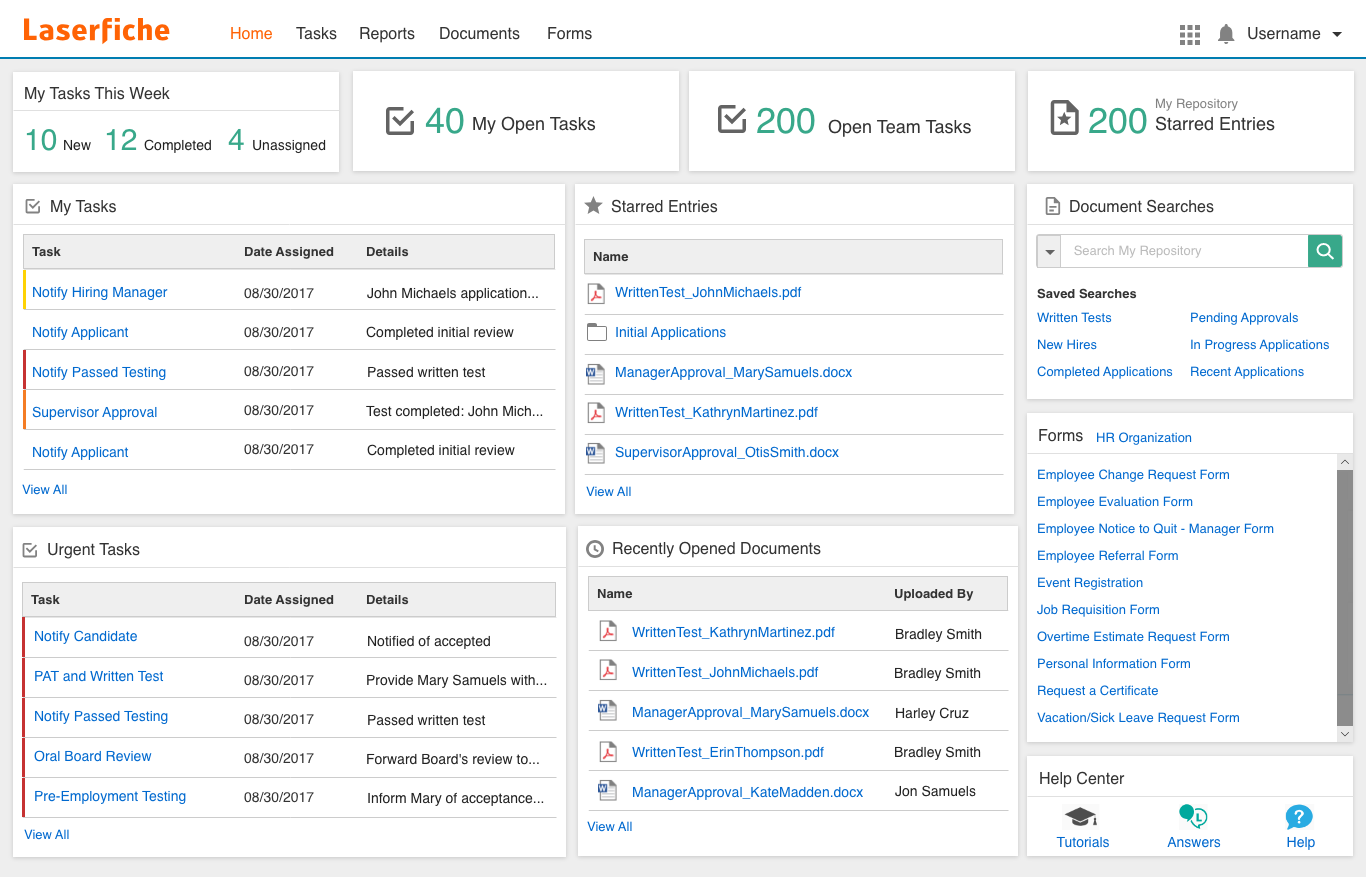
Laserfiche è spesso scelto da team che desiderano automatizzare flussi di lavoro documentali complessi grazie alle sue capacità di automazione dei processi. La piattaforma è particolarmente adatta alle organizzazioni che hanno bisogno di digitalizzare moduli, gestire approvazioni e coordinare processi multi-step tra diversi dipartimenti. A differenza di Box, Laserfiche offre strumenti integrati per la progettazione dei workflow e funzionalità avanzate di automazione che aiutano a ridurre l’intervento manuale nella gestione dei contenuti.
Perché è una valida alternativa a Box
Per i team che necessitano di automatizzare processi basati su documenti, Laserfiche offre strumenti di gestione dei workflow che superano quelli di Box. Ho scelto Laserfiche perché consente di progettare workflow personalizzati utilizzando un builder visuale drag-and-drop, permettendo di automatizzare facilmente approvazioni, notifiche e l’instradamento dei documenti.
La piattaforma supporta anche moduli elettronici e mappatura dei processi, così puoi digitalizzare e ottimizzare task articolati a livello aziendale. Se il tuo obiettivo è ridurre il lavoro manuale nella gestione dei contenuti, le funzionalità di automazione di Laserfiche sono particolarmente indicate.
Caratteristiche principali di Laserfiche
Altre funzionalità che mi hanno colpito includono:
- Controlli granulari dei permessi: Definisci diritti di accesso dettagliati per utenti e gruppi a livello di cartella o documento.
- Gestione delle versioni: Traccia le modifiche e conserva la cronologia completa delle revisioni e degli aggiornamenti ai documenti.
- Riconoscimento ottico dei caratteri (OCR): Converte documenti scansionati e immagini in file ricercabili e modificabili.
- Gestione dei record: Applica piani di conservazione e automatizza la conformità ai requisiti normativi.
Integrazioni di Laserfiche
Le integrazioni includono Microsoft 365, Salesforce, SAP, DocuSign, Adobe Sign, OneSpan, Workday, Oracle Cloud ERP, Esri ArcGIS ed Ellucian.
Pros and Cons
Pros:
- Moduli elettronici potenti
- Conformità normativa approfondita
- Metadati altamente personalizzabili
Cons:
- L'interfaccia appare un po' datata
- Eccessivo per la semplice sincronizzazione di file

Dropbox
Ideale per flussi di lavoro di condivisione file semplici
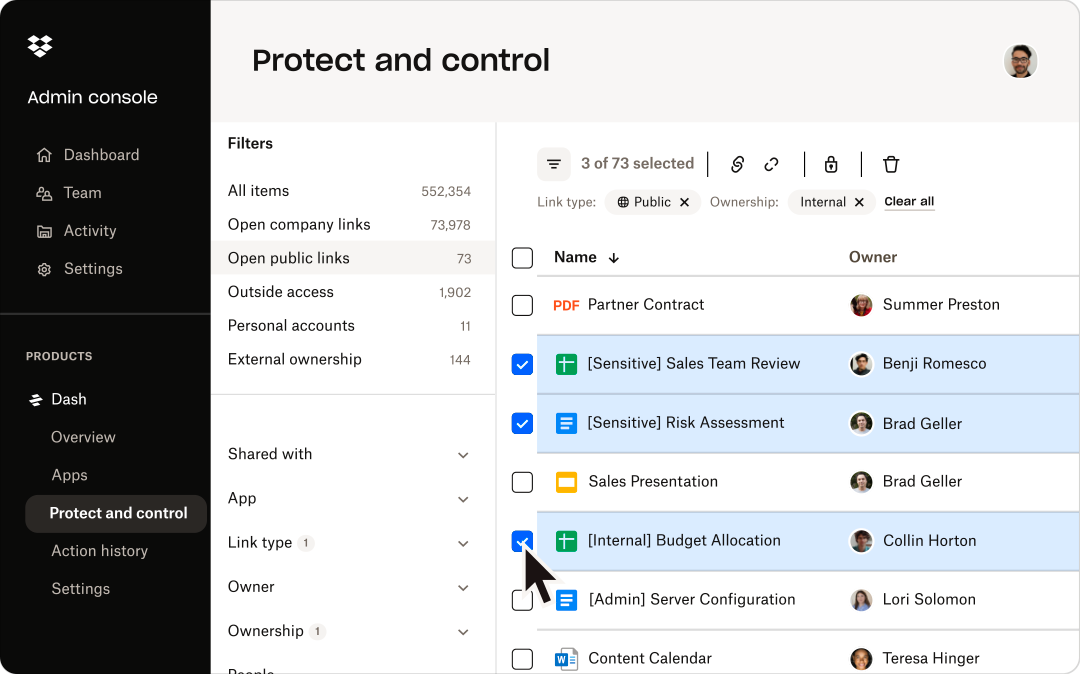
Dropbox è una scelta ideale per i team che necessitano di una soluzione semplice per condividere e organizzare file senza complessità aggiuntive. È particolarmente apprezzato da aziende e professionisti creativi che desiderano una sincronizzazione e condivisione dei file veloce e affidabile su diversi dispositivi. A differenza di Box, Dropbox mantiene i processi semplici, permettendo una gestione dei contenuti immediata senza la necessità di navigare tra configurazioni avanzate o permessi stratificati.
Perché è una valida alternativa a Box
Per i team che vogliono evitare configurazioni di gestione dei contenuti complesse, Dropbox offre un approccio snello alla condivisione dei file. Ho scelto Dropbox perché le sue funzionalità principali si concentrano su caricamenti rapidi dei file, semplice organizzazione delle cartelle e sincronizzazione affidabile tra dispositivi.
Lo strumento di richiesta file permette di raccogliere documenti da chiunque, anche da chi non possiede un account Dropbox. Se la vostra priorità è la condivisione diretta dei file senza livelli di workflow avanzati, Dropbox rappresenta un'alternativa pratica a Box.
Funzionalità principali di Dropbox
Altre funzionalità rendono Dropbox una soluzione versatile per la gestione dei contenuti:
- Dropbox Paper: Crea, modifica e collabora su documenti direttamente all'interno di Dropbox.
- Recupero dei file e cronologia delle versioni: Ripristina file eliminati e accedi alle versioni precedenti fino a 180 giorni.
- Smart Sync: Accedi a tutti i file dal desktop senza occupare spazio di archiviazione locale.
- Gestione delle cartelle del team: Organizza e controlla l’accesso alle cartelle condivise per diversi gruppi o progetti.
Integrazioni Dropbox
Le integrazioni includono Google Workspace, Microsoft, Adobe, HubSpot, Autodesk, Canva, AWS, Slack, Zoom e Trello.
Pros and Cons
Pros:
- Enorme elenco di app di terze parti
- Ottime richieste di file da esterni
- Interfaccia familiare per la maggior parte degli utenti
Cons:
- Applicazione desktop pesante
- Spazio di archiviazione gratuito molto limitato

Ideale per opzioni di personalizzazione open-source

Nextcloud merita un esame approfondito se hai bisogno di una piattaforma di gestione dei contenuti che puoi controllare e personalizzare completamente. Questa soluzione open-source è ideale per i team IT, le organizzazioni attente alla privacy e i gruppi con esigenze particolari di conformità o integrazione. A differenza di Box, Nextcloud ti permette di auto-ospitare, modificare ed estendere ogni aspetto del tuo ambiente di gestione dei file.
Perché è una valida alternativa a Box
Per i team che desiderano il pieno controllo sulla piattaforma di gestione dei contenuti, Nextcloud si distingue per le sue opzioni di personalizzazione open-source. Apprezzo il fatto che puoi installare Nextcloud sulla tua infrastruttura, dando il controllo diretto su privacy e conformità dei dati.
La piattaforma supporta anche una vasta gamma di app sviluppate dalla community, così puoi adattare flussi di lavoro, sicurezza e funzioni di collaborazione alle tue precise esigenze. Se cerchi una soluzione che si adatti ai requisiti unici della tua organizzazione, Nextcloud offre una flessibilità che Box non può eguagliare.
Funzionalità principali di Nextcloud
Altre funzionalità che rendono Nextcloud una scelta flessibile per la gestione dei contenuti:
- Crittografia end-to-end: Proteggi i file con crittografia lato client per dati sensibili.
- Chiamate video e audio integrate: Organizza riunioni e chiamate direttamente all'interno della piattaforma.
- Controlli di accesso ai file dettagliati: Imposta permessi precisi per utenti e gruppi su cartelle e file.
- Strumenti collaborativi: Usa chat integrate, commenti e modifica collaborativa dei documenti.
Integrazioni Nextcloud
Le integrazioni includono Collabora, OnlyOffice, Moodle, Zimbra, BigBlueButton e Microsoft Outlook.
Pros and Cons
Pros:
- Nessun limite mensile di archiviazione
- Ampio hub di plugin della community
- Ottima conformità sui dati europei
Cons:
- I client di sincronizzazione possono essere instabili
- Non è pronta all'uso immediatamente

Ideale per la massima flessibilità di implementazione self-hosted
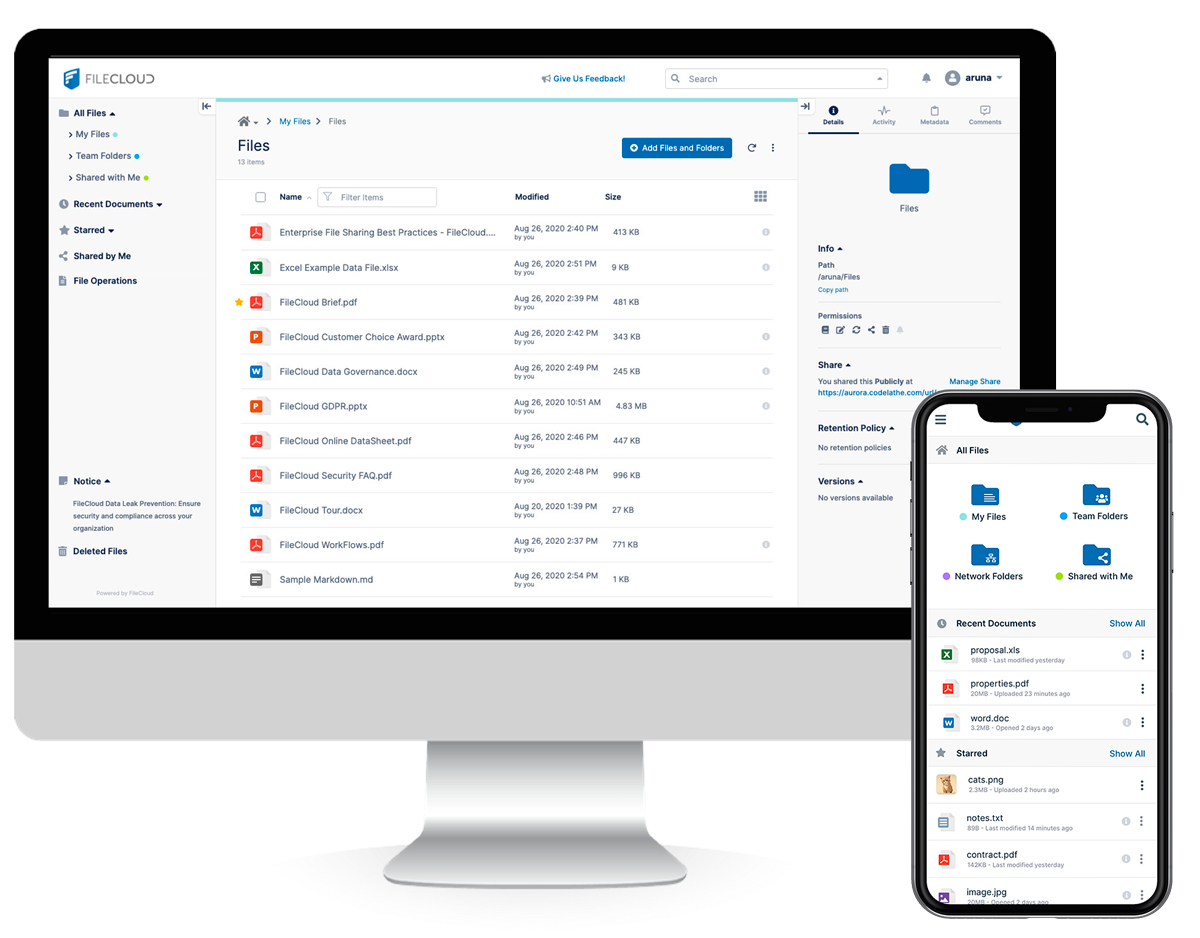
FileCloud è una soluzione ideale per le organizzazioni che desiderano pieno controllo sui propri dati e sulla propria infrastruttura. È particolarmente interessante per i team IT e i settori regolamentati che devono implementare la gestione dei contenuti sui propri server o su cloud privato. Grazie alle opzioni di self-hosting flessibili e ai controlli amministrativi dettagliati, FileCloud risponde alle esigenze di sicurezza, conformità e personalizzazione che Box e la maggior parte delle piattaforme esclusivamente cloud non possono eguagliare.
Perché è una valida alternativa a Box
A differenza della maggior parte delle piattaforme cloud-first, FileCloud offre la possibilità di gestire completamente in proprio l'ambiente di gestione dei contenuti. Ho scelto FileCloud perché permette di implementare la piattaforma on-premises, su cloud privato o in un'infrastruttura ibrida, l'ideale per le organizzazioni con requisiti stringenti di residenza dei dati o di conformità.
La console di amministrazione offre un controllo granulare su accessi degli utenti, posizioni di archiviazione e impostazioni di crittografia. Se il tuo team necessita della flessibilità di implementazione che Box non offre, FileCloud è pensato proprio per questo livello di controllo.
Caratteristiche principali di FileCloud
Altre funzionalità che rendono FileCloud interessante per i team di gestione dei contenuti:
- Personalizzazione del branding: Applica il logo, i colori e il dominio della tua organizzazione all'interfaccia utente.
- Automazione dei flussi di lavoro integrata: Progetta e gestisci flussi di approvazione e revisione dei documenti direttamente nella piattaforma.
- DLP avanzato (protezione dalla perdita dei dati): Imposta regole per rilevare e prevenire la condivisione o il download non autorizzato di file sensibili.
- Registri di audit completi: Tieni traccia di tutte le attività degli utenti e degli accessi ai file per la conformità e il monitoraggio della sicurezza.
Integrazioni FileCloud
Le integrazioni includono Microsoft 365, Microsoft Teams, Outlook, OnlyOffice, Google Workspace, Okta, Active Directory, ClamAV, ICAP e reCaptcha.
Pros and Cons
Pros:
- Massima conformità per il settore sanitario
- Opzioni di backup degli endpoint avanzate
- Personalizzazione del branding eccellente
Cons:
- Configurazione iniziale complessa
- L'interfaccia utente manca di modernità

Ideale per soluzioni intranet aziendali
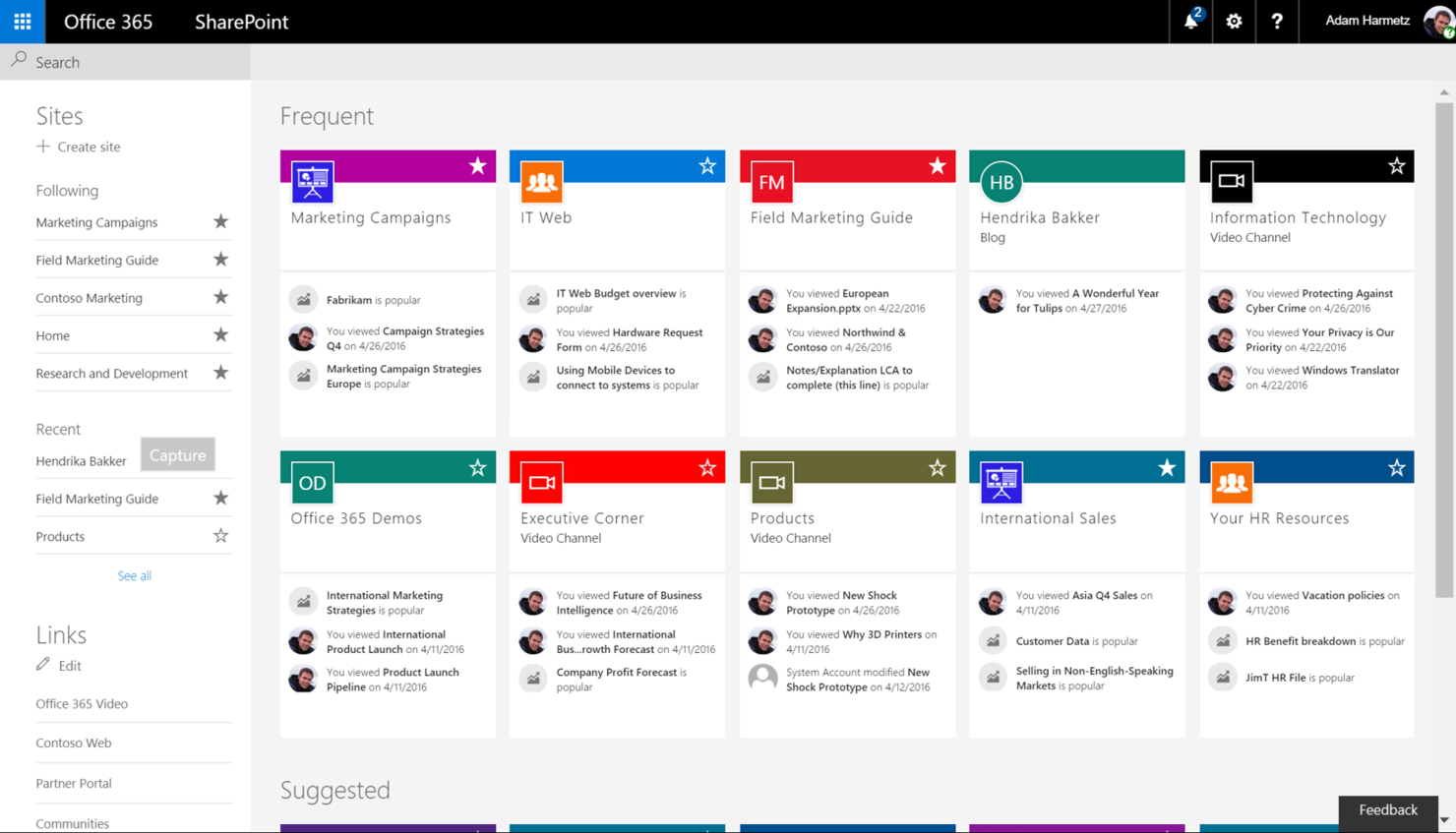
Microsoft SharePoint è pensato per le organizzazioni che necessitano di una piattaforma di gestione dei contenuti che funzioni anche come una intranet sicura e personalizzabile. I team IT aziendali e le grandi imprese scelgono spesso SharePoint per la sua integrazione con Microsoft 365, i controlli avanzati sui permessi e la gestione scalabile dei siti. A differenza di Box, SharePoint consente di creare portali interni, automatizzare flussi di lavoro e gestire documenti in un unico ambiente.
Perché è una buona alternativa a Box
Quando hai bisogno di una piattaforma di gestione dei contenuti che possa anche servire come una intranet aziendale completa, SharePoint è una scelta solida. Ho scelto SharePoint perché permette di creare siti interni personalizzati, gestire librerie di documenti e impostare controlli di accesso dettagliati per diversi team o dipartimenti.
I suoi strumenti di automazione dei flussi di lavoro aiutano a snellire i processi aziendali direttamente nell'ambiente intranet. Per le organizzazioni che cercano più di un semplice spazio di archiviazione, SharePoint offre un ambiente unificato per collaborazione, comunicazione e condivisione delle conoscenze.
Funzionalità chiave di Microsoft SharePoint
Altre funzionalità rendono SharePoint una piattaforma versatile per la gestione dei contenuti aziendali:
- Cronologia delle versioni: Tieni traccia e ripristina versioni precedenti dei documenti all'interno delle librerie.
- Tag di metadati: Organizza e cerca i file utilizzando campi di metadati personalizzati.
- Co-authoring: Modifica i documenti contemporaneamente ai colleghi in tempo reale.
- Accesso da mobile: Usa app dedicate per accedere a siti e file anche in mobilità.
Integrazioni di Microsoft SharePoint
Le integrazioni includono Microsoft Teams, Microsoft OneDrive, Microsoft Outlook, Microsoft Word, Microsoft Excel, Microsoft Forms e Microsoft Viva.
Pros and Cons
Pros:
- Flussi documentali altamente personalizzabili
- Scalabilità aziendale elevata
- Solidi controlli sugli accessi
Cons:
- Problemi di sincronizzazione con cartelle di grandi dimensioni
- Elevata curva di apprendimento per il personale

Ideale per l'organizzazione dei team nelle piccole imprese
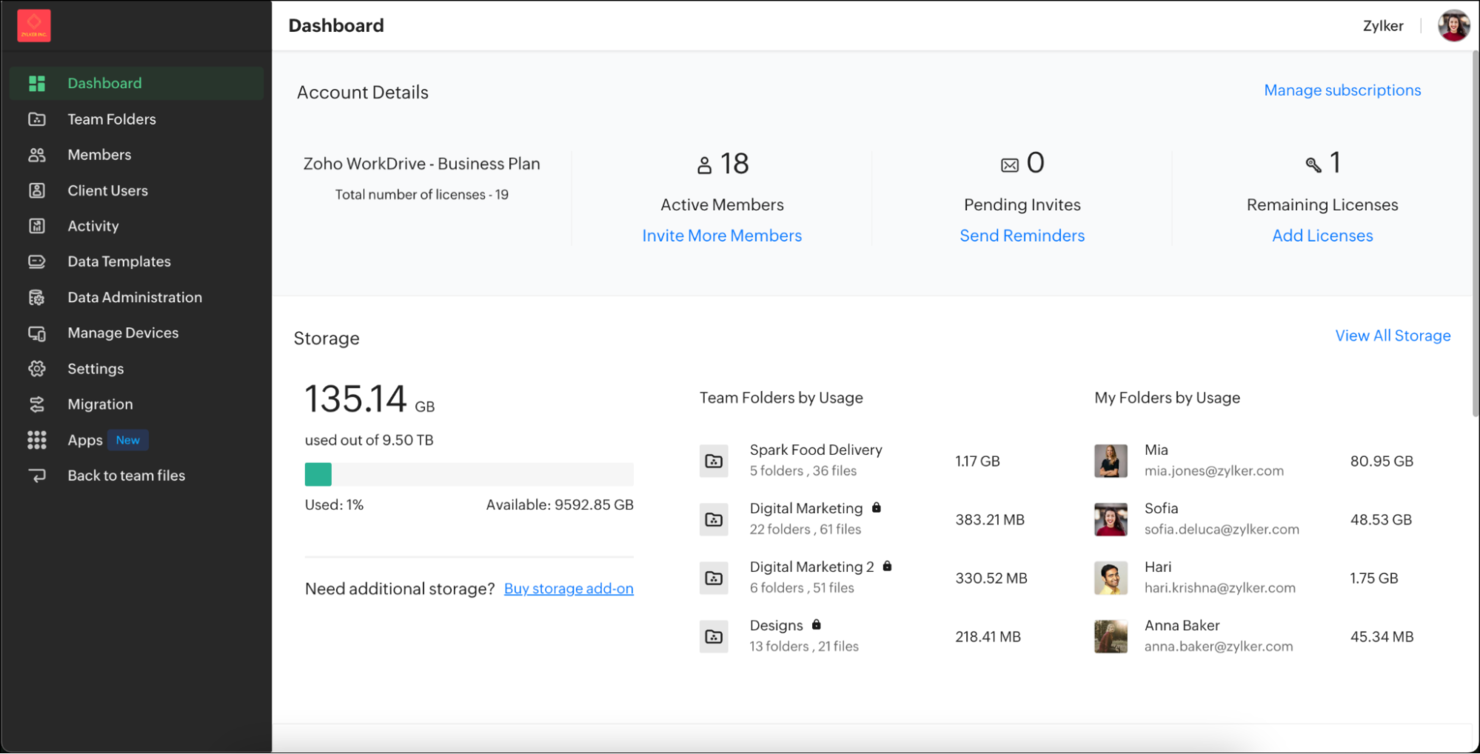
Zoho WorkDrive è interessante per le piccole imprese che cercano una piattaforma di gestione dei contenuti facile da organizzare e da amministrare. La piattaforma è pensata per i team che necessitano di spazi di lavoro condivisi, permessi dettagliati sulle cartelle e una semplice procedura di onboarding senza un pesante coinvolgimento IT. A differenza di Box, Zoho WorkDrive mette in risalto strutture di file basate sul team e strumenti di collaborazione integrati, pensati per organizzazioni in crescita.
Perché è una valida alternativa a Box
Per le piccole imprese che vogliono mantenere i team organizzati senza complessità aggiuntive, Zoho WorkDrive offre un approccio orientato al lavoro di squadra che si distingue da Box. Mi piace il fatto che si possano creare Cartelle di Team con accessi basati sui ruoli, così tutti sanno esattamente dove trovare e archiviare i file.
La timeline delle attività integrata consente di monitorare a colpo d'occhio le modifiche ai documenti e i contributi del team. Se la tua azienda ha bisogno di una piattaforma di gestione dei contenuti strutturata per collaborazione e chiarezza, Zoho WorkDrive è la soluzione giusta.
Funzionalità principali di Zoho WorkDrive
Alcune altre funzionalità rendono Zoho WorkDrive una scelta solida per la gestione dei contenuti:
- Gestione delle versioni dei documenti: Accedi e ripristina versioni precedenti dei file direttamente dalla piattaforma.
- Anteprima integrata dei file: Visualizza documenti, immagini e video senza bisogno di scaricarli.
- Controlli di amministrazione dettagliati: Imposta limiti di archiviazione, gestisci i ruoli utente e monitora l'attività da una dashboard centrale.
- Integrazione con Zoho Office Suite: Modifica documenti, fogli di calcolo e presentazioni nello stesso spazio di lavoro.
Integrazioni di Zoho WorkDrive
Le integrazioni includono Zoho CRM, Zoho Projects, Zoho Cliq, Zoho Mail, Microsoft Office, Microsoft Outlook, Gmail, Bigin, WorkDrive Genie e Zoho Sheet.
Pros and Cons
Pros:
- Suite di applicazioni office integrate
- Buona struttura delle cartelle di team
- Dashboard semplice e pulita
Cons:
- L'app mobile può risultare poco fluida
- Presenza minore nel settore enterprise

Egnyte
Ideale per controlli granulari sulla governance dei dati

Egnyte si distingue per le organizzazioni che necessitano di un controllo avanzato sui file sensibili e sulla conformità normativa. È particolarmente utile per i responsabili IT e i team focalizzati sulla sicurezza in settori come la sanità, la finanza e l'architettura. Grazie alle sue funzionalità granulari di governance dei dati, Egnyte ti consente di gestire i permessi, monitorare le attività sui file e applicare politiche più avanzate rispetto a Box e a molte altre piattaforme.
Perché è una buona alternativa a Box
Quando serve qualcosa di più della semplice condivisione di file, Egnyte offre controlli avanzati di governance dei dati che lo distinguono da Box. Ho scelto Egnyte perché consente di impostare permessi estremamente specifici a livello di cartella, sottocartella e persino di singolo file, aspetto essenziale nei settori regolamentati.
La classificazione dei contenuti integrata e il rilevamento delle minacce in tempo reale aiutano a identificare i dati sensibili e rispondere rapidamente ai rischi. Se il tuo team deve applicare politiche di conformità e sicurezza molto rigorose, Egnyte offre il livello di controllo granulare che spesso manca a Box.
Funzionalità principali di Egnyte
Altre funzionalità rendono Egnyte una scelta solida per la gestione dei contenuti:
- Archiviazione cloud ibrida: Conserva e accedi ai file sia in locale che nel cloud per una distribuzione flessibile.
- Strumenti di collaborazione sui documenti: Modifica e commenta i documenti direttamente sulla piattaforma.
- App di accesso mobile: Gestisci e condividi file in sicurezza da dispositivi iOS e Android.
- Gestione automatizzata del ciclo di vita dei file: Imposta regole di conservazione, archiviazione ed eliminazione dei file in base alle esigenze della tua organizzazione.
Integrazioni Egnyte
Le integrazioni includono Google Workspace, Microsoft 365, Salesforce, Google Cloud, Microsoft Azure, AWS e Adobe.
Pros and Cons
Pros:
- Rilevamento ransomware integrato
- Gestione efficace di grandi file CAD
- Controlli avanzati sulla governance dei dati
Cons:
- Client di sincronizzazione desktop pesante
- La configurazione richiede competenze IT

Ideale per automazione di processi documentali

Hyland OnBase viene spesso utilizzato dalle organizzazioni che necessitano di automatizzare processi ricchi di documenti attraverso un approccio centrato sui processi. La piattaforma è particolarmente adatta per settori come sanità, pubblica amministrazione e finanza che richiedono una gestione sicura dei documenti e automazione dei flussi di lavoro in linea con le esigenze di conformità. A differenza di Box, OnBase offre un'integrazione profonda con i sistemi aziendali principali e un'automazione avanzata per flussi di lavoro documentali.
Perché è una valida alternativa a Box
Quando l'automazione dei processi basati sui documenti è una priorità assoluta, Hyland OnBase offre funzionalità che Box non è in grado di eguagliare. Ho scelto OnBase perché consente di automatizzare flussi di lavoro complessi relativi all'acquisizione, instradamento e approvazione dei documenti, tutto all'interno di un'unica piattaforma.
Il sistema supporta anche l'imaging e l'indicizzazione avanzata dei documenti, aiutando i team a gestire grandi volumi di contenuti legati ai processi aziendali. Se la tua organizzazione ha bisogno di collegare strettamente i documenti ai flussi di lavoro automatizzati, OnBase rappresenta una solida alternativa a Box.
Funzionalità principali di Hyland OnBase
Altre funzionalità che hanno attirato la mia attenzione includono:
- Strumenti di gestione dei casi: Gestisci documenti, attività e comunicazioni relative a casi o progetti specifici in uno spazio di lavoro unificato.
- Integrazione con firma elettronica: Raccogli firme legalmente vincolanti direttamente all'interno della piattaforma.
- Pianificazione automatica della conservazione: Applica e fai rispettare le policy di conservazione dei documenti in base ai requisiti di conformità.
- Ricerca full-text: Trova rapidamente i documenti utilizzando ricerca per parola chiave e metadati su tutti i contenuti memorizzati.
Integrazioni Hyland OnBase
Le integrazioni includono Peoplesoft, Accela, Google Docs, Tempest Prospero, Adobe Sign, MuleSoft, NextGen, Microsoft Outlook, Cerner e Cognizant.
Pros and Cons
Pros:
- Forte conformità per la sanità
- Eccezionale storicità delle verifiche di audit
- Collega stack IT frammentati
Cons:
- Regole di distribuzione molto rigide
- Solo per aziende di grandi dimensioni

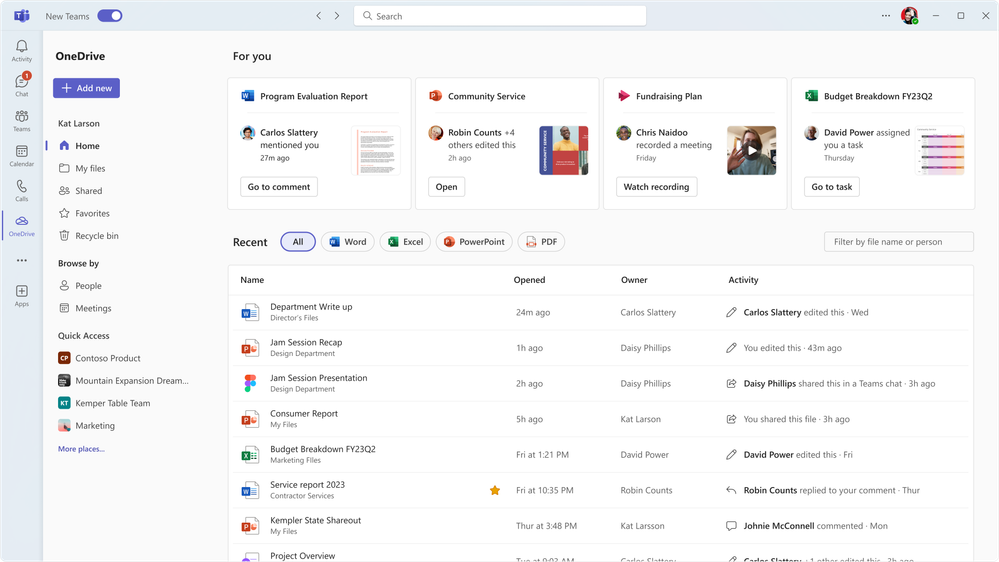
Microsoft OneDrive offre un'esperienza di gestione dei contenuti strettamente integrata per le organizzazioni che hanno già investito in Microsoft 365. È particolarmente utile per i team che si affidano quotidianamente a Word, Excel e Teams per la collaborazione e la condivisione dei documenti. A differenza di Box, il collegamento diretto di OneDrive con la suite di produttività Microsoft lo rende la scelta naturale per le organizzazioni che desiderano centralizzare i file e gestire i flussi di lavoro all'interno dell'ecosistema Microsoft.
Perché è una valida alternativa a Box
Se il tuo team utilizza già Microsoft 365, OneDrive offre un livello di integrazione che Box non può eguagliare. L'ho scelto perché i file archiviati in OneDrive sono accessibili direttamente da Word, Excel, PowerPoint e Teams, rendendo la gestione dei documenti e la collaborazione estremamente fluida all'interno dell'ambiente Microsoft.
OneDrive supporta anche la co-autorizzazione in tempo reale e la sincronizzazione automatica dei file su tutti i dispositivi, aiutando i team a rimanere allineati sui progetti condivisi. Per le aziende che desiderano mantenere tutto nell'ecosistema Microsoft, OneDrive è un'alternativa pratica a Box.
Funzionalità principali di Microsoft OneDrive
Altre funzioni rendono OneDrive una scelta valida per la gestione dei contenuti oltre alla sua integrazione in Microsoft 365:
- Cassaforte personale: conserva i file sensibili in un'area protetta con verifica dell'identità per maggiore sicurezza.
- Richiesta di file: raccogli file da chiunque inviando un collegamento sicuro per il caricamento, anche a chi non ha un account Microsoft.
- Backup automatico di foto e video: sincronizza foto e video dai dispositivi mobili direttamente su OneDrive per un facile accesso e organizzazione.
- Controlli dettagliati sulla condivisione: imposta permessi per visualizzare, modificare o scaricare file e cartelle a livello granulare.
Integrazioni di Microsoft OneDrive
Le integrazioni includono Microsoft Teams, Outlook, SharePoint, Word, Excel, PowerPoint, Power BI, Dynamics 365, Windows e Samsung.
Pros and Cons
Pros:
- Cassaforte personale per la sicurezza
- Ottima integrazione con Windows
- Solido accesso ai file offline
Cons:
- Mancanza di governance granulare come Box
- A volte velocità di caricamento più lente
Altre alternative a Box
Ecco alcune ulteriori opzioni alternative a Box che non sono state incluse nel mio elenco ristretto, ma che vale comunque la pena prendere in considerazione:
- OpenText Content Cloud
Ideale per la conformità nei settori regolamentati
- Progress ShareFile
Ideale per lo scambio sicuro di file con i clienti
- monday AI Workspace
Ideale per l'organizzazione dei file di progetto basata sull'intelligenza artificiale
- Oodrive
Ideale per esigenze di residenza dei dati in Europa


Hoe ik Box-alternatieven evalueer
Ik verdeel mijn evaluatie in twee lagen: de basis waaraan elke tool moet voldoen—versiebeheer, machtigingen en realtime samenwerking—en de onderscheidende kenmerken, zoals elektronische handtekeningen en nalevingscertificeringen.
Kernfunctionaliteit (basisvereisten voor deze lijst)
Bij het selecteren van tools voor mijn lijst beoordeel ik elke tool op een schaal van 0 (biedt de functionaliteit niet) tot 5 (blink uit op dit gebied) voor elke hieronder vermelde kernfunctionaliteit. Vervolgens zet ik de totaalscore van de tool om in een percentage. Elke tool moet een minimale totaalscore van 65% behalen om in aanmerking te komen voor opname.
- Cloudbestandsopslag: Ik kijk naar opslagniveaus, de betrouwbaarheid van synchronisatie en limieten voor bestandsgrootten—vooral naar hoe goed elke tool grote opleveringen, zoals videobestanden of ontwerpbestanden, op verschillende apparaten verwerkt.
- Gedetailleerde toegangscontroles: Elke tool wordt beoordeeld op machtigingen op mapniveau, het verlopen van links en wachtwoordbeveiliging voor het delen van gevoelige SOW's of klantcontracten.
- Realtime samenwerking: Ik controleer of teams documenten gezamenlijk kunnen bewerken, van opmerkingen kunnen voorzien en erin kunnen annoteren zonder het platform te verlaten, omdat het wisselen tussen apps beoordelingen vertraagt.
- Versiebeheer en auditlogboeken: Bijhouden wie wat en wanneer heeft gewijzigd is belangrijk voor de verantwoordingsplicht binnen projecten. Daarom beoordeel ik de diepgang van de revisiegeschiedenis en rapportage van activiteiten op beheerdersniveau.
- Extern delen en klantenportalen: Projecten blijven zelden intern, dus ik kijk naar hoe elke tool omgaat met gastgebruikers, portalen in de huisstijl en veilige workflows voor bestandsaanvragen met externe belanghebbenden.
- Integraties met projectmanagementtools: Ik beoordeel ingebouwde connectoren voor platforms zoals Jira, Asana en Monday, plus ondersteuning voor Microsoft 365 en Google Workspace voor gezamenlijk auteurschap binnen vertrouwde omgevingen.
Zodra ik een lijst heb met tools die aan deze criteria voldoen, kijk ik naar wat elk platform onderscheidt.
Onderscheidende factoren (wat leveranciers van elkaar onderscheidt)
Zo vergelijk ik verschillende leveranciers met elkaar:
Opvallende functies
Zoeken op basis van AI en automatische labels maken echt verschil wanneer je team honderden projectmappen doorzoekt naar één specifieke oplevering. Ik kijk ook naar ingebouwde ondersteuning voor elektronische handtekeningen, wat een stap bespaart wanneer je goedkeuring nodig hebt voor SOW's of wijzigingsopdrachten zonder naar een aparte tool te hoeven overschakelen. Voor AEC- en creatieve teams zorgen ingebouwde voorbeelden voor CAD-, PSD- en videobestanden ervoor dat beoordelaars feedback kunnen geven zonder iets te downloaden.
Meer dan functies
Nalevingscertificeringen zijn belangrijk wanneer je projecten gereguleerde gegevens bevatten—ik controleer op SOC 2 Type II-, HIPAA- en GDPR-dekking, plus opties voor gegevensresidentie voor verspreide teams. Migratietools zijn ook belangrijk, omdat het verplaatsen van terabytes aan projectbestanden uit Box zonder mapstructuren of machtigingen te verliezen een uitrol kan doen ontsporen. Ik beoordeel ook de transparantie van de prijsstelling, waarbij ik nauwlettend let op hoe opslaglimieten en kosten per gebruiker meegroeien wanneer projectteams groter worden dan de oorspronkelijke proefgroep.
Perché cercare un’alternativa a Box?
Sebbene Box sia una buona scelta come piattaforma di gestione dei contenuti, esistono diversi motivi per cui alcuni utenti cercano soluzioni alternative. Potresti essere alla ricerca di un’alternativa a Box perché…
- Hai bisogno di funzionalità più avanzate per il portale clienti
- Il tuo settore richiede controlli di conformità più rigorosi
- Vuoi la crittografia da punto a punto per tutti i file
- Hai bisogno di una migliore integrazione con gli strumenti specifici del tuo settore
- Il tuo team ritiene che le impostazioni delle autorizzazioni di Box siano troppo complesse
- Hai bisogno che i dati risiedano in un Paese specifico
Se ti riconosci in una di queste situazioni, sei nel posto giusto. Il mio elenco contiene diverse opzioni di piattaforme per la gestione dei contenuti più adatte ai team che affrontano queste difficoltà con Box e cercano soluzioni alternative.
Funzionalità principali di Box
Ecco alcune delle funzionalità principali di Box, per aiutarti a mettere a confronto ciò che offrono le soluzioni alternative:
- Controlli granulari delle autorizzazioni per utenti e gruppi
- Collaborazione sui documenti in tempo reale con Box Notes
- Creazione automatizzata dei flussi di lavoro con Box Relay
- Funzionalità native di firma elettronica con Box Sign disponibile come componente aggiuntivo
- Integrazione con Microsoft 365 e Google Workspace
- Cronologia dettagliata delle versioni dei file e monitoraggio delle attività
- Strumenti avanzati per la sicurezza dei contenuti, la protezione tramite password e l'inserimento di filigrane
- Console di amministrazione centralizzata per la gestione degli utenti
- App mobili per iOS e Android
- API estesa per integrazioni personalizzate