

10 alternative a Bitrix24 per la gestione dei progetti nel 2026

Selezione delle alternative a Bitrix24


Una valida alternativa a Bitrix24 offre funzionalità CRM flessibili, una gestione affidabile dei flussi di lavoro e integrazioni adatte ai processi specifici del tuo team. Se stai cercando alternative a Bitrix24, probabilmente stai riscontrando limiti nella personalizzazione, nella collaborazione o nell'espansione del tuo CRM insieme alla crescita della tua azienda.
La sostituzione giusta dovrebbe aiutarti a gestire i contatti, automatizzare le vendite e supportare il lavoro di squadra tra reparti diversi senza gli attriti che stai cercando di lasciarti alle spalle. In questo elenco troverai piattaforme CRM che affrontano queste problematiche, così potrai confrontare le opzioni e scegliere quella più adatta alle esigenze del tuo team nel 2026.
Che cos'è Bitrix24?
Bitrix24 è una piattaforma software CRM che combina la gestione dei contatti, l'automazione delle vendite, la collaborazione sui progetti e gli strumenti di comunicazione in un unico sistema. I team utilizzano Bitrix24 per monitorare i lead, gestire le pipeline, coordinare le attività e controllare il monitoraggio del tempo tra i vari reparti. La piattaforma offre anche funzionalità per la condivisione dei documenti, la chat e l'automazione dei flussi di lavoro. Bitrix24 è popolare tra le aziende che cercano una piattaforma tutto-in-uno per gestire le relazioni con i clienti e i processi interni da un'unica interfaccia.
Tabella di confronto delle alternative a Bitrix24
Questa tabella di confronto riassume i dettagli sui prezzi delle mie principali alternative a Bitrix24:
| Tool | Best For | Trial Info | Price | ||
|---|---|---|---|---|---|
| 1 | Ideale per pipeline di vendita orientate all’azione | Prova gratuita di 21 giorni + demo gratuita disponibile | Da $9.95/utente/mese | Website | |
| 2 | Ideale per la generazione di lead automatizzata | Prova gratuita disponibile | Da $37.6/mese | Website | |
| 3 | La migliore compatibilità con l’ecosistema Microsoft 365 | Prova gratuita di 30 giorni disponibile | Da $65/utente/mese (fatturazione annuale) | Website | |
| 4 | Ideale per la collaborazione su attività e progetti | Piano gratuito + demo gratuita disponibile | Da $7/utente/mese (fatturazione annuale) | Website | |
| 5 | Ideale per automazione marketing integrata | Piano gratuito + demo gratuita disponibile | Da $7/utente/mese (fatturazione annuale) | Website | |
| 6 | Ideale per la visualizzazione dei processi di vendita | Prova gratuita di 14 giorni | Da $14/postazione/mese (fatturazione annuale) | Website | |
| 7 | Ideale per una gestione semplice dei contatti | Prova gratuita di 15 giorni | Da $9.99/mese (fatturazione annuale) | Website | |
| 8 | Ideale per personalizzazioni enterprise su larga scala | Prova gratuita di 30 giorni + piano gratuito disponibile | Da $25/utente/mese (fatturazione annuale) | Website | |
| 9 | Ideale per l’integrazione della gestione dei ticket di assistenza clienti | Prova gratuita + demo gratuita disponibili | Da $19/agente/mese (fatturazione annuale) | Website | |
| 10 | Ideale per app aziendali personalizzabili | Prova gratuita di 14 giorni + demo gratuita disponibile | Da $15/utente/mese (fatturazione annuale) | Website |
Perché fidarsi dei nostri consigli sui software
Il nostro team testa e recensisce software dal 2012. In quanto project manager noi stessi, sappiamo quanto sia difficile — e importante — scegliere il software giusto.
Per questa guida, abbiamo valutato gli strumenti attraverso test pratici e ricerche indipendenti, assegnando un punteggio agli strumenti in base ai nostri criteri di selezione. Ci basiamo inoltre sulle competenze di leader di pensiero del settore e di professionisti attivi nella gestione dei progetti.
Le nostre recensioni riflettono il nostro giudizio editoriale umano, non un discorso di vendita.
Revisori esperti:
Recensioni delle alternative a Bitrix24
Di seguito sono riportati i miei riepiloghi dettagliati delle migliori alternative a Bitrix24 incluse nella mia selezione. Le mie recensioni offrono un’analisi approfondita delle funzionalità, dei casi d’uso ideali e delle integrazioni di ciascuna piattaforma, per aiutarti a trovare quella più adatta a te.
Ideale per pipeline di vendita orientate all’azione

I team di vendita che cercano un CRM che dia priorità all’azione e al follow-up troveranno OnePageCRM particolarmente interessante. A differenza di Bitrix24 e di altri CRM che si concentrano sull’archiviazione dei dati o su flussi di lavoro complessi, OnePageCRM costruisce la propria interfaccia attorno a una pipeline di vendita dinamica e promemoria per la prossima azione. Questo approccio aiuta gli utenti a mantenere in movimento le trattative e garantisce che nessun potenziale cliente venga dimenticato.
Perché OnePageCRM è una valida alternativa a Bitrix24
Se desideri un CRM che mantenga il tuo team di vendita concentrato sull’azione, OnePageCRM merita considerazione. Ho scelto OnePageCRM perché la sua interfaccia ruota attorno a una pipeline di vendita in ordine di priorità, in cui ogni contatto ha un prossimo passo chiaro assegnato. Il flusso di azioni del tool e i promemoria di follow-up aiutano i commerciali a mantenere il ritmo ed evitare che i lead si blocchino. Per i team che danno valore a un approccio proattivo e orientato ai compiti, piuttosto che a una gestione di progetti complessa, OnePageCRM rappresenta un’alternativa diretta a Bitrix24.
Funzionalità principali di OnePageCRM
Altre funzionalità che rendono OnePageCRM interessante per i team di vendita includono:
- Lead Clipper: Consente di acquisire i lead direttamente dalle pagine web e aggiungerli al CRM con un solo clic.
- Modelli di email di vendita: Offre modelli personalizzabili per inviare e monitorare le email commerciali.
- App mobili: Offre app dedicate per iOS e Android per gestire contatti e azioni in mobilità.
- Azioni di massa: Permette di aggiornare, assegnare o etichettare più contatti contemporaneamente per una gestione dei flussi di lavoro più veloce.
Integrazioni OnePageCRM
Le integrazioni includono Mailchimp, Xero, QuickBooks, Google Workspace, Outlook, Zapier, Evernote, Skype e altre ancora.
Pros and Cons
Pros:
- Flusso di azioni che mantiene le attività di vendita in ordine di priorità
- Modelli di email di vendita per coerenza nei contatti
- App mobili per la gestione della pipeline
Cons:
- Opzioni di personalizzazione dei report limitate
- Assenza di chat interna per il team

Ideale per la generazione di lead automatizzata

Se il tuo team ha bisogno di automatizzare la generazione di lead in uscita su larga scala, Instantly offre una soluzione specializzata. I professionisti delle vendite e del marketing che si affidano alla ricerca a freddo possono utilizzare Instantly per creare elenchi di contatti mirati e lanciare campagne email automatiche da un'unica piattaforma. A differenza di Bitrix24, Instantly è specializzato nell'invio di email ad alto volume e in strumenti di deliverability progettati per un rapido reperimento di potenziali clienti.
Perché Instantly è una valida alternativa a Bitrix24
Per i team focalizzati sulla generazione di lead outbound, Instantly offre automazione e gestione delle risorse a un livello che Bitrix24 non raggiunge. Ho scelto Instantly perché permette di creare elenchi di lead mirati e inviare campagne cold email ad alto volume con strumenti di deliverability integrati. La piattaforma include follow-up automatici e rotazione delle caselle di posta, così puoi massimizzare la portata senza sforzo manuale. Se le tue esigenze CRM si concentrano sul riempimento della pipeline con nuovi lead, le funzionalità specializzate di Instantly lo rendono un'alternativa solida.
Funzionalità principali di Instantly
Altre funzionalità che rendono Instantly interessante per chi cerca un CRM includono:
- Strumento di Email Warmup: Aumenta gradualmente il volume di invio per migliorare la deliverability ed evitare i filtri antispam.
- Collaborazione di team: Consente a più utenti di gestire le campagne e condividere l'accesso agli elenchi di lead.
- Dashboard di analisi campagne: Monitora in tempo reale tassi di apertura, risposte e altre metriche chiave.
- Lead scoring: Assegna automaticamente punteggi ai lead in base all'engagement e all'attività in campagna.
Integrazioni Instantly
Le integrazioni includono Zapier, HubSpot, Pipedrive, Salesforce, Slack e altri.
Pros and Cons
Pros:
- Capacità di invio email a freddo ad alto volume
- Lead scoring integrato per la prioritizzazione dei prospect
- Connessioni illimitate di account email per utente
Cons:
- Nessuna gestione della pipeline CRM integrata
- Gestione dei contatti limitata
La migliore compatibilità con l’ecosistema Microsoft 365
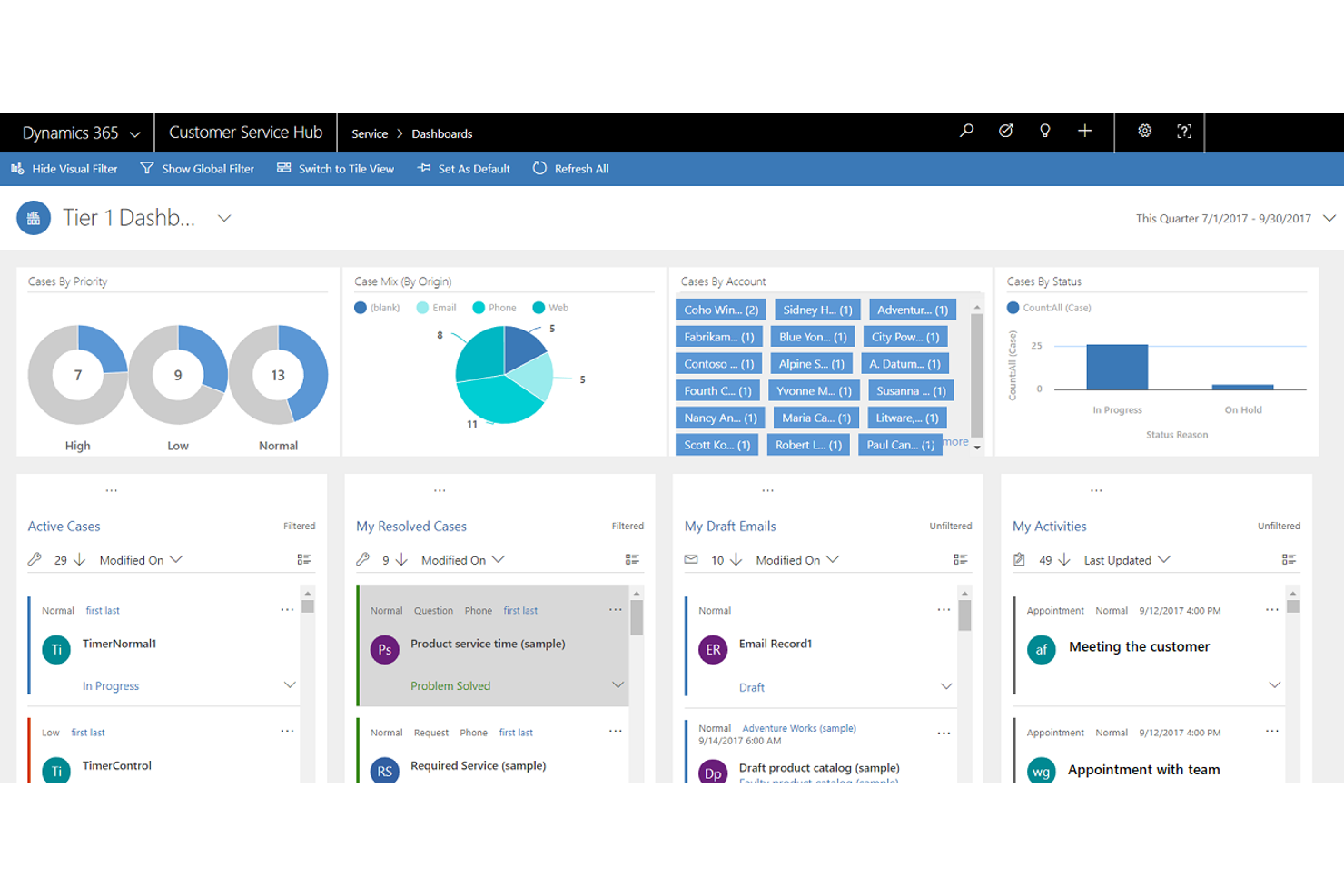
Per i team che già utilizzano Microsoft 365, Microsoft Dynamics 365 offre funzionalità CRM che si integrano perfettamente nei flussi di lavoro esistenti. È particolarmente utile per le organizzazioni che desiderano collegare vendite, marketing e dati dei clienti con strumenti Microsoft familiari come Outlook, Teams ed Excel. A differenza di Bitrix24, Dynamics 365 si distingue per la sua profonda integrazione con l’ecosistema Microsoft e per le sue avanzate funzionalità di automazione dei dati.
Perché Microsoft Dynamics 365 è una valida alternativa a Bitrix24
Quando il tuo team si affida agli strumenti Microsoft 365, Microsoft Dynamics 365 offre funzionalità CRM che funzionano in modo nativo con Outlook, Teams ed Excel. Ho scelto Dynamics 365 perché consente di automatizzare i flussi di lavoro e sincronizzare i dati dei clienti direttamente all’interno dell’ambiente Microsoft. Gli approfondimenti guidati dall’IA e gli strumenti di previsione delle vendite della piattaforma aiutano i team a prendere decisioni basate sui dati senza lasciare le app familiari. Per le organizzazioni che desiderano un CRM profondamente integrato nello stack Microsoft, Dynamics 365 è una valida alternativa a Bitrix24.
Funzionalità principali di Microsoft Dynamics 365
Altre funzionalità che rendono Dynamics 365 interessante per chi cerca un CRM includono:
- Dashboard personalizzabili: Crea dashboard visivi su misura per diversi ruoli e reparti.
- Gestione lead e opportunità: Traccia, valuta e coltiva i lead durante tutto il ciclo di vendita.
- Gestione dei casi: Gestisci i casi di assistenza clienti con regole di instradamento ed escalation automatiche.
- Accesso tramite app mobile: Accedi ai dati e agli strumenti CRM da dispositivi iOS e Android.
Integrazioni di Microsoft Dynamics 365
Le integrazioni includono Microsoft Teams, Outlook, Excel, SharePoint, Power BI, LinkedIn, OneDrive, Azure, Microsoft Power Platform e altre ancora.
Pros and Cons
Pros:
- Profonda integrazione con le app Microsoft 365
- Approfondimenti sulle vendite e sui clienti guidati dall’IA
- Controlli avanzati di sicurezza e conformità
Cons:
- Richiede licenze separate per ogni modulo
- Configurazione complessa per ambienti non-Microsoft

ClickUp
Ideale per la collaborazione su attività e progetti

Se il tuo team ha bisogno di un CRM che funzioni anche come un software di gestione progetti flessibile, ClickUp merita considerazione. È particolarmente interessante per i team che vogliono gestire pipeline di vendita, relazioni con i clienti e attività di progetto tutto in un unico posto. A differenza di Bitrix24, ClickUp si distingue per le sue viste delle attività altamente personalizzabili e per le funzionalità collaborative che supportano sia i flussi di lavoro CRM che quelli di progetto.
Perché ClickUp è una valida alternativa a Bitrix24
Per i team che desiderano combinare CRM e collaborazione sui progetti, ClickUp offre un approccio unico. Ho scelto ClickUp perché permette di gestire pipeline clienti insieme ad attività, documenti e conversazioni in un’unica area di lavoro. Le sue viste attività personalizzabili, come le Kanban board e i diagrammi di Gantt, aiutano i team di vendita e assistenza a monitorare affari e progetti insieme. Se cerchi un’alternativa a Bitrix24 che metta collaborazione e gestione attività al centro del CRM, ClickUp è una scelta solida.
Funzionalità chiave di ClickUp
Altre funzionalità che rendono ClickUp interessante per chi cerca un CRM includono:
- Campi personalizzati: Aggiungi campi dati personalizzati ad attività e liste per tracciare informazioni specifiche del CRM.
- Integrazione email: Invia e ricevi email direttamente dalle attività per mantenere le comunicazioni organizzate.
- Automazioni: Imposta automazioni basate su regole per gestire i flussi di lavoro CRM ripetitivi.
- Vista modulo: Raccogli lead e dati clienti tramite moduli personalizzabili che alimentano direttamente la tua area di lavoro.
Integrazioni ClickUp
Le integrazioni includono Slack, Wrike, GitHub, GitLab, HubSpot, Everhour, Toggl, Google Drive, OneDrive, Outlook e altro ancora.
Pros and Cons
Pros:
- Campi personalizzati illimitati per dati CRM
- Vista modulo per acquisizione lead diretta
- Viste attività multiple per la gestione delle pipeline
Cons:
- Strumenti di fatturazione e fatturazione nativi limitati
- Permessi complessi per grandi team

HubSpot
Ideale per automazione marketing integrata

Se stai cercando un CRM che riunisca vendite, marketing e servizio clienti in un'unica piattaforma, HubSpot è da prendere in considerazione. È particolarmente utile per i team di marketing o le aziende che vogliono automatizzare campagne, gestire lead e tracciare i percorsi dei clienti senza dover usare più strumenti. HubSpot si distingue da Bitrix24 offrendo un'automazione del marketing integrata e una piattaforma unificata per coltivare i potenziali clienti dal primo contatto fino alla chiusura della trattativa.
Perché HubSpot è una buona alternativa a Bitrix24
Per i team che desiderano automazione di marketing integrata direttamente nel CRM, HubSpot offre un approccio unificato che Bitrix24 non eguaglia. Ho scelto HubSpot perché consente di creare campagne email automatizzate, assegnare punteggi ai lead in base all'engagement e tracciare ogni interazione lungo il funnel di vendita. Il builder di workflow visuale facilita la progettazione e il lancio di campagne di marketing multi-step senza codifica, anche nella versione gratuita. Se la tua azienda si basa sulla coltivazione dei lead e sull'allineamento tra vendite e marketing, gli strumenti di automazione integrata di HubSpot sono la soluzione ideale.
Funzionalità principali di HubSpot
Altre funzionalità HubSpot che spesso interessano chi acquista un CRM includono:
- Gestione dei contatti: Archivia e organizza registri dettagliati per ogni lead, cliente e azienda nel tuo database.
- Widget di chat dal vivo: Ti permette di aggiungere una chat in tempo reale al tuo sito web per una comunicazione immediata con i clienti.
- Visualizzazione della pipeline di vendita: Offre un'interfaccia drag and drop per tenere traccia delle trattative in ogni fase del tuo processo di vendita.
- Costruttore di knowledge base: Permette di creare e gestire una libreria di articoli di aiuto ricercabile per i clienti.
Integrazioni di HubSpot
Le integrazioni includono Gmail, Outlook, Google Calendar, Slack, Zoom, Salesforce, WordPress, Meta Ads, Microsoft Teams e Google Meet.
Pros and Cons
Pros:
- Automazione del marketing integrata per campagne email
- Pipeline di vendita visuale con fasi drag-and-drop
- Chat dal vivo e chatbot nativi
Cons:
- I report personalizzati richiedono un piano a pagamento
- Nessun sistema di telefonia o PBX integrato

Ideale per la visualizzazione dei processi di vendita

Se il tuo team ha bisogno di un CRM che metta i flussi di vendita visivi al centro, Pipedrive merita sicuramente attenzione. Le organizzazioni focalizzate sulle vendite e i team dedicati al fatturato apprezzeranno come trasforma le fasi delle trattative in un flusso di lavoro chiaro, drag-and-drop. Questo approccio basato sul cloud ti aiuta a individuare i colli di bottiglia, dare priorità ai lead e mantenere il processo di vendita in movimento in modo più pratico rispetto a Bitrix24.
Perché Pipedrive è una valida alternativa a Bitrix24
A differenza di molti CRM che nascondono le attività di vendita in menu complessi, Pipedrive mette l'intero processo di vendita su una bacheca pipeline visiva. Ho scelto Pipedrive per i team che vogliono gestire le trattative con la semplicità del drag-and-drop e visualizzare ogni fase a colpo d'occhio. Puoi personalizzare le fasi delle pipeline, monitorare l'avanzamento delle trattative in modo visivo e utilizzare segnali colorati per evidenziare le opportunità ferme. Questa attenzione alla visualizzazione dei processi di vendita rende Pipedrive una valida alternativa per i team che desiderano maggiore chiarezza e controllo rispetto a quanto offerto da Bitrix24.
Funzionalità principali di Pipedrive
Altre funzionalità che rendono Pipedrive interessante per chi cerca un CRM includono:
- Integrazione con l'email: Si sincronizza con il tuo provider email per tenere traccia delle conversazioni e inviare messaggi direttamente dal CRM.
- Pianificatore di attività: Ti permette di programmare chiamate, riunioni e attività collegate a specifiche trattative o contatti.
- Report personalizzabili: Genera report di vendita e attività che puoi adattare alle metriche del tuo team.
- Moduli per l'acquisizione dei lead: Ti consente di creare moduli web per raccogliere lead e aggiungerli automaticamente alla tua pipeline.
Integrazioni di Pipedrive
Le integrazioni includono Slack, QuickBooks, Trello, Gmail, Microsoft Teams, PandaDoc, JustCall e altri.
Pros and Cons
Pros:
- Bacheca pipeline visiva per monitorare le fasi delle trattative
- Campi attività di vendita e trattative personalizzabili
- Tracciamento email integrato con notifiche di apertura
Cons:
- Archiviazione documenti limitata rispetto a Bitrix24
- Nessun sistema nativo di ticketing per il supporto clienti

Ideale per una gestione semplice dei contatti

BIGContacts è progettato per team e piccole imprese che desiderano un modo semplice per gestire i contatti e monitorare le comunicazioni. Se stai cercando un'alternativa a Bitrix24 che mantenga le cose semplici, BIGContacts si concentra sulla gestione dei contatti senza la confusione di funzionalità avanzate di progetti o flussi di lavoro. È una scelta adatta per chi ha bisogno di un CRM facile da usare per organizzare i dettagli dei clienti, seguire le attività e mantenere registri chiari.
Perché BIGContacts è una buona alternativa a Bitrix24
Se desideri un CRM che metta la gestione dei contatti al centro, BIGContacts è un'opzione valida. Ho scelto BIGContacts perché offre un'interfaccia pulita per archiviare dettagliate anagrafiche, monitorare ogni interazione e impostare promemoria per i follow-up. La timeline delle attività e gli strumenti di gestione delle attività ti aiutano a restare aggiornato sulle comunicazioni con i clienti senza ulteriore complessità. Per i team che non hanno bisogno di moduli avanzati per progetti o flussi di lavoro, BIGContacts offre funzionalità mirate facili da adottare.
Funzionalità principali di BIGContacts
Altre funzionalità che rendono BIGContacts utile per chi cerca un CRM includono:
- Integrazione con l'email marketing: Si collega a strumenti di email marketing per inviare campagne e tracciare le risposte.
- Campi personalizzati: Permette di personalizzare le schede contatto con campi specifici per le esigenze aziendali.
- Archiviazione documenti: Carica e organizza file direttamente nei profili dei contatti.
- Sincronizzazione calendario: Si sincronizza con Google Calendar e Outlook per una pianificazione unificata.
Integrazioni di BIGContacts
Le integrazioni includono ActiveCampaign, Skype, Mailchimp, Campaign Monitor, HubSpot, QuickBooks, Outlook, Google Contacts, Shopify e molte altre.
Pros and Cons
Pros:
- Database dei contatti semplice con monitoraggio delle attività
- Promemoria delle attività collegati alle schede contatto
- Archiviazione documenti all'interno di ogni profilo contatto
Cons:
- Nessun modulo di gestione dei flussi di lavoro
- Nessuna app mobile nativa

Ideale per personalizzazioni enterprise su larga scala

Salesforce è una piattaforma CRM progettata per i team che necessitano di una profonda personalizzazione e automazioni avanzate all'interno di processi di vendita complessi. È particolarmente adatta a grandi aziende o organizzazioni con flussi di lavoro unici che superano i modelli CRM standard. Se la tua azienda ha bisogno di integrazioni su misura, reportistica dettagliata o soluzioni di gestione delle relazioni con i clienti più scalabili rispetto a ciò che offre Bitrix24, Salesforce si distingue come una scelta flessibile.
Perché Salesforce è una valida alternativa a Bitrix24
Quando hai bisogno di un CRM che si adatti a requisiti aziendali complessi, Salesforce offre opzioni di personalizzazione ben oltre quelle disponibili su Bitrix24. Ho scelto Salesforce per la sua capacità di consentire ai team di creare oggetti personalizzati, automatizzare workflow multi-step e progettare processi di approvazione dettagliati. Il marketplace AppExchange della piattaforma offre inoltre migliaia di componenti aggiuntivi per esigenze specifiche di settore. Se la tua organizzazione richiede un CRM che si modelli sui tuoi processi anziché il contrario, Salesforce è una scelta solida.
Caratteristiche principali di Salesforce
Altre funzionalità che spesso vengono ricercate in Salesforce includono:
- Lead Scoring: Assegna un punteggio ai lead in base all’engagement e alla probabilità di conversione, aiutando a dare priorità agli sforzi di vendita.
- Gestione Opportunità: Traccia le trattative in ogni fase della pipeline di vendita con campi e viste personalizzabili.
- Gestione dei Casi: Gestisce richieste di assistenza clienti, archiviazione di file e ticket di supporto all'interno della stessa piattaforma dei dati di vendita.
- App Mobile: Permette agli utenti di accedere ai dati CRM, aggiornare i record e comunicare con i membri del team da qualsiasi dispositivo.
Integrazioni Salesforce
Le integrazioni includono Slack, Outlook, Gmail, Mailchimp, Docusign, LinkedIn e altro ancora.
Pros and Cons
Pros:
- Automazione estesa per processi complessi
- Dashboard e report altamente personalizzabili
- Ampio marketplace di estensioni specifiche per settore
Cons:
- È necessario un amministratore dedicato per la gestione
- Gli add-on e le integrazioni spesso hanno un costo aggiuntivo


Quando il tuo team ha bisogno di un sistema avanzato di gestione dei ticket di assistenza clienti con funzionalità CRM, Zendesk merita un’attenta valutazione. È progettato per team di supporto e aziende che vogliono unificare le conversazioni con i clienti, automatizzare l’assegnazione dei ticket e integrare i dati dell’assistenza con i processi di vendita. A differenza di Bitrix24, Zendesk è specializzato nella gestione omnicanale dei ticket e in una profonda automazione del supporto per gestire grandi volumi di interazioni con i clienti.
Perché Zendesk è una buona alternativa a Bitrix24
Se tra le priorità del tuo CRM c’è la gestione dei ticket di assistenza clienti, Zendesk offre strumenti specializzati che Bitrix24 non fornisce. Ho scelto Zendesk perché centralizza le richieste di supporto provenienti da email, chat, telefono e canali social in un unico sistema di ticketing. L’assegnazione automatica dei ticket e i flussi di lavoro personalizzabili della piattaforma aiutano i team di supporto a rispondere più rapidamente e a tracciare ogni interazione con il cliente. Per le aziende che necessitano di integrare in profondità il servizio clienti con il CRM, l’attenzione di Zendesk al supporto omnicanale lo rende una scelta valida.
Caratteristiche principali di Zendesk
Altre funzionalità che rendono Zendesk interessante per chi cerca un CRM includono:
- Campi ticket personalizzabili: Personalizza i moduli dei ticket per raccogliere esattamente le informazioni di cui il tuo team ha bisogno.
- Gestione della knowledge base: Crea e mantieni un centro assistenza self-service per clienti e agenti.
- Sondaggi di soddisfazione del cliente: Raccogli feedback direttamente dopo le interazioni di supporto per monitorare la qualità del servizio.
- Controlli di accesso basati sui ruoli: Imposta permessi e livelli di accesso per i diversi membri del team e reparti.
Integrazioni Zendesk
Le integrazioni includono Salesforce, Slack, Shopify, Jira, Mailchimp, HubSpot, Trello, Google Analytics e molto altro.
Pros and Cons
Pros:
- Automazione dei ticket per supporti ad alto volume
- Dashboard avanzate di reportistica e analisi
- Ampio marketplace di integrazioni native
Cons:
- Nessuno strumento di gestione progetti integrato
- Opzioni limitate per l’esportazione massiva dei dati

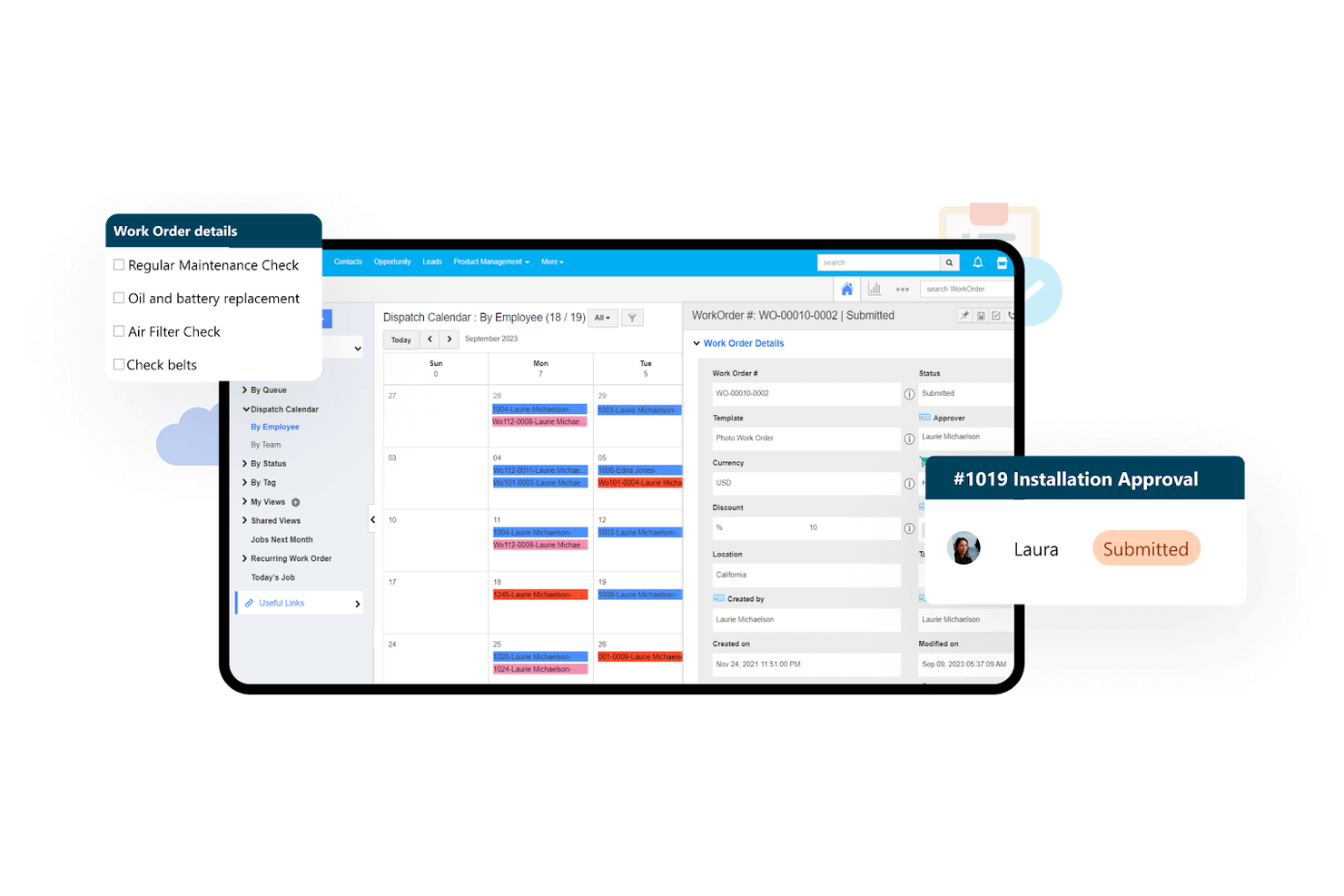
Per i team che desiderano un CRM da personalizzare in base ai propri flussi di lavoro unici, Apptivo offre una suite di app aziendali altamente personalizzabili. A differenza di Bitrix24, Apptivo consente di creare moduli personalizzati e adattare campi, layout e automazioni per allinearsi perfettamente ai tuoi processi. Questa flessibilità lo rende una scelta solida per aziende con esigenze specializzate o in continua evoluzione.
Perché Apptivo è una valida alternativa a Bitrix24
Ciò che distingue Apptivo è la sua profonda attenzione alla personalizzazione all'interno della sua suite di app aziendali. Ho scelto Apptivo per i team che necessitano di modellare il CRM in base a flussi di lavoro di vendita, assistenza o progetto particolari. Puoi creare moduli personalizzati, adattare campi e layout e automatizzare processi open-source per rispondere alle esigenze della tua azienda. Questo livello di flessibilità rende Apptivo una valida alternativa a Bitrix24 per le organizzazioni con necessità specifiche o in evoluzione.
Funzionalità principali di Apptivo
Altre funzionalità che rendono Apptivo interessante per chi cerca un CRM includono:
- Sincronizzazione email: Collega i tuoi account email per tracciare le conversazioni direttamente nel CRM.
- Gestione della pipeline di vendita: Visualizza e gestisci le trattative tramite fasi di vendita personalizzabili.
- Ticketing per supporto clienti: Permette di tracciare, assegnare e risolvere le problematiche dei clienti tramite un modulo di supporto dedicato.
- Gestione delle spese: Consente di registrare e gestire le spese aziendali insieme ai dati CRM.
Integrazioni Apptivo
Le integrazioni includono Google Workspace, Microsoft 365, QuickBooks Online, Xero, Slack, Dropbox, PayPal, RingCentral e altro.
Pros and Cons
Pros:
- Moduli personalizzati adattati ai tuoi flussi di lavoro aziendali
- Gestione progetti integrata e collegata ai record CRM
- Supporto multivaluta per team di vendita globali
Cons:
- Manca segmentazione avanzata delle email
- Meno modelli predefiniti rispetto ai concorrenti
Altre alternative a Bitrix24
Ecco alcune ulteriori alternative a Bitrix24 che non sono state incluse nella mia selezione, ma che vale comunque la pena prendere in considerazione:
- Zoho CRM
Ideale per il monitoraggio della comunicazione multicanale
- monday.com
Ideale per la gestione visiva dei flussi di lavoro
- Bigin
Ideale per la gestione delle pipeline nei piccoli team


Come valuto le alternative a Bitrix24
Valuto le alternative a Bitrix24 su due livelli: se coprono gli aspetti fondamentali della gestione dei progetti e della collaborazione e se elementi distintivi come la profondità del CRM, i prezzi o le opzioni di hosting autonomo giustificano il passaggio.
Funzionalità fondamentali (requisiti essenziali per questo elenco)
Quando seleziono gli strumenti per il mio elenco, assegno a ciascuno un punteggio su una scala da 0 (non offre la funzionalità) a 5 (eccelle in quest'area) per ogni funzionalità fondamentale elencata di seguito. Poi calcolo il punteggio totale dello strumento trasformandolo in una percentuale. Ogni strumento deve raggiungere un punteggio totale minimo del 75% per essere preso in considerazione.
- Gestione delle attività e dei progetti: verifico la presenza di gerarchie delle attività, dipendenze e monitoraggio delle tappe fondamentali in grado di gestire contemporaneamente più progetti per clienti o sprint di prodotto.
- Viste multiple dei progetti: ogni strumento dovrebbe offrire viste Kanban, Gantt, elenco e calendario, così che le squadre possano passare dalla pianificazione del backlog di uno sprint alla presentazione di una sequenza temporale ai portatori di interesse.
- Strumenti di collaborazione della squadra: chat in tempo reale, commenti organizzati in discussioni, condivisione di file e flusso delle attività sono importanti, soprattutto per le squadre distribuite che sostituiscono l'intranet sociale integrata di Bitrix24.
- Automazione dei flussi di lavoro: valuto se sia possibile configurare regole basate su trigger, come assegnare automaticamente un revisore QA quando un'attività passa a "Pronta per la revisione", senza scrivere codice.
- Gestione del tempo e delle risorse: le viste del carico di lavoro e il monitoraggio del tempo sono fondamentali per le agenzie e le squadre di servizi che devono monitorare la capacità tra i progetti e registrare le ore fatturabili.
- Strumenti aziendali integrati: poiché Bitrix24 raggruppa funzionalità CRM, documenti e risorse umane, valuto se ogni alternativa offra moduli nativi comparabili o integrazioni approfondite con strumenti come HubSpot, Google Workspace o Slack.
Una volta ottenuto un elenco di strumenti che soddisfano questi criteri, considero ciò che distingue ciascuna piattaforma.
Fattori distintivi (ciò che differenzia i fornitori)
Ecco come confronto i diversi fornitori:
Caratteristiche distintive
Un modulo CRM nativo è un importante elemento distintivo: le squadre che gestiscono progetti per i clienti possono monitorare le trattative e i risultati nello stesso spazio di lavoro, invece di passare da uno strumento all'altro. Anche i portali per i clienti sono importanti, soprattutto per le agenzie che condividono aggiornamenti sui progressi o raccolgono approvazioni dai portatori di interesse esterni. Valuto inoltre le funzionalità di IA, come la sintesi delle attività e le previsioni sui progetti, che stanno comparendo in strumenti come monday.com e ClickUp e possono far risparmiare tempo reale durante la pianificazione degli sprint o la preparazione dei report sullo stato.
Oltre le funzionalità
La struttura dei prezzi è molto importante quando si passa da Bitrix24, poiché il suo modello a tariffa fissa con funzionalità raggruppate fa sì che i prezzi per utente dei concorrenti possano aumentare rapidamente per le squadre più grandi. Valuto inoltre la flessibilità della distribuzione: alcune squadre hanno bisogno di opzioni con hosting autonomo o in locale per garantire la sovranità dei dati, e solo una manciata di alternative come Nextcloud o gli strumenti a codice aperto le offre. Anche la profondità delle integrazioni è un fattore chiave; verifico la presenza di connettori nativi per gli strumenti su cui le squadre fanno già affidamento, come Slack, Google Workspace o HubSpot, oltre al supporto per API e Zapier per flussi di lavoro personalizzati.
Perché cercare un'alternativa a Bitrix24?
Sebbene Bitrix24 sia una buona scelta di software CRM, ci sono diversi motivi per cui alcuni utenti cercano soluzioni alternative. Potresti essere alla ricerca di un'alternativa a Bitrix24 perché…
- Hai bisogno di una visualizzazione più avanzata della pipeline di vendita
- Vuoi un'interfaccia più semplice per i team più piccoli
- Hai bisogno di integrazioni più approfondite con strumenti specifici del settore
- Hai bisogno di report e analisi più flessibili
- Vuoi un supporto migliore per il lavoro da dispositivi mobili o da remoto
- Hai bisogno di un CRM con funzionalità di automazione più avanzate
Se ti riconosci in una di queste situazioni, sei nel posto giusto. Il mio elenco contiene diverse opzioni di software per la gestione delle relazioni con i clienti più adatte ai team che affrontano queste problematiche con Bitrix24 e cercano soluzioni alternative.
Caratteristiche principali di Bitrix24
Ecco alcune delle caratteristiche principali di Bitrix24, che ti aiuteranno a mettere a confronto ciò che offrono le soluzioni alternative:
- Pipeline visivo delle vendite e monitoraggio delle trattative
- Telefonia integrata per chiamate e SMS
- Moduli per la gestione delle attività e dei progetti
- Chat interna e videoconferenze
- Gestione dei documenti e condivisione dei file
- Progettista di flussi di lavoro e processi aziendali automatizzati
- Campi e pipeline CRM personalizzabili
- Calendario integrato e strumenti di pianificazione
- Moduli di acquisizione dei lead e automazione da sito web a lead
- Controlli degli accessi e autorizzazioni basati sui ruoli