

10 alternative ad AgencyAnalytics per i report dei clienti nel 2026

10 Le migliori alternative ad AgencyAnalytics


Gestire i report di marketing può essere frustrante quando la piattaforma di reporting non soddisfa più le tue esigenze. Forse AgencyAnalytics non offre più la flessibilità o la scalabilità che ti aspetti. Potresti avere a che fare con funzionalità limitate, una mancanza di personalizzazione o persino vincoli di budget. Queste difficoltà possono rallentare il tuo team e ostacolare il processo decisionale.
In base alla mia esperienza, trovare lo strumento di analisi di marketing giusto può fare una grande differenza. Ho esaminato alcune delle migliori alternative per il reporting delle agenzie ad AgencyAnalytics, concentrandomi su ciò che ogni opzione offre per risolvere i tuoi specifici problemi. Troverai opzioni che migliorano le funzionalità di reporting, migliorano l'integrazione dei dati personalizzati acquisiti da strumenti come un CRM o un'API e si adattano al tuo budget. Esploriamo queste alternative e scopriamo quale sia la soluzione perfetta per il tuo team.
Che cos'è AgencyAnalytics?
AgencyAnalytics è uno strumento di reporting di marketing progettato per semplificare la visualizzazione e la reportistica dei dati destinati ai clienti per le agenzie di marketing. Viene comunemente utilizzato da esperti di marketing digitale, specialisti SEO e team di marketing che devono presentare ai clienti informazioni basate sui dati. Dashboard personalizzate, report automatizzati e integrazioni con vari connettori e fonti di dati, come Google Sheets, aiutano a presentare informazioni chiare e utilizzabili. Nel complesso, AgencyAnalytics offre a te e al tuo team un modo efficiente per gestire e comunicare le prestazioni di marketing utilizzando funzionalità avanzate.
Riepilogo delle migliori alternative ad AgencyAnalytics
Questa tabella comparativa riassume i dettagli sui prezzi delle mie migliori alternative ad AgencyAnalytics, per aiutarti a trovare quella più adatta al tuo budget e alle esigenze della tua attività.
| Tool | Best For | Trial Info | Price | ||
|---|---|---|---|---|---|
| 1 | Ideale per dashboard create a partire da metriche grezze | Prova gratuita di 14 giorni | A partire da $120/mese (con fatturazione annuale) | Website | |
| 2 | Ideale per l'analisi dei backlink | Piano gratuito disponibile | A partire da $29/mese | Website | |
| 3 | Ideale per analisi esplorative avanzate | Prova gratuita + piano gratuito disponibili | A partire da $15/utente/mese (fatturato annualmente) | Website | |
| 4 | Ideale per pannelli di controllo KPI in tempo reale montati a parete | Prova gratuita di 14 giorni | A partire da $119/mese (con fatturazione annuale) | Website | |
| 5 | Ideale per la ricerca di parole chiave | Piano gratuito + prova gratuita + demo gratuita disponibili | Da $117.33/mese (fatturato annualmente) | Website | |
| 6 | Ideale per l'analisi SEO | Prova gratuita di 7 giorni + dimostrazione gratuita disponibile | A partire da $79/mese (fatturato annualmente) | Website | |
| 7 | Ideale per la reportistica di marketing automatizzata per più clienti | Piano gratuito disponibile | A partire da $229/mese (con fatturazione annuale) | Website | |
| 8 | Ideale per monitorare le metriche in un'unica visualizzazione | Prova gratuita di 14 giorni disponibile | A partire da $29/mese | Website | |
| 9 | Ideale per il monitoraggio delle prestazioni orientato agli obiettivi | Piano gratuito + prova gratuita + demo gratuita disponibili | A partire da $64/mese (fatturato annualmente) | Website | |
| 10 | Ideale per la reportistica di livello professionale per agenzie | Demo gratuita disponibile | Prezzi su richiesta | Website |
Perché fidarsi dei nostri consigli sui software
Il nostro team testa e recensisce software dal 2012. In quanto project manager noi stessi, sappiamo quanto sia difficile — e importante — scegliere il software giusto.
Per questa guida, abbiamo valutato gli strumenti attraverso test pratici e ricerche indipendenti, assegnando un punteggio agli strumenti in base ai nostri criteri di selezione. Ci basiamo inoltre sulle competenze di leader di pensiero del settore e di professionisti attivi nella gestione dei progetti.
Le nostre recensioni riflettono il nostro giudizio editoriale umano, non un discorso di vendita.
Revisori esperti:
Recensioni delle migliori alternative ad AgencyAnalytics
Di seguito trovi i miei riepiloghi dettagliati delle migliori alternative ad AgencyAnalytics che sono entrate nel mio elenco. Le mie recensioni offrono uno sguardo approfondito alle funzionalità principali, ai pro e contro, alle integrazioni e ai casi d’uso ideali di ogni strumento, per aiutarti a trovare quello più adatto a te.

Ideale per dashboard create a partire da metriche grezze
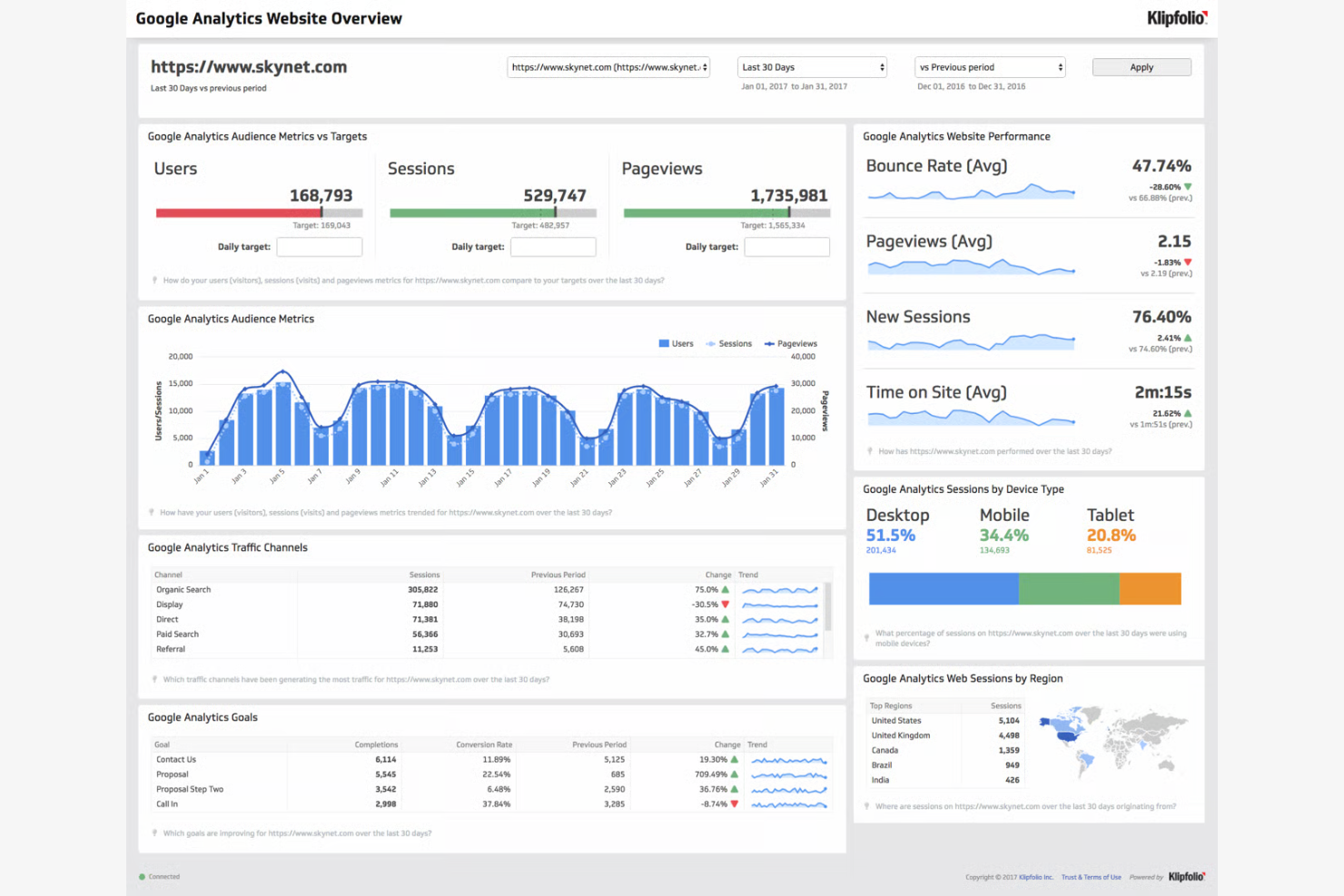
Klipfolio è una soluzione per dashboard progettata per le aziende che devono creare dashboard e report personalizzabili. È pensata per i team che desiderano automatizzare la gestione dei dati e migliorare la visualizzazione dei dati per prendere decisioni più efficaci.
Perché Klipfolio è una valida alternativa ad AgencyAnalytics: Offre un'esperienza di dashboard altamente personalizzabile, con funzionalità come strumenti di debug e temi personalizzati. È possibile connettersi a oltre 200 servizi e acquisire dati in tempo reale, contribuendo a creare dashboard dinamiche e interattive. L'aggiornamento automatico dei dati e l'accesso centralizzato ai dati facilitano il monitoraggio delle metriche in tempo reale. Questa flessibilità consente alle aziende di adattare i flussi di lavoro dei report a esigenze specifiche.
Funzionalità e integrazioni distintive:
Le funzionalità includono oltre 30 visualizzazioni basate sulle migliori pratiche tra cui scegliere, opzioni di layout per dashboard personalizzate e una modalità scura integrata per un maggiore comfort visivo. È inoltre possibile accedere a numerose risorse di supporto, tra cui onboarding e formazione.
Le integrazioni includono Google Analytics, Salesforce, HubSpot, Facebook Ads, X Ads, LinkedIn, Shopify, QuickBooks, Mailchimp, Instagram e altro ancora.
Pros and Cons
Pros:
- Dashboard altamente personalizzabili
- Ampia scelta di opzioni di visualizzazione
- Aggiornamento automatico dei dati
Cons:
- Richiede conoscenze dei fogli di calcolo
- La configurazione iniziale può essere complessa

Ahrefs
Ideale per l'analisi dei backlink
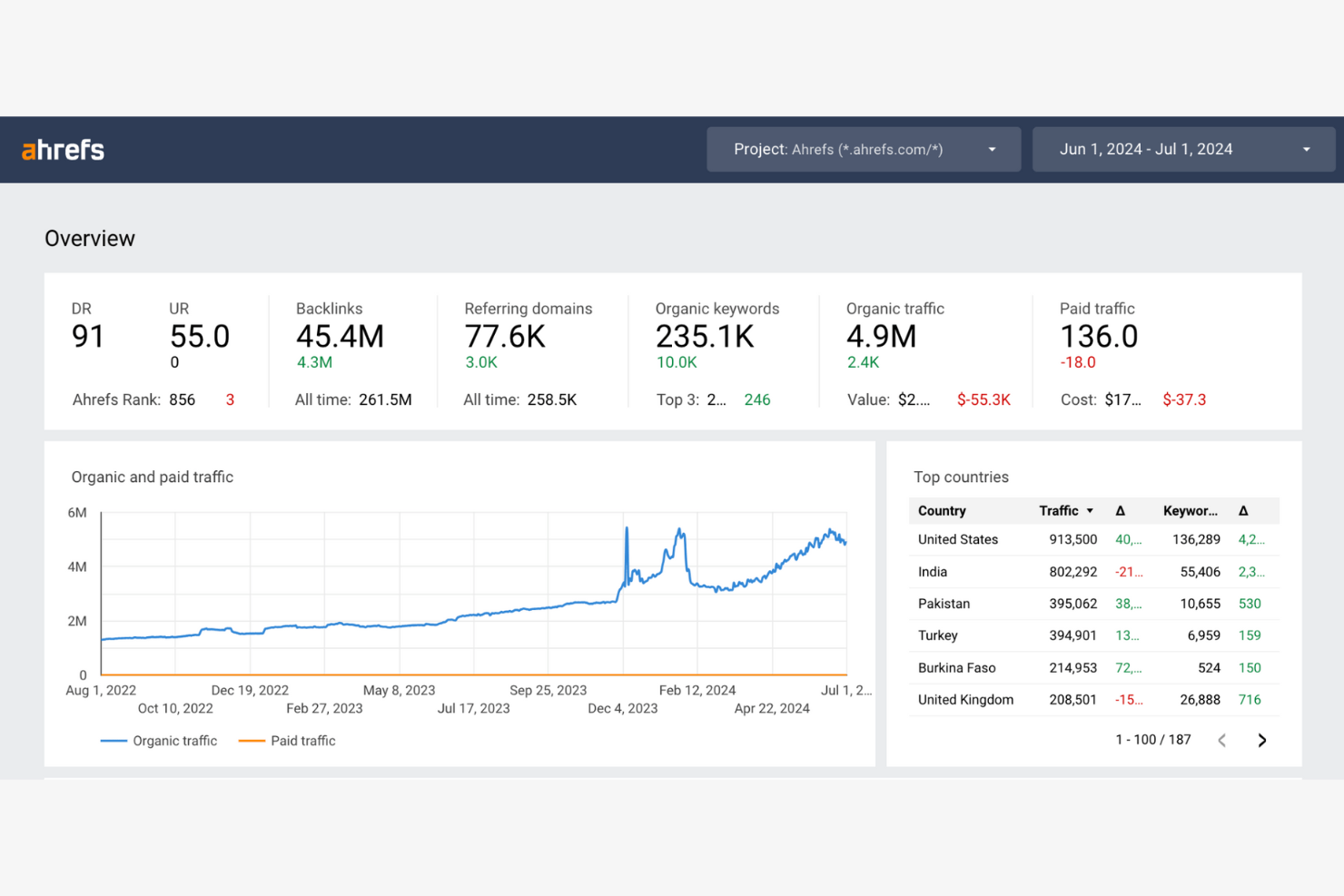
Ahrefs è un set di strumenti SEO progettato per aiutare i professionisti del marketing a migliorare la propria visibilità online. Offre soluzioni per l'analisi dei backlink, la ricerca delle parole chiave e l'analisi della concorrenza, con l'obiettivo di migliorare il posizionamento nei motori di ricerca.
Perché Ahrefs è una buona alternativa ad AgencyAnalytics: offre un'analisi dettagliata dei backlink, aiutandoti a comprendere e migliorare il profilo dei link del tuo sito. Puoi monitorare il posizionamento delle parole chiave per vedere come si comporta il tuo sito nei risultati di ricerca. La funzione di analisi della concorrenza ti consente di valutare le strategie dei concorrenti e individuare opportunità di crescita.
Funzionalità e integrazioni principali:
Le funzionalità includono uno strumento di audit del sito che identifica i problemi tecnici SEO. Puoi utilizzare l'esploratore dei contenuti per scoprire argomenti e idee popolari per la tua strategia di contenuti. Ahrefs offre anche il monitoraggio del posizionamento, che ti consente di controllare nel tempo le prestazioni delle tue parole chiave.
Le integrazioni includono Google Sheets, Screaming Frog, AgencyAnalytics, Whatagraph e altro.
Pros and Cons
Pros:
- Analisi dettagliata dei backlink
- Monitoraggio efficace delle parole chiave
- Strumento di audit del sito
Cons:
- Curva di apprendimento elevata
- Richiede conoscenze SEO

Tableau
Ideale per analisi esplorative avanzate
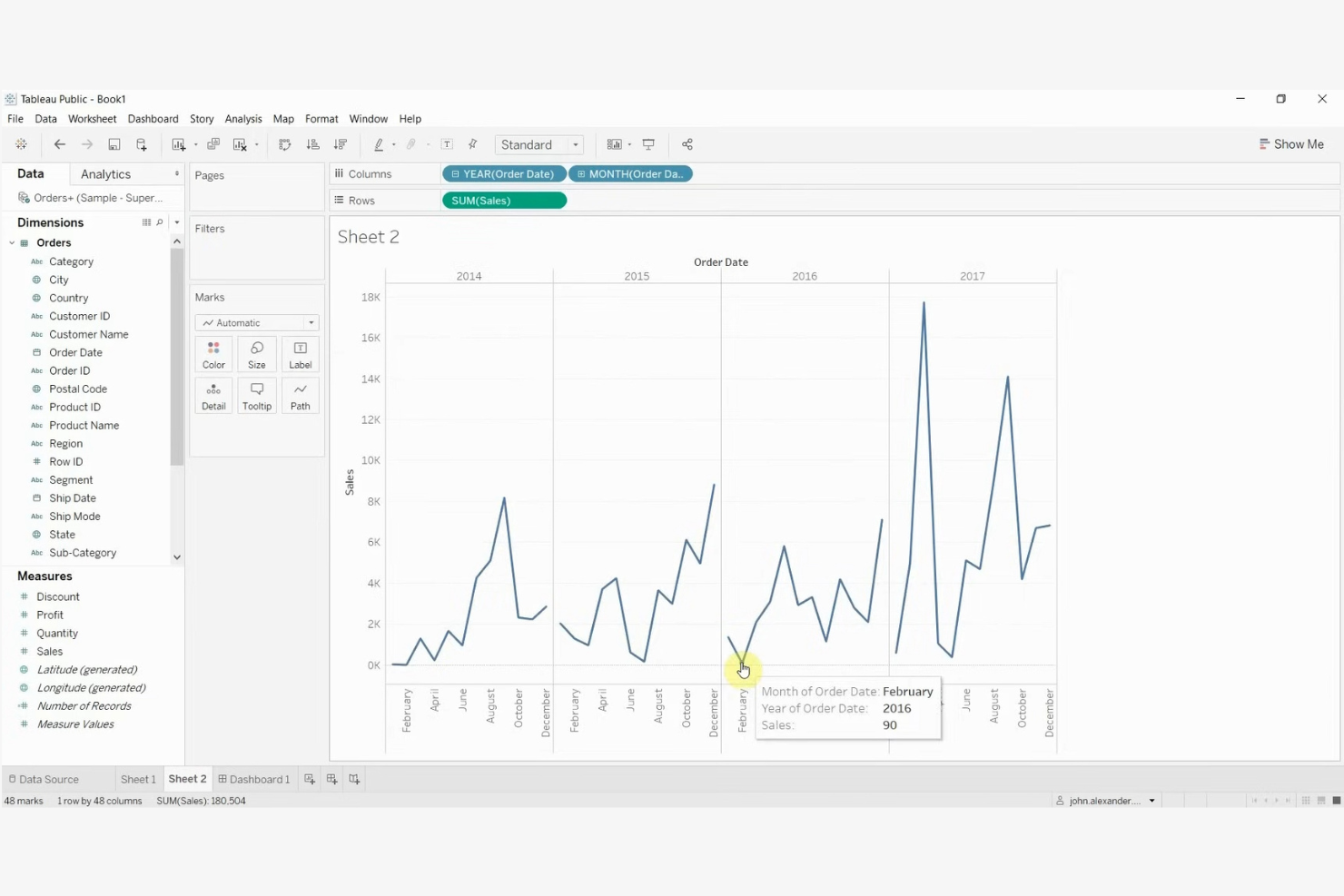
Tableau è uno strumento di visualizzazione dei dati pensato per aiutare le aziende a trasformare i dati in informazioni utili attraverso dashboard interattive. È ampiamente utilizzato da analisti dei dati, esperti di business intelligence e team che necessitano di visualizzare facilmente dati complessi.
Perché Tableau è una buona alternativa ad AgencyAnalytics: eccelle nella creazione di visualizzazioni dei dati interattive e visivamente accattivanti. Grazie alla funzionalità di trascinamento, è possibile creare grafici complessi senza scrivere codice. La capacità dello strumento di gestire in modo efficiente grandi insiemi di dati supporta analisi e report dettagliati.
Funzionalità e integrazioni principali:
Le funzionalità includono la possibilità di creare dashboard interattive che consentono di esplorare i dati in modo dinamico. È possibile utilizzare punti narrativi per creare narrazioni basate sui dati che comunicano chiaramente le informazioni. Tableau offre inoltre report ottimizzati per i dispositivi mobili, garantendo l'accessibilità anche in movimento.
Le integrazioni includono Salesforce, Google Analytics, Amazon Redshift, Microsoft Excel, SQL Server, Oracle, SAP, Teradata, Dropbox, Box e altro.
Pros and Cons
Pros:
- Visualizzazioni interattive dei dati
- Gestisce bene grandi insiemi di dati
- Report ottimizzati per i dispositivi mobili
Cons:
- Richiede tempo per essere implementato e padroneggiato completamente
- Processo di configurazione complesso
Ideale per pannelli di controllo KPI in tempo reale montati a parete
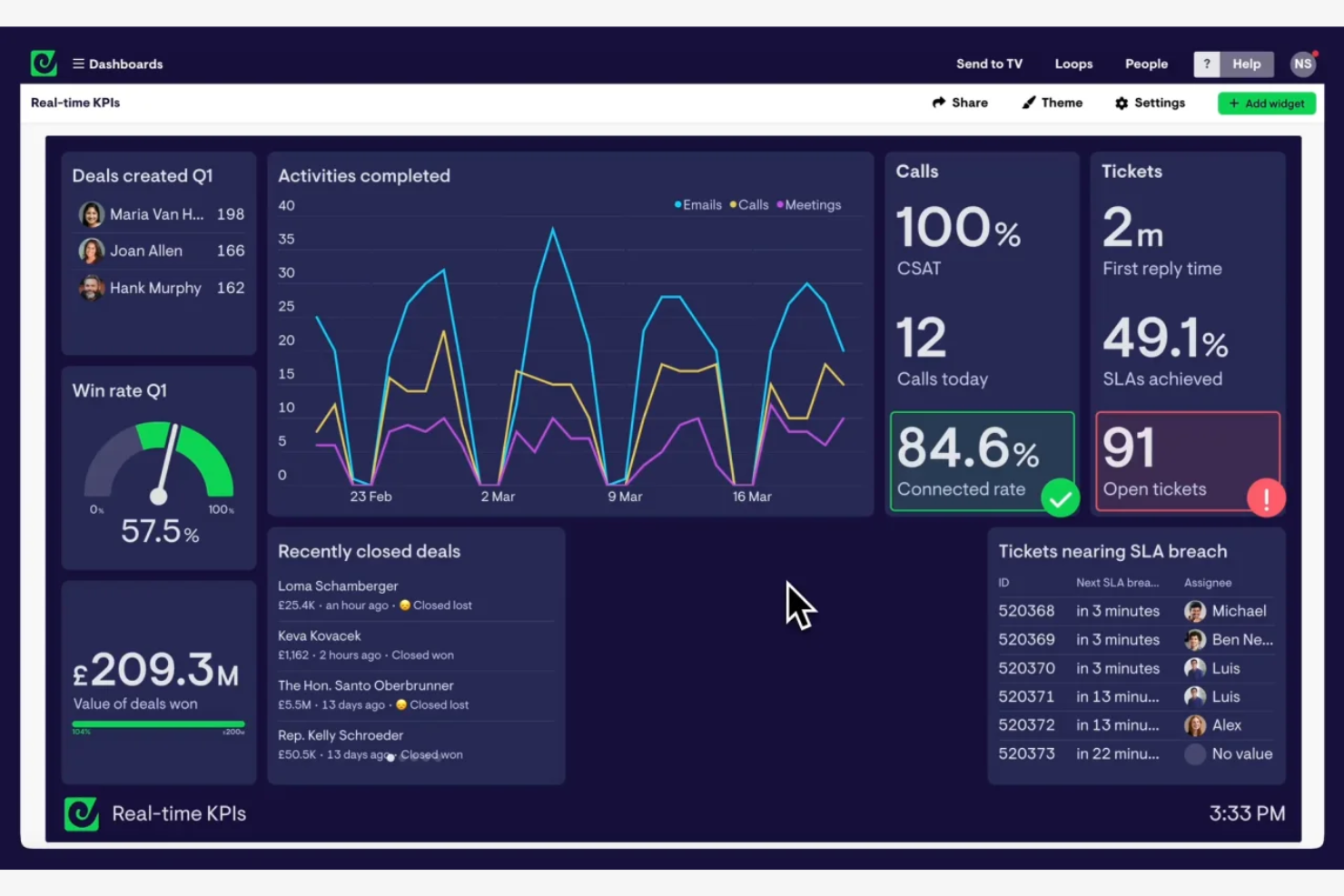
Geckoboard è uno strumento per pannelli di controllo dei dati progettato per i team che necessitano di visibilità in tempo reale sugli indicatori chiave di prestazione. Viene utilizzato principalmente dalle aziende che desiderano mostrare dati in tempo reale su TV o monitor, per mantenere i team allineati e informati.
Perché Geckoboard è una buona alternativa ad AgencyAnalytics: offre funzionalità di visualizzazione dei dati in tempo reale, risultando ideale per monitorare le metriche aggiornate. Puoi creare facilmente pannelli di controllo con la sua interfaccia di trascinamento, che non richiede competenze tecniche. Gli elementi grafici personalizzabili ti consentono di adattare il pannello di controllo alle esigenze specifiche del tuo team. Questa attenzione ai dati in tempo reale aiuta il tuo team a prendere rapidamente decisioni informate.
Funzionalità e integrazioni principali:
Le funzionalità includono la possibilità di personalizzare i pannelli di controllo con diversi elementi grafici in base alle esigenze del tuo team. Puoi configurare notifiche che ti avvisano di variazioni specifiche nei dati. Geckoboard offre anche una modalità TV, perfetta per visualizzare i pannelli di controllo nelle aree comuni.
Le integrazioni includono Google Analytics, Salesforce, Zendesk, Stripe, Mailchimp, Shopify, Intercom, Mixpanel, Xero, Trello e altro ancora.
Pros and Cons
Pros:
- Aggiornamenti dei dati in tempo reale
- Modalità TV per visualizzazioni pubbliche
- Avvisi sulle variazioni dei dati
Cons:
- Opzioni di visualizzazione di base
- Richiede una connessione Internet stabile

Semrush
Ideale per la ricerca di parole chiave
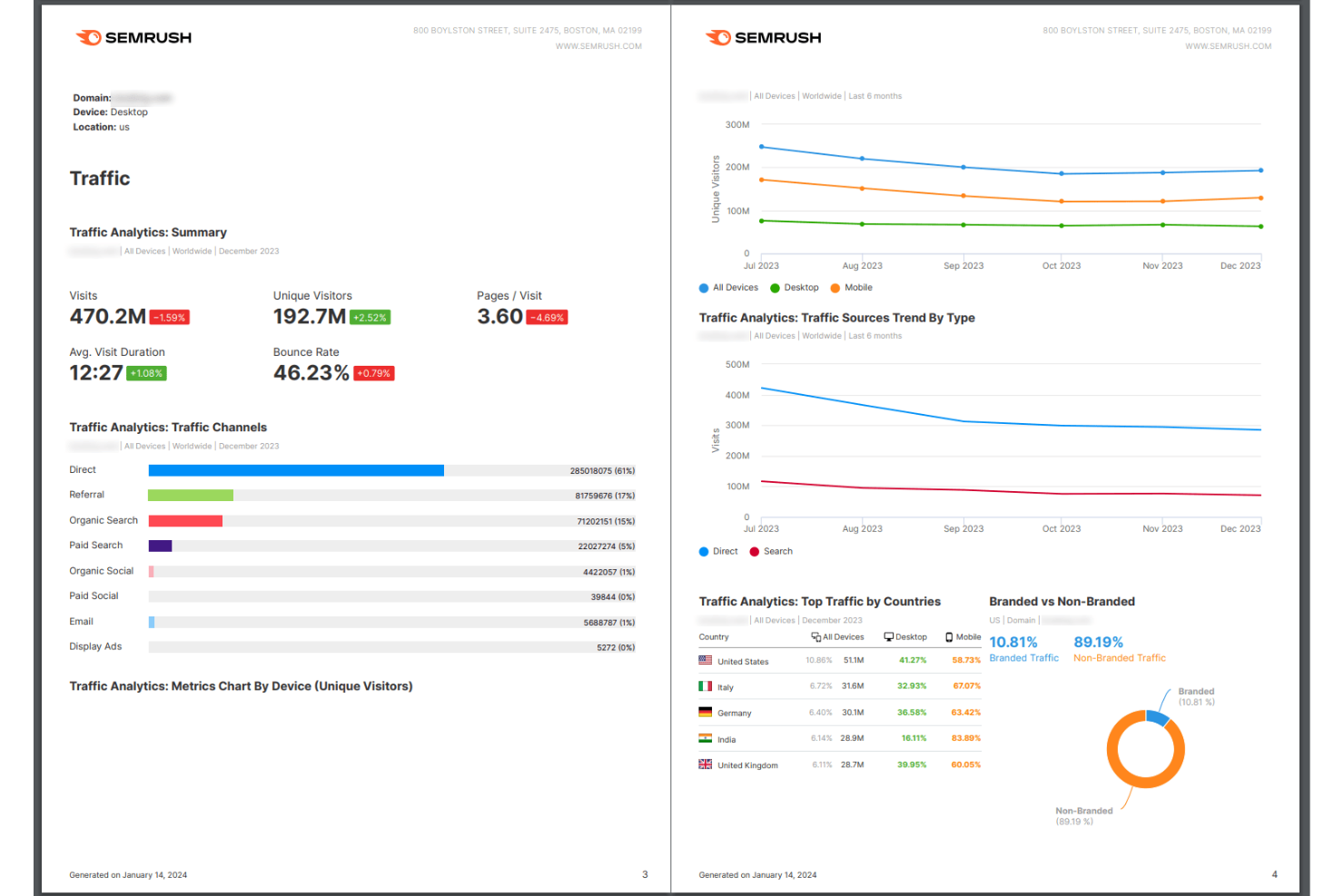
Semrush è uno strumento di marketing digitale pensato per freelance SEO, esperti di content marketing e agenzie digitali. Aiuta il tuo team nella ricerca di parole chiave, negli audit dei siti e nell'analisi della concorrenza per migliorare la visibilità online.
Perché Semrush è una buona alternativa ad AgencyAnalytics: offre strumenti per la ricerca di parole chiave, rendendo più semplice individuare opportunità per migliorare il posizionamento nei motori di ricerca. Puoi eseguire audit del sito per individuare problemi tecnici che potrebbero influire sulle prestazioni. La funzione di analisi della concorrenza ti consente di confrontarti con i competitor e modificare le strategie di conseguenza. Questo focus sulla SEO e sugli insight competitivi offre un approccio specializzato che integra la reportistica tradizionale.
Funzionalità e integrazioni di rilievo:
Le funzionalità includono il monitoraggio delle parole chiave, che ti aiuta a tenere sotto controllo nel tempo le prestazioni del tuo sito nelle ricerche. Puoi generare report di audit del sito per individuare e risolvere problemi tecnici. Semrush offre anche un analizzatore dei contenuti che valuta l'efficacia della tua strategia di contenuti.
Le integrazioni includono Google Analytics, Google Search Console, Trello, WordPress, HubSpot, Majestic, Salesforce, Bitrix24, monday.com, Asana e altro ancora.
Pros and Cons
Pros:
- Strumenti per la ricerca di parole chiave
- Report dettagliati degli audit del sito
- Ampie risorse SEO
Cons:
- Può essere costoso rispetto ad alcuni concorrenti
- Numero limitato di utenti per piano

Moz Pro
Ideale per l'analisi SEO
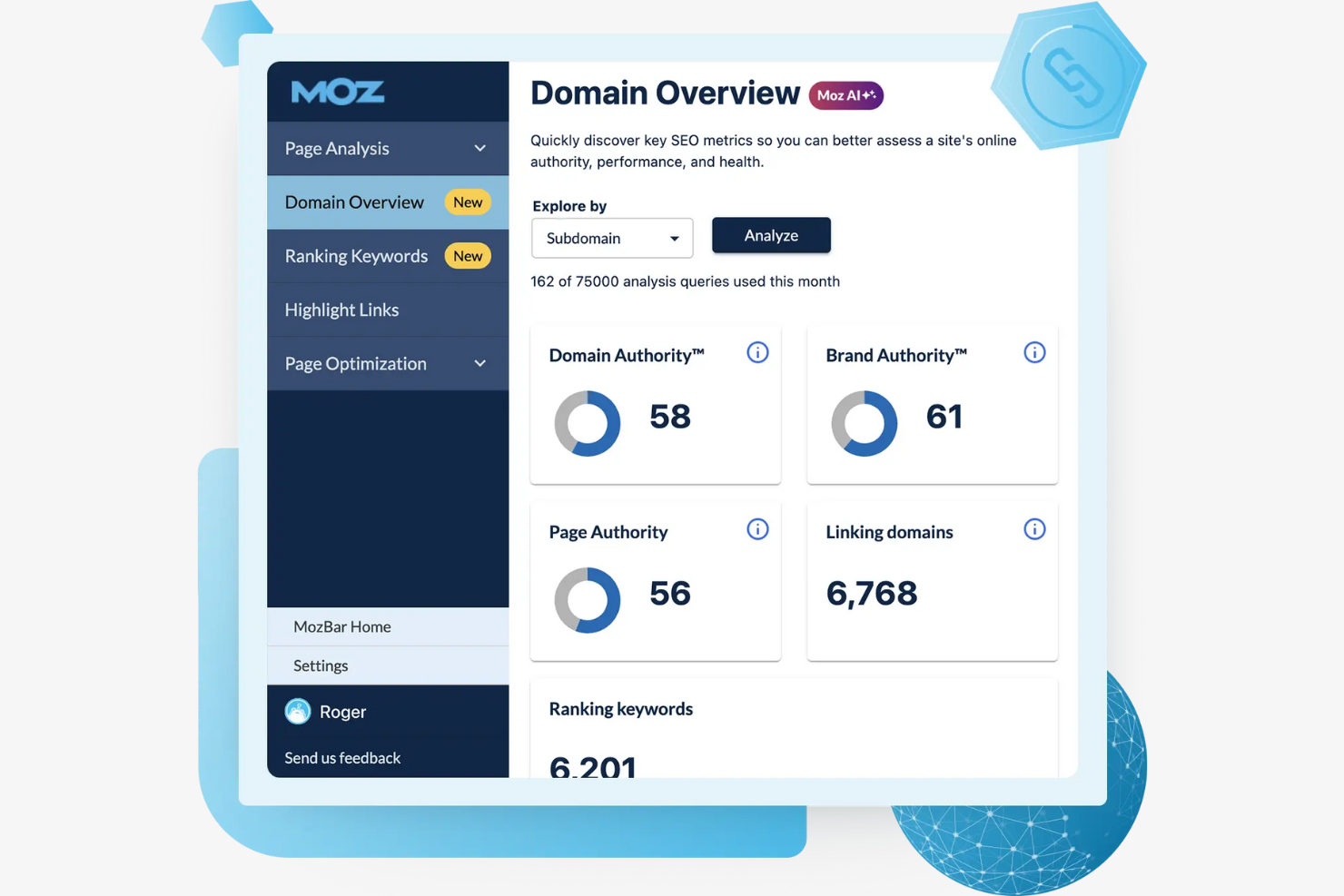
Moz Pro è un insieme di strumenti SEO progettato per i professionisti del marketing che desiderano migliorare la visibilità dei siti web. Offre strumenti per la ricerca di parole chiave, la verifica dei siti e il monitoraggio del posizionamento.
Perché Moz Pro è una buona alternativa ad AgencyAnalytics: offre strumenti di analisi SEO approfonditi che aiutano a ottimizzare il sito per ottenere un migliore posizionamento nei risultati di ricerca. Puoi effettuare ricerche di parole chiave per trovare nuove opportunità e monitorare il posizionamento del tuo sito nel tempo. La funzionalità di verifica del sito identifica i problemi tecnici che potrebbero influire sulle prestazioni.
Caratteristiche distintive e integrazioni:
Le funzionalità includono la possibilità di monitorare le prestazioni delle parole chiave, fornendo informazioni sull'efficacia della tua strategia SEO. Puoi generare rapporti che evidenziano le metriche principali e i progressi. Moz Pro offre inoltre suggerimenti per l'ottimizzazione dei contenuti della pagina, al fine di migliorare i contenuti del tuo sito.
Le integrazioni includono Google Analytics, Looker Studio, Google Search Console e altro.
Pros and Cons
Pros:
- Strumenti dettagliati di analisi SEO
- Suggerimenti per l'ottimizzazione dei contenuti della pagina
- Ampie funzionalità per la ricerca di parole chiave
Cons:
- La banca dati delle parole chiave è più ridotta rispetto a quella di alcuni concorrenti
- Interfaccia poco intuitiva

Ideale per la reportistica di marketing automatizzata per più clienti

Whatagraph è uno strumento di reportistica di marketing progettato per consentire a professionisti e agenzie del marketing digitale di automatizzare e semplificare i processi di reportistica. Aiuta il tuo team a creare report e dashboard visivamente accattivanti per presentare i dati di marketing in modo efficace.
Perché Whatagraph è una buona alternativa ad AgencyAnalytics: Eccelle nell'automazione dei processi di reportistica, facendoti risparmiare tempo e fatica. Puoi programmare l'invio automatico dei report, riducendo il lavoro manuale. Grazie ai modelli predefiniti e alla funzionalità di trascinamento, creare report diventa semplice e veloce. Le opzioni di personalizzazione dell'identità del marchio ti consentono di adattare i report allo stile del tuo team.
Funzionalità e integrazioni principali:
Le funzionalità includono modelli predefiniti che velocizzano la creazione dei report, personalizzazione dell'identità del marchio per allinearsi all'identità del tuo team e acquisizione dei dati in tempo reale per garantire che i report siano sempre aggiornati.
Le integrazioni includono Google Analytics, Facebook Ads, Instagram, LinkedIn, Google Ads, Mailchimp, HubSpot, Shopify, YouTube e altro.
Pros and Cons
Pros:
- Programmazione automatica dei report
- Modelli di report personalizzabili
- Interfaccia intuitiva con funzionalità di trascinamento
Cons:
- Può essere costoso per i team piccoli
- Occasionali problemi di sincronizzazione dei dati

Cyfe
Ideale per monitorare le metriche in un'unica visualizzazione
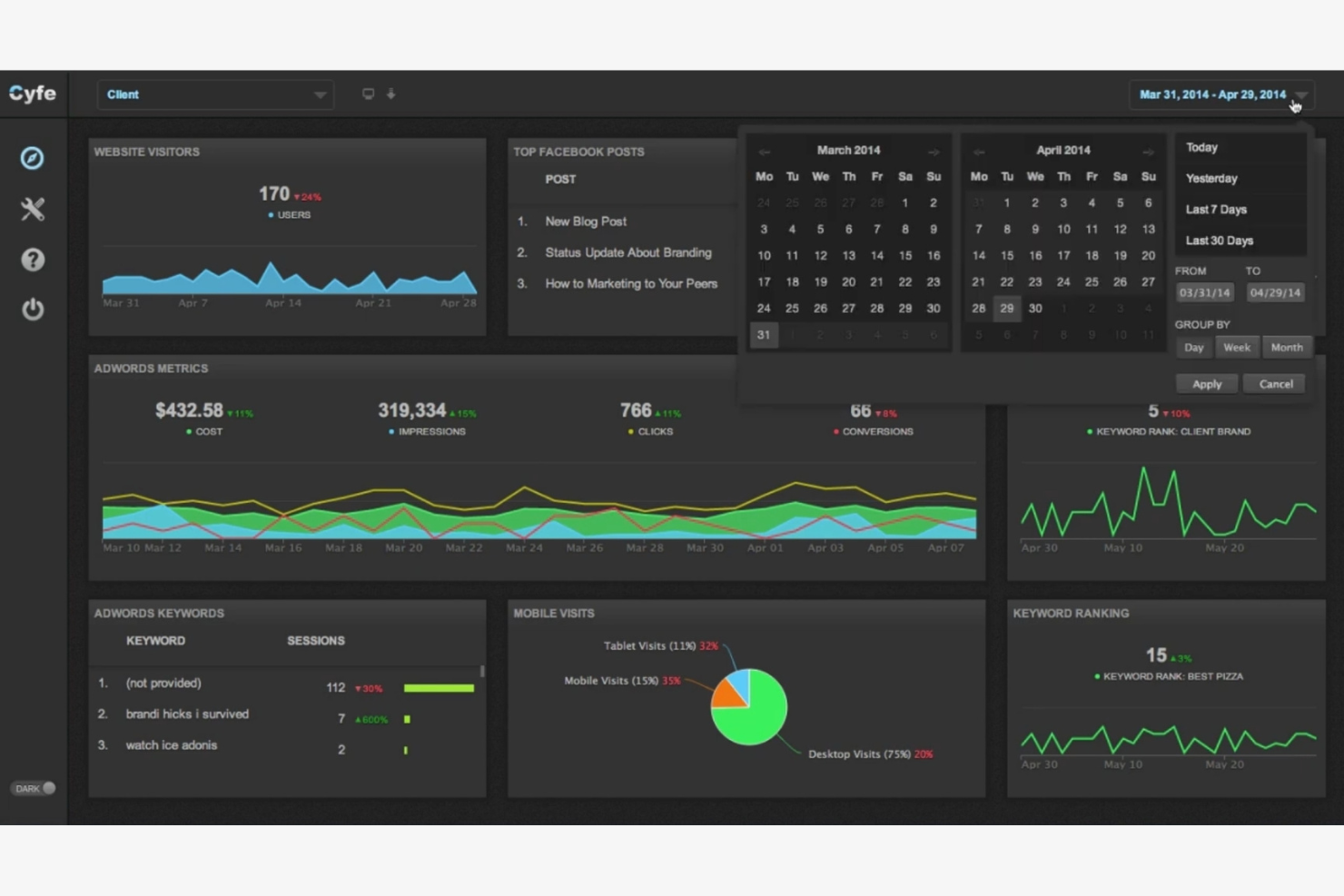
Cyfe è una soluzione completa per i pannelli di controllo aziendali che si rivolge a diversi tipi di utenti, dalle piccole imprese alle aziende più grandi. Aiuta il tuo team a monitorare e analizzare diversi aspetti della tua attività, dal commercio elettronico alle metriche dei social media.
Perché Cyfe è una buona alternativa ad AgencyAnalytics: offre un'esperienza di pannello di controllo unificata che consente di monitorare più metriche aziendali in un unico luogo, inclusi i casi d'uso del PPC. I widget predefiniti rendono la configurazione del pannello di controllo rapida e semplice, senza bisogno di competenze tecniche. La possibilità di integrare tutti i tuoi dati migliora il processo decisionale
Funzionalità e integrazioni principali:
Le funzionalità includono widget predefiniti che ti consentono di aggiungere e configurare rapidamente le metriche nel pannello di controllo. Puoi anche configurare avvisi personalizzati per notificare al tuo team i cambiamenti importanti. Cyfe offre l'archiviazione dei dati storici, che ti aiuta ad analizzare le tendenze nel tempo.
Le integrazioni includono Google Analytics, Facebook, Mailchimp, QuickBooks, Salesforce, Xero, YouTube e altro.
Pros and Cons
Pros:
- Soluzione completa con pannello di controllo unico
- Widget predefiniti disponibili
- Archiviazione dei dati storici
Cons:
- Opzioni di visualizzazione di base
- Alcune funzionalità richiedono competenze tecniche

Databox
Ideale per il monitoraggio delle prestazioni orientato agli obiettivi

Databox è una piattaforma di analisi aziendale progettata per professionisti del marketing e analisti che devono monitorare le metriche delle prestazioni in tempo reale. Consente al tuo team di creare pannelli di controllo personalizzabili che mostrano i dati aziendali principali.
Perché Databox è una buona alternativa ad AgencyAnalytics: si concentra sulla presentazione di dati visivamente coinvolgenti attraverso pannelli di controllo personalizzabili. Puoi creare facilmente visualizzazioni utilizzando la sua interfaccia con funzionalità di trascinamento. Grazie agli aggiornamenti in tempo reale, puoi monitorare le metriche delle prestazioni man mano che cambiano. Questo accesso immediato ai dati ti aiuta a prendere decisioni tempestive.
Funzionalità e integrazioni principali:
Le funzionalità includono il monitoraggio degli obiettivi, che consente di impostare e monitorare gli obiettivi aziendali. Puoi ricevere schede di valutazione giornaliere per mantenere il tuo team informato sui principali indicatori di prestazione. Databox offre inoltre l'accesso da dispositivi mobili, assicurandoti di poter controllare i pannelli di controllo in qualsiasi momento e ovunque ti trovi.
Le integrazioni includono Google Analytics, HubSpot, Facebook Ads, Shopify, Instagram Business, LinkedIn, X Ads, Salesforce, Mailchimp, QuickBooks e altro.
Pros and Cons
Pros:
- Aggiornamenti dei dati in tempo reale
- Funzionalità di monitoraggio degli obiettivi
- Accesso da dispositivi mobili disponibile
Cons:
- Richiede tempo per la configurazione iniziale
- Alcune funzionalità richiedono conoscenze tecniche

NinjaCat
Ideale per la reportistica di livello professionale per agenzie

NinjaCat è una piattaforma per la reportistica, il monitoraggio delle chiamate e la gestione delle campagne, pensata per le agenzie di marketing digitale. Aiuta i team a consolidare i dati di marketing e ad automatizzare la reportistica per i clienti.
Perché NinjaCat è una valida alternativa ad AgencyAnalytics: offre funzionalità di reportistica automatizzata che consentono di risparmiare tempo eliminando la gestione manuale dei dati. È possibile creare report personalizzati in linea con il proprio marchio, garantendo coerenza nelle comunicazioni con i clienti. Grazie alla funzione di monitoraggio delle chiamate, è possibile controllare e analizzare i dati delle chiamate insieme alle altre metriche di marketing.
Funzionalità e integrazioni principali:
Le funzionalità includono la possibilità di monitorare le chiamate e integrare questi dati nei report, offrendo una panoramica delle prestazioni di marketing. È possibile personalizzare i pannelli di controllo in base al marchio dell'agenzia, assicurandosi che i report riflettano la sua identità. NinjaCat offre inoltre strumenti per la gestione delle campagne che semplificano i flussi di lavoro.
Le integrazioni includono Google Ads, Facebook Ads, Bing Ads, CallRail, Google Analytics, HubSpot, LinkedIn Ads, Twitter Ads, Instagram e altro ancora.
Pros and Cons
Pros:
- Generazione automatizzata dei report
- Monitoraggio integrato delle chiamate
- Gestione delle campagne
Cons:
- Prezzo di partenza elevato
- Processo di configurazione complesso
Altre alternative ad AgencyAnalytics
Ecco alcune alternative aggiuntive ad AgencyAnalytics che non sono entrate nel mio elenco, ma che vale comunque la pena prendere in considerazione:
- Grow
Ideale per la business intelligence senza codice
- Reporting Ninja
Ideale per pannelli di controllo dei clienti rapidi da implementare
- Dataslayer.ai
Ideale per automatizzare l'estrazione dei dati


Come valuto le alternative ad AgencyAnalytics
Divido la mia valutazione in due livelli: gli elementi fondamentali che ogni strumento deve offrire—dashboard per più clienti, personalizzazione del marchio e integrazioni dei dati—e i fattori distintivi che separano le opzioni migliori.
Funzionalità fondamentali (requisiti essenziali per questo elenco)
Quando seleziono gli strumenti per il mio elenco, assegno a ciascuno un punteggio su una scala da 0 (non offre la funzionalità) a 5 (eccelle in quest'area) per ogni funzionalità fondamentale elencata di seguito. Successivamente, converto il punteggio totale dello strumento in una percentuale. Ogni strumento deve raggiungere un punteggio totale minimo del 65% per essere preso in considerazione.
- Integrazione dei dati multicanale: verifico quanti connettori nativi supporta uno strumento—la possibilità di raccogliere dati da Google Analytics, Meta Ads, LinkedIn e dalle piattaforme SEO in un'unica vista è importante per i flussi di lavoro delle agenzie.
- Report e dashboard per i clienti: valuto ogni strumento in base al livello di controllo offerto sul layout della dashboard, sulla selezione dei widget e sui formati di esportazione quando si creano report che i clienti leggono davvero.
- Gestione di progetti e attività: cerco l'assegnazione delle attività, il monitoraggio dello stato e la gestione delle scadenze collegati ai risultati da consegnare ai clienti—non solo una semplice lista di cose da fare aggiunta a uno strumento di reporting.
- Gestione degli accessi di clienti e utenti: gli ambienti con più clienti richiedono autorizzazioni basate sui ruoli e accessi dedicati per i clienti, quindi valuto quanto granularmente una piattaforma gestisca gli accessi tra team e clienti.
- Personalizzazione del marchio senza riferimenti al fornitore: il marchio dell'agenzia su report, dashboard e pagine di accesso è un'aspettativa fondamentale—verifico se sono supportati domini personalizzati, colori e loghi.
- Pianificazione automatizzata e notifiche: l'invio programmato dei report, i promemoria delle attività e gli avvisi attivati da eventi aiutano a mantenere il lavoro per i clienti sotto controllo, quindi valuto la profondità e la flessibilità delle opzioni di automazione di ogni strumento.
Dopo aver ottenuto un elenco di strumenti che soddisfano questi criteri, considero ciò che distingue ogni piattaforma.
Fattori distintivi (ciò che differenzia i fornitori)
Ecco come confronto i diversi fornitori:
Funzionalità distintive
Il confronto tra clienti è un elemento importante—confrontare le prestazioni delle campagne sull'intero portafoglio clienti aiuta a individuare rapidamente le tendenze e a segnalare le campagne con prestazioni inferiori. Cerco anche il monitoraggio integrato del tempo e il controllo del budget collegati ai progetti dei clienti, poiché è così che le agenzie misurano la redditività di ogni account. Sono importanti anche gli strumenti per creare metriche personalizzate, soprattutto quando i clienti desiderano KPI proprietari che combinino dati provenienti da più fonti in un unico widget della dashboard.
Oltre le funzionalità
La struttura dei prezzi è importante quando si espande un'agenzia. Valuto se una piattaforma applica un costo per cliente, per utente o in base al livello del piano—l'aggiunta di dieci nuovi account non dovrebbe costringere a un doloroso passaggio a un piano superiore. Anche la profondità delle integrazioni è un fattore che considero attentamente, perché un'agenzia che gestisce campagne Google Ads, Meta e HubSpot ha bisogno che questi connettori funzionino nativamente e senza configurazioni aggiuntive. Considero inoltre l'adeguatezza alle dimensioni dell'agenzia, poiché un consulente indipendente che gestisce cinque clienti ha esigenze molto diverse da quelle di una struttura con 50 persone che coordina centinaia di clienti.
Perché cercare un'alternativa ad AgencyAnalytics?
Sebbene AgencyAnalytics sia una buona scelta come strumento di reporting di marketing, esistono diversi motivi per cui alcuni utenti cercano soluzioni alternative. Potresti essere alla ricerca di un'alternativa ad AgencyAnalytics perché:
- Hai bisogno di una visualizzazione dei dati più avanzata
- Il tuo team richiede il supporto multilingue
- Cerchi opzioni di integrazione migliori
- Vuoi uno strumento con piani tariffari più convenienti
- Il tuo team ha bisogno di più funzionalità di personalizzazione
Se uno di questi motivi ti è familiare, sei nel posto giusto. Il mio elenco contiene diverse opzioni di strumenti di reporting di marketing più adatte ai team che affrontano queste difficoltà con AgencyAnalytics.
Funzionalità principali di AgencyAnalytics
Ecco alcune delle principali funzionalità di AgencyAnalytics che ti aiuteranno a mettere a confronto ciò che offrono le soluzioni alternative:
- Report automatizzati: pianifica e invia automaticamente report professionali, facendo risparmiare tempo al tuo team.
- Branding senza marchio: personalizza i report con il tuo marchio per mantenere un aspetto coerente.
- Editor con trascinamento: crea facilmente report e pannelli di controllo personalizzati con un'interfaccia intuitiva.
- Report intelligenti: evidenzia automaticamente le informazioni e le tendenze principali per mantenere il tuo team aggiornato.
- Report in blocco: genera e invia più report contemporaneamente, migliorando l'efficienza.
- Visualizzazione dei dati: trasforma i dati in grafici e diagrammi per raccontare meglio le storie ai tuoi clienti.
- Pannelli di controllo personalizzati: visualizza le metriche importanti per ogni cliente, aiutando il tuo team a rimanere organizzato.
- Monitoraggio degli obiettivi e del budget: monitora i progressi delle campagne rispetto agli obiettivi per assicurarti che vengano raggiunti.
- Strumenti SEO: monitora il posizionamento e analizza le prestazioni SEO per migliorare la tua visibilità online.
- Metriche personalizzate: crea KPI specifici in base alle esigenze dei clienti, consentendo analisi su misura.
E adesso:
Se stai cercando uno strumento per la reportistica di marketing, contatta gratuitamente un consulente di SoftwareSelect per ricevere consigli.
Compili un modulo e fai una breve conversazione durante la quale vengono analizzate nel dettaglio le tue esigenze. Poi riceverai una selezione ristretta di software da valutare. Ti supporteranno anche durante l'intero processo di acquisto, comprese le negoziazioni sul prezzo.