

10 alternative a Workato per l’automazione senza codice nel 2026

Le migliori alternative a Workato: selezione


Se gestisci progetti, conosci bene la difficoltà di destreggiarti tra numerosi strumenti e sistemi. Una piattaforma di integrazione come servizio (iPaaS) può aiutarti collegando le tue app e automatizzando i flussi di lavoro, ma forse Workato non soddisfa le tue esigenze.
Forse cerchi funzionalità che Workato non offre oppure desideri opzioni diverse per il modello di prezzo. Qualunque sia il motivo, esplorare strumenti di integrazione alternativi è una scelta intelligente per il tuo team.
In questo articolo condividerò le mie migliori alternative a Workato. Ho testato e recensito questi strumenti per offrirti una guida imparziale. Troverai soluzioni adatte a diverse esigenze aziendali e di automazione, così potrai prendere una decisione informata.
Che cos'è Workato?
Workato è una piattaforma di integrazione come servizio (iPaaS) che collega le app e aiuta gli utenti aziendali a creare flussi di lavoro. Viene generalmente utilizzato da professionisti IT, responsabili di progetto e team delle operazioni aziendali che desiderano aumentare la produttività. Funzionalità come l'automazione tramite trascinamento, i connettori preconfigurati e la sincronizzazione dei dati in tempo reale aiutano a semplificare le integrazioni complesse e a migliorare l'efficienza operativa. Nel complesso, Workato offre valore consentendo al tuo team di lavorare in modo più intelligente e veloce grazie all'automazione.
Riepilogo delle migliori alternative a Workato
Questa tabella comparativa riassume i dettagli sui prezzi delle mie migliori alternative a Workato, per aiutarti a trovare quella più adatta al tuo budget e alle esigenze della tua azienda.
| Tool | Best For | Trial Info | Price | ||
|---|---|---|---|---|---|
| 1 | Ideale per integrazioni intuitive e facili da usare | Demo gratuita disponibile | Prezzo su richiesta | Website | |
| 2 | Ideale per l'integrazione dati tutto-in-uno | Piano gratuito disponibile | Da $79/mese (fatturato annualmente) | Website | |
| 3 | Ideale per chi preferisce costruire flussi di lavoro in modo visivo | Piano gratuito + demo gratuita disponibile | A partire da $9/mese (fatturato annualmente) | Website | |
| 4 | Ideale per automazione guidata dall'IA | Prova gratuita di 30 giorni disponibile | Da $99/mese + uso | Website | |
| 5 | Ideale per la gestione dei dati con intelligenza artificiale | Demo gratuita disponibile | Prezzo su richiesta | Website | |
| 6 | Ideale per esigenze di integrazione cloud ibrido | Prova gratuita di 30 giorni + demo gratuita disponibile | Da $200/mese (fatturazione annuale) | Website | |
| 7 | Ideale per grandi aziende che utilizzano sistemi Oracle | Prova gratuita di 30 giorni + demo gratuita disponibile | Prezzo su richiesta | Website | |
| 8 | Ideale per l'automazione senza codice | Piano gratuito disponibile | A partire da $19,99/mese (fatturato annualmente) | Website | |
| 9 | Ideale per integrazioni guidate da API | Prova gratuita + demo gratuita disponibili | Prezzo su richiesta | Website | |
| 10 | Ideale per l'automazione di flussi di lavoro SaaS complessi | Demo gratuita disponibile | Prezzi su richiesta | Website |
Perché fidarsi dei nostri consigli sui software
Il nostro team testa e recensisce software dal 2012. In quanto project manager noi stessi, sappiamo quanto sia difficile — e importante — scegliere il software giusto.
Per questa guida, abbiamo valutato gli strumenti attraverso test pratici e ricerche indipendenti, assegnando un punteggio agli strumenti in base ai nostri criteri di selezione. Ci basiamo inoltre sulle competenze di leader di pensiero del settore e di professionisti attivi nella gestione dei progetti.
Le nostre recensioni riflettono il nostro giudizio editoriale umano, non un discorso di vendita.
Revisori esperti:
Recensioni delle migliori alternative a Workato
Di seguito trovi i miei riepiloghi dettagliati delle migliori alternative a Workato incluse nella mia selezione. Le mie recensioni offrono un’analisi approfondita delle funzionalità principali, dei pro e dei contro, delle integrazioni e dei casi d’uso ideali di ogni strumento, per aiutarti a trovare quello più adatto a te.


Celigo è una piattaforma di integrazione che semplifica la connessione tra applicazioni e l'automazione dei flussi di lavoro per le aziende. È utilizzata principalmente da professionisti IT e team aziendali che desiderano migliorare l'efficienza operativa.
Perché Celigo è una valida alternativa a Workato: Celigo offre un'interfaccia intuitiva che consente al tuo team di creare e gestire facilmente le integrazioni. I modelli controllati dall'IT e le opzioni di personalizzazione della piattaforma permettono un'implementazione e una modifica rapide. Il suo design intuitivo supporta l'automazione efficiente dei flussi di lavoro senza richiedere conoscenze approfondite di programmazione.
Funzionalità principali e integrazioni:
Le funzionalità includono progettazione guidata dall'AI e intelligenza riutilizzabile per creare integrazioni, connettori preconfigurati per flussi di lavoro comuni e una piattaforma unica per tutte le integrazioni che semplifica le operazioni. Queste caratteristiche aiutano il tuo team a implementare e gestire le integrazioni in modo efficace.
Le integrazioni comprendono Snowflake, PostgreSQL, Google BigQuery, NetSuite Analytics Warehouse, Shopify, Amazon, Zendesk, Freshdesk, Drift e altri ancora.
Pros and Cons
Pros:
- Facile personalizzazione dei flussi di lavoro
- Definizione di permessi basata sui ruoli per i flussi
- Designer visuale per integrazioni
Cons:
- Richiede supporto tecnico occasionale
- Complesso per utenti non tecnici
New Product Updates from Celigo
Celigo Expands Microsoft Entra Authentication for SQL Connectors
Celigo’s Azure Synapse and MS SQL connectors now support Microsoft Entra service principal authentication via client secrets and certificates, so you can connect securely without relying on SQL credentials. For more information, visit Celigo’s official site.
 .
.
Skyvia
Ideale per l'integrazione dati tutto-in-uno

Skyvia è una piattaforma di integrazione dati basata su cloud che si rivolge alle aziende che desiderano gestire e integrare i propri dati in modo efficiente. Viene utilizzata principalmente da aziende e professionisti IT per collegare diverse fonti di dati e automatizzare i flussi di lavoro dei dati.
Perché Skyvia è una valida alternativa a Workato: Skyvia offre una soluzione completa per l'integrazione dei dati che semplifica la gestione degli stessi. La sua interfaccia intuitiva e i potenti strumenti di trasformazione dei dati facilitano al tuo team la gestione di compiti complessi relativi ai dati. La versatilità della piattaforma supporta una vasta gamma di operazioni sui dati, rendendola adatta a diverse esigenze aziendali.
Caratteristiche principali e integrazioni:
Le funzionalità includono importazione ed esportazione dei dati per un'eccellente movimentazione delle informazioni, backup su cloud per proteggere i dati e sincronizzazione dei dati per mantenere le informazioni sempre aggiornate. Questi strumenti aiutano il tuo team a gestire i dati in modo efficace e sicuro.
Le integrazioni comprendono Salesforce, Google Apps, HubSpot, Dynamics 365, PostgreSQL, SQL Server, Oracle, Amazon S3, Snowflake, Azure Synapse e molte altre.
Pros and Cons
Pros:
- Integrazione dati tutto-in-uno
- Potenti strumenti di trasformazione dei dati
- Sincronizzazione bidirezionale dei dati cloud
Cons:
- Nessun repository di archiviazione dati integrato
- Le prestazioni possono essere lente

Make
Ideale per chi preferisce costruire flussi di lavoro in modo visivo
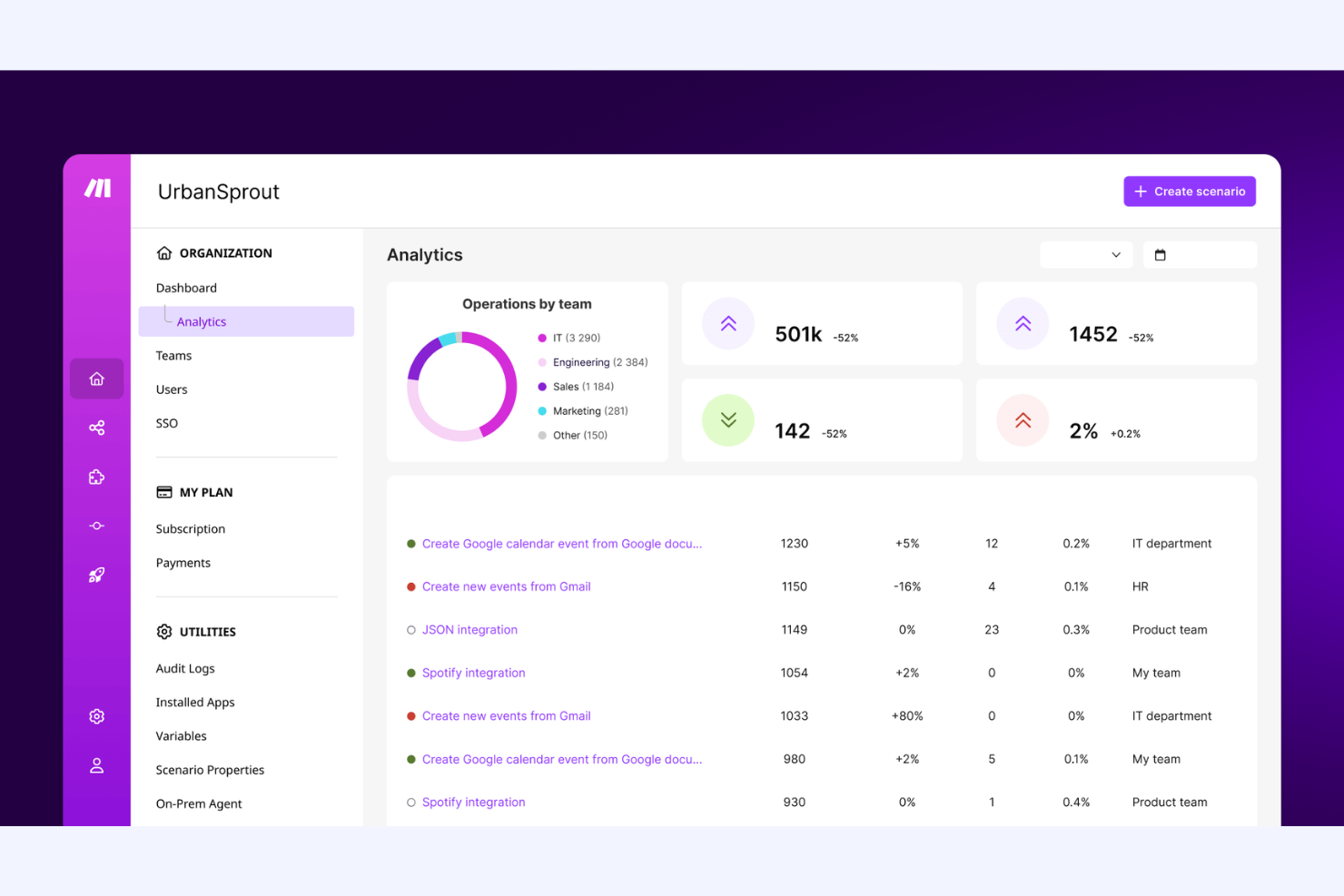
Make è una piattaforma di integrazione come servizio (Integration Platform as a Service) che consente agli utenti di automatizzare i flussi di lavoro e connettere applicazioni. Viene utilizzata da aziende e sviluppatori per aumentare la produttività e ottimizzare le operazioni.
Perché Make è una valida alternativa a Workato: Make è adatto a team che preferiscono vedere e controllare ogni fase di un flusso di lavoro. Puoi costruire scenari multi-step utilizzando una tela visiva con percorsi logici chiari. Supporta instradamento avanzato, filtri e gestione dei dati in un'unica vista. Questo funziona bene se il tuo team desidera un controllo pratico invece di un'automazione basata su ricette.
Caratteristiche principali e integrazioni:
Le funzionalità includono un builder di scenari drag-and-drop che mostra l'intero layout del flusso di lavoro. Supporta la gestione degli errori e i controlli di esecuzione a ogni passaggio. Puoi anche esaminare la cronologia delle esecuzioni per risolvere i problemi e adattare la logica nel tempo.
Le integrazioni includono Google Sheets, Slack, Airtable, Notion, Google Gmail, Google Drive, Shopify, HubSpot CRM, Stripe, OpenAI e altro ancora.
Pros and Cons
Pros:
- Design visivo chiaro dei flussi di lavoro
- Controllo dettagliato della logica
- Costruzione flessibile degli scenari
Cons:
- La gestione degli errori può essere complessa
- Richiede una pianificazione logica

Boomi
Ideale per automazione guidata dall'IA
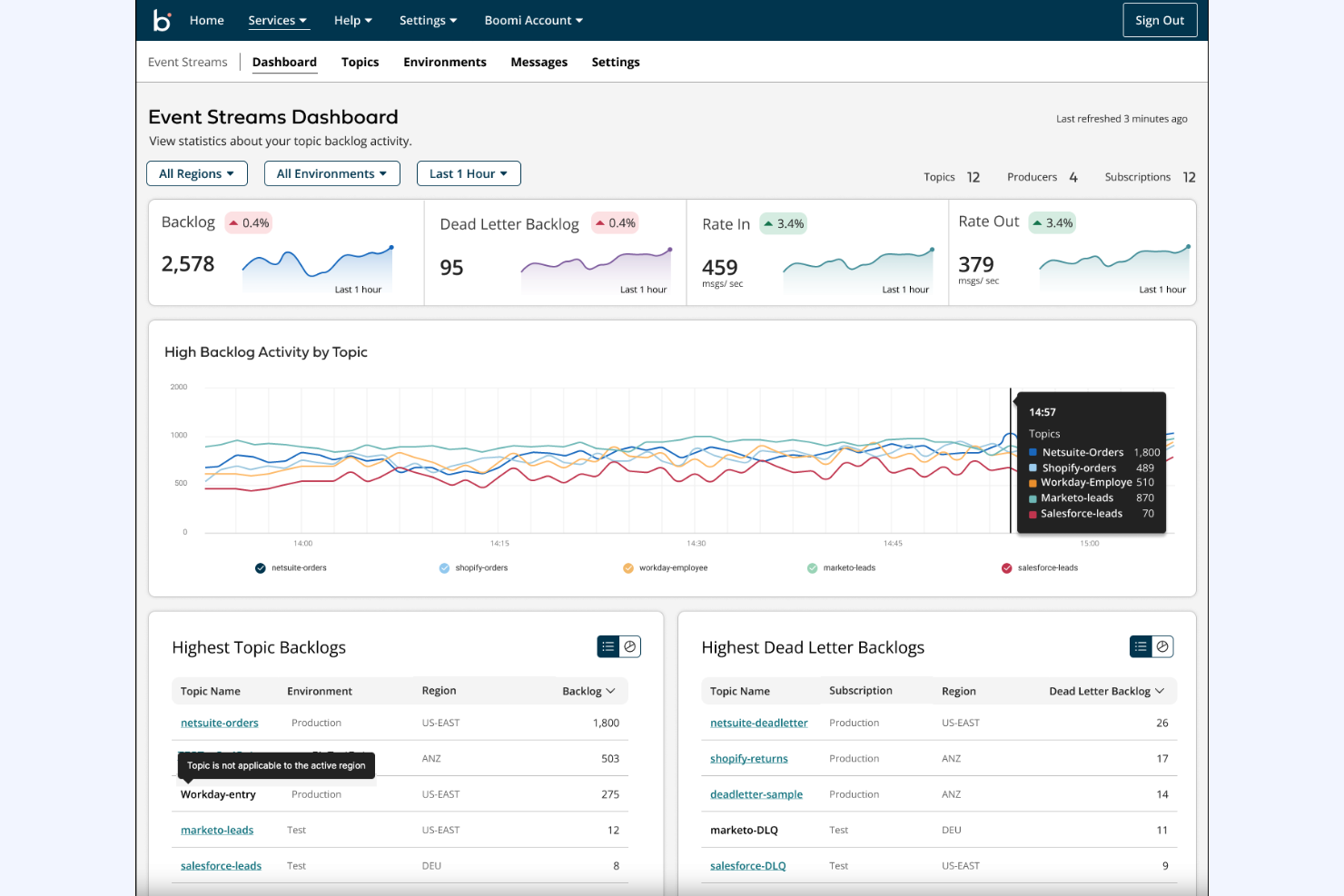
Boomi è una piattaforma di integrazione che collega applicazioni e automatizza processi per diverse funzioni aziendali. È ampiamente utilizzata da professionisti IT e team di operazioni aziendali per aumentare la produttività e l'efficienza.
Perché Boomi è una valida alternativa a Workato: L'automazione guidata dall'IA di Boomi, lo sviluppo low-code e le integrazioni in tempo reale supportano una gestione dei flussi di lavoro rapida ed efficiente. Queste funzionalità aiutano il tuo team ad automatizzare facilmente compiti complessi. La versatilità della piattaforma tra vari settori, inclusi finanza, sanità e commercio al dettaglio, la rende una scelta solida per diverse esigenze aziendali. È conforme a numerosi standard, tra cui SOC 2, GDPR e HIPAA.
Caratteristiche e integrazioni principali:
Le caratteristiche includono connettori predefiniti che consentono di automatizzare lo scambio di dati tra applicazioni e fonti di dati, l'accesso a oltre 300 milioni di integrazioni autoapprendenti e aggiornamenti automatici della piattaforma che distribuiscono modifiche sincronizzate ai tuoi processi di integrazione. Questi strumenti permettono agli utenti non tecnici di integrare e automatizzare senza conoscenze estese di programmazione.
Le integrazioni comprendono SAP, Salesforce, AWS, NetSuite, Google Drive, Microsoft Teams, Oracle, Workday, ServiceNow, Slack e altri.
Pros and Cons
Pros:
- Mappatura automatica dei dati e suggerimenti
- Piattaforma di sviluppo low-code
- Supporta l'integrazione dei dati in tempo reale
Cons:
- Fasce di prezzo elevate
- Interfaccia utente complicata
Ideale per la gestione dei dati con intelligenza artificiale
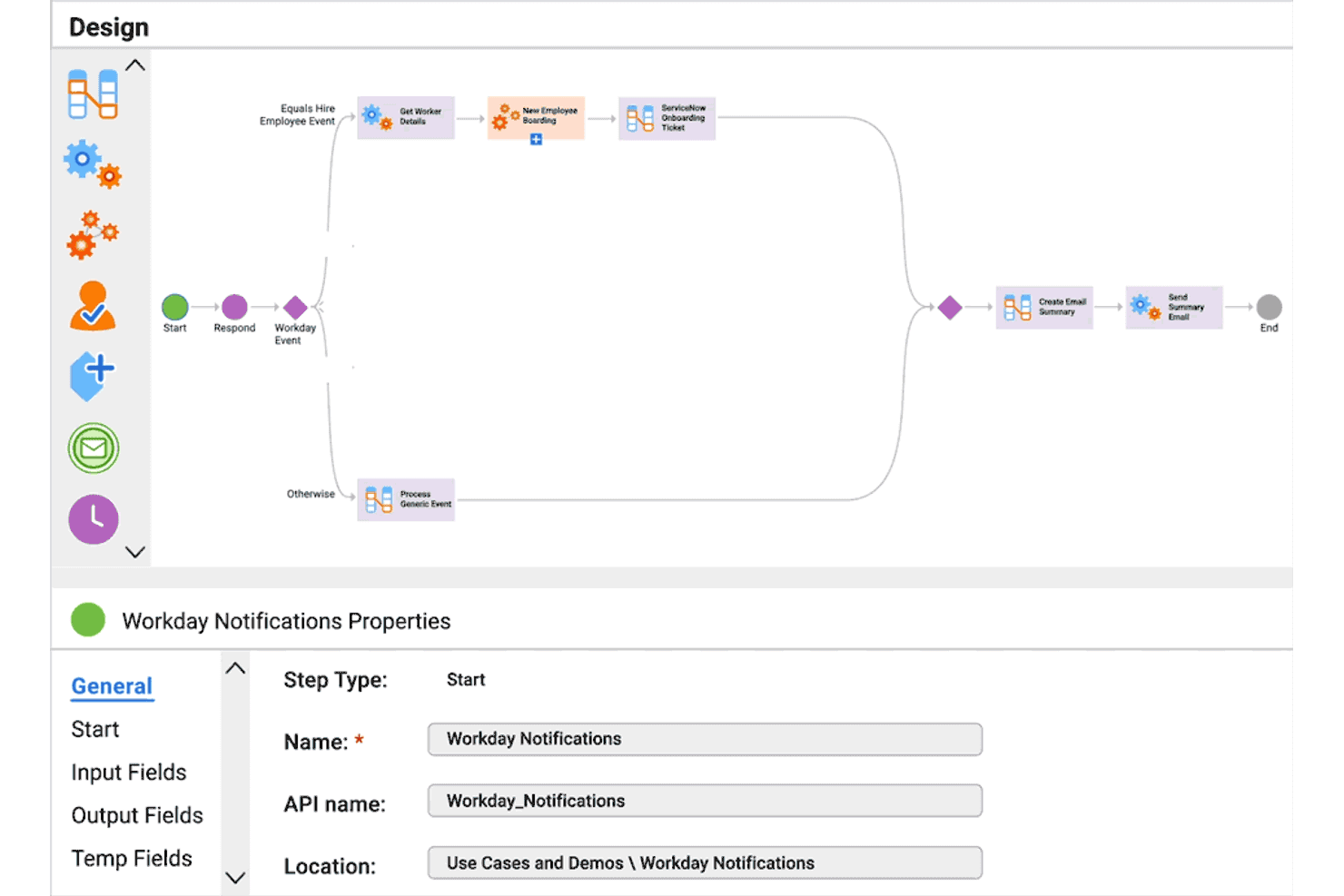
Informatica è una piattaforma di integrazione dati che aiuta le aziende a gestire e processare i dati tra diversi sistemi. È utilizzata principalmente da grandi imprese e professionisti IT che desiderano rafforzare il processo decisionale basato sui dati.
Perché Informatica è una buona alternativa a Workato: Informatica offre una gestione dei dati potenziata dall’AI, permettendo al tuo team di automatizzare e ottimizzare i flussi di lavoro sui dati. L’attenzione alla qualità e alla governance dei dati garantisce processi affidabili. La scalabilità della piattaforma la rende adatta alle aziende che necessitano di soluzioni estese per i dati.
Funzionalità e integrazioni principali:
Le funzionalità includono automazione intelligente guidata dall’AI, avanzati strumenti per la qualità dei dati per garantirne l’accuratezza e integrazione dei dati nel cloud per un accesso agevole. Queste funzionalità aiutano il tuo team a mantenere standard dati elevati.
Le integrazioni includono Salesforce, SAP, Microsoft Azure, Google Analytics, Oracle, Snowflake, Tableau, IBM, Workday e altre ancora.
Pros and Cons
Pros:
- Eccellenti capacità di gestione dei dati
- Focalizzazione sulla qualità dei dati
- Ampia libreria di trasformazioni predefinite
Cons:
- Richiede un’infrastruttura IT significativa
- Il design legacy manca di flessibilità


IBM App Connect offre software di integrazione e automazione aziendale per organizzazioni che gestiscono sistemi misti in cloud e on-premises. È utilizzato da grandi team che devono connettere applicazioni, gestire API e automatizzare processi su diversi ambienti.
Perché IBM App Connect è una buona alternativa a Workato: IBM App Connect supporta configurazioni di cloud ibrido in cui il tuo team esegue carichi di lavoro sia on-premises che in cloud. Puoi creare integrazioni e workflow che coprono ambienti diversi senza dover centralizzare tutto su un'unica piattaforma. Include strumenti per l'integrazione applicativa, la messaggistica e la gestione delle API sotto una governance condivisa. È ideale per team che necessitano di un controllo più stretto su sistemi distribuiti piuttosto che solo automazione cloud.
Funzionalità e integrazioni principali:
Le funzionalità includono la gestione centralizzata delle policy per controllare come vengono eseguite le integrazioni nei vari ambienti. Supporta la messaggistica basata su eventi per la gestione dei dati in tempo reale. Puoi inoltre gestire i cicli di vita delle integrazioni con strumenti di monitoraggio e controllo delle versioni.
Le integrazioni includono AWS, Salesforce, Microsoft Teams, Microsoft Dynamics 365, Mailchimp, monday.com, Shopify, Dropbox, Google Gmail, HubSpot e altri ancora.
Pros and Cons
Pros:
- Solido supporto cloud ibrido
- Funziona bene con sistemi on-premises
- Alta scalabilità per le aziende
Cons:
- Richiede amministratori esperti
- Impatto notevole sulla piattaforma

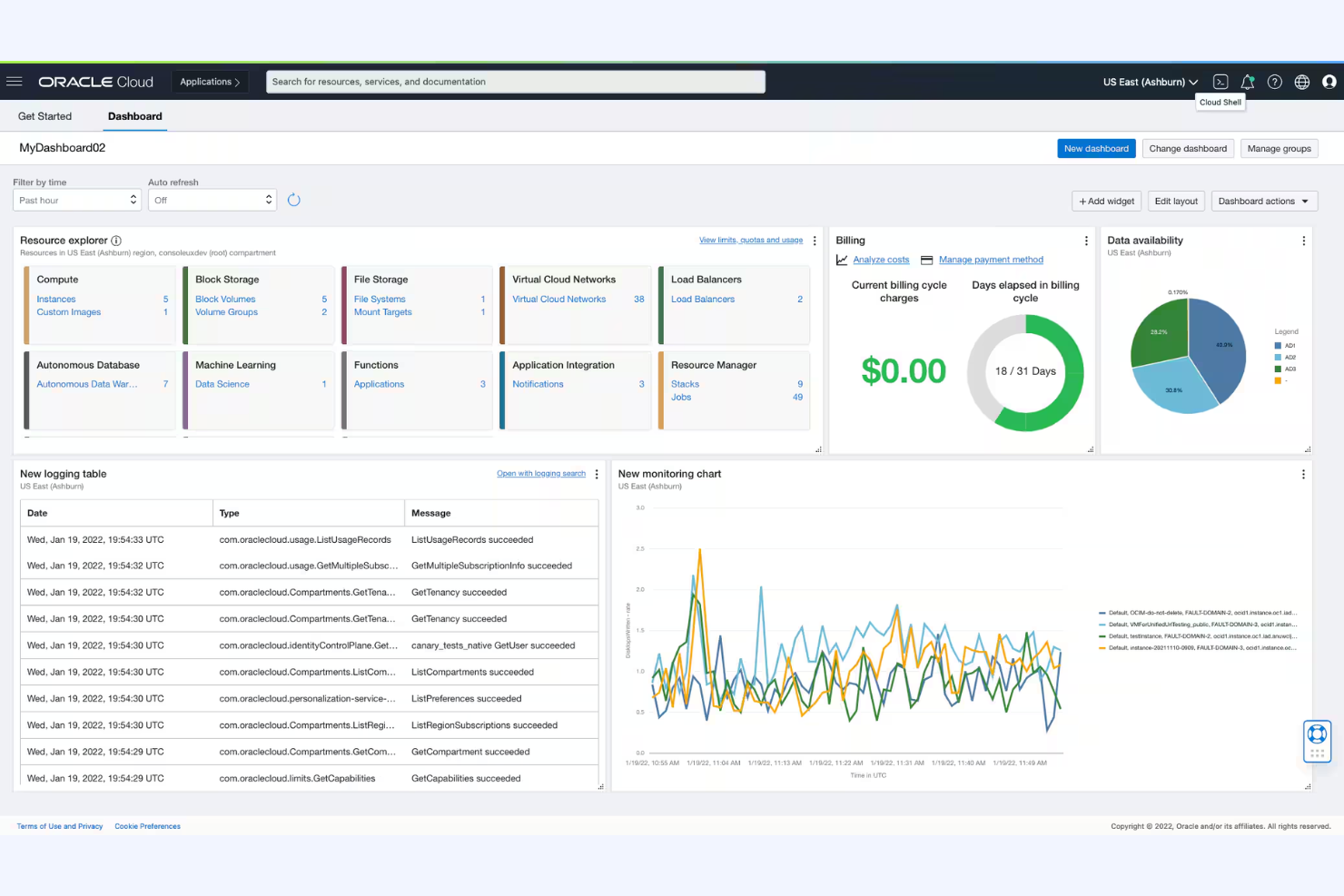
Oracle Cloud Infrastructure (OCI) è una piattaforma cloud che fornisce software aziendali per l'integrazione, l'automazione e la gestione dei dati. Viene utilizzata da grandi organizzazioni che necessitano di capacità di integrazione in grado di connettere sistemi, automatizzare processi e gestire flussi di dati complessi.
Perché Oracle Cloud Infrastructure è una valida alternativa a Workato: OCI è ideale per i team che già utilizzano sistemi principali basati su tecnologia Oracle. È possibile creare integrazioni, automatizzare flussi di lavoro e gestire lo spostamento dei dati all'interno dello stesso ambiente cloud. Supporta processi aziendali complessi con strumenti di governance e controllo integrati. Questa soluzione è particolarmente efficace se il vostro team desidera un'automazione strettamente allineata ai sistemi Oracle anziché una piattaforma autonoma.
Funzionalità principali e integrazioni:
Le funzionalità includono strumenti di progettazione visiva per le integrazioni che aiutano il team a costruire e gestire i flussi. Supporta l'automazione guidata da eventi per i processi aziendali. È inoltre possibile monitorare e gestire le integrazioni con monitoraggio e gestione degli errori integrati.
Le integrazioni includono Amazon S3, HubSpot, Microsoft Outlook, Salesforce, SAP, ServiceNow, Spotify, Workday e altri.
Pros and Cons
Pros:
- Si adatta bene alle grandi imprese
- Gestisce logiche di processo complesse
- Ideale per ecosistemi basati su Oracle
Cons:
- Elevato sforzo di configurazione
- Onboarding più lento per i team

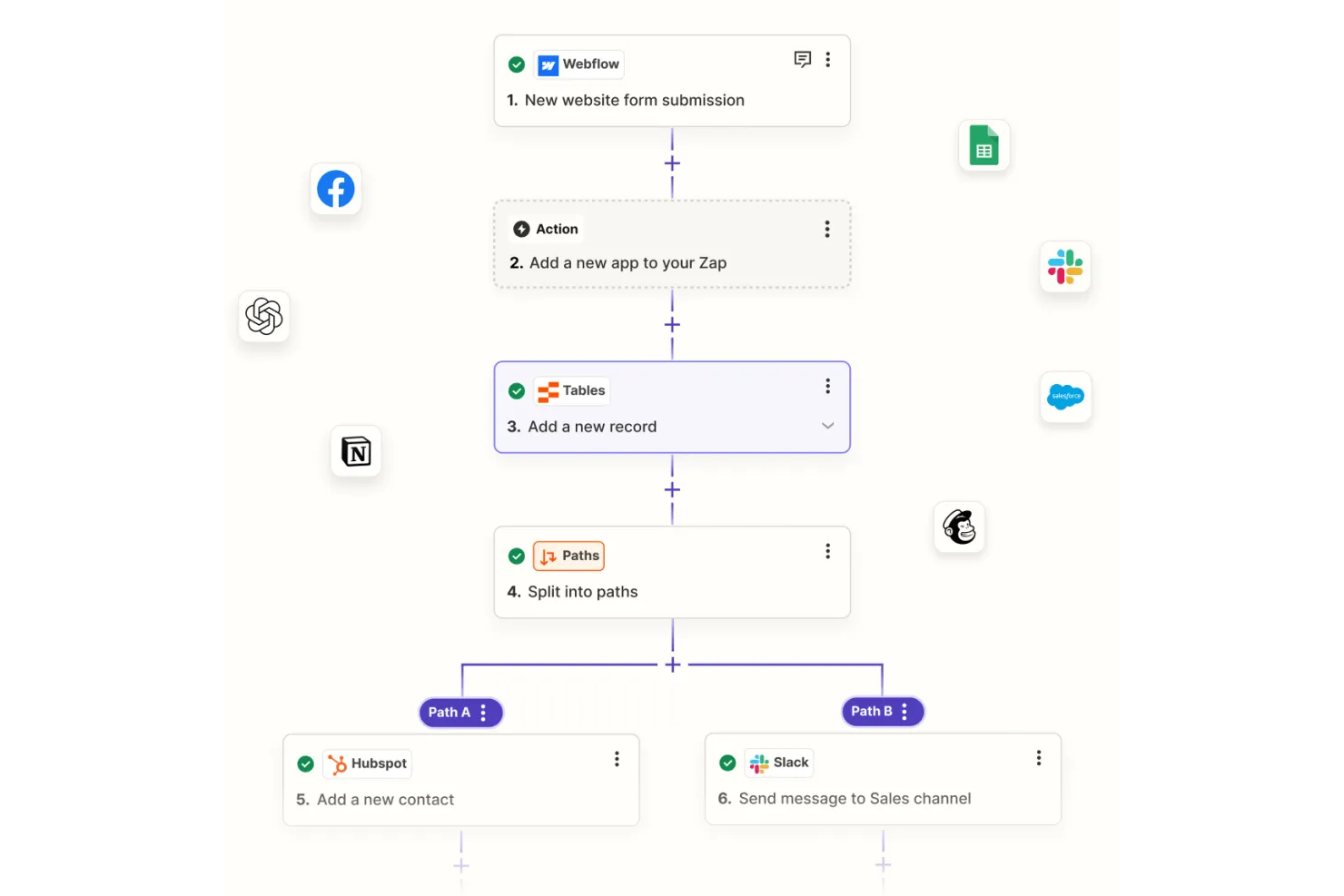
Zapier è uno strumento di automazione che collega diverse app e servizi per automatizzare i flussi di lavoro senza la necessità di programmare. È popolare tra piccole imprese, freelance e team che desiderano risparmiare tempo su attività ripetitive, come la sincronizzazione delle email con un CRM.
Perché Zapier è una buona alternativa a Workato: La piattaforma di automazione no-code di Zapier è facile da usare e ti permette di configurare flussi di lavoro e pipeline in modo rapido. Grazie alla sua interfaccia intuitiva, puoi creare Zaps per automatizzare attività tra diverse applicazioni. La piattaforma è accessibile anche a chi ha conoscenze tecniche minime, rendendola perfetta per i team che necessitano di soluzioni di automazione semplici ed efficienti.
Funzionalità e integrazioni principali:
Le funzionalità includono un editor semplice drag-and-drop per creare flussi di lavoro, modelli personalizzabili per iniziare rapidamente e una cronologia integrata delle attività per il monitoraggio. Questi strumenti facilitano l'automazione delle attività, permettendo al tuo team di concentrarsi su lavori più importanti.
Le integrazioni includono Google Gmail, Slack, Trello, Google Sheets, Mailchimp, Stripe, HubSpot, Facebook Lead Ads, Notion, Salesforce e altri ancora.
Pros and Cons
Pros:
- Esperienza utente intuitiva
- Non è richiesta programmazione
- Ampia selezione di modelli
Cons:
- Limitazioni delle app sul piano gratuito
- Può diventare costoso con la scala

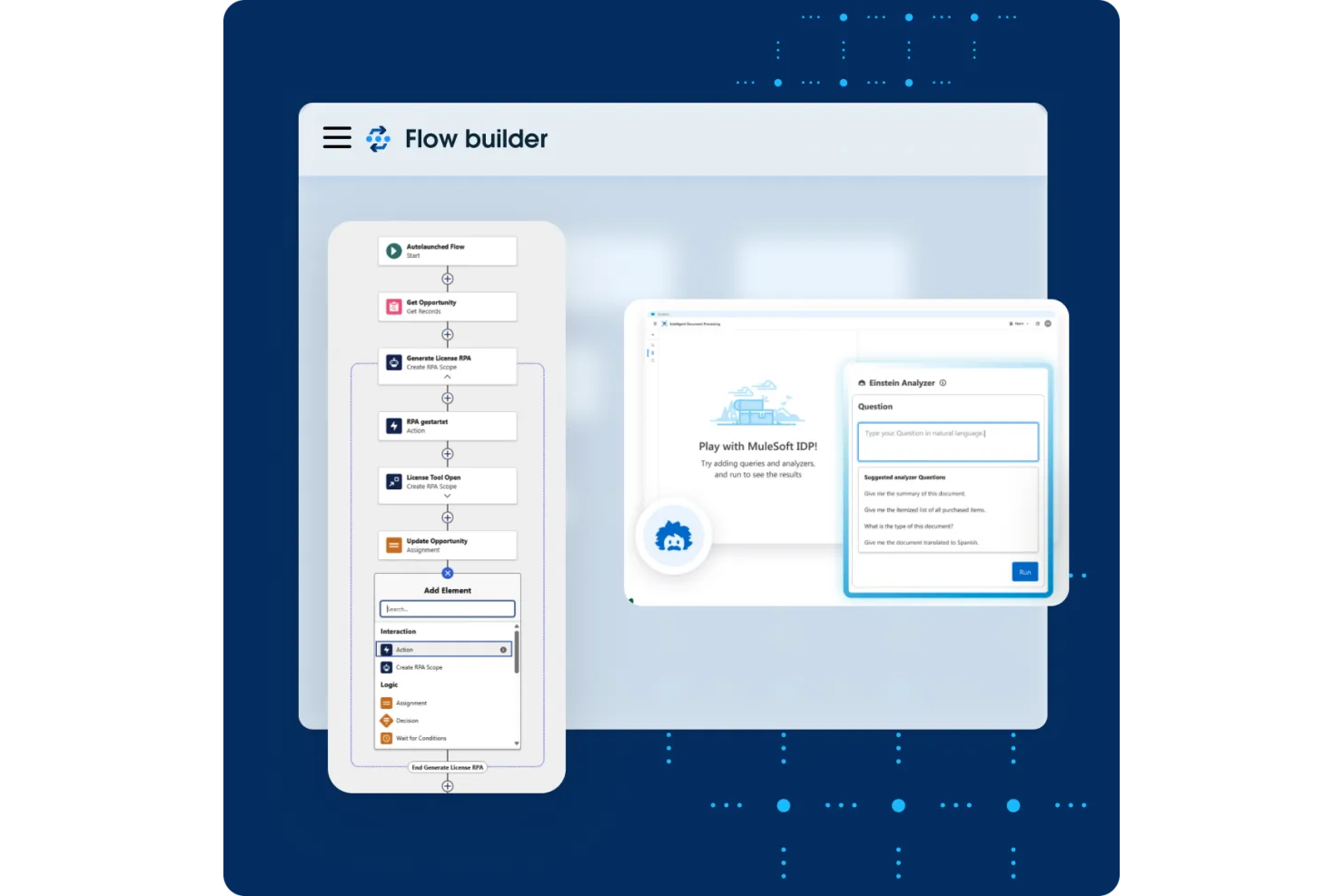
MuleSoft è una piattaforma di integrazione che si concentra sul collegamento di applicazioni, dati e dispositivi tramite un approccio guidato dalle API. È utilizzata principalmente dai team IT e dagli sviluppatori per facilitare una comunicazione fluida tra i sistemi e potenziare le iniziative di trasformazione digitale.
Perché MuleSoft è una valida alternativa a Workato: MuleSoft offre connettività guidata dalle API, che consente al tuo team di progettare, costruire e gestire integrazioni personalizzate in modo efficiente. La piattaforma fornisce Anypoint Studio, un'interfaccia intuitiva per creare flussi di integrazione, e Anypoint Exchange, una libreria di connettori e modelli predefiniti. Queste funzionalità la rendono una scelta ideale per le aziende che fanno grande affidamento sulle integrazioni API per le loro operazioni. Offre inoltre funzionalità di sicurezza di livello aziendale.
Caratteristiche e integrazioni principali:
Le caratteristiche includono un'interfaccia visiva per la creazione delle integrazioni, una suite completa per la gestione delle API e strumenti avanzati per il monitoraggio. Questi strumenti permettono al tuo team di gestire e ottimizzare efficacemente le performance delle integrazioni senza necessità di un ampio uso del codice.
Le integrazioni includono Salesforce, SAP, AWS, Microsoft Dynamics 365, Oracle, ServiceNow, Workday, Zendesk, Slack, Google Drive e altre ancora.
Pros and Cons
Pros:
- Ottime capacità di gestione delle API
- Ampia libreria di connettori
- Supporta integrazioni complesse
Cons:
- Richiede conoscenza di Java o XML
- Prezzo basato sul consumo delle chiamate API


Tray è una piattaforma di integrazione e automazione creata per i team che devono connettere strumenti SaaS e automatizzare processi complessi. È utilizzata da team tecnici che gestiscono grandi volumi di logica dei flussi di lavoro e di movimentazione dei dati.
Perché Tray è una valida alternativa a Workato: Tray si adatta ai team che creano automazioni avanzate su molti strumenti SaaS. Puoi creare flussi di lavoro multi-step con logica dettagliata e gestione dei dati. Supporta connettori personalizzati e componenti di flusso di lavoro riutilizzabili per garantire la scalabilità, e aiuta a semplificare le attività di Extract Transform Load (ETL). Questo è ideale se il tuo team ha bisogno di un controllo approfondito sull’automazione SaaS, piuttosto che l’utilizzo di ricette guidate.
Funzionalità e integrazioni principali:
Le funzionalità includono un costruttore di flussi di lavoro visivo progettato per il controllo avanzato della logica. Supporta scripting personalizzati per la gestione di casi dati complessi. È anche possibile gestire le versioni dei flussi di lavoro e l’esecuzione su larga scala.
Le integrazioni includono Salesforce, HubSpot, Slack, Zendesk, NetSuite, ServiceNow, Atlassian Jira, Workday, Snowflake, Marketo e altre ancora.
Pros and Cons
Pros:
- Gestisce logiche di flusso di lavoro complesse
- Ottima scalabilità per i team SaaS
- Forti opzioni di personalizzazione
Cons:
- Controllo eccessivo per casi d’uso semplici
- Meno adatto ai team piccoli
Altre alternative a Workato
Ecco alcune ulteriori alternative a Workato che non sono state incluse nella mia selezione, ma che vale comunque la pena prendere in considerazione:
- Flowgear
Ideale per soluzioni di integrazione rapide
- Jitterbit iPaaS
Ideale per l'automazione enterprise basata su IA
- SnapLogic
Ideale per l'integrazione dei dati in tempo reale


Come valuto le alternative a Workato
Divido la mia valutazione in due livelli: le funzionalità di base che qualsiasi strumento iPaaS deve offrire, come i creatori visivi di flussi di lavoro e i connettori nativi per gli strumenti di gestione dei progetti, e gli elementi distintivi che separano le opzioni migliori dalle altre.
Funzionalità fondamentali (requisiti minimi per questo elenco)
Quando seleziono gli strumenti per il mio elenco, assegno a ciascuno un punteggio su una scala da 0 (non offre la funzionalità) a 5 (eccelle in quest'area) per ogni funzionalità fondamentale elencata di seguito. Poi calcolo il punteggio totale dello strumento come percentuale. Ogni strumento deve raggiungere un punteggio totale minimo del 65% per essere preso in considerazione.
- Connettori per applicazioni predefiniti: verifico l'ampiezza della libreria di connettori per applicazioni di gestione dei progetti, CRM, ITSM e finanza, prestando particolare attenzione a strumenti come Jira, Asana, Salesforce e ServiceNow.
- Creatore visivo di automazioni dei flussi di lavoro: il creatore dovrebbe supportare diramazioni condizionali e logiche a più passaggi, in modo che i team operativi di gestione dei progetti possano progettare sincronizzazioni senza scrivere codice.
- Struttura di attivazione e azioni: valuto se le automazioni possono attivarsi in base a eventi in tempo reale, essere eseguite secondo pianificazioni e concatenare più azioni in un unico flusso di lavoro.
- Trasformazione e mappatura dei dati: la mappatura dei campi tra strumenti come Monday e HubSpot spesso richiede una riformattazione; cerco il supporto per le formule e le tabelle di ricerca.
- Supporto per API e webhook: per le applicazioni prive di connettori nativi, verifico l'accesso alle API REST/SOAP e le opzioni webhook per confermare che sia possibile creare connessioni personalizzate.
- Monitoraggio e gestione degli errori: i log delle esecuzioni, i nuovi tentativi automatici e gli avvisi di errore sono importanti quando una sincronizzazione interrotta tra lo strumento di gestione dei progetti e il sistema di fatturazione blocca uno sprint.
Dopo aver ottenuto un elenco di strumenti che soddisfano questi criteri, valuto ciò che distingue ogni piattaforma.
Fattori distintivi (ciò che differenzia i fornitori)
Ecco come confronto i diversi fornitori:
Funzionalità di spicco
I modelli di ricette predefiniti sono un importante elemento distintivo: consentono ai team operativi di gestione dei progetti di attivare in pochi minuti automazioni comuni, come una sincronizzazione dello stato da Jira a Slack, invece di crearle da zero. Cerco anche passaggi con intervento umano, in cui un flusso di lavoro si mette in pausa per l'approvazione tramite Slack o Teams prima di promuovere un progetto alla fase successiva. Le funzionalità di governance, come gli ambienti di prova e l'accesso basato sui ruoli, sono importanti quando più team creano automazioni all'interno di una catena di strumenti condivisa per la gestione dei progetti.
Oltre le funzionalità
Il modello di prezzo è molto importante in questo caso. Alcune piattaforme applicano un costo per attività o per esecuzione del flusso di lavoro, il che può diventare imprevedibile quando il PMO amplia le automazioni a decine di progetti. Valuto se la struttura delle licenze rimane gestibile con l'aumento dei volumi. Anche il tempo necessario per ottenere valore è un fattore che considero: le piattaforme con modelli solidi incentrati sulla gestione dei progetti e curve di apprendimento ridotte consentono ai team operativi di lanciare la prima automazione in pochi giorni, non in settimane. Verifico inoltre la presenza delle certificazioni SOC 2 e ISO 27001, soprattutto quando i flussi di lavoro trasferiscono dati sensibili sui progetti tra sistemi.
Perché cercare un'alternativa a Workato?
Sebbene Workato sia una buona scelta come piattaforma di integrazione come servizio (iPaaS), esistono diversi motivi per cui alcuni utenti cercano soluzioni alternative. Potresti cercare un'alternativa a Workato perché…
- Hai bisogno di opzioni di prezzo più flessibili
- Il tuo team richiede interfacce utente più semplici
- Cerchi un'assistenza clienti migliore
- Hai bisogno di analisi dei dati più avanzate
- La tua azienda opera in regioni soggette a restrizioni
- Cerchi procedure di inserimento più semplici
Se ti riconosci in una di queste situazioni, sei nel posto giusto. Il mio elenco include diverse opzioni di piattaforma di integrazione come servizio (iPaaS) più adatte ai team che affrontano queste difficoltà con Workato e cercano soluzioni alternative.
Caratteristiche principali di Workato
Ecco alcune delle caratteristiche principali di Workato, che ti aiuteranno a confrontare ciò che offrono le soluzioni alternative:
- Integrazione e automazione: connette diverse applicazioni e automatizza i flussi di lavoro per aumentare la produttività nell'integrazione.
- Sicurezza e conformità: fornisce potenti misure di sicurezza e protocolli di governance per proteggere i dati.
- Soluzioni basate sull'intelligenza artificiale: utilizza l'intelligenza artificiale per migliorare i flussi di lavoro, fornendo diagnosi e informazioni in tempo reale.
- Connettività universale: si integra con i moderni sistemi SaaS, i sistemi in sede e le infrastrutture precedenti per offrire un'ampia connettività.
- Funzionalità agentiche: offre un ambiente a basso codice per progettare e gestire agenti intelligenti.
- MCP aziendale: supporta la creazione, la condivisione e l'esposizione sicura di competenze e flussi di lavoro aziendali.
- Funzionalità di orchestrazione: gestisce flussi di lavoro, applicazioni, dati e API per le operazioni aziendali in tempo reale.
- Trasparenza operativa: fornisce il monitoraggio in tempo reale delle prestazioni e dello stato del sistema con diagnosi integrate.
- Infrastruttura sempre attiva: garantisce un'elevata disponibilità con aggiornamenti senza interruzioni e ridimensionamento automatico.
- Supporto e risorse: offre supporto globale 24 ore su 24, 7 giorni su 7, e accesso a numerose risorse per gli utenti.
- Automazione dei processi robotici (RPA): utilizza bot per automatizzare attività ripetitive basate su regole.
Qual è il prossimo passo:
Se stai valutando una piattaforma di integrazione come servizio (iPaaS), contatta gratuitamente un consulente di SoftwareSelect per ricevere consigli.
Compili un modulo e partecipi a una breve conversazione in cui vengono analizzati nel dettaglio i tuoi requisiti. In seguito riceverai una selezione ristretta di software da valutare. Ti assisteranno inoltre durante l'intero processo di acquisto, comprese le negoziazioni sul prezzo.