

Le 10 migliori alternative a RescueTime per la produttività nel 2026

Elenco delle migliori alternative a RescueTime


In qualità di project manager, sai che monitorare il tempo e la produttività è essenziale per il successo del tuo team. Tuttavia, forse hai notato che RescueTime non soddisfa pienamente le tue esigenze. Che si tratti di funzionalità mancanti, di possibilità di personalizzazione limitate o semplicemente del fatto che non si adatta al tuo flusso di lavoro, non sei il solo a cercare alternative.
In base alla mia esperienza nel testare e recensire software, ho visto come lo strumento giusto possa fare la differenza. Ti serve qualcosa che sia in linea con gli obiettivi della tua azienda e che affronti le tue sfide specifiche.
In questo articolo condividerò le mie migliori alternative a RescueTime. Ti offrirò una panoramica imparziale di ogni opzione, così potrai trovare quella più adatta al tuo team. Esaminiamo le soluzioni per il monitoraggio del tempo che possono aiutarti a gestire i tuoi progetti in modo più efficace.
Che cos'è RescueTime?
RescueTime è un software per il monitoraggio del tempo e della produttività che ti aiuta a controllare come impieghi le tue ore di lavoro. Viene utilizzato da freelance, lavoratori da remoto e team che desiderano migliorare la propria produttività. Fornisce informazioni sulle tue abitudini quotidiane, consentendoti di prendere decisioni consapevoli sulla gestione del tempo.
Funzionalità come il monitoraggio automatico del tempo, i report dettagliati e la definizione degli obiettivi aiutano a comprendere i propri schemi di lavoro e a migliorare l'efficienza. Nel complesso, RescueTime offre agli utenti dati preziosi per ottimizzare la giornata lavorativa e aumentare la produttività.
Tabella comparativa delle alternative a RescueTime
Questa tabella comparativa riassume i dettagli sui prezzi delle mie migliori alternative a RescueTime:
| Tool | Best For | Trial Info | Price | ||
|---|---|---|---|---|---|
| 1 | Ideale per il monitoraggio del tempo dei team multipiattaforma | Piano gratuito + prova gratuita di 7 giorni disponibile | A partire da $3.99/utente/mese (fatturato annualmente) | Website | |
| 2 | Ideale per la registrazione automatica del tempo | Prova gratuita di 14 giorni + demo gratuita disponibile | A partire da $9/utente/mese (con fatturazione annuale) | Website | |
| 3 | Ideale per il monitoraggio del tempo con un solo clic | Prova gratuita di 14 giorni + piano gratuito + demo gratuita disponibili | A partire da $3.99/utente/mese (con fatturazione annuale) | Website | |
| 4 | Ideale per budgeting e reportistica | Piano gratuito disponibile | A partire da 8,50 $/utente/mese (con fatturazione annuale) | Website | |
| 5 | Ideale per il monitoraggio dettagliato della giornata lavorativa | Piano gratuito disponibile + prova gratuita di 14 giorni | A partire da $5.83/utente/mese (con fatturazione annuale) | Website | |
| 6 | Ideale per la produttività dei team remoti | Prova gratuita di 14 giorni + demo gratuita disponibile | A partire da $6.67/utente/mese (con fatturazione annuale) | Website | |
| 7 | Ideale per il monitoraggio privato del tempo | Prova gratuita di 14 giorni | Da $14/mese (fatturato annualmente) | Website | |
| 8 | Ideale per freelance e agenzie | Prova gratuita di 7 giorni | A partire da $9/user/month (con fatturazione annuale) | Website | |
| 9 | Ideale per la fatturazione integrata | Prova gratuita di 30 giorni + piano gratuito + demo gratuita disponibili | A partire da $9/utente/mese (con fatturazione annuale) | Website | |
| 10 | Ideale per l'analisi della concentrazione e della produttività | Piano gratuito disponibile | A partire da $12.99/mese (fatturato annualmente) | Website |

Perché fidarsi dei nostri consigli sui software
Il nostro team testa e recensisce software dal 2012. In quanto project manager noi stessi, sappiamo quanto sia difficile — e importante — scegliere il software giusto.
Per questa guida, abbiamo valutato gli strumenti attraverso test pratici e ricerche indipendenti, assegnando un punteggio agli strumenti in base ai nostri criteri di selezione. Ci basiamo inoltre sulle competenze di leader di pensiero del settore e di professionisti attivi nella gestione dei progetti.
Le nostre recensioni riflettono il nostro giudizio editoriale umano, non un discorso di vendita.
Revisori esperti:
Recensioni delle migliori alternative a RescueTime
Di seguito trovi i miei riepiloghi dettagliati delle migliori alternative a RescueTime incluse nel mio elenco. Le mie recensioni offrono uno sguardo approfondito alle funzionalità principali, ai vantaggi e agli svantaggi, alle integrazioni e ai casi d’uso ideali di ogni strumento, per aiutarti a trovare quello più adatto a te.

Clockify
Ideale per il monitoraggio del tempo dei team multipiattaforma

Clockify è un software per il monitoraggio del tempo che serve liberi professionisti, piccole aziende e grandi team, fornendo strumenti per tenere traccia delle ore di lavoro e gestire i progetti. Ti aiuta a monitorare la produttività, allocare le risorse e generare report.
Perché è una buona alternativa a RescueTime: ho selezionato Clockify perché offre una visibilità completa sulle registrazioni delle ore del team, indipendentemente dal sistema operativo o dal dispositivo. Risponde alle esigenze di rilevamento del tempo multipiattaforma offrendo app native per Windows, Mac, Linux, iOS, Android e browser web, con supporto completo per il monitoraggio offline. Questo garantisce che il tuo team distribuito possa registrare accuratamente le ore, monitorare in tempo reale i progressi dei progetti e mantenere le consegne ai clienti nei tempi previsti, indipendentemente dall'ambiente operativo preferito.
Funzionalità e integrazioni principali:
Le funzionalità includono strumenti organizzativi che aiutano a categorizzare e stabilire efficacemente la priorità delle attività. Puoi impostare tariffe fatturabili per diversi progetti e generare fatture in base alle ore registrate. Clockify offre inoltre una dashboard visiva che fornisce una panoramica dell'utilizzo del tempo e delle tendenze della produttività.
Le integrazioni includono Asana, Trello, Jira, QuickBooks Online, monday.com, GitHub e altro.
Pros and Cons
Pros:
- Supporta cinque utenti gratuiti
- Supporta grandi team
- Gestione flessibile dei progetti
Cons:
- Personalizzazione di base delle notifiche
- Funzionalità di configurazione della dashboard limitate

Timely
Ideale per la registrazione automatica del tempo
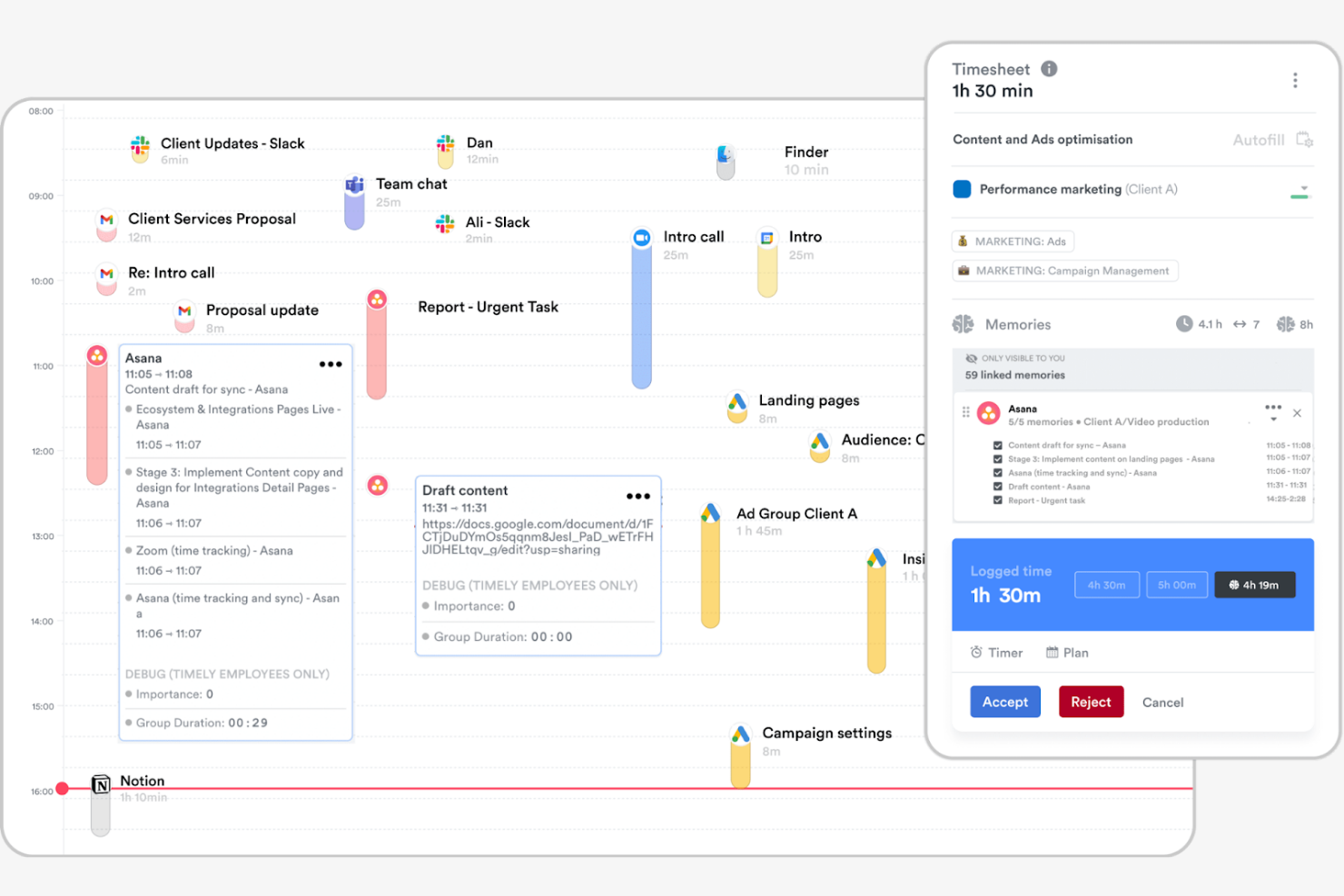
Timely è un software per il monitoraggio del tempo che utilizza l'intelligenza artificiale per registrare automaticamente le ore, rivolto a professionisti e team che danno priorità a un monitoraggio accurato e semplice. Può aiutarti a gestire i progetti, monitorare la produttività e allocare le risorse.
Perché è una valida alternativa a RescueTime: Timely offre un monitoraggio della memoria che registra le tue attività lavorative senza inserimento manuale. Questa funzionalità ti aiuta a registrare tutte le ore fatturabili e riduce il rischio di dimenticare delle registrazioni. Timely fornisce inoltre una dashboard dei progetti, che ti aiuta a comprendere come viene distribuito il tempo tra le attività e nei diversi progetti. La sua attenzione all'automazione e alla precisione lo rende adatto a chi desidera ridurre al minimo gli sforzi di monitoraggio manuale.
Funzionalità e integrazioni principali:
Le funzionalità includono sequenze temporali visive dei progetti per aiutarti a pianificare attività specifiche per un progetto. L'app offre report dettagliati per analizzare l'utilizzo del tempo e le tendenze della produttività. Puoi anche impostare budget di progetto e monitorare i progressi in tempo reale, assicurandoti di rimanere in linea con gli obiettivi.
Le integrazioni includono Asana, Trello, Slack, Google Calendar, QuickBooks Online, Xero e altro.
Pros and Cons
Pros:
- Monitoraggio automatico del tempo con l'intelligenza artificiale
- Sequenze temporali visive dei progetti
- Monitoraggio del budget in tempo reale
Cons:
- Personalizzazione limitata dei report
- Nessuna funzionalità per le dipendenze tra attività

TimeCamp
Ideale per il monitoraggio del tempo con un solo clic

TimeCamp è un software per il monitoraggio del tempo e la gestione dei progetti progettato per liberi professionisti, piccole imprese e team più grandi. Ti aiuta a monitorare le ore di lavoro, gestire i progetti e analizzare la produttività.
Perché è una valida alternativa a RescueTime: TimeCamp offre il monitoraggio del tempo con un solo clic, rendendo semplice avviare e interrompere i timer. Fornisce il monitoraggio automatico del tempo tramite il controllo dell'attività del computer, offrendoti informazioni dettagliate su come impieghi il tuo tempo. Puoi anche generare report dettagliati per analizzare la produttività e i progressi dei progetti. L'attenzione di TimeCamp alla facilità d'uso e al monitoraggio dettagliato lo rende adatto ai team che cercano una gestione del tempo semplice e intuitiva.
Funzionalità e integrazioni principali:
Le funzionalità includono modelli di fattura personalizzati per semplificare il processo di fatturazione. Puoi impostare i budget dei progetti e monitorare le spese per favorire il controllo finanziario. TimeCamp offre anche il monitoraggio delle presenze, consentendoti di controllare la presenza dei dipendenti e i periodi di assenza.
Le integrazioni includono Asana, Trello, Slack, Jira, QuickBooks Online, Xero, monday.com e altro ancora.
Pros and Cons
Pros:
- Monitoraggio del tempo con un solo clic
- Monitoraggio automatico delle attività
- Configurazione e utilizzo semplici
Cons:
- Avvisi del timer limitati
- Funzionalità limitate di pianificazione dei progetti

Everhour
Ideale per budgeting e reportistica

Everhour è uno strumento per il monitoraggio del tempo e la gestione dei progetti, progettato per i team che necessitano di funzionalità dettagliate di budgeting e reportistica. Ti aiuta a monitorare il tempo, gestire i budget e generare fogli presenze.
Perché è una buona alternativa a RescueTime: Everhour offre funzionalità avanzate di budgeting e reportistica adatte ai team che lavorano per progetti. Puoi impostare e monitorare i budget dei progetti, assicurandoti di rimanere entro i limiti finanziari. Gli strumenti di reportistica di Everhour forniscono informazioni sulle prestazioni del team e sull'avanzamento dei progetti, aiutandoti a prendere decisioni informate. La sua attenzione alla gestione finanziaria lo rende una buona scelta per i team che necessitano di soluzioni complete per il budgeting.
Funzionalità e integrazioni principali:
Le funzionalità includono la generazione di fatture a partire dal tempo monitorato, per semplificare i processi di fatturazione, e il calcolo delle ferie retribuite, che mostra quanto tempo hanno accumulato i membri del team. Puoi monitorare i costi e le tariffe fatturabili per diversi progetti e attività, così da gestire le esigenze dei vari clienti. Everhour offre inoltre una dashboard visiva che fornisce una panoramica dell'utilizzo del tempo e dello stato del budget.
Le integrazioni includono Asana, Trello, Jira, Slack, Basecamp, GitHub, ClickUp e altre.
Pros and Cons
Pros:
- Supporta i team che lavorano per progetti
- Aiuta a gestire i limiti finanziari
- Dashboard visiva per l'utilizzo del tempo
Cons:
- Nessun monitoraggio GPS o della posizione
- Avvisi di base sui budget dei progetti

TMetric
Ideale per il monitoraggio dettagliato della giornata lavorativa

TMetric è un software di monitoraggio del tempo progettato per liberi professionisti, piccole aziende e grandi team, per gestire le ore lavorative e la produttività. Ti aiuta a monitorare il tempo, gestire i progetti e generare report dettagliati.
Perché è una buona alternativa a RescueTime: TMetric offre un monitoraggio dettagliato della giornata lavorativa con funzionalità come il monitoraggio del tempo fatturabile e la gestione delle attività. Puoi gestire facilmente le ore lavorative del tuo team e assegnare attività, ottenendo visibilità sull'avanzamento dei progetti. Le funzionalità di reporting di TMetric ti consentono di analizzare la produttività e supportare decisioni informate.
Funzionalità distintive e integrazioni:
Le funzionalità includono strumenti per la definizione del budget dei progetti e il monitoraggio delle spese, a supporto della gestione finanziaria. TMetric offre anche il monitoraggio delle presenze, che ti consente di controllare la presenza dei dipendenti e gestire le assenze, oltre a una dashboard della produttività del team che può aiutarti a ottimizzare l'assegnazione dei carichi di lavoro.
Le integrazioni includono Asana, Trello, Jira, Slack, QuickBooks Online, GitHub, monday.com e altro.
Pros and Cons
Pros:
- Monitoraggio dettagliato della giornata lavorativa
- Supporta la gestione delle attività
- Flessibile per team di diverse dimensioni
Cons:
- Mancano funzionalità di analisi avanzate
- Modalità offline limitata

Ideale per la produttività dei team remoti
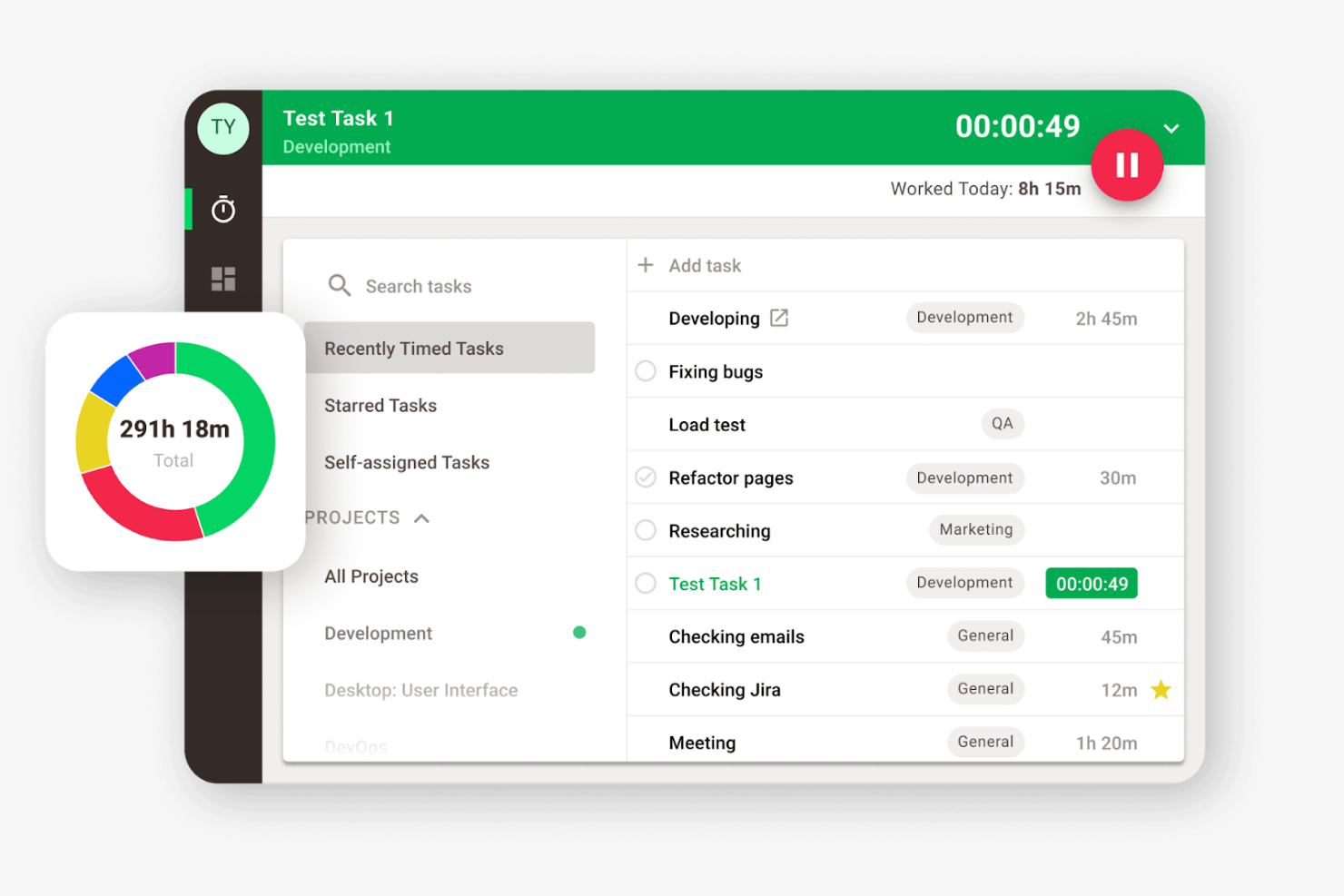
Time Doctor è un software per il monitoraggio del tempo e della produttività, progettato per team e aziende che lavorano da remoto e desiderano migliorare la produttività e la responsabilità. Può aiutarti a monitorare le ore lavorate, gestire le attività e analizzare la produttività.
Perché è una buona alternativa a RescueTime: Time Doctor offre funzionalità dettagliate per il monitoraggio dei dipendenti, inclusi screenshot e tracciamento delle attività, che ti aiutano a supervisionare le prestazioni del team remoto. Puoi monitorare il tempo dedicato ai progetti e impostare obiettivi di produttività, consentendo una migliore gestione del carico di lavoro.
Funzionalità e integrazioni principali:
Le funzionalità includono avvisi sulle distrazioni per mantenere il team concentrato, notificandogli quando si allontana dall'attività. Il software offre anche la gestione delle buste paga, semplificando la gestione dei pagamenti in base alle ore monitorate.
Le integrazioni includono Asana, Trello, Jira, Salesforce, Basecamp, GitHub e altro.
Pros and Cons
Pros:
- Gli avvisi sulle distrazioni migliorano la concentrazione
- Supporta l'impostazione di obiettivi di produttività
- Funzionalità di gestione delle buste paga
Cons:
- Strumenti limitati per la pianificazione basata sui turni
- La dashboard può risultare sovraccarica di dati

Memtime
Ideale per il monitoraggio privato del tempo
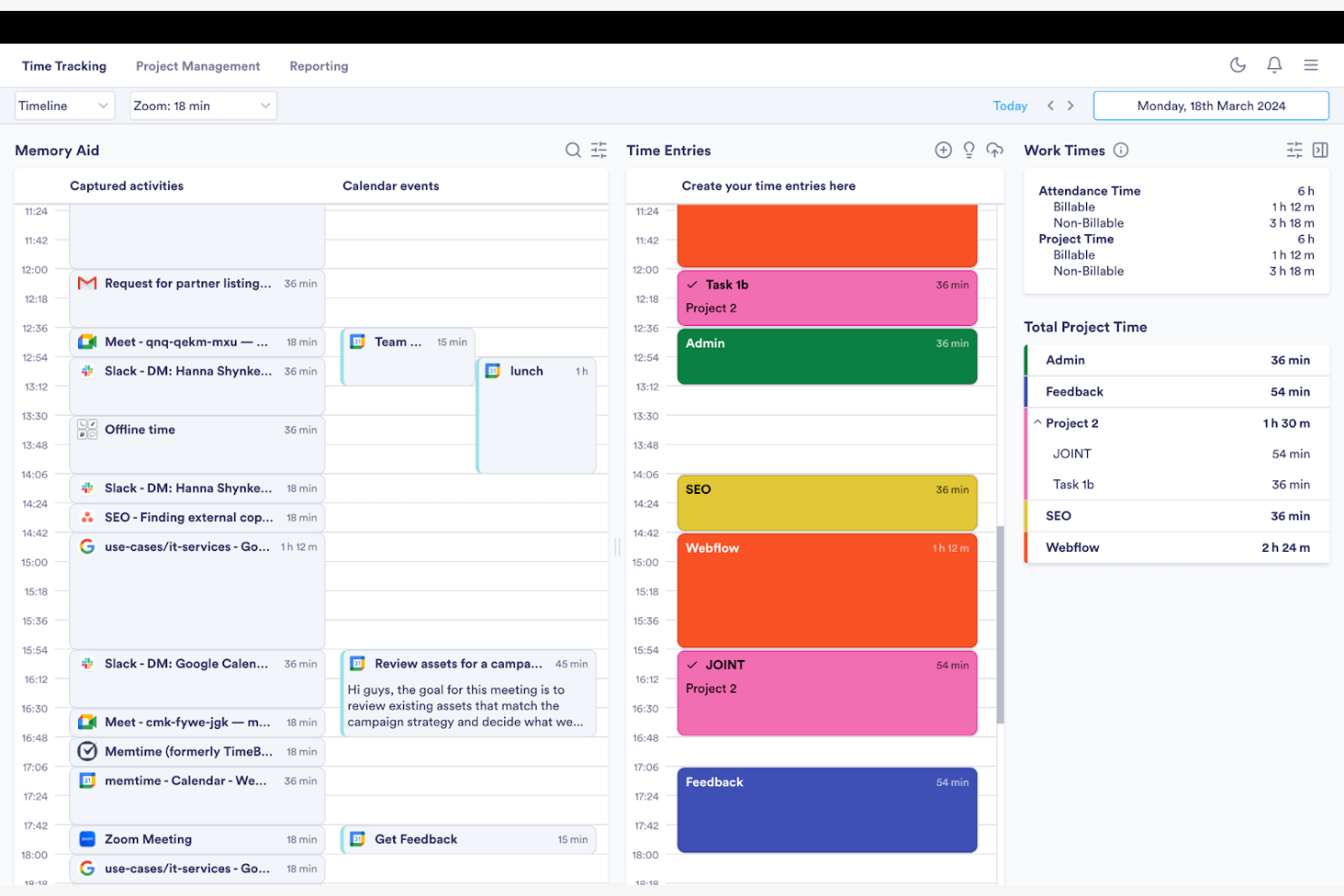
Memtime è un software per il monitoraggio del tempo progettato per professionisti e team che desiderano registrare le ore di lavoro senza inserimenti manuali. Ti aiuta a monitorare automaticamente il tempo e ad analizzare la produttività.
Perché è una buona alternativa a RescueTime: Memtime si concentra sulla registrazione automatica del tempo, eliminando la necessità di inserimenti manuali. Funziona in background mentre registra le attività e il tempo trascorso nei programmi, quindi genera report dettagliati che forniscono informazioni su come viene impiegato il tempo.
Funzionalità e integrazioni principali:
Le funzionalità includono il monitoraggio passivo del tempo, che registra le tue attività mentre lavori. Puoi generare schede attività personalizzate con dati storici illimitati per comprendere i tuoi schemi di produttività e individuare le aree di miglioramento.
Le integrazioni includono Google Calendar, Microsoft Teams, Asana, Jira Cloud, ClickUp e altro.
Pros and Cons
Pros:
- Registrazione passiva del tempo
- Ampia copertura delle integrazioni
- Sistema semplice per l'esportazione dei report
Cons:
- Integrazione limitata dei progetti
- Formattazione di base delle esportazioni

Bonsai
Ideale per freelance e agenzie
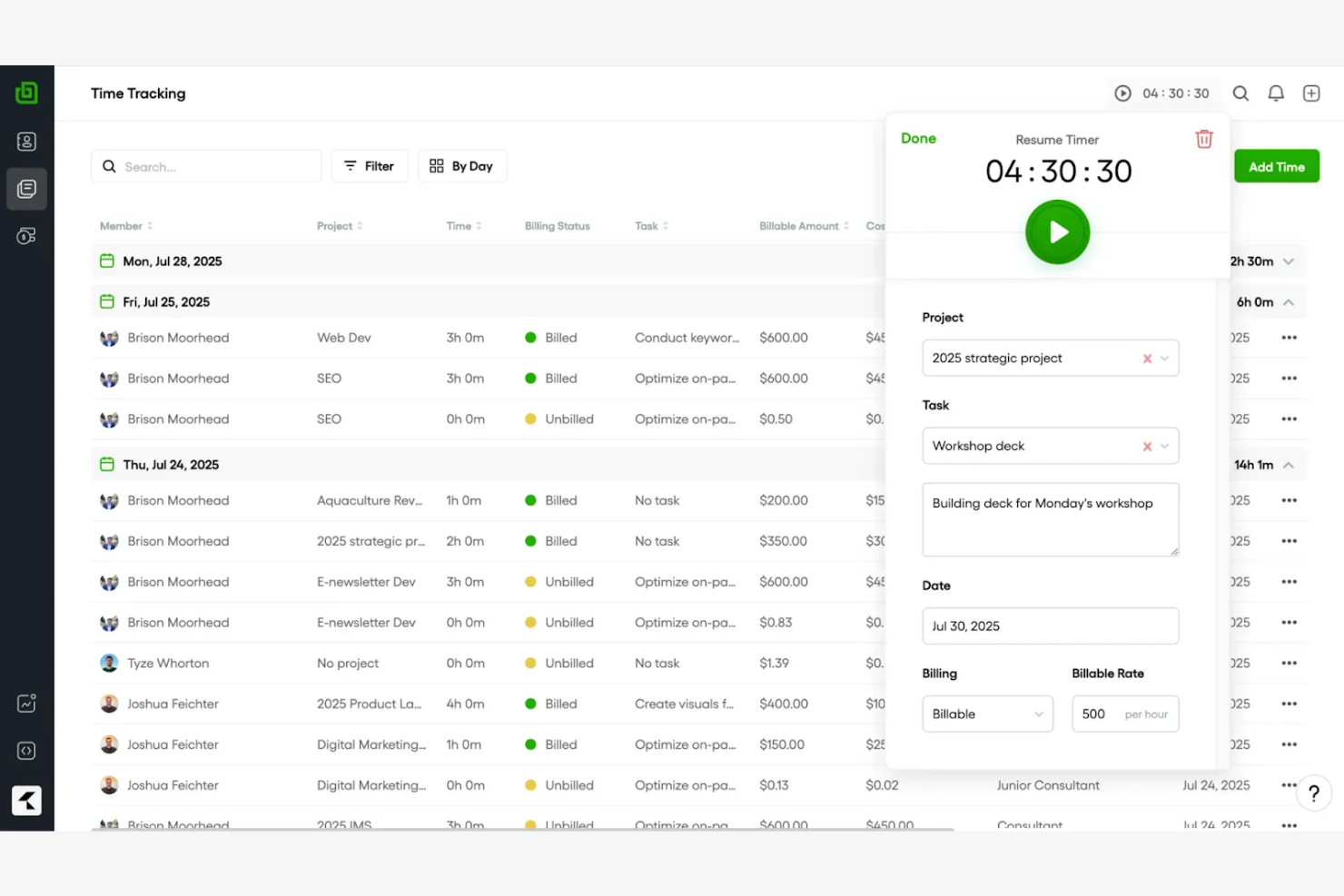
Bonsai è uno strumento completo per la gestione aziendale che aiuta a gestire contratti, proposte, monitoraggio del tempo e fatturazione. È progettato per freelance e agenzie che desiderano semplificare i propri flussi di lavoro e gestire i progetti in modo efficiente.
Perché è una buona alternativa a RescueTime: Bonsai offre strumenti completi per gestire le relazioni con i clienti, inclusi modelli di contratto e creazione di proposte. Fornisce funzioni integrate di fatturazione ed elaborazione dei pagamenti, semplificando la gestione della fatturazione. La funzione di monitoraggio del tempo di Bonsai consente di registrare le ore fatturabili e generare fogli presenze.
Funzionalità e integrazioni principali:
Le funzionalità includono promemoria automatici che aiutano a tenere traccia delle scadenze e delle comunicazioni con i clienti. È possibile creare e personalizzare modelli per moduli, preventivi e fatture, risparmiando tempo nella gestione delle pratiche. Bonsai offre anche funzionalità kanban, Gantt e calendario che consentono di monitorare le tempistiche dei progetti.
Le integrazioni includono QuickBooks Online, Zapier, Calendly, Xero, HiBob e altro.
Pros and Cons
Pros:
- Supporta freelance e agenzie
- Funzionalità versatili per la gestione delle attività
- Modelli di documenti personalizzabili
Cons:
- Gestione avanzata dei progetti limitata
- Le dipendenze tra attività non sono supportate

Harvest
Ideale per la fatturazione integrata
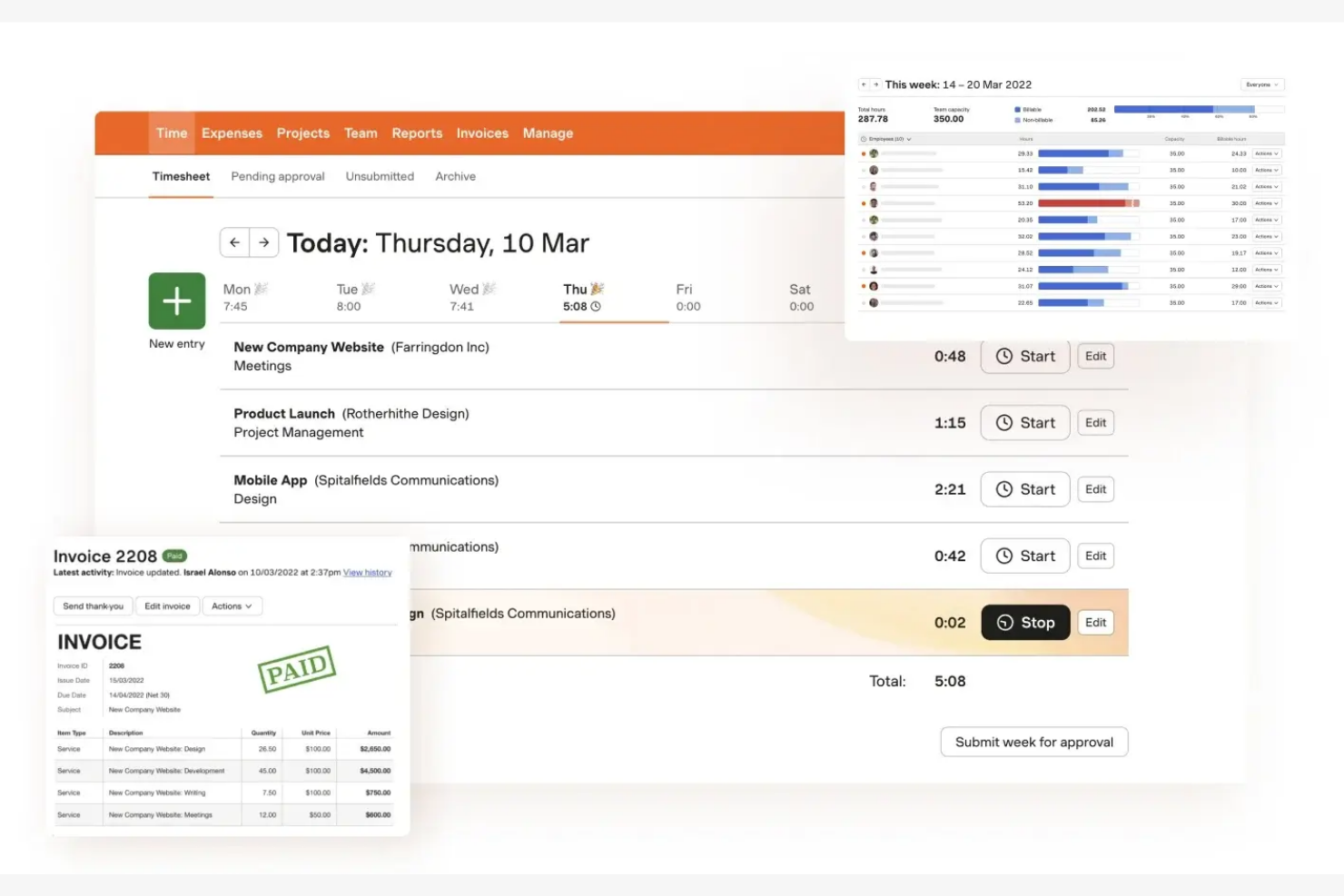
Harvest è un software per il monitoraggio del tempo e la fatturazione rivolto a liberi professionisti, piccole aziende e team che desiderano gestire progetti e fatturazione. Può aiutarti a monitorare il tempo, generare fatture e analizzare i costi dei progetti.
Perché è una buona alternativa a RescueTime: Harvest offre la fatturazione integrata, semplificando il processo di fatturazione consentendoti di creare e inviare fatture direttamente dalle voci di tempo registrate. Harvest fornisce inoltre report per analizzare la redditività dei progetti, aiutandoti a prendere decisioni finanziarie informate.
Funzionalità e integrazioni principali:
Le funzionalità includono il monitoraggio delle spese per registrare i costi dei progetti e generare fatture accurate. Puoi impostare budget per i progetti e monitorare i progressi in tempo reale, assicurandoti di rimanere entro i limiti finanziari.
Le integrazioni includono Asana, Slack, QuickBooks Online, Xero, Trello, Basecamp e altro.
Pros and Cons
Pros:
- Funzionalità di fatturazione integrata
- Funzionalità di monitoraggio delle spese
- Analisi semplice dei costi dei progetti
Cons:
- Strumenti avanzati di gestione dei progetti limitati
- Registri delle attività del team limitati


Rize è un'app di analisi della produttività e monitoraggio del tempo che può aiutare i professionisti a migliorare concentrazione ed efficienza. Si rivolge a singoli individui e team che desiderano ottimizzare le abitudini lavorative e migliorare la produttività.
Perché è una buona alternativa a RescueTime: Rize si concentra sulla fornitura di analisi dettagliate della produttività e di informazioni sui modelli di lavoro. Offre funzionalità come il monitoraggio del tempo di concentrazione e promemoria per le pause, per aiutarti a mantenere la concentrazione e gestire la fatica. I report giornalieri di Rize offrono una panoramica completa delle tendenze della tua produttività, consentendoti di prendere decisioni basate sui dati.
Funzionalità e integrazioni principali:
Le funzionalità includono il monitoraggio automatico delle attività lavorative, permettendoti di vedere come impieghi il tuo tempo senza inserimenti manuali. Rileva anche i periodi di inattività e interrompe il monitoraggio quando non rileva attività per più di due minuti. Puoi impostare obiettivi e monitorare i progressi nel tempo, aiutandoti a raggiungere una produttività migliore.
Le integrazioni includono Google Calendar, Zapier, ClickUp, Linear, Microsoft 365 e altro.
Pros and Cons
Pros:
- Informazioni dettagliate sulla produttività
- Offre la gestione della concentrazione
- Impostazione e monitoraggio automatici degli obiettivi
Cons:
- Funzionalità di collaborazione di squadra limitate
- Nessun monitoraggio del tempo da dispositivo mobile
Altre alternative a RescueTime
Ecco alcune alternative aggiuntive a RescueTime che non sono entrate nel mio elenco, ma che vale comunque la pena prendere in considerazione:
- Toggl
Ideale per un monitoraggio intuitivo del tempo
- Connecteam
Ideale per la gestione della forza lavoro mobile
- EARLY
Ideale per l'ecosistema di integrazione


Come valuto le alternative a RescueTime
Esamino questi strumenti su due livelli: i requisiti di base—come il monitoraggio passivo delle app e l'attribuzione ai progetti—che consentono a uno strumento di entrare nell'elenco, e gli elementi distintivi che li differenziano.
Funzionalità fondamentali (requisiti essenziali per questo elenco)
Quando seleziono gli strumenti per il mio elenco, assegno a ciascuno un punteggio su una scala da 0 (non offre la funzionalità) a 5 (eccelle in quest'area) per ogni funzionalità fondamentale elencata di seguito. Quindi, converto il punteggio totale dello strumento in una percentuale. Ogni strumento deve raggiungere un punteggio totale minimo del 65% per essere preso in considerazione.
- Monitoraggio automatico del tempo: verifico se lo strumento registra passivamente l'utilizzo di app, siti web e documenti, così un PM che esamina la propria giornata vede dati effettivi, non ciò che ricorda di aver fatto.
- Categorizzazione della produttività: ogni strumento dovrebbe consentire di classificare le attività come produttive o distraenti e di modificare queste etichette in base al ruolo, poiché Slack può essere essenziale per il lavoro di un team e una distrazione per un altro.
- Attribuzione a progetti e attività: valuto come il tempo monitorato viene associato a progetti o clienti specifici, un aspetto particolarmente importante per consulenti e team di agenzie che devono confrontare le ore con i risultati da consegnare.
- Pannelli di reportistica e analisi: i report devono evidenziare le tendenze sia a livello individuale sia di team, come gli schemi settimanali del tempo dedicato alla concentrazione o la suddivisione del tempo per progetto che i PM presentano effettivamente alla dirigenza.
- Gestione delle distrazioni e della concentrazione: cerco strumenti integrati come blocchi dei siti, sessioni di concentrazione o avvisi di promemoria che aiutino i collaboratori a proteggere le fasce di lavoro concentrato durante la giornata.
- Visibilità per i team e multiutente: in questo caso sono importanti i pannelli per i responsabili con accesso basato sui ruoli, soprattutto per i responsabili di team remoti che hanno bisogno di visualizzazioni aggregate senza sconfinare nel territorio della sorveglianza.
Una volta ottenuto un elenco di strumenti che soddisfano questi criteri, considero ciò che distingue ciascuna piattaforma.
Fattori distintivi (ciò che differenzia i fornitori)
Ecco come confronto i diversi fornitori:
Funzionalità di spicco
L'integrazione con il calendario è un aspetto importante per me: voglio vedere le riunioni di Google o Outlook sovrapposte al tempo monitorato, così i PM possono confrontare le ore pianificate con il tempo effettivamente dedicato al lavoro concentrato. Anche i suggerimenti basati sull'intelligenza artificiale per i fogli ore si distinguono, soprattutto per i consulenti che altrimenti passerebbero i pomeriggi del venerdì a redigere manualmente le registrazioni settimanali basandosi sulla memoria. Valuto anche le funzionalità di definizione degli obiettivi, cercando strumenti che consentano di stabilire obiettivi giornalieri di concentrazione e di inviare avvisi quando si sta andando fuori rotta.
Oltre le funzionalità
Verifico quanto bene ogni strumento si connette alle piattaforme per PM come Jira, Asana o ClickUp, perché il tempo monitorato è utile solo se confluisce negli strumenti in cui il team gestisce già il lavoro. I controlli della privacy sono altrettanto importanti. L'introduzione di uno strumento di monitoraggio in un team distribuito procede più agevolmente quando i collaboratori possono vedere i propri dati e mettere in pausa il monitoraggio durante il tempo personale. Valuto anche le strutture tariffarie, cercando modelli per postazione che si adattino in modo prevedibile alla crescita del PMO o dell'agenzia, da una manciata di collaboratori a decine.
Perché cercare un'alternativa a RescueTime?
Sebbene RescueTime sia una buona scelta per il monitoraggio del tempo e della produttività, esistono diversi motivi per cui alcuni utenti cercano soluzioni alternative. Potresti essere alla ricerca di un'alternativa a RescueTime perché…
- Hai bisogno di più opzioni di personalizzazione
- Il tuo team richiede funzionalità offline
- Desideri funzionalità di fatturazione integrate
- La tua azienda ha bisogno di analisi avanzate
- Hai bisogno di migliori possibilità di integrazione
- Ti serve uno strumento per team più grandi
Se ti riconosci in una di queste situazioni, sei nel posto giusto. Il mio elenco comprende diverse opzioni software più adatte ai team che affrontano queste difficoltà con RescueTime e cercano strumenti alternativi per il monitoraggio del tempo.
Funzionalità principali di RescueTime
Ecco alcune delle funzionalità principali di RescueTime che ti aiuteranno a metterle a confronto con ciò che offrono le soluzioni alternative:
- Monitoraggio automatico del tempo: Monitora il tempo trascorso sulle applicazioni e sui siti web per offrirti una panoramica accurata della tua giornata.
- Report dettagliati: Fornisce informazioni sulle applicazioni, sui siti web e sui file su cui hai lavorato, nonché sull'andamento della tua produttività nel tempo.
- Blocco di siti web e applicazioni: Ti aiuta a rimanere concentrato bloccando i siti web e le applicazioni che distraggono durante le sessioni di lavoro.
- Monitoraggio degli obiettivi: Ti consente di impostare obiettivi personalizzati e monitorare i tuoi progressi con aggiornamenti in tempo reale e report settimanali.
- Sessioni di concentrazione: Ti consentono di impostare un timer per bloccare le distrazioni e concentrarti sul lavoro.
- Suggerimenti per la compilazione intelligente: Suggerisce inserimenti di tempo in base alla tua attività per semplificare il monitoraggio.
- Report flessibili: Offre report personalizzabili in base alle tue esigenze specifiche.
- Controllo degli accessi basato sui ruoli: Fornisce diversi livelli di accesso ai membri del team per gestire progetti e attività in modo efficiente.
- Report dei modelli giornalieri: Mostra i modelli di produttività e concentrazione per aiutarti a ottimizzare la tua giornata lavorativa.