

10 migliori alternative a Confluence per la gestione della conoscenza nel 2026

Selezione delle migliori alternative a Confluence


Se utilizzi Atlassian Confluence per gestire le conoscenze e la documentazione dei progetti del tuo team, potresti esserti imbattuto in alcuni ostacoli: modifiche macchinose, personalizzazione limitata o prezzi che non si adattano alle esigenze del tuo team.
Un software per la gestione delle conoscenze dovrebbe aiutare il tuo team a rimanere organizzato, condividere gli aggiornamenti in modo chiaro e ridurre la confusione. Se Confluence non sta facendo questo per te, potrebbe essere il momento di provare qualcosa di nuovo.
In questo articolo ho raccolto le migliori alternative a Confluence da prendere in considerazione. Testo e recensisco i software in modo indipendente e ho scelto strumenti che risolvono i problemi più comuni della gestione dei progetti, offrendo al contempo una soluzione più adatta a team e budget diversi.
Che cos'è Confluence?
Confluence di Atlassian è uno strumento per la gestione delle conoscenze che aiuta i team a organizzare, accedere e condividere le informazioni in un unico luogo. È ampiamente utilizzato da project manager, sviluppatori e professionisti IT che hanno bisogno di uno spazio centrale per collaborare.
Funzionalità chiave come la modifica dei documenti, il monitoraggio delle attività e le integrazioni di terze parti rendono più semplice per i team coordinarsi e rimanere allineati. Nel complesso, Confluence favorisce una comunicazione migliore e aumenta la produttività dei team.
Perché fidarsi dei nostri consigli sui software
Il nostro team testa e recensisce software dal 2012. In quanto project manager noi stessi, sappiamo quanto sia difficile — e importante — scegliere il software giusto.
Per questa guida, abbiamo valutato gli strumenti attraverso test pratici e ricerche indipendenti, assegnando un punteggio agli strumenti in base ai nostri criteri di selezione. Ci basiamo inoltre sulle competenze di leader di pensiero del settore e di professionisti attivi nella gestione dei progetti.
Le nostre recensioni riflettono il nostro giudizio editoriale umano, non un discorso di vendita.
Revisori esperti:
Tabella di confronto delle alternative a Confluence
Questa tabella di confronto riassume i dettagli sui prezzi delle mie migliori alternative a Confluence:
| Tool | Best For | Trial Info | Price | ||
|---|---|---|---|---|---|
| 1 | Ideale per knowledge base potenziate dall'AI | Prova gratuita di 14 giorni + demo gratuita disponibile | Prezzo su richiesta | Website | |
| 2 | Ideale per la documentazione di team che lavorano in modalità asincrona | Prova gratuita di 14 giorni + demo gratis disponibile | Da $10/utente/mese (fatturazione annuale) | Website | |
| 3 | Ideale per la collaborazione intuitiva | Prova gratuita di 14 giorni + piano gratuito disponibile | Da $6/utente/mese (fatturato annualmente) | Website | |
| 4 | Ideale per la condivisione della conoscenza incentrata su Slack | Prova gratuita di 30 giorni disponibile | Da $8/utente/mese (fatturato annualmente) | Website | |
| 5 | Ideale per la flessibilità open-source | Demo gratuita disponibile | Prezzi su richiesta | Website | |
| 6 | Ideale per la collaborazione sulla documentazione di prodotto | Piano gratuito + demo gratuita disponibile | Da $65/sito/mese + $12/utente/mese (fatturati annualmente) | Website | |
| 7 | Ideale per la condivisione della conoscenza nel team | Piano gratuito disponibile | Da $6.67/utente/mese (fatturato annualmente) | Website | |
| 8 | Ideale per documentazione pulita basata su Markdown | Prova gratuita di 30 giorni + piano gratuito disponibile | A partire da $4/utente/mese (fatturato annualmente) | Website | |
| 9 | Ideale per la semplicità open source | Demo gratuita disponibile | Piano gratuito per sempre | Website | |
| 10 | Ideale per un’ampia personalizzazione | Gratuito, open-source | Gratuito da utilizzare | Website |
Recensioni delle migliori alternative a Confluence
Di seguito trovi i miei riepiloghi dettagliati delle migliori alternative a Confluence incluse nella mia selezione. Le mie recensioni offrono una panoramica approfondita delle funzionalità principali, dei pro \u0026 contro, delle integrazioni e dei casi d’uso ideali di ogni strumento, per aiutarti a trovare quello più adatto a te.

Ideale per knowledge base potenziate dall'AI

Document360 è un software di knowledge base progettato per aiutare i team a creare e gestire la documentazione in modo efficiente. È comunemente utilizzato da team di assistenza clienti e team tecnici che necessitano di una piattaforma centralizzata per le proprie risorse di conoscenza.
Perché è una buona alternativa a Confluence: Document360 offre funzionalità di ricerca potenziate dall'AI, un'esperienza di scrittura avanzata e il controllo delle versioni, che aiutano a mantenere una documentazione accurata e facilmente accessibile. La possibilità di creare contenuti multilingue e le analisi dettagliate rafforzano ulteriormente il ruolo del software come uno strumento completo per la gestione della conoscenza.
Funzionalità e Integrazioni principali:
Funzionalità includono opzioni di branding personalizzabili che permettono al tuo team di mantenere un aspetto coerente in tutta la documentazione. È inoltre possibile utilizzare il gestore di categorie per organizzare i contenuti in modo logico. La piattaforma supporta anche la collaborazione grazie a un sistema di commenti completo per migliorare la comunicazione all'interno del team.
Integrazioni includono Microsoft Teams, Zendesk, Intercom, Slack, Freshdesk, Google Analytics, Drift, Zoho PageSense, Olark e Gorgias.
Pros and Cons
Pros:
- Funzionalità di ricerca potenziate dall'AI
- Solido controllo delle versioni
- Analisi dettagliate disponibili
Cons:
- Può essere esigente in termini di risorse
- Supporto mobile di base
New Product Updates from Document360

Document360 Adds Bulk Mirroring, Eddy AI Citations, and Unified SSO
Document360 adds bulk article mirroring, citations in Eddy AI chatbot responses, and a unified Enterprise SSO setup. These updates improve content reuse, answer verification, and access management. For more information, visit Document360’s official site.
 .
.
Slite
Ideale per la documentazione di team che lavorano in modalità asincrona

Slite è una piattaforma di documentazione creata per team che lavorano su fusi orari diversi e hanno bisogno di un luogo per condividere conoscenze senza riunioni in tempo reale. Viene spesso utilizzata da team remoti e orientati al lavoro asincrono per centralizzare aggiornamenti, decisioni e processi interni.
Perché Slite è una valida alternativa a Confluence: Slite offre al tuo team uno spazio per scrivere, rivedere e commentare i documenti senza la necessità di essere online contemporaneamente. Include funzionalità come il tracciamento delle decisioni, le risposte ai post e le evidenziazioni che aiutano a mantenere le discussioni focalizzate. Note e documenti restano organizzati in canali, così è facile ritrovare tutto in seguito. Slite è ideale per i membri del team che preferiscono lavorare in modo indipendente e hanno bisogno di uno spazio condiviso per restare coordinati.
Funzionalità principali e integrazioni:
Funzionalità includono registri delle decisioni per tracciare le scelte del team, canali basati su argomenti per organizzare i contenuti e commenti asincroni per discussioni a thread. Puoi creare modelli per risparmiare tempo con i documenti ricorrenti. C’è anche un feed di aggiornamento, così ogni membro del team può consultare i cambiamenti quando preferisce.
Integrazioni includono Slack, GitHub, Loom, Google Docs, Trello, Asana, Figma, Linear, Airtable e ClickUp
Pros and Cons
Pros:
- Facile monitoraggio delle decisioni del team
- Ottima per team distribuiti
- Semplice da organizzare per argomento
Cons:
- Strumenti limitati per la documentazione su larga scala
- Non ideale per knowledge base approfondite

Nuclino
Ideale per la collaborazione intuitiva
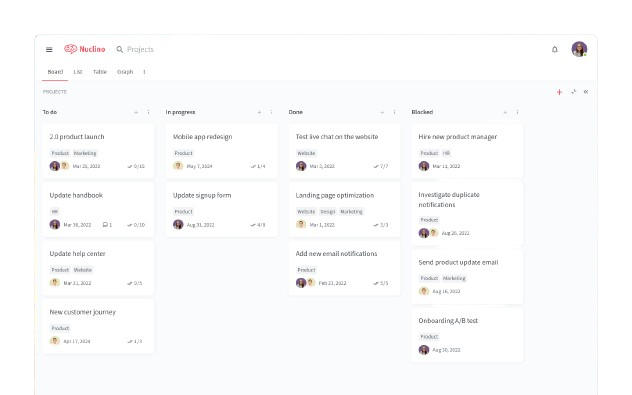
Nuclino è uno spazio di lavoro collaborativo progettato per aiutare i team a organizzare e condividere la conoscenza senza sforzo. È ideale per startup e piccole e medie imprese che cercano un modo semplice ed efficace per gestire le informazioni.
Perché è una valida alternativa a Confluence: Nuclino utilizza un editor pulito e privo di distrazioni, facile da apprendere per qualsiasi membro del team. Puoi collegare pagine correlate con un solo clic e passare facilmente tra vista elenco, bacheca e grafico per organizzare i contenuti a modo tuo. La modifica e i commenti in tempo reale rendono inoltre semplice la collaborazione senza confusione. L'interfaccia è rapida e intuitiva, aiutando il tuo team a restare concentrato su ciò che sta costruendo o documentando.
Caratteristiche principali e integrazioni:
Caratteristiche includono una struttura dei contenuti gerarchica che consente al tuo team di organizzare le informazioni in modo logico. Puoi inoltre usare l'editor drag-and-drop per creare e modificare velocemente i documenti. La piattaforma supporta anche Markdown, che permette di formattare il testo in modo semplice e uniforme.
Integrazioni incluse Slack, Google Drive, Figma, GitHub, Typeform, Canva, Miro, Lucidchart, Jira e Microsoft Teams.
Pros and Cons
Pros:
- Collaborazione in tempo reale
- Vista bacheca visiva
- Creazione di documenti interconnessi
Cons:
- Opzioni di personalizzazione di base
- Analisi limitate

Tettra
Ideale per la condivisione della conoscenza incentrata su Slack

Tettra è uno strumento di gestione della conoscenza progettato per i team che fanno affidamento sugli strumenti di chat per collaborare. È spesso utilizzato da team di supporto, operativi e team remoti per documentare domande ricorrenti e condividere rapidamente le risposte.
Perché Tettra è una valida alternativa a Confluence: Tettra si collega direttamente a Slack, così il tuo team può cercare, condividere e creare documentazione senza uscire dalla chat. Puoi trasformare le domande in articoli di aiuto e assegnare responsabili per mantenere i contenuti aggiornati. Il semplice editor del software rende facile scrivere e aggiornare le risposte di cui il team ha bisogno ogni giorno. Tettra funziona al meglio se il tuo team comunica principalmente su Slack e desidera un accesso rapido alle informazioni condivise.
Funzionalità principali e integrazioni:
Funzionalità includono suggerimenti sui contenuti basati sull'attività del team, promemoria di verifica per mantenere le informazioni aggiornate e ruoli utente per gestire le modifiche. Puoi anche organizzare le pagine in categorie per aiutare il tuo team a trovare rapidamente ciò che serve. Inoltre, la piattaforma offre una funzione di richiesta che permette ai colleghi di segnalare la necessità di documentazione mancante.
Integrazioni includono Slack, Google Workspace, GitHub, Zapier e Notion
Pros and Cons
Pros:
- Aiuta a ridurre le domande ripetute nella chat
- Mantiene i contenuti aggiornati con promemoria ai responsabili
- Gestione semplice delle richieste di pagina
Cons:
- Controllo limitato sulla formattazione e l'impaginazione
- Non ideale per team che non usano flussi di lavoro basati su chat

XWiki
Ideale per la flessibilità open-source

XWiki è una piattaforma di gestione della conoscenza flessibile, pensata per i team che necessitano di uno spazio collaborativo per creare, organizzare e condividere contenuti. È spesso utilizzata da team tecnici, dipartimenti IT e project manager che vogliono avere maggiore controllo su come funziona il loro sistema di documentazione.
Perché XWiki è una valida alternativa a Confluence: XWiki offre al tuo team pieno accesso al suo codice sorgente, così puoi modificare la piattaforma in base alle tue esigenze. Puoi ospitarla sui tuoi server, il che la rende adatta se cerchi controllo e privacy sui dati. La piattaforma supporta anche una gestione avanzata dei permessi, scripting e modelli di pagina per aiutarti a costruire un sistema che si adatti ai tuoi flussi di lavoro. L’impaginazione e la struttura dei contenuti sono completamente personalizzabili.
Funzionalità e integrazioni principali:
Funzionalità includono un editor WYSIWYG integrato per una facile creazione di pagine e contenuti, la cronologia delle versioni per tracciare ogni modifica e gerarchie di pagine nidificate per organizzare grandi insiemi di contenuti. Puoi utilizzare macro e script per creare funzionalità personalizzate senza dover partire da zero. Supporta anche contenuti multilingue, particolarmente utili per team globali.
Integrazioni includono Nextcloud, OnlyOffice, JIRA, Matomo, LDAP, Google Analytics, Google Maps e Auth0
Pros and Cons
Pros:
- Completamente open-source e ospitabile autonomamente
- Supporta una personalizzazione approfondita tramite script
- Funziona bene con grandi quantità di contenuti
Cons:
- L’interfaccia di modifica può sembrare datata
- Non ideale per team non tecnici


GitBook è una piattaforma di documentazione collaborativa progettata per team tecnici e sviluppatori che desiderano creare e gestire la documentazione di prodotto. È particolarmente utile per i team che hanno bisogno di uno spazio centralizzato dove collaborare su contenuti tecnici.
Perché è una valida alternativa a Confluence: GitBook rende semplice mantenere aggiornata la documentazione di prodotto grazie alla modifica in tempo reale e alla cronologia delle versioni. Puoi redigere i contenuti in un editor semplice e pubblicarli, pubblicamente o privatamente, con pochi clic. Permette inoltre al tuo team di commentare e collaborare direttamente nel documento, mantenendo i feedback sempre contestualizzati. Con GitBook, la tua documentazione rimane ordinata, facile da leggere e pronta per essere condivisa con utenti o altri team.
Funzionalità principali & Integrazioni:
Funzionalità includono un editor potente che supporta testo ricco e Markdown, consentendo al tuo team di formattare facilmente i documenti. Puoi utilizzare le analisi integrate per monitorare l'utilizzo e il coinvolgimento sui documenti. La piattaforma offre anche la cronologia delle versioni per aiutarti a gestire efficacemente le modifiche ai documenti.
Integrazioni includono GitHub, Slack, Google Analytics, Intercom, Segment, Sentry, Mixpanel, Hotjar e HelpScout.
Pros and Cons
Pros:
- Interfaccia pulita e facile da usare
- Pubblicazione di contenuti pubblici o privati
- Capacità di gestione delle versioni
Cons:
- Opzioni di personalizzazione limitate
- Richiede alcune conoscenze tecniche


Slab è uno strumento di condivisione delle conoscenze pensato per i team che desiderano un modo semplice per creare, organizzare e condividere la documentazione interna. È spesso utilizzato da team di prodotto, design e ingegneria che necessitano di uno spazio per la scrittura collaborativa e il processo decisionale.
Perché Slab è una valida alternativa a Confluence: Slab si concentra sul rendere facile scrivere, trovare e leggere le informazioni. Il suo editor risulta semplice e veloce, così il tuo team può trascorrere meno tempo sulla formattazione e più tempo nella cattura delle idee. Puoi anche raggruppare contenuti correlati in argomenti e configurare la verifica dei contenuti per mantenere la wiki sempre aggiornata. Inoltre, Slab evidenzia le connessioni tra le varie conoscenze, aiutando il tuo team a collaborare senza perdere di vista ciò che conta.
Funzionalità e integrazioni principali:
Funzionalità includono la cronologia delle revisioni per tenere traccia dei cambiamenti, scorciatoie da tastiera per modifiche più rapide e gruppi di utenti per gestire gli accessi. Puoi anche mettere in evidenza i post importanti per trovarli sempre facilmente. Il software supporta anche menzioni e commenti, che aiutano a mantenere le discussioni nel contesto.
Integrazioni includono Slack, Google Workspace, GitHub, GitLab, Asana, Trello, Figma, Canva, Okta e Loom
Pros and Cons
Pros:
- Facile da apprendere e iniziare a usare
- Supporta la collaborazione senza funzionalità aggiuntive
- Ideale per documentazione leggera
Cons:
- Meno strumenti di personalizzazione per gli amministratori
- Impostazioni di esportazione e backup minime

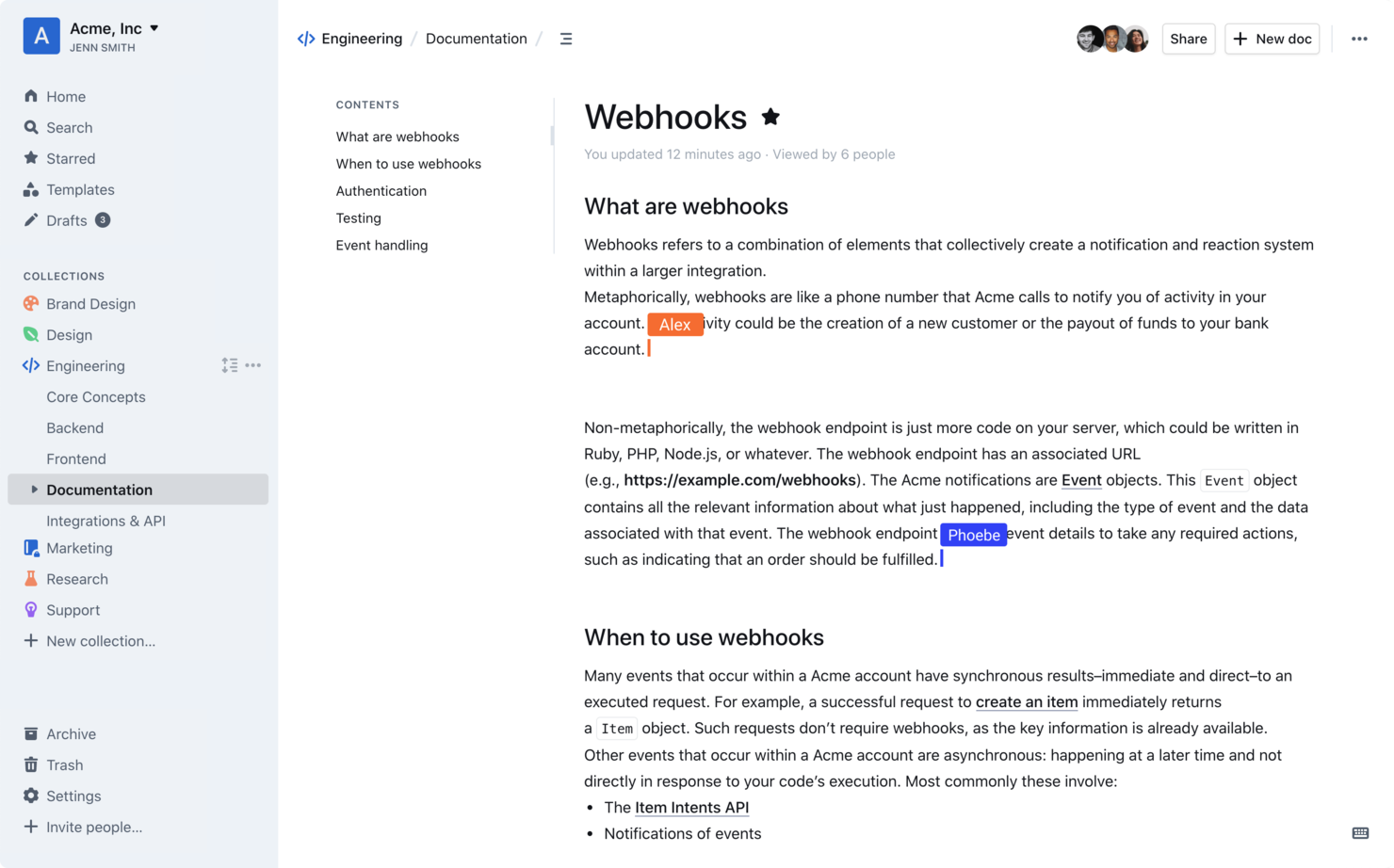
Outline è uno strumento di knowledge base interna creato per i team che necessitano di un modo veloce e minimalista per creare e organizzare la documentazione interna. È comunemente utilizzato da team di prodotto, ingegneria e operazioni per tenere traccia delle conoscenze e dei flussi di lavoro.
Perché Outline è una valida alternativa a Confluence: Outline utilizza la formattazione Markdown, che offre al tuo team un'esperienza di scrittura pulita con scorciatoie semplici per lo stile del testo. Puoi organizzare le pagine utilizzando raccolte annidate e mantenere tutto ordinato grazie alla ricerca rapida e ai backlink. La cronologia delle versioni integrata ti consente inoltre di tracciare le modifiche e ripristinare i contenuti quando necessario. Il design senza distrazioni della piattaforma favorisce inoltre la concentrazione sulla scrittura e la lettura, senza ingombri.
Funzionalità e integrazioni principali:
Funzionalità includono scorciatoie da tastiera che velocizzano la modifica, editing collaborativo in tempo reale e controllo degli accessi per organizzare i permessi per team o utente. Puoi creare template personalizzati per velocizzare le attività di documentazione ripetitive. È presente anche un sistema di cestino e archiviazione integrato per recuperare i contenuti eliminati.
Integrazioni includono Slack, Zapier, GitHub, Google Docs, Figma, Airtable, Miro, Trello, Codepen e YouTube.
Pros and Cons
Pros:
- Esperienza di scrittura focalizzata su Markdown
- Facile da organizzare con raccolte annidate
- Il layout minimalista riduce le distrazioni
Cons:
- Meno controlli di layout rispetto ad alcuni strumenti
- Richiede di imparare la sintassi Markdown

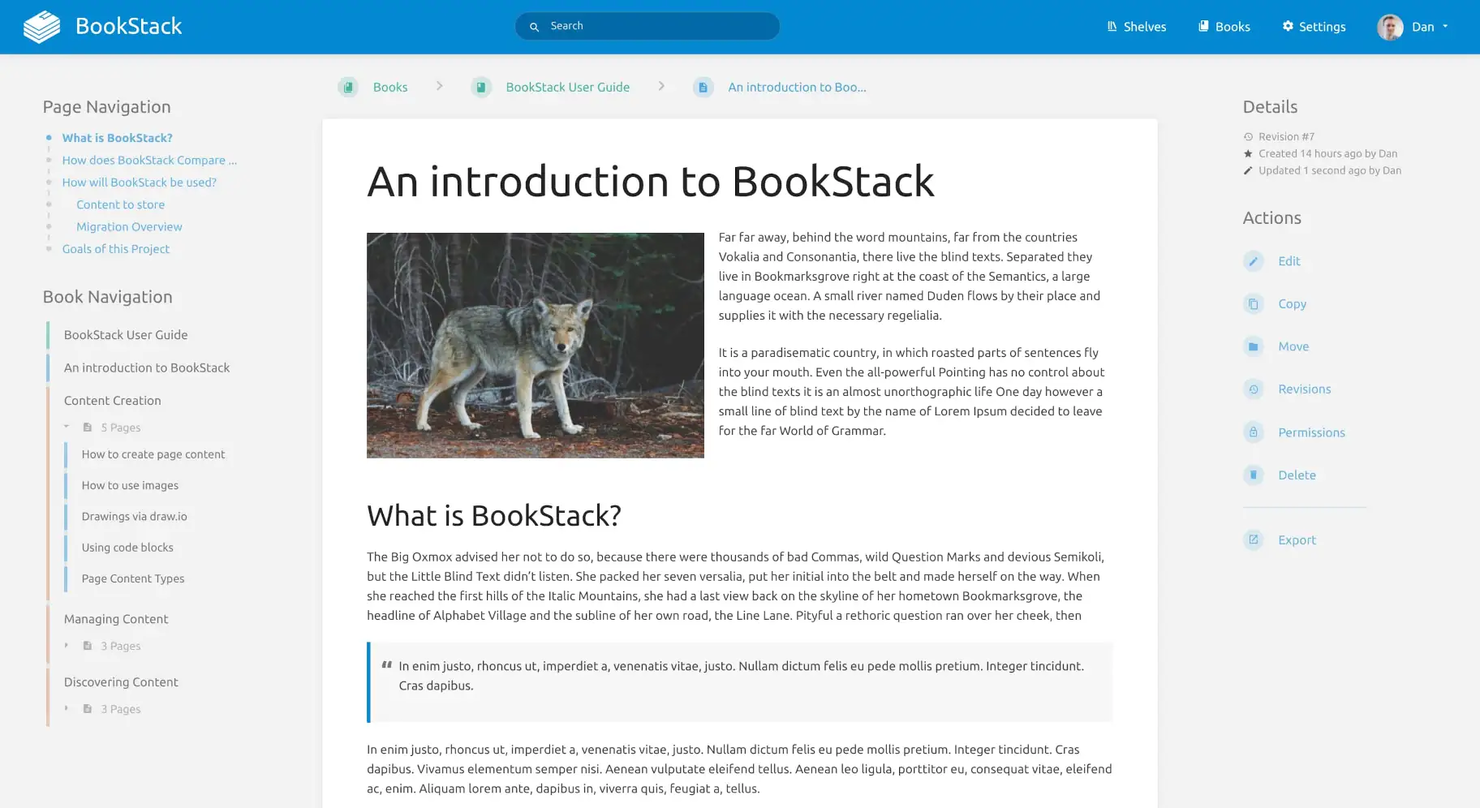
BookStack è una piattaforma open source progettata per organizzare e archiviare informazioni in un ambiente self-hosted. È popolare tra piccoli team e sviluppatori che cercano una soluzione semplice per la gestione della conoscenza.
Perché è una buona alternativa a Confluence: BookStack offre un editor WYSIWYG intuitivo, supporto multilingue e gestione dei permessi basata sui ruoli, che semplificano la creazione e gestione dei contenuti. La creazione di diagrammi integrata e la modifica tramite Markdown contribuiscono alla sua semplicità, rendendolo una soluzione ideale per i team che preferiscono un approccio open source.
Caratteristiche principali e integrazioni:
Caratteristiche includono una potente capacità di ricerca che aiuta a trovare le informazioni rapidamente. La piattaforma supporta anche temi chiari e scuri per adattarsi alle preferenze del team. Opzioni di autenticazione integrate garantiscono inoltre l'accesso sicuro ai tuoi contenuti.
Integrazioni includono GitHub, Discord e altre piattaforme di supporto della comunità, come Reddit e Codeberg.
Pros and Cons
Pros:
- Configurazione self-hosting semplice
- Editor WYSIWYG facile da usare
- Supporta più lingue
Cons:
- Richiede impostazioni tecniche
- Nessuna app mobile disponibile


Wiki.js è un software wiki open-source per la gestione della conoscenza, progettato per i team che cercano una soluzione wiki personalizzabile. È molto apprezzato da sviluppatori e team IT che necessitano di una piattaforma flessibile per organizzare e condividere le conoscenze.
Perché è una buona alternativa a Confluence: Wiki.js offre ampie opzioni di personalizzazione, un editor in tempo reale e il supporto per numerosi metodi di autenticazione, elementi che aiutano a modellare la piattaforma sulle tue specifiche esigenze. Il supporto integrato alla localizzazione e il versatile editor di pagine ne aumentano ulteriormente l’adattabilità, rendendolo ideale per i team che cercano un’esperienza su misura.
Funzionalità e integrazioni principali:
Funzionalità includono un motore di ricerca integrato che rende rapido e semplice trovare i contenuti. La piattaforma supporta molteplici tipi di contenuto, permettendo al tuo team di includere tutto, dai testi ai video. È inoltre possibile tracciare le modifiche tramite il controllo delle versioni, così tutti restano aggiornati.
Integrazioni includono Microsoft Azure, Google Analytics e GitHub.
Pros and Cons
Pros:
- Configurazione altamente personalizzabile
- Modifica collaborativa in tempo reale
- Editor di pagine versatile
Cons:
- Funzionalità limitate di base
- Può richiedere molte risorse
Altre alternative a Confluence
Ecco alcune alternative aggiuntive a Confluence che non sono state incluse nella mia selezione, ma che vale comunque la pena prendere in considerazione:
- Papyrs
Ideale per la creazione di intranet e portali
- You Need a Wiki
Ideale per l'integrazione con Google Docs
- Guru
Ideale per aggiornamenti di conoscenza in tempo reale


Come valuto le alternative a Confluence
Per le squadre che abbandonano Confluence o consolidano i wiki con il lavoro sui progetti, suddivido la valutazione in due livelli: i criteri di base che ogni strumento deve soddisfare e i fattori distintivi che determinano l'effettiva adeguatezza.
Funzionalità principali (requisiti fondamentali per questo elenco)
Quando seleziono gli strumenti per il mio elenco, assegno a ciascuno un punteggio su una scala da 0 (non offre la funzionalità) a 5 (eccelle in quest'area) per ogni funzionalità principale elencata di seguito. Quindi calcolo il punteggio totale dello strumento e lo converto in percentuale. Ogni strumento deve raggiungere un punteggio totale minimo del 65% per essere preso in considerazione.
- Modifica collaborativa dei documenti: verifico se più membri della squadra possono modificare una pagina contemporaneamente in tempo reale, lasciare commenti in linea e tenere traccia della cronologia delle versioni come ci si aspetterebbe durante una retrospettiva dello sprint.
- Struttura della knowledge base: una gerarchia chiara è importante. Cerco pagine nidificate, spazi e collegamenti incrociati che consentano di organizzare procedure operative, specifiche dei progetti e documenti di inserimento senza che nulla finisca sepolto.
- Integrazione con progetti e attività: valuto quanto bene i documenti siano collegati al lavoro effettivo sui progetti, tramite bacheche e tempistiche delle attività native oppure integrazioni approfondite con strumenti come Jira, Asana o ClickUp.
- Ricerca e scoperta dei contenuti: trovare un registro delle decisioni di tre mesi fa non dovrebbe richiedere cinque minuti. Cerco una ricerca a testo integrale con filtri, tag e filtri per tipo di contenuto che faccia emergere rapidamente la pagina giusta.
- Autorizzazioni e controllo degli accessi: le squadre che condividono documenti con collaboratori esterni, clienti o dirigenti hanno bisogno di autorizzazioni a livello di pagina e di accesso per gli ospiti. Verifico la presenza di controlli granulari dei ruoli, oltre alle impostazioni di base applicate all'intero spazio di lavoro.
- Modelli e riutilizzabilità dei contenuti: cerco raccolte di modelli che coprano gli elementi essenziali della gestione dei progetti, come note delle riunioni, documenti costitutivi dei progetti e rapporti sullo stato di avanzamento, oltre alla possibilità di creare e condividere modelli personalizzati all'interno della squadra.
Una volta ottenuto un elenco di strumenti che soddisfano questi criteri, valuto ciò che distingue ogni piattaforma.
Fattori distintivi (ciò che differenzia i fornitori)
Ecco come confronto e metto in contrapposizione i diversi fornitori:
Funzionalità di spicco
Le funzionalità basate sull'intelligenza artificiale, come la sintesi delle pagine e la generazione di bozze, possono ridurre concretamente il tempo dedicato agli aggiornamenti settimanali sullo stato e alla stesura delle analisi a posteriori. Cerco anche database incorporati che trasformino una pagina di progetto statica in uno strumento dinamico di monitoraggio con visualizzazioni a bacheca, tabella o calendario. Le lavagne e gli strumenti di diagrammazione integrati sono importanti per le squadre che organizzano sessioni di esplorazione o retrospettive in cui la collaborazione visiva deve trovarsi proprio accanto ai documenti di progetto.
Oltre le funzionalità
Il supporto alla migrazione è un aspetto fondamentale. Verifico se una piattaforma offre un importatore dedicato da Confluence che conservi la gerarchia delle pagine, gli allegati e la formattazione. Ricostruire manualmente centinaia di pagine è un ostacolo insormontabile per la maggior parte delle squadre. Anche l'ecosistema delle integrazioni ha un peso reale: il wiki deve potersi collegare a Slack, Jira o agli strumenti di gestione dei progetti già utilizzati dalla squadra. Anche i modelli tariffari meritano grande attenzione, soprattutto per il modo in cui i fornitori gestiscono gli accessi degli ospiti per collaboratori esterni e portatori di interesse che necessitano soltanto dell'accesso in visualizzazione o ai commenti.
Perché cercare un'alternativa a Confluence?
Sebbene Confluence sia una buona scelta per la gestione delle conoscenze, alcuni utenti cercano soluzioni alternative. Potresti essere alla ricerca di un'alternativa a Confluence perché…
- Hai bisogno di una migliore integrazione con altri strumenti
- Il tuo team ritiene che l'interfaccia sia troppo complessa
- Desideri più opzioni di personalizzazione
- Il tuo budget per gli abbonamenti software è limitato
- Hai bisogno di accedere ai documenti offline
- Il tuo team ha bisogno di un'assistenza clienti più rapida
Se ti riconosci in una di queste situazioni, sei nel posto giusto. Il mio elenco contiene diverse opzioni di software per la gestione delle conoscenze più adatte ai team che affrontano difficoltà con Confluence e cercano soluzioni alternative.
Funzionalità principali di Confluence
Ecco alcune funzionalità chiave di Confluence che ti aiuteranno a confrontarle con ciò che offrono le soluzioni alternative:
- Modifica in tempo reale: i team possono modificare collaborativamente i contenuti in simultanea.
- Commenti: i commenti in linea consentono al team di discutere direttamente all'interno dei contenuti.
- Notifiche: ricevi avvisi per rimanere aggiornato sulle modifiche e sui progressi dei tuoi progetti.
- Lavagne bianche: utilizza una tela infinita per il brainstorming e l'ideazione con il tuo team.
- Database: organizza e visualizza le informazioni con aggiornamenti in tempo reale provenienti da vari strumenti.
- Funzionalità di IA e automazione: automatizza le attività e migliora l'efficienza della comunicazione grazie alle funzionalità di IA.
- Spazi Confluence: organizza le conoscenze per team e progetti con opzioni di ricerca avanzate.
- Archiviazione dei file: archivia i contenuti in modo sicuro con opzioni di archiviazione da 250 GB o illimitata.
- Gestione degli utenti: il supporto per un numero illimitato di utenti consente una collaborazione estesa tra i team.
- Autorizzazioni sui contenuti: personalizza l'accesso per utenti e gruppi per gestire la visibilità dei contenuti.