


Test de Microsoft Copilot : Avantages, Inconvénients, Fonctionnalités et Tarifs



Microsoft Copilot is an AI productivity tool built directly into Microsoft 365, giving you AI assistance inside Word, Excel, PowerPoint, Teams, and Outlook. It's the right fit if your team already runs on Microsoft 365 and wants AI capabilities without adding separate tools to your stack. Compared to Google Gemini for Workspace, Copilot has a clear edge for Microsoft-first teams—the integration with your existing files, emails, and meeting recordings is native, not layered on top after the fact.
Microsoft CoPilot Evaluation Summary
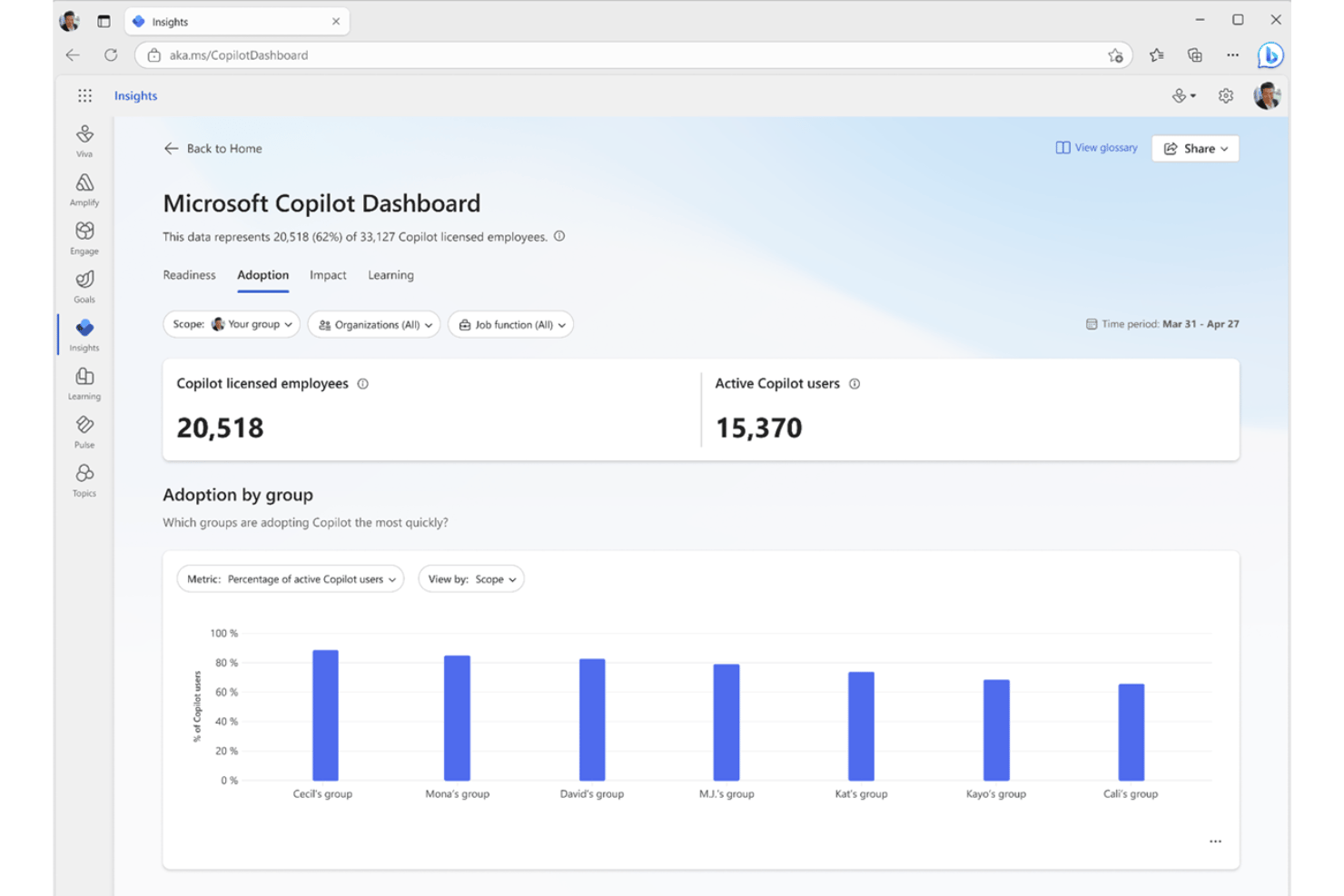
- From $21/user/month (billed annually)
- Free plan available
Pourquoi faire confiance à nos recommandations de logiciels
Notre équipe teste et évalue des logiciels depuis 2012. En tant que chefs de projet nous-mêmes, nous savons à quel point il est difficile — et important — de choisir le bon logiciel.
Pour ce guide, nous avons évalué les outils grâce à des tests pratiques et une recherche indépendante, en notant les outils selon nos critères de sélection. Nous nous appuyons également sur les enseignements de leaders d’opinion du secteur et de professionnels de la gestion de projet en activité.
Nos avis reflètent notre jugement éditorial humain, et non un argumentaire de vente.
Réviseurs experts:
Microsoft CoPilot Overview
In my view, Microsoft Copilot is an easy pick if your team lives in Microsoft 365. Its integration across Outlook, Teams, Word, and Excel means you get AI-driven summaries, data analysis, and drafting tools with almost no onboarding or setup. While pricing will rule it out for smaller teams and some wish it supported more third-party tools, I find its native experience best for organizations seeking reliable, deeply integrated automation rather than more experimental AI features. For project managers prioritizing security, compatibility, and a familiar interface, Copilot is often the smartest choice.
pros
-
Built into all core Microsoft 365 apps
-
Generates meeting summaries from Teams and Outlook automatically
-
Helps draft documents, emails, and presentations with context
cons
-
Requires a paid Microsoft 365 subscription with specific tiers
-
Struggles to accurately summarize highly technical information
-
Limited support for automating workflows involving non-Microsoft apps
-

Smartsheet
Visit WebsiteThis rating combines scores from multiple user review sites to reflect overall customer sentiment about the product.4.5 -
Celoxis
Visit WebsiteThis rating combines scores from multiple user review sites to reflect overall customer sentiment about the product.4.5 -
Accelo
Visit WebsiteThis rating combines scores from multiple user review sites to reflect overall customer sentiment about the product.4.4





Notre méthodologie d'évaluation
Comment nous testons et notons les outils
Nous avons passé des années à construire, affiner et améliorer notre système de test et de notation de logiciels. Notre grille d’évaluation est conçue pour capturer les subtilités de la sélection de logiciels et ce qui rend un outil efficace, en mettant l’accent sur les aspects critiques de la prise de décision. Ci-dessous, vous pouvez voir exactement comment notre processus de test et de notation fonctionne sur sept critères. Cela nous permet de fournir une évaluation impartiale des logiciels selon leur fonctionnalité principale, leurs fonctionnalités remarquables, leur facilité d’utilisation, l’onboarding, le support client, les intégrations, les avis clients et le rapport qualité/prix.
Fonctionnalités principales (25 % du score final)
Le point de départ de notre évaluation est toujours la fonctionnalité principale de l’outil. Dispose-t-il des fonctionnalités et caractéristiques de base attendues par l’utilisateur ? Certaines de ces fonctionnalités de base sont-elles réservées aux formules tarifaires supérieures ? Nous nous attendons à ce qu’un outil soit à la hauteur des capacités de base de ses concurrents.
Fonctionnalités remarquables (25 % du score final)
Ensuite, nous évaluons les fonctionnalités remarquables et peu communes qui vont au-delà de la fonctionnalité de base habituellement retrouvée dans ce type d’outils. Un score élevé reflète des fonctionnalités spécialisées ou uniques qui rendent le produit plus rapide, plus efficace, ou offrent une valeur supplémentaire à l’utilisateur. Nous évaluons également la facilité d’intégration avec d’autres outils couramment présents dans l’environnement technique pour étendre la puissance et l’utilité du logiciel. Les outils offrant de nombreuses intégrations natives, des connexions tierces et un accès API pour créer des intégrations personnalisées obtiennent la meilleure note.
Facilité d’utilisation (10 % du score final)
Nous considérons la rapidité et la facilité d’exécution des tâches principales à l’aide de l’outil. Un logiciel bien noté est conçu intelligemment, intuitif à utiliser, propose des applications mobiles, fournit des modèles et simplifie les tâches relativement complexes.
Onboarding (10 % du score final)
Nous savons à quel point l’adoption rapide par l’équipe est cruciale lors de la mise en place d’une nouvelle plateforme. Nous évaluons donc la facilité avec laquelle un utilisateur peut apprendre et utiliser le logiciel avec un minimum de formation. Nous vérifions la rapidité avec laquelle un membre peut s’installer et démarrer sans expérience préalable. Les solutions ayant une note élevée nécessitent peu ou pas de support.
Support client (10 % du score final)
Nous examinons la rapidité et la facilité d’obtention d’une aide par téléphone, chat en direct ou base de connaissances. Les outils et sociétés proposant un support en temps réel obtiennent la meilleure note, tandis que les chatbots sont les moins bien notés.
Avis clients (10 % du score final)
Au-delà de nos propres tests et évaluations, nous tenons compte du net promoter score des clients actuels et passés. Nous étudions la probabilité, pour eux, de choisir à nouveau l’outil pour ses fonctionnalités principales. Un logiciel ayant une note élevée reflète un score NPS élevé de la part des utilisateurs actuels ou passés.
Rapport qualité/prix (10 % du score final)
Enfin, en tenant compte de tous les autres critères, nous comparons le prix moyen des forfaits d’entrée de gamme aux fonctionnalités principales et considérons la valeur des autres critères d’évaluation. Un logiciel qui en offre davantage pour moins cher sera mieux noté.
Core Features
AI-Powered Document Drafting
Copilot generates outlines, text, and slides in Word and PowerPoint based on prompts. You can quickly create reports, proposals, or presentation decks using your organization’s own data.
Contextual Email Assistance
In Outlook, Copilot drafts responses and summarizes threads. It highlights key decisions or deadlines so you save time reviewing long chains.
Meeting Summaries and Action Items
Copilot produces summarized notes and next steps from Teams calls. This helps project managers track follow-ups without manual notetaking.
Data Analysis in Excel
Copilot suggests formulas, visualizations, and key insights from raw data in Excel. You can ask questions in plain language and get instant answers.
Task and Project Brief Generation
Generate project briefs or update summaries from Teams or Planner activities. Copilot surfaces key tasks, due dates, and blockers in seconds.
Natural Language Queries
Ask Copilot questions in Word, Excel, or Teams and receive answers from across your Microsoft 365 documents. This eliminates the need for manual searching or digging through files.

Ease of Use
Microsoft Copilot is among the easiest AI productivity tools for teams who already use Microsoft 365. You don’t need to learn new platforms—AI features appear right in Word, Outlook, Teams, and Excel. Users appreciate the contextual prompts and the way it adapts to their organization’s content, while feedback calls out that natural language controls and clear prompts keep the learning curve low.
Integrations
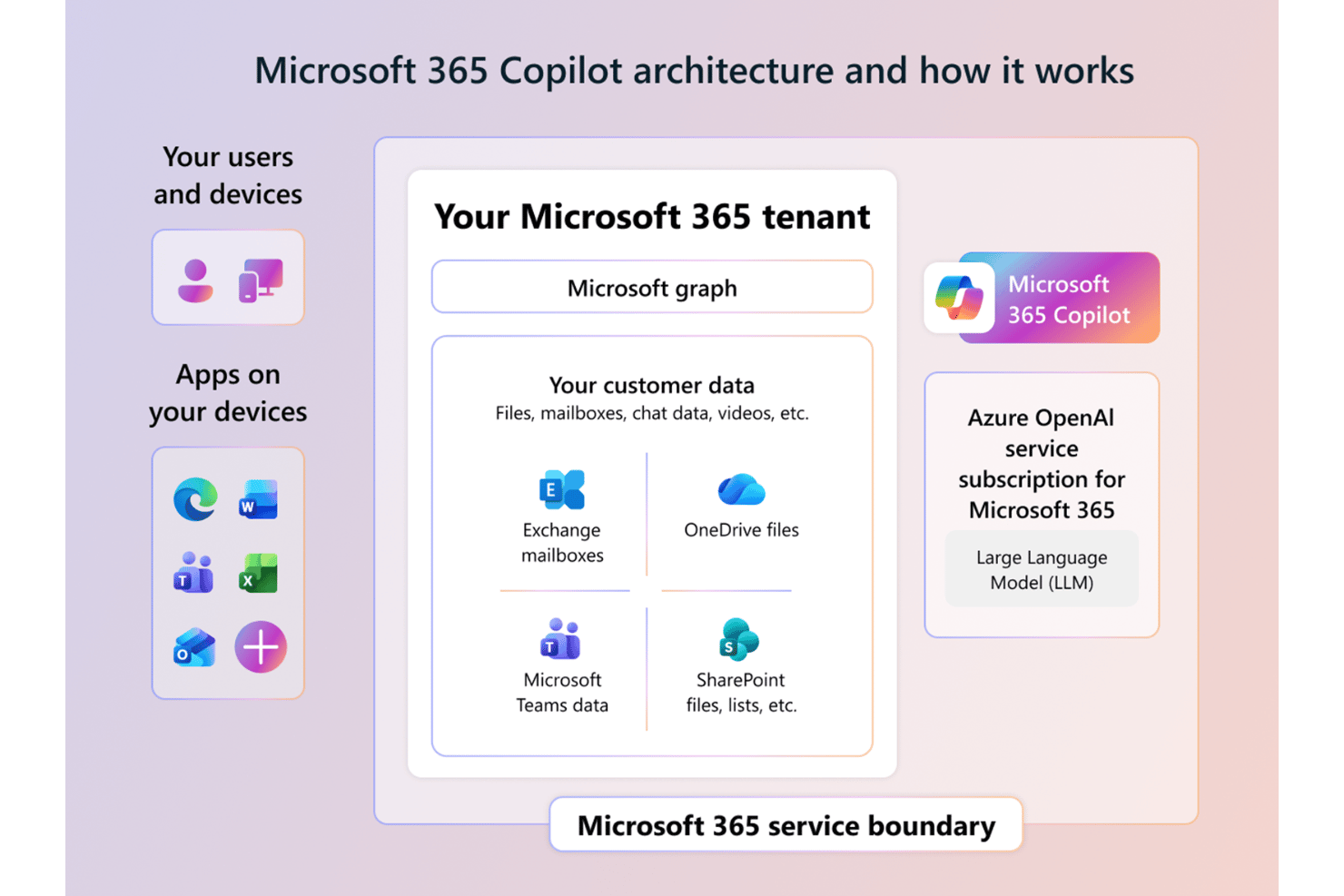
Microsoft Copilot integrates with Word, Excel, PowerPoint, Outlook, Teams, OneNote, Loop, SharePoint, Microsoft Planner, and Viva.
Microsoft 365 Copilot offers APIs that enable developers to integrate Copilot capabilities into custom applications, workflows, and agents.
Microsoft CoPilot Specs
- API
- Calendar Management
- Data Export
- Data Import
- Email Integration
- External Integrations
- Notifications
- Scheduling
Alternatives to Microsoft CoPilot


- Avis sur Microsoft Copilot Studio 2026 : avantages, inconvénients, fonctionnalités et tarifsOpens new window
- Chef de projet avec plus de 30 ans d’expérience partage comment il déploie Copilot de Microsoft IA dans son organisationOpens new window
- Test de Microsoft Copilot : Avantages, Inconvénients, Fonctionnalités et TarifsOpens new window