

10 alternatives à TimeCamp pour le suivi du temps d’équipe en 2026

Sélection des meilleures alternatives à Timecamp


La gestion de projets peut être complexe, et trouver les bons outils pour aider votre équipe à rester sur la bonne voie est essentiel. Si vous utilisez Timecamp, mais avez l'impression qu'il ne répond pas à vos besoins, vous n'êtes pas seul. De nombreux chefs de projet recherchent des alternatives lorsqu'ils ont besoin de davantage de flexibilité, de meilleures fonctionnalités ou d'une approche différente.
D'après mon expérience, explorer de nouvelles options logicielles peut apporter de nouvelles perspectives à votre flux de travail. J'ai testé et évalué indépendamment divers outils de gestion de projets afin de vous proposer des informations impartiales.
Dans cet article, vous trouverez une liste soigneusement sélectionnée d'alternatives à Timecamp susceptibles de répondre à vos besoins spécifiques. Que vous ayez besoin d'un suivi amélioré, d'une meilleure intégration ou de fonctionnalités uniques, je suis là pour vous aider. Explorons les outils de gestion de projets adaptés à vos besoins et à ceux de votre équipe.
Qu'est-ce que Timecamp ?
Timecamp est un outil de productivité et de gestion de projets conçu pour aider les équipes à suivre le temps et à gérer efficacement les projets. Les professionnels, notamment les chefs de projet, les responsables d'équipe et les travailleurs indépendants, utilisent généralement Timecamp pour obtenir des informations sur la répartition du temps et la productivité des employés.
Son suivi simple du temps, ses rapports détaillés et ses fonctionnalités de facturation facilitent la gestion des tâches, l'amélioration de l'efficacité et la compréhension des besoins en matière de budget des projets. Globalement, Timecamp offre un moyen simple d'améliorer la productivité et de suivre l'avancement des projets.
Tableau comparatif des alternatives à Timecamp
Ce tableau comparatif récapitule les informations tarifaires de ma sélection des meilleures alternatives à Timecamp :
| Tool | Best For | Trial Info | Price | ||
|---|---|---|---|---|---|
| 1 | Idéal pour le suivi du temps des équipes de terrain et distantes | Essai gratuit de 14 jours + démonstration gratuite disponible | À partir de $3.99/utilisateur/mois (facturé annuellement) | Website | |
| 2 | Idéal pour les petites équipes | Forfait gratuit + essai gratuit de 7 jours disponible | À partir de $3.99/utilisateur/mois (facturé annuellement) | Website | |
| 3 | Idéal pour le suivi automatique du temps | Essai gratuit de 14 jours + démonstration gratuite disponible | À partir de $9/utilisateur/mois (facturé annuellement) | Website | |
| 4 | Idéal pour obtenir des informations sur la rentabilité des projets | Formule gratuite + essai gratuit de 14 jours + démonstration gratuite disponible | À partir de $4/utilisateur/mois (facturé annuellement) | Website | |
| 5 | Idéal pour l'automatisation des processus | Essai gratuit de 14 jours + forfait gratuit | Tarification sur demande | Website | |
| 6 | Idéal pour la facturation multidevise | Formule gratuite disponible + essai gratuit de 14 jours | À partir de $5.83/utilisateur/mois (facturé annuellement) | Website | |
| 7 | Idéal pour l'analyse des équipes distantes | Essai gratuit de 14 jours + démo gratuite disponible | À partir de $6.67/utilisateur/mois (facturé annuellement) | Website | |
| 8 | Idéal pour l’intégration au calendrier | Essai gratuit + forfait gratuit + démo disponibles | À partir de $30/mois (facturé annuellement) | Website | |
| 9 | Idéal pour la facturation intégrée | Formule gratuite + essai gratuit de 30 jours disponible | À partir de $9/siège/mois (facturé annuellement) | Website | |
| 10 | Meilleur choix pour les rapports personnalisables | Forfait gratuit + essai gratuit de 30 jours + démonstration gratuite disponible | À partir de $9/utilisateur/mois (facturé annuellement) | Website |


Pourquoi faire confiance à nos recommandations de logiciels
Notre équipe teste et évalue des logiciels depuis 2012. En tant que chefs de projet nous-mêmes, nous savons à quel point il est difficile — et important — de choisir le bon logiciel.
Pour ce guide, nous avons évalué les outils grâce à des tests pratiques et une recherche indépendante, en notant les outils selon nos critères de sélection. Nous nous appuyons également sur les enseignements de leaders d’opinion du secteur et de professionnels de la gestion de projet en activité.
Nos avis reflètent notre jugement éditorial humain, et non un argumentaire de vente.
Réviseurs experts:
Avis sur les meilleures alternatives à Timecamp
Vous trouverez ci-dessous mes résumés détaillés des meilleures alternatives à Timecamp qui figurent dans ma sélection. Mes avis offrent un aperçu détaillé des principales fonctionnalités, des avantages et inconvénients, des intégrations et des cas d’utilisation idéaux de chaque outil afin de vous aider à trouver celui qui vous convient le mieux.

Idéal pour le suivi du temps des équipes de terrain et distantes
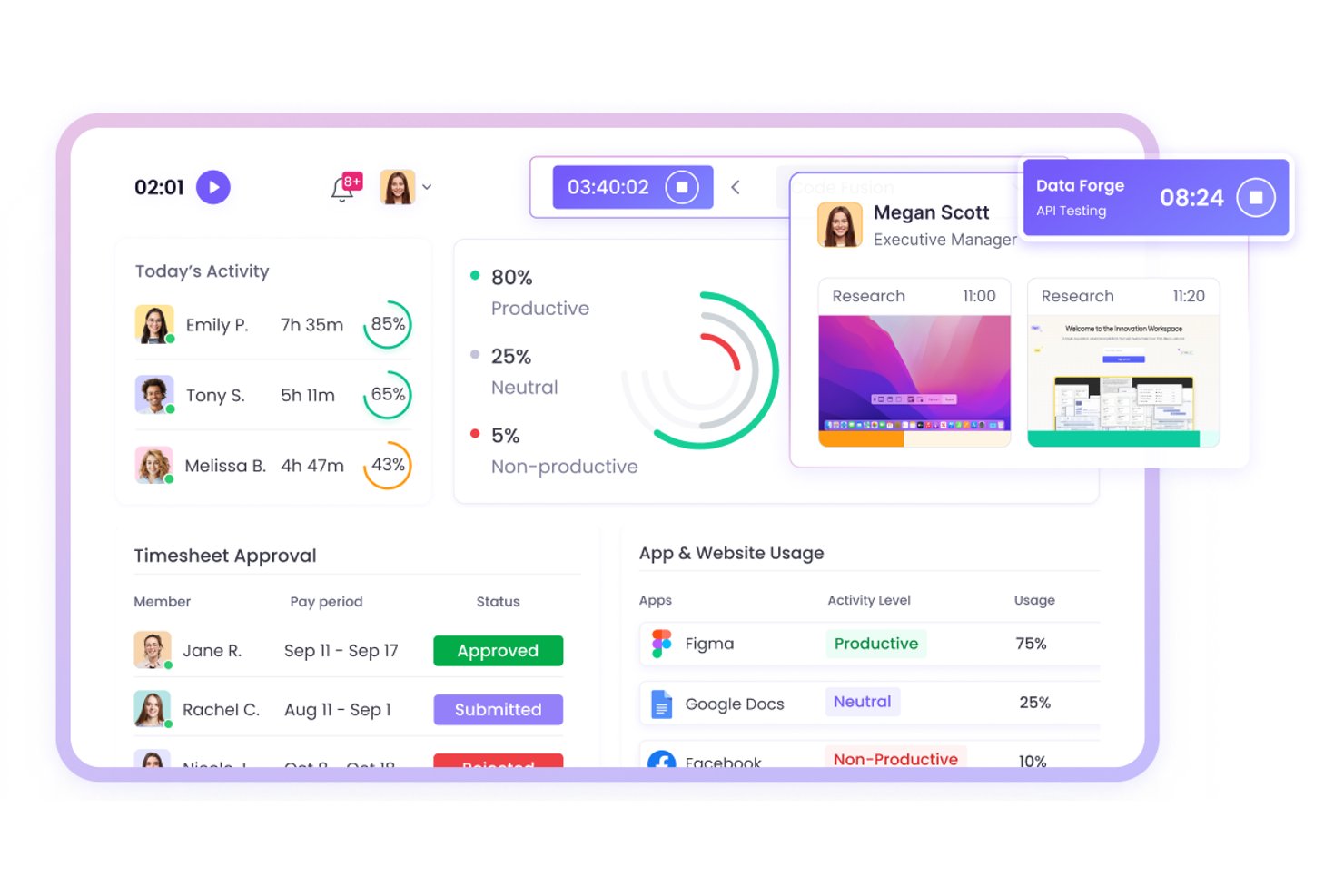
WebWork Time Tracker est un logiciel de suivi du temps destiné aux équipes distribuées et travaillant sur le terrain. Il aide les chefs de projet à surveiller les heures travaillées, l’activité et l’avancement des projets dans le cadre d’opérations à distance.
À qui WebWork Time Tracker convient-il le mieux ?
WebWork Time Tracker convient aux chefs de projet qui coordonnent des équipes de terrain et des équipes distantes distribuées ayant besoin d’une visibilité sur les heures, l’activité et l’avancement des projets.
Pourquoi WebWork Time Tracker est une bonne alternative à Timecamp
J’ai choisi WebWork Time Tracker parce qu’il prend en charge le suivi du temps des équipes de terrain et distantes avec des captures d’écran et une surveillance de l’activité. Mon équipe peut vérifier les heures travaillées sur différents sites, examiner l’activité des projets et comparer le temps enregistré avec l’avancement. Son suivi GPS aide également à associer le travail mobile à des emplacements précis.
Principales fonctionnalités de WebWork Time Tracker
- Suivi automatique du temps : enregistre le temps consacré aux tâches et projets attribués.
- Suivi des présences : consigne les heures d’arrivée, de départ, les pauses et les heures supplémentaires.
- Rapports de productivité : génère des rapports sur les heures, les présences et les données des projets.
- Gestion des tâches : permet aux équipes de créer des tâches, de définir des priorités et de suivre les statuts.
Intégrations de WebWork Time Tracker
WebWork Time Tracker propose des intégrations natives avec Jira, Asana, Trello, ClickUp, Slack, Google Workspace, Microsoft Teams, Freshdesk et QuickBooks. Il se connecte également à Zapier et Make, et fournit une API publique ainsi que des points de terminaison webhook pour les intégrations personnalisées.
Pros and Cons
Pros:
- Le suivi GPS associe les heures de travail sur le terrain aux emplacements
- Les captures d’écran facilitent la vérification du travail à distance
- Les rapports de présence et d’heures supplémentaires facilitent la vérification de la paie
Cons:
- Les captures d’écran fréquentes peuvent préoccuper les équipes soucieuses de la confidentialité
- Le suivi mobile peut épuiser les batteries des appareils

Clockify
Idéal pour les petites équipes
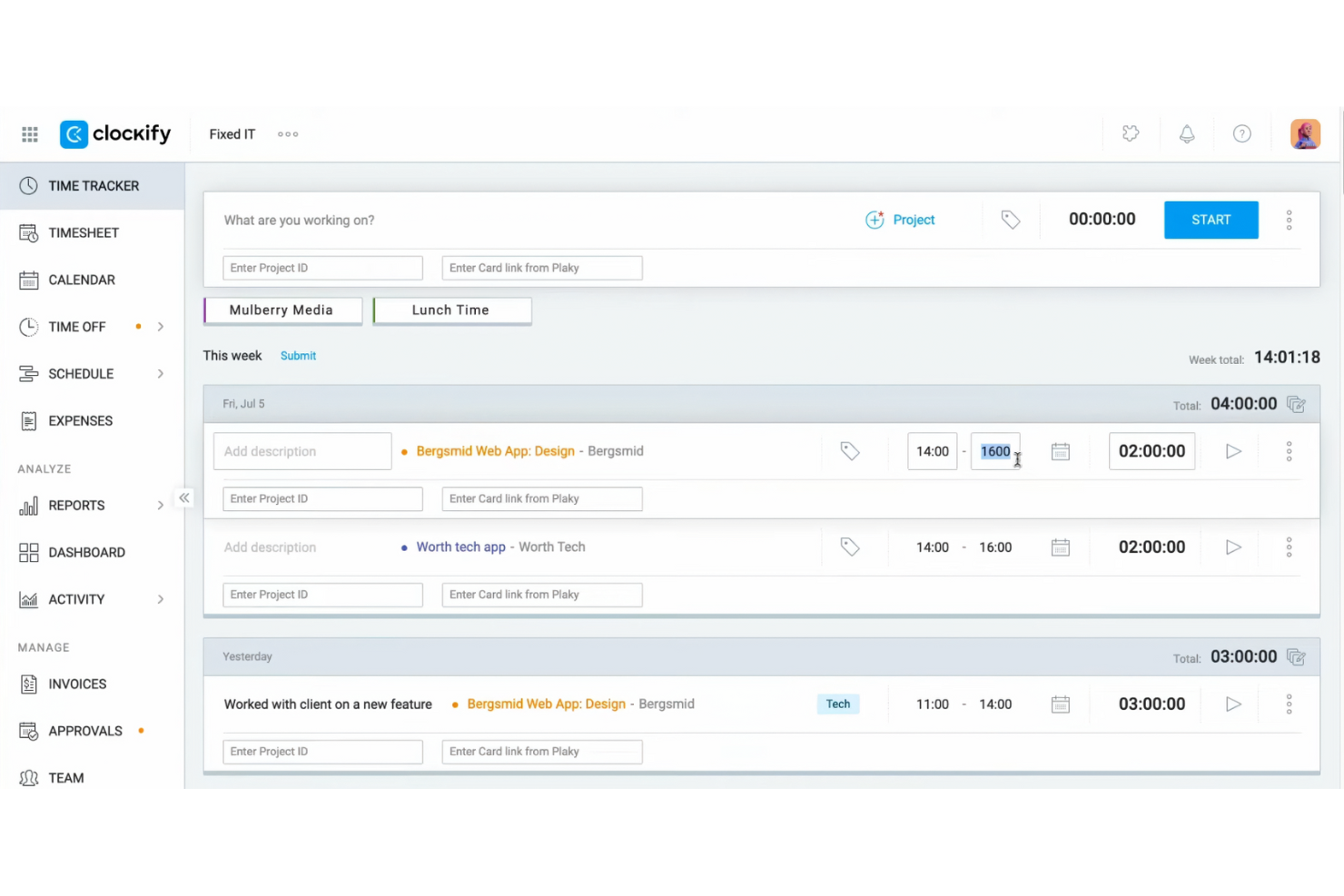
Clockify est un logiciel de suivi du temps conçu pour les travailleurs indépendants et les équipes qui doivent surveiller la productivité des employés et gérer des projets sans contraintes budgétaires. Il vous aide à suivre les heures de travail, à gérer les tâches et à analyser efficacement l’avancement des projets.
Pourquoi c'est une bonne alternative à Timecamp : J’ai sélectionné Clockify parce qu’il offre aux petites équipes un moyen accessible de suivre les heures consacrées aux projets et de gérer les feuilles de temps hebdomadaires sans coûts initiaux élevés. Ses fonctionnalités essentielles de suivi offrent une visibilité claire sur les échéances des projets et la production quotidienne de l’équipe, sans contraindre les petites structures à adopter des niveaux d’abonnement coûteux. Il est donc idéal pour les responsables qui ont besoin d’un suivi essentiel et de preuves du travail effectué tout en maintenant leurs frais logiciels à un niveau bas.
Fonctionnalités et intégrations remarquables :
Les fonctionnalités comprennent des outils de gestion de projet, le suivi gratuit du temps et le suivi des heures facturables. Elles vous aident à garantir un suivi précis du temps et une facturation exacte des clients. Clockify propose également des rapports visuels détaillés pour analyser la productivité de l’équipe.
Les intégrations comprennent Asana, Trello, Jira, QuickBooks, monday.com, Basecamp, GitHub, Salesforce et bien plus encore.
Pros and Cons
Pros:
- Suivi du temps économique pour les petits budgets
- Adapté aux équipes de toutes tailles
- Rapports détaillés disponibles
Cons:
- Gestion de projet basique
- Nécessite une connexion Internet

Timely
Idéal pour le suivi automatique du temps

Timely est un outil de gestion du temps conçu pour les équipes et les indépendants souhaitant automatiser le suivi de leur temps. Il vous aide à suivre précisément les heures de travail et à gérer plus efficacement l’avancement des projets.
Pourquoi Timely est une bonne alternative à Timecamp : Timely propose un suivi automatique du temps, ce qui élimine la nécessité de saisir manuellement les données et garantit une collecte précise des informations. Le module de suivi de la mémoire enregistre toutes les activités sur votre ordinateur, offrant ainsi une vue d’ensemble de votre travail. Vous pouvez facilement consulter et approuver les heures suivies, ce qui fluidifie la gestion des projets. Cette automatisation du suivi du temps fait de Timely une option remarquable pour ceux qui recherchent simplicité et précision.
Fonctionnalités et intégrations remarquables :
Les fonctionnalités comprennent un module de suivi de la mémoire, des tableaux de bord de projet et des rapports de temps. Ces fonctionnalités de suivi du temps vous offrent une vision claire de vos heures de travail. Timely propose également une chronologie qui représente visuellement votre journée de travail et vous aide ainsi à mieux gérer votre emploi du temps.
Les intégrations comprennent Asana, Google Calendar et bien d’autres.
Pros and Cons
Pros:
- Suivi automatique du temps
- Fonctionnalités étendues de suivi des activités
- Adapté aux indépendants
Cons:
- Dépend du suivi de l’utilisation de l’ordinateur
- Options de saisie manuelle limitées

My Hours
Idéal pour obtenir des informations sur la rentabilité des projets

My Hours est un logiciel de suivi du temps conçu pour les indépendants et les petites équipes qui doivent gérer les budgets des projets et les heures de travail. Il vous aide à suivre le temps, à gérer les tâches et à analyser efficacement les coûts des projets.
Pourquoi My Hours est une bonne alternative à Timecamp : My Hours fournit des rapports détaillés contenant des informations sur la rentabilité des projets, afin que vous puissiez voir quels projets sont les plus avantageux. Le logiciel vous permet de suivre les heures facturables et non facturables, vous donnant ainsi une vision claire des coûts des projets. Vous pouvez définir des budgets de projet et recevoir des notifications lorsque vous approchez des limites. Cette attention portée aux informations financières est une fonctionnalité clé qui vous aide à prendre des décisions éclairées concernant les priorités des projets.
Fonctionnalités et intégrations remarquables :
Les fonctionnalités comprennent la facturation, les rapports détaillés et la gestion des tâches. Elles vous aident à garder le contrôle sur les budgets de vos projets et la productivité de votre équipe. My Hours propose également des feuilles de temps personnalisables pour un suivi précis du temps.
Les intégrations comprennent Trello, Asana, Slack, Zapier, Jira, monday.com et bien plus encore.
Pros and Cons
Pros:
- Suivi des heures facturables et non facturables
- Notifications de budget disponibles
- Feuilles de temps personnalisables
Cons:
- Courbe d'apprentissage pour les nouveaux utilisateurs
- Peut ne pas convenir aux grandes entreprises

Idéal pour l'automatisation des processus

Runrun.it est une solution de gestion de projets et de suivi du temps conçue pour les équipes qui cherchent à améliorer leur productivité et à gérer efficacement leurs flux de travail. Elle vous aide à organiser les tâches, à suivre le temps et à automatiser les processus afin d'améliorer les performances de l'équipe.
Pourquoi Runrun.it est une bonne alternative à Timecamp : Runrun.it propose des fonctionnalités d'automatisation des processus, vous permettant d'automatiser les tâches répétitives et de simplifier les flux de travail. Le logiciel vous permet de configurer des alertes et des notifications automatisées afin de tenir votre équipe informée. Vous pouvez également utiliser des flux de travail personnalisés pour vous assurer que les tâches sont effectuées dans le bon ordre. Cette orientation vers l'automatisation des processus fait de Runrun.it un excellent choix pour les équipes souhaitant améliorer leur efficacité.
Fonctionnalités et intégrations remarquables :
Les fonctionnalités comprennent la gestion des tâches et le suivi du temps. Elles vous aident à surveiller la productivité de votre équipe et les échéances de vos projets. Runrun.it propose également des tableaux de bord visuels offrant une vue d'ensemble claire de l'avancement des projets.
Les intégrations ne sont pas répertoriées publiquement.
Pros and Cons
Pros:
- Automatisation des processus disponible
- Flux de travail personnalisés pris en charge
- Tableaux de bord visuels proposés
Cons:
- Nécessite du temps pour la configuration
- Pas d'application mobile
TMetric
Idéal pour la facturation multidevise

TMetric est une solution de suivi du temps et un outil de productivité conçus pour les freelances, les petites entreprises et les équipes à distance qui souhaitent gérer efficacement leurs heures de travail et leur facturation, que ce soit sur leur application de bureau ou leur application mobile. Il vous aide à suivre le temps, à gérer les tâches et à faciliter la facturation des clients.
Pourquoi TMetric est une bonne alternative à Timecamp : TMetric propose une facturation multidevise, ce qui facilite la gestion des entreprises ayant des clients internationaux. La fonctionnalité de facturation vous permet de créer et d'envoyer des factures et prend en charge la facturation dans plusieurs devises, facilitant ainsi vos transactions internationales. Vous pouvez suivre précisément les heures facturables et les convertir facilement en factures. Cette prise en charge des devises multiples fait de TMetric un choix pratique pour les entreprises opérant au-delà des frontières.
Fonctionnalités et intégrations remarquables :
Les fonctionnalités comprennent la gestion de projets, des rapports détaillés et le suivi des congés. Ces fonctionnalités vous aident à garder le contrôle sur la productivité de votre équipe et la gestion de vos projets. TMetric fournit également des outils de gestion budgétaire pour maintenir vos projets sur la bonne voie financièrement.
Les intégrations incluent Asana, Trello, Slack, Jira, GitHub, Bitbucket, monday.com, GitLab et bien d'autres.
Pros and Cons
Pros:
- Facturation multidevise
- Outils de budgétisation des projets
- Gestion de projets facile
Cons:
- Options de rapport basiques
- Limitations de l'application mobile

Idéal pour l'analyse des équipes distantes
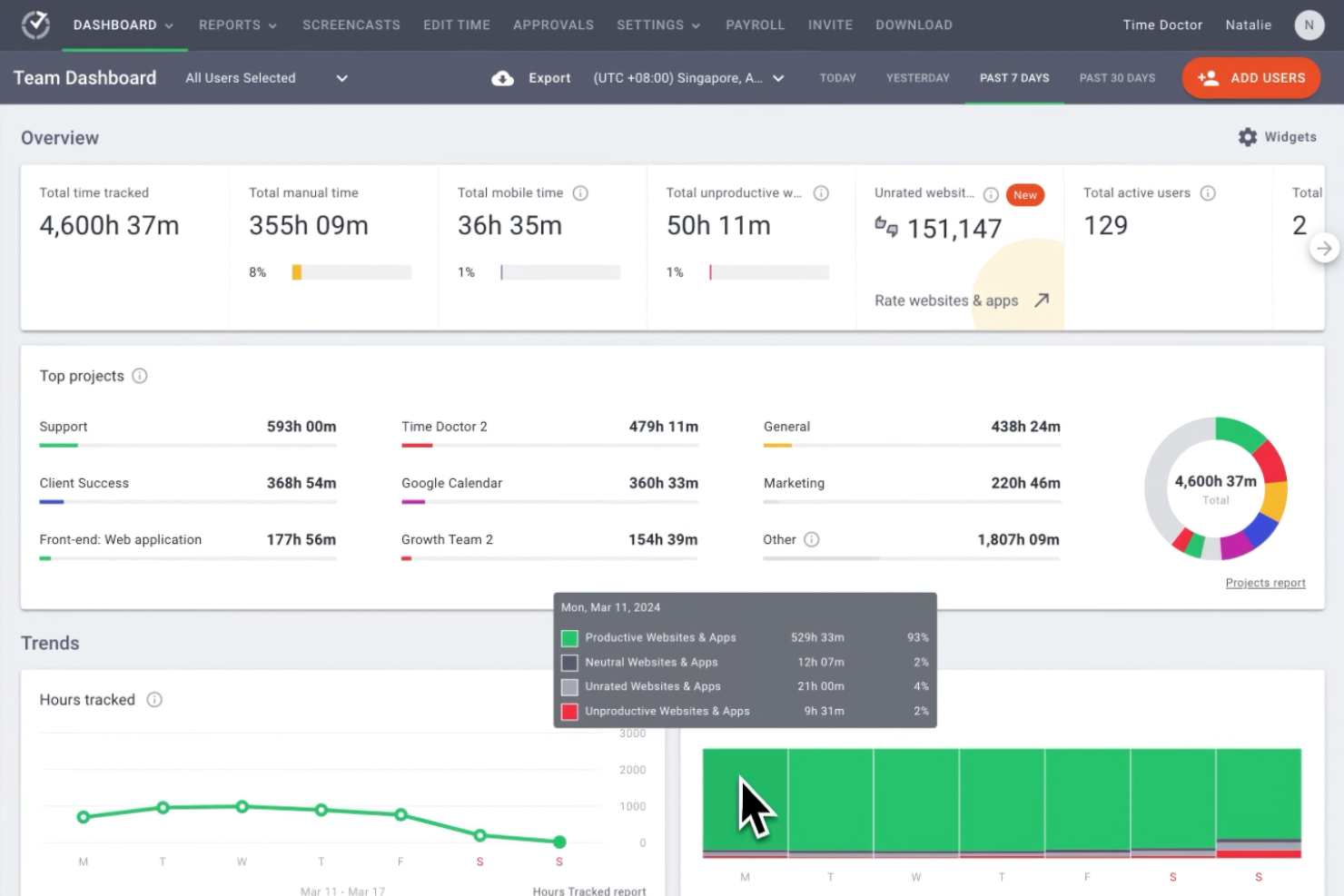
Time Doctor est un logiciel de suivi du temps tout-en-un conçu pour les entreprises et les équipes distantes qui souhaitent améliorer leur productivité globale. Il fournit aux responsables et aux chefs d'équipe des informations sur la manière dont le temps des employés est consacré aux différents projets.
Pourquoi Time Doctor est une bonne alternative à Timecamp : Time Doctor est une application de suivi du temps qui propose des fonctionnalités d'analyse avancées, axées sur les performances des équipes distantes. Ses fonctionnalités de suivi du temps comprennent la surveillance en temps réel. Les alertes de distraction permettent à votre équipe de rester concentrée sur ses tâches. De plus, la capture d'écran de Time Doctor offre une vue claire de la productivité des employés, ce qui soutient sa proposition de valeur unique (USP) en matière d'analyse des équipes distantes.
Fonctionnalités et intégrations remarquables :
Les fonctionnalités comprennent le suivi du temps avec captures d'écran, les alertes de distraction et la surveillance de la productivité des employés en temps réel. Ces fonctionnalités vous aident à maintenir la productivité et à garder votre équipe concentrée. Le logiciel propose également des rapports détaillés pour vous aider à analyser les habitudes de travail.
Les intégrations comprennent Asana, Trello, Jira, monday.com, Basecamp 3, Salesforce, Wrike et bien d'autres.
Pros and Cons
Pros:
- Surveillance de la productivité en temps réel
- Capture d'écran
- Alertes de distraction
Cons:
- Suivi hors ligne limité
- Fonctionnalités de gestion de projet basiques
Idéal pour l’intégration au calendrier
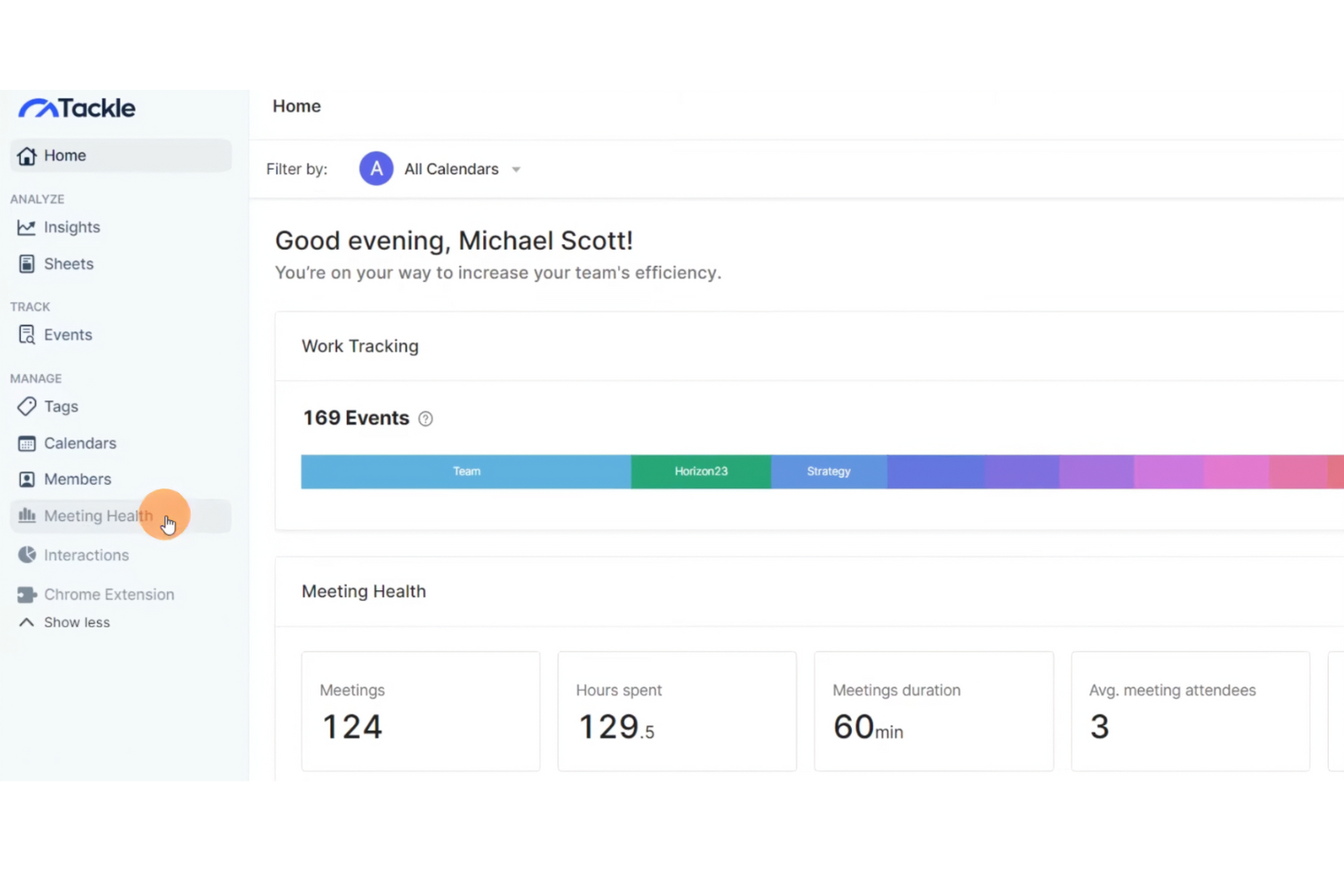
Tackle est un outil de gestion du temps conçu pour les professionnels et les équipes qui souhaitent optimiser leur planification et suivre leur productivité. Il vous aide à convertir les données de calendrier en informations exploitables pour améliorer la gestion du temps et des tâches.
Pourquoi Tackle est une bonne alternative à Timecamp : Tackle offre une intégration fluide du calendrier, vous permettant de synchroniser et d’analyser efficacement votre emploi du temps, que ce soit sur votre application de bureau ou votre application mobile. Cette fonctionnalité permet de suivre la productivité afin de vous aider à surveiller la manière dont votre temps est réparti entre différentes activités, pour identifier facilement les tendances et effectuer des ajustements afin d’améliorer votre productivité. L’accent mis par Tackle sur l’intégration du calendrier garantit que votre planification reste alignée sur vos objectifs de productivité.
Fonctionnalités remarquables et intégrations :
Les fonctionnalités comprennent le suivi automatisé du temps, la visualisation des données et des informations personnalisées. Ces fonctionnalités vous aident à mieux comprendre vos habitudes de productivité. Tackle propose également une interface conviviale pour simplifier la gestion de votre emploi du temps.
Les intégrations comprennent Google Agenda ainsi que la possibilité d’exporter des données vers Google Sheets et Excel.
Pros and Cons
Pros:
- Intégration native du calendrier
- Suivi automatisé du temps
- Interface conviviale
Cons:
- Fonctionnalités avancées limitées
- Peut nécessiter une configuration initiale


Harvest est une solution de suivi du temps et un logiciel de facturation conçus pour les freelances, les petites entreprises et les équipes qui souhaitent gérer efficacement leur temps et leurs finances. Il vous aide à suivre les heures de travail consacrées aux projets, à créer des factures et à gérer les budgets.
Pourquoi Harvest est une bonne alternative à Timecamp : Harvest propose une facturation intégrée, qui vous permet de générer des factures directement à partir des saisies de temps et des dépenses. Cette fonctionnalité simplifie la facturation des clients et garantit l’exactitude des montants facturés. Vous pouvez facilement convertir les heures de travail suivies en factures, ce qui simplifie la gestion financière. L’accent mis par Harvest sur la combinaison d’un suivi précis du temps et de la facturation assure une transition fluide entre le travail sur les projets et la facturation des clients.
Fonctionnalités et intégrations remarquables :
Les fonctionnalités comprennent le suivi des dépenses, la gestion du budget des projets et des rapports détaillés. Ces fonctionnalités vous aident à surveiller les coûts des projets et à vous assurer de respecter le budget. Harvest propose également l’approbation des feuilles de temps afin de simplifier la gestion des équipes.
Les intégrations comprennent Asana, Trello, Slack, Jira, QuickBooks Online, Basecamp, Stripe, PayPal, Xero, Google Calendar, et bien plus encore.
Pros and Cons
Pros:
- Facturation intégrée
- Adapté aux petites entreprises
- Suivi facile des dépenses
Cons:
- Dépend d’un suivi précis du temps
- Projets illimités uniquement avec les formules payantes

Toggl
Meilleur choix pour les rapports personnalisables
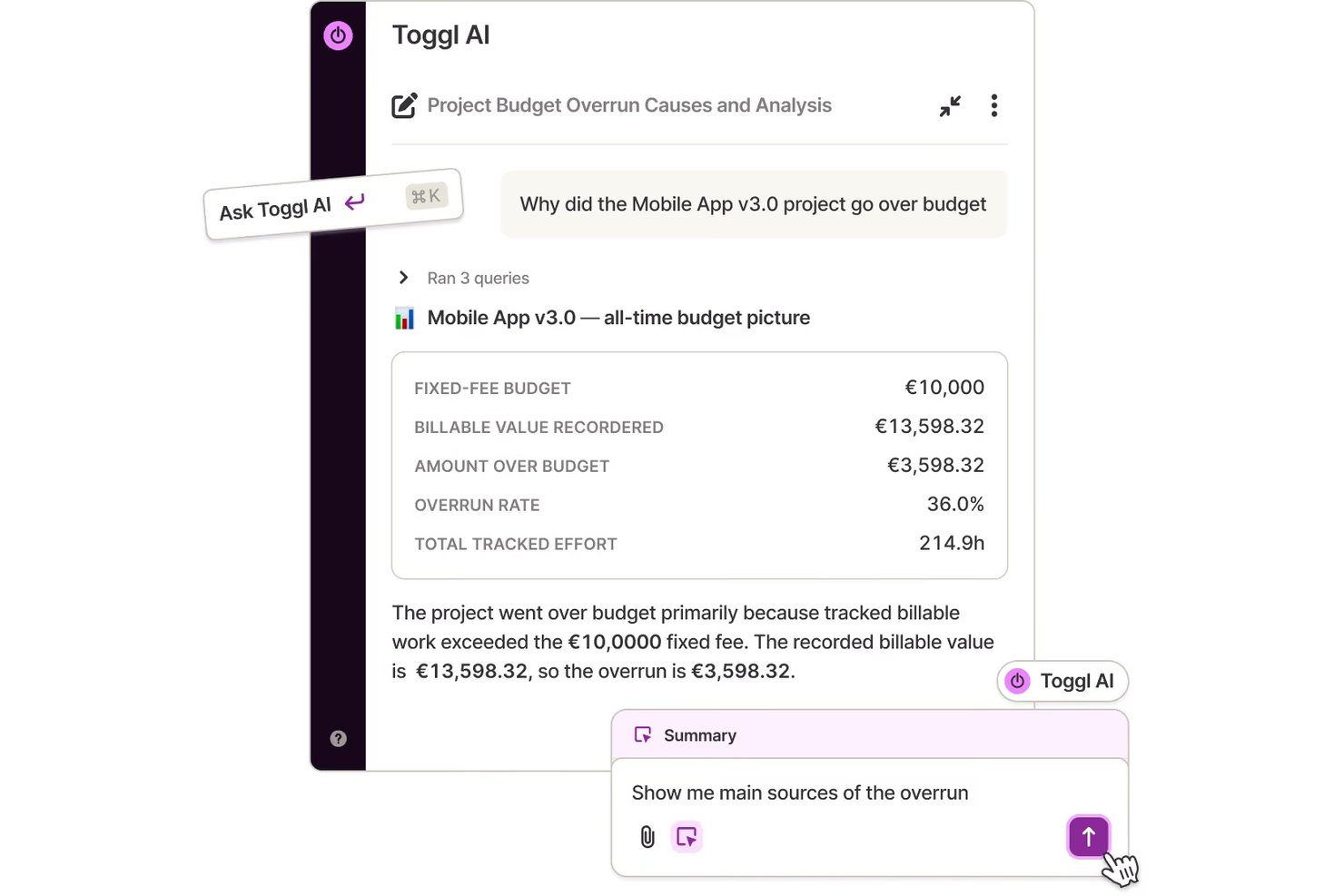
Toggl est un outil de suivi du temps conçu pour les travailleurs indépendants, les petites entreprises et les équipes souhaitant améliorer leur productivité. Il fournit des informations sur la manière dont le temps est consacré aux projets, améliorant ainsi l’efficacité de la gestion de projet.
Pourquoi Toggl est une bonne alternative à Timecamp : Toggl offre des possibilités de personnalisation des rapports, vous permettant d’adapter les rapports de temps à vos besoins spécifiques. Son interface simple facilite le suivi du temps sans vous perdre dans les détails. Vous pouvez générer des rapports détaillés qui se concentrent sur les indicateurs les plus importants pour vous. La flexibilité de Toggl Track dans la personnalisation des rapports de temps vous aide à obtenir des informations directement pertinentes pour la productivité de votre équipe.
Fonctionnalités et intégrations remarquables :
Les fonctionnalités comprennent la détection du temps d’inactivité et le suivi de l’avancement des projets. Ces fonctionnalités vous aident à gérer plus efficacement la productivité de votre équipe. Toggl propose également des rappels pour garantir la régularité du suivi du temps.
Les intégrations comprennent Asana, Trello, Slack, Jira, Google Calendar, Todoist, Basecamp, GitHub, Evernote, QuickBooks Online et bien plus encore.
Pros and Cons
Pros:
- Application mobile pour Android et iOS
- Convient aux petites équipes
- Forfaits payants abordables
Cons:
- La prise en charge d’un nombre illimité d’utilisateurs n’est pas disponible
- Aucune fonctionnalité de facturation
Autres alternatives à Timecamp
Voici quelques alternatives supplémentaires à Timecamp qui ne figurent pas dans ma sélection, mais qui méritent tout de même d’être examinées :
- Monitask
Idéal pour le suivi des employés
- Hubstaff
Idéal pour le suivi GPS
- Buddy Punch
Idéal pour la planification des employés
- Tick's Time Tracking
Idéal pour le suivi simple du budget des projets


Comment j’évalue les alternatives à TimeCamp
J’examine chaque alternative à TimeCamp en deux niveaux : les indispensables de base, comme les budgets au niveau des projets et les taux facturables, puis les facteurs qui distinguent réellement les outils.
Fonctionnalités essentielles (indispensables pour cette liste)
Lorsque je sélectionne les outils de ma liste, j’évalue chacun d’eux sur une échelle allant de 0 (la fonctionnalité n’est pas proposée) à 5 (l’outil excelle dans ce domaine) pour chaque fonctionnalité essentielle indiquée ci-dessous. Je convertis ensuite le score total de l’outil en pourcentage. Chaque outil doit obtenir un score total minimum de 65 % pour être retenu.
- Suivi du temps : Je vérifie si l’outil propose des minuteurs, une saisie manuelle et une forme d’automatisation, comme la détection des applications en arrière-plan dans Toggl Track ou les alertes d’inactivité dans Clockify, afin que les équipes n’aient pas à reconstituer leurs feuilles de temps de mémoire à la fin de la semaine.
- Organisation des projets et des tâches : Chaque outil doit permettre d’associer les entrées de temps à des projets, des tâches et des clients précis, comme Harvest relie les heures enregistrées aux lignes détaillées des tâches au lieu de tout regrouper dans un seul espace.
- Heures facturables et facturation : J’évalue la manière dont chaque plateforme gère l’étiquetage des heures facturables et non facturables, les taux personnalisés par projet ou membre de l’équipe, ainsi que sa capacité à générer ou à exporter des factures directement à partir du temps suivi.
- Suivi des budgets et de la rentabilité : Les outils obtiennent de meilleures notes lorsqu’ils permettent de définir des budgets en heures ou en coûts par projet et d’afficher la progression en temps réel, ce qui est particulièrement utile pour les équipes d’agence qui surveillent leurs marges sur plusieurs missions clients simultanément.
- Rapports et analyses : Je recherche des rapports personnalisables qui vont au-delà des simples feuilles de temps, avec notamment des filtres par client, période ou membre de l’équipe, ainsi que des options d’exportation comme les formats CSV et PDF pour les mises à jour destinées aux parties prenantes.
- Gestion des équipes et des ressources : La prise en charge de plusieurs utilisateurs avec des autorisations fondées sur les rôles, l’approbation des feuilles de temps et les vues de la charge de travail ou de la capacité sont importantes ici, en particulier pour les responsables qui gèrent des équipes pluridisciplinaires sur plusieurs projets simultanés.
Une fois que j’ai établi une liste d’outils répondant à ces critères, j’examine ce qui distingue chaque plateforme.
Facteurs différenciants (ce qui distingue les fournisseurs)
Voici comment je compare les différents fournisseurs :
Fonctionnalités remarquables
Le suivi automatique de l’activité est un élément important pour moi : des outils comme Hubstaff et Toggl Track peuvent enregistrer les applications et les URL en arrière-plan, ce qui évite aux équipes de reconstituer leur journée a posteriori. J’évalue également le niveau d’intégration d’une plateforme avec les outils de gestion de projet, car une synchronisation bidirectionnelle avec Jira ou Asana est bien plus utile qu’une simple connexion unidirectionnelle. Les informations sur la productivité complètent l’ensemble en aidant les responsables à repérer les habitudes de concentration et à détecter la surcharge de travail avant qu’elle ne devienne un problème de fidélisation.
Au-delà des fonctionnalités
La structure tarifaire joue ici un rôle important : un travailleur indépendant qui évalue Toggl Track a des besoins très différents de ceux d’une agence de 50 personnes qui examine Harvest. Je vérifie donc si les forfaits évoluent sans contraindre prématurément les équipes à adopter des niveaux destinés aux grandes entreprises. La couverture des plateformes est un autre facteur que je prends en compte, car les équipes sur le terrain et à distance ont besoin d’applications mobiles et d’un suivi hors ligne qui se synchronise dès qu’elles sont de nouveau connectées. Pour les équipes qui traitent des données clients sensibles, j’examine également les éléments fondamentaux de la sécurité, comme l’authentification unique, l’authentification à deux facteurs et la conformité au RGPD.
Pourquoi chercher une alternative à Timecamp ?
Bien que Timecamp soit un bon choix de logiciel de productivité et de gestion de projets, plusieurs raisons peuvent pousser certains utilisateurs à rechercher des solutions alternatives. Vous cherchez peut-être une alternative à Timecamp parce que :
- Vous avez besoin de fonctionnalités de création de rapports plus avancées
- Votre équipe a besoin de meilleures options d'évolutivité
- Vous recherchez des outils de collaboration améliorés
- Vous avez besoin d'un logiciel doté de fonctionnalités hors ligne
- Votre équipe éprouve des difficultés avec l'interface utilisateur
- Vous avez besoin de formules tarifaires plus flexibles
Si l'une de ces situations vous correspond, vous êtes au bon endroit. Ma liste contient plusieurs options de logiciels de productivité et de gestion de projets qui conviennent mieux aux équipes confrontées à ces difficultés avec Timecamp et qui recherchent des solutions alternatives.
Fonctionnalités
Voici quelques-unes des principales fonctionnalités de Timecamp, pour vous aider à comparer les offres des solutions alternatives :
- Suivi du temps : fournit un suivi automatisé et manuel pour vous aider à conserver des relevés précis des heures de travail.
- Surveillance des effectifs : suit les niveaux d'activité des employés et la productivité de votre équipe, ce qui est idéal pour gérer des équipes à distance.
- Suivi des présences : gère les présences, les heures supplémentaires et les demandes de congé afin de simplifier les processus de paie.
- Intégrations : compatible avec plus de 100 outils, notamment des logiciels de gestion de projet et de facturation, pour s'intégrer à votre flux de travail.
- Analyses : génère des rapports détaillés sur l'utilisation du temps, les comparaisons budgétaires et la productivité des employés afin de faciliter la prise de décision.
- Facturation et émission de factures : suit les heures facturables et crée des factures à partir du temps suivi, ce qui facilite la gestion de la facturation des clients.
- Rôles de gestion : vous permet de définir les autorisations des utilisateurs et de créer des rôles personnalisés pour mieux contrôler les accès.
- Étiquettes et captures d'écran : utilise des étiquettes pour la classification et des captures d'écran facultatives pour assurer la transparence du suivi.
- Approbations et dépenses : permet aux employés de soumettre leurs feuilles de temps pour approbation et de suivre les dépenses liées aux projets.
- Services personnalisés : propose des options de déploiement auto-hébergé et des intégrations personnalisées pour répondre aux besoins spécifiques de l'entreprise.