

10 meilleures alternatives à RescueTime pour la productivité en 2026

Sélection des meilleures alternatives à RescueTime


En tant que chef de projet, vous savez que le suivi du temps et de la productivité est essentiel à la réussite de votre équipe. Mais vous avez peut-être constaté que RescueTime ne répond pas tout à fait à vos besoins. Qu'il s'agisse de fonctionnalités manquantes, de possibilités de personnalisation limitées ou simplement d'une incompatibilité avec votre flux de travail, vous n'êtes pas le seul à chercher des alternatives.
Grâce à mon expérience dans le test et l'évaluation de logiciels, j'ai constaté à quel point le bon outil peut faire la différence. Vous avez besoin d'une solution qui s'aligne sur vos objectifs commerciaux et réponde à vos défis spécifiques.
Dans cet article, je vais vous présenter mes meilleures alternatives à RescueTime. Je vous donnerai un aperçu impartial de chaque option afin que vous puissiez trouver celle qui convient le mieux à votre équipe. Découvrons les solutions de suivi du temps qui peuvent vous aider à gérer vos projets plus efficacement.
Qu'est-ce que RescueTime ?
RescueTime est un logiciel de suivi du temps et de la productivité qui vous aide à surveiller la façon dont vous utilisez vos heures de travail. Il est utilisé par les indépendants, les travailleurs à distance et les équipes qui souhaitent améliorer leur productivité. Il fournit des informations sur vos habitudes quotidiennes, vous permettant de prendre des décisions éclairées en matière de gestion du temps.
Des fonctionnalités telles que le suivi automatique du temps, les rapports détaillés et la définition d'objectifs permettent de mieux comprendre vos habitudes de travail et d'améliorer votre efficacité. Dans l'ensemble, RescueTime fournit aux utilisateurs des données précieuses pour optimiser leur journée de travail et stimuler leur productivité.
Tableau comparatif des alternatives à RescueTime
Ce tableau comparatif résume les informations tarifaires de mes meilleures alternatives à RescueTime :
| Tool | Best For | Trial Info | Price | ||
|---|---|---|---|---|---|
| 1 | Idéal pour la facturation et l'attribution du temps aux projets | Essai gratuit de 14 jours | À partir de $3.99/utilisateur/mois (facturé annuellement) | Website | |
| 2 | Idéal pour le suivi du temps des équipes multiplateformes | Forfait gratuit + essai gratuit de 7 jours disponible | À partir de $3.99/utilisateur/mois (facturé annuellement) | Website | |
| 3 | Idéal pour l'enregistrement automatique du temps | Essai gratuit de 14 jours + démonstration gratuite disponible | À partir de $9/utilisateur/mois (facturé annuellement) | Website | |
| 4 | Idéal pour le suivi du temps en un clic | Essai gratuit de 14 jours + forfait gratuit + démo gratuite disponible | À partir de $3.99/user/month (facturé annuellement) | Website | |
| 5 | Idéal pour la budgétisation et la création de rapports | Version gratuite disponible | À partir de 8.50 $/utilisateur/mois (facturé annuellement) | Website | |
| 6 | Idéal pour un suivi détaillé de la journée de travail | Forfait gratuit disponible + essai gratuit de 14 jours | À partir de $5.83/utilisateur/mois (facturé annuellement) | Website | |
| 7 | Idéal pour la productivité des équipes à distance | Essai gratuit de 14 jours + démo gratuite disponible | À partir de $6.67/utilisateur/mois (facturé annuellement) | Website | |
| 8 | Idéal pour le suivi privé du temps | Essai gratuit de 14 jours | À partir de $14/mois (facturé annuellement) | Website | |
| 9 | Idéal pour les freelances et les agences | Essai gratuit de 7 jours | À partir de $9/utilisateur/mois (facturé annuellement) | Website | |
| 10 | Idéal pour la facturation intégrée | Essai gratuit de 30 jours + formule gratuite + démonstration gratuite disponible | À partir de $9/utilisateur/mois (facturation annuelle) | Website |

Pourquoi faire confiance à nos recommandations de logiciels
Notre équipe teste et évalue des logiciels depuis 2012. En tant que chefs de projet nous-mêmes, nous savons à quel point il est difficile — et important — de choisir le bon logiciel.
Pour ce guide, nous avons évalué les outils grâce à des tests pratiques et une recherche indépendante, en notant les outils selon nos critères de sélection. Nous nous appuyons également sur les enseignements de leaders d’opinion du secteur et de professionnels de la gestion de projet en activité.
Nos avis reflètent notre jugement éditorial humain, et non un argumentaire de vente.
Réviseurs experts:
Avis sur les meilleures alternatives à RescueTime
Vous trouverez ci-dessous mes résumés détaillés des meilleures alternatives à RescueTime qui ont intégré ma sélection. Mes avis proposent un examen approfondi des principales fonctionnalités, des avantages et inconvénients, des intégrations et des cas d’utilisation idéaux de chaque outil afin de vous aider à trouver celui qui vous convient le mieux.

Idéal pour la facturation et l'attribution du temps aux projets
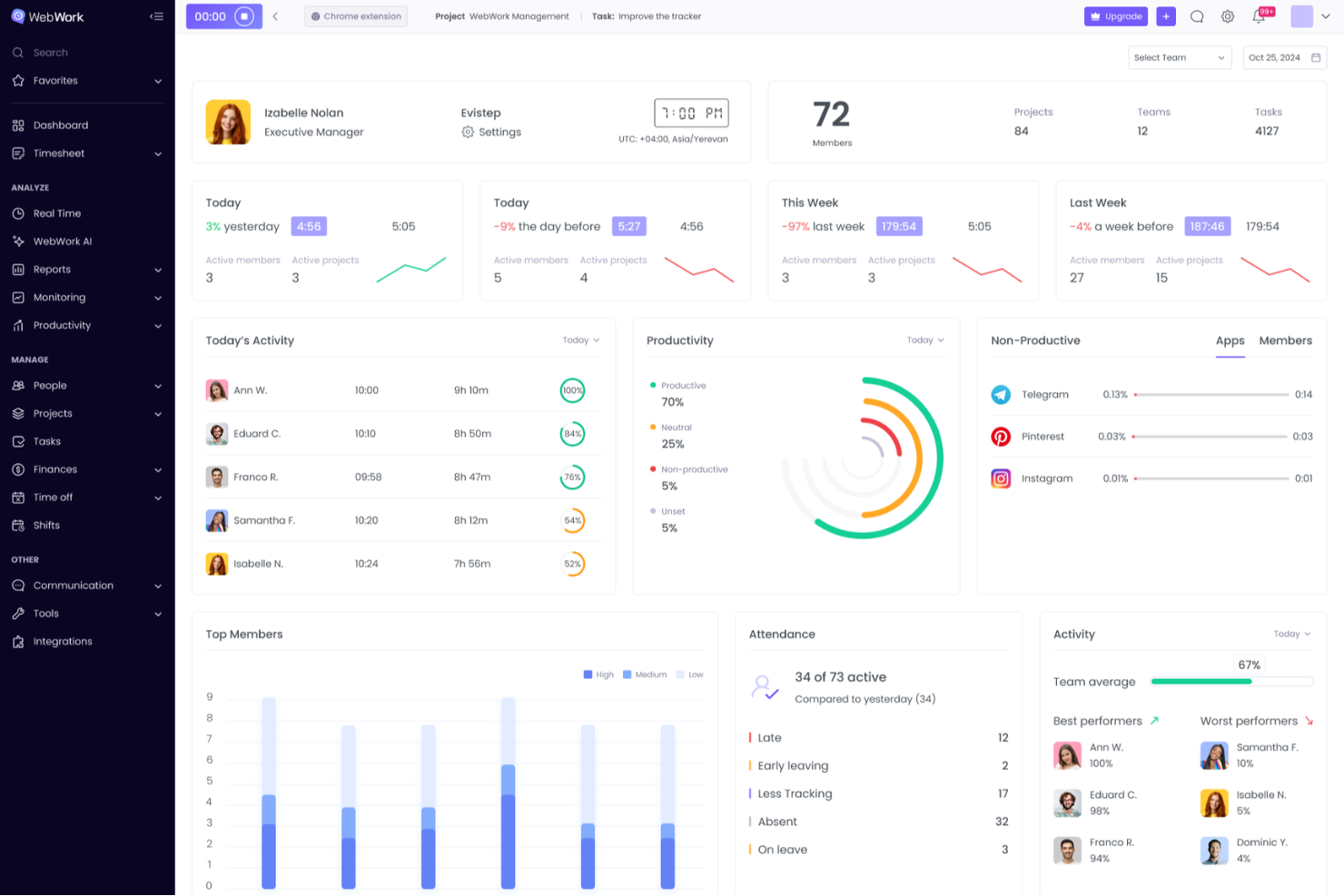
WebWork Time Tracker est un logiciel de suivi du temps destiné aux agences, aux travailleurs indépendants et aux équipes distribuées qui ont besoin d'une meilleure visibilité sur le travail, d'un meilleur suivi des projets et de relevés précis pour les missions clients.
À qui WebWork Time Tracker convient-il le mieux ?
WebWork Time Tracker convient aux agences, aux travailleurs indépendants et aux équipes distribuées qui ont besoin de suivre précisément les heures facturables associées aux projets clients.
Pourquoi j'ai choisi WebWork Time Tracker : une bonne alternative à RescueTime examinée
J'ai choisi WebWork Time Tracker pour l'importance accordée à la facturation et à l'attribution du temps aux projets. J'utilise des minuteurs par projet, des taux de facturation et des rapports de temps détaillés pour relier les heures travaillées à des livrables clients précis. Cela aide mon équipe à distinguer les activités facturables des activités non facturables avant de préparer les factures clients ou d'évaluer la rentabilité des projets.
Principales fonctionnalités de WebWork Time Tracker
- Captures d'écran : Effectue régulièrement des captures d'écran pendant les sessions de travail suivies.
- Utilisation des applications et des sites web : Enregistre le temps passé sur les applications et les sites web.
- Niveaux d'activité : Mesure l'activité du clavier et de la souris pendant les périodes de travail.
- Suivi des présences : Enregistre les pointages d'arrivée, les pauses et les pointages de départ.
Intégrations de WebWork Time Tracker
WebWork Time Tracker propose des intégrations natives avec Slack, Trello, Asana, Jira, ClickUp, Teamwork, Todoist, Wrike, Zoho Projects et Bitbucket, ainsi qu'avec Zapier. Il se connecte également à Make et fournit une API et des webhooks pour les intégrations personnalisées.
Pros and Cons
Pros:
- Les taux de facturation relient les heures aux projets
- Les rapports facilitent la facturation des clients et l'évaluation de la rentabilité
- Les captures d'écran documentent l'activité pendant les sessions suivies
Cons:
- La surveillance par captures d'écran peut soulever des préoccupations en matière de confidentialité
- Le suivi de l'activité peut sembler intrusif pour les employés

Clockify
Idéal pour le suivi du temps des équipes multiplateformes
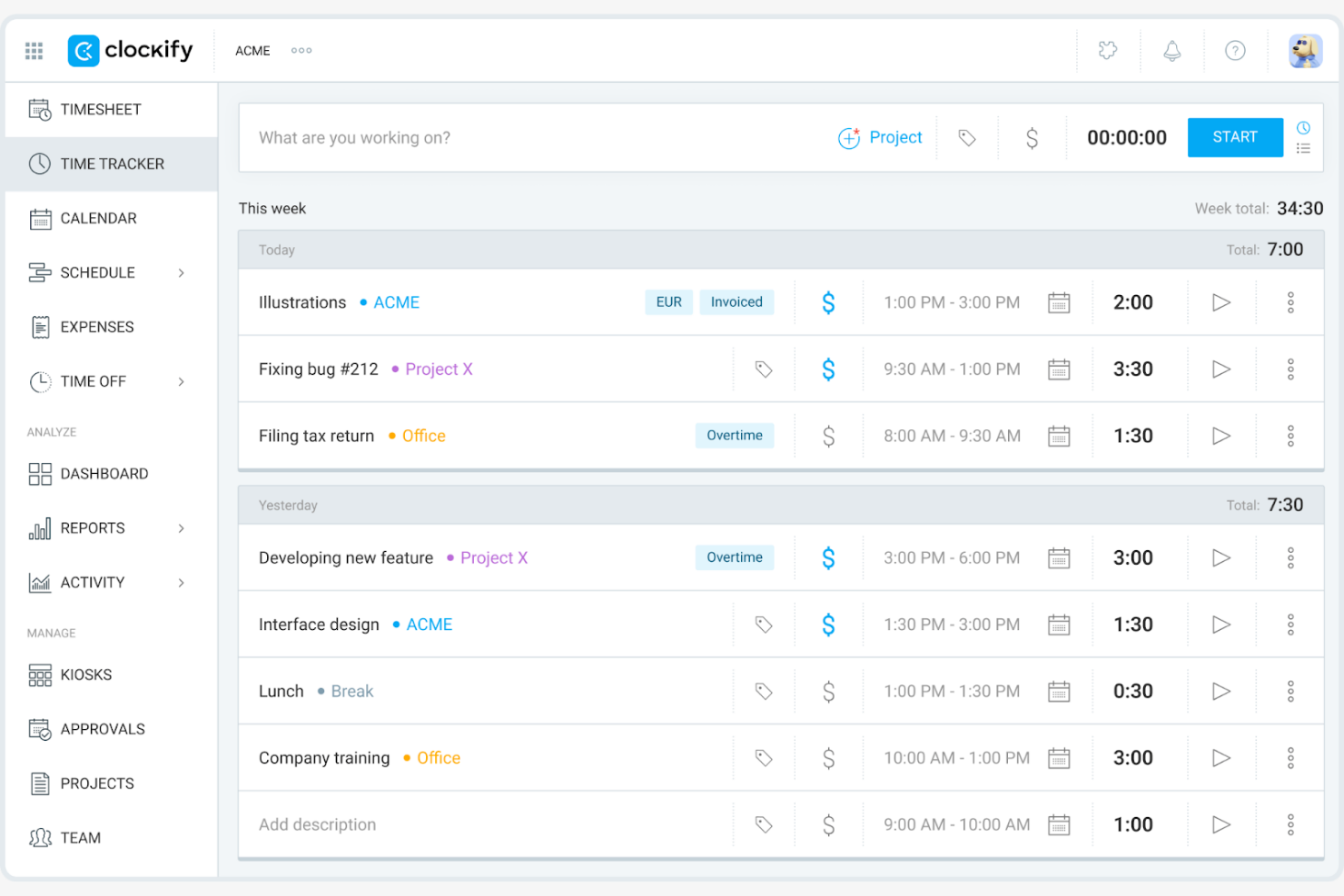
Clockify est un logiciel de suivi du temps qui s'adresse aux travailleurs indépendants, aux petites entreprises et aux grandes équipes en fournissant des outils pour suivre les heures de travail et gérer les projets. Il vous aide à surveiller la productivité, à affecter les ressources et à générer des rapports.
Pourquoi c'est une bonne alternative à RescueTime : J'ai sélectionné Clockify parce qu'il vous offre une visibilité complète sur les saisies de temps de l'équipe, quel que soit le système d'exploitation ou l'appareil utilisé. Il répond aux besoins de suivi du temps multiplateforme en proposant des applications natives pour Windows, Mac, Linux, iOS, Android et les navigateurs web, avec prise en charge du suivi hors ligne. Ainsi, votre équipe distribuée peut enregistrer ses heures avec précision, suivre en temps réel l'avancement des projets et respecter les délais de livraison destinés aux clients, quel que soit son environnement d'exploitation préféré.
Fonctionnalités et intégrations remarquables :
Les fonctionnalités comprennent des outils d'organisation qui vous aident à catégoriser et à hiérarchiser efficacement les tâches. Vous pouvez définir des taux facturables pour différents projets et générer des factures basées sur les heures suivies. Clockify propose également un tableau de bord visuel qui fournit une vue d'ensemble de l'utilisation du temps et des tendances de productivité.
Les intégrations comprennent Asana, Trello, Jira, QuickBooks Online, monday.com, GitHub et bien plus encore.
Pros and Cons
Pros:
- Prend en charge cinq utilisateurs gratuits
- Prend en charge les grandes équipes
- Gestion de projets flexible
Cons:
- Personnalisation basique des notifications
- Fonctionnalités de configuration du tableau de bord limitées

Timely
Idéal pour l'enregistrement automatique du temps
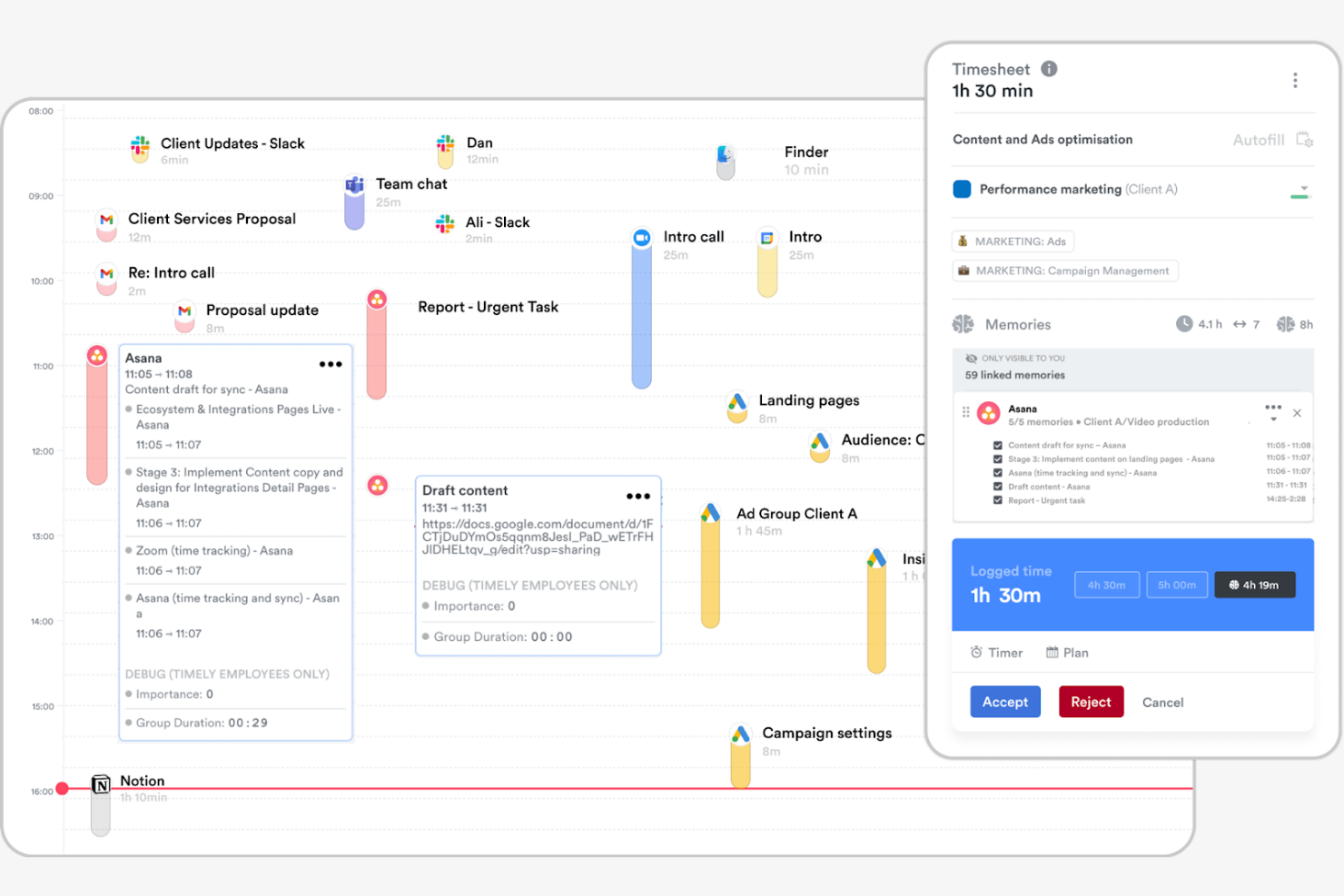
Timely est un logiciel de suivi du temps qui utilise l'IA pour enregistrer automatiquement les heures, destiné aux professionnels et aux équipes qui privilégient un suivi précis et simple. Il peut vous aider à gérer des projets, à suivre la productivité et à affecter les ressources.
Pourquoi c'est une bonne alternative à RescueTime : Timely propose un outil de suivi de la mémoire, qui enregistre vos activités professionnelles sans saisie manuelle. Cette fonctionnalité vous aide à comptabiliser toutes les heures facturables et réduit le risque d'oublier des entrées. Timely fournit également un tableau de bord des projets, qui vous aide à comprendre comment le temps est réparti entre les tâches et les projets. L'accent mis sur l'automatisation et la précision en fait un outil adapté à ceux qui souhaitent réduire au minimum les efforts de suivi manuel.
Fonctionnalités et intégrations remarquables :
Les fonctionnalités comprennent des calendriers visuels de projets pour vous aider à planifier des tâches spécifiques d'un projet. L'application propose des rapports détaillés pour analyser l'utilisation du temps et les tendances de productivité. Vous pouvez également définir des budgets de projet et suivre la progression en temps réel, afin de rester sur la bonne voie.
Les intégrations comprennent Asana, Trello, Slack, Google Calendar, QuickBooks Online, Xero et bien plus encore.
Pros and Cons
Pros:
- Suivi automatique du temps avec l'IA
- Calendriers visuels de projets
- Suivi du budget en temps réel
Cons:
- Personnalisation limitée des rapports
- Aucune fonctionnalité de dépendance entre les tâches

TimeCamp
Idéal pour le suivi du temps en un clic
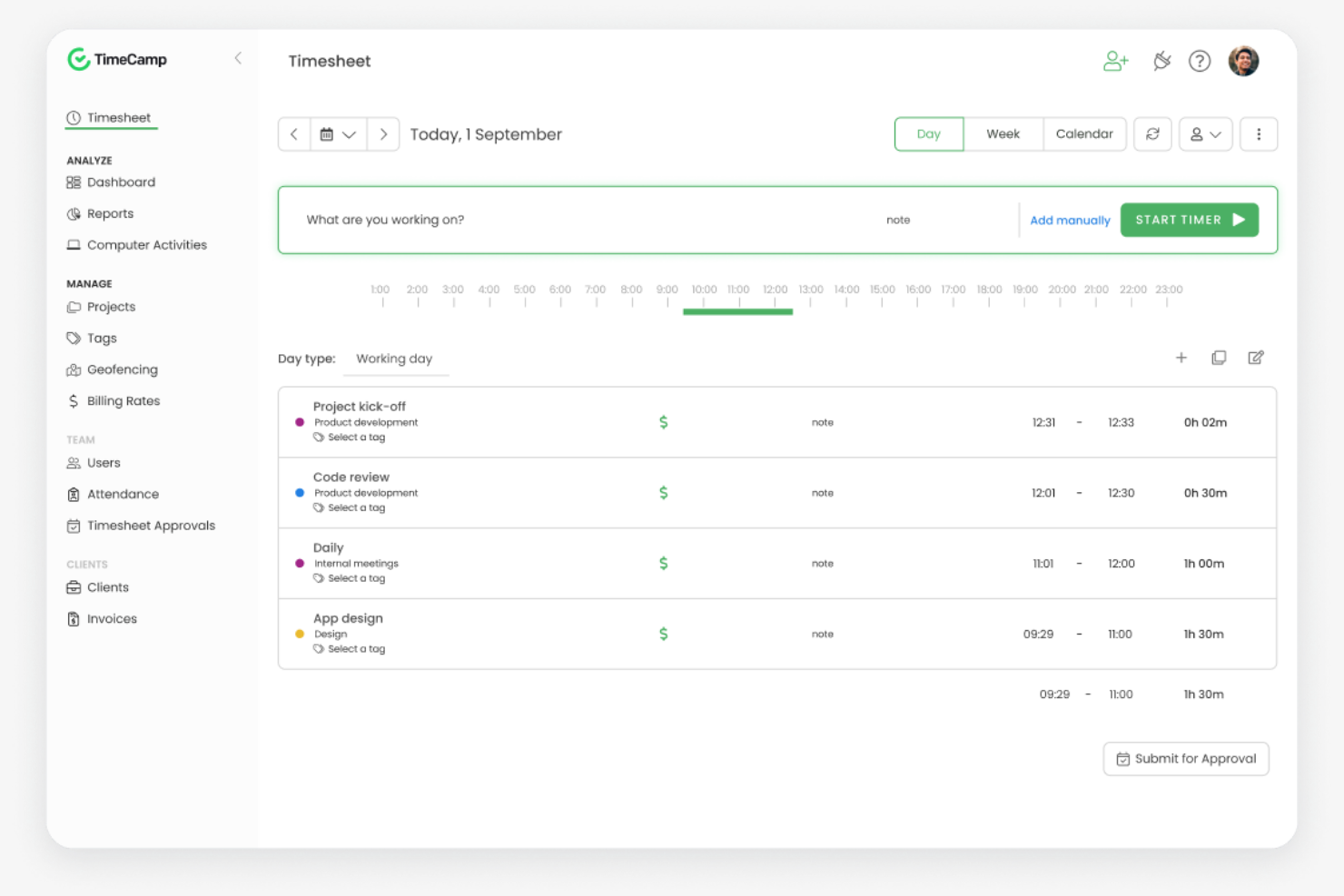
TimeCamp est un logiciel de suivi du temps et de gestion de projets conçu pour les freelances, les petites entreprises et les équipes plus importantes. Il vous aide à suivre les heures de travail, à gérer les projets et à analyser la productivité.
Pourquoi c'est une bonne alternative à RescueTime : TimeCamp propose un suivi du temps en un clic, ce qui vous permet de démarrer et d'arrêter facilement les minuteurs. Il assure un suivi automatique du temps grâce à la surveillance de l'activité de l'ordinateur, vous donnant des informations détaillées sur la façon dont votre temps est utilisé. Vous pouvez également générer des rapports détaillés pour analyser la productivité et l'avancement des projets. L'accent mis par TimeCamp sur la facilité d'utilisation et le suivi détaillé en fait une solution adaptée aux équipes à la recherche d'une gestion du temps simple.
Fonctionnalités et intégrations remarquables :
Les fonctionnalités comprennent des modèles de factures personnalisés pour contribuer à simplifier le processus de facturation. Vous pouvez définir des budgets de projet et suivre les dépenses afin de favoriser le contrôle financier. TimeCamp propose également un suivi des présences, vous permettant de surveiller la présence des employés et leurs congés.
Les intégrations comprennent Asana, Trello, Slack, Jira, QuickBooks Online, Xero, monday.com et bien plus encore.
Pros and Cons
Pros:
- Suivi du temps en un clic
- Surveillance automatique de l'activité
- Configuration et utilisation faciles
Cons:
- Alertes de minuteur limitées
- Fonctionnalités limitées de planification des projets

Everhour
Idéal pour la budgétisation et la création de rapports
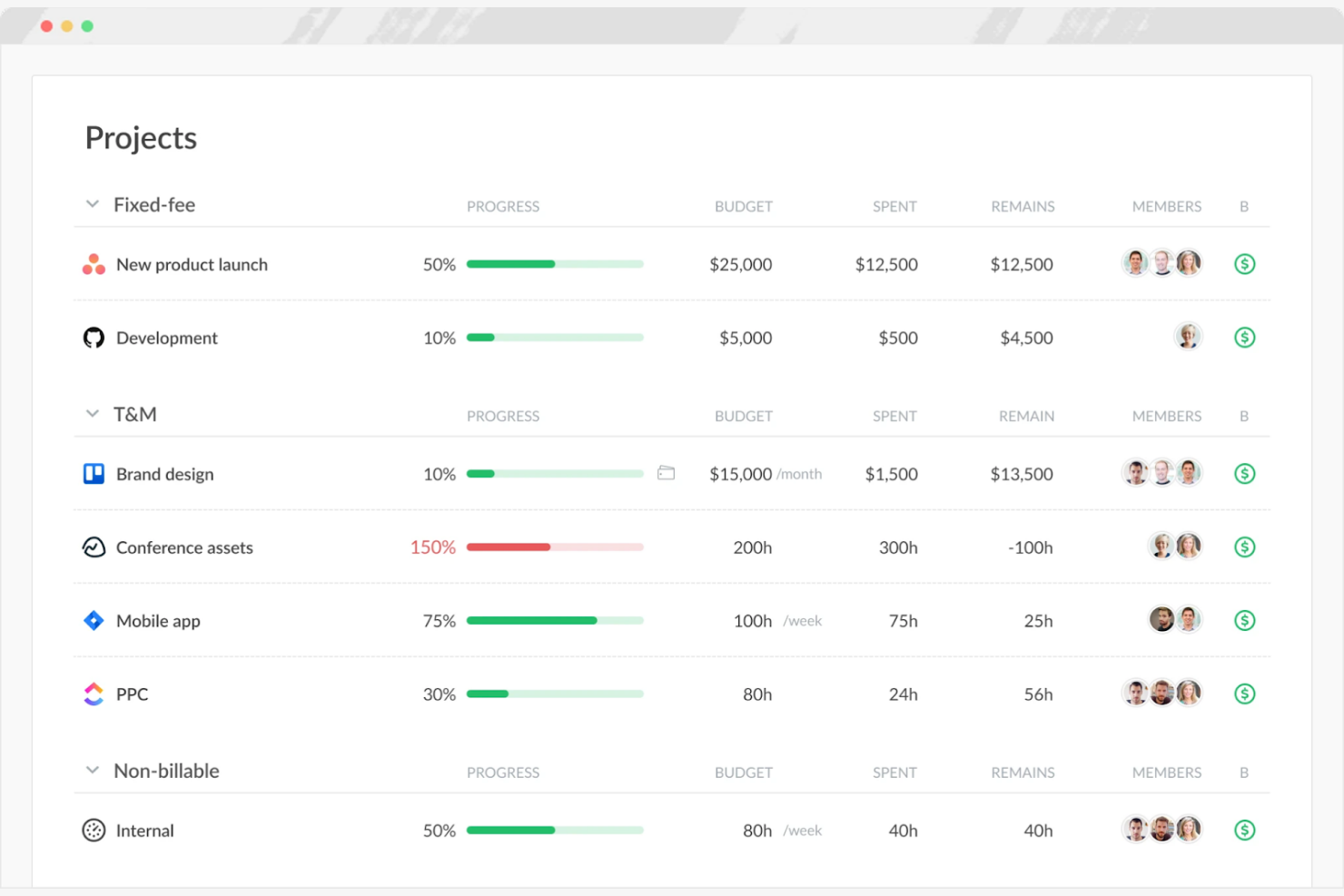
Everhour est un outil de suivi du temps et de gestion de projets conçu pour les équipes qui ont besoin de fonctionnalités détaillées de budgétisation et de création de rapports. Il vous aide à suivre le temps, à gérer les budgets et à générer des feuilles de temps.
Pourquoi c'est une bonne alternative à RescueTime : Everhour offre des fonctionnalités avancées de budgétisation et de création de rapports adaptées aux équipes travaillant sur des projets. Vous pouvez définir et suivre les budgets des projets afin de vous assurer de respecter les limites financières. Les outils de création de rapports d'Everhour fournissent des informations sur les performances de l'équipe et l'avancement des projets, ce qui peut vous aider à prendre des décisions éclairées. Son orientation vers la gestion financière en fait un bon choix pour les équipes qui ont besoin de solutions complètes de budgétisation.
Fonctionnalités et intégrations remarquables :
Les fonctionnalités comprennent la génération de factures à partir du temps suivi afin de simplifier les processus de facturation, ainsi que le calcul des congés qui indique le temps acquis par les membres de l'équipe. Vous pouvez suivre les coûts et les tarifs facturables pour différents projets et tâches afin de répondre aux besoins variés de vos clients. Everhour propose également un tableau de bord visuel qui donne une vue d'ensemble de l'utilisation du temps et de l'état du budget.
Les intégrations comprennent Asana, Trello, Jira, Slack, Basecamp, GitHub, ClickUp et bien plus encore.
Pros and Cons
Pros:
- Prend en charge les équipes travaillant sur des projets
- Aide à gérer les limites financières
- Tableau de bord visuel pour l'utilisation du temps
Cons:
- Pas de suivi GPS ou de localisation
- Alertes de base concernant le budget des projets

TMetric
Idéal pour un suivi détaillé de la journée de travail
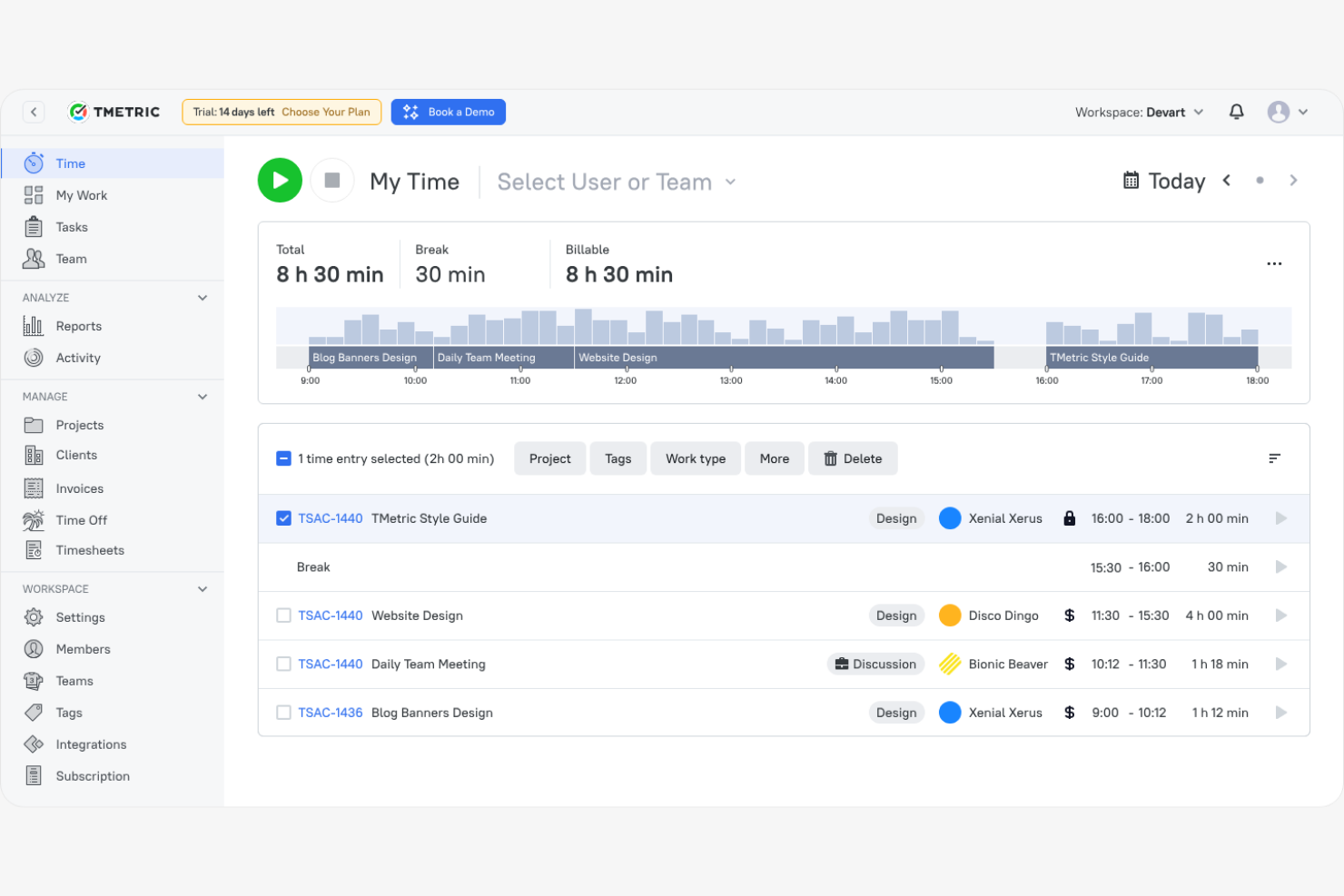
TMetric est un logiciel de suivi du temps conçu pour les indépendants, les petites entreprises et les grandes équipes afin de gérer les heures de travail et la productivité. Il vous aide à suivre le temps, à gérer les projets et à générer des rapports détaillés.
Pourquoi c'est une bonne alternative à RescueTime : TMetric propose un suivi détaillé de la journée de travail avec des fonctionnalités telles que le suivi du temps facturable et la gestion des tâches. Vous pouvez facilement gérer les heures de travail de votre équipe et attribuer des tâches, ce qui vous permet de suivre l'avancement des projets. Les fonctionnalités de création de rapports de TMetric vous permettent d'analyser la productivité et de prendre des décisions éclairées.
Fonctionnalités et intégrations remarquables :
Les fonctionnalités comprennent des outils de budgétisation des projets et de suivi des dépenses pour faciliter la gestion financière. TMetric propose également un suivi des présences, qui vous permet de surveiller la présence des employés et de gérer les congés, ainsi qu'un tableau de bord de la productivité de l'équipe qui peut vous aider à optimiser la répartition de la charge de travail.
Les intégrations comprennent Asana, Trello, Jira, Slack, QuickBooks Online, GitHub, monday.com et bien plus encore.
Pros and Cons
Pros:
- Suivi détaillé de la journée de travail
- Prend en charge la gestion des tâches
- S'adapte à différentes tailles d'équipe
Cons:
- Absence d'analyses avancées
- Mode hors ligne limité

Idéal pour la productivité des équipes à distance
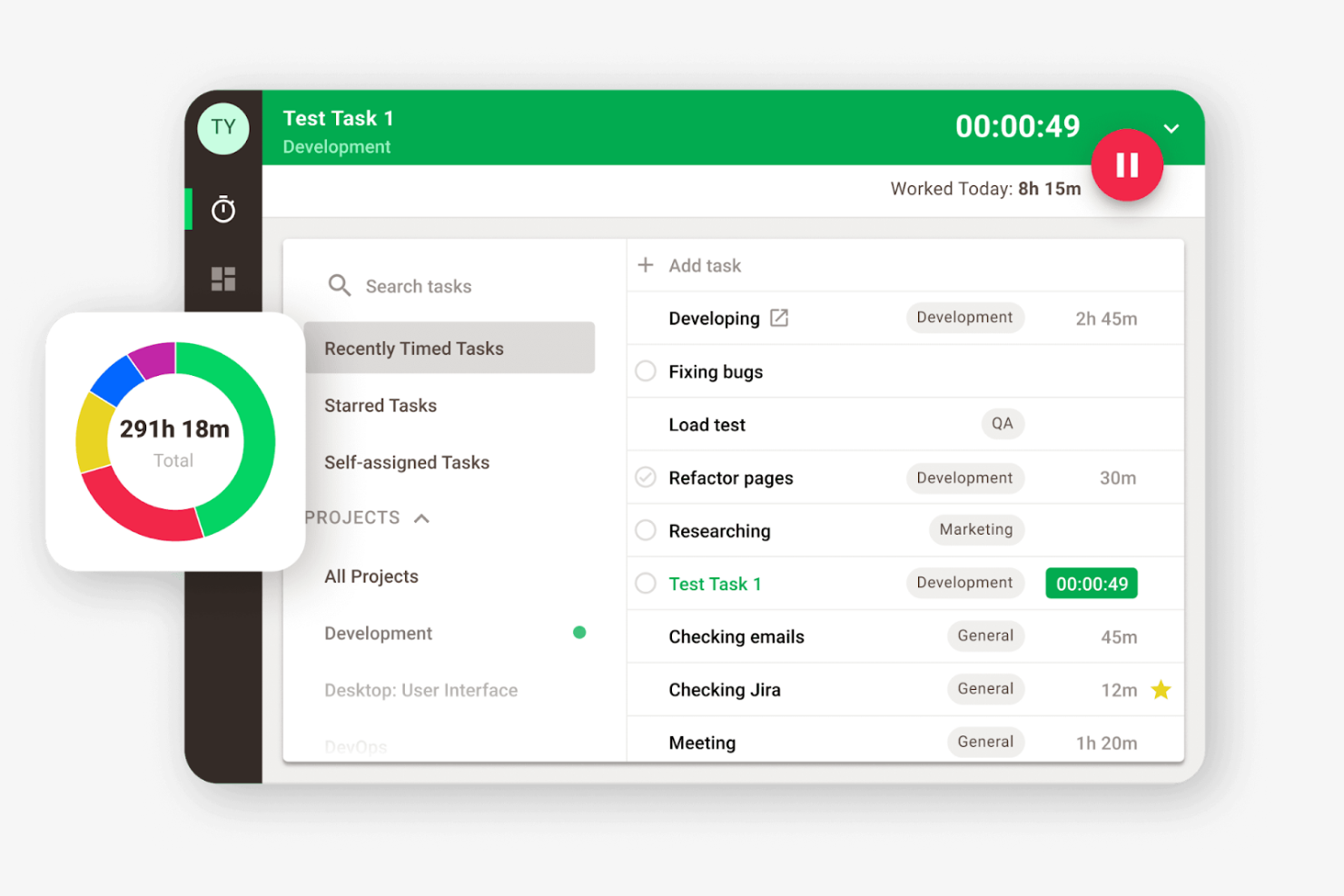
Time Doctor est un logiciel de suivi du temps et de la productivité conçu pour les équipes à distance et les entreprises souhaitant améliorer leur productivité et leur responsabilisation. Il peut vous aider à surveiller les heures de travail, à gérer les tâches et à analyser la productivité.
Pourquoi c'est une bonne alternative à RescueTime : Time Doctor propose des fonctionnalités détaillées de surveillance des employés, notamment des captures d'écran et le suivi de l'activité, qui vous aident à superviser les performances des équipes à distance. Vous pouvez suivre le temps consacré aux projets et définir des objectifs de productivité, ce qui permet une meilleure gestion de la charge de travail.
Fonctionnalités remarquables et intégrations :
Les fonctionnalités comprennent des alertes de distraction pour aider votre équipe à rester concentrée en la prévenant lorsqu'elle s'écarte de sa tâche. Le logiciel propose également la gestion de la paie, ce qui facilite le traitement des paiements en fonction des heures suivies.
Les intégrations comprennent Asana, Trello, Jira, Salesforce, Basecamp, GitHub et bien plus encore.
Pros and Cons
Pros:
- Les alertes de distraction améliorent la concentration
- Prend en charge la définition d'objectifs de productivité
- Fonctionnalités de gestion de la paie
Cons:
- Outils de planification des horaires par équipe limités
- Le tableau de bord peut être accablant en raison de la quantité de données

Memtime
Idéal pour le suivi privé du temps
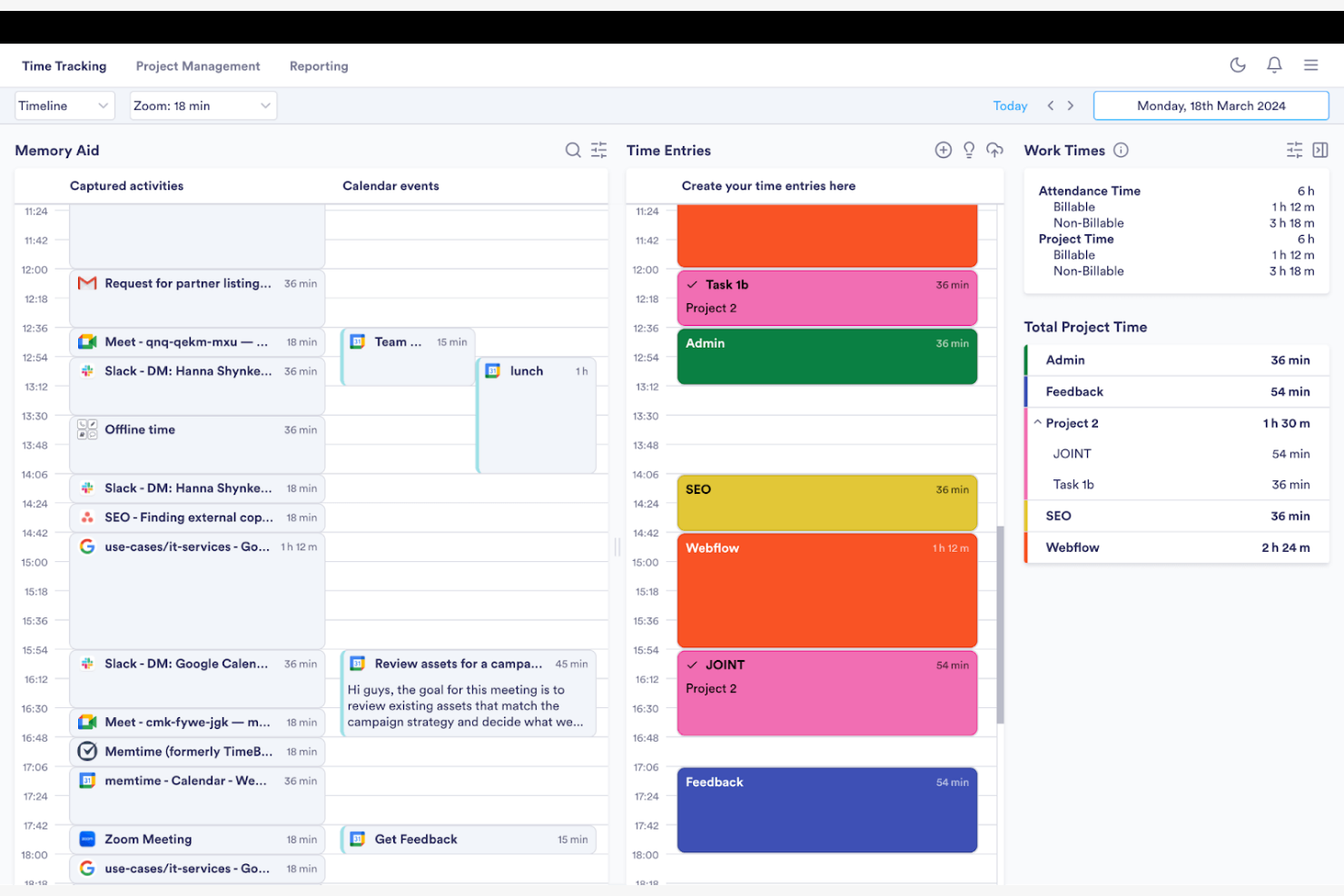
Memtime est un logiciel de suivi du temps conçu pour les professionnels et les équipes qui souhaitent enregistrer leurs heures de travail sans saisie manuelle. Il vous aide à suivre automatiquement le temps consacré à vos activités et à analyser votre productivité.
Pourquoi c'est une bonne alternative à RescueTime : Memtime se concentre sur l'enregistrement automatique du temps, éliminant ainsi le besoin de saisies manuelles. Il fonctionne en arrière-plan pendant qu'il enregistre vos activités et le temps passé dans les programmes, puis génère des rapports détaillés qui permettent de comprendre comment votre temps est utilisé.
Fonctionnalités et intégrations remarquables :
Les fonctionnalités comprennent le suivi passif du temps, qui enregistre vos activités pendant que vous travaillez. Vous pouvez générer des feuilles de temps personnalisées avec un historique illimité afin de comprendre vos habitudes de productivité et d'identifier les points à améliorer.
Les intégrations comprennent Google Calendar, Microsoft Teams, Asana, Jira Cloud, ClickUp et bien plus encore.
Pros and Cons
Pros:
- Enregistrement passif du temps
- Large éventail d'intégrations
- Système simple d'exportation des rapports
Cons:
- Intégration limitée des projets
- Mise en forme basique des exports

Bonsai
Idéal pour les freelances et les agences
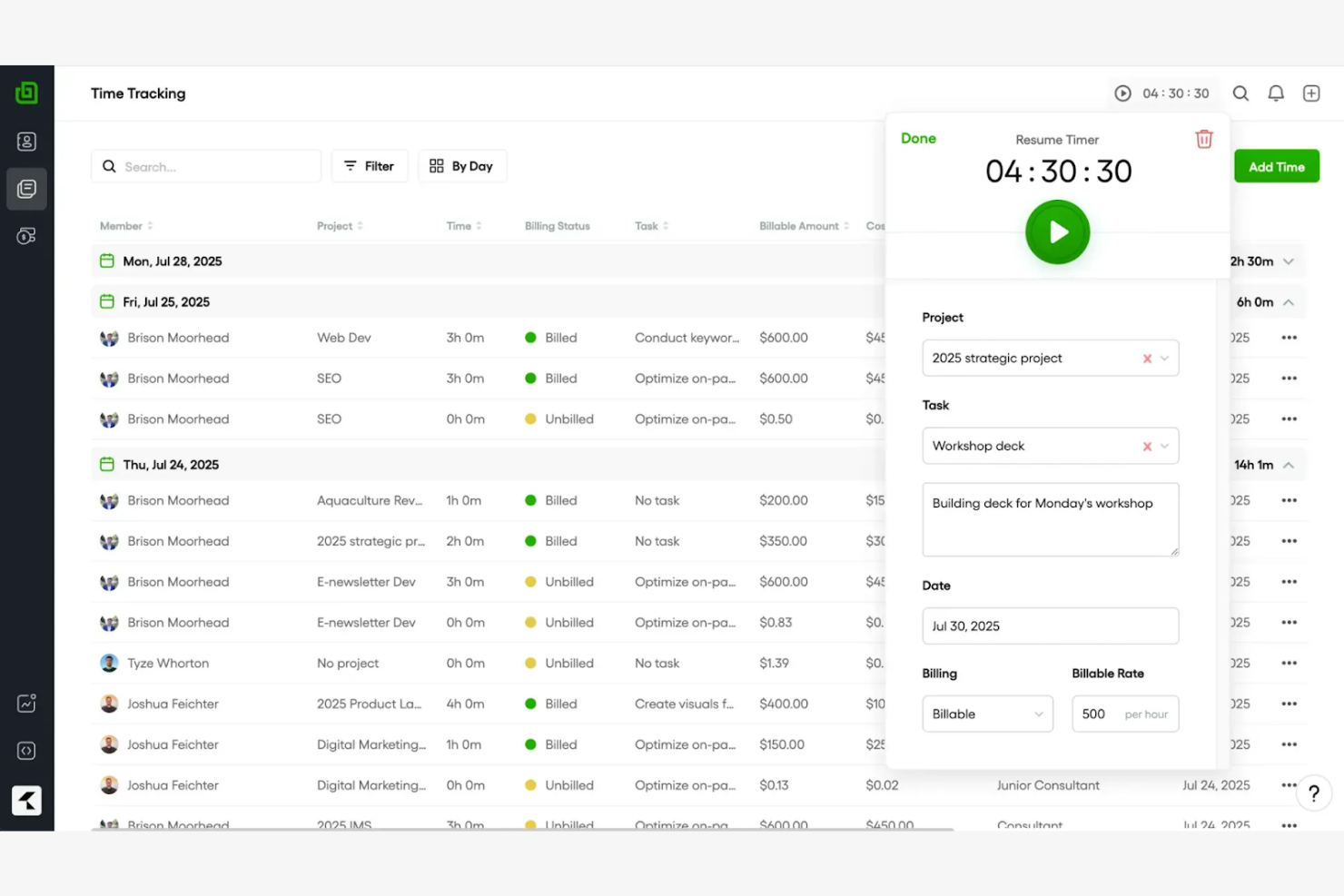
Bonsai est un outil de gestion d'entreprise tout-en-un qui facilite la gestion des contrats, des propositions, du suivi du temps et de la facturation. Il est conçu pour les freelances et les agences qui souhaitent simplifier leurs flux de travail et gérer efficacement leurs projets.
Pourquoi c'est une bonne alternative à RescueTime : Bonsai propose des outils complets pour gérer les relations clients, notamment des modèles de contrats et la création de propositions. Il intègre la facturation et le traitement des paiements, ce qui facilite la gestion de votre facturation. La fonctionnalité de suivi du temps de Bonsai vous permet d'enregistrer les heures facturables et de générer des feuilles de temps.
Fonctionnalités et intégrations remarquables :
Les fonctionnalités comprennent des rappels automatisés pour vous aider à suivre les échéances et les communications avec les clients. Vous pouvez créer et personnaliser des modèles de formulaires, de devis et de factures, ce qui peut vous faire gagner du temps sur les tâches administratives. Bonsai propose également des fonctionnalités de tableau kanban, de diagramme de Gantt et de calendrier qui vous permettent de suivre les échéanciers des projets.
Les intégrations comprennent QuickBooks Online, Zapier, Calendly, Xero, HiBob, et bien plus encore.
Pros and Cons
Pros:
- Prend en charge les freelances et les agences
- Fonctionnalités polyvalentes de gestion des tâches
- Modèles de documents personnalisables
Cons:
- Gestion avancée des projets limitée
- Les dépendances entre les tâches ne sont pas prises en charge

Harvest
Idéal pour la facturation intégrée
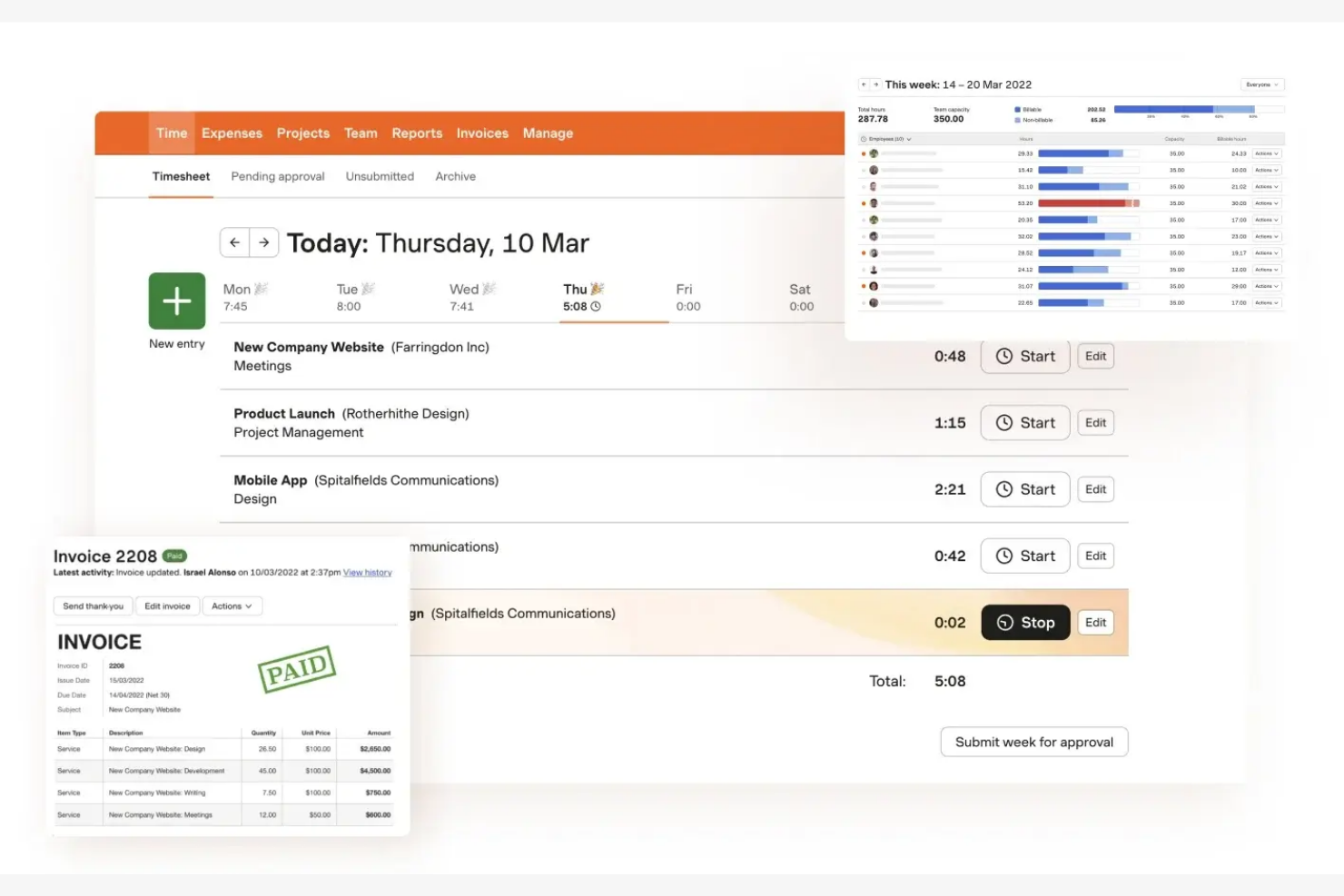
Harvest est un logiciel de suivi du temps et de facturation qui s'adresse aux freelances, aux petites entreprises et aux équipes souhaitant gérer leurs projets et leur facturation. Il peut vous aider à suivre le temps, à générer des factures et à analyser les coûts des projets.
Pourquoi c'est une bonne alternative à RescueTime : Harvest propose une facturation intégrée, ce qui simplifie le processus de facturation en vous permettant de créer et d'envoyer des factures directement à partir des entrées de temps suivies. Harvest fournit également des rapports pour analyser la rentabilité des projets, vous aidant ainsi à prendre des décisions financières éclairées.
Fonctionnalités et intégrations remarquables :
Les fonctionnalités comprennent le suivi des dépenses pour enregistrer les coûts des projets et générer des factures précises. Vous pouvez définir des budgets de projet et suivre la progression en temps réel, afin de vous assurer de respecter les limites financières.
Les intégrations comprennent Asana, Slack, QuickBooks Online, Xero, Trello, Basecamp et bien d'autres.
Pros and Cons
Pros:
- Fonctionnalité de facturation intégrée
- Fonctionnalités de suivi des dépenses
- Analyse simple des coûts des projets
Cons:
- Outils avancés de gestion de projet limités
- Journaux d'activité de l'équipe limités
Autres alternatives à RescueTime
Voici quelques alternatives supplémentaires à RescueTime qui n’ont pas intégré ma sélection, mais qui méritent tout de même d’être examinées :
- Rize
Idéal pour la concentration et l’analyse de la productivité
- Toggl
Idéal pour un suivi intuitif du temps
- Connecteam
Idéal pour la gestion du personnel mobile
- EARLY
Idéal pour l’écosystème d’intégration


Comment j’évalue les alternatives à RescueTime
J’examine ces outils sur deux niveaux : les exigences de base — comme le suivi passif des applications et l’attribution aux projets — qui permettent à un outil d’être retenu, et les éléments différenciateurs qui les distinguent.
Fonctionnalités fondamentales (indispensables pour cette liste)
Lorsque je sélectionne les outils de ma liste, j’évalue chacun d’entre eux sur une échelle de 0 (ne propose pas cette fonctionnalité) à 5 (excelle dans ce domaine) pour chacune des fonctionnalités fondamentales présentées ci-dessous. Je convertis ensuite le score total de l’outil en pourcentage. Chaque outil doit atteindre un score total minimum de 65 % pour être pris en compte.
- Suivi automatique du temps : Je vérifie si l’outil enregistre automatiquement l’utilisation des applications, des sites web et des documents — afin qu’un responsable de projet qui examine sa journée voie les données réelles, et non ce dont il se souvient.
- Catégorisation de la productivité : Chaque outil doit permettre de classer les activités comme productives ou distrayantes et d’ajuster ces étiquettes selon le rôle, puisque Slack peut être essentiel au travail pour une équipe et constituer une distraction pour une autre.
- Attribution aux projets et aux tâches : J’évalue la manière dont le temps suivi est associé à des projets ou à des clients spécifiques, ce qui est particulièrement important pour les consultants et les équipes d’agence qui rapprochent les heures effectuées des livrables.
- Tableaux de bord de rapports et d’analyses : Les rapports doivent faire ressortir les tendances aux niveaux individuel et collectif — comme les habitudes hebdomadaires de temps consacré à la concentration ou la répartition du temps par projet que les responsables de projet présentent réellement à la direction.
- Gestion des distractions et de la concentration : Je recherche des outils intégrés comme les bloqueurs de sites, les sessions de concentration ou les alertes de rappel qui aident les collaborateurs à protéger leurs périodes de travail concentré pendant la journée.
- Visibilité pour les équipes et les utilisateurs multiples : Les tableaux de bord destinés aux responsables, avec un accès fondé sur les rôles, sont importants ici, notamment pour les responsables d’équipes à distance qui ont besoin de vues agrégées sans franchir la limite de la surveillance intrusive.
Une fois que j’ai établi une liste d’outils répondant à ces critères, j’examine ce qui distingue chaque plateforme.
Facteurs de différenciation (ce qui distingue les fournisseurs)
Voici comment je compare les différents fournisseurs :
Fonctionnalités remarquables
L’intégration au calendrier est essentielle pour moi : je veux voir les réunions de Google ou d’Outlook superposées au temps suivi afin que les responsables de projet puissent comparer les heures planifiées au temps réellement consacré au travail concentré. Les suggestions de feuilles de temps alimentées par l’IA se démarquent également, en particulier pour les consultants qui devraient sinon passer leur vendredi après-midi à rédiger manuellement leurs entrées hebdomadaires de mémoire. J’évalue aussi les fonctionnalités de définition d’objectifs, en recherchant des outils qui permettent de définir des objectifs quotidiens de concentration et d’envoyer des alertes lorsque la tendance s’écarte de la trajectoire prévue.
Au-delà des fonctionnalités
Je vérifie dans quelle mesure chaque outil se connecte à des plateformes de gestion de projet comme Jira, Asana ou ClickUp — car le temps suivi n’est utile que s’il est réinjecté dans les outils où votre équipe gère déjà son travail. Les contrôles de confidentialité sont tout aussi importants. Le déploiement d’un outil de suivi dans une équipe distribuée se déroule plus facilement lorsque les collaborateurs peuvent consulter leurs propres données et suspendre le suivi pendant leur temps personnel. J’évalue également les structures tarifaires, en recherchant des modèles par utilisateur qui évoluent de manière prévisible lorsque votre bureau de gestion de projet ou votre agence passe de quelques collaborateurs à plusieurs dizaines.
Pourquoi chercher une alternative à RescueTime ?
Bien que RescueTime soit un bon choix de logiciel de suivi du temps et de la productivité, il existe plusieurs raisons pour lesquelles certains utilisateurs recherchent d'autres solutions. Vous cherchez peut-être une alternative à RescueTime parce que…
- Vous avez besoin de davantage d'options de personnalisation
- Votre équipe a besoin de fonctionnalités hors ligne
- Vous souhaitez disposer de fonctionnalités de facturation intégrées
- Votre entreprise a besoin d'analyses avancées
- Vous avez besoin de meilleures capacités d'intégration
- Vous avez besoin d'un outil pour les grandes équipes
Si l'une de ces situations vous correspond, vous êtes au bon endroit. Ma liste comprend plusieurs solutions logicielles mieux adaptées aux équipes confrontées à ces problèmes avec RescueTime et à la recherche d'outils alternatifs de suivi du temps.
Principales fonctionnalités de RescueTime
Voici quelques-unes des principales fonctionnalités de RescueTime pour vous aider à les mettre en contraste et à les comparer à celles proposées par les solutions alternatives :
- Suivi automatique du temps : Suit le temps passé sur les applications et les sites web afin de vous donner une vue d’ensemble précise de votre journée.
- Rapports détaillés : Fournit des informations sur les applications, les sites web et les fichiers sur lesquels vous avez travaillé, ainsi que sur l’évolution de votre productivité au fil du temps.
- Blocage des sites web et des applications : Vous aide à rester concentré en bloquant les sites web et les applications distrayants pendant vos sessions de travail.
- Suivi des objectifs : Vous permet de définir des objectifs personnalisés et de suivre vos progrès grâce à des mises à jour en temps réel et des rapports hebdomadaires.
- Sessions de concentration : Vous permettent de définir un minuteur pour bloquer les distractions et vous concentrer sur votre travail.
- Suggestions intelligentes de saisie : Suggère des entrées de temps en fonction de votre activité afin de simplifier le suivi.
- Rapports flexibles : Propose des rapports personnalisables adaptés à vos besoins spécifiques.
- Contrôle d’accès basé sur les rôles : Fournit différents niveaux d’accès aux membres de l’équipe afin de gérer efficacement les projets et les tâches.
- Rapport sur les habitudes quotidiennes : Affiche les habitudes de productivité et de concentration pour vous aider à optimiser votre journée de travail.