

10 alternativas a TimeCamp para el seguimiento del tiempo del equipo en 2026

Lista de las mejores alternativas a Timecamp


Gestionar proyectos puede ser complejo, y encontrar las herramientas adecuadas para ayudar a tu equipo a mantener el rumbo es vital. Si utilizas Timecamp, pero sientes que no satisface tus necesidades, no eres el único. Muchos responsables de proyectos buscan alternativas cuando necesitan más flexibilidad, mejores funciones o un enfoque diferente.
Según mi experiencia, explorar nuevas opciones de software puede aportar perspectivas renovadas a tu flujo de trabajo. He probado y analizado de forma independiente diversas herramientas de gestión de proyectos para ofrecerte información imparcial.
En este artículo encontrarás una lista cuidadosamente seleccionada de alternativas a Timecamp que podrían adaptarse a tus necesidades específicas. Tanto si necesitas un seguimiento mejorado, una integración más eficaz o funciones únicas, encontrarás lo que buscas. Exploremos las herramientas de gestión de proyectos adecuadas para ti y tu equipo.
¿Qué es Timecamp?
Timecamp es una herramienta de productividad y gestión de proyectos diseñada para ayudar a los equipos a registrar el tiempo y gestionar proyectos de forma eficiente. Profesionales como responsables de proyectos, líderes de equipo y trabajadores autónomos suelen utilizar Timecamp para obtener información sobre la distribución del tiempo y la productividad de los empleados.
Su sencillo registro del tiempo, sus informes detallados y sus funciones de facturación ayudan a gestionar tareas, mejorar la eficiencia y comprender las necesidades presupuestarias de los proyectos. En general, Timecamp ofrece una forma sencilla de aumentar la productividad y realizar un seguimiento del progreso de los proyectos.
Resumen de las mejores alternativas a Timecamp
Este cuadro comparativo resume los detalles de precios de mis principales alternativas a Timecamp para ayudarte a encontrar las mejores herramientas de gestión de proyectos según tu presupuesto y las necesidades de tu empresa.
| Tool | Best For | Trial Info | Price | ||
|---|---|---|---|---|---|
| 1 | Ideal para el seguimiento del tiempo de equipos de campo y remotos | Prueba gratuita de 14 días + demostración gratuita disponible | Desde $3.99/usuario/mes (facturado anualmente) | Website | |
| 2 | Ideal para equipos pequeños | Plan gratuito + prueba gratuita de 7 días disponible | Desde $3.99/usuario/mes (facturado anualmente) | Website | |
| 3 | Ideal para el seguimiento automático del tiempo | Prueba gratuita de 14 días + demostración gratuita disponible | Desde $9/usuario/mes (facturado anualmente) | Website | |
| 4 | La mejor opción para obtener información sobre la rentabilidad de los proyectos | Plan gratuito + prueba gratuita de 14 días + demostración gratuita disponible | Desde $4/usuario/mes (facturado anualmente) | Website | |
| 5 | Mejor para la automatización de procesos | Prueba gratuita de 14 días + plan gratuito | Precios bajo petición | Website | |
| 6 | La mejor opción para la facturación multidivisa | Plan gratuito disponible + prueba gratuita de 14 días | Desde $5.83/usuario/mes (facturado anualmente) | Website | |
| 7 | Ideal para el análisis de equipos remotos | Prueba gratuita de 14 días + demostración gratuita disponible | Desde $6.67/usuario/mes (facturado anualmente) | Website | |
| 8 | Ideal para la integración con el calendario | Prueba gratuita + plan gratuito + demostración disponible | Desde $30/mes (facturado anualmente) | Website | |
| 9 | Ideal para la facturación integrada | Plan gratuito + prueba gratuita de 30 días disponible | Desde $9/asiento/mes (facturado anualmente) | Website | |
| 10 | Ideal para informes personalizables | Plan gratuito + prueba gratuita de 30 días + demostración gratuita disponible | Desde $9/usuario/mes (facturado anualmente) | Website |

Por qué confiar en nuestras recomendaciones de software
Nuestro equipo lleva probando y evaluando software desde 2012. Como gestores de proyectos, sabemos lo difícil —y lo importante— que es elegir el software adecuado.
Para esta guía, evaluamos las herramientas mediante pruebas prácticas e investigación independiente, puntuando las herramientas según nuestros criterios de selección. También nos basamos en la experiencia de líderes de opinión del sector y de profesionales en activo de la gestión de proyectos.
Nuestras reseñas reflejan nuestro criterio editorial humano, no un discurso de ventas.
Revisores expertos:
Análisis de las mejores alternativas a Timecamp
A continuación encontrarás mis resúmenes detallados de las mejores alternativas a Timecamp que llegaron a mi lista. Mis análisis ofrecen una visión detallada de las funciones principales, ventajas y desventajas, integraciones y casos de uso ideales de cada herramienta para ayudarte a encontrar la más adecuada para ti.

Ideal para el seguimiento del tiempo de equipos de campo y remotos
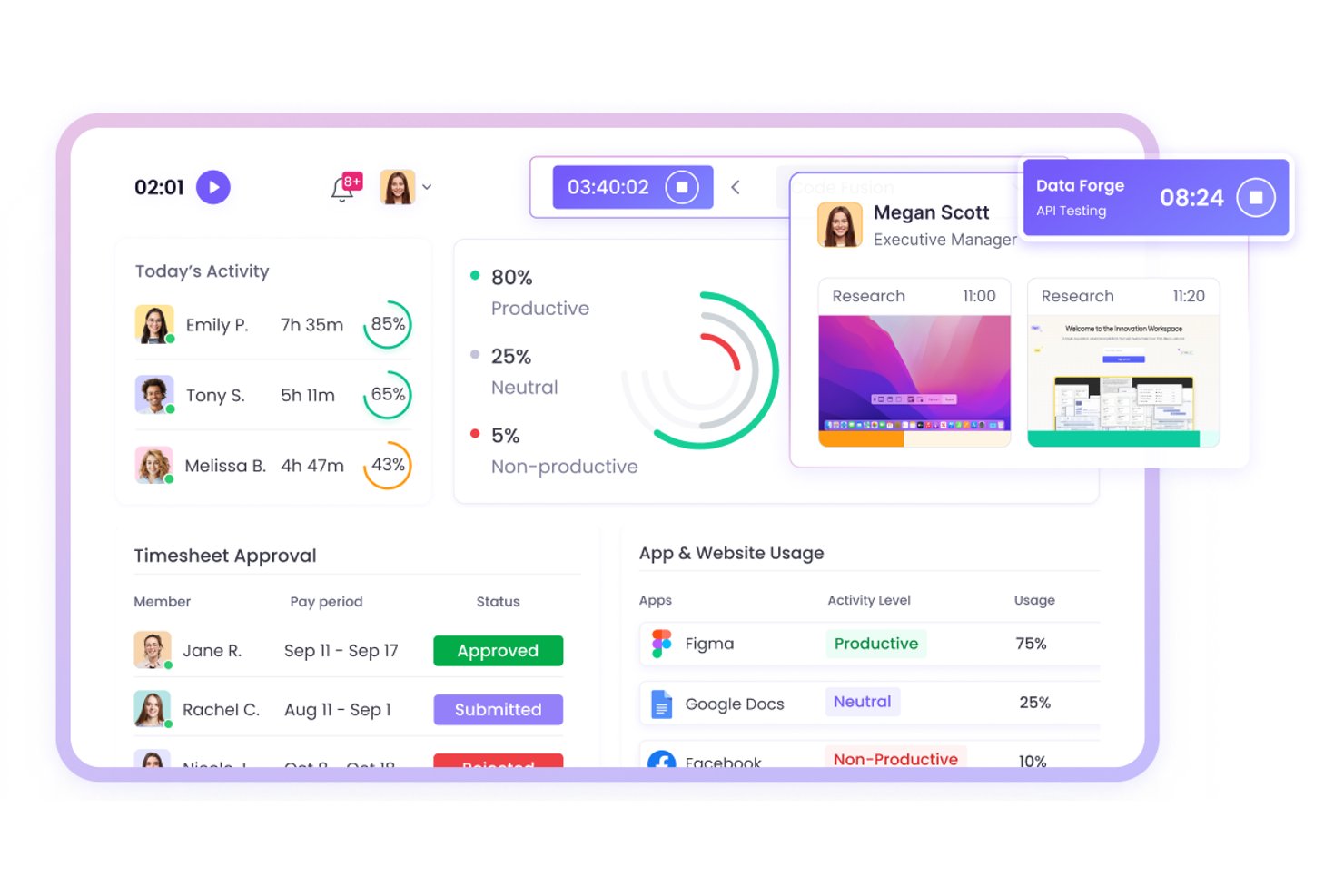
WebWork Time Tracker es un software de seguimiento del tiempo para equipos distribuidos y basados en el trabajo de campo, que ayuda a los responsables de proyectos a supervisar las horas trabajadas, la actividad y el progreso de los proyectos en operaciones remotas.
¿Para quién es más adecuado WebWork Time Tracker?
WebWork Time Tracker es adecuado para responsables de proyectos que coordinan personal de campo y equipos remotos distribuidos que necesitan visibilidad sobre las horas, la actividad y el progreso de los proyectos.
Por qué WebWork Time Tracker es una buena alternativa a Timecamp
Elegí WebWork Time Tracker porque permite realizar un seguimiento del tiempo de equipos de campo y remotos mediante capturas de pantalla y supervisión de la actividad. Mi equipo puede verificar las horas trabajadas en distintos lugares de trabajo, revisar la actividad de los proyectos y comparar el tiempo registrado con el progreso. Su seguimiento GPS también ayuda a vincular el trabajo móvil con ubicaciones específicas.
Características principales de WebWork Time Tracker
- Seguimiento automático del tiempo: Registra el tiempo dedicado a las tareas y proyectos asignados.
- Seguimiento de la asistencia: Registra las entradas, salidas, descansos y horas extra.
- Informes de productividad: Genera informes sobre horas, asistencia y datos de proyectos.
- Gestión de tareas: Permite a los equipos crear tareas, establecer prioridades y realizar un seguimiento de los estados.
Integraciones de WebWork Time Tracker
WebWork Time Tracker ofrece integraciones nativas con Jira, Asana, Trello, ClickUp, Slack, Google Workspace, Microsoft Teams, Freshdesk y QuickBooks. También se conecta con Zapier y Make, y proporciona una API pública y webhooks para integraciones personalizadas.
Pros and Cons
Pros:
- El seguimiento GPS vincula las horas de trabajo de campo con las ubicaciones
- Las capturas de pantalla ayudan a verificar el trabajo remoto
- Los informes de asistencia y horas extra facilitan la revisión de la nómina
Cons:
- Las capturas de pantalla frecuentes pueden preocupar a los equipos que priorizan la privacidad
- El seguimiento móvil puede agotar las baterías de los dispositivos

Clockify
Ideal para equipos pequeños

Clockify es un software de seguimiento del tiempo diseñado para autónomos y equipos que necesitan supervisar la productividad de los empleados y gestionar proyectos sin restricciones presupuestarias. Te ayuda a registrar las horas de trabajo, gestionar tareas y analizar el progreso de los proyectos de manera eficiente.
Por qué es una buena alternativa a Timecamp: Seleccioné Clockify porque ofrece a los equipos pequeños una forma accesible de registrar las horas de los proyectos y gestionar las hojas de horas semanales sin costes iniciales elevados. Sus funciones principales de seguimiento proporcionan una visibilidad clara de los cronogramas de los proyectos y del rendimiento diario del equipo, sin obligar a las operaciones más pequeñas a contratar niveles de software costosos. Esto lo hace ideal para los responsables que necesitan una supervisión esencial y pruebas del trabajo realizado, manteniendo bajos los gastos generales del software.
Funciones e integraciones destacadas:
Las funciones incluyen herramientas de gestión de proyectos, seguimiento gratuito del tiempo y seguimiento de horas facturables. Estas funciones te ayudan a garantizar un seguimiento preciso del tiempo y la facturación a los clientes. Clockify también ofrece informes visuales detallados para analizar la productividad del equipo.
Las integraciones incluyen Asana, Trello, Jira, QuickBooks, monday.com, Basecamp, GitHub, Salesforce y más.
Pros and Cons
Pros:
- Seguimiento del tiempo rentable para presupuestos reducidos
- Adecuado para equipos de cualquier tamaño
- Informes detallados disponibles
Cons:
- Gestión de proyectos básica
- Requiere conexión a Internet

Timely
Ideal para el seguimiento automático del tiempo
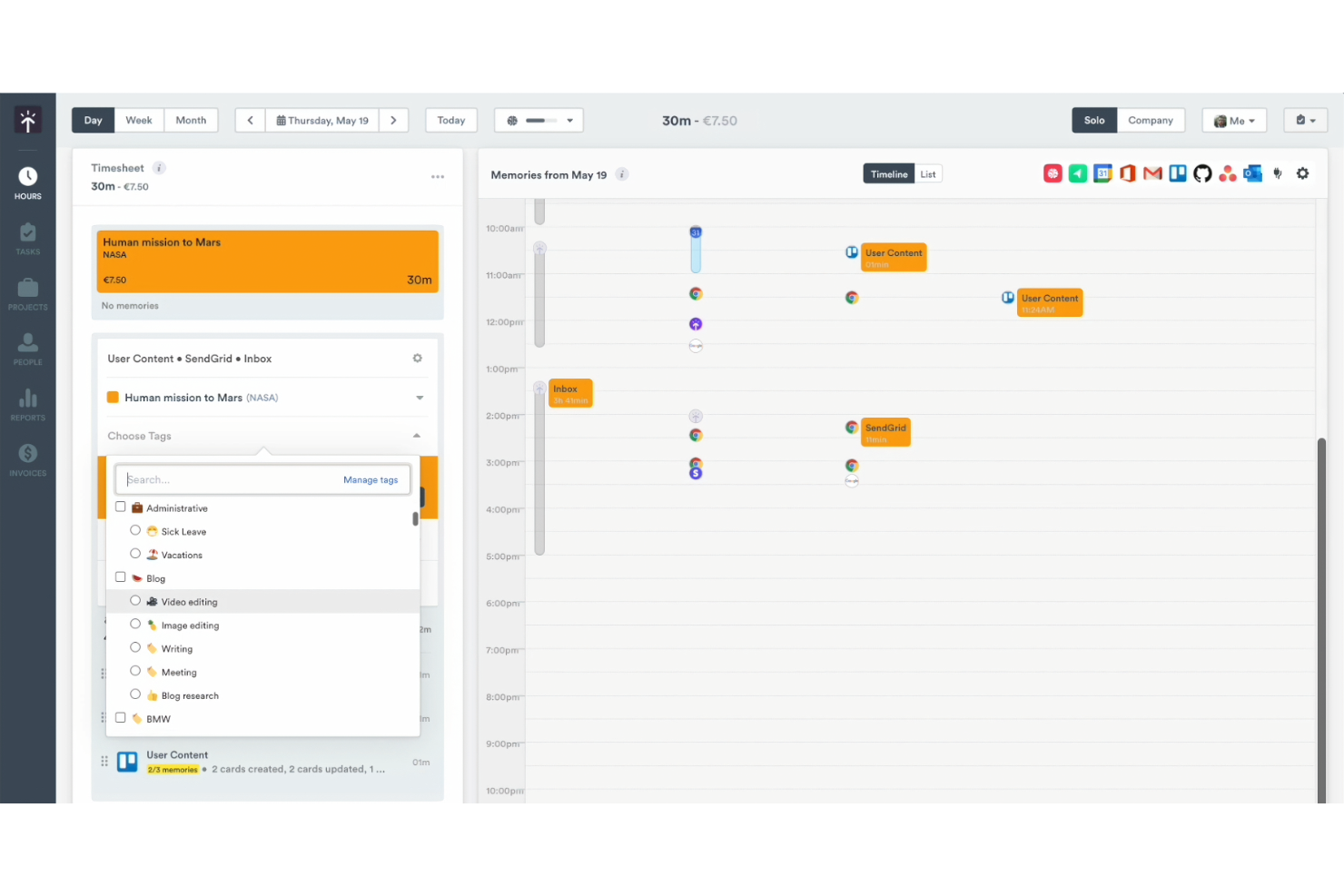
Timely es una herramienta de gestión del tiempo diseñada para equipos y trabajadores autónomos que buscan automatizar el seguimiento del tiempo. Te ayuda a registrar las horas de trabajo con precisión y a gestionar el progreso de los proyectos de manera más eficiente.
Por qué Timely es una buena alternativa a Timecamp: Timely ofrece un seguimiento automático del tiempo, lo que elimina la necesidad de introducir datos manualmente y garantiza una recopilación precisa de los datos. El rastreador de memoria registra todas las actividades en tu ordenador, proporcionando una visión completa de tu trabajo. Puedes revisar y aprobar fácilmente las horas registradas, haciendo que la gestión de proyectos sea más sencilla. Esta automatización del seguimiento del tiempo convierte a Timely en una opción destacada para quienes buscan simplicidad y precisión.
Funciones e integraciones destacadas:
Las funciones incluyen un rastreador de memoria, paneles de proyectos e informes de tiempo. Estas funciones de seguimiento del tiempo te ofrecen una visión clara de tus horas de trabajo. Timely también ofrece una línea de tiempo que representa visualmente tu jornada laboral, ayudándote a gestionar mejor tu horario.
Las integraciones incluyen Asana, Google Calendar y más.
Pros and Cons
Pros:
- Seguimiento automático del tiempo
- Amplias funciones de supervisión de la actividad
- Adecuado para trabajadores autónomos
Cons:
- Depende del seguimiento del uso del ordenador
- Opciones limitadas de introducción manual

My Hours
La mejor opción para obtener información sobre la rentabilidad de los proyectos

My Hours es un software de seguimiento del tiempo diseñado para autónomos y equipos pequeños que necesitan gestionar presupuestos de proyectos y horas de trabajo. Te ayuda a registrar el tiempo, gestionar tareas y analizar los costes de los proyectos de forma eficiente.
Por qué My Hours es una buena alternativa a Timecamp: My Hours proporciona informes detallados con información sobre la rentabilidad de los proyectos, para que puedas ver qué proyectos son más beneficiosos. El software te permite registrar horas facturables y no facturables, lo que te ofrece una visión clara de los costes de los proyectos. Puedes establecer presupuestos para los proyectos y recibir notificaciones cuando te acerques a los límites. Este enfoque en la información financiera es una función clave que te ayuda a tomar decisiones fundamentadas sobre las prioridades de los proyectos.
Funciones e integraciones destacadas:
Las funciones incluyen facturación, informes detallados y gestión de tareas. Estas funciones te ayudan a mantener el control sobre los presupuestos de tus proyectos y la productividad del equipo. My Hours también ofrece hojas de horas personalizables para un seguimiento preciso del tiempo.
Las integraciones incluyen Trello, Asana, Slack, Zapier, Jira, monday.com y más.
Pros and Cons
Pros:
- Seguimiento de horas facturables y no facturables
- Notificaciones de presupuesto disponibles
- Hojas de horas personalizables
Cons:
- Curva de aprendizaje para los nuevos usuarios
- Puede no ser adecuado para grandes empresas

Mejor para la automatización de procesos
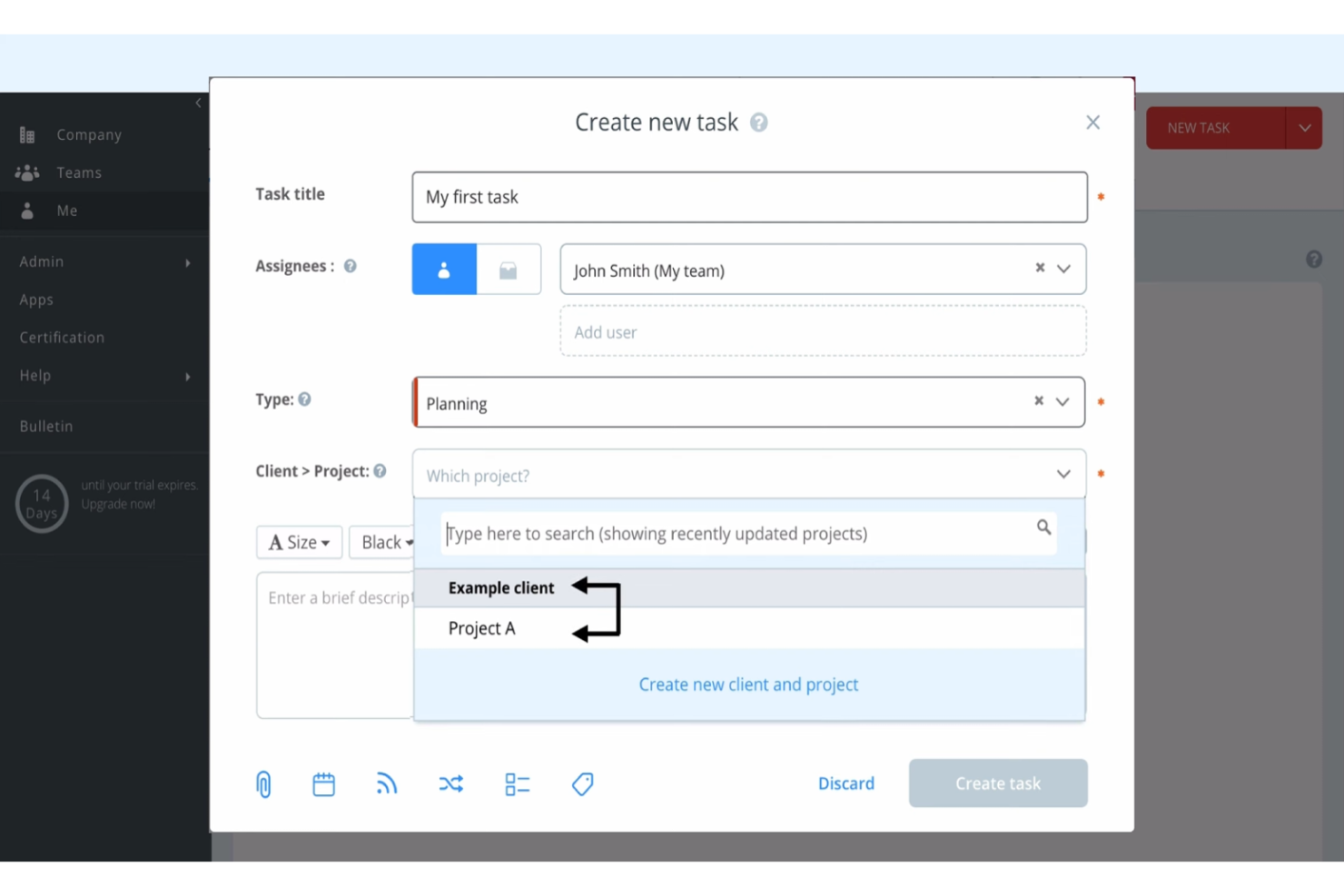
Runrun.it es una solución de gestión de proyectos y seguimiento del tiempo diseñada para equipos que buscan mejorar la productividad de su equipo y gestionar los flujos de trabajo de manera eficiente. Te ayuda a organizar tareas, registrar el tiempo y automatizar procesos para mejorar el rendimiento del equipo.
Por qué Runrun.it es una buena alternativa a Timecamp: Runrun.it ofrece funciones de automatización de procesos, lo que te permite automatizar tareas repetitivas y optimizar los flujos de trabajo. El software permite configurar alertas y notificaciones automatizadas para mantener informado a tu equipo. También puedes utilizar flujos de trabajo personalizados para garantizar que las tareas se completen en el orden correcto. Este enfoque en la automatización de procesos convierte a Runrun.it en una excelente opción para los equipos que buscan mejorar la eficiencia.
Características e integraciones destacadas:
Las características incluyen la gestión de tareas y el seguimiento del tiempo. Estas funciones te ayudan a supervisar la productividad de tu equipo y los plazos de los proyectos. Runrun.it también ofrece paneles visuales para proporcionar una visión clara del progreso de los proyectos.
Las integraciones no se indican públicamente.
Pros and Cons
Pros:
- Automatización de procesos disponible
- Flujos de trabajo personalizados compatibles
- Paneles visuales disponibles
Cons:
- Requiere tiempo de configuración
- No hay aplicación móvil
TMetric
La mejor opción para la facturación multidivisa
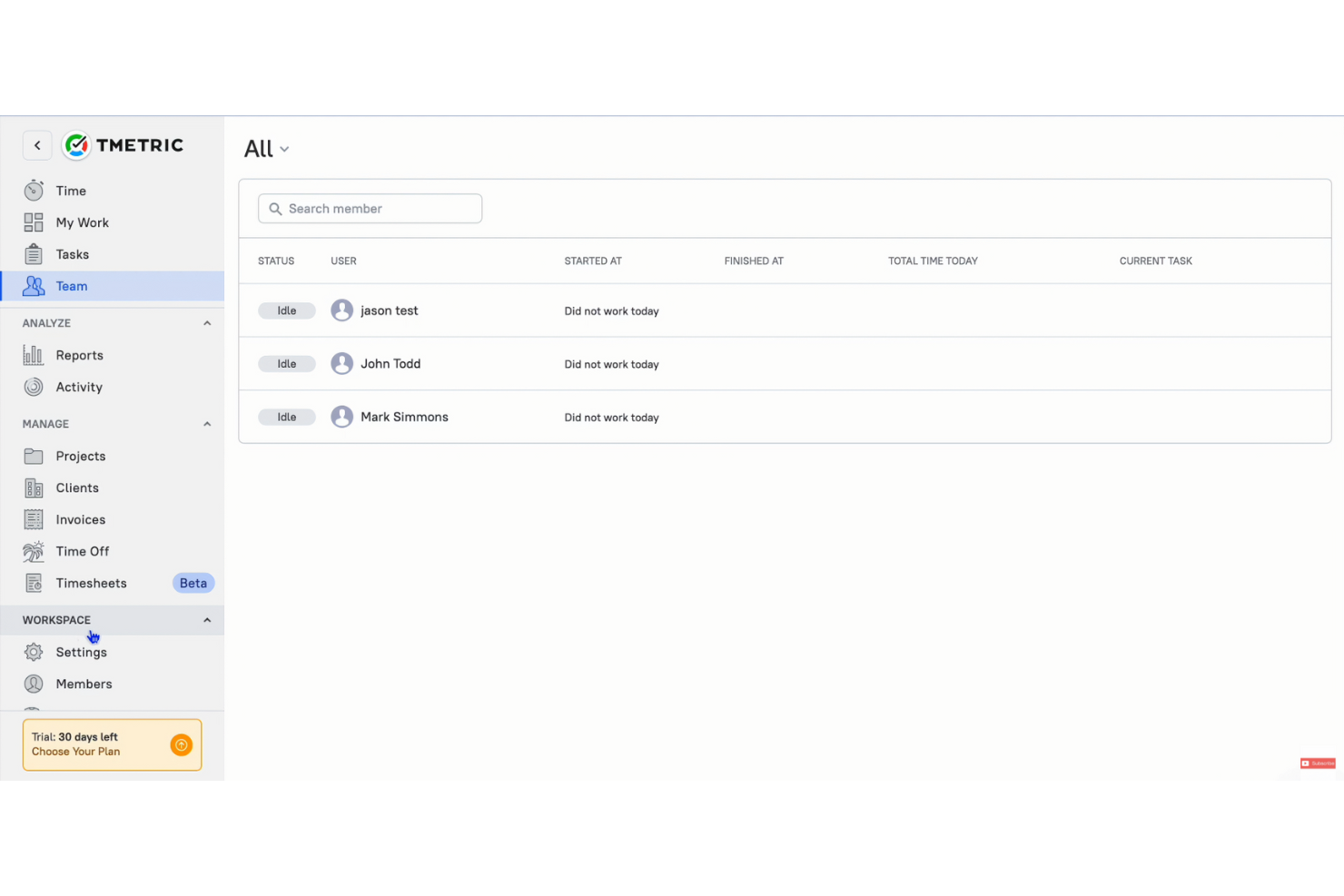
TMetric es una solución de seguimiento del tiempo y una herramienta de productividad diseñada para autónomos, pequeñas empresas y equipos remotos que buscan gestionar las horas de trabajo y la facturación de manera eficiente, ya sea desde la aplicación de escritorio o la aplicación móvil. Te ayuda a registrar el tiempo, gestionar tareas y facilitar la facturación de clientes.
Por qué TMetric es una buena alternativa a Timecamp: TMetric ofrece facturación multidivisa, lo que facilita el trabajo de las empresas con clientes internacionales. La función de facturación te permite crear y enviar facturas, y admite la facturación en varias divisas, facilitando tus transacciones internacionales. Puedes registrar con precisión las horas facturables y convertirlas fácilmente en facturas. Este enfoque en la compatibilidad con múltiples divisas convierte a TMetric en una opción práctica para empresas que trabajan a través de distintas fronteras.
Funciones e integraciones destacadas:
Las funciones incluyen gestión de proyectos, informes detallados y seguimiento de las ausencias. Estas funciones te ayudan a mantener el control sobre la productividad de tu equipo y la gestión de proyectos. TMetric también ofrece herramientas de gestión de presupuestos para mantener tus proyectos financieramente encaminados.
Las integraciones incluyen Asana, Trello, Slack, Jira, GitHub, Bitbucket, monday.com, GitLab y muchas más.
Pros and Cons
Pros:
- Facturación multidivisa
- Herramientas de presupuestación de proyectos
- Gestión sencilla de proyectos
Cons:
- Opciones básicas de informes
- Limitaciones de la aplicación móvil

Ideal para el análisis de equipos remotos
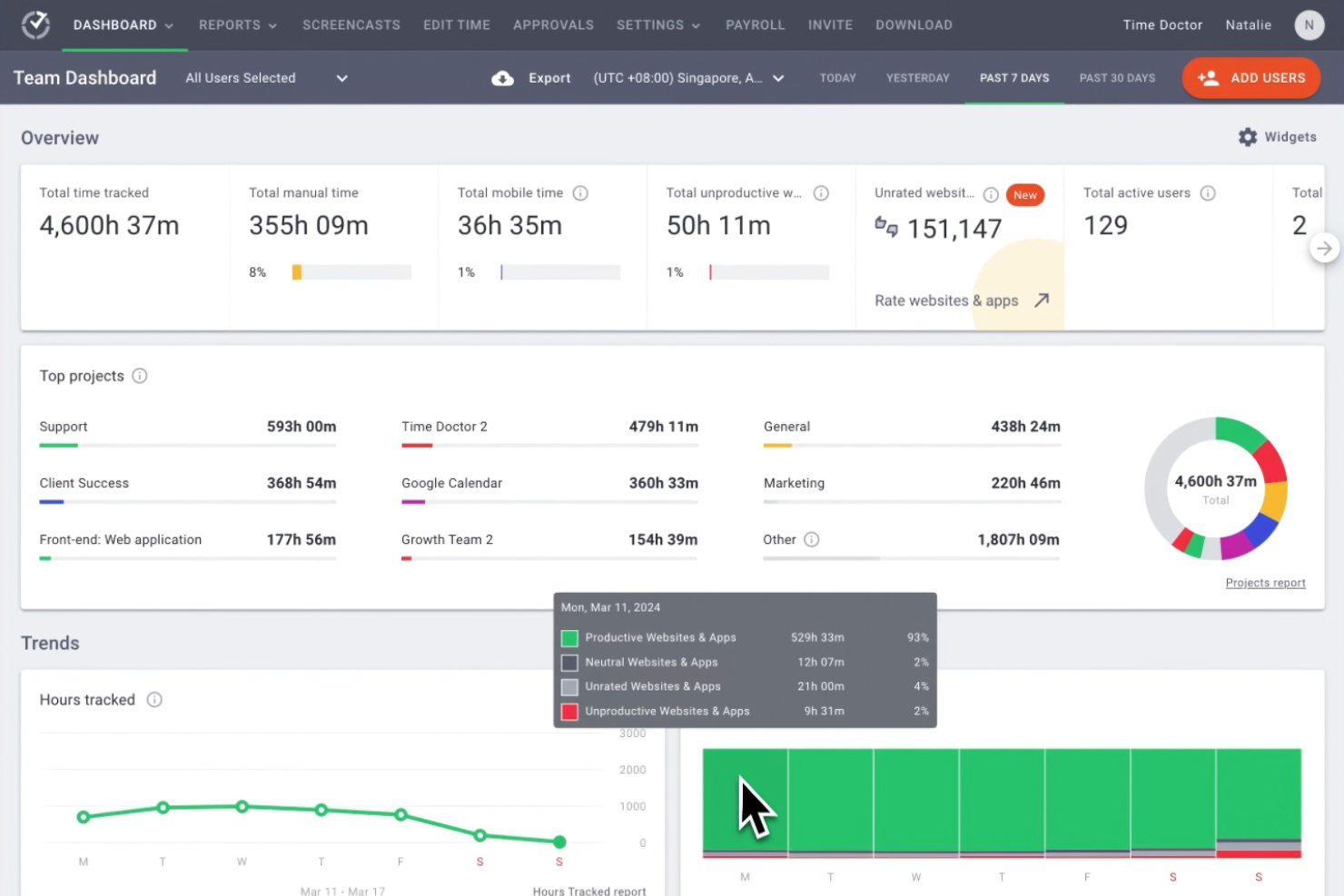
Time Doctor es un software todo en uno de seguimiento del tiempo, diseñado para empresas y equipos remotos que buscan mejorar la productividad general. Proporciona a los gerentes y líderes de equipo información sobre cómo se emplea el tiempo de los empleados en los distintos proyectos.
Por qué Time Doctor es una buena alternativa a Timecamp: Time Doctor es una aplicación de seguimiento del tiempo que ofrece funciones avanzadas de análisis, centradas en el rendimiento de los equipos remotos. Sus capacidades de seguimiento del tiempo incluyen supervisión en tiempo real. La función de alertas de distracciones garantiza que tu equipo se mantenga concentrado en sus tareas. Además, las capturas de pantalla de Time Doctor proporcionan una visión clara de la productividad de los empleados, respaldando su propuesta de valor única (USP) en el análisis de equipos remotos.
Características destacadas e integraciones:
Las características incluyen seguimiento del tiempo con capturas de pantalla, alertas de distracciones y supervisión de la productividad de los empleados en tiempo real. Estas características te ayudan a mantener la productividad y a mantener a tu equipo concentrado. El software también ofrece informes detallados para ayudarte a analizar los patrones de trabajo.
Las integraciones incluyen Asana, Trello, Jira, monday.com, Basecamp 3, Salesforce, Wrike y más.
Pros and Cons
Pros:
- Supervisión de la productividad en tiempo real
- Captura de pantallas
- Alertas de distracciones
Cons:
- Seguimiento sin conexión limitado
- Funciones básicas de gestión de proyectos
Ideal para la integración con el calendario
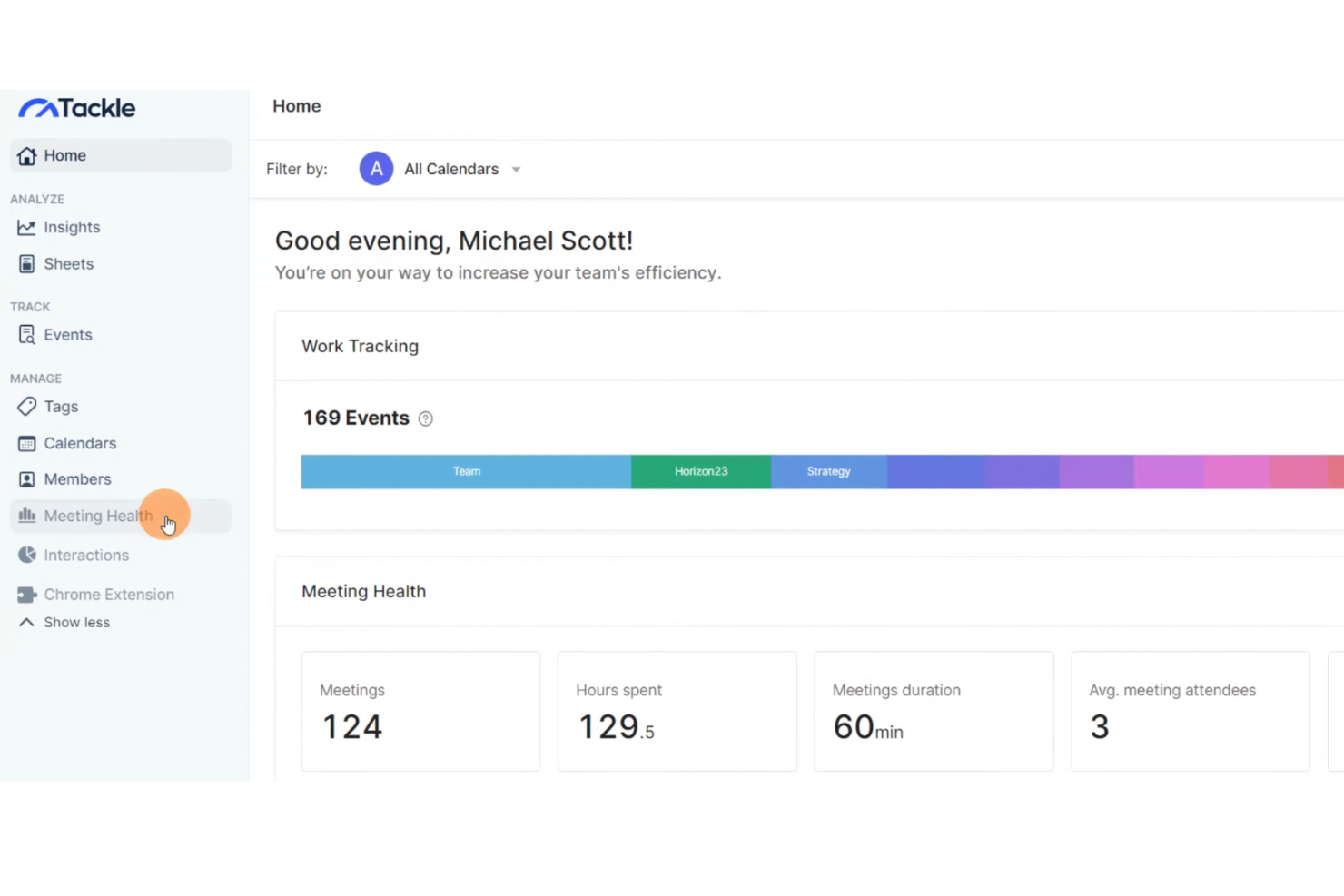
Tackle es una herramienta de gestión del tiempo diseñada para profesionales y equipos que necesitan optimizar su planificación y supervisar su productividad. Te ayuda a convertir los datos del calendario en información útil para mejorar la gestión del tiempo y las tareas.
Por qué Tackle es una buena alternativa a Timecamp: Tackle ofrece una integración fluida con el calendario, lo que te permite sincronizar y analizar tu agenda de manera eficiente, ya sea en la aplicación de escritorio o en la aplicación móvil. Esta función ofrece supervisión de la productividad para ayudarte a hacer un seguimiento de cómo distribuyes tu tiempo entre distintas actividades, de modo que puedas identificar patrones fácilmente y realizar ajustes para mejorar la productividad. El enfoque de Tackle en la integración con el calendario garantiza que tu planificación esté alineada con tus objetivos de productividad.
Funciones e integraciones destacadas:
Las funciones incluyen el seguimiento automatizado del tiempo, la visualización de datos y estadísticas personalizadas. Estas funciones te ayudan a comprender mejor tus patrones de productividad. Tackle también ofrece una interfaz fácil de usar para simplificar el proceso de gestión de tu agenda.
Las integraciones incluyen Google Calendar y la posibilidad de exportar datos a Google Sheets y Excel.
Pros and Cons
Pros:
- Integración nativa con el calendario
- Seguimiento automatizado del tiempo
- Interfaz fácil de usar
Cons:
- Funciones avanzadas limitadas
- Puede requerir una configuración inicial

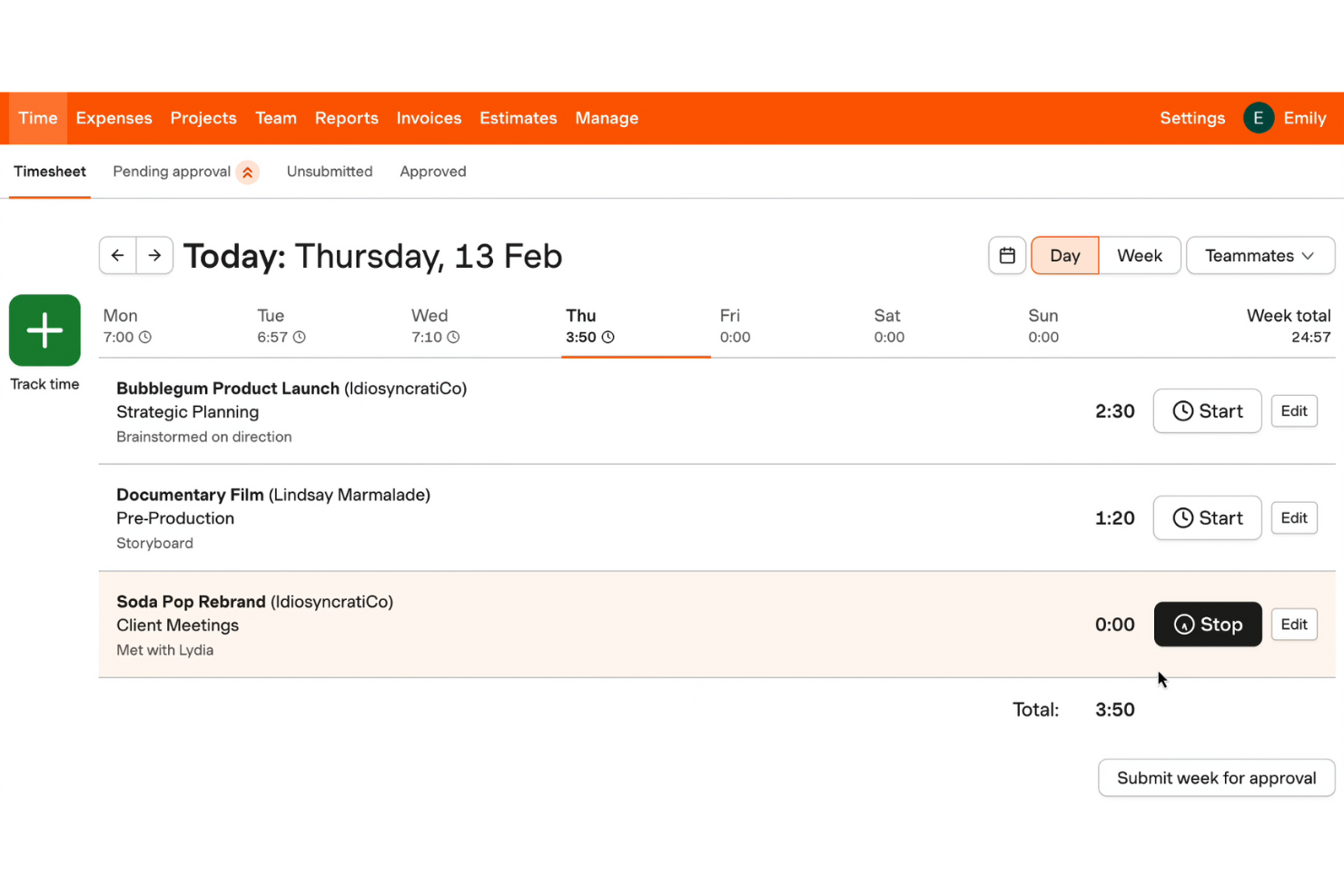
Harvest es una solución de seguimiento del tiempo y un software de facturación diseñado para trabajadores independientes, pequeñas empresas y equipos que buscan gestionar su tiempo y sus finanzas de manera eficiente. Te ayuda a registrar las horas de trabajo de los proyectos, crear facturas y gestionar presupuestos.
Por qué Harvest es una buena alternativa a Timecamp: Harvest ofrece facturación integrada, lo que te permite generar facturas directamente a partir de los registros de tiempo y los gastos. Esta función simplifica la facturación a clientes y garantiza la exactitud de los cargos. Puedes convertir fácilmente las horas de trabajo registradas en facturas, lo que facilita la gestión financiera. El enfoque de Harvest en combinar un seguimiento preciso del tiempo con la facturación proporciona una transición fluida del trabajo del proyecto a la facturación del cliente.
Características e integraciones destacadas:
Las características incluyen el seguimiento de gastos, la gestión del presupuesto de proyectos y los informes detallados. Estas funciones te ayudan a supervisar los costes de los proyectos y a garantizar que te mantengas dentro del presupuesto. Harvest también ofrece aprobación de hojas de horas para agilizar la gestión de equipos.
Las integraciones incluyen Asana, Trello, Slack, Jira, QuickBooks Online, Basecamp, Stripe, PayPal, Xero, Google Calendar y más.
Pros and Cons
Pros:
- Facturación integrada
- Adecuado para pequeñas empresas
- Seguimiento sencillo de gastos
Cons:
- Depende de un seguimiento preciso del tiempo
- Proyectos ilimitados solo en los planes de pago

Toggl
Ideal para informes personalizables
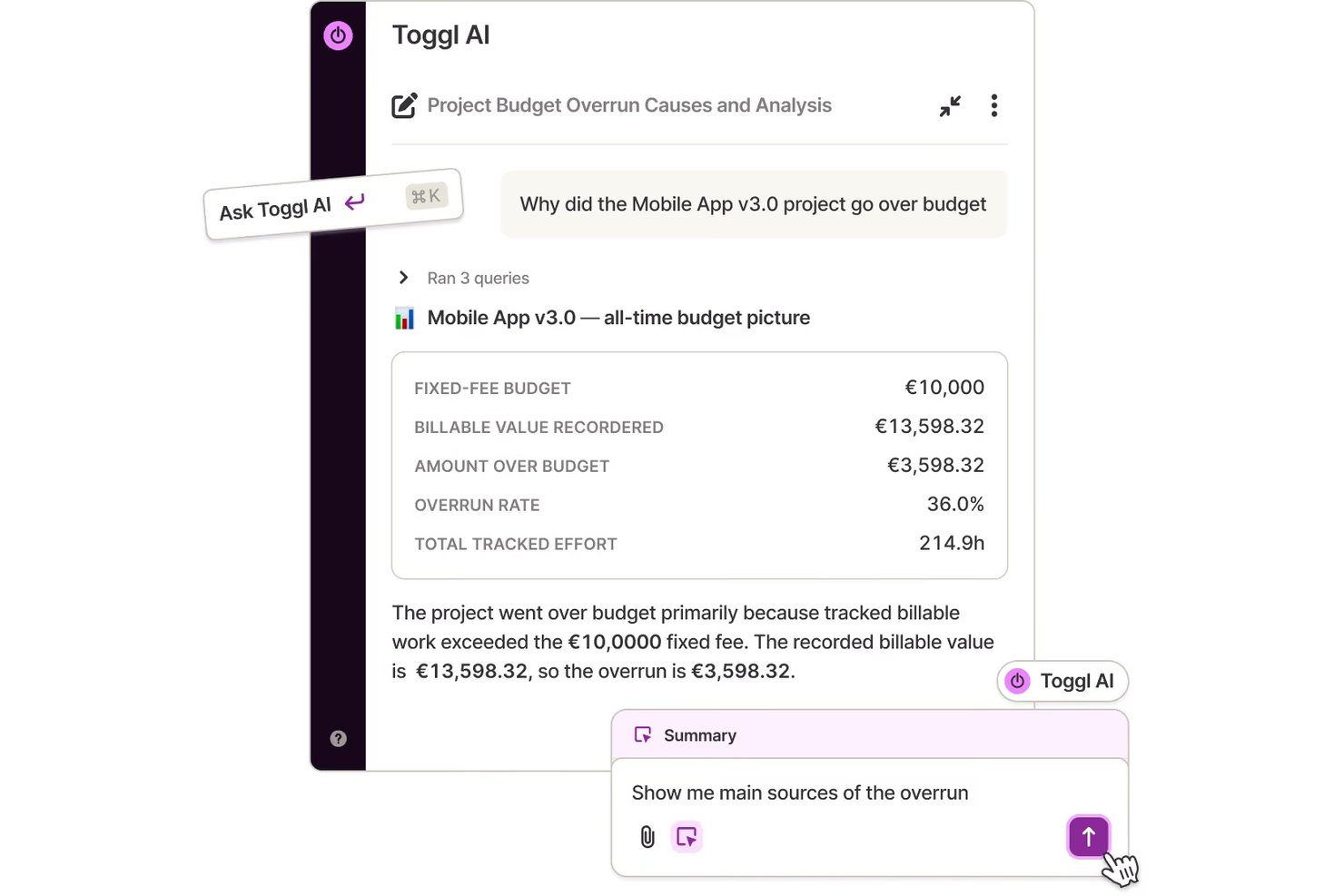
Toggl es una herramienta de seguimiento del tiempo diseñada para autónomos, pequeñas empresas y equipos que buscan mejorar la productividad. Proporciona información sobre cómo se emplea el tiempo en los proyectos, mejorando la eficiencia de la gestión de proyectos.
Por qué Toggl es una buena alternativa a Timecamp: Toggl ofrece personalización en los informes, lo que te permite adaptar los informes de tiempo a tus necesidades específicas. Su sencilla interfaz facilita el seguimiento del tiempo sin perderse en los detalles. Puedes generar informes detallados que se centren en las métricas más importantes para ti. La flexibilidad de Toggl Track para personalizar los informes de tiempo te ayuda a obtener información directamente relevante para la productividad de tu equipo.
Características e integraciones destacadas:
Las características incluyen la detección del tiempo de inactividad y el seguimiento del progreso de los proyectos. Estas características te ayudan a gestionar la productividad de tu equipo de manera más eficaz. Toggl también ofrece recordatorios para garantizar que el seguimiento del tiempo se mantenga constante.
Las integraciones incluyen Asana, Trello, Slack, Jira, Google Calendar, Todoist, Basecamp, GitHub, Evernote, QuickBooks Online y mucho más.
Pros and Cons
Pros:
- Aplicación móvil para Android e iOS
- Adecuado para equipos pequeños
- Planes de pago asequibles
Cons:
- No admite usuarios ilimitados
- No ofrece funciones de facturación
Otras alternativas a Timecamp
Estas son algunas alternativas adicionales a Timecamp que no llegaron a mi lista, pero que siguen siendo dignas de consideración:
- Monitask
Ideal para la supervisión de empleados
- Hubstaff
La mejor opción para las funciones de seguimiento por GPS
- Buddy Punch
Ideal para la programación de empleados
- Tick's Time Tracking
Ideal para realizar un seguimiento sencillo del presupuesto de proyectos


Cómo evalúo las alternativas a TimeCamp
Analizo cada alternativa a TimeCamp en dos niveles: primero, los requisitos básicos, como los presupuestos a nivel de proyecto y las tarifas facturables; después, los factores que realmente diferencian unas herramientas de otras.
Funcionalidad principal (requisitos básicos para esta lista)
Al seleccionar herramientas para mi lista, califico cada una en una escala de 0 (no ofrece la funcionalidad) a 5 (sobresale en esta área) para cada una de las funcionalidades principales que se indican a continuación. Después, convierto la puntuación total de la herramienta en un porcentaje. Cada herramienta debe alcanzar una puntuación total mínima del 65 % para ser considerada para su inclusión.
- Seguimiento del tiempo: Compruebo si una herramienta ofrece temporizadores, introducción manual y algún tipo de automatización, como la detección de aplicaciones en segundo plano de Toggl Track o las alertas de inactividad de Clockify, para que los equipos no tengan que reconstruir sus hojas de horas de memoria al final de la semana.
- Organización de proyectos y tareas: Cada herramienta debería permitir asociar las entradas de tiempo con proyectos, tareas y clientes específicos, de la misma forma que Harvest vincula las horas registradas con partidas a nivel de tarea en lugar de volcarlo todo en un único grupo.
- Horas facturables y facturación: Evalúo cómo gestiona cada plataforma las etiquetas de tiempo facturable y no facturable, las tarifas personalizadas por proyecto o miembro del equipo y si puede generar o exportar facturas directamente a partir del tiempo registrado.
- Seguimiento del presupuesto y la rentabilidad: Las herramientas obtienen mejores calificaciones cuando permiten establecer presupuestos de horas o costes por proyecto y mostrar el progreso en tiempo real, algo especialmente útil para los equipos de agencias que controlan los márgenes de varios proyectos de clientes a la vez.
- Informes y análisis: Busco informes personalizables que vayan más allá de las hojas de horas sin procesar, incluidos filtros por cliente, intervalo de fechas o miembro del equipo, además de opciones de exportación como CSV y PDF para las actualizaciones dirigidas a las partes interesadas.
- Gestión de equipos y recursos: Aquí son importantes la compatibilidad con varios usuarios y los permisos basados en roles, las aprobaciones de hojas de horas y las vistas de carga de trabajo o capacidad, especialmente para los responsables que gestionan equipos multifuncionales en varios proyectos simultáneos.
Una vez que tengo una lista de herramientas que cumplen estos criterios, analizo qué diferencia a cada plataforma.
Factores diferenciadores (qué distingue a los proveedores)
Así es como comparo y contrasto los distintos proveedores:
Funciones destacadas
Para mí, el seguimiento automático de la actividad es un factor importante: herramientas como Hubstaff y Toggl Track pueden registrar aplicaciones y URL en segundo plano, lo que evita que los equipos tengan que reconstruir su jornada después. También evalúo hasta qué punto llegan las integraciones de gestión de proyectos de una plataforma, ya que una sincronización bidireccional con Jira o Asana es mucho más útil que una conexión básica unidireccional. Los análisis de productividad completan la propuesta, ya que ayudan a los responsables a detectar patrones de concentración y señalar el exceso de trabajo antes de que se convierta en un problema de retención.
Más allá de las funciones
La estructura de precios es muy importante en este caso: un profesional independiente que evalúa Toggl Track tiene necesidades muy distintas de las de una agencia de 50 personas que analiza Harvest, así que compruebo si los planes pueden ampliarse sin obligar prematuramente a los equipos a contratar niveles empresariales. La cobertura de plataformas es otro factor que considero, ya que los equipos móviles y remotos necesitan aplicaciones móviles y seguimiento sin conexión que se sincronice cuando vuelvan a estar en línea. Para los equipos que gestionan datos confidenciales de clientes, también reviso aspectos básicos de seguridad, como SSO, 2FA y el cumplimiento del RGPD.
¿Por qué buscar una alternativa a Timecamp?
Aunque Timecamp es una buena opción de software de productividad y gestión de proyectos, hay varias razones por las que algunos usuarios buscan soluciones alternativas. Es posible que estés buscando una alternativa a Timecamp porque:
- Necesitas funciones de informes más avanzadas
- Tu equipo necesita mejores opciones de escalabilidad
- Buscas herramientas de colaboración mejoradas
- Necesitas un software con funciones sin conexión
- Tu equipo tiene dificultades con la interfaz de usuario
- Necesitas planes de precios más flexibles
Si alguna de estas situaciones te resulta familiar, has llegado al lugar adecuado. Mi lista contiene varias opciones de software de productividad y gestión de proyectos más adecuadas para los equipos que se enfrentan a estos desafíos con Timecamp y buscan soluciones alternativas.
Características
Estas son algunas de las características principales de Timecamp, para ayudarte a contrastar y comparar lo que ofrecen las soluciones alternativas:
- Seguimiento del tiempo: Proporciona seguimiento tanto automatizado como manual para ayudarte a llevar un registro preciso de las horas de trabajo.
- Supervisión de la plantilla: Realiza un seguimiento de los niveles de actividad de los empleados y de la productividad de tu equipo, lo que resulta ideal para gestionar equipos remotos.
- Control de asistencia: Gestiona la asistencia, las horas extra y las solicitudes de ausencia para agilizar los procesos de nómina.
- Integraciones: Es compatible con más de 100 herramientas, incluidos programas de gestión de proyectos y facturación, para integrarse en tu flujo de trabajo.
- Análisis: Genera informes detallados sobre el uso del tiempo, las comparaciones presupuestarias y la productividad de los empleados para facilitar la toma de decisiones.
- Facturación: Realiza un seguimiento de las horas facturables y crea facturas a partir del tiempo registrado, lo que facilita la gestión de la facturación de los clientes.
- Roles de gestión: Te permite establecer permisos de usuario y crear roles personalizados para controlar mejor el acceso.
- Etiquetas y capturas de pantalla: Utiliza etiquetas para la clasificación y capturas de pantalla opcionales para ofrecer transparencia en la supervisión.
- Aprobaciones y gastos: Permite a los empleados enviar hojas de horas para su aprobación y realizar un seguimiento de los gastos relacionados con los proyectos.
- Servicios personalizados: Ofrece opciones de implementación en servidores propios e integraciones personalizadas para adaptarse a necesidades empresariales específicas.
¿Qué viene después?
Si estás investigando software de productividad y gestión de proyectos, ponte en contacto con un asesor de SoftwareSelect para obtener recomendaciones gratuitas.
Rellenas un formulario y mantienes una breve conversación en la que se centran en los detalles específicos de tus necesidades. Después, recibirás una lista de programas preseleccionados para revisar. Incluso te ayudarán durante todo el proceso de compra, incluidas las negociaciones de precios.