

2026’nın En İyi 20 Yapay Zeka Profesyonel Hizmetler Yazılımı

En İyi AI Profesyonel Hizmet Yazılımları Kısa Listesi


AI profesyonel hizmet yazılımı; danışmanlık, ajans ve müşteri hizmetleri ekiplerinde projeleri yönetmenize, kaynakları tahsis etmenize ve iş akışlarını otomatikleştirmenize yardımcı olmak için yapay zekâdan yararlanır. Hızlı ilerleyen ve son derece rekabetçi bir sektörde önde kalmanızı sağlayacak en iyi araçları arıyorsanız, yeni sorunlar yaratmadan doğruluğu, şeffaflığı ve teslimat hızını artıran çözümlere ihtiyacınız var. Bu rehber, seçenekleri karşılaştırabilmeniz, hangilerinin işletmenize uygun olduğunu görebilmeniz ve sonraki adımlarınızı planlarken güvenle karar verebilmeniz için karmaşayı ortadan kaldırıp en iyi AI araçlarını ayrıntılı olarak ele alıyor.
Why Trust Our Software Recommendations
Our team has been testing and reviewing software since 2012. As project managers ourselves, we know how difficult—and important—it is to choose the right software.
For this guide, we evaluated tools using hands-on testing and independent research, scoring tools using our selection criteria. We also draw on insights from industry thought leaders and practicing project management experts.
Our reviews reflect our human editorial judgment, not a sales pitch.
Expert reviewers:
AI Profesyonel Hizmet Yazılımları Karşılaştırma Tablosu
Bu karşılaştırma tablosu, en iyi AI profesyonel hizmet yazılımı seçimlerimin fiyatlandırma ayrıntılarını özetlemektedir.
| Tool | Starting Price | Website | |
|---|---|---|---|
| Best for resource and project forecasting | 4.2 out of 5 | Pricing upon request Not available | Website |
| Best for automated team planning | 4.4 out of 5 | Pricing upon request Free demo available | Website |
| Best for tracking profitability by project | 4.6 out of 5 | $10/user/month 14-day free trial | Book Demo |
| Best for all-in-one business oversight | 4.5 out of 5 | $17/user/month 14-day free trial | Book Demo |
| Best for time and billing management | 4.5 out of 5 | $20/user/month Free demo available | Website |
| Best for unified financial management | 4.6 out of 5 | $17/user/month 21-day free trial + free demo available | Website |
| Best for real-time project visibility | — | Pricing upon request Free demo available | Website |
| Best for native Salesforce integration | — | Pricing upon request Free demo available | Website |
| Best for enterprise-grade reporting tools | — | Pricing upon request Free demo available | Website |
| Best for smooth ERP integration | — | Pricing upon request Free demo available | Website |
En İyi AI Profesyonel Hizmet Yazılımları İncelemeleri
Aşağıda, kısa listeme giren en iyi AI profesyonel hizmet yazılımlarına ilişkin ayrıntılı özetlerimi bulabilirsiniz. İncelemelerim, sizin için en iyi seçeneği bulmak üzere veriye dayalı kararlar almanıza yardımcı olmak amacıyla her platformun özelliklerini, entegrasyonlarını ve en uygun kullanım alanlarını ayrıntılı şekilde ele alıyor.

Kantata
Best for resource and project forecasting
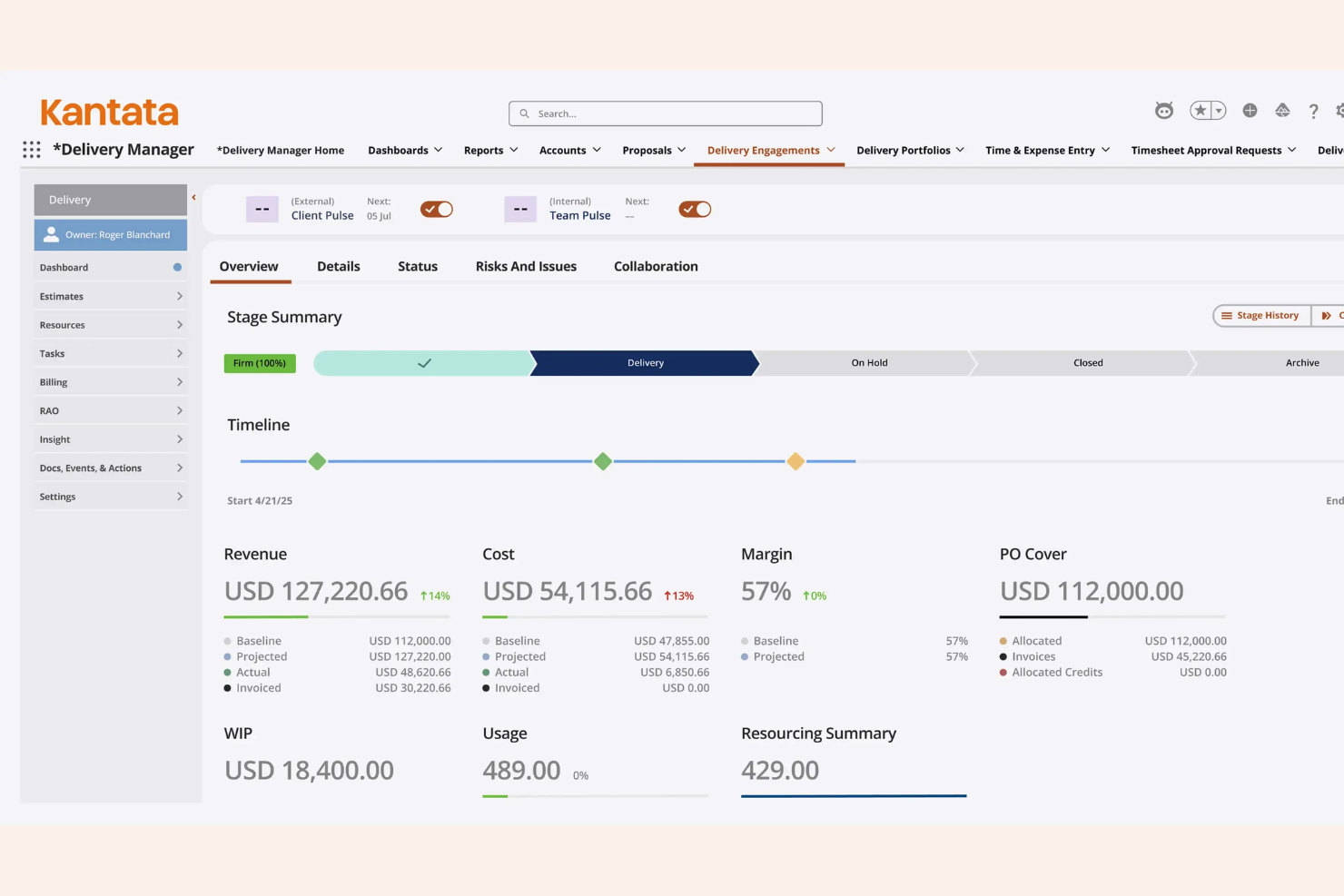
Kantata is an AI-driven professional services automation platform integrating generative AI capabilities to offer advanced project management, resource scheduling, analytics, and financial tools for service-based organizations.
Who Is Kantata Best For?
Kantata suits professional services teams at medium to large organizations that need an AI assistant alongside advanced controls for project and resource management.
Why I Picked Kantata
Kantata is one of my top picks because I get detailed resource planning, scenario modeling, and AI-powered forecasts. I like how I can compare project timelines, track capacity, and adjust allocations before making big commitments.
Kantata Key Features
- Financial management modules: Track budgets, invoices, expenses, and revenue in one place.
- Project accounting tools: Get real-time project financials and margin analysis.
- Skill-based resource matching: Assign team members based on skills and certifications.
- Time and expense tracking: Capture billable hours and expenses across projects.
Kantata Integrations
Kantata offers native integrations with Salesforce, Slack, Jira, HubSpot, QuickBooks, Xero, Microsoft 365, Google Workspace, Expensify, and NetSuite. An API is available for custom integrations.
Pros and Cons
Pros:
- Scenario modeling for future project planning
- Granular resource scheduling and allocation views
- AI-driven project forecasting tools
Cons:
- Custom reporting requires technical expertise
- Complex setup process for new accounts
New Product Updates from Kantata

Kantata Adds Access Group Change History
Kantata adds Access Groups History, letting account administrators track changes to group details, membership, and permissions in Recent History. The update also makes these events available through the Subscribed Events API for broader monitoring. For more information, visit Kantata’s official site.
 .

Mosaic
Best for automated team planning
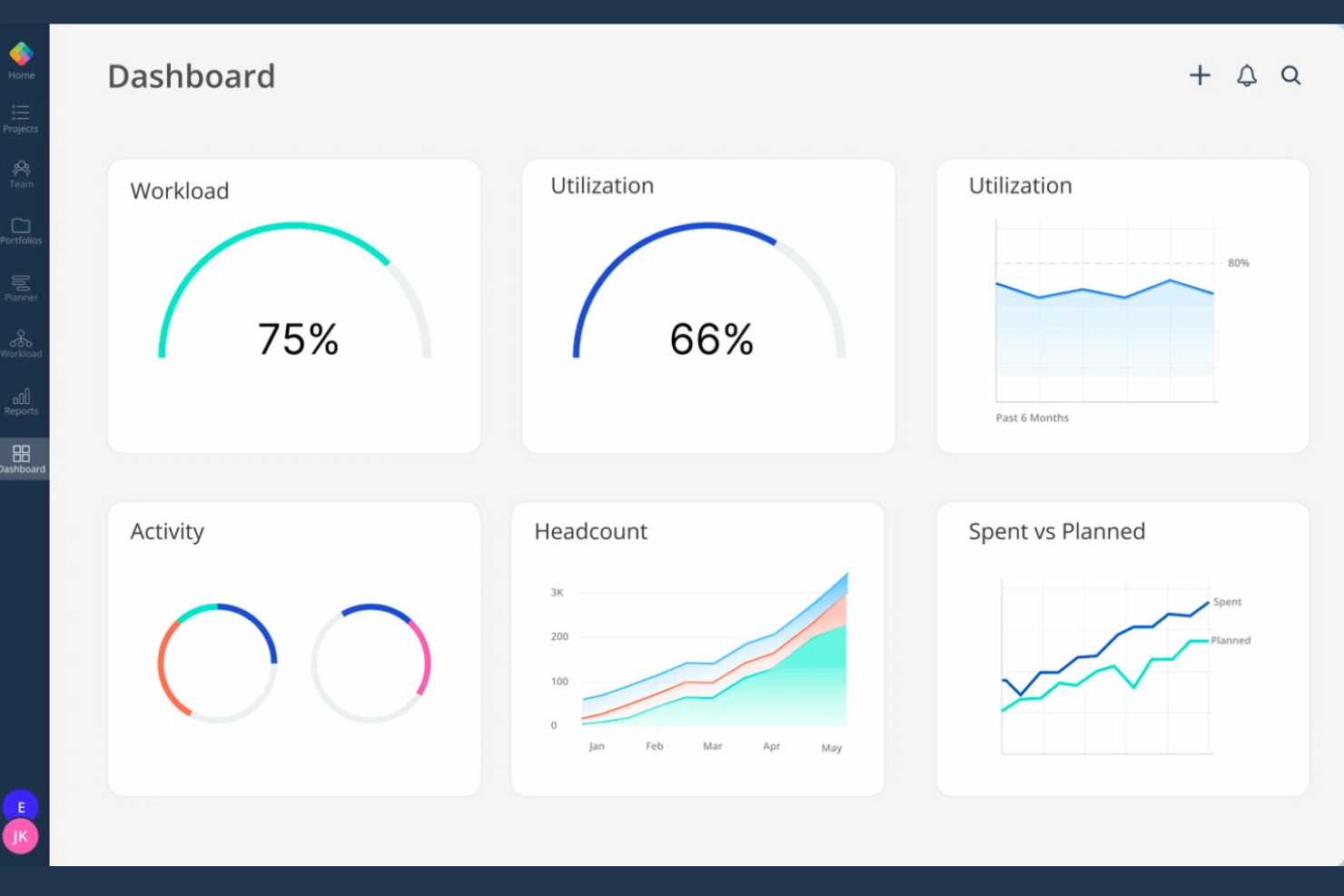
Mosaic is a resource management and team planning platform for professional services teams, leveraging AI agents to offer automated workload forecasting, project scheduling, time tracking, and staffing analytics.
Who Is Mosaic Best For?
Mosaic suits project leads and operations managers in growing professional services firms needing real-world AI-powered resource planning for distributed or hybrid teams.
Why I Picked Mosaic
I picked Mosaic as one of the best because I use its AI-driven scheduling engine to automate team assignments and balance workloads as projects shift. I also rely on its real-time utilization tracking and heatmaps to instantly spot resource constraints.
Mosaic Key Features
- Project request intake: Capture and centralize incoming project requests directly in the platform.
- Skill-based resourcing: Match assignments to team members based on tracked skillsets.
- Visual timeline view: Display projects, phases, and allocations in a single interactive timeline.
- AI forecasting: Predict future resource needs using AI-driven analytics.
Mosaic Integrations
Mosaic offers native integrations with Jira, QuickBooks, Slack, Google Workspace, Microsoft 365, Salesforce, HubSpot, Asana, Capsule, ClickUp, Deel, Gusto, GitHub, HiBob, BambooHR, Procore, and more. Zapier is supported, and an API is available for custom integrations.
Pros and Cons
Pros:
- Visual dashboards for real-time team capacity
- Skill-based matching for project assignments
- AI workload prediction across multiple projects
Cons:
- Initial platform setup requires time
- Custom field configuration is limited

Best for tracking profitability by project
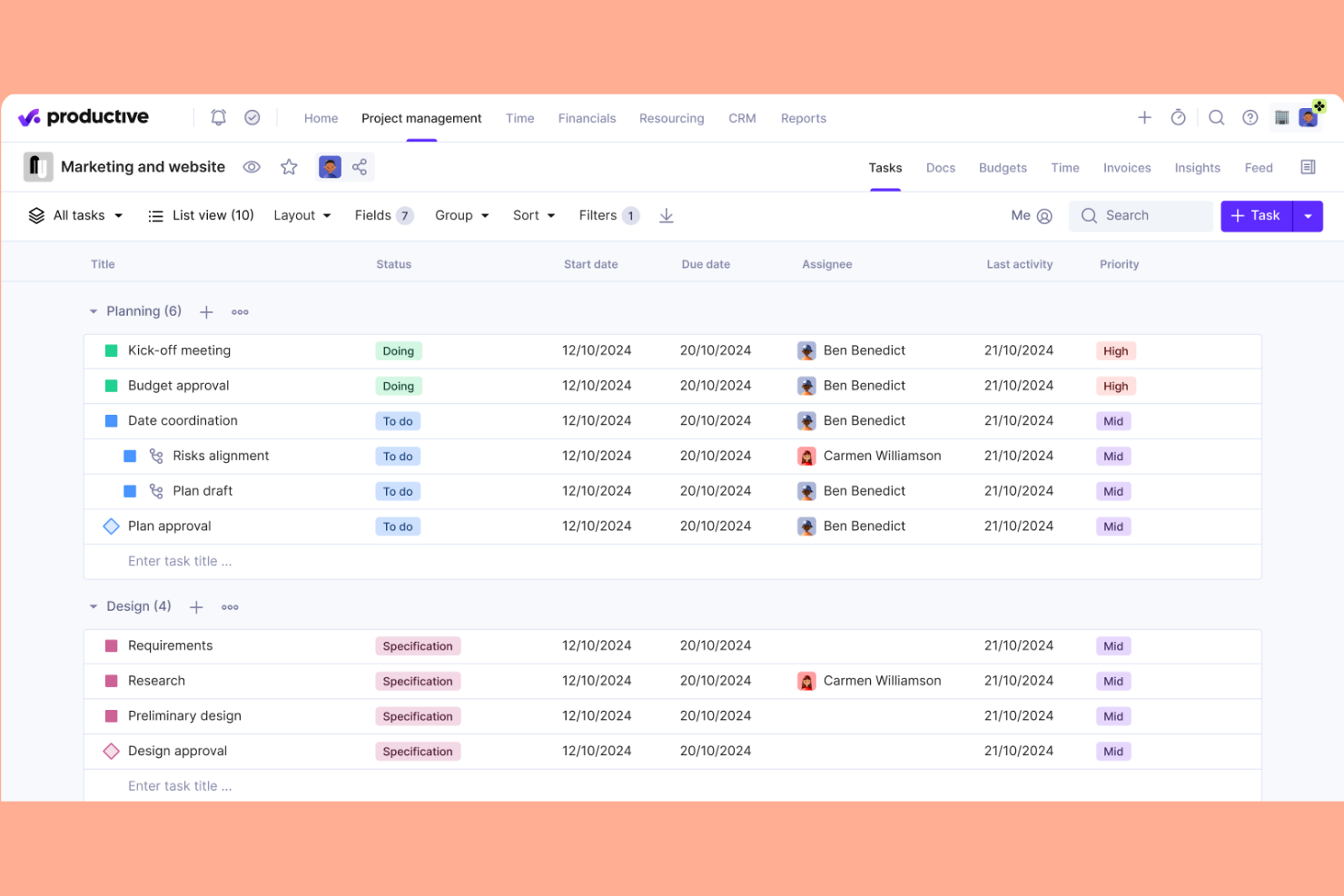
Productive is a professional services automation platform for AI consulting, social media agencies, and digital service firms that covers project management, resource planning, budgeting, time tracking, and invoicing in one unified system.
Who Is Productive Best For?
Productive suits mid-sized and larger digital, creative, or IT services firms that need visibility into project-level financials and resource allocation.
Why I Picked Productive
I picked Productive because tracking profit margins on every project is a core feature, not a reporting afterthought. I use real-time budget tracking and custom cost rates to monitor profitability as delivery progresses. I rely on granular invoicing tied to project progress.
Productive Key Features
- Resource planning: Schedule team members and allocate capacity to projects in a drag-and-drop interface.
- Task management: Organize assignments, set deadlines, and track task status in project boards or lists.
- Custom fields: Add personalized data fields to projects, tasks, and budgets for process flexibility.
- Document storage: Upload, share, and organize project files directly in the platform.
Productive Integrations
Productive offers native integrations with Slack, Jira, Amplitude, Notion, Stripe, QuickBooks, Xero, Google Workspace, and HubSpot. An API is available for custom integrations.
Pros and Cons
Pros:
- Financial and utilization dashboards are built in
- Custom cost rates by person or role
- Project budgets update in real time
Cons:
- Custom field formula options are limited
- Limited automation for multi-step workflows
New Product Updates from Productive
Productive Adds Email and Calendar Integrations for Agents
Productive adds Gmail, Outlook, Google Calendar, and Outlook Calendar connectors for its AI agents. These integrations let agents manage emails and create calendar events directly within Productive. For more information, visit Productive’s official site.
 .

Scoro
Best for all-in-one business oversight

Scoro is an all-in-one professional services management platform that supports natural language querying to bring together project management, sales, billing, CRM, and reporting in a unified system for service-based businesses.
Who Is Scoro Best For?
Scoro is ideal for mid-sized professional services teams that need deep data analysis to unify project tracking, sales, and financials in one system.
Why I Picked Scoro
I picked Scoro because I rely on its unified workspace to manage projects, sales, quotes, and invoicing side by side. I use centralized dashboards to connect all operational data, giving full oversight across every business function from a single platform.
Scoro Key Features
- Task automation: Automate recurring tasks with templates and triggers.
- Gantt chart view: Visualize project timelines and dependencies with a drag-and-drop interface.
- Time tracking: Log billable and non-billable hours from desktop or mobile.
- Resource planner: Allocate team capacity and manage workload in real time.
Scoro Integrations
Scoro offers native integrations with Xero, QuickBooks, Avalara, Stripe, Jira, Envoice, Google Calendar, Outlook, Slack, Mailchimp, and Dropbox. Zapier and an API are available for custom integrations.
Pros and Cons
Pros:
- Real-time budget and profitability reporting
- Detailed time tracking across teams and projects
- Highly configurable project and billing templates
Cons:
- Mobile app offers fewer features than the web
- Setting up task hierarchies is rigid
New Product Updates from Scoro

Scoro Adds Time Mobile App and ELI Improvements
Scoro adds the Scoro Time mobile app for iOS/Android to track time anywhere and expands ELI with attachments, smarter filtering, and trigger-based actions. For more information, visit Scoro's official site.
 .

BigTime
Best for time and billing management
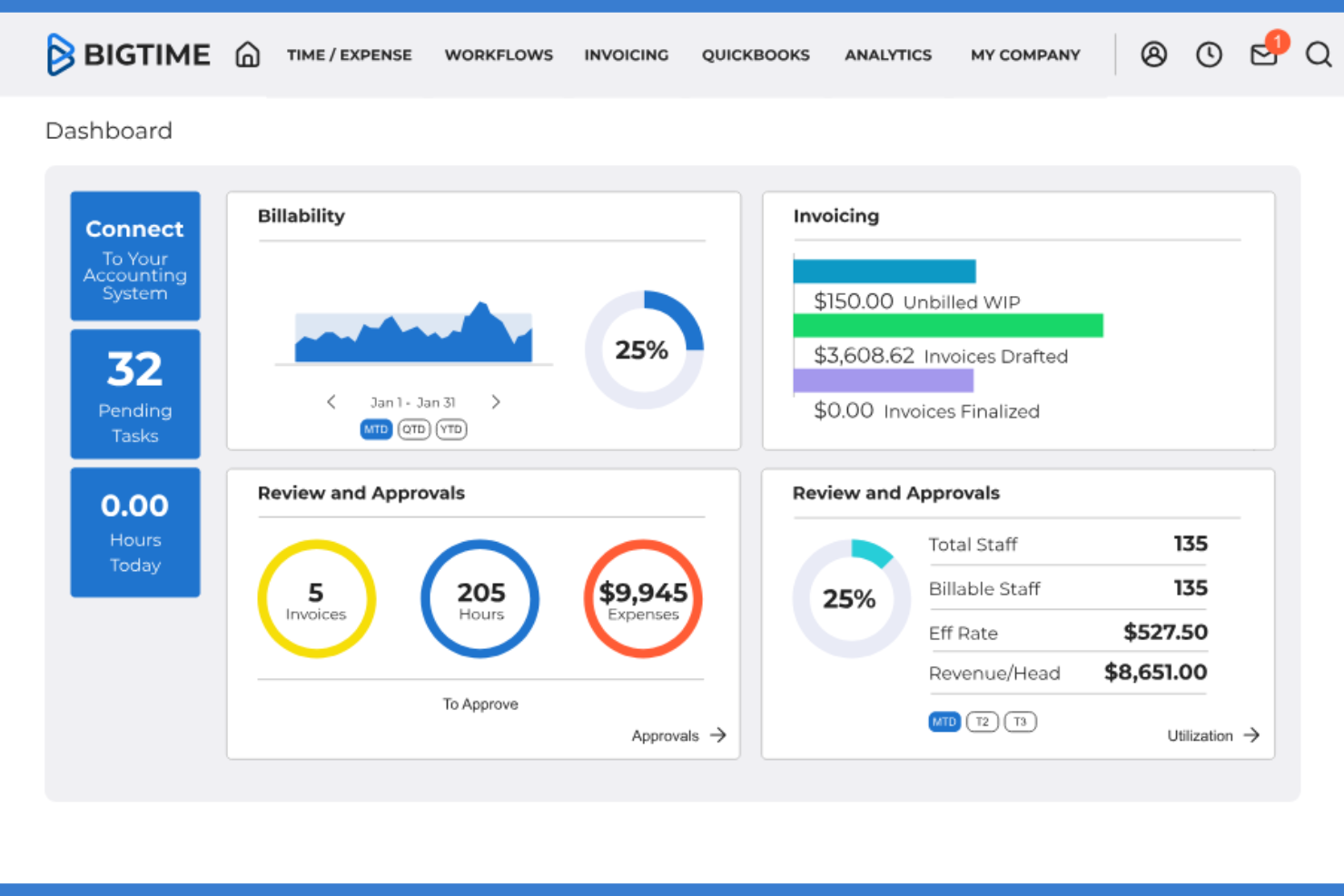
BigTime is a cloud-based time tracking and billing management platform for professional services firms, offering project budgeting, expense tracking, invoicing, and resource management tools.
Who Is BigTime Best For?
BigTime suits midsize professional services firms that need accurate project time tracking and billing tools for client work.
Why I Picked BigTime
I picked BigTime as one of the best because I use its toolset to generate high-quality financial insights, centralized time tracking, and detailed billing tools to optimize project accounting. The platform lets me automate billing cycles and create client-ready, professional invoices.
BigTime Key Features
- Project budgeting and forecasting: Set project budgets, forecast future spend, and monitor progress in real time.
- Resource allocation management: Assign staff to projects based on availability and skill set.
- Customizable dashboard reporting: Build tailored dashboards to track utilization, performance, and project status.
- Mobile time entry app: Submit and review time entries from mobile devices.
BigTime Integrations
BigTime offers native integrations with QuickBooks, Xero, Sage Intacct, Hubspot, Jira, Smartsheet, Zendesk, Okta, Salesforce, Lacerte, Slack, and more, and provides an API for custom integrations.
Pros and Cons
Pros:
- Custom approval workflows for time and expense
- Granular role-based access controls
- AI-driven project time entry suggestions
Cons:
- Limited workflow automation beyond time and billing
- Hard limit on active dashboard views

Best for unified financial management

Projectworks is a professional services automation platform for AI teams, aligning your functional business model with project planning, resource management, timesheets, invoicing, and forecasting in one system.
Who Is Projectworks Best For?
Projectworks is a strong choice for small to mid-sized consulting firms needing centralized financial oversight and project resource management.
Why I Picked Projectworks
I picked Projectworks as one of the best because I can handle project budgets, forecasting, and invoicing all in one view. I use its real-time financial dashboards to spot margin trends and proactively manage client profitability.
Projectworks Key Features
- Resource scheduling: Assign and balance workloads with visual tools for your team.
- Capacity planning dashboard: See staff availability and project allocation in real time.
- Customizable project templates: Set up repeatable project structures for consistent delivery.
- Integrated time tracking: Track time directly within each project and task.
Projectworks Integrations
Projectworks offers native integrations with Xero, QuickBooks Online, Salesforce, Employment Hero, Power BI, BambooHR, and HubSpot. Zapier and an API are available for custom integrations.
Pros and Cons
Pros:
- Role-based access control for sensitive financials
- Forecasting links resource, revenue, and utilization views
- Project margin reporting is highly granular
Cons:
- No built-in AI-driven resource suggestions
- Settings are overly complex initially

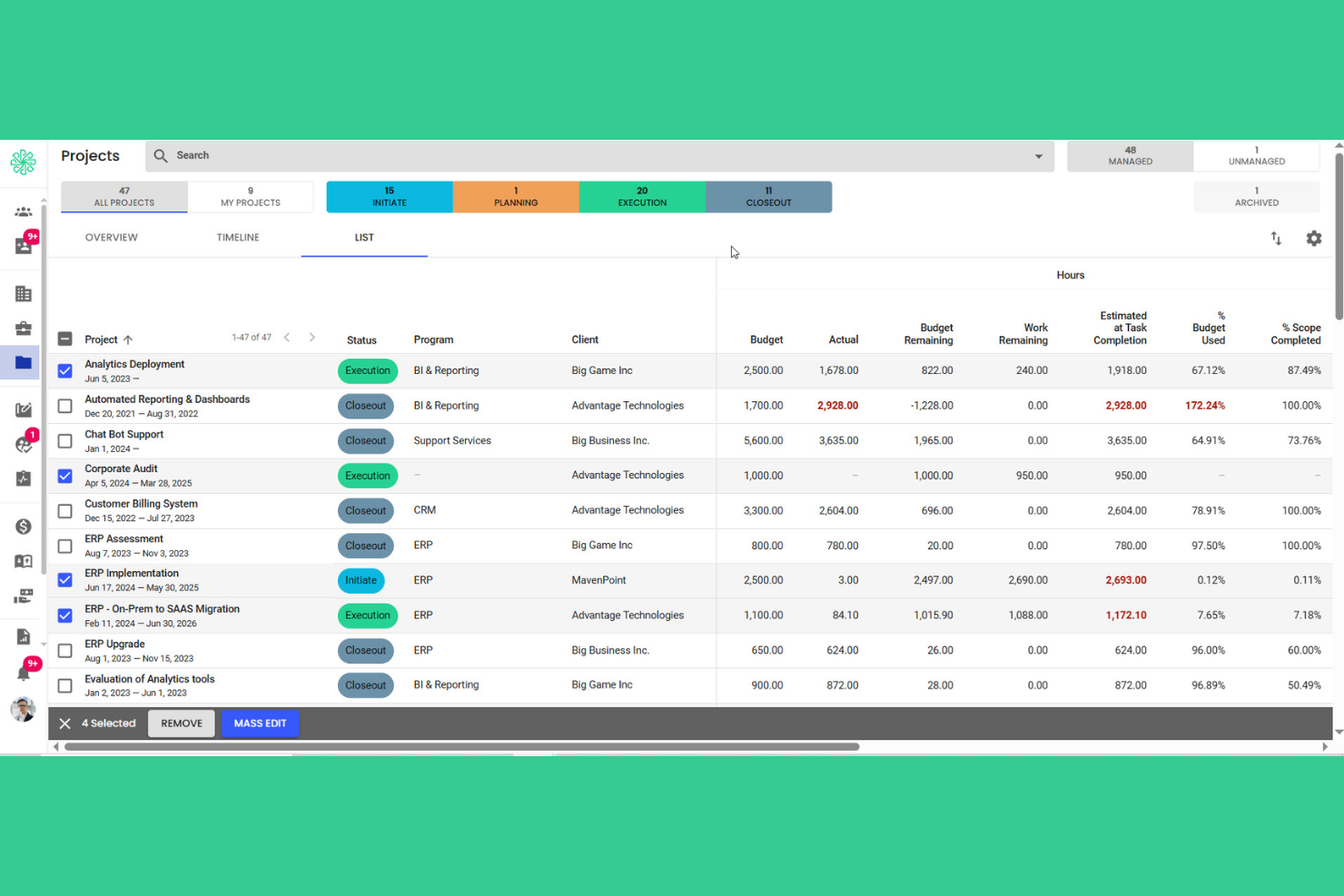
Polaris PSA is a professional services automation platform that utilizes advanced AI models to bring together project planning, resource management, budgeting, and timesheet capabilities for services teams managing complex work.
Who Is Polaris PSA Best For?
Polaris PSA suits any modern corporate law firm or professional services organization needing granular project tracking and resource forecasting across multiple teams.
Why I Picked Polaris PSA
I picked Polaris PSA because it integrates large language models to present project health, resources, and budgets in real time from executive dashboards. I rely on AI-powered SmartBeats for up-to-date project status, plus advanced analytical outputs for informed decision-making as projects evolve.
Polaris PSA Key Features
- Resource management module: Assign people to projects based on roles, skills, and availability.
- Skill tracking database: Catalog and update team member skills for better project staffing.
- Automated timesheet system: Capture, validate, and approve resource hours directly in the platform.
- Configurable project templates: Standardize workflows with reusable templates for project setup and planning.
Polaris PSA Integrations
Polaris PSA offers native integrations with Deltek ERP systems, Salesforce, QuickBooks, Xero, Jira, and Microsoft 365. An API is available for custom integrations.
Pros and Cons
Pros:
- Configurable workflows for resource scheduling and billing
- SmartBeats for automated project status updates
- Real-time project health and financial dashboards
Cons:
- Mobile app sync can lag
- Complex initial configuration and setup process

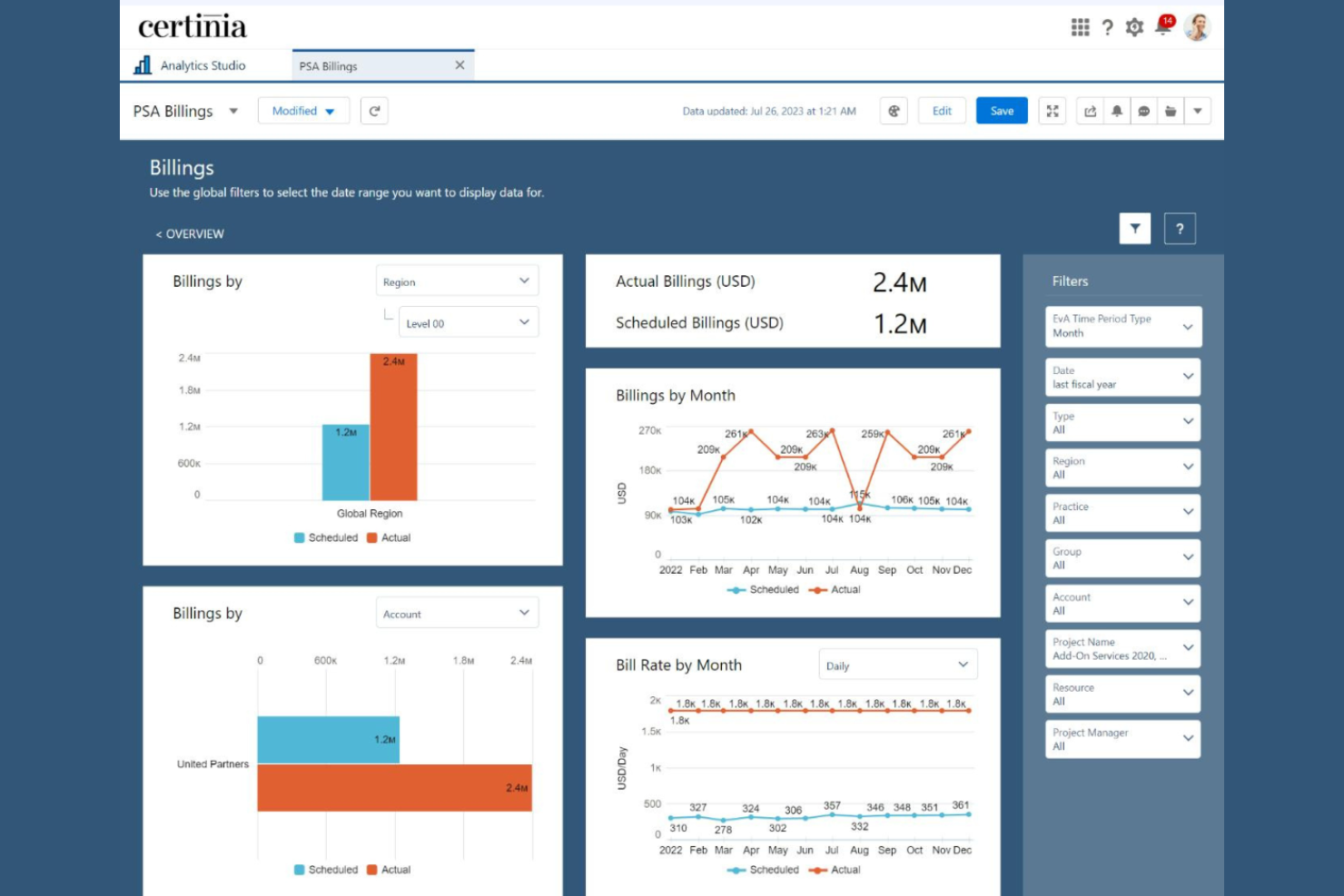
Certinia PS Cloud is a professional services automation platform that prioritizes data privacy while unifying project management, resource planning, time tracking, and financial management for service-based organizations.
Who Is Certinia PS Cloud Best For?
Professional services teams already operating on the Salesforce platform will find Certinia PS Cloud especially aligned to their workflows.
Why I Picked Certinia PS Cloud
I picked Certinia PS Cloud because it allows for hands-on management of project delivery, resources, and billing right inside Salesforce, with real-time project status and revenue data synced to my CRM.
Certinia PS Cloud Key Features
- Resource demand planning: Forecast staffing needs and match resources to projects.
- Timesheet management: Capture and approve project hours within the platform.
- Project risk tracking: Flag and track project risks with configurable risk criteria.
- Flexible billing models: Support milestone, time and materials, or fixed fee invoicing.
Certinia PS Cloud Integrations
Certinia PS Cloud offers native integrations with Salesforce, Jitterbit, Expensify, SAP Concur, Avalara, Celigo, Zankraft, Conga, and DocuSign, and provides an API for custom integrations.
Pros and Cons
Pros:
- Custom workflows for resource management and billing
- Strong native alignment with Salesforce data model
- Real-time project and financial visibility
Cons:
- Dashboard layouts feel overly cluttered
- Initial configuration can be complex


Workday PSA is an enterprise professional services automation platform that leverages fine-tuned LLMs to bring together project management, resource planning, financials, and workforce analytics in one cloud-based system.
Who Is Workday PSA Best For?
Workday PSA is a solid choice for large enterprises and global organizations with complex service delivery and analytics requirements.
Why I Picked Workday PSA
I picked Workday PSA as one of the best because its specialized AI use cases grant access to customizable dashboards, ad hoc analysis, and prebuilt reporting templates. My team can drill into project, resource, and financial data at scale with enterprise-grade reporting tools.
Workday PSA Key Features
- Integrated resource management: Plan and allocate staff across client projects using a unified dashboard.
- Project budgeting tools: Set budgets, monitor spend, and compare projections versus actuals for each engagement.
- Mobile app access: Track projects, expenses, and approvals from any mobile device.
- Workflow automation engine: Automate project approvals, notifications, and task assignments with configurable workflows.
Workday PSA Integrations
Native integrations are not publicly listed. Workday PSA offers an API for custom integrations.
Pros and Cons
Pros:
- Workflow design with customizable approval processes
- Resource allocation tools integrated with project management
- Advanced analytics for financial project visibility
Cons:
- Most adjustments require IT help
- Initial implementation takes significant time

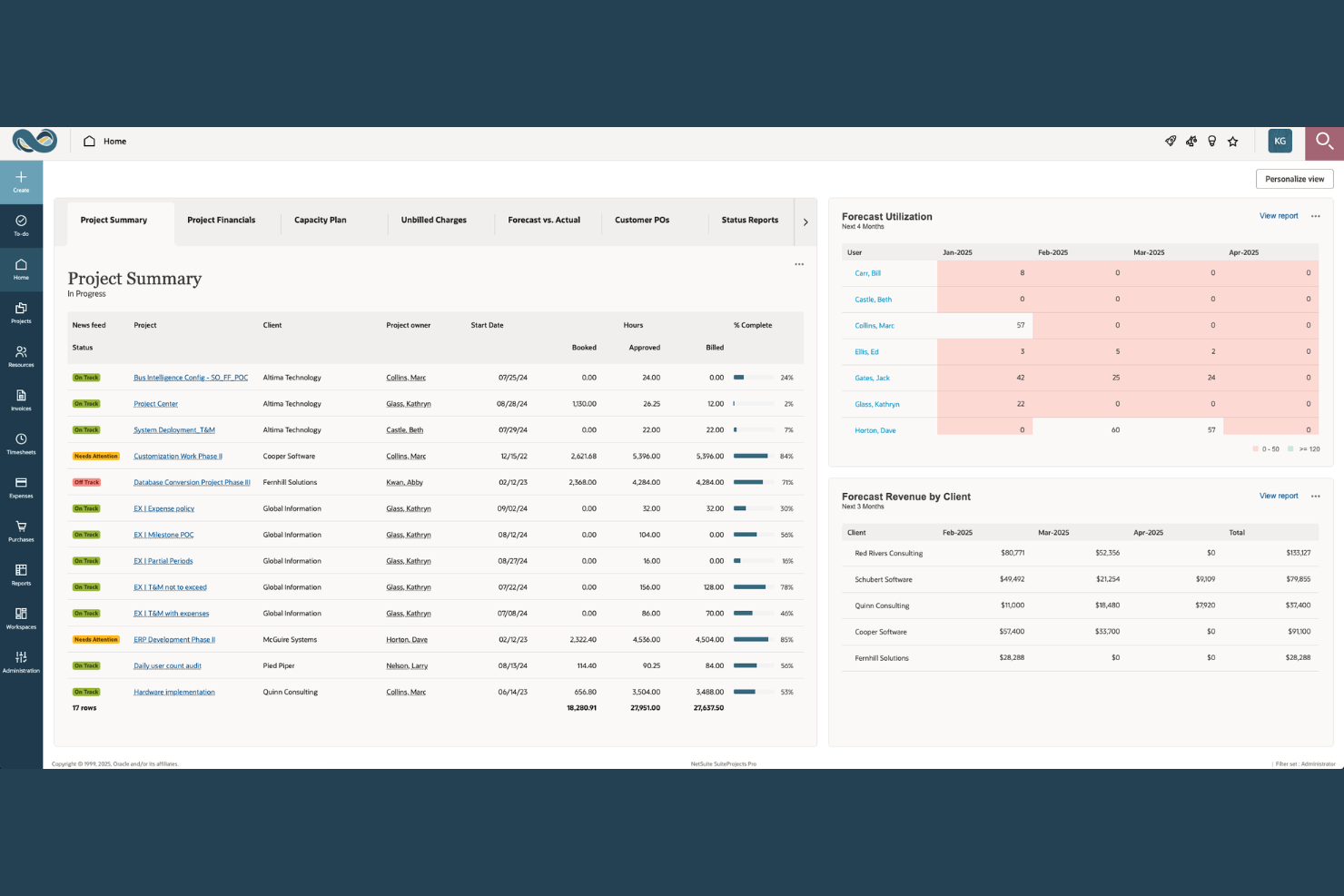
NetSuite SuiteProjects Pro fits global professional services organizations that need to streamline core business processes across finance, project delivery, and resource management.
Who Is NetSuite SuiteProjects Pro Best For?
SuiteProjects Pro fits global professional services organizations that need unified processes across finance, project delivery, and resource management.
Why I Picked NetSuite SuiteProjects Pro
I picked NetSuite SuiteProjects Pro as one of the best because I can manage project delivery, finance, and resource planning within the same ERP. I use its native project accounting for instant updates across billing, revenue, and time tracking. My team benefits from unified project financials and operations.
NetSuite SuiteProjects Pro Key Features
- Resource management dashboard: View real-time staff allocation and project capacity in a visual dashboard.
- Document management: Store and share project files and contracts within the platform.
- Gantt chart project planning: Build and adjust project timelines with interactive Gantt charts.
- Time off request workflows: Submit and approve leave requests in the project context.
NetSuite SuiteProjects Pro Integrations
NetSuite SuiteProjects Pro offers native integrations across the Oracle NetSuite ecosystem, including NetSuite ERP and NetSuite CRM. An API is available for custom integrations.
Pros and Cons
Pros:
- Full project visibility from the ERP dashboard
- Direct project-to-invoice workflow for billing
- Built-in resource forecasting and allocation tools
Cons:
- The outdated user interface feels clunky
- Complex initial setup for project teams
Diğer AI Profesyonel Hizmet Yazılımları
Kullanıcı geri bildirimlerine ve yayımlanmış vaka çalışmalarına dayanarak, kısa listeme girmeyen ancak yine de göz atmaya değer bazı ek AI profesyonel hizmet yazılımı seçeneklerini aşağıda bulabilirsiniz:
- Accelo
For workflow automation
- Dayshape
For AI-driven resource optimization
- Wrike
For customizable project workspaces
- Forecast
For unified project and financial insights
- VOGSY
For workflow-driven quote-to-cash processes
- Runn
For scenario-based capacity planning
- Rocketlane
For collaborative client onboarding
- Parallax
For aligning sales and delivery teams
- Birdview PSA
For cross-project resource coordination
- Klient PSA
For Salesforce-centric service delivery


How I Evaluate AI Professional Services Software
Every tool on this list needs to deliver real AI value—not just rebrand a filter as "intelligent." I split my evaluation into two layers: the core functionality a platform must have to qualify (like AI resource matching, predictive analytics, and quote-to-cash billing) and the differentiating factors that separate good options from great ones.
Core Functionality (Table Stakes For This List)
When I'm selecting tools for my list, I rank each one on a scale from 0 (does not offer the functionality) to 5 (excels in this area) for each core functionality listed below. Then, I calculate the tool's total score into a percentage. Each tool needs to achieve a minimum total score of 55% to be considered for inclusion.
- AI Resource Optimization: I look for ML-driven staffing recommendations that factor in skills, availability, and utilization—not just a filterable roster dressed up as "smart matching."
- Predictive Project Analytics: The platform should surface risks like margin erosion or timeline slippage before they hit, using historical patterns rather than static threshold alerts.
- Project & Engagement Management: I evaluate how well a tool handles the full engagement lifecycle—phases, deliverables, dependencies, and client milestones—across billing models like T&M and fixed fee.
- Time, Expense & Billing: AI-assisted time entry matters here, whether that's auto-suggesting entries from calendar data or flagging missing billable hours at the end of the week.
- PSA Financial Management: I check for services-specific financials like WIP tracking, revenue recognition, and project-level margin analysis rather than generic budget-vs.-actual reporting.
- Demand & Capacity Forecasting: Strong tools pull pipeline data from CRMs to project future resource demand against bench availability, helping leaders plan hiring cycles proactively.
Once I have a list of tools that meet this criteria, I consider what sets each platform apart.
Differentiating Factors (What Sets Vendors Apart)
Here's how I compare and contrast different vendors:
Standout Features
Generative AI assistants are a major differentiator. I look for copilots that draft SOWs, auto-generate weekly status reports, and summarize project notes without manual input. Intelligent time capture adds real value too, especially when AI infers billable hours from calendar events and emails, then routes entries for one-click approval. Real-time profitability dashboards round out what I evaluate—the strongest ones blend actuals, forecasts, and pipeline data so partners spot margin shifts as they happen rather than in a month-end review.
Beyond Features
Integration depth matters a lot in this space. I check whether a platform offers bi-directional sync with CRMs like Salesforce or HubSpot so opportunity data flows into project setup without manual re-entry. AI governance is another factor I weigh—consultancies handle sensitive client data, so I look for clear policies on data residency, LLM training opt-outs, and SOC 2 compliance. Firm size fit also plays a role. A tool that works for a 50-person agency may buckle under multi-entity, multi-currency operations at a global consultancy.
AI Profesyonel Hizmet Yazılımı Nasıl Seçilir?
Uzun özellik listeleri ve karmaşık fiyatlandırma yapıları arasında kaybolmak kolaydır. Kendinize özgü yazılım seçim sürecinizi yürütürken odaklanmanızı korumanıza yardımcı olmak için göz önünde bulundurmanız gereken faktörleri aşağıda bir kontrol listesi hâlinde bulabilirsiniz:
| Faktör | Göz Önünde Bulundurulması Gerekenler |
|---|---|
| Ölçeklenebilirlik | Yazılım; konum, hizmet alanı veya kullanıcı eklemek gibi büyüme planlarınızı öngörülemeyen maliyetler ya da karmaşık yükseltmeler olmadan karşılayabilecek mi? |
| Entegrasyonlar | CRM, muhasebe veya İK platformları gibi işletmeniz için kritik diğer araçlara yerel olarak bağlanabiliyor mu? Eksik entegrasyonların iş akışları üzerindeki etkisini göz önünde bulundurun. |
| Özelleştirilebilirlik | Proje yapılarını, izinleri ve raporlamayı uyarlama konusunda ne kadar esnekliğe sahipsiniz? Yazılım, değişen teslimat modellerinize uyum sağlayabiliyor mu? |
| Kullanım kolaylığı | Farklı işlevlerdeki ekip üyeleri hızlıca çalışmaya başlayabilir mi, yoksa direnç ve sık destek talepleriyle mi karşılaşacaksınız? |
| Uygulama ve işe alıştırma | Devreye alma işlemi ne kadar sürecek ve hangi iç kaynaklara ihtiyacınız olacak? Veri taşıma, veri içe aktarma ve role dayalı eğitim destekleniyor mu? |
| Maliyet | Fiyatlandırma katmanlarını karşılaştırmak kolay mı; gizli kullanıcı, entegrasyon veya raporlama ücretleri var mı? Gerçek maliyetin zaman içinde bütçenizle örtüştüğünden emin olun. |
| Güvenlik önlemleri | Yazılım; veri şifreleme, role dayalı erişim ve denetim günlükleri gibi güvenlik gereksinimlerinizi destekliyor mu? Güvenlik incelemesine dayanabilecek mi? |
| Destek erişilebilirliği | Çalışma saatlerinizde gerçek zamanlı yardım mevcut mu ve sağlayıcı acil sorunlar için net bir üst makama iletme süreci sunuyor mu? |
AI Profesyonel Hizmet Yazılımları Nelerdir?
AI profesyonel hizmetler yazılımı, işletmelerin yerleşik yapay zekâ özellikleriyle müşteri odaklı projeleri yönetmesine, otomatikleştirmesine ve optimize etmesine yardımcı olmak üzere tasarlanmış dijital bir araçtır. Bu platformlar, hizmet tabanlı ekipler için kaynak tahsisi, tahminleme, finansal takip ve raporlama gibi işlevleri destekler. Yapay zekâyı entegre ederek firmaların daha iyi kararlar almasına, iş akışlarını optimize etmesine ve proje durumu ile işletme performansı hakkında daha iyi görünürlük elde etmesine yardımcı olurlar.
AI Profesyonel Hizmetler Yazılımının Özellikleri
AI profesyonel hizmetler yazılımı seçerken aşağıdaki temel özelliklere dikkat edin:
- Proje yönetimi panosu: Etkin projeler, son tarihler, bütçeler ve ekip ilerlemesi hakkında bir bakışta genel görünüm sunarak müşteri portföyünüzdeki proje durumunu izlemeyi kolaylaştırır.
- Kaynak tahsisi araçları: Personeli becerilerine, uygunluk durumuna ve iş yüküne göre projelere ve görevlere atamanıza olanak tanıyarak hem aşırı görevlendirmeyi hem de kaynakların yetersiz kullanılmasını önlemenize yardımcı olur.
- Zaman takibi: Ekip üyelerinin farklı projelerde çalıştıkları saatleri kaydetmesini ve kategorilere ayırmasını sağlar; doğru kullanım oranı içgörüleri sunar ve müşteri faturalandırmasını destekler.
- Otomatik faturalandırma: Doğrudan proje zaman çizelgelerinden, giderlerden veya kilometre taşlarından faturalar oluşturarak faturalandırmayı optimize eder, manuel iş yükünü azaltır ve gelir döngülerini hızlandırır.
- Finansal tahminleme: Proje gelirlerini, maliyetlerini ve kâr marjlarını tahmin etmek için geçmiş ve gerçek zamanlı verileri kullanır; yöneticilerin kaynak planlaması ve kârlılık konusunda bilinçli kararlar almasına yardımcı olur.
- Özelleştirilebilir raporlama: Proje performansı, finansal durum ve ekip metrikleriyle ilgili birden fazla veri kümesinden veri çekerek özel raporlar oluşturmanıza ve zamanlamanıza olanak tanır; veri odaklı yönetimi ve müşterilerle açık iletişimi mümkün kılar.
- Yapay zekâ destekli analiz: Proje teslimat portföyünüzdeki eğilimleri ortaya çıkarmak, riskleri tahmin etmek ve kaynak veya maliyet optimizasyonları önermek için makine öğrenimini uygular.
- Belge yönetimi: Proje belgelerini, sözleşmeleri ve müşteri iletişimlerini tek bir merkezi merkezde depolamak, sürümlemek ve paylaşmak için güvenli bir alan sağlar.
- Role dayalı izinler: Finansal verilere, proje bilgilerine veya hassas müşteri ayrıntılarına kimlerin erişebileceğini, bunları düzenleyebileceğini ya da onaylayabileceğini kontrol ederek uyumluluğu ve iç kontrolleri destekler.
- Müşteri portalı: Müşterilere zaman çizelgeleri, teslimatlar, faturalar ve onaylar hakkında gerçek zamanlı görünürlük sunarak şeffaflığı teşvik eder ve güven oluşturur.
AI Profesyonel Hizmetler Yazılımının Faydaları
AI profesyonel hizmetler yazılımını uygulamak ekibiniz ve işletmeniz için çeşitli faydalar sağlar. Yararlanabileceğiniz bazı faydalar şunlardır:
- Geliştirilmiş proje görünürlüğü: Gerçek zamanlı panolar ve raporlama, herkesin proje durumu, ilerleme ve bütçeler hakkında bilgi sahibi olmasını sağlar.
- Daha doğru tahminleme: Yapay zekâ destekli analizler kaynak ihtiyaçlarını, geliri ve olası riskleri tahmin ederek proaktif planlama yapmanıza olanak tanır.
- Daha hızlı müşteri faturalandırması: Otomatik faturalandırma, zaman takibi ve gider verilerini gönderilmeye hazır faturalara dönüştürerek manuel iş yükünü ve faturalandırma gecikmelerini azaltır.
- Geliştirilmiş kaynak kullanımı: Akıllı tahsis araçları ekip kapasitesini proje ihtiyaçlarıyla eşleştirerek hem tükenmişliği hem de atıl zamanı önler.
- Merkezi bilgi erişimi: Belge yönetimi ve müşteri portalları, sözleşmeleri, proje dosyalarını ve iletişimleri ekibiniz ile müşterileriniz için tek bir yerde toplar.
- Daha iyi uyumluluk ve güvenlik: Role dayalı izinler ve denetime hazır kayıtlar hassas müşteri verilerini korur ve düzenleyici gereksinimleri destekler.
- Daha güçlü müşteri ilişkileri: Şeffaf iş akışları, paylaşılan zaman çizelgeleri ve müşteri iş birliği alanları güven oluşturur ve iletişim kopukluklarını azaltır.
AI Profesyonel Hizmetler Yazılımı Maliyetleri ve Fiyatlandırması
AI profesyonel hizmetler yazılımını seçmek, mevcut çeşitli fiyatlandırma modellerini ve planları anlamayı gerektirir. Maliyetler özelliklere, ekip büyüklüğüne, eklentilere ve daha fazlasına göre değişir. Aşağıdaki tablo, AI profesyonel hizmetler yazılımı çözümlerinde yaygın planları, ortalama fiyatlarını ve genellikle sunulan özellikleri özetlemektedir:
AI Profesyonel Hizmetler Yazılımı İçin Plan Karşılaştırma Tablosu
| Plan Türü | Ortalama Fiyat | Yaygın Özellikler |
|---|---|---|
| Ücretsiz Plan | $0 | Temel proje takibi, sınırlı kullanıcı koltukları, basit zaman takibi ve e-posta desteği. |
| Kişisel Plan | $10-$25/kullanıcı/ay | Bireysel proje yönetimi, kaynak planlama, standart raporlama, sınırlı otomasyon ve temel entegrasyonlar. |
| İşletme Planı | $30-$60/kullanıcı/ay | Çoklu proje yönetimi, gelişmiş raporlama, otomatik faturalandırma, özel iş akışları ve API erişimi. |
| Kurumsal Plan | $70-$120/kullanıcı/ay | Sınırsız proje, yapay zekâ destekli analizler, gelişmiş güvenlik, müşteri portalları, özel destek ve uyumluluk araçları. |
Yapay Zekâ Profesyonel Hizmetler Yazılımı SSS
Yapay zekâ profesyonel hizmetler yazılımı hakkında sık sorulan bazı soruların yanıtlarını burada bulabilirsiniz:
Yapay zekâ profesyonel hizmetler yazılımını nasıl geliştirir?
Yapay zekâ; kaynak tahsisi, tahmin ve risk tespiti gibi görevleri otomatikleştirerek profesyonel hizmetler yazılımını geliştirir. Bu, ekibinizin daha iyi kararlar almasına, manuel süreçlerde zaman kazanmasına ve değişen proje taleplerine proaktif bir şekilde yanıt vermesine yardımcı olur.
Yapay zekâ profesyonel hizmetler yazılımından en çok hangi tür işletmeler yararlanır?
Danışmanlık şirketleri, dijital ajanslar ve BT hizmet sağlayıcıları gibi proje tabanlı ve müşterilerle doğrudan çalışan profesyonel hizmet firmaları en çok faydayı sağlar. Birden fazla projeyi yönetmeniz, kaynak planlarını dengelemeniz ve faturalandırılabilir saatler gibi ölçümleri takip etmeniz gerekiyorsa bu araçlar sizin için uygundur.
Yapay zekâ profesyonel hizmetler yazılımı karmaşık faturalandırma yapılarını yönetebilir mi?
Evet, çoğu çözüm sabit ücretli, kilometre taşına dayalı ve zaman-malzeme esaslı faturalandırma gibi karmaşık faturalandırma ihtiyaçlarını destekler. Ancak ilerlemeden önce bir platformun faturalandırma ve sözleşme mantığının müşteri anlaşmalarınıza uygun olduğunu doğrulamalısınız.
Mevcut projeleri yeni bir sisteme taşımak zor mu?
Her zaman değil. Birçok platform veri içe aktarma araçları, işe alıştırma kontrol listeleri ve geçiş desteği sunar. Yine de bazı başlangıç çalışmaları planlamalı ve veri doğruluğu ya da eksik bağlamla ilgili sorunları en aza indirmek için içe aktarımları test etmelisiniz.
Yapay zekâ profesyonel hizmetler yazılımı ne kadar güvenli?
Modern çözümler veri şifreleme, denetim günlükleri ve role dayalı erişim denetimi gibi etkili güvenlik özellikleri içerir. Uygulamaya geçmeden önce her zaman sağlayıcının uyumluluk sertifikalarını inceleyin ve güvenlik gereksinimlerini BT ekibinizle görüşün.
Dikkat edilmesi gereken gizli maliyetler veya ücretler var mı?
Evet, entegrasyonlar, gelişmiş raporlama veya kullanıcı yükseltmeleri için ek ücretleri içeren fiyatlandırmayı incelemelisiniz. Ekibiniz büyüdükçe sürprizlerle karşılaşmamak için her zaman dâhil olan ve ek ücretli özelliklerin tam dökümünü isteyin.