

2026’nın En İyi 10 Yapay Zekâ Sanal Asistanı

En İyi Yapay Zekâ Sanal Asistanları Kısa Listesi


Yapay zekâ sanal asistanları, yapay zekâyı kullanarak görevleri yerine getiren, soruları yanıtlayan ve iş akışlarını otomatikleştiren dijital araçlardır. Zamandan tasarruf etmenin ve projeleri yolunda tutmanın yollarını arıyorsanız doğru seçeneği bulmak büyük fark yaratabilir. Bu rehber, günümüzdeki en iyi yapay zekâ sanal asistanlarını karşılaştırmanıza yardımcı olmak için abartıyı ve karmaşıklığı ortadan kaldırır; böylece daha bilinçli bir seçim yapabilir ve ekibinizin en önemli konulara odaklanmasını sağlayabilirsiniz.
Why Trust Our Software Recommendations
Our team has been testing and reviewing software since 2012. As project managers ourselves, we know how difficult—and important—it is to choose the right software.
For this guide, we evaluated tools using hands-on testing and independent research, scoring tools using our selection criteria. We also draw on insights from industry thought leaders and practicing project management experts.
Our reviews reflect our human editorial judgment, not a sales pitch.
Expert reviewers:
Yapay Zekâ Sanal Asistanları Karşılaştırma Tablosu
Bu karşılaştırma tablosu, önde gelen kurumsal yapay zekâ sanal asistanı seçimlerimin fiyatlandırma ayrıntılarını özetler.
| Tool | Starting Price | Website | |
|---|---|---|---|
| Best for admin-governed app actions | 4.6 out of 5 | $7.25/user/month Free plan available | Website |
| Best for governed meeting recordings | 4.7 out of 5 | $7/user/month Free plan available | Website |
| Best for drafting from workspace context | 4.6 out of 5 | $20/user/month Free plan available | Website |
| Best for AI inside Workspace apps | 4.4 out of 5 | $7/user/month 14-day free trial | Website |
| Best for live meeting transcription | 4.4 out of 5 | $16.99/user/month Free plan available | Website |
| Best for voice-driven task creation | 4.6 out of 5 | $9/user/month Free plan available | Website |
| Best for automatic daily time-blocking | 4.2 out of 5 | $19/user/month Free trial available | Website |
| Best for predicting project delivery risks | 4.3 out of 5 | $10/user/month 14-day free trial | Website |
| Best for role-based collaborative AI agents | — | Pricing upon request Free demo available | Website |
| Best for context-aware workspace actions | — | $9/user/month 14-day free trial | Website |
En İyi Yapay Zekâ Sanal Asistanları İncelemeleri
Aşağıda, kısa listeme giren en iyi yapay zekâ sanal asistanları hakkındaki ayrıntılı özetlerimi bulabilirsiniz. İncelemelerim, size en uygun olanı bulmanıza yardımcı olmak için her aracın özelliklerine, yeteneklerine ve en iyi kullanım alanlarına ayrıntılı bir bakış sunar.

Slack
Best for admin-governed app actions
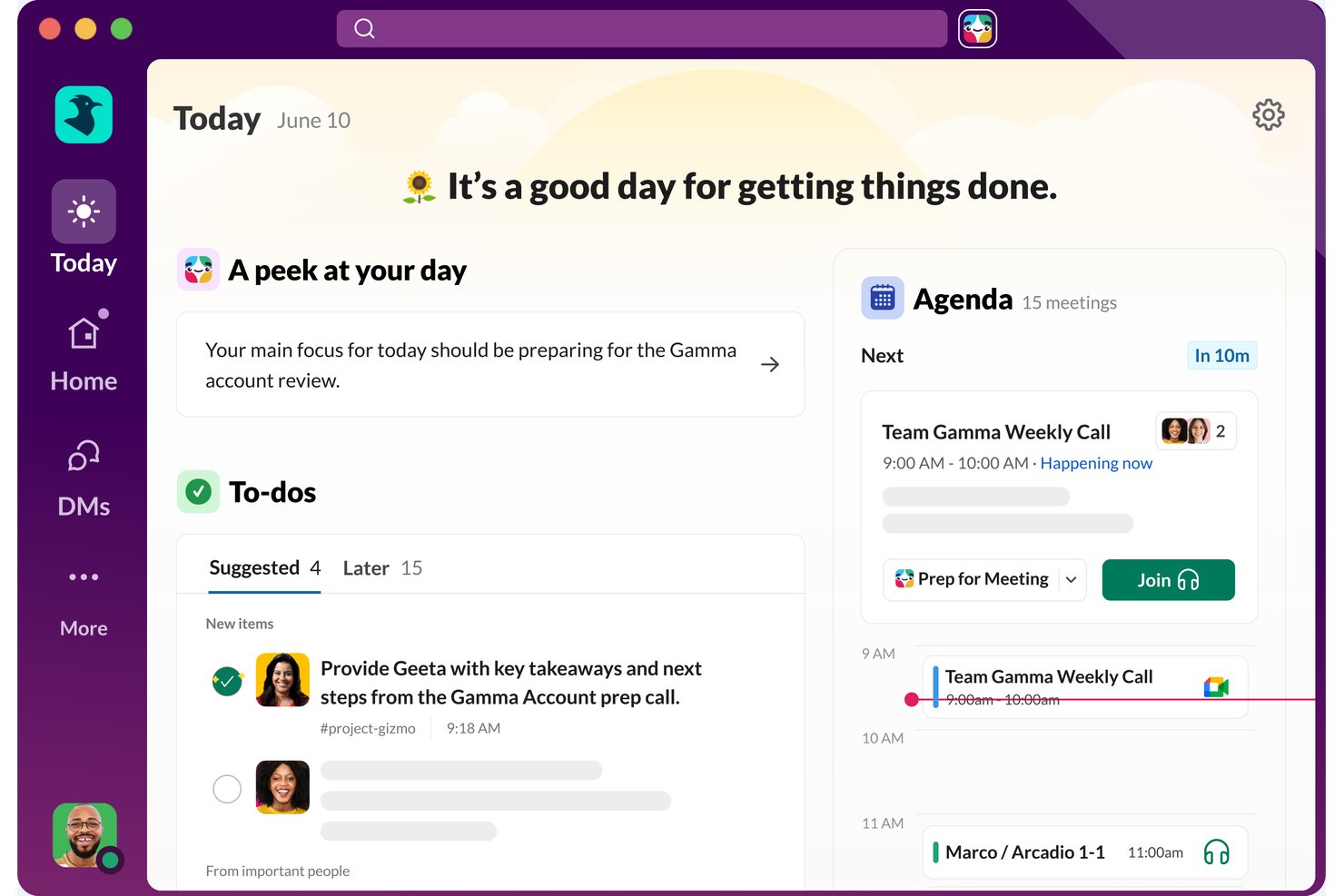
Slack is a workplace communication platform with a built-in AI assistant, Slackbot, that handles natural-language queries, automates tasks across connected apps, and surfaces summaries, recaps, and action items from conversations.
Who Is Slack Best For?
Slack is a strong fit for teams that need IT or admin oversight over which AI actions and app connections are permitted across the workspace.
Why I Picked Slack
I picked Slack as one of the best because it gives IT and workspace admins direct control over which AI actions and app connections Slackbot can actually perform. On Enterprise Grid and Enterprise+, admins can set individual MCP-connected tools to "Always allow," "Needs approval," or "Blocked," right down to the read versus write level. That kind of granular governance is rare, and it's what makes Slackbot viable in environments where ungoverned AI actions across apps like Jira, Docusign, or Salesforce simply aren't an option.
Slack Key Features
- AI daily recaps: Slackbot generates a morning digest summarizing activity across channels you select, covering the previous day or days you were away.
- Huddle AI notes: Slack automatically captures key takeaways, action items, and a full transcript from live huddles and shares them in a canvas in the huddle thread.
- Workflow Builder: A no-code tool that lets you build automated workflows from a natural-language prompt or by adding steps manually, with support for conditional branching and 70+ app connectors.
- AI search: Ask questions in plain language to get cited answers pulled from Slack conversations, shared files, and connected data sources.
Slack Integrations
Slack offers 2,600+ marketplace integrations, including Google Calendar, Outlook Calendar, Salesforce, Jira, DocuSign, Google Drive, GitHub, Asana, and Zoom. Slack APIs support custom apps, agents, and workflow steps.
Pros and Cons
Pros:
- Daily recaps surface missed channel updates
- Huddle notes capture takeaways and action items
- Admins control AI action permissions
Cons:
- Automated tasks face daily run caps
- AI summaries can miss context

Fellow
Best for governed meeting recordings
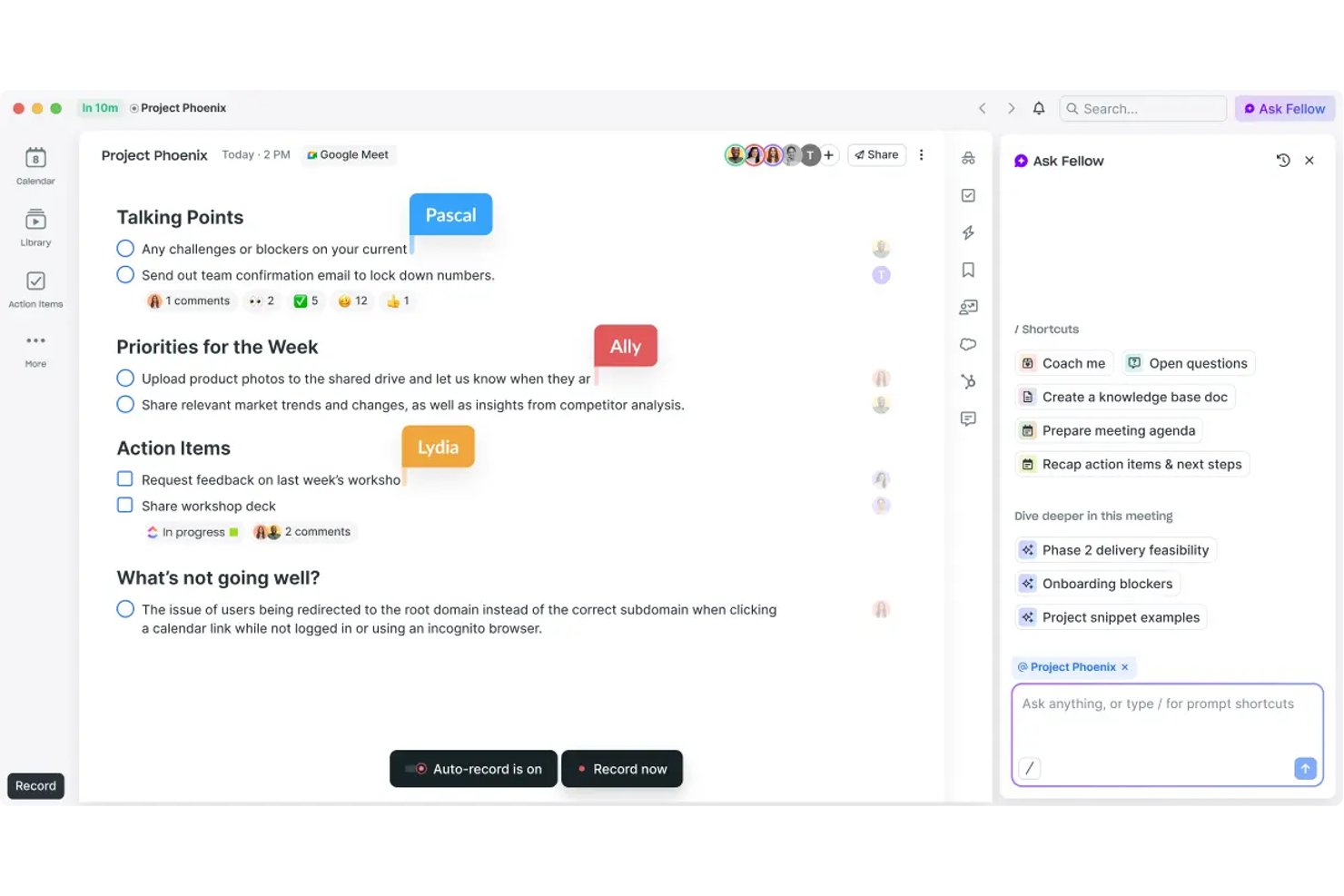
Fellow is an AI meeting assistant built for governance-first teams, offering bot and botless recording, transcription in 99 languages, action-item capture, and a searchable meeting library across Zoom, Microsoft Teams, and Google Meet.
Who Is Fellow Best For?
Fellow is a strong fit for enterprise teams in regulated industries—finance, healthcare, and legal—where meeting compliance, audit trails, and data governance aren't optional.
Why I Picked Fellow
Fellow earns its spot as one of the best on my shortlist because of how seriously it treats governed meeting recordings. I can pause and resume recording mid-call, with paused segments deleted entirely, and apply MNPI redaction to transcripts before they're distributed. Features like consent capture, zero-day retention, and a SEC Rule 17a-4-ready audit trail set it apart from every other AI meeting assistant I've used.
Fellow Key Features
- Ask Fellow conversational AI: Lets you query past meetings and notes using natural language.
- AI meeting agenda drafting: Automatically generates structured agendas from invite details or prior threads.
- Project management integrations: Connects natively with tools like Asana, Jira, Linear, and ClickUp for direct action item sync.
- Workspace analytics dashboard: Tracks meeting volume, attendance, and note-taking activity across teams.
Fellow Integrations
Fellow offers over 50 native integrations, including Asana, Jira, Linear, ClickUp, Monday.com, Trello, GitHub, Slack, Microsoft Teams, Google Workspace, and Salesforce. An API is available for custom integrations.
Pros and Cons
Pros:
- Botless recording avoids uninvited participants joining calls
- Ask Fellow answers natural-language meeting queries
- MNPI redaction keeps sensitive transcripts audit-ready
Cons:
- Mobile app functionality lags behind desktop version
- AI limited to meeting workflows only
Best for drafting from workspace context
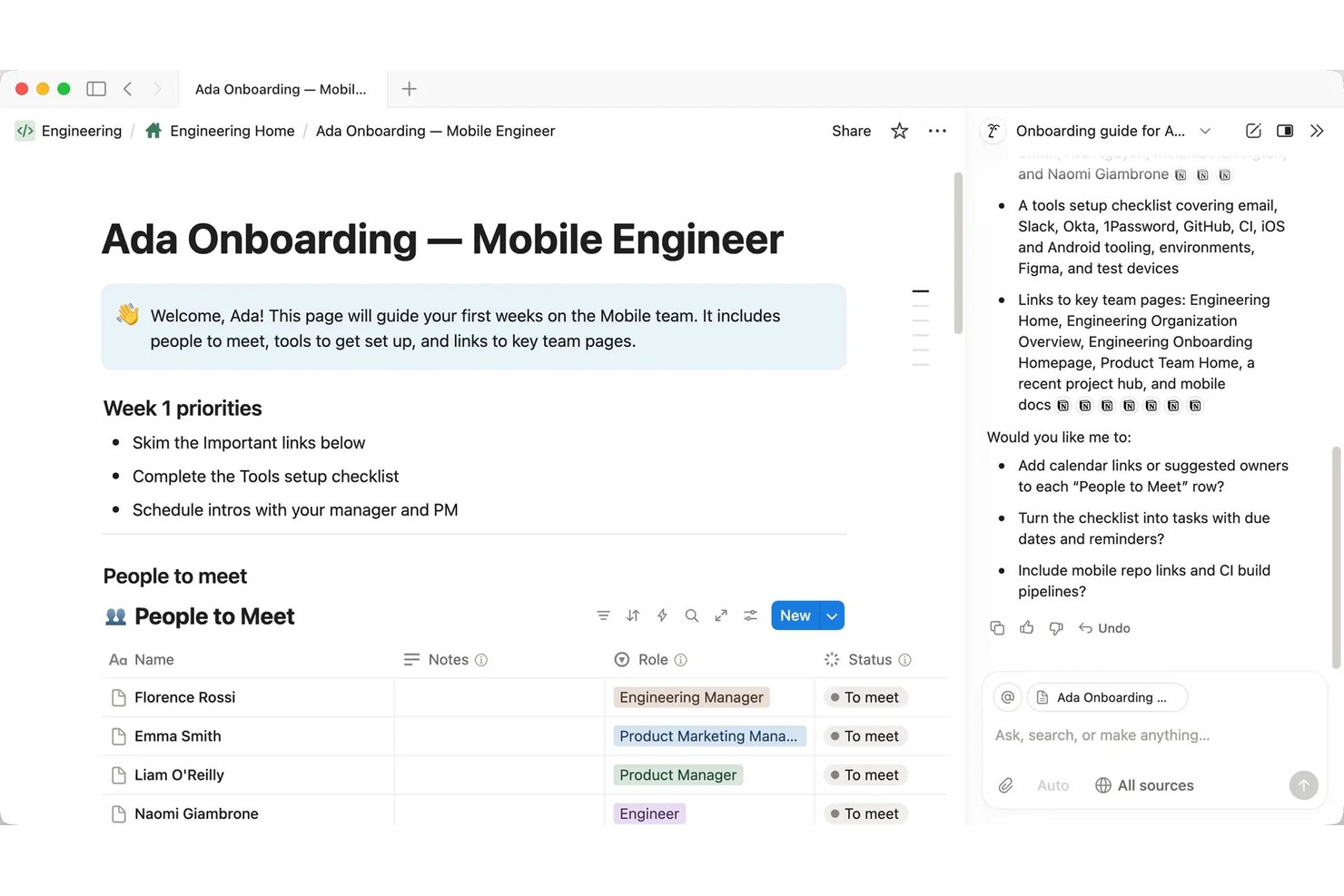
Notion AI is a workspace-native AI assistant embedded inside Notion that handles document drafting, meeting transcription and summarization, multi-step task automation, and cross-app knowledge retrieval through a conversational interface.
Who Is Notion AI Best For?
Notion AI is a strong fit for project managers and cross-functional teams that already run their documentation, wikis, and project tracking inside Notion.
Why I Picked Notion AI
I picked Notion AI as one of the best because the AI drafts from your actual workspace content, not a blank slate. When I ask it to write a project status report, it pulls from the meeting notes, task databases, and briefs already living in my workspace. AI Meeting Notes handles transcription automatically, so the context I need is already captured before I start drafting. The Autofill feature extends this by populating database fields like project status, owner, and priority directly from documented content.
Notion AI Key Features
- Enterprise Search (beta): Lets you query Slack, Google Drive, GitHub, Microsoft Teams, Jira, and more from within Notion.
- Custom Agents: Automates multi-step team workflows with scheduled or triggered agent actions in your workspace.
- Research mode (beta): Delivers lengthy, source-cited workspace and web research without leaving Notion.
- Model-agnostic architecture: Gives you the ability to change AI models or providers for any agent workflow.
Notion AI Integrations
Notion AI offers native integrations with Slack, Google Drive, GitHub, Microsoft Teams, Jira, Box, OneDrive, and Salesforce. It also connects with Zapier and provides an API for custom integrations.
Pros and Cons
Pros:
- AI agents run multi-step workflows autonomously
- Summarizes meeting notes without leaving Notion
- Drafts from existing workspace content automatically
Cons:
- No voice interface for hands-free interaction
- Weaker outside the Notion workspace ecosystem
Best for AI inside Workspace apps
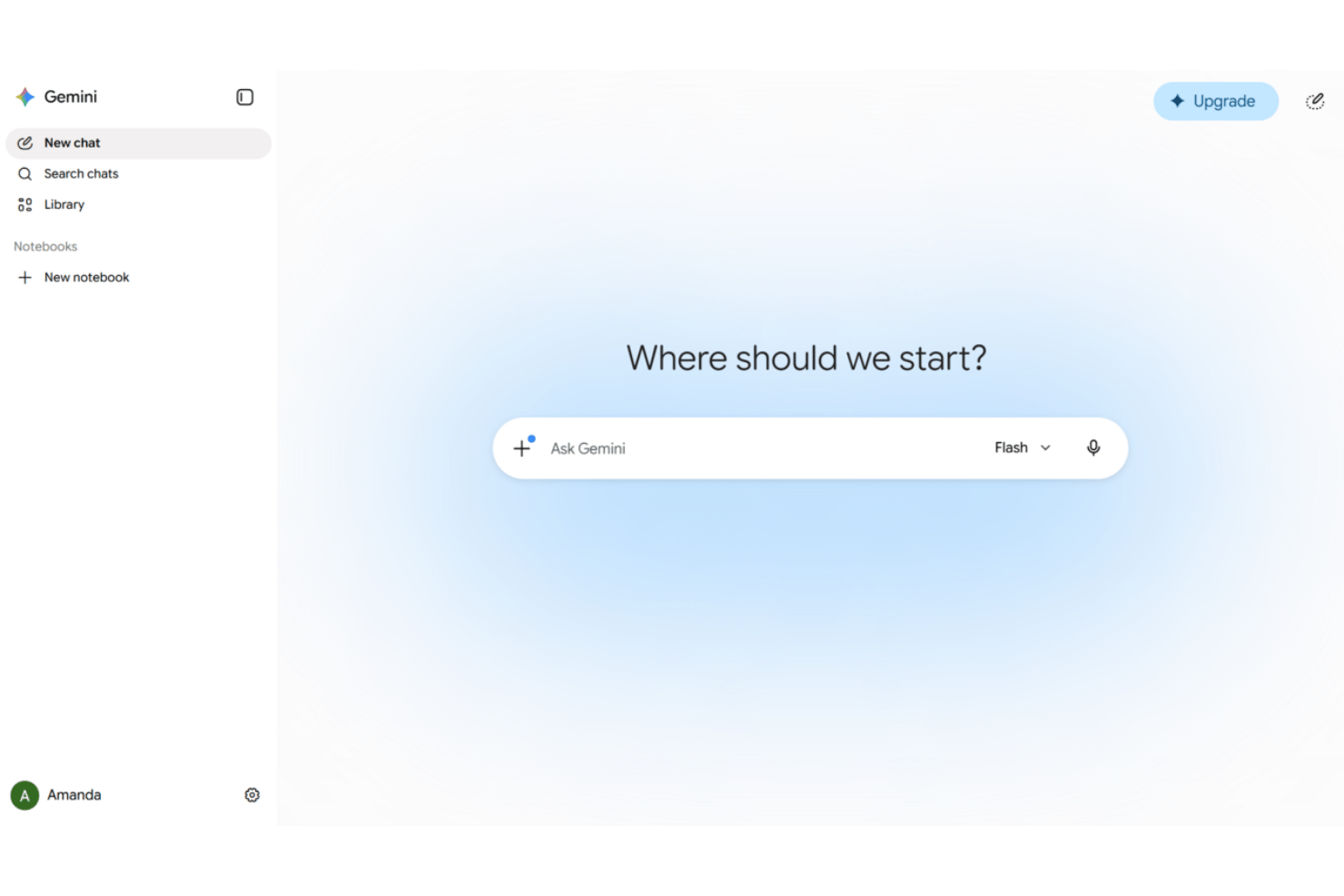
Google Gemini is an AI virtual assistant embedded across Google Workspace apps—Gmail, Docs, Sheets, Meet, and Drive—offering conversational chat, document drafting, meeting note-taking, and agentic automation across connected business tools.
Who Is Google Gemini Best For?
Google Gemini is a strong fit for project teams already running their work inside Google Workspace who want AI assistance without switching tools.
Why I Picked Google Gemini
Google Gemini earns its spot on my shortlist because of how naturally it works as an AI assistant inside the tools project teams already use. I use Gemini in Meet to auto-capture notes and action items without a third-party add-on, and in Gmail I can query Drive and my calendar from the same sidebar while composing a reply. Workspace Studio is where it becomes genuinely useful for PM workflows: I've built flows that automate meeting prep and route follow-up emails without writing any code.
Google Gemini Key Features
- Multimodal input and output: Accepts and processes voice, text, images, and video in supported Workspace apps.
- Gemini Notebook for research synthesis: Lets you gather, organize, and summarize information from multiple sources in one AI-assisted workspace.
- Agentic automation with pre-built connectors: Connects to platforms like Salesforce, Jira, SAP, and Microsoft 365 for automated data actions.
- Built-in compliance and data loss prevention: Includes advanced privacy safeguards and DLP controls aligned with enterprise standards.
Google Gemini Integrations
Google Gemini offers native integrations with Gmail, Google Drive, Google Calendar, Google Meet, Salesforce, Jira, SAP, and Microsoft 365. An API is available for custom integrations.
Pros and Cons
Pros:
- Summarizes long email threads and Drive documents
- Captures meeting notes and action items automatically
- Deeply embedded across all Workspace apps
Cons:
- Agentic features require higher-tier paid plans
- Less useful outside the Google ecosystem

Otter.ai
Best for live meeting transcription
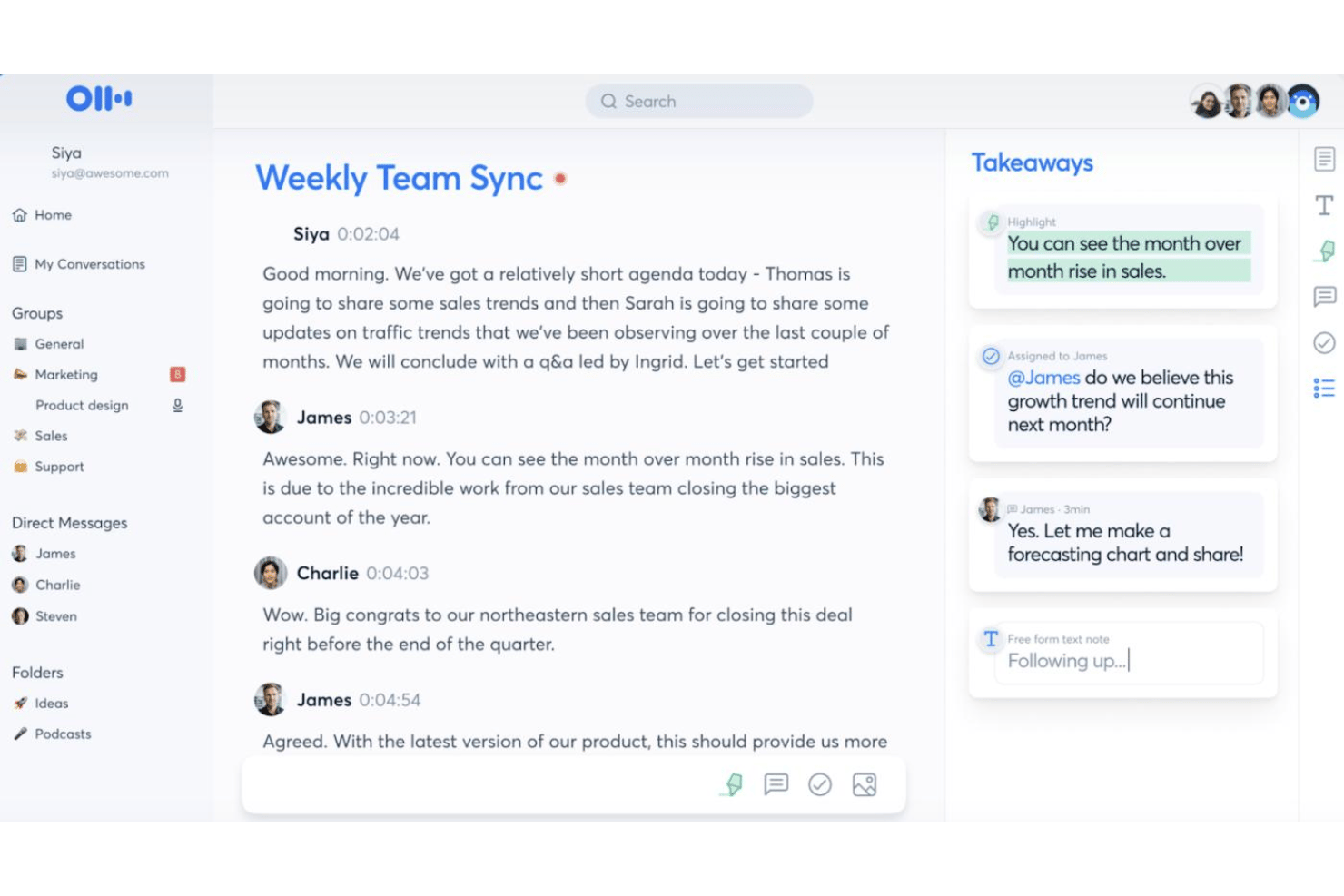
Otter.ai is an AI meeting assistant that combines live transcription, automated meeting summaries, action item capture, and an AI chat interface that lets you query across your full meeting history.
Who Is Otter.ai Best For?
Otter.ai is a natural fit for teams that run high volumes of meetings and need accurate, searchable transcripts without manual note-taking.
Why I Picked Otter.ai
Otter.ai earns its spot on my shortlist because its live transcription goes beyond just capturing words. The AI Meeting Agent joins calls and answers questions in real time using your full meeting history, so you're not just recording a meeting, you're building a searchable knowledge base. I also like the automated slide capture, which syncs presenter slides directly into the transcript so the full context of any meeting is preserved in one place.
Otter.ai Key Features
- AI-powered meeting chat: Interact with meeting transcripts using a conversational interface to query details or request summaries.
- Custom vocabulary: Add industry terms, acronyms, and unique names for improved transcription accuracy.
- Workspace collaboration: Share transcripts and meeting notes with teammates in real time within a shared workspace.
- Third-party integrations: Connect with apps like Slack, Salesforce, HubSpot, Notion, and Google Workspace for extended workflow support.
Otter.ai Integrations
Otter.ai offers native integrations with Zoom, Microsoft Teams, Google Meet, Slack, Salesforce, HubSpot, and Google Workspace. It also integrates with Notion and connects with Zapier. An API is available for custom integrations.
Pros and Cons
Pros:
- Automated action item capture during live meetings
- AI chat queries across full meeting history
- Real-time transcription accuracy is consistently high
Cons:
- AI responses confined to meeting content only
- Limited project management workflow automation
Best for voice-driven task creation
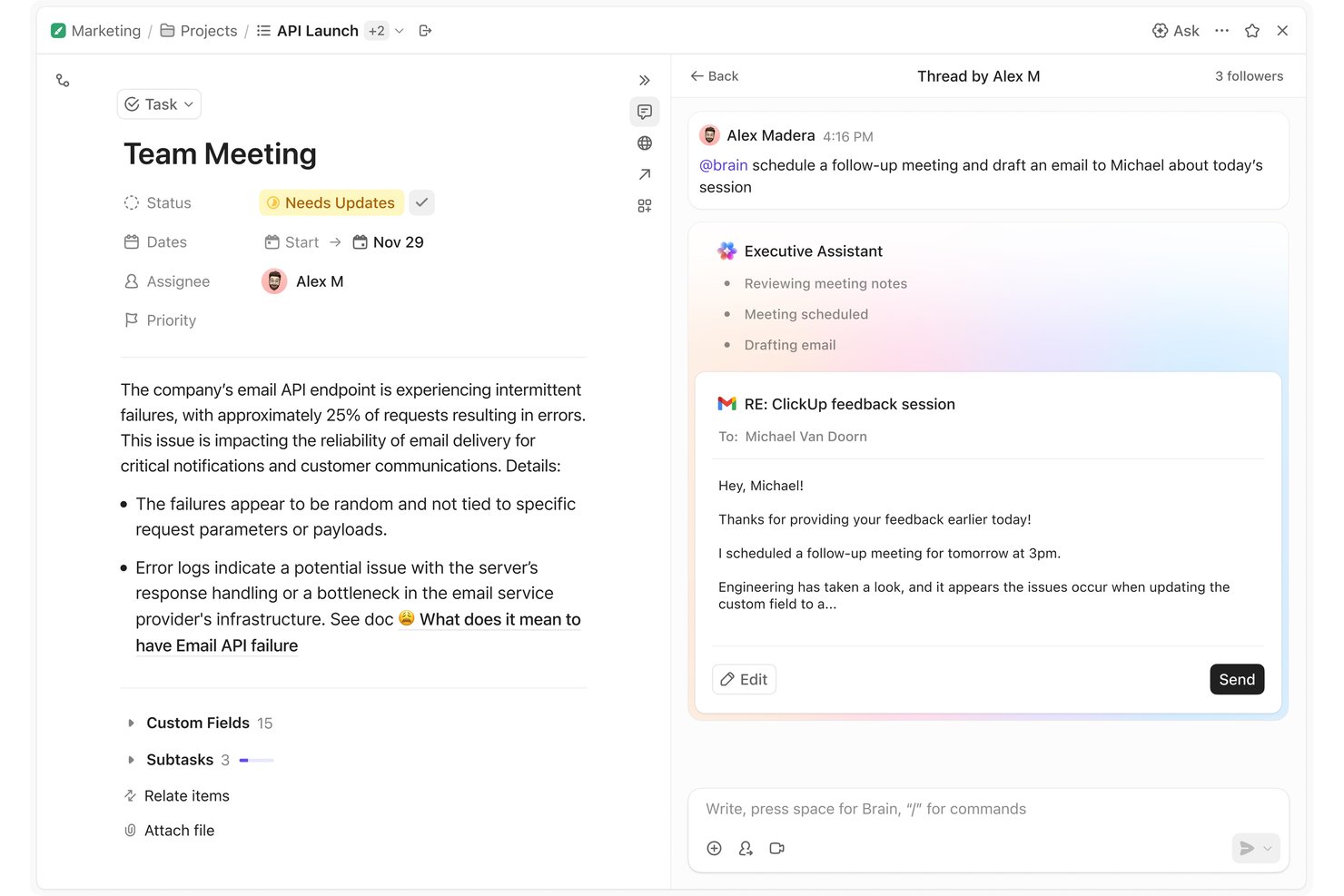
ClickUp Brain is an AI virtual assistant built into ClickUp's work management platform, combining multi-model AI (GPT, Claude, Gemini), voice input, autonomous agents, contextual memory, and document drafting.
Who Is ClickUp Brain Best For?
It's a strong fit for project managers and cross-functional teams who already run their work in ClickUp and want AI that can act directly on live project data.
Why I Picked ClickUp Brain
I picked ClickUp Brain as one of the best because its Talk-to-Text voice input on the desktop app is built to replace the keyboard entirely, not just supplement it. I can dictate a new task, add context, and assign it to a teammate without typing a single word. Because Brain² holds live context across my entire workspace, those voice-created tasks land in the right project with the right details already attached.
ClickUp Brain Key Features
- Super Agents: AI coworkers that can be assigned tasks, scheduled, and mentioned directly within your workspace.
- Self-updating company brain: Persistent memory that captures and adapts to your team’s workflows, communication style, and project context.
- Multi-model AI engine: Instantly routes queries to GPT, Claude, or Gemini for optimized responses on every interaction.
- Connected search: Queries workspace data and integrated platforms like Slack, Google Drive, Jira, and Confluence in real time.
ClickUp Brain Integrations
ClickUp Brain offers native integrations with Slack, Google Drive, Jira, GitHub, Confluence, Dropbox, Box, OneDrive, Microsoft Teams, and Gmail. An API is available for building custom integrations.
Pros and Cons
Pros:
- Summarizes docs and threads inside ClickUp
- Queries live project data without switching apps
- Voice-driven task creation directly in workspace
Cons:
- Response speed lags on complex workspace queries
- Brain only works within the ClickUp ecosystem

Motion
Best for automatic daily time-blocking
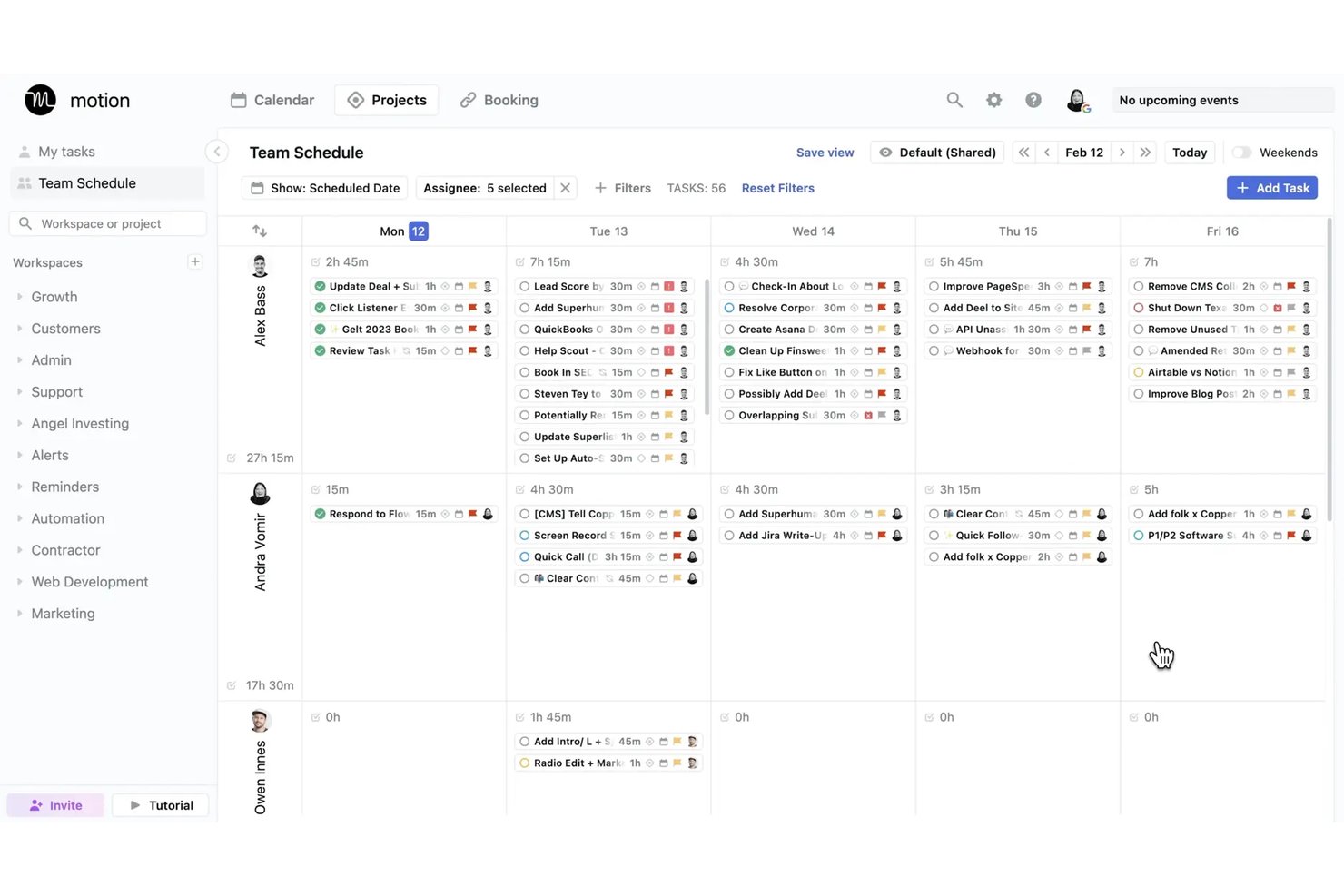
Motion is an AI virtual assistant platform that auto-schedules tasks, manages calendars, transcribes meetings, and generates projects and documents through a suite of role-specific AI agents.
Who Is Motion Best For?
Motion is a strong fit for project managers and small teams who need AI to handle the daily prioritization and scheduling decisions that eat into focused work time.
Why I Picked Motion
I picked Motion as one of the best because its automatic time-blocking engine genuinely removes the daily overhead of deciding what to work on and when. When a new meeting lands on my calendar or a deadline shifts, Motion recalculates my entire schedule in seconds rather than leaving me to manually reshuffle tasks. I also rely on the AI Notetaker to capture action items during meetings, which then feed directly back into my scheduled task plan.
Motion Key Features
- AI Docs assistant: Convert notes and project documentation into tasks, projects, or shareable links.
- AI meeting notetaker: Transcribes and summarizes meetings, then generates action items automatically.
- AI employees: Deploy specialized AI agents for tasks like executive assistance, sales, or project management.
- Gantt view: Visualize project timelines, dependencies, and progress across all active projects.
Motion Integrations
Motion offers native integrations with Google Calendar, Outlook, Office 365, iCloud, Zoom, Google Meet, Microsoft Teams, Slack, HubSpot, and Salesforce. It also supports Zapier and provides an API for custom integrations.
Pros and Cons
Pros:
- Dedicated AI agents for role-specific work
- AI meeting notes capture action items automatically
- Auto-reschedules tasks when priorities shift
Cons:
- AI scheduling works best for individual users
- Limited mobile app experience compared to desktop
Best for predicting project delivery risks
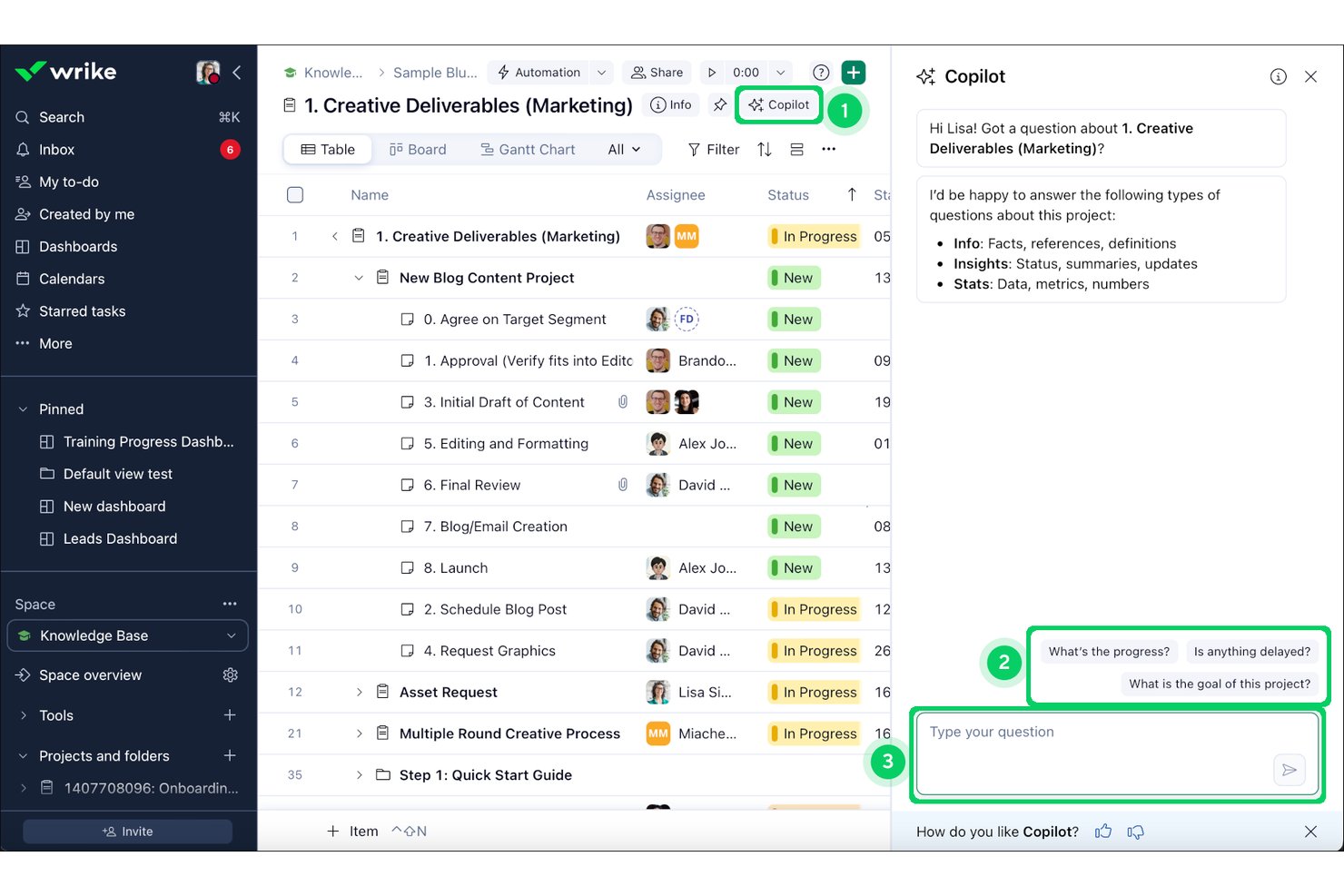
Wrike Copilot is an AI assistant embedded in the Wrike platform that lets project teams query live project data, summarize comment threads, generate status updates, and surface risks through natural-language conversation.
Who Is Wrike Copilot Best For?
It's a strong fit for enterprise PMO teams and program directors managing complex, multi-team portfolios inside the Wrike ecosystem.
Why I Picked Wrike Copilot
I picked Wrike Copilot as one of the best because of how it uses the Work Intelligence Graph, built on 500 billion historical data points, to proactively flag at-risk milestones before they become blockers. When I query Copilot about sprint risks, it surfaces overloaded resources, stalled dependencies, and slipping milestones in real time. That level of proactive scanning is what separates it from AI assistants that only respond to what you already know to ask.
Wrike Copilot Key Features
- Multi-turn natural language chat interface: Lets you interact with project data and updates in real time within Wrike.
- AI-powered document and comment summarization: Summarizes lengthy threads and documents directly inside tasks and projects.
- Native project management integrations: Connects with tools like Slack, Teams, Google Workspace, Salesforce, and more for cross-platform project operations.
- Role-based contextual memory: Delivers responses and insights based on the specific folder, project, or user context you select.
Wrike Copilot Integrations
Wrike Copilot offers hundreds of native integrations through Wrike’s built-in integrations and marketplace, including Google Workspace, Microsoft 365, Salesforce, Slack, Jira, GitHub, Adobe Creative Cloud, Zoom, Box, and Dropbox. It also supports Zapier and provides an API for custom integrations.
Pros and Cons
Pros:
- Drafts status updates from live project data
- Summarizes long comment threads inside tasks
- Predicts delivery risks using historical project data
Cons:
- No voice input for AI queries
- Locked to the Wrike platform only
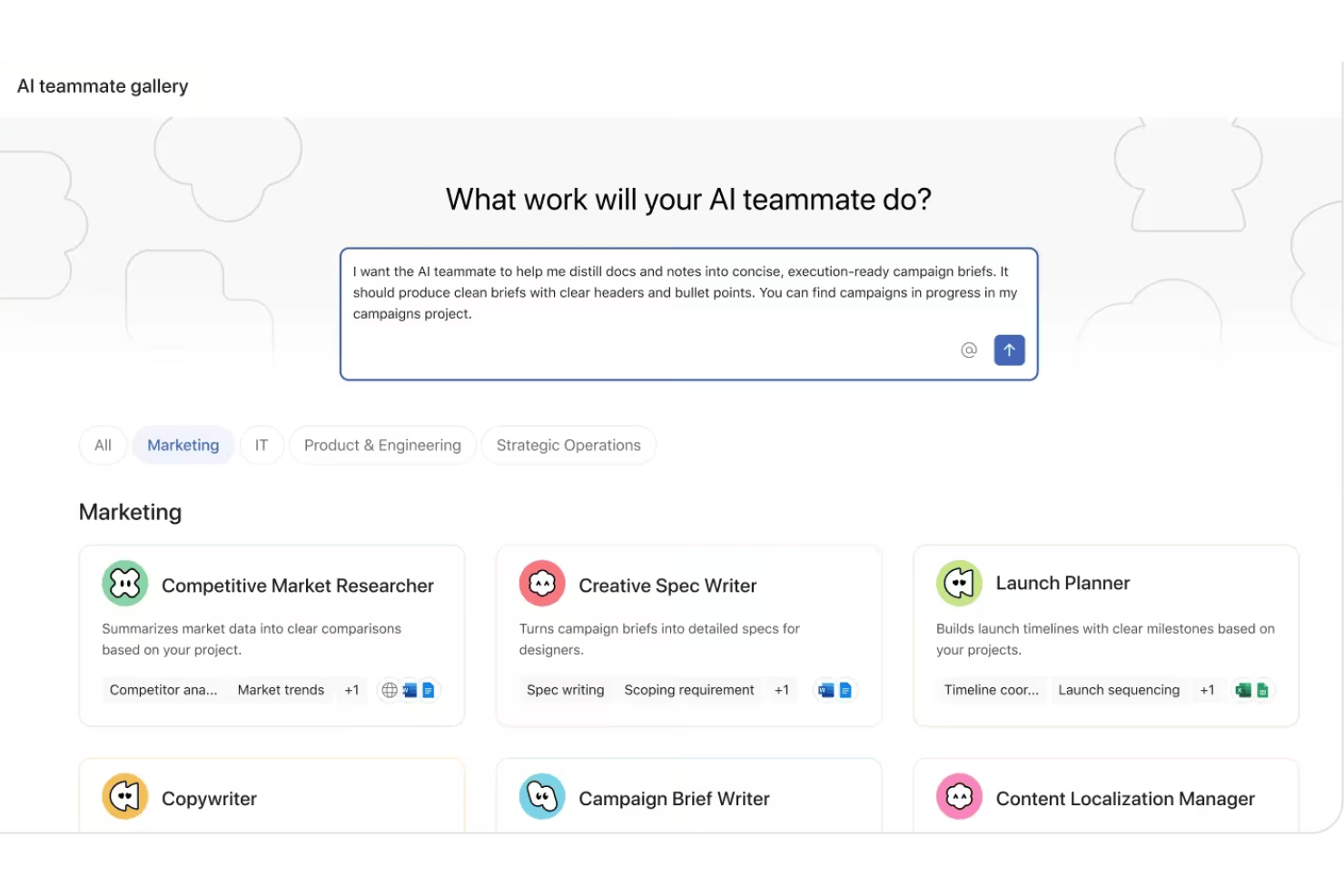
Asana AI Teammates is a role-based AI agent layer built into Asana's work management platform that lets project teams assign work to AI agents, automate project admin tasks, and draft and summarize project documentation.
Who Is Asana AI Teammates Best For?
It's a strong fit for mid-market and enterprise teams with established PMO structures that need AI agents operating across multiple functions simultaneously.
Why I Picked Asana AI Teammates
Asana AI Teammates earns its spot on my shortlist because of how the agents are structured around actual job functions rather than generic task types. I particularly like the Sprint Coach and Status Reporter agents, which my team can assign work to directly inside Asana projects, just like a human team member. What makes it genuinely different is the Work Graph, which gives each agent persistent context across all connected projects, so it's not starting from scratch every interaction.
Asana AI Teammates Key Features
- Custom Teammate builder: Create tailored AI agents for unique workflows using a simple no-code interface.
- Work Graph context: AI agents access structured project, goal, and team data, drawing from Asana's Work Graph for context.
- Attachment reading: Agents can read and process document attachments to summarize or extract project details.
- Enterprise-grade governance: Admins control data access, permissions, and audit logs across all AI teammate actions.
Asana AI Teammates Integrations
Asana AI Teammates offers native integrations with Jira, Microsoft 365, Google Workspace, Slack, Salesforce, Tableau, and Power BI. An API is available for custom integrations.
Pros and Cons
Pros:
- Human checkpoints keep AI actions under review
- Role-specific agents cover distinct project functions
- Agents operate inside live Asana projects natively
Cons:
- Still in beta with general availability not confirmed
- Currently limited to AI Studio Pro plan subscribers

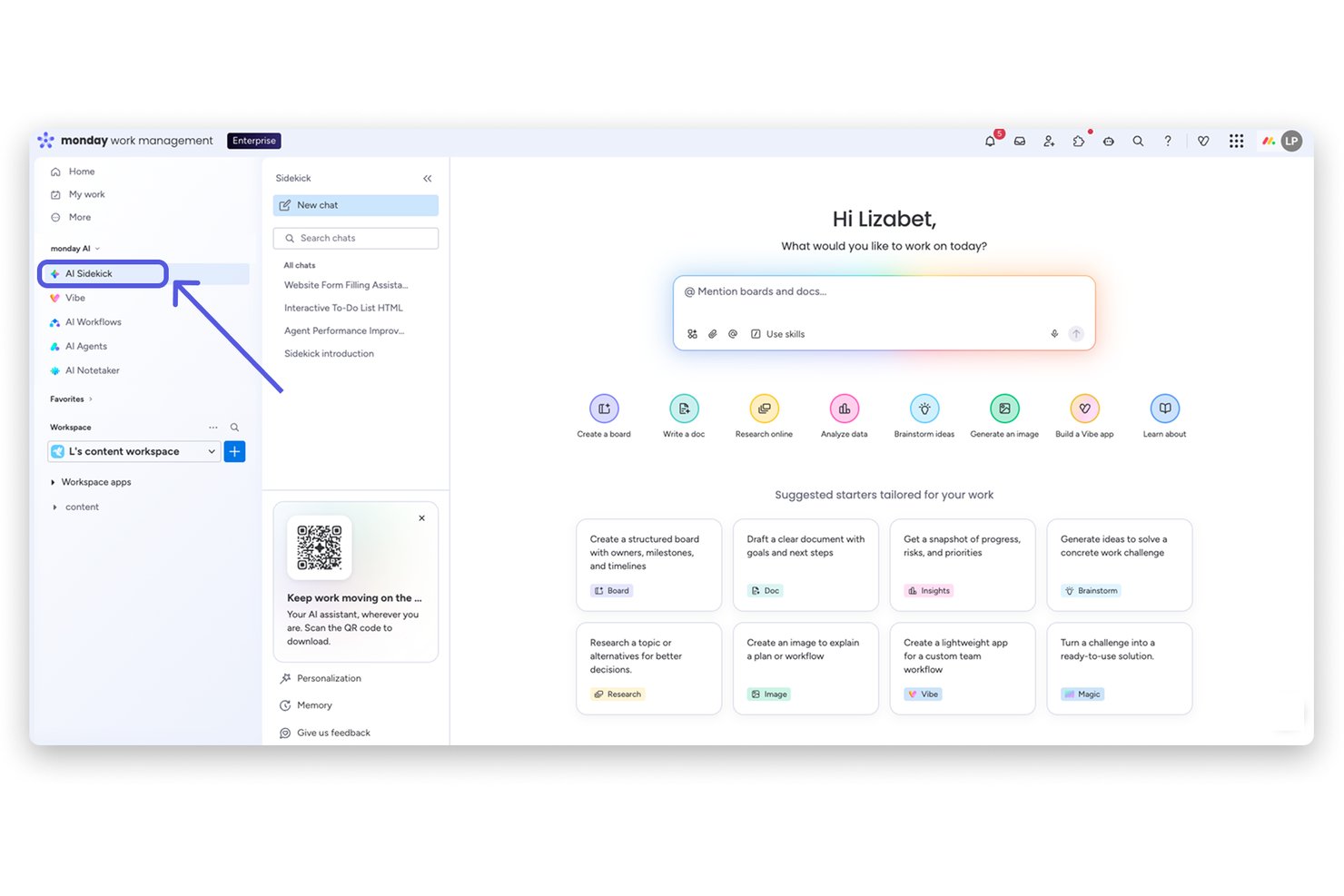
monday sidekick is an AI assistant built directly into the monday.com platform that lets you create workflows, automate tasks, generate documents, and surface project insights through natural-language conversation inside your workspace.
Who Is monday sidekick Best For?
monday sidekick is a strong fit for project managers and cross-functional teams already running their work inside monday.com who want AI embedded in their existing workflows.
Why I Picked monday sidekick
monday sidekick earns its spot on my shortlist because it doesn't just answer questions, it acts directly on your workspace data. I particularly like the Routines feature, which lets me schedule recurring AI tasks like weekly board summaries or status checks without any manual prompting. When I ask Sidekick to build a project plan, it creates items, assigns owners, and sets deadlines inside my actual boards, not a separate document disconnected from where the work lives.
monday sidekick Key Features
- Multi-model AI engine: Lets users tap into Claude, GPT, Gemini, and other top AI models for project queries and outputs.
- Mobile AI assistant: Offers conversational AI features and voice input on mobile for on-the-go project management.
- Scheduled AI routines: Automates recurring tasks like board summaries, status updates, or data pulls on a set cadence.
- Workspace-aware Canvas panel: Provides an editable document alongside the chat for drafting, summarizing, and organizing project content.
monday sidekick Integrations
monday sidekick offers native integrations with Slack, Google Workspace, Microsoft Teams, Salesforce, HubSpot, Zoom, GitHub, Zendesk, and Trello. It also supports Zapier and provides an API for custom integrations.
Pros and Cons
Pros:
- Runs scheduled AI routines without manual prompting
- Lets you choose between multiple AI models
- Acts directly on live board data
Cons:
- Complex multi-step queries sometimes produce errors
- Cannot pull context from external tools
Diğer Yapay Zekâ Sanal Asistanları
Kısa listeme giremeyen ancak yine de göz atmaya değer bazı ek yapay zekâ sanal asistanı seçenekleri şunlardır:
- Microsoft 365 Copilot
For AI across Office apps
- Fireflies.ai
For conversation intelligence analytics
- Atlassian Rovo
For cross-app enterprise knowledge search
- Fathom
For customizable meeting summaries
- Granola
For bot-free collaborative note refinement


How I Evaluate AI Virtual Assistants
An AI virtual assistant needs to do more than surface a chatbot—it should handle things like drafting status updates, capturing action items, or flagging blockers without you having to dig for answers. I split my evaluation into two layers: the core functionality a tool must have to qualify, and the differentiating factors that separate one option from another.
Core Functionality (Table Stakes For This List)
When I'm selecting tools for my list, I rank each one on a scale from 0 (does not offer the functionality) to 5 (excels in this area) for each core functionality listed below. Then, I calculate the tool's total score into a percentage. Each tool needs to achieve a minimum total score of 65% to be considered for inclusion.
- Conversational Interface: I evaluate whether you can ask things like "What's overdue on Project X?" and get useful, contextual answers in a multi-turn exchange.
- Generative AI Engine: The AI should produce contextual outputs—like sprint summaries or risk assessments—not just template-based responses from a library.
- Task & Meeting Automation: I look for tools that create tasks from meeting notes, send follow-up reminders, and handle scheduling without manual input.
- Project Tool Integrations: Connections to platforms like Jira, Slack, and Google Calendar matter so the assistant can pull and act on real project data.
- Contextual Memory: I check whether the assistant remembers past interactions and project details across sessions, so you're not re-explaining context each time.
- Summarization & Drafting: The tool should condense meeting transcripts or long threads into briefs and draft artifacts like status reports or stakeholder updates.
Once I have a list of tools that meet the criteria, I consider what sets each platform apart.
Differentiating Factors (What Sets Vendors Apart)
Here's how I compare and contrast different vendors:
Standout Features
Proactive intelligence is a big differentiator—I look for assistants that flag at-risk tasks or nudge you about approaching deadlines before you have to ask. Custom workflow automation also matters, especially tools that let you build multi-step flows like auto-assigning tasks when a sprint kicks off, without needing engineering support. I also evaluate how well an assistant retains context across sessions so it can reference past project decisions without you repeating yourself.
Beyond Features
Integration ecosystem is one of the first things I evaluate—an assistant that can't pull data from your existing stack (Jira, Confluence, Slack, Google Calendar) will create more busywork than it eliminates. Security and compliance controls also deserve close attention, especially LLM data usage policies and audit logging, since these tools often process sensitive project data. I also consider time-to-value: how quickly your team can get a working setup without weeks of fine-tuning or heavy vendor onboarding.
Yapay Zekâ Sanal Asistanları Nasıl Seçilir?
Uzun özellik listeleri ve karmaşık fiyatlandırma yapıları içinde kaybolmak kolaydır. Kendinize özgü yazılım seçim süreciniz üzerinde çalışırken odağınızı korumanıza yardımcı olmak için aklınızda bulundurmanız gereken faktörleri içeren bir kontrol listesi hazırladık:
| Faktör | Dikkat Edilmesi Gerekenler |
|---|---|
| Ölçeklenebilirlik | Asistan mevcut ve gelecekteki proje hacimlerinizi, ekiplerinizi ve departmanlarınızı yönetebiliyor mu? Kullanıcı veya proje ekledikçe maliyet ya da gecikme artışlarına dikkat edin. |
| Entegrasyonlar | Proje yönetimi, sohbet, takvim ve belge araçlarınıza ne kadar kapsamlı bağlanıyor? Yerel ve güçlü entegrasyonlar, manuel çalışmayı ve bağlantısız iş akışlarını azaltır. |
| Özelleştirilebilirlik | Otomasyonları, iş akışlarını ve yanıtları ekibinizin çalışma düzenine ve raporlama ihtiyaçlarına uyacak şekilde uyarlayabiliyor musunuz? Esnek kurallar ile az kodlu/kodsuz seçenekleri arayın. |
| Kullanım kolaylığı | Ekibiniz aracı gerçekten kullanacak mı, yoksa arayüz işe alıştırma sürecini zorlaştırıyor mu? Sezgisel kuruluma, anlaşılır menülere ve yararlı yönlendirmelere sahip seçeneklere öncelik verin. |
| Uygulama ve işe alıştırma | Değeri ne kadar sürede görmeye başlayacaksınız? Yöneticilerinize aşırı yük bindirmeden kullanıma geçişi hızlandırmak için şablon botlar, eğitim kaynakları veya özel destek sunulup sunulmadığını kontrol edin. |
| Maliyet | Fiyatlandırma gerçek kullanıma veya ekip büyüklüğüne göre mi ölçekleniyor? Ek özellikleri, minimum ücretleri ve gelişmiş özelliklerin daha yüksek paketlerle sınırlı olup olmadığını hesaba katın. |
| Güvenlik önlemleri | Hassas proje verileri korunacak mı? Şifreleme, role dayalı erişim, denetim kayıtları ve LLM verilerinin kullanımına ilişkin kontrolleri arayın. |
| Destek erişilebilirliği | Sorun çıktığında desteğe kolayca ulaşabiliyor musunuz? Araçla ilgili sorunlar yaşandığında proje gecikmelerini önlemek için hizmet seviyesi sözleşmesi sürelerini, uygulama içi yardımı veya canlı sohbeti doğrulayın. |
Yapay Zekâ Sanal Asistanları Nedir?
Yapay zekâ sanal asistanları, doğal dil aracılığıyla görevleri otomatikleştirmek, soruları yanıtlamak ve iş akışlarını yönetmek için yapay zekâ kullanan dijital araçlardır. Bu asistanlar toplantı planlama ve not almadan proje güncellemeleri hazırlamaya kadar pek çok işi üstlenerek ekiplerin sürekli manuel giriş yapmadan daha verimli çalışmasına yardımcı olur. Temel uygulamalarınıza bağlanır, proje bağlamını anlar ve desteklerini ihtiyaçlarınıza göre kişiselleştirir.
Yapay Zekâ Sanal Asistanının Özellikleri
Yapay zekâ sanal asistanı seçerken aşağıdaki temel özelliklere dikkat edin:
- Sohbet arayüzü: Sohbet veya sesli komutları kullanarak etkileşim kurmanızı sağlar; güncellemeleri almayı, görevler atamayı veya projeyle ilgili sorular sormayı günlük dille kolaylaştırır.
- Üretken yapay zekâ yanıtları: Özetler oluşturmak, proje belgeleri hazırlamak ve bağlamınıza göre uyarlanmış öneriler sunmak için büyük bir dil modeli kullanır.
- Görev otomasyonu: Tümü konuşmalarınızdan veya proje etkinliklerinizden tetiklenerek görevleri otomatik olarak oluşturur, hatırlatıcılar ayarlar, takip mesajları gönderir ve toplantıları planlar.
- Proje aracı entegrasyonları: Jira, Asana, Slack ve Google Workspace gibi platformlara sorunsuz şekilde bağlanarak proje bilgilerini doğrudan iş akışınız içinde görüntüler ve günceller.
- Bağlamsal bellek: Geçmiş etkileşimlerdeki önemli ayrıntıları hatırlar; böylece daha ilgili öneriler sunar, gereksiz sorulardan kaçınır ve devam eden projelerinize uyum sağlar.
- Belge özetleme: Uzun belgeleri, mesajları veya toplantı notlarını kısa özetlere dönüştürerek güncellemeleri incelerken veya raporlar hazırlarken zamandan tasarruf etmenizi sağlar.
- Kişiselleştirme: İletişim tarzınızı, tercihlerinizi ve tekrarlanan projelerinizi öğrenerek yanıtlarını ve önerilerini kendinize özgü çalışma biçiminize uyacak şekilde özelleştirir.
- Eylem maddesi çıkarma: Konuşmalardaki kararları, sonraki adımları ve eylem maddelerini belirleyip kaydederek takip işlemlerini kolaylaştırır ve sorumluluğun yerine getirilmesini sağlar.
- Güvenlik önlemleri: Şifreleme, erişim denetimleri ve uyumluluk seçenekleriyle hassas verileri korur; böylece proje bilgileriniz güvende kalır.
- Mobil erişilebilirlik: Mobil uygulamalar veya duyarlı tasarım sunarak asistanı hareket hâlindeyken kullanmanızı sağlar ve çalıştığınız her yerde destek sunar.
Yapay Zekâ Sanal Asistanlarının Faydaları
Yapay zekâ sanal asistanlarını uygulamak ekibiniz ve işletmeniz için çeşitli faydalar sağlar. Yararlanabileceğiniz birkaç fayda şunlardır:
- Azalan idari yük: Toplantı notları, takip mesajları ve durum güncellemeleri gibi rutin görevleri otomatikleştirerek ekiplerin manuel idari işlere daha az zaman ayırmasını sağlar.
- Daha hızlı proje kararları: Doğal dil sorguları ve belge özetleme yoluyla önemli proje verilerini, engelleri ve eylem maddelerini anında görünür kılar.
- Tutarlı görev takibi: Konuşmalardaki atamaları ve kararları kaydedip düzenleyerek ekiplerin uyum içinde kalmasını ve gözden kaçan eylem maddelerinin en aza indirilmesini sağlar.
- Kişiselleştirilmiş proje desteği: Ekibinizin iş akışını ve iletişim tercihlerini öğrenerek önerileri ve yanıtları her kullanıcıya veya projeye göre uyarlar.
- Geliştirilmiş iş birliği: Temel proje araçlarınıza bağlanır ve güncellemeleri kanallar arasında ileterek farklı konumlardaki ekiplerin eşgüdüm içinde kalmasını kolaylaştırır.
- Hareket hâlinde erişilebilirlik: Mobil ve sesli seçenekler sunarak proje yöneticilerinin ve paydaşların işin gerçekleştiği her yerde ve her zaman destek almasını sağlar.
- Geliştirilmiş veri güvenliği: Proje ve işletme bilgilerini şifreleme, erişim denetimleri ve uyumluluğa hazır güvenlik önlemleriyle korur.
Yapay Zekâ Sanal Asistanlarının Maliyetleri ve Fiyatlandırması
Yapay zekâ sanal asistanlarını seçmek, mevcut çeşitli fiyatlandırma modellerini ve planları anlamayı gerektirir. Maliyetler özelliklere, ekip büyüklüğüne, eklentilere ve diğer unsurlara göre değişir. Aşağıdaki tablo, yaygın planları, ortalama fiyatlarını ve yapay zekâ sanal asistanı çözümlerinde genellikle bulunan özellikleri özetlemektedir:
Yapay Zekâ Sanal Asistanları İçin Plan Karşılaştırma Tablosu
| Plan Türü | Ortalama Fiyat | Yaygın Özellikler |
|---|---|---|
| Ücretsiz Plan | $0 | Temel sohbet işlevi, sınırlı görev otomasyonu ve standart destek. |
| Kişisel Plan | $5–$25/kullanıcı/ay | Çok turlu sohbet, belge özetleme, basit entegrasyonlar ve kişisel görev otomasyonu. |
| İşletme Planı | $20–$60/kullanıcı/ay | Ekip iş birliği araçları, proje aracı entegrasyonları, iş akışı otomasyonu ve yönetici denetimleri. |
| Kurumsal Plan | $50–$150/kullanıcı/ay | Gelişmiş güvenlik, uyumluluk desteği, özel iş akışları, API erişimi, özel başlangıç desteği ve öncelikli destek. |
Yapay Zekâ Sanal Asistanı SSS
Yapay zekâ sanal asistanı hakkında sık sorulan soruların bazı yanıtlarını burada bulabilirsiniz:
Yapay zekâ sanal asistanları mevcut proje yönetimi araçlarıyla nasıl entegre olur?
Çoğu yapay zekâ sanal asistanı, yerleşik entegrasyonları veya API’leri kullanarak Jira, Asana ya da Trello gibi proje platformlarına doğrudan bağlanır. Bu sayede siz çalışırken proje verilerini alabilir, durumu güncelleyebilir ve görevleri otomatikleştirebilir; iş akışlarınızdaki kesintiyi en aza indirirler.
Yapay zekâ sanal asistanları gizli veya hassas bilgileri işleyebilir mi?
Evet; çözüm, şifreleme, uyumluluk seçenekleri ve erişim denetimleri gibi güvenlik önlemleri sunuyorsa bunu yapabilir. İşletmenizin gereksinimlerine uygun olduklarından emin olmak için her aracın gizlilik politikalarını ve güvenlik sertifikalarını kontrol etmeniz önemlidir.
Yapay zekâ sanal asistanları ne tür görevleri otomatikleştirebilir?
Yapay zekâ sanal asistanları toplantı planlamayı, eylem maddelerini kaydetmeyi, hatırlatma bildirimlerini, rapor taslaklarını ve durum güncellemelerini yönetir; bunların tümü doğal dildeki girdiniz veya devam eden proje değişiklikleri tarafından tetiklenir.
Yapay zekâ sanal asistanları için çok fazla kurulum veya eğitim gerekir mi?
Hayır, modern asistanların çoğu az kodlu/kodsuz kurulum seçenekleri sunar ve başlangıç kılavuzları veya şablonlarla birlikte gelir. Hatta bazı araçlar, zaman içinde süreçlerinizi öğrenerek önerileri kişiselleştirir ve manuel yapılandırma ihtiyacını azaltır.
Yapay zekâ sanal asistanları farklı konumlarda çalışan ekipler için uygun mudur?
Evet, bu asistanlar dağınık ekipleri desteklemek üzere tasarlanmıştır. Cihazlar arasında eşitlenir, güncellemeleri gerçek zamanlı olarak iletir ve temel mesajlaşma ve iş birliği platformlarınızla çalışırlar.