

2026’nın En İyi 10 Ücretsiz Müşteri Oryantasyon Yazılımı

Ücretsiz Müşteri Oryantasyonu Yazılımı Kısa Listesi


Ücretsiz müşteri oryantasyonu yazılımı, ekibinize ön ödeme gerektirmeden yeni müşterileri karşılama, organize etme ve yönetme araçları sunar; bu, ücretsiz bir plan veya ücretsiz deneme aracılığıyla olabilir. Oryantasyonu otomatikleştirmenin, herkesin aynı bilgiye sahip olmasını sağlamanın ve bütçenizi aşmadan sorunsuz bir müşteri deneyimi sunmanın yollarını arıyorsanız doğru yerdesiniz. Bu kılavuz, en iyi ücretsiz seçenekleri öne çıkararak özellikleri karşılaştırmanıza, iş akışınıza en uygun seçeneği görmenize ve 2026 yılında işletmeniz için güvenli bir seçim yapmanıza yardımcı olur.
Why Trust Our Software Recommendations
Our team has been testing and reviewing software since 2012. As project managers ourselves, we know how difficult—and important—it is to choose the right software.
For this guide, we evaluated tools using hands-on testing and independent research, scoring tools using our selection criteria. We also draw on insights from industry thought leaders and practicing project management experts.
Our reviews reflect our human editorial judgment, not a sales pitch.
Expert reviewers:
Ücretsiz Müşteri Oryantasyonu Yazılımı Karşılaştırma Tablosu
Bu karşılaştırma tablosu, en iyi ücretsiz müşteri oryantasyonu yazılımı seçimlerimin fiyatlandırma ayrıntılarını özetlemektedir.
| Tool | Starting Price | Website | |
|---|---|---|---|
| Best for secure client portals with workflow automation | 4.4 out of 5 | $5,000/year Free trial + free demo available | Book Demo |
| Best for a flexible workspace for building onboarding checklists and guides | 4.6 out of 5 | $10/user/month Free plan + free trial + free demo available | Website |
| Best for no-code client portals for onboarding and resource sharing | 4.7 out of 5 | $25/month Free plan + 7-day free trial + free demo available | Website |
| Best for a spreadsheet-database hybrid for tracking onboarding progress | 4.6 out of 5 | $20/user/month Free plan + 14-day trial + demo available | Website |
| Best for client onboarding workspaces with templates and automation | 4.9 out of 5 | $350/month Free plan + free demo available | Website |
| Best for SOP templates for structured client onboarding | — | $7/user/month Free plan available | Website |
| Best for onboarding and client portals for small teams | — | $20/month 7-day free trial + free plan available | Website |
| Best for CRM with built-in onboarding pipeline tools | — | $20/seat/month 28-day free trial + free plan available | Website |
| Best for interactive forms for client intake and onboarding surveys | — | $28/month Free plan available | Website |
| Best for client portals with task management and file sharing | — | $6.50/month Free trial + free plan available | Website |
Ücretsiz Müşteri Oryantasyonu Yazılımı İncelemeleri
Aşağıda, kısa listeme giren en iyi ücretsiz müşteri oryantasyonu yazılımlarının ayrıntılı özetlerini bulabilirsiniz. İncelemelerim, size en uygun seçeneği bulmanıza yardımcı olmak için her platformun özelliklerine, en iyi kullanım alanlarına ve fiyatlandırmasına ayrıntılı bir bakış sunar.

Moxo
Best for secure client portals with workflow automation
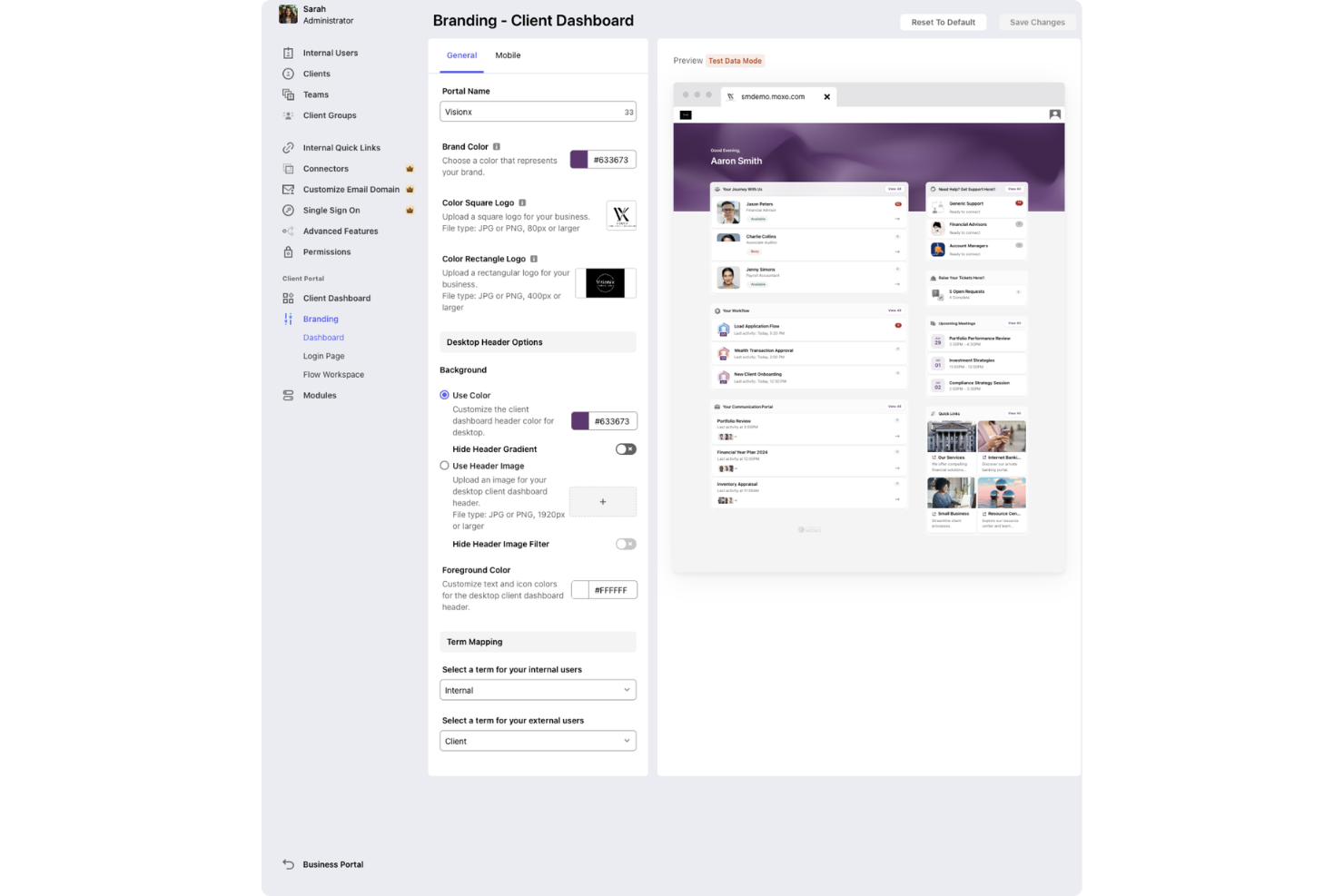
Moxo is a client onboarding and workflow management platform that provides secure client portals, digital forms, e-signatures, and real-time collaboration tools for managing onboarding processes.
Who Is Moxo Best For?
Moxo suits client-facing teams at financial services firms, consultancies, and professional services companies that need secure, branded onboarding portals.
Why I Picked Moxo
I picked Moxo as one of the best because I can set up secure, branded onboarding portals for clients and manage all onboarding steps in one place. I like that Moxo supports digital forms and e-signatures, which lets my team collect documents and approvals without switching tools. The free trial lets me test these features with real clients before committing.
Moxo Key Features
- In-app chat: Communicate with clients directly within the onboarding portal.
- Task tracking: Assign and monitor onboarding tasks for each client.
- Document sharing: Upload and organize files for client access and review.
- Audit trails: Track all client interactions and activity for compliance.
Moxo Integrations
Moxo offers native integrations with DocuSign, Salesforce, HubSpot, Outlook, and Google for meeting scheduling and data sync. An API is available for custom integrations.
What's Free?
Moxo offers a free plan with limited “flows” and AI credits. The plan provides access to core onboarding features, and users can perform up to two flows and have access to 500 AI credits per month.
Pros and Cons
Pros:
- Branded experience with customizable client workspaces
- Automated task assignment and progress tracking
- Real-time chat and messaging with clients
Cons:
- Mobile app notifications can be inconsistent
- No free plan, only a free trial
Notion
Best for a flexible workspace for building onboarding checklists and guides
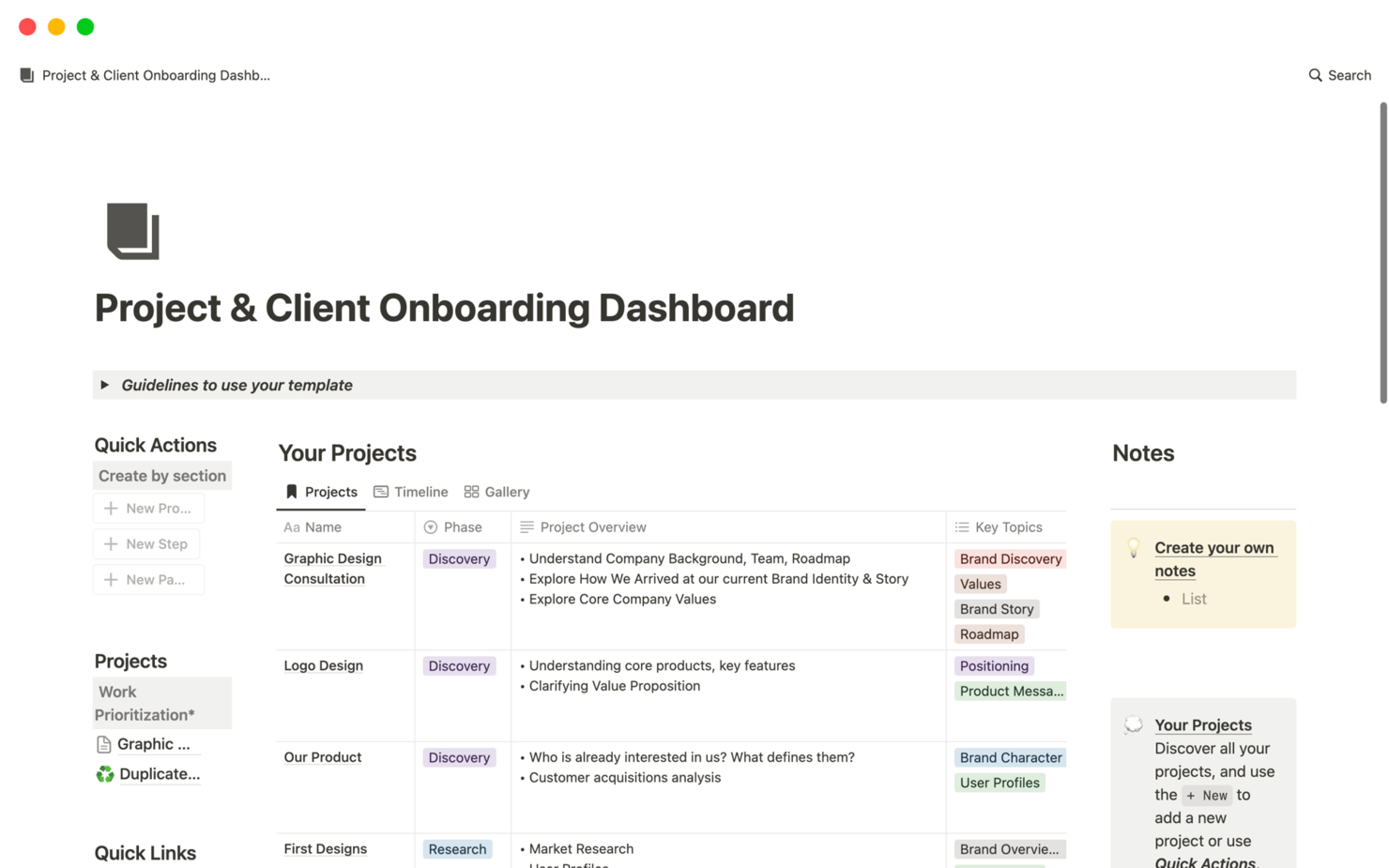
Notion is a collaborative workspace platform that combines document creation, wikis, databases, and project management tools for organizing and managing client onboarding workflows.
Who Is Notion Best For?
Notion suits small to midsize teams who want a flexible, all-in-one workspace for managing client onboarding and internal documentation.
Why I Picked Notion
I picked Notion as one of the best because I can combine docs, wikis, and project management in a single workspace—my team builds onboarding templates, tracks client progress in databases, and centralizes all onboarding resources in one place. I like that we can link onboarding checklists directly to client records and update everything in real time. The flexibility to create custom onboarding dashboards and knowledge bases makes it easy to adapt our process as client needs change.
Notion Key Features
- Guest access: Invite clients to view or edit specific onboarding pages.
- Task assignment: Assign onboarding tasks to team members or clients.
- Commenting and mentions: Collaborate on onboarding steps with in-line comments and @mentions.
- Version history: Track changes to onboarding documents and restore previous versions.
Notion Integrations
Notion offers native integrations with Slack, GitHub, GitLab, Jira, Asana, Google Drive, Figma, Zoom, and Typeform. It connects with Zapier and provides an API for custom integrations.
What's Free?
Notion offers a free-forever plan for individuals and small teams with unlimited pages and blocks. The free plan limits file uploads to 5MB per file and restricts some advanced permissions and admin controls.
Pros and Cons
Pros:
- Real-time collaboration with comments and mentions
- Custom templates support tailored onboarding workflows
- Flexible workspace combines documentation and task tracking
Cons:
- No dedicated client portal functionality
- Limited native automation for onboarding processes

Softr
Best for no-code client portals for onboarding and resource sharing

Softr is a no-code client portal builder that lets you create secure onboarding portals using data from Airtable or Google Sheets, with features for user authentication, permissions, and customizable layouts.
Who Is Softr Best For?
Softr is a good fit for small businesses and consultancies that want to build secure, no-code client onboarding portals using Airtable or Google Sheets.
Why I Picked Softr
I picked Softr as one of the best because I can build secure client portals directly from Airtable or Google Sheets without writing code. My team is able to set up granular user permissions and authentication for each client. I like that we can customize layouts and add document upload blocks to match our onboarding process.
Softr Key Features
- Drag-and-drop page builder: Arrange onboarding pages and sections visually with no coding required.
- Pre-built onboarding templates: Start quickly with templates designed for client portals and onboarding flows.
- Custom domain support: Use your own branded domain for client-facing portals.
- Email notifications: Automatically send onboarding updates and alerts to clients and team members.
Softr Integrations
Softr offers native integrations with Airtable, Google Sheets, Stripe, HubSpot, Mailchimp, Google Analytics, Intercom, Hotjar, and Google Tag Manager. It connects with Zapier and provides an API for custom integrations.
What's Free?
Softr offers a free-forever plan that includes unlimited applications and up to 5 internal users. The free plan displays Softr branding and has limited integration and customization options.
Pros and Cons
Pros:
- User authentication controls support secure access
- Pre-built templates accelerate setup time
- No-code builder simplifies creation of client onboarding portals
Cons:
- Reporting features are relatively basic
- Limited workflow automation capabilities

Airtable
Best for a spreadsheet-database hybrid for tracking onboarding progress
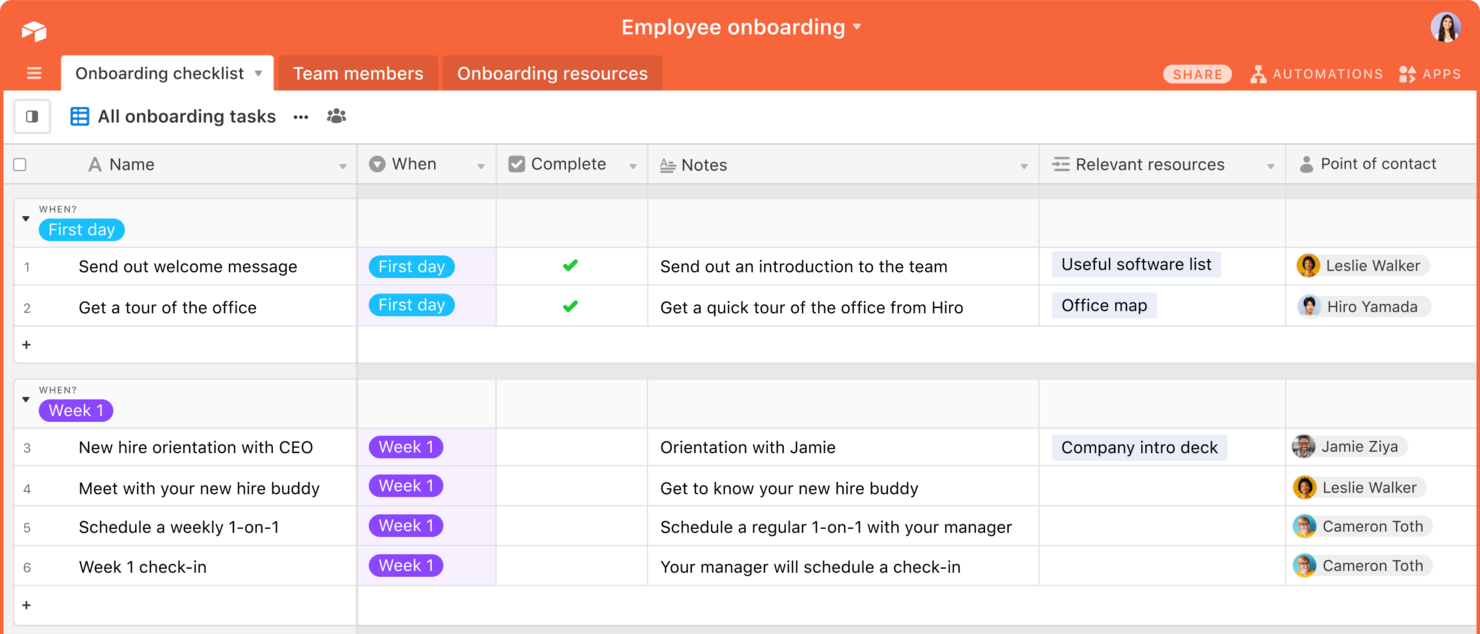
Airtable is a flexible database and workflow platform that lets you build custom client onboarding pipelines, automate processes, and organize client data using spreadsheets, forms, and visual dashboards.
Who Is Airtable Best For?
Airtable is a good fit for teams that need to design custom onboarding workflows and manage client data in a highly visual, flexible environment.
Why I Picked Airtable
I picked Airtable as one of the best because I can build custom onboarding pipelines using its visual database and automation tools. My team uses the free plan to create onboarding forms, track client progress, and collaborate in real time. I like that I can design unique onboarding templates and dashboards without code, which fits a range of client needs.
Airtable Key Features
- Views gallery: Choose from grid, calendar, kanban, and gallery views for onboarding data.
- Role-based permissions: Set granular access levels for collaborators and clients.
- Automations library: Trigger actions like notifications or record updates based on onboarding milestones.
- Attachment fields: Upload and organize client documents directly within onboarding records.
Airtable Integrations
Airtable offers native integrations with Google Drive, Slack, Jira, Salesforce, Box, and Dropbox, and connects with Zapier. An API is available for custom integrations.
What's Free?
Airtable offers a free-forever plan with unlimited bases, up to five creators or editors per workspace, and limited automation and integration options. Storage and record limits apply on the free plan.
Pros and Cons
Pros:
- Custom forms support structured client data collection
- Multiple views improve visibility into onboarding progress
- Flexible database structure adapts to custom onboarding workflows
Cons:
- Lacks built-in client communication tools
- Advanced automation features restricted on free plan

Dock
Best for client onboarding workspaces with templates and automation
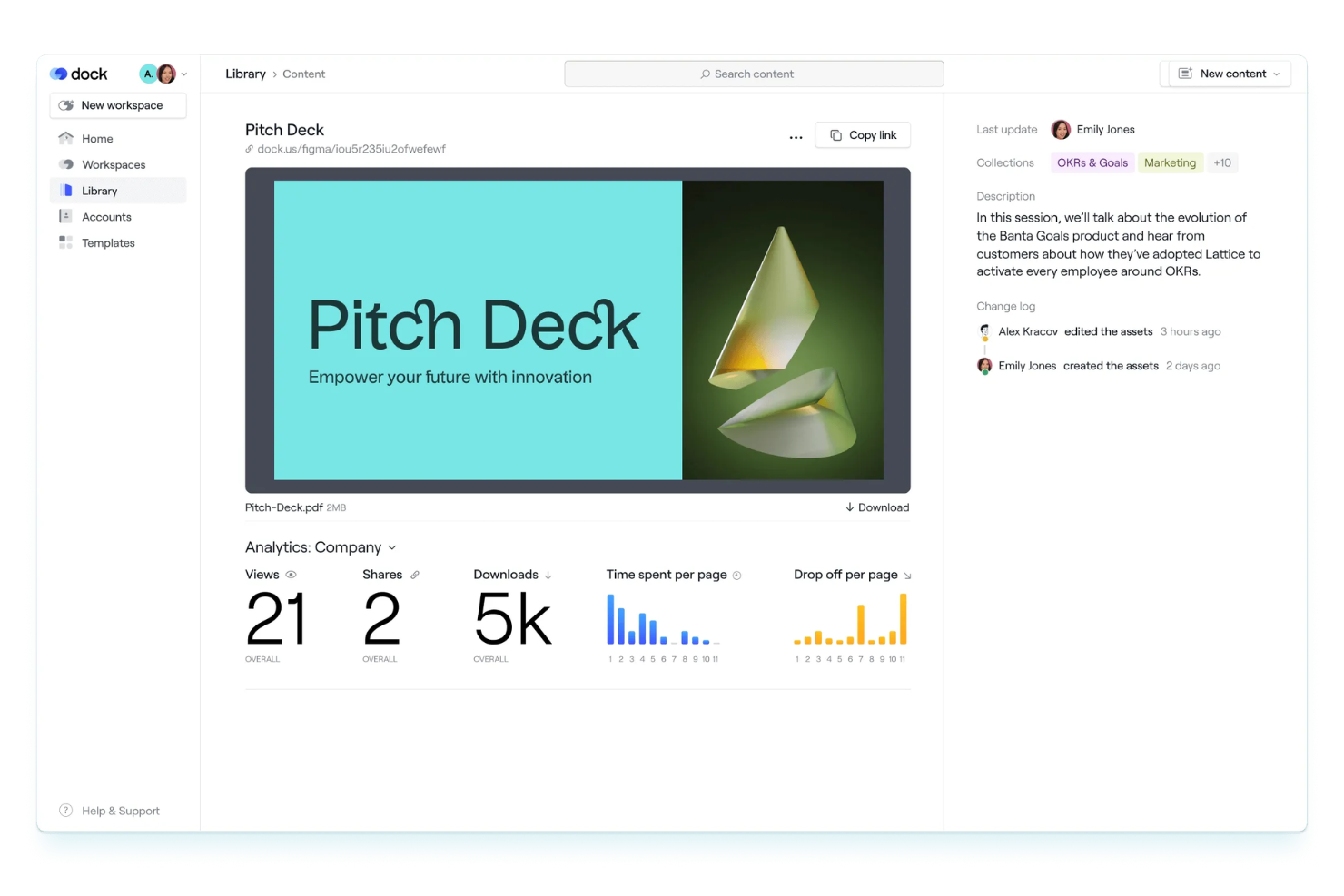
Dock is a client onboarding workspace platform that lets teams create interactive onboarding portals, automate onboarding tasks, and use customizable templates to manage client journeys.
Who Is Dock Best For?
Dock is a good fit for customer success and onboarding teams at B2B SaaS companies managing multiple client projects.
Why I Picked Dock
I picked Dock as one of the best because its onboarding workspaces let my team build repeatable client journeys with templates and automation. I like that I can assign tasks, share documents, and track progress in a single portal. The workspace templates make it easy to standardize onboarding across different client types.
Dock Key Features
- Client portal customization: Personalize each client’s onboarding portal with branding and tailored content.
- Embedded video walkthroughs: Add video guides directly into onboarding workspaces for step-by-step instructions.
- File request and upload: Request and collect documents securely from clients within the portal.
- Approval workflows: Set up approval steps for client deliverables and onboarding milestones.
Dock Integrations
Integrations include Slack, Salesforce, Gong, Zoom, Microsoft Teams, Zoom, Avoma, and Loom.
What's Free?
Dock offers a free-forever plan with limited features. The free plan restricts you to one active client workspace and does not include advanced automation or integrations.
Pros and Cons
Pros:
- Embedded video walkthroughs enhance onboarding guidance
- Customizable client portals with tailored content and branding
- Workspace templates standardize repeatable onboarding processes
Cons:
- Mobile experience less optimized than desktop
- Limited analytics for tracking onboarding performance

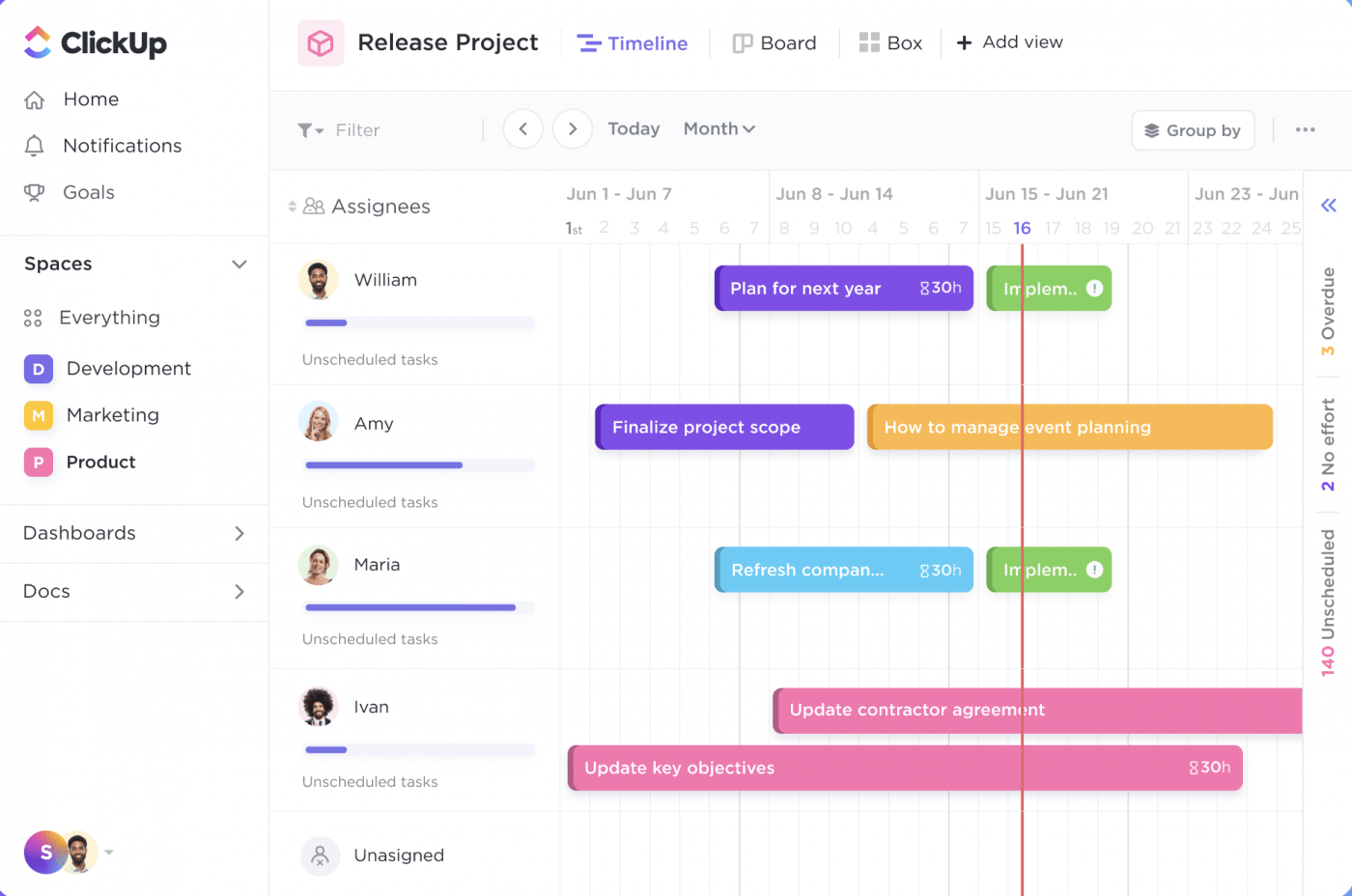
ClickUp is a work management platform that lets teams organize client onboarding with customizable SOP templates, task lists, document sharing, and workflow automation.
Who Is ClickUp Best For?
ClickUp is a good fit for small to midsize teams in digital agencies or consulting firms that need customizable onboarding workflows.
Why I Picked ClickUp
I picked ClickUp as one of the best because I can grab ready-made SOP templates for client onboarding and customize them for my workflow. I like that I can assign onboarding tasks, set dependencies, and track progress in real time. My team uses ClickUp’s document sharing to keep all onboarding materials in one place.
ClickUp Key Features
- Form view: Collect onboarding information from clients using customizable forms.
- Automations: Set up triggers and actions to automate repetitive onboarding steps.
- Custom fields: Track client-specific onboarding data with tailored field types.
- Time tracking: Monitor time spent on each onboarding task directly within the platform.
ClickUp Integrations
ClickUp offers native integrations with Google Drive, Slack, GitHub, Zoom, Microsoft Teams, Dropbox, OneDrive, Outlook, and Calendly. It also connects with Zapier and provides an API for custom integrations.
What's Free?
ClickUp offers a free-forever plan with unlimited users and tasks. The free plan limits automations, advanced reporting, and some integrations, and restricts guest access and storage.
Pros and Cons
Pros:
- Real-time collaboration improves team coordination
- Custom fields allow detailed client data tracking
- Pre-built SOP templates support structured onboarding processes
Cons:
- Mobile performance can lag on complex projects
- Automation capabilities limited on free plan

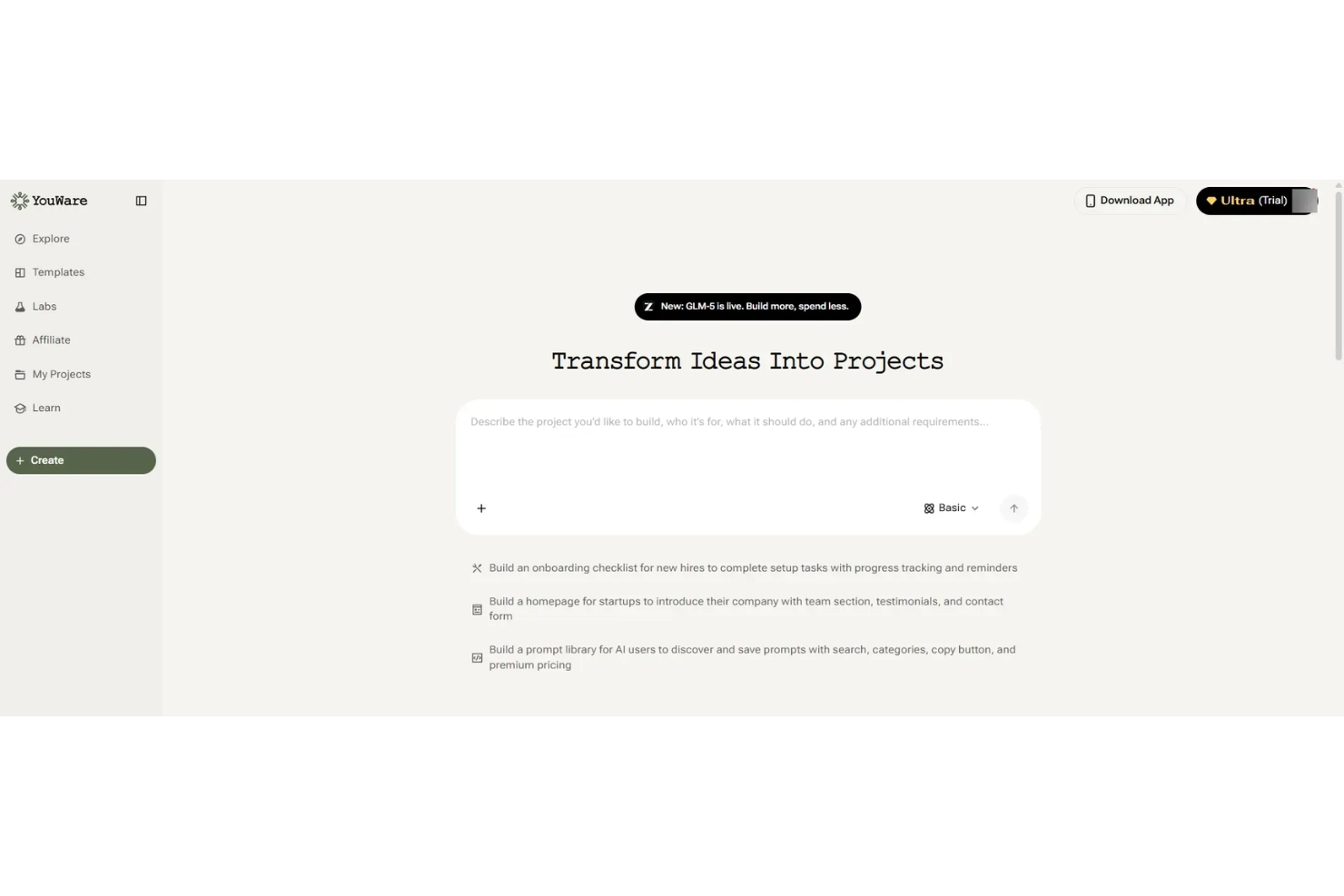
Youware is a client onboarding and portal platform designed for small teams, offering tools for client intake, document sharing, task assignment, and progress tracking.
Who Is Youware Best For?
Youware is a good fit for small teams or solo professionals who need a simple client onboarding and portal solution.
Why I Picked Youware
I picked Youware as one of the best because its free onboarding and client portal features are purpose-built for small teams. I like that I can set up client intake forms, assign onboarding tasks, and share documents in a single workspace. My team is able to track client progress and manage communication without needing to upgrade or add extra tools.
Youware Key Features
- Client portal customization: Personalize the look and feel of each client’s portal.
- Automated reminders: Send scheduled notifications to clients for outstanding tasks.
- Role-based access control: Set permissions for team members and clients.
- Activity timeline: View a chronological log of all client interactions and updates.
Youware Integrations
Integrations include Azure, Stripe, Google Cloud, Cloudflare, Supabase, Figma, AWS, Anthropic, OpenAI, and more.
What's Free?
Youware offers a free-forever plan for small teams. The free plan includes unlimited clients and core onboarding features, but advanced integrations and some customization options may be limited.
Pros and Cons
Pros:
- Built-in task tracking and automated reminders improve follow-ups
- Simple interface suited for small teams and solo users
- Free plan supports unlimited client onboarding projects
Cons:
- Basic role-based permissions lack depth
- Limited workflow automation compared to advanced tools

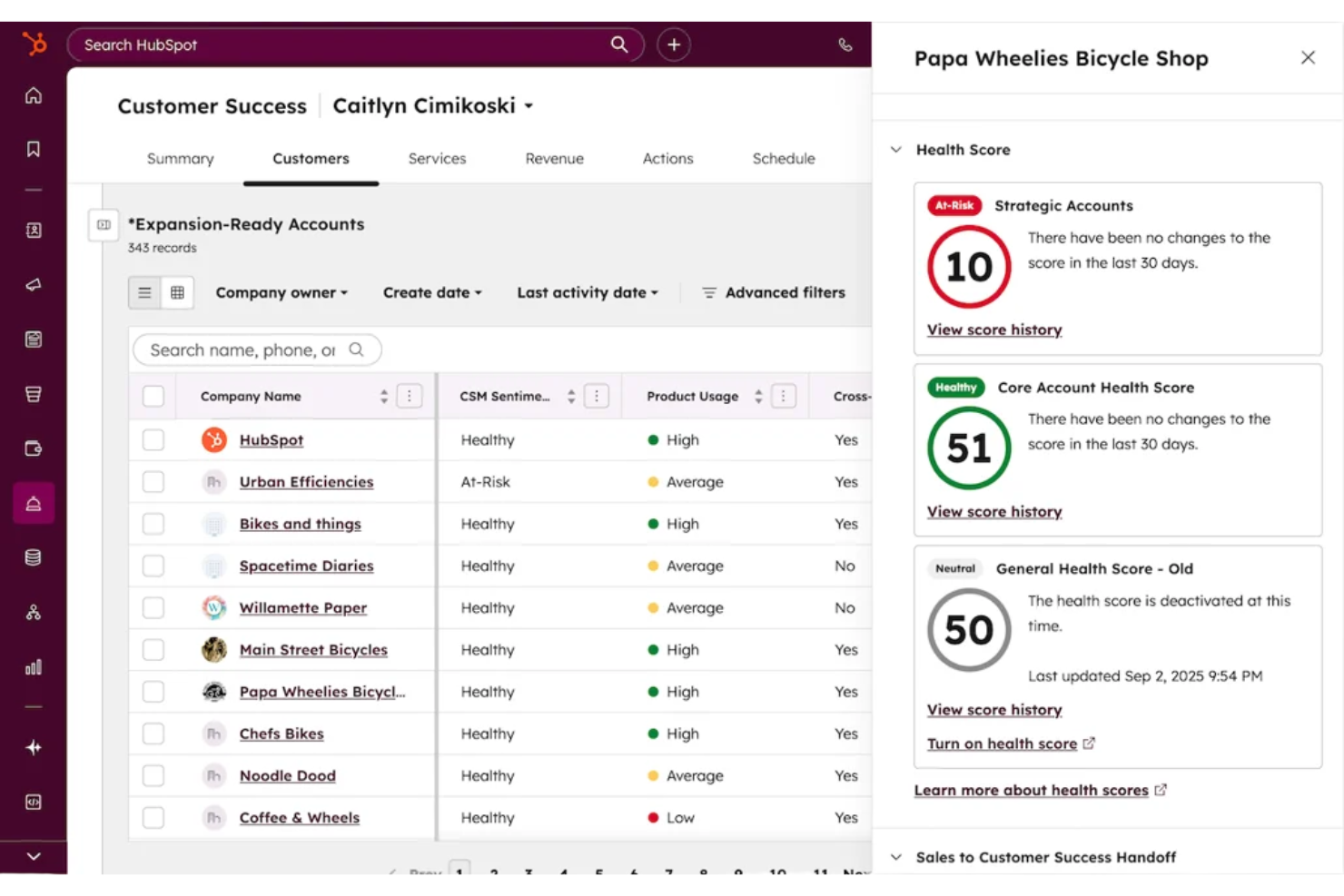
HubSpot CRM is a client onboarding and relationship management platform that combines contact management, pipeline tracking, email integration, and workflow automation for teams handling new client onboarding.
Who Is HubSpot CRM Best For?
Small to midsize businesses that need a unified platform for managing client onboarding and ongoing customer relationships.
Why I Picked HubSpot CRM
I picked HubSpot CRM as one of the best because it gives my team unlimited users and contacts on the free plan, which is rare for onboarding tools. I use its customizable pipelines to track every stage of client onboarding, and the built-in email tracking helps us keep communication organized. The contact timeline lets me see all client interactions in one place, so nothing falls through the cracks.
HubSpot CRM Key Features
- Meeting scheduling links: Let clients book onboarding calls directly from your calendar.
- Document management: Store and share onboarding documents within each client record.
- Task automation: Automatically assign onboarding tasks to team members based on triggers.
- Live chat widget: Add real-time chat to your website for instant client support during onboarding.
HubSpot CRM Integrations
HubSpot CRM offers native integrations with Gmail, Outlook, Google Calendar, Slack, Zoom, Mailchimp, Shopify, Stripe, Facebook Ads, and LinkedIn Ads. An API is available for custom integrations.
What's Free?
HubSpot CRM offers a free-forever plan with unlimited users and contacts. Some advanced features, automation, and reporting tools are restricted to paid plans.
Pros and Cons
Pros:
- Customizable pipelines for onboarding workflows
- Email tracking and logging for client communication
- Built-in meeting scheduler for onboarding calls
Cons:
- No built-in e-signature for onboarding documents
- Workflow automation is limited on free plan


Typeform is an online form builder that lets you create interactive forms, surveys, and quizzes with conversational logic for collecting client information and onboarding details.
Who Is Typeform Best For?
Typeform suits marketing teams and small businesses that want to create engaging, interactive onboarding forms for clients.
Why I Picked Typeform
I picked Typeform as one of the best because its conversational forms make client onboarding feel personal and interactive. I like that I can use conditional logic to tailor questions based on client responses. My team is able to embed forms directly on our website and collect onboarding details in a way that feels more like a conversation than a survey.
Typeform Key Features
- File upload field: Clients can securely upload documents or images during onboarding.
- Custom branding: Add your logo, colors, and fonts to match your brand identity.
- Response notifications: Get instant email alerts when a client submits a form.
- Integration with CRM tools: Connect responses directly to platforms like HubSpot or Salesforce.
Typeform Integrations
Typeform offers native integrations with HubSpot, Slack, Google Sheets, Salesforce, Mailchimp, Airtable, Trello, Asana, Microsoft Teams, and Zapier. An API is available for custom integrations.
What's Free?
Typeform offers a free-forever plan that allows one user to create unlimited forms with up to 10 questions per form and 10 responses per month. Some integrations and advanced features are only available on paid plans.
Pros and Cons
Pros:
- Custom branding enhances client-facing forms
- Conditional logic personalizes onboarding experiences
- Interactive forms improve client engagement during intake
Cons:
- Not suited for full end-to-end onboarding workflows
- Response limits restrict scalability on free plan

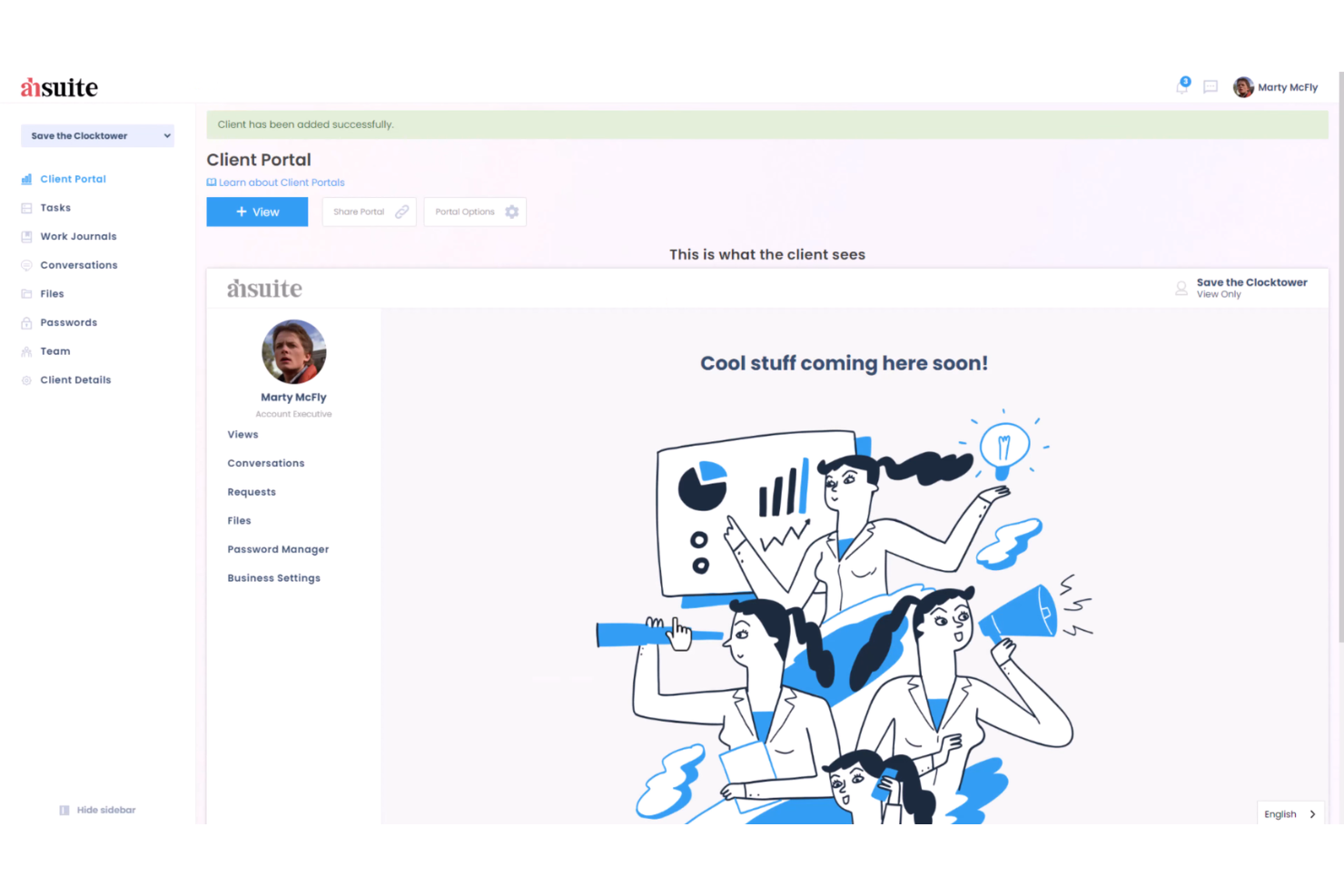
Ahsuite is a client portal platform for onboarding that lets you organize client dashboards, share files, manage tasks, and embed custom tools in a secure, branded environment.
Who Is Ahsuite Best For?
Ahsuite is a good fit for small agencies and consultants who need to onboard and manage multiple clients in one place.
Why I Picked Ahsuite
I picked Ahsuite as one of the best because it lets me onboard unlimited clients for free and organize each client’s dashboard with custom tabs, file sharing, and embedded tools. I like that I can create secure, branded portals for every client without worrying about user limits. My team is able to manage client communications, tasks, and shared resources all in one place, which is rare for a free plan.
Ahsuite Key Features
- White label customization: Add your own branding, logo, and colors to each client portal.
- Password manager: Store and share passwords securely with clients and team members.
- Client messaging: Send and receive direct messages within the portal.
- Task management: Assign, track, and organize tasks for each client workspace.
Ahsuite Integrations
Native integrations are not clearly documented
What's Free?
Ahsuite offers a free-forever plan with unlimited client portals and users. The free plan includes core features but displays Ahsuite branding and does not support white-label customization or advanced automation.
Pros and Cons
Pros:
- Custom dashboard tabs support flexible onboarding layouts
- Built-in messaging centralizes client communication
- Unlimited client portals available on free plan
Cons:
- No dedicated mobile application
- Limited automation for onboarding workflows
Diğer Ücretsiz Müşteri Oryantasyonu Yazılımları
Kısa listeme girmeyen ancak yine de göz atmaya değer bazı ek ücretsiz müşteri oryantasyonu yazılımı seçeneklerini burada bulabilirsiniz:
- Zoho CRM
For CRM with onboarding workflow automation
- Trupeer
For AI-driven onboarding automation
- Rocketlane
For purpose-built onboarding platform with project templates
- Clustdoc
For client portal for document collection and onboarding workflows
- Appcues
For no-code onboarding flows and in-app guidance


How I Evaluate Free Client Onboarding Software
First, I define what counts as free. For client onboarding software, where you're repeating intake forms, kickoff checklists, and client portals for every engagement, a free-forever plan is required. From there, I evaluate on two layers: the core functionality a tool must have to make the list, and the differentiators that set vendors apart.
Core Functionality (Table Stakes For This List)
In addition to my free offer requirements, I also use a scoring system to select tools for my list. Here's how it works:
I rank each one on a scale from 0 (does not offer the functionality) to 5 (excels in this area) for each core functionality listed below. Then, I calculate the tool's total score into a percentage. Each tool needs to achieve a minimum total score of 65% to be considered for inclusion.
- Client Intake Forms: I check whether the free plan includes customizable forms for collecting project briefs, brand assets, login credentials, or scoping details from new clients.
- Onboarding Workflow Automation: Repeatable onboarding matters here. I look for templates or task sequences that can be cloned each time a new client signs on, rather than rebuilding from scratch.
- Client Portal or Shared Workspace: I evaluate whether clients get a dedicated space to view progress, access shared files, and interact with your team without needing a paid seat.
- Task & Milestone Tracking: Each tool should let you assign onboarding tasks, set due dates, and track milestones so nothing falls through the cracks during a client's first few weeks.
- Document Sharing & E-Signatures: I look at how the free plan handles contracts, SOWs, and onboarding packets—specifically whether clients can review, approve, or sign documents in the platform.
- Communication & Notifications: I evaluate whether the tool keeps clients and internal team members aligned through comments, @mentions, or automated email alerts tied to onboarding steps.
Once I have a list of tools that meet the criteria, I consider what sets each platform apart.
Differentiating Factors (What Sets Vendors Apart)
Here's how I compare and contrast different vendors:
Standout Features
Reusable onboarding templates save real time when you're bringing on multiple clients with similar service packages. I look for tools that let you clone a full onboarding sequence—tasks, forms, documents—and deploy it in a few clicks. A built-in contract or proposal builder also adds value by keeping the entire handoff in one place instead of bouncing between separate signing tools. I also consider whether clients can complete intake steps from their phone, since delays often happen when someone needs a desktop to respond.
Beyond Features
Free plan limits matter a lot here. I check how many active clients, team seats, and storage a tool allows before you hit a paywall—because onboarding even five clients a month can push you past tight caps. Integration support is another big factor. If the tool connects natively to your project management stack (Asana, Trello, ClickUp) or offers Zapier access on its free tier, you can hand off onboarded clients into active projects without manual re-entry. I also evaluate data security, since you're handling contracts, credentials, and sensitive client information from day one.
Ücretsiz Müşteri Oryantasyonu Yazılımı Nasıl Seçilir?
Uzun özellik listeleri ve karmaşık fiyatlandırma yapıları arasında kaybolmak kolaydır. Kendinize özgü yazılım seçim sürecinizi yürütürken odağınızı korumanıza yardımcı olmak için göz önünde bulundurmanız gereken faktörleri içeren bir kontrol listesi aşağıdadır:
| Faktör | Dikkate Alınması Gerekenler |
|---|---|
| Ölçeklenebilirlik | İşletmeniz büyüdükçe yazılım daha fazla müşteriyi veya kullanıcıyı destekleyebilecek mi, yoksa ücretsiz planın sınırlarını kısa sürede aşacak mısınız? |
| Entegrasyonlar | Mevcut araçlarınıza (CRM, e-posta veya dosya depolama gibi) yerel olarak bağlanabiliyor mu, yoksa geçici çözümlere mi ihtiyacınız olacak? |
| Özelleştirilebilirlik | İş akışlarını, alanları ve şablonları oryantasyon sürecinize uyacak şekilde düzenleyebilir misiniz, yoksa varsayılan ayarlarla mı sınırlısınız? |
| Kullanım kolaylığı | Ekibiniz ve müşterileriniz kapsamlı bir eğitim veya destek almadan sistemde gezinebilecek mi? |
| Uygulama ve oryantasyon | Sistemi kurup çalışır hâle getirmek ne kadar sürecek ve geçiş yapmanıza yardımcı olmak için hangi kaynaklar veya destek sunuluyor? |
| Maliyet | Beklenenden daha erken ödeme yapmanıza neden olabilecek gizli maliyetler, yükseltme gerektiren durumlar veya kullanım sınırları var mı? |
| Güvenlik önlemleri | Platform şifreleme, erişim kontrolleri ve ilgili veri gizliliği standartlarına uyumluluk sunuyor mu? |
| Destek olanakları | Ücretsiz planda hangi destek kanalları kullanılabiliyor ve yanıt süreleri ihtiyaçlarınız için yeterli mi? |
Ücretsiz Müşteri Oryantasyonu Yazılımı Nedir?
Ücretsiz müşteri oryantasyonu yazılımı, işletmelerin müşteri oryantasyonu sürecini başlangıçtan tamamlanmaya kadar ön ödeme yapmadan yönetmesine yardımcı olan bir oryantasyon çözümüdür. Bu araçlar; paydaşları organize etme, tekrarlayan görevleri azaltma ve yapılandırılmış iş akışları, self servis kaynaklar ve kullanıcı dostu arayüzlerle değere ulaşma süresini iyileştirme konusunda ekiplere destek olur. Tutarlı ve yönlendirmeli bir oryantasyon deneyimi oluşturarak müşteriyi elde tutmayı optimize etmek ve kullanıcı oryantasyonu kaynaklı müşteri kaybını azaltmak için sıklıkla kullanılırlar.
Ücretsiz Müşteri Oryantasyonu Yazılımının Özellikleri
Müşteri sürece dahil etme yazılımlarında yaygın olarak bulunan özellikleri ve bunların ücretsiz ve ücretli planlara genellikle hangilerinin dahil edildiğini inceleyelim.
Genellikle Ücretsiz Müşteri Sürece Dahil Etme Yazılımı Özellikleri
- Görev yönetimi: Hiçbir şeyin gözden kaçmamasını sağlamak için ekip üyelerine ve müşterilere sürece dahil etme görevleri atayın, görevleri takip edin ve düzenleyin.
- Kontrol listesi şablonları: Sürecinizi standartlaştırmak ve kurulum için harcanan zamanı azaltmak üzere önceden hazırlanmış sürece dahil etme kontrol listelerini kullanın veya özelleştirin.
- Belge paylaşımı: Kolay erişim ve iş birliği için dosyaları veya formları doğrudan platform içinde yükleyip müşterilerle paylaşın.
- Temel otomasyon: Manuel çalışmayı azaltmak için görevleri otomatik olarak atama veya hatırlatıcı gönderme gibi basit tetikleyiciler ayarlayın.
- Yorumlar ve bahsetmeler: Görüşmeleri düzenli tutmak için uygulama içi yorumları ve @bahsetmeleri kullanarak ekip üyeleriyle veya müşterilerle iletişim kurun.
- İlerleme takibi: Müşteri yolculuklarını yakından takip etmek için sürece dahil etme adımlarının durumunu izleyin ve tamamlanma oranlarını görselleştirin.
- Kullanıcı yönetimi: Aynı çalışma alanında sürece dahil etme projeleri üzerinde iş birliği yapmak üzere birden fazla kullanıcı veya ekip üyesi ekleyin.
- Takvim entegrasyonu: Programları uyumlu tutmak için sürece dahil etme görevlerini ve son tarihlerini takviminizle senkronize edin.
- Etkinlik günlükleri: Hesap verebilirlik ve şeffaflık için sürece dahil etme projelerinde gerçekleştirilen işlemlerin geçmişini görüntüleyin.
Genellikle Ücretli Müşteri Sürece Dahil Etme Yazılımı Özellikleri
- Gelişmiş otomasyon: Ekipler arasında karmaşık sürece dahil etme dizilerini, onayları veya bildirimleri otomatikleştiren çok adımlı iş akışları oluşturun.
- Özel markalama: Müşteriler için markalı bir sürece dahil etme deneyimi oluşturmak üzere şirketinizin logosunu, renklerini ve alan adını ekleyin.
- Elektronik imza toplama: Sözleşmeler veya formlar üzerindeki yasal olarak bağlayıcı elektronik imzaları doğrudan platform içinde toplayın.
- Müşteri portalları: Müşterilere sürece dahil olma ilerlemelerini takip etmeleri ve kaynaklara erişmeleri için güvenli, kişiselleştirilmiş panolar sunun.
- Raporlama ve analiz: Sürece dahil etme performansı, darboğazlar ve müşteri memnuniyeti ölçümleri hakkında ayrıntılı raporlar oluşturun.
- Role dayalı izinler: Kullanıcılara ve müşterilere ayrıntılı izinler atayarak hassas bilgilere erişimi kontrol edin.
- Premium araçlarla entegrasyon: Ücretsiz planlarda bulunmayan gelişmiş CRM, muhasebe veya proje yönetimi sistemlerine bağlanın.
- Öncelikli destek: Sorun giderme ve sürece dahil etme yardımı için daha hızlı yanıt sürelerine ve özel destek kanallarına erişin.
- Sınırsız depolama: Büyük miktarlardaki sürece dahil etme belgelerini ve medyayı barındırmak için dosya yükleme ve depolama sınırlarını kaldırın.
- API erişimi: Özel entegrasyonlar oluşturmak veya diğer iş sistemleriyle veri akışlarını otomatikleştirmek için platformun API'sini kullanın.
Ücretsiz Müşteri Sürece Dahil Etme Yazılımının Faydaları
Ücretsiz müşteri sürece dahil etme yazılımını uygulamak, ekibiniz ve işletmeniz için çeşitli faydalar sağlar. Yararlanabileceğiniz birkaç fayda şunlardır:
- Standartlaştırılmış süreçler: Her müşterinin tutarlı bir sürece dahil etme deneyimi yaşamasını sağlamak için şablonları ve kontrol listelerini kullanın.
- Geliştirilmiş iş birliği: Ekibinizi ve müşterilerinizi uyumlu tutmak için görevler atayın, belgeleri paylaşın ve tek bir yerde iletişim kurun.
- Maliyet tasarrufu: Abonelik ücreti ödemeden temel sürece dahil etme özelliklerine erişerek bütçeleri yönetmeyi kolaylaştırın.
- Daha hızlı sürece dahil etme: Tekrarlayan adımları otomatikleştirin ve müşterileri süreçte daha hızlı ilerletmek için gelişimi takip edin.
- Artan görünürlük: Hiçbir şeyin gözden kaçmaması ve herkesin hesap verebilirliğini koruması için sürece dahil olma durumunu ve son tarihlerini izleyin.
- Kolay ölçeklenebilirlik: Ani yükseltme maliyetleri konusunda endişelenmeden işletmeniz büyüdükçe daha fazla kullanıcı veya müşteri ekleyin.
- Merkezi belgeler: Tüm sürece dahil etme materyallerini ve müşteri dosyalarını ekibinizin erişebileceği tek bir konumda depolayın.
Müşteri Sürece Dahil Etme Yazılımının Maliyetleri ve Fiyatlandırması
Bu makaleye ücretsiz olarak sunulan en iyi müşteri sürece dahil etme yazılımı seçeneklerini arayarak geldiğinizi biliyorum. Ancak ücretsiz planlar yalnızca sınırlı özellikler sunduğundan, gelecekte planınızı yükseltmeniz gerekme ihtimali oldukça yüksektir.
Aşağıdaki tablo, müşteri sürece dahil etme yazılımlarında yaygın olan planları, bunların ortalama fiyatlarını ve genellikle dahil edilen özellikleri özetlemektedir:
Müşteri Oryantasyon Yazılımı için Plan Karşılaştırma Tablosu
| Plan Türü | Ortalama Fiyat | Yaygın Özellikler |
|---|---|---|
| Ücretsiz Plan | $0 | Temel görev yönetimi, kontrol listesi şablonları, sınırlı belge paylaşımı, temel otomasyon ve standart destek. |
| Kişisel Plan | $5–$15/kullanıcı/ay | Sınırsız görev, daha fazla depolama alanı, takvim senkronizasyonu, basit entegrasyonlar ve sınırlı raporlama. |
| İşletme Planı | $15–$30/kullanıcı/ay | Gelişmiş otomasyon, özel markalama, müşteri portalları, elektronik imza toplama ve gelişmiş analizler. |
| Kurumsal Plan | $30–$60/kullanıcı/ay | Role dayalı izinler, API erişimi, sınırsız depolama alanı, gelişmiş entegrasyonlar ve öncelikli destek. |
Ücretsiz Müşteri Oryantasyon Yazılımı SSS
Ücretsiz müşteri oryantasyon yazılımı hakkında sık sorulan bazı soruların yanıtları burada yer alıyor:
Ücretsiz müşteri oryantasyon yazılımının başlıca sınırlamaları nelerdir?
Ücretsiz müşteri oryantasyon yazılımı genellikle kullanıcı sayısını, depolama alanını, otomasyon kurallarını ve entegrasyonları sınırlar. Ayrıca raporlama, özel markalama ve müşteri portalları gibi gelişmiş özelliklerde de kısıtlamalarla karşılaşabilirsiniz.
Ücretsiz plandan ücretli plana geçersem verilerimi taşıyabilir miyim?
Evet, çoğu platform yükseltme yaptığınızda verilerinizi sorunsuz bir şekilde taşımanıza olanak tanır. Görevleriniz, belgeleriniz ve müşteri kayıtlarınız genellikle olduğu gibi kalır; ancak geçiş yapmadan önce taşıma ayrıntılarını sağlayıcıyla doğrulamanız faydalı olur.
Ücretsiz müşteri oryantasyon yazılımı hassas müşteri verileri için yeterince güvenli mi?
Evet, saygın ücretsiz müşteri oryantasyon yazılımlarının çoğu şifreleme ve erişim denetimleri kullanır. Ancak ücretsiz planlar gelişmiş güvenlik özelliklerini veya uyumluluk sertifikalarını içermeyebilir. Bu nedenle hassas bilgilerle çalışıyorsanız sağlayıcının güvenlik belgelerini inceleyin.
Ücretsiz müşteri oryantasyon yazılımını aynı anda birden fazla proje veya müşteri için kullanabilir miyim?
Evet, çoğu ücretsiz plan birden fazla projeyi veya müşteriyi yönetmenize olanak tanır; ancak etkin proje, kullanıcı veya depolama alanı sayısında sınırlamalara ulaşabilirsiniz. İş akışınıza uygun olduğundan emin olmak için planın kısıtlamalarını kontrol edin.
Ücretsiz planın sınırlarını aşarsam ne olur?
Ücretsiz planın sınırlarını aşarsanız daha fazla kullanıcıya, depolama alanına veya gelişmiş özelliklere erişmek için ücretli bir plana yükseltmeniz gerekir. Çoğu sağlayıcı mevcut verilerinizi veya iş akışlarınızı kaybetmeden yükseltme yapmanızı kolaylaştırır. Oryantasyon ihtiyaçlarınız daha karmaşık hale geldikçe ek otomasyon ve destek için AI müşteri oryantasyon yazılımını da değerlendirmek isteyebilirsiniz.