

2026’nın En İyi 10 Süreç Optimizasyonu Yazılımı

En İyi Süreç Optimizasyonu Yazılımları Kısa Listesi


Süreç optimizasyonu yazılımı, ekibinizin yalnızca daha çok değil, daha akıllıca çalışabilmesi için iş süreçlerinizi analiz etmenize, otomatikleştirmenize ve iyileştirmenize yardımcı olur. En iyi süreç optimizasyonu yazılımını arıyorsanız değişen ekip ihtiyaçlarına uyum sağlayan, dağınık verileri birbirine bağlayan ve karmaşıklık eklemeden gerçek iyileştirmeler sağlayan çözümlere ihtiyacınız vardır.
Bu rehberde değişen öncelikleri yönetmenize, iş akışları genelinde netlik sağlamanıza ve 2026 yılında sonuç sunmak için ihtiyaç duyduğunuz içgörüleri elde etmenize yardımcı olabilecek en iyi araçları bulacaksınız.
Why Trust Our Software Recommendations
Our team has been testing and reviewing software since 2012. As project managers ourselves, we know how difficult—and important—it is to choose the right software.
For this guide, we evaluated tools using hands-on testing and independent research, scoring tools using our selection criteria. We also draw on insights from industry thought leaders and practicing project management experts.
Our reviews reflect our human editorial judgment, not a sales pitch.
Expert reviewers:
Süreç Optimizasyonu Yazılımları Karşılaştırma Tablosu
En iyi süreç optimizasyonu yazılımı seçimlerimin fiyatlandırma ayrıntılarını bu karşılaştırma tablosunda özetledim:
| Tool | Starting Price | Website | |
|---|---|---|---|
| Best for checklist-driven operations | 4.7 out of 5 | Pricing upon request 14-day free trial; free demo available | Website |
| Best for customizable workflow templates | 4.6 out of 5 | Pricing upon request Free plan + free demo available | Website |
| Best for real-time process analytics | 4.5 out of 5 | Pricing upon request Free demo | Website |
| Best for automated document generation | 4.4 out of 5 | $15,000/year 30-day free trial + free demo available | Website |
| Best for Microsoft ecosystem integration | — | $15/user/month 30-day free trial + free plan | Website |
| Best for low-code workflow automation | 4.4 out of 5 | Pricing upon request Free plan + demo available | Website |
| Best for intuitive drag-and-drop workflows | 4.3 out of 5 | Pricing upon request Free demo | Website |
| Best for no-code process building | — | £1,722/month 7-day free trial + free demo | Website |
| Best for advanced process discovery | — | Pricing upon request 60-day standard trial + free demo | Website |
| Best for finding automation opportunities | — | $13/user/month Free plan + free demo | Website |
En İyi Süreç Optimizasyonu Yazılımı İncelemeleri
Aşağıda, kısa listeme giren en iyi süreç optimizasyonu yazılımlarının ayrıntılı özetlerini bulabilirsiniz. İncelemelerim, size en uygun olanı bulmanıza yardımcı olmak için her platformun özelliklerine, yeteneklerine ve entegrasyonlarına ayrıntılı bir bakış sunuyor.

Best for checklist-driven operations
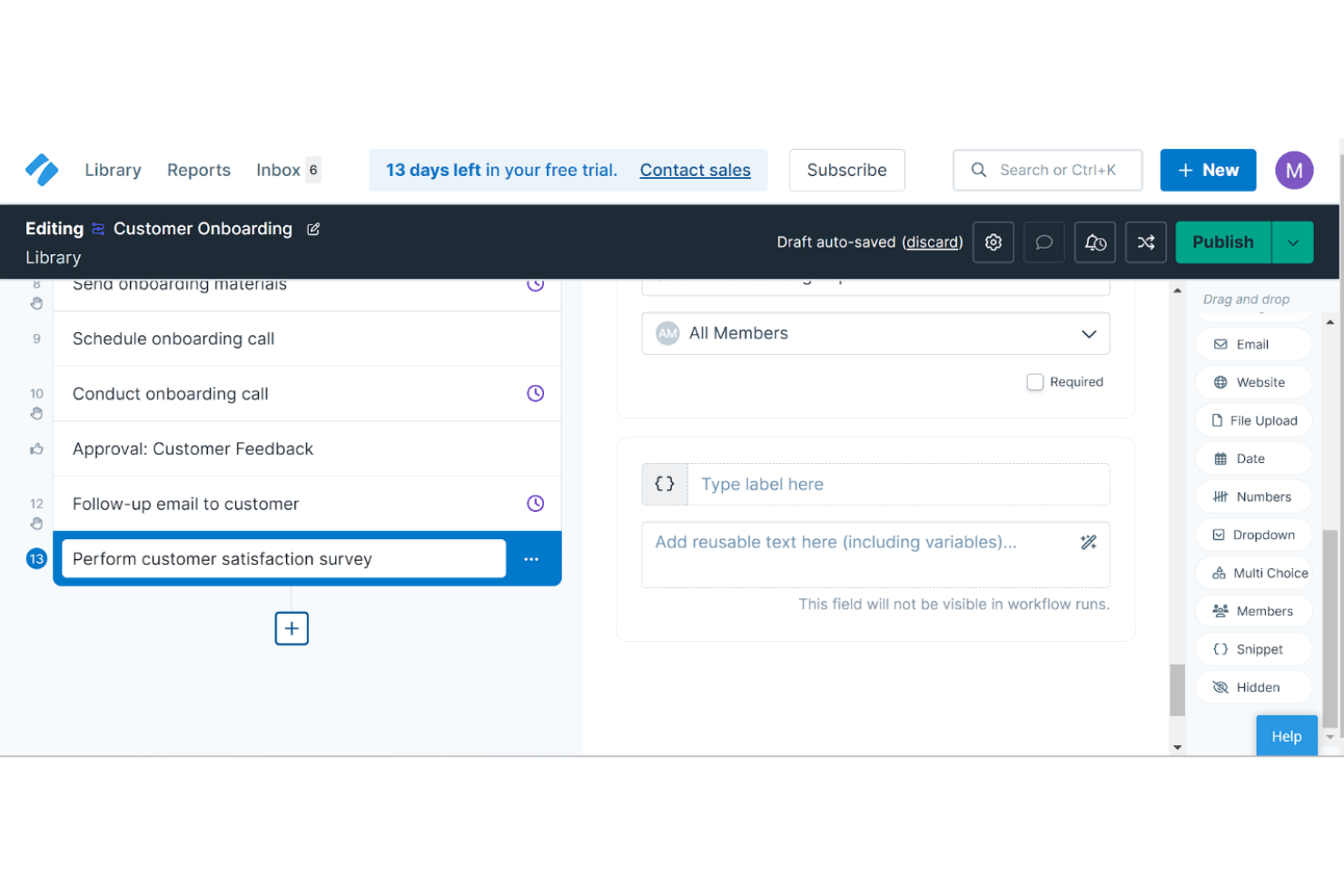
Process Street is a workflow and SOP management platform built around no-code process building, conditional logic automation, and an AI compliance agent that monitors and enforces process execution.
Who Is Process Street Best For?
Process Street suits operations managers in compliance-heavy industries like healthcare, financial services, and real estate who need structured, audit-ready process execution.
Why I Picked Process Street
Process Street earns its spot on my shortlist because of how it handles checklist-driven operations at scale. I like that every process, from new-hire onboarding to compliance audits, runs as a structured, enforced checklist with conditional logic that automatically skips or reveals steps based on prior answers. The Cora AI agent then monitors each run in real time, flagging skipped steps and overdue tasks without me having to chase anyone down.
Process Street Key Features
- Workflow analytics dashboard: Track process completion rates, overdue tasks, and user activity across all workflows.
- Public API access: Connect Process Street with custom systems to trigger or update workflows programmatically.
- Role-based access controls: Assign granular permissions so different users can view, edit, or run specific workflows.
- Document approval flows: Route SOPs or procedures through multi-step review and sign-off processes before publishing.
Process Street Integrations
Process Street offers native integrations with Slack, Microsoft Teams, Power Automate, and Make, and connects with Zapier. An API is available for custom integrations.
Pros and Cons
Pros:
- Approval workflows support audit trails
- Conditional logic customizes workflow steps
- Automated checklists enforce process compliance
Cons:
- Checklists lack visual flowchart design
- No process simulation or what-if modeling

Pipefy
Best for customizable workflow templates
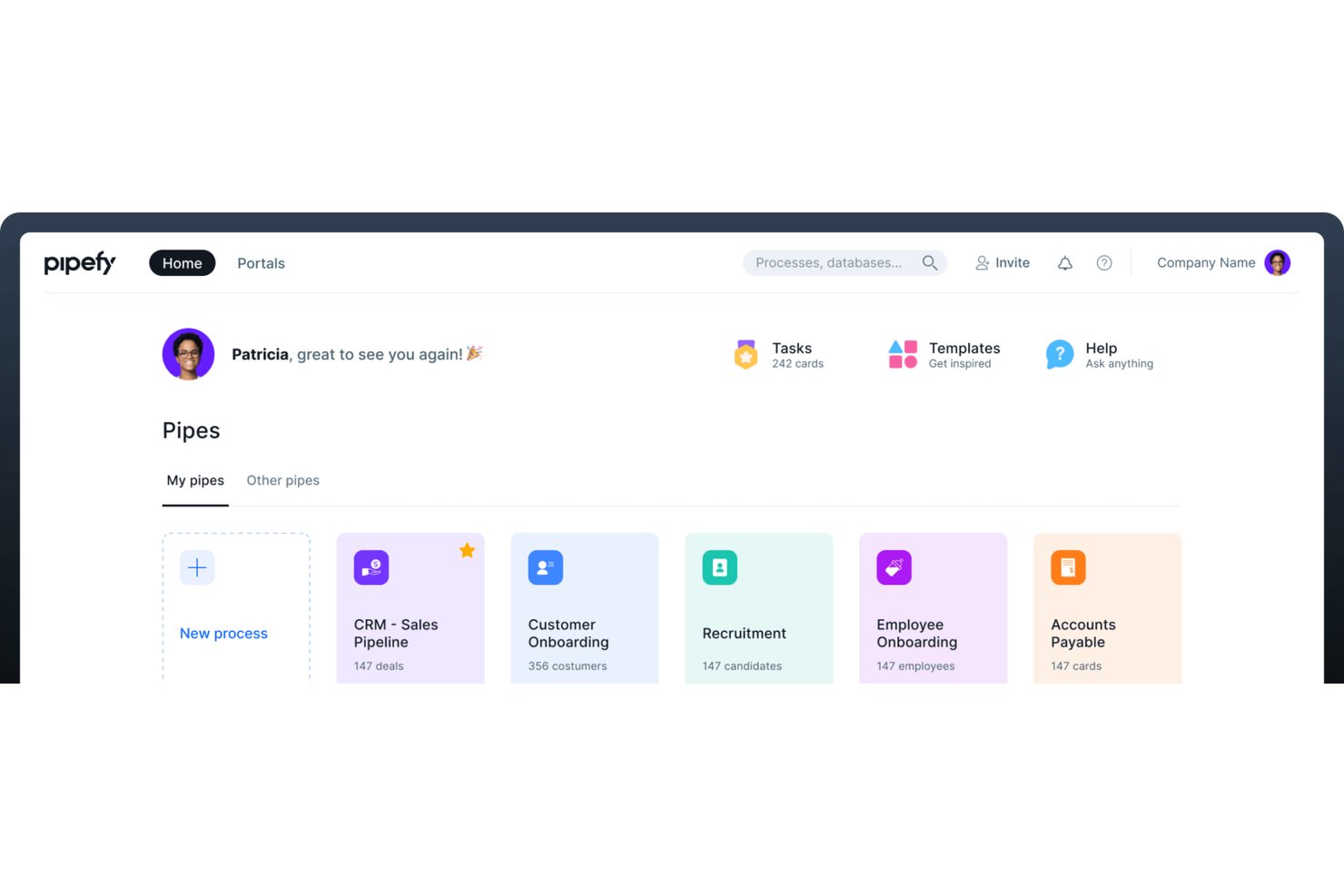
Pipefy is a no-code business process automation platform that lets teams design, automate, and monitor workflows across HR, procurement, finance, and operations using visual pipes, conditional logic, AI agents, and real-time KPI dashboards.
Who Is Pipefy Best For?
Pipefy is a strong fit for mid-market operations and business process teams that need to build and automate department-level workflows without relying on IT or engineering resources.
Why I Picked Pipefy
I've included Pipefy in my top picks because its workflow templates are genuinely built for specific business processes, not just blank canvases. Each template comes pre-configured with phases, form fields, and automation rules for processes like purchase requests, employee onboarding, and claims management. I can adjust phase logic, add conditional fields, and modify automation triggers directly inside the pipe builder, which keeps each template tightly aligned to how the actual process runs in practice.
Pipefy Key Features
- AI-powered automation studios: Automate routing, approvals, and actions with specialized AI models for processes like SRM and claims.
- Centralized request tracker: Manage all incoming process requests from one portal for total visibility.
- Role-based permissions: Control who can view, edit, or approve different workflow phases and process data.
- Real-time analytics dashboards: Monitor cycle times, bottlenecks, and workload distribution with customizable reports.
Pipefy Integrations
Pipefy offers native integrations with Salesforce, HubSpot, RD Station, Google Sheets, Slack, Shopify, Zendesk, Zenefits, and more. It also connects with Zapier and provides an API for custom integrations.
Pros and Cons
Pros:
- Dynamic forms and conditional process logic
- Extensive template library for common workflows
- Built-in AI agents for process optimization
Cons:
- Limited support for advanced BPMN modeling
- No process simulation or what-if analysis
Celonis
Best for real-time process analytics
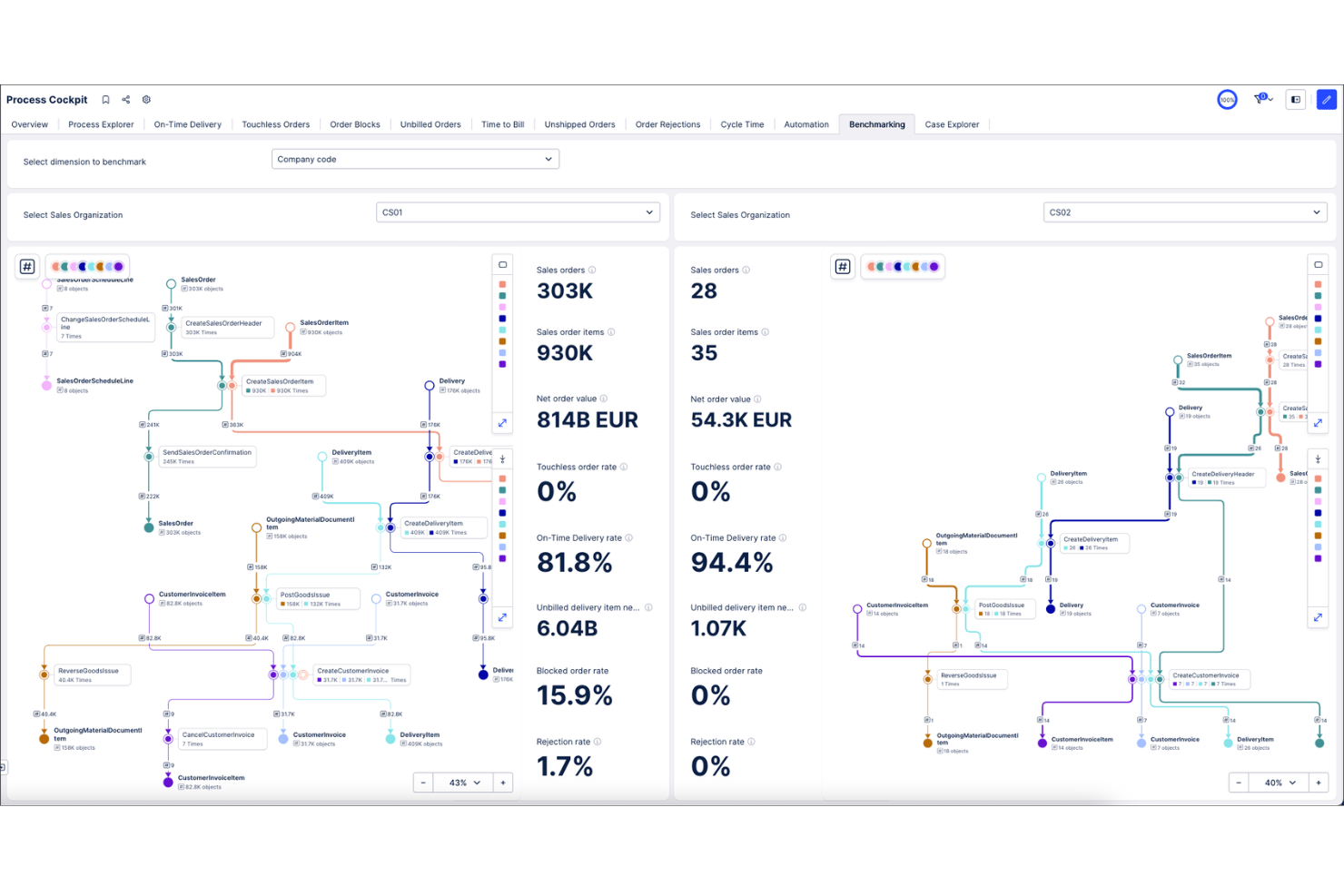
Celonis is a process intelligence platform that applies process mining, AI-driven analytics, and workflow automation to map, analyze, and optimize end-to-end business operations using live data from enterprise systems.
Who Is Celonis Best For?
Celonis is a strong fit for large enterprises running complex ERP environments, particularly those with dedicated operations or continuous improvement teams managing high-volume transactional processes.
Why I Picked Celonis
Celonis earns its spot on my shortlist because of how it handles real-time process analytics at scale. I particularly like the Insights Explorer and AI Co-pilots, which automatically surface patterns and flag exactly which variables are hurting a target KPI. In practice, that means I can pinpoint a bottleneck in an order-to-cash cycle without manually sifting through system logs or waiting on a scheduled report.
Celonis Key Features
- Object-centric process modeling: Supports multidimensional process mapping across interconnected business objects and systems.
- AI-powered process designer: Lets you visually design and manage enterprise process maps with AI-driven recommendations.
- Process adherence manager: Automatically overlays designed processes with real execution to identify deviations and compliance risks.
- Extensive connector catalog: Offers over 200 pre-built connectors for ERP, CRM, ITSM, and collaboration platforms.
Celonis Integrations
Celonis offers over 200 native integrations, including Jira, Coupa, Ironclad, Amazon S3, Google Sheets, and Confluence. An API is available for custom integrations.
Pros and Cons
Pros:
- Automatic root cause and pattern detection
- Real-time monitoring of process performance metrics
- Industry-leading process mining and analytics capabilities
Cons:
- Limited native support for business process modeling
- Implementation often requires significant IT resources

Nintex
Best for automated document generation
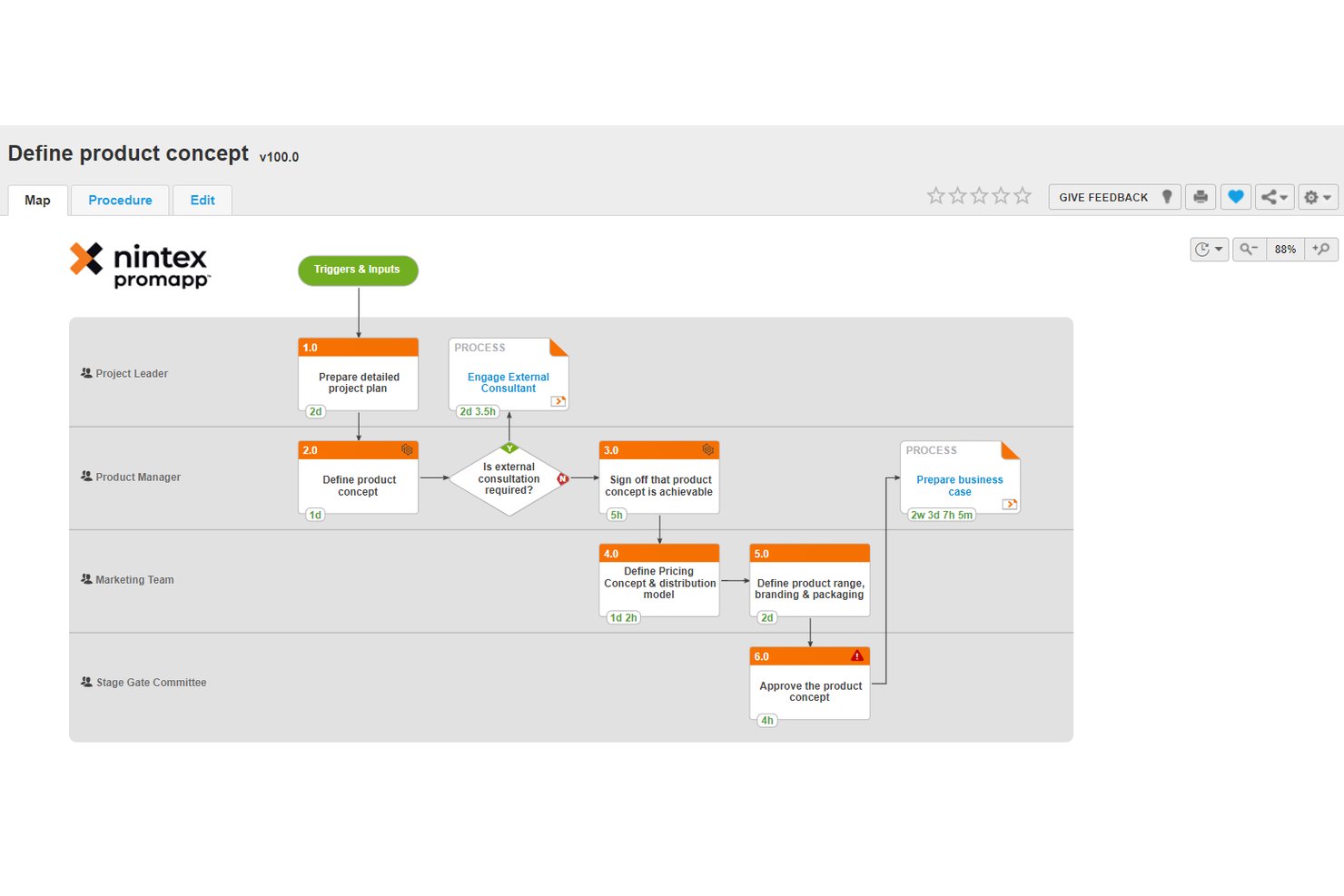
Nintex is a no-code process optimization platform that combines process mapping, workflow automation, document generation, robotic process automation, and eSignature into a single, unified environment.
Who Is Nintex Best For?
Nintex is a strong fit for enterprise and mid-market operations teams that need to document, automate, and govern complex business processes across departments.
Why I Picked Nintex
I picked Nintex as one of the best because its DocGen capability sits directly inside the workflow engine, not as a bolt-on feature. I can trigger contract or proposal generation automatically at a specific workflow step, pulling live data from connected systems to populate templates. That means my team isn't manually assembling documents after a process milestone, because the document is produced as part of the process execution itself.
Nintex Key Features
- Process mapping with Promapp: Map and document business processes with version controls and collaborative editing.
- Robotic process automation: Automate repetitive tasks and system handoffs using bots across applications.
- Workflow designer: Build rule-based workflows with drag-and-drop controls to orchestrate tasks and approvals.
- eSignature integration: Add digital signature steps directly into automated workflows and document cycles.
Nintex Integrations
Nintex offers native integrations across the Microsoft ecosystem, including Microsoft 365, SharePoint, and Azure, plus Salesforce and Docusign. An API is available for custom integrations.
Pros and Cons
Pros:
- Automated document creation from live data
- Built-in process mapping with versioning
- No-code workflow builder for business users
Cons:
- Bulk editing options are restrictive
- Limited process mining capabilities

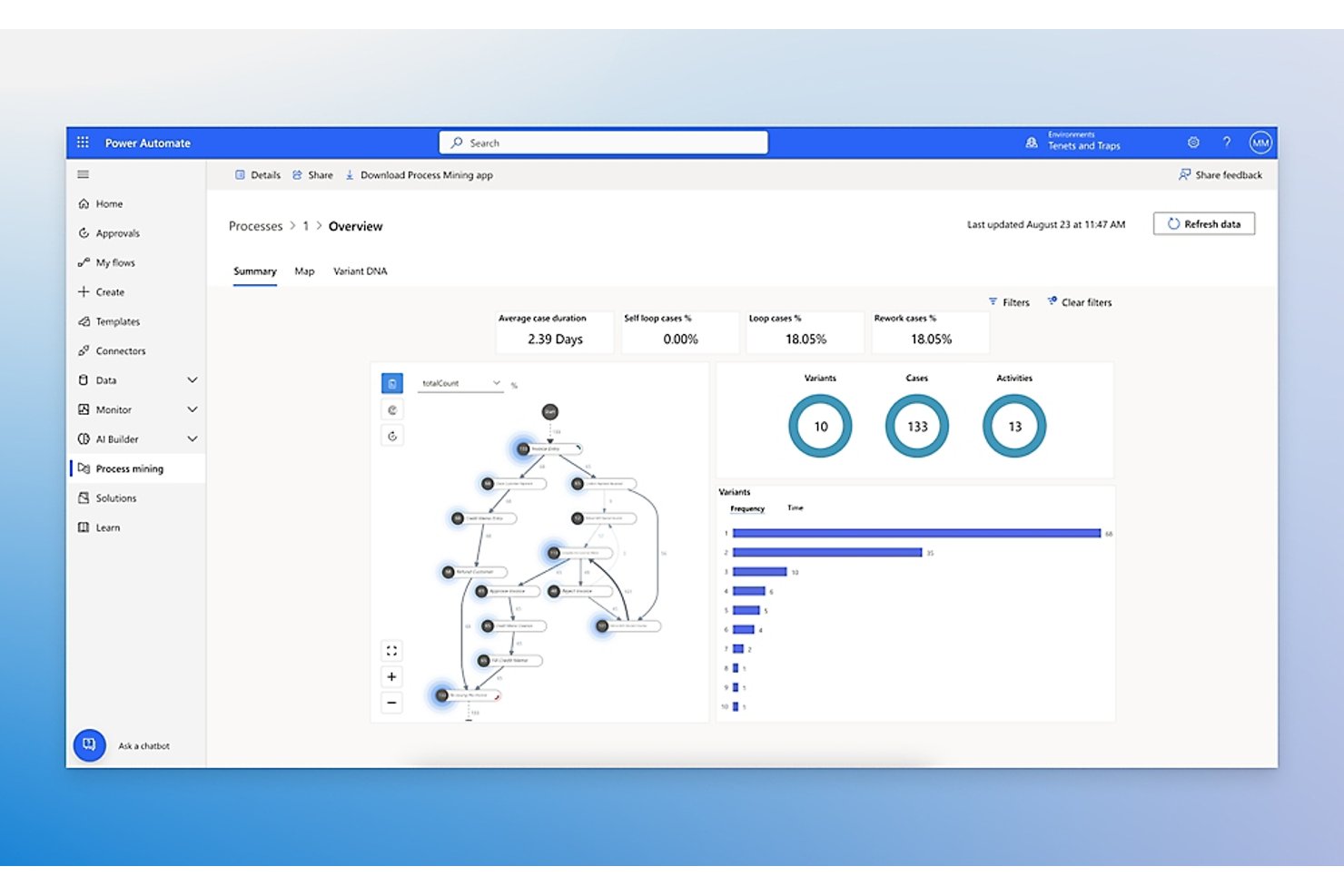
Microsoft Power Automate is a cloud-based automation platform that combines digital process automation, robotic process automation (RPA), and AI-driven process mining to discover, automate, and monitor business workflows.
Who Is Microsoft Power Automate Best For?
It's a strong fit for mid-size to enterprise organizations already standardized on Microsoft 365, Dynamics 365, or Azure who want to automate processes without leaving that ecosystem.
Why I Picked Microsoft Power Automate
Microsoft Power Automate earns its spot on my shortlist because of how tightly it fits into a Microsoft-first stack. I particularly like the approval flow builder, which routes sign-offs through Outlook or Teams without any custom development work. The process mining capability pulls event logs directly from Dynamics 365 or SharePoint and generates visualized process maps showing cycle times and bottleneck steps. I've used it to pinpoint exactly where handoffs slow down before rebuilding the flow entirely.
Microsoft Power Automate Key Features
- AI-powered task mining: Identifies patterns and manual steps from user activity data to suggest opportunities for automation.
- Hosted RPA bots: Runs unattended robotic process automations on Microsoft-managed virtual machines for scale and reliability.
- Centralized governance dashboard: Gives admins controls over flow approvals, data loss prevention, and environment management.
- 1,400+ prebuilt connectors: Lets users automate tasks across popular SaaS, legacy, and on-premises applications without custom code.
Microsoft Power Automate Integrations
Microsoft Power Automate has native integrations across the Microsoft ecosystem, including Microsoft 365 and Azure. It also offers 1,400+ certified connectors to tools like SAP, Salesforce, ServiceNow, Oracle, Docusign, and Jira, with an API available for custom integrations.
Pros and Cons
Pros:
- Enterprise governance with Managed Environments
- Automated approvals through Microsoft Teams and Outlook
- Built-in process and task mining tools
Cons:
- No native process simulation or what-if analysis
- Lacks true BPMN process modeling capability

Appian
Best for low-code workflow automation
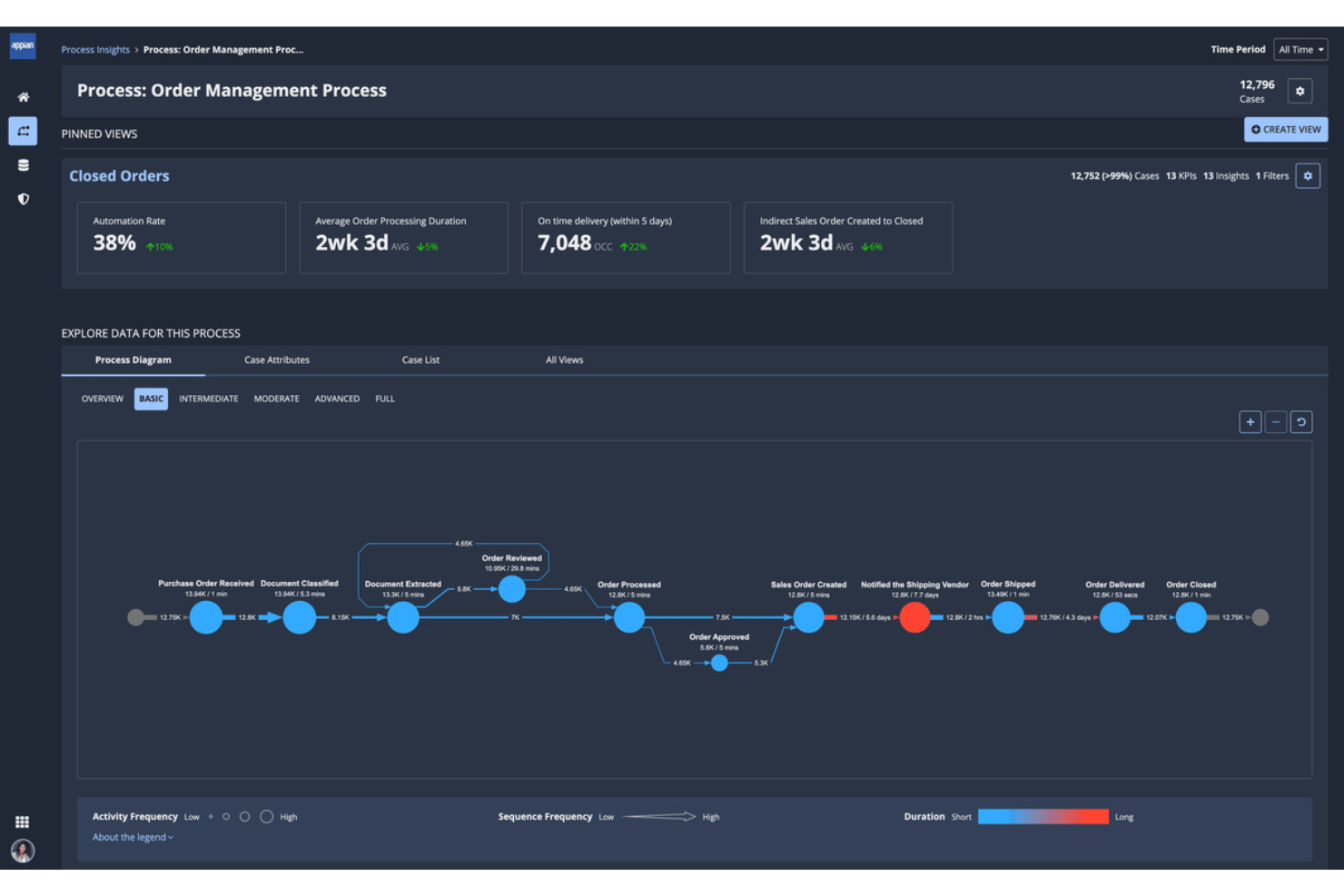
Appian is a low-code process automation platform that combines BPM, process mining, RPA, and AI-driven workflow orchestration to design, execute, and monitor end-to-end business processes.
Who Is Appian Best For?
Appian is a strong fit for large enterprises in regulated industries like finance, healthcare, and government that need governed, auditable process automation at scale.
Why I Picked Appian
I picked Appian as one of the best because its low-code process designer lets my team build and modify BPMN-based workflows without waiting on developers. What really sets it apart is Process HQ, which layers process mining on top of live execution data to surface bottlenecks automatically. I can see exactly where approvals are stalling across hundreds of running process instances, with AI-generated recommendations on what to fix first.
Appian Key Features
- Data Fabric: Connects and unifies data from multiple sources for use in process models without data migration.
- Robotic process automation: Lets you run bots to automate repetitive tasks across legacy and modern systems.
- Case Management Studio: Provides tools for building structured and unstructured case management solutions.
- AI Copilot for developers: Uses generative AI to help design, build, and modify process logic within the platform.
Appian Integrations
Appian offers native integrations with Twilio, Snowflake, Apache Kafka, and SQL Server. It provides cloud integrations across AWS, Azure, and Google Cloud, and includes an API for custom integrations.
Pros and Cons
Pros:
- Supports enterprise-grade security and compliance
- Built-in AI for process recommendations
- Workflow automation requires little custom code
Cons:
- Limited options for advanced UI customization
- Reports of slower app deployment speeds
Kissflow
Best for intuitive drag-and-drop workflows
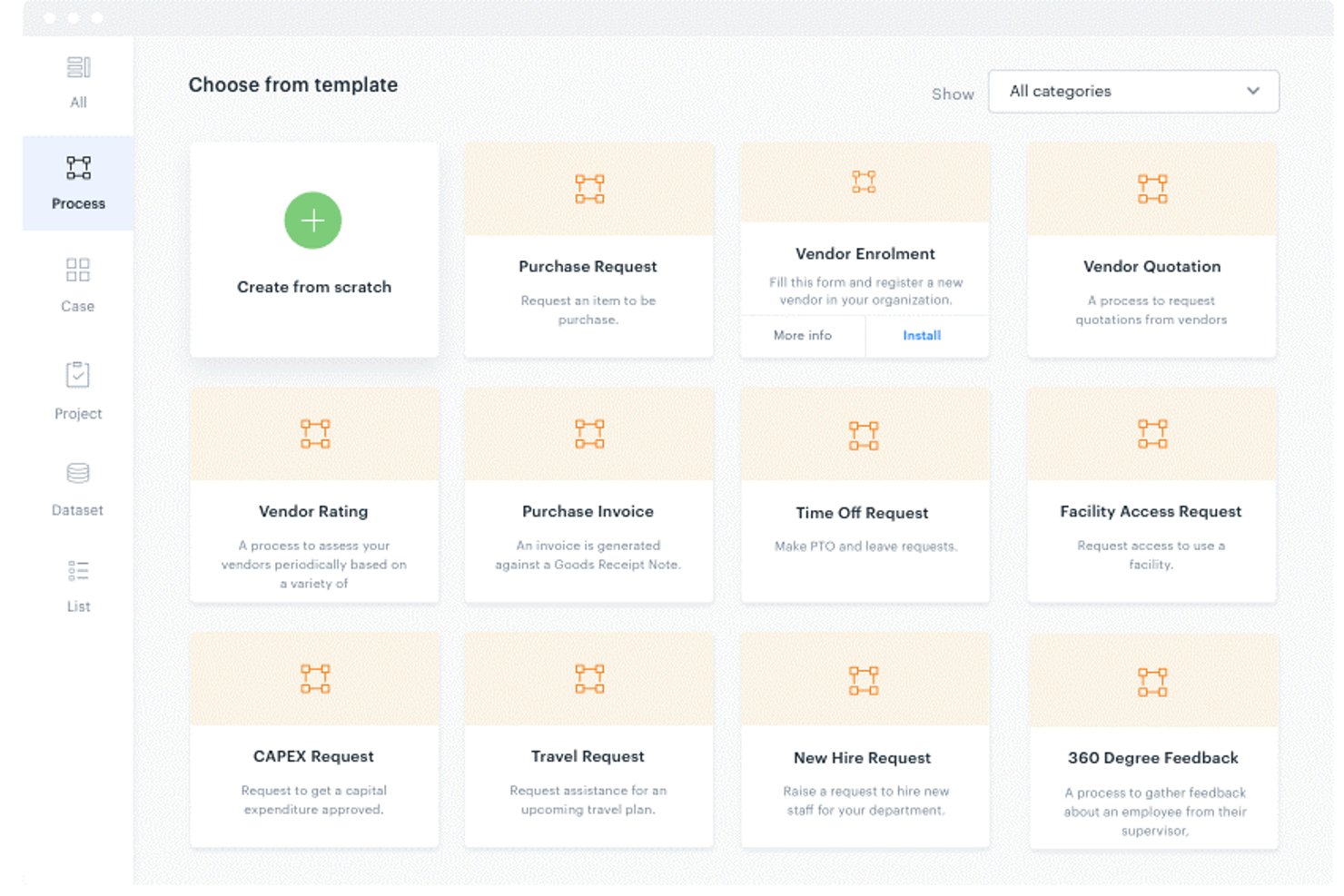
Kissflow is a low-code BPM platform that lets business users visually design, automate, and monitor end-to-end workflows using a drag-and-drop process designer, conditional logic, and AI-assisted process modeling.
Who Is Kissflow Best For?
Kissflow is a strong fit for mid-market and enterprise operations teams where business users—not developers—need to own and manage process workflows independently.
Why I Picked Kissflow
Kissflow earns its spot on my shortlist because the drag-and-drop Process Designer genuinely removes the barrier between having a process idea and running it in production. I can map parallel approval branches, set per-step time limits, and configure auto-escalation paths all from the same visual canvas, without touching a line of code. The AI-assisted workflow generation is also worth noting: I can describe a process in plain language and get a working draft in under two minutes.
Kissflow Key Features
- Form builder: Create forms with conditional logic, field validation, and calculated fields for structured data collection.
- Native integrations: Connect with ERP, CRM, HRMS, and 8,000+ apps via Zapier or API to sync process data.
- Role-based access control: Set granular permissions and manage security with SSO and audit trails.
- Live analytics dashboards: Track cycle times, bottlenecks, and SLA compliance with real-time reporting.
Kissflow Integrations
Kissflow offers native integrations with Google Workspace, Microsoft 365, SAP, Salesforce, and Slack. It connects with Zapier and provides an API for custom integrations.
Pros and Cons
Pros:
- Built-in SLA tracking for task cycles
- AI-powered flow mapping detects process issues
- Process designer allows rapid workflow changes
Cons:
- Advanced reporting options are limited
- No support for process simulation modeling

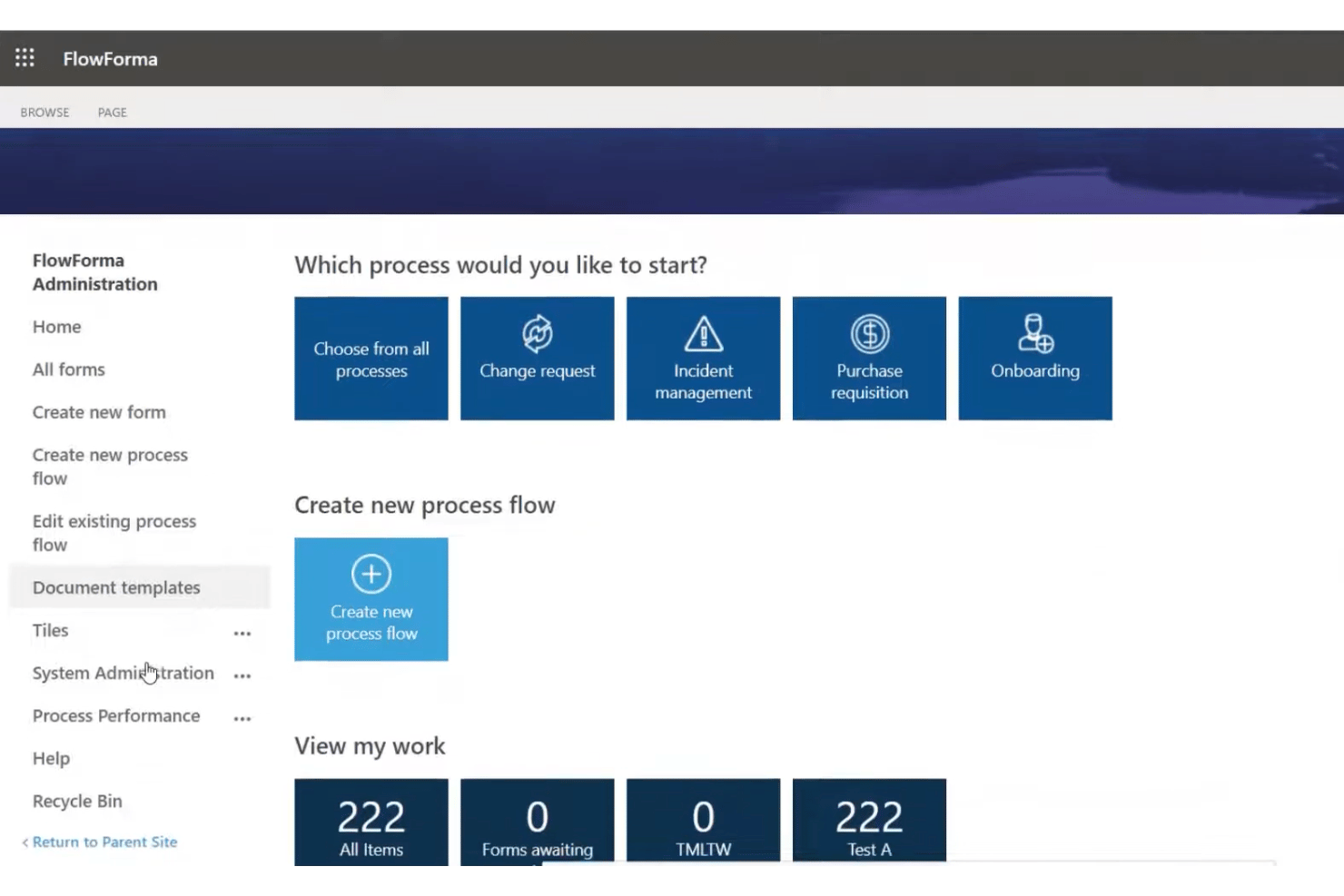
FlowForma is a no-code process automation platform built natively inside Microsoft 365 that lets business users design, automate, and manage end-to-end workflows using forms, approvals, document generation, and AI-assisted process building.
Who Is FlowForma Best For?
FlowForma is a strong fit for mid-size to enterprise organizations already running on Microsoft 365 that want business users, not developers, to own process automation.
Why I Picked FlowForma
I picked FlowForma as one of the best because the no-code process building experience is genuinely distinct from most automation platforms. FlowForma Copilot lets me describe a process in plain language and then generates the workflow, forms, and approval routing automatically. I also like the AI Agents feature, which reads uploaded documents, extracts structured data, and feeds it directly into a live process, cutting out manual data entry steps.
FlowForma Key Features
- Drag-and-drop workflow builder: Design custom workflows visually without writing any code.
- Document generation: Automatically create Word or PDF documents from process data and templates.
- Governance and permissions: Control access with role-based permissions and maintain a complete audit trail for compliance.
- Mobile app: Allow users to complete forms, approvals, and process tasks from mobile devices.
FlowForma Integrations
FlowForma offers native integrations across the Microsoft ecosystem, including Microsoft 365, SharePoint, Teams, Outlook, Power Automate, and Azure SQL, and provides an API for custom integrations.
Pros and Cons
Pros:
- Role-based workflow permissions and governance
- Automated document generation from workflow data
- Built natively on Microsoft 365 architecture
Cons:
- Lacks process simulation and what-if analysis
- No BPMN 2.0 or process mapping
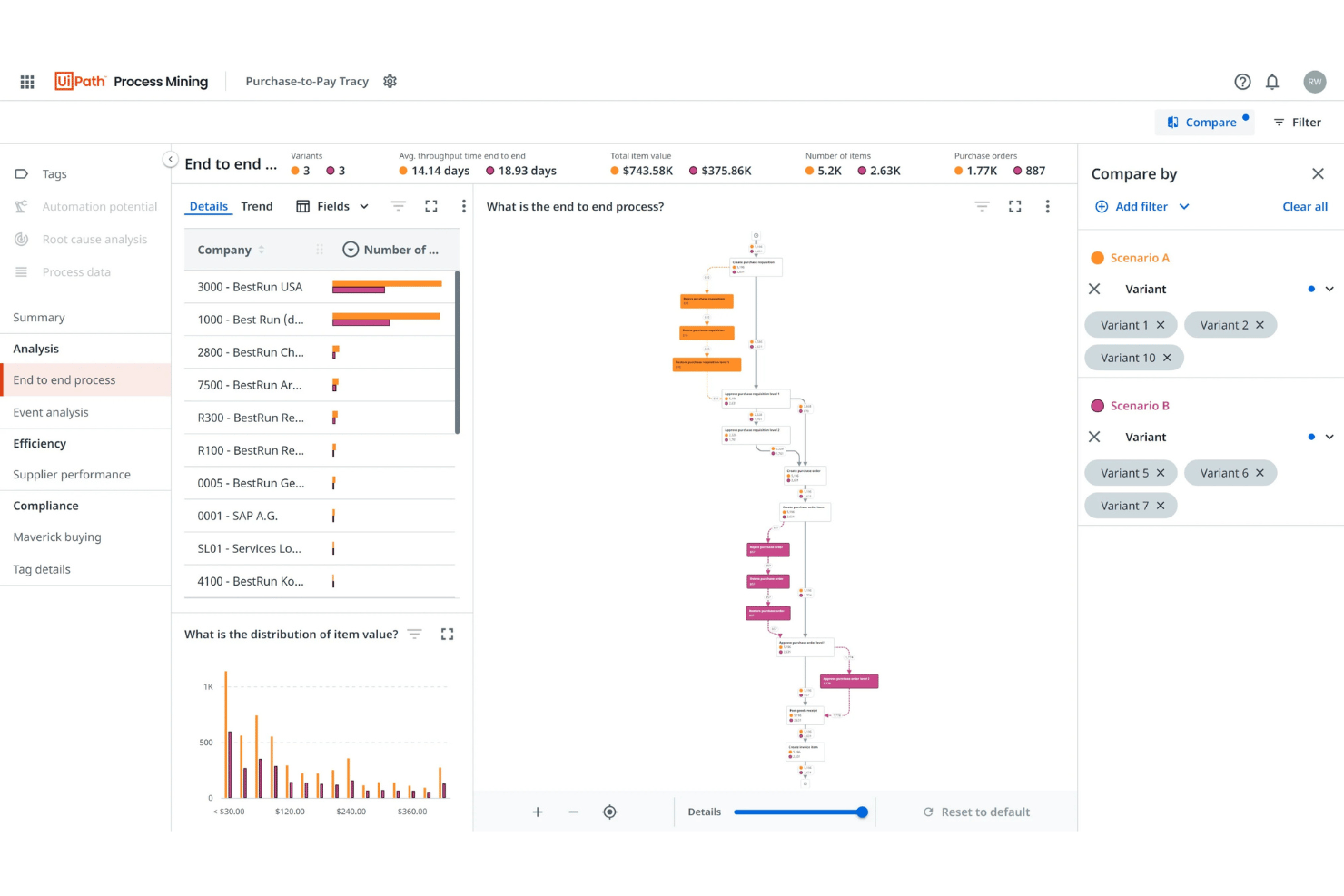
UiPath Process Mining is a process intelligence platform that uses data from enterprise systems to automatically discover, visualize, and monitor end-to-end business processes, surfacing bottlenecks, deviations, and automation opportunities through interactive dashboards.
Who Is UiPath Process Mining Best For?
It's a strong fit for mid-to-large enterprises running complex, multi-system operations who need data-driven visibility into how their processes actually run.
Why I Picked UiPath Process Mining
UiPath Process Mining earns its spot on my shortlist because of how it handles process discovery at scale. What I find genuinely impressive is the TRACY algorithm, UiPath's proprietary approach to model-based mining that cuts through noisy event log data to produce clean, readable process graphs without manual cleanup. I also like the conformance checking feature, which continuously flags where real-world execution deviates from the intended process model, giving my team a live view of where things are actually breaking down.
UiPath Process Mining Key Features
- Automatic process discovery: Generates visual maps of real business processes using event log data from core enterprise systems.
- Customizable dashboarding: Lets you build and adjust interactive dashboards around any business process metric or KPI.
- 50+ enterprise system connectors: Connects natively to platforms like SAP, Salesforce, Oracle, ServiceNow, and Microsoft Dynamics.
- Role-based access control: Restricts data visibility and editing permissions based on user roles within your organization.
UiPath Process Mining Integrations
UiPath Process Mining offers native integrations with SAP, Salesforce, and ServiceNow, connects with other UiPath products like Task Mining and Automation Hub, and provides an API for custom integrations.
Pros and Cons
Pros:
- Direct integration with UiPath automation suite
- Real-time process conformance monitoring
- Advanced process discovery with TRACY algorithm
Cons:
- Simulation features only in enterprise tier
- Implementation cycle can be several months

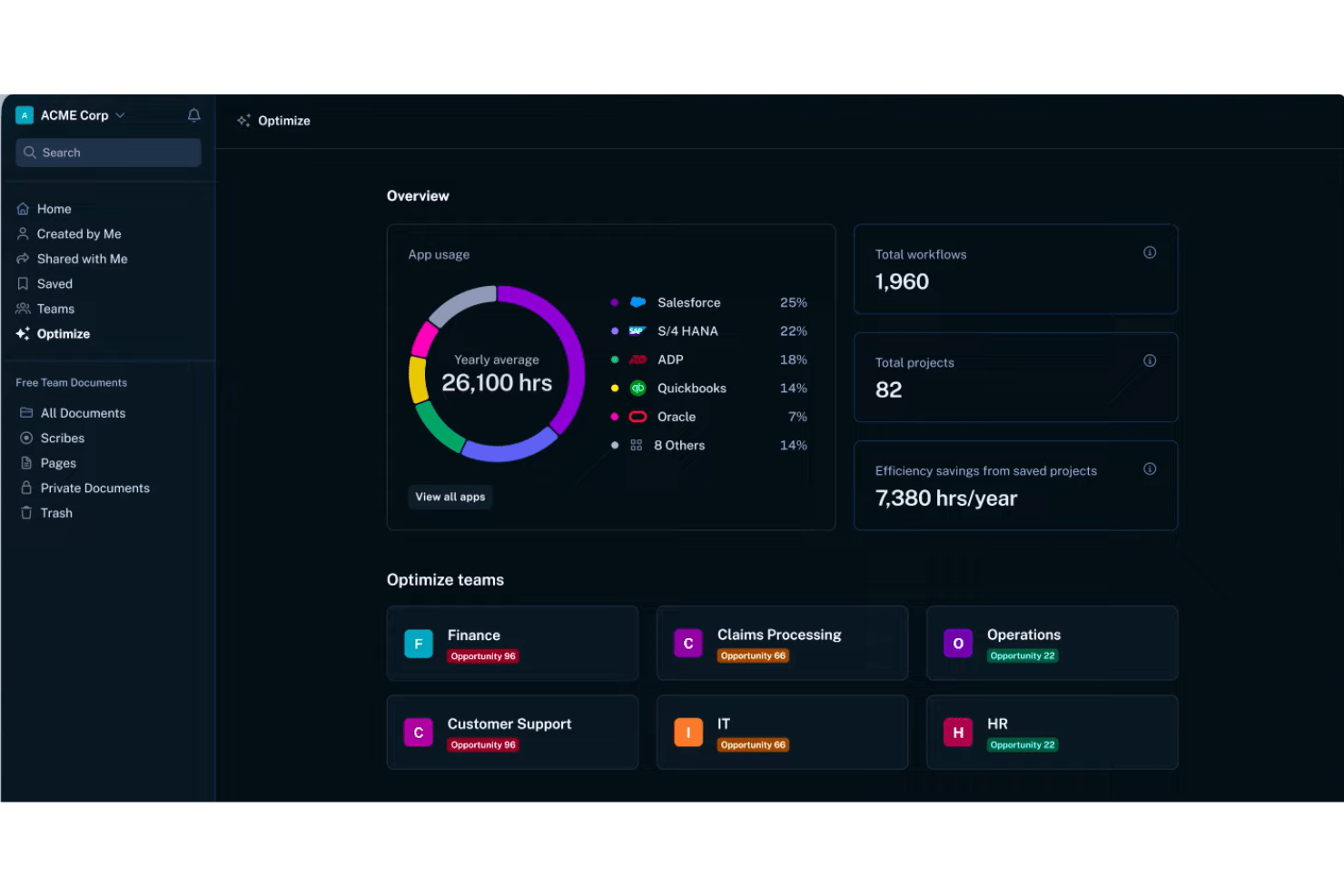
Scribe Optimize is an AI-powered workflow discovery tool that automatically captures team workflows, generates process maps, and identifies automation opportunities and inefficiencies across enterprise software environments.
Who Is Scribe Optimize Best For?
Scribe Optimize is a strong fit for enterprise operations and continuous improvement teams leading AI adoption or digital transformation initiatives.
Why I Picked Scribe Optimize
I've included Scribe Optimize in my top picks because it surfaces automation opportunities from real workflow data, not from interviews or manual mapping sessions. I like that its AI agents identify which workflows are the strongest automation candidates based on actual frequency and time cost. It also generates ROI projections before any automation work begins, so the business case is grounded in real numbers rather than estimates.
Scribe Optimize Key Features
- Workflow capture across approved apps: Automatically records user actions in software tools to build a workflow dataset.
- Always-up-to-date process maps: Instantly generates visual process maps from real-time workflow activity.
- AI Q&A agents: Lets users ask direct questions about workflows, inefficiencies, and inconsistencies.
- Integration with enterprise platforms: Connects with Confluence, Slack, Microsoft Copilot, and custom enterprise APIs for data sharing and workflow visibility.
Scribe Optimize Integrations
Scribe Optimize offers native integrations with Confluence, Slack, and Microsoft Copilot. An API is available for custom integrations, and it connects with enterprise search platforms.
Pros and Cons
Pros:
- ROI projections for recommended automation candidates
- Auto-generated process maps from live user activity
- AI surfaces hidden workflow bottlenecks fast
Cons:
- Lacks traditional BPMN process modeling features
- Cannot execute automations or workflow changes
Diğer Süreç Optimizasyonu Yazılımları
Kısa listeme giremeyen ancak yine de göz atmaya değer bazı ek süreç optimizasyonu yazılımı seçenekleri şunlardır:
- Quickbase
For flexible data-driven automation
- Miro
For visual process mapping
- QPR ProcessAnalyzer
For operational context in AI workflows
- Pega
For end-to-end workflow adaptability
- Qntrl
For departmental process automation
- Bizagi
For enterprise orchestration with AI
- IBM Process Mining
For AI-driven workflow insights
- SAP Signavio
For collaborative enterprise transformation
- iGrafx
For integrated process intelligence


How I Evaluate Process Optimization Software
I split my evaluation into two layers: the baseline requirements a tool must meet and the differentiators—like process mining and simulation—that set one platform apart from another.
Core Functionality (Table Stakes for This List)
When I'm selecting tools for my list, I rank each one on a scale from 0 (does not offer the functionality) to 5 (excels in this area) for each core functionality listed below. Then, I calculate the tool's total score into a percentage. Each tool needs to achieve a minimum total score of 65% to be considered for inclusion.
- Process Mapping & Modeling: I evaluate whether the tool supports BPMN or swim lane notation so teams can document workflows like order-to-cash or incident resolution clearly.
- Workflow Automation: Each tool should let you automate task handoffs and approvals with conditional logic, not just basic linear sequences.
- Process Analytics & KPIs: I look for dashboards that track cycle time, throughput, and status breakdowns so you can spot trends without exporting data manually.
- Bottleneck Detection: The platform should surface delays and deviations automatically, like flagging approval steps that consistently stall a sprint release process.
- Process Simulation: I check whether you can model proposed changes and compare projected outcomes before rolling them out across teams or departments.
- Integration With Work Systems: Tools need to connect with project management, ERP, or collaboration platforms your team already uses to pull in real operational data.
Once I have a list of tools that meet the criteria, I consider what sets each platform apart.
Differentiating Factors (What Sets Vendors Apart)
Here's how I compare and contrast different vendors:
Standout Features
Process mining is a major differentiator—I look for tools that ingest event logs from systems like SAP or ServiceNow and reconstruct actual process flows, not just the ones teams documented. Digital twin simulation matters when you need to forecast how a change to your release process will affect cycle time before rolling it out. I also evaluate whether AI-powered recommendations suggest specific next-best actions based on historical patterns, rather than just flagging issues.
Beyond Features
Integration ecosystem matters—I check whether a platform offers pre-built connectors for the systems generating your event data, like SAP or Salesforce, rather than relying solely on custom API work. Time-to-value is another key factor. Vendors with pre-built templates for common flows like procure-to-pay can get your team from data connection to first insight in weeks, not months. I also evaluate compliance posture, especially audit trails and data masking for event logs that may expose sensitive information.
Süreç Optimizasyonu Yazılımı Nasıl Seçilir?
Uzun özellik listeleri ve karmaşık fiyatlandırma yapılarına kapılmak kolaydır. Kendinize özgü yazılım seçim sürecinizde ilerlerken odağınızı korumanıza yardımcı olmak için göz önünde bulundurmanız gereken faktörleri aşağıdaki kontrol listesinde bulabilirsiniz:
| Faktör | Dikkat Edilmesi Gerekenler |
|---|---|
| Ölçeklenebilirlik | Yazılım, performansı yavaşlatmadan veya platform sınırlarına takılmadan artan etkinlik verilerini, kullanıcıları ve genişleyen süreçleri destekleyecek mi? |
| Entegrasyonlar | Araç, proje, ERP veya iş birliği sistemlerinize bağlanıyor mu? Yerel bağlayıcılar ile manuel veya özel API çalışması gerektiren seçenekleri kontrol edin. |
| Özelleştirilebilirlik | Süreç şablonlarını, kuralları veya gösterge panolarını ekibinizin kendine özgü iş akışlarını ve dilini yansıtacak şekilde uyarlayabilir misiniz? |
| Kullanım kolaylığı | İş birimi kullanıcıları ve analistler aracı hızlıca öğrenebilecek mi? Görsel düzenleyiciler, uygulama içi ipuçları ve anlaşılır belgeler arayın. |
| Uygulama ve kullanıma alma | Kurulum ne kadar zaman ve kurum içi uzmanlık gerektiriyor? Ortalama uygulama sürelerini ve tedarikçi eğitiminin dahil olup olmadığını sorun. |
| Maliyet | Kullandığınız katmanda gerçek maliyet nedir? Entegrasyonlar, veri hacmi veya premium destek için ek ücretlere dikkat edin. |
| Güvenlik önlemleri | Tedarikçi, hassas süreç günlükleri ve kullanıcı eylemleri için denetim izleri, veri maskeleme ve sertifikalı veri koruması sunuyor mu? |
| Destek erişilebilirliği | Destek hizmeti dahil mi, 7/24 mü sunuluyor, yoksa çalışma saatleriyle mi sınırlı? Kuruluşunuzun saat dilimini, self servis kaynaklarını ve sorunun üst makama aktarılması seçeneklerini değerlendirin. |
Süreç Optimizasyonu Yazılımı Nedir?
Süreç optimizasyonu yazılımı; görevleri otomatikleştirerek, verimsizlikleri tespit ederek ve süreç performansını izleyerek işletme veya proje iş akışlarını görselleştirmenize, analiz etmenize ve iyileştirmenize yardımcı olan bir platformdur. Bu araçlar; iş akışlarını haritalandırması, çevrim sürelerini ölçmesi ve departmanlar genelinde sürekli iyileştirme sağlamak amacıyla süreç değişikliklerini test etmesi gereken ekipler için tasarlanmıştır.
Özellikler
Süreç optimizasyonu yazılımı seçerken aşağıdaki temel özelliklere dikkat edin:
- Süreç haritalama ve modelleme: Kullanıcıların, ekipler arasındaki iletişimin net olması için BPMN veya akış şemaları gibi standartlaştırılmış gösterimleri kullanarak iş akışlarını görsel olarak belgelemelerini ve yapılandırmalarını sağlar.
- İş akışı otomasyonu: Manuel görevleri, onayları ve devirleri kurallara dayalı otomatik dizilere dönüştürmenizi sağlayarak hataları azaltır ve tutarlılığı artırır.
- Analiz ve KPI izleme: Değişikliklerin etkisini ölçebilmeniz için çevrim süresi, iş hacmi ve darboğazlar gibi süreç ölçümlerini izleyen gösterge panoları ve raporlar sunar.
- Darboğaz ve verimsizlik tespiti: Süreçlerinizdeki yavaşlamaları, gecikmeleri veya sapmaları ortaya çıkararak ekiplerin iyileştirme alanlarını hızlıca belirlemesine yardımcı olur.
- Simülasyon veya varsayım analizi: Önerilen süreç değişikliklerini canlı ortamlarda uygulamaya almadan önce modellemek, test etmek ve karşılaştırmak için bir deneme alanı sunar.
- Entegrasyon özellikleri: Gerçek zamanlı verileri almak ve süreçleri güncel tutmak için proje yönetimi, ERP ve iş birliği platformlarına bağlanır.
- Sürüm kontrolü ve denetim izleri: Süreç güncellemelerini ve kullanıcı eylemlerini zaman içinde izleyerek uyumluluğu ve hesap verebilirliği destekler.
- Kullanıcı erişim kontrolleri: Yöneticilerin izinleri ayarlamasını sağlayarak ekip üyelerinin yalnızca rollerine uygun veri ve iş akışlarına erişmesini garanti eder.
- Şablonlar ve hızlandırıcılar: Dağıtımı ve standartlaştırmayı hızlandırmak için önceden oluşturulmuş süreç şablonları ve sektöre özel hızlandırıcılar sunar.
- Mobil ve bulut erişimi: Dağıtık veya hibrit ekipler için kullanıcıların süreçleri her konumdan tasarlamasına, izlemesine ve iyileştirmesine olanak tanır.
Faydalar
Süreç optimizasyonu yazılımını uygulamak ekibiniz ve işletmeniz için çeşitli faydalar sağlar. Yararlanabileceğiniz bazı avantajlar şunlardır:
- Geliştirilmiş iş akışı görünürlüğü: Görsel süreç haritalama ve analiz, verimsizlikleri belirlemeyi ve ekipler genelinde performansı izlemeyi kolaylaştırır.
- Daha hızlı süreç yürütme: İş akışı otomasyonu, manuel devirleri ve tekrarlayan adımları ortadan kaldırarak proje veya işletme döngülerini hızlandırır.
- Veriye dayalı karar alma: Gerçek zamanlı gösterge panoları ve simülasyon araçları, ekiplerin ölçülebilir KPI'lara dayalı bilinçli değişiklikler yapmasını sağlar.
- Azalan operasyonel maliyetler: Darboğazları tespit ederek ve görevleri basitleştirerek ekipler kaynak tahsisini optimize edebilir ve gereksiz harcamaları azaltabilir.
- Geliştirilmiş hesap verebilirlik: Sürüm kontrolü, denetim izleri ve erişim kontrolleri; süreç değişikliklerini kimin yaptığının ve neden yaptığının net bir şekilde izlenmesini ve uyumluluğu sağlar.
- Daha yüksek uyarlanabilirlik: Simülasyon ve modelleme özellikleri, tam kullanıma almadan önce süreç iyileştirmelerini minimum riskle test etmenizi sağlar.
- Daha güçlü sistem entegrasyonu: Proje yönetimi ve ERP araçlarıyla bağlantılar, iş akışı verilerinizi daha kolay yönetim ve analiz için merkezileştirir.
Maliyetler & Fiyatlandırma
Süreç optimizasyonu yazılımı seçmek, mevcut çeşitli fiyatlandırma modellerinin ve planların anlaşılmasını gerektirir. Maliyetler; özelliklere, ekip büyüklüğüne, eklentilere ve daha birçok unsura bağlı olarak değişir. Aşağıdaki tablo, süreç optimizasyonu yazılımı çözümlerinde yaygın planları, ortalama fiyatlarını ve genellikle sunulan özellikleri özetlemektedir:
Süreç Optimizasyonu Yazılımı İçin Plan Karşılaştırma Tablosu
| Plan Türü | Ortalama Fiyat | Yaygın Özellikler |
|---|---|---|
| Ücretsiz Plan | $0 | Sınırlı süreç haritalama, temel analiz, topluluk desteği ve kısıtlı kullanıcı kontenjanı. |
| Kişisel Plan | $10–$30/kullanıcı/ay | Süreç modelleme, küçük projeler için otomasyon, raporlama, e-posta desteği ve temel entegrasyonlar. |
| İşletme Planı | $25–$60/kullanıcı/ay | Çok kullanıcılı erişim, iş akışı otomasyonu, gösterge tablosu analizleri, önceden oluşturulmuş şablonlar ve geliştirilmiş güvenlik. |
| Kurumsal Plan | $60–$150/kullanıcı/ay | Gelişmiş süreç madenciliği, kurumsal entegrasyonlar, yapay zekâ önerileri, role dayalı kontroller ve öncelikli destek. |
Süreç Optimizasyonu Yazılımı SSS
Süreç optimizasyonu yazılımı hakkında sık sorulan soruların bazı yanıtları:
Süreç optimizasyonu yazılımı, standart iş akışı araçlarından nasıl farklıdır?
Süreç optimizasyonu yazılımı, karmaşık süreçlerdeki darboğazları belirlemek için derinlemesine veri analizi, süreç madenciliği ve senaryo simülasyonu sunarak temel iş akışı otomasyonunun ötesine geçer. Yalnızca görevleri otomatikleştirmek yerine, genel süreç verimliliğini artırmak, ürün kalitesini iyileştirmek ve uzun vadeli kârlılığı yükseltmek için uçtan uca iş akışlarını ölçer.
Süreç optimizasyonu yazılımı mevcut araçlarımla entegre olabilir mi?
Evet, çoğu çözüm proje yönetimi, ERP ve iş birliği platformlarıyla entegrasyonlar sunar; bunlara genellikle SAP, Salesforce ve ServiceNow gibi başlıca sistemler için önceden oluşturulmuş bağlayıcılar da dahildir. Bu entegrasyonlar departmanlar arasında gerçek zamanlı bildirimleri tetikleyebilir ve süreç kontrolünü iyileştirebilir.
Süreç optimizasyonu yazılımı küçük ekipler için mi yoksa yalnızca büyük işletmeler için mi uygundur?
Süreç optimizasyonu yazılımı hem küçük ekiplere hem de büyük işletmelere fayda sağlayabilir; ancak gelişmiş analiz ve otomasyon araçları, ölçek büyüdükçe veya karmaşık iş akışları kullanıldığında daha fazla değer sunma eğilimindedir. Kuruluşlar, mevcut süreçlerini belirlenmiş temel performans göstergeleriyle karşılaştırarak gereksiz kesinti sürelerini ortadan kaldırabilir, müşteri memnuniyetini artırabilir ve sürdürülebilirlik hedeflerini ilerletebilir.
Uygulama genellikle ne kadar sürer?
Uygulama süreleri sağlayıcıya ve dağıtım kapsamına göre değişir; ancak birçok çözüm, aylar içinde değil haftalar içinde operasyonel verimlilikte ölçülebilir iyileştirmeler sağlamak için önceden oluşturulmuş şablonlar ve işe alıştırma desteği sunar.
Genellikle hangi veri güvenliği önlemleri bulunur?
Önde gelen platformlar, güvenlik standartlarına uygun olarak hassas iş akışı ve olay günlüğü verilerini korumak için denetim izleri, şifreleme, role dayalı erişim ve veri maskeleme sunar.
Bu yazılım Lean veya Six Sigma gibi süreç iyileştirme çerçevelerini destekliyor mu?
Evet, birçok araç sürekli iyileştirme metodolojileriyle uyumlu özellikler içerir. Bu da temel paydaşları performans hedefleri konusunda aynı hizaya getirirken Lean, Six Sigma veya benzer çerçeveler kapsamında süreçleri belgelemeyi, ölçmeyi ve optimize etmeyi kolaylaştırır.