

2026’nın En İyi 10 Müşteri Kaynak Yönetimi Yazılımı

En İyi Müşteri Kaynak Yönetimi Yazılımları Kısa Listesi


Çok sayıda müşteri kaynak yönetimi yazılımı seçeneği olduğundan doğru olanı seçmek zor olabilir. Müşteri ilişkilerini yönetmek ve satış sürecinizi etkili bir şekilde ilerletmek istiyorsunuz, ancak şu soru hâlâ geçerliliğini koruyor: Hangi yazılım size en iyi şekilde hizmet edecek?
Sizi anlıyorum ve bu süreçte size rehberlik etmek için buradayım! Çeşitli kaynak ve proje yönetimi araçlarıyla ilgili kapsamlı deneyimimden yararlanarak kararınızı kolaylaştırmanıza yardımcı olacağım. En iyi müşteri kaynak yönetimi yazılımları için önerilerim burada.
Why Trust Our Software Recommendations
Our team has been testing and reviewing software since 2012. As project managers ourselves, we know how difficult—and important—it is to choose the right software.
For this guide, we evaluated tools using hands-on testing and independent research, scoring tools using our selection criteria. We also draw on insights from industry thought leaders and practicing project management experts.
Our reviews reflect our human editorial judgment, not a sales pitch.
Expert reviewers:
Karşılaştırma Tablosu: Müşteri Kaynak Yönetimi Yazılımları
Bu karşılaştırma tablosu, en iyi müşteri kaynak yönetimi yazılımı seçimlerim için fiyatlandırma ayrıntılarını özetlemektedir.
Score legend (out of 5)
- Excellent 4.5–5
- Good 4–4.4
- Average 3–3.9
- Below average 2–2.9
- Poor 1–1.9
| Tool | Starting Price | Website | |||||||
|---|---|---|---|---|---|---|---|---|---|
| Best for social insights | 3.7 out of 5 | 4 | 4 | 3 | 4 | 4 | 3 | $24.90/user/month 30-day free trial | Website |
| Best for activity-based selling | 3.8 out of 5 | 4 | 4 | 3 | 5 | 4 | 3 | $14/user/month 14-day free trial | Website |
| Best for managing leads through payment | 3.7 out of 5 | 4 | 4 | 3 | 4 | 4 | 3 | $299/month Free trial + free demo available | Website |
| Best for managing complex account structures | 3.8 out of 5 | 4 | 4 | 4 | 4 | 3 | 4 | $25/user/month Free plan + 30-day free trial available | Website |
| Best for nurturing customer relationships | 3.7 out of 5 | 4 | 4 | 3 | 4 | 4 | 3 | $30/user/month 14-day free trial + fee demo available | Website |
| Best for simplified contact management | 3.7 out of 5 | 4 | 4 | 3 | 4 | 4 | 3 | $22/user/month Free plan + 14-day free trial available | Website |
| Best for visual sales pipelines | 3.7 out of 5 | 4 | 4 | 3 | 4 | 3 | 4 | $12/user/month 14-day free trial + free demo available | Book Demo |
| Best for mapping account relationships | 3.8 out of 5 | 4 | 4 | 3 | 4 | 4 | 4 | $29/user/month Free trial + free demo available | Website |
| Best for product-led SaaS account management | 4.0 out of 5 | 4 | 5 | 3 | 4 | 4 | 4 | $44/user/month Free plan + 14-day trial + demo available | Website |
| Best for AI-based insights | 3.7 out of 5 | 4 | 4 | 3 | 4 | 4 | 3 | $9/user/month 21-day free trial + free demo available | Website |

En İyi Müşteri Kaynak Yönetimi Yazılımı İncelemeleri
Önde gelen müşteri kaynak yönetimi yazılımlarının güçlü ve zayıf yönlerini keşfedin. İncelemelerim, özelliklerin ayrıntılı dökümlerini sunar ve her platformun kullanımı için ideal senaryoları belirler.

Nimble
Best for social insights
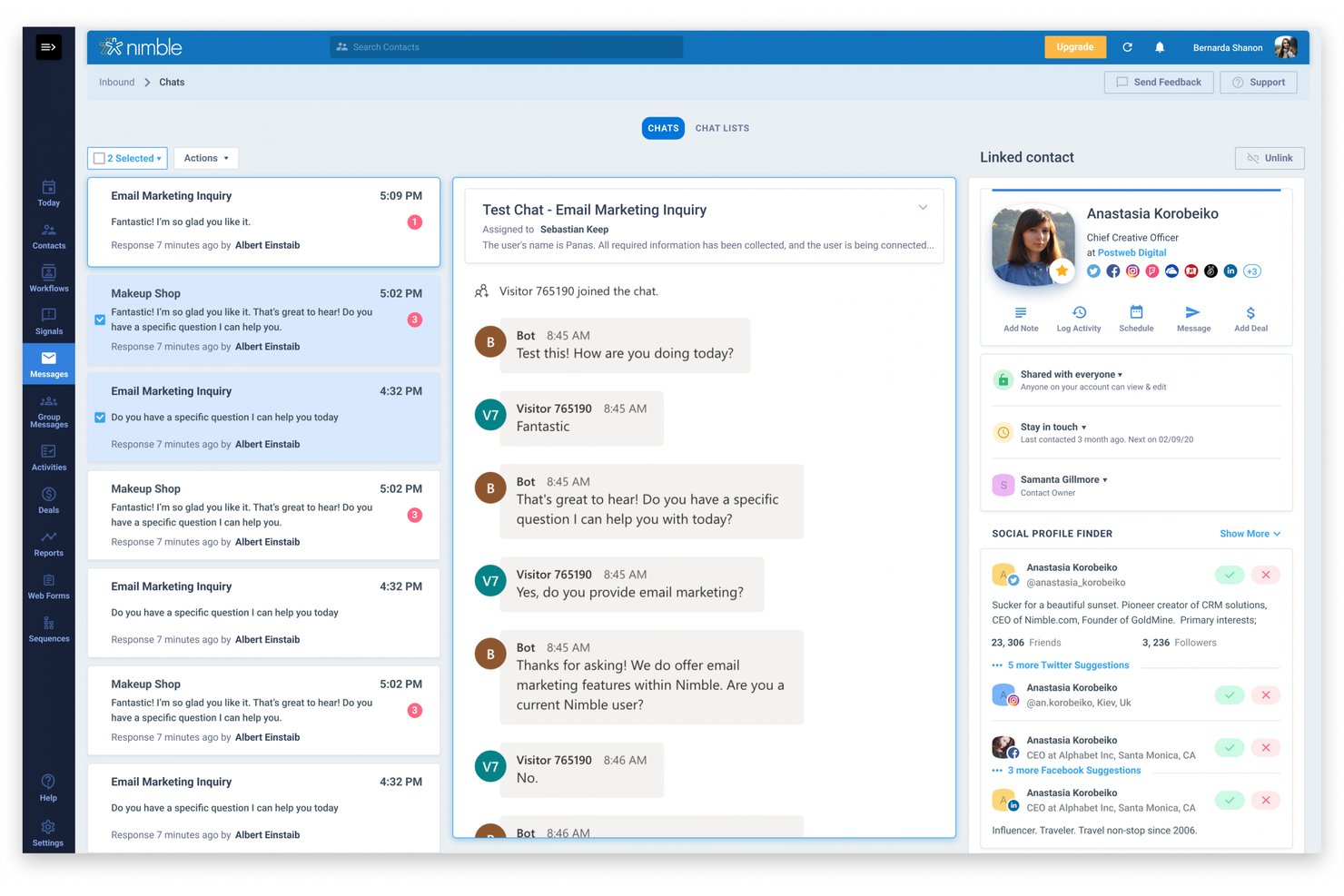
Nimble is a CRM built for small teams that combines contact management, social profile enrichment, deal pipelines, email sequences, and workflow automation in a single platform.
Who Is Nimble Best For?
Nimble is a strong fit for small business owners and service-based professionals who prioritize contact enrichment and relationship-building over complex enterprise CRM workflows.
Why I Picked Nimble
I picked Nimble as one of the best because its contact enrichment and social profile matching set it apart from most CRMs at this price point. When I look up a new contact, Nimble automatically pulls in their business details, social profiles, and company data, so I'm not piecing together information from five tabs before a call. I also rely on its filter-based saved segments, which update automatically as contacts meet the criteria, making it easy to target the right people for follow-up sequences without manual list maintenance.
Nimble Key Features
- Deal pipeline tracking: Manage deals across multiple customizable Kanban or list-view pipelines, with stage-duration tracking and stuck-deal alerts.
- Email sequences with activity steps: Automate multi-step outreach that includes tasks, calls, and events alongside emails, assignable to specific teammates.
- Workflow automation: Trigger actions like tag assignments, activity creation, and notifications based on contact or deal conditions.
- Dynamic saved segments: Build filter-based contact groups that automatically update as contacts meet your defined criteria.
Nimble Integrations
Nimble lists 120+ app integrations, including native integrations with Microsoft 365, Google Workspace, Outlook, Gmail, Google Calendar, Google Drive, OneDrive, Microsoft Teams, and Apple Mail. It also supports marketplace integrations, including Zapier, plus a REST API for custom integrations.
Pros and Cons
Pros:
- Sequences assign follow-up activities to teammates
- Saved segments update as contacts meet criteria
- Enriched contacts connect social and business context
Cons:
- Standard reports offer limited customization
- Email history sync covers only 90 days

Best for activity-based selling
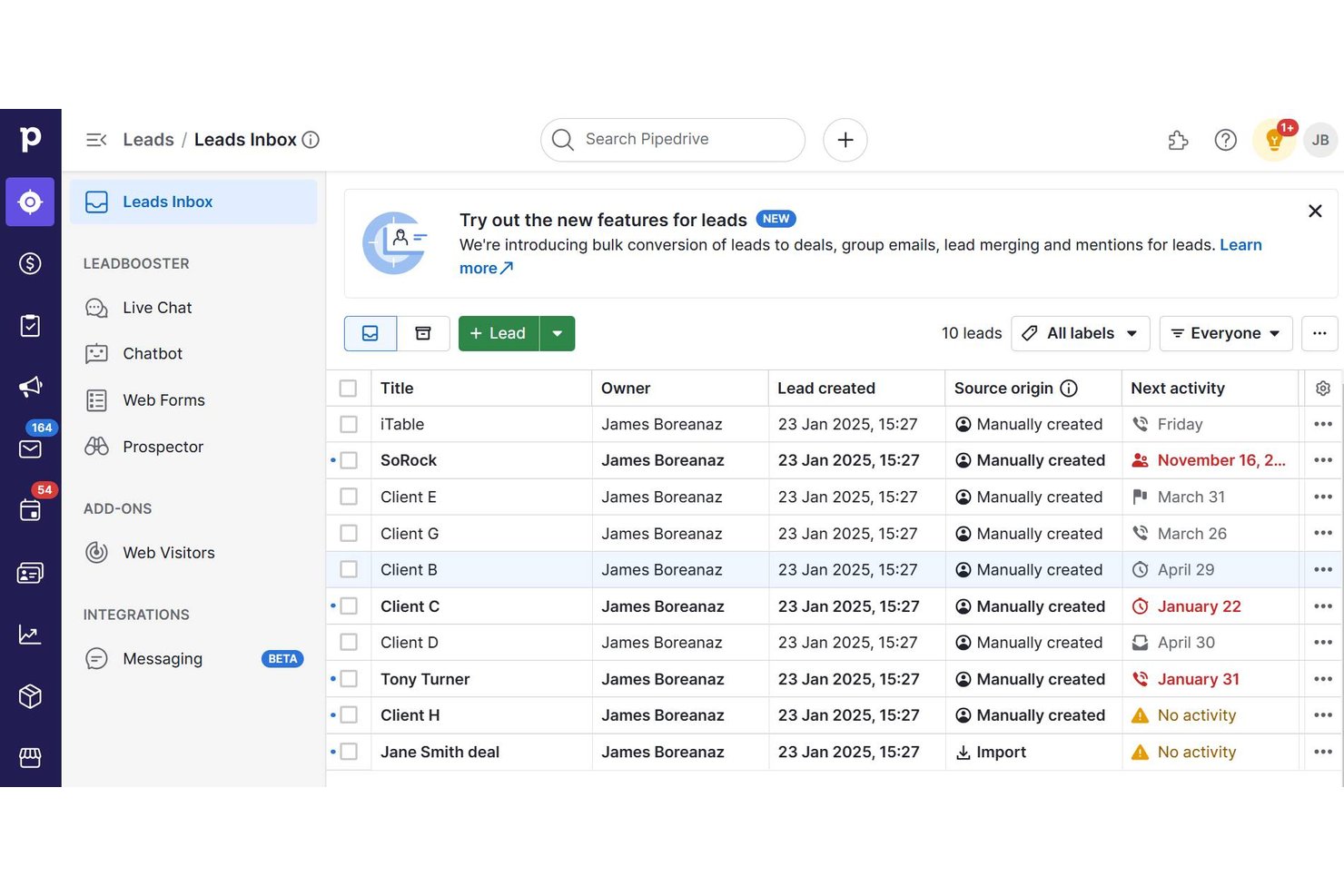
Pipedrive is a sales CRM that centralizes contact, deal, and pipeline data alongside workflow automation, email and calendar sync, activity tracking, and reporting.
Who Is Pipedrive Best For?
Pipedrive is a strong fit for small business sales teams that need a visual, activity-driven CRM to keep deals moving without a steep learning curve.
Why I Picked Pipedrive
Pipedrive earns its spot on my shortlist because of how well its activity-based model keeps deals from going cold. I love that every contact, deal, and follow-up is built around scheduled activities, so nothing falls through the cracks between touchpoints. Visual drag-and-drop pipelines with configurable stages let me see exactly where each deal stands, and automated activity reminders mean my next step is always queued up without manual effort.
Pipedrive Key Features
- Email and calendar sync: Connect Gmail, Outlook, and other accounts to log emails and sync calendar events directly to deal and contact records.
- Related-organization mapping: Link parent, daughter, and non-hierarchical organization relationships to reflect real account structures in your CRM.
- Advanced contact filtering: Build segment filters using ALL/ANY logic across contacts, deals, leads, and activities with up to 16 conditions per filter.
- Meeting intelligence with Pipedrive Nova: Record and transcribe calls, generate post-call recaps, and draft CRM updates for review automatically.
Pipedrive Integrations
Pipedrive offers native integrations with WhatsApp Business, Microsoft Teams, Google Meet, QuickBooks, Asana, DocuSign, Slack and Zoom Meetings, plus marketplace integrations with PandaDoc and Zapier. Its REST API, webhooks and JavaScript and PHP client libraries support custom integrations.
Pros and Cons
Pros:
- Linked records consolidate customer context
- Activity reminders keep follow-ups visible
- Visual pipelines clarify deal progression
Cons:
- Multi-step automations hit workflow limits
- Complex reporting offers limited flexibility
Keap
Best for managing leads through payment
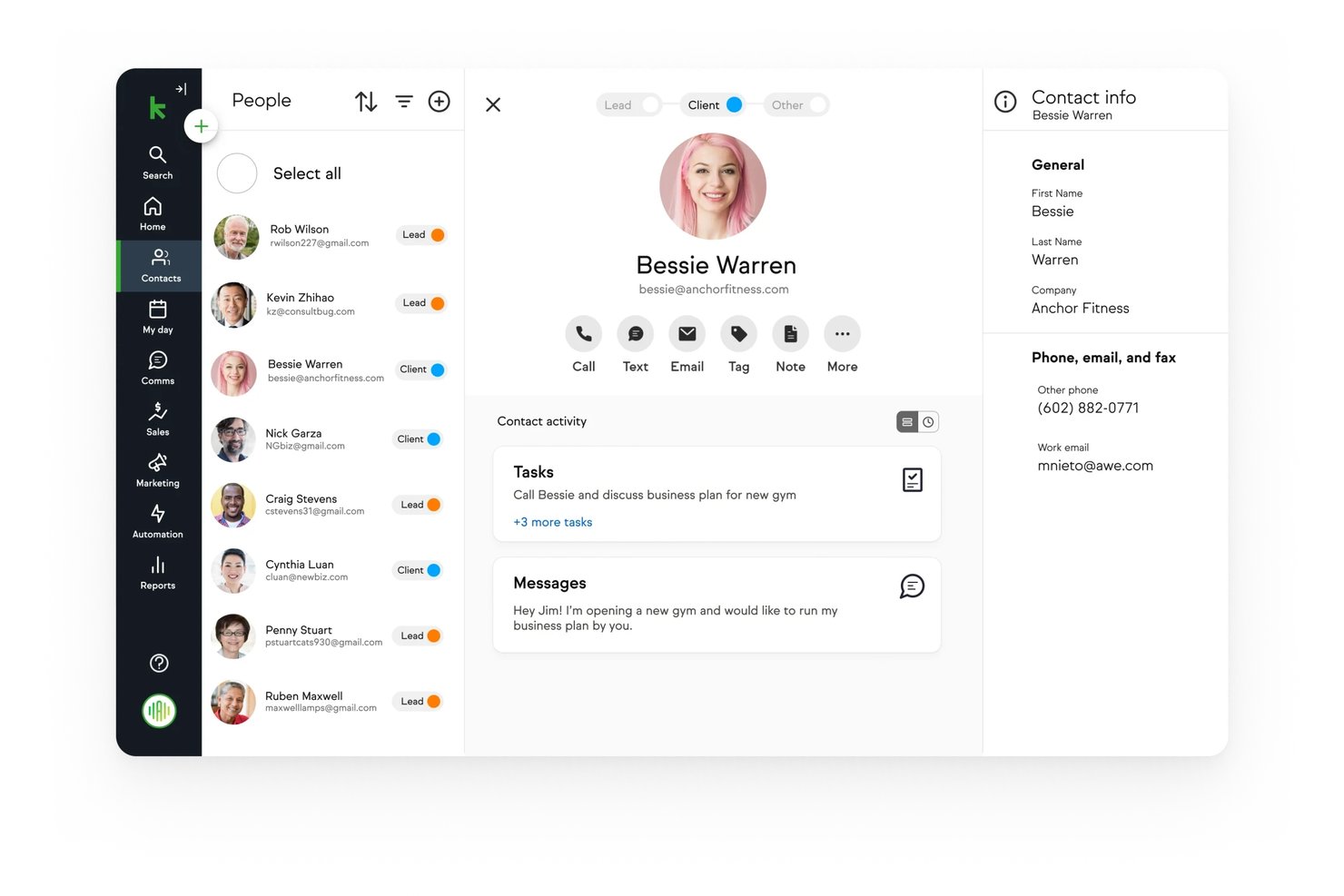
Keap is a CRM and marketing automation platform for small businesses that combines contact management, sales pipelines, email and text marketing, appointment scheduling, invoicing, and payment processing in one system.
Who Is Keap Best For?
Keap is a strong fit for small business owners who need a single system to manage contacts, automate follow-ups, and collect payments without juggling multiple tools.
Why I Picked Keap
I picked Keap as one of the best because it's one of the few CRM platforms that tracks a contact from first touch all the way through payment, without switching tools. I love that quotes convert directly to invoices and invoices connect to recurring payment collection, so the entire lead-to-revenue trail lives in one contact record. Keap's checkout forms also trigger automation the moment a purchase happens, which means follow-up sequences start without any manual hand-off.
Keap Key Features
- Lead scoring: Scores and prioritizes contacts based on likelihood to buy, and can trigger automation when a score threshold is reached.
- Contact segmentation with tags: Groups contacts using tags to organize records and target specific audiences with relevant messages.
- Sales pipeline templates: Lets you build pipelines from prebuilt templates or from scratch, with customizable stage names and a task-outstanding indicator across multiple pipelines.
- Growth dashboard: Displays preconfigured widgets for new leads, new clients, repeat clients, sales, quotes, and invoices across 7-, 14-, 30-, and 60-day date ranges.
Keap Integrations
Keap supports over 5,000 integrations through Zapier, including Gmail, Outlook, Google My Business, PayPal, Stripe, and Eway. It also offers a REST API and webhooks for custom integrations.
Pros and Cons
Pros:
- Quotes-to-invoices connect pipeline activity to payment
- Unified customer records support sales coordination
- Automated follow-ups help prevent missed touchpoints
Cons:
- Reporting limits custom conversion analysis
- Email sync misses past history and attachments

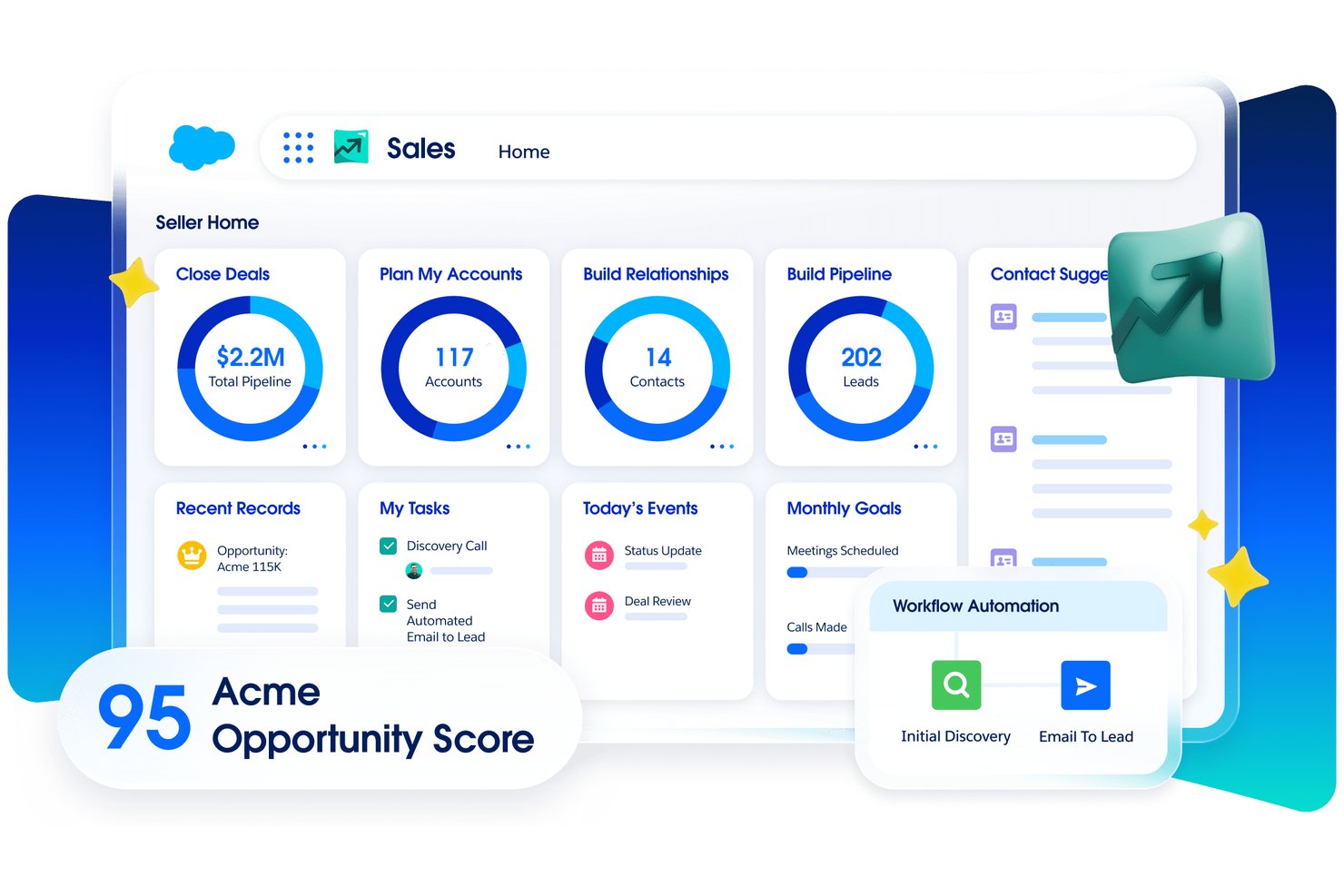
Salesforce Sales Cloud is a CRM and sales force automation platform that centralizes account, contact, lead, and opportunity data alongside pipeline management, activity tracking, workflow automation, and AI-driven forecasting.
Who Is Salesforce Sales Cloud Best For?
Sales Cloud is a strong fit for sales operations teams managing large, multi-layered account structures across enterprise or mid-market organizations.
Why I Picked Salesforce Sales Cloud
Salesforce Sales Cloud earns its spot on my shortlist because of how well it handles complex, multi-layered account structures. I love that you can map parent-child account relationships across an entire organization and then surface opportunity data directly within those account plans. Pipeline Inspection lets me track deal-level changes over time across those same accounts, so nothing slips between layers of a corporate hierarchy.
Salesforce Sales Cloud Key Features
- Einstein Activity Capture: Automatically syncs emails and calendar events from connected Microsoft or Google accounts to relevant contact, lead, and opportunity records.
- Flow Builder: A drag-and-drop automation tool for building multi-step sales workflows, approval processes, and lead routing rules without code.
- Forecast management: Lets teams build real-time forecasts, customize forecast metrics, and share pipeline visibility across the sales organization.
- Customizable reports and dashboards: Lets users build and personalize reports across pipeline performance, lead volume, activity conversion, and sales metrics.
Salesforce Sales Cloud Integrations
Salesforce Sales Cloud offers native integrations with Gmail and Outlook, plus the Sales Cloud in Claude marketplace integration through AgentExchange. It also supports REST and Web Services APIs for custom integrations.
Pros and Cons
Pros:
- Tracks pipeline changes for forecasting
- Connects account plans with opportunities
- Maps parent-child account hierarchies
Cons:
- Record updates can involve too many clicks
- Advanced workflows require dedicated administration

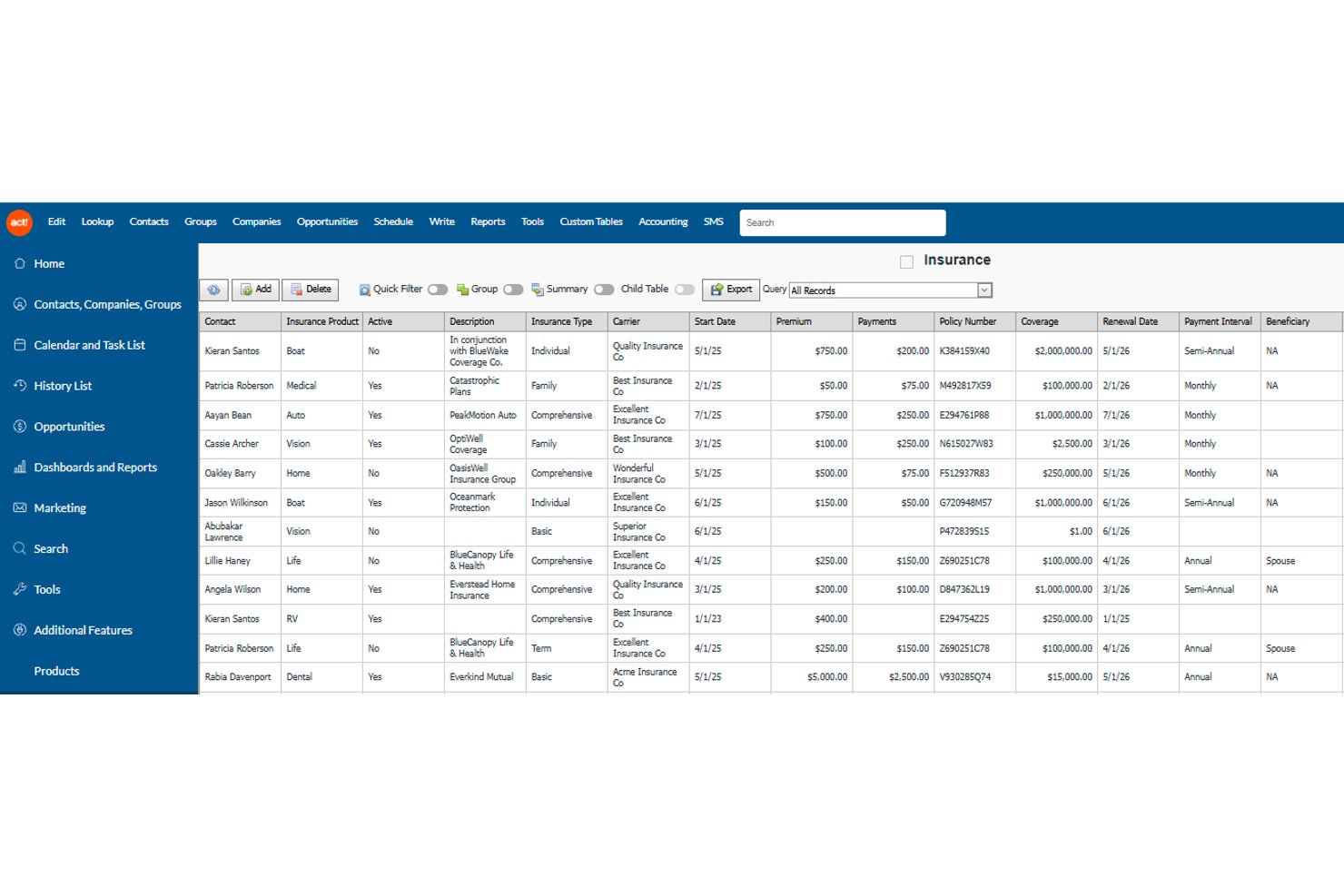
Act! CRM is a small business-focused CRM and marketing platform that combines contact management, sales pipeline tracking, email marketing, and marketing automation in one system.
Who Is Act! CRM Best For?
Act! CRM is a strong fit for small business owners who want contact management, email marketing, and sales pipeline tracking in a single platform.
Why I Picked Act! CRM
Act! CRM earns its spot on my shortlist because of how well it holds the full context of a customer relationship in one place. I like that every contact record pulls together notes, emails, documents, activity history, and open opportunities, so anyone on the team can pick up a conversation without starting from scratch. The dynamic groups and lead scoring at the Ultimate tier also make it easy to identify which contacts need attention and when, which is exactly what good relationship nurturing looks like in practice.
Act! CRM Key Features
- Sales opportunity Kanban board: Move deals through pipeline stages using a drag-and-drop board tied directly to contact records.
- Dynamic groups: Build auto-updating contact segments based on custom criteria to target specific audiences.
- Interactive quotes and payments: Create, send, and accept online quotes with built-in payment processing and automated follow-up scheduling.
- Email campaign tracking: Monitor opens, clicks, and comparative performance metrics across campaigns from within the platform.
Act! CRM Integrations
Act! offers native integrations with Microsoft Outlook, Google, RingCentral, and Microsoft Office, plus marketplace integrations with Zendesk, Shopify, QuickBooks Online, and Xero. Act! Connect lists hundreds of apps and supports REST APIs, OData, OpenAPI, and a .NET SDK for custom connections.
Pros and Cons
Pros:
- Automated reminders turn engagement into follow-up tasks
- Dynamic groups target contacts by engagement
- Contact records unite history, notes, and opportunities
Cons:
- Reports can feel slow and limited
- Customer interactions sometimes fail to sync reliably

Capsule
Best for simplified contact management
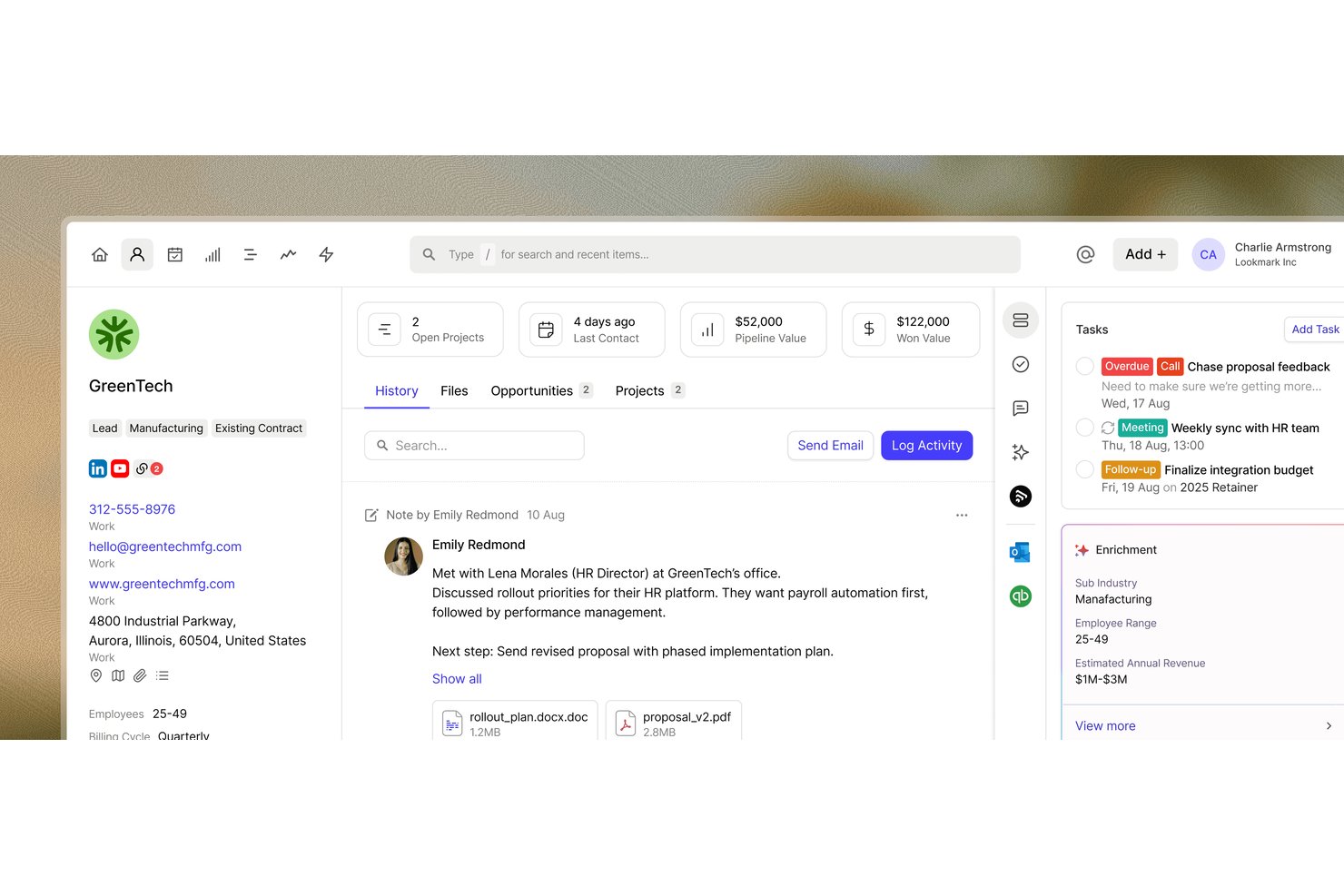
Capsule CRM is a contact and relationship management tool that centralizes customer records, tracks sales opportunities through customizable pipelines, and organizes follow-up tasks, projects, and interaction history across your accounts.
Who Is Capsule Best For?
Capsule is a strong fit for small businesses and growing teams that want a clean, easy-to-navigate CRM without a steep learning curve or feature overload.
Why I Picked Capsule
I picked Capsule as one of the best because it strips contact management down to exactly what most small teams actually need. Every person and organization gets a structured record with linked notes, emails, tasks, and opportunities, so your full history with a client is never more than one click away. I particularly like how Tracks let you build reusable task sequences for things like client onboarding or renewal check-ins, keeping follow-up consistent without manual effort each time.
Capsule Key Features
- Sales pipeline tracking: View and manage opportunities by value and stage using a drag-and-drop Kanban board, list, or dashboard with customizable pipeline milestones.
- Workflow automations: Configure automated actions—such as assigning users, sending emails, or creating linked projects—triggered by opportunity or project status changes.
- Reporting dashboards: Access visual dashboards covering pipeline values, forecasts, opportunity conversions, contact activity, and project completion trends.
- Dynamic contact lists: Build saved, filtered contact lists using tags, custom fields, and activity criteria that update automatically as records change.
Capsule Integrations
Capsule lists 100+ integrations on its homepage, including Gmail, Outlook, Zendesk, Help Scout, Xero, QuickBooks Online, Slack, Microsoft Teams, Shopify, and Transpond. It also offers a REST API, REST hooks, and Zapier.
Pros and Cons
Pros:
- Mobile app supports offline customer updates
- Reusable Tracks keep recurring follow-ups on schedule
- Centralized histories connect contacts, tasks, and deals
Cons:
- Basic dashboards limit deeper customer analysis
- Email sync requires personal-mailbox connections
New Product Updates from Capsule
Capsule Adds AI-Powered Marketing Assistance in Transpond
Capsule’s Transpond has opened early access to AI-powered marketing assistance, letting users connect an AI tool to query campaign data and get help building automations. For more information, visit Capsule's official site.
 .
Best for visual sales pipelines
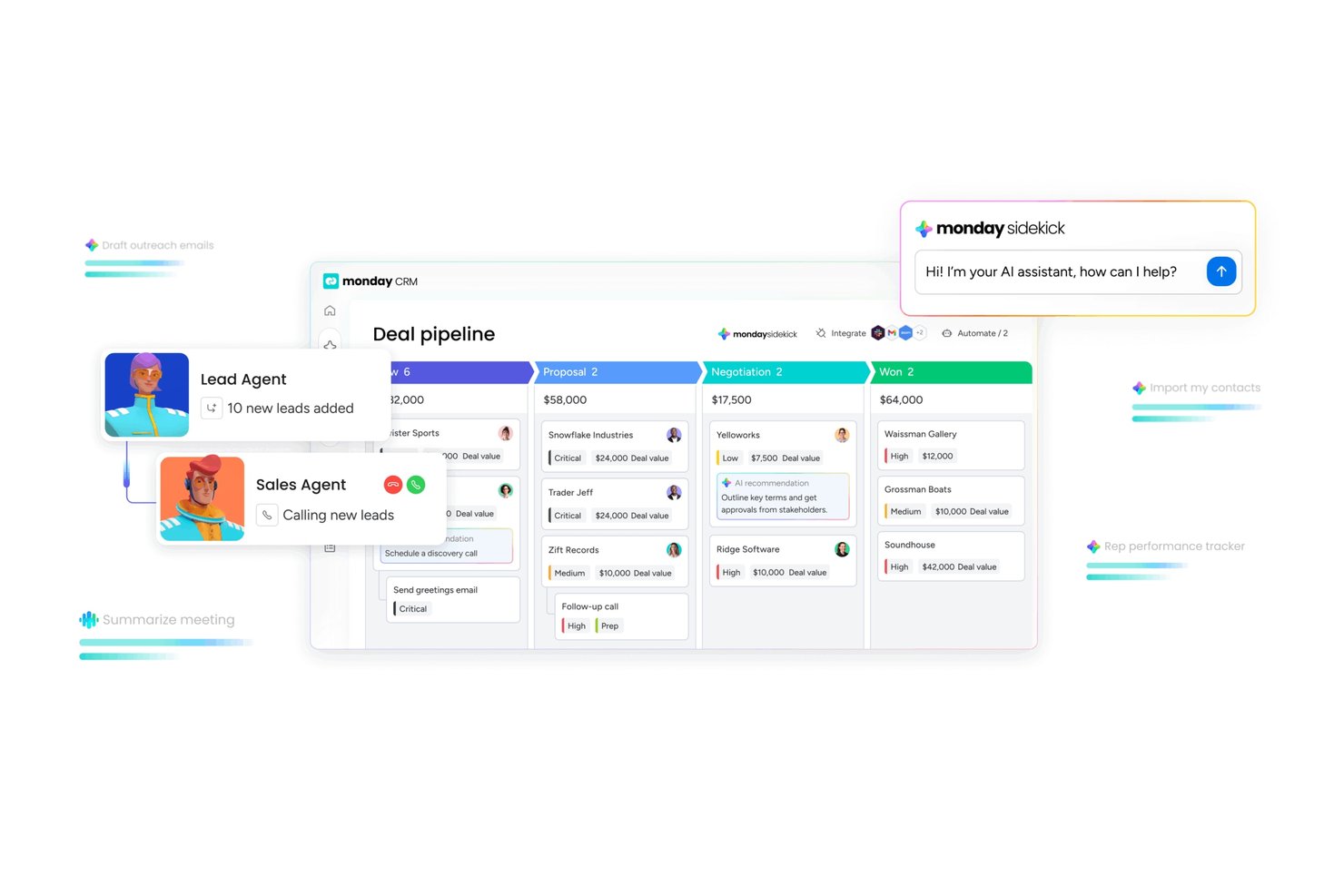
monday CRM is a customizable CRM platform that combines lead, contact, account, and deal management with visual sales pipelines, AI-powered agents, and automated workflows.
Who Is monday CRM Best For?
monday CRM is a strong fit for sales teams and small-to-midsize businesses that want a visual, customizable pipeline without the complexity of a traditional enterprise CRM.
Why I Picked monday CRM
monday CRM earns its spot on my shortlist because the visual pipeline experience is genuinely one of the best I've seen in this category. I love how the deal boards let you see stage distribution, velocity, and stale deals at a glance, and the Pipeline Health Agent actively flags at-risk opportunities without you having to dig through reports. The Kanban-style pipeline view combined with live dashboard filters makes it easy to run a weekly pipeline review without pulling data from anywhere else.
monday CRM Key Features
- Lead sourcing agent: An AI agent that finds, enriches, and scores new leads daily against your ideal customer profile.
- Sequences: Automated outreach workflows that combine emails, call tasks, and wait steps to move contacts through follow-up cadences.
- Emails & Activities timeline: A connected inbox view that logs sent and received emails, calls, meetings, and notes directly to contact and account records.
- Quotes and invoices: Built-in tools to generate quotes, send invoices, and collect signatures from within a deal record.
monday CRM Integrations
Documented integrations include Gmail, Outlook, Slack, Microsoft Teams, Zoom, LinkedIn, QuickBooks, Stripe, DocuSign, and Google Drive. monday CRM also supports an open API, GraphQL API, and SDK for custom connections.
Pros and Cons
Pros:
- Dashboards surface stale deals and team activity
- Linked contact and account records centralize history
- Visual deal boards clarify pipeline status
Cons:
- Complex automations take time to configure
- Sales forecasting lacks depth for complex teams
New Product Updates from monday CRM

monday CRM Adds Meta Conversions API Integration
monday CRM now lets you connect Meta Conversions API and sync lead status back to Meta, improving targeting and conversions via a new Meta integration automation recipe. For more information, visit monday CRM's official site.
Copper
Best for mapping account relationships
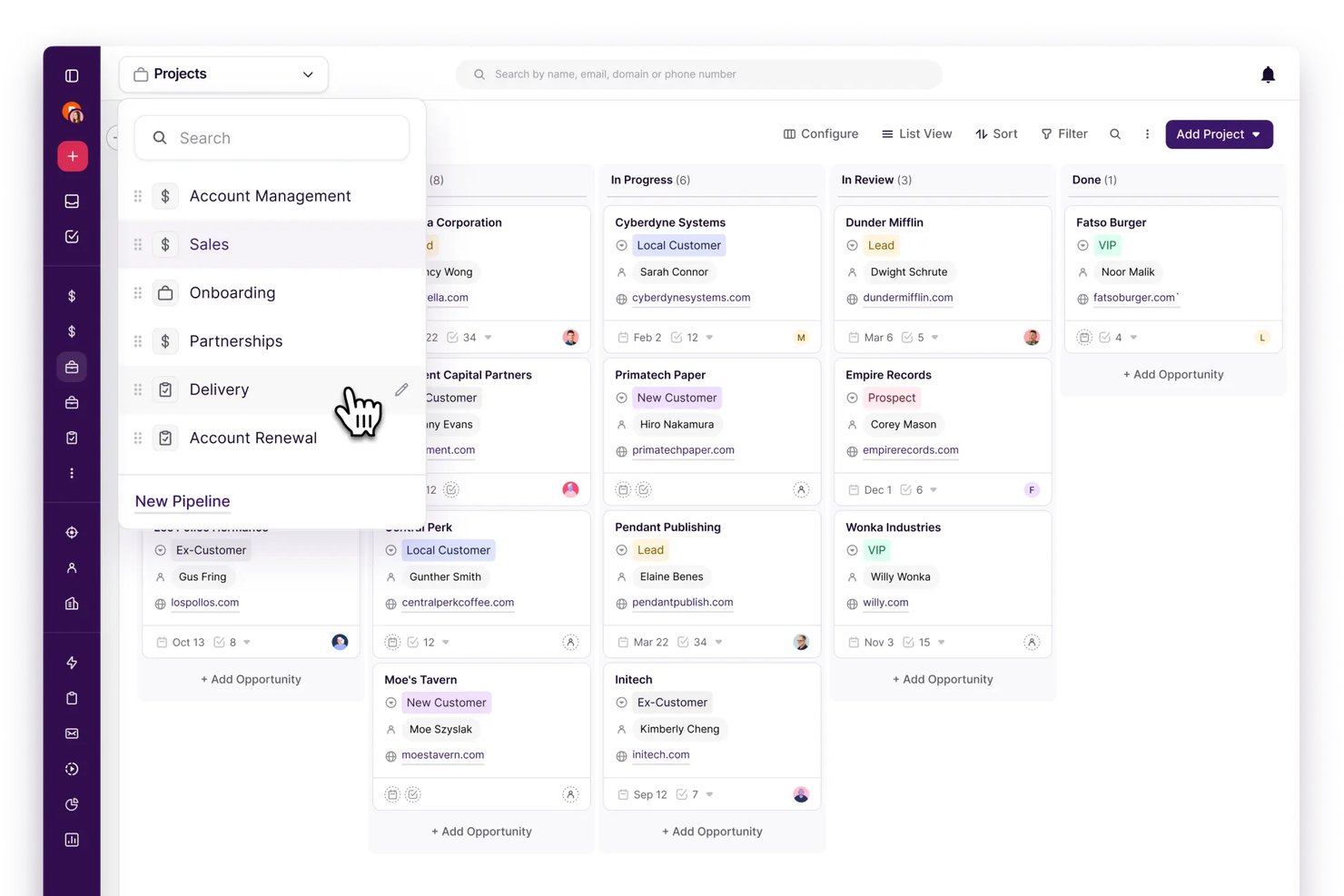
Copper is a CRM built around Google Workspace that brings together contact management, sales pipelines, project tracking, and email automation in one platform.
Who Is Copper Best For?
Copper is a strong fit for small and mid-sized teams that run their business inside Google Workspace and need a CRM that keeps up with their existing email and calendar workflows.
Why I Picked Copper
I picked Copper as one of the best because of how it handles account relationship mapping through Connect Fields, which let you define and filter connections like parent/child companies, referrals, and investors directly on contact and company records. I love that a closed deal can flow straight into a project pipeline, so the relationship context built during the sales process carries over into onboarding without starting from scratch. It's the CRM I'd reach for when keeping track of who knows whom actually matters to how you work.
Copper Key Features
- Sales-to-project handoff: Move a closed deal directly into a project pipeline for onboarding or service delivery without rebuilding context from scratch.
- Gmail and Google Calendar sync: Log emails and calendar events automatically to contact records, keeping communication history in one place.
- Contact enrichment: AI fills in new contact records with phone numbers, email addresses, and social profiles when you add someone to Copper.
- Task automation: Trigger task creation automatically when a record is updated, so follow-up steps don't rely on manual entry.
Copper Integrations
Copper offers seven native integrations, including Gmail, Google Calendar, Google Contacts, Google Drive, Google Sheets, Google Looker Studio, and Google Gemini. It also supports marketplace integrations with Mailchimp, DocuSign, QuickBooks, Slack, and Zendesk, plus REST API, webhooks, an integration SDK, and Zapier.
Pros and Cons
Pros:
- Links customer activity to follow-up tasks
- Carries closed deals into onboarding projects
- Maps parent, child, referral, and investor relationships
Cons:
- Complex multistage email workflows feel restrictive
- Advanced reporting offers limited flexibility

Attio
Best for product-led SaaS account management
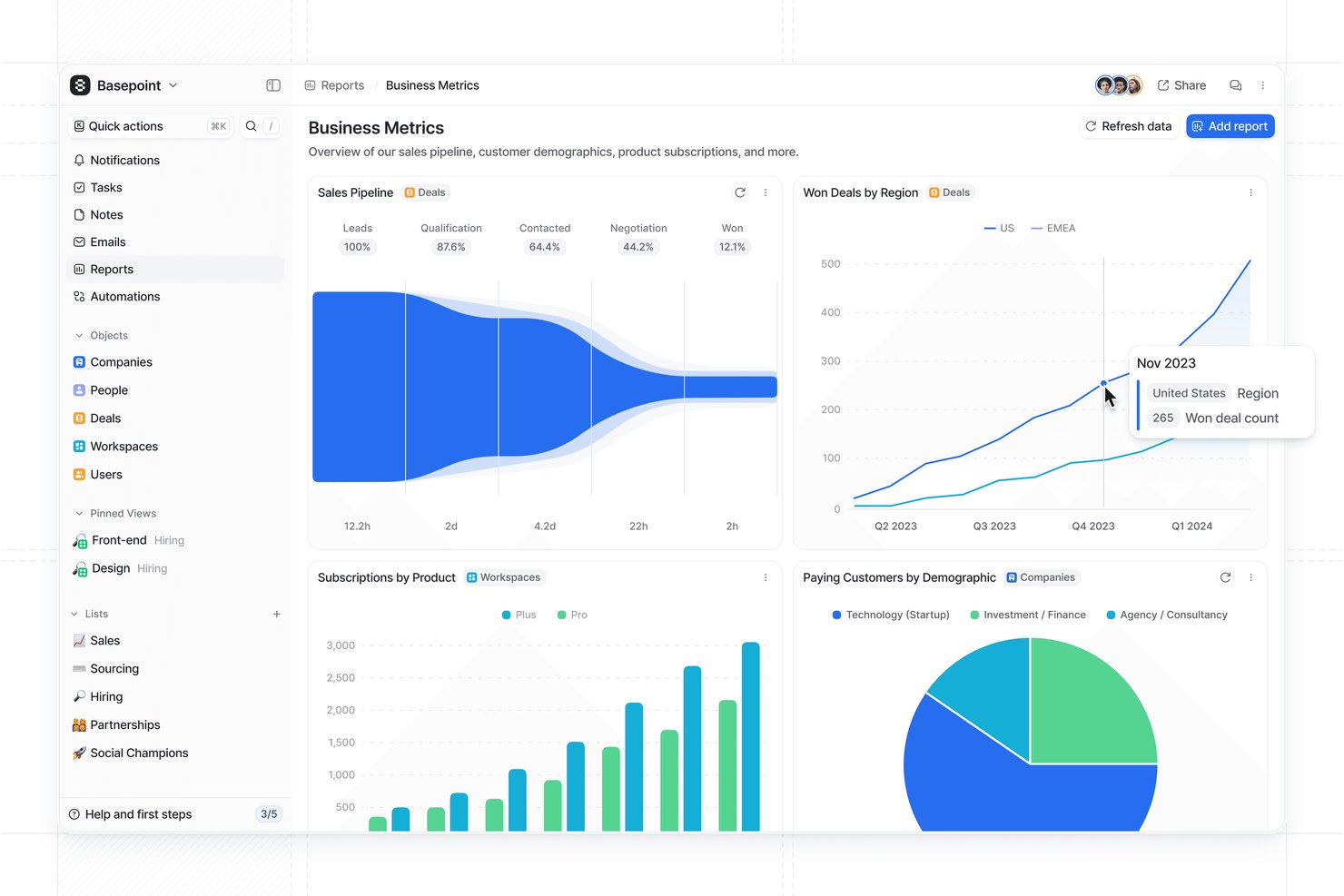
Attio is a CRM platform built around a flexible, customizable data model that connects people, companies, deals, and custom objects with AI-driven workflow automation, call intelligence, email and calendar sync, pipeline management, and reporting.
Who Is Attio Best For?
Attio is a strong fit for SaaS customer success and account management teams that need a flexible, customizable CRM built around product-led growth workflows.
Why I Picked Attio
I picked Attio as one of the best because its data model is built specifically around how SaaS teams run accounts after the sale. You can track Workspace and User records alongside renewal dates, subscription values, and product-usage signals, all linked together so your customer success workflow lives in the same place as your pipeline. I also like that AI agents actively monitor accounts for churn signals and queue expansion plays, which turns your CRM into something that surfaces what needs attention rather than waiting for you to go looking.
Attio Key Features
- Email and calendar sync: Automatically imports past email and calendar history and keeps new messages and events linked to their relevant people and company records.
- Call Intelligence: Records, transcribes, and logs calls natively, surfacing buying signals, blockers, and action items while linking recordings directly to CRM records.
- Configurable workflow automation: Triggers multi-step workflows on record changes, schedules, or webhooks, with branching logic, loops, and agent-driven actions across your pipeline.
- Dynamic segmentation views: Filters records using nested AND/OR logic across custom and linked-record attributes, with saved views that update automatically as data changes.
Attio Integrations
Attio offers native integrations with Gmail, Outlook, Slack, Zoom, Microsoft Teams, Google Sheets, Stripe, Segment, and Asana, plus marketplace integrations. It also provides a REST API, webhooks, App SDK, MCP server, and Zapier.
Pros and Cons
Pros:
- Agents flag churn and expansion signals
- Communication histories stay attached to records
- Custom data models connect customer accounts
Cons:
- Workflow configuration can require extra setup
- Cross-object reporting can require spreadsheet work
New Product Updates from Attio
Attio Redesigns Record Pages with Table-Style Relationship Tabs
Attio introduces redesigned record pages with table-style relationship tabs and expanded record drawer views. These updates simplify data management and record navigation. For more information, visit Attio’s official site.
 .

Freshsales
Best for AI-based insights
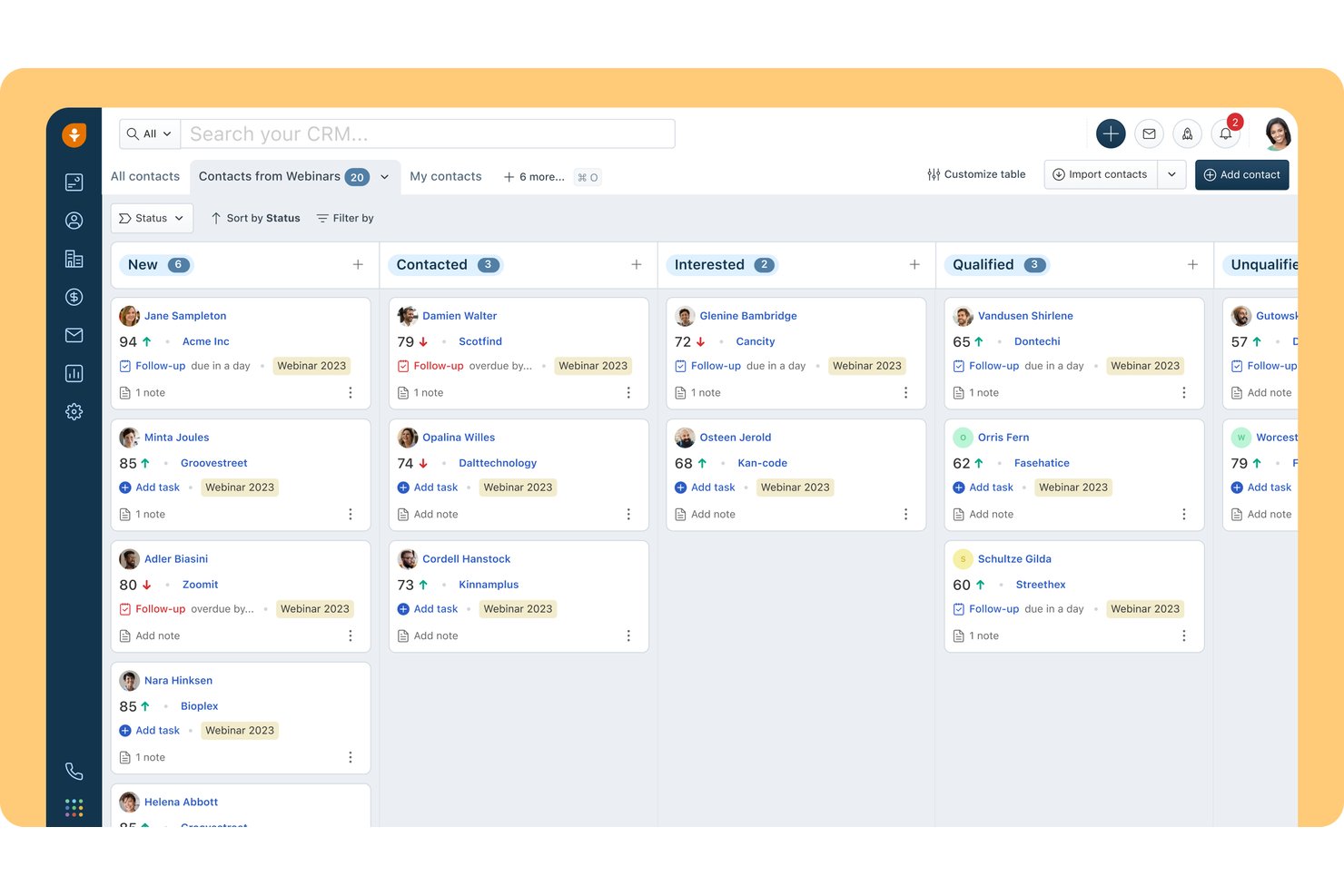
Freshsales is an AI-powered sales CRM from Freshworks that brings together contact and account management, visual deal pipelines, workflow automation, and built-in communication tools across email, phone, and chat.
Who Is Freshsales Best For?
Freshsales is a strong fit for sales teams that want AI-driven lead prioritization and deal insights without managing a complex CRM setup.
Why I Picked Freshsales
Freshsales earns its spot on my shortlist because of how Freddy AI turns raw CRM data into actionable sales signals. I particularly like the contact scoring feature, which uses historical engagement data to rank leads so my team isn't guessing who to follow up with first. Deal insights layer on top of that, flagging which open opportunities are worth prioritizing based on activity patterns and deal history.
Freshsales Key Features
- Visual sales pipeline: Manage deals through configurable stages using a drag-and-drop Kanban view.
- Sales sequences: Automate a series of sales actions—including emails, calls, and SMS—to keep outreach on schedule.
- Marketing segmentation: Build dynamic contact segments using AND/OR logic across fields, account properties, email activity, and page visits.
- Workflow automation: Trigger automated actions like task creation, record updates, and webhooks based on record events or a date/time schedule.
Freshsales Integrations
Freshsales has marketplace integrations with over 100 apps, plus native integrations with Freshdesk, Gmail, and Outlook/Office 365. It supports REST API access and webhooks for custom integrations.
Pros and Cons
Pros:
- Visual pipelines clarify deal-stage progress
- Automated sequences maintain follow-up cadence
- AI scores leads and flags deals
Cons:
- Advanced pipeline features require higher tiers
- Email tracking can arrive late or fail
Diğer Müşteri Kaynak Yönetimi Yazılımları
Aşağıda kısa listeme aldığım ancak en iyi listeye giremeyen diğer müşteri kaynak yönetimi yazılımlarının bir listesi yer alıyor. Bunlara göz atmanızda fayda var!
- Zoho CRM
For AI-driven sales
- Streak
For Gmail integration
- Salesflare
For moving B2B leads from search to CRM
- Bigin by Zoho CRM
For small business simplicity
- Bitrix24
For mobile deal-to-payment work
- Salesforce Financial Services Cloud
For scalable customization
- Creatio
For on-premise CRM deployment
- Vtiger CRM
For one view customer data
- Nutshell
For sales-to-onboarding handoffs
- SugarCRM
For ERP-based reorder and retention


İlgili Proje Yönetimi Yazılımları
- Proje Yönetimi Yazılımı
- Kaynak Yönetimi Yazılımı
- İş Akışı Otomasyonu Yazılımı
- Zaman Takibi Yazılımı
- Görev Yönetimi Yazılımı
- İş Birliği Araçları
- Resource Guru Alternatifleri
How I Evaluate Customer Resource Management Software
I split my evaluation into three parts, giving the most weight to core functionality: keeping customer records and interaction history together, and tracking deal stages and follow-ups. Next, I consider standout features such as customer health scores. Finally, I look beyond features at onboarding support and pricing as teams grow.
Core Functionality (Table Stakes For This List)
When I'm selecting tools for my list, I score each one on a scale from 0 (does not offer the functionality) to 5 (excels in this area) for each core functionality listed below. I then convert the total into a percentage to help assess each tool's overall fit, with extra weight on any functionalities I’ve deemed essential.
- Customer Records (Essential): I look for linked contact and account records with ownership, notes, and history teams can access during a sales-to-delivery handoff.
- Interaction & Communication Tracking (Essential): Check whether emails, calls, and meetings appear on the right record, creating a useful timeline before a client status conversation.
- Pipeline & Account Stages: I assess configurable deal or relationship stages that show where prospects and active accounts sit, including ownership and next steps.
- Follow-Up Automation: Look for reminders or trigger-based tasks tied to dates or customer activity, such as prompting an owner after a proposal.
- Reporting & Customer Insights: I consider dashboards that show activity, pipeline, and account trends, helping teams spot quiet accounts or stalled opportunities.
- Segmentation & Contact Groups: Check whether filters, tags, or dynamic lists group contacts by role, account status, or engagement for targeted follow-up.
Once I have a list of tools that meet the criteria, I consider what sets each platform apart.
Differentiating Factors (What Sets Vendors Apart)
Here's how I compare and contrast different vendors:
Standout Features
I check whether a tool offers customer health scoring, since a composite score built from engagement and support data helps account managers spot at-risk clients before a renewal conversation goes sideways. Email and calendar sync matters just as much—I look for two-way capture that attaches messages and meeting notes to the right record automatically, so nothing falls through the cracks between a sales call and a kickoff. I also evaluate mobile field access, because relationship-facing staff who can log updates on-site keep records current instead of relying on memory back at a desk.
Beyond Features
I look at how each tool handles onboarding for non-technical staff—whether it offers guided data migration from spreadsheets or legacy CRMs, in-app walkthroughs, and ready-made templates that shorten time-to-value. Pricing scalability matters just as much, because a CRM that fits a five-person team but penalizes you for growing your contact volume or adding automation seats can stall adoption mid-rollout. I also check the integration ecosystem, confirming native connectors to email providers, billing platforms, and support tools your stack already relies on.
Müşteri Kaynak Yönetimi Yazılımı Nasıl Seçilir?
Yazılım seçimi sürecinizi yürütürken aşağıdaki noktaları göz önünde bulundurun.
- İşletme İhtiyaçlarını Belirleme: CRM seçeneklerini incelemeden önce işletmenizin özel ihtiyaçlarını ana hatlarıyla belirlemek önemlidir. Örneğin, bir gayrimenkul şirketi kişi yönetimi ve mülk listeleme konusunda başarılı bir CRM'e ihtiyaç duyabilirken, bir perakende işletmesi satış takibine ve müşteri etkileşimi geçmişine öncelik verebilir. Gereksinimlerinizi tam olarak belirleyerek sektörünüzün kendine özgü ihtiyaçlarına uygun yazılım seçeneklerini daraltabilirsiniz.
- Entegrasyon Kolaylığı: CRM yazılımı mevcut sistemlerinizle kolayca entegre olmalıdır. İşletmeniz büyük ölçüde e-posta pazarlamasına dayanıyorsa CRM'in e-posta platformunuza bağlanabildiğinden emin olun. Bu husus, platformlar arasında tutarlılığı korumak isteyen şirketler için hayati önem taşır.
- Ölçeklenebilirlik: İşletmeniz büyüdükçe CRM'iniz de bu büyümeye ayak uydurmalıdır. Genişlemeyi planlayan yeni girişimler veya küçük işletmeler, performanstan ödün vermeden artan müşteri ve satış sayılarını yönetebilen yazılımları tercih etmelidir.
- Özelleştirme: Her işletme farklı şekilde faaliyet gösterir ve CRM'iniz bunu yansıtmalıdır. Özelleştirilebilir bir CRM, dava ayrıntılarını takip etmesi gereken bir hukuk bürosu gibi belirli bir hizmet sağlayıcının özel iş akışına uyum sağlayabilir. Özelleştirme, yazılımın herhangi bir sektörün kendine özgü süreçlerine göre uyarlanmasına olanak tanır.
- Maliyet Verimliliği: Maliyeti sunulan özelliklerle karşılaştırarak değerlendirin. Bütçesi kısıtlı olan küçük bir işletme, temel özellikleri daha düşük bir fiyata sunan bir CRM'i değerlendirebilir. Buna karşılık, daha büyük bir işletme gelişmiş analiz ve otomasyon özelliklerine sahip daha pahalı bir CRM'i daha değerli bulabilir. Yazılımın işletme ihtiyaçlarınızı karşılama becerisine göre yatırım getirisini değerlendirmek önemlidir.
Müşteri Kaynak Yönetimi Yazılımındaki Trendler
Müşteri kaynak yönetimi yazılımı hızla gelişmektedir. Geleceğini şekillendiren temel trendler aşağıdadır.
- Yapay Zekâ ve Makine Öğrenimiyle Entegrasyon: Yapay zekâ ve makine öğrenimi CRM yazılımının ayrılmaz parçaları hâline geliyor. Tahmine dayalı analizleri mümkün kılıyor ve müşteri etkileşimlerini geliştiriyorlar. Bu trend, kişiselleştirilmiş ve proaktif müşteri hizmetleri için kritik önem taşıyor.
- Gelişmiş Veri Gizliliği ve Güvenlik Önlemleri: Veri gizliliği ve güvenliği, CRM yazılımındaki gelişmelerin merkezinde yer alıyor. Artan siber tehditlerle birlikte güçlü güvenlik protokolleri artık standart hâle geldi. Bu durum, müşteri güvenini korumak ve düzenlemelere uymak açısından hayati önem taşıyor.
- Konuşmalı Kullanıcı Arayüzlerinin Benimsenmesi: Sohbet botları gibi konuşmalı arayüzler CRM sistemlerinde yaygın olarak kullanılmaya başlandı. Müşterilerle gerçek zamanlı, etkileşimli iletişim sunuyorlar. Bu trend, müşteri hizmetlerinin verimliliğini ve erişilebilirliğini dönüştürüyor.
- Mobil Öncelikli CRM Çözümlerine Geçiş: CRM sağlayıcıları mobil öncelikli tasarımlara öncelik veriyor. Bu sayede müşteri verilerine ve CRM işlevlerine hareket hâlindeyken erişim sağlanıyor.
- CRM'in Yeni Dikey Alanlara Yayılması: CRM yazılımı geleneksel satış ve pazarlama rollerinin ötesine yayılıyor. Artık belirli sektörlere ve operasyonel işlevlere göre uyarlanıyor. Bu uzmanlaşma, çeşitli işletme ihtiyaçlarını karşılamanın anahtarıdır.
Müşteri Kaynak Yönetimi Yazılımı Nedir?
Müşteri kaynak yönetimi yazılımı, müşteri yaşam döngüsü boyunca müşteri etkileşimlerini ve verilerini yönetmek ve analiz etmek için tasarlanmış dijital bir platformdur. Müşteri ilişkilerini geliştirmek, süreçleri kolaylaştırmak ve satışları artırmak amacıyla satış personeli ve çeşitli büyüklüklerdeki işletmeler tarafından kullanılır. Yazılım, müşteri bilgileri için merkezi bir depo görevi görür; satış, pazarlama ve müşteri hizmetleri ekipleri bu bilgilere erişip bilgileri yöneterek müşteri etkileşimini ve elde tutmayı geliştirebilir.
Müşteri kaynak yönetimi yazılımı kişi yönetimi, etkileşim takibi, potansiyel müşteri yönetimi, e-posta otomasyonu ve analiz özelliklerini içerir. Kişi yönetimi müşteri ayrıntılarını depolar, etkileşim takibi her müşteri etkileşimini kaydeder, potansiyel müşteri yönetimi olası müşterilerin izlenmesine yardımcı olur, e-posta otomasyonu iletişimi kolaylaştırır ve analizler müşteri davranışları hakkında içgörüler sunar.
Müşteri Kaynak Yönetimi Yazılımının Özellikleri
Müşteri kaynak yönetimi yazılımını seçerken işletmenizin kendine özgü ihtiyaçlarını en etkili şekilde destekleyecek özellikleri göz önünde bulundurun. Aramanız gereken başlıca özellikler aşağıdadır.
- İletişim Yönetimi: Bu özellik, iletişim bilgileri için bir veritabanı görevi görür ve müşteri etkileşimlerinin izlenmesine olanak tanır.
- Potansiyel Müşteri Yönetimi: Bu özellik, potansiyel müşterilerin izlenmesine ve satış süreci boyunca potansiyel müşterilerin yönetilmesine olanak tanır.
- Satış Tahmini: Bu özellik, gelecekteki satış eğilimlerini tahmin etmek için geçmiş verileri kullanır.
- E-posta Takibi: Bu özellik, müşteri e-posta etkileşimlerinin izlenmesini sağlar.
- İş Akışı Otomasyonu: Bu özellik, zamandan tasarruf etmek ve hataları azaltmak için tekrarlayan görevleri otomatikleştirir.
- Belge Yönetimi: Bu özellik, satışla ilgili belgelerin depolanmasına ve yönetilmesine olanak tanır.
- Analiz ve Raporlama: Bu özellik, müşteri verileri ve işletme performansı hakkında içgörüler sağlar.
- Entegrasyon Yetenekleri: Bu özellik, yazılımın diğer sistemlerle entegre olmasını sağlar.
- Mobil Erişim: Bu özellik, kullanıcıların CRM sistemine mobil cihazlardan erişmesine olanak tanır.
- Özelleştirme: Bu özellik, yazılımın bir işletmenin ihtiyaçlarına göre uyarlanmasına olanak tanır.
- Eklentiler: Ek yazılım bileşenleri, temel bir CRM uygulamasının işlevselliğini artırır.
- Bulut Tabanlı CRM: Müşteri İlişkileri Yönetimi sistemi, uzak sunucularda barındırılır ve İnternet üzerinden erişilir.
- E-posta Kampanyaları: CRM sistemi içinde belirli müşteri gruplarını hedefleyen otomatikleştirilmiş veya planlanmış e-posta pazarlama çalışmaları.
- Metrikler: CRM ile ilgili çeşitli faaliyetlerin performansını değerlendirmek ve izlemek için kullanılan nicel ölçütler.
- Yönlendirme: Bu süreç, müşteri verilerinin veya iş akışlarının CRM sistemi içindeki uygun konumlara ya da kaynaklara yönlendirilmesini ifade eder.
- Temas Noktaları: Bir müşteri ile CRM sistemi arasındaki etkileşim noktaları, müşteri etkileşimini ve davranışını izlemek için kullanılır.
Müşteri İlişkileri Yönetimi Yazılımının Faydaları
Aşağıda, CRM yazılımının kullanıcılara ve kuruluşlara sağladığı beş temel fayda yer almaktadır.
- Merkezi Müşteri Bilgileri: CRM yazılımı, müşteri verilerini tek bir veritabanında birleştirir. Bu, kullanıcıların müşteri bilgilerine erişmesine ve bunları yönetmesine olanak tanır.
- Geliştirilmiş İletişim: CRM yazılımı, tüm müşteri iletişimlerini izleyerek tutarlı ve bilgiye dayalı etkileşimleri sürdürmenizi sağlar. Bu, daha bütünlüklü bir müşteri deneyimi sunar ve daha güçlü ilişkiler kurulmasına yardımcı olur.
- Geliştirilmiş Satış Yönetimi: CRM araçları, satış faaliyetlerini, tahminleri ve performansı izlemeye yardımcı olur. Bu, satış ekiplerinin fırsatları belirlemesini, satış sürecini kolaylaştırmasını ve anlaşmaları daha verimli bir şekilde sonuçlandırmasını sağlar.
- Verimli Pazarlama Kampanyaları: CRM yazılımı, hedefli pazarlama kampanyalarına olanak tanır. Ayrıntılı müşteri verileri sayesinde kullanıcılar müşteri tabanını bölümlere ayırabilir ve pazarlama çalışmalarını belirli gruplara göre uyarlayabilir.
- Veriye Dayalı Karar Alma: CRM sistemleri, işletmelerin müşteri davranışlarını ve tercihlerini anlamasına yardımcı olan analiz ve raporlama özellikleri sağlar. Bu veriler, stratejik karar alma süreçlerini destekler ve eğilimlerin ve büyüme fırsatlarının belirlenmesine yardımcı olur.
Müşteri İlişkileri Yönetimi Yazılımının Maliyetleri ve Fiyatlandırması
CRM yazılımı, kullanıcıların ihtiyaçlarını karşılamak için çeşitli planlar ve fiyatlandırma seçenekleri sunar. Aşağıda, her plana dahil edilen yaygın özellikler de dahil olmak üzere CRM yazılımı plan seçeneklerini ve fiyatlandırmasını özetleyen bir tablo yer almaktadır.
Müşteri İlişkileri Yönetimi Yazılımı İçin Plan Karşılaştırma Tablosu
| Plan Türü | Ortalama Fiyat | Yaygın Özellikler |
|---|---|---|
| Ücretsiz | $0 | Temel CRM özellikleri, iletişim yönetimi, potansiyel müşteri takibi, sınırlı kullanıcı erişimi |
| Başlangıç Seviyesi | $25/user/month | Potansiyel müşteri yakalama, iletişim ve hesap yönetimi, temel raporlama, e-posta entegrasyonu |
| Orta Seviye | $100/user/month | İş akışı otomasyonu, özelleştirilebilir panolar, gelişmiş raporlama, e-posta pazarlaması |
| Yüksek Seviye | $400/user/month | Yapay zekâ destekli içgörüler, gelişmiş özelleştirme, sınırsız otomasyon, tam entegrasyon |
Müşteri Kaynak Yönetimi Yazılımı SSS'leri
Müşteri kaynak yönetimi yazılımı hakkında sıkça sorulan bazı soruları burada bulabilirsiniz.
Müşteri kaynak yönetimi yazılımı müşteri ilişkilerini nasıl geliştirir?
CRM yazılımı, tüm müşteri etkileşimlerinin kapsamlı bir görünümünü sunarak, müşteri etkileşimlerini izleyerek ve müşteri hesaplarını yöneterek müşteri ilişkilerini geliştirir. İşletmelerin müşteri tabanını ve müşterilerinin yolculuğundaki aşamaları anlamasına yardımcı olmak üzere tasarlanmıştır; bu da daha etkili iletişim ve daha iyi müşteri hizmeti sağlayabilir.
Müşteri kaynak yönetimi yazılımı diğer sistemlerle entegre edilebilir mi?
Evet, çoğu CRM yazılımı e-posta, takvim, pazarlama otomasyonu ve müşteri hizmetleri yazılımı gibi diğer sistemlerle entegre edilebilir. Bu entegrasyon, platformlar arasında veri senkronizasyonu sağlayarak müşteri etkileşimlerinin birleştirilmiş bir görünümünü sunar ve iş süreçlerini kolaylaştırır.
Müşteri kaynak yönetimi yazılımı küçük işletmeler için uygun mudur?
CRM yazılımı, küçük işletmeler de dahil olmak üzere her büyüklükteki işletme için faydalıdır. Küçük işletmelerin müşteri verilerini yönetmesine, satış fırsatlarını izlemesine, pazarlama kampanyaları yürütmesine ve müşteri hizmeti sunmasına yardımcı olur. Birçok CRM sağlayıcısı, işletmeyle birlikte büyüyebilen ölçeklenebilir çözümler sunar.
Müşteri kaynak yönetimi yazılımı satışlara nasıl yardımcı olur?
CRM yazılımı, müşteri verilerini düzenleyerek, satış etkileşimlerini izleyerek ve temel görevleri otomatikleştirerek satış süreçlerine yardımcı olur. Satış ekiplerine potansiyel müşterileri, fırsatları ve satış süreçlerini yönetmeleri için araçlar sunar; bu da satış verimliliğinin artmasını ve daha yüksek dönüşüm oranlarını sağlayabilir.
Müşteri kaynak yönetimi yazılımının kullanımı zor mudur?
CRM yazılımının kullanım kolaylığı sağlayıcıya göre değişir. Ancak birçok CRM sistemi, kullanıcı dostu arayüzlerle tasarlanır ve kullanıcıların yazılımdan en iyi şekilde yararlanmasına yardımcı olacak eğitim kaynakları sunar. Bazı CRM çözümleri, sistemi işletmenin ihtiyaçlarına göre uyarlamak için özelleştirme seçenekleri de sunar.