

2026’daki En İyi 18 Yapay Zekâ Bilgi Yönetimi Yazılımı

En İyi Yapay Zekâ Bilgi Yönetimi Yazılımları Kısa Listesi


Yapay zekâ bilgi yönetimi yazılımları, ekibinizin belgeleri, araçları ve görüşmeleri arasındaki bilgileri düzenlemek, almak ve görünür hâle getirmek için yapay zekâ kullanır. Bilgi bombardımanını azaltmanın, işe alıştırma sürecini hızlandırmanın veya ekiplerin ihtiyaç duyduklarını gerçekten bulmasına yardımcı olmanın yollarını arıyorsanız bu araçlar sizin için tasarlanmıştır.
Daha akıllı arama ve daha iyi iş birliği vadeden bu kadar çok çözüm varken hangi platformların gerçekten sonuç verdiğini bilmek zordur. Bu kılavuz, 2026 yılındaki önde gelen seçenekleri net bir şekilde görmenizi sağlar; böylece iş akışlarını optimize etmek, ekibinizin bağlantıda kalmasını ve bilgilenmesini sağlamak için doğru yazılımı seçebilirsiniz.
Why Trust Our Software Recommendations
Our team has been testing and reviewing software since 2012. As project managers ourselves, we know how difficult—and important—it is to choose the right software.
For this guide, we evaluated tools using hands-on testing and independent research, scoring tools using our selection criteria. We also draw on insights from industry thought leaders and practicing project management experts.
Our reviews reflect our human editorial judgment, not a sales pitch.
Expert reviewers:
Yapay Zekâ Bilgi Yönetimi Yazılımları Karşılaştırma Tablosu
En iyi yapay zekâ bilgi yönetimi yazılımı seçimlerim için fiyatlandırma ayrıntılarını bu karşılaştırma tablosunda özetliyorum.
| Tool | Starting Price | Website | |
|---|---|---|---|
| Best for capturing and sharing meeting knowledge | 4.7 out of 5 | $10/user/month 14-day free trial + free demo available | Website |
| Best for integrated workspace automation | 4.6 out of 5 | $20/user/month Free plan available | Website |
| Best for team-based document collaboration | 4.3 out of 5 | $5.78/user/month Free plan + 7-day trial available | Website |
| Best for integrating AI with Microsoft apps | 4.6 out of 5 | $30/user/month 1-month free trial | Website |
| Best for task-driven knowledge insights | 4.6 out of 5 | $9/user/month Free plan available | Website |
| Best for AI-powered meeting transcription | 4.3 out of 5 | $10/user/month Free plan + free demo available | Website |
| Best for real-time knowledge verification | 3.5 out of 5 | Pricing upon request Free demo available | Website |
| Best for unified enterprise search across apps | 5.0 out of 5 | Pricing upon request Free demo available | Website |
| Best for natural language question answering | 4.6 out of 5 | $20/user/month 30-day free trial | Website |
| Best for Google Cloud data integration | — | $21/user/month 30-day free trial + free demo available | Website |
En İyi Yapay Zekâ Bilgi Yönetimi Yazılımları İncelemeleri
Kısa listemde yer alan en iyi yapay zekâ bilgi yönetimi yazılımlarına ilişkin ayrıntılı özetlerimi aşağıda bulabilirsiniz. İncelemelerim, size en uygun olanı bulmanıza yardımcı olmak için her platformun özelliklerine, entegrasyonlarına ve en iyi kullanım alanlarına ayrıntılı bir bakış sunar.

Slite
Best for capturing and sharing meeting knowledge
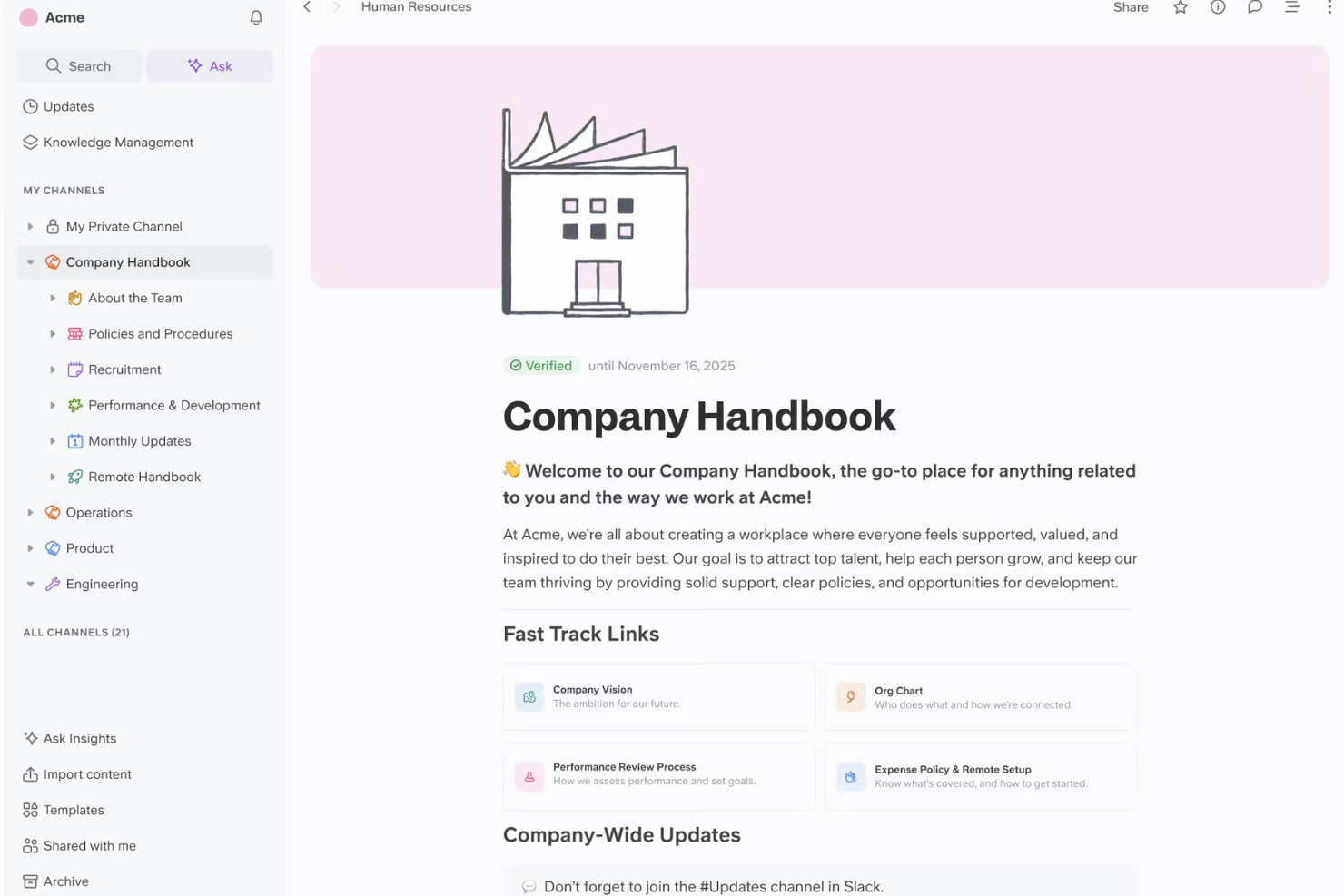
Slite is a collaborative knowledge management platform with meeting note capture, AI-driven search, and document sharing features designed for teams organizing company knowledge.
Who Is Slite Best For?
Slite is a fit for distributed product or project teams who need to capture, organize, and share meeting details and decisions in real time.
Why I Picked Slite
I picked Slite as one of the best because I can capture meeting notes in real time, instantly turn those notes into searchable knowledge, and use AI to summarize or organize key decisions for my team to access later.
Slite Key Features
- AI assistant: Generates answers to questions using workspace content.
- Document verification: Lets you mark content as verified or outdated.
- Knowledge base templates: Provides pre-built templates for guides and documentation.
- Access permissions: Controls who can view or edit specific documents.
Slite Integrations
Slite offers native integrations with Slack, Google Drive, and GitHub, and provides an API for custom integrations.
Pros and Cons
Pros:
- Threaded comments enable focused team discussions
- AI document verification flags outdated knowledge
- Meeting notes sync instantly across team spaces
Cons:
- Lacks granular export options for content
- Limited offline access for documentation
Best for integrated workspace automation
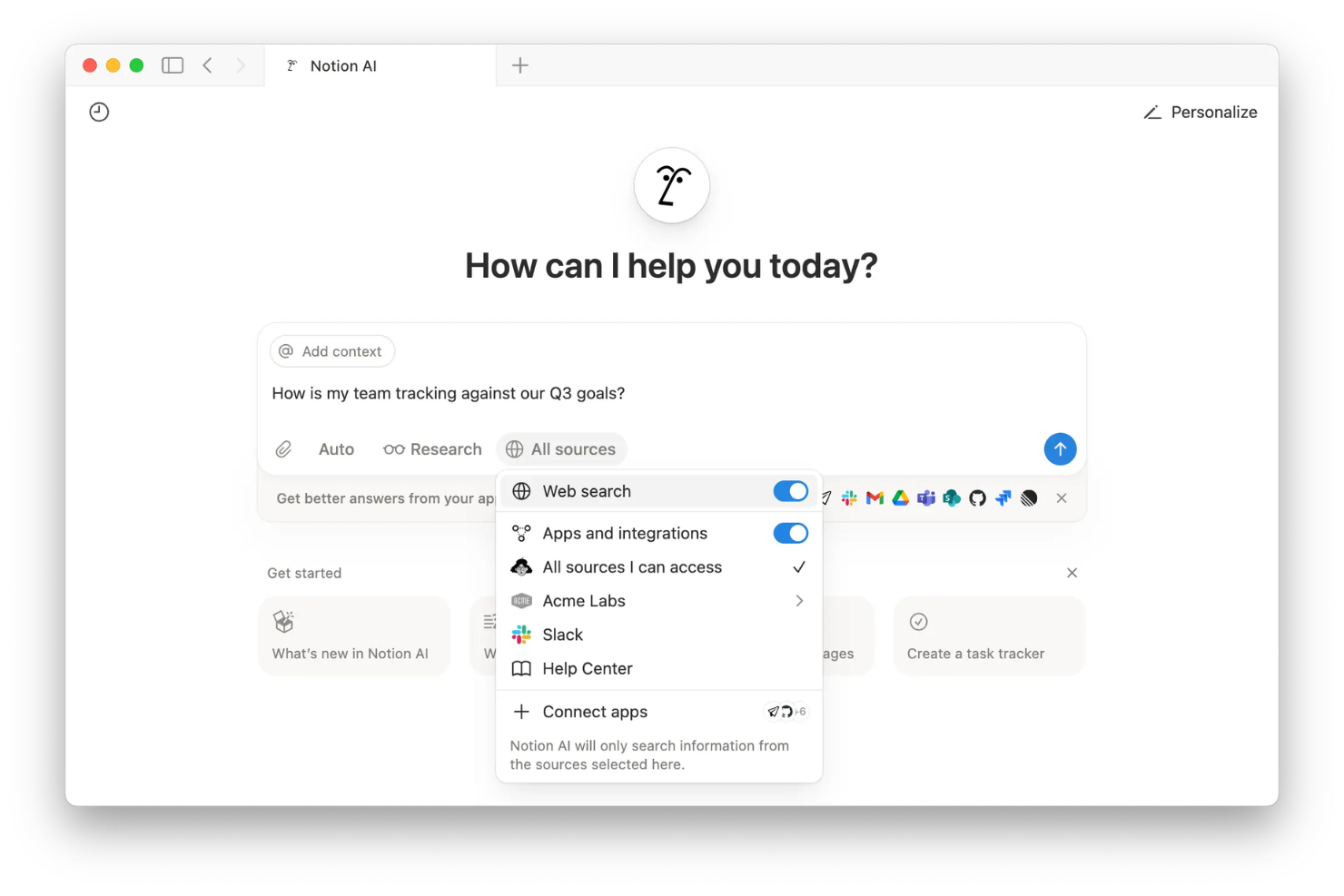
Notion AI is an AI-powered workspace platform that combines document creation, knowledge base management, automated content generation, and collaborative editing into a single environment for your team.
Who Is Notion AI Best For?
Notion AI fits startups and cross-functional teams that need an all-in-one workspace for managing documents, project notes, and organizational knowledge.
Why I Picked Notion AI
I picked Notion AI as one of the best because I use its workspace automations to generate, summarize, and organize documents as we capture knowledge in real time, and connect AI-powered workflows directly to our docs and databases.
Notion AI Key Features
- Database-linked pages: Connect pages directly to databases for unified information management.
- Custom templates: Create reusable templates for meeting notes, knowledge bases, or project specs.
- Inline AI commands: Trigger actions like rewriting or brainstorming directly inside any Notion document.
- Permissions management: Control access and editing rights at the page or workspace level.
Notion AI Integrations
Notion AI offers native integrations with Slack, GitHub, Jira, Asana, Google Drive, Google Calendar, Figma, Zoom, and Microsoft Teams. It connects with Zapier and also provides an API for custom integrations.
Pros and Cons
Pros:
- Workspace automations connect data and documents
- Deeply unifies docs, wikis, and databases
- AI easily summarizes and generates knowledge content
Cons:
- Advanced permissions can be confusing to configure
- AI features require an add-on fee
Best for team-based document collaboration
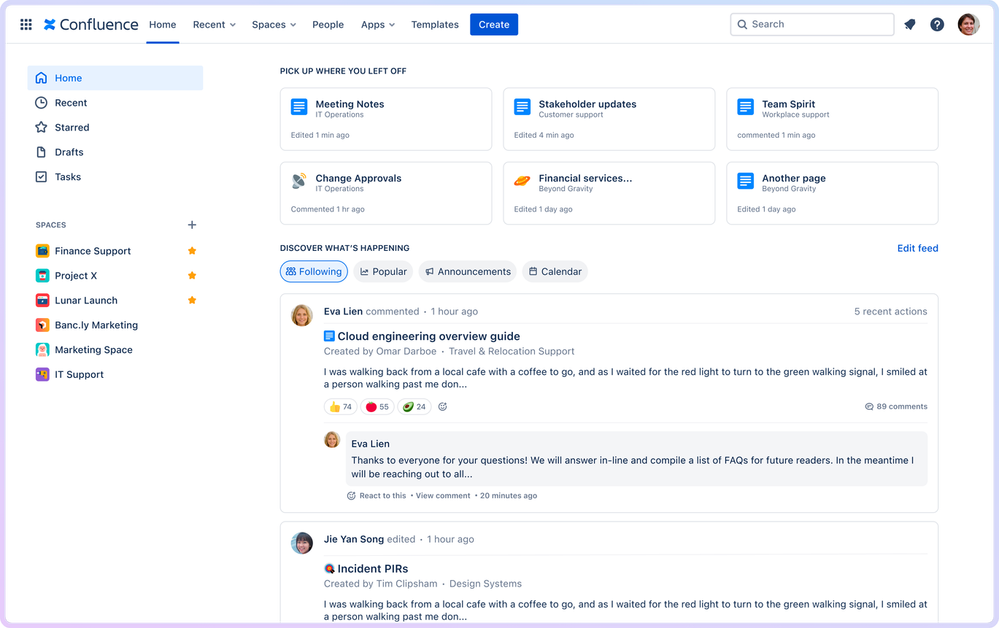
Confluence is a cloud-based collaboration workspace for teams to organize, edit, and share documents, manage meeting notes, and maintain knowledge bases and project information in one centralized platform.
Who Is Confluence Best For?
Confluence suits cross-functional teams and project managers who need a central space for collaborative document editing and organized knowledge sharing.
Why I Picked Confluence
I picked Confluence because my team benefits from real-time collaborative editing, granular permission controls, and structured knowledge spaces that help us organize documentation with page trees, templates, and inline comments for every project.
Confluence Key Features
- AI-powered search: Surface relevant pages and documents using an intelligent search algorithm that understands context.
- Task tracking: Assign and monitor action items directly within pages and meeting notes.
- Page version history: View, compare, and restore past page versions at any time to preserve team operational efficiency.
- Macros library: Add dynamic content like charts, status updates, and calendars to any page.
Confluence Integrations
Confluence offers native integrations with Jira, Trello, Slack, Google Drive, Microsoft 365, Dropbox, GitHub, Salesforce, Zoom, and Figma. An API is available for custom integrations.
Pros and Cons
Pros:
- Page templates for faster documentation creation
- Granular permissions for page and space access
- AI-powered knowledge base content suggestions
Cons:
- Search precision can vary with large spaces
- Limited automation for knowledge curation workflows

Best for integrating AI with Microsoft apps
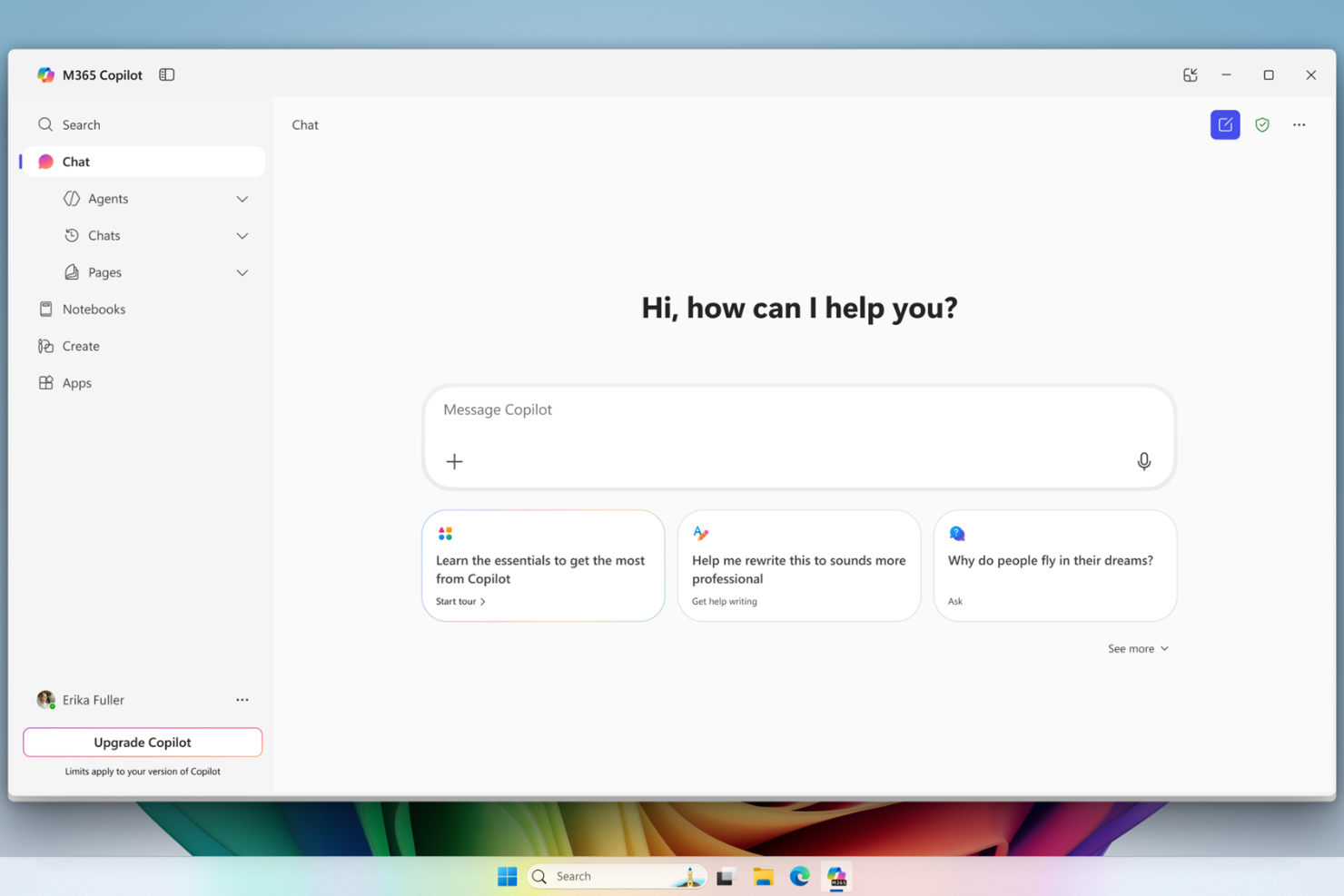
Microsoft 365 Copilot is an AI-powered productivity and knowledge management solution that brings generative AI features and intelligent data retrieval directly into Microsoft 365 apps like Word, Excel, Outlook, Teams, and PowerPoint.
Who Is Microsoft 365 Copilot Best For?
Microsoft 365 Copilot is a strong fit for business users and enterprise teams already working in the Microsoft 365 ecosystem.
Why I Picked Microsoft 365 Copilot
I picked Microsoft 365 Copilot because I regularly use generative AI to summarize emails, generate documents from prompts, and surface context-aware knowledge inside Teams and Outlook, all without leaving Microsoft 365 apps.
Microsoft 365 Copilot Key Features
- Microsoft Graph data integration: Connects securely to your organization’s documents, calendar, and communication data.
- In-app contextual prompts: Lets you ask questions and issue commands directly within Word, Excel, and PowerPoint.
- Automatic meeting recaps: Generates highlights, decisions, and action items after Teams meetings.
- Enterprise-grade data security: Protects data using Microsoft 365 security, compliance, privacy controls, and stricter GDPR frameworks.
Microsoft 365 Copilot Integrations
Microsoft 365 Copilot has native integrations across the Microsoft ecosystem, including Microsoft 365 and Azure. An API is available for custom integrations.
Pros and Cons
Pros:
- Automates meeting recaps and knowledge summaries
- Delivers context-aware insights using organizational data
- Embeds generative AI in Microsoft 365 apps
Cons:
- Limited customization beyond the Microsoft ecosystem
- Requires Microsoft 365 licensing and compliance
Best for task-driven knowledge insights

ClickUp Brain is an AI knowledge management software that brings together task management, document collaboration, and AI-powered search for teams working in ClickUp.
Who Is ClickUp Brain Best For?
ClickUp Brain suits project managers at fast-paced teams or startups who need AI-driven task and knowledge insights alongside robust collaboration tools.
Why I Picked ClickUp Brain
I picked ClickUp Brain because I like how it layers AI into every aspect of task and project management, letting me surface key knowledge directly in tasks and docs. I use its context-aware insights to quickly generate task summaries or get instant answers from workspace content.
ClickUp Brain Key Features
- AI project templates: Offer ready-made frameworks for recurring workflows and documentation.
- Knowledge base search: Lets you query workspace data using natural language prompts.
- AI-powered writing assistant: Helps draft and revise documentation within tasks and docs.
- Custom AI roles: Allows admins to set permissions on who can use AI features.
ClickUp Brain Integrations
ClickUp Brain offers native integrations with Slack, GitHub, Zoom, Google Drive, Microsoft Teams, Dropbox, Outlook, and Calendar. It also connects with Zapier and provides an API for custom integrations.
Pros and Cons
Pros:
- AI assistant works within project docs
- Task summaries update in real time
- AI answers surface directly in tasks
Cons:
- Can be resource-intensive for larger workspaces
- Responses sometimes lack context from custom fields

Best for AI-powered meeting transcription
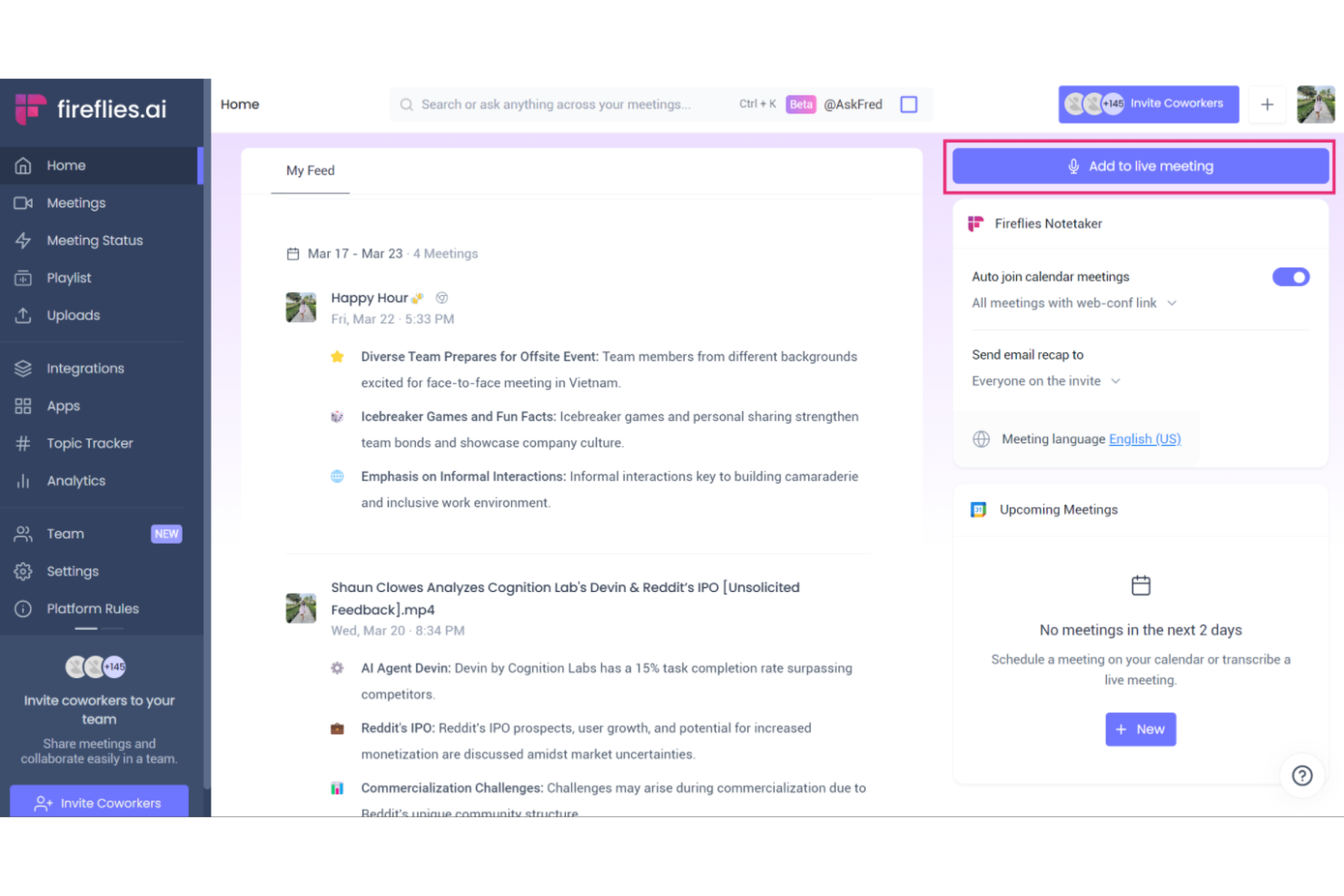
Fireflies.ai is an AI meeting transcription and conversation intelligence platform that records calls, transcribes audio, indexes meeting content, and enables search across meeting data for knowledge management.
Who Is Fireflies.ai Best For?
Sales, customer success, and operations teams that need searchable, AI-generated transcripts of virtual meetings and calls.
Why I Picked Fireflies.ai
I picked Fireflies.ai as one of the best because it automatically records and transcribes meetings with impressive accuracy, tags action items, and lets my team search across past conversations. This is especially valuable for AI-powered meeting transcription.
Fireflies.ai Key Features
- Channel-based workspace organization: Group meeting recordings and transcripts for teams or projects.
- Collaboration tools: Add comments, reactions, and highlights directly on transcript lines.
- Custom topic tracking: Set up keywords or topics to monitor automatically in meeting notes.
- Automatic summary generation: Generate AI-powered summaries of meetings for rapid reference and sharing.
Fireflies.ai Integrations
Fireflies.ai offers native integrations with Google Meet, Zoom, Microsoft Teams, Slack, Salesforce, HubSpot, Asana, Trello, Dropbox, and Zapier. An API is available for custom integrations.
Pros and Cons
Pros:
- Generates AI-driven summaries and topic tracking
- Searchable archive of all recorded conversations
- Transcribes multi-speaker meetings with high accuracy
Cons:
- Limited editing features for generated transcripts
- Occasional errors with technical vocabulary

Guru
Best for real-time knowledge verification
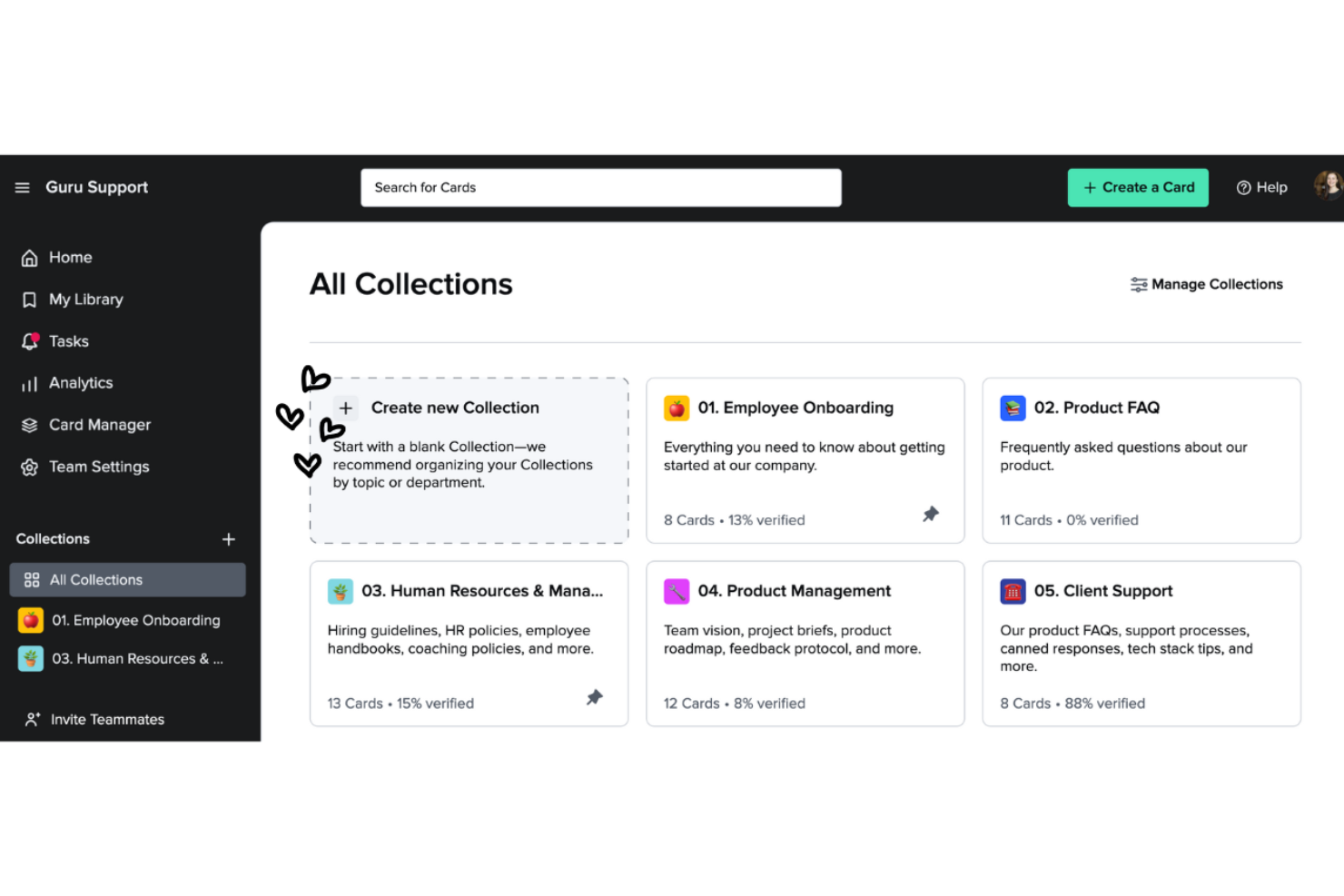
Guru is an AI-powered knowledge management platform designed to help teams capture, organize, verify, and surface company knowledge directly within their daily workflows.
Who Is Guru Best For?
Guru fits distributed customer support, sales, and ops teams who need fast, verified answers while working across multiple tools.
Why I Picked Guru
I picked Guru because I rely on its AI-powered verification that keeps company knowledge accurate and up to date as our experts review content in real time. I also use Guru's browser extension to capture and share answers without leaving Slack or Chrome.
Guru Key Features
- AI search bar: Find company knowledge instantly using an AI-powered search.
- Card organization: Store information in bite-sized, easily managed cards alongside your primary document management processes.
- Knowledge triggers: Surface answers automatically based on user activity.
- Slack integration: Access and update knowledge directly within Slack.
Guru Integrations
Guru offers native integrations with Slack, Microsoft Teams, Chrome, Zendesk, Salesforce, and Zapier. An API is available for custom integrations.
Pros and Cons
Pros:
- Search delivers verified results instantly
- Real-time knowledge alerts and notifications
- AI-driven content verification workflow
Cons:
- AI features require a premium plan
- Formatting options for content feel limited
Glean
Best for unified enterprise search across apps

Glean is an AI-powered knowledge management platform designed to connect, search, and organize content from multiple workplace tools and data sources in one unified interface.
Who Is Glean Best For?
Glean suits IT, HR, and knowledge management teams at mid-sized and large enterprises that need to unify information across business applications.
Why I Picked Glean
I picked Glean as one of the best because it pulls content from Google Workspace, Slack, Jira, and dozens of other business apps into a single interface. I use its AI-driven search to uncover files, messages, and knowledge from across my tech stack instantly.
Glean Key Features
- Customizable knowledge cards: Display curated information from subject matter experts to eliminate knowledge gaps directly within search results.
- Automatic content updates: Sync and index new documents and messages across all connected apps in real time.
- Enterprise-grade access controls: Define granular roles and permissions for content visibility within corporate knowledge management tools.
- AI-powered question answering: Respond to natural language queries with concise, context-aware results.
Glean Integrations
Glean offers native integrations with Google Workspace, Microsoft 365, Slack, Jira, Confluence, Salesforce, Zendesk, Workday, GitHub, and Box, and provides an API for custom integrations.
Pros and Cons
Pros:
- Suggests relevant experts and documentation internally
- Personalized results based on user context
- Fast AI-powered search across connected work apps
Cons:
- Limited offline access to indexed content
- Requires admin setup for initial integrations
Best for natural language question answering
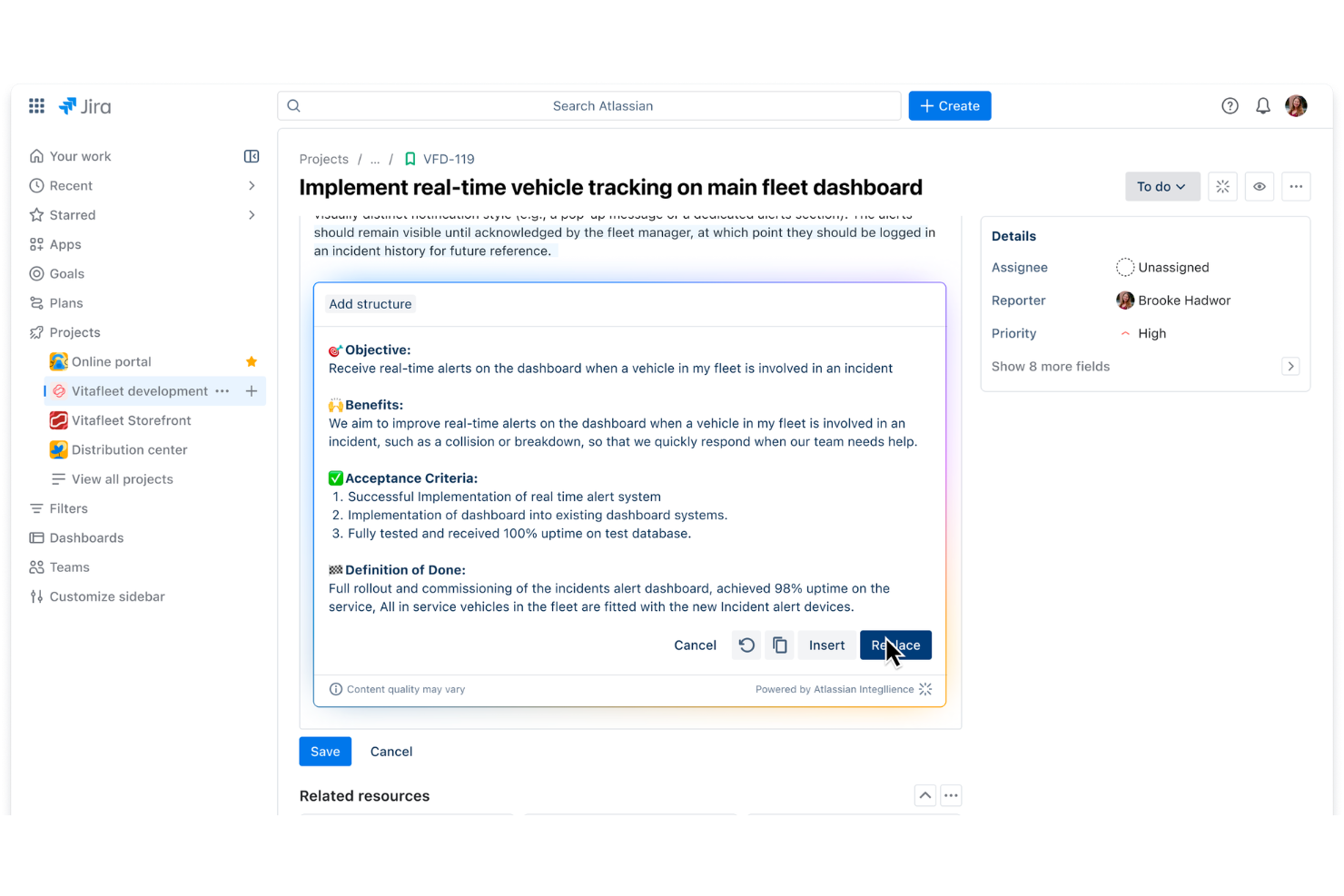
Atlassian Rovo is an AI platform that combines advanced natural language processing search, document understanding, and data connectivity within the Atlassian ecosystem.
Who Is Atlassian Rovo Best For?
Atlassian Rovo suits product and engineering teams at mid-sized and large organizations already using Jira, Confluence, or other Atlassian solutions.
Why I Picked Atlassian Rovo
I picked Atlassian Rovo as one of the best because I use its natural language question answering to search across Jira and Confluence without keywords, and it generates precise, context-aware responses from scattered documentation and tickets.
Atlassian Rovo Key Features
- Automated knowledge curation: Rovo curates and updates knowledge from Jira and Confluence workspaces.
- Secure content permissions: Honors Atlassian's granular permission settings for data access.
- Direct workspace integration: Embeds seamlessly into existing dashboards where AI helps engineers reference historical code changes.
- Continuous learning engine: Improves answer quality to surface relevant knowledge through ongoing team usage and feedback.
Atlassian Rovo Integrations
Atlassian Rovo offers native integrations with Jira, Confluence, Jira Service Management, and Trello within the Atlassian ecosystem. An API is available for custom integrations.
Pros and Cons
Pros:
- Works across Jira, Confluence, and Trello
- Surfaces experts within your organization
- Delivers answers in conversational language
Cons:
- Limited external data source connectivity
- Requires Atlassian products for full functionality
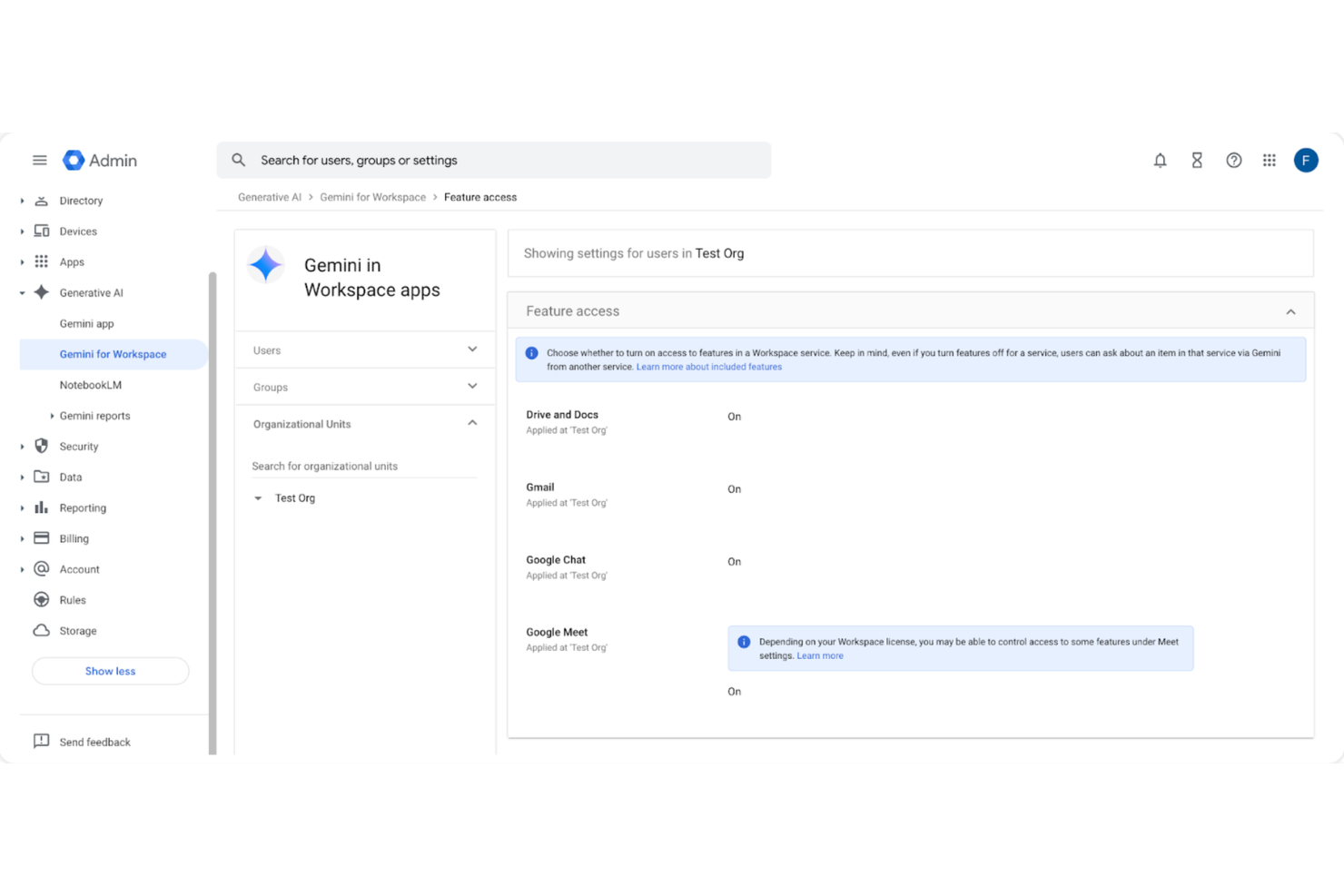
Gemini Enterprise is a generative AI platform for enterprise knowledge management that lets you search, analyze, and automate workflows using Google Cloud’s AI models and integrations.
Who Is Gemini Enterprise Best For?
Gemini Enterprise is a fit for large organizations or technical teams using Google Cloud infrastructure who need integrated AI-powered knowledge management.
Why I Picked Gemini Enterprise
I picked Gemini Enterprise because I can connect Google Cloud datasets directly, apply generative AI to search or summarize documents at scale, and build custom workflows powered by Google’s AI models right inside my existing infrastructure.
Gemini Enterprise Key Features
- Conversational AI interface: Lets users query enterprise data and documents using natural language.
- Data access controls: Offers granular permissions for managing access to sensitive knowledge.
- Multimodal input support: Accepts text, images, and code for diverse content processing.
- Audit and traceability tools: Tracks activity and model outputs for compliance and review.
Gemini Enterprise Integrations
Gemini Enterprise offers native integrations across the Google Cloud ecosystem, including Google Workspace, BigQuery, and Vertex AI. An API is available for custom integrations.
Pros and Cons
Pros:
- Granular access controls for knowledge management
- Handles large-scale document search and analysis
- Connects directly to Google Cloud services
Cons:
- Advanced AI features require deep configuration
- Limited support for non-Google cloud platforms
Diğer Yapay Zekâ Bilgi Yönetimi Yazılımları
Kısa listemde yer almayan ancak yine de incelemeye değer bazı ek yapay zekâ bilgi yönetimi yazılımı seçenekleri şunlardır:
- Slackbot
For searching conversations within chat
- Dust
For custom workflow automation with LLMs
- Tettra
For organized internal Q&A management
- Bloomfire
For knowledge sharing with advanced search
- Persana AI
For centralized company knowledge retrieval
- eesel AI
For automatic document categorization
- Coda AI
For AI-powered document templates
- Onyx
For collaborative team workspaces


How I Evaluate AI Knowledge Management Software
Every tool here needs to prove its AI does real work—like pulling the right lessons learned from past sprints without anyone tagging a thing. I evaluate each option on two layers: core functionality needed to make the list and the differentiating factors that separate one tool from the rest.
Core Functionality (Table Stakes For This List)
When I'm selecting tools for my list, I rank each one on a scale from 0 (does not offer the functionality) to 5 (excels in this area) for each core functionality listed below. Then, I calculate the tool's total score into a percentage. Each tool needs to achieve a minimum total score of 65% to be considered for inclusion.
- AI-Powered Search: I check whether the search goes beyond keywords—can a PM ask "what did we decide about the API migration?" and get a grounded, cited answer?
- Automated Content Organization: Tools should auto-tag and categorize docs, meeting notes, and artifacts so teams aren't manually building folder structures mid-sprint.
- Generative Summarization: I look for on-demand summaries across docs, threads, and meetings—like distilling a 40-page project retrospective into key takeaways.
- Project Tool Integrations: I evaluate native connections to platforms like Jira, Asana, and Confluence, since disconnected knowledge bases defeat the purpose for PM teams.
- Contextual Q&A Assistant: A conversational assistant should answer project-scoped questions using ingested data, not generic responses pulled from public training sets.
- Knowledge Governance & Permissions: Access controls matter—I look for permission-aware AI outputs with source citations so sensitive project data stays within the right teams.
Once I have a list of tools that meet this criteria, I consider what sets each platform apart.
Differentiating Factors (What Sets Vendors Apart)
Here's how I compare and contrast different vendors:
Standout Features
Meeting intelligence is a big differentiator—I look for tools that auto-capture decisions, risks, and action items from standups or steering committees without manual note-taking. Proactive knowledge surfacing also adds real value, where the AI pushes relevant past project docs based on your current task or sprint phase. I evaluate analytics dashboards too, especially ones that flag stale content or unanswered queries across a portfolio, since those gaps often signal where teams are losing time.
Beyond Features
Data security matters here more than in most categories—I check whether vendors guarantee customer data isn't used to train their models and whether they hold SOC 2 Type II or ISO 27001 certifications. AI model transparency is closely tied to this; I want to know which LLMs power the tool and whether teams can deploy privately. Time-to-value is another factor I weigh, especially how fast a tool can ingest existing Confluence or SharePoint repos, since a PMO won't wait months to see results from a new platform.
Yapay Zekâ Bilgi Yönetimi Yazılımı Nasıl Seçilir?
Uzun özellik listeleri ve karmaşık fiyatlandırma yapıları arasında kaybolmak kolaydır. Benzersiz yazılım seçim süreciniz üzerinde çalışırken odağınızı korumanıza yardımcı olmak için aklınızda bulundurmanız gereken faktörleri içeren bir kontrol listesi hazırladık:
| Faktör | Dikkat Edilmesi Gerekenler |
| Ölçeklenebilirlik | Ekibiniz büyüdükçe platform daha fazla kullanıcıyı, toplantıyı ve dosyayı yönetebilecek mi? Gelecekteki iş yükünü, veri büyümesini ve kullanıcı ya da depolama sınırlarını göz önünde bulundurun. |
| Entegrasyonlar | Slack, Zoom veya mevcut bilgi tabanınız gibi ekibinizin hâlihazırda kullandığı temel araçlara bağlanabiliyor mu? Yerel ve üçüncü taraf seçeneklerini kontrol edin. |
| Özelleştirilebilirlik | İş akışlarını, etiketleri veya panoları şirketinizin bilgi yönetimi ihtiyaçlarına uyacak şekilde düzenleyebilir misiniz? Araç, özel şablonları veya özetleri destekliyor mu? |
| Kullanım kolaylığı | Ekibiniz aracı ne kadar hızlı benimseyebilir? Özellikle teknik olmayan çalışanlar için anlaşılır arayüzler ve düşük eğitim gereksinimleri arayın. |
| Uygulama ve işe alıştırma | Kurulum için hangi kaynaklar gerekiyor? Veri geçişini, kullanıcı erişimi yapılandırmasını ve ekibinizin hız kazanması için gereken süreyi düşünün. |
| Maliyet | Planlar bütçenize ve kuruluşunuzun büyüklüğüne uygun şekilde yapılandırılmış mı? Her kademede hangi özelliklerin sunulduğunu inceleyin ve gizli ücretleri ya da eklentileri kontrol edin. |
| Güvenlik önlemleri | Yazılım güvenlik standartlarınızı karşılıyor mu? Veri şifreleme, kullanıcı izinleri, gizlilik denetimleri ve denetim günlükleri hakkında bilgi alın. |
| Destek erişilebilirliği | Sorunlar ortaya çıktığında hızlı destek alabiliyor musunuz? Canlı sohbet, telefon ve kapsamlı kendi kendine yardım kaynaklarının sunulup sunulmadığını değerlendirin. |
Yapay Zekâ Bilgi Yönetimi Yazılımı Nedir?
Yapay zekâ bilgi yönetimi yazılımı, toplantılardan, belgelerden ve iletişimlerden bilgi yakalamak, düzenlemek ve görünür hâle getirmek için yapay zekâ kullanan dijital bir platformdur. Yazıya dökme, kategorilere ayırma ve içerik alma gibi görevleri otomatikleştirerek ekiplerin iş akışları ve projeler genelindeki ortak bilgileri bulmasını, paylaşmasını ve uygulamasını kolaylaştırır.
Özellikler
Yapay zekâ bilgi yönetimi yazılımı seçerken aşağıdaki temel özelliklere dikkat edin:
- Otomatik transkripsiyon: Toplantılardaki ve görüşmelerdeki konuşma içeriklerini aranabilir yazılı metne dönüştürerek önemli hiçbir şeyin gözden kaçmamasını veya konuşma sırasında kaybolmamasını sağlar.
- Yapay zekâ destekli arama: Büyük miktarlardaki notlar, dosyalar ve kayıtlar arasından bağlamı anlamak ve ilgili bilgileri bulmak için makine öğrenimini kullanır.
- Bilgi tabanı oluşturma: Ekiplerin belgeleri, sık sorulan soruları, politikaları ve proje notlarını merkezi ve yapılandırılmış bir depoda saklamasına, düzenlemesine ve kategorilere ayırmasına olanak tanır.
- İçerik etiketleme ve kategorilere ayırma: Konuları, anahtar kelimeleri ve temaları otomatik olarak belirleyip etiketleyerek ilgili bilgileri filtrelemeyi ve gruplandırmayı kolaylaştırır.
- Toplantı özeti oluşturma: Uzun toplantıları veya konuşmaları temel noktalar, yapılacak işler ve kararları içeren kısa özetlere dönüştürmek için yapay zekâyı kullanır.
- Kullanıcı erişim denetimleri: Hassas bilgilerin yetkili ekip üyeleri veya gruplarıyla sınırlandırılabilmesi için izinler ve role dayalı erişim sunar.
- İş birliği araçları: Ekip üyelerinin ilgili bölümlere doğrudan bilgi tabanı veya dökümler içinde yorum yapmasını, açıklama eklemesini ya da vurgulamasını sağlar.
- İş araçlarıyla entegrasyon: Verileri otomatik olarak almak veya bilgileri paylaşmak için iletişim, üretkenlik ve proje yönetimi uygulamalarına sorunsuz şekilde bağlanır.
- Sürüm geçmişi ve denetim kayıtları: Belgelerde veya notlarda yapılan değişiklikleri ve düzenlemeleri takip ederek ekiplerin kimin neyi ve ne zaman güncellediğini görmesine yardımcı olur.
- Özelleştirilebilir şablonlar: Toplantı notları, içerik üretimini ölçeklendirme veya teknik dokümantasyon için önceden hazırlanmış şablonlar sunar.
Avantajlar
Yapay zekâ bilgi yönetimi yazılımını uygulamak ekibiniz ve işletmeniz için çeşitli avantajlar sağlar. Yararlanabileceğiniz avantajlardan bazıları şunlardır:
- Daha hızlı bilgi erişimi: Yapay zekâ araması ve etiketleme özellikleri, kullanıcıların toplantı notlarını, belgeleri veya görüşmeleri manuel olarak aramak zorunda kalmadan ilgili bilgileri hızlıca bulmasını sağlar.
- Otomatik bilgi yakalama: Otomatik transkripsiyon ve kategorilere ayırma, toplantılardan ve iletişimlerden elde edilen önemli içgörülerin her zaman kaydedilmesini ve saklanmasını sağlar.
- Gelişmiş ekip iş birliği: Yerleşik yorum yapma, etiketleme ve paylaşma araçları bilgi alışverişini teşvik eder ve bilgi silolarını azaltır.
- Tutarlı toplantı dokümantasyonu: Yapay zekâ tarafından oluşturulan özetler, yapılacak işler ve yapılandırılmış notlar, tüm önemli görüşmeler için standartlaştırılmış kayıtlar sunar.
- Artırılmış bilgi güvenliği: İzne dayalı erişim denetimleri, hassas bilgileri yalnızca yetkili kullanıcıların görüntüleyebilmesini veya düzenleyebilmesini sağlar.
- Azaltılmış manuel iş yükü: Not alma, düzenleme ve etiketleme gibi tekrarlayan görevlerin otomatikleştirilmesi, daha yüksek değerli çalışmalar için zaman kazandırır.
- Geliştirilmiş karar alma: Düzenli ve güncel bilgilere kolay erişim, ekiplerin daha hızlı ve daha bilinçli kararlar almasını sağlar.
Maliyetler & Fiyatlandırma
Yapay zekâ bilgi yönetimi yazılımını seçmek, mevcut çeşitli fiyatlandırma modellerini ve planları anlamayı gerektirir. Maliyetler özelliklere, ekip büyüklüğüne, eklentilere ve daha fazlasına göre değişir. Aşağıdaki tablo, yapay zekâ bilgi yönetimi yazılımı çözümlerinde yaygın planları, bunların ortalama fiyatlarını ve genellikle sunulan özellikleri özetlemektedir:
Yapay Zekâ Bilgi Yönetimi Yazılımı İçin Plan Karşılaştırma Tablosu
| Plan Türü | Ortalama Fiyat | Yaygın Özellikler |
| Ücretsiz Plan | $0 | Temel transkripsiyon, sınırlı depolama, tek kullanıcı erişimi ve temel arama işlevi. |
| Kişisel Plan | $5-$15/kullanıcı/ay | Otomatik özetler, artırılmış depolama, basit iş birliği araçları ve öncelikli destek erişimi. |
| İşletme Planı | $20-$40/kullanıcı/ay | Ekip çalışma alanları, gelişmiş izinler, popüler araçlarla entegrasyonlar ve analiz panoları. |
| Kurumsal Plan | $50-$100/kullanıcı/ay | Özel güvenlik seçenekleri, özel işe alıştırma süreci, API erişimi, ayrıcalıklı destek ve uyumluluk araçları. |
AI Bilgi Yönetimi Yazılımı SSS'leri
AI bilgi yönetimi yazılımı hakkında sık sorulan bazı soruların yanıtlarını burada bulabilirsiniz:
AI bilgi yönetimi yazılımı toplantı verimliliğini nasıl artırır?
AI bilgi yönetimi yazılımı toplantıları otomatik olarak yazıya döker, görüşmeleri özetler ve yapılacak işleri öne çıkarır. Bu özellikler ekibinizin uyum içinde kalmasına, önemli noktaları hızlıca gözden geçirmesine ve manuel not alma ya da toplantı sonrası takip ihtiyacını azaltmasına yardımcı olur.
Ekibim AI bilgi yönetimi yazılımıyla mevcut araçları kullanabilir mi?
Evet, çoğu AI bilgi yönetimi yazılımı Slack, Microsoft Teams ve proje yönetimi platformları gibi araçlarla entegrasyonlar sunar. Bu sayede iş akışlarını birbirine bağlayabilir, sistemler arasında güncellemeleri paylaşabilir ve veri silolarından kaçınabilirsiniz.
Verilerim AI bilgi yönetimi yazılımında güvende mi?
Evet, güvenilir platformlar verilerinizi korumak için şifreleme, güvenli erişim denetimleri ve denetim günlüğü kullanır. Kuruluşunuzun gereksinimlerini karşıladığından emin olmak için her sağlayıcının güvenlik uygulamalarını mutlaka inceleyin.
AI bilgi yönetimi yazılımından en çok hangi büyüklükteki ekipler yararlanır?
Her büyüklükteki ekip yararlanabilir; ancak bilgiye hızlıca erişmesi ve bilgiyi düzenlemesi gereken büyük veya farklı konumlara dağılmış ekiplerde etkisi daha belirgindir. Küçük ekipler genellikle temel planları kullanırken, daha büyük kuruluşlar gelişmiş denetimler ve entegrasyonlar arar.
Bu araçlar için tipik öğrenme eğrisi nasıldır?
Çoğu AI bilgi yönetimi yazılımı sezgisel arayüzler, şablonlar ve yönlendirmeli başlangıç süreçleriyle hızlı benimsenmek üzere tasarlanmıştır. Ekipler, teknik uzmanlık gerekmese bile genellikle birkaç oturum içinde sistemi kullanmaya başlar.
Mevcut bilgilerimi yeni bir platforma taşıyabilir miyim?
Evet, birçok çözüm belgelerin, toplantı dökümlerinin ve mevcut veritabanlarının içe aktarılmasını destekler. Geçiş yaparken taşıma desteği ve içe aktarma kılavuzları sunan çözümleri tercih edin.