

2026’da Profesyonel Hizmetler İçin En İyi 10 CRM Yazılımı

Profesyonel Hizmetler İçin En İyi CRM Yazılımları Kısa Listesi


Profesyonel hizmetler için modern müşteri ilişkileri yönetimi yazılımı, ekibinizin müşteri ilişkilerini, projeleri ve iletişimleri tek bir yerden yönetmesine yardımcı olarak her etkileşim üzerinde tam görünürlük ve kontrol sağlar. Profesyonel hizmetler için en iyi CRM yazılımını arıyorsanız, muhtemelen karmaşık projeler, değişen müşteri ihtiyaçları ve ekipler arası iş birliği sorunlarıyla uğraşıyorsunuzdur. Doğru CRM, müşteri verilerinizi, proje ayrıntılarınızı ve satış süreçlerinizi bir araya getirerek hiçbir şeyin gözden kaçmamasını sağlar.
Bu kılavuzda, sektörünüz için özel olarak tasarlandığını düşündüğüm en iyi platformları inceleyecek ve 2026 yılında her seçeneği profesyonel hizmet ekipleri için öne çıkaran özellikleri göstereceğim.
Why Trust Our Software Recommendations
Our team has been testing and reviewing software since 2012. As project managers ourselves, we know how difficult—and important—it is to choose the right software.
For this guide, we evaluated tools using hands-on testing and independent research, scoring tools using our selection criteria. We also draw on insights from industry thought leaders and practicing project management experts.
Our reviews reflect our human editorial judgment, not a sales pitch.
Expert reviewers:
Profesyonel Hizmetler İçin En İyi CRM Yazılımları Özeti
Bu karşılaştırma tablosu, bütçeniz ve işletmenizin ihtiyaçları için en iyi seçeneği bulmanıza yardımcı olmak amacıyla profesyonel hizmetler için en iyi CRM yazılımı seçimlerimin fiyatlandırma ayrıntılarını özetlemektedir.
| Tool | Starting Price | Website | |
|---|---|---|---|
| Best for quote-to-project conversion with billing | 4.5 out of 5 | $17/user/month 14-day free trial | Book Demo |
| Best for marketing and sales team collaboration | 4.4 out of 5 | $7/user/month Free plan available | Website |
| Best for project delivery linked to sales | 4.2 out of 5 | $29/user/month 14-day free trial + free demo available | Website |
| Best for managing agency operations end-to-end | 4.6 out of 5 | $10/user/month 14-day free trial + demo available | Book Demo |
| Best for tracking project time and expenses | 4.5 out of 5 | $20/user/month Free demo available | Website |
| Best for task assignment and time tracking | 4.4 out of 5 | Pricing upon request Free plan available | Website |
| Best for visualizing deal progression stages | 4.4 out of 5 | $14/user/month 14-day free trial | Website |
| Best for customizing data dashboards and reporting | — | $25/user/month Free plan + 30-day free trial available | Website |
| Best for flexible workflow customization | — | $18/seat/month 14-day free trial + free demo available | Website |
| Best for integrating with Salesforce ecosystems | — | Pricing upon request Free demo available | Website |


Profesyonel Hizmetler İçin En İyi CRM Yazılımları İncelemeleri
Kısa listeme giren profesyonel hizmetler için en iyi CRM yazılımlarına dair ayrıntılı özetlerimi aşağıda bulabilirsiniz. İncelemelerim, size en uygun seçeneği bulmanıza yardımcı olmak için her platformun özelliklerine, en iyi kullanım alanlarına ve entegrasyonlarına ayrıntılı bir bakış sunmaktadır.
Scoro
Best for quote-to-project conversion with billing

Scoro is a professional services automation platform that combines CRM and pipeline management, project delivery, time tracking, resource planning, and client billing in a single system.
Who Is Scoro Best For?
Scoro is a strong fit for professional services firms—agencies, consultancies, and IT firms—that need to manage the full arc from client quote to project delivery to invoice in one place.
Why I Picked Scoro
Scoro earns its spot on my shortlist because the quote-to-project conversion flow is genuinely built into the platform's core, not bolted on. I love that a confirmed quote carries its budget directly into a live project, so nothing gets re-entered when a deal closes. From there, logged time feeds invoices automatically, and retainer billing periods track budget burn against the original scope in one view.
Scoro Key Features
- Contact cards with linked history: Each company and person record connects to related projects, deals, quotes, and financial documents in a single view.
- Customizable pipeline stages: Quote statuses, probabilities, and expiry dates can be tailored to match your firm's sales process.
- Revenue forecasting by deal probability: Deal values weighted by closing probability feed the Revenue report alongside confirmed project revenue.
- Multi-entity financial reporting: Financial summaries can be consolidated across entities, with administrator-controlled user access per entity.
Scoro Integrations
Scoro connects to 40+ other tools, including native integrations with Xero, QuickBooks, Sage Intacct, Salesforce, Stripe, Jira, Slack, Google Calendar, and Google Drive. It also offers a REST API, webhooks, and Zapier.
Pros and Cons
Pros:
- Logged time connects directly to invoicing
- Pipeline dashboards clarify deal and revenue status
- Quotes carry budgets into project delivery
Cons:
- Quote search and interaction can feel limited
- Some reports require exports or external summaries
New Product Updates from Scoro

Scoro Adds Time Mobile App and ELI Improvements
Scoro adds the Scoro Time mobile app for iOS/Android to track time anywhere and expands ELI with attachments, smarter filtering, and trigger-based actions. For more information, visit Scoro's official site.
Best for marketing and sales team collaboration
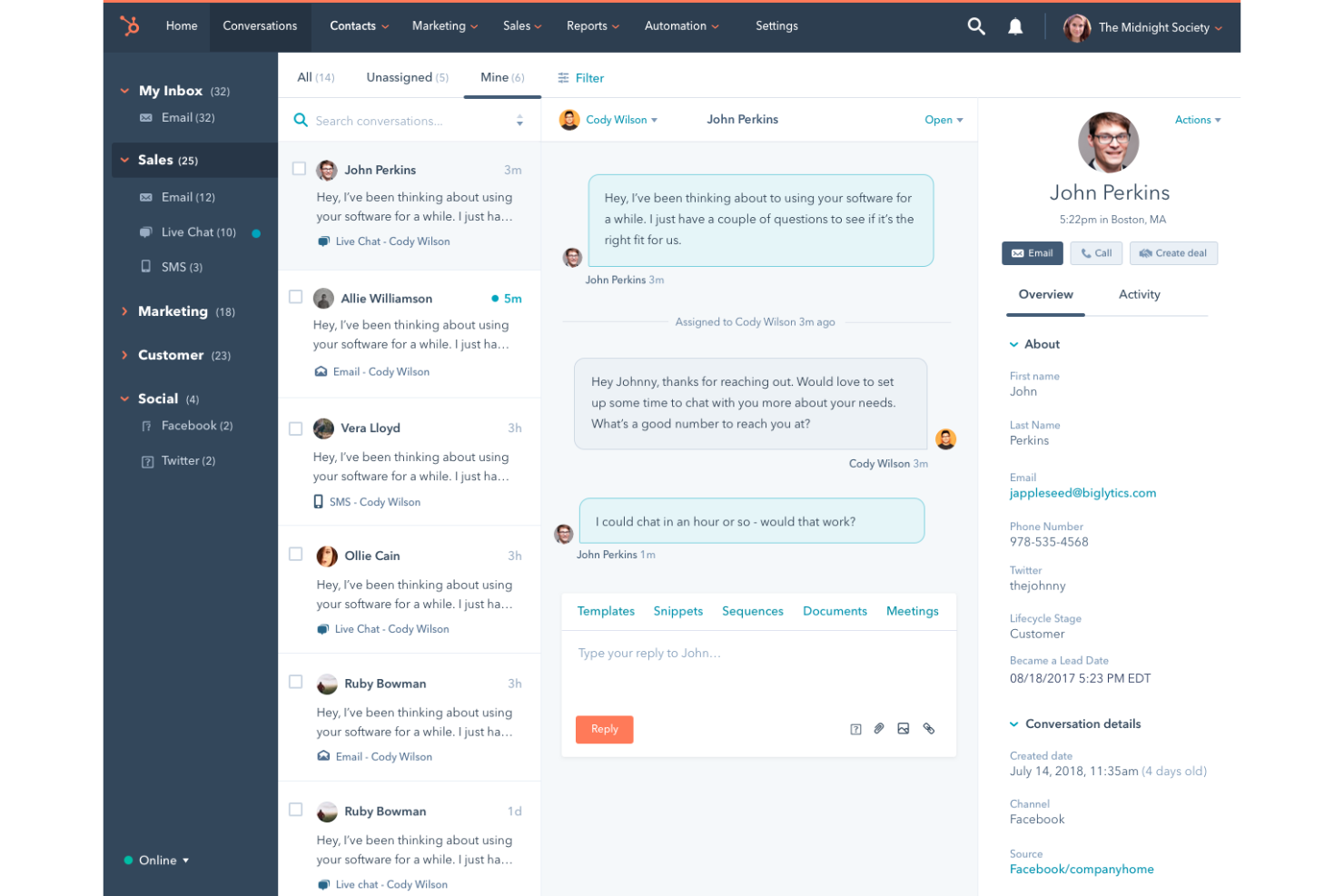
HubSpot CRM is a cloud-based CRM platform that covers contact management, deal tracking, email outreach, meeting scheduling, and sales pipeline management across connected marketing, sales, and service hubs.
Who Is HubSpot CRM Best For?
HubSpot CRM is a natural fit for growing professional services firms where marketing and sales teams need to work from shared contact and pipeline data.
Why I Picked HubSpot CRM
HubSpot CRM earns its spot on my shortlist because the shared contact timeline gives marketing and sales a single view of every touchpoint, from initial lead generation campaign click to closed deal. I particularly like how lead scoring lets marketing define qualification criteria that sales can see before picking up a call. The built-in meeting scheduler and email sequences mean both teams operate from the same tool without duplicating work.
HubSpot CRM Key Features
- Deal pipeline management: Build and customize sales pipelines with drag-and-drop deal stages that reflect your firm's actual sales process.
- Sales forecasting: Project revenue by pipeline stage, deal amount, and close date from a dedicated forecasting dashboard.
- Custom reporting dashboards: Build reports across contacts, deals, and activities using a drag-and-drop report builder.
- Quote generation: Create and send branded quotes directly from a deal record without leaving the CRM.
HubSpot CRM Integrations
HubSpot's App Marketplace is home to over 1,000 integrations, including tools like Salesforce, Slack, Gmail, Google Calendar, Jira, Mailchimp, Calendly, Zendesk, WordPress, and QuickBooks. Zapier is also available for connecting HubSpot to additional apps, and an API is offered for custom integrations.
Pros and Cons
Pros:
- Website visitor tracking identifies anonymous prospects
- Built-in marketing automation alongside sales tools
- Shared data across marketing, sales, and service
Cons:
- Key features locked behind higher-priced tiers
- Workflow automation restricts complex multi-step processes

Best for project delivery linked to sales

Insightly is a CRM platform that combines pipeline management, contact tracking, and built-in project delivery tools so teams can convert closed deals into tracked projects without leaving the platform.
Who Is Insightly Best For?
Insightly suits consulting firms and agencies where account managers oversee both deal-closing and client delivery from the same system.
Why I Picked Insightly
I picked Insightly as one of the best because it's the only CRM I've used where a won opportunity converts into a live project in one click. The project inherits the original contact records, notes, and custom field data captured during the sales cycle. I also like that project pipelines use the same stage-based structure as sales pipelines, so delivery teams work in a familiar environment without a separate tool or handoff process.
Insightly Key Features
- Activity sets: Triggers predefined sequences of tasks and events when a deal or project moves to a new stage.
- Relationship linking: Maps connections between contacts, organizations, and opportunities to show how accounts are related.
- Lead routing: Automatically assigns incoming leads to a specific team member based on defined rules.
- Built-in reporting: Generates dashboards across sales pipeline, project status, and team activity in one view.
Insightly Integrations
Insightly offers dozens of native integrations, including DocuSign, QuickBooks, PandaDoc, Xero, MailChimp, Slack, Zoom, Evernote, and Unbounce, plus Google and Microsoft integrations. Over 1,000 additional integrations are available through Insightly's AppConnect add-on. Insightly also provides an API for custom integrations, and it connects with Zapier.
Pros and Cons
Pros:
- Customizable pipelines for both sales and delivery
- Relationship linking maps contacts across organizations
- Converts won deals into tracked projects instantly
Cons:
- Slowdowns occur when handling larger datasets
- Reporting and automation are gated behind higher tiers

Best for managing agency operations end-to-end

Productive is an agency management platform that covers project management, resource planning, sales CRM, time tracking, budgeting, invoicing, and financial forecasting in a single connected workspace.
Who Is Productive Best For?
Productive is a strong fit for digital, creative, and marketing agencies that need to manage client work, billable hours, and profitability from a single platform.
Why I Picked Productive
I picked Productive as one of the best because it's one of the few tools where a won deal converts directly into a live project, with budget, contacts, and client context already in place. I like that real-time profitability tracking sits at the center of everything: as my team logs time, cost, and margin data updates instantly, so I'm not waiting on monthly reports. The scenario builder also lets me compare pricing and resourcing models before committing to a proposal, which I find especially useful for protecting margins on fixed-fee work.
Productive Key Features
- Resource planning: Schedule team members by availability, skills, and seniority across current and upcoming projects with a visual capacity overview.
- Gantt chart view: Map project timelines, task dependencies, and milestones in a drag-and-drop Gantt interface that updates as work progresses.
- Automated invoice drafting: Generate invoice drafts directly from logged time and approved budgets without manual data entry.
- Revenue recognition: Track recognized versus deferred revenue across active projects and client contracts from within the same platform.
Productive Integrations
Productive offers native integrations with Jira, HubSpot, Xero, QuickBooks, Sage, Google Calendar, Gmail, Microsoft Outlook, Slack, and BambooHR, along with several other accounting and HR connectors. It also connects with Zapier and provides an open API with webhook support for custom integrations.
Pros and Cons
Pros:
- Unifies CRM, time tracking, and invoicing
- Real-time profitability tracking per project
- Deals convert directly into active projects
Cons:
- Interface can feel sluggish at times
- Reporting formulas lack advanced flexibility
New Product Updates from Productive
Productive Adds Email and Calendar Integrations for Agents
Productive adds Gmail, Outlook, Google Calendar, and Outlook Calendar connectors for its AI agents. These integrations let agents manage emails and create calendar events directly within Productive. For more information, visit Productive’s official site.

BigTime
Best for tracking project time and expenses

BigTime is a professional services automation (PSA) platform that covers time and expense tracking, project and portfolio management, resource scheduling, scoping and quoting, invoicing, and AI-assisted reporting for your consulting business.
Who Is BigTime Best For?
BigTime is a strong fit for mid-sized professional services firms in consulting, accounting, engineering, and IT services that bill clients by the hour.
Why I Picked BigTime
BigTime earns its spot on my shortlist because of how tightly it connects time and expense tracking to actual billing and project financials. I picked it because the budget vs. actuals view updates in real time, so I can catch a project going over budget before the invoice goes out, not after. I also like the Expense Agent, which captures, categorizes, and routes receipts for approval without manual entry. That kind of detail matters when you're billing clients and need every expense accounted for accurately.
BigTime Key Features
- Resource scheduling: Assign staff to projects by role or department, with conflict detection and utilization tracking across your team.
- Scoping and quoting: Build project quotes using real cost and margin data, with controls for pricing, discounts, and scope.
- Invoicing workflow: Customize invoices per client, sync with QuickBooks or Sage Intacct, and automate billing to reduce errors.
- AI assistant: Query project margins, capacity, and bottlenecks in real time using BigTime's built-in AI reporting tool.
BigTime Integrations
BigTime offers native integrations with QuickBooks, Sage Intacct, Xero, NetSuite, Salesforce, HubSpot, Microsoft Dynamics CRM, Jira, BambooHR, and Zendesk. It also connects with identity providers like Okta and Microsoft Entra ID, and includes a REST API and BigTime DataHub for custom integrations and advanced reporting through tools like Power BI and Tableau.
Pros and Cons
Pros:
- Built-in vendor spend capture per project
- Ties time entries directly to invoices
- Real-time budget vs. actuals project tracking
Cons:
- Mobile app can be clunky on Android
- Only supports two levels of task depth
Best for task assignment and time tracking
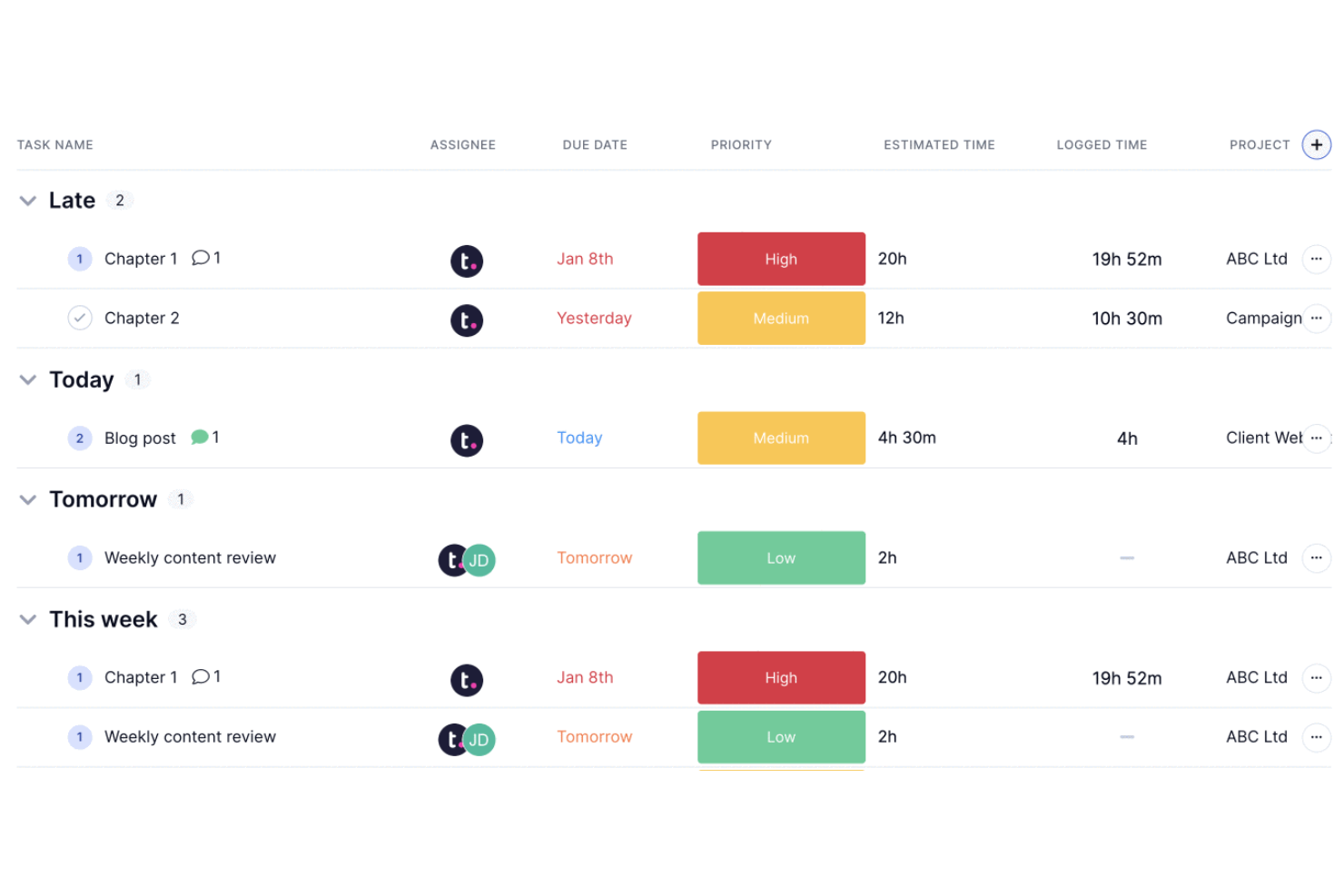
Teamwork.com is a project management and CRM platform built specifically for client-facing professional services teams, combining client management, task tracking, time logging, and resource planning in one place.
Who Is Teamwork.com Best For?
Teamwork.com is a strong fit for agencies and consultancies that manage multiple client projects simultaneously and need tight control over task ownership and billable hours.
Why I Picked Teamwork.com
Teamwork.com is one of my top picks because I love how granular task assignment gets. I can assign tasks and subtasks to specific team members, set dependencies, and attach time estimates directly to each item, so there's no ambiguity about who owns what or how long it should take. The native time tracking lets my team log hours with timers, mark time as billable, and generate timesheets, which feeds directly into budget tracking and invoicing. That end-to-end flow from task assignment to billable time to client invoice is something I haven't found as tightly connected in many other tools in this space.
Teamwork.com Key Features
- Client portal: Give clients a branded view of project progress, files, and messages without exposing internal team activity.
- Workload management: View team capacity across all active projects and reassign tasks when someone is over-allocated.
- Milestone tracking: Set project milestones that tie to task lists, keeping delivery schedules visible at a high level.
- Project templates: Build reusable templates for recurring client engagements to standardize your team's delivery process.
Teamwork.com Integrations
Teamwork.com offers 150+ integrations, including native connections with Slack, Salesforce, HubSpot, Microsoft Teams, QuickBooks, Xero, Harvest, Google Calendar, Dropbox, and SharePoint. It also connects with Zapier and has an API for custom integrations.
Pros and Cons
Pros:
- Billable hours linked to project budgets
- Client-specific permissions for external visibility
- Built-in time tracking per task
Cons:
- Advanced CRM tools require integration
- No dedicated sales pipeline view

Best for visualizing deal progression stages

Pipedrive is a sales-focused CRM built around a visual pipeline interface, with deal tracking, contact management, activity scheduling, and AI-powered sales assistance baked in.
Who Is Pipedrive Best For?
Pipedrive is a strong fit for small to mid-sized businesses with dedicated sales reps who need clear visibility into where every deal stands at any given moment.
Why I Picked Pipedrive
Pipedrive earns its spot on my shortlist because no other CRM makes deal stage visibility this central to the product experience. The kanban-style pipeline board is the default view, so every rep can see exactly where each deal sits and drag it forward when a stage is complete. I also like the forecast view, which filters deals by expected close date so my team stays honest about what's actually closeable this month versus next.
Pipedrive Key Features
- AI sales assistant: Surfaces suggestions and warns you when a deal has gone quiet or a follow-up is overdue.
- Activity scheduling: Logs and tracks calls, meetings, and emails directly against each contact or deal record.
- Smart contact data: Auto-enriches contact profiles by pulling publicly available data based on an email address.
- Workflow automation: Triggers actions like task creation or status updates when a deal moves or a field changes.
Pipedrive Integrations
Pipedrive's Marketplace offers 500+ integrations, including QuickBooks, Trello, Asana, and Slack, along with Google Meet, Microsoft Teams, Xero, DocuSign, Mailchimp, and PandaDoc. It's available on Zapier and has an open API for custom integrations.
Pros and Cons
Pros:
- Activity reminders prevent missed follow-ups
- Custom fields for service-specific data
- Drag-and-drop pipeline for tracking deals
Cons:
- No native project delivery tracking
- Limited built-in reporting depth
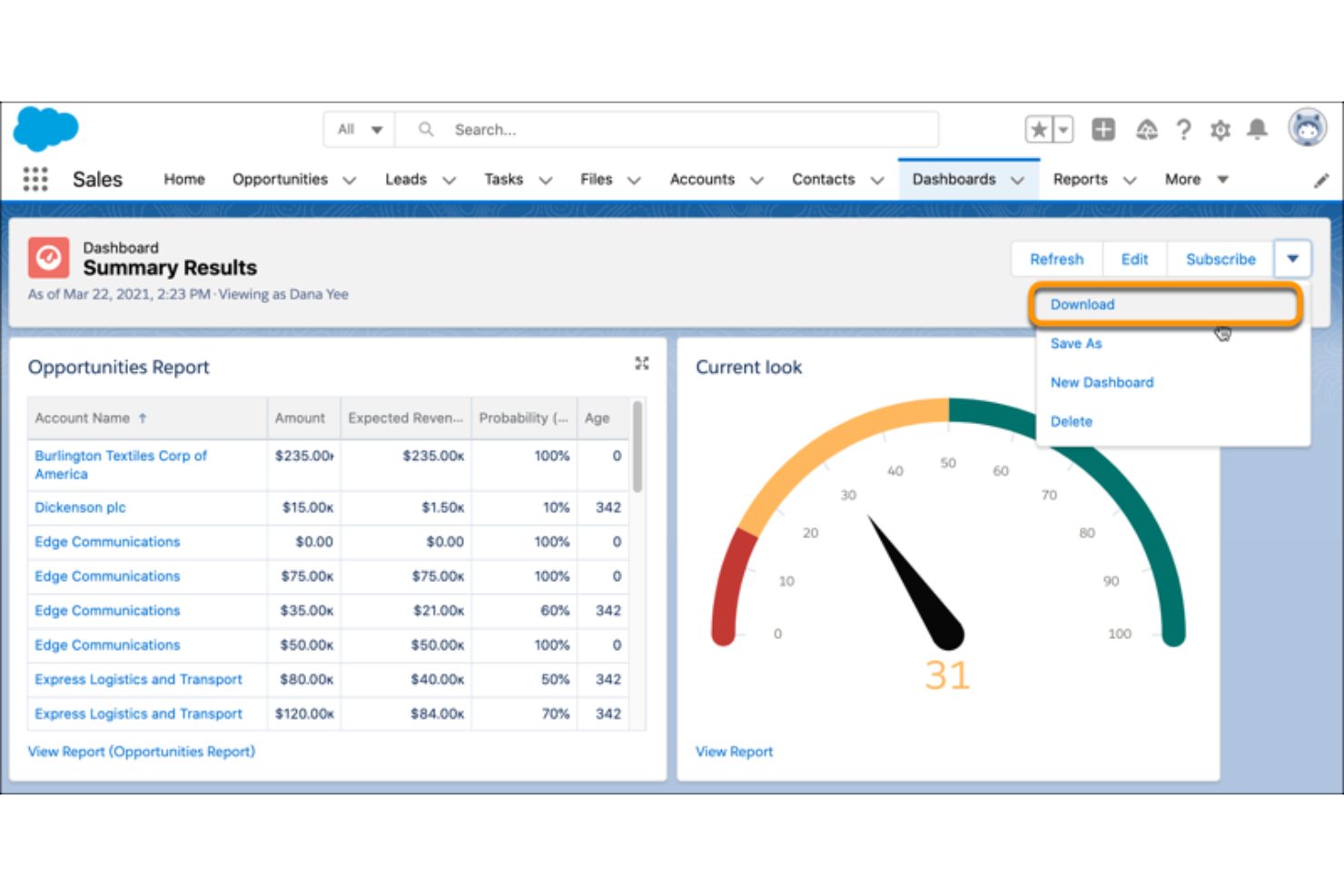
Salesforce Sales Cloud is a CRM platform built around deep pipeline visibility, with tools for contact and account management, opportunity tracking, AI-driven forecasting, and highly configurable reporting.
Who Is Salesforce Sales Cloud Best For?
Salesforce Sales Cloud is a strong fit for mid-to-large professional services firms with dedicated sales ops teams who need deep reporting customization.
Why I Picked Salesforce Sales Cloud
I picked Salesforce Sales Cloud as one of the best because no other CRM gives you the same depth of control over how data is visualized and reported. I love the drag-and-drop report builder, which lets me slice pipeline data by rep, region, stage, or custom field without needing a developer. The dashboard layer goes further with CRM Analytics, where I can build live, drillable charts that surface deal velocity and win-rate trends in real time.
Salesforce Sales Cloud Key Features
- Einstein lead scoring: AI assigns a score to each lead based on historical conversion patterns, helping prioritize outreach.
- Opportunity management: Track every deal through custom stages, with fields for amount, close date, and linked contacts.
- Sales engagement: Build automated outreach cadences with email, call, and LinkedIn steps directly from a contact record.
- Territory management: Define and assign account territories by geography, industry, or custom rules across your sales team.
Salesforce Sales Cloud Integrations
Salesforce Sales Cloud offers thousands of marketplace integrations through its AppExchange, including tools like Slack, Google Workspace, QuickBooks, Jira, DocuSign, Mailchimp, HubSpot, LinkedIn Sales Navigator, Zoom, and Microsoft 365. It's also available on Zapier and provides an API for custom integrations.
Pros and Cons
Pros:
- Handles complex, multi-stage sales processes well
- Flow Builder supports no-code workflow automation
- Reports and dashboards are deeply customizable
Cons:
- Add-on costs accumulate across the platform
- Admin-level setup often requires certified expertise

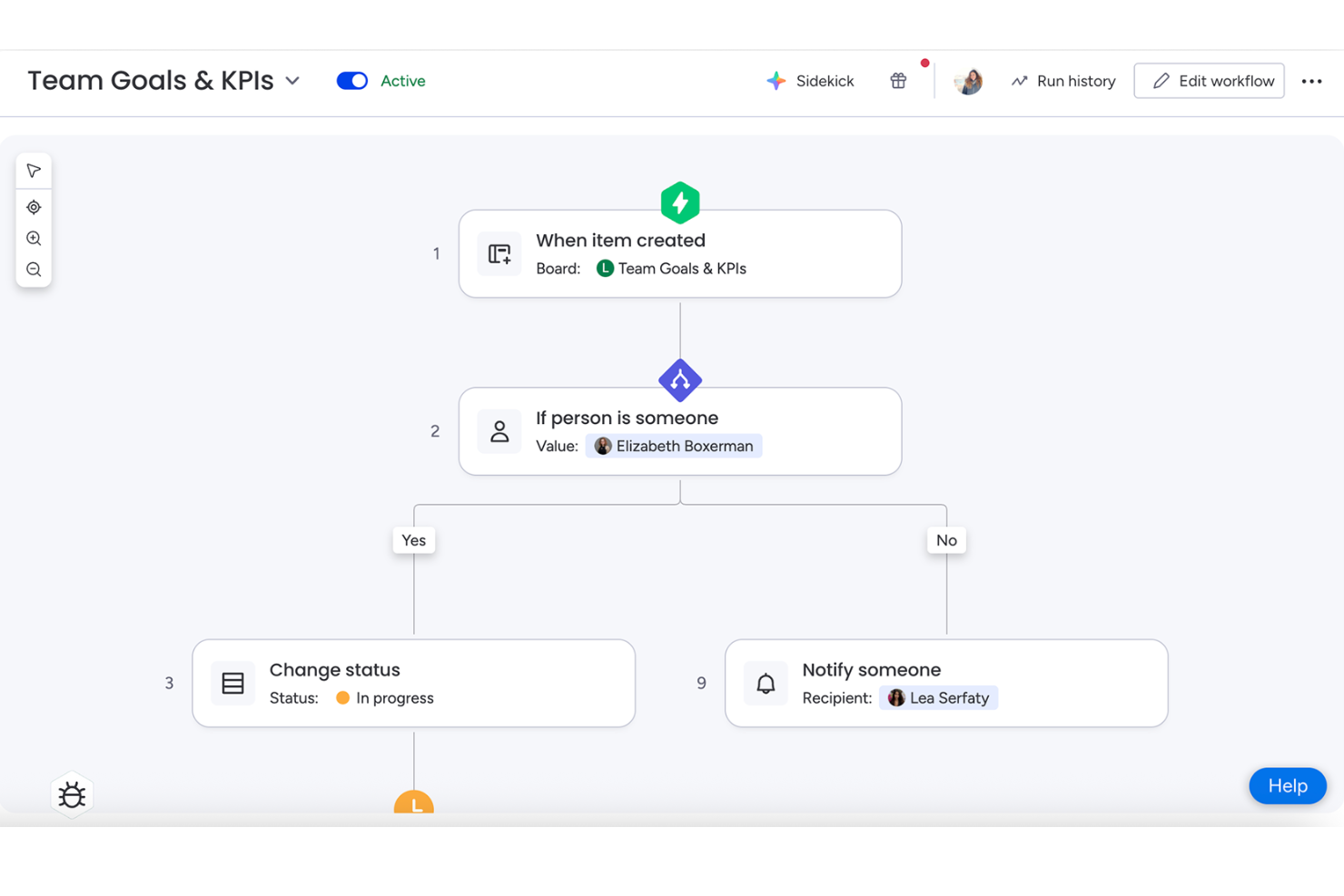
monday CRM is a sales-focused CRM platform that centralizes lead management, pipeline tracking, contact data, and automated workflows across the full revenue cycle, from prospecting to post-sale.
Who Is monday CRM Best For?
monday CRM is a strong fit for small to mid-sized service teams that need to build and adjust their sales process without relying on a developer.
Why I Picked monday CRM
monday CRM earns its spot on my shortlist because the workflow builder gives you real control over how your pipeline runs. I can rename deal stages, add custom column types to capture service-specific data, and build no-code automation recipes that trigger actions like reassigning a contact or flagging a stalled deal. In practice, my team's board reflects how we actually sell, not a rigid default structure.
monday CRM Key Features
- Email sync: Connect Gmail or Outlook to log emails directly against contacts and deals.
- Lead capture forms: Generate web forms that feed submissions straight into your CRM board.
- Sales forecasting dashboard: View projected revenue by deal stage across your active pipeline.
- Activity log: Track every call, meeting, and note against a contact in a single timeline.
monday CRM Integrations
monday CRM offers 850+ integrations and apps through its built-in integrations and marketplace, including Salesforce, QuickBooks, and HubSpot, as well as Slack, Gmail, Google Calendar, Outlook, and Microsoft Teams. It connects with Zapier, and provides APIs and SDKs for building custom integrations.
Pros and Cons
Pros:
- No-code automations reduce repetitive admin tasks
- Won deals convert directly into projects
- Drag-and-drop boards adapt to any workflow
Cons:
- Built-in email composer feels clunky
- Minimum seat requirement raises entry cost

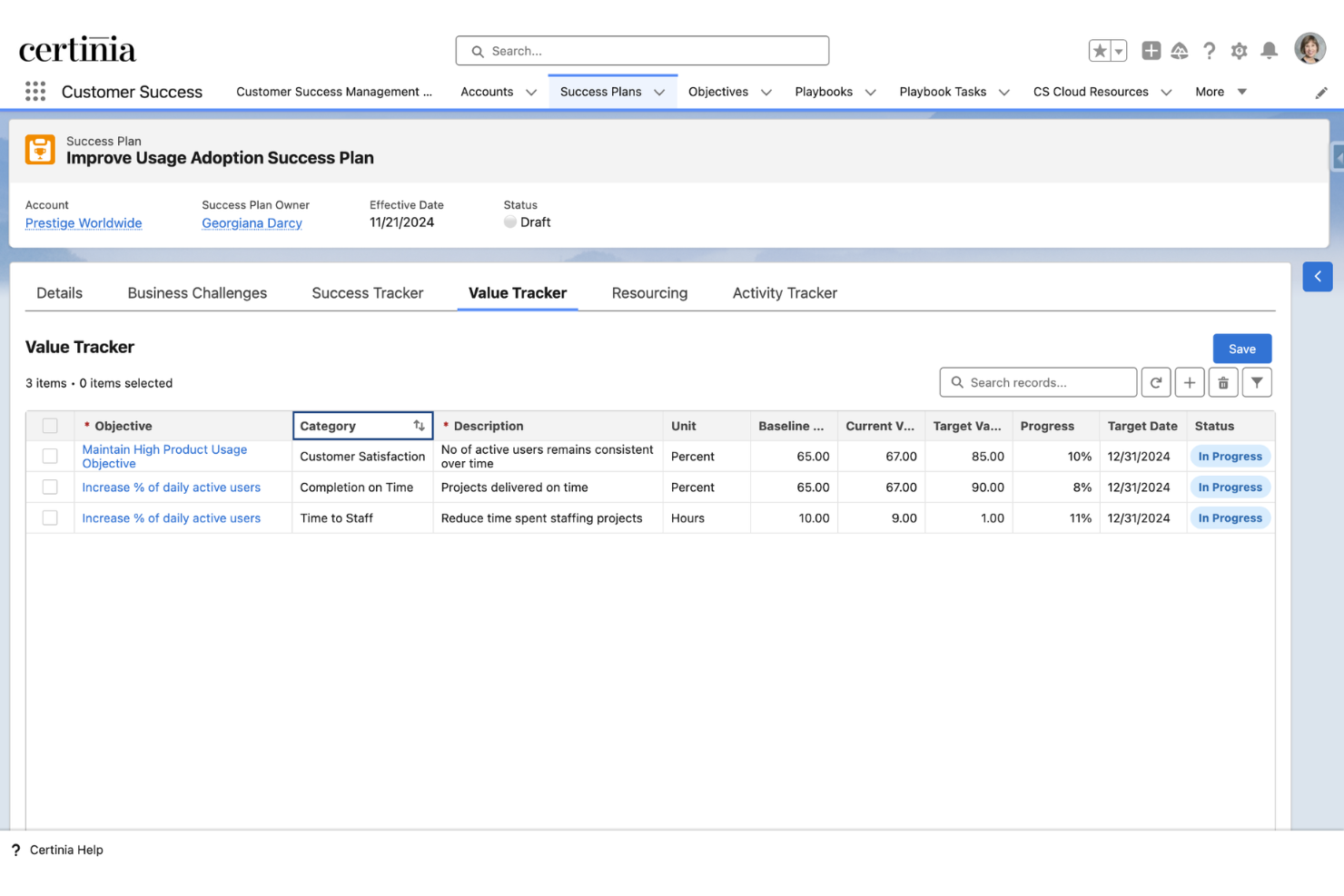
Certinia PS Cloud is a professional services automation (PSA) platform built natively on Salesforce, covering services estimation, resource management, project delivery, billing, and financial management in a single connected system.
Who Is Certinia PS Cloud Best For?
Certinia PS Cloud is a natural fit for mid-to-enterprise professional services organizations already running their CRM on Salesforce.
Why I Picked Certinia PS Cloud
I've included Certinia PS Cloud in my top picks because it's the only PSA built natively on Salesforce, which means your CRM data and services delivery data live in the same system with no sync required. I like how opportunity data from Salesforce flows directly into service estimates and staffing, so there's no handoff gap between what was sold and what gets delivered. The Veda AI layer also generates estimates from historical project data, which I find genuinely useful for tightening bid accuracy.
Certinia PS Cloud Key Features
- Resource management: Search and assign staff to projects by skills, certifications, availability, and role across your entire services organization.
- Milestone and time-based billing: Generate invoices tied directly to project milestones, time logged, or fixed-fee schedules without manual reconciliation.
- Revenue recognition: Automate revenue recognition against contract terms and delivery schedules in compliance with ASC 606 and IFRS 15.
- Customer success workspace: Track renewals, health scores, and engagement history for each account from within the same platform as project delivery.
Certinia PS Cloud Integrations
Built natively on Salesforce, Certinia PS Cloud integrates with other on-platform apps and provides a secure API model for off-platform systems. Its integrations page lists 25 partner integrations, including Jira, DocuSign, SAP Concur, Avalara, Expensify, Microsoft Outlook, Conga, MuleSoft, Celigo, and Plaid. Certinia provides open, standards-based RESTful and SOAP APIs for custom integrations.
Pros and Cons
Pros:
- Real-time scheduling, billing, and forecasting are unified
- Org-wide visibility into consultant time allocation
- Built-in reporting for project tracking and reconciliation
Cons:
- Customizations require dedicated Salesforce admin expertise
- Page loading times can feel slow
Profesyonel Hizmetler İçin Diğer CRM Yazılımları
Kısa listeme giremeyen ancak yine de göz atmaya değer bazı profesyonel hizmetler için ek CRM yazılımı seçenekleri şunlardır:
- Accelo
For workflow automation in client work
- Zoho CRM
For multichannel client communications
- Kantata
For resource and capacity planning
- Copper
For Google Workspace integration
- BQE Core
For billing and invoicing automation
- Deltek Vantagepoint
For project profitability insights
- Bitrix24
For internal communication and collaboration
- Flowlu
For built-in knowledge base management
- Workamajig
For creative agency resource planning
- Microsoft Dynamics 365 Sales
For advanced sales forecasting tools


How I Evaluate CRM Software for Professional Services
I look at these platforms across two layers: the baseline capabilities a tool must have—like converting won deals into projects without re-entry—and the differentiators that set top picks apart.
Core Functionality (Table Stakes For This List)
When I'm selecting tools for my list, I rank each one on a scale from 0 (does not offer the functionality) to 5 (excels in this area) for each core functionality listed below. Then, I calculate the tool's total score into a percentage. Each tool needs to achieve a minimum total score of 65% to be considered for inclusion.
- Client Lifecycle Management: I check whether a platform tracks accounts from first inquiry through repeat engagements, including custom lifecycle stages and engagement history per client.
- Pipeline & Deal Tracking: Services deals aren't one-size-fits-all, so I look for customizable pipelines with weighted probabilities and fields that reflect T&M, retainer, or fixed-fee models.
- Project Conversion: A won deal should flow into a project without anyone re-entering scope, timelines, or budgets—I evaluate how cleanly that handoff happens inside the tool.
- Resource & Engagement Visibility: I look at whether you can see who's assigned where, what capacity looks like across your team, and how that ties back to specific client accounts or deals.
- Time & Billing Integration: Whether native or through a tight connector, I evaluate how the tool links tracked hours and expenses to client records for invoicing and profitability tracking.
- Services Revenue Forecasting: I look for forecasting that goes beyond raw pipeline totals to factor in active project stages, committed retainers, and backlog alongside weighted opportunities.
Once I have a list of tools that meet this criteria, I consider what sets each platform apart.
Differentiating Factors (What Sets Vendors Apart)
Here's how I compare and contrast different vendors:
Standout Features
Resource and capacity forecasting is a big differentiator. I look for tools that use weighted pipeline data to project staffing needs and utilization gaps before deals close. Engagement and proposal management matters just as much, especially when a platform lets you generate SOWs with built-in pricing models like T&M or retainer and push them for e-signature without leaving the CRM. I also evaluate revenue and billing intelligence, checking whether the tool tracks realization rates and lifetime client value across mixed billing arrangements.
Beyond Features
Industry and vertical fit is the first thing I consider. A CRM built for IT consulting firms handles engagements differently than one designed for architecture or accounting practices, and pre-built data models save weeks of configuration. Integration depth matters just as much—I check whether a platform syncs with accounting tools like QuickBooks or Xero and PSA systems so billable hours actually flow into invoicing. I also evaluate total cost of ownership, looking at whether core services features require premium-tier upgrades or expensive add-ons to unlock.
Profesyonel Hizmetler İçin CRM Yazılımı Nasıl Seçilir?
Uzun özellik listeleri ve karmaşık fiyatlandırma yapılarına kendinizi kaptırmanız kolaydır. Kendinize özgü yazılım seçim sürecinizde ilerlerken odağınızı korumanıza yardımcı olmak için göz önünde bulundurmanız gereken faktörlerin bir kontrol listesini burada bulabilirsiniz:
| Faktör | Göz önünde bulundurulması gerekenler |
|---|---|
| Ölçeklenebilirlik | Yeni müşteriler eklerken, yeni bölgelere genişlerken veya yeni ofisler açarken platform firmanızı destekleyecek mi? |
| Entegrasyonlar | Yazılım, temel muhasebe, PSA ve zaman takip araçlarınıza yerleşik bağlantılar sunuyor mu? |
| Özelleştirilebilirlik | Aşamaları, alanları ve iş akışlarını ekiplerinizin müşteri hizmetlerini sunma biçimine uyacak şekilde yapılandırabilir misiniz? |
| Kullanım kolaylığı | Proje yöneticileri, danışmanlar ve ortaklar sistemi günlük olarak gerçekten kullanacak mı, yoksa sistem sürtüşme mi yaratacak? |
| Uygulama ve işe alıştırma | Çalışmaya başlamak için hangi kaynaklar gerekiyor? Tedarikçi tarafından yürütülen işe alıştırma sürece dahil mi, yoksa dışarıdan yardıma mı ihtiyacınız var? |
| Maliyet | Kullanıcı, modül veya entegrasyon ekledikçe fiyatlandırma net mi? Ölçeği büyütürken gizli maliyetlere dikkat edin. |
| Güvenlik önlemleri | Platform ayrıntılı izinler, güçlü şifreleme ve müşteri ile proje verilerini denetlemek için günlükler sunuyor mu? |
| Uyumluluk gereksinimleri | Çözüm, hassas profesyonel hizmet verilerinin işlenmesi için gereken GDPR, SOC 2 veya diğer standartları destekliyor mu? |
Profesyonel Hizmetler İçin CRM Yazılımı Nedir?
Profesyonel hizmetler için CRM yazılımı, proje tabanlı veya danışmanlık hizmetleri sunan firmalara göre uyarlanmış müşteri ilişkilerini, satış süreçlerini, proje teslimini ve faturalandırma süreçlerini yönetmek üzere tasarlanmış bir platformdur. Bu çözümler müşteri verilerini merkezileştirir, anlaşmaları ve etkileşimleri takip eder ve operasyonel teslimatı finansal iş akışlarına bağlayarak firmaların tüm müşteri yaşam döngüsünü yönetmesini ve ekipler arası iş birliğini geliştirmesini kolaylaştırır.
Profesyonel Hizmetler için CRM Yazılımının Özellikleri
Profesyonel hizmetler için CRM yazılımı seçerken aşağıdaki temel özelliklere dikkat edin:
- İletişim ve hesap yönetimi: Kapsamlı müşteri bilgilerini tek bir yerde depolayın, düzenleyin ve güncelleyin; her etkileşimi, iletişimi ve ilişki geçmişini takip edin.
- Özelleştirilebilir satış süreçleri: Anlaşma aşamalarını ve olasılık ağırlıklarını satış sürecinize göre yapılandırarak proje fırsatlarını izleyin ve geliri doğru şekilde tahmin edin.
- Anlaşmadan projeye dönüşüm: Kapanan anlaşmaları anında projelere veya çalışmalara dönüştürün; ilgili müşteri, kapsam ve atama verilerini yeniden manuel olarak girmeden koruyun.
- Kaynak ve kapasite planlaması: Dengeli iş yükleri ve etkili proje teslimi sağlamak için ekip üyelerini becerilerine ve uygunluklarına göre müşteri çalışmalarına atayın.
- Zaman ve gider takibi: Faturalanabilir saatleri ve ilgili giderleri doğrudan CRM içinde kaydedin, doğru faturalandırma ve kârlılık analizi için bunları müşteri projelerine bağlayın.
- Faturalandırma ve fatura oluşturma entegrasyonu: Platform içinden fatura oluşturun, sabit ücretli sözleşmeleri yönetin ve ödemeleri takip edin veya mevcut muhasebe sistemlerinizle senkronize edin.
- Belge yönetimi: Sözleşmeleri, teklifleri ve iş kapsamı beyanlarını CRM içinde güvenli bir şekilde depolayın, paylaşın ve bunlar üzerinde iş birliği yapın; uyumluluk için denetim izlerinden yararlanın.
- Role dayalı izinler: Kullanıcı rolüne veya ekibe göre hassas verilere erişimi kontrol ederek müşteri gizliliğini koruyun ve sektörel uyumluluk gereksinimlerini destekleyin.
- Müşteri iletişimi takibi: Otomatik senkronizasyon özellikleriyle e-postaları, aramaları ve toplantıları kaydedin; böylece tüm ekibiniz her aşamada müşteri görüşmelerini görebilsin.
- Raporlama ve analiz panoları: Süreç sağlığını, gelir eğilimlerini, kaynak kullanımını ve müşteri etkileşimini görselleştirerek yöneticilerin bilinçli iş kararları almasına yardımcı olun.
Profesyonel Hizmetler için CRM Yazılımının Faydaları
Profesyonel hizmetler için CRM yazılımını uygulamak, ekibiniz ve işletmeniz için çeşitli faydalar sağlar. Yararlanabileceğiniz birkaç avantaj şunlardır:
- Uçtan uca müşteri görünürlüğü: İletişim bilgilerini, teklifleri, projeleri ve geçmiş çalışmaları tek bir sistemde bir araya getirerek her müşteri ilişkisine dair eksiksiz bir görünüm elde edin.
- Daha hızlı anlaşmadan projeye iş akışı: Kapanan anlaşmaları anında aktif projelere dönüştürerek manuel veri girişini ortadan kaldırın ve proje başlangıçlarındaki gecikmeleri azaltın.
- Kaynak ve gelir tahmini: Personel ihtiyaçlarını öngörmek, iş yüklerini yönetmek ve şirket gelirini daha doğru tahmin etmek için gerçek zamanlı süreç ve kapasite verilerini kullanın.
- Geliştirilmiş faturalandırma doğruluğu: Faturalanabilir saatleri, giderleri ve sabit ücretli sözleşmeleri doğrudan müşteri çalışmalarına göre takip ederek doğru ve zamanında faturalandırma sağlayın.
- Merkezi iletişim geçmişi: Daha iyi iş birliği ve süreklilik için müşteri e-postalarını, aramalarını, belgelerini ve toplantılarını kaydederek herkesin aynı bilgilere sahip olmasını sağlayın.
- Daha güçlü veri güvenliği: Uyumluluk gereksinimlerini destekleyen role dayalı erişim ve denetim izleriyle hassas müşteri ve proje bilgilerini koruyun.
- Daha iyi karar alma: Eğilimleri belirlemek, proje kârlılığını ölçmek ve hem satış hem de operasyon stratejilerine yön vermek için yerleşik analiz ve raporlama özelliklerinden yararlanın.
Profesyonel Hizmetler için CRM Yazılımının Maliyetleri ve Fiyatlandırması
Profesyonel hizmetler için CRM yazılımı seçmek, mevcut çeşitli fiyatlandırma modellerini ve planları anlamayı gerektirir. Maliyetler özelliklere, ekip büyüklüğüne, eklentilere ve daha fazlasına göre değişir. Aşağıdaki tablo, profesyonel hizmetler için CRM yazılımı çözümlerinde yaygın planları, ortalama fiyatlarını ve genellikle dahil edilen özellikleri özetlemektedir:
Profesyonel Hizmetler için CRM Yazılımı Plan Karşılaştırma Tablosu
| Plan Türü | Ortalama Fiyat | Yaygın Özellikler |
|---|---|---|
| Ücretsiz Plan | $0 | Temel iletişim yönetimi, sınırlı satış süreçleri ve basit raporlama. |
| Bireysel Plan | $10-$25/kullanıcı/ay | İletişim yönetimi, özelleştirilebilir satış süreçleri, temel proje dönüşümü ve tek kullanıcı desteği. |
| İşletme Planı | $30-$55/kullanıcı/ay | Çok kullanıcılı destek, proje ve kaynak yönetimi, zaman takibi, faturalandırma entegrasyonu ve gelişmiş raporlama. |
| Kurumsal Plan | $60-$120/kullanıcı/ay | Gelişmiş izinler, çoklu varlık desteği, uyumluluk araçları, API erişimi, premium entegrasyonlar ve işe alıştırma desteği. |
Profesyonel Hizmetler için CRM Yazılımı SSS
Profesyonel hizmetler için CRM yazılımı hakkında sık sorulan soruların bazı yanıtları:
Profesyonel hizmetler için CRM yazılımını genel CRM araçlarından farklı kılan nedir?
Profesyonel hizmetler için CRM yazılımı; satış, proje teslimi ve faturalandırmayı tek bir sistemde birleştirerek ekiplerin müşterinin yaşam döngüsünü görmesini ve teklif hazırlama, proje dönüşümü ve kaynak planlaması gibi özel iş akışlarını desteklemesini sağlar.
Profesyonel hizmetler için CRM yazılımı muhasebe veya PSA araçlarıyla entegre olabilir mi?
Evet, çoğu platform muhasebe, zaman takibi ve profesyonel hizmet otomasyonu araçlarıyla yerel veya onaylı entegrasyonlar sunar. Böylece finansal verileri senkronize edebilir, faturalandırılabilir saatleri takip edebilir ve faturalandırmayı kolaylaştırabilirsiniz.
Profesyonel hizmetler için CRM yazılımını uygulamak ne kadar kolaydır?
Uygulama süresi, mevcut sistemlerinize ve süreçlerinizin karmaşıklığına bağlıdır. Hazır sektör yapılandırmalarına ve hizmet odaklı başlangıç seçeneklerine sahip platformlar genellikle kurulum süresini kısaltır ve teknik olmayan ekiplerin kullanıma geçişini kolaylaştırır.
CRM yazılımı proje ve kaynak planlamasına nasıl yardımcı olur?
CRM yazılımı, fırsat ve proje verilerini kaynak planlama modüllerine aktararak ekip iş yüklerini öngörmenize, becerileri yaklaşan projelerle eşleştirmenize ve teslimatı etkilemeden önce olası aşırı görevlendirmeleri veya kapasite açıklarını belirlemenize yardımcı olur.
İş akışlarını ve veri alanlarını sunduğum hizmete özel olarak özelleştirmek mümkün mü?
Evet, önde gelen platformlar; saatlik faturalandırma, sürekli hizmet sözleşmeleri, sabit ücretli projeler veya farklı çalışma türlerinin bir bileşimine odaklanmanız fark etmeksizin anlaşma aşamalarını, proje türlerini ve veri alanlarını firmanızın hizmet sunum modeline uyacak şekilde özelleştirmenize olanak tanır.
Profesyonel hizmetler için CRM yazılımından en çok hangi tür firmalar yararlanır?
Danışmanlık firmaları, yaratıcı ajanslar, BT hizmet sağlayıcıları, hukuk büroları ve proje tabanlı diğer işletmeler en fazla değeri elde eder. Özellikle müşteri kazanımını, hizmet sunumunu ve faturalandırmayı tek bir çözümde birleştirmesi gereken işletmeler bundan büyük ölçüde yararlanır.