

2026’da İncelenen En İyi 10 Yapay Zekâ Destekli Dijital Varlık Yönetimi Aracı

En İyi Yapay Zekâ DAM Araçları Kısa Listesi


Dijital varlıkları yönetmek baş ağrıtıcı olabilir. Sayısız dosyayla uğraşmanız, ekibinizdeki herkesin erişime sahip olduğundan emin olmanız ve her şeyi düzenli tutmaya çalışmanız gerekir. Kendinizi bunalmış hissetmeniz çok kolaydır.
İşte Yapay Zekâ DAM araçları tam bu noktada devreye girer. Dijital varlıklarınızı verimli bir şekilde yönetmenize yardımcı olur, zamandan tasarruf sağlar ve içerikleri büyük ölçekte kategorilere ayırıp aramanızı kolaylaştırır. Deneyimlerime göre bu araçlar, ekibinizin çalışma biçimini dönüştürebilir.
Birçok yazılım çözümünü test edip inceledim ve en iyi seçimlerimi sizinle paylaşmaya hazırım. Piyasadaki en iyi Yapay Zekâ DAM araçları hakkında tarafsız ve iyi araştırılmış bir inceleme sunacağım. Ekibiniz için doğru seçeneği bulabilmeniz amacıyla her aracın özelliklerine, avantajlarına ve benzersiz tekliflerine birlikte göz atalım.
Why Trust Our Software Recommendations
Our team has been testing and reviewing software since 2012. As project managers ourselves, we know how difficult—and important—it is to choose the right software.
For this guide, we evaluated tools using hands-on testing and independent research, scoring tools using our selection criteria. We also draw on insights from industry thought leaders and practicing project management experts.
Our reviews reflect our human editorial judgment, not a sales pitch.
Expert reviewers:
Yapay Zekâ DAM Araçları Karşılaştırma Tablosu
Bu karşılaştırma tablosu, en iyi Yapay Zekâ DAM araçları seçimlerimin fiyatlandırma ayrıntılarını özetlemektedir:
| Tool | Starting Price | Website | |
|---|---|---|---|
| Best for AI-powered DAM workflows | 4.6 out of 5 | Pricing upon request Free demo available | Website |
| Best for templated content creation | 4.4 out of 5 | Pricing upon request Not available | Website |
| Best for custom AI tagging | 4.8 out of 5 | $250/month Free plan + free trial available | Website |
| Best for AI-driven asset tagging | 4.8 out of 5 | $99/month Free plan + 14-day free trial + demo available | Website |
| Best for AI-powered tagging and review | 4.7 out of 5 | $29/month 30-day free trial available | Website |
| Best for AI-powered content search | 4.6 out of 5 | $900/month Free plan + demo available | Book Demo |
| Best for centralized product data management | 4.7 out of 5 | Pricing upon request 14-day free trial | Website |
| Best for ecommerce asset publishing workflows | 5.0 out of 5 | $109/month 14-day free trial + free demo available | Website |
| Best for small businesses | 4.4 out of 5 | Pricing upon request Free demo available | Website |
| Best for marketing teams | 3.2 out of 5 | Pricing upon request Free demo available | Website |
En İyi Yapay Zekâ DAM Araçları İncelemeleri
Aşağıda, kısa listeme giren en iyi Yapay Zekâ DAM araçlarının ayrıntılı özetlerini bulabilirsiniz. İncelemelerim, size en uygun aracı bulmanıza yardımcı olmak için her aracın temel özelliklerine, artılarına & eksilerine, entegrasyonlarına ve ideal kullanım alanlarına ayrıntılı bir bakış sunmaktadır.

Best for AI-powered DAM workflows
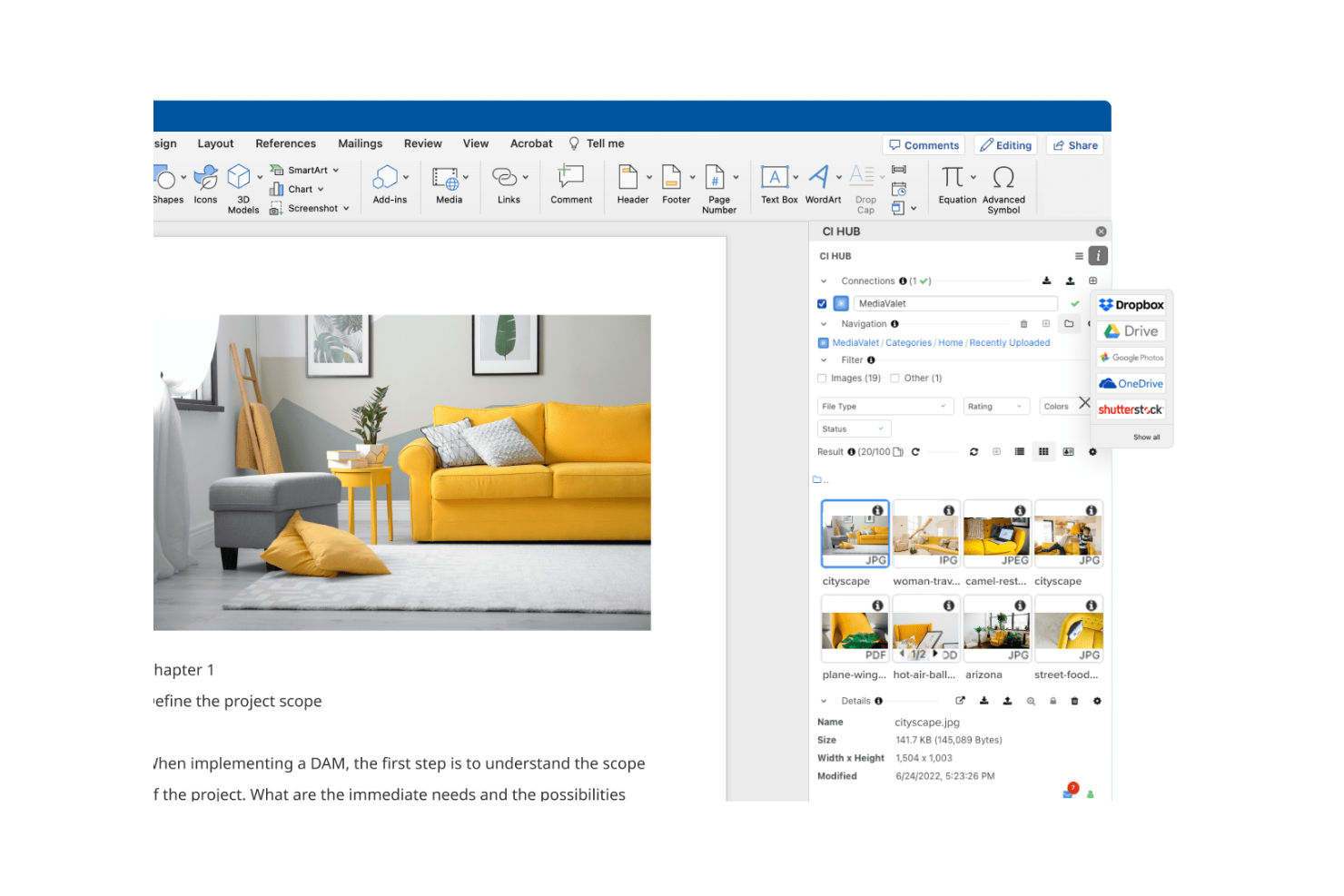
MediaValet is a Digital Asset Management (DAM) solution that caters to organizations looking for seamless Microsoft integration. It focuses on asset organization and distribution, making it ideal for teams that rely heavily on Microsoft tools.
Why I picked MediaValet: MediaValet is built for teams that rely heavily on Microsoft tools. You get direct integration with Office 365 and SharePoint, making your workflows smoother. Since it’s cloud-based, your team can access and collaborate on assets from anywhere. With strong security and data protection, it fits well if your company needs to keep information safe.
Standout Features & Integrations
Features include advanced search capabilities that help your team find assets quickly with metadata and keywords. Automated workflows streamline repetitive tasks, saving your team time and effort. The platform's scalability ensures that it grows with your organization, adapting to increasing demands.
Integrations include Microsoft Office 365, SharePoint, Adobe Creative Cloud, Slack, Box, Dropbox, Salesforce, Hootsuite, WordPress, and Google Analytics.
Pros and Cons
Pros:
- Focus on security and protection
- Automated workflow features
- Strong Microsoft integration
Cons:
- Dependence on the Microsoft ecosystem
- Requires training for new users

Papirfly
Best for templated content creation

Papirfly is an AI-driven DAM tool best known for its templated content creation, helping teams produce brand-ready assets quickly and consistently. It works well for industries like automotive, pharma, and retail that require strict brand consistency across multiple markets. With automated features like asset tagging and content translation, Papirfly reduces manual work, shortens time-to-market, and helps teams stay aligned with global brand standards.
Why I Picked Papirfly
I picked Papirfly for its templated content creation, which helps teams produce consistent, on-brand materials without relying heavily on design resources. Its AI-driven metadata tagging also streamlines the organization and retrieval of digital assets, reducing manual effort. Together, these features allow teams to maintain brand accuracy while improving the speed and efficiency of their creative workflows.
Papirfly Key Features
In addition to templated content creation, Papirfly offers:
- Campaign Management: This feature allows your team to plan, execute, and analyze marketing campaigns within a unified platform.
- Brand Portal: It provides a centralized space for storing and accessing brand guidelines and assets, ensuring consistency across all materials.
- GDPR Compliance: Papirfly ensures that all data handling processes meet regulatory standards, crucial for maintaining trust and legality.
- Data Analytics: This tool offers insights into asset usage and campaign performance, helping refine marketing strategies.
Papirfly Integrations
Papirfly integrates with Adobe Creative Cloud, Microsoft Office 365, Google Workspace, Salesforce, HubSpot, Marketo, Sitecore, WordPress, Drupal, and an API is available for custom integrations.
Pros and Cons
Pros:
- Supports multiple languages for global reach
- Auto-tags assets to speed up organization
- Easy to manage large libraries of assets
Cons:
- Some users experience slow loading at times
- Templates can be limiting or require adjustments
New Product Updates from Papirfly

Papirfly Prove Enterprise Adds Analytics Agent
Papirfly Prove Enterprise adds Analytics Agent for asking data questions in plain language and generating figures or charts. This helps users explore analytics without setting up filters or queries. For more information, visit Papirfly’s official site.
 .
Best for custom AI tagging

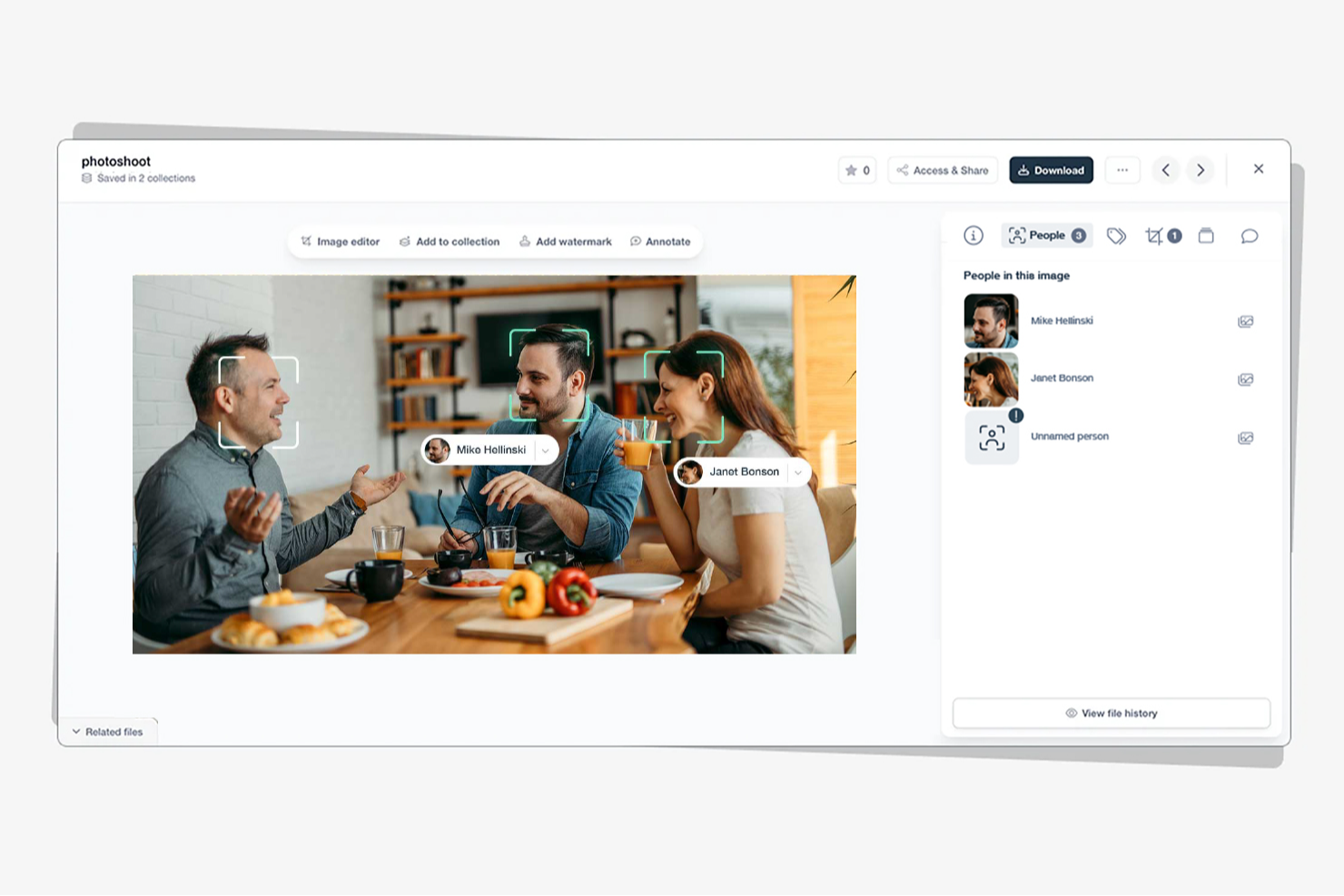
Tagbox is an AI-powered digital asset management platform built for teams in retail, events, nonprofits, and creative agencies. It helps businesses organize large media libraries using features like semantic search, face recognition, and automated tagging. By turning scattered assets into searchable libraries, Tagbox improves collaboration and long-term media management.
Why I Picked Tagbox
I picked Tagbox for its practical use of AI in media organization. Its semantic search makes it easy to find visuals based on people, objects, or context, saving teams time. Automated tagging further reduces manual work, making Tagbox a strong choice for teams managing growing asset libraries.
Tagbox Key Features
In addition to its core functionalities, Tagbox offers several other features that enhance its utility for digital asset management:
- Face Recognition: This feature allows your team to identify and categorize images based on facial data, improving organization.
- Custom AI Tagging: You can train an AI to detect your specific products, locations or other visual elements.
- Collaborative Tools: Facilitate teamwork and client interaction through media sharing and management.
- User-Friendly Interface: The intuitive design ensures that your team can easily navigate and utilize the tool without extensive training.
Tagbox Integrations
Connect Tagbox.io through Tagbox Desktop (drag-and-drop into any app), Zapier, Make, and a REST API. Custom workflows are available for Enterprise.
Pros and Cons
Pros:
- Custom tagging for video libraries
- Face recognition improves asset discovery
- AI-powered video asset organization
Cons:
- Limited offline access options
- No built-in video editing

Best for AI-driven asset tagging
Stockpress is a digital asset management (DAM) tool that uses artificial intelligence to help teams organize, find, and share files more efficiently. It’s designed for companies of all sizes that want to simplify asset management without limiting user access or paying per seat.
Why I picked Stockpress: I picked Stockpress because its AI tagging and search capabilities make it incredibly easy for you to locate the right asset fast. The platform automatically applies intelligent metadata to your files, saving your team time on manual tagging and organization. You also get version control and duplicate detection tools, helping your team maintain clean, up-to-date asset libraries without confusion. What really stands out is how Stockpress combines collaboration and control—you can annotate, comment, and securely share files, all within an intuitive dashboard.
Stockpress standout features & integrations
Features include AI-driven tagging and visual search to improve asset discoverability, version control with duplicate detection to maintain file integrity, and customizable share links with user permissions for secure collaboration.
Integrations include Figma, Photoshop, Mailchimp, Slack, Dropbox, Google Drive, Okta, WordPress, Azure, Webflow, and Klaviyo.
Pros and Cons
Pros:
- Secure file access control
- Advanced tagging customization
- User-friendly interface
Cons:
- Few analytics tools
- Limited mobile support

Filecamp
Best for AI-powered tagging and review

Filecamp is a versatile digital asset management (DAM) tool designed to meet the needs of marketing teams and professionals across various industries, including media, non-profits, and web agencies. It offers a user-friendly platform that enhances workflow efficiency and brand consistency, making it an ideal choice for those looking to streamline asset management processes. With features like online proofing, customizable branding, and version control, Filecamp addresses the challenges of organizing and managing digital assets effectively.
Why I Picked Filecamp
I picked Filecamp for its robust online proofing tools and version control capabilities that are essential for managing digital assets in today's fast-paced environment. These features allow you to review and approve files seamlessly, ensuring that your team stays on the same page and maintains brand consistency. Additionally, the platform's secure file sharing ensures that sensitive information is protected while facilitating collaboration among remote teams. These functionalities make Filecamp a reliable choice for businesses looking to optimize their digital asset management processes.
Filecamp Key Features
In addition to its standout online proofing and version control, Filecamp offers several other features that enhance its usability as an AI DAM tool.
- Customizable Branding: Tailor the platform to match your brand’s identity, ensuring consistency across all digital assets.
- Secure File Sharing: Share files securely within your team or with external partners, maintaining control over access and permissions.
- Google Cloud Hosting: Benefit from data security and compliance with a platform hosted on Google Cloud, protecting your assets.
- Unlimited Users and Bandwidth: Manage your digital assets without worrying about user or bandwidth limitations, making it scalable for growing teams.
Filecamp Integrations
Native integrations are not currently listed by Filecamp.
Pros and Cons
Pros:
- Strong version control capabilities
- Unlimited users on all plans
- Built-in online proofing workflows
Cons:
- AI search is less advanced
- No native integrations available
New Product Updates from Filecamp
Filecamp Adds Analytics, AI Thumbnails, and CDN Embed Links
Filecamp adds Analytics, AI-powered thumbnails, and CDN-backed Embed links. These updates give teams more visibility into asset usage, improve thumbnail presentation, and make embedded images easier to manage. For more information, visit Filecamp’s official site.
 .

Air
Best for AI-powered content search

Air is a platform designed to manage and scale creative operations, providing a central hub for all your digital assets. It allows you to combine feedback, approvals, formatting, and licensing in one place, eliminating the need to jump between multiple tools.
Why I picked Air: I picked Air because its AI-powered search helps you find digital assets the way you think, recognizing colors, objects, faces, and dialogue. This capability means your creative team can focus more on producing content instead of manually tagging and sorting assets. I also like its facial recognition tool, which automatically detects and tags people in photos, making visual asset organization much faster. Air’s visual interface and collaboration tools make it especially effective for teams managing large volumes of creative content.
Air standout features & integrations
Features include AI-powered search and tagging that make it easy to locate assets based on visual or contextual cues, visual scrubbable previews that let you see inside design files and videos without opening them, and automatic video and audio transcription to make media content searchable. Its desktop sync feature gives you instant access to assets directly from your desktop.
Integrations include Slack, Salesforce, Canva, Zapier, Figma, Adobe Premiere Pro, NetSuite, HubSpot, Google Sheets, ClickUp, Shopify, and ChatGPT (OpenAI).
Pros and Cons
Pros:
- Convenient desktop sync
- Facial recognition tagging
- AI-powered visual search
Cons:
- May experience delays with large files
- Limited customization options
New Product Updates from Air
Air Introduces Workspace Agent Automations
Air adds scheduled automations, reusable skills, and run history tracking to its workspace agent. These features help teams automate recurring tasks and manage workflows without manual intervention. For more information, visit Air’s official site.
 .

Best for centralized product data management

4ALLPORTAL is built for businesses that need an AI-driven way to manage digital assets while keeping product data centralized. It’s used across industries such as e-commerce and healthcare, offering modular tools that support consistent product information and media management. With AI-enhanced search and auto-tagging, 4ALLPORTAL helps teams organize and distribute digital assets more efficiently across channels.
Why I Picked 4ALLPORTAL
I picked 4ALLPORTAL for its ability to centralize product data alongside digital assets in one AI-enabled system. This makes it easier to manage product information, images, and documents consistently across teams and channels. Features like natural-language search and auto-tagging reduce manual work by helping your team find and organize assets faster. Its built-in translation support also helps teams manage multilingual product content without relying on separate tools.
4ALLPORTAL Key Features
In addition to centralized product data management, 4ALLPORTAL offers:
- Modular and Scalable Solutions: The platform offers flexibility to scale and customize according to your business needs, ensuring it grows with your organization.
- User-Friendly Interface: The intuitive design makes it easy for teams to navigate and utilize the platform’s full capabilities without extensive training.
- Seamless Integrations: 4ALLPORTAL integrates smoothly with existing systems, reducing the need for disruptive changes in your current workflow.
4ALLPORTAL Integrations
Integrations include Adobe Photoshop, Adobe InDesign, Microsoft Office, Dropbox, Amazon S3, Shopify, WordPress, Salesforce, SAP, and Jira.
Pros and Cons
Pros:
- Reduces duplicate assets across product libraries
- Versioning helps track product data changes
- Combines DAM and PIM for unified product workflows
Cons:
- Reporting options are more operational than visual
- Software updates occasionally disrupt workflow continuity

Dash
Best for ecommerce asset publishing workflows

Dash is a digital asset management platform with AI-powered search, smart tagging, and built-in tools for organizing, sharing, and deploying creative assets across ecommerce and marketing channels.
Who Is Dash Best For?
Dash is a strong fit for ecommerce and marketing teams that need a central home for product imagery, campaign assets, and brand files they regularly push to Shopify, WordPress, or email platforms.
Why I Picked Dash
I picked Dash as one of the best because its Shopify and WordPress integrations let you push product photography directly into listings and bulk-update SKUs without ever leaving your asset library. I also love how its account-trained Smart Tagging learns your own taxonomy over time, so it can suggest niche values like campaign codes or SKUs rather than generic labels. That combination of ecommerce-native deployment and context-aware tagging is what makes Dash genuinely useful for teams managing high-volume product imagery.
Dash Key Features
- AI search: Find images and videos using everyday-language descriptions, even when those terms don't appear in the asset's metadata.
- Branded portals: Give external partners self-service access to selected assets through a permanent, public-facing portal you control.
- Usage rights and expiry date fields: Set custom fields to record when an asset can and can't be used, with automatic admin email alerts on expiry.
- Version control: Upload new asset versions while retaining previous ones, with existing share links automatically updated to show the latest version.
Dash Integrations
Dash offers native integrations with Shopify, WordPress, WooCommerce, Klaviyo, Hootsuite, Canva, Figma, Adobe Creative Suite, Google Workspace, and Corebook. It also provides a REST API for custom integrations and supports Zapier.
Pros and Cons
Pros:
- Portals cut repeated partner asset requests
- Natural-language search finds untagged creative
- Account-trained tags suggest niche metadata
Cons:
- Duplicate checks miss edited and bulk-uploaded copies
- Tag suggestions can need frequent correction
Canto
Best for small businesses

Canto is a Digital Asset Management (DAM) software designed for small businesses, focusing on simplifying asset organization and sharing. It offers features that help teams manage their digital content efficiently, making it a valuable tool for businesses with limited resources.
Why I picked Canto: Canto is built for small teams that want a simple way to manage digital assets. You get tools like visual search and smart albums, so your team can quickly find and organize files. The setup is fast and easy, which makes it practical if you don’t have extra time or resources. With a central space for sharing, your team can collaborate without digging through scattered folders.
Standout Features & Integrations
Features include a visual search that helps your team locate assets quickly using image recognition. Smart albums automatically organize assets based on metadata, saving time and effort. The customizable branding feature lets you personalize the platform to match your company's identity.
Integrations include Adobe Creative Cloud, Microsoft Office, Slack, Dropbox, Box, Google Drive, Salesforce, WordPress, Zapier, and Shopify.
Pros and Cons
Pros:
- Customizable branding options
- Visual search capabilities
- Quick setup process
Cons:
- May require initial training
- Pricing transparency issues

Aprimo
Best for marketing teams

Aprimo is a Digital Asset Management (DAM) platform designed for marketing teams, focusing on content management and campaign coordination. It helps teams organize, distribute, and optimize their marketing assets efficiently.
Why I picked Aprimo: Aprimo is built for marketing teams that need better control over campaigns and content distribution. You can set up workflows that match how your team operates instead of sticking to rigid processes. Its analytics tools give you clear insight into how content performs, so you can shape strategies around real data. With strong collaboration features, your team can stay connected and work together no matter where they’re located.
Standout Features & Integrations
Features include a content calendar that helps your team plan and track marketing campaigns. The version control feature ensures that your team always works with the most up-to-date assets. Collaboration tools support communication and coordination among team members, making it easier to manage projects.
Integrations include Adobe Creative Cloud, Salesforce, SAP, Microsoft Dynamics 365, Workfront, Sitecore, Marketo, Hootsuite, Drupal, and Optimizely.
Pros and Cons
Pros:
- Effective version control
- Strong analytics capabilities
- Tailored for marketing workflows
Cons:
- Requires training for full use
- Pricing transparency issues
Diğer Yapay Zekâ DAM Araçları
İşte kısa listeme giremeyen ancak yine de göz atmaya değer bazı ek Yapay Zekâ DAM aracı seçenekleri:
- Acquia DAM
For cloud-native solutions
- Frontify
For brand consistency
- Brandkit
For brand management
- Orange Logic
For large enterprises
- Storyteq
For dynamic content
- Pics.io
For Google Drive users
- Bynder
For creative teams
- Connecter Suite
For instant access to local files
- Brandfolder
For visual asset management
- OpenAsset
For architecture and engineering
- Iconik
For cloud-based content collaboration


How I Evaluate AI DAM Tools
I look for AI that actually saves project teams time—auto-tagging thousands of assets on upload or surfacing the right file from a natural language query, not just a rebranded keyword search. From there, I split my evaluation into core functionality every AI DAM tool needs to qualify and differentiating factors that separate good options from great ones.
Core Functionality (Table Stakes For This List)
When I'm selecting tools for my list, I rank each one on a scale from 0 (does not offer the functionality) to 5 (excels in this area) for each core functionality listed below. Then, I calculate the tool's total score into a percentage. Each tool needs to achieve a minimum total score of 65% to be considered for inclusion.
- AI-Driven Auto-Tagging: I check whether the tool generates accurate metadata on upload across file types—think tagging a batch of 500 campaign images with usable keywords instead of dumping them into a folder.
- AI-Powered Asset Search: Search should go beyond filenames. I evaluate whether teams can run natural language or visual queries to find assets, like searching "person on a rooftop at sunset" and getting relevant results.
- Centralized Asset Repository: The platform needs to house all major file types—images, video, PDFs, design files—in a structured library with custom metadata schemas and scalable taxonomy.
- Version Control & Approval Workflows: I look for clear version histories and configurable approval routing, so a designer can push a revised banner ad through a multi-stage review without losing the original.
- Permissions & Rights Management: Role-based access and license tracking matter here. I evaluate how well a tool handles asset expiration dates, usage restrictions, and access scoping across internal and external users.
- PM & Creative Tool Integrations: The DAM should connect to the tools project teams already use. I look for native integrations with platforms like Asana, Monday, Adobe Creative Cloud, or Figma.
Once I have a list of tools that meet the criteria, I consider what sets each platform apart.
Differentiating Factors (What Sets Vendors Apart)
Here's how I compare and contrast different vendors:
Standout Features
AI brand compliance is a major differentiator—I look for tools that flag off-brand assets before they reach a client, saving project managers from catching those issues manually during review. Automated workflow triggers also add real value, especially when an asset approval can kick off downstream tasks like notifying stakeholders or updating project status. Generative AI capabilities matter too. Auto-resizing a hero image across multiple deliverable formats helps teams handling high-volume creative output move faster.
Beyond Features
I evaluate how well each platform handles external collaboration—agency partners and clients need guest access with expiring links and rights-aware sharing, not workarounds. Security and compliance also weigh heavily. I check for SOC 2 Type II certification, SSO support, and clear policies on how the vendor handles data used to train its AI models. Implementation timelines matter for project-driven teams too. A tool that offers migration support and taxonomy consulting gets teams to value faster than one that leaves you building metadata schemas from scratch.
Yapay Zekâ DAM Araçları Nasıl Seçilir?
Uzun özellik listeleri ve karmaşık fiyatlandırma yapılarına kapılmak kolaydır. Kendinize özgü yazılım seçim sürecinizde ilerlerken odağınızı korumanıza yardımcı olmak için aklınızda bulundurmanız gereken faktörleri aşağıda bir kontrol listesi olarak sıraladım:
| Faktör | Dikkate Alınması Gerekenler |
|---|---|
| Ölçeklenebilirlik | Aracın ekibinizle birlikte büyüyüp büyüyemeyeceğini değerlendirin. Kullanıcı sınırlarını ve depolama kapasitesini sorun. Kuruluşunuz büyüdükçe artan veri hacmini işleyebildiğinden emin olun. |
| Entegrasyonlar | Aracın mevcut yazılımlarınızla entegre olup olmadığını kontrol edin. İş akışındaki boşlukları önlemek için Adobe Creative Cloud, Slack ve Google Drive gibi araçlarla yerel entegrasyonlar sunulup sunulmadığına bakın. |
| Özelleştirilebilirlik | Aracın özel ihtiyaçlarınıza uyacak şekilde uyarlanıp uyarlanamayacağını değerlendirin. Ekibinizin süreçlerine uyacak özelleştirilebilir şablonlar ve iş akışları arayın. |
| Kullanım kolaylığı | Kullanıcı arayüzünün sezgisel olup olmadığını test edin. Ekip üyelerinin kapsamlı bir eğitim almadan gezinebildiğinden emin olun. Ekibinizin teknoloji yeterliliğine uygun, temiz ve basit bir düzen arayın. |
| Uygulama ve işe alışma | Başlamanın ne kadar kolay olduğunu değerlendirin. Video veya eğitimler gibi mevcut eğitim kaynaklarını sorun. Günlük operasyonlarda en az kesintiyle sorunsuz bir geçiş sağlayın. |
| Maliyet | Fiyatlandırma planlarını bütçenizle karşılaştırın. Fiyatlandırmada şeffaflık olup olmadığına ve gizli ücretlere bakın. Ek kullanıcılar veya özellikler için alınabilecek ücretler de dâhil olmak üzere uzun vadeli maliyetleri değerlendirin. |
| Güvenlik önlemleri | Aracın güvenlik standartlarınızı karşılayıp karşılamadığını kontrol edin. Varlıklarınızı korumak için veri şifreleme, kullanıcı izinleri ve düzenli güvenlik güncellemeleri gibi özellikleri arayın. |
| Destek erişilebilirliği | Satıcının güvenilir destek sunduğundan emin olun. Birden fazla destek kanalı ve hızlı yanıt süreleri arayın. Hızlı çözümler için kendi kendine hizmet kaynaklarının kullanılabilirliğini değerlendirin. |
Yapay Zekâ Destekli DAM Araçları Nedir?
Yapay zekâ destekli DAM araçları, dijital varlıkları verimli bir şekilde düzenlemek, depolamak ve bulmak için yapay zekâyla geliştirilmiş dijital varlık yönetimi sistemleridir. Pazarlamacılar, tasarımcılar ve içerik üreticileri gibi profesyoneller, dijital medyalarını yönetmek ve hızlı erişim ile iş birliği sağlamak için bu araçları kullanır.
Meta veri etiketleme, akıllı arama ve otomatik iş akışları gibi özellikler varlıkların düzenlenmesine, üretkenliğin artırılmasına ve marka tutarlılığının korunmasına yardımcı olur. Genel olarak bu araçlar, kullanıcılara verimli varlık yönetimi ve kolaylaştırılmış iş birliği sunar.
Yapay Zekâ Destekli DAM Araçlarının Özellikleri
Yapay zekâ destekli DAM araçlarını seçerken aşağıdaki temel özelliklere dikkat edin:
- Meta veri etiketleme: Varlıkları ilgili meta verilerle otomatik olarak etiketleyerek dijital dosyaların aranmasını ve düzenlenmesini kolaylaştırır.
- Akıllı arama: Dosyaları anahtar kelimelere veya etiketlere göre hızlı bir şekilde bulmak için yapay zekâdan yararlanır; zamandan tasarruf sağlar ve üretkenliği artırır.
- Sürüm kontrolü: Ekiplerin varlıkların en güncel dosyalarıyla çalışmasını sağlamak için farklı varlık sürümlerini yönetir.
- Özelleştirilebilir iş akışları: Ekiplerin süreçleri özel ihtiyaçlarına göre uyarlamasına olanak tanıyarak verimliliği ve iş birliğini artırır.
- İş birliği araçları: Ekip üyelerinin varlıkları paylaşmasına, incelemesine ve bunlarla ilgili geri bildirim sunmasına olanak tanıyarak ekip çalışmasını geliştirir.
- Merkezi varlık kitaplığı: Tüm dijital varlıkların depolanması ve bunlara erişilmesi için tek bir konum sunarak tutarlılık ve kolay erişim sağlar.
- Güvenlik önlemleri: Şifreleme ve kullanıcı izinleri gibi özelliklerle dijital varlıkları koruyarak veri güvenliğini sağlar.
- Otomatik iş akışları: Tekrarlanan görevleri kolaylaştırarak daha stratejik çalışmalar için zaman kazandırır.
- Analiz ve raporlama: Varlık kullanımı ve performansı hakkında içgörüler sunarak ekiplerin verilere dayalı kararlar almasına yardımcı olur.
- Çok kanallı dağıtım: İçeriğin çeşitli platformlarda paylaşılmasını kolaylaştırarak geniş erişim ve tutarlılık sağlar.
Yapay Zekâ Destekli DAM Araçlarının Faydaları
Yapay zekâ destekli DAM araçlarını uygulamak ekibiniz ve işletmeniz için çeşitli faydalar sağlar. Yararlanabileceğiniz faydalardan bazıları şunlardır:
- Geliştirilmiş düzen: Yapay zekâ destekli meta veri etiketleme ve akıllı arama, dijital varlıkların iyi düzenlenmesine ve kolayca bulunmasına yardımcı olur.
- Geliştirilmiş iş birliği: Merkezi varlık kitaplıkları ve iş birliği araçları gibi özellikler, ekiplerin birlikte çalışmasını ve geri bildirim paylaşmasını kolaylaştırır.
- Zamandan tasarruf: Otomatik iş akışları ve akıllı arama, tekrarlanan görevlere ve dosyaları bulmaya harcanan zamanı azaltır.
- Tutarlılık: Sürüm kontrolü ve merkezi varlık yönetimi, tüm ekip üyelerinin en güncel ve tutarlı marka varlıklarını kullanmasını sağlar.
- Veri güvenliği: Güvenlik önlemleri, dijital varlıklarınızı yetkisiz erişime ve olası veri ihlallerine karşı korur.
- Bilinçli kararlar: Analiz ve raporlama, varlık performansı hakkında içgörüler sunarak ekiplerin verilere dayalı kararlar almasına yardımcı olur.
- Daha geniş erişim: Çok kanallı dağıtım özellikleri, içeriğinizin çeşitli platformlarda tutarlı bir şekilde paylaşılmasını sağlar.
Yapay Zekâ Destekli DAM Araçlarının Maliyetleri ve Fiyatlandırması
Yapay zekâ DAM araçlarını seçmek, mevcut çeşitli fiyatlandırma modellerini ve planları anlamayı gerektirir. Maliyetler özelliklere, ekip büyüklüğüne, eklentilere ve daha fazlasına göre değişir. Aşağıdaki tablo, yapay zekâ DAM aracı çözümlerinde yaygın planları, ortalama fiyatlarını ve genellikle dahil edilen özellikleri özetlemektedir:
Yapay Zekâ DAM Araçları İçin Plan Karşılaştırma Tablosu
| Plan Türü | Ortalama Fiyat | Yaygın Özellikler |
|---|---|---|
| Ücretsiz Plan | $0 | Temel depolama, sınırlı kullanıcı erişimi ve temel meta veri etiketleme. |
| Kişisel Plan | $5-$25/kullanıcı/ay | Genişletilmiş depolama, temel iş birliği araçları ve standart arama özellikleri. |
| İşletme Planı | $30-$75/kullanıcı/ay | Gelişmiş iş birliği, özelleştirilebilir iş akışları ve gelişmiş güvenlik özellikleri. |
| Kurumsal Plan | $100+/kullanıcı/ay | Sınırsız depolama, tam entegrasyon desteği ve kapsamlı analizler. |
Yapay Zekâ DAM Araçları Hakkında SSS
Yapay zekâ DAM araçları hakkında sık sorulan bazı soruların yanıtları aşağıda yer almaktadır:
DAM ekip iş birliğini nasıl geliştirir?
DAM araçları, ekip üyeleri arasındaki iletişimi kolaylaştırarak ekip iş birliğini geliştirir. Ekibiniz gerekli varlıklara erişebilir, yorum yapabilir ve son sürümleri doğrudan sistem içinde onaylayabilir. Bu birleşik erişim ve gerçek zamanlı geri bildirim sağlama olanağı, ekibinizin daha verimli bir şekilde birlikte çalışmasına yardımcı olur.
DAM marka tutarlılığını nasıl geliştirir?
Bulut tabanlı bir DAM, herkesin en güncel marka varlıklarına erişmesini sağlayarak marka tutarlılığını güvence altına alır. Marka ekibiniz varlıkları kolayca yönetebilir ve güncelleyerek güncelliğini yitirmiş materyalleri ortadan kaldırabilir. Bu kontrol, tüm kanallarda ve materyallerde tutarlı bir marka imajının korunmasına yardımcı olur.
Yapay zekâ DAM araçlarını seçerken neleri göz önünde bulundurmalıyım?
Yapay zekâ DAM araçlarını seçerken ölçeklenebilirlik ve mevcut sistemlerle entegrasyon gibi faktörleri göz önünde bulundurun. Platformun ekibinizin ihtiyaçlarına uyacak şekilde ne kadar özelleştirilebilir olduğunu değerlendirin. Ayrıca sorunsuz bir uygulama sağlamak için kullanım kolaylığını ve müşteri desteğinin kalitesini inceleyin.
Yapay zekâ DAM araçları büyük miktarda veriyi işleyebilir mi?
Evet, yapay zekâ DAM araçları büyük miktarda veriyi verimli bir şekilde işlemek üzere tasarlanmıştır. Varlıkları hızlı bir şekilde düzenlemek ve almak için akıllı arama ve meta veri etiketleme özelliklerini kullanırlar. Değerlendirme yaparken, gelecekte herhangi bir sınırlamayla karşılaşmamak için aracın artan veri ihtiyaçlarınızla birlikte ölçeklenip ölçeklenemediğini kontrol edin.
Yapay zekâ DAM araçları güvenli midir?
Yapay zekâ DAM araçları, veri şifreleme ve kullanıcı izinleri gibi özellikler sunarak güvenliğe öncelik verir. Bir araç seçerken kuruluşunuzun güvenlik standartlarını karşıladığından ve dijital varlıklarınızı yetkisiz erişime karşı korumak için güvenlik protokollerini düzenli olarak güncellediğinden emin olun.
Yapay zekâ DAM araçları diğer yazılımlarla nasıl entegre olur?
Yapay zekâ DAM araçları genellikle Adobe Creative Cloud, Slack ve Google Drive gibi popüler yazılımlarla entegrasyonlar sunar. Bu entegrasyonlar, farklı platformlar arasında sorunsuz bir iş akışının korunmasına yardımcı olur. Mevcut sistemlerinizle uyumluluğu sağlamak için aracın entegrasyon özelliklerini kontrol edin.