

2026’da İncelenen En İyi 10 Standart İşletim Prosedürü Yazılımı

En İyi SOP Yazılımları Kısa Listesi


Projeleri yönetmek zor olabilir; görevleri takip etmeniz, ekibin uyum içinde çalışmasını sağlamanız ve hiçbir şeyin gözden kaçmasını önlemeniz gerekir. SOP yazılımları; süreçleri düzenleyerek, talimatları anlaşılır tutarak ve ekibin bunları tutarlı bir şekilde uygulamasını kolaylaştırarak yardımcı olabilir.
Bu araçları bağımsız olarak test edip inceledim ve gerçekten size ve ekibinize yardımcı olan özelliklere odaklandım. Deneyimlerime göre güvenilir SOP yazılımları kullanmak zaman kazandırır, hataları azaltır ve günlük operasyonları yönetmeyi daha kolay hâle getirir.
Bu makalede, önde gelen SOP yazılımlarına ilişkin tarafsız ve kapsamlı incelemeler bulacaksınız. Ekibinizin iş akışına uygun, bilinçli bir karar vermenize yardımcı olmak için temel özellikleri, güçlü ve zayıf yönleri ele alacağım.
Why Trust Our Software Recommendations
Our team has been testing and reviewing software since 2012. As project managers ourselves, we know how difficult—and important—it is to choose the right software.
For this guide, we evaluated tools using hands-on testing and independent research, scoring tools using our selection criteria. We also draw on insights from industry thought leaders and practicing project management experts.
Our reviews reflect our human editorial judgment, not a sales pitch.
Expert reviewers:
SOP Yazılımları Karşılaştırma Tablosu
Bu karşılaştırma tablosu, en iyi SOP yazılımı seçimlerim için fiyatlandırma ayrıntılarını özetlemektedir:
| Tool | Starting Price | Website | |
|---|---|---|---|
| Best for turning screen recordings into SOPs | — | $29/month 7-day free trial + free demo available | Website |
| Best for knowledge management | 4.7 out of 5 | Pricing upon request 14-day free trial + free demo available | Website |
| Best for browser-based workflow guidance | 5.0 out of 5 | $29/creator/month Free plan + free demo available | Website |
| Best for automatic process capture | 4.8 out of 5 | $12/seat/month Free plan + free demo available | Website |
| Best for centralized team workflows | 4.7 out of 5 | Pricing upon request 14-day free trial; free demo available | Website |
| Best for employee onboarding | 4.7 out of 5 | $249/month Free 7-day trial | Website |
| Best for process automation | 4.9 out of 5 | $10/month Free demo available | Website |
| Best for small businesses | — | $82.50/month Free demo + free 14-day trial available | Website |
| Best for training consistency | — | $99/10 users/month Free demo available | Website |
| Best for visual SOP creation | — | $10/seat/month Free plan available | Website |
En İyi SOP Yazılımı İncelemeleri
Aşağıda, kısa listeme giren en iyi SOP yazılımlarına ilişkin ayrıntılı özetlerimi bulabilirsiniz. İncelemelerim; sizin için en uygun seçeneği bulmanıza yardımcı olmak amacıyla her aracın temel özelliklerine, artılarına ve eksilerine, entegrasyonlarına ve ideal kullanım alanlarına ayrıntılı bir bakış sunar.
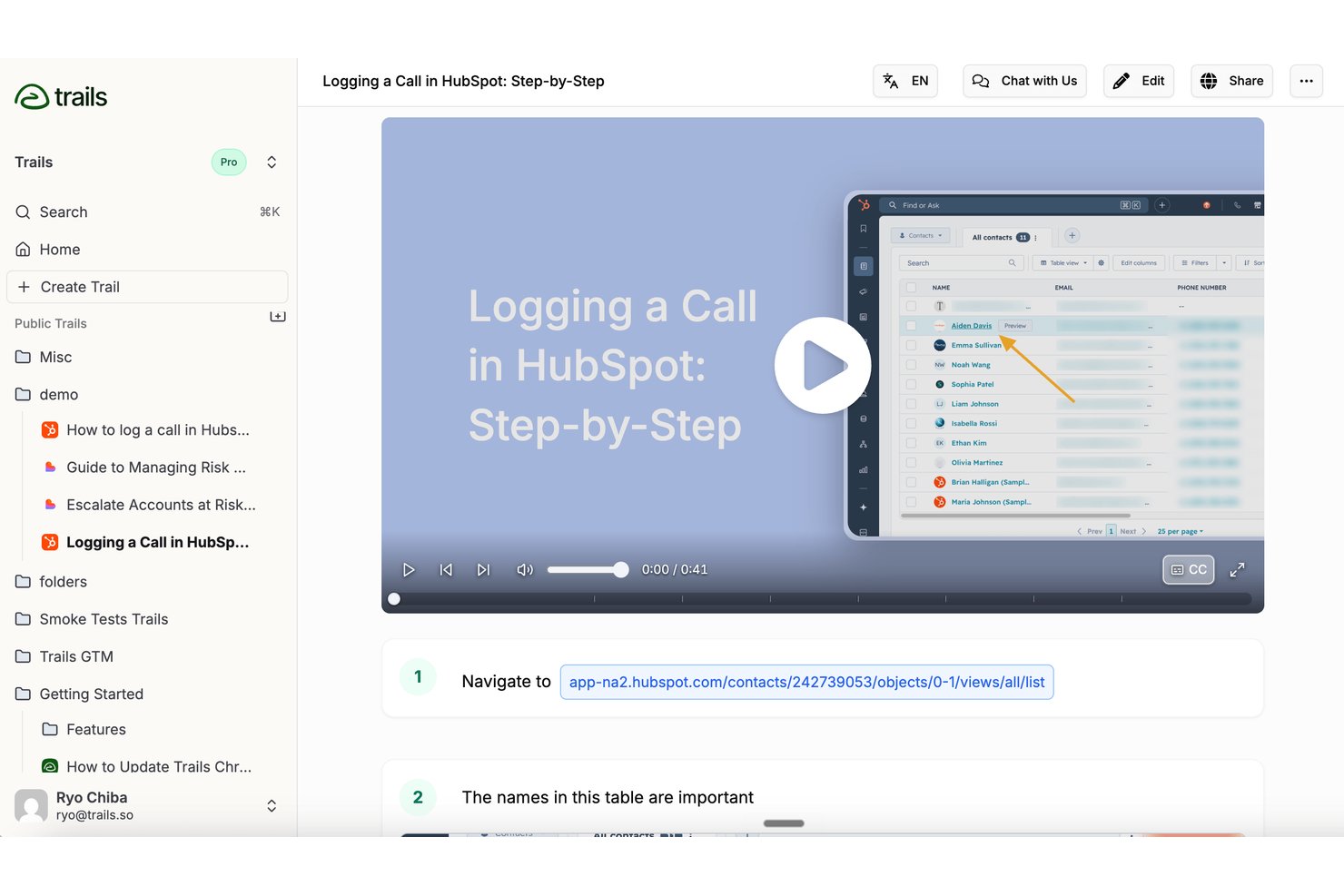
Trails is an SOP and process documentation tool that converts screen recordings into editable, step-by-step guides and AI-narrated training videos, which you can organize into a searchable knowledge base.
Who Is Trails Best For?
Trails is a strong fit for operations and training teams that need to document recurring processes fast, without spending hours writing guides from scratch.
Why I Picked Trails
I picked Trails as one of the best because it's the fastest way I've seen to turn a screen recording into a finished, shareable SOP. Record your workflow once and Trails generates an editable, numbered guide with annotated screenshots and an AI-narrated training video at the same time. I especially like that editing the guide text automatically updates the video narration, so your written SOP and video walkthrough stay in sync without extra work.
Trails Key Features
- Searchable knowledge base: Publish guides in a browsable, auto-syncing knowledge base that can be embedded in tools like SharePoint, Confluence, or Notion.
- On-device sensitive data redaction: Blur private information directly on your device before screenshots are uploaded, with smart detection for names and email addresses.
- Multilingual video narration: Generate AI-narrated training videos with captions in more than 75 languages from a single guide.
- Role-based access controls: Assign viewer, editor, or admin roles at the organization or individual guide level to manage who can view or edit each SOP.
Trails Integrations
Trails supports knowledge-base embedding in SharePoint, Confluence, and Notion. It also lists Zendesk, Google Drive, Slack, Microsoft Teams, Salesforce, Microsoft Entra ID, and Okta.
Pros and Cons
Pros:
- On-device blurring protects sensitive screenshots
- Guide edits keep narration and visuals aligned
- Turns recordings into editable illustrated SOPs
Cons:
- Version history lacks audit-grade revision details
- No read receipts or training completion tracking

Best for knowledge management
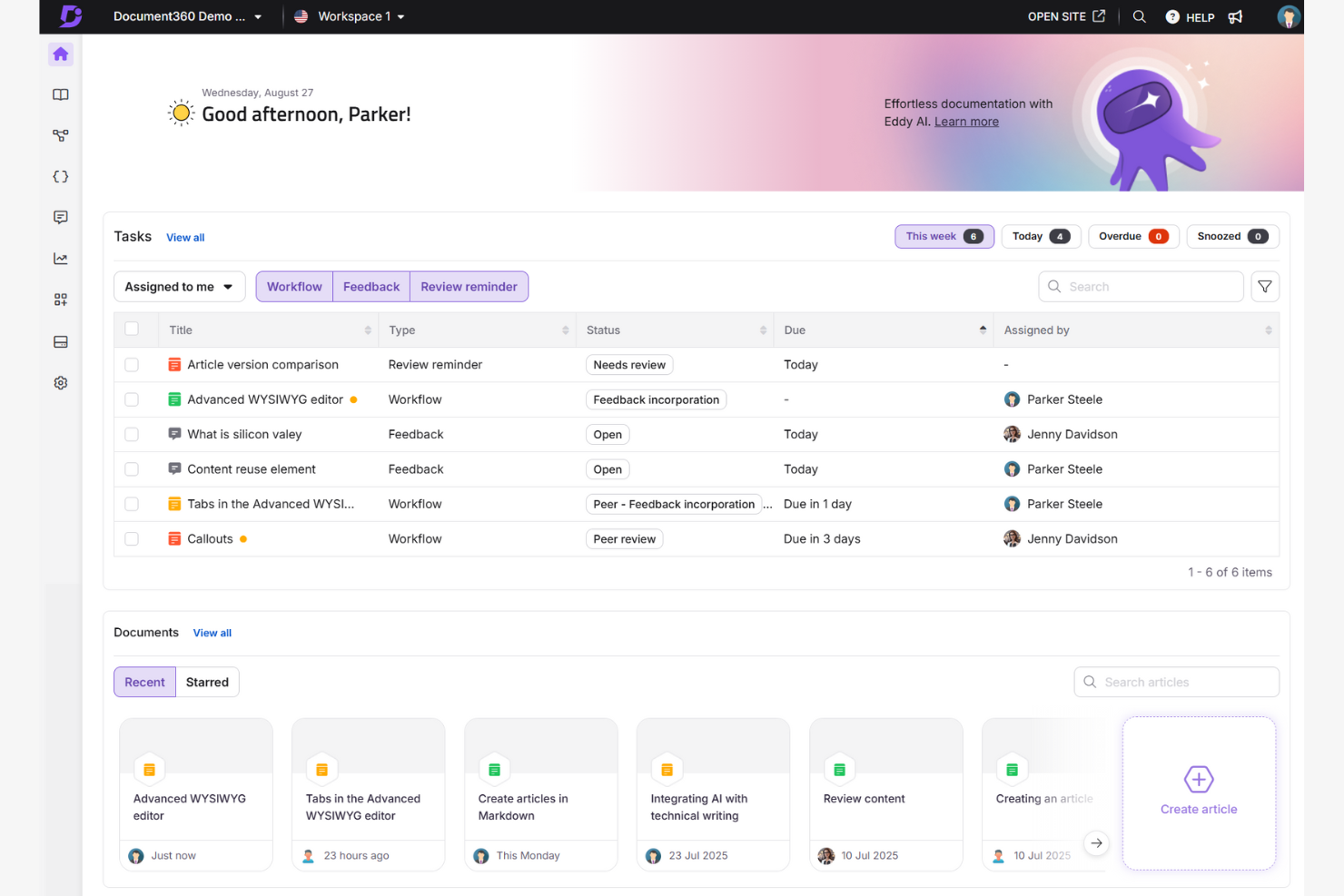
Document360 is a knowledge base software designed for teams needing organized and accessible document management. It's popular among customer support and IT departments for its ability to manage and share knowledge efficiently.
Why I picked Document360: It offers a structured way to create and maintain documentation. You can use its AI-powered editor to create SOPs and training documents. Its version history lets you track changes over time. This makes it ideal for teams that need precise control over their document management system.
Standout Features and Integrations:
Features include an editor that makes it simple to create, edit, and categorize SOP documentation. The version history feature allows you to track and revert changes, maintaining accuracy in your documentation.
Integrations include Microsoft Teams, Slack, Google Analytics, and more.
Pros and Cons
Pros:
- Suitable for multiple languages
- Customizable branding options
- Detailed version history
Cons:
- Some integrations may have limited functionality
- Requires regular updates
New Product Updates from Document360

Document360 Adds Feedback APIs, MCP Tools, and Zendesk Authentication
Document360 adds feedback APIs, expanded MCP tools, Zendesk account authentication, and the ability to reopen closed feedback. These updates help teams manage feedback, automate knowledge base tasks, and control integration access. For more information, visit Document360’s official site.
 .

Best for browser-based workflow guidance

Guideless is an SOP creation tool that records browser-based workflows through a Chrome extension and automatically converts them into AI-narrated, step-by-step video guides complete with captions, smart zooms, and annotations.
Who Is Guideless Best For?
Guideless is a good fit for small to mid-sized teams that need to document browser-based processes quickly without dedicated instructional designers or video editors.
Why I Picked Guideless
Guideless is one of my top picks because I love how it captures browser workflows directly as they happen, turning live clicks and navigation into structured SOPs without any manual scripting. I use the Chrome extension to record a process once, and Guideless automatically generates the narration, applies smart zooms on key actions, and adds captions. What I find especially useful is that when a workflow changes, I can update the guide without re-recording the entire thing from scratch.
Guideless Key Features
- AI voice selection: Choose from 50+ AI voices to narrate your SOPs, so guides sound consistent across your entire library.
- Guide sharing and export: Publish guides via shareable URL, embed code, or downloadable MP4 to distribute SOPs across any channel or platform.
- Branding and annotation customization: Add your logo, custom colors, and on-screen annotations to keep guides aligned with your organization's style.
- Viewer analytics: Track views, completion rates, and drop-off points to see exactly where people stop following a process.
Guideless Integrations
Guideless primarily works through a Chrome extension that captures browser-based workflows and lets you share or embed guides via link or embed code.
Pros and Cons
Pros:
- Guides update without full re-recording
- Captures browser workflows with zero setup
- AI narration included on every guide
Cons:
- Free plan limited to three guides
- Only captures browser-based workflows

Scribe
Best for automatic process capture

Scribe is a documentation tool used by teams to create step-by-step guides quickly. It's popular among HR, IT, and customer support teams for documenting processes and creating employee training materials.
Why I picked Scribe: It specializes in automatic process capture, allowing you to generate guides quickly and document complex workflows. You can use the platform's Workflow AI to automate the documentation process. This is an option for teams looking to improve their training and onboarding processes for new employees.
Standout Features and Integrations:
Features include a resource gallery that provides templates and examples to assist you in creating guides. You can also customize guides and docs to fit your specific needs, making them more relevant for your team and stakeholders.
Integrations include Slack, Microsoft Teams, Confluence, Salesforce, Zendesk, and more.
Pros and Cons
Pros:
- Suitable for various departments
- Workflow AI capabilities
- Automatic process capture
Cons:
- Basic reporting features
- Not ideal for highly complex workflows

Best for centralized team workflows
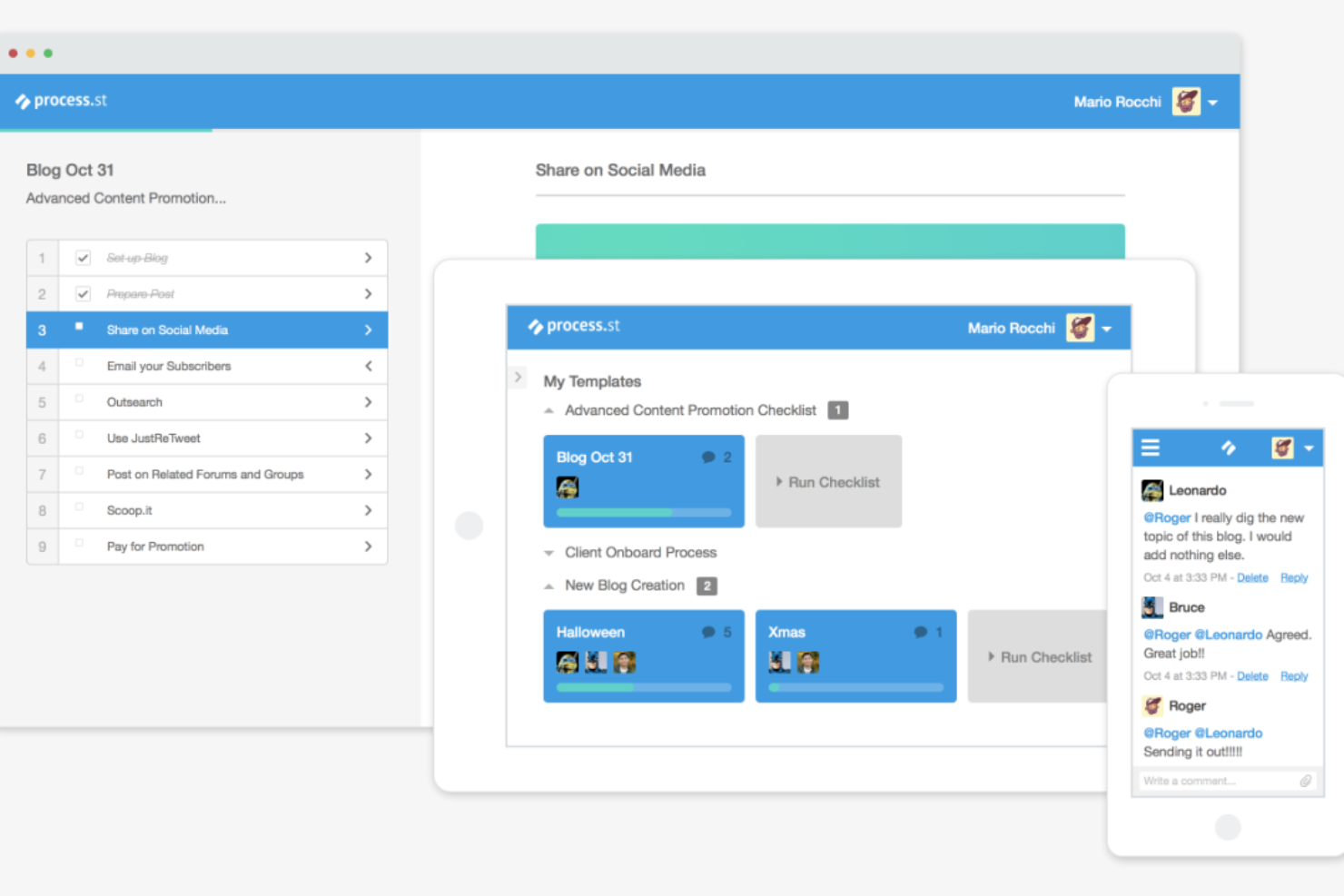
Process Street Docs is a document management feature designed for teams to create, organize, and maintain standard operating procedures. It's ideal for operations, HR, and project management teams looking to centralize SOPs and maintain consistency across processes.
Why I picked Process Street Docs: It excels in SOP creation and management by providing a structured platform for writing and updating procedures. You can link Docs to workflows so team members have access to instructions while executing tasks. This makes it easy for teams to keep SOPs up-to-date and aligned with evolving processes.
Standout Features and Integrations:
Features include a rich text editor for detailed SOP documentation, version control to track updates over time, and the ability to organize documents into categories and folders for easy access. You can also link Docs to workflow checklists, so team members reference the right SOPs while completing tasks.
Integrations include Slack, Zapier, Salesforce, Jira, Google Sheets, DocuSign, and more.
Pros and Cons
Pros:
- Suitable for complex workflows
- Versatile API
- Supports conditional logic
Cons:
- Limited mobile app functionality
- Requires initial setup time

Trainual
Best for employee onboarding

Trainual is an onboarding and training tool designed for small to medium-sized businesses. It helps organize company processes and training materials to maintain consistency and clarity for new hires.
Why I picked Trainual: It focuses on employee onboarding by offering structured training modules. You can create detailed manuals that guide your new team members through company policies and procedures. The templates make it simple to set up training paths for different roles. This is ideal for businesses looking to simplify and improve their onboarding process.
Standout Features and Integrations:
Features include customizable templates that help you create training manuals specific to your business needs. You can track progress to make sure your team members complete their training on time. The platform also offers quizzes to test knowledge retention, which helps reinforce learning.
Integrations include Slack, Zapier, BambooHR, Gusto, QuickBooks Payroll, and more.
Pros and Cons
Pros:
- Includes quizzes for learning
- Progress tracking tools
- Customizable training templates
Cons:
- The content library may become cluttered
- Limited advanced features

Tallyfy
Best for process automation
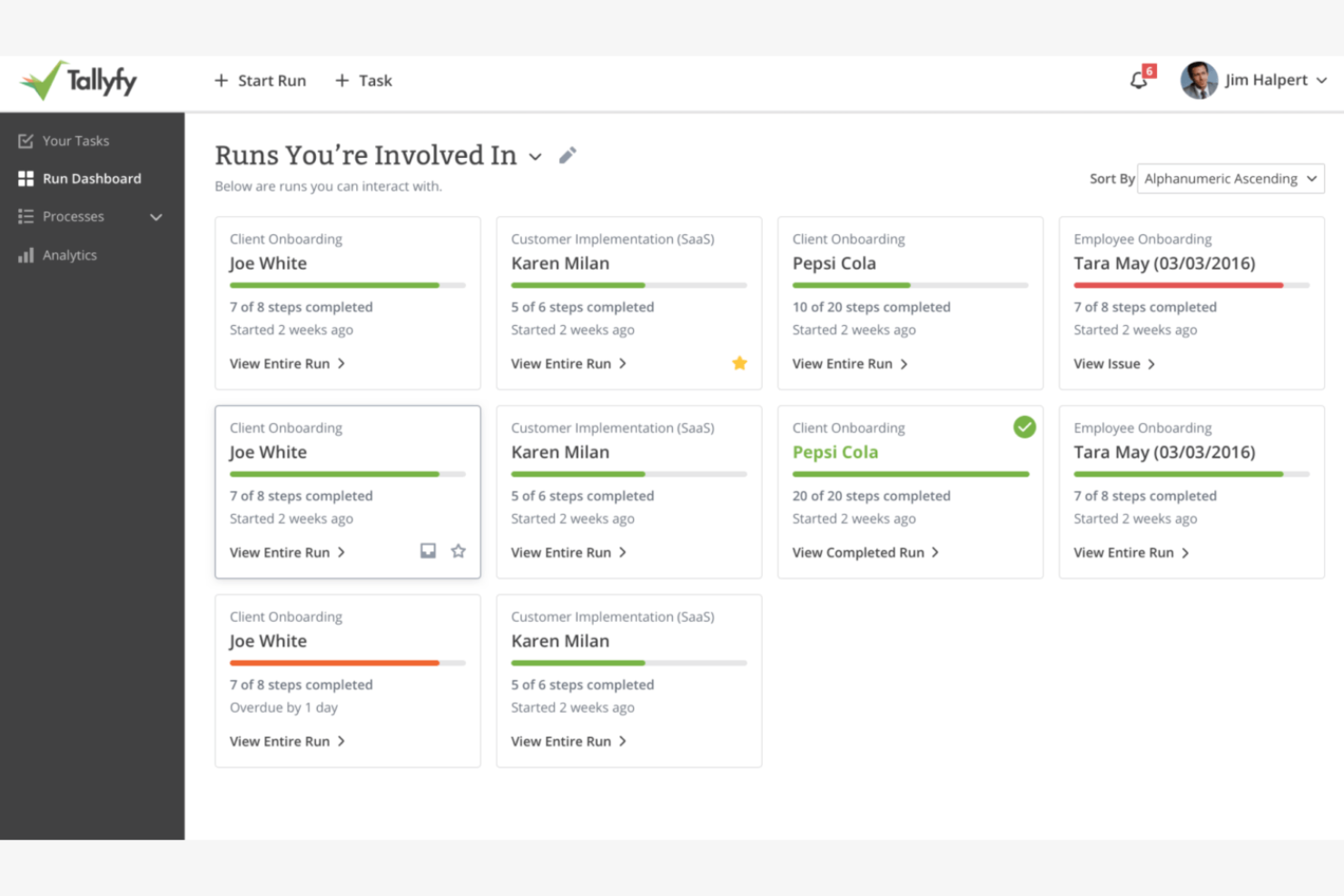
Tallyfy is a process management tool designed for automating and managing workflows. It's used by operations and project management teams to help processes run smoothly.
Why I picked Tallyfy: It excels in process automation, allowing your team to automate routine workflows with ease. You can create detailed process maps that visualize each step and decision point. The platform's automation features help reduce manual tasks, saving you time and effort.
Standout Features and Integrations:
Features include the ability to create detailed process maps that help you visualize workflows clearly. You can use automation triggers to reduce manual intervention in repetitive tasks. The platform also offers real-time tracking, so you can monitor the progress of processes and make adjustments as needed.
Integrations include Slack and more.
Pros and Cons
Pros:
- Suitable for complex workflows
- Real-time tracking available
- Process mapping tools
Cons:
- Few integrations
- Limited advanced conditional logic
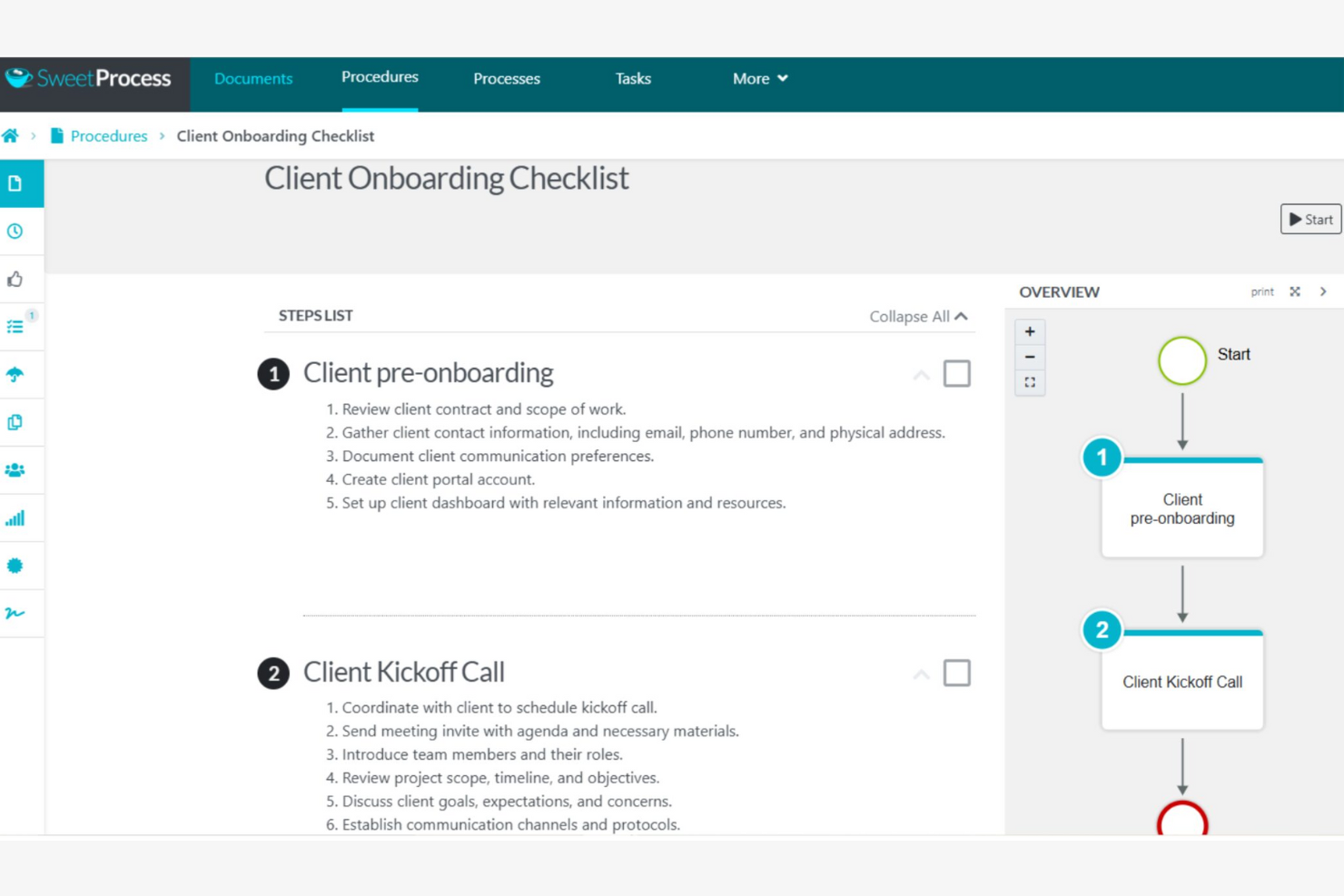
SweetProcess is a process documentation tool designed for small businesses to document and optimize their procedures. It helps teams create clear SOPs and keeps everyone following the same steps for consistency.
Why I picked SweetProcess: It focuses on small businesses by providing straightforward tools for documenting processes. You can create step-by-step procedures that are simple for your team to follow. SweetProcess allows you to assign tasks and set deadlines, helping to keep everyone on track. This makes it a valuable resource for small teams looking to improve their operational efficiency.
Standout Features and Integrations:
Features include an interface that makes creating and editing procedures simple for your team. You can attach files and images to your SOPs to provide visual aids that can improve understanding. The task management feature allows you to assign responsibilities and track progress, maintaining accountability.
Integrations include Zapier, Dropbox, Google Drive, Box, OneDrive, Salesforce, Slack, Microsoft Teams, and more.
Pros and Cons
Pros:
- Suitable for small teams
- Task management features
- Tools to produce visual aids
Cons:
- Basic version control features
- Limited reporting and analytics

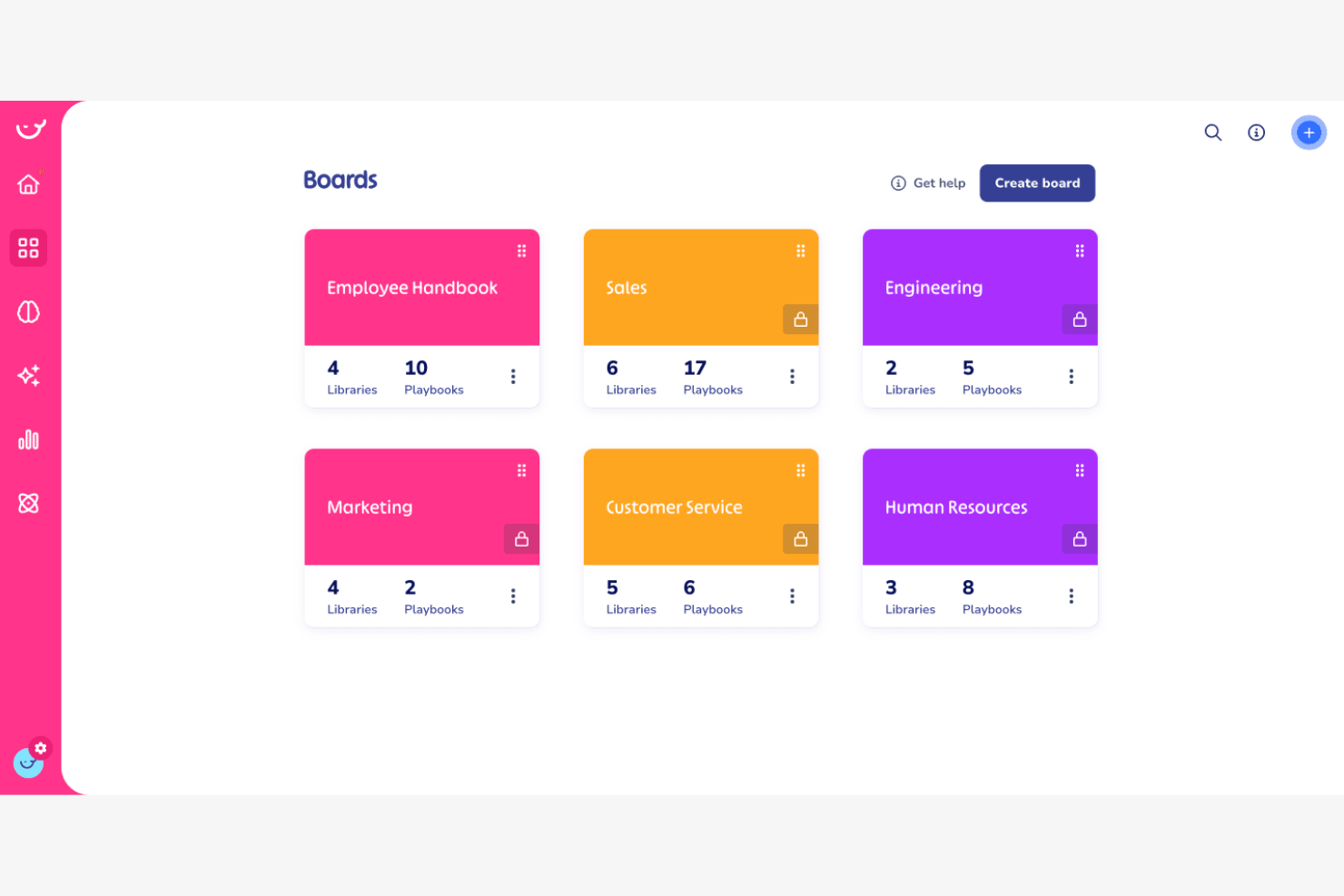
Whale is a knowledge-sharing and training platform designed to maintain consistent training and process documentation. It's popular among businesses that need to maintain uniformity in training materials and standard operating procedures.
Why I picked Whale: It focuses on training consistency, providing tools to create and distribute training content effectively. The platform allows for updates and sends notifications to remind team members to complete training tasks. This standard operating procedure software is ideal for businesses aiming to improve their training consistency across departments.
Standout Features and Integrations:
Features include a user-friendly editor that lets you create and update training content. You can use the quiz builder to test your team's understanding and reinforce learning. The analytics feature provides insights into training effectiveness, helping you identify areas for improvement.
Integrations include Slack, Google Drive, YouTube, Microsoft OneDrive, and more.
Pros and Cons
Pros:
- Suitable for various industries
- Tools for analytics
- Quiz builder
Cons:
- Basic reporting features
- Limited customization options

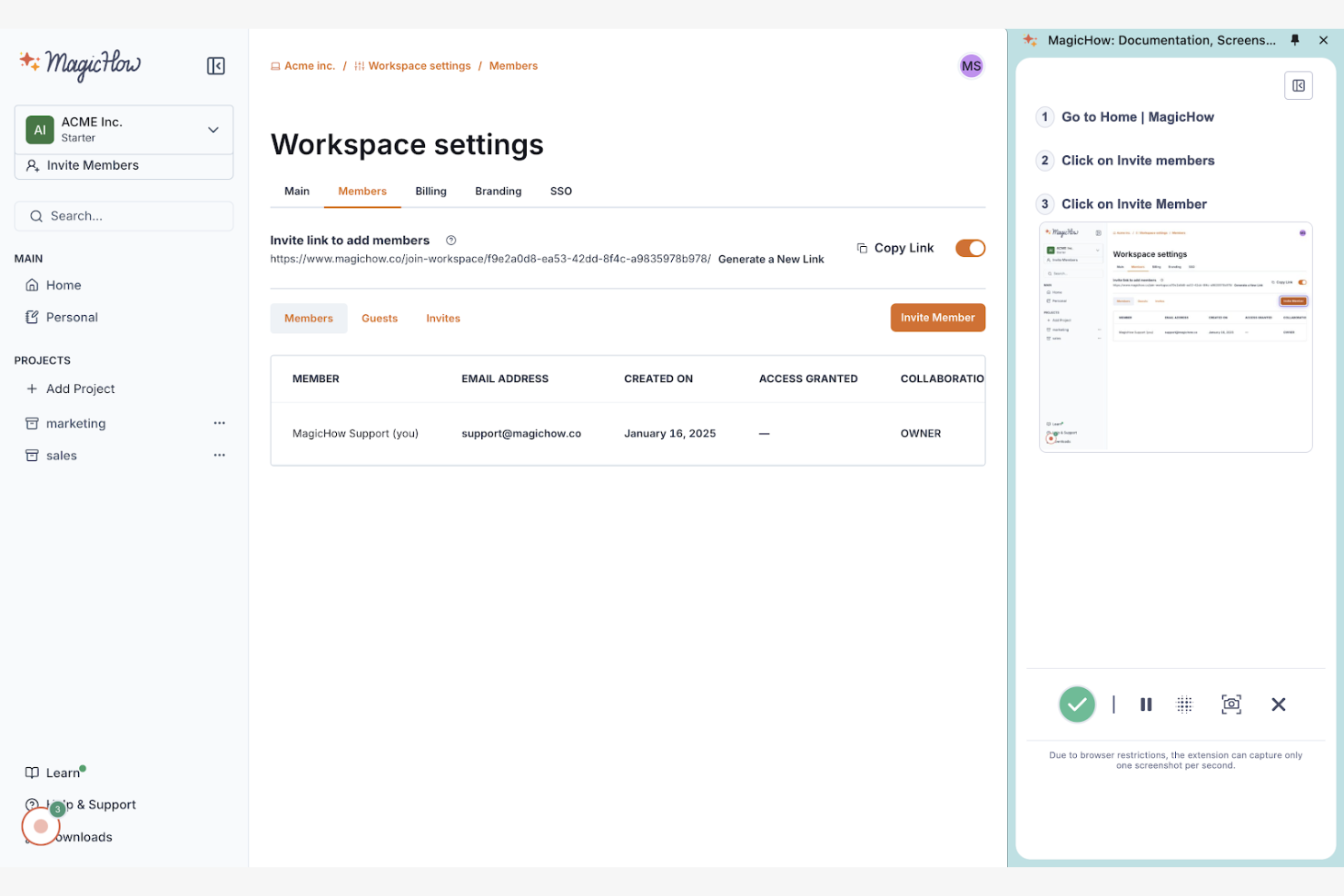
MagicHow is a tool designed for creating step-by-step guides, SOPs, and training manuals. It's primarily used by teams in HR, customer support, and operations.
Why I picked MagicHow: It excels in visual SOP creation, making it simple for you to document procedures. You can record actions, which the tool compiles into editable guides for training programs. Sharing guides in various formats, such as PDF and HTML, improves accessibility for your team.
Standout Features and Integrations:
Features include a simple recording process and customizable templates for different documentation needs. Your team can include annotations, screenshots, and graphics on slides and embed their training manuals in other tools for easy access.
Integrations include Google Drive, Slack, Confluence, Notion, and more.
Pros and Cons
Pros:
- Suitable for various industries
- Flexible guide formats
- Quick setup process
Cons:
- Basic design customization
- Limited advanced features


How I Evaluate Standard Operating Procedure Software
I evaluate SOP tools across two layers: the baseline must-haves—like version control and approval workflows—and the differentiators that reveal which tools actually fit a PMO's delivery environment.
Core Functionality (Table Stakes For This List)
When I'm selecting tools for my list, I rank each one on a scale from 0 (does not offer the functionality) to 5 (excels in this area) for each core functionality listed below. Then, I calculate the tool's total score into a percentage. Each tool needs to achieve a minimum total score of 65% to be considered for inclusion.
- SOP Authoring & Templates: I look for structured editors and template libraries that let you build project-specific SOPs—like sprint retrospective procedures or change request workflows—without starting from scratch.
- Version Control & History: Every SOP evolves, so I check whether the tool tracks revisions, supports rollback, and shows who changed what—especially useful when audit season hits.
- Approval Workflows: I evaluate how each tool handles review routing, whether that's a single sign-off from a project lead or a multi-stage approval chain across PMO leadership and compliance.
- Centralized SOP Repository: A searchable, organized library matters when your team is distributed. I look for tagging, folder structures, and permission filters that help people find the right SOP fast.
- Task & Process Assignment: The best SOP tools let you turn documented procedures into assignable checklists or tasks—like tying a deployment SOP to a release milestone so nothing gets skipped.
- Collaboration & Access Controls: I evaluate multi-user editing, commenting, and role-based permissions to make sure teams can co-author SOPs while keeping sensitive procedures locked to the right groups.
Once I have a list of tools that meet the criteria, I consider what sets each platform apart.
Differentiating Factors (What Sets Vendors Apart)
Here's how I compare and contrast different vendors:
Standout Features
AI-assisted SOP generation is a major differentiator—I look for tools that can draft procedures from prompts or existing docs, which saves hours when you're documenting a new delivery framework. Process analytics also matter. Dashboards that show completion rates and adherence trends give PMO leads real visibility into whether teams actually follow procedures. I also check for automation triggers that launch SOPs based on project milestones, like kicking off a go-live checklist when a release task moves to "ready."
Beyond Features
Integrations with your PM ecosystem are one of the first things I check. An SOP tool that connects to Jira, Asana, or Monday means your documented procedures live alongside active project work instead of in a silo. Security and compliance certifications like SOC 2 or ISO 27001 also weigh heavily, especially for teams handling client-facing delivery where audit trails and data residency matter. I also evaluate pricing models to see whether per-user costs stay reasonable as a PMO scales from a pilot team to a full portfolio rollout.
SOP Yazılımı Nasıl Seçilir?
Uzun özellik listeleri ve karmaşık fiyatlandırma yapıları içinde kaybolmak kolaydır. Kendinize özgü yazılım seçim sürecinizi yürütürken odağınızı korumanıza yardımcı olmak için göz önünde bulundurmanız gereken faktörleri aşağıda bir kontrol listesi hâlinde bulabilirsiniz:
| Faktör | Nelere Dikkat Edilmeli? |
|---|---|
| Ölçeklenebilirlik | Araç ekibinizle birlikte büyüyebilir mi? Gelecekteki ihtiyaçları ve yazılımın büyük yükseltmelere veya maliyet artışlarına yol açmadan artan kullanıcı ve süreçleri yönetip yönetemeyeceğini değerlendirin. |
| Entegrasyonlar | Mevcut araçlarınızla çalışıyor mu? CRM aracınız, proje yönetimi yazılımınız ve güvendiğiniz diğer önemli sistemlerle uyumluluk arayın. |
| Özelleştirilebilirlik | İş akışlarınıza uyacak şekilde uyarlayabilir misiniz? Yazılımın şablonlarda, süreçlerde ve kullanıcı rollerinde benzersiz gereksinimlerinize uygun ayarlamalar yapmanıza izin verip vermediğini kontrol edin. |
| Kullanım kolaylığı | Kullanıcı dostu mu? Dik bir öğrenme eğrisi benimsenmesini engelleyebilir. Ekip üyelerinin kolayca kullanabilmesi için sezgisel arayüzler ve basit gezinme seçenekleri arayın. |
| Uygulama ve işe alıştırma | Ne kadar hızlı kullanmaya başlayabilirsiniz? Kesintileri en aza indirmek için kurulum süresini, mevcut eğitim kaynaklarını ve işe alıştırma aşamasındaki desteği değerlendirin. |
| Maliyet | Bütçeniz dâhilinde mi? Fiyatlandırma modellerini karşılaştırın, gizli ücretleri göz önünde bulundurun ve maliyetin ihtiyaç duyduğunuz özellik ve avantajlarla uyumlu olup olmadığını kontrol edin. |
| Güvenlik önlemleri | Verileriniz korunuyor mu? Yazılımın şifreleme, erişim denetimleri ve sektörünüzle ilgili veri koruma düzenlemelerine uygunluk sunduğunu doğrulayın. |
| Desteğin kullanılabilirliği | İhtiyaç duyduğunuzda yardım alabilecek misiniz? Sorunları hızlıca çözmek için 7/24 destek seçeneklerini, yanıt sürelerini ve canlı sohbet ya da telefon desteğinin kullanılabilirliğini arayın. |
SOP Yazılımı Nedir?
SOP yazılımı, kuruluşların standart işletim prosedürleri oluşturmasına, yönetmesine ve depolamasına yardımcı olan bir araçtır. Proje yöneticileri, İK ekipleri ve operasyon yöneticileri gibi profesyoneller, süreçlerinde tutarlılığı ve uyumluluğu korumak için bu araçları kullanır.
Belge oluşturma, şablon özelleştirme ve sürüm denetimi özellikleri, prosedürlerin etkili bir şekilde düzenlenmesine ve korunmasına yardımcı olur. Genel olarak bu araçlar, işletme operasyonlarının yönetiminde netlik ve verimlilik sağlar.
Özellikler
SOP yazılımı seçerken aşağıdaki temel özelliklere dikkat edin:
- Belge oluşturma: Operasyonlarınızda netlik ve tutarlılık sağlamak için standart işletim prosedürlerini kolayca taslak hâline getirmenize ve düzenlemenize olanak tanır.
- Şablon özelleştirme: Şablonları özel süreç ihtiyaçlarınıza uyacak şekilde düzenleme seçenekleri sunarak geçerliliği ve doğruluğu korur.
- Sürüm denetimi: Değişiklikleri izlemenizi ve önceki sürümlere dönmenizi sağlayarak belgelerinizin bütünlüğünü korur.
- İş birliği araçları: Gerçek zamanlı iletişimi ve ekip çalışmasını kolaylaştırır.
- Entegrasyon olanakları: İş akışlarını basitleştirmek için CRM sistemleri ve proje yönetimi yazılımları gibi diğer işletme araçlarıyla bağlantıyı destekler.
- Güvenlik önlemleri: Hassas verileri korumak ve düzenlemelere uymak için şifreleme ve erişim denetimleri sunar.
- Görev yönetimi: SOP'ler içindeki görevlerin atanmasına ve izlenmesine olanak tanıyarak sorumluluğu ve görevlerin zamanında tamamlanmasını korur.
- Gerçek zamanlı güncellemeler: Herkesin en güncel bilgilere erişebilmesi için belgeleri güncel tutar.
- Analiz ve raporlama: İyileştirme gerektiren alanların belirlenmesine yardımcı olmak için SOP'lerin kullanımı ve etkililiği hakkında içgörüler sunar.
- Mobil erişilebilirlik: SOP'lere hareket hâlindeyken erişilmesini sağlayarak ekip üyelerinin prosedürleri her yerde takip edebilmesine olanak tanır.
Avantajlar
SOP yazılımını uygulamak ekibiniz ve işletmeniz için çeşitli avantajlar sağlar. Yararlanabileceğiniz avantajlardan bazıları şunlardır:
- Tutarlılık: Tüm ekip üyelerinin aynı prosedürleri izlemesini sağlayarak hataları azaltır ve kalite denetimini iyileştirir.
- Verimlilik: Görev yönetimi ve gerçek zamanlı güncellemeler gibi özelliklerle süreç yönetimini basitleştirerek zamandan ve kaynaklardan tasarruf sağlar.
- İş birliği: Gerçek zamanlı iş birliği araçları aracılığıyla ekip çalışmasını teşvik ederek iletişimi ve üretkenliği artırır.
- Uyumluluk: Güvenlik önlemleri ve sürüm denetimiyle standartlara ve düzenlemelere uyulmasını korumaya yardımcı olur.
- Ölçeklenebilirlik: İşletmeniz geliştikçe süreçlerin genişletilmesine ve uyarlanmasına olanak tanıyarak büyümeyi destekler.
- Erişilebilirlik: SOP'lere mobil erişim sağlayarak ekip üyelerinin prosedürleri her yerden takip edebilmesine olanak tanır.
- İçgörü: SOP kullanımını ve etkililiğini izlemek için analiz ve raporlama sunarak sürekli iyileştirme çalışmalarına yön verir.
Maliyetler ve Fiyatlandırma
SOP yazılımı seçmek, mevcut çeşitli fiyatlandırma modellerinin ve planların anlaşılmasını gerektirir. Maliyetler özelliklere, ekip büyüklüğüne, eklentilere ve daha fazlasına göre değişir. Aşağıdaki tablo, SOP yazılımı çözümlerindeki yaygın planları, ortalama fiyatlarını ve genellikle dâhil edilen özellikleri özetler:
SOP Yazılımı için Plan Karşılaştırma Tablosu
| Plan Türü | Ortalama Fiyat | Yaygın Özellikler |
|---|---|---|
| Ücretsiz Plan | $0 | Temel belge oluşturma, sınırlı depolama ve topluluk desteği. |
| Kişisel Plan | $10-$25/user/month | Belge oluşturma ve düzenleme, şablon özelleştirme ve e-posta desteği. |
| İşletme Planı | $22-$90/user/month | Gelişmiş iş birliği araçları, entegrasyon olanakları ve sürüm denetimi. |
| Kurumsal Plan | $80-$300+/user/month | Özelleştirilebilir güvenlik önlemleri, özel hesap yönetimi ve gelişmiş analiz özellikleri. |
SOP Yazılımı SSS
SOP yazılımı hakkında sık sorulan bazı soruların yanıtları:
Ekibimin SOP yazılımına ihtiyacı olup olmadığını nasıl anlayabilirim?
Ekibiniz süreçlerde tutarlılığı korumakta zorlanıyorsa veya belgeleri manuel olarak yönetmeye çok fazla zaman harcıyorsa SOP yazılımı yardımcı olabilir. Prosedürleri oluşturmak, yönetmek ve güncellemek için merkezi bir platform sağlayarak herkesin aynı adımları izlemesini mümkün kılar. Uygun olup olmadığını belirlemek için ekibinizin büyüklüğünü ve operasyonların karmaşıklığını göz önünde bulundurun.
SOP yazılımı proje ekipleri için işe alıştırma sürecini nasıl iyileştirir?
SOP yazılımı, adım adım kılavuzları, kontrol listelerini ve videoları tek bir yerde sunarak işe alıştırma sürecini hızlandırır. Yeni ekip üyeleri, açık ve tutarlı prosedürlere hemen erişerek eğitim süresini ve hataları azaltır. Süreci izleyebilir ve süreçleriniz değiştikçe SOP’leri hızlıca güncelleyebilirsiniz.
SOP yazılımı ekibimin kullandığı diğer araçlarla entegre olabilir mi?
Evet, çoğu SOP yazılımı CRM sistemleri, proje yönetimi yazılımları ve iletişim platformları gibi popüler araçlarla entegrasyon özellikleri sunar. Ekibinizin hâlihazırda kullandığı araçlarla uyumluluğu doğrulamak için her yazılımın sunduğu belirli entegrasyonları kontrol edin. Bu, farklı sistemler arasında geçiş yapmaya gerek kalmadan sorunsuz bir iş akışının sürdürülmesine yardımcı olur.
İşletmem büyüdükçe SOP yazılımı ölçeklenebilir mi?
Evet, birçok SOP yazılımı çözümü işletmenizle birlikte ölçeklenebilecek şekilde tasarlanmıştır. Ekibiniz büyüdükçe daha fazla kullanıcıyı ve daha karmaşık süreçleri destekleyebilecek farklı fiyatlandırma katmanları ve özellikler sunar. Önemli kesintiler yaşamadan büyümenizi destekleyebileceğini doğrulamak için her yazılımın ölçeklenebilirlik seçeneklerini değerlendirin.
Hassas bilgileri depolamak için SOP yazılımı ne kadar güvenlidir?
SOP yazılımı genellikle veri şifreleme, erişim denetimleri ve sektör standartlarına uyumluluk gibi güvenlik önlemlerini içerir. Hassas bilgileri korumaya yönelik şirket gereksinimlerinizi karşıladığını doğrulamak için yazılımın güvenlik özelliklerini her zaman inceleyin. Olası tehditlerin önünde kalmak için güvenlik protokollerini düzenli olarak güncelleyen yazılımları tercih edin.