

2026’da İncelenen En İyi 10 Profesyonel Hizmetler Planlama Yazılımı

En İyi Profesyonel Hizmetler Planlama Yazılımları Kısa Listesi


Programları ve randevuları yönetmek, alevli meşaleleri aynı anda çevirmek gibi hissettirebilir. Asıl önemli olan şeylere, yani projelerinize, ekibinize ve müşterilerinize odaklanmak istersiniz. Profesyonel hizmetler planlama yazılımı tam da bu noktada devreye girer. Her şeyi düzenli tutmanıza yardımcı olur, böylece biraz daha rahat nefes alabilirsiniz.
Deneyimlerime göre doğru araç büyük bir fark yaratabilir. İhtiyaçlarınıza en uygun seçeneği bulmanıza yardımcı olmak için çeşitli seçenekleri bağımsız olarak test edip inceledim. Bu makale, en iyi seçenekler arasında size rehberlik edecek; her birinin sunduklarını ve yaygın planlama sorunlarını nasıl çözebileceklerini vurgulayacaktır.
Ekibiniz için bilinçli bir karar verebilmeniz amacıyla her aracın özelliklerine, avantajlarına ve dezavantajlarına tarafsız bir bakış elde edeceksiniz. Haydi başlayalım.
Yazılım Önerilerimize Neden Güvenebilirsiniz?
Ekibimiz 2012’den beri yazılımları test ediyor ve inceliyor. Biz de proje yöneticisi olduğumuz için doğru yazılımı seçmenin ne kadar zor ve önemli olduğunu biliyoruz.
Bu rehber için araçları uygulamalı testler ve bağımsız araştırmalarla değerlendirdik ve seçim kriterlerimize göre puanladık. Ayrıca sektörün fikir önderlerinin ve alanında çalışan proje yönetimi uzmanlarının görüşlerinden de yararlanıyoruz.
İncelemelerimiz bir satış konuşması değil, editör ekibimizin kendi değerlendirmesidir.
Uzman inceleyenler:
Profesyonel Hizmetler Planlama Yazılımları Karşılaştırma Tablosu
Aşağıdaki tablo, profesyonel hizmetler planlama yazılımları arasından en iyi seçimlerim için fiyatlandırma ayrıntılarını karşılaştırmaktadır.
| Tool | Starting Price | Website | |
|---|---|---|---|
| Best for end-to-end PS firm resourcing | 4.5 out of 5 | $17/user/month 14-day free trial + free demo available | Book Demo |
| Best for client bookings | 4.8 out of 5 | $20/month 7-day free trial | Website |
| Best for meeting scheduling | 4.7 out of 5 | $10/user/month Free plan + demo available | Website |
| Best for time zone support | 4.7 out of 5 | Pricing upon request Free plan + 14-day trial + demo available | Website |
| Best for small businesses | 4.6 out of 5 | $19.99/month Free plan available | Website |
| Best for custom bookings | 4.6 out of 5 | $13.9/month Free plan + 14-day free trial + demo available | Website |
| Best for field services | 4.4 out of 5 | Pricing upon request Free demo available | Website |
| Best for payment integration | — | $49/month Free plan + 30-day free trial available | Website |
| Best for open-source users | — | $12/user/month 14-day free trial + free plan + free demo available | Website |
| Best for project tracking | 4.6 out of 5 | $10/user/month 14-day free trial + demo available | Book Demo |


En İyi Profesyonel Hizmetler Planlama Yazılımları İncelemesi
Aşağıda, kısa listeme giren en iyi profesyonel hizmetler planlama yazılımlarıyla ilgili ayrıntılı özetlerimi bulabilirsiniz. İncelemelerim, sizin için en iyi seçeneği bulmanıza yardımcı olmak amacıyla her aracın temel özelliklerine, avantajlarına ve dezavantajlarına, entegrasyonlarına ve ideal kullanım alanlarına ayrıntılı bir bakış sunuyor.

Scoro
Best for end-to-end PS firm resourcing
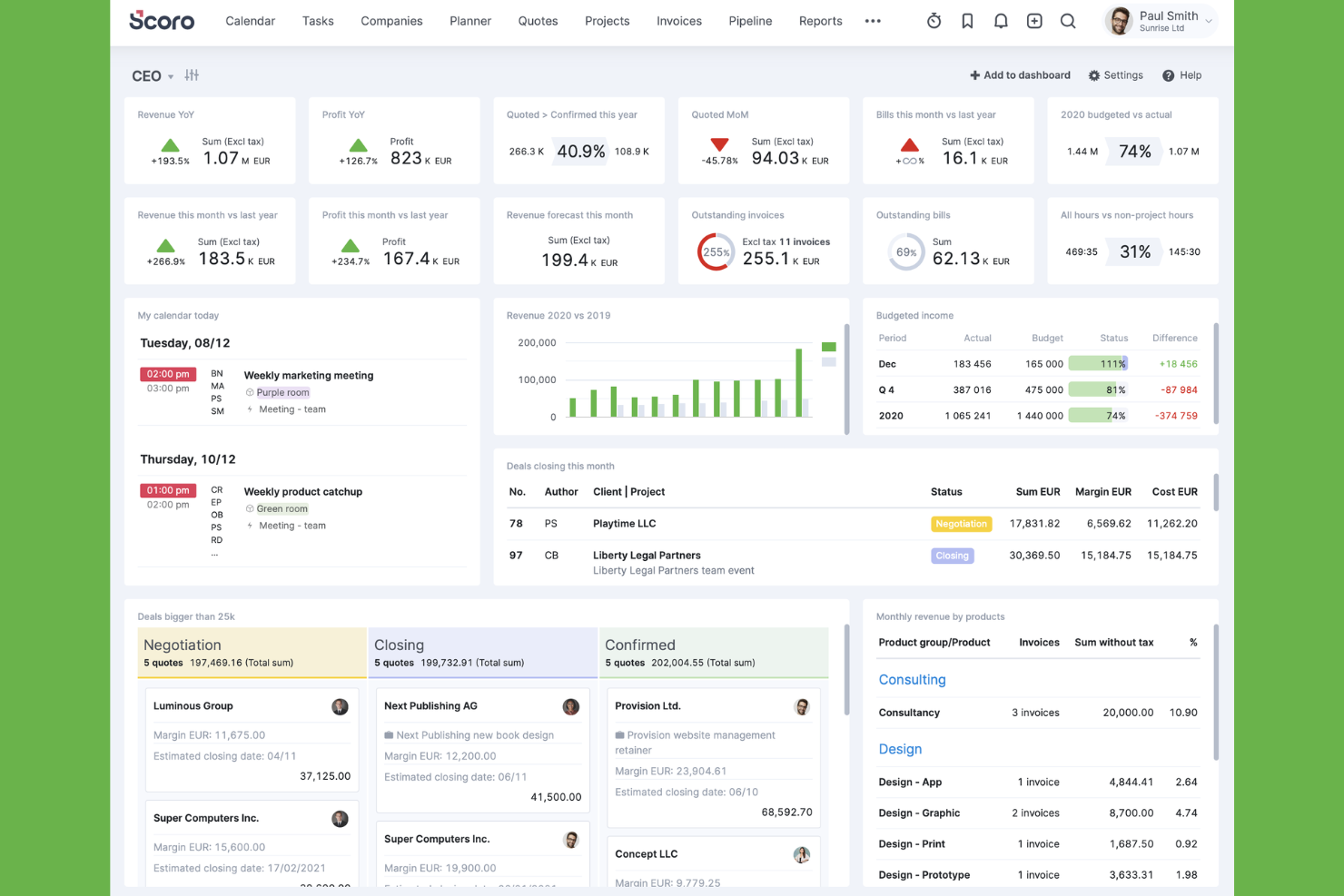
Scoro is a PSA platform built specifically for professional services firms that unifies resource scheduling, project delivery, time tracking, quoting, and financial reporting in a single system.
Who Is Scoro Best For?
Scoro is a strong fit for consulting firms, agencies, and IT services businesses that need to manage the full project lifecycle—from pipeline and resourcing to invoicing—in one place.
Why I Picked Scoro
Scoro earns its spot on my shortlist because it covers the entire PS firm workflow, from pipeline to invoicing, without requiring a stack of separate tools. What I particularly like is the quote estimation matrix, which breaks project deliverables down by role, effort, cost, and margin before a single hour is logged, so profitability is baked in from the sales stage. The Bookings module then carries that context forward, letting you assign confirmed or soft (tentative) bookings against real capacity data that already accounts for leave and public holidays.
Scoro Key Features
- 360° time usage view: Shows planned, booked, and logged time side by side across individuals, roles, and projects in a single view.
- WIP reporting: Surfaces unbilled time and uninvoiced costs so you can forecast revenue and cost completion before a project closes.
- Utilization heatmaps: Color-coded capacity indicators flag overloaded and underutilized team members across your scheduling view in real time.
- ELI AI assistant: Lets you query project and billing data in plain language and automate data capture from receipts and documents.
Scoro Integrations
Scoro offers native integrations with Salesforce, HubSpot, Google Calendar, Microsoft 365, Jira, BambooHR, Xero, QuickBooks, and Slack. Its open API supports custom integrations, with Azure Active Directory available for SSO.
Pros and Cons
Pros:
- Quote estimation links role effort to profitability
- 360° time view shows real-time utilization
- Bookings module supports tentative and confirmed assignments
Cons:
- Mobile app has fewer features than desktop
- Initial setup can be time consuming
New Product Updates from Scoro

Scoro Adds Time Mobile App and ELI Improvements
Scoro adds the Scoro Time mobile app for iOS/Android to track time anywhere and expands ELI with attachments, smarter filtering, and trigger-based actions. For more information, visit Scoro's official site.

Best for client bookings
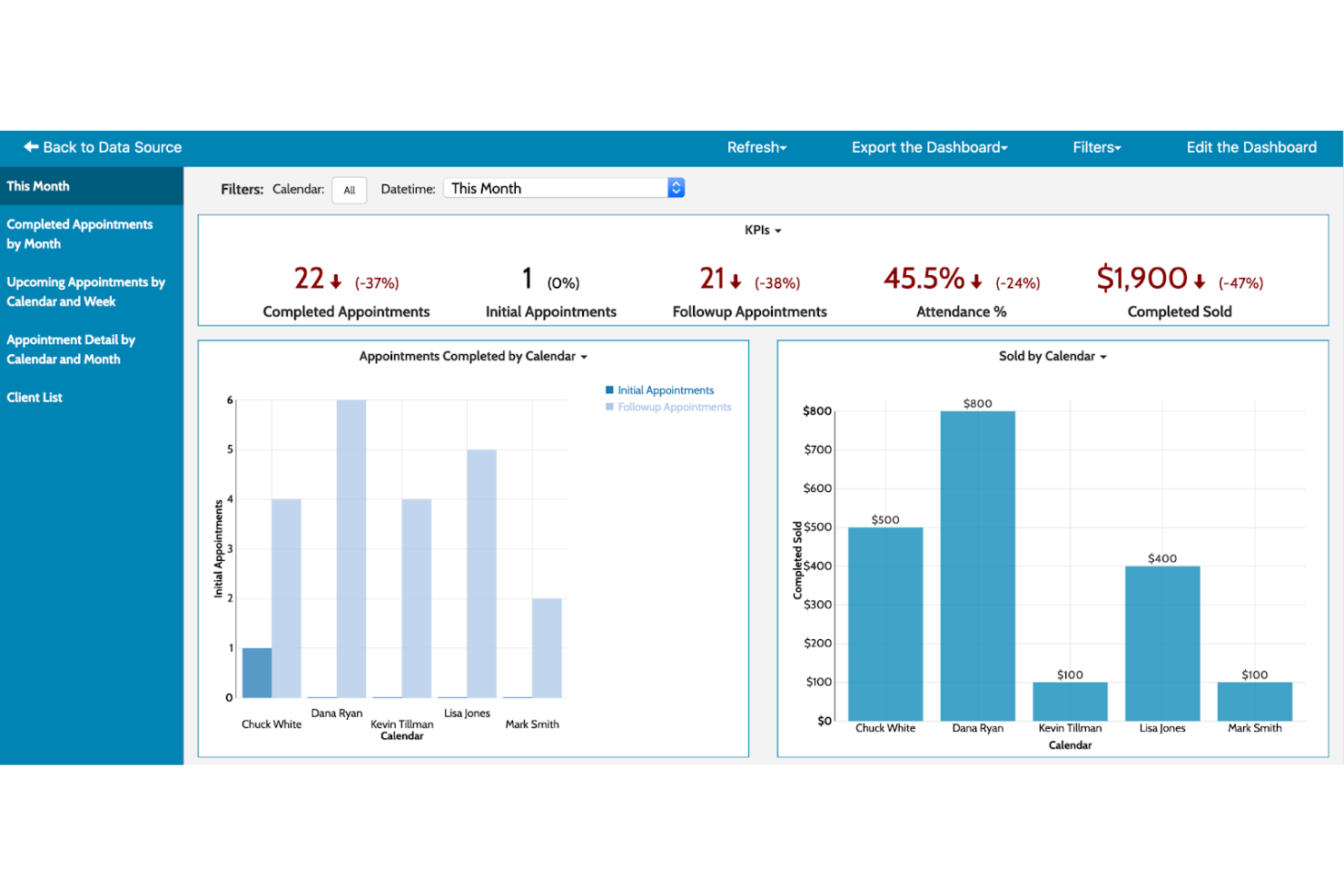
Acuity Scheduling is an online appointment scheduling software designed for businesses that require efficient client booking management. It automates client bookings, reminders, and payments to ensure smooth operations.
Why I picked Acuity Scheduling: It's tailored for client bookings with features that automate scheduling and client management. You can customize appointment types to fit your business needs. The platform supports automatic time zone adjustments, ensuring clients book at the right time. It also provides intake forms to gather client information before appointments.
Standout Features and Integrations:
Features include appointment packages, which allow you to sell bundled services, and gift certificates for an added revenue stream. You can also block off personal time to ensure your schedule reflects your availability accurately. The software's reporting tools help you analyze booking trends.
Integrations include Google Calendar, Zoom, Mailchimp, QuickBooks, PayPal, Stripe, and more.
Pros and Cons
Pros:
- Offers intake forms
- Supports appointment packages
- Automatic time zone adjustments
Cons:
- Requires internet connection
- Limited customization for branding

Calendly
Best for meeting scheduling

Calendly is an online scheduling tool designed primarily for individuals and teams needing efficient meeting management. It simplifies the process of scheduling meetings without the back-and-forth emails.
Why I picked Calendly: It's ideal for scheduling meetings with ease and efficiency. Calendly allows you to set your availability and share your link, letting others book appointments and meetings at times that work for you. You can customize meeting types to suit different needs. It also automatically adjusts for time zones, which is great for global teams.
Standout Features and Integrations:
Features include buffer times between meetings, helping you manage your schedule without overlaps. You can also set daily limits on the number of meetings to prevent burnout and promote wellness in your team. Additionally, Calendly offers group scheduling options for team meetings.
Integrations include Google Calendar, Outlook, Zoom, Microsoft Teams, Slack, HubSpot, and more.
Pros and Cons
Pros:
- Customizable meeting types
- Automatic time zone adjustments
- Easy to share scheduling links
Cons:
- Poor support for group polls
- Restrictive branding controls

Best for time zone support

YouCanBookMe is an online scheduling tool primarily used by professionals who need to manage appointments across different time zones. It simplifies booking processes, allowing users to avoid the hassle of time zone conversions.
Why I picked YouCanBookMe: It excels in handling time zone differences, ensuring accurate scheduling for global teams. You can set your availability and let clients book at their convenience. The tool automatically adjusts for time zone changes, reducing errors. It also offers customizable booking pages to fit your brand.
Standout Features and Integrations:
Features include email and SMS reminders to reduce no-shows, ensuring your schedule stays on track. You can also set buffer times between appointments to manage your workload effectively. The tool supports group bookings, making it easy to coordinate meetings with multiple participants.
Integrations include Google Calendar, Outlook, Zoom, Microsoft Teams, Slack, Zapier, and more.
Pros and Cons
Pros:
- Supports group bookings
- Customizable booking pages
- Handles multiple time zones
Cons:
- Basic features on free plan
- Mobile app is not available

Appointy
Best for small businesses
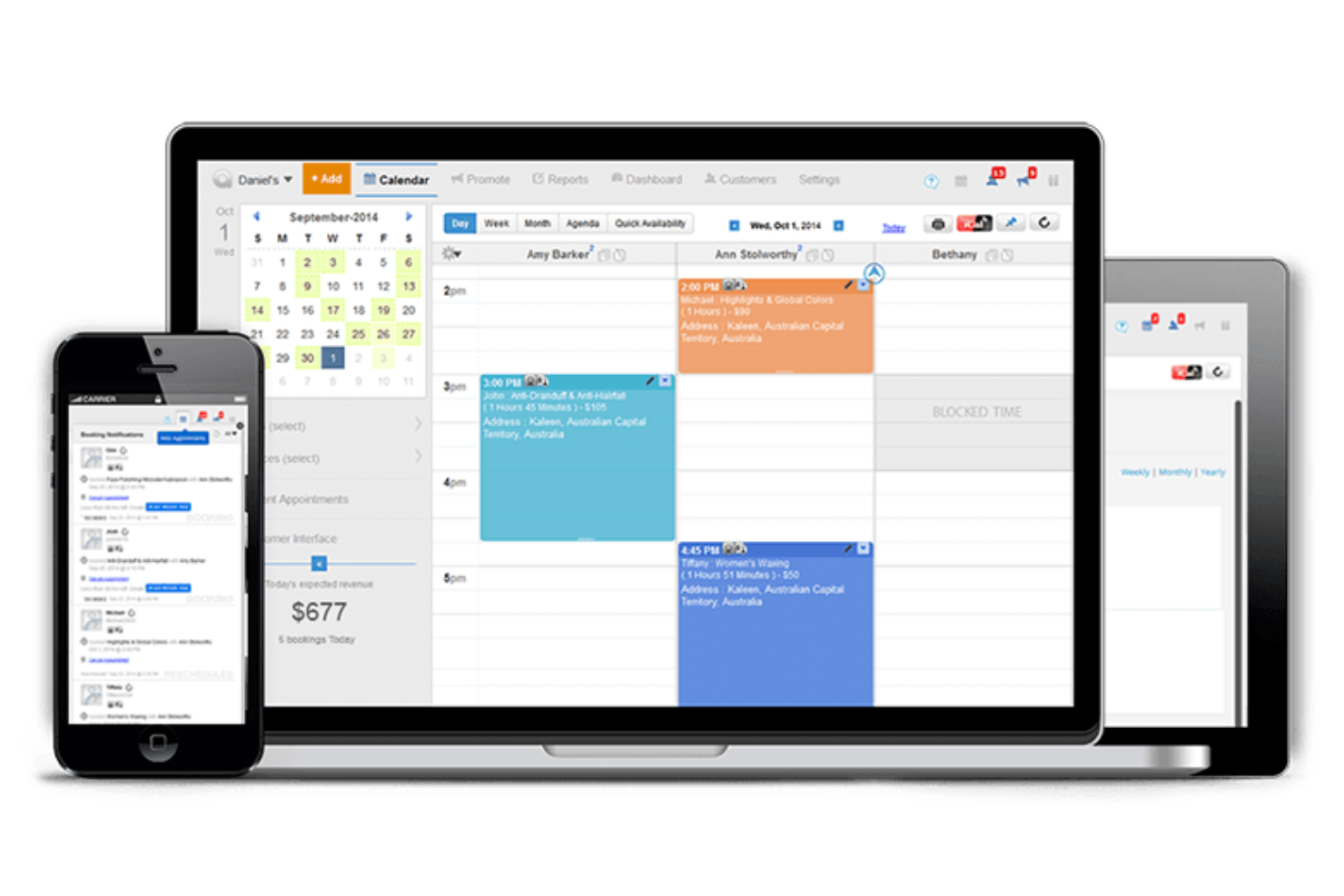
Appointy is an online scheduling software tailored for small businesses. It helps manage appointments, automate reminders, and simplify client bookings.
Why I picked Appointy: It's ideal for small businesses looking for easy scheduling solutions. Appointy offers automated reminders and online payments, which are essential for small business efficiency. Customizable booking pages cater to specific business needs. Its simple interface allows even non-tech-savvy users to navigate pages smoothly.
Standout Features and Integrations:
Features include the ability to manage multiple locations, offer membership deals, and create recurring appointments. You can set buffer times between appointments to keep your schedule running smoothly and improve customer experience. The software also supports class and event bookings.
Integrations include Google Calendar, Zoom, Stripe, PayPal, WordPress, Facebook, and more.
Pros and Cons
Pros:
- Handles online payments
- Automates reminder messages
- Customizable booking pages
Cons:
- Outdated UI/UX design
- Occasional sync issues

Best for custom bookings

SimplyBook.me is an online booking system aimed at businesses that need customizable scheduling solutions. It helps manage appointments, client bookings, and service offerings efficiently.
Why I picked SimplyBook.me: It's perfect for businesses seeking custom booking options with features that let you tailor the booking experience. You can create personalized booking pages that reflect your brand. The tool supports a variety of service offerings, allowing you to cater to different client needs. It also provides tools for managing promotions and discounts, improving client engagement.
Standout Features and Integrations:
Features include automated reminders to reduce no-shows, ensuring your schedule stays on track. You can also manage memberships and packages, offering clients more flexible options. The software supports payment processing, allowing you to handle transactions with minimal stress.
Integrations include Google Calendar, Facebook, Instagram, WordPress, Stripe, PayPal, and more.
Pros and Cons
Pros:
- Manages promotions and discounts
- Supports memberships and packages
- Highly customizable booking pages
Cons:
- Costs add up with ‘Custom Features'
- Dated admin interface design

Best for field services
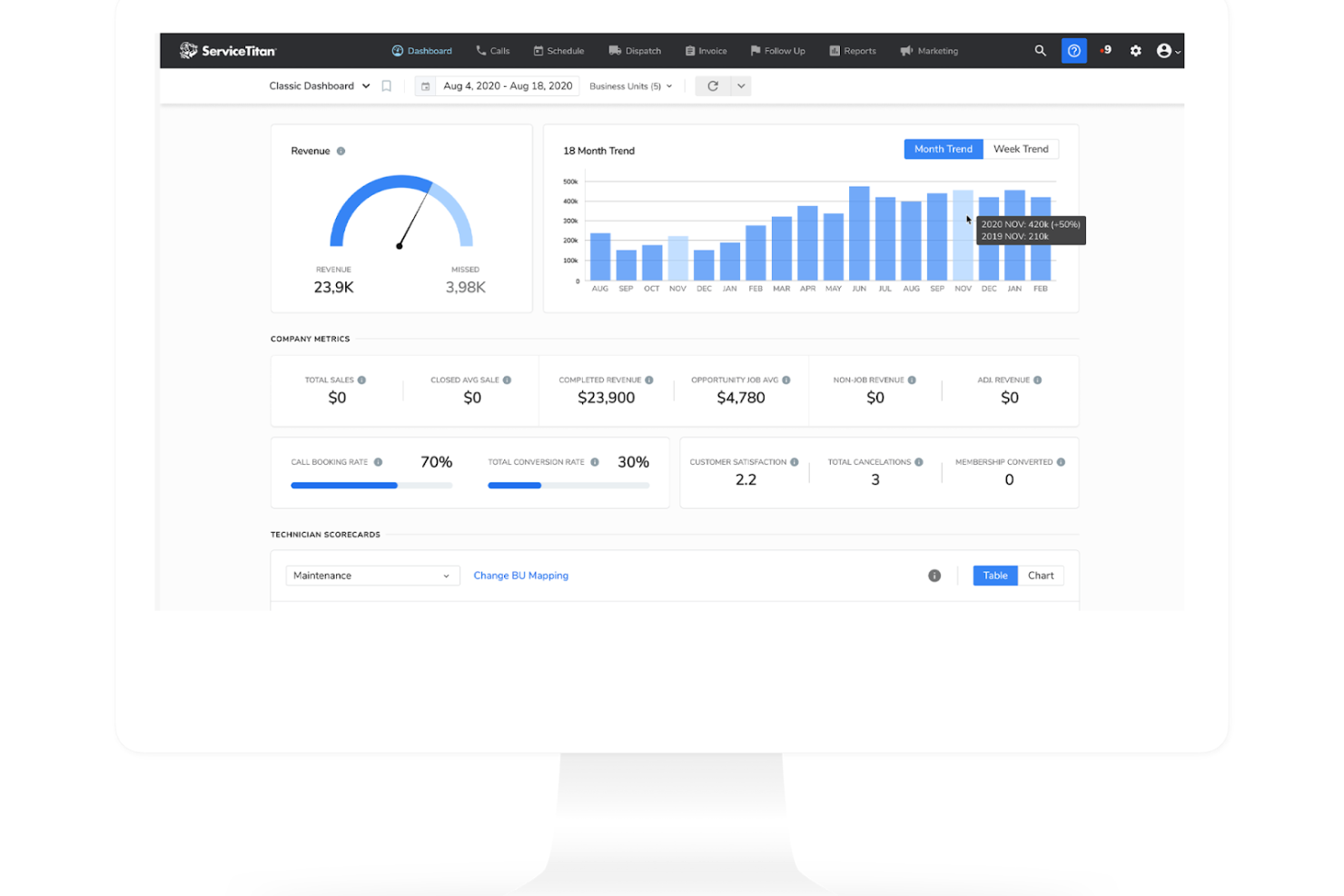
ServiceTitan is a field service management software designed for businesses in the home and commercial service sectors. It offers tools for scheduling, dispatching, and managing field operations effectively.
Why I picked ServiceTitan: It's tailored for field services, providing features that simplify scheduling and dispatching tasks. You can track field technicians in real time, ensuring jobs are completed efficiently. The software supports easy invoicing and payment processing directly from the field. It also offers customer relationship management (CRM) tools that help maintain strong client communications and development.
Standout Features and Integrations:
Features include advanced reporting tools that give insights into your business performance. You can also automate marketing campaigns to engage customers and grow your business. The software supports inventory management, helping you keep track of supplies and equipment.
Integrations include QuickBooks, Salesforce, Intuit, Google Calendar, Microsoft Outlook, and more.
Pros and Cons
Pros:
- Supports inventory management
- CRM tools
- Real-time technician tracking
Cons:
- Frequent software glitches
- Very high subscription cost

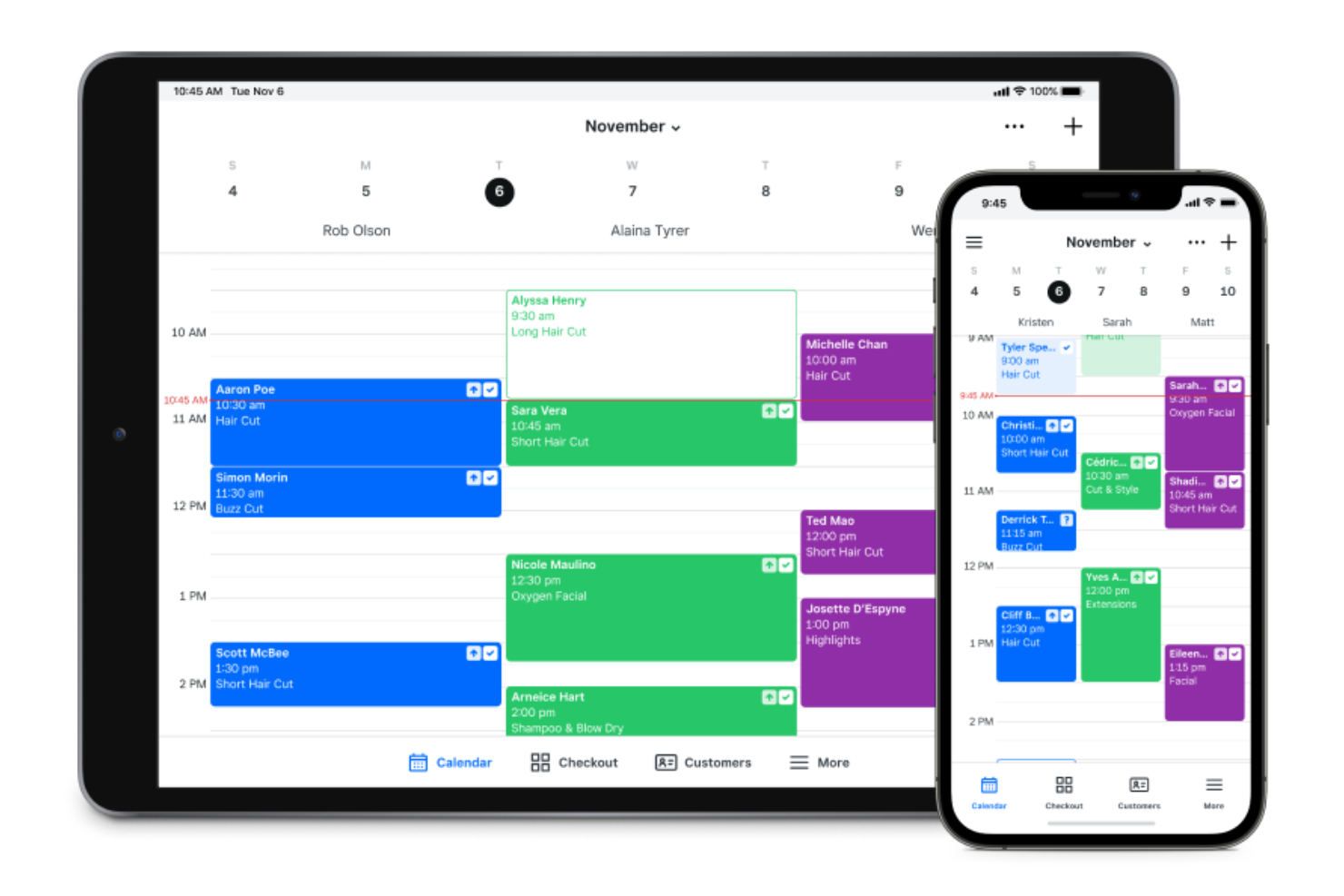
Square Appointments is an online scheduling software tailored for businesses that need integrated payment solutions. It serves small to medium-sized businesses, supporting appointment bookings and payment processing.
Why I picked Square Appointments: It offers smooth payment integration with Square's payment processing system, making transactions straightforward. You can manage bookings and payments within a single platform. The software supports automated reminders through text messages to reduce last-minute no-shows. It also provides a user-friendly interface that suits businesses of all sizes.
Standout Features and Integrations:
Features include the ability to manage staff schedules, allowing you to oversee real-time availability and allocate resources efficiently. You can set up recurring appointments for regular clients, which simplifies ongoing scheduling. The platform also offers reporting tools to track business performance.
Integrations include Google Calendar, Instagram, QuickBooks, Wix, Weebly, WordPress, and more.
Pros and Cons
Pros:
- Supports staff scheduling
- Automated reminders for clients
- Integrated payment processing
Cons:
- High processing fees
- Basic intake forms

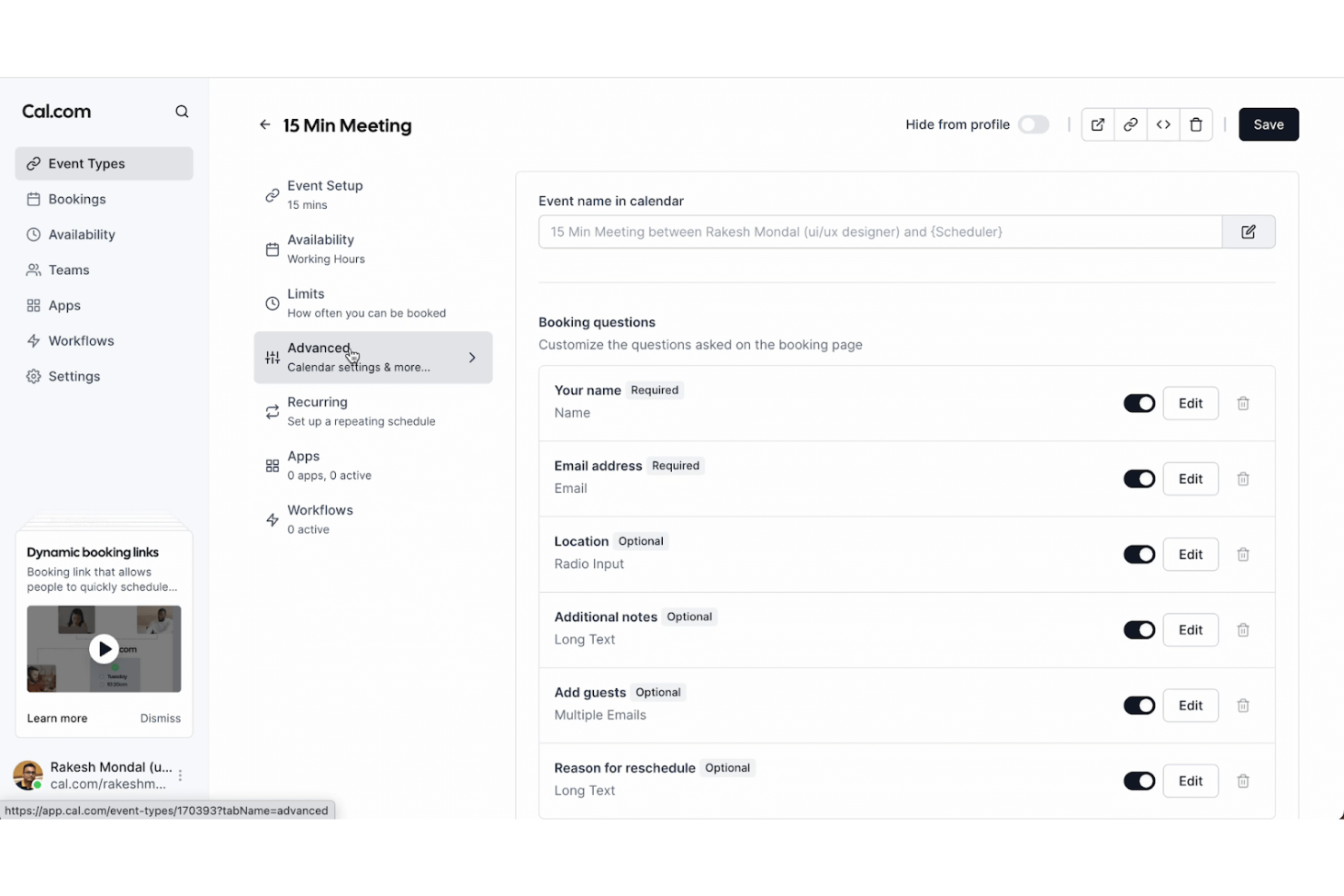
Cal.com is an open-source scheduling tool that caters to developers and businesses looking for customizable solutions. It provides scheduling capabilities with a focus on flexibility and adaptability.
Why I picked Cal.com: It offers an open-source platform, allowing users to customize and modify the tool according to their needs. You can integrate it with various systems and permissions to adapt it to fit your team's workflow. The tool supports multiple scheduling options, making it versatile for different use cases. It's ideal for tech-savvy users who want to build and expand on its core functionalities.
Standout Features and Integrations:
Features include customizable booking pages that let you tailor the user experience. You can also set custom availability to reflect your specific schedule needs. The software supports group scheduling, making it easy to coordinate with multiple participants.
Integrations include Google Calendar, Zoom, Microsoft Teams, Slack, Zapier, and more.
Pros and Cons
Pros:
- Open-source flexibility
- Supports multiple scheduling options
- Highly customizable for developers
Cons:
- Regular updates needed for stability
- Limited out-of-the-box features

Productive
Best for project tracking
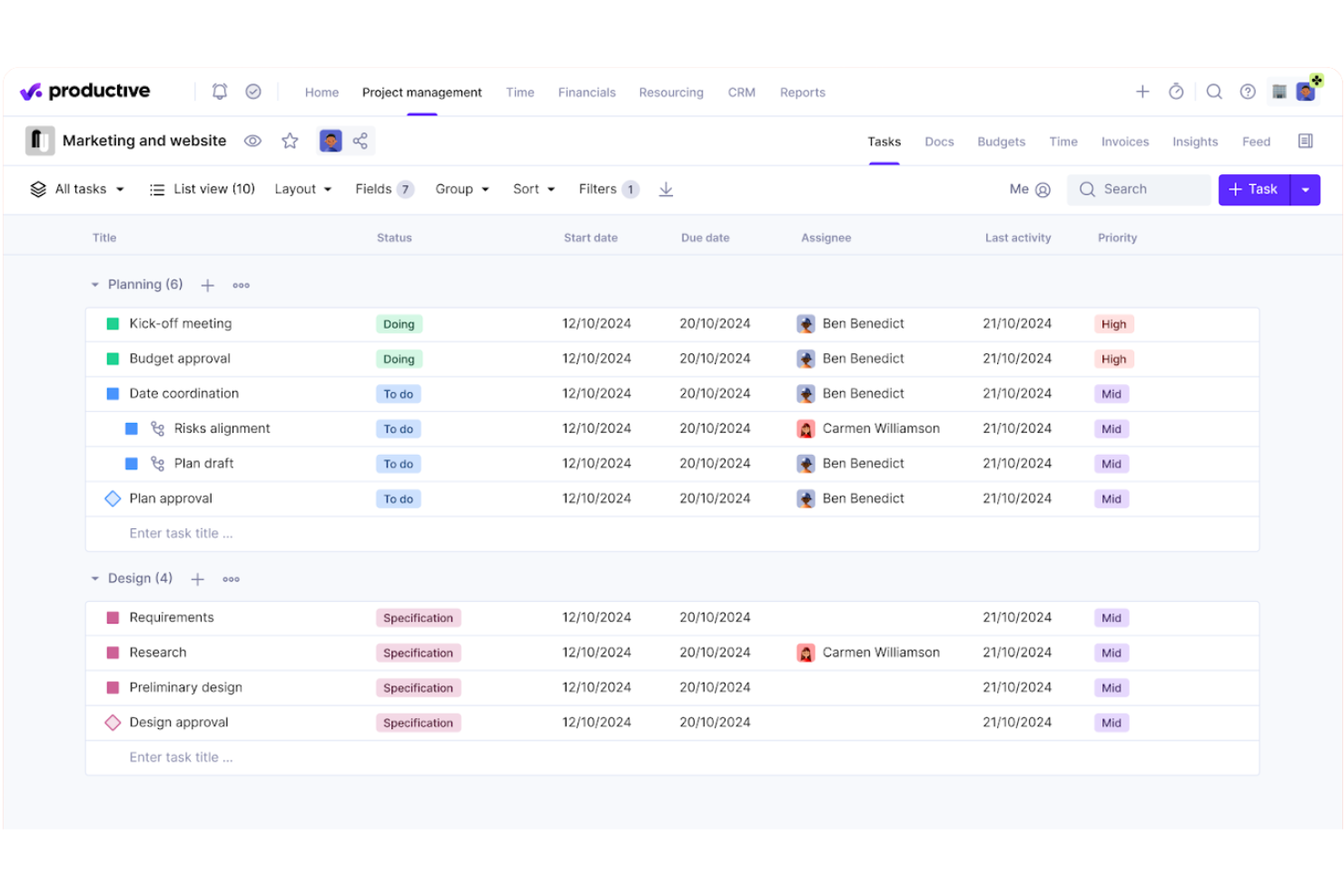
Productive is a professional services scheduling software built to align team capacity with project demands. It centralizes resource allocation, real-time availability, and workload balancing to help firms maintain a steady and sustainable pace.
Why I picked Productive: It excels in resource scheduling and provides a high-level view of team bandwidth and upcoming gaps. You can manage shifts, time-off requests, and billable utilization within a single interface, ensuring no one is overbooked. The tool offers visual heatmaps to identify which consultants are under-taxed or at risk of burnout. It also includes integrated forecasting features, allowing you to see how today’s schedule impacts your firm's long-term profitability and hiring needs.
Standout Features and Integrations:
Features include budget management tools, which help you keep projects on track financially. You can also create detailed reports to analyze team performance. The software supports task management, allowing you to assign and prioritize tasks.
Integrations include Slack, QuickBooks, Xero, Google Calendar, Asana, Trello, and more.
Pros and Cons
Pros:
- Includes resource planning
- Customizable dashboards
- Detailed project profitability insights
Cons:
- Occasional UI lag
- Limited custom reporting
New Product Updates from Productive
Productive Adds Email and Calendar Integrations for Agents
Productive adds Gmail, Outlook, Google Calendar, and Outlook Calendar connectors for its AI agents. These integrations let agents manage emails and create calendar events directly within Productive. For more information, visit Productive’s official site.
Diğer Profesyonel Hizmetler Planlama Yazılımları
Kısa listeme giremeyen ancak yine de göz atmaya değer bazı ek profesyonel hizmetler planlama yazılımı seçenekleri şunlardır:
- Connecteam
For mobile teams
- Kantata
All-in-one solution
- Housecall Pro
For home services
- monday AI Workspace
For visual project tracking
- Setmore
For appointment-based businesses
- Jobber
For automated client communication


How I Evaluate Professional Services Scheduling Software
I split my evaluation into what a tool must do—like matching consultants to pipeline deals by skills and availability—and what separates the best options from the rest.
Core Functionality (Table Stakes For This List)
When I'm selecting tools for my list, I rank each one on a scale from 0 (does not offer the functionality) to 5 (excels in this area) for each core functionality listed below. Then, I calculate the tool's total score into a percentage. Each tool needs to achieve a minimum total score of 65% to be considered for inclusion.
- Resource Scheduling & Allocation: I evaluate how each tool handles assigning consultants to engagements—whether it offers visual, drag-and-drop scheduling or relies on static task lists.
- Capacity & Availability Management: Real-time workload views matter here, especially how well a tool surfaces PTO, part-time schedules, and overbooked team members.
- Skills & Role-Based Matching: I check whether you can tag resources by certification, seniority, or skill set and then filter by those attributes when staffing a new engagement.
- Utilization & Billable Hours Tracking: Each tool needs to distinguish billable from non-billable time and report utilization rates at the individual, team, and project level.
- Project & Timeline Management: I look at how projects are structured—whether the tool supports phases, milestones, dependencies, and deadline tracking tied to staffed resources.
- Forecasting & Demand Planning: Pipeline-aware forecasting is key, so I evaluate whether the tool lets you project future resource needs against confirmed and probable engagements.
Once I have a list of tools that meet this criteria, I consider what sets each platform apart.
Differentiating Factors (What Sets Vendors Apart)
Here's how I compare and contrast different vendors:
Standout Features
Scenario planning is a major differentiator—I look for tools that let you model what happens to your bench and utilization if a deal closes next month or a key consultant rolls off early. A CRM-to-resourcing bridge adds real value here, pulling pipeline opportunities so you can soft-book people before contracts are signed. I also evaluate AI staffing recommendations that surface the best-fit consultant based on skills, availability, and past project history.
Beyond Features
Integration depth matters a lot here. I evaluate whether a tool connects natively to your PSA suite, finance system, and HRIS so availability and billing data stay in sync without manual exports. Reporting is another area I weigh heavily—pre-built utilization and bench dashboards save PMO leads from building reports from scratch in external BI tools. Implementation speed also factors in, especially how well a vendor supports migrating historical data from spreadsheets or a legacy system.
Profesyonel Hizmetler Planlama Yazılımı Nasıl Seçilir?
Uzun özellik listeleri ve karmaşık fiyatlandırma yapıları içinde kaybolmak kolaydır. Kendinize özgü yazılım seçim sürecinizi yürütürken odağınızı korumanıza yardımcı olmak için aklınızda bulundurmanız gereken faktörlerin bir kontrol listesini burada bulabilirsiniz:
| Faktör | Dikkat Edilmesi Gerekenler |
|---|---|
| Ölçeklenebilirlik | Yazılım işletmenizle birlikte büyüyecek mi? Genişledikçe daha fazla kullanıcıyı ve randevuyu destekleyip destekleyemediğini kontrol edin. Gelecekteki büyümeyi sınırlayan araçlardan kaçının. |
| Entegrasyonlar | Mevcut araçlarınızla çalışıyor mu? Takvimleriniz, e-postanız ve günlük olarak kullandığınız diğer yazılımlarla bağlantı kurduğundan emin olun. |
| Özelleştirilebilirlik | İhtiyaçlarınıza uyacak şekilde uyarlayabilir misiniz? Rezervasyon sayfalarını ve iş akışlarını süreçlerinize uygun şekilde özelleştirme seçenekleri arayın. |
| Kullanım kolaylığı | Arayüz sezgisel mi? Sistemin kapsamlı bir eğitim gerektirmeden kolayca kullanılabildiğini görmek için kendiniz test edin veya kullanıcı yorumlarını okuyun. |
| Uygulama ve işe alışma | Ne kadar hızlı kullanmaya başlayabilirsiniz? Ekibiniz için sorunsuz bir geçiş sağlamak üzere kurulum ve eğitim için gereken zamanı ve kaynakları göz önünde bulundurun. |
| Maliyet | Fiyatlandırma bütçenize uygun mu? Hem peşin ücretleri hem de devam eden giderleri dikkate alarak araçların maliyetlerini karşılaştırın. Değeri test etmek için ücretsiz denemeler sunan seçenekleri arayın. |
| Güvenlik önlemleri | Verilerinizi nasıl koruyor? Bilgilerinizi güvende tutmak için şifreleme standartlarını ve veri koruma önlemlerini doğrulayın. |
| Destek erişilebilirliği | Desteğe ne zaman ulaşabilirsiniz? İhtiyaç duyduğunuzda yardım alabilmek için 7/24 erişilebilirlik ve birden fazla iletişim yöntemi olup olmadığını kontrol edin. |
Profesyonel Hizmetler Planlama Yazılımı Nedir?
Profesyonel hizmetler planlama yazılımı, işletmelerin randevuları ve planlamayı verimli bir şekilde yönetmesine yardımcı olan bir araçtır. Genellikle danışmanlar, ajanslar ve hizmet sağlayıcıları tarafından kullanılan bu yazılım, programları düzenleyerek ve rezervasyon çakışmalarını azaltarak değer sağlar. Otomatik hatırlatıcılar, takvim senkronizasyonu ve özelleştirilebilir rezervasyon seçenekleri gibi özellikler, verimli zaman yönetimine ve müşteri memnuniyetine yardımcı olur. Genel olarak bu araçlar, planlama görevlerini basitleştirip müşteri etkileşimlerini iyileştirerek üretkenliği destekler.
Özellikler
Profesyonel hizmetler planlama yazılımı seçerken aşağıdaki temel özelliklere dikkat edin:
- Otomatik hatırlatıcılar: Randevuya gelmeme durumlarını azaltmak ve herkesin programa uygun hareket etmesini sağlamak için müşterilere ve personele bildirimler gönderin.
- Takvim senkronizasyonu: Tüm randevuların ve etkinliklerin güncel ve görünür olmasını sağlamak için popüler takvim uygulamalarıyla entegre olur.
- Özelleştirilebilir rezervasyon sayfaları: İşletmelerin hizmetleri ve müşteri ihtiyaçlarıyla uyumlu, markaya özel rezervasyon deneyimleri oluşturmasına olanak tanır.
- Saat dilimi ayarlamaları: Farklı saat dilimlerindeki müşteriler için randevu saatlerini otomatik olarak ayarlayarak çifte rezervasyonları ve planlama hatalarını önler.
- Ödeme işlemleri: Güvenli işlemlerin doğrudan planlama platformu üzerinden gerçekleştirilmesini sağlayarak faturalandırmayı ve ödeme tahsilatını kolaylaştırır.
- Grup planlaması: Aynı anda birden fazla katılımcı için rezervasyon yapılmasını kolaylaştırır; ekip toplantıları veya grup oturumları için idealdir.
- Mobil uygulama erişilebilirliği: Hareket hâlindeyken planlama özelliklerine erişim sağlayarak mobil ekipler için esneklik sunar.
- Raporlama araçları: Planlama eğilimleri ve işletme performansı hakkında içgörüler sunarak stratejik planlamayla iptallerin ve yeniden planlamaların azaltılmasına yardımcı olur.
- Kaynak yönetimi: Planlamayı ve hizmet sunumunu optimize etmek için personel uygunluğunu ve kaynakları yönetir.
- Müşteri yönetimi: Müşteri bilgilerini ve geçmişini saklayarak kişiselleştirilmiş hizmeti ve iletişimi iyileştirir.
Avantajlar
Profesyonel hizmetler planlama yazılımını uygulamak, ekibiniz ve işletmeniz için çeşitli avantajlar sağlar. Yararlanabileceğiniz avantajlardan bazıları şunlardır:
- Geliştirilmiş verimlilik: Hatırlatıcılar ve takvim senkronizasyonu gibi planlama görevlerini otomatikleştirerek ekibinizin diğer sorumluluklara odaklanması için zaman kazandırır.
- Artan müşteri memnuniyeti: Müşteriler için sorunsuz ve kişiselleştirilmiş bir rezervasyon deneyimi sağlamak üzere özelleştirilebilir rezervasyon seçenekleri ve saat dilimi ayarlamaları sunar.
- Azalan randevuya gelmeme oranı: Müşterilere otomatik hatırlatıcılar göndererek kaçırılan randevuların ve planlama çakışmalarının oranını önemli ölçüde düşürür.
- Sadeleştirilmiş ödeme işlemleri: Ödeme seçeneklerini doğrudan planlama platformuna entegre ederek hem sizin hem de müşterileriniz için işlemleri kolay ve güvenli hâle getirir.
- Daha iyi kaynak yönetimi: Personel uygunluğunu ve kaynakları yöneterek randevuların planlanma ve hizmetlerin sunulma şeklini optimize eder.
- Değerli içgörüler: Planlama eğilimleri ve işletme performansı hakkında içgörüler sağlayan raporlama araçları sunarak stratejik karar alma süreçlerine yardımcı olur.
- Artan esneklik: Mobil uygulama erişilebilirliği, ekibinizin planlama özelliklerine hareket hâlindeyken erişmesine olanak tanıyarak uzaktan çalışmayı ve mobil operasyonları destekler.
Maliyetler ve Fiyatlandırma
Profesyonel hizmetler planlama yazılımı seçimi, mevcut çeşitli fiyatlandırma modellerinin ve planların anlaşılmasını gerektirir. Maliyetler özelliklere, ekip büyüklüğüne, eklentilere ve daha fazlasına bağlı olarak değişir. Aşağıdaki tablo, profesyonel hizmetler planlama yazılımı çözümlerinde yaygın olarak sunulan planları, ortalama fiyatlarını ve tipik özelliklerini özetlemektedir:
Profesyonel Hizmetler Planlama Yazılımı İçin Plan Karşılaştırma Tablosu
| Plan Türü | Ortalama Fiyat | Yaygın Özellikler |
|---|---|---|
| Ücretsiz Plan | $0 | Temel planlama, sınırlı takvim senkronizasyonu ve temel hatırlatıcılar. |
| Kişisel Plan | $7-$49/kullanıcı/ay | Özelleştirilebilir rezervasyon sayfaları, genişletilmiş takvim entegrasyonları ve temel raporlama araçları. |
| İşletme Planı | $30-$60/kullanıcı/ay | Gelişmiş planlama seçenekleri, ödeme işlemleri ve grup rezervasyonu özellikleri. |
| Kurumsal Plan | $70-$100/kullanıcı/ay | Ayrıntılı raporlama, özel destek, gelişmiş özelleştirme ve tüm özelliklerle entegrasyon. |
Profesyonel Hizmetler Planlama Yazılımı Hakkında Sıkça Sorulan Sorular
Profesyonel hizmetler planlama yazılımı hakkında sıkça sorulan bazı soruların yanıtları aşağıda verilmiştir:
Planlama yazılımı seçerken nelere dikkat etmeliyim?
Planlama yazılımı seçerken mevcut araçlarınızla nasıl entegre olduğunu, sunduğu özelleştirme düzeyini ve işletmenizle birlikte büyümesini sağlayacak ölçeklenebilirliğini değerlendirin. Ayrıca kullanım kolaylığını ve sunulan müşteri desteğinin kalitesini inceleyin. Yazılımın özel ihtiyaçlarınız ve iş akışlarınızla uyumlu olduğundan emin olun. Birkaç seçeneği ücretsiz denemelerle test etmek, ekibiniz için en uygun çözümün hangisi olduğu konusunda fikir verebilir.
Planlama yazılımı müşteri iletişimini geliştirebilir mi?
Evet, Jobber gibi planlama yazılımları randevu hatırlatıcılarını ve onaylarını otomatikleştirerek müşteri iletişimini destekleyebilir. Ayrıca müşterilere kendi randevularını almaları için self servis seçenekleri sunarak randevuları planlamalarını ve yönetmelerini kolaylaştırabilir. Açık iletişim, randevuya gelmeme durumlarını azaltır ve müşteri memnuniyetini artırır; bu da güçlü müşteri ilişkilerini sürdürmek açısından faydalıdır.
Planlama yazılımında veri güvenliği endişe konusu mudur?
Evet, veri güvenliği önemli bir konudur ve güçlü şifreleme ile veri koruma önlemleri sunan bir yazılım seçmek önemlidir. Uygulanabilir olması durumunda GDPR veya HIPAA gibi sektör standartlarına ve düzenlemelerine uyan araçları tercih edin. Verilerinizin güvende olduğundan emin olmak için her zaman yazılımın güvenlik özellikleri hakkında bilgi alın ve kullanıcı yorumlarını okuyun.
Planlama yazılımını uzaktan çalışan ekipler için kullanabilir miyim?
Evet, planlama yazılımı uzaktan çalışan ekipleri yönetmek için mükemmeldir; herkesin programlara ve randevulara her yerden erişmesine olanak tanır. Mobil uygulama kullanılabilirliği ve saat dilimi ayarlamaları gibi özellikler, uzaktan çalışanların bağlantıda kalmasını kolaylaştırır. Bu esneklik, konumdan bağımsız olarak verimli ekip iş birliğini destekler.