

2026’da İncelenen En İyi 10 Pazarlama Ajansı Yazılımı

En İyi Pazarlama Ajansı Yazılımları Kısa Listesi


Bir pazarlama ajansını yönetmek zorlu bir iş olabilir. Müşteri talepleri, sıkı teslim tarihleri ve ekip koordinasyonu arasında denge kurmanız gerekir. Bunalmış hissetmek kolaydır. Pazarlama ajansı yazılımları tam da bu noktada devreye girer. Bu araçlar, her şeyi düzenli tutmanıza ve işlerin sorunsuz ilerlemesini sağlamanıza yardımcı olabilir.
Yazılımları test edip inceleme deneyimime dayanarak bu zorlukları ele alan en iyi çözümleri belirledim. Amacım, en iyi pazarlama ajansı yazılımlarına tarafsız bir bakış sunmak. Her aracın özelliklerini, avantajlarını ve olası dezavantajlarını göstereceğim.
Okumaya devam ederken hangi yazılımın ekibinizin özel ihtiyaçlarına uygun olduğunu keşfedeceksiniz. İster iş birliğine, ister otomasyona, ister analizlere odaklanın, burada size uygun bir seçenek bulabilirsiniz.
Why Trust Our Software Recommendations
Our team has been testing and reviewing software since 2012. As project managers ourselves, we know how difficult—and important—it is to choose the right software.
For this guide, we evaluated tools using hands-on testing and independent research, scoring tools using our selection criteria. We also draw on insights from industry thought leaders and practicing project management experts.
Our reviews reflect our human editorial judgment, not a sales pitch.
Expert reviewers:
Pazarlama Ajansı Yazılımları Karşılaştırma Tablosu
Bu karşılaştırma tablosu, en iyi pazarlama ajansı yazılımı seçimlerimin fiyatlandırma ayrıntılarını özetlemektedir:
| Tool | Starting Price | Website | |
|---|---|---|---|
| Best for agency profitability insights | 4.6 out of 5 | $10/user/month 14-day free trial | Book Demo |
| Best for all-in-one business management | 4.5 out of 5 | $17/user/month 14-day free trial | Book Demo |
| Best for no-code custom automation | 4.6 out of 5 | Pricing upon request Not available | Book Demo |
| Best for tracking marketing metrics | 4.7 out of 5 | $20/client/month Free demo + 14-day free trial | Website |
| Best for inbound marketing strategies | 4.4 out of 5 | $20/user/month Free plan + 14-day free trial + demo available | Website |
| Best for email marketing automation | 4.4 out of 5 | Pricing upon request 14-day free trial available | Book Demo |
| Best for AI-assisted remote team collaboration | 4.4 out of 5 | $9.99/user/month Free plan + 14-day free trial + free demo available | Website |
| Best for marketing automation tools | — | $97/month 14-day free trial | Website |
| Best for managing client testimonials | — | $9.99/month Free plan available | Website |
| Best for insurance agency workflows | — | Pricing upon request Free demo available | Website |
En İyi Pazarlama Ajansı Yazılımları İncelemesi
Aşağıda, kısa listeme giren en iyi pazarlama ajansı yazılımlarına ilişkin ayrıntılı özetlerimi bulabilirsiniz. İncelemelerim, size en uygun aracı bulmanıza yardımcı olmak için her aracın temel özelliklerine, artılarına ve eksilerine, entegrasyonlarına ve ideal kullanım alanlarına ayrıntılı bir bakış sunuyor.
Best for agency profitability insights
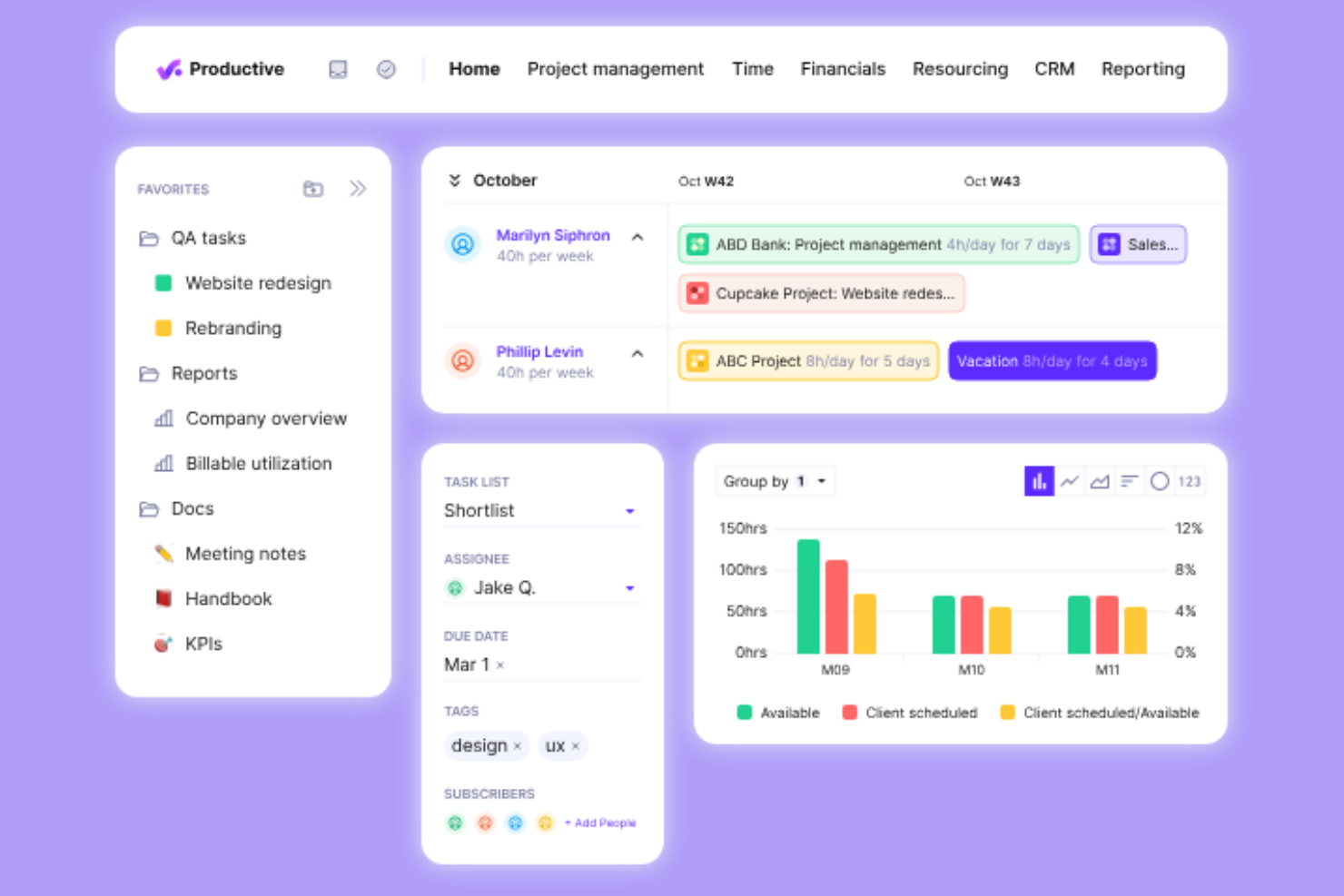
Productive is a professional services automation software designed for agencies and service businesses. It helps with resource planning, project management, and financial management.
Why I picked Productive: The tool provides real-time profitability tracking and growth forecasting, which is essential for agencies looking to increase profitability. Features such as automated task management and workflow automation set it apart. It integrates with tools such as Xero and Slack to provide a smooth workflow, as well as allowing you to connect to third-party apps via Open API. Productive also offers specific solutions for various roles, ensuring everyone in your team benefits.
Standout Features and Integrations:
Features include real-time profitability insights, automated task management, and tailored reporting on billable utilization. These features help you track financial performance and streamline your operations. The software also supports revenue forecasting, making it easier for you to plan for growth.
Integrations include Xero, Slack, QuickBooks, Jira, Zapier, and more.
Pros and Cons
Pros:
- Improves client communication
- Tailored reports for agencies
- Real-time profitability insights Tailored reports for agencies Improves client communication
Cons:
- Can be overwhelming for new users
- Limited customization options
New Product Updates from Productive
Productive Adds Email and Calendar Integrations for Agents
Productive adds Gmail, Outlook, Google Calendar, and Outlook Calendar connectors for its AI agents. These integrations let agents manage emails and create calendar events directly within Productive. For more information, visit Productive’s official site.
 .
Scoro
Best for all-in-one business management
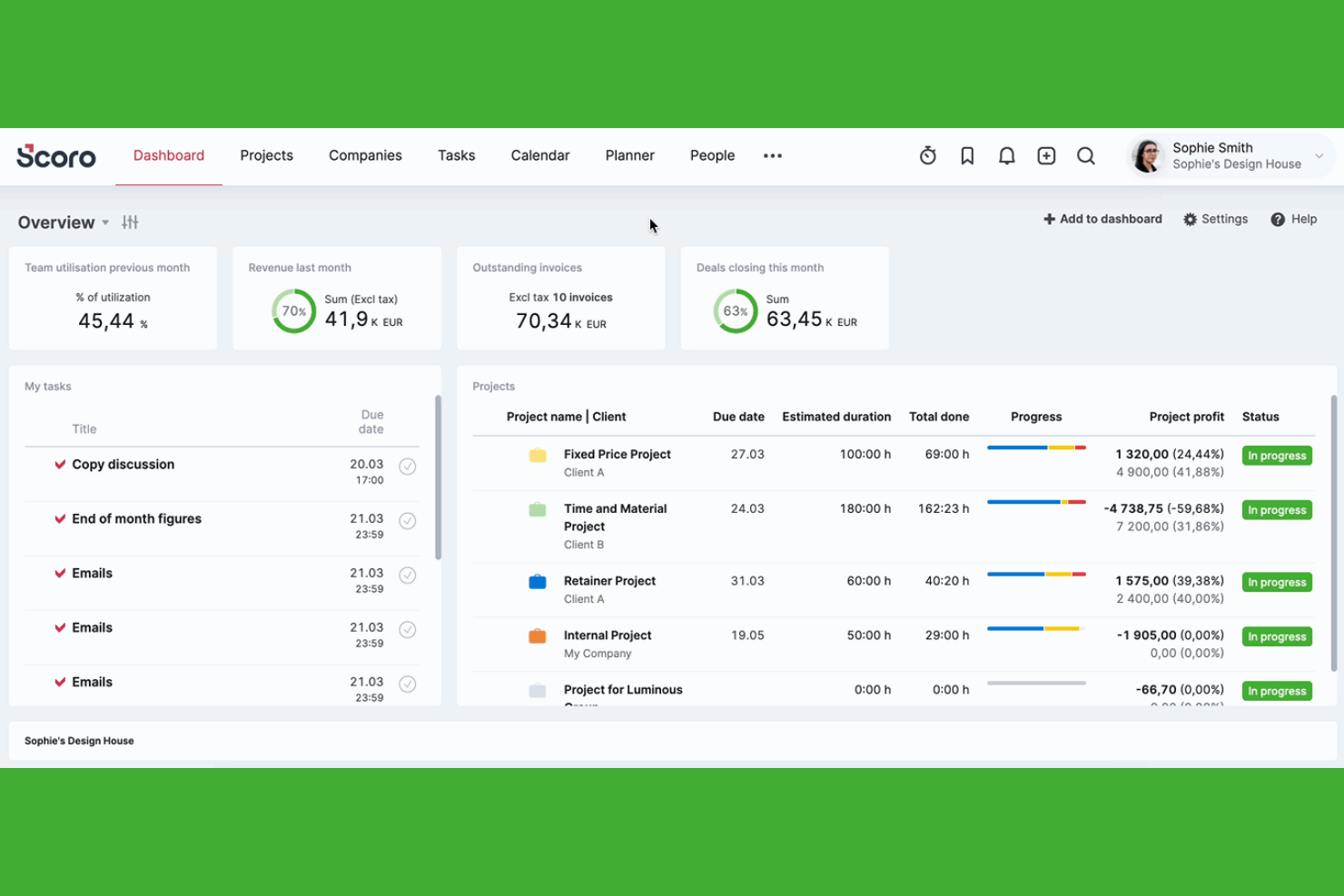
Scoro is a business management software tailored for agencies and professional service firms. It offers tools for project management, billing, and reporting to improve operational efficiency.
Why I picked Scoro: It provides an all-in-one solution that integrates project management with billing and reporting. The platform's real-time KPI dashboards give you insights into your business performance. Scoro's time tracking ensures accurate billing and resource allocation. The customizable reports help you tailor data presentations to suit your needs.
Standout Features and Integrations:
Features include project management tools that let you plan and track projects from start to finish. The billing feature simplifies invoicing and revenue tracking. Additionally, Scoro offers a CRM system to improve client relationships and sales pipeline management.
Integrations include Xero, QuickBooks, Dropbox, Google Calendar, Salesforce, and more.
Pros and Cons
Pros:
- Effective CRM system
- All-in-one management solution
- Real-time KPI dashboards
Cons:
- Configuration takes significant time
- Mobile app lacks full functionality
New Product Updates from Scoro

Scoro Adds Time Mobile App and ELI Improvements
Scoro adds the Scoro Time mobile app for iOS/Android to track time anywhere and expands ELI with attachments, smarter filtering, and trigger-based actions. For more information, visit Scoro's official site.
 .
Best for no-code custom automation

Screendragon is an enterprise work management platform built for marketing and agency operations, combining project management, resource planning, creative approvals, budget tracking, and AI-powered workflow orchestration in one system.
Who Is Screendragon Best For?
Screendragon suits mid-to-large marketing agencies and in-house agency teams managing high volumes of work across multiple clients, typically with 30 or more users.
Why I Picked Screendragon
Screendragon earns its spot as one of the best on my shortlist because its no-code workflow builder lets agency ops teams design, adjust, and govern custom processes without involving IT. I particularly like the dynamic forms feature, which replaces scattered email briefs with structured intake that triggers automated approval sequences. The side-by-side version compare and multi-stage approval routing are genuinely useful when managing creative reviews across multiple client accounts simultaneously.
Screendragon Key Features
- Resource capacity planning: Visual planner aggregates team availability and workloads across multiple concurrent projects.
- Campaign budget tracking: Real-time dashboards show project budgets, forecasted spend, and financial performance by campaign.
- Digital asset management: Centralized repository for storing, tagging, and reusing creative assets across client campaigns.
- Advanced permission controls: Role- and region-based access settings protect confidential client data in complex agency structures.
Screendragon Integrations
Screendragon offers native integrations with HubSpot, Microsoft Power BI, Ziflow, Brandfolder, Workato, and Smartsheet. An API is available for custom integrations.
Pros and Cons
Pros:
- Granular permissions protect sensitive cross-client data
- Multi-stage creative approvals with version control
- No-code workflow builder tailored for agencies
Cons:
- Reporting flexibility limited compared to competitors
- Onboarding new users takes considerable time

Best for tracking marketing metrics

AgencyAnalytics is an agency management software and reporting platform designed for marketing agencies looking to track and visualize marketing metrics. It serves digital marketers by offering tools for creating custom dashboards and automated reports.
Why I picked AgencyAnalytics: It excels in tracking marketing metrics, providing you with extensive data visualization options. Custom dashboards allow you to present data to suit your agency's needs. Automated reporting saves time and ensures you always have up-to-date information. The user-friendly drag-and-drop interface makes it easy to create reports without the need for technical skills.
Standout Features and Integrations:
Features include white-label reporting, which allows you to brand reports with your agency's logo. The SEO audit tool helps you analyze website performance and identify areas for improvement. Additionally, the rank tracker monitors search engine rankings to keep your team informed about SEO performance.
Integrations include Google Analytics, Facebook, Instagram, X Ads, and more.
Pros and Cons
Pros:
- SEO audit tools included
- White-label report capability
- Easy-to-use drag-and-drop interface
Cons:
- Frequent integration instability
- Requires setup time

HubSpot
Best for inbound marketing strategies
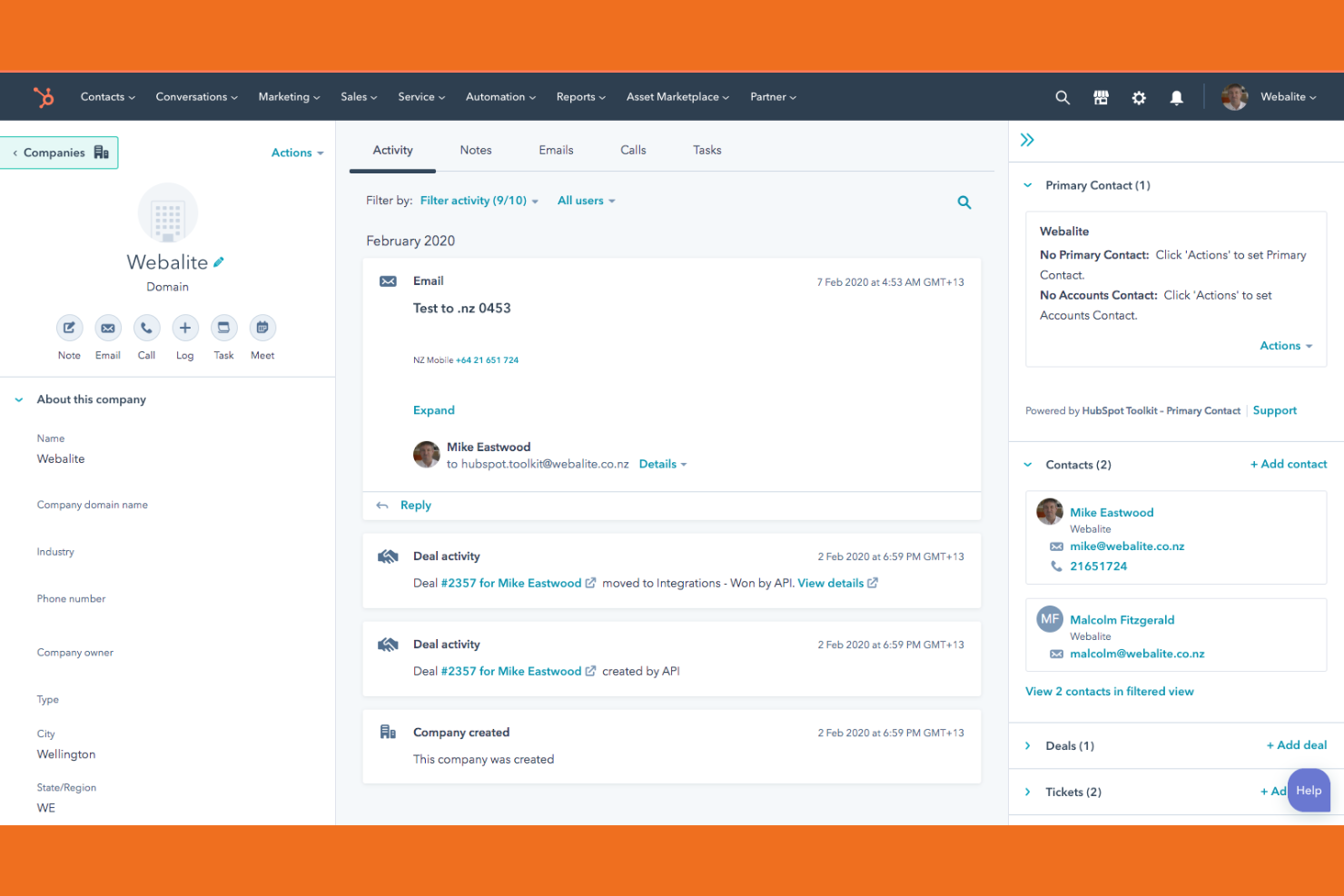
HubSpot is a customer relationship management (CRM) and marketing platform for inbound marketing, sales, and customer service. It serves marketing teams by providing tools to attract visitors, convert leads, and close customers.
Why I picked HubSpot: It excels in inbound marketing strategies, offering a suite of tools to manage content marketing, social media, customer relationships and retention. The CRM system is integrated, allowing your team to track leads and interactions proficiently. HubSpot's content management system helps you create and optimize marketing content for better engagement. The email marketing feature is strong, with automation options to nurture leads effectively.
Standout Features and Integrations:
Features include a landing page builder that lets you design pages without coding skills. The social media management tool helps you schedule and monitor posts across platforms. Additionally, the analytics dashboard provides insights into your marketing performance, helping you make data-driven decisions.
Integrations include Salesforce, Mailchimp, Shopify, Zoom, Slack, and more.
Pros and Cons
Pros:
- Content management features
- Strong email marketing tools
- Integrated CRM system
Cons:
- Annual contracts can be rigid
- Mandatory paid onboarding fees

Best for email marketing automation
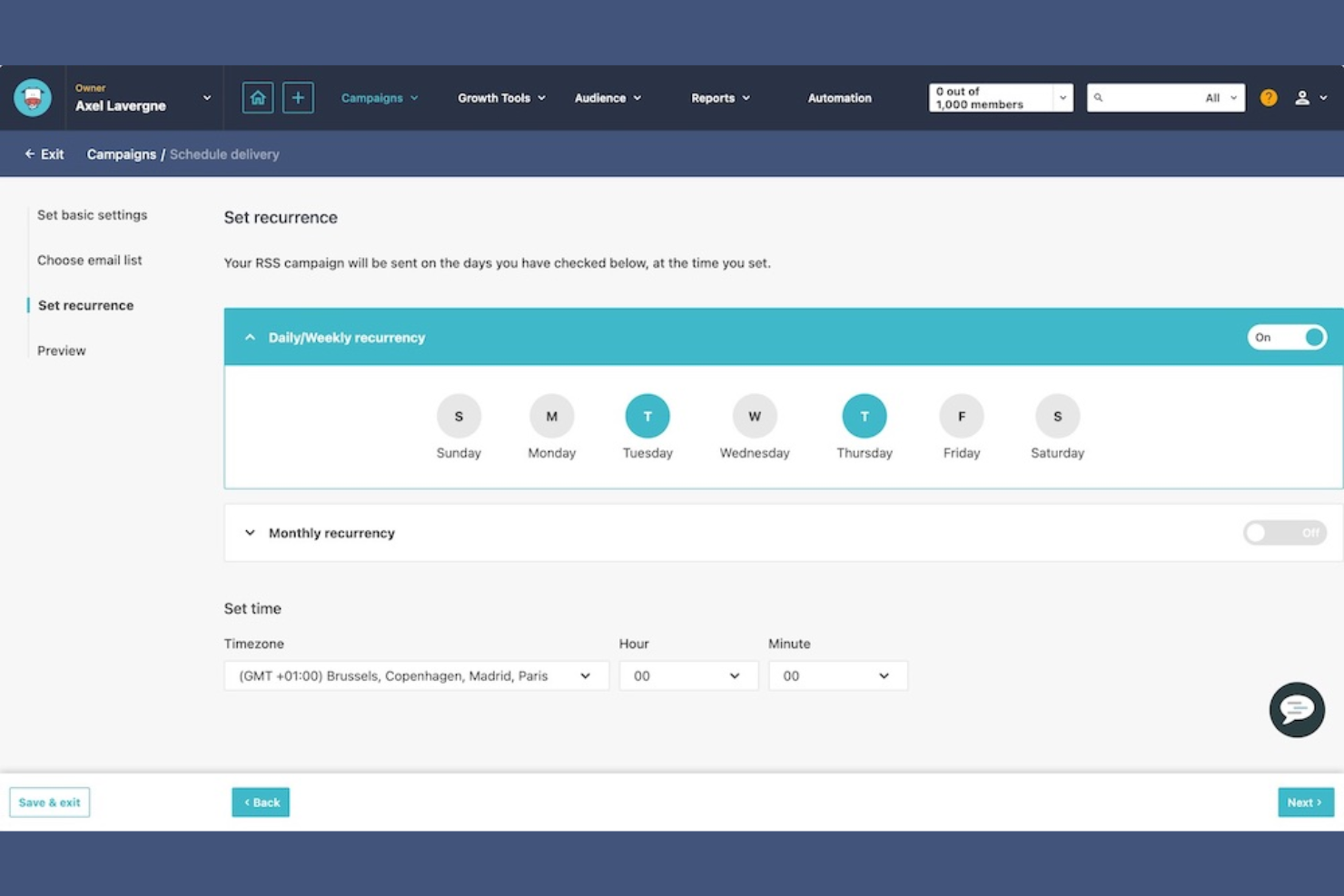
ActiveCampaign is a marketing automation platform that primarily serves small to medium-sized businesses. It focuses on email marketing, customer relationship management, and sales automation.
Why I picked ActiveCampaign: It excels in email marketing automation, offering advanced features to personalize your campaigns. The platform's automation workflows help you engage your audience effectively. Its segmentation tools allow you to target specific customer groups. ActiveCampaign also provides detailed analytics to track the performance of your campaigns.
Standout Features and Integrations:
Features include a drag-and-drop email builder that simplifies the creation of engaging emails. The platform's lead scoring feature helps you prioritize your sales efforts. Additionally, the site tracking tool enables you to understand how your contacts interact with your website.
Integrations include Shopify, Salesforce, WordPress, Zapier, WooCommerce, Facebook, and more.
Pros and Cons
Pros:
- Effective segmentation tools
- Detailed campaign analytics
- Advanced email automation workflows
Cons:
- Becomes costly as contact lists grow
- Phone support limited to top tiers
Best for AI-assisted remote team collaboration
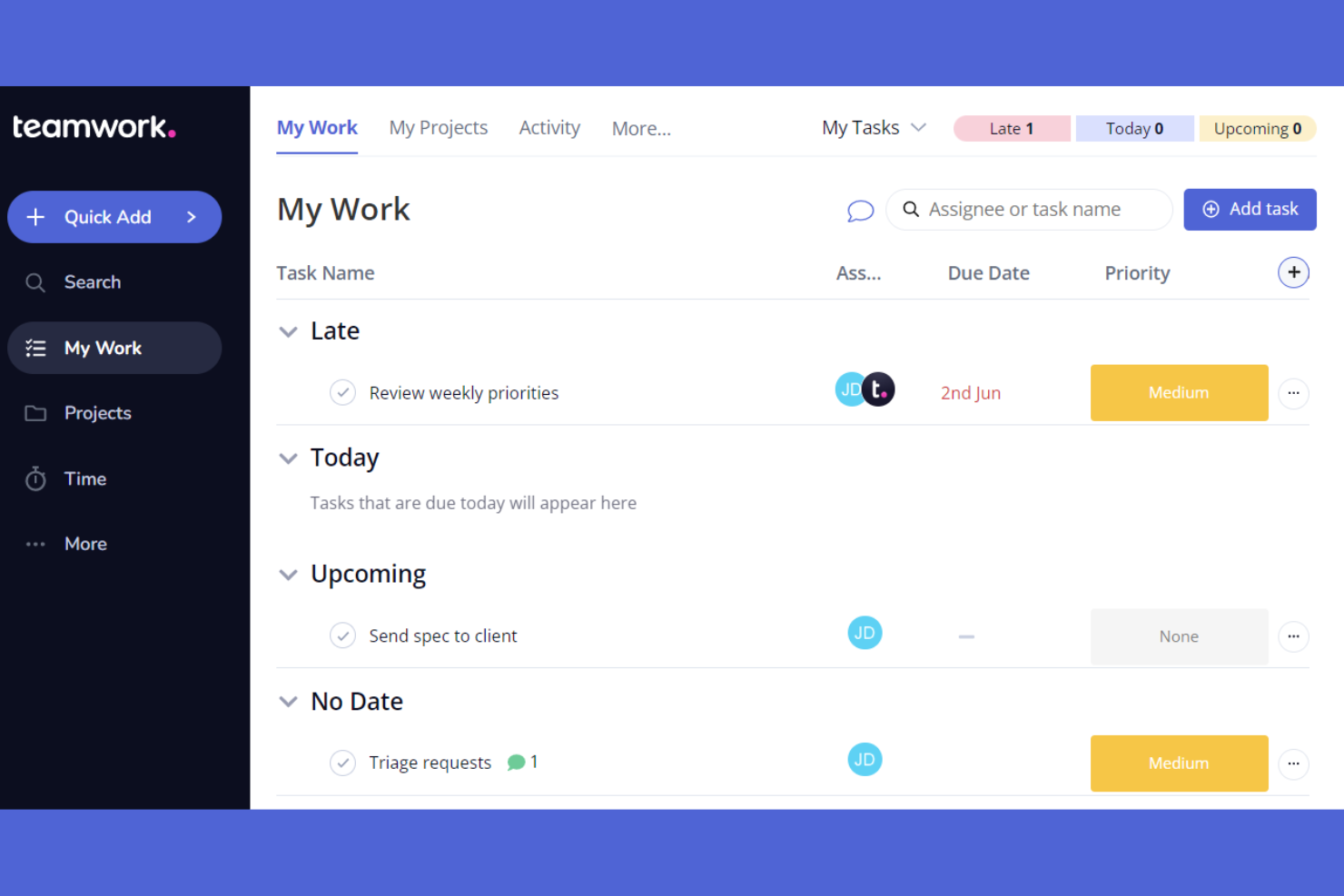
Teamwork.com is an AI-powered project management software tailored for teams working remotely. It helps with task management, team collaboration, and project tracking.
Why I picked Teamwork.com: It offers features that support remote collaboration, making it suitable for distributed teams. The built-in chat and file sharing features make communication easy. Teamwork.com also offers templates for various project types, improving its usability for remote teams.
Standout Features and Integrations:
Features include Gantt charts for project planning, a time tracking tool to monitor productivity, and workload management to balance team efforts. These features help you allocate resources effectively. The software also offers a client portal, which is useful for agencies that need to share updates with clients.
Integrations include Slack, HubSpot, Xero, Microsoft Office, ChatGPT, Stripe, and more.
Pros and Cons
Pros:
- Client portal access
- Integrated chat feature
- Customizable project templates
Cons:
- Higher tiers required for key tools
- Can feel cluttered with many projects

HighLevel is a marketing automation platform aimed at agencies and marketers. It facilitates lead management, client interaction, and campaign automation.
Why I picked GoHighLevel: The platform excels in providing marketing automation tools that simplify client communication and lead conversion. It offers a unified inbox to manage messages from various channels. Automated workflows save time and ensure consistent client follow-up. HighLevel also provides customizable dashboards to track key metrics, keeping your team informed.
Standout Features and Integrations:
Features include a funnel builder for creating sales funnels, an appointment scheduling system to manage bookings, and a membership area for client access. These features help to improve your marketing efforts by simplifying client interactions. The software also includes a CRM system to organize and track leads efficiently.
Integrations include Mailchimp, Stripe, Shopify, QuickBooks, and more.
Pros and Cons
Pros:
- Membership area feature
- Funnel builder included
- Unified inbox for messages
Cons:
- Occasional feature glitches
- Complex reporting options

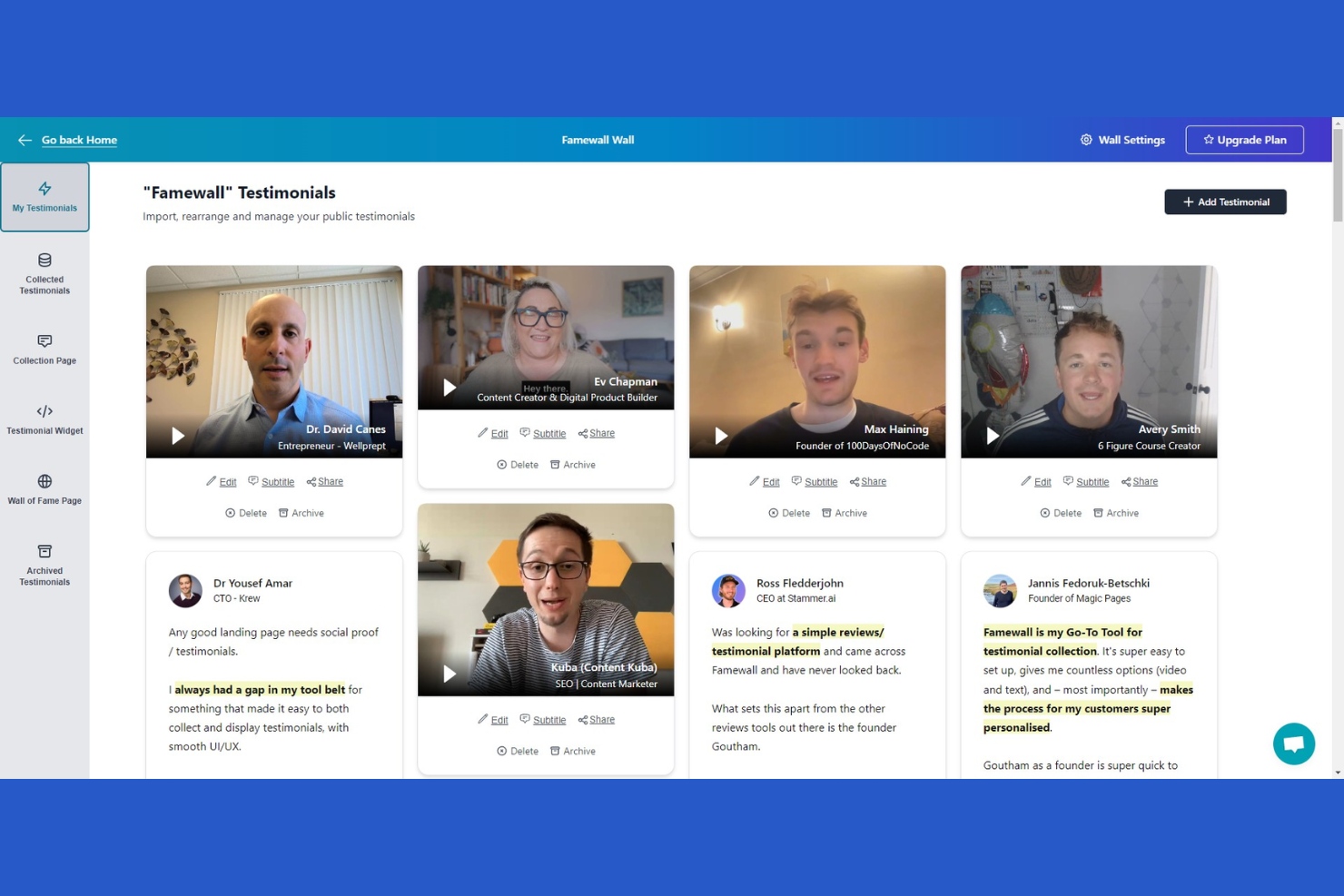
Famewall is a testimonial management platform aimed at businesses wanting to showcase customer feedback. It helps marketers and business owners collect, display, and manage testimonials effectively.
Why I picked Famewall: It specializes in managing client testimonials, providing tools to collect and display them on your website. The platform allows you to collect and manage testimonials for multiple projects in one place. The software also offers AI testimonial analytics to help you analyze client data and develop marketing strategies.
Standout Features and Integrations:
Features include customizable widgets that allow you to tailor the appearance of testimonials to match your brand. The software offers a simple link for collecting testimonials, making it easy for clients to submit feedback. Additionally, the moderation tools help you filter and select the best testimonials to display.
Pros and Cons
Pros:
- Moderation tools for quality control
- Simple link for collecting feedback
- Customizable testimonial widgets
Cons:
- Occasional syncing delays
- Limited analytics features

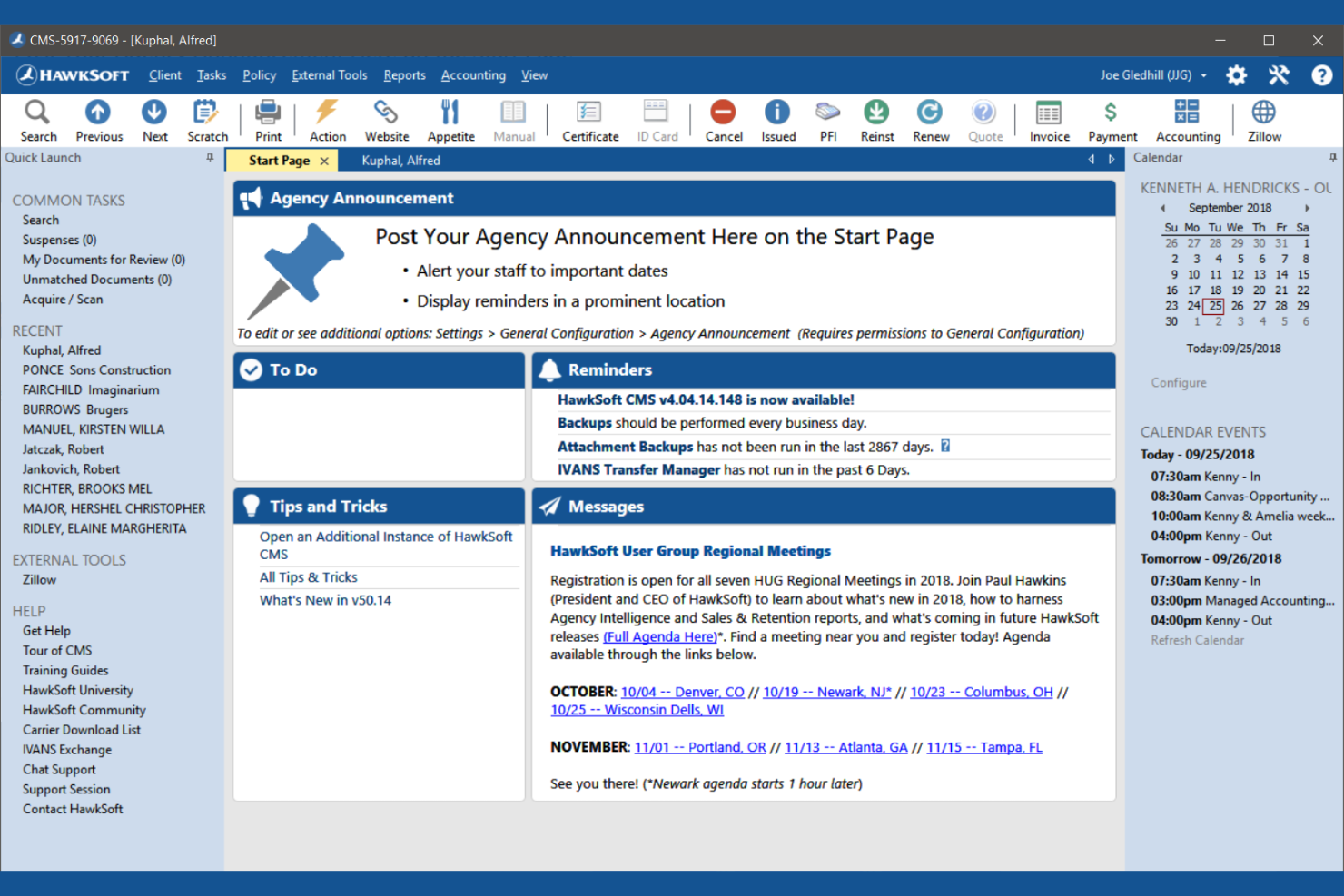
HawkSoft is a management system designed specifically for insurance agencies. It helps insurance professionals manage policies, track claims, and handle customer interactions efficiently.
Why I picked HawkSoft: It focuses on optimizing insurance agency workflows, providing tools to simplify policy, and claims management. The document management feature allows you to organize and access client files efficiently. HawkSoft's reporting tools offer insights into agency performance and operations. The system's client communication tools help maintain strong customer relationships.
Standout Features and Integrations:
Features include an intuitive dashboard that gives you a quick overview of your agency's operations. The task management feature helps you keep track of daily activities and deadlines. Additionally, the automated reminders ensure that you never miss important follow-ups with clients.
Integrations include ePayPolicy, Microsoft 365, QuickBooks, and more.
Pros and Cons
Pros:
- Detailed reporting capabilities
- Extensive document management
- Optimized for insurance workflows
Cons:
- Search requires specific email login
- Can be difficult to customize workflows
Diğer Pazarlama Ajansı Yazılımları
Kısa listeme girmeyen, ancak yine de göz atmaya değer bazı ek pazarlama ajansı yazılımı seçenekleri şunlardır:
- Resource Guru
For resource scheduling needs
- Wrike
For project customization options


How I Evaluate Marketing Agency Software
I evaluate agency tools in two layers: core requirements like juggling 20+ client accounts without cross-contaminating data, and differentiators that make one platform genuinely better for your team.
Core Functionality (Table Stakes For This List)
When I'm selecting tools for my list, I rank each one on a scale from 0 (does not offer the functionality) to 5 (excels in this area) for each core functionality listed below. Then, I calculate the tool's total score into a percentage. Each tool needs to achieve a minimum total score of 65% to be considered for inclusion.
- Multi-Client Project Management: I look for separate client workspaces with distinct timelines, permissions, and templates so a retail campaign never bleeds into a healthcare client's board.
- Resource & Capacity Planning: Each tool should let you visualize who's overbooked and who's available, especially when a creative team is split across five active accounts.
- Time Tracking & Billing: I check whether time entries connect directly to tasks and billable rates, making it simple to log hours on a social media campaign and generate an invoice from the same data.
- Creative Proofing & Approvals: The platform should support annotations on images, videos, and PDFs with structured approval stages so client feedback doesn't get buried in email threads.
- Client Collaboration Portal: I evaluate whether external stakeholders can log in to view progress, upload briefs, and leave feedback without needing a full seat or seeing other client data.
- Campaign Budget Tracking: Budget-to-actuals tracking at the project level matters here, so you can spot a campaign trending over budget before it eats into your margin.
Once I have a list of tools that meet this criteria, I consider what sets each platform apart.
Differentiating Factors (What Sets Vendors Apart)
Here's how I compare and contrast different vendors:
Standout Features
White-label branding is a big differentiator. When your client portal carries your agency's logo and colors, it reinforces trust during every review cycle. Retainer management tools matter just as much, especially when you need to track monthly hour rollovers and flag scope creep before a client conversation gets awkward. I also look for built-in digital asset management so your team can tag, store, and reuse creative files across accounts instead of digging through shared drives.
Beyond Features
Integration depth with marketing tools is the first thing I check. An agency platform that connects to Google Ads, Meta, Adobe Creative Cloud, and your CRM keeps campaign data flowing without manual exports. Pricing transparency matters too—I evaluate whether client and guest seats inflate costs as your roster grows. Client confidentiality controls like granular permissions and SSO also deserve close attention when you're handling sensitive campaign data across competing brands.
Pazarlama Ajansı Yazılımı Nasıl Seçilir?
Uzun özellik listeleri ve karmaşık fiyatlandırma yapıları içinde kaybolmak kolaydır. Kendinize özgü yazılım seçim sürecinizi yürütürken odaklanmanıza yardımcı olmak için göz önünde bulundurmanız gereken faktörlerin bir kontrol listesini aşağıda bulabilirsiniz:
| Faktör | Göz önünde bulundurulması gerekenler |
|---|---|
| Ölçeklenebilirlik | Yazılım ajansınızla birlikte büyüyecek mi? Performans sorunları yaşamadan artan sayıda müşteri ve projeyi yönetip yönetemeyeceğini değerlendirin. |
| Entegrasyonlar | Mevcut araçlarınızla bağlantı kuruyor mu? İş akışında aksaklıkları önlemek için CRM, e-posta ve analiz platformlarıyla yerel entegrasyonlar sunmasına dikkat edin. |
| Özelleştirilebilirlik | Yazılımı süreçlerinize uyacak şekilde düzenleyebilir misiniz? Ajansınızın ihtiyaçlarına uygun olarak panoları, raporları ve iş akışlarını özelleştirmenize izin verip vermediğini değerlendirin. |
| Kullanım kolaylığı | Arayüz ekibiniz için sezgisel mi? Eğitim süresini azaltmak ve benimsenmeyi artırmak için yazılımın basit bir düzene ve kolay gezinme özelliklerine sahip olup olmadığını kontrol edin. |
| Uygulama ve işe alışma | Ne kadar hızlı başlayabilirsiniz? Yeni yazılıma sorunsuz bir geçişi desteklemek için eğitim materyallerinin, desteğin ve kaynakların mevcut olup olmadığını değerlendirin. |
| Maliyet | Fiyatlandırma bütçeniz dahilinde mi? Maliyeti sunulan özelliklerle karşılaştırın. Bütçenizi etkileyebilecek gizli ücretlere veya ek ödemelere dikkat edin. |
| Güvenlik önlemleri | Verilerinizi koruyor mu? Yazılımın veri koruma düzenlemelerine uyduğundan ve şifreleme, yedekleme ile güvenli kullanıcı erişim kontrolleri sunduğundan emin olun. |
| Destek erişilebilirliği | Ne zaman yardım alabilirsiniz? Sorunları hızlıca çözmek için sağlayıcının 7/24 destek ve sohbet, e-posta ve telefon gibi birden fazla iletişim seçeneği sunup sunmadığını doğrulayın. |
Pazarlama Ajansı Yazılımı Nedir?
Pazarlama ajansı yazılımı; ajansların projeleri yönetmesine, kampanyaları izlemesine ve müşterilerle iş birliği yapmasına yardımcı olmak üzere tasarlanmış bir araçlar bütünüdür. Pazarlama profesyonelleri, proje yöneticileri ve yaratıcı ekipler bu araçları genellikle üretkenliği artırmak ve başarılı kampanyalar yürütmek için kullanır. Görev yönetimi, müşteri iletişimi ve raporlama özellikleri; iş akışlarını düzenlemeye, müşteri ilişkilerini sürdürmeye ve performansı analiz etmeye yardımcı olur. Genel olarak bu araçlar, ajansların verimli bir şekilde çalışması ve hedeflerine ulaşması için ihtiyaç duyduğu yapıyı ve içgörüleri sağlar.
Özellikler
Pazarlama ajansı yazılımı seçerken aşağıdaki temel özelliklere dikkat edin:
- Görev yönetimi: Projelerin planlandığı şekilde ilerlemesini ve son teslim tarihlerine uyulmasını sağlamak için görevleri düzenler ve önceliklendirir.
- Müşteri iletişimi: Güçlü ilişkileri sürdürmek ve beklentileri yönetmek için müşterilerle kolay etkileşim kurulmasını sağlar.
- Raporlama araçları: Kampanya performansına ilişkin gerçek zamanlı raporlar ve içgörüler sunarak ekiplerin bilinçli kararlar almasına ve düzenlemeler yapmasına yardımcı olur.
- Özelleştirilebilir panolar: Kullanıcıların en alakalı verilere ve ölçümlere odaklanmak için görünümlerini kendilerine göre düzenlemesine olanak tanır.
- Entegrasyon olanakları: Uyumlu bir iş akışı oluşturmak için CRM ve e-posta platformları gibi diğer araçlara bağlanır.
- Zaman takibi: Üretkenliği ve faturalandırma doğruluğunu artırmak için görevler ve projeler üzerinde harcanan zamanı izler.
- Otomatik iş akışları: Zaman kazanmak ve manuel hataları azaltmak için tekrarlayan görevleri otomatikleştirir.
- Kaynak planlama: Çakışmaları önlemek ve ekip üretkenliğini en üst düzeye çıkarmak için kaynakların verimli bir şekilde tahsis edilmesine yardımcı olur.
- Güvenlik önlemleri: Yönetmeliklere uyumu sağlamak için hassas verileri şifreleme ve erişim denetimleriyle korur.
- İşe alıştırma desteği: Ekiplerin yeni yazılıma sorunsuz bir şekilde geçiş yapmasına yardımcı olmak için eğitim materyalleri ve kaynaklar sunar.
Avantajlar
Pazarlama ajansı yazılımını uygulamak ekibiniz ve işletmeniz için çeşitli avantajlar sağlar. Yararlanabileceğiniz avantajlardan bazıları şunlardır:
- Geliştirilmiş organizasyon: Hiçbir şeyin gözden kaçmamasını sağlamak için görev yönetimi özellikleriyle projeleri ve görevleri düzenli tutun.
- Daha iyi iletişim: Entegre mesajlaşma ve iş birliği araçları aracılığıyla müşteriler ve ekip arasındaki iletişimi geliştirin.
- Veriye dayalı kararlar: Performansa ilişkin içgörüler sunan raporlama araçlarıyla bilinçli stratejik seçimler yapmanıza yardımcı olun.
- Zaman verimliliği: Tekrarlayan görevleri otomatikleştirin ve projelerde harcanan zamanı izleyerek zamandan tasarruf edin ve üretkenliği artırın.
- Kaynak optimizasyonu: Planlama araçlarıyla kaynakları etkili bir şekilde tahsis ederek çakışmaları önleyin ve ekip çıktısını en üst düzeye çıkarın.
- Özelleştirme esnekliği: Kullanılabilirliği artırmak için panoları ve iş akışlarını ajansınızın benzersiz ihtiyaçlarına göre uyarlayın.
- Veri güvenliği: Veri koruma yönetmeliklerine uyumu sağlamak için hassas bilgileri güvenlik önlemleriyle koruyun.
Maliyetler & Fiyatlandırma
Pazarlama ajansı yazılımı seçmek, sunulan çeşitli fiyatlandırma modellerinin ve planların anlaşılmasını gerektirir. Maliyetler; özelliklere, ekip büyüklüğüne, eklentilere ve daha fazlasına göre değişir. Aşağıdaki tablo, yaygın planları, ücretli planların ortalama fiyatlarını ve pazarlama ajansı yazılımı çözümlerinde genellikle sunulan özellikleri özetlemektedir:
Pazarlama Ajansı Yazılımı İçin Plan Karşılaştırma Tablosu
| Plan Türü | Ortalama Fiyat | Yaygın Özellikler |
|---|---|---|
| Ücretsiz Plan | $0 | Temel görev yönetimi, sınırlı raporlama ve temel müşteri iletişimi. |
| Bireysel Plan | $5-$25/user/month | Görev yönetimi, müşteri iletişimi araçları ve temel raporlama özellikleri. |
| İşletme Planı | $35-$800/month | Gelişmiş raporlama, ekip iş birliği özellikleri ve diğer araçlarla entegrasyon. |
| Kurumsal Plan | $145-$3600/month | Özelleştirilebilir panolar, geliştirilmiş güvenlik özellikleri ve özel destek ve eğitim seçenekleri. |
Pazarlama Ajansı Yazılımı SSS
Pazarlama ajansı yazılımı hakkında sık sorulan bazı soruların yanıtları:
Ajansımın pazarlama ajansı yazılımına ihtiyacı olup olmadığını nasıl anlarım?
Ekibiniz birden fazla müşteri kampanyasını yönetmekte ve performansı takip etmekte zorlanıyorsa pazarlama ajansı yazılımı yardımcı olabilir. Mevcut süreçlerinizi değerlendirin ve otomasyon ile daha iyi bir organizasyonun verimliliği artırabileceği alanları belirleyin. Sık sık darboğazlar veya hatalarla karşılaşıyorsanız yazılım çözümlerini değerlendirmenin zamanı gelmiş olabilir.
Pazarlama ajansı yazılımı mevcut araçlarımla entegre olabilir mi?
Evet, çoğu pazarlama ajansı yazılımı CRM ve SaaS sistemleri, e-posta platformları ve analiz araçları gibi popüler araçlarla entegrasyon özellikleri sunar. Mevcut araçlarınıza bağlandığından emin olmak için yazılımın entegrasyon listesini kontrol edin. Bu uyumluluk, iş akışının sorunsuz bir şekilde sürdürülmesine yardımcı olur ve veri silolarının oluşmasını önler.
Pazarlama ajansı yazılımı ne kadar güvenlidir?
Güvenlik sağlayıcılar arasında değişiklik gösterir, ancak saygın yazılımların çoğunda şifreleme, kullanıcı erişim denetimleri ve veri yedekleme özellikleri bulunur. Sektörünüzle ilgili veri koruma düzenlemelerine uygun yazılımları tercih edin. Verilerinizin güvende kalmasını sağlamak için satıcının güvenlik önlemleri hakkında mutlaka bilgi alın.
Pazarlama ajansı yazılımı satın almadan önce neleri göz önünde bulundurmalıyım?
Satın almadan önce ekibinizin ihtiyaçlarını, bütçenizi ve yazılımın ölçeklenebilirliğini değerlendirin. Öğrenme eğrisini ve ekibinizin hızlı bir şekilde uyum sağlayıp sağlayamayacağını göz önünde bulundurun. Kullanıcı yorumlarını araştırın ve yazılımı iş başında görmek için tanıtım talep edin. Bu inceleme, bilinçli bir karar vermenize yardımcı olacaktır.