

2026’da İncelenen En İyi 10 Belge Oluşturma Yazılımı

En İyi Belge Oluşturma Yazılımları Kısa Listesi


Dijital projeleri yönetmek çoğu zaman evrak işleri ve tekrarlayan görevlerle uğraşmak anlamına gelir. Ancak belgeleri oluşturmak, düzenlemek ve organize etmek değerli zamanınızın büyük bir bölümünü alabilir. Belge oluşturma yazılımları burada önem kazanır; bu görevleri otomatikleştirip basitleştirerek zamanınızı daha verimli kullanmanızı sağlar.
Farklı araçları test edip inceleme deneyimime göre, doğru yazılım ekibinizin üretkenliğini önemli ölçüde artırabilir. Bu nedenle bu makale, en iyi seçeneklere tarafsız bir bakış sunarak özelliklerini, kullanım kolaylıklarını ve her birini öne çıkaran unsurları vurgulamaktadır.
Amaç, ihtiyaçlarınıza uygun çözümü bulmanıza yardımcı olmak ve böylece başarılı projeler sunmaya odaklanabilmenizi sağlamaktır.
Why Trust Our Software Recommendations
Our team has been testing and reviewing software since 2012. As project managers ourselves, we know how difficult—and important—it is to choose the right software.
For this guide, we evaluated tools using hands-on testing and independent research, scoring tools using our selection criteria. We also draw on insights from industry thought leaders and practicing project management experts.
Our reviews reflect our human editorial judgment, not a sales pitch.
Expert reviewers:
Belge Oluşturma Yazılımları Karşılaştırma Tablosu
Bu karşılaştırma tablosu, en iyi belge oluşturma yazılımı seçimlerimin fiyatlandırma ayrıntılarını özetlemektedir:
| Tool | Starting Price | Website | |
|---|---|---|---|
| Best for automating guide creation | — | $40/month 10-day free trial + free demo available | Website |
| Best with dynamic web forms for data capture | 4.5 out of 5 | $399/month Free demo available | Website |
| Best for reducing document prep time | 4.3 out of 5 | Pricing upon request Free demo available | Website |
| Best for AI-powered document intelligence | 4.8 out of 5 | Pricing upon request Free demo available | Website |
| Best for electronic signatures | 4.6 out of 5 | $10/month Free plan available | Website |
| Best for multi-language support | 4.8 out of 5 | $49/user/month Free trial available | Website |
| Best for built-in form capture and approvals | 4.5 out of 5 | $19.99/user/month 7-day free trial | Website |
| Best for team collaboration | 4.3 out of 5 | $5.78/user/month Free plan + 7-day trial available | Website |
| Best for sales teams | 4.5 out of 5 | $19/user/month Free plan + 14-day free trial + free demo available | Website |
| Best for custom forms | — | $83/month Free demo available | Website |
En İyi Belge Oluşturma Yazılımı İncelemeleri
Aşağıda, kısa listeme giren en iyi belge oluşturma yazılımlarının ayrıntılı özetlerini bulabilirsiniz. İncelemelerim, sizin için en uygun aracı bulmanıza yardımcı olmak amacıyla her aracın temel özelliklerine, avantajlarına & dezavantajlarına, entegrasyonlarına ve ideal kullanım alanlarına ayrıntılı bir bakış sunmaktadır.


TruPeer caters to enterprises aiming to simplify and enhance their document generation and video creation processes. With its AI-driven capabilities, it turns screen recordings into professional guides and videos, making it an appealing solution for industries focused on training, marketing, and customer success. By automating complex tasks like script enhancement and multilingual translation, TruPeer addresses the challenge of creating consistent, high-quality content quickly.
Why I Picked TruPeer
I picked TruPeer for its unique ability to automate the creation of step-by-step guides and videos from simple screen recordings. This feature, combined with its customizable AI avatars and studio-quality voiceovers, allows your team to produce professional content without needing advanced editing skills. TruPeer also supports translation into over 65 languages, which is invaluable for global teams looking to maintain consistency across different markets. Its centralized knowledge base with AI video search capabilities ensures that all your content is easy to find and access.
TruPeer Key Features
In addition to its standout guide creation capabilities, TruPeer offers several other features:
- Automated Zoom Effects: This feature automatically enhances screen recordings by focusing on key areas, ensuring that your audience doesn't miss important details.
- Brand Personalization Options: Customize your documents and videos with your brand's colors and logos, maintaining a consistent brand image across all content.
- Engagement Analytics: Track how your audience interacts with your content, providing insights to refine your document and video strategies.
- Security and Compliance: With ISO 27001 and SOC2 compliance, TruPeer ensures that your data is secure, a critical feature for enterprises handling sensitive information.
TruPeer Integrations
Integrations include Monday.com, Make, Medium, Google Analytics, Repurpose.ai, Bigtincan, Cal.com, SurveyMonkey, and Pipedrive.
Pros and Cons
Pros:
- Strong branding and formatting controls
- Supports multilingual content creation
- Automates step by step documentation
Cons:
- Chrome dependent recording workflow
- Limited advanced manual editing

altaFlow
Best with dynamic web forms for data capture
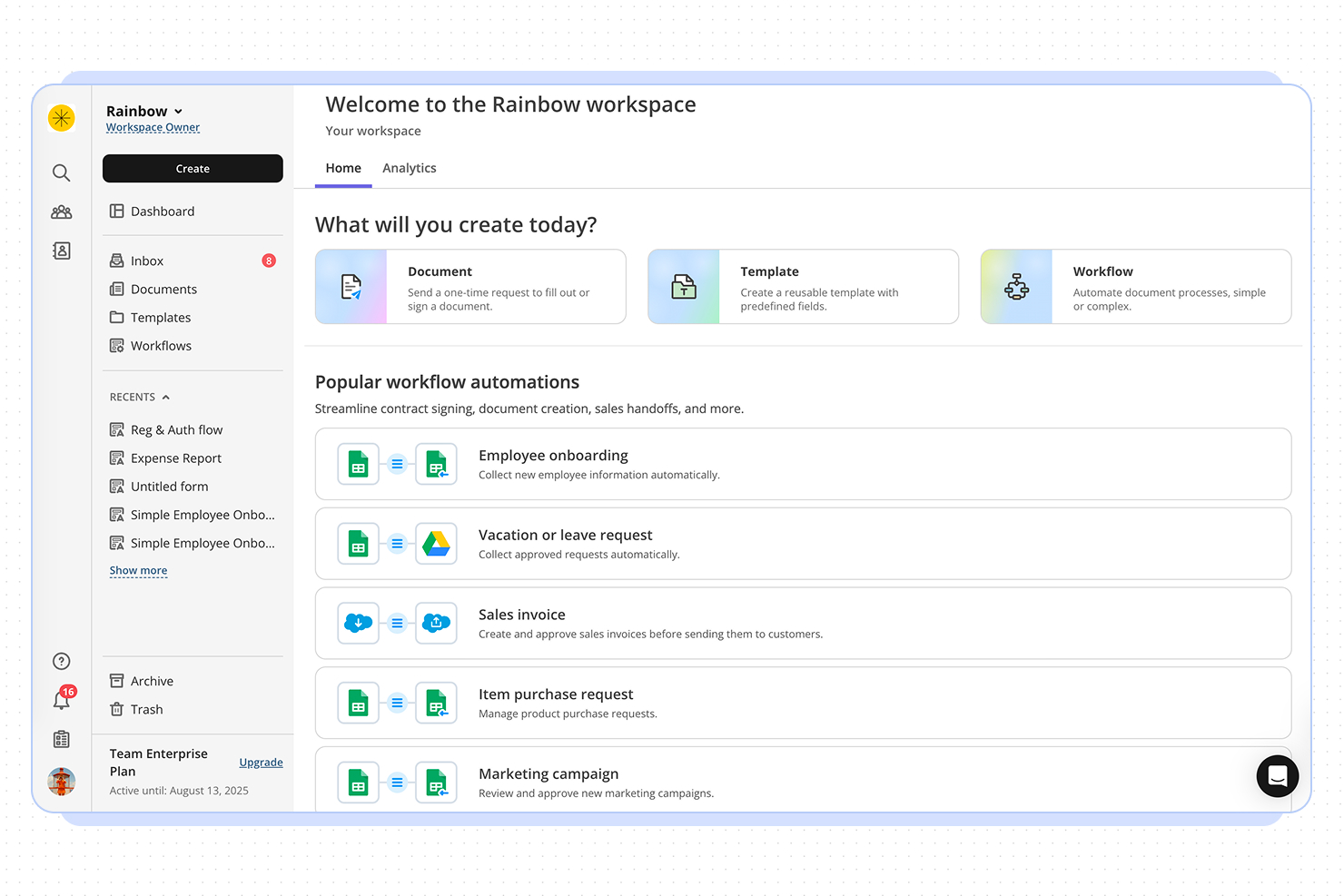
altaFlow offers a document generation platform designed for teams that need to automate complex workflows and integrate data from multiple sources. It’s a strong fit for organizations in regulated industries or those managing high volumes of forms and contracts. With its focus on automation and integration, altaFlow helps businesses reduce manual data entry and streamline document processes.
Who Is altaFlow Best For?
altaFlow is a strong choice for mid-sized to large organizations in regulated industries that need to automate document workflows and integrate data across multiple business systems.
Why I Picked altaFlow
For document generation software, I picked altaFlow because of its advanced dynamic web forms that make data capture flexible and customizable. The platform lets you build forms that adapt to user input, which is especially useful for organizations handling complex or variable data requirements. I appreciate how altaFlow’s forms can trigger automated document creation based on the data collected, reducing manual steps and errors. This focus on dynamic data capture sets it apart for teams that need to generate accurate, tailored documents from diverse sources.
altaFlow Key Features
Some other altaFlow features that support document generation include:
- Automated workflow routing: Route documents and tasks automatically based on predefined rules and user actions.
- Template management: Store, edit, and reuse document templates to maintain consistency across your organization.
- E-signature integration: Collect legally binding electronic signatures directly within generated documents.
- Audit trails: Track every change and action taken on documents for compliance and transparency.
altaFlow Integrations
Integrations include Salesforce, NetSuite, SharePoint, and HubSpot.
Pros and Cons
Pros:
- Real-time audit trails and version control
- Conditional logic for dynamic document workflows
- Drag-and-drop template designer for documents
Cons:
- Credits-based pricing may limit high-volume use
- API access requires custom arrangements

Best for reducing document prep time
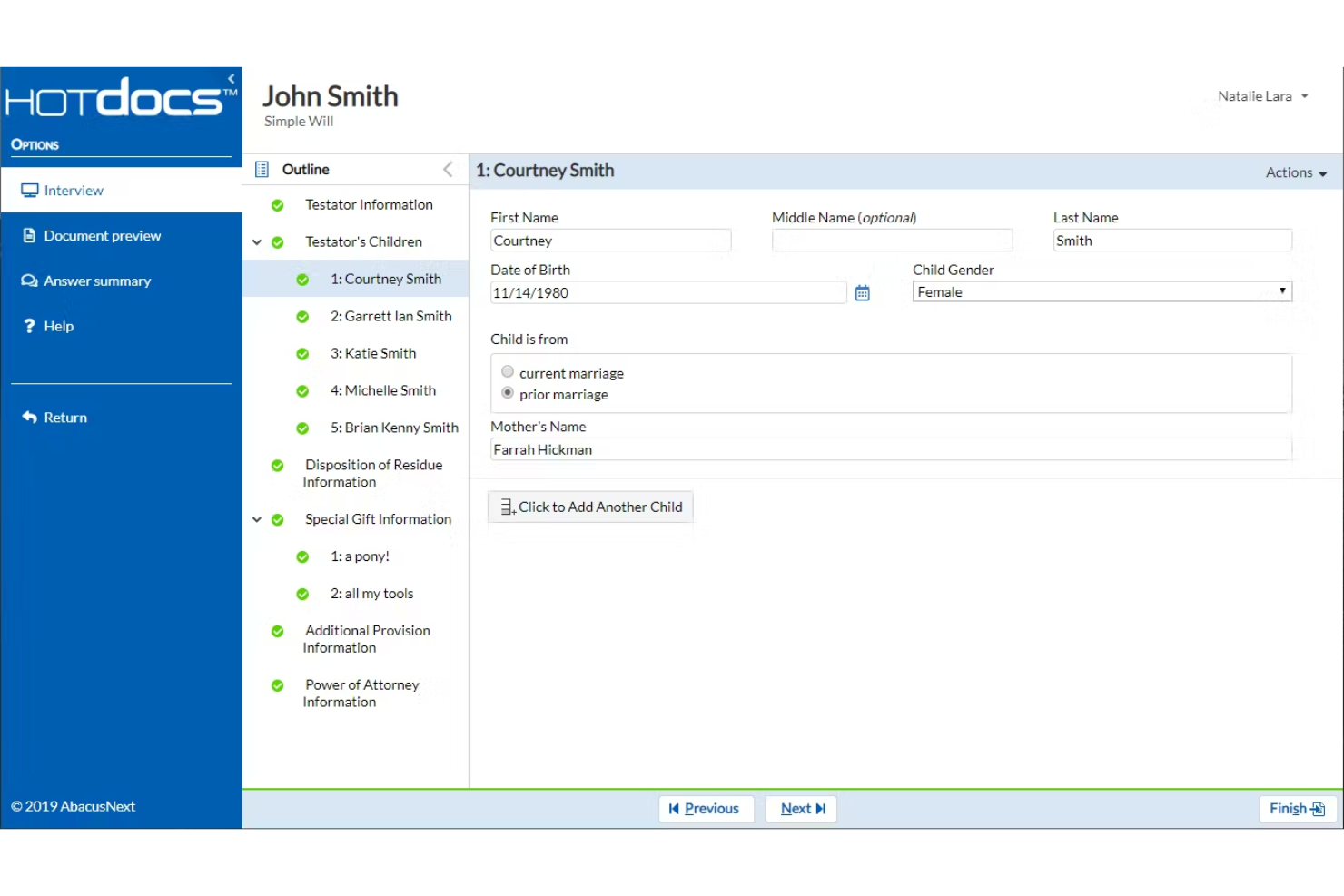
Mitratech HotDocs is a document generation platform designed to automate the creation of frequently used documents. It helps legal, compliance, and business teams save time by turning standard documents into intelligent templates while maintaining accuracy and regulatory compliance. This makes it especially useful for organizations managing complex workflows and large volumes of legal content.
Why I Picked Mitratech HotDocs: I chose Mitratech HotDocs because it can significantly reduce the time spent preparing legal documents while improving accuracy. By converting repetitive forms into intelligent templates, it minimizes manual data entry and the risk of human error. I also like that it centralizes document versions, making it easier to maintain compliance and ensure your team is always working with the latest approved materials.
Standout Features & Integrations
Features include intelligent document templates that adapt to different use cases, centralized version control for better compliance, and built-in tools that reduce errors during document assembly. HotDocs also offers dynamic dashboards and secure template management to keep your workflows organized.
Integrations include iManage, Mitratech TeamConnect, Managed Bill Review, AdvanceLaw, CaseCloud, LegalHold, InvoiceIQ, TAP for workflow automation, Alyne, Prevalent, Mitratech Mineral, and Mitratech AssureHire.
Pros and Cons
Pros:
- Centralized version control for consistent updates
- Built-in compliance tools for document accuracy
- Intelligent templates reduce repetitive manual work
Cons:
- Setup can be complex for new users
- Limited customization options in the basic package
Doxis
Best for AI-powered document intelligence
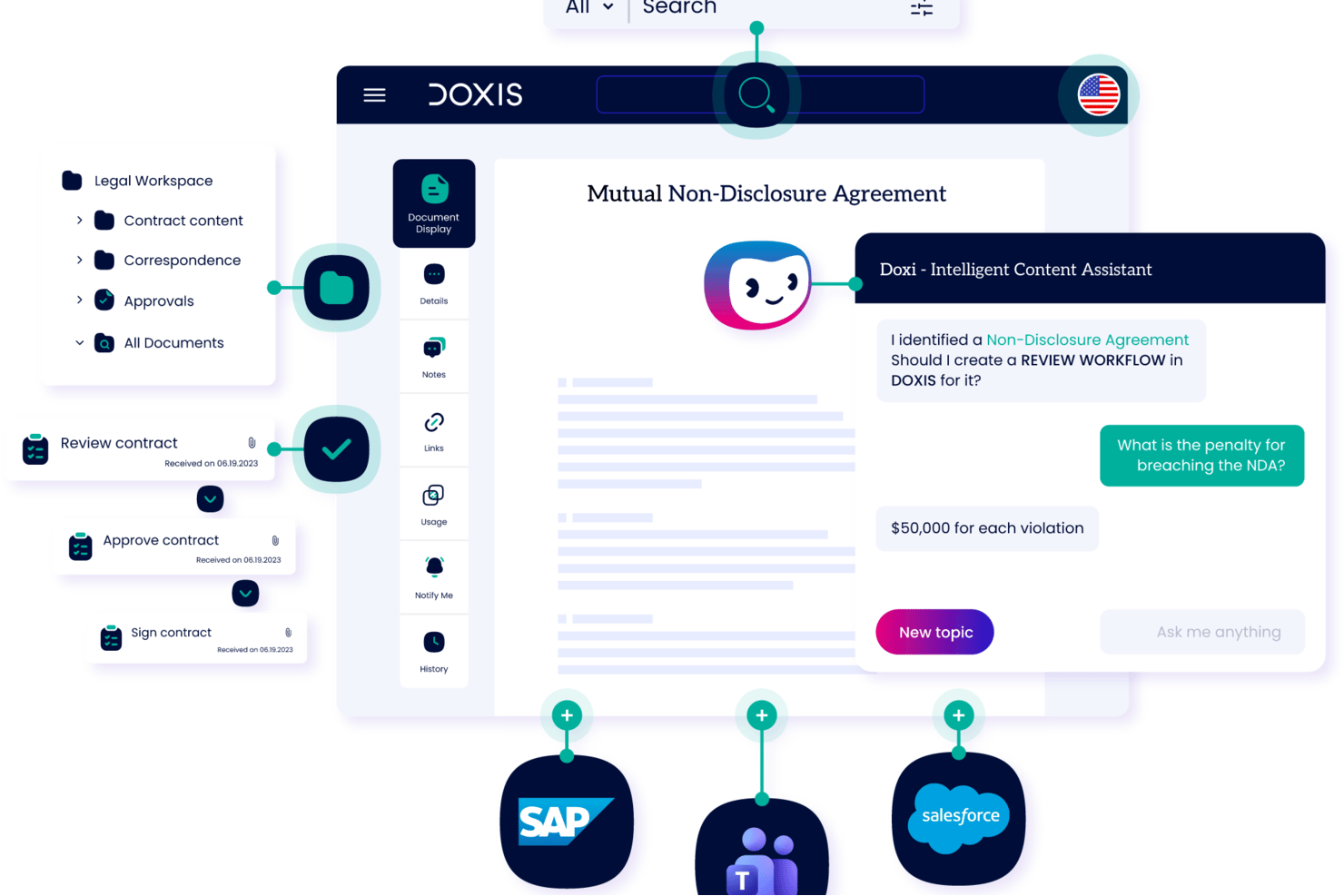
Doxis is an enterprise content services platform that combines document generation, intelligent document processing, AI-powered data extraction, and workflow automation across SAP, Salesforce, and Microsoft environments.
Who Is Doxis Best For?
Doxis is built for large enterprises in regulated industries like financial services, insurance, and manufacturing that need document intelligence at scale.
Why I Picked Doxis
Doxis earns its spot as one of the best on my shortlist because its AI-powered document intelligence goes well beyond standard generation. I particularly like Ask Doxis, an AI assistant that lets users query document content directly, and Doxis AI.dp, which classifies incoming documents and extracts structured data before feeding it into output templates. The result is a generation workflow where data capture and document output are handled as a single, connected process.
Doxis Key Features
- Template library: Store and reuse standardized templates for recurring business documents and process deliverables.
- Version control: Manage document versions and maintain audit trails for every template and generated file.
- Role-based access controls: Set granular permissions for viewing, editing, and approving content across teams.
- SAP and Microsoft integration: Connects directly with SAP and Microsoft platforms for seamless data access and document storage.
Doxis Integrations
Doxis offers native integrations with SAP, Salesforce, Microsoft 365, Sage, ADP, Oracle, AutoCad, Solid Edge, and Microsoft Dynamics 365, and provides an API for custom integrations.
Pros and Cons
Pros:
- Granular access controls for document governance
- Supports high-volume batch document generation runs
- Classifies and routes documents without manual intervention
Cons:
- Steeper learning curve for lightweight teams
- Complex initial configuration for template setup
Docusign
Best for electronic signatures
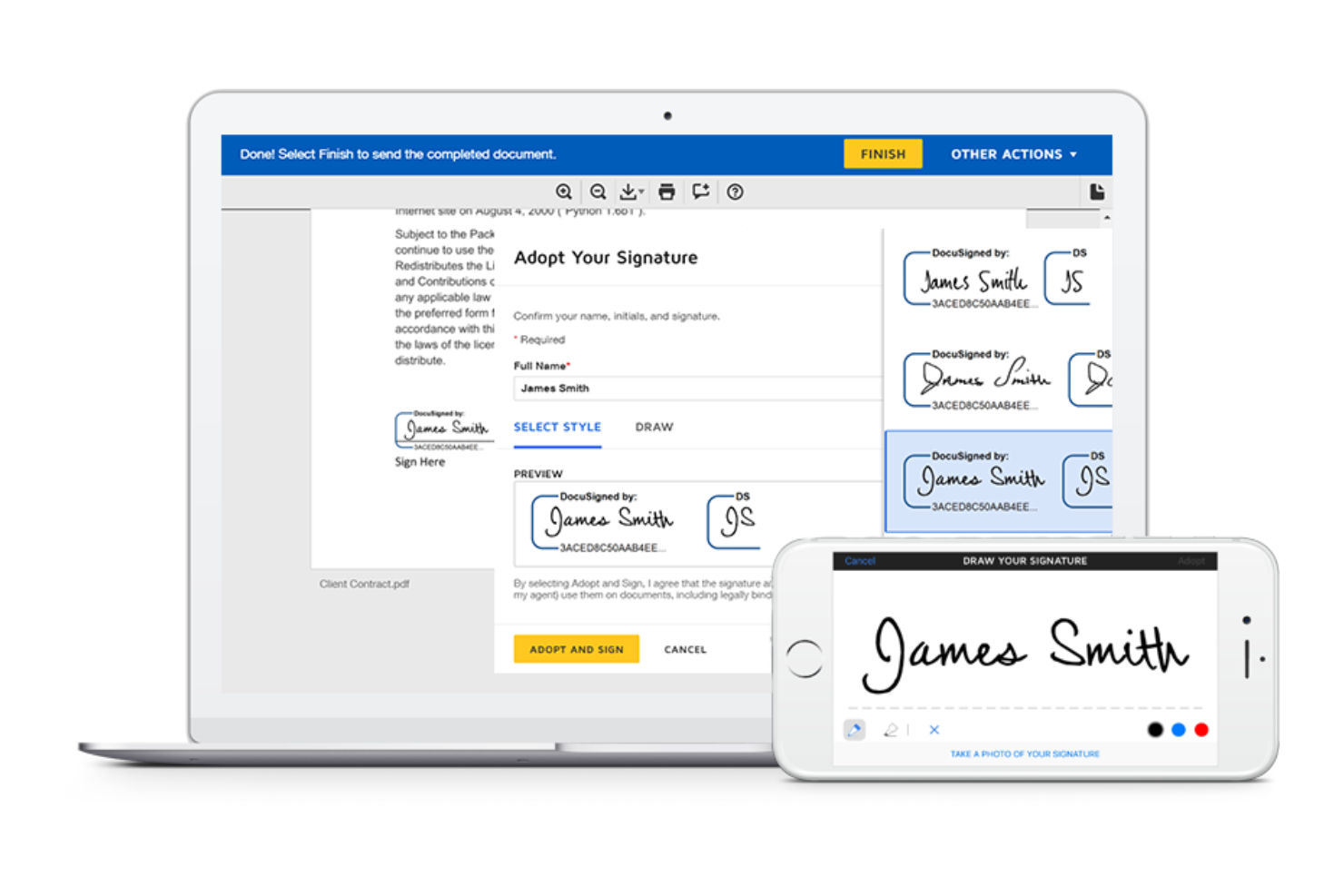
DocuSign is an electronic signature platform used by businesses in real estate, legal, finance, and other industries. It allows for secure signing and easy management of agreements and contracts, helping teams handle document transactions more efficiently.
Why I picked Docusign: DocuSign makes it easy for you and your team to handle electronic signatures. You can track document status in real time, so you know when something’s signed. It works with many file types, giving you flexibility. Built-in security helps keep your information safe.
Standout Features & Integrations
Features include real-time status tracking, which gives you updates on document progress. It supports multiple document formats, providing flexibility in what you can upload and manage. Security features like encryption and audit trails ensure your documents are protected throughout the process.
Integrations include Salesforce, Microsoft Office 365, Google Workspace, Dropbox, Box, SAP, Oracle, Slack, Zoom, and NetSuite.
Pros and Cons
Pros:
- Wide format support
- Real-time document tracking
- Strong security features
Cons:
- Complex initial setup
- Limited offline functionality
Docmosis
Best for multi-language support
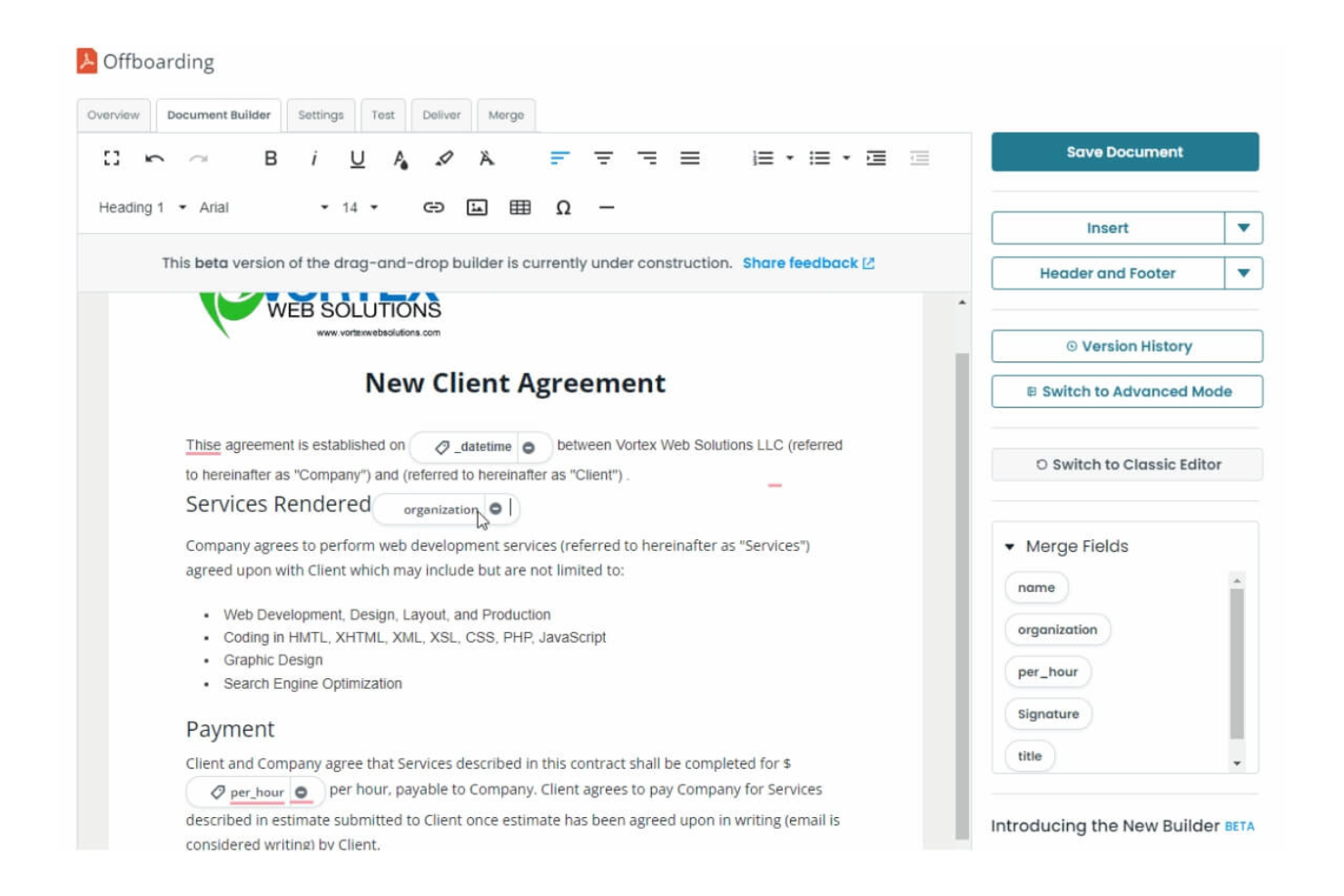
Docmosis is a document generation tool built for developers and teams that need to create documents in multiple languages. It works well in industries like healthcare, legal, and finance, and you can easily add it to your existing apps.
Why I picked Docmosis: Docmosis lets your team create documents in different languages without extra steps. Its template system helps you keep things consistent. You can plug it into your current setup using a flexible API. It also handles complex formatting well, so your documents come out looking clean and accurate.
Standout Features & Integrations
Features include a template designer that simplifies document creation with a WYSIWYG interface. Conditional logic allows you to create dynamic documents that adapt to user input. The batch processing feature helps you generate large volumes of documents efficiently.
Integrations include Salesforce, Microsoft Dynamics, Google Workspace, Dropbox, Box, Slack, SAP, Oracle, QuickBooks, and HubSpot.
Pros and Cons
Pros:
- Handles complex formatting
- Easy template management
- Supports multiple languages
Cons:
- Requires technical expertise
- Initial setup complexity

Best for built-in form capture and approvals
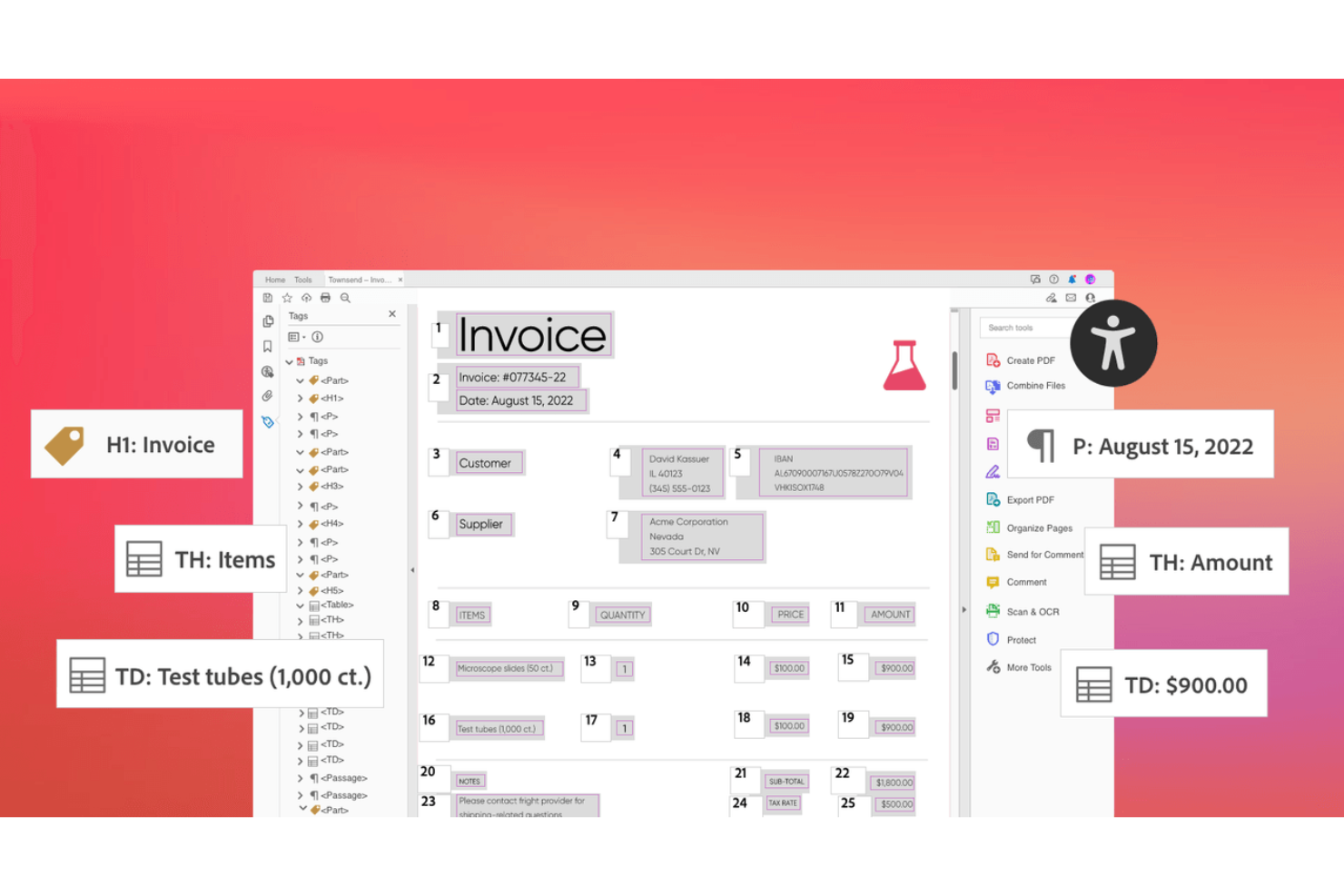
Adobe Acrobat can support document generation workflows, but primarily as the final formatting, input collection, and distribution layer rather than a system that generates documents dynamically from structured data. It’s well suited for creating controlled templates, collecting inputs via forms, and producing consistent PDF outputs with security and compliance safeguards. For teams that rely on standardized documents and human review cycles, it helps maintain consistency and auditability.
Who Is Adobe Acrobat Best For?
Adobe Acrobat is a good fit for IT, legal, and operations teams in mid-size to large organizations that need secure, collaborative document workflows.It works best in environments where documents are assembled from templates and reviewed by people, rather than generated automatically from databases or business systems.
Why I Picked Adobe Acrobat
It stands out for teams that need to manage document workflows around shared files, especially where review, annotation, and controlled distribution are part of the process. Its integrations with cloud storage and content systems make it easier to organize and retrieve documents, while in-document commenting and tagging help capture context during reviews. This makes it more effective as a coordination layer for document workflows than as a system for generating documents programmatically.
Adobe Acrobat Key Features
- PDF form creation: Build interactive forms with fillable fields, dropdowns, and digital signatures.
- Batch document processing: Automate repetitive tasks like converting, combining, or watermarking multiple files at once.
- Redaction tools: Permanently remove sensitive information from documents before sharing.
- Version control: Track document revisions and maintain access to previous versions within shared workspaces.
Adobe Acrobat Integrations
Adobe Acrobat offers native integrations with Microsoft 365, SharePoint, Google Drive, Dropbox, Box, and OneDrive. An API is available for custom integrations.
Pros and Cons
Pros:
- Enables secure e-signature collection within documents
- Provides audit trails for document activity tracking
- Offers advanced PDF editing and redaction tools
Cons:
- API-based generation requires additional setup and is not core to the product
- Not designed for high-volume, data-driven document generation
Best for team collaboration
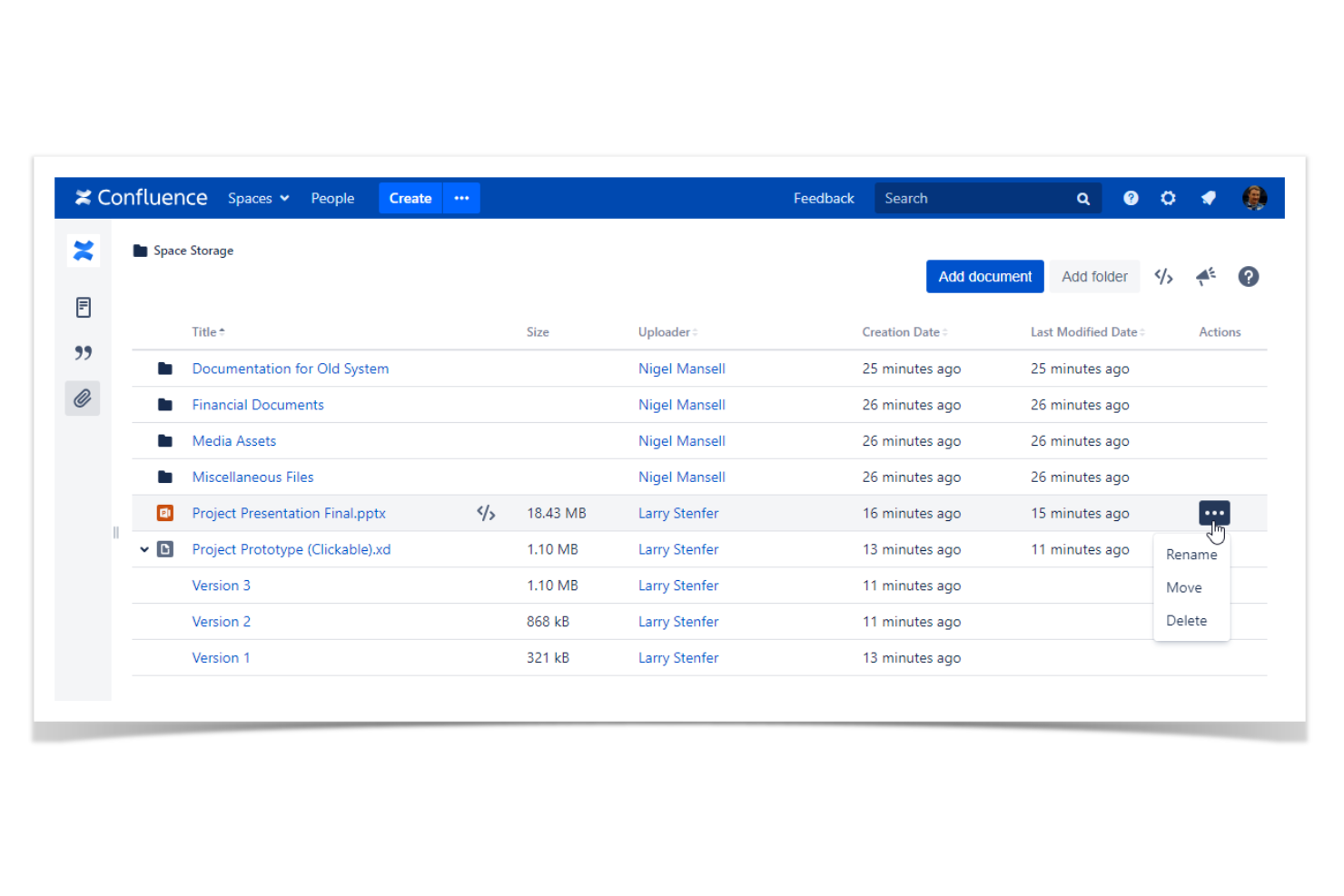
Confluence is a collaboration and knowledge management platform designed for teams needing a centralized space for project documentation and communication. It helps businesses organize, share, and collaborate on content, making it a valuable tool for project management and team coordination.
Why I picked Confluence: Confluence helps your team work together with shared spaces and real-time editing. Page versioning tracks changes, so everyone stays on the same page. You can use templates to create and organize content, which keeps things consistent. It also connects with other Atlassian tools to support your project work.
Standout Features & Integrations
Features include a rich content editor that allows you to create and format documents easily. Page versioning tracks changes and maintains a history for future reference. Collaborative editing lets multiple team members work on the same document simultaneously, enhancing productivity.
Integrations include Jira, Trello, Slack, Microsoft Teams, Google Drive, Dropbox, Salesforce, Zoom, GitHub, and Microsoft Office 365.
Pros and Cons
Pros:
- Extensive template library
- Collaborative editing capabilities
- Strong version control
Cons:
- Limited offline functionality
- Steep learning curve
PandaDoc
Best for sales teams
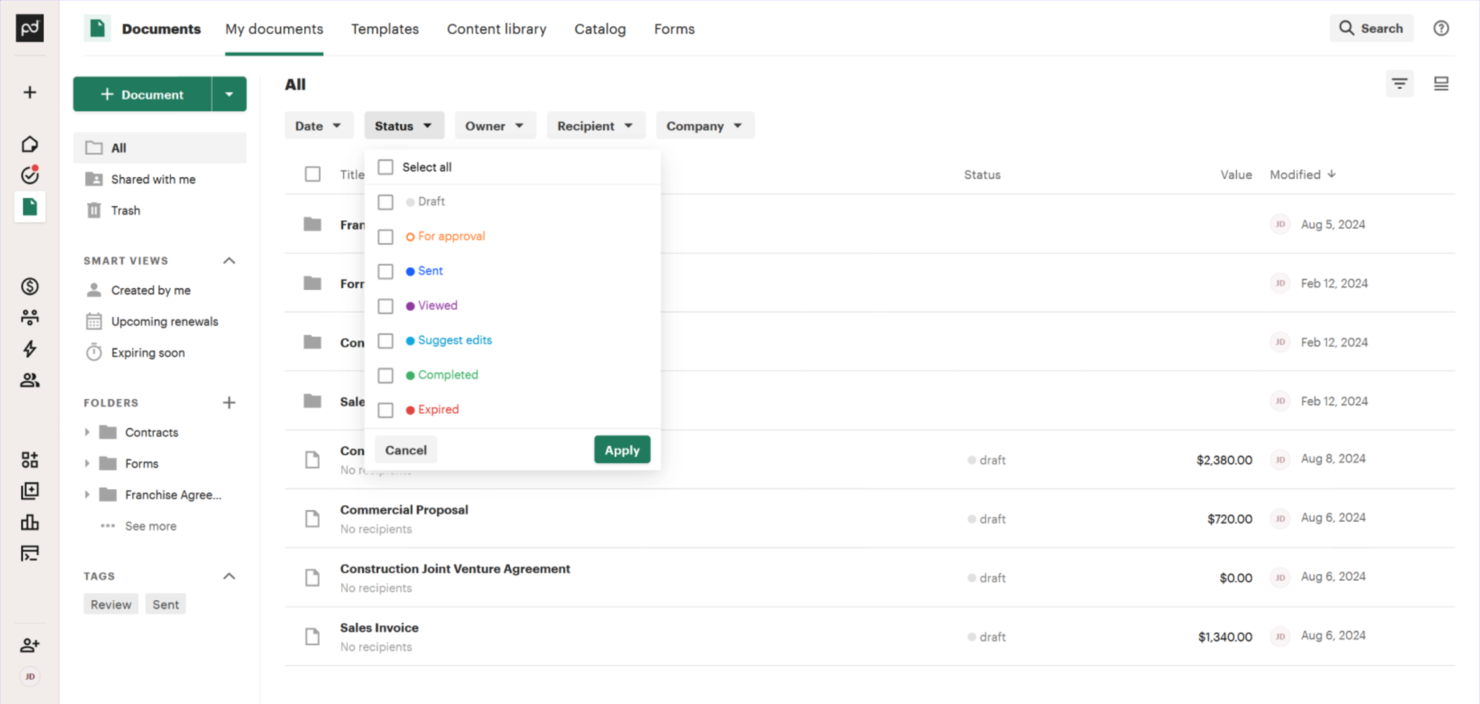
PandaDoc is a document management platform built for sales teams to efficiently create, manage, and eSign documents. It supports the sales process with features such as document generation, CPQ tools, and collaborative deal rooms.
Why I picked PandaDoc: PandaDoc helps your sales team manage documents more easily. Its CPQ feature supports accurate pricing and quotes. Deal rooms let your team work together on sales documents. You can customize content for each client, and tracking tools show how recipients interact with your files.
Standout Features & Integrations
Features include customizable signing orders, identity verification, and audit trails. Document metrics help you track performance, and integrated payment gateways make transactions easier. The platform also supports workflow automation for efficient processes.
Integrations include Salesforce, HubSpot, Google Workspace, Slack, Stripe, PayPal, Microsoft Dynamics, Zoho CRM, Pipedrive, and QuickBooks.
Pros and Cons
Pros:
- Smart content customization
- Integrated payment options
- Customizable signing workflows
Cons:
- Occasional integration hiccups
- Limited offline access

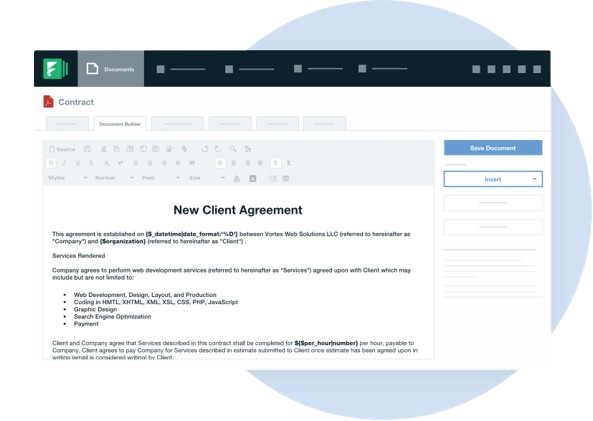
Formstack Documents is a document automation tool designed for businesses that require custom form creation and document generation. It helps industries like healthcare, finance, and education automate paperwork and efficiently manage data collection.
Why I picked Formstack Documents: Formstack Documents lets you build custom forms that match what your team needs. You can use the drag-and-drop builder to set them up fast. It cuts down on manual work by generating documents automatically. Conditional logic makes your forms adjust based on how people fill them out.
Standout Features & Integrations
Features include a drag-and-drop form builder that lets you customize forms easily. Conditional logic allows you to tailor forms to specific user responses. Automated workflows streamline document generation and delivery.
Integrations include Salesforce, Google Drive, Dropbox, Box, Microsoft Dynamics, Zapier, Stripe, PayPal, Mailchimp, and Slack.
Pros and Cons
Pros:
- Automated workflows
- Dynamic conditional logic
- Customizable form builder
Cons:
- Occasional integration issues
- Learning curve for beginners
Diğer Belge Oluşturma Yazılımları
İşte kısa listeme giremeyen ancak yine de göz atmaya değer bazı ek belge oluşturma yazılımı seçenekleri:
- Conga
For contract management
- Templafy
For brand compliance
- Docupilot
For workflow automation
- Documentero
For PDF generation
- Fynk
For small businesses
- Gamma
For AI-powered content creation
- Proposify
For proposal management
- Lark
For remote team collaboration
- Nutrient
For API integration
- EDocGen
For high-volume document generation


How I Evaluate Document Generation Software
I split my evaluation into baseline capabilities—auto-populating charters, SOWs, or status reports—and the differentiators that distinguish tools built for project teams from generic alternatives.
Core Functionality (Table Stakes For This List)
When I'm selecting tools for my list, I rank each one on a scale from 0 (does not offer the functionality) to 5 (excels in this area) for each core functionality listed below. Then, I calculate the tool's total score into a percentage. Each tool needs to achieve a minimum total score of 65% to be considered for inclusion.
- Template Creation & Management: I look for a structured template library where you can build, version, and reuse project deliverables like charters, SOWs, and close-out reports without starting from scratch each time.
- Dynamic Data Merging: Each tool should let you map merge fields to live data sources so documents like status reports auto-populate with project names, milestones, dates, and owner details.
- Conditional Content Logic: I evaluate whether the tool supports rule-based content blocks—for example, showing a risk section only when a project is flagged as high risk, or swapping payment terms by client type.
- Multi-Format Output: Generating polished PDFs for client delivery and editable DOCX files for internal review are baseline expectations. I check for additional formats like HTML and PPTX as well.
- PM & Data Source Integrations: The tool should connect to the platforms your team already uses. I look for native integrations with tools like Jira, Asana, Smartsheet, Salesforce, or Google Drive to pull project data directly.
- Collaboration & E-Sign Workflows: I evaluate whether the platform supports multi-user review cycles, approval routing, and either built-in or integrated e-signature capabilities to finalize documents like SOWs or change orders.
Once I have a list of tools that meet this criteria, I consider what sets each platform apart.
Differentiating Factors (What Sets Vendors Apart)
Here's how I compare and contrast different vendors:
Standout Features
AI-powered drafting is a big differentiator—tools that generate executive summaries or status narratives from raw project data save PMs real time during reporting cycles. I also evaluate bulk generation capabilities, especially for PMOs running monthly reports across dozens of projects. A no-code workflow builder matters here too. I check whether a PM can set up a document trigger, like auto-generating a change order when scope shifts, without filing a ticket with IT.
Beyond Features
Integration depth matters more than integration count. I check whether a tool offers two-way sync with PM platforms like Jira or Asana, not just a read-only connection. Pricing models vary widely in this space—some vendors charge per user while others bill per document generated, which changes the math for PMOs producing hundreds of reports monthly. I also evaluate security posture, specifically SSO support, role-based access, and SOC 2 compliance, since project documents often contain sensitive client data and contract terms.
Belge Oluşturma Yazılımı Nasıl Seçilir?
Uzun özellik listeleri ve karmaşık fiyatlandırma yapıları arasında kaybolmak kolaydır. Kendinize özgü yazılım seçim sürecinizi yürütürken odağınızı korumanıza yardımcı olmak için göz önünde bulundurmanız gereken faktörlerden oluşan bir kontrol listesi hazırladım:
| Faktör | Dikkat Edilmesi Gerekenler |
|---|---|
| Ölçeklenebilirlik | Yazılımın ekibinizle birlikte büyüyebildiğinden emin olun. Performanstan ödün vermeden artan belge hacimlerini işleyebilen çözümleri tercih edin. |
| Entegrasyonlar | Yazılımın CRM, ERP veya bulut depolama gibi mevcut araçlarınızla çalışıp çalışmadığını kontrol edin. İyi bir entegrasyon zamandan tasarruf sağlayabilir ve manuel veri girişini azaltabilir. |
| Özelleştirilebilirlik | Şablonları ve iş akışlarını özel ihtiyaçlarınıza uyacak şekilde düzenlemenize olanak tanıyan araçları tercih edin. Özelleştirme, belgeler genelinde marka tutarlılığının korunmasına yardımcı olur. |
| Kullanım Kolaylığı | Öğrenme süresini en aza indiren kullanıcı dostu arayüzlere öncelik verin. Ekibiniz, çok az eğitimle yazılımda gezinebilmeli ve yazılımı etkili bir şekilde kullanabilmelidir. |
| Bütçe | Abonelik ücretleri, kurulum maliyetleri ve olası eklentiler dahil olmak üzere toplam sahip olma maliyetini değerlendirin. Bütçe sınırlarınız içinde kaldığından emin olun. |
| Güvenlik Önlemleri | Yazılımın güçlü şifreleme ve GDPR gibi veri koruma düzenlemelerine uyumluluk sunduğunu doğrulayın. Hassas belgeleri işlerken güvenlik büyük önem taşır. |
| Destek Seçenekleri | Müşteri desteğinin ve eğitimler, SSS'ler ve canlı sohbet gibi kaynakların bulunabilirliğini değerlendirin. İyi destek, uygulama ve sorun giderme süreçlerinde paha biçilmez olabilir. |
| Özellik Seti | Elektronik imzalar, belge otomasyonu ve şablon yönetimi gibi temel özellikleri belirleyin. Yazılımın temel gereksinimlerinizi karşıladığından emin olun. |
Belge Oluşturma Yazılımlarındaki Trendler
Araştırmam sırasında farklı belge oluşturma yazılımı sağlayıcılarından sayısız ürün güncellemesi, basın bülteni ve sürüm kaydı inceledim. Takip ettiğim yeni trendlerden bazıları şunlar:
- Yapay Zekâ Destekli Belge Oluşturma: Yapay zekâ, tahmine dayalı metin ve içerik önerileri gibi özelliklerle belge oluşturma sürecini geliştirmek için kullanılıyor. Bu, kullanıcıların daha hızlı ve daha az hatayla belge oluşturmasına yardımcı oluyor. Bazı sağlayıcılar, geçmiş belgeleri analiz etmek ve iyileştirme önerileri sunmak için yapay zekâyı kullanıyor.
- Gerçek Zamanlı İş Birliği: Daha fazla araç, ekiplerin belgeler üzerinde eş zamanlı olarak çalışmasına olanak tanıyan gerçek zamanlı iş birliği özellikleri sunuyor. Bu özellik, belgeleri birlikte düzenlemesi ve incelemesi gereken uzaktan çalışan ekipler için giderek daha önemli hâle geliyor; verimliliği ve iletişimi artırıyor.
- Gelişmiş Analiz: Belge analizleri, belgelerin nasıl kullanıldığı ve bunlarla nasıl etkileşim kurulduğu hakkında içgörüler sağlar. Bu trend, işletmelerin belge performansını ve etkileşimini anlamasına yardımcı olarak daha iyi kararlar alınmasını sağlar. Sağlayıcılar bu ölçümleri görselleştirmek için panolar ekliyor.
- Ses Tanıma Entegrasyonu: Sesten metne özellikleri belge redaksiyon araçlarına entegre ediliyor. Bu trend, kullanıcıların belgeleri dikte etmesine olanak tanıyarak süreci daha hızlı ve erişilebilir hâle getiriyor; özellikle hareket hâlindeki profesyoneller için.
- Güvenlik İçin Blok Zinciri: Blok zinciri teknolojisi, belge güvenliğini ve doğrulamasını geliştirmek amacıyla araştırılıyor. Bu trend, belgelerin üzerinde oynama yapılamaz olmasını sağlar ve özellikle hukuk ve finans sektörleri için yararlı olan şeffaf bir denetim izi sunar.
Belge Oluşturma Yazılımı Nedir?
Belge oluşturma yazılımı, önceden tanımlanmış şablonlardan ve veri girdilerinden otomatik olarak belge oluşturmak için kullanılır. Pazarlamacılar, hukuk ekipleri ve satış profesyonelleri, çalışmalarını hızlandırmak ve belgelerde tutarlılığı korumak için bu yazılımdan yararlanır.
Şablon yönetimi, gerçek zamanlı iş birliği ve analiz gibi özellikler belge oluşturmayı daha verimli hâle getirir ve yararlı içgörüler sağlar. Bu sayede zamandan tasarruf edilir, hatalar azaltılır ve ekibiniz daha önemli görevlere odaklanabilir.
Belge Oluşturma Yazılımının Özellikleri
Belge oluşturma yazılımı seçerken aşağıdaki temel özelliklere dikkat edin:
- Şablon yönetimi: Tutarlı belge biçimlendirmesi ve stili için şablonlar oluşturmanıza ve depolamanıza olanak tanır.
- Gerçek zamanlı iş birliği: Birden fazla kullanıcının aynı belge üzerinde eş zamanlı çalışmasını sağlayarak ekip verimliliğini ve iletişimini artırır.
- E-imza entegrasyonu: Belgelerin dijital olarak imzalanmasını kolaylaştırır, onay süreçlerini hızlandırır ve kağıt kullanımını azaltır.
- Veri otomasyonu: Belgeleri entegre sistemlerdeki verilerle otomatik olarak doldurarak manuel veri girişini ve hataları en aza indirir.
- Sürüm kontrolü: Belge değişikliklerini takip eder ve bir geçmiş tutarak şeffaflık sağlar; gerektiğinde kolayca önceki sürüme dönülmesine olanak tanır.
- Analiz paneli: Belge performansı ve kullanıcı etkileşimi hakkında içgörüler sunarak ekiplerin veriye dayalı kararlar almasına yardımcı olur.
- Çoklu dil desteği: Çeşitli dillerde belge oluşturulmasını sağlayarak farklı ekiplerin ve uluslararası pazarların ihtiyaçlarını karşılar.
- Güvenlik uyumluluğu: Belgelerin güvenli bir şekilde depolanmasını ve paylaşılmasını sağlayarak veri koruma düzenlemelerine uyulmasına yardımcı olur.
- Koşullu mantık: Belgelerin kullanıcı girdilerine göre uyarlanmasını sağlayarak onları daha dinamik ve belirli ihtiyaçlara daha duyarlı hâle getirir.
Belge Oluşturma Yazılımının 6 Faydası
Belge oluşturma yazılımını uygulamak, ekibiniz ve işletmeniz için çeşitli faydalar sağlar. İşte yararlanabileceğiniz altı fayda:
- Zaman tasarrufu: Belge oluşturma ve veri girişi gibi tekrarlayan görevleri otomatikleştirerek daha stratejik faaliyetler için zaman kazandırır.
- Hataların azaltılması: Manuel veri girişi hatalarını en aza indirmek için şablonları ve veri otomasyonunu kullanarak tutarlı ve doğru belgeler sağlar.
- Geliştirilmiş iş birliği: Gerçek zamanlı iş birliği araçları, ekip üyelerinin verimli bir şekilde birlikte çalışmasına olanak tanıyarak iletişimi ve üretkenliği artırır.
- Geliştirilmiş uyumluluk: Güvenlik özellikleri ve uyumluluk ayarları, belgelerin düzenleyici standartları karşılamasını sağlayarak hassas bilgileri korur.
- Maliyet verimliliği: Kağıt kullanımını ve manuel süreçleri azaltarak belge yönetiminde maliyet tasarrufu sağlar.
- Ölçeklenebilirlik: Artan ihtiyaçlarınıza uyum sağlayarak performanstan ödün vermeden büyüyen belge hacimlerini yönetmenize olanak tanır.
Belge Oluşturma Yazılımının Maliyetleri ve Fiyatlandırması
Belge oluşturma yazılımını seçmek, mevcut çeşitli fiyatlandırma modellerinin ve planların anlaşılmasını gerektirir. Maliyetler özelliklere, ekip büyüklüğüne, eklentilere ve daha fazlasına göre değişir. Aşağıdaki tabloda yaygın planlar, bunların ortalama fiyatları ve belge oluşturma yazılımı çözümlerinde genellikle sunulan özellikler özetlenmiştir:
Belge Oluşturma Yazılımı İçin Plan Karşılaştırma Tablosu
| Plan Türü | Ortalama Fiyat | Yaygın Özellikler |
|---|---|---|
| Ücretsiz Plan | $0 | Temel belge şablonları, sınırlı depolama ve temel destek. |
| Kişisel Plan | $5-25/kullanıcı/ay | Özel şablonlar, temel analizler, e-imzalar ve öncelikli e-posta desteği |
| İşletme Planı | $25-$50/kullanıcı/ay | Gelişmiş şablonlar, gerçek zamanlı iş birliği, CRM sistemleriyle entegrasyonlar ve gelişmiş analizler. |
| Kurumsal Plan | $50-$100/kullanıcı/ay | Özel iş akışları, özel hesap yöneticisi, geliştirilmiş güvenlik özellikleri ve API erişimi. |
Belge Oluşturma Yazılımı SSS
Belge oluşturma yazılımı hakkında sık sorulan sorulara bazı yanıtlar:
Belge oluşturma yazılımı işletmelere nasıl para kazandırır?
Belge oluşturma yazılımı, belge oluşturma ve veri girişi gibi tekrarlayan görevleri otomatikleştirerek tasarruf sağlar. Bu, manuel çalışmayı azaltır ve hataların önlenmesine yardımcı olarak maliyetleri düşürür. Ayrıca ekibinizin büyümeyi ve geliri destekleyen görevlere odaklanmak için zaman kazanmasını sağlayarak daha verimli çalışmasına yardımcı olur.
Belge oluşturma yazılımı güvenli midir?
Evet, birçok belge oluşturma aracı şifreleme ve GDPR gibi veri koruma yasalarına uyumluluk gibi güvenlik özellikleri içerir. Bu özellikler, belgelerinizin yetkisiz erişime karşı korunmasına yardımcı olur. Hassas bilgilerle çalışıyorsanız güvenliği ön planda tutan bir yazılım seçmeniz önemlidir.
Belge oluşturma yazılımı diğer araçlarla entegre olabilir mi?
Çoğu belge oluşturma yazılımı CRM sistemleri, bulut depolama ve elektronik imza platformları gibi araçlarla entegre olur. Bu bağlantılar iş akışlarını otomatikleştirmenize, uygulamalarınızdaki verileri tutarlı hâle getirmenize, zamandan tasarruf etmenize ve manuel veri girişini azaltmanıza yardımcı olur.
Belge oluşturma yazılımı için ne tür destek seçenekleri sunulur?
Destek seçenekleri sağlayıcıya göre değişir, ancak genellikle eğitimler, SSS, canlı sohbet ve e-posta desteğini içerir. Bazı sağlayıcılar özel müşteri yöneticileri veya premium destek planları da sunar. Sorunları hızlı bir şekilde çözebilmek ve yazılımdan en iyi şekilde yararlanabilmek için güçlü destek sunan bir sağlayıcı seçmek faydalıdır.
Belge oluşturma araçları ne kadar özelleştirilebilir?
Birçok belge oluşturma aracı şablonları özelleştirmenize, marka ögeleri eklemenize ve esnek iş akışları oluşturmanıza olanak tanır. Bu, yazılımı özel ihtiyaçlarınıza uyarlamanıza ve belgelerinizin markanızla tutarlı olmasını sağlamanıza yardımcı olur. Özelleştirme, ekibinizin kendine özgü süreçleri veya gereksinimleri varsa özellikle faydalıdır.
Belge oluşturma yazılımıyla ilişkili tipik maliyetler nelerdir?
Maliyetler özelliklere, kullanıcı sayısına ve dahil edilen ek hizmetlere göre değişir. Birçok sağlayıcı, sınırlı özelliklere sahip ücretsiz planlar ve daha gelişmiş seçenekler sunan ücretli planlarla kademeli fiyatlandırma uygular. En iyi değeri elde etmek için yazılımı ekibinizin ihtiyaçları ve bütçesiyle uyumlu hâle getirmeniz önemlidir.