

2026’da Diyagram Oluşturma için En İyi 10 SmartDraw Alternatifi

10 En İyi Visio Alternatifleri Kısa Listesi


Bir proje yöneticisi olarak diyagram oluşturma araçlarının beraberinde getirdiği zorlukları biliyorsunuz. Visio popüler olabilir, ancak ekibinizin kendine özgü ihtiyaçları için her zaman en uygun seçenek olmayabilir. Belki karmaşık arayüzü veya yüksek maliyetleriyle zorlanıyorsunuz.
Deneyimlerime göre doğru aracı bulmak, üretkenlik ve iş birliği açısından büyük fark yaratabilir. Daha uygun bir seçenek bulmanıza yardımcı olmak için Visio'nun çeşitli alternatiflerini test edip inceledim.
Kullanımı kolay, uygun maliyetli ve farklı sektörlere göre uyarlanmış araçları keşfedeceksiniz. Bu makale, karşılaştığınız zorlukları ele alan özelliklere odaklanarak en iyi seçeneklerime ilişkin tarafsız bir inceleme sunuyor. Ekibiniz için mükemmel diyagram oluşturma aracını bulalım.
Visio Nedir?
Visio; akış şemaları, diyagramlar ve organizasyon şemaları oluşturmak için kullanılan bir diyagram oluşturma aracıdır. Karmaşık verileri ve süreçleri görselleştirmesi gereken bilişim teknolojileri profesyonelleri, mühendisler ve iş analistleri arasında popülerdir. Visio'nun sürükle ve bırak arayüzü, kapsamlı şablon kitaplığı ve Microsoft Office ile entegrasyonu, ayrıntılı ve profesyonel diyagramların verimli bir şekilde oluşturulmasına yardımcı olur. Genel olarak Visio, ekibiniz içinde bilgileri görsel olarak iletmek için yapılandırılmış bir yöntem sunar.
Visio Alternatifleri Karşılaştırma Tablosu
Aşağıdaki tabloda en iyi Visio alternatiflerimin fiyatlandırma ayrıntıları karşılaştırılıyor.
| Tool | Starting Price | Website | |
|---|---|---|---|
| Best for AI-driven design and prototyping | 4.7 out of 5 | $3/user/month Free plan available | Website |
| Best for AI-powered real-time brainstorming | 4.7 out of 5 | $3/user/month Free plan available | Website |
| Best for AI-driven collaborative whiteboarding | 4.4 out of 5 | $8/user/month Free plan + 30-day free trial available | Website |
| Best for extensive templates | 4.5 out of 5 | $119/year 7-day free trial available | Website |
| Best for user-friendly interface | 4.4 out of 5 | $99/user/year 7-day free trial + free demo available | Website |
| Best for AI-driven real-time previews | — | $10/user/month Free plan + free trial + free demo available | Website |
| Best for privacy-focused storage | — | Pricing upon request Free plan available | Website |
| Best for AI-assisted Confluence integration | — | $3.80/user/month Free plan + 30-day trial available | Website |
| Best for project collaboration | — | $5/user/month 14-day free trial + free plan available | Website |
| Best for text-based diagrams | — | Free to use Free to use | Website |
Why Trust Our Software Recommendations
Our team has been testing and reviewing software since 2012. As project managers ourselves, we know how difficult—and important—it is to choose the right software.
For this guide, we evaluated tools using hands-on testing and independent research, scoring tools using our selection criteria. We also draw on insights from industry thought leaders and practicing project management experts.
Our reviews reflect our human editorial judgment, not a sales pitch.
Expert reviewers:
En İyi Visio Alternatifleri İncelemeleri
Aşağıda kısa listeme giren en iyi Visio alternatiflerine ilişkin ayrıntılı özetlerimi bulabilirsiniz. İncelemelerim, sizin için en iyi seçeneği bulmanıza yardımcı olmak amacıyla her aracın temel özelliklerine, artılarına ve eksilerine, entegrasyonlarına ve ideal kullanım alanlarına ayrıntılı bir bakış sunuyor.

Figma
Best for AI-driven design and prototyping
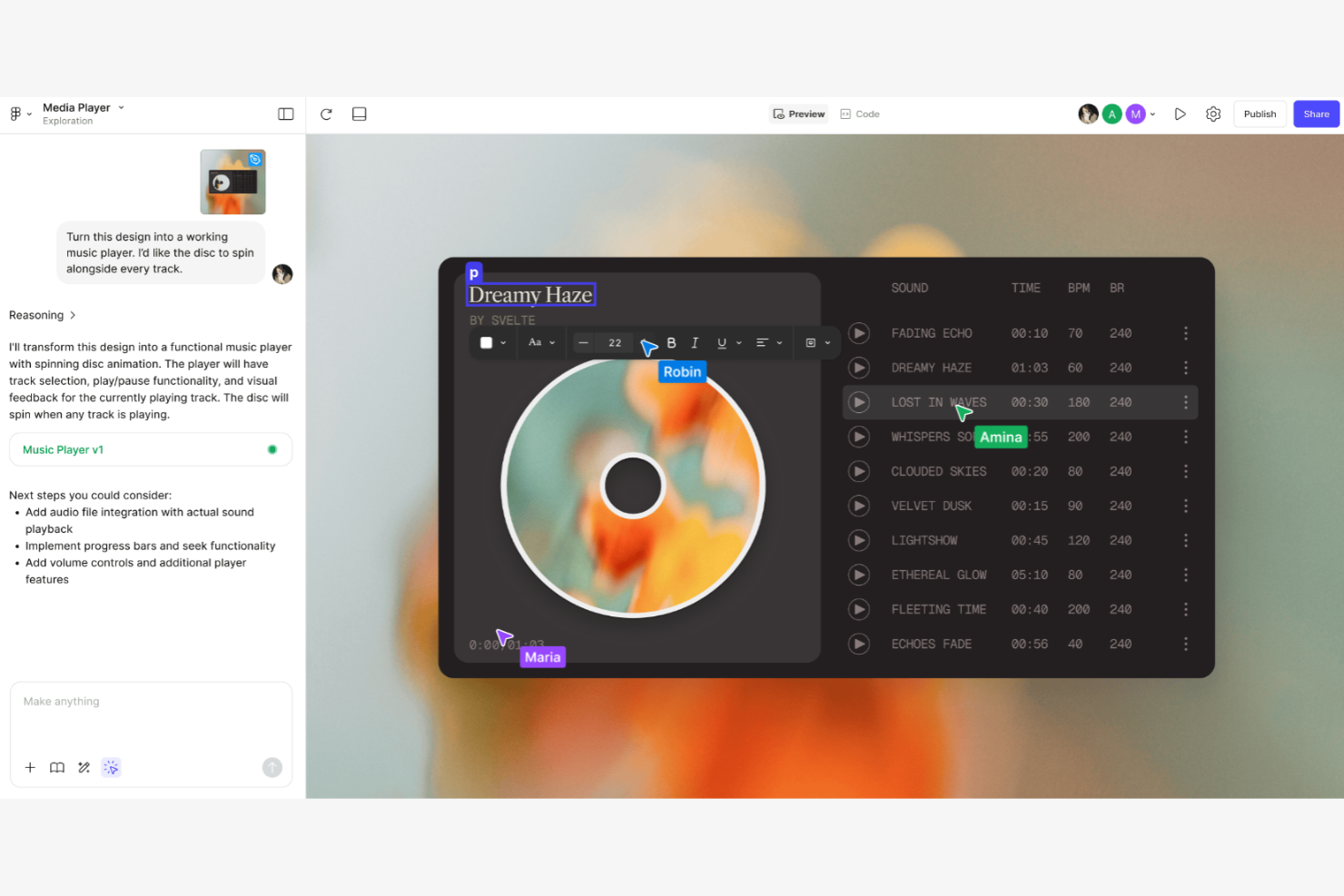
Figma is a web-based design tool used by UI/UX designers and creative teams to design and prototype digital products. It allows for real-time collaboration on wireframes, mockups, and prototypes.
Why Figma is a good Visio alternative: Figma offers integrated design and prototyping features that let your team move smoothly from design to testing. Its cloud-based nature enables real-time collaboration, ensuring everyone is on the same page. The tool includes advanced design features, improving precision and creativity. It uses shapes and connectors that snap to the grid to map out flows. Unlike Visio, Figma focuses on user interface design, making it ideal for digital product teams, and it has an ecosystem of plugins that extends its functionality.
Standout Features and Integrations:
Features include vector editing, which allows for precise design work. You can use prototyping features to create interactive and clickable prototypes. Figma's component system helps your team maintain consistency across design projects.
Integrations include Slack, Microsoft Teams, Jira, Trello, Dropbox, Notion,, and more.
Pros and Cons
Pros:
- Ideal for digital products
- Integrated design and prototyping
- Web-based and cross-platform
Cons:
- Lags with very large/complex files
- No true offline editing mode

FigJam
Best for AI-powered real-time brainstorming
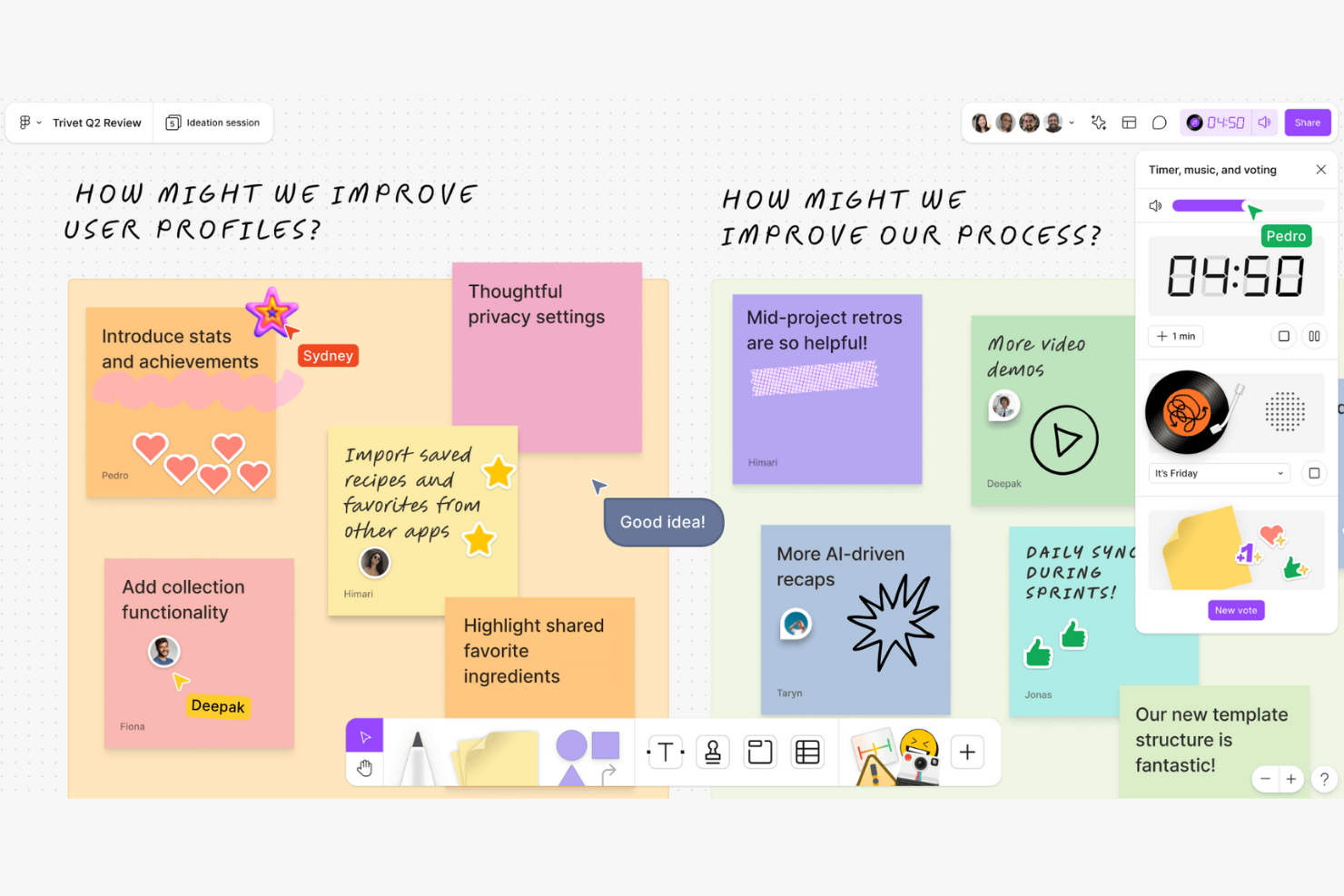
FigJam is an online whiteboard tool designed for collaborative brainstorming and team workshops. It serves designers, product teams, and educators who need to ideate and plan interactively.
Why FigJam is a good Visio alternative: FigJam offers real-time brainstorming capabilities that allow your team to collaborate and share ideas instantly. The tool includes sticky notes, drawing tools, and emojis to make sessions more interactive. Its infinite canvas provides flexibility, letting you explore ideas without constraints. Unlike Visio, FigJam focuses on fostering creativity and interaction, making it perfect for brainstorming sessions.
Standout Features and Integrations:
Features include sticky notes for jotting down quick ideas during meetings. You can use drawing tools to sketch concepts directly on the canvas. FigJam also offers voting features, helping your team prioritize ideas effectively.
Integrations include Slack, Microsoft Teams, Jira, Trello, Zoom, Asana, and Airtable.
Pros and Cons
Pros:
- Infinite canvas
- Interactive brainstorming tools
- Real-time collaboration
Cons:
- Higher cost for larger teams
- Fewer templates than Miro or Mural

Creately
Best for AI-driven collaborative whiteboarding
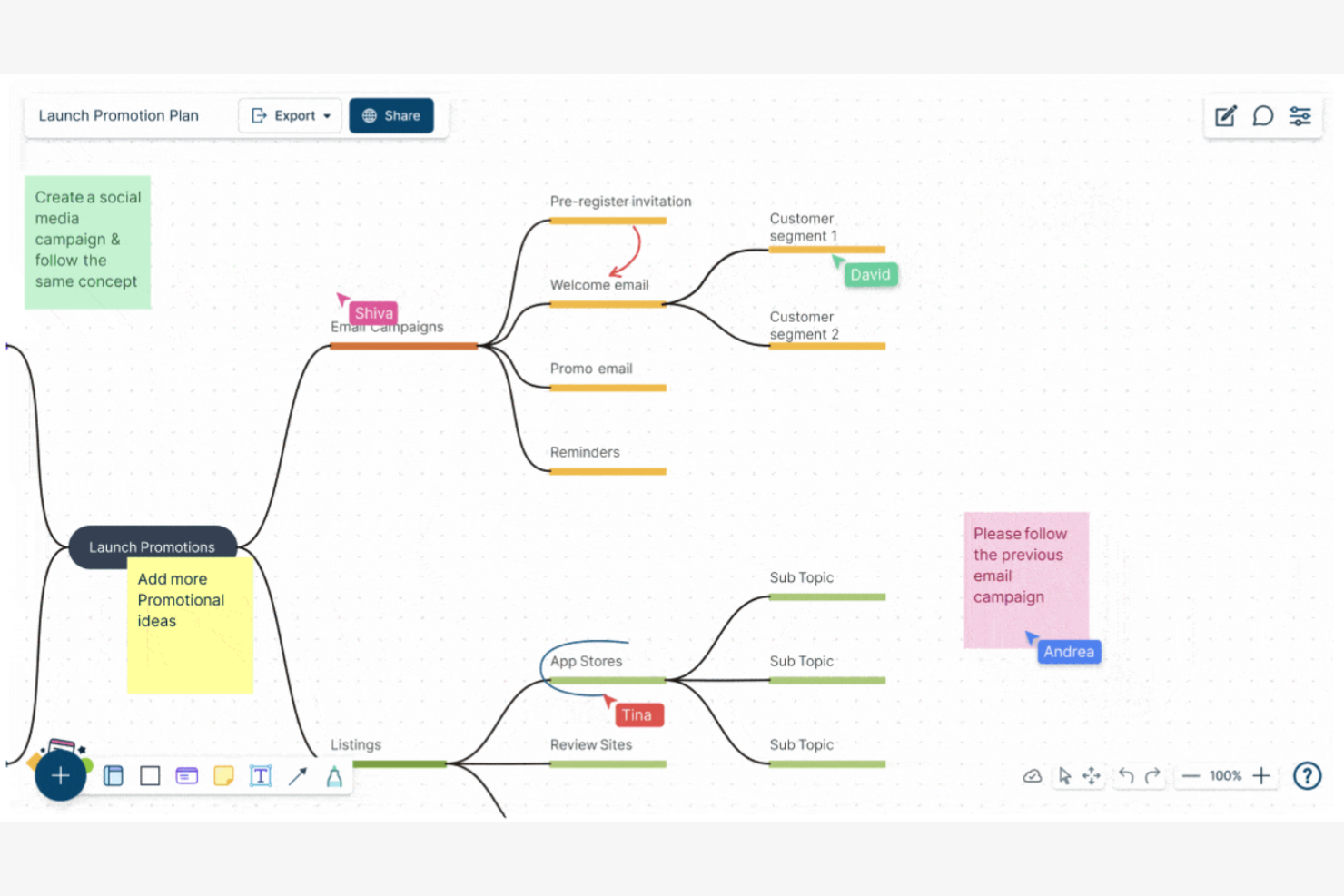
Creately is a visual collaboration tool used for diagramming and whiteboarding, ideal for teams in education, design, and project management. It helps users map processes, brainstorm ideas, and create visual content collaboratively.
Why Creately is a good Visio alternative: Creately offers collaborative whiteboarding features that enable your team to work together on a shared canvas. The tool provides a wide range of templates and shapes that simplify diagram creation. Its AI-driven, intuitive interface allows even non-technical users to contribute effectively. Unlike Visio, Creately's emphasis on collaboration makes it a more engaging option for team projects.
Standout Features and Integrations:
Features include real-time collaboration, which keeps everyone on the same page. The ability to add notes and comments directly on the canvas helps your team communicate ideas clearly. You can also track changes and revisions to ensure everyone is aligned with the project goals.
Integrations include Google Drive, Slack, Confluence, Microsoft Teams, and more.
Pros and Cons
Pros:
- Easy onboarding process
- Track changes and revisions
- Collaborative mindmapping
Cons:
- Occasional sync delays for teams
- Laggy with complex, large diagrams

EdrawMax
Best for extensive templates
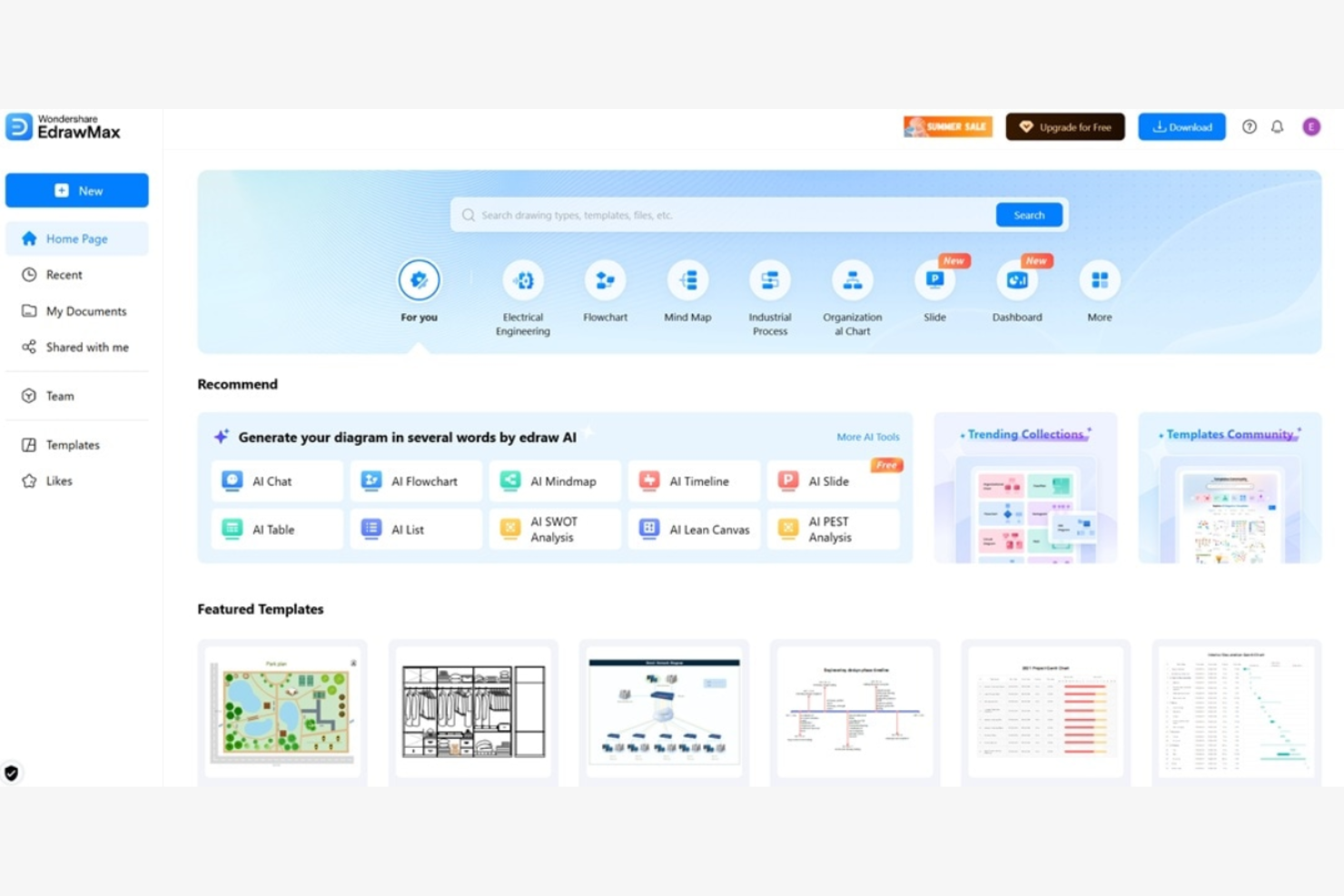
EdrawMax is a versatile diagramming tool used by professionals in engineering, design, and education to create detailed visuals. It helps users design flowcharts, mind maps, and floor plans efficiently.
Why EdrawMax is a good Visio alternative: EdrawMax offers an extensive library of templates and symbols that cater to various industries, allowing your team to start projects quickly. Its interface is intuitive, allowing even first-time users to create complex diagrams. EdrawMax provides more customization options than Visio, boosting creativity and flexibility.
Standout Features and Integrations:
Features include vector-based drawing, which ensures clarity in your diagrams. You can use the drag-and-drop functionality to simplify the diagram creation process. The software also supports multi-page diagrams, allowing your team to organize complex information effectively.
Integrations include Microsoft Office, Google Workspace, Dropbox, and GitHub.
Pros and Cons
Pros:
- Supports a wide range of diagram types
- Supports vector graphics
- Extensive template library
Cons:
- Inconsistent importing of Visio files
- Lacks depth in specialized features

Best for user-friendly interface
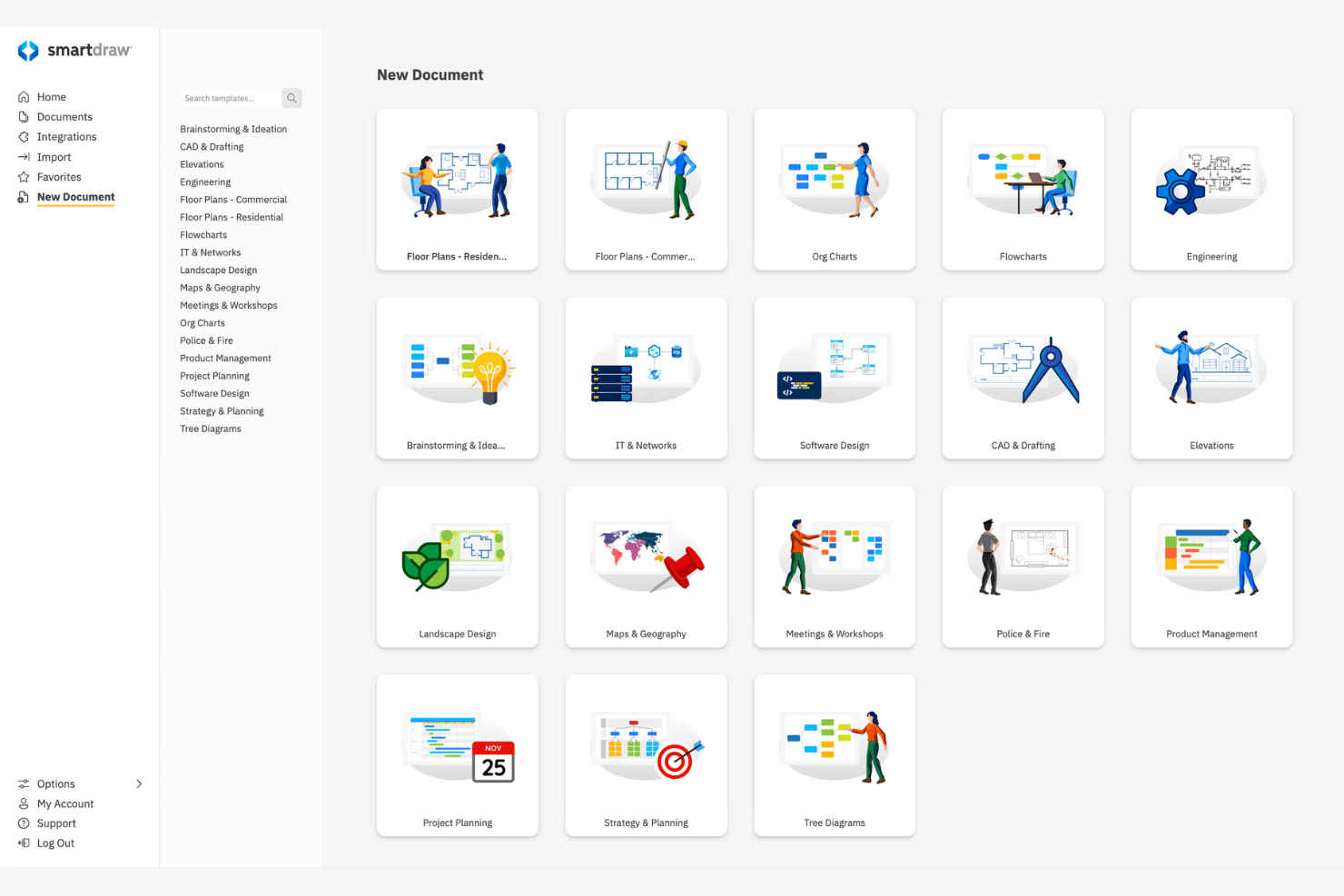
SmartDraw is a diagramming software designed for creating flowcharts, org charts, and other visuals. It serves business professionals, project managers, and architects who need to visualize data and processes.
Why SmartDraw is a good Visio alternative: SmartDraw's user-friendly interface allows your team to quickly create professional diagrams without extensive training. SmartDraw offers the leading import for Visio files and stencils, allowing you to convert files accurately. SmartDraw is more intuitive than Visio, making it accessible for users of all skill levels.
Standout Features and Integrations:
Features include intelligent formatting that keeps your diagrams neat as you edit. You can access an extensive library of templates and symbols to jumpstart your projects. The ability to export diagrams to various file formats makes sharing your work straightforward.
Integrations are not publicly listed.
Pros and Cons
Pros:
- Suitable for all skill levels
- Intelligent diagram formatting
- User-friendly interface
Cons:
- Free trial blocks all exports
- Weak real-time collaboration

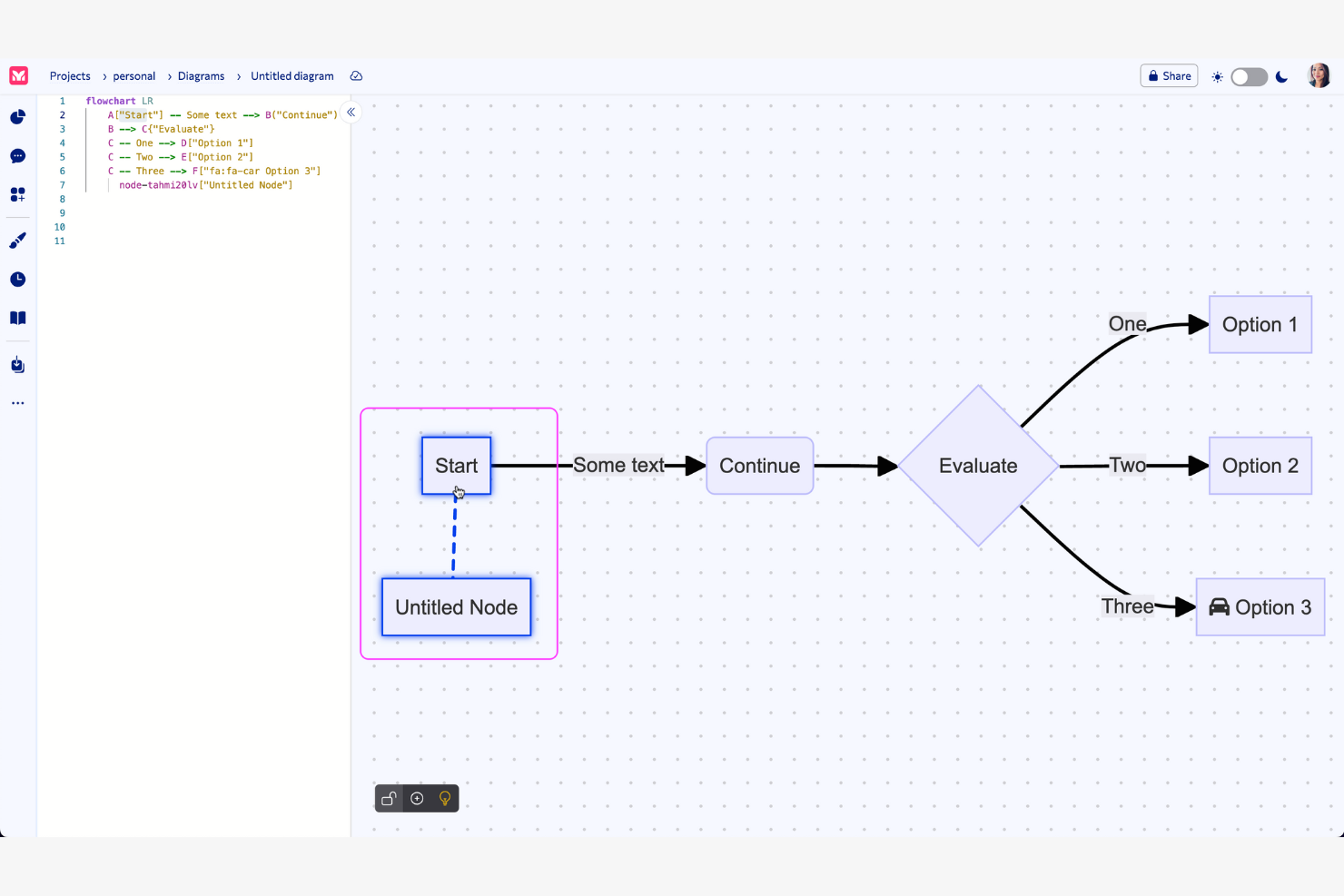
Mermaid is a text-based diagramming tool used by developers and technical teams to create visual diagrams through simple text definitions. It facilitates the creation of flowcharts, sequence diagrams, and more, transforming text into visual charts.
Why Mermaid is a good Visio alternative: Mermaid simplifies the creation of complex visuals with straightforward text input. This method supports efficient version control and integrates well into coding workflows. The tool's simplicity allows for quick diagram updates as projects evolve, and it offers AI-powered real-time preview functionality, allowing you to see changes to your code immediately. Mermaid caters to users who prefer writing code over using graphical interfaces.
Standout Features and Integrations:
Features include the ability to render diagrams from text-based input, which simplifies the creation and editing process. You can collaborate in real time with your team, increasing productivity. Additionally, Mermaid supports multiple diagram types, offering flexibility for various project needs.
Integrations include Visual Studio Code, GitHub, Confluence, Jira, ChatGPT, and more.
Pros and Cons
Pros:
- Ideal for coding workflows
- Real-time preview functionality
- Create diagrams from plain text
Cons:
- Lacks drag-and-drop features
- Limited styling

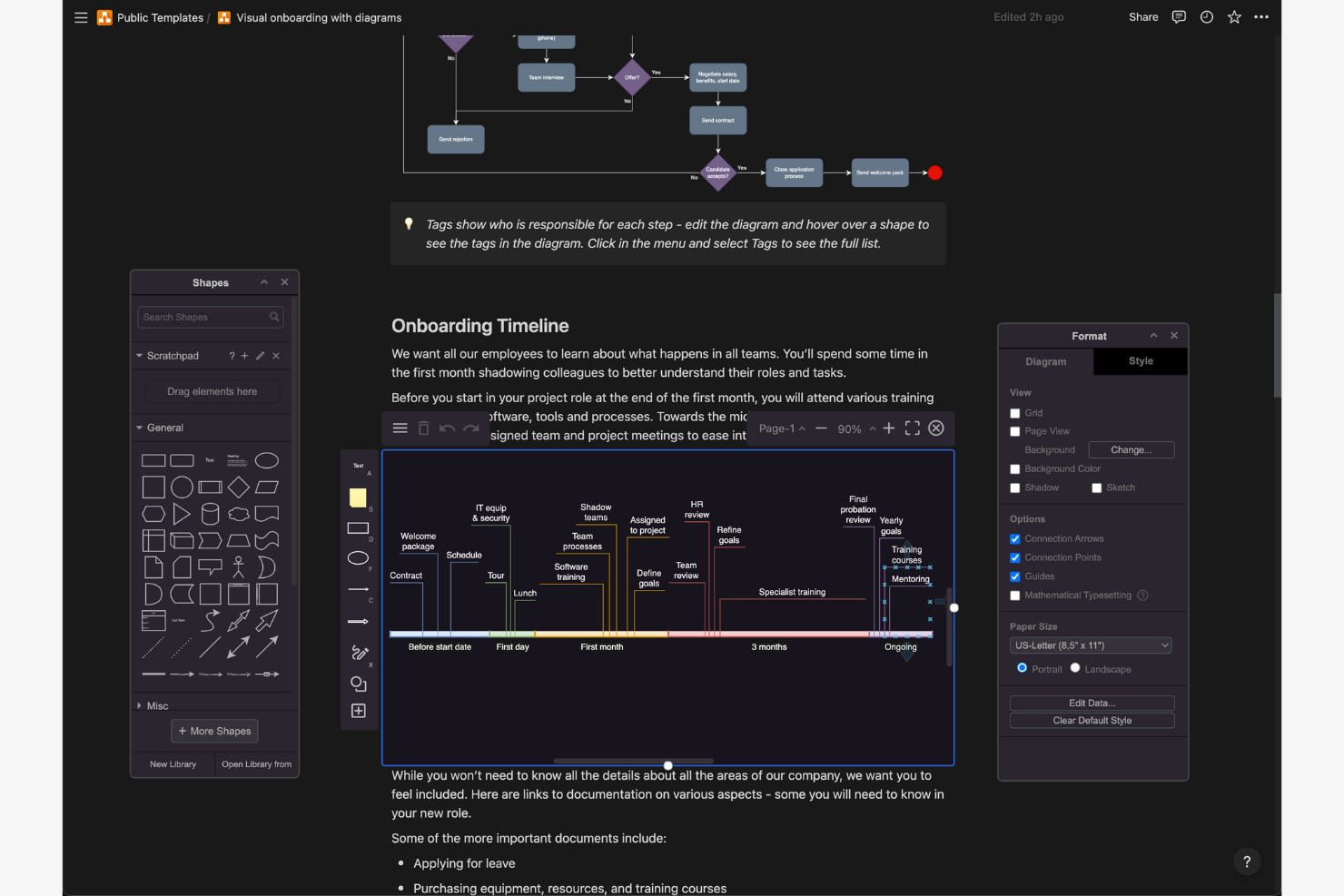
draw.io is an online diagramming tool used by teams who need to create flowcharts, network diagrams, and more. It's popular with professionals in IT, engineering, and education for visualizing processes and systems.
Why draw.io is a good Visio alternative: draw.io offers privacy-focused storage options, allowing your team to choose where to save your diagrams. Its open-source nature means you have more control over your data. draw.io desktop is a stand-alone, offline application available for Windows, macOS, and Linux, which is ideal if you want the security of a desktop application with no reliance on an internet connection. The tool has a simple interface that doesn't require extensive training. This free Visio alternative is accessible for budget-conscious teams.
Standout Features and Integrations:
Features include a user-friendly drag-and-drop interface that simplifies diagram creation. You can access a wide range of templates to quickly start your projects. Version control helps your team track changes and collaborate effectively.
Integrations include Google Drive, Microsoft OneDrive, Microsoft SharePoint, Dropbox, GitHub, and more.
Pros and Cons
Pros:
- Free version available
- Open-source flexibility
- Privacy-focused data storage
Cons:
- Limited performance with large, complex diagrams
- Manual line snapping is tedious

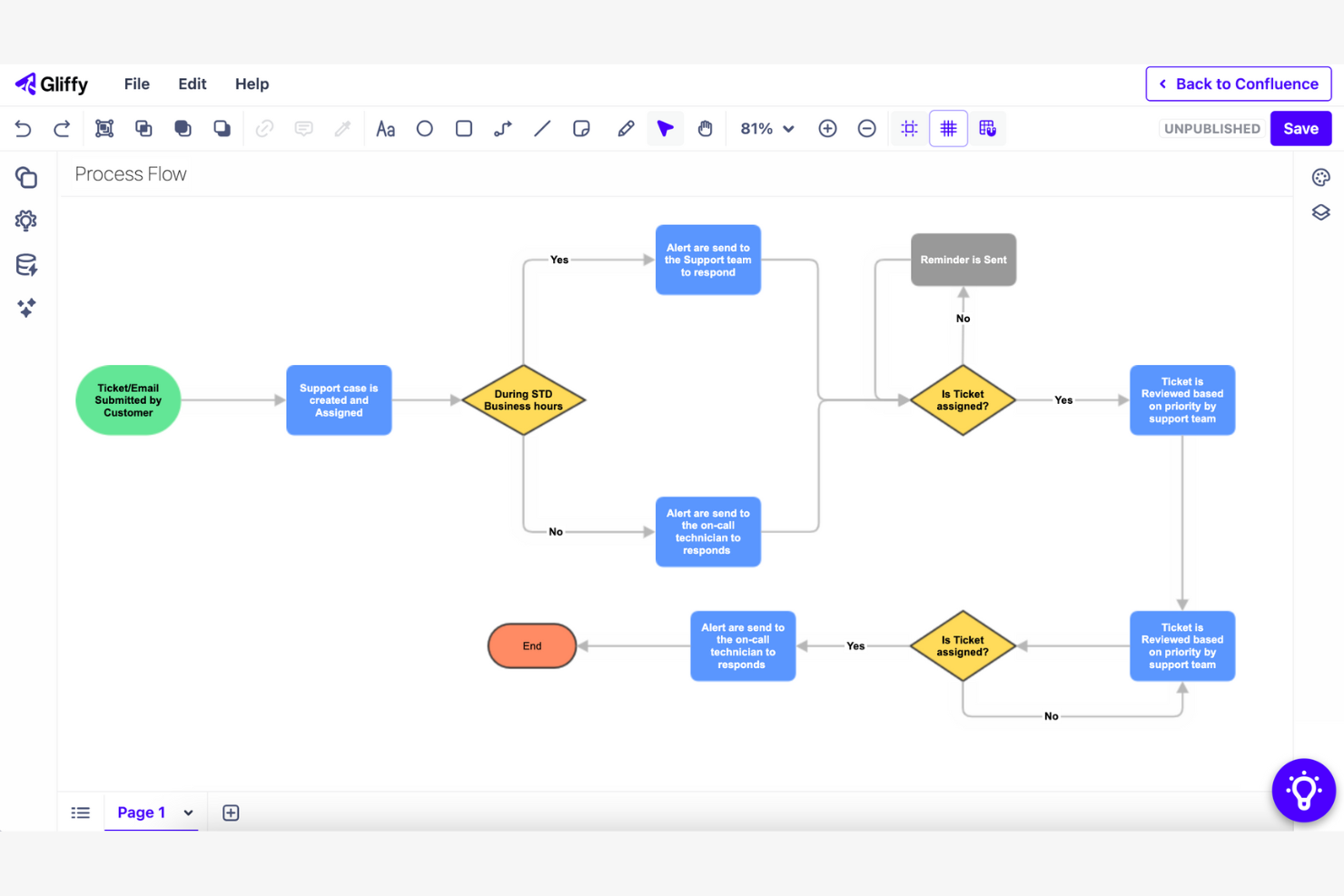
Gliffy is a web-based diagramming tool that helps teams create flowcharts, wireframes, and network diagrams. It is popular among project managers, developers, and IT professionals who need to visualize processes and systems.
Why Gliffy is a good Visio alternative: Gliffy integrates with Confluence, allowing your team to embed diagrams directly into your Confluence pages. This feature boosts collaboration by keeping everyone on the same page. The tool provides an intuitive interface, allowing your team to start diagramming without extensive training. Gliffy is designed to work within your existing Confluence environment, simplifying workflow integration.
Standout Features and Integrations:
Features include a drag-and-drop interface that simplifies diagram creation. You can use a variety of templates to quickly start your projects. Gliffy also offers automatic diagram updates, ensuring your visuals stay current as your projects evolve.
Integrations include Confluence, Jira, Slack, Mermaid, and more.
Pros and Cons
Pros:
- Automatic diagram updates
- Drag-and-drop interface
- Confluence integration
Cons:
- Can be slow with complex diagrams
- No mobile app


Cacoo is a cloud-based diagramming tool used by teams in design, marketing, and project management to create and share diagrams. It supports collaborative work on flowcharts, wireframes, and network diagrams.
Why Cacoo is a good Visio alternative: Cacoo offers project collaboration features that allow multiple users to edit diagrams simultaneously, ensuring everyone is aligned. With its extensive template library, your team can quickly start new projects. The tool supports the exporting of PNG, SVG, PDF, PS, and PPT files. Cacoo focuses on boosting teamwork and real-time communication, making it ideal for collaborative environments.
Standout Features and Integrations:
Features include real-time collaboration, which keeps your team connected during diagram creation. You can comment directly on diagrams, facilitating clear communication. Cacoo also provides version history, allowing you to track changes and revert if needed.
Integrations include Slack, Google Drive, Google Docs, Dropbox, Adobe Creative Cloud, and Visio.
Pros and Cons
Pros:
- Manage work visually with Kanban boards
- Direct commenting on diagrams
- Real-time editing
Cons:
- Less suitable for specialized teams
- Dated interface and UX elements

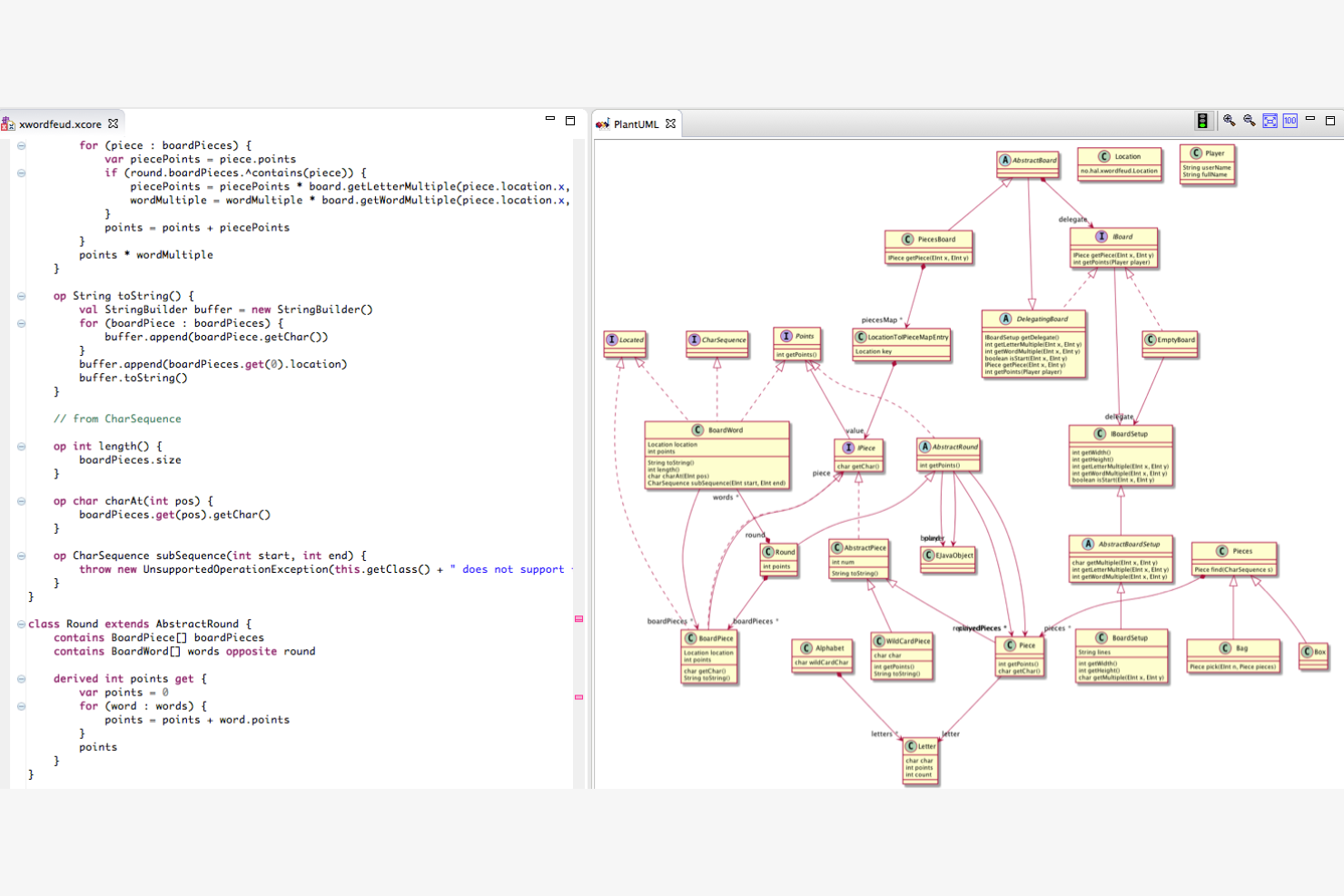
PlantUML is a tool for creating UML diagrams using a simple text description, catering mainly to developers and technical teams. It helps visualize complex systems and processes through diagrams for sequence, use case, and activity.
Why PlantUML is a good Visio alternative: PlantUML's text-based diagramming approach allows your team to generate diagrams quickly by writing simple code. This method makes version control easier and supports integration with development workflows. The tool is lightweight, making it suitable for environments where resources are limited. Unlike Visio, PlantUML is ideal for teams that prefer a code-centric approach to diagramming.
Standout Features and Integrations:
Features include the ability to create diagrams through text scripts, which simplifies the diagramming process. You can update and maintain diagrams as your projects evolve. The software supports a wide range of UML diagram types, providing flexibility for different project needs.
Integrations include Visual Studio Code, IntelliJ IDEA, Eclipse, Microsoft Word, and more.
Pros and Cons
Pros:
- Straightforward version control
- Lightweight software
- Text-based diagram creation
Cons:
- Limited visual customization
- Requires coding knowledge
Diğer Visio Alternatifleri
İşte kısa listeme giremeyen ancak yine de göz atmaya değer bazı ek Visio alternatifleri:
- Miro
For AI-powered team collaboration tools
- Lucidchart
For AI-driven diagrams
- yWorks
For graph visualization tools
- Visual Paradigm Online
For AI-powered UML diagram creation


How I Evaluate Visio Alternatives
When a PM needs to document a release process or map a RACI, the tool has to do more than draw shapes—I evaluate each option on baseline diagramming capability first, then on what sets it apart.
Core Functionality (Table Stakes For This List)
When I'm selecting tools for my list, I rank each one on a scale from 0 (does not offer the functionality) to 5 (excels in this area) for each core functionality listed below. Then, I calculate the tool's total score into a percentage. Each tool needs to achieve a minimum total score of 65% to be considered for inclusion.
- Diagramming & Flowchart Creation: I evaluate how many diagram types each tool supports, from basic flowcharts to swimlanes, BPMN process maps, and network topology diagrams.
- Templates & Shape Libraries: A solid template library matters when you need to spin up a sprint workflow or org chart fast. I look for PM-specific stencils and shape sets.
- Real-Time Collaboration: I check whether multiple team members can co-edit a diagram at once, leave contextual comments, and track version history across revisions.
- Visio File Compatibility: Teams migrating from Visio need clean .vsdx import and export. I evaluate how well each tool handles round-trip fidelity with existing Visio files.
- Cross-Platform Accessibility: Visio's Windows-only desktop app is a common reason teams look elsewhere. I look for web-based access and support across macOS and Linux.
- PM Tool Integrations: Project diagrams live inside broader workflows, so I check for native connections to tools like Jira, Confluence, Microsoft Teams, and Google Workspace.
Once I have a list of tools that meet this criteria, I consider what sets each platform apart.
Differentiating Factors (What Sets Vendors Apart)
Here's how I compare and contrast different vendors:
Standout Features
AI-assisted diagramming is a big differentiator. Tools that generate flowcharts from text prompts or auto-arrange complex process maps save real time during sprint planning. I also look for data-linked diagrams that pull live data from spreadsheets or databases, keeping resource maps and status dashboards current without manual updates. Presentation mode matters too, especially when you need to walk leadership through a release plan without exporting to a separate slide deck.
Beyond Features
Pricing structure is one of the first things I evaluate. Some tools offer generous free tiers for individual PMs, while others require per-seat licensing that adds up fast across a PMO. Security and compliance also weigh heavily—I check for SOC 2 certification, SSO/SAML support, and role-based access controls, especially for enterprise teams handling sensitive project data. Migration tooling deserves attention too. When you're moving hundreds of Visio files, I look at how well each vendor supports bulk .vsdx imports and library migration.
Neden Visio Alternatifi Aramalısınız?
Visio iyi bir diyagram oluşturma aracı seçeneği olsa da bazı kullanıcıların alternatif çözümler aramasının çeşitli nedenleri vardır. Şu nedenlerle bir Visio alternatifi arıyor olabilirsiniz…
- Daha uygun fiyatlı bir seçeneğe ihtiyacınız var
- Ekibiniz daha kolay iş birliği araçları istiyor
- Diğer uygulamalarla daha iyi entegrasyona ihtiyacınız var
- Daha basit bir kullanıcı arayüzünü tercih ediyorsunuz
- Tüm cihazlarda kullanılabilen bir araca ihtiyacınız var
- Ekibinizin daha fazla özelleştirme seçeneğine ihtiyacı var
Bunlardan herhangi biri sizi anlatıyorsa doğru yere geldiniz. Listemde, Visio ile ilgili bu zorluklarla karşılaşan ve alternatif çözümler arayan ekipler için daha uygun olan çeşitli diyagram oluşturma aracı seçenekleri bulunuyor.
Visio'nun Temel Özellikleri
Alternatif çözümlerin sunduklarını karşılaştırmanıza yardımcı olmak için Visio'nun bazı temel özelliklerini burada bulabilirsiniz:
- Diyagram oluşturma: Çeşitli türlerde diyagramlar oluşturabilir ve bunları SharePoint veya OneDrive'a kaydederek projelerinizi düzenlemeyi ve bunlara erişmeyi kolaylaştırabilirsiniz.
- Düzenleme araçları: Metinler ve şekiller için zengin biçimlendirme seçeneklerinin yanı sıra standart düzenleme işlevleri, diyagramlarınızı etkili bir şekilde özelleştirmenize yardımcı olur.
- Gömme: Diyagramları web sayfalarına ve SharePoint'e gömebilirsiniz; bu özellik, görsel içerikleri kuruluşunuz içinde paylaşmak için kullanışlıdır.
- Arama işlevi: Diyagramlar içindeki belirli metinleri hızlıca bulun ve karmaşık görsellerde gezinirken zamandan tasarruf edin.
- İş birliği: Gerçek zamanlı ortak yazma ve yorum yapma özellikleri, birden fazla kullanıcının diyagramlar üzerinde aynı anda çalışmasına olanak tanıyarak ekip çalışmasını kolaylaştırır.
- Çevrimdışı erişim: Masaüstü sürümü, çevrimdışı düzenlemeye olanak tanıyarak internet bağlantısı olmadan diyagramlar üzerinde çalışabilmenizi sağlar.
- Paylaşma: Ekibinize hızlı erişim sağlamak için diyagramları bağlantılar aracılığıyla paylaşın.
- Gezinme: Diyagramlarınızı kolayca görüntülemek ve düzenlemek için yakınlaştırıp uzaklaştırın ve sayfalar arasında gezinin.