

2026’da Dijital Varlıklar İçin 10 Brandfolder Alternatifi Araç

En İyi Brandfolder Alternatifleri Kısa Listesi


En iyi Brandfolder alternatiflerinin kullanımı daha sezgiseldir; böylece pazarlama materyallerini ve dijital varlıkları daha iyi depolayabilir, yönetebilir ve dağıtabilirsiniz. Ayrıca daha küçük ekip ve kuruluşlara daha uygun, daha düşük bir maliyetle sunulabilirler. Brandfolder için doğru alternatifi bulduğunuzda dijital varlık yönetimi aracınızın iş akışlarınızı desteklediğini ve varlıkları daha verimli ve etkili bir şekilde bulup kullanmanıza yardımcı olduğunu göreceksiniz.
Pazarlama alanındaki deneyimimi ve 3 yılı aşkın yazılım test deneyimimi kullanarak düzinelerce aracı inceledim ve en iyi Brandfolder alternatifleri listemi oluşturdum. Önerilerimin her biri dijital varlıklarınızı tek ve erişilebilir bir yerde düzenlemenize, bunları güvenli, paylaşılabilir ve bulunabilir durumda tutmanıza yardımcı olacaktır. Aşağıda her araç için güçlü yönleri ve temel farkları, artıları ve eksileri ile ideal kullanım alanlarını ele alıyorum.
Brandfolder Alternatifleri Nedir?
Brandfolder alternatifleri, Brandfolder'a benzer özellikler sunan ancak daha düşük fiyatlı veya daha sezgisel bir arayüze sahip dijital varlık yönetimi araçlarıdır. Buna, dijital varlıklar ve marka materyalleri (ör. logolar, görseller ve videolar) için merkezi bir depoda iş birliği, dağıtım, sürüm denetimi, meta veriler ve arama özellikleri dahildir.
Bu araçlar ayrıca Brandfolder'da bulunmayan belge karşılaştırma, sosyal medya izleme veya özel bir mobil uygulama gibi ek özellikler de sunabilir.
Why Trust Our Software Recommendations
Our team has been testing and reviewing software since 2012. As project managers ourselves, we know how difficult—and important—it is to choose the right software.
For this guide, we evaluated tools using hands-on testing and independent research, scoring tools using our selection criteria. We also draw on insights from industry thought leaders and practicing project management experts.
Our reviews reflect our human editorial judgment, not a sales pitch.
Expert reviewers:
Brandfolder Alternatifleri Karşılaştırma Tablosu
En iyi Brandfolder alternatiflerimin fiyatlarını ve temel özelliklerini karşılaştırmak için bu karşılaştırma tablosunu kullanın.
| Tool | Starting Price | Website | |
|---|---|---|---|
| Best for centralized brand governance | 4.4 out of 5 | Pricing upon request Not available | Website |
| Best for automated tagging and metadata control | 4.8 out of 5 | $99/month Free plan + 14-day free trial + demo available | Website |
| Best for AI-powered visual asset organization | 4.8 out of 5 | $250/month Free plan + free trial available | Website |
| Best for advanced asset management | 4.5 out of 5 | Pricing upon request Free demo available | Website |
| Best for smart search capabilities | 4.6 out of 5 | $900/month Free plan + demo available | Book Demo |
| Best for online proofing tools | 4.7 out of 5 | $29/month 30-day free trial available | Website |
| Best for developing brand strategy | 4.7 out of 5 | Pricing upon request Free demo available | Website |
| Best for managing marketing resources | 4.5 out of 5 | $567/month Free demo available | Website |
| Best for brand asset kits | 4.6 out of 5 | $80/month + $16/user/month 30-day free trial + free demo available | Website |
| Best for integrating and managing office workflows | 4.4 out of 5 | $7.30/user/month 30-day free trial available | Website |
En İyi Brandfolder Alternatifleri İncelemeleri
Brandfolder için her alternatif hakkında ayrıntılı incelemelerimi burada bulabilirsiniz. Her aracın avantajlarını ve dezavantajlarını, özelliklerini ve kullanım alanlarını ele alıyorum.

Papirfly
Best for centralized brand governance
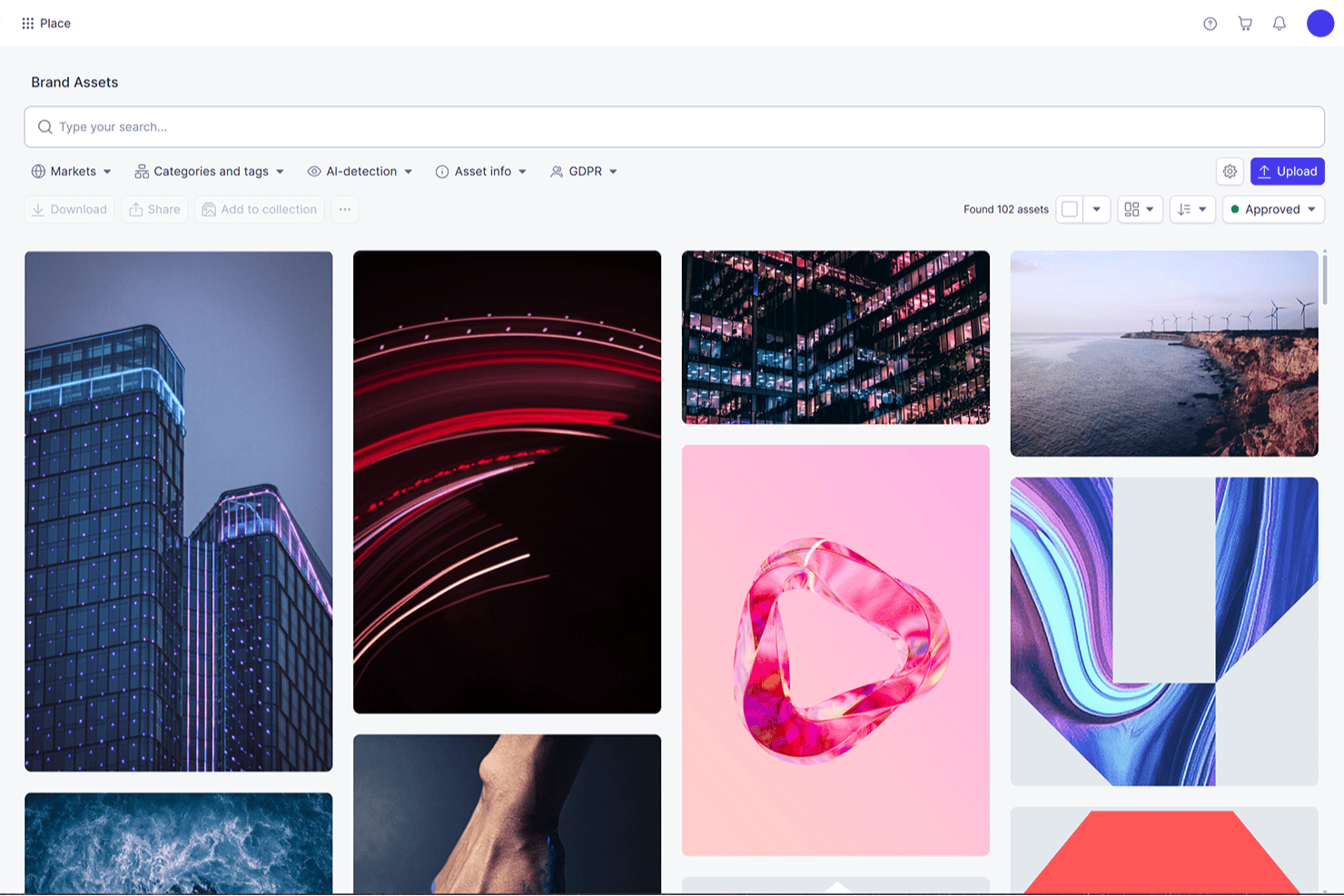
Papirfly is an enterprise brand and marketing platform that combines digital asset management, templated content creation, brand portals, and campaign approval workflows in one governed environment.
Who Is Papirfly Best For?
Papirfly is a strong fit for enterprise marketing and brand teams that need to govern content creation, approvals, and asset distribution across global or distributed teams from a single platform.
Why I Picked Papirfly
Papirfly earns its spot on my shortlist because of how seriously it takes brand governance at the enterprise level. I love that it combines locked templates, embedded brand rules, and multi-step approval workflows in one place, so distributed teams can't go off-brand even when creating content independently. Its Brand Assistant pulls directly from your published brand portals to answer brand guideline questions in context, which I find genuinely useful when global teams are working across regions and languages.
Papirfly Key Features
- AI-powered auto-tagging: Automatically adds metadata and searchable tags to uploaded assets using visual recognition to identify products, logos, people, and themes.
- Plan Approval workflows: Supports simple and multi-step review processes with reviewer notifications, comments, annotations, and status tracking against review deadlines.
- Shared Collections: Lets users create asset collections with expiry dates that can be shared via direct link or email with internal and external stakeholders.
- InDesign file conversion: Converts existing InDesign files into editable templates within the platform for ongoing use across campaigns.
Papirfly Integrations
Papirfly lists integrations with Adobe Creative Cloud, Figma, Microsoft 365, Optimizely, Shopify, Salesforce, Google Drive, and SharePoint, plus other named connections. It also offers a REST API for custom integrations.
Pros and Cons
Pros:
- Version history supports comparison and restoration
- Campaign approvals connect reviews to deadlines
- Locked templates reduce off-brand requests
Cons:
- Image search needs stronger subject-matter tags
- Uploaded files can be cumbersome to rearrange
New Product Updates from Papirfly

Papirfly Prove Enterprise Adds Analytics Agent
Papirfly Prove Enterprise adds Analytics Agent for asking data questions in plain language and generating figures or charts. This helps users explore analytics without setting up filters or queries. For more information, visit Papirfly’s official site.
 .

Best for automated tagging and metadata control
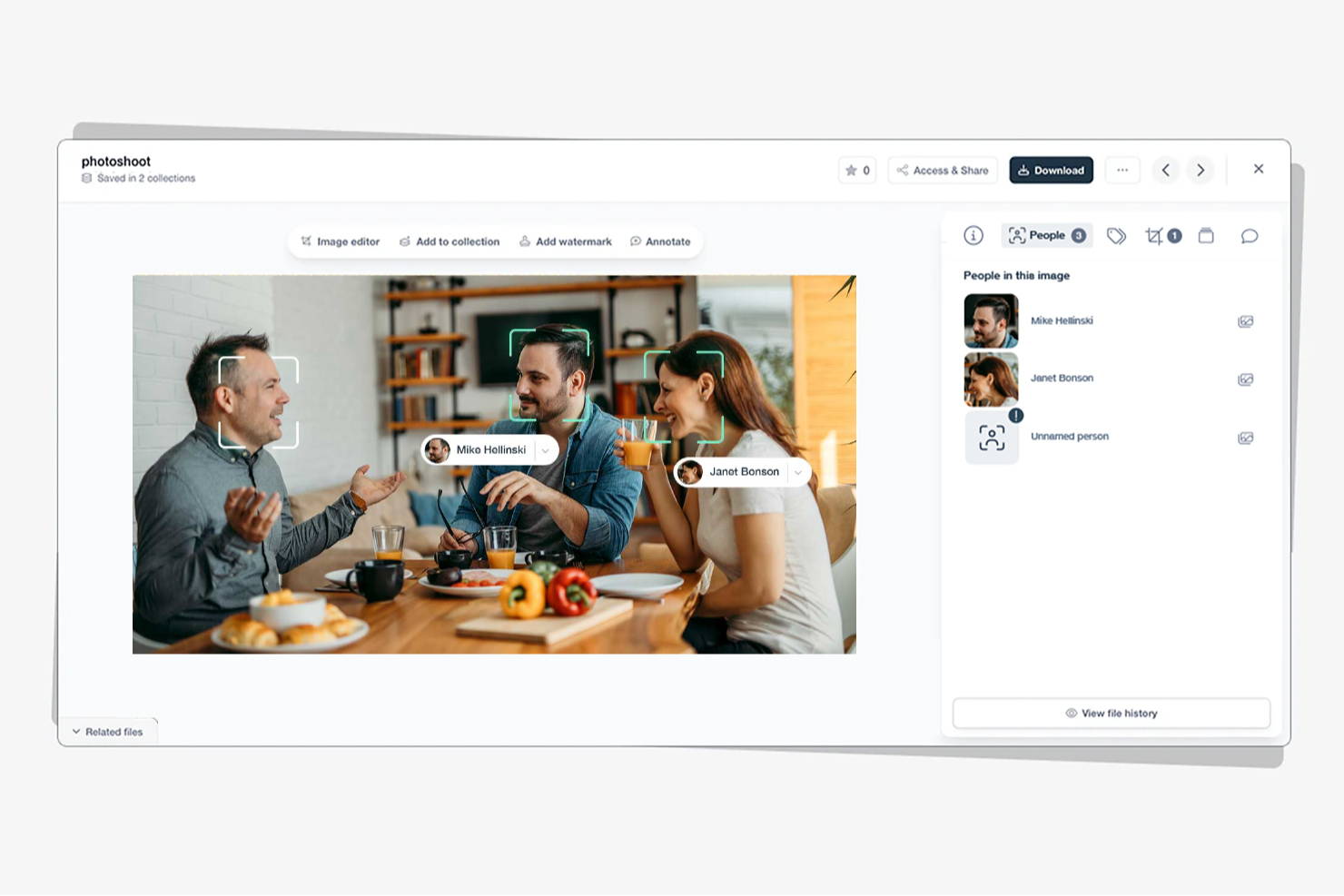
Stockpress is a digital asset management platform built around AI-powered tagging, metadata control, and searchable asset organization, with tools for file versioning, access controls, branded Content Portals, and integrations with Adobe, Figma, and Canva.
Who Is Stockpress Best For?
Stockpress is a strong fit for marketing and brand teams that manage large volumes of visual assets and need AI-powered tagging to keep their library organized and searchable without manual overhead.
Why I Picked Stockpress
Stockpress earns its spot on my shortlist because of how seriously it takes metadata and tagging as a foundation, not an afterthought. I love that AI tagging runs automatically on every image from day one, with the ability to enable video tagging separately, and that custom metadata groups let you build a taxonomy that actually mirrors how your team searches. File statuses can be configured to block downloads or apply watermarks, so unapproved assets don't slip through during active campaigns.
Stockpress Key Features
- Content Portals: Build branded, shareable external pages that include Collections, files, videos, links, brand colors, and fonts for partners or clients.
- Guest upload pages: Create public submission pages where external contributors can upload files directly into a workspace Collection without becoming users.
- File expiration dates: Set time-based expiration on files that can automatically disable downloads or apply a watermark when the deadline passes.
- Figma and Adobe integrations: Search, place, and export assets between Stockpress and Figma, Photoshop, or InDesign without leaving your creative tool.
Stockpress Integrations
Stockpress offers native integrations with Adobe Photoshop, Adobe InDesign, Figma, Canva, Dropbox, Box, Google Drive, Mailchimp, Webflow, and WordPress. Its Premium plan includes API access for custom integrations.
Pros and Cons
Pros:
- Reviewers report faster asset discovery
- Custom metadata supports consistent asset taxonomy
- AI tagging speeds visual asset discovery
Cons:
- Navigation can feel difficult with many files
- New tags can take time to appear
Best for AI-powered visual asset organization
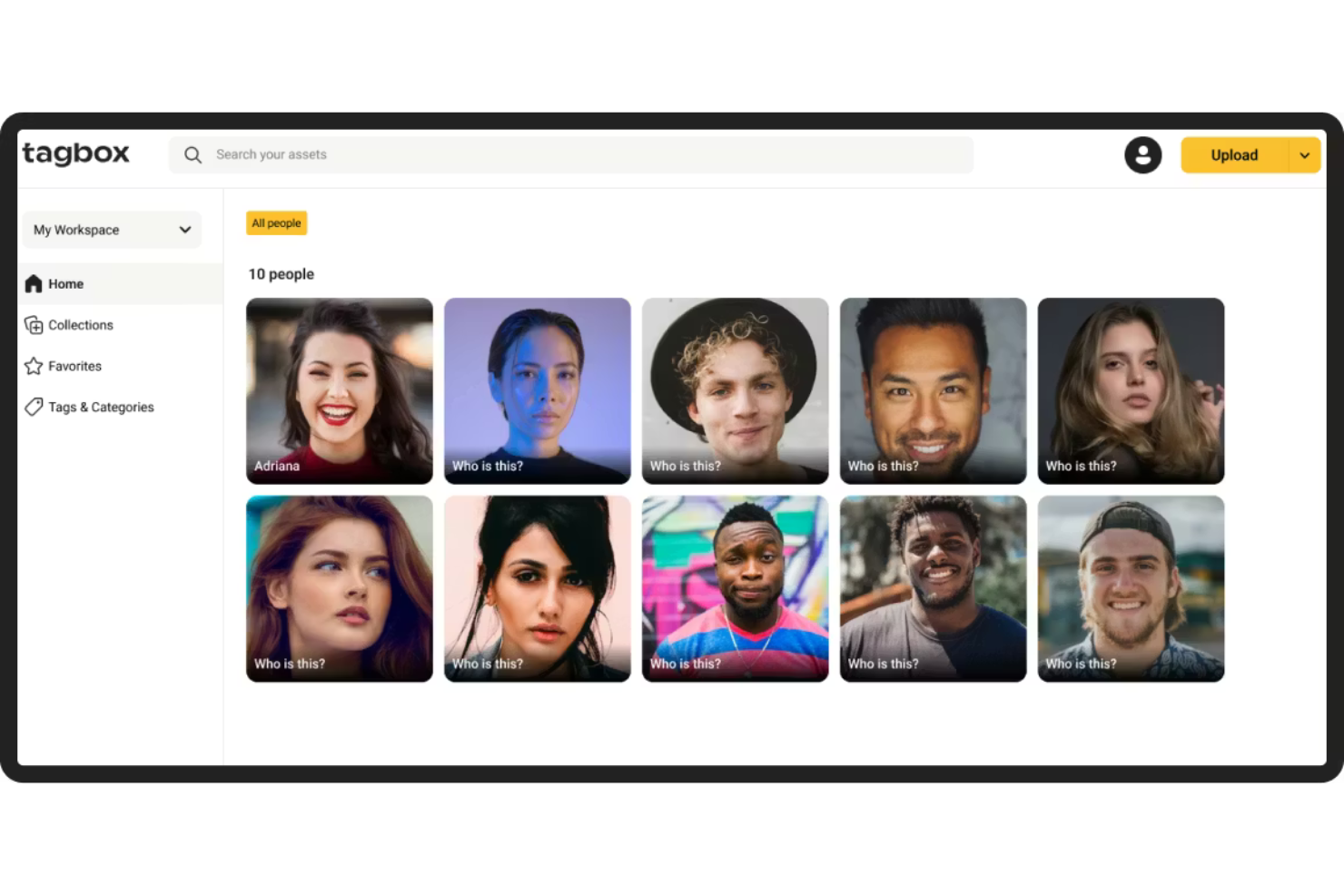
Tagbox.io is a digital asset management platform built around AI-powered visual search, metadata tagging, face recognition, and video transcription for organizing and retrieving photo and video libraries.
Who Is Tagbox.io Best For?
Tagbox.io is a strong fit for marketing teams managing large photo and video libraries who need AI-driven search and tagging to find assets fast.
Why I Picked Tagbox.io
Tagbox.io earns its spot on my shortlist because its AI visual search goes far beyond keyword matching: you can describe a scene, upload a reference image, or filter by dominant color to surface exactly the right asset. I particularly like the brand-aware AI tagging, where you train custom tags on your own product names or SKUs using example images, so every new upload is automatically categorized against your taxonomy. Combined with built-in usage rights tracking that can block downloads of expired assets, it's a solid replacement if Brandfolder's search and rights management have been letting you down.
Tagbox.io Key Features
- Face recognition: Identifies and groups people across photos and videos, letting you name, find, merge, and correct people records across your entire library.
- Video and audio transcription: Automatically transcribes video and audio in more than 100 languages and makes the content searchable alongside your other assets.
- Guest upload links: Lets external contributors submit files directly into a chosen collection with preset tags applied, without needing a workspace account.
- Copyright expiration controls: Records license expiry dates and allowed channels per asset, and automatically warns or blocks downloads when rights have lapsed.
Tagbox.io Integrations
Tagbox.io lists integrations with Canva, Claude, ChatGPT, Make, and Zapier through its API and MCP connector. It also offers a REST API and MCP connector for custom integrations.
Pros and Cons
Pros:
- Rights metadata blocks downloads of expired assets
- Brand-aware tags map product names and SKUs
- Visual search finds assets by scene/color
Cons:
- No structured brand-guideline editor or portal
- Dedicated approval workflows are absent

Bynder
Best for advanced asset management
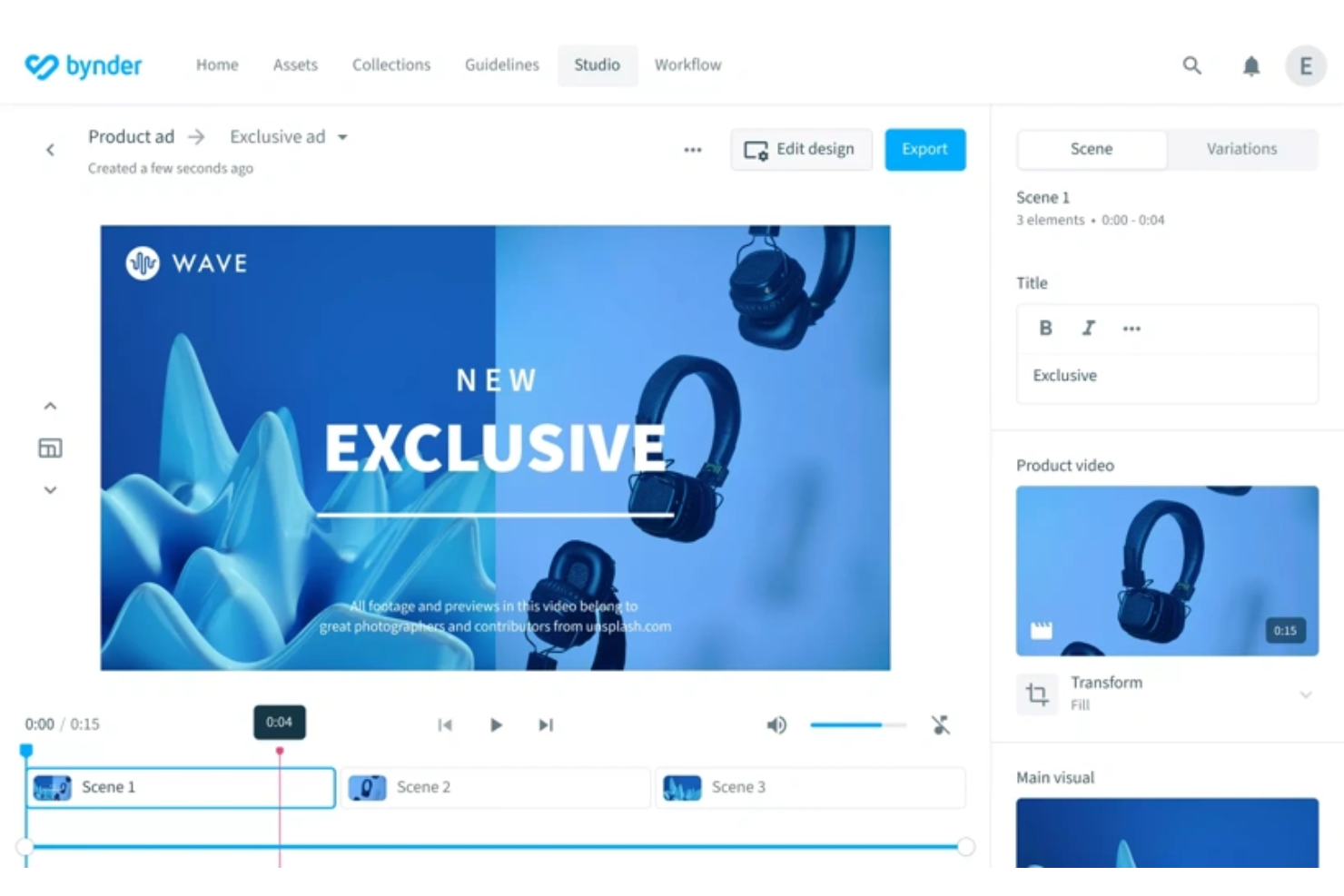
Bynder is an AI-powered digital asset management platform that centralizes asset storage, metadata tagging, brand guideline management, and creative review workflows for marketing and brand teams.
Who Is Bynder Best For?
Bynder is a strong fit for enterprise marketing and brand teams that need to manage large asset libraries, enforce brand governance, and coordinate creative workflows across multiple stakeholders.
Why I Picked Bynder
Bynder earns its spot on my shortlist because its AI-driven asset management goes deeper than most DAM platforms. I especially like the Enrichment Agents, which analyze and tag assets against your existing taxonomy automatically, and the natural-language search that lets you find assets by describing them rather than relying on exact metadata. Paired with centralized, live brand guidelines that update across every team and partner portal at once, Bynder handles the kind of large-scale asset governance that Brandfolder often can't keep up with.
Bynder Key Features
- Asset Workflow annotations: Add text and shape annotations directly on images and videos during creative review, tag colleagues, and resolve feedback with approval or rejection.
- Bulk Version Updater: Upload new versions for multiple assets at once, with files automatically matched to existing assets by filename while preserving full version history.
- Usage rights and expiration tracking: Store copyright information, licensing details, usage restrictions, and expiration dates directly on each asset's detail view.
- 170+ prebuilt integrations: Connect Bynder to tools like Salesforce, HubSpot, Shopify, Contentful, monday.com, and Hootsuite through a marketplace of prebuilt connectors.
Bynder Integrations
Bynder’s marketplace lists 176 applications, including Contentful, Shopify, Salesforce Commerce Cloud, Salesforce Marketing Cloud, Asana, SharePoint, HubSpot, monday.com, Hootsuite, and Adobe Experience Manager. It also offers a RESTful API, SDKs, and MCP for custom integrations.
Pros and Cons
Pros:
- Review annotations keep approvals tied to assets
- Brand guidelines update centrally across teams
- AI agents map metadata to taxonomies
Cons:
- Taxonomy setup and permissions need careful configuration
- Search results can be inconsistent or slow

Air
Best for smart search capabilities
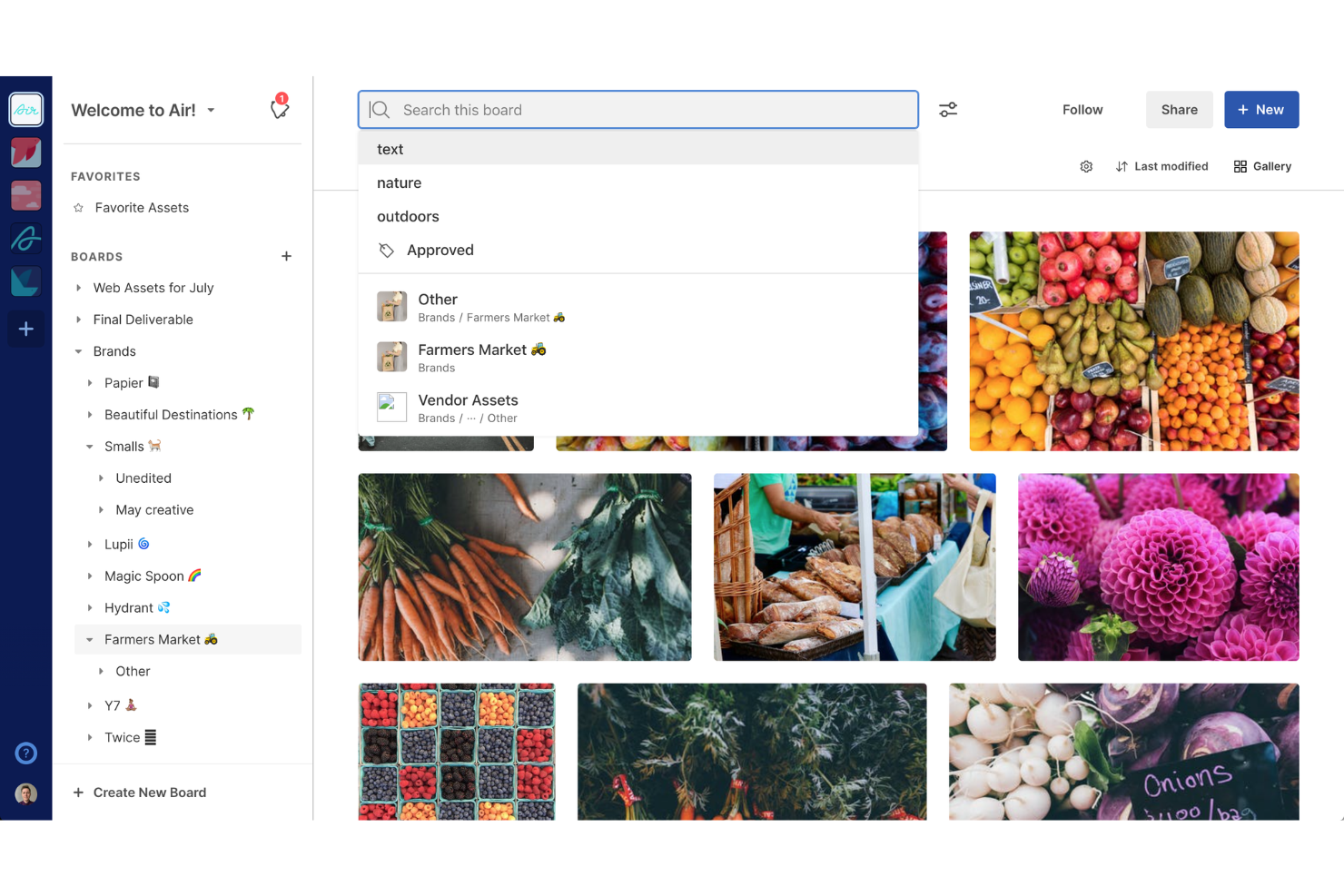
Air is a digital asset management platform that combines visual asset organization, AI-powered search and metadata tagging, creative review and approval workflows, and asset distribution tools.
Who Is Air Best For?
Air is a strong fit for creative and marketing teams that manage large volumes of visual assets and need to find the right file fast.
Why I Picked Air
Air earns its spot on my shortlist because its search capabilities genuinely set it apart from Brandfolder. I love that you can describe what you're looking for in natural language, and Air's AI surfaces assets by color, object, face, or even spoken dialogue in a video. Image Intelligence auto-generates Smart Tags on upload, so your library stays findable without manual tagging effort.
Air Key Features
- Kanban workflow boards: Track creative projects through customizable stages, with asset ownership visible across the board at a glance.
- Content collection forms: Let external contributors upload photos, videos, and files directly into your workspace without needing an Air account.
- Version history and rollback: View past asset iterations, compare changes side by side, and restore any earlier version.
- Showcases: Package selected assets into a branded public link without exposing your internal workspace or moving source files.
Air Integrations
Air documents integrations with Brandfolder, Bynder, Canto, Dropbox, Google Drive, Figma, Adobe Premiere Pro, Canva, Slack, and Zapier. It also offers a public API, TypeScript/JavaScript SDK, and OAuth 2.0 for custom integrations.
Pros and Cons
Pros:
- Reviewers praise asset organization and sharing
- AI-generated tags reduce manual labeling
- Natural-language search locates visual assets
Cons:
- Brand guidelines lack dedicated distribution controls
- Users report desktop sync instability
New Product Updates from Air
Air Introduces Workspace Agent Automations
Air adds scheduled automations, reusable skills, and run history tracking to its workspace agent. These features help teams automate recurring tasks and manage workflows without manual intervention. For more information, visit Air’s official site.
 .

Filecamp
Best for online proofing tools
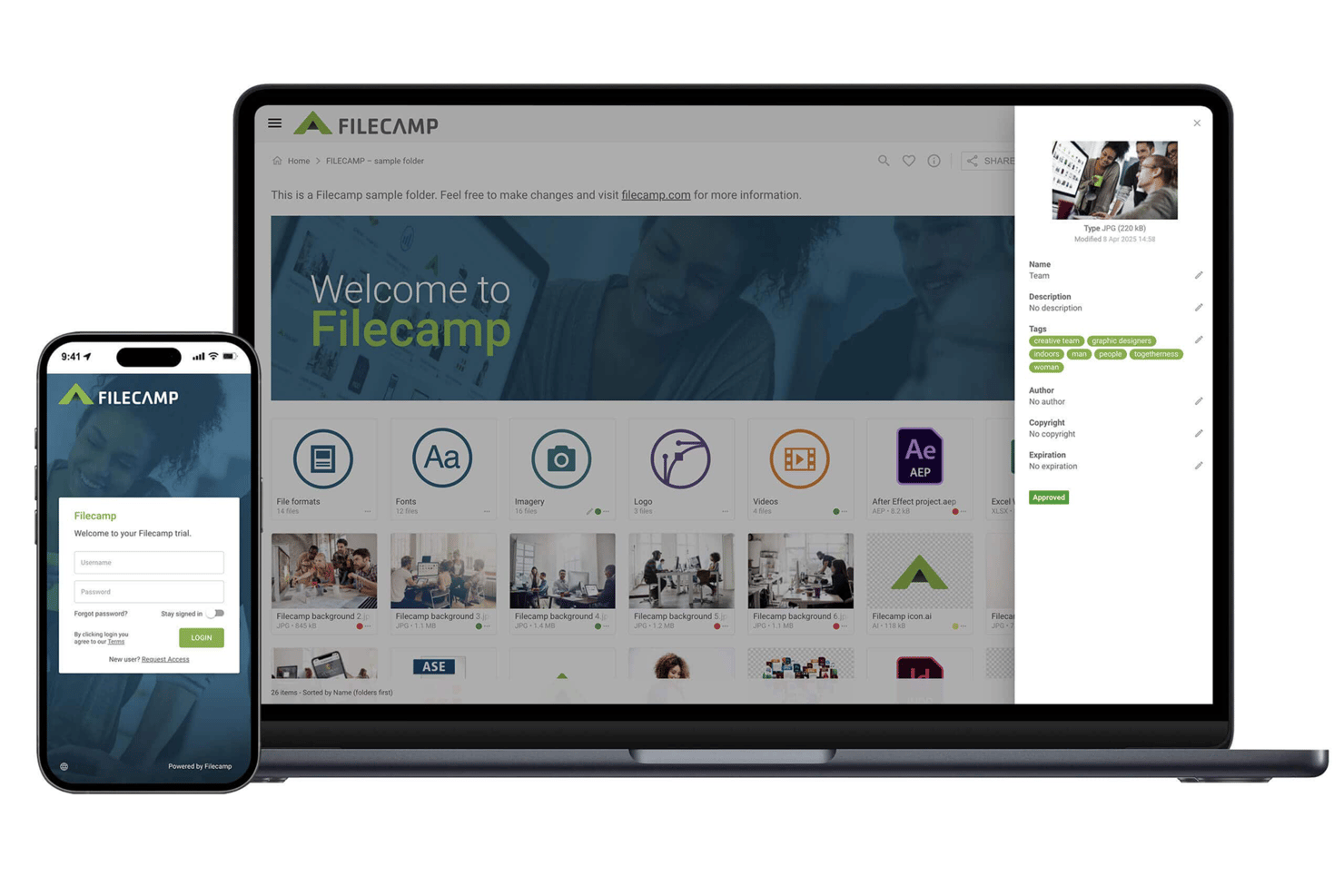
Filecamp is a digital asset management platform that combines centralized asset storage, metadata-based search, branded sharing, and browser-based online proofing with commenting, markers, and approval labels.
Who Is Filecamp Best For?
Filecamp is a good fit for marketing and creative teams at small-to-mid-sized companies that need browser-based proofing and branded asset sharing without enterprise pricing.
Why I Picked Filecamp
I picked Filecamp as one of the best because its browser-based online proofing tools are genuinely built for creative review workflows. Reviewers can drop markers directly onto PDFs, PSD, AI, and EPS files, leave threaded comments, and apply approval labels like "Pending" or "Approved," all without leaving the browser. I also like that external clients get a secure email link to review files, no Filecamp account required for access.
Filecamp Key Features
- AI auto-tagging: Filecamp analyzes uploaded images and applies suggested keywords automatically to improve search and discovery.
- Custom branded themes: Create separate branded themes and assign them to specific folders for different clients, partners, or projects.
- Granular folder permissions: Set role-based and folder-level access controls that carry through to subfolders, with custom permission sets for specific actions.
- Asset expiration management: Set expiration dates on assets so Filecamp automatically removes them from the library when they're no longer current.
Filecamp Integrations
Filecamp offers native WebDAV access for mounting or accessing a Filecamp instance. It currently has no public API, though the vendor says an API is planned by the end of 2026.
Pros and Cons
Pros:
- Unlimited users support broad stakeholder access
- Branded client links simplify asset distribution
- Browser proofing replaces email-based approvals
Cons:
- Proof history requires opening versions individually
- Search slows across large asset libraries
New Product Updates from Filecamp
Filecamp Adds Analytics, AI Thumbnails, and CDN Embed Links
Filecamp adds Analytics, AI-powered thumbnails, and CDN-backed Embed links. These updates give teams more visibility into asset usage, improve thumbnail presentation, and make embedded images easier to manage. For more information, visit Filecamp’s official site.
 .

Frontify
Best for developing brand strategy
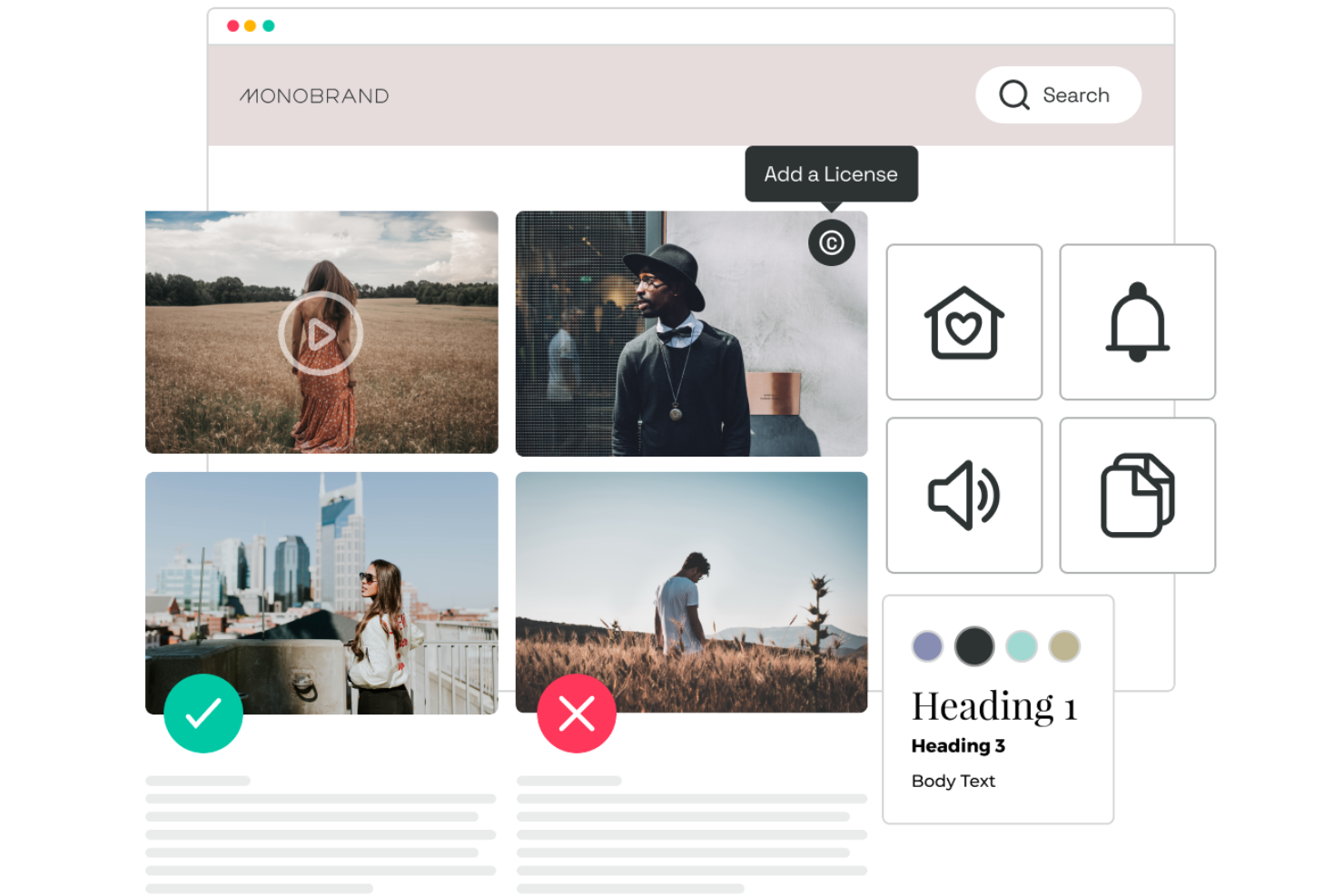
Frontify is a brand platform that combines digital asset management, living brand guidelines, and branded portals for teams managing creative assets, templates, and brand standards across distributed internal and external audiences.
Who Is Frontify Best For?
Frontify is a strong fit for enterprise brand and creative operations teams that need to manage living guidelines, digital assets, and branded portals from a single platform.
Why I Picked Frontify
Frontify earns its spot on my shortlist because it goes beyond storing assets to actively supporting how brand strategy gets built and maintained. I especially like its living guidelines feature, which lets teams update brand standards centrally so everyone, from internal designers to external agencies, always works from current guidance rather than outdated downloads. The Brand Assistant takes this further by answering brand questions on demand and linking responses directly to the relevant guideline section.
Frontify Key Features
- AI-powered auto-tagging: Automatically applies tags, generates metadata, and flags duplicate files when assets are uploaded to your library.
- Asset lifecycle management: Set "available from" and "available until" dates on assets, with configurable expiry actions and advance email notifications to relevant users.
- Batch asset creation: Connect a spreadsheet to a template and generate multiple on-brand assets at once, mapped to your data.
- Role-based permissions with time-bound access: Assign granular view, review, or edit access at the folder level, with optional start and end dates on each invitation.
Frontify Integrations
Frontify lists integrations with Adobe CC Libraries, Figma, Google Sheets, Webflow, WordPress, Slack, and Okta. It also provides GraphQL, webhooks, a Brand SDK, an MCP server, and Zapier connectivity.
Pros and Cons
Pros:
- AI tagging supports large-library discovery
- Portals reduce repeated asset requests
- Living guidelines keep distributed teams aligned
Cons:
- Initial setup and administration take work
- Search can depend on exact tags

Best for managing marketing resources
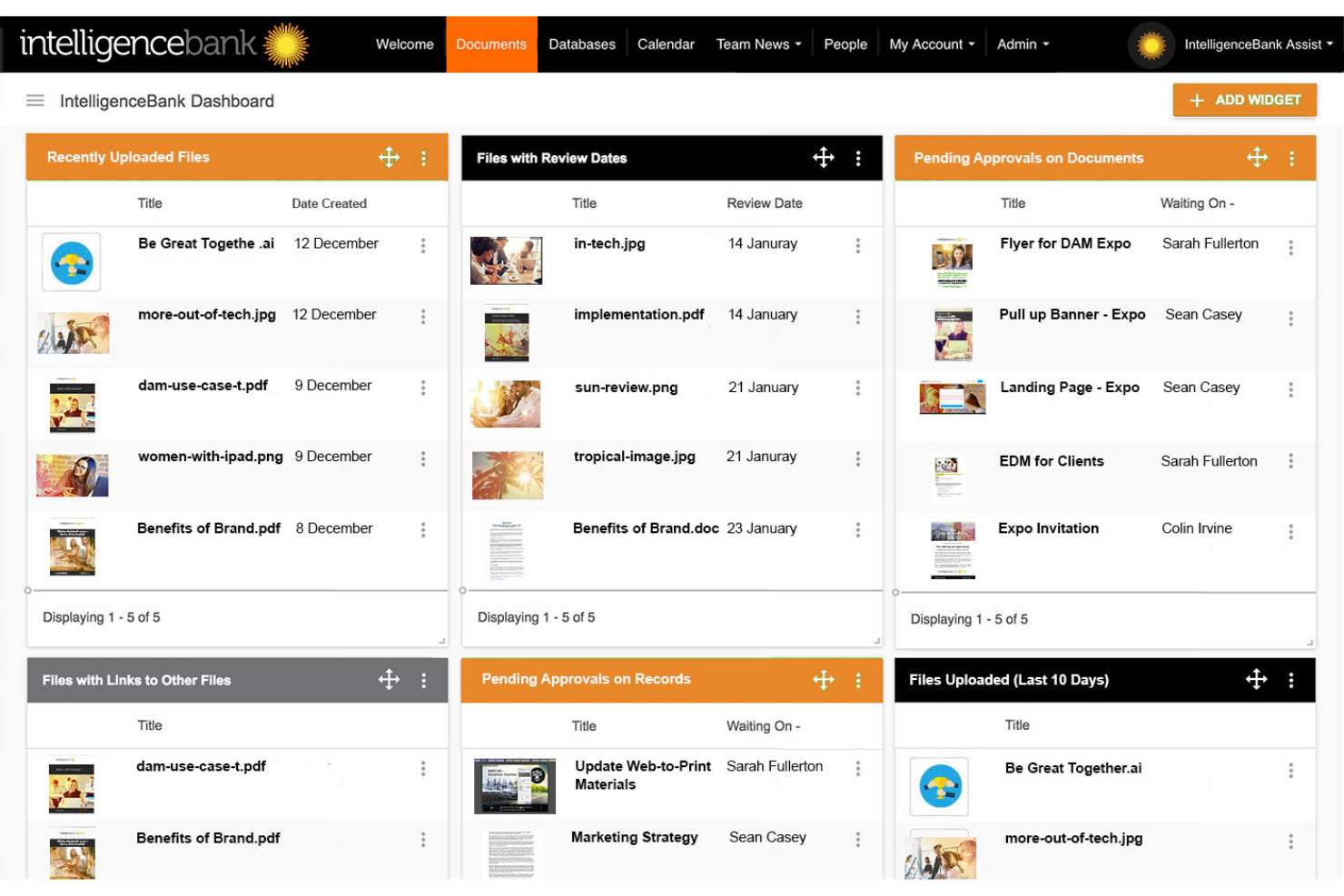
IntelligenceBank is a digital asset management platform built for marketing teams that combines asset storage, AI-powered tagging, brand portals, approval workflows, and rights management in one system.
Who Is IntelligenceBank Best For?
IntelligenceBank is a strong fit for marketing and brand teams that need governed access to approved assets across distributed teams, agencies, and external partners.
Why I Picked IntelligenceBank
IntelligenceBank earns its spot on my shortlist because it's purpose-built for marketing teams that need tight control over which assets get used, by whom, and when. I particularly like how brand portals let you house approved assets, templates, and brand guidelines in one governed space that both internal teams and external partners can access without needing a platform login. The mandatory version control is a detail I appreciate too: admins can enforce it across the entire library, so outdated assets don't quietly circulate across campaigns.
IntelligenceBank Key Features
- AI-powered duplicate detection: Automatically identifies duplicate assets across your library to keep large collections clean and organized.
- Rights and expiry management: Set review dates, link release forms, and track asset versions to manage licensing and expiry across your library.
- Adobe Creative Cloud connector: Access, place, and update DAM assets directly within InDesign, Photoshop, and Illustrator, with permissions mirrored from the DAM.
- Configurable reporting dashboards: Monitor downloads, expiring assets, overdue work, and stuck approvals through reports you can tailor to your team's needs.
IntelligenceBank Integrations
Documented native integrations include Adobe Photoshop, Illustrator, InDesign, Figma, Canva, Contentful, WordPress, Shopify, and Sitecore Experience Manager. IntelligenceBank also provides Graph API v3 and API v2 for custom integrations.
Pros and Cons
Pros:
- Governed brand portals serve external teams
- AI-assisted tagging helps organize large libraries
- Traceable asset approvals and version history
Cons:
- Workflow configuration takes setup effort
- Search and filtering frustrate some reviewers

Lingo
Best for brand asset kits
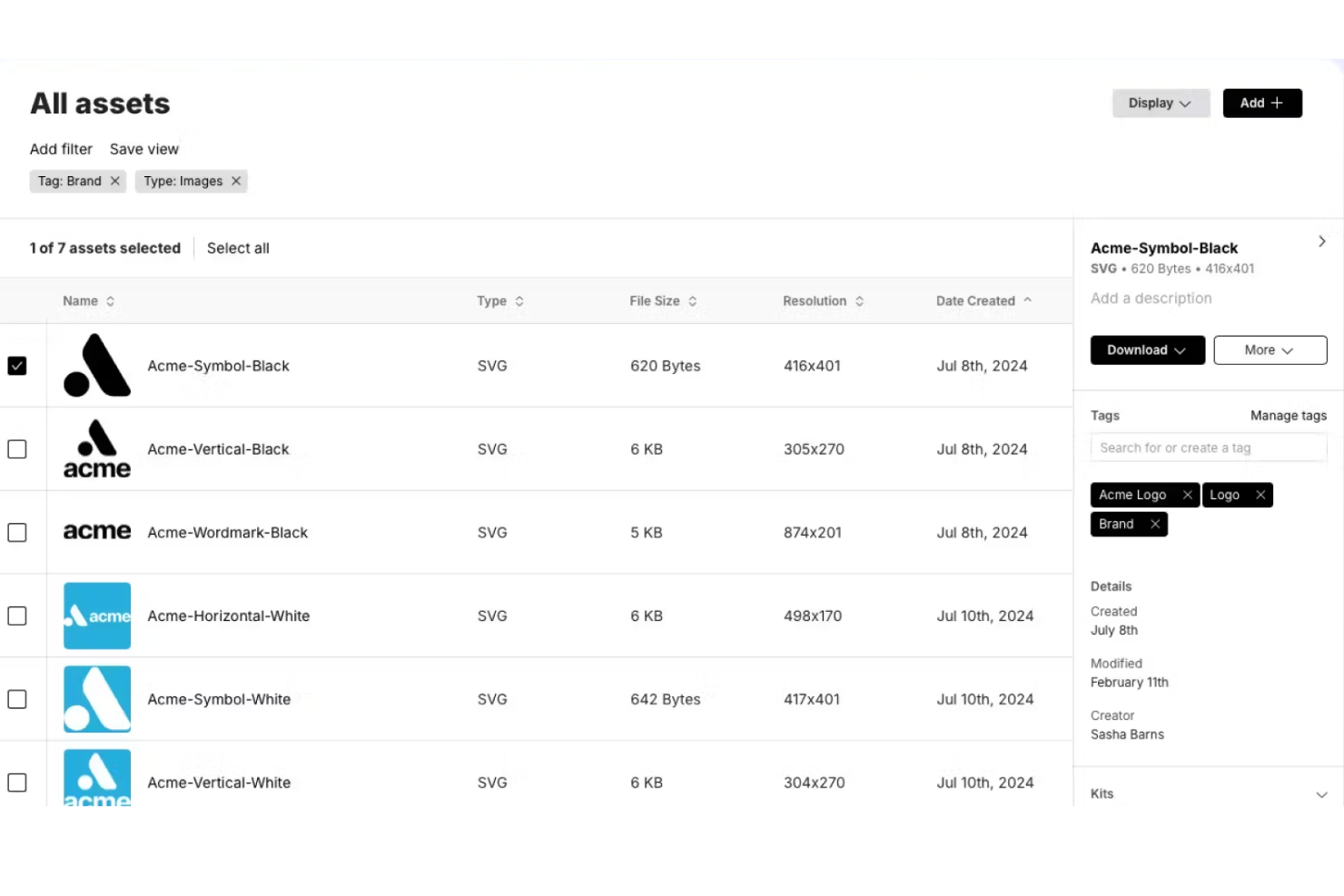
Lingo is a digital asset management platform built around brand Kits and Portals, combining asset storage, metadata tagging, version control, and controlled sharing into a single library for brand and marketing teams.
Who Is Lingo Best For?
Lingo is a strong fit for brand and marketing teams that need to package assets alongside guidelines and share them with external partners through controlled, branded Kits.
Why I Picked Lingo
Lingo earns its spot on my shortlist because its Kit model does something I genuinely haven't seen packaged this cleanly elsewhere: it lets you bundle assets alongside actual brand guidelines in one shareable collection, so partners and internal teams aren't left guessing which logo version to use or hunting for usage rules in a separate doc. I also like Kit Versioning, which lets you stage changes in a Shared Draft and publish named snapshots with release notes, keeping live Kits stable while you work on updates. The branded Portals layer on top, letting you group Kits into audience-specific hubs with custom domains and themes.
Lingo Key Features
- Metadata tagging and custom fields: Add tags and structured custom fields to assets, then filter and save views to quickly surface the right files.
- Direct Links: Generate embeddable CDN links to assets that automatically serve the latest version whenever the source file is updated.
- Figma integration: Sync Figma components and frames directly into Lingo, with metadata preserved and assets updated when designs change.
- Asset insights: Track how brand assets are accessed and downloaded, including engagement data and Direct Link request analytics.
Lingo Integrations
Lingo documents integrations with Figma, Google Drive, and Dropbox. Its REST API and JavaScript library support custom workflow connections.
Pros and Cons
Pros:
- Branded portals tailor partner-facing asset hubs
- Draft snapshots keep shared kits stable
- Kits pair approved assets with guidelines
Cons:
- No built-in comments or approval stages
- Navigation gets harder across large libraries

Best for integrating and managing office workflows

Microsoft SharePoint offers document management and storage systems designed primarily for business use. It integrates and manages office workflows, making it an essential tool for businesses seeking a unified approach to document and process management.
Why it's a good Brandfolder alternative: I chose Microsoft SharePoint for this list because it offers solid capabilities in managing content across an organization. Its widespread adoption in various industries and deep integration capabilities with other enterprise tools make it stand out as a good Brandfolder alternative.
Standout features & integrations:
Features include secure document management, automated workflow creation, and real-time collaboration. These features support a wide range of business processes, enhancing organizational productivity and communication.
Integrations include Microsoft SharePoint integrates with Microsoft Teams, Power Platform (Power Apps, Power Automate, Power BI), Adobe Sign, and Office 365 applications.
Pros and Cons
Pros:
- Flexible for various business sizes and needs
- Solid security features for enterprise use
- Complete integration with Microsoft products
Cons:
- May require substantial training for end-users
- High dependency on other Microsoft products for full functionality
Diğer Brandfolder Alternatifleri
Yukarıda aradığınızı bulamadıysanız inceleyebileceğiniz bazı ek Brandfolder alternatiflerini burada bulabilirsiniz.
- Aprimo
For optimizing marketing operations
- Adobe Bridge
For creative asset organization
- Nuxeo
For scalable content management
- Lytho
For creative team operations
- ioMoVo
For AI-enhanced brand asset management
- Infomaze DAM
For performance efficiency solutions
- Miro
For product-led growth strategy
- Cloudinary
For AI-powered media workflows
- Pics.io
For digital agencies' asset management
- Acquia DAM (Widen)
For real-time asset transformations


İlgili Proje Yönetimi Yazılımı İncelemeleri
Hâlâ aradığınızı bulamadıysanız test edip incelediğimiz şu ilgili proje yönetimi araçlarına göz atın.
- Proje Yönetimi Yazılımı
- Kaynak Yönetimi Yazılımı
- İş Akışı Otomasyonu Yazılımı
- Görev Yönetimi Yazılımı
- İş Birliği Araçları
- Gantt Şeması Oluşturucu
How I Evaluate Brandfolder Alternatives
I evaluate Brandfolder alternatives in two layers: baseline capabilities like DAM, structured approvals, and version control, then differentiators that separate the best fits for creative ops teams.
Core Functionality (Table Stakes For This List)
When I'm selecting tools for my list, I rank each one on a scale from 0 (does not offer the functionality) to 5 (excels in this area) for each core functionality listed below. Then, I calculate the tool's total score into a percentage. Each tool needs to achieve a minimum total score of 65% to be considered for inclusion.
- Digital Asset Management: I look for a central asset library with metadata tagging, folder structures, and filtered search so teams can find the right logo variant or campaign file in seconds.
- Project & Workflow Management: Each tool should let you assign tasks, set deadlines, and visualize work across views like Kanban or Gantt to keep creative projects moving.
- Review & Approval Workflows: I evaluate how each platform handles proofing—whether you can annotate directly on a design file and route it through multi-stage sign-offs before launch.
- Version Control: Tracking iterations matters when a campaign asset goes through five rounds of feedback, so I check for automatic versioning, rollback, and side-by-side comparison.
- Permissions & Access Controls: The tool should support role-based permissions and guest access, especially for agencies sharing deliverables with external clients or stakeholders.
- Integrations & Sharing: I check for native connections to creative tools like Adobe Creative Cloud and Figma, plus branded portals or share links for distributing approved assets externally.
Once I have a list of tools that meet this criteria, I consider what sets each platform apart.
Differentiating Factors (What Sets Vendors Apart)
Here's how I compare and contrast different vendors:
Standout Features
Creative request intake forms are a big differentiator. I look for tools that let you build structured briefs feeding directly into project queues, so nothing gets lost in a Slack thread. A built-in brand guidelines portal also adds real value when external partners need self-serve access to approved logos, fonts, and usage rules. I evaluate reporting dashboards that track approval cycle times and asset usage too, since marketing PMs often need to show leadership where bottlenecks live.
Beyond Features
Pricing structure matters here because some platforms charge per user while others price by storage or asset volume, and the right model depends on whether your team is ten people or a hundred. I also consider migration support, since moving thousands of assets out of Brandfolder with metadata intact is a real project in itself. Security and compliance round out my evaluation—teams in regulated industries should look for SOC 2 and SSO support, especially when external collaborators access sensitive brand materials.
Neden Brandfolder Alternatifleri Aramalısınız?
Aşağıdaki özelliklere sahipseniz Brandfolder için bir alternatif arıyor olabilirsiniz.
- Maliyet endişeleri: Brandfolder'ın fiyatlandırması bütçenizi aşıyor.
- Özellik seti: Brandfolder'ın sunmadığı belirli özelliklere ihtiyaç duyuyorsunuz.
- Kullanıcı deneyimi: Daha sezgisel veya farklı bir kullanıcı arayüzünü tercih ediyorsunuz.
- Entegrasyon ihtiyaçları: Mevcut teknoloji yığınınızla daha iyi uyumluluk gereksinimi duyuyorsunuz.
- Müşteri desteği: Daha hızlı yanıt veren veya daha kapsamlı bir müşteri hizmeti istiyorsunuz.
Brandfolder'ın Temel Özellikleri
Alternatif çözümlerin sunduklarını karşılaştırmanıza yardımcı olmak için Brandfolder'ın bazı temel özelliklerini burada bulabilirsiniz:
- Yaratıcı iş akışı: Gecikmeleri en aza indirmek ve ekibiniz arasındaki iş birliğini güçlendirmek için yaratıcı süreçleri iyileştirir.
- Marka zekâsı: Ekibin marka varlıklarını etkili bir şekilde anlaması ve kullanabilmesi için bu varlıkları etiketlemek ve analiz etmek üzere yapay zekâdan yararlanır.
- Entegrasyonlar: Çeşitli pazarlama teknolojilerine bağlanarak ekibinizin varlıkları farklı platformlarda sorunsuz bir şekilde kullanmasını sağlar.
- İçerik otomasyonu: Yaratıcı ekiplerinizin zamandan tasarruf etmesini ve tutarlı, verimli içerik oluşturmasını sağlayan özelleştirilebilir şablonlar sunar.
- Portallar: Kullanıcılarınızın veya ekibinizin özel ihtiyaçlarını karşılayacak şekilde uyarlanmış, seçkili içerik deneyimleri sunar.
- API: Özel entegrasyonları destekleyerek geliştiricilerinize Brandfolder'ı diğer araçlara bağlama esnekliği sağlar.
- Marka kılavuzu: Marka yönergelerini ekibinizdeki herkes için erişilebilir ve güncel tutar.
- Akıllı CDN: Varlıkları web genelinde gömmenize olanak tanır; böylece bu varlıklara kolayca erişilebilir ve varlıklar güncel tutulur.
- Sürüm denetimi: Varlıkların geçmişini ve düzenlemelerini izler, gerektiğinde ekibinizin önceki sürümlere dönmesine olanak tanır.
- Dijital haklar yönetimi: Varlıkların kullanım haklarını ve izinlerini yöneterek varlıkların doğru ve yasalara uygun şekilde kullanılmasını sağlar.