

2026’da Danışmanlar İçin İncelenen En İyi 10 Yapay Zekâ Aracı

10 Danışmanlar İçin En İyi Yapay Zekâ Araçları Kısa Listesi


Bir proje yöneticisi olarak sürekli birden fazla görev ve teslim tarihi arasında denge kurmaya çalışıyorsunuz. Kaliteli sonuçları zamanında teslim etme baskısı hiç azalmıyor. Danışmanlar için yapay zekâ araçları, tekrarlayan görevleri otomatikleştirerek ve zamandan ve emekten tasarruf etmenizi sağlayan içgörüler sunarak iş yükünüzü hafifletmeye yardımcı olabilir.
Deneyimlerime göre bu araçlar ekibinizin üretkenliğini ve karar alma süreçlerini önemli ölçüde geliştirebilir. Tarafsız bir şekilde mevcut en iyi seçenekleri sunabilmek için çok sayıda yazılım çözümünü bağımsız olarak test edip inceledim.
Bu makalede, karşılaştığınız benzersiz zorluklara hitap eden en iyi yapay zekâ araçları hakkında kapsamlı araştırmalara dayanan bir inceleme bulacaksınız. Veri analizini, iletişimi veya müşteri etkileşimlerini geliştirmek istiyorsanız bu rehber size yardımcı olacak.
Why Trust Our Software Recommendations
Our team has been testing and reviewing software since 2012. As project managers ourselves, we know how difficult—and important—it is to choose the right software.
For this guide, we evaluated tools using hands-on testing and independent research, scoring tools using our selection criteria. We also draw on insights from industry thought leaders and practicing project management experts.
Our reviews reflect our human editorial judgment, not a sales pitch.
Expert reviewers:
Karşılaştırma Tablosu: Danışmanlar İçin Yapay Zekâ Araçları
Bu karşılaştırma tablosu, danışmanlar için en iyi yapay zekâ aracı seçimlerimin fiyatlandırma ayrıntılarını özetlemektedir.
| Tool | Starting Price | Website | |
|---|---|---|---|
| Best for partner-built consulting solutions | 4.6 out of 5 | $7.25/user/month Free plan available | Website |
| Best for client collaboration | 4.4 out of 5 | $5,000/year Free trial + free demo available | Book Demo |
| Best for no-code automation tools | 4.3 out of 5 | $10/user/month Free plan + 14-day trial available | Book Demo |
| Best with multilingual AI agent support | 4.4 out of 5 | $32/month 7-day free trial + demo available | Website |
| Best for strategic insights | 4.6 out of 5 | $69/month 14-day free trial | Website |
| Best for AI-generated slides | 4.5 out of 5 | $8.33/month Free plan available | Website |
| Best for virtual assistance | — | $30/user/month 7-day free trial + free demo available | Website |
| Best for slideshow templates | — | $12/month 14-day free trial + free demo available | Website |
| Best for interactive proposals | — | $35/user/month 14-day free trial | Website |
| Best for transcription services | — | $8.17/month Free plan available | Website |
Danışmanlar İçin En İyi Yapay Zekâ Araçları İncelemeleri
Aşağıda, kısa listeme giren danışmanlar için en iyi yapay zekâ araçlarına ilişkin ayrıntılı özetlerimi bulabilirsiniz. İncelemelerim, size en uygun aracı bulmanıza yardımcı olmak için her aracın temel özelliklerine, avantajlarına & dezavantajlarına, entegrasyonlarına ve ideal kullanım alanlarına ayrıntılı bir bakış sunmaktadır.

Slack
Best for partner-built consulting solutions
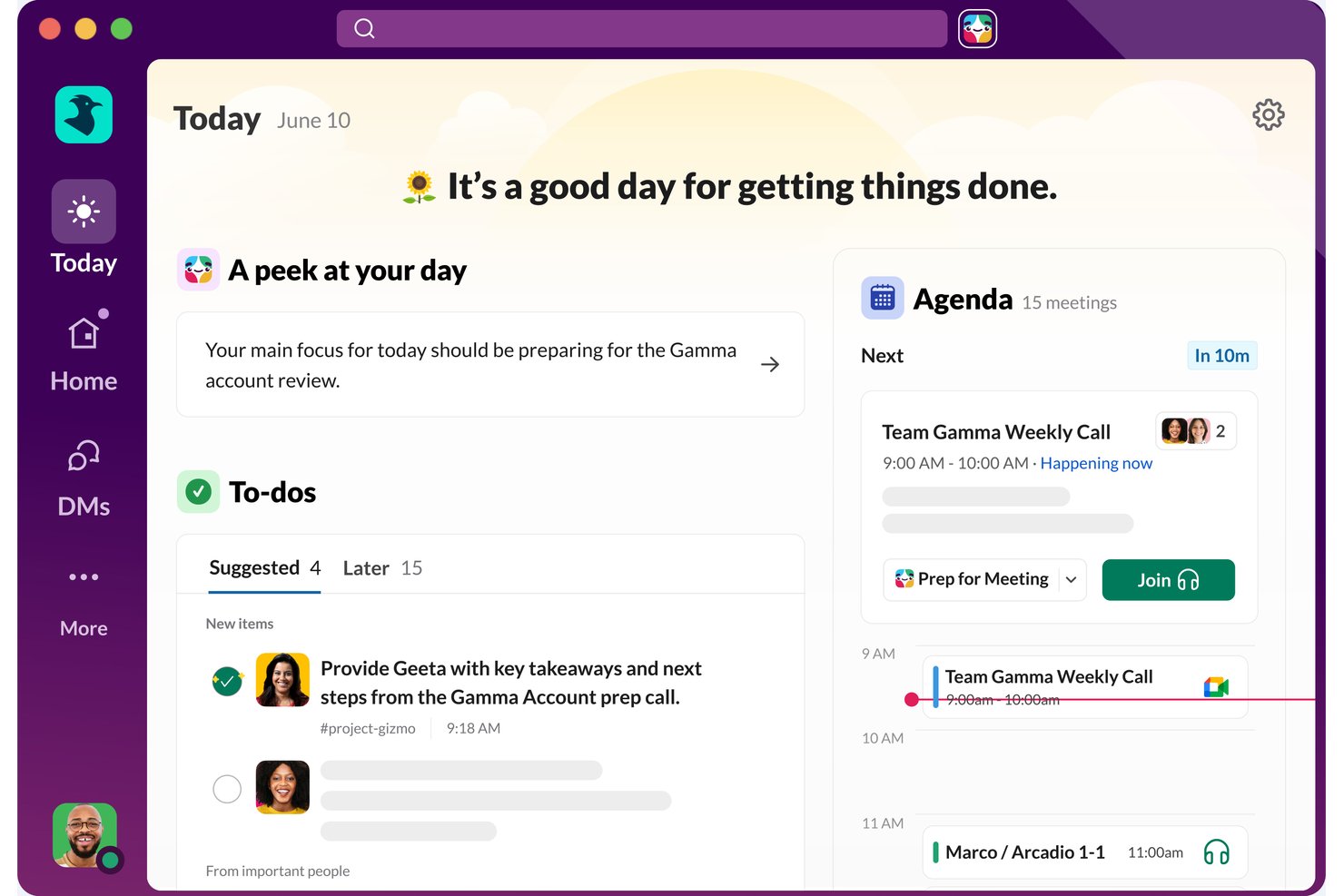
Slack is a team collaboration platform that brings together messaging, file sharing, AI-powered search and summarization, workflow automation, and a partner-built ecosystem of consulting solutions.
Who Is Slack Best For?
Slack works well for management consulting firms that want to tap into a partner-built ecosystem of industry-specific advisory and strategy solutions.
Why I Picked Slack
I've included Slack in my top picks because its partner-built ecosystem sets it apart for management consulting firms, with Salesforce and Slack consulting partners developing industry-specific advisory, strategy, and organizational transformation solutions directly on the platform. Slackbot can research across channels, files, Salesforce data, and the web to produce reports, while AI huddle notes automatically capture takeaways and action items after every meeting.
Slack Key Features
- Slack Connect: Share channels with external clients, vendors, and partners to collaborate across organizational boundaries without leaving Slack.
- Canvas AI writing: Draft, edit, and refine documents directly within a canvas using prompts, tone adjustments, and formatting options like checklists and tables.
- Workflow Builder: Build no-code, multi-step automated workflows from natural-language prompts to handle recurring tasks and process steps.
- Enterprise Search: Search across Slack conversations and connected apps, databases, and systems—including Google Drive, Jira, and Salesforce—from a single search experience.
Slack Integrations
Slack offers more than 2,600 marketplace apps, including Salesforce, Google Drive, Jira, Asana, and Google Sheets. It also provides APIs and Java, JavaScript, and Python SDKs for custom integrations.
Pros and Cons
Pros:
- Client and project channels keep work visible
- Channel summaries help consultants catch up quickly
- Consulting partners build industry-specific advisory solutions
Cons:
- Workflow Builder struggles with complex processes
- AI answers and summaries can be inaccurate

Moxo
Best for client collaboration

Moxo is a collaborative platform designed for consultants and businesses that require efficient client engagement and project management. It facilitates communication and document sharing, helping teams stay connected with clients and manage tasks effectively.
Why I picked Moxo: It excels in client collaboration, making it perfect for teams that need to maintain strong client relationships. Moxo offers features like secure messaging and video conferencing, which keep communication open and transparent. The platform's task management tools help you track project progress and ensure deadlines are met. Its document sharing capabilities allow you to exchange files easily, enhancing collaboration with clients.
Standout features & integrations:
Features include secure messaging for confidential communication, video conferencing for face-to-face meetings, and task management tools to track project progress. The platform also offers document sharing, audit trails, client portals, and workflow automation, allowing you to coordinate deliverables and approvals more efficiently.
Integrations include Salesforce, Microsoft Teams, Slack, Zoom, Box, Dropbox, Google Drive, OneDrive, Outlook, and Gmail.
Pros and Cons
Pros:
- Enhances task management
- Facilitates document sharing
- Supports secure client communication
Cons:
- Internet-dependent for full functionality
- Slight learning curve for advanced features

Wrike
Best for no-code automation tools
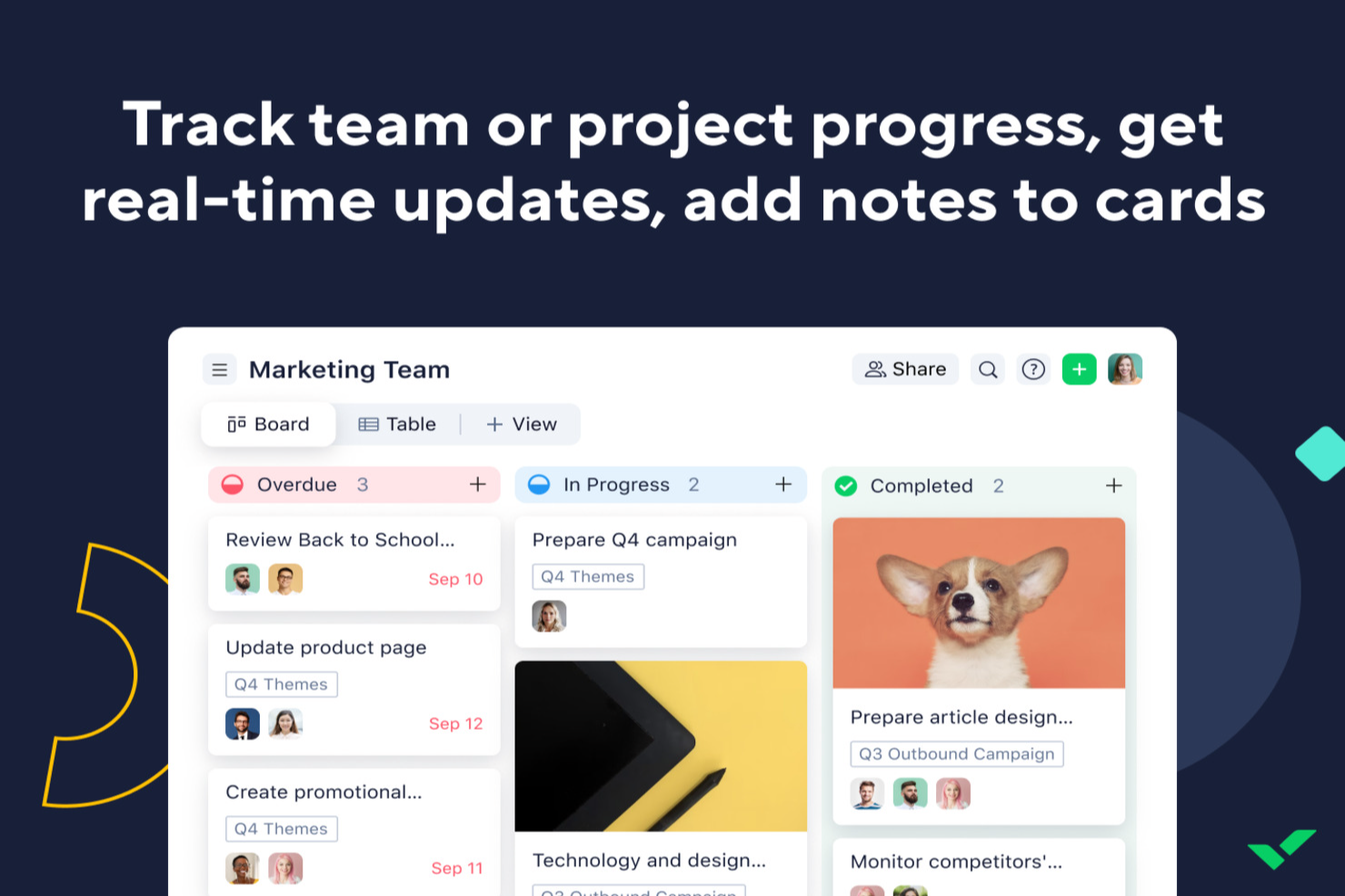
For consultants looking for an AI tool to improve project management, Wrike offers a practical option. The platform helps streamline workflows so you can spend more time delivering value to clients. Whether you’re handling complex engagements or coordinating with external stakeholders, Wrike’s automation and AI features support task prioritization and risk management in day-to-day project work.
Why I Picked Wrike
I picked Wrike for its AI-driven features that align well with consulting needs. Wrike Copilot helps with project prioritization and risk identification, both essential for keeping projects on track. The no-code automation tools also make it easier to reduce routine manual work, freeing up time for higher-level planning and decision-making. Together, these features address common consulting challenges like time management and resource allocation.
Wrike Key Features
In addition to its AI capabilities, I also found several other features valuable for consultants:
- Mind Mapping: A tool that helps visualize project plans and ideas, facilitating better strategic planning.
- Customizable Request Forms: Allows you to create tailored forms for client inputs, ensuring you capture all necessary information efficiently.
- Real-Time Dashboards: Provides instant insights into project status and performance, helping you make informed decisions.
- Multiple Project Views: Offers Gantt charts and Kanban boards to suit diverse project management styles and preferences.
Wrike Integrations
Integrations include Microsoft Teams, Google Workspace, Zoom, Slack, Dropbox, Outlook, Salesforce, Adobe Creative Cloud, Jira, and QuickBooks. An API is available for custom integrations.
Pros and Cons
Pros:
- Customizable real-time dashboards
- No-code workflow automation tools
- AI-powered task prioritization
Cons:
- Pricing may challenge small teams
- Advanced features require higher tiers
New Product Updates from Wrike

Wrike Redesigns Workspace Search With New Filters
Wrike introduces a redesigned Workspace Search interface with recent search shortcuts, item type and location filters, and parent-task context. These updates help users find relevant work items and navigate search results efficiently. For more information, visit Wrike’s official site.
 .

Chatbase
Best with multilingual AI agent support
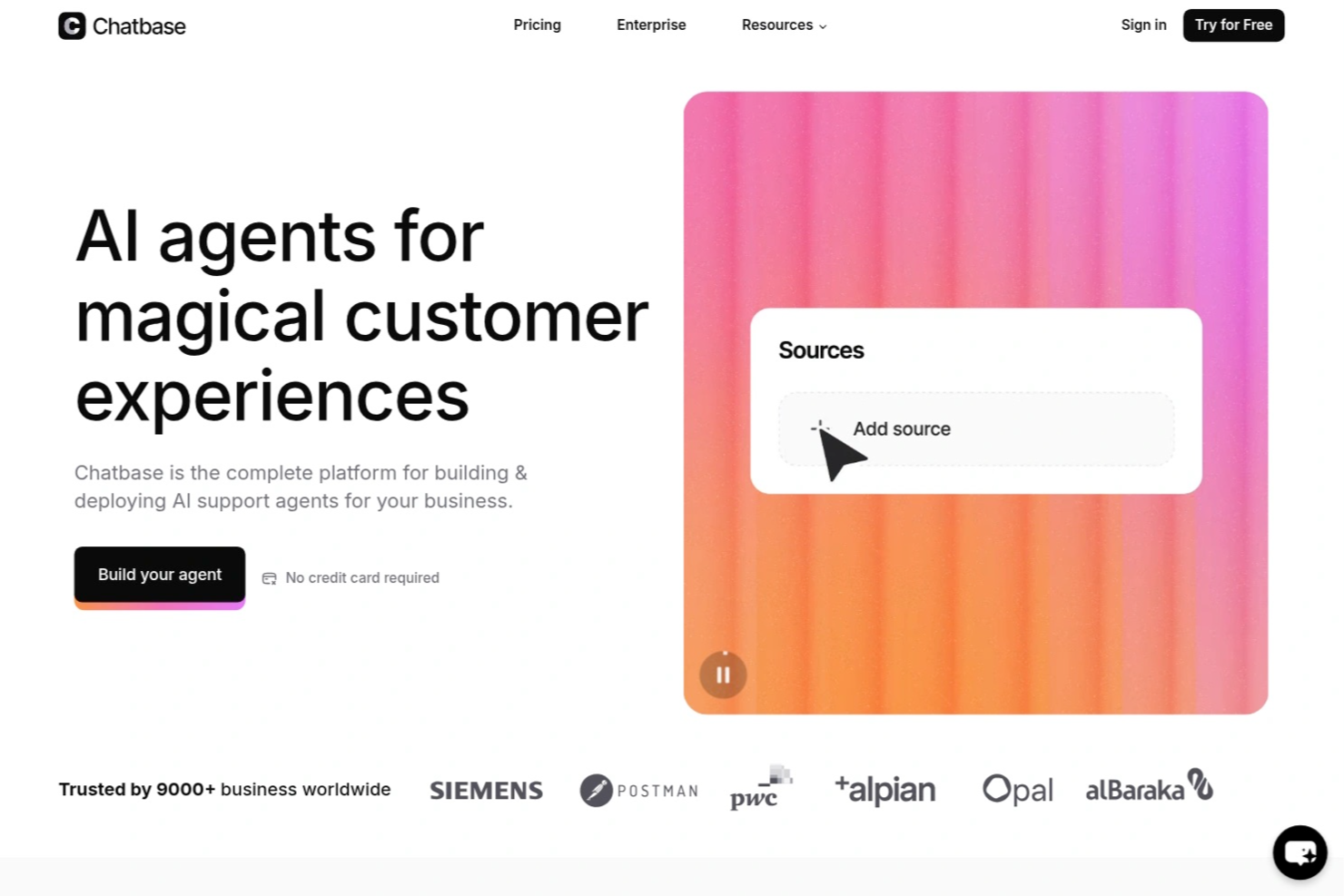
Chatbase is an AI chatbot builder designed for consultants who want to create, deploy, and manage custom chatbots that connect to multiple data sources and integrate with external systems.
Who Is Chatbase Best For?
Chatbase suits consultants and small teams who need to build custom AI chatbots that connect with diverse data sources and client systems.
Why I Picked Chatbase
I picked Chatbase as one of the best because I can build AI chatbots that handle conversations in multiple languages without extra setup. My team uses its multilingual agent support to serve clients across different regions. I also like that I can upload documents in various languages and the chatbot responds accurately, making it easy to support global consulting projects.
Chatbase Key Features
- Custom chatbot builder: Create AI chatbots tailored to your consulting workflows and branding.
- Data source integration: Connect chatbots to websites, pdfs, or text files for dynamic knowledge delivery.
- Conversation analytics: Track user interactions and chatbot performance with built-in analytics tools.
- API access: Integrate Chatbase with your existing systems using its API for advanced automation.
Chatbase Integrations
Chatbase offers native integrations with Zendesk, Notion, Slack, Stripe, Salesforce, Cal.com, Calendly, WhatsApp, Messenger, and Make. It also connects with Zapier and provides an API for custom integrations.
Pros and Cons
Pros:
- Includes analytics for tracking chatbot performance
- Provides API access for workflow automation
- Allows custom chatbot training on unique data
Cons:
- Limited branding customization for chat widgets
- No built-in live chat handoff to humans

Best for strategic insights

Pointerpro is a digital assessment platform designed for consultants, coaches, HR professionals, and marketers. It enables users to create online assessments and automatically generate tailored PDF reports for various evaluations, like client and employee assessments.
Why I picked Pointerpro: It offers strategic insights through its automated assessment features. The platform includes a questionnaire builder and report generator, allowing you to create interactive assessments and detailed reports. Its benchmarking feature helps you compare results against industry standards. Multi-user management enables your team to collaborate efficiently on projects.
Standout features & integrations:
Features include advanced report logic (formulas, conditional visibility), distribution options for sharing assessments, and support for over 50 languages. The platform also provides extensive training and ISO 27001:2022 certification for data security.
Integrations include Zapier, Google Sheets, HubSpot, Salesforce, Mailchimp, Slack, Microsoft Teams, ActiveCampaign, WordPress, and Dropbox.
Pros and Cons
Pros:
- Benchmarking and advanced logic capabilities
- Supports multiple languages
- Highly customizable automated reporting
Cons:
- Automation and team features require higher-tier plans
- Advanced setup can have a learning curve

SlidesAI
Best for AI-generated slides

SlidesAI is an AI-powered presentation tool designed for educators, professionals, and students. It helps users create engaging presentations quickly in Google Slides and PowerPoint by generating slide outlines and themes without the need for design skills.
Why I picked SlidesAI: It excels in generating AI solutions for your slides, allowing you to quickly create presentations. You can input topics or documents, and the platform generates slide outlines in over 100 languages. Theme editing and content rearrangement enhance the presentation's appeal. These features make it a go-to tool for quick and effective presentation creation.
Standout features & integrations:
Features include the ability to edit themes for a fresh look, rearrange content easily, and integrate images from AI-generated options or stock. The platform also offers content shortening for conciseness and translation features for global reach. These capabilities are strengthened by generative AI and machine learning algorithms, helping you produce polished presentations quickly.
Integrations include Google Slides and PowerPoint.
Pros and Cons
Pros:
- No design skills required
- Quick slide generation
- Supports over 100+ languages
Cons:
- Requires Google Slides or PowerPoint
- Learning curve for some features


Fyxer is an AI-powered email assistant tailored for consultants who need to manage communication efficiently. It focuses on automating inbox management, allowing consultants to prioritize client interactions and reduce administrative tasks.
Why I picked Fyxer: It offers virtual assistance (similar to AI chatbots and AI models) by automating email responses and organizing your inbox. The tool drafts replies using your past email history, saving you time on writing. It labels emails by priority and filters out distractions, helping you focus on important tasks. These features make it an ideal AI assistant for consultants who want to enhance productivity.
Standout features & integrations:
Features include automatic email drafting that uses your tone and style, priority labeling for efficient inbox management, and spam filtering to eliminate distractions. The platform also provides detailed meeting summaries and follow-up emails, ensuring no important details are missed.
Integrations include Outlook and Gmail.
Pros and Cons
Pros:
- Provides detailed AI-powered meeting summaries
- Organizes inbox by priority
- Automates email responses
Cons:
- Relies on email platform integration
- Limited offline functionality


Beautiful.ai is a presentation software designed for professionals across various industries who need to create visually appealing slides. It automates the slide design process, allowing users to focus on content rather than formatting.
Why I picked Beautiful.ai: It offers AI-driven slideshow templates that automatically adjust as you add content, ensuring your slides always look polished. The tool provides a wide range of customizable themes and layouts to fit your presentation needs. It also includes a library of images and icons to enhance your slides visually. You can even integrate ChatGPT to generate slide content or outlines instantly. Its DesignerBot feature can generate slide content. These features simplify the creation process, making it a favorite for those who want professional-looking presentations without the hassle.
Standout features & integrations:
Features include an intuitive drag-and-drop interface for easy content placement, a real-time collaboration feature that allows your team to work together on presentations, and automatic slide updates to keep your designs consistent. The platform also offers a library of stock images and icons for visual enhancement, helping you create high-quality presentations with less effort.
Integrations include Slack, Microsoft Teams, PowerPoint, Keynote, Google Slides, Dropbox, Box, Google Drive, and Salesforce.
Pros and Cons
Pros:
- Real-time team collaboration
- Extensive template library
- Automates slide design
Cons:
- Advanced branding and collaboration features require higher-tier plans
- Less granular design control compared to full presentation tools


Qwiler is a proposal software aimed at sales teams and freelancers who need to create interactive and visually appealing proposals. It allows users to build dynamic proposals that engage clients and facilitate faster decision-making.
Why I picked Qwiler: It excels in creating interactive proposals, making it ideal for teams that want to impress clients with engaging content. The platform offers customizable templates that help you design proposals tailored to your brand. It includes analytics that provide insights into how clients interact with your proposals. These features give your team a clear competitive advantage by making proposals both compelling and data-driven.
Standout features & integrations:
Features include a drag-and-drop builder for easy content creation, customizable templates that align with your brand identity, and analytics that track client interactions. The platform also offers e-signature functionality to speed up the approval process.
Integrations include Salesforce, HubSpot, Xero, QuickBooks, Slack, Zapier, Stripe, PayPal, Google Analytics, and Microsoft Teams.
Pros and Cons
Pros:
- Offers e-signature and payment functionality
- Provides client interaction insights
- Customizable templates available
Cons:
- Internet-dependent for full functionality
- Limited offline access


Notta is a transcription tool designed for consultants, educators, and business professionals who need accurate and fast transcriptions of meetings, interviews, and lectures. It converts audio into text in real time, helping users save time on manual note-taking and ensuring nothing is missed during discussions.
Why I picked Notta: It excels in providing reliable transcription services, making it perfect for those who need quick and accurate text conversion. The platform supports 58+ languages, allowing for diverse use cases. It offers real-time transcription, which means you can follow along as words are spoken, like real-time GenAI. You can also edit and export transcriptions, which adds flexibility to your workflow.
Standout features & integrations:
Features include speaker identification to distinguish between different voices, the ability to search within transcriptions for specific keywords, and text editing capabilities for refining the output. The platform also supports exporting transcriptions in various formats, which is useful for sharing. These capabilities are powered by advanced AI technology, making the tool both accurate and efficient.
Integrations include Zoom, Google Meet, Microsoft Teams, Slack, Dropbox, Google Drive, Evernote, Notion, Trello, Asana, and Microsoft OneNote.
Pros and Cons
Pros:
- Offers text editing features
- Real-time transcription available
- Supports 58+ languages
Cons:
- Can be resource-intensive
- Accuracy depends on audio quality
Danışmanlar İçin Diğer Yapay Zekâ Araçları
Kısa listeme girmeyen ancak yine de göz atmaya değer bazı ek danışmanlık yapay zekâ aracı seçenekleri şunlardır:
- Introhive
For CRM integration
- Olive
For scaling services
- Sally
For AI-driven data analysis
- cloudsquid
For secure knowledge centralization
- monday AI Workspace
For customizable AI-driven workflows
- Fireflies.ai
For meeting transcription accuracy
- ClickUp
For customizable task views


How I Evaluate AI Tools for Consultants
Every tool on this list needs to go beyond slapping an AI label on basic features—I look for platforms that actually save consultants time on deliverables, project plans, or client reporting. I split my evaluation into core functionality every tool must deliver to qualify and differentiating factors that separate a solid option from the best fit for your workflow.
Core Functionality (Table Stakes For This List)
When I'm selecting tools for my list, I rank each one on a scale from 0 (does not offer the functionality) to 5 (excels in this area) for each core functionality listed below. Then, I calculate the tool's total score into a percentage. Each tool needs to achieve a minimum total score of 65% to be considered for inclusion.
- AI Document Generation: I look for tools that produce consulting-grade deliverables—SOWs, project charters, status reports—from a prompt, not just generic text blocks.
- AI-Assisted Project Planning: The tool should help build schedules, estimate timelines, or break down workstreams, like scoping a 12-week digital transformation engagement.
- AI Meeting Intelligence: I check whether the tool transcribes client calls, pulls out action items, and links them back to project tasks or deliverables automatically.
- AI-Driven Data Analysis: Tools earn higher marks here when they can ingest a client dataset or survey export and surface patterns, summaries, or visual insights worth presenting.
- Client Engagement Management: I evaluate how well a tool separates work by client—dedicated workspaces, permissioned access, and deliverable tracking per engagement matter here.
- AI Workflow Automation: Repetitive consulting tasks like sending weekly status updates or logging time entries should be automatable with AI-triggered rules or agents.
Once I have a list of tools that meet this criteria, I consider what sets each platform apart.
Differentiating Factors (What Sets Vendors Apart)
Here's how I compare and contrast different vendors:
Standout Features
I pay close attention to whether a tool can be trained on your own frameworks and past deliverables, so AI outputs reflect your methodology instead of generic boilerplate. Client-facing portals also matter—being able to share branded dashboards or status updates directly with stakeholders saves hours of formatting. Billable time intelligence is another separator, especially for consultants juggling multiple engagements who need automatic tracking tied to profitability insights.
Beyond Features
Data security is a top concern—I check whether a vendor isolates client data and confirms it won't be used to train shared AI models, since consultants routinely handle sensitive business information. Pricing structure matters too, especially for solo practitioners or small firms who need flexible, per-seat plans that scale as they take on more engagements. I also evaluate integration depth with tools like Slack, Jira, and Google Workspace, because a tool that doesn't connect to your clients' tech stacks creates more manual work than it saves.
Danışmanlar İçin Yapay Zekâ Araçları Nasıl Seçilir?
Uzun özellik listeleri ve karmaşık fiyatlandırma yapıları arasında kaybolmak kolaydır. Kendinize özgü yazılım seçim süreciniz üzerinde çalışırken odağınızı korumanıza yardımcı olmak için göz önünde bulundurmanız gereken faktörlerin bir kontrol listesi aşağıdadır:
| Faktör | Göz önünde bulundurulması gerekenler |
| Ölçeklenebilirlik | Araç işletmenizle birlikte büyüyebilir mi? Gelecekteki ihtiyaçlarınızı göz önünde bulundurun ve aracın performans sorunları yaşamadan artan veri ve kullanıcı sayısını işleyebildiğinden emin olun. |
| Entegrasyonlar | Araç mevcut yazılımlarınızla entegre oluyor mu? Veri silolarını ve iş akışı kesintilerini önlemek için CRM, e-posta ve proje yönetimi araçlarıyla uyumluluğu kontrol edin. |
| Özelleştirilebilirlik | Aracı iş akışlarınıza uyacak şekilde uyarlayabilir misiniz? Ekibinizin ihtiyaçlarına uygun özelleştirilebilir gösterge panoları, iş akışları ve raporlama seçenekleri arayın. |
| Kullanım kolaylığı | Araç ekibiniz için kullanımı kolay mı? Arayüzün basitliğini test edin ve benimseme oranlarını düşürebilecek dik bir öğrenme eğrisi olmadığından emin olun. |
| Uygulama ve işe alıştırma | Ekibiniz ne kadar hızlı çalışmaya başlayabilir? Videolar gibi eğitim materyalleri ve sağlayıcının desteği de dâhil olmak üzere kurulum için gereken zamanı ve kaynakları göz önünde bulundurun. |
| Maliyet | Fiyatlandırma bütçenize uyuyor mu? Maliyetleri sunulan özelliklerle karşılaştırın ve gizli ücretleri kontrol edin. Uzun vadeli maliyetleri ve potansiyel yatırım getirisini göz önünde bulundurun. |
| Güvenlik önlemleri | Araç verilerinizi koruyor mu? Şifreleme gibi sektör standartlarına uyduğundan ve iki faktörlü kimlik doğrulama gibi özellikler sunduğundan emin olun. |
| Destek erişilebilirliği | Hangi destek seçenekleri mevcut? Sağlayıcının destek saatlerini, kanallarını (sohbet veya telefon gibi) ve destek kalitesine ilişkin kullanıcı değerlendirmelerini inceleyin. |
Danışmanlar İçin Yapay Zekâ Araçları Nedir?
Danışmanlara yönelik yapay zekâ araçları, görevleri otomatikleştirerek ve veriye dayalı içgörüler sağlayarak danışmanlık hizmetlerini geliştirmek için yapay zekâ kullanan yazılım çözümleridir. Danışmanlar, iş analistleri ve proje yöneticileri bu araçları verimliliği ve karar alma süreçlerini iyileştirmek için sıklıkla kullanır. Veri analizi, otomatik raporlama ve müşteri iletişimi desteği gibi özellikler, danışmanların karmaşık projeleri yönetmesine ve müşterilere değer sunmasına yardımcı olur. Bu araçlar, nihayetinde kullanıcıların zamandan tasarruf etmesine, manuel çalışmayı azaltmasına ve bilinçli kararlar almasına yardımcı olur.
Danışmanlara Yönelik Yapay Zekâ Araçlarının Özellikleri
Danışmanlara yönelik yapay zekâ araçlarını seçerken aşağıdaki temel özelliklere dikkat edin:
- Veri analizi: Otomatik veri işleme yoluyla içgörüler sunarak danışmanların bilinçli kararlar almasına yardımcı olur.
- Otomatik raporlama: Ayrıntılı raporları hızlı bir şekilde oluşturarak zamandan tasarruf sağlar ve müşteri iletişiminde doğruluğu güvence altına alır.
- Müşteri iletişimi: Müşterilerle güvenli ve verimli etkileşimi kolaylaştırarak ilişki yönetimini geliştirir.
- Özelleştirilebilir panolar: Kullanıcıların projeler üzerindeki görünürlüğü ve denetimi artırmak için arayüzlerini kendi ihtiyaçlarına göre uyarlamasına olanak tanır.
- Görev otomasyonu: Tekrarlayan görevleri otomatikleştirerek manuel çalışmayı azaltır ve genel verimliliği artırır.
- Çoklu dil desteği: Düzinelerce dili destekleyerek küresel ekiplerin etkili bir şekilde iş birliği yapmasını sağlar.
- Entegrasyon olanakları: CRM ve proje yönetimi yazılımları gibi mevcut araçlara bağlanarak iş akışlarının sorunsuz ilerlemesini sağlar.
- Performans takibi: Ekip ve proje performansını izleyerek sürekli iyileştirme için içgörüler sunar.
- Güvenli veri işleme: Şifreleme ve sektör standartlarına uyumlulukla veri korumasını güvence altına alır.
- Gerçek zamanlı iş birliği: Birden fazla kullanıcının projeler üzerinde aynı anda birlikte çalışmasına olanak tanıyarak ekip çalışmasını destekler.
Danışmanlara Yönelik Yapay Zekâ Araçlarının Faydaları
Danışmanlara yönelik yapay zekâ araçlarını uygulamak, ekibiniz ve işletmeniz için çeşitli faydalar sağlar. Yararlanabileceğiniz faydalardan bazıları şunlardır:
- Artan verimlilik: Tekrarlayan görevlerin otomatikleştirilmesi zaman kazandırır ve ekibinizin stratejik faaliyetlere odaklanmasına olanak tanır.
- Geliştirilmiş karar alma: Veri analizi özellikleri, ekibinizin hızlı bir şekilde bilinçli kararlar almasına yardımcı olan içgörüler sunar.
- Geliştirilmiş müşteri iletişimi: Güvenli ve verimli iletişim araçları, müşteri ilişkilerini ve güvenini güçlendirir.
- Zaman tasarrufu: Otomatik raporlama, manuel rapor oluşturma için harcanan zamanı azaltarak projelerin daha hızlı teslim edilmesini sağlar.
- Küresel iş birliği: Çoklu dil desteği, farklı bölgelerdeki ekiplerin dil engelleri olmadan birlikte çalışmasını sağlar.
- Daha iyi proje yönetimi: Özelleştirilebilir panolar ve performans takibi, projeler üzerinde daha iyi denetim ve gözetim sağlar.
- Veri güvenliği: Güvenli veri işleme, hassas bilgilerin korunmasını sağlayarak içinizin rahat olmasına yardımcı olur.
Danışmanlara Yönelik Yapay Zekâ Araçlarının Maliyetleri ve Fiyatlandırması
Danışmanlara yönelik yapay zekâ araçlarını seçmek, mevcut çeşitli fiyatlandırma modellerinin ve planların anlaşılmasını gerektirir. Maliyetler özelliklere, ekip büyüklüğüne, eklentilere ve diğer unsurlara göre değişir. Aşağıdaki tablo, danışmanlara yönelik yapay zekâ araçlarının çözümlerinde yaygın olarak sunulan planları, bunların ortalama fiyatlarını ve tipik özelliklerini özetlemektedir:
Danışmanlara Yönelik Yapay Zekâ Araçları İçin Plan Karşılaştırma Tablosu
| Plan Türü | Ortalama Fiyat | Yaygın Özellikler |
| Ücretsiz Plan | $0 | Temel veri analizi, sınırlı otomasyon ve temel raporlama. |
| Kişisel Plan | $5-$25/kullanıcı/ay | Veri analizi, görev otomasyonu, özelleştirilebilir panolar ve e-posta desteği. |
| İşletme Planı | $30-$70/kullanıcı/ay | Gelişmiş raporlama, müşteri iletişimi araçları, ekip iş birliği ve destek. |
| Kurumsal Plan | $75-$150/kullanıcı/ay | Tam özelleştirme, öncelikli destek, entegrasyon seçenekleri ve geliştirilmiş güvenlik. |
Danışmanlar için Yapay Zekâ Araçları SSS
Danışmanlar için yapay zekâ araçları hakkında sık sorulan soruların bazı yanıtları:
Danışmanlar için yapay zekâ araçları mevcut yazılımlarla nasıl entegre olur?
Evet, çoğu danışmanlık yapay zekâ aracı CRM’ler, proje yönetimi araçları ve iletişim platformları gibi popüler yazılımlarla entegre olur. Entegrasyon, veri akışını sağlayarak verimliliği ve iş birliğini artırır. Satın almadan önce aracın mevcut sistemlerinizle uyumluluğunu ve Salesforce, Slack veya Google Workspace gibi gerekli entegrasyonları destekleyip desteklemediğini kontrol edin. Bu, iş akışınıza sorunsuz bir geçiş sağlar ve aracın kullanımını en üst düzeye çıkarır.
Danışmanlar için yapay zekâ araçları farklı sektörlere göre özelleştirilebilir mi?
Evet, birçok danışmanlık yapay zekâ aracı çeşitli sektörlere uyacak özelleştirme seçenekleri sunar. Panoları, raporları ve iş akışlarını finans veya sağlık hizmetleri gibi belirli sektörlerin ihtiyaçlarına uyacak şekilde düzenleyebilirsiniz. Özelleştirme, uygunluğu ve etkililiği artırır; bu nedenle özellikleri sektörünüzün kendine özgü gereksinimlerine uyarlamanıza olanak tanıyan araçları değerlendirin.
Danışmanlar için yapay zekâ araçlarında ne tür teknik destek sunulur?
Teknik destek sağlayıcıya göre değişir; ancak genellikle çevrim içi yardım merkezleri, e-posta desteği ve canlı sohbet gibi kaynakları içerir. Bazı sağlayıcılar, üst düzey planlar için 7/24 destek veya özel hesap yöneticileri sunar. Ekibinizin ihtiyaç duyduğunda, özellikle uygulama ve işe alıştırma süreçlerinde yardım alabilmesini sağlamak için mevcut destek seçeneklerini kontrol edin.
Danışmanlar için yapay zekâ araçları güvenli mi?
Evet, saygın danışmanlık yapay zekâ araçları veri şifreleme, iki faktörlü kimlik doğrulama ve düzenli güvenlik denetimleri gibi önlemleri uygulayarak güvenliğe öncelik verir. Özellikle hassas müşteri verilerini işliyorsanız, aracın güvenlik özelliklerini değerlendirmek ve sektör standartlarına uygunluğunu doğrulamak önemlidir. Güvenlik uygulamalarının göstergeleri olarak ISO 27001 gibi sertifikaları veya GDPR uyumluluğunu arayın.