

2026 İçin En İyi 10 Müşteri Belge Yönetimi Yazılımı

Müşteri Belgesi Yönetim Yazılımı Kısa Listesi


Müşteri belgesi yönetim yazılımı, ekibinizin müşteri dosyalarını tek bir yerde güvenli bir şekilde düzenlemesine, depolamasına ve paylaşmasına olanak tanır. Hassas belgeleri, dosya depolamayı, değişiklikleri izlemeyi ve dağıtık ekipler genelinde erişimi yönetmenin en iyi yolunu arıyorsanız, manuel iş süreçlerinin ne kadar hızlı aksayabileceğini bilirsiniz. Doğru platform, sonsuz e-posta yazışmaları veya kaybolan ekler olmadan birden çok dosya türünü yönetmenize, uyumluluğu korumanıza ve herkesin en güncel sürümle çalışmasını sağlamanıza yardımcı olur.
Ayrıca birçok araç, görev yönetimi özelliklerini kullanıcı dostu bir arayüzle birleştirir. Sonuç olarak, müşteri belgelerini düzenli tutarken işleri koordine etmek daha kolaydır. Bu kılavuzda, iş akışınıza, güvenlik ihtiyaçlarınıza ve iş birliği tarzınıza en uygun seçeneği belirleyebilmeniz için 2026 yılının önde gelen müşteri belgesi yönetim araçlarının net bir karşılaştırmasını bulacaksınız.
Why Trust Our Software Recommendations
Our team has been testing and reviewing software since 2012. As project managers ourselves, we know how difficult—and important—it is to choose the right software.
For this guide, we evaluated tools using hands-on testing and independent research, scoring tools using our selection criteria. We also draw on insights from industry thought leaders and practicing project management experts.
Our reviews reflect our human editorial judgment, not a sales pitch.
Expert reviewers:
Müşteri Belgesi Yönetim Yazılımı Karşılaştırma Tablosu
En iyi müşteri belgesi yönetim yazılımı seçimlerimin fiyatlandırma ayrıntılarını incelemek için bu karşılaştırma tablosunu kullanın.
| Tool | Starting Price | Website | |
|---|---|---|---|
| Best for multilingual document processing | 4.8 out of 5 | Pricing upon request Free demo available | Website |
| Best for real-time document editing | 4.7 out of 5 | $9.20/user/month Free plan + 14-day free trial available | Website |
| Best with Microsoft ecosystem integration | 4.5 out of 5 | Pricing upon request Not available | Website |
| Best for built-in productivity tools | 4.6 out of 5 | Pricing upon request Free plan available | Website |
| Best for legal case document tracking | 4.5 out of 5 | Pricing upon request Free demo available | Website |
| Best for automated workflow routing | 4.5 out of 5 | Pricing upon request Free demo available | Website |
| Best with advanced collaboration controls | 4.3 out of 5 | CAD$21/user/month 14-day free trial | Website |
| Best for metadata-driven search | 4.4 out of 5 | $65/user/month Free demo available | Website |
| Best for secure client file sharing | 4.4 out of 5 | $55/user/month Free demo + free trial available | Website |
| Best for compliance management needs | 4.4 out of 5 | Pricing upon request 14-day free trial + free demo available | Website |
Müşteri Belgesi Yönetim Yazılımı İncelemeleri
Aşağıda, kısa listeme giren müşteri belgesi yönetim yazılımlarının ayrıntılı özetlerini bulabilirsiniz. İncelemelerim, size en uygun seçeneği bulmanıza yardımcı olmak için her platformun özelliklerini, en uygun kullanım alanlarını ve entegrasyonlarını ayrıntılı şekilde ele alır.
Doxis
Best for multilingual document processing
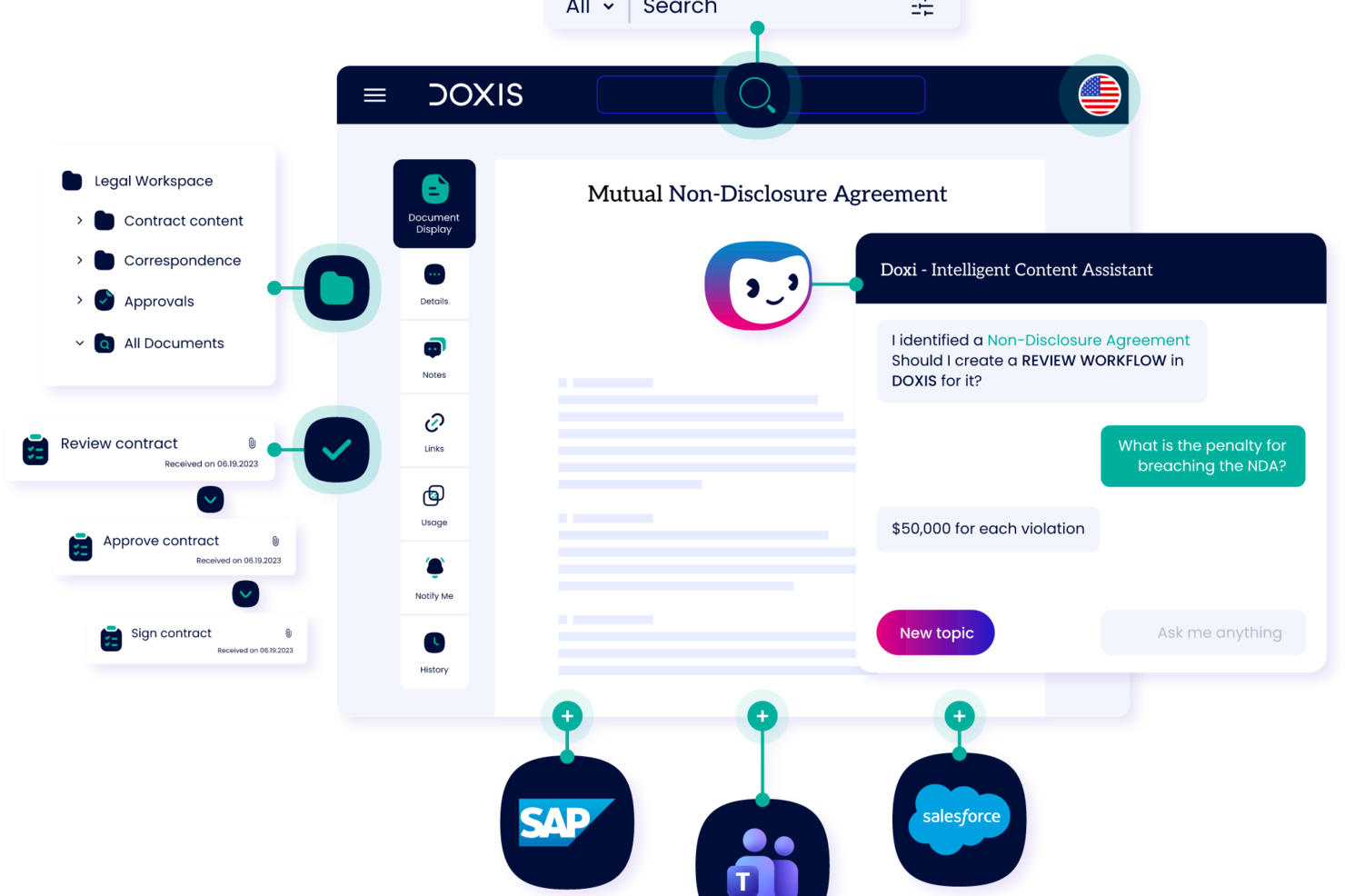
Doxis is an enterprise content management platform that brings together AI-powered document capture, electronic client files, automated workflows, and compliance-ready archiving in a single, configurable system.
Who is Doxis Best For?
Doxis suits mid-to-large enterprises in regulated industries that need a configurable, compliance-ready system for managing high volumes of client documents across departments.
Why I Picked Doxis
I've included Doxis in my top picks because its AI.dp module detects and processes documents in over 100 languages, including mixed-language documents, which is a real differentiator for enterprise teams managing client files across international markets. In practice, that means my team can run the same automated classification and data extraction workflows on a contract written in Arabic or Chinese as on one written in English, without building separate pipelines. I also like that the platform's UI is available in 12 official languages, covering 135 countries, so the teams actually doing the document work aren't navigating a system built for a different locale.
Doxis Key Features
- Electronic client files: Consolidates contracts, emails, invoices, and related documents into a single, comprehensive client record.
- Audit-proof archiving: Stores documents in tamper-proof archives with GDPR-compliant retention schedules and automated deletion rules.
- Document workflow automation: Routes documents through multi-stage approval with delegation and deputy rules.
- Role-based access control: Restricts document visibility and editing rights by user role, team, or organizational unit.
Doxis Integrations
Doxis offers native integrations with SAP, Salesforce, and the Microsoft ecosystem, including Microsoft 365, Microsoft Teams, Microsoft Outlook, Microsoft SharePoint, and Microsoft Dynamics 365. It also provides a REST API for custom integrations, plus vendor-independent connectors for ERP, CRM, HR, and CAD systems. Zapier support remains unclear.
Pros and Cons
Pros:
- Deep integration with SAP and Salesforce
- Audit-proof archiving with tamper-proof controls
- Supports multilingual document classification
Cons:
- Support quality depends on the individual agent
- Primarily designed for enterprise-scale deployments

Best for real-time document editing
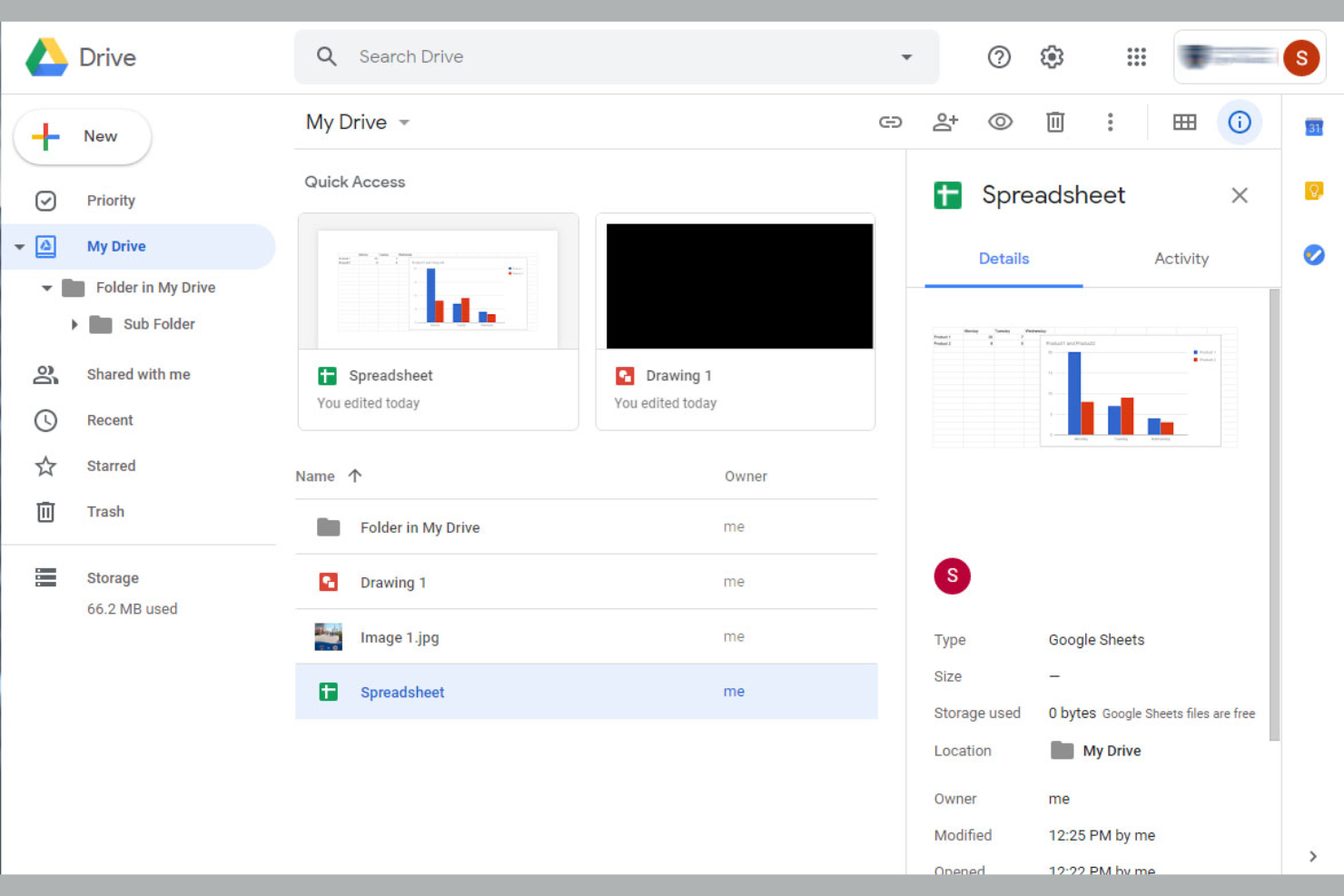
If your team needs to collaborate on client documents in real time, Google Drive is a top choice. It’s especially useful for agencies, consultancies, and distributed teams that rely on fast, shared editing and commenting. Google Drive stands out for its live co-authoring, easy sharing controls, and seamless integration with Google Workspace apps.
Why I Picked Google Drive
For teams that need to edit and review client documents together, Google Drive’s real-time collaboration features are hard to match. I picked Google Drive because it lets multiple users work on the same document at once, with changes and comments appearing instantly. The built-in version history makes it easy to track edits and revert to previous drafts if needed. These features make Google Drive a strong fit for client document management, where live feedback and fast turnaround are priorities.
Google Drive Key Features
Some other features that make Google Drive useful for client document management include:
- Shared Drives: Create dedicated spaces for teams or clients to organize and access documents collectively.
- Advanced Search Filters: Locate files quickly using filters for owner, type, date modified, and more.
- File Expiration Controls: Set access expiration dates for shared files to maintain client confidentiality.
- Offline Access: View and edit documents without an internet connection, syncing changes when you’re back online.
Google Drive Integrations
Integrations include Google Docs, Google Sheets, Google Slides, Gmail, Google Calendar, Google Meet, Tableau, Atlassian, and more.
Pros and Cons
Pros:
- Shared Drives organize files by client or team
- File version history tracks all document changes
- Real-time editing supports fast client collaboration
Cons:
- Search results can include irrelevant files
- No built-in e-signature functionality

OneDrive
Best with Microsoft ecosystem integration

For businesses already using Microsoft 365, OneDrive offers a familiar way to manage and share client documents. It’s especially useful for IT teams, consultancies, and professional services that rely on Microsoft apps for daily work. OneDrive stands out for its deep integration with Outlook, Teams, and SharePoint, making it easy to keep client files connected to your existing workflows.
Why I Picked OneDrive
When your team relies on Microsoft 365 tools, OneDrive fits naturally into your client document management process. I picked OneDrive because it lets you save, share, and co-edit files directly from familiar apps like Outlook and Teams. The automatic syncing with SharePoint ensures that client documents stay organized and accessible across your organization. These features make OneDrive a strong choice for businesses that want document management tightly woven into their Microsoft ecosystem.
OneDrive Key Features
Some other features that make OneDrive useful for client document management include:
- File Request: Collect documents from clients securely without giving them access to your folders.
- Personal Vault: Store sensitive client files in a protected area with an extra layer of security.
- Granular Sharing Permissions: Set view, edit, or download rights for each file or folder.
- Automatic Ransomware Detection: Receive alerts and file recovery options if suspicious activity is detected.
OneDrive Integrations
Integrations include Microsoft 365, Outlook, Teams, SharePoint, Power Automate, Power BI, Dynamics 365, and more.
Pros and Cons
Pros:
- Offline file access for remote client work
- File Request feature simplifies client uploads
- Direct integration with Microsoft Teams chat
Cons:
- No built-in document annotation tools
- Sync conflicts can cause duplicate client files

Best for built-in productivity tools
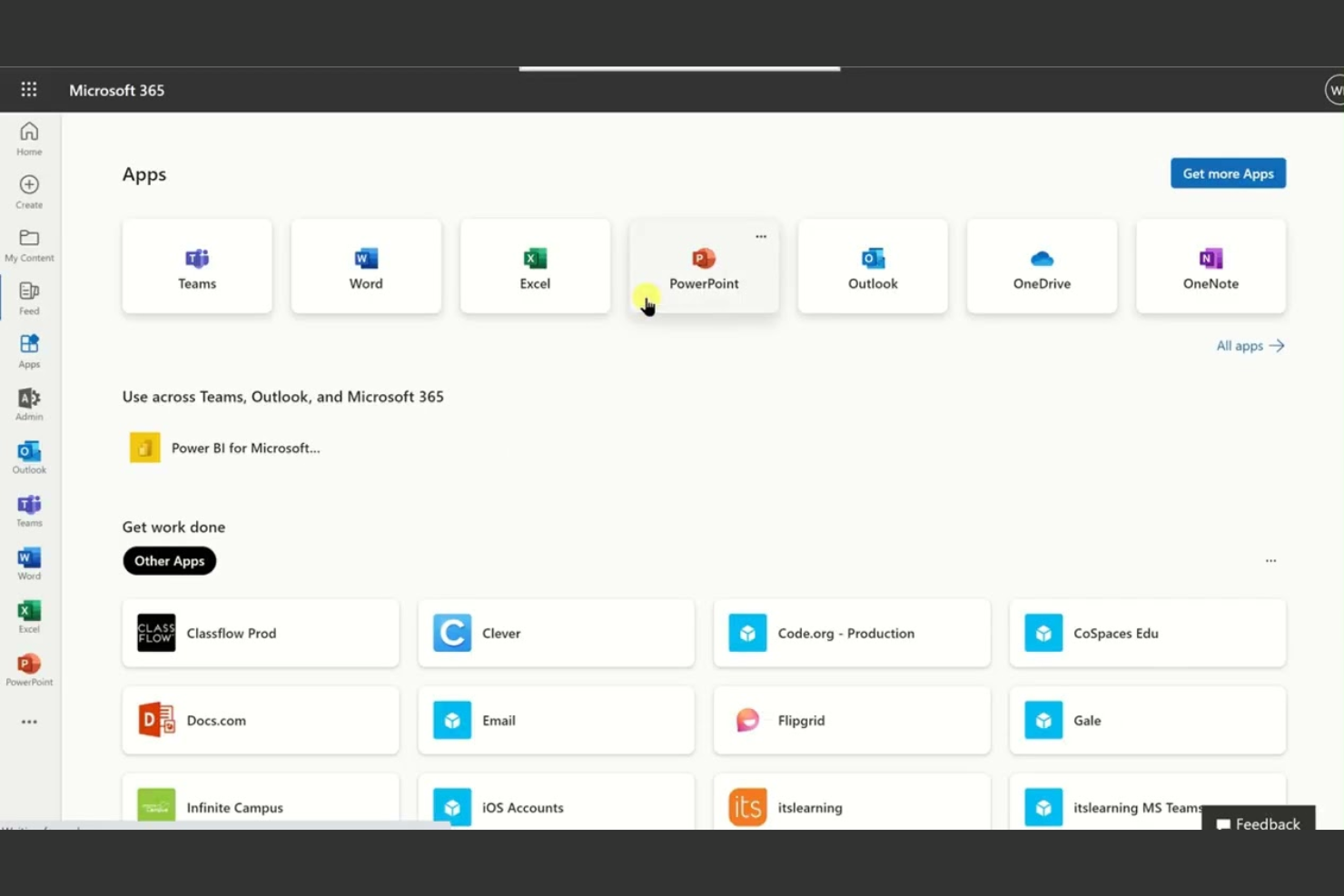
If your team needs client document management tightly connected to productivity tools, Microsoft 365 brings everything under one roof. It’s a strong fit for consultancies, agencies, and professional services that want document storage, editing, and collaboration in the same environment as email, calendars, and meetings. With built-in apps like Word, Excel, and SharePoint, you can manage client files and communications without switching platforms.
Why I Picked Microsoft 365
What sets Microsoft 365 apart for client document management is how it combines document storage with built-in productivity tools. I picked Microsoft 365 because you can create, edit, and share client files using Word, Excel, and PowerPoint without leaving the platform. SharePoint adds structured document libraries and permission controls, which help teams organize and secure client materials. This all-in-one approach means you can manage client documents and collaborate on them in real time, all within the same workspace.
Microsoft 365 Key Features
Some other features that make Microsoft 365 useful for client document management include:
- Data Loss Prevention (DLP): Set up policies to help prevent accidental sharing of sensitive client information.
- Co-Authoring: Multiple team members can work on the same document at the same time.
- eDiscovery: Search and export client documents for legal or compliance needs.
- OneDrive Sync: Access and sync client files across devices for offline work.
Microsoft 365 Integrations
Integrations include Microsoft Teams, OneDrive, SharePoint, Outlook, Power BI, Dynamics 365, and more.
Pros and Cons
Pros:
- Microsoft Purview adds audit and compliance tools
- eDiscovery supports legal and compliance needs
- Built-in DLP policies protect client data
Cons:
- File sharing outside organization often restricted
- SharePoint permissions can be complex to manage

Filevine
Best for legal case document tracking
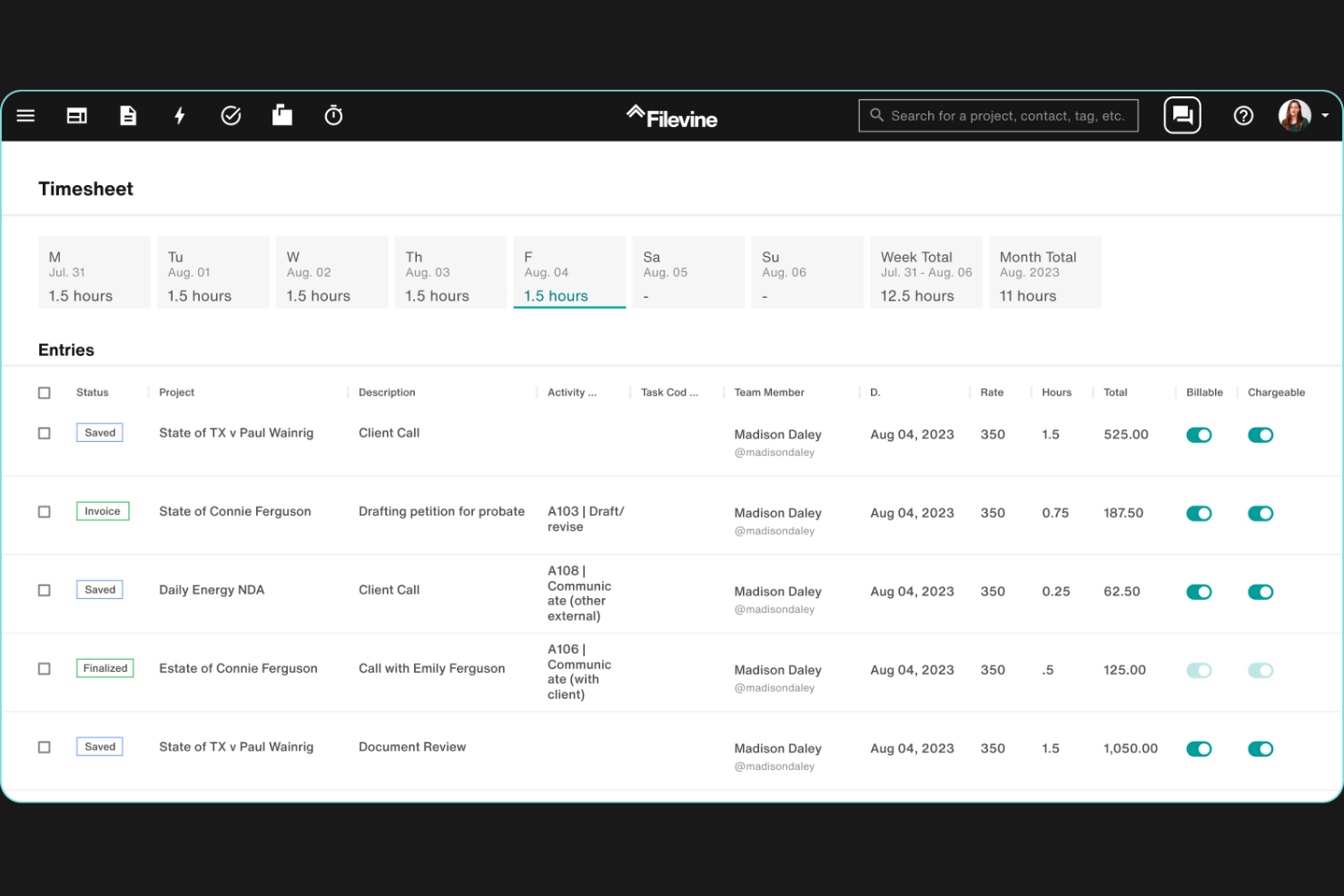
Filevine is designed for legal teams that need to track, organize, and collaborate on case documents throughout the entire lifecycle of a matter. It’s especially useful for law firms and legal departments managing high volumes of case files, deadlines, and client communications. With its case-centric approach, Filevine helps you keep every document, note, and task connected to the right client and matter.
Why I Picked Filevine
Legal case document tracking is a core strength of Filevine, making it a strong choice for law firms and legal teams. The platform organizes all documents, notes, and communications by case, so you always know where to find the right file. I like that Filevine also offers deadline and task tracking tied directly to each matter, which helps keep teams on top of critical dates and deliverables. For legal professionals who need to manage complex case files and maintain a clear audit trail, these features make Filevine a focused solution.
Filevine Key Features
Some other features in Filevine that support client document management include:
- Document Generation Tools: Create and populate legal documents using customizable templates.
- Text-to-Case File Integration: Send texts directly to a case file for automatic documentation.
- eSignature Collection: Request and track electronic signatures within the platform.
- Role-Based Access Controls: Set permissions for users based on their role or case involvement.
Filevine Integrations
Integrations include Outlook, Gmail, QuickBooks, LawPay, Dropbox, Box, Google Drive, Microsoft Teams, and more.
Pros and Cons
Pros:
- eSignature collection directly within the platform
- Automated document generation from templates
- Built-in text-to-case file documentation
Cons:
- Custom reporting setup requires vendor assistance
- Document search can be slow with large volumes

DocuWare
Best for automated workflow routing
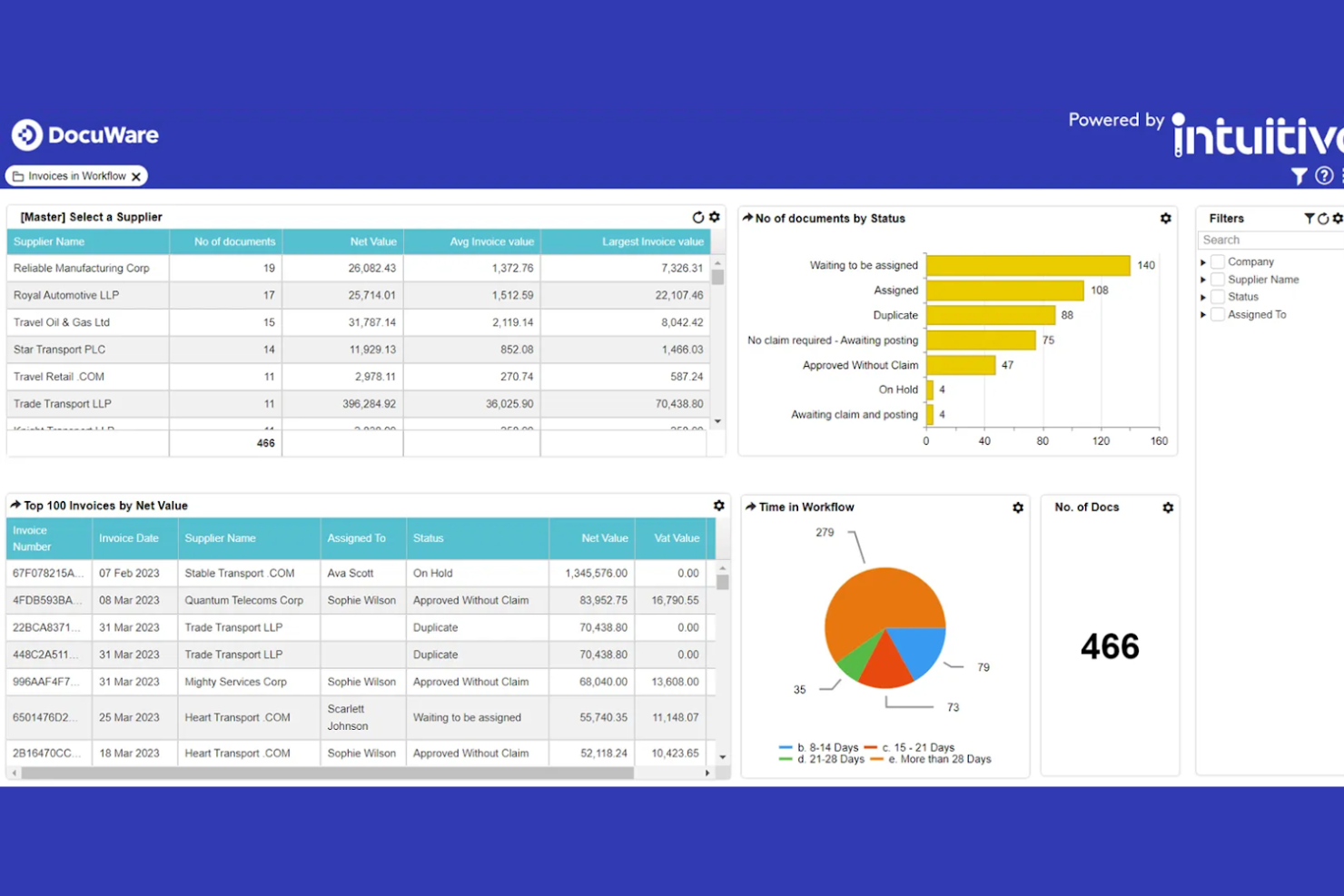
DocuWare stands out for teams that need to automate complex document workflows and approvals. It’s especially useful for organizations with high-volume document routing needs, like finance, HR, and operations. The platform helps reduce manual handoffs and errors by letting you design and trigger multi-step workflows directly from your document repository, while also supporting e-signing to simplify approvals and document completion.
Why I Picked DocuWare
Automated workflow routing is where DocuWare really shines for client document management. The platform lets you build custom workflows that automatically route documents for review, approval, or archiving based on rules you set. I appreciate how you can trigger notifications and assign tasks as documents move through each stage, which helps teams avoid bottlenecks and manual follow-ups. For organizations that need to manage high volumes of client paperwork with strict process controls, DocuWare’s workflow automation features are a strong fit.
DocuWare Key Features
Some other features in DocuWare that support client document management include:
- Document Version Control: Track changes and maintain a full history of document edits and updates.
- Role-Based Access Permissions: Set granular access levels for users and groups to protect sensitive information.
- Full-Text Search: Locate documents quickly using keyword and metadata search across your entire repository.
- Mobile Document Management: Access, review, and approve documents from mobile devices using the DocuWare app.
DocuWare Integrations
Integrations include Microsoft Dynamics 365, SAP, Outlook, Sage, QuickBooks, SharePoint, Oracle, and more.
Pros and Cons
Pros:
- Version control with detailed document history
- Role-based access for granular permission control
- Full-text search across all stored documents
Cons:
- Interface updates may disrupt established workflows
- Occasional delays in document indexing reported

Box
Best with advanced collaboration controls
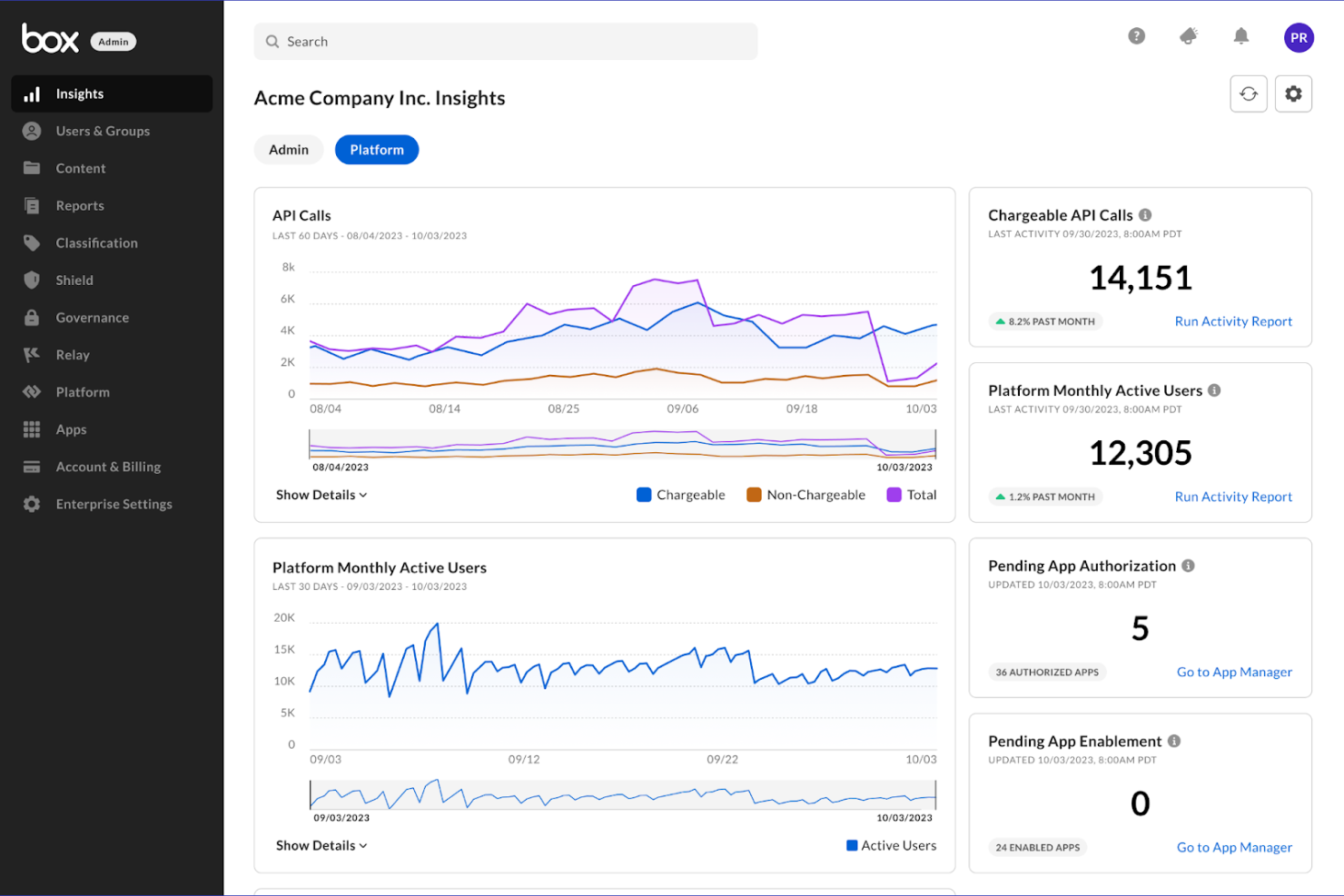
Box is designed for teams that need granular control over document sharing and collaboration. It’s a strong fit for organizations in regulated industries or those managing sensitive client files across distributed teams. With advanced permission settings and detailed activity tracking, Box helps you manage who can access, edit, or share client documents at every stage.
Why I Picked Box
Advanced collaboration controls set Box apart for client document management. The platform lets you set detailed permissions at the file, folder, or user level, so you can control exactly who can view, edit, or share sensitive client documents. I like that Box also provides audit trails and activity logs, which help you track document access and changes for compliance or client transparency. For teams that need to manage confidential files and coordinate across departments or external partners, these collaboration features make Box a strong choice.
Box Key Features
Some other features in Box that support client document management include:
- Document Watermarking: Add visible watermarks to files to deter unauthorized sharing or copying.
- Automated Retention Policies: Set rules for document retention and automatic deletion to support compliance requirements.
- eSignature Integration: Collect legally binding electronic signatures directly within Box using Box Sign.
- File Request Links: Create secure links that let clients or partners upload documents directly into designated folders.
Box Integrations
Integrations include Microsoft Office 365, Google Workspace, Salesforce, Slack, Adobe, Servicenow, and more.
Pros and Cons
Pros:
- File request links simplify client document intake
- Automated retention policies for compliance support
- eSignature collection built directly into platform
Cons:
- Folder structure can become complex quickly
- Upload speeds can lag with large files

M-Files
Best for metadata-driven search

M-Files takes a metadata-driven approach to document management, making it easier for teams to find and organize client files based on what they are, not just where they’re stored. This platform is especially useful for professional services firms, legal teams, and consultancies that handle large volumes of client documents with complex search and compliance needs. M-Files stands out for its ability to automate document classification and surface relevant content quickly, even across multiple repositories.
Why I Picked M-Files
What sets M-Files apart is its metadata-driven search, which helps teams locate client documents based on context and content rather than folder location. I picked M-Files because it lets you tag files with custom metadata, making it much easier to organize and retrieve information across projects and clients. The platform’s automatic document classification and advanced search filters mean you can quickly surface the right files, even in large, distributed repositories. For teams that need to manage complex client records and ensure nothing gets lost, these features make M-Files a strong fit.
M-Files Key Features
Some other features in M-Files that support client document management include:
- Automated Workflow Routing: Assign documents to specific users or teams based on predefined rules.
- Granular Access Permissions: Control who can view, edit, or share each document at a detailed level.
- Document Versioning: Maintain a complete history of changes and easily revert to previous versions.
- eSignature Integration: Collect legally binding electronic signatures directly within the platform.
M-Files Integrations
Integrations include Microsoft 365, Salesforce, SAP, Google Workspace, and more.
Pros and Cons
Pros:
- Audit trails help with compliance requirements
- Granular permissions restrict client file access
- Version history tracks all document changes
Cons:
- Advanced search setup requires admin configuration
- Desktop client installation required for full features

Best for secure client file sharing
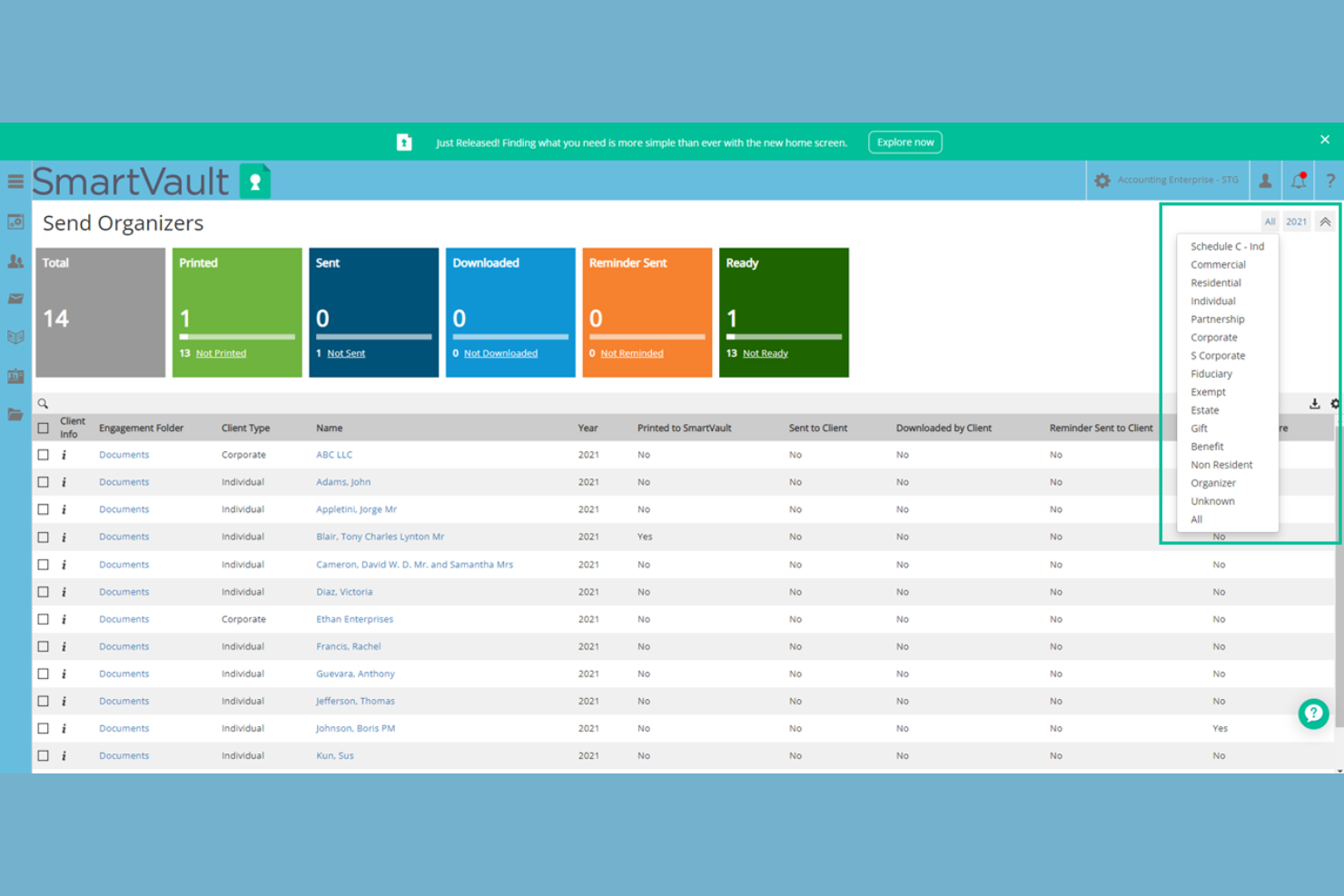
SmartVault is designed for teams that need secure, centralized client file sharing and document storage. It’s a strong fit for accounting firms, financial advisors, and other professionals handling sensitive client data. The platform addresses challenges around secure access, audit trails, and compliance requirements in client communications. With features like cloud storage, tools to sign documents, and workflows that support paperless operations, SmartVault helps teams spend less time managing files while maintaining security. Many organizations also reference case studies to evaluate how the platform supports secure client document management.
Why I Picked SmartVault
I chose SmartVault because secure client file sharing is a top priority for many businesses handling confidential information. The platform offers bank-level encryption and customizable access permissions, which help teams control exactly who can view or edit sensitive documents. I also like that SmartVault provides detailed audit logs, so you can track every document interaction for compliance and accountability. These features make it a strong choice for professionals who need to protect client data while maintaining efficient workflows.
SmartVault Key Features
Some other features in SmartVault that support client document management include:
- Client Portal: Clients can securely upload, download, and view documents through a branded online portal.
- Document Request List: Create and send lists of required documents to clients, tracking submissions in real time.
- eSignature Integration: Collect legally binding electronic signatures directly within the platform.
- Folder Templates: Standardize folder structures for different client types or projects to keep files organized.
SmartVault Integrations
Integrations include QuickBooks Online, Xero, Sage Intacct, Bill.com, Hubdoc, Salesforce, Microsoft Office 365, DocuSign, Adobe Sign, Intuit ProConnect, and more.
Pros and Cons
Pros:
- Document request lists for client submissions
- Detailed audit trails for compliance tracking
- Secure client portal for document sharing
Cons:
- Interface can feel dated compared to competitors
- Occasional slow upload speeds reported by users
Revver
Best for compliance management needs
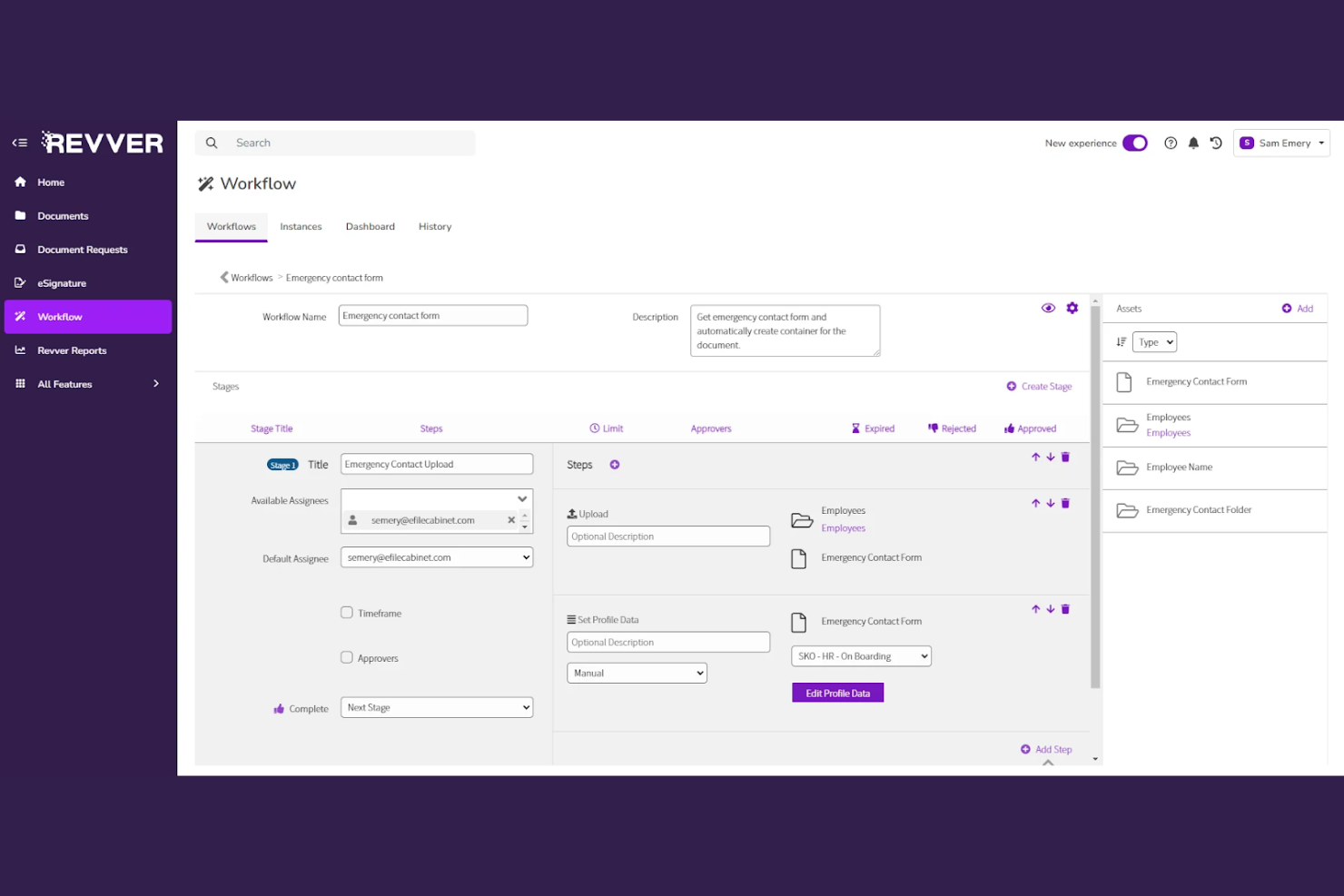
Revver is designed for organizations that need to manage client documents with strict compliance and audit requirements. It’s a strong fit for financial services, healthcare, and legal teams that face complex regulatory standards and need to prove document control. Revver stands out for its built-in compliance workflows and detailed audit trails that help teams stay ready for inspections and audits.
Why I Picked Revver
Revver caught my attention because it’s built with compliance management at its core, which is essential for teams handling sensitive client documents. The platform offers automated retention policies and audit trails, so you can demonstrate compliance with industry regulations at any time. I picked Revver for its ability to lock down document access and track every action, which is especially important for regulated industries. These features make it a strong choice for organizations that need to prove document integrity and control during audits or inspections.
Revver Key Features
In addition to its compliance-focused controls, Revver offers several other features for managing client documents:
- Document Templates: Create and reuse standardized templates for common client documents.
- Bulk Uploading: Add multiple files at once to speed up onboarding or migration.
- Custom Metadata Fields: Tag documents with client-specific or project-specific metadata for easier organization.
- Advanced Search Filters: Narrow down document searches using multiple criteria like date, owner, or document type.
Revver Integrations
Integrations include OneDrive, Google Drive, Google Sheets, Google Docs, Microsoft 365, and more.
Pros and Cons
Pros:
- Audit logs track every document action
- Document templates standardize client-facing files
- Bulk uploading accelerates document migration
Cons:
- Search filters can be slow with large volumes
- Limited public documentation for advanced features
Diğer Müşteri Belgesi Yönetim Yazılımları
Kısa listeme girmeyen ancak yine de göz atmaya değer bazı ek müşteri belgesi yönetim yazılımı seçenekleri şunlardır:


How I Evaluate Client Document Management Software
I split my evaluation into two layers: baseline requirements like secure client portals and version history, and differentiators like automation and white-labeling that set the best tools apart.
Core Functionality (Table Stakes For This List)
When I'm selecting tools for my list, I rank each one on a scale from 0 (does not offer the functionality) to 5 (excels in this area) for each core functionality listed below. Then, I calculate the tool's total score into a percentage. Each tool needs to achieve a minimum total score of 65% to be considered for inclusion.
- Centralized Client Repository: I check whether the tool organizes documents by client, project, or engagement—not just generic folders—so teams can find a specific deliverable without digging through a shared drive.
- Client-Facing Sharing Portal: Each tool should offer a secure portal or branded workspace where clients log in to view, download, or upload files rather than relying on scattered email attachments.
- Granular Access Permissions: I evaluate how precisely you can control who sees what—for example, giving a client read-only access to final deliverables while keeping internal drafts restricted to your project team.
- Version Control & Audit Trails: The platform should track every edit, upload, and access event so you can trace who changed a scope document and when, which matters during client disputes or audits.
- Document Collaboration & Approvals: I look at whether teams and clients can comment, annotate, and approve files within the platform—think redlining a statement of work without toggling between tools.
- Project & Workflow Integration: The tool should connect documents to project tasks and milestones, either natively or through integrations with platforms like Asana, Monday, or Jira.
Once I have a list of tools that meet this criteria, I consider what sets each platform apart.
Differentiating Factors (What Sets Vendors Apart)
Here's how I compare and contrast different vendors:
Standout Features
White-label branding matters for agencies and consultancies that want their portal to feel like part of their own brand, not a third-party tool. I also evaluate automated document workflows—like triggering a reminder when a client hasn't signed off on a deliverable by a milestone date. Client intake forms that guide clients through uploading the right files save teams from chasing missing documents over email. Engagement analytics help you spot when a client hasn't opened a proposal so you can follow up before a deadline slips.
Beyond Features
Security and compliance certifications like SOC 2 Type II and GDPR readiness are worth checking, especially when you're handling sensitive client contracts or regulated project data. I also evaluate pricing models carefully—some platforms charge per external client user, which gets expensive fast when you're managing dozens of client accounts. Integration depth with your existing PM stack matters too. A tool that syncs documents with your Asana or Monday workflows saves your team from manually linking files to tasks across two systems.
Müşteri Belgesi Yönetim Yazılımı Nasıl Seçilir?
Uzun özellik listeleri ve karmaşık fiyatlandırma yapıları içinde kaybolmak kolaydır. Size özgü yazılım seçme sürecinde ilerlerken odağınızı korumanıza yardımcı olmak için aklınızda bulundurmanız gereken faktörlerin bir kontrol listesini burada bulabilirsiniz:
| Faktör | Dikkate Alınması Gerekenler |
|---|---|
| Ölçeklenebilirlik | Yazılım, zaman içinde belge hacminizi ve kullanıcı sayısındaki artışı kaldırabilecek mi? Depolama sınırlarını ve kullanıcı kotalarını kontrol edin. |
| Entegrasyonlar | Mevcut araçlarınıza (e-posta, CRM, proje yönetimi) yerel olarak bağlanıyor mu? Kısa liste oluşturmadan önce olmazsa olmaz entegrasyonlarınızı belirleyin. |
| Özelleştirilebilirlik | Klasör yapılarını, izinleri ve iş akışlarını müşteri süreçlerinize uyacak şekilde özelleştirebilir misiniz? Sizi sisteme uyum sağlamaya zorlayan katı sistemlerden kaçının. |
| Kullanım kolaylığı | Ekibiniz ve müşterileriniz sistemi hızlı bir şekilde benimseyecek mi? Açık bir gezinme yapısı, minimum eğitim ihtiyacı ve tanıdık bir arayüz arayın. |
| Uygulama ve işe alışma | Belgeleri taşımak ve kullanıcıları eğitmek ne kadar sürecek? Veri içe aktarma araçlarını, işe alıştırma desteğini ve mevcut kaynakları sorun. |
| Maliyet | İhtiyaçlarınız büyüdükçe fiyatlandırma kademeleri şeffaf ve öngörülebilir mi? Depolama, kullanıcılar veya gelişmiş özellikler için ek ücretlere dikkat edin. |
| Güvenlik önlemleri | Şifreleme, ayrıntılı izinler ve denetim izleri sunuyor mu? Sektörünüzün veri koruma standartlarına uygunluğu doğrulayın. |
| Uyumluluk gereksinimleri | Yazılım, mevzuata ilişkin ihtiyaçlarınızı (GDPR, HIPAA, SOC 2) destekliyor mu? Belgeleri isteyin ve yerleşik uyumluluk araçlarının bulunup bulunmadığını kontrol edin. |
Müşteri Belge Yönetimi Yazılımı Nedir?
Müşteri belge yönetimi yazılımı, müşteri çalışmalarıyla ilgili belgeleri depolamak, düzenlemek, paylaşmak ve güvence altına almak için kullanılan dijital bir sistemdir. Bu platformlar ekiplerin dosyaları yönetmesine, erişimi kontrol etmesine, değişiklikleri izlemesine ve veri koruma standartlarına uyumluluğu sürdürmesine yardımcı olur. Proje yöneticileri bu yazılımları müşteri iletişimlerini merkezileştirmek, iş birliğini kolaylaştırmak ve hassas bilgilerin proje yaşam döngüsü boyunca güvenli bir şekilde işlenmesini sağlamak için kullanır.
Müşteri Belge Yönetimi Yazılımının Özellikleri
Müşteri belge yönetimi yazılımı seçerken aşağıdaki temel özelliklere dikkat edin:
- Belge depolama: Tüm müşteri dosyalarını güvenli ve düzenli bir dijital depoda merkezileştirerek belgeleri her yerden yüklemeyi, bunlara erişmeyi ve yönetmeyi kolaylaştırır.
- İzin denetimleri: Kullanıcılar ve gruplar için ayrıntılı erişim düzeyleri belirlemenizi sağlayarak yalnızca yetkili kişilerin hassas müşteri bilgilerini görüntüleyebilmesini, düzenleyebilmesini veya paylaşabilmesini garanti eder.
- Sürüm geçmişi: Belgelerde zaman içinde yapılan değişiklikleri izleyerek kullanıcıların veri kaybını veya karışıklığı önlemek amacıyla önceki sürümleri görüntülemesine, karşılaştırmasına veya geri yüklemesine olanak tanır.
- Denetim izleri: Görüntüleme, düzenleme ve paylaşma gibi tüm belge etkinliklerini kaydederek uyumluluk ve güvenlik gereksinimleri için şeffaflık ve hesap verebilirlik sağlar.
- Dosya paylaşımı: Belgelerin müşterilerle veya ekip üyeleriyle güvenli bir şekilde paylaşılmasını sağlar; genellikle parola koruması, son kullanma tarihleri veya indirme kısıtlamaları gibi seçenekler sunar.
- Arama ve erişim: Belgeleri anahtar kelimeye, meta verilere veya filtrelere göre hızlıca bulmak için gelişmiş arama araçları sunarak zamandan tasarruf sağlar ve manuel çabayı azaltır.
- İş birliği araçları: Ekiplerin ve müşterilerin sürüm çakışmaları yaşamadan belgeler üzerinde birlikte çalışabilmesi için gerçek zamanlı düzenlemeyi, yorum yapmayı ve bildirimleri destekler.
- Belge şablonları: Yaygın müşteri belgeleri için yeniden kullanılabilir şablonlar sunarak süreçlerin standartlaştırılmasına ve tekrarlayan işlerin azaltılmasına yardımcı olur.
- Mobil erişim: Kullanıcıların akıllı telefonlardan veya tabletlerden belgeleri görüntülemesine, düzenlemesine ve paylaşmasına olanak tanıyarak uzaktan çalışmayı ve hareket hâlindeyken iş birliğini destekler.
Müşteri Belge Yönetimi Yazılımının Faydaları
Müşteri belge yönetimi yazılımını uygulamak ekibiniz ve işletmeniz için çeşitli faydalar sağlar. Yararlanabileceğiniz birkaç fayda şunlardır:
- Merkezileştirilmiş belge erişimi: Tüm müşteri dosyaları tek bir güvenli konumda depolanır; böylece ekibiniz belgeleri kolayca bulabilir ve yönetebilir.
- Geliştirilmiş veri güvenliği: İzin denetimleri ve denetim izleri, hassas müşteri bilgilerinin korunmasına yardımcı olur ve sektör düzenlemelerine uyumluluğu destekler.
- Daha hızlı iş birliği: Gerçek zamanlı düzenleme, yorum yapma ve paylaşma özellikleri, ekiplerin ve müşterilerin gecikme veya sürüm karışıklığı yaşamadan birlikte çalışmasını sağlar.
- Azaltılmış manuel hatalar: Sürüm geçmişi ve belge şablonları hataları en aza indirir ve müşteri teslimatlarında tutarlılık sağlar.
- Kolaylaştırılmış işe alıştırma: Arama araçları ve düzenli klasör yapıları, yeni ekip üyelerinin müşteri projelerine hızla hâkim olmasına yardımcı olur.
- Geliştirilmiş hesap verebilirlik: Etkinlik günlükleri ve denetim izleri, belgelere kimlerin eriştiği veya belgeleri kimlerin değiştirdiği konusunda şeffaflık sağlayarak iç incelemeleri ve denetimleri destekler.
- Uzaktan çalışma desteği: Mobil erişim ve bulut tabanlı depolama, ekibinizin müşteri belgelerini her yerden yönetmesine olanak tanıyarak projelerin ilerlemesini sağlar.
Müşteri Belge Yönetimi Yazılımının Maliyetleri ve Fiyatlandırması
Müşteri belge yönetimi yazılımını seçmek, mevcut çeşitli fiyatlandırma modellerinin ve planların anlaşılmasını gerektirir. Maliyetler; özelliklere, ekip büyüklüğüne, eklentilere ve diğer unsurlara göre değişir. Aşağıdaki tablo, müşteri belge yönetimi yazılımı çözümlerinde yaygın planları, ortalama fiyatlarını ve genellikle sunulan özellikleri özetlemektedir:
Müşteri Belge Yönetimi Yazılımı İçin Plan Karşılaştırma Tablosu
| Plan Türü | Ortalama Fiyat | Yaygın Özellikler |
|---|---|---|
| Ücretsiz Plan | $0 | Temel belge depolama, sınırlı paylaşım seçenekleri, basit arama ve temel izin denetimleri. |
| Kişisel Plan | $5-$15/kullanıcı/ay | Artırılmış depolama alanı, bireysel kullanıcı erişimi, sürüm geçmişi ve temel iş birliği araçları. |
| İşletme Planı | $15-$30/kullanıcı/ay | Ekip tabanlı izinler, gelişmiş paylaşım, denetim izleri, entegrasyon seçenekleri ve geliştirilmiş güvenlik. |
| Kurumsal Plan | $30-$60/kullanıcı/ay | Özel iş akışları, uyumluluk araçları, gelişmiş analizler, özel destek ve sınırsız depolama alanı. |
Müşteri Belge Yönetimi Yazılımı Hakkında Sıkça Sorulan Sorular
Müşteri belge yönetimi yazılımı hakkında sık sorulan bazı soruların yanıtlarını burada bulabilirsiniz:
Mevcut müşteri belgelerimi yeni bir belge yönetimi sistemine nasıl aktarabilirim?
Çoğu müşteri belge yönetimi yazılımı içe aktarma araçları veya geçiş hizmetleri sunar. Dosyalarınızı düzenleyerek başlayın, ardından belgeleri aktarmak için yerleşik içe aktarma özelliklerini kullanın veya sağlayıcının destek ekibiyle çalışın. Mevcut dosya formatlarınızla uyumluluğu kontrol edin ve önce küçük bir dosya grubuyla geçişi test edin.
Belirli müşteri belgelerini kimlerin görebileceğini veya düzenleyebileceğini kontrol edebilir miyim?
Evet, izin denetimleri her belgeyi veya klasörü kimlerin görüntüleyebileceğini, düzenleyebileceğini ya da paylaşabileceğini belirlemenizi sağlar. Kullanıcılara veya gruplara roller atayın ve yalnızca yetkili kişilerin hassas müşteri bilgilerine erişebildiğinden emin olmak için izinleri düzenli olarak gözden geçirin.
Müşteri belge yönetimi yazılımında hangi güvenlik önlemlerini aramalıyım?
Şifreleme (aktarılırken ve depolanırken), denetim izleri, çok faktörlü kimlik doğrulama ve SOC 2 veya ISO 27001 gibi uyumluluk sertifikalarını arayın. Bu özellikler müşteri verilerinin korunmasına ve kuruluşunuzun güvenlik gereksinimlerinin desteklenmesine yardımcı olur.
Belge sürüm oluşturma ve denetim izleri nasıl çalışır?
Belge sürüm oluşturma, değişiklik yapıldığında önceki sürümleri otomatik olarak kaydeder; böylece önceki taslakları inceleyebilir veya geri yükleyebilirsiniz. Denetim izleri; görüntüleme, düzenleme ve paylaşma gibi tüm belge etkinliklerini kaydederek uyumluluk ve hesap verebilirlik için bir kayıt sağlar.
Müşteri belge yönetimi yazılımını diğer iş araçlarıyla entegre etmek mümkün mü?
Evet, birçok platform e-posta, CRM, proje yönetimi ve elektronik imza araçlarıyla entegrasyonlar sunar. Mevcut sistemlerinizle uyumluluğu doğrulamak için sağlayıcının entegrasyon pazar yerini veya API belgelerini kontrol edin.