

Os 10 melhores softwares de controlo de tempo com IA analisados em 2026

Melhor programa de controlo de tempo com IA


O melhor programa de controlo de tempo com IA permite automatizar os registos de tempo, acompanhar com precisão as horas faturáveis e obter informações em tempo real sobre a produtividade da equipa. Sem ele, fica dependente da reconciliação de folhas de horas manuais, da procura de registos em falta e de relatórios imprecisos, tudo situações que atrasam os projetos e aumentam os custos.
Testei e analisei pessoalmente várias ferramentas de controlo de tempo com IA e avaliei de que forma podem ter um impacto positivo nos prazos, na responsabilização da equipa e na alocação de recursos. Eis as minhas escolhas do melhor programa de automatização de fluxos de trabalho com IA para ajudar a melhorar a gestão do tempo e a entregar projetos dentro do prazo, com menos erros.
Why Trust Our Software Recommendations
Our team has been testing and reviewing software since 2012. As project managers ourselves, we know how difficult—and important—it is to choose the right software.
For this guide, we evaluated tools using hands-on testing and independent research, scoring tools using our selection criteria. We also draw on insights from industry thought leaders and practicing project management experts.
Our reviews reflect our human editorial judgment, not a sales pitch.
Expert reviewers:
Tabela comparativa de programas de controlo de tempo com IA
Esta tabela comparativa resume os detalhes de preços das minhas principais escolhas de ferramentas de controlo de tempo com IA:
| Tool | Best For | Trial Info | Price | ||
|---|---|---|---|---|---|
| 1 | Best for billing-focused project reporting | Free plan available; 30-day free trial; Free demo available | From $9/user/month | Website | |
| 2 | Best for automating timesheet workflows | Free plan + 14-day free trial + free demo available | From $9/user/month (billed annually) | Website | |
| 3 | Best for integrated break tracking | Free trial available | From $6.42/user/month (billed annually) | Website | |
| 4 | Best for plain-language report building | Free plan + 30-day trial available | From $9/user/month (billed annually) | Website | |
| 5 | Best for lightweight team tracking | Free 21-day trial + free plan for up to 3 users | From $7/seat/month | Website | |
| 6 | Best for automatic time tracking | Free 14-day trial + free demo available | From $9/user/month (billed annually) | Website | |
| 7 | Best for attendance and payroll integration | Free plan + free demo available | Pricing upon request | Website | |
| 8 | Best for offline time tracking | 14-day free trial | From $14/month (billed annually) | Website | |
| 9 | Best for freelancers and agencies | Free trial available | From $8/user/month (billed annually) | Website | |
| 10 | Best for legal industry compliance | Free demo available | Pricing upon request | Website |


Análise do melhor programa de controlo de tempo com IA
Leia os meus resumos detalhados de cada uma das minhas escolhas do melhor programa de controlo de tempo com IA. Abordo as principais funcionalidades, vantagens & desvantagens, integrações e casos de utilização para que possa encontrar a melhor opção para si.
Toggl
Best for billing-focused project reporting
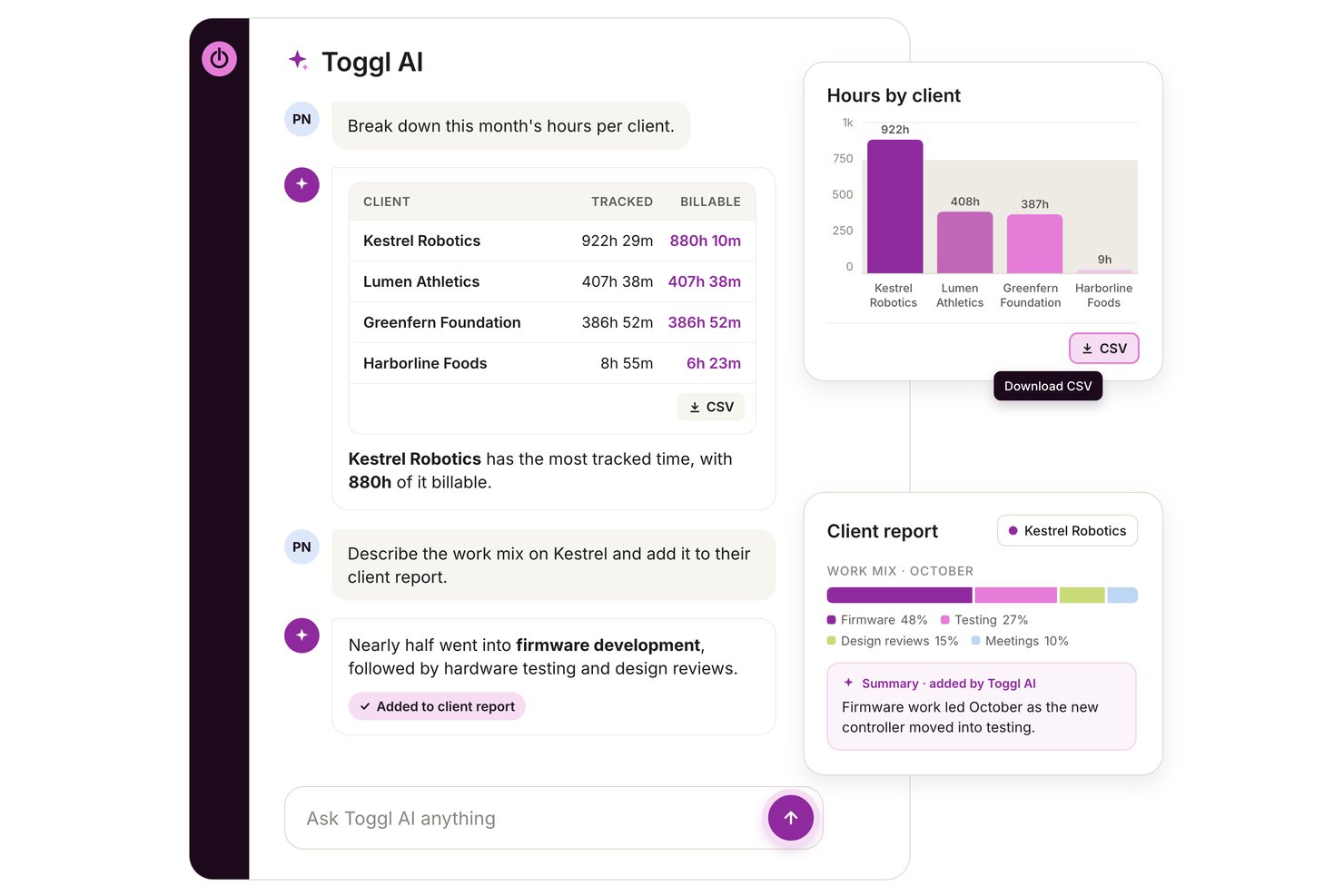
Toggl is a time tracking platform that combines automated activity capture, AI-assisted reporting, project budgeting, and profitability analysis for teams and freelancers.
Who Is Toggl Best For?
Toggl is a strong fit for freelancers, consultants, and project-led teams who need to connect tracked time directly to client billing and project profitability.
Why I Picked Toggl
I've included Toggl in my top picks because its profitability reporting goes deeper than most time trackers I've tested. At the Premium tier, you get project dashboards that show actual time against estimates, projected finish dates, and margin breakdowns across clients, tasks, and team members, which makes it genuinely useful for billing-focused work. I also like that Toggl AI lets you query that data in plain language and pull the results into a downloadable chart without touching a report filter.
Toggl Key Features
- Toggl AI answers: Ask plain-language questions about your workspace time, budgets, and capacity, and get answers drawn directly from your data.
- Timesheet approvals: Submit and approve timesheets on a weekly or monthly cycle, with approved periods locked from further edits.
- Keyword-based autotracker: Link keywords to projects so Toggl prompts you to log time whenever a matching window title appears in the foreground.
- MCP server connection: Connect Toggl to MCP-compatible AI assistants like Claude or Cursor to read and update tasks, projects, and time entries from outside the app.
Toggl Integrations
Toggl offers native integrations with Google Calendar, Outlook Email & Calendar, Asana, Jira, and Slack. It also supports custom connections through its REST API, webhooks, MCP server, and CLI.
Pros and Cons
Pros:
- Trust-based tracking avoids screen surveillance
- AI answers turn workspace data into charts
- Project reports expose time allocation and bottlenecks
Cons:
- Auto-tracked entries can need manual correction
- Activity categorization depends on manually set rules

Best for automating timesheet workflows
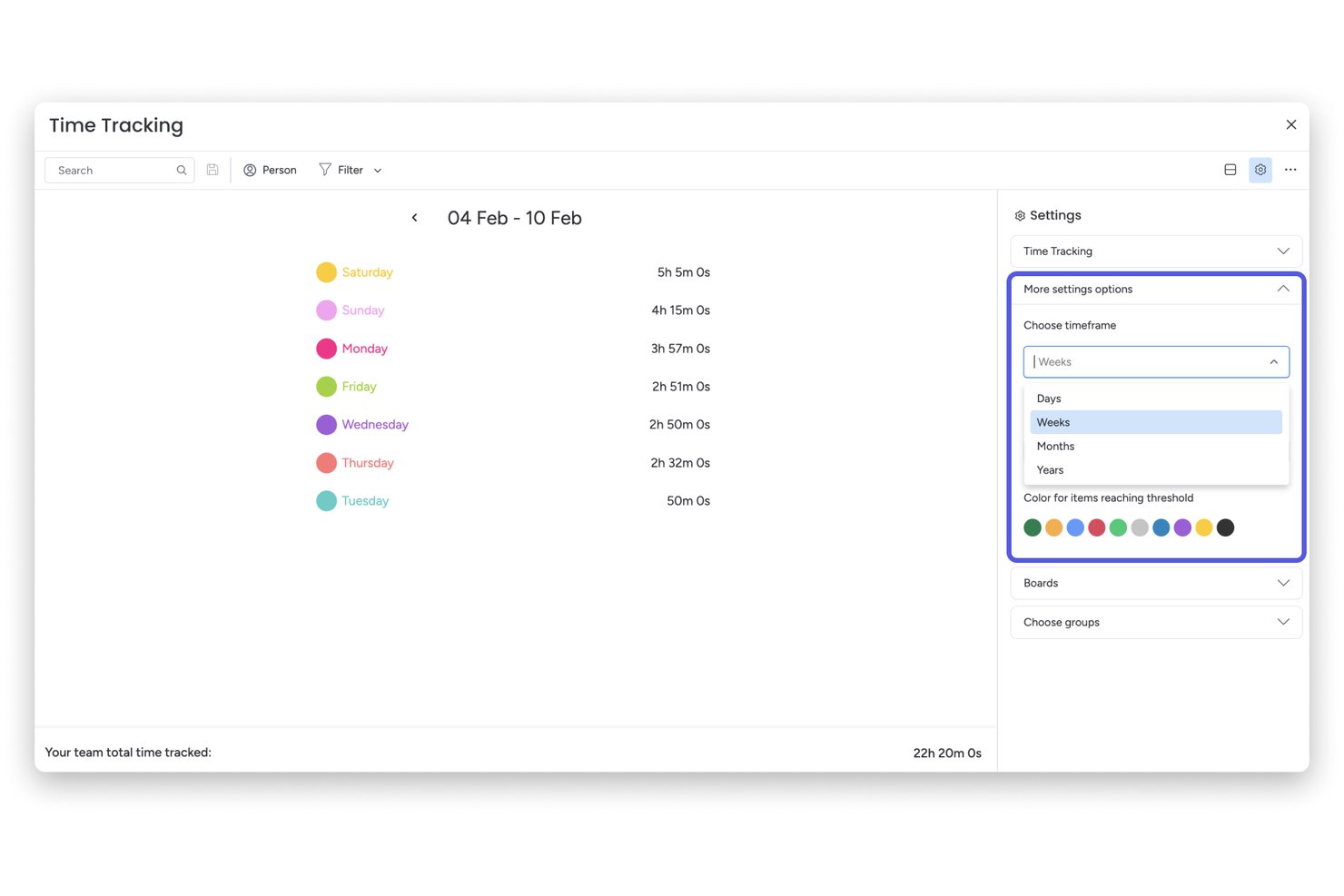
monday AI Workspace is a work management platform that combines project tracking, AI-powered automation, and native time tracking to help teams log hours, manage workloads, and route timesheet approvals across projects.
Who Is monday AI Workspace Best For?
It's a strong fit for project managers and PMO teams who already run their work inside monday.com and want to automate timesheet approvals without switching tools.
Why I Picked monday AI Workspace
I picked monday AI Workspace because its automation engine covers the full timesheet cycle, not just the time entry itself. I like that you can trigger timer starts from a task status change, route completed timesheets through an approval chain, and have the system automatically remind anyone who hasn't submitted. My team uses it specifically to eliminate the back-and-forth that usually comes with weekly timesheet collection.
monday AI Workspace Key Features
- AI-powered dashboards: Gain access to dashboards that surface project timelines, workload, and resource allocation insights using AI.
- Advanced project automation: Build complex workflow automations for task assignments, project dependencies, and notifications without coding.
- Native project management boards: Manage tasks, priorities, and milestones using customizable, visual board layouts.
- Multi-platform integrations: Connect with leading tools like Jira, Slack, Zoom, and Google Drive to centralize data and automate information flow.
monday AI Workspace Integrations
monday AI Workspace offers hundreds of native integrations through its built-in integrations and marketplace, including Slack, Jira, Google Drive, Zoom, Outlook, Typeform, and Salesforce. It also supports Zapier and provides an API for custom integrations.
Pros and Cons
Pros:
- AI-powered dashboards for resource forecasting
- Automations trigger timers from board status
- Direct timesheet approvals built into workflows
Cons:
- Lacks AI-driven time entry categorization
- No passive activity-based time tracking
New Product Updates from monday AI Workspace
monday AI Workspace Adds Human Approval Routing
monday AI Workspace adds a human-in-the-loop approval block to AI Workflows, sending approval requests and routing workflow paths based on responses. For more information, visit monday AI Workspace's official site.

DeskTime
Best for integrated break tracking
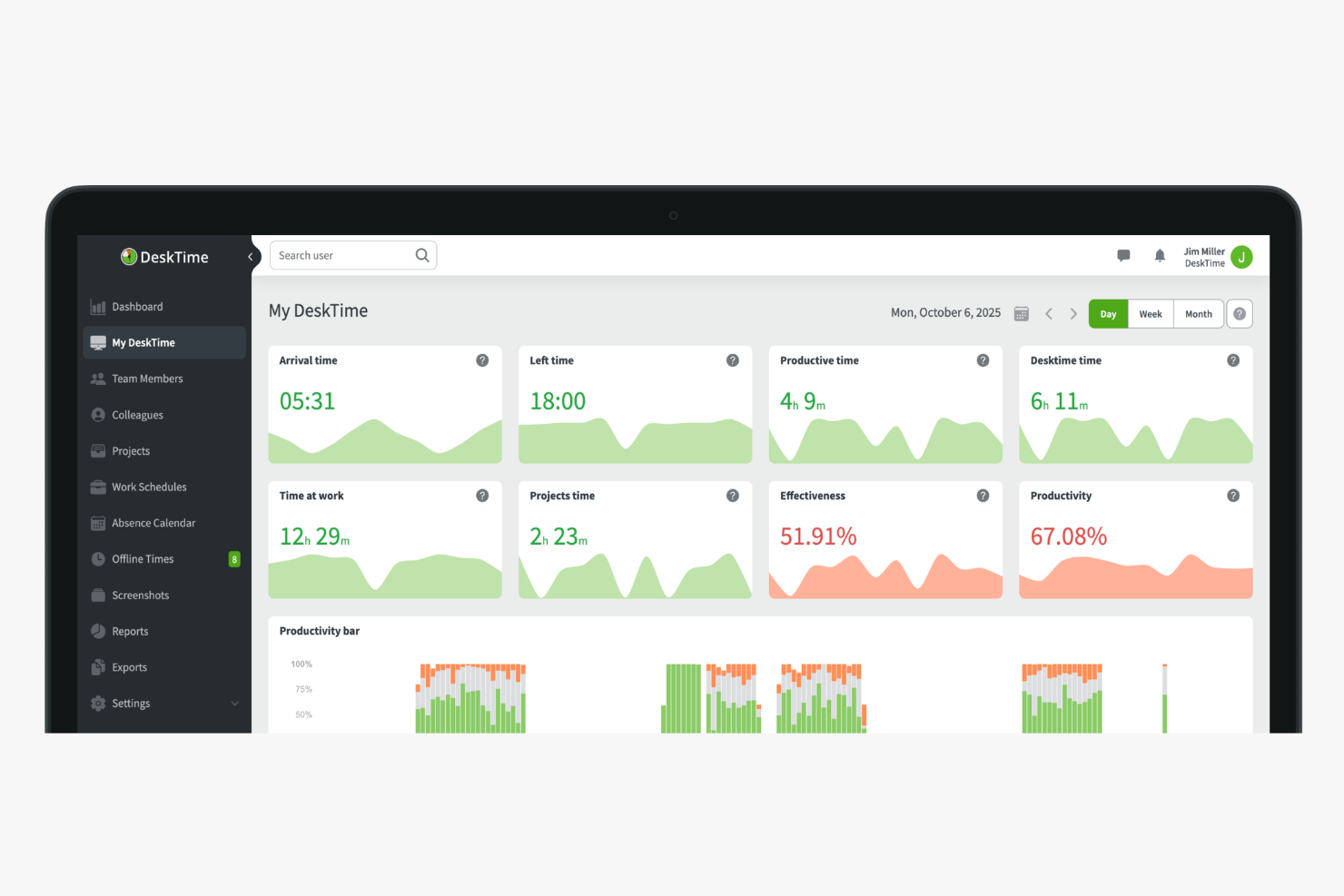
DeskTime is an automatic time tracking and productivity monitoring tool that logs app and URL usage, generates AI-powered work summaries, and tracks shift schedules across teams.
Who Is DeskTime Best For?
DeskTime is a good fit for managers of remote or hybrid teams who need visibility into how work hours are spent across distributed workforces.
Why I Picked DeskTime
DeskTime earns its spot on my shortlist for integrated break tracking because it's one of the few time trackers that treats breaks as a first-class part of the workday, not an afterthought. The break time reminder feature sends automatic nudges to employees throughout the day, prompting them to step away at regular intervals without any manual setup on my end. I also like the private time feature, which lets team members pause all tracking when they need a personal moment, so that lunch break browsing or a quick personal errand doesn't show up alongside their productive work hours. That combination means I get accurate time data and my team gets the autonomy to take real breaks.
DeskTime Key Features
- Screenshot monitoring: Captures random screenshots at set intervals to give managers a visual record of on-screen activity during work hours.
- GPS location tracking: Logs employee location via the mobile app, useful for tracking field workers or distributed teams on the go.
- Late arrival alerts: Notifies managers automatically when an employee clocks in after their scheduled start time.
- Daily productivity timeline: Displays a colour-coded breakdown of each employee's active, idle, and away time across the full workday.
DeskTime Integrations
Integrations include Google Calendar, Outlook Calendar, Trello, Gitlab, Asana, Jira, and Zapier.
Pros and Cons
Pros:
- Built-in Pomodoro timer for focus sessions
- Categorizes activity as productive or unproductive
- Tracks time automatically without manual input
Cons:
- Project switching requires manual input
- Lacks predictive web category filtering
Beebole
Best for plain-language report building
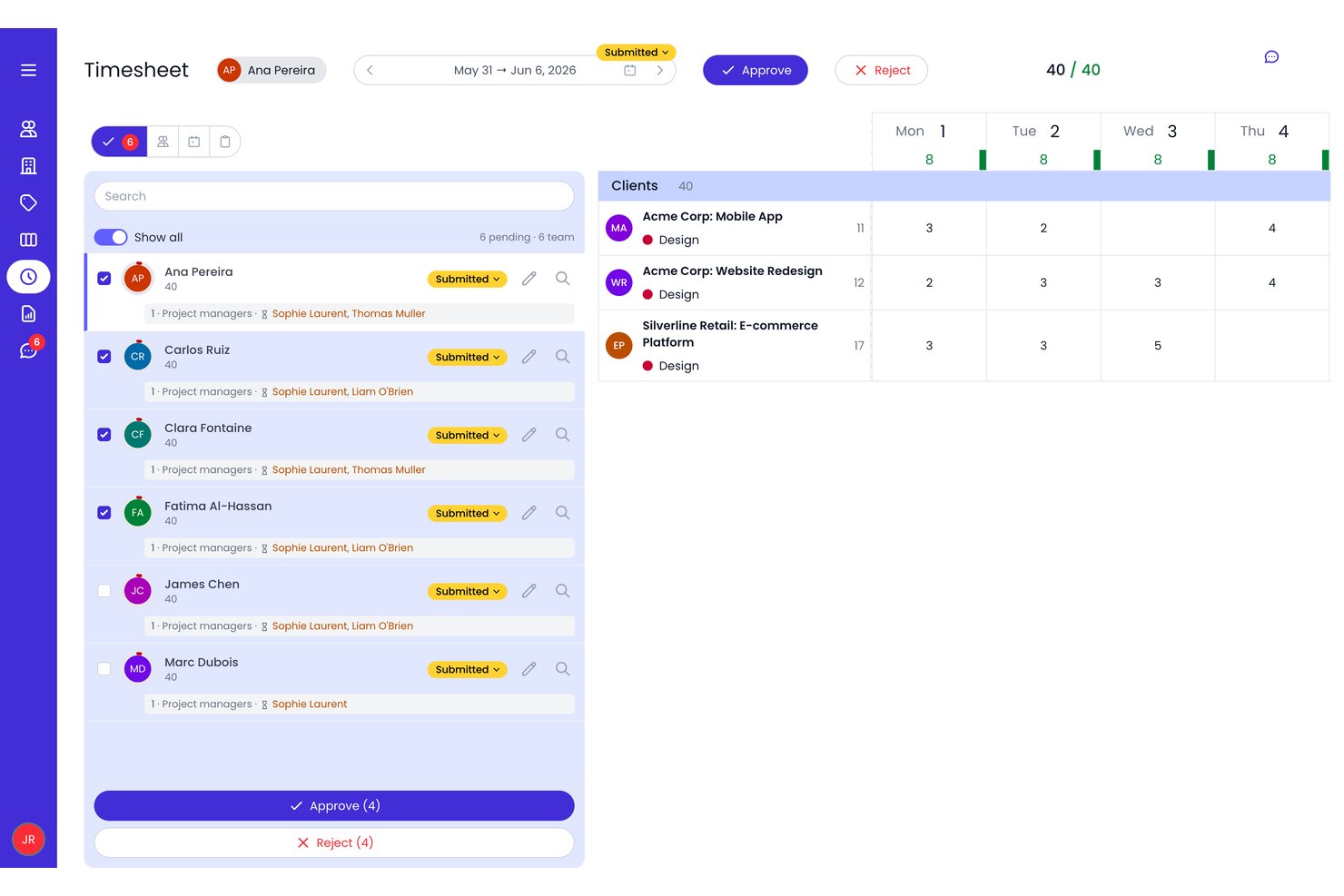
Beebole is a time tracking and project planning tool that combines AI-suggested time entries, resource scheduling, and reporting across projects, tasks, and clients.
Who Is Beebole Best For?
Beebole is a strong fit for agency and project leads who need to track billable hours across clients, manage project budgets, and pull detailed financial reports without heavy setup.
Why I Picked Beebole
I picked Beebole as one of the best because its AI report builder genuinely changes how fast you can get from raw time data to a client-ready breakdown. Instead of clicking through filters, you describe the report you need in plain language and Beebole builds it. I also like that it flags unusual timesheets automatically, catching things like hours logged on non-working days or totals well outside the norm, before approvals go through.
Beebole Key Features
- Resource scheduling: Allocate team members to projects by availability and skill, with tentative bookings supported while plans are still being finalized.
- Multi-level timesheet approvals: Route timesheets through configurable approval workflows with defined approver sequences and multiple review levels.
- Audit trail: Track every change to time entries, including who made the change, when, and the old-to-new value for edits.
- Budget Status report: View actual time, billing, and costs against project targets, with subproject rollups and a forecast bar for planned effort remaining.
Beebole Integrations
Beebole lists integrations with hundreds of apps, including Asana, Google Calendar, Outlook Calendar, Google Sheets, Excel, QuickBooks Online, Xero, Linear, and BambooHR. It also supports GraphQL, webhooks, and an MCP server for custom integrations.
Pros and Cons
Pros:
- Opt-in drafts avoid screenshot monitoring
- Flexible reports support client-specific analysis
- Plain-language reports speed client breakdowns
Cons:
- No AI productivity or focus recommendations
- AI suggestions require manual acceptance

Traqq
Best for lightweight team tracking

Traqq makes my list for teams that want lightweight but reliable time tracking, especially when they don't need a complicated setup. I think it's a fit for remote or hybrid teams who just want automated activity recording, optional screenshots, and clear reports—without a lot of manual input.
What I appreciate most is how it quietly tracks work in the background and keeps things simple, so you get the visibility you need with minimal interruptions.
Traqq’s Best For
- Remote and hybrid teams needing simple activity tracking
- Managers who want oversight without detailed manual timesheets
Traqq’s Not Great For
- Teams requiring advanced project management or budgeting tools
- Organizations needing deep integrations with HR or payroll systems
What sets Traqq apart
Traqq approaches time tracking by running in the background and removing manual data entry from the picture. Unlike tools like Toggl, which expect users to start and stop timers for each task, Traqq quietly tracks activity so teams can focus on their work. I notice this works best when you want a lightweight record of hours and activity without building complicated workflows or creating new habits.
Tradeoffs with Traqq
Traqq optimizes for simplicity and automated tracking, but you lose out on granular task breakdowns and detailed project planning. This means it won't suit teams that need forecasting, budgeting, or complex workflow management.
Pros and Cons
Pros:
- Includes PTO and leave management
- Non-intrusive activity tracking
- Intuitive user interface
Cons:
- Basic reporting capabilities
- Limited advanced features

Timely
Best for automatic time tracking

Timely makes this list because it brings real, fully automatic time tracking into the workflow—no manual timers or tracking required. I like how it builds a private timeline of every app, meeting, and website I work with throughout the day, then lets me confirm what belongs on my timesheet.
Teams that struggle to track project hours accurately without adding admin work are going to appreciate how Timely actually captures all that time by itself. This comes in handy once you’ve realized that fragmented, manual entry just doesn’t cut it when you need dependable project reporting.
Timely’s Best For
- Teams that want fully automatic time tracking
- Agencies and consultancies billing time across many projects
Timely’s Not Great For
- Organizations needing detailed task-level breakdowns
- Teams that require built-in payroll or invoicing features
What sets Timely apart
Timely focuses on making time tracking invisible. Instead of manual start-stop buttons like Toggl or Harvest, it quietly captures activity in the background and builds a private daily timeline. I notice this helps when you want to focus on your work, not the process of tracking time. Timely expects you to review and approve entries, not record them as you go.
Tradeoffs with Timely
By optimizing for automatic capture and privacy, Timely sacrifices task-level tracking detail. If your workflow demands granular breakdowns or time-on-task analysis, results start feeling less precise.
Pros and Cons
Pros:
- Helpful productivity insights
- Simplifies project management
- Accurate AI-generated timesheets
Cons:
- Limited customization options
- Setup can be time-consuming

Jibble
Best for attendance and payroll integration

Jibble is on my list because it's rare to see AI-powered time tracking so tightly linked with attendance, scheduling, and payroll processing. I recommend it when you need automated timesheets to flow directly into payroll calculations, especially for organizations dealing with hourly workforces or shift rosters.
What I like is how Jibble ties facial recognition clock-ins to pay rules, so you can cut out time theft and keep reporting accurate.
Jibble’s Best For
- Companies managing hourly staff and shifts across locations
- Organizations that need payroll and attendance tightly integrated
Jibble’s Not Great For
- Teams with salaried or project-based time tracking needs
- Businesses needing advanced project analytics or costing
What sets Jibble apart
Jibble is designed for organizations that need clock-ins to drive both attendance tracking and payroll, instead of relying on task-based or manual entry tools like Toggl or ClickUp. It builds work around biometric and geolocation check-ins, expecting teams to treat clock-in data as the primary source of truth. In practice, I see it working best when you want no ambiguity between recorded time and what gets sent to payroll.
Tradeoffs with Jibble
Jibble optimizes for compliance and payroll-linked attendance. You give up deeper project time analysis, so if you need granular task costing, you hit limits fast.
Pros and Cons
Pros:
- Facial Automated reminders for clock-ins
- GPS tracking for remote teams
- Facial recognition capability
Cons:
- Not ideal for complex projects
- Limited offline functionality

Memtime
Best for offline time tracking

Memtime earns a spot on my shortlist because it’s one of the best tools for capturing work time offline—even when you’re completely disconnected. When I tested this, Memtime tracked my activities locally, letting me review and allocate time accurately once I got back online. I like that you can reconstruct a precise timeline from local data, which helps teams who can’t always be connected or need to track sensitive offline work.
Memtime’s Best For
- Individuals or teams needing accurate offline time tracking
- Professionals working with sensitive or non-networked data
Memtime’s Not Great For
- Teams that require real-time collaboration features
- Businesses wanting built-in advanced AI time suggestions
What sets Memtime apart
Memtime stands out because it records everything you do locally, even when you’re offline. This isn’t like RescueTime or Timely, where you depend on cloud syncing to produce a timeline of your activities. I find this works best for people who move between offices without reliable internet or need to track sensitive work on air-gapped machines.
Tradeoffs with Memtime
Memtime optimizes for reliable offline tracking, but you lose out on features tied to cloud-based AI and real-time sync. That means you don’t get live collaboration or remote management functions.
Pros and Cons
Pros:
- Ideal for remote workers
- Detailed productivity reports
- Automatic activity tracking
Cons:
- Limited collaboration tools
- Basic customization options

Clockk
Best for freelancers and agencies
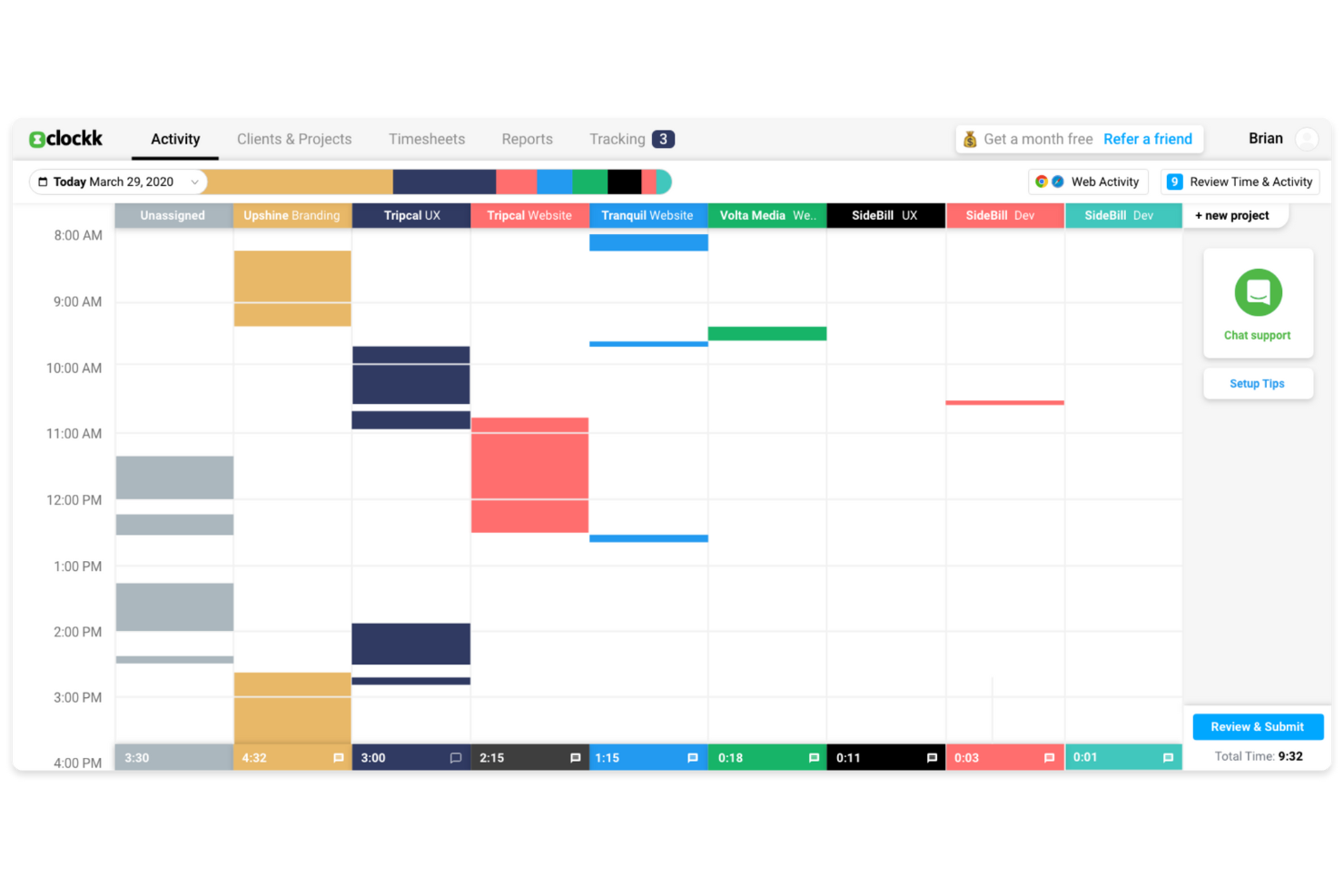
Clockk makes my list because it’s one of the few AI time tracking tools that actually learns from your work patterns, which is perfect when you’re juggling different projects for several clients. I especially appreciate how I can let Clockk automatically track which apps and websites I use throughout the day, then see time attributed to specific projects with almost no manual effort.
Freelancers and agencies who switch between tasks all day usually spend too much time reconstructing their hours; with Clockk’s automatic project tagging and AI-driven time allocation, that friction basically disappears.
Clockk’s Best For
- Freelancers or agencies managing multiple client projects
- People who need automatic, AI-driven time allocation
Clockk’s Not Great For
- Teams that need strict, real-time timesheet approvals
- Manual time entry or specialized task-level billing
What Sets Clockk Apart
Clockk focuses on automating time tracking by watching what you do in the background and assigning work to projects for you. Unlike manual tools like Toggl where you punch in every task, Clockk expects people to work naturally, switching between clients throughout the day without interruption. In practice, this feels different from ClickUp or monday.com, which make you log activities or categorize them in the moment.
Tradeoffs with Clockk
Clockk optimizes for hands-off, automatic time capture, so you lose the precision of manual time entries. If you need to track exactly what was done on each task, the automated approach can make your records feel less exact.
Pros and Cons
Pros:
- Automatic time categorization
- Visual timeline feature
- Ideal for freelancers
Cons:
- Not suitable for large teams
- Requires internet connection

Intapp Time
Best for legal industry compliance

Intapp Time makes this list because it covers the compliance and audit challenges legal teams deal with daily. What sticks out to me is the way it automatically captures activities, applies firm-specific compliance rules, and flags risky billing entries before submission. When I’m working with firms that need airtight compliance and billing accuracy, this is the tool I recommend.
I appreciate how you get AI-powered activity capture that’s purpose-built for the legal industry, not just generic tracking.
Intapp Time’s Best For
- Legal teams needing automated, compliant time tracking
- Firms facing strict billing or regulatory requirements
Intapp Time’s Not Great For
- Companies outside legal or professional services
- Teams wanting basic, lightweight time tracking only
What sets Intapp Time apart
Intapp Time is meant for legal professionals who need automatic, audit-ready time capture baked into everyday workflows. Unlike basic time tracking tools, it expects you to work inside systems where billing, compliance, and detailed client matter management are non-negotiable. In my experience, this works best for firms that structure billable work around regulations, not just project hours.
Tradeoffs with Intapp Time
Intapp Time optimizes for regulatory detail and compliance, which makes it less practical for teams wanting a fast, simple timer or casual time logging.
Pros and Cons
Pros:
- Ideal for legal professionals
- Automated time capture
- Compliance-focused features
Cons:
- May require setup assistance
- Learning curve for new users
Outro programa de controlo de tempo com IA
Eis algumas opções adicionais de programas de controlo de tempo com IA que não entraram na minha seleção, mas que ainda assim vale a pena conhecer:
- ZeroTime
For real-time project updates
- Rize
For personal productivity insights
- Laurel
For privacy-focused tracking
- MonitUp
For remote team management
- Connecteam
For mobile-first teams
- BigTime
For professional service firms
- GoodDay
For agile workflow support
- TimeCamp
For budget management tools
- Deputy
For shift scheduling
- Intelogos
For real-time work analytics
- ClickUp
For task management integration
- EARLY
For deadline reminders


How I Evaluate AI Time Tracking Software
Any tool can slap an AI label on a basic timer, so I look for platforms where the AI actually reduces manual work and improves accuracy in ways you'd notice on day one. I split my evaluation into core functionality every tool needs to make the list and differentiating factors that separate good fits from great ones.
Core Functionality (Table Stakes For This List)
When I'm selecting tools for my list, I rank each one on a scale from 0 (does not offer the functionality) to 5 (excels in this area) for each core functionality listed below. Then, I calculate the tool's total score into a percentage. Each tool needs to achieve a minimum total score of 65% to be considered for inclusion.
- Automated Time Capture: I check whether the tool passively tracks activity across desktop apps, browsers, and calendars so team members aren't stopping mid-task to start a timer.
- AI Time Entry Categorization: Smart tagging matters here—I look for AI that maps captured time to the right project, client, or billing code based on context and learned patterns.
- Project Management Integration: The tool should sync with platforms like Jira, Asana, or monday.com so tracked time flows directly to the correct task or sprint.
- AI-Powered Timesheet Generation: I evaluate whether the tool auto-drafts timesheets from tracked activity, giving users something to review and approve rather than build from scratch.
- Predictive Insights & Forecasting: Tools that surface budget burn rates, flag time entry anomalies, or project workload capacity using historical data score higher in my evaluation.
- Billable Hours & Reporting: I look for clear billable vs. non-billable separation with project- or client-level reports that are ready for invoicing or profitability reviews.
Once I have a list of tools that meet this criteria, I consider what sets each platform apart.
Differentiating Factors (What Sets Vendors Apart)
Here's how I compare and contrast different vendors:
Standout Features
Meeting and calendar intelligence is a big differentiator—I look for tools that pull time from video calls and calendar events and map it to the right project automatically. For PMs who spend half their day in cross-functional syncs, this alone can recapture hours of lost billable time. Privacy controls also matter for team adoption; passive tracking stalls when employees can't control what's visible to managers. A conversational reporting assistant adds real value too, letting you query time data naturally instead of building custom reports from scratch.
Beyond Features
AI model transparency is something I evaluate closely—I want to know how the tool categorizes time and whether you can audit and correct its suggestions over time. Data privacy also weighs heavily, especially for teams handling client work under strict compliance requirements like GDPR or SOC 2. Pricing structure matters for agencies and consultancies with fluctuating headcount, where you need a model that scales without locking you into annual commitments for short-term contractors.
Como escolher um programa de controlo de tempo com IA
É fácil ficar perdido em listas extensas de funcionalidades e estruturas de preços complexas. Para se manter concentrado enquanto escolhe a ferramenta certa, eis uma lista de verificação dos fatores a ter em conta:
| Fator | O que considerar |
|---|---|
| Escalabilidade | O programa acompanhará o crescimento da sua empresa? Tenha em conta os limites de utilizadores e a facilidade de aumentar a escala. Certifique-se de que o modelo de preços não se torna proibitivo à medida que a sua equipa cresce. |
| Integrações | A ferramenta integra-se com os seus sistemas atuais? Verifique a compatibilidade com as suas ferramentas de gestão de projetos, contabilidade e comunicação para manter uma integração fluida do fluxo de trabalho. |
| Personalização | Pode adaptar o programa às suas necessidades específicas? Procure a possibilidade de personalizar painéis, relatórios e definições para corresponder aos seus fluxos de trabalho e processos empresariais. |
| Facilidade de utilização | A interface é intuitiva para a sua equipa? Uma curva de aprendizagem acentuada pode tornar a adoção mais lenta. Procure um programa com uma disposição simples e uma navegação direta. |
| Implementação e integração inicial | Quanto tempo será necessário para começar a utilizar o programa? Tenha em conta a disponibilidade de recursos como vídeos de formação, visitas guiadas ao produto e apoio ao cliente para facilitar uma transição tranquila. |
| Custo | Os preços cabem no seu orçamento? Avalie o custo total, incluindo taxas ocultas e encargos adicionais por funcionalidades ou utilizadores extra. Procure modelos de preços flexíveis que se adequem ao seu orçamento. |
| Medidas de segurança | Como protege o programa os seus dados? Procure encriptação, cópias de segurança dos dados e conformidade com as normas de segurança. Certifique-se de que as suas informações sensíveis permanecem seguras. |
| Disponibilidade do apoio | Que opções de apoio estão disponíveis? Tenha em conta a disponibilidade de apoio 24 horas por dia, 7 dias por semana, conversação em direto e tempos de resposta para garantir que pode obter ajuda quando necessário. |
O que é um programa de controlo de tempo com IA?
Um programa de controlo de tempo com IA é uma ferramenta que regista e analisa automaticamente a forma como o tempo é gasto nas tarefas. É normalmente utilizado por trabalhadores independentes, gestores de projetos e equipas remotas para melhorar a produtividade e gerir o tempo de forma eficiente.
As capacidades de monitorização, elaboração de relatórios e integração automatizadas ajudam a garantir uma faturação precisa, a gerir a carga de trabalho e a obter informações sobre a produtividade. De um modo geral, estas ferramentas permitem poupar tempo e podem fornecer informações valiosas sobre os padrões de trabalho da equipa.
Funcionalidades do software de monitorização de tempo com IA
Ao selecionar software de monitorização de tempo com IA, procure as seguintes funcionalidades principais:
- Registo automatizado do tempo: Regista automaticamente o tempo despendido nas tarefas, reduzindo os erros de introdução manual e poupando tempo.
- Monitorização em tempo real: Fornece dados atualizados ao minuto sobre as atividades de trabalho, ajudando-o a manter-se informado e a tomar decisões atempadas.
- Relatórios personalizáveis: Permite adaptar os relatórios às suas necessidades específicas e fornece informações sobre a produtividade e a utilização do tempo.
- Capacidades de integração: Liga-se a outras ferramentas que utiliza, como software de gestão de projetos ou de contabilidade, para manter uma integração fluida do fluxo de trabalho.
- Controlos de privacidade: Disponibiliza funcionalidades como capturas de ecrã desfocadas para proteger dados sensíveis e preservar a privacidade dos colaboradores.
- Alertas de conformidade: Fornece notificações em tempo real para cumprir as normas e regulamentações do setor.
- Acesso móvel: Permite monitorizar e elaborar relatórios em qualquer lugar, proporcionando flexibilidade aos membros da equipa que trabalham remotamente ou viajam.
- Interface fácil de utilizar: Apresenta um design intuitivo que facilita a adoção e a utilização eficaz por parte da sua equipa.
- Ferramentas de gestão do orçamento: Ajudam a acompanhar os custos, gerir os orçamentos dos projetos e manter o controlo e a eficiência financeiros.
- Integração da gestão de tarefas: Liga a monitorização do tempo à gestão de tarefas, permitindo um fluxo de trabalho coeso.
Benefícios do software de monitorização de tempo com IA
A implementação de software de monitorização de tempo com IA proporciona vários benefícios à sua equipa e à sua empresa. Eis alguns dos benefícios que pode esperar:
- Maior produtividade: A monitorização automatizada e os dados em tempo real ajudam a identificar ineficiências, permitindo que a sua equipa se concentre nas tarefas prioritárias.
- Faturação precisa: O registo automatizado do tempo contabiliza todas as horas faturáveis e reduz as discrepâncias nas faturas.
- Maior conformidade: Os alertas em tempo real e as funcionalidades de conformidade ajudam a sua equipa a cumprir as normas do setor sem esforço adicional.
- Melhor gestão de recursos: Os relatórios personalizáveis e as capacidades de integração fornecem informações sobre a utilização do tempo, permitindo-lhe atribuir recursos de forma eficiente.
- Maior flexibilidade: O acesso móvel e a integração com ferramentas de gestão de tarefas permitem que a sua equipa trabalhe de forma eficiente a partir de qualquer lugar.
- Proteção da privacidade: Funcionalidades como capturas de ecrã desfocadas protegem os dados sensíveis e preservam a confiança e a segurança.
- Redução de custos: Ao automatizar a monitorização do tempo e reduzir os erros manuais, pode poupar nos custos administrativos e melhorar o controlo financeiro.
Custos e preços do software de monitorização de tempo com IA
Os custos do software de monitorização de tempo com IA variam consoante as funcionalidades, o tamanho da equipa, os complementos, entre outros fatores. A tabela abaixo resume os planos comuns, os preços médios e as funcionalidades normalmente incluídas nas soluções de software de monitorização de tempo com IA:
Tabela de comparação de planos de software de monitorização de tempo com IA
| Tipo de plano | Preço médio | Funcionalidades comuns |
|---|---|---|
| Plano gratuito | $0/user/month | Monitorização básica do tempo, elaboração limitada de relatórios e integração com ferramentas selecionadas. |
| Plano pessoal | $5-$15/user/month | Monitorização automatizada, acesso móvel e relatórios personalizáveis. |
| Plano empresarial | $20-$40/user/month | Relatórios avançados, ferramentas de colaboração em equipa e funcionalidades de gestão do orçamento. |
| Plano empresarial de grande dimensão | $50-$100/user/month | Personalização completa, suporte dedicado e capacidades de gestão da conformidade. |
Perguntas frequentes sobre software de controlo de tempo com IA
Eis algumas respostas a perguntas comuns sobre software de controlo de tempo com IA:
Qual é a precisão do controlo de tempo com IA para efeitos de faturação?
A IA pode registar a utilização do tempo através da monitorização da atividade das aplicações, das entradas do rato/teclado e das alterações aos documentos. Muitas vezes, assinala o tempo de inatividade e corrige a falta de atividade, o que ajuda a reduzir a faturação incorreta. No entanto, não é perfeita. Certifique-se de que revê e ajusta os registos antes de emitir a fatura.
As ferramentas de controlo de tempo com IA são seguras?
A maioria das ferramentas de controlo de tempo com IA disponibiliza encriptação e outras medidas de proteção de dados. Ao escolher uma ferramenta, certifique-se de que cumpre normas de segurança comuns e políticas de privacidade, para que os seus dados permaneçam seguros.
O software de controlo de tempo com IA pode integrar-se com outras ferramentas?
Sim, a maioria dos softwares de controlo de tempo com IA pode integrar-se com outras ferramentas, como plataformas de gestão de projetos, contabilidade e comunicação. Esta integração ajuda a melhorar os seus fluxos de trabalho e mantém todas as suas ferramentas a funcionar em conjunto de forma harmoniosa.
Quais são as vantagens de utilizar IA para o controlo de tempo?
O controlo de tempo com IA automatiza o processo, reduz os erros manuais e poupa tempo. Fornece informações em tempo real sobre a produtividade e ajuda a otimizar a alocação de recursos. Isto conduz a uma maior eficiência e a uma faturação mais precisa.
Como é que o controlo de tempo com IA lida com a multitarefa ou a mudança de contexto?
Os sistemas de controlo de tempo com IA normalmente segmentam o trabalho detetando alterações de janela, mudanças de foco nas aplicações ou alterações nos ficheiros. Agrupam tarefas relacionadas e permitem-lhe fundir ou reatribuir segmentos. Por vezes, terá de corrigir sobreposições ou classificações incorretas.