

As 10 melhores ferramentas de software de base de conhecimento com IA em 2026

Lista restrita dos melhores softwares de base de conhecimento com IA


O software de base de conhecimento com IA utiliza inteligência artificial para organizar, obter e atualizar automaticamente as informações da empresa. Se precisa de uma solução que ajude a sua equipa a aceder rapidamente às respostas, extraia informações de fontes dispersas e mantenha o conteúdo atualizado, está no sítio certo.
A adoção da base de conhecimento com IA adequada ajuda a reduzir as perguntas repetitivas, apoia as equipas distribuídas e proporciona-lhe uma vantagem no ambiente dinâmico de hoje. Nesta lista, apresentarei as principais opções, destacarei o que torna cada uma única e ajudarei a perceber qual a ferramenta de base de conhecimento com IA que melhor corresponde às necessidades da sua equipa.
Why Trust Our Software Recommendations
Our team has been testing and reviewing software since 2012. As project managers ourselves, we know how difficult—and important—it is to choose the right software.
For this guide, we evaluated tools using hands-on testing and independent research, scoring tools using our selection criteria. We also draw on insights from industry thought leaders and practicing project management experts.
Our reviews reflect our human editorial judgment, not a sales pitch.
Expert reviewers:
Tabela comparativa de softwares de base de conhecimento com IA
Esta tabela comparativa resume os detalhes de preços das minhas principais escolhas de software de base de conhecimento com IA.
| Tool | Best For | Trial Info | Price | ||
|---|---|---|---|---|---|
| 1 | Best for granular documentation control | Free trial + demo available | Pricing upon request | Website | |
| 2 | Best for interactive self-serve guides | Free demo + 14-day free trial available | Pricing upon request | Website | |
| 3 | Best for screen-recorded SOP knowledge bases | 10-day free trial + free demo available | From $40/month (billed annually) | Website | |
| 4 | Best for asynchronous team knowledge sharing | 14-day free trial + demo available | From $10/user/month (billed annually) | Website | |
| 5 | Best for AI-enhanced workspace notes | Free plan available | From $20/user/month | Website | |
| 6 | Best for multimedia content organization | Free demo available | Pricing upon request | Website | |
| 7 | Best for project documentation within teams | Free plan + 7-day trial available | From $5.78/user/month | Website | |
| 8 | Best for capturing and sharing company expertise | 30-day free trial + free demo available | Pricing upon request | Website | |
| 9 | Best customization options for content structure | Free demo + 14-day free trial available | From $249/month | Website | |
| 10 | Best for searching across internal company tools | Free plan + free demo available | From $20/user/month | Website |
Avaliações dos melhores softwares de base de conhecimento com IA
Apresentamos abaixo os meus resumos detalhados dos melhores softwares de base de conhecimento com IA que entraram na minha lista restrita. As minhas avaliações proporcionam uma análise detalhada das funcionalidades, dos melhores casos de utilização e das integrações de cada plataforma, para o ajudar a encontrar a melhor opção para si.

Best for granular documentation control
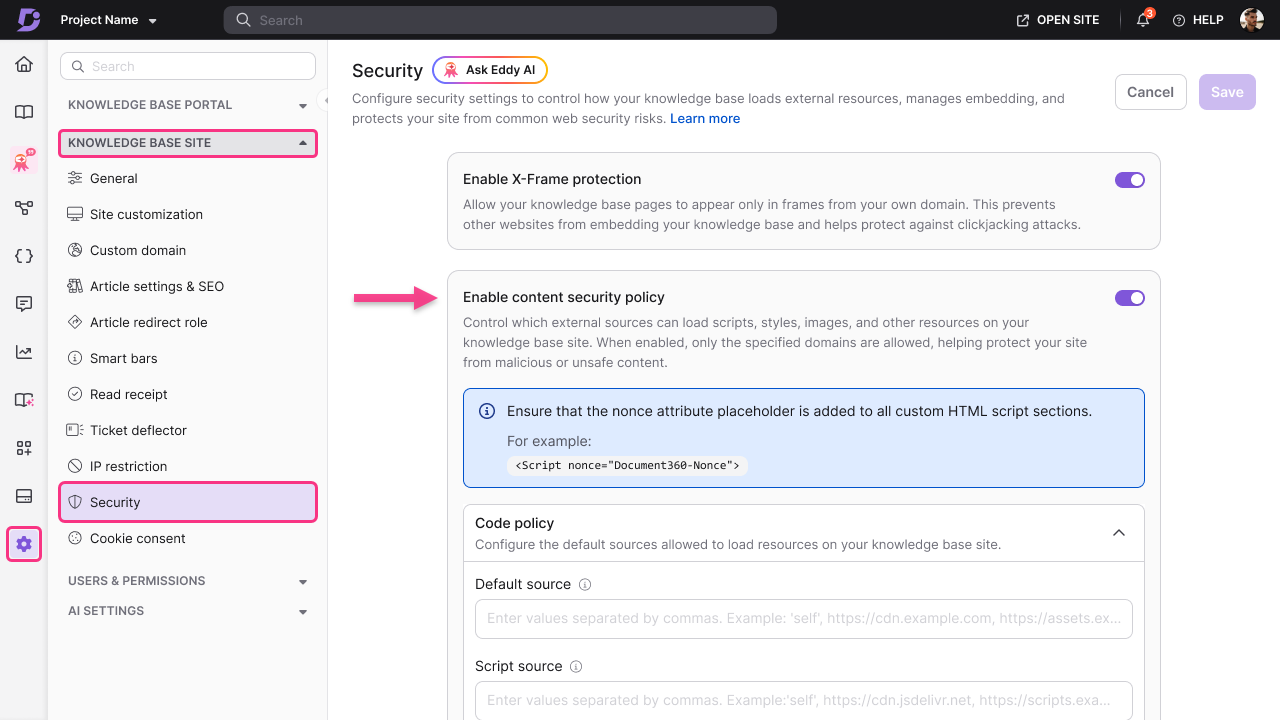
Document360 is an AI-powered knowledge base software built for technical documentation, featuring granular content organization, markdown support, advanced versioning, and customizable category hierarchy.
Who Is Document360 Best For?
Document360 is well-suited for technical writers and documentation teams at software companies who need advanced control over knowledge management.
Why I Picked Document360
I picked Document360 because I can set detailed user permissions, track every change with full version history, and configure granular workflow approvals for sensitive documentation projects. I like having deep control over documentation access and edits.
Document360 Key Features
- Markdown editor: Supports editing and formatting content using markdown syntax.
- AI-powered search: Delivers fast, context-aware results across all documentation.
- Custom branding: Lets you tailor the knowledge base interface to your company’s identity.
- Category manager: Enables users to structure content in a multi-level category tree.
Document360 Integrations
Document360 offers native integrations with Microsoft Teams, Slack, Freshdesk, Intercom, Zendesk, Google Analytics, Segment, Disqus, and Algolia, and provides an API for custom integrations.
Pros and Cons
Pros:
- AI search adapts to content complexity
- Detailed category hierarchy for organizing content
- Advanced version history with rollback
Cons:
- Limited offline or export documentation options
- Lacks real-time co-authoring inside docs
New Product Updates from Document360

Document360 Adds AI Version Summaries and Centralized Engage Controls
Document360 adds Eddy AI summaries for article version changes and a centralized Engage dashboard for guides and videos. These updates help teams review content changes faster and manage interactive assets from one place. For more information, visit Document360’s official site.
 .
Stonly
Best for interactive self-serve guides
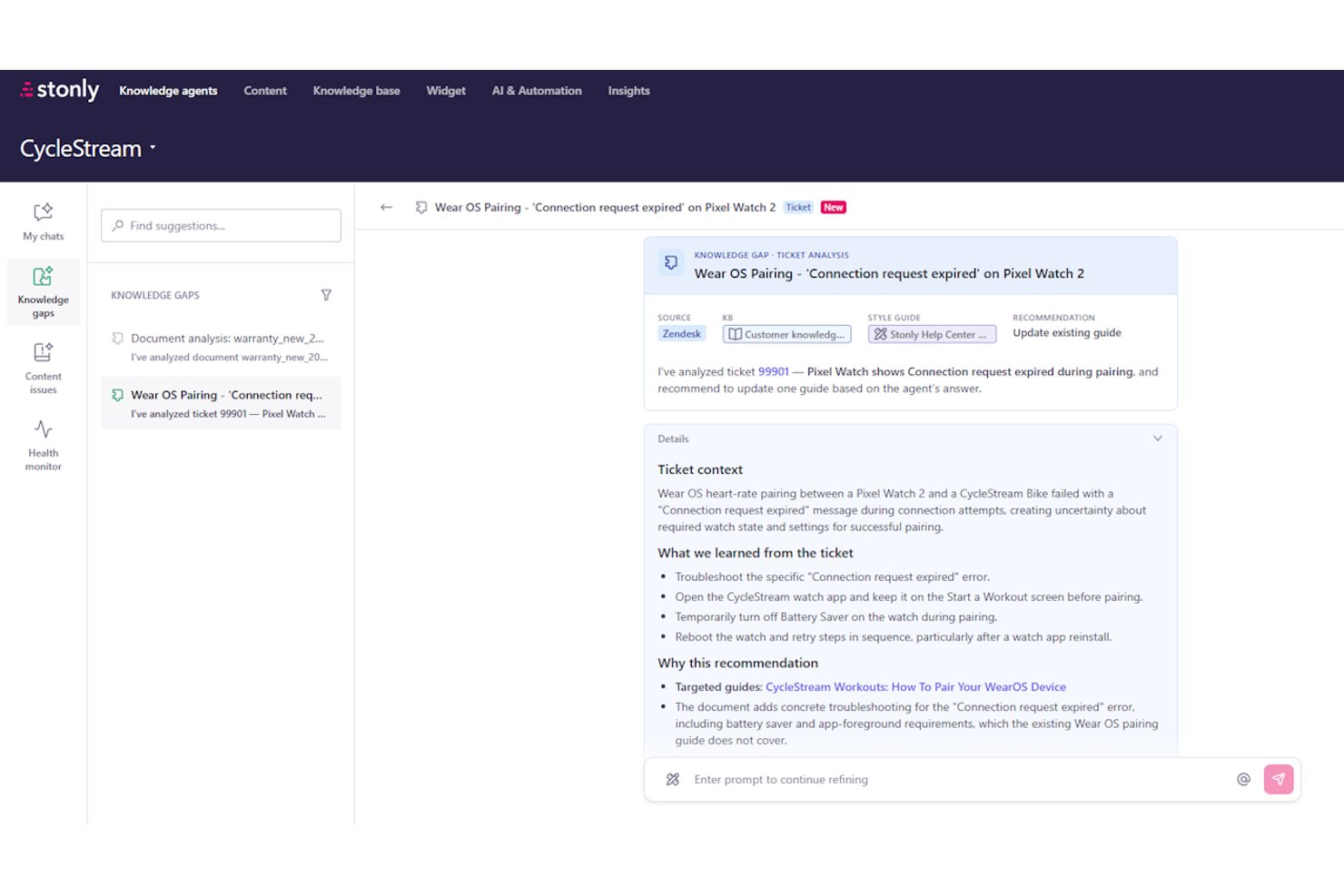
Stonly is a knowledge management platform that combines interactive step-by-step guides, AI-powered search, and automated knowledge curation to help teams build and maintain self-serve support content.
Who Is Stonly Best For?
Stonly is a strong fit for customer service and support teams that want to replace static help articles with interactive, branching guides that adapt to each user's situation.
Why I Picked Stonly
I've included Stonly in my top picks because its interactive, branching guides set it apart from knowledge bases that rely on static articles. Instead of dropping users onto a help page and hoping for the best, Stonly walks each person through a personalized resolution path using conditional logic. I particularly like how its Knowledge Agents monitor content health around the clock, automatically flagging stale guides and drafting updates for review when support tickets reveal gaps.
Stonly Key Features
- AI Agent Assist: Surfaces AI-generated response suggestions and ticket summaries directly inside Zendesk, Salesforce, and other help desks without requiring agents to switch tabs.
- Business Process Agents: Automates multi-step support workflows end-to-end, following documented processes to resolve issues like billing disputes or GDPR requests without agent intervention.
- Full-path analytics: Tracks exactly where users drop off or change course through each guide step, giving you visibility into where content is losing people.
- Multi-source AI ingestion: Pulls knowledge from Stonly content, external knowledge bases, websites, and Google Drive into a single AI layer for unified search and answers.
Stonly Integrations
Stonly integrates with Confluence, Notion, Google Drive, Google Sheets, Zendesk, Salesforce, Freshdesk, ServiceNow, Microsoft Teams, and Jira. It also supports Zapier for additional connections.
Pros and Cons
Pros:
- Business process agents automate complex support tasks
- AI-driven knowledge agents proactively flag stale content
- Interactive branching guides boost self-serve resolution rates
Cons:
- Guide performance declines with very large guides
- Customer support focus limits project documentation use

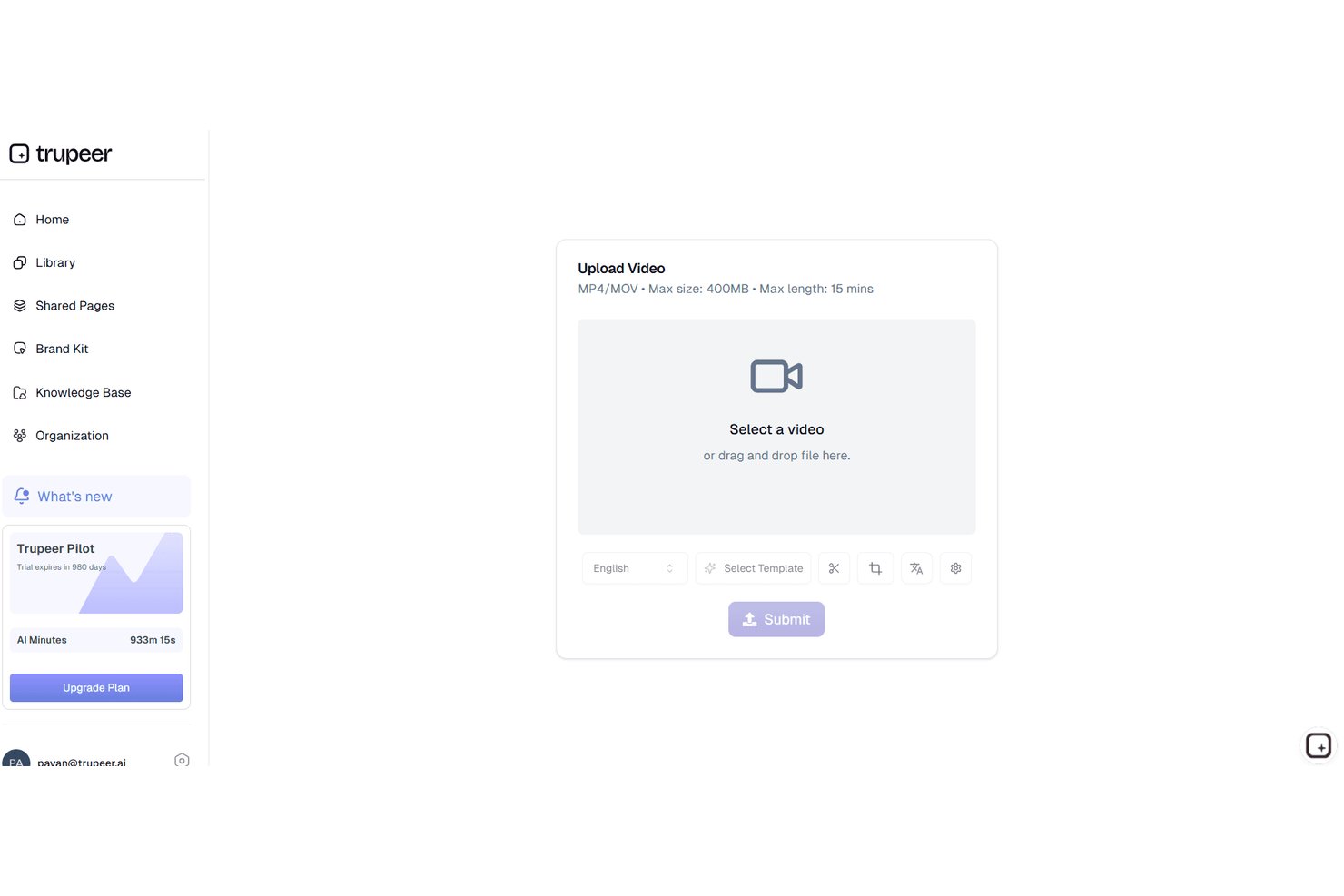
Trupeer is an AI knowledge base platform that turns screen recordings into searchable video libraries, structured SOPs, and step-by-step documentation.
Who Is Trupeer Best For?
Trupeer is a strong fit for enablement, support, and product teams that need to turn screen recordings into polished SOPs and training content fast.
Why I Picked Trupeer
I picked Trupeer as one of the best because it's the only tool I've seen that turns a raw screen recording into a fully indexed, searchable SOP in minutes. Record a workflow once, and Trupeer auto-generates both a polished video and an annotated step-by-step document simultaneously. What really sets it apart is the AI search, which returns timestamped answers from inside videos so your team jumps straight to the exact moment that answers their question.
Trupeer Key Features
- Dual-format output: A single screen recording automatically generates both a polished video and a structured, annotated step-by-step document at the same time.
- 120+ language translation: Videos and documents can be translated into 120+ languages with matching AI voiceovers, supporting global team distribution.
- Content health checks: Enterprise users get automated alerts flagging potentially outdated content across the knowledge base.
- MCP support: Scale and Enterprise plans let AI agents programmatically access Trupeer's knowledge layer as a live data source.
Trupeer Integrations
Trupeer offers documented embed-based integrations with Confluence, Notion, Coda, Mintlify, and monday AI Workspace, plus MCP support on Scale and Enterprise plans for AI-agent access.
Pros and Cons
Pros:
- Supports 120+ languages with matching voiceovers
- AI search finds exact video answer timestamps
- Converts screen recordings into searchable SOPs instantly
Cons:
- Cannot ingest or search external documentation sources
- No generative assistant for multi-turn Q&A

Slite
Best for asynchronous team knowledge sharing

Slite is a team knowledge base platform for organizing documents, managing wikis, discussing topics, and enabling fast search powered by AI-driven discovery.
Who Is Slite Best For?
Slite suits distributed product and project teams that need a central place to share knowledge and document collaboration asynchronously.
Why I Picked Slite
I picked Slite as one of the best because my team can ask questions directly in the knowledge base and use AI-powered answers. I use threaded discussions in documents to resolve async decisions without endless meetings, and manage company handbooks centrally.
Slite Key Features
- Templates gallery: Access ready-made templates for meeting notes, project plans, and onboarding docs.
- Knowledge base search: Search all documents and spaces using AI-powered quick find.
- Access permissions: Set workspace, folder, and doc-level permissions for granular control.
- Version history: Review or restore previous versions of any page or document.
Slite Integrations
Slite offers native integrations with Slack, Google Drive, GitHub, Figma, Loom, and Asana. It also provides an API for custom integrations.
Pros and Cons
Pros:
- Embedded conversation feedback loops
- Structured spaces for topic-based knowledge hubs
- Fast AI-powered search within documents
Cons:
- Fewer page design customization features
- Limited bulk content import and export options

Best for AI-enhanced workspace notes

Notion AI is an AI-powered workspace knowledge management platform where you can create notes, docs, wikis, and databases, combining advanced AI writing tools with modular content organization.
Who Is Notion AI Best For?
Notion AI suits individuals and teams who want to unify note-taking, documentation, and knowledge sharing within one flexible platform.
Why I Picked Notion AI
I picked Notion AI because I can generate summaries, brainstorm ideas, and automate note-taking directly in my workspace. I like using the AI to draft project docs and quickly transform raw input into polished notes with actionable highlights.
Notion AI Key Features
- Database views: Visualize and filter structured content in tables, boards, calendars, and lists.
- Wiki linking: Connect pages and docs using internal links for fast navigation.
- Permissions management: Restrict or share access for individuals, teams, or external collaborators.
- Custom templates: Build and reuse templates for repeatable documentation and workflows.
Notion AI Integrations
Notion AI offers native integrations with Slack, Google Drive, GitHub, Jira, Figma, and Zoom. It also provides an API for custom integrations.
Pros and Cons
Pros:
- Modular structure supports mixed media documentation
- Workspace search includes AI-powered suggestions
- AI generates summaries from complex notes
Cons:
- Requires consistent cloud synchronization
- Limited advanced control over AI outputs

Best for multimedia content organization
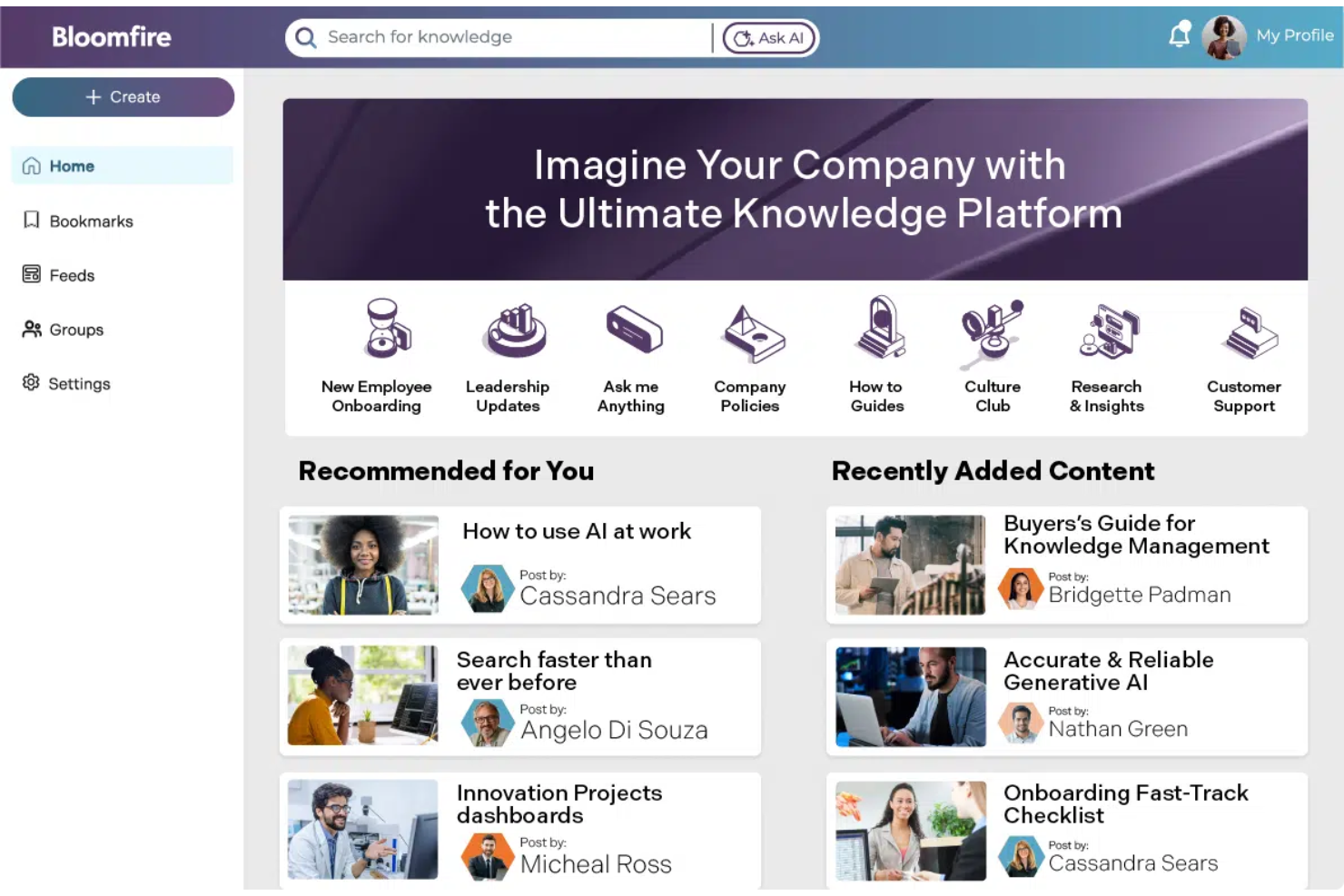
Bloomfire is an AI-powered knowledge base platform that lets you upload, tag, and organize articles, videos, audio, PDFs, and other media in a searchable company hub.
Who Is Bloomfire Best For?
Bloomfire is a great fit for marketing, customer service, or support teams that need to share and organize multimedia content across departments.
Why I Picked Bloomfire
I picked Bloomfire because I can upload and tag images, videos, and audio clips alongside documents, then use AI-powered search to surface content instantly. I like how video transcriptions and embedded multimedia previews keep all knowledge accessible in one place.
Bloomfire Key Features
- Q&A feature: Let users post questions and crowdsource answers from across the organization.
- Custom taxonomy: Enables creation of custom categories and tags for advanced organization.
- Analytics dashboard: Tracks engagement, searches, and content usage over time.
- Content scheduling: Allows admins to schedule content publication or archiving in advance.
Bloomfire Integrations
Bloomfire offers native integrations with Salesforce, Microsoft Teams, Zendesk, Google Drive, Dropbox, Box, and Slack, and provides an API for custom integrations.
Pros and Cons
Pros:
- Q&A feature enables knowledge sharing at scale
- Handles video, audio, and image uploads natively
- AI-powered search improves content discoverability
Cons:
- Limited reporting customization for analytics
- Bulk importing requires manual setup for each type
Best for project documentation within teams

Confluence is a workspace collaboration and documentation platform for creating, organizing, and sharing project knowledge, project plans, requirements, and meeting notes in one searchable hub.
Who Is Confluence Best For?
Confluence fits product, engineering, and cross-functional teams that need a structured space for sharing knowledge and documenting projects collaboratively.
Why I Picked Confluence
I picked Confluence because my team can create structured documentation spaces, use customizable page templates, and organize project wikis with granular permissions. I like embedding Jira issues and action items for tight project documentation within teams.
Confluence Key Features
- Page version history: View, compare, and restore previous page versions for easy tracking.
- Inline comments: Comment directly on any part of a page for contextual discussions.
- Search with advanced filters: Locate documents and pages using detailed filtering options.
- Bulk page management: Move, archive, or delete multiple pages at once from the space directory.
Confluence Integrations
Confluence offers native integrations with Jira, Trello, Slack, Google Drive, Microsoft 365, Dropbox, GitHub, Zendesk, and Salesforce. An API is available for custom integrations.
Pros and Cons
Pros:
- Automation for content review and publishing
- Inline editing for collaborative content creation
- Extensive content organization with spaces
Cons:
- Requires manual migration for large datasets
- Limited AI-powered content suggestions

Guru
Best for capturing and sharing company expertise

Guru is an AI-driven knowledge management platform that centralizes company information, uses intelligent workflows to suggest content, and simplifies capturing expertise within growing teams.
Who Is Guru Best For?
Knowledge managers and support teams at mid-sized to large companies who need to capture and organize internal expertise.
Why I Picked Guru
I picked Guru as one of the best because it uses AI to suggest relevant knowledge cards in real time, verifies the accuracy of shared information, and makes it simple to capture and share expertise across teams right inside your workflow.
Guru Key Features
- Browser extension: Access and capture knowledge from any website or web app without leaving your workflow.
- Card templates: Create structured knowledge cards for consistent documentation across teams.
- Knowledge alerts: Notify users about updated or important information directly within the platform.
- Permission controls: Manage who can view, edit, or publish content based on granular user roles.
Guru Integrations
Guru offers native integrations with Slack, Microsoft Teams, Salesforce, Zendesk, Google Workspace, Chrome, and Zapier. An API is also available for custom integrations.
Pros and Cons
Pros:
- Verification status clearly displayed on content
- In-app browser extension captures info instantly
- AI suggests knowledge cards during workflows
Cons:
- Formatting editor lacks advanced block options
- Search can miss relevant older cards

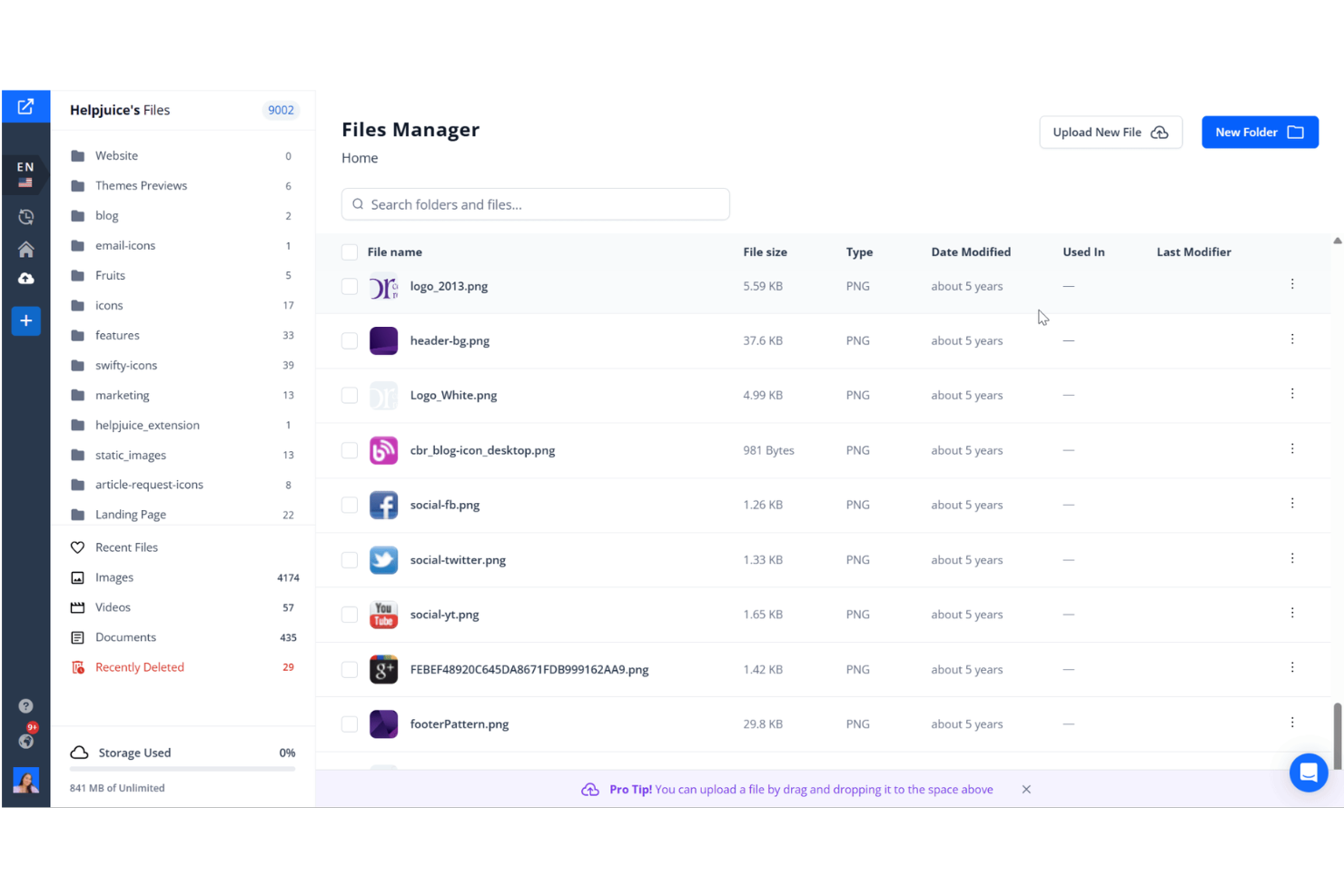
Helpjuice is an AI-driven knowledge base software that lets teams create, organize, search, and analyze internal and external documentation with tailored content structures and a user-friendly editor.
Who Is Helpjuice Best For?
Helpjuice is a strong fit for mid-sized to large organizations that want full control over their internal or external knowledge base structure.
Why I Picked Helpjuice
I picked Helpjuice as one of my favourites because I can customize every aspect of article structure, navigation, and branding. I like how I can build unlimited category levels and apply advanced formatting controls without developer input.
Helpjuice Key Features
- AI-powered search: Surfaces contextually relevant articles and suggestions as users type queries.
- Version history: Tracks every edit on an article and lets you restore previous versions.
- Embeddable widgets: Allow teams to display knowledge articles within external apps or websites.
- Article analytics: Measures searches, views, and engagement for every piece of content.
Helpjuice Integrations
Helpjuice offers native integrations with Slack, Salesforce, Zendesk, Google Chrome, and Freshdesk. An API is available for custom integrations.
Pros and Cons
Pros:
- Multi-language content management included
- AI search understands natural language queries
- Article templates for advanced formatting options
Cons:
- Limited bulk content editing actions
- Permission controls lack granular settings


GoSearch is an AI-powered enterprise search platform that connects to multiple internal company tools and data sources, letting teams find and manage knowledge spanning chat, files, wikis, tickets, and documentation.
Who Is GoSearch Best For?
GoSearch suits distributed teams and growing companies that need to search across tools like Slack, Google Workspace, Notion, and email.
Why I Picked GoSearch
I picked GoSearch as one of the best because I can search and retrieve information from across Slack, Google Drive, Notion, and email with a single query. I like that search results show document previews and highlight answers in context, which saves time when scanning large knowledge bases.
GoSearch Key Features
- AI suggestions: Surfaces related knowledge and resources as you type.
- Access control: Let admins manage user permissions for each data source.
- Search filters: Allows filtering by tool, author, or date range.
- Chrome extension: Enables quick search directly from the browser.
GoSearch Integrations
GoSearch offers native integrations with Slack, Google Workspace, Notion, GitHub, Confluence, Jira, Zendesk, Microsoft 365, Salesforce, and Box. An API is available for custom integrations.
Pros and Cons
Pros:
- Contextual previews help review results faster
- AI-powered suggestions improve over time
- Finds answers from chat, tickets, and docs
Cons:
- Bulk export options are missing
- Limited support for niche or custom tools
Outros softwares de base de conhecimento com IA
Eis algumas opções adicionais de software de base de conhecimento com IA que não entraram na minha lista restrita, mas que ainda vale a pena conhecer:


How I Evaluate AI Knowledge Base Software
Every tool on this list has to go beyond keyword search with an AI label—I look for platforms where a PM can ask a plain-language question and get a sourced, accurate answer pulled from actual project docs. I split my evaluation into core functionality every tool must have to qualify and differentiating factors that separate good options from great ones.
Core Functionality (Table Stakes For This List)
When I'm selecting tools for my list, I rank each one on a scale from 0 (does not offer the functionality) to 5 (excels in this area) for each core functionality listed below. Then, I calculate the tool's total score into a percentage. Each tool needs to achieve a minimum total score of 65% to be considered for inclusion.
- AI Semantic Search: I check whether the tool can answer a plain-language question like "what was the agreed scope change in Sprint 12?" and return a direct, sourced answer from indexed project docs.
- Generative AI Authoring: I look for built-in AI that can draft a meeting summary or update a project runbook from a prompt, not just suggest edits to existing text.
- Multi-Source Knowledge Ingestion: The tool should pull in content from places where project knowledge already lives, like Confluence wikis, Jira tickets, Google Drive folders, or uploaded PDFs.
- Source Citation & Grounding: Every AI-generated answer should trace back to its source page or document so a PM can verify the response before sharing it with stakeholders.
- Permissions & Access Controls: I evaluate whether the platform supports role-based access at the project or space level, so sensitive program data stays visible only to authorized team members.
- Knowledge Organization Structure: A tool should let you organize content into logical groupings like project spaces, phase-based categories, or tagged collections rather than dumping everything into a flat list.
Once I have a list of tools that meet this criteria, I consider what sets each platform apart.
Differentiating Factors (What Sets Vendors Apart)
Here's how I compare and contrast different vendors:
Standout Features
Content gap detection is a big differentiator. I look for tools that flag when a query has no matching article, so you know exactly where your project wiki needs attention. Auto-generated content matters too, especially when the AI can turn a Zoom transcript or Jira thread into a draft runbook without manual copy-pasting. I also evaluate multi-channel embedding, since the best setups let teammates pull AI answers directly inside Slack or Teams instead of switching to a separate knowledge portal.
Beyond Features
I pay close attention to hallucination controls—especially whether the AI flags low-confidence answers or blocks responses pulled from outdated sources. A PM sharing incorrect scope details with leadership is a real risk. Source connectors also matter. I check whether the tool syncs natively with where your project data already lives, like Confluence, Jira, or SharePoint, so you're not manually re-uploading docs every week. I also consider time-to-value: how fast you can ingest existing content and start getting accurate AI answers after setup.
Como escolher um software de base de conhecimento com IA
É fácil ficar sobrecarregado com listas extensas de funcionalidades e estruturas de preços complexas. Para o ajudar a manter o foco enquanto percorre o seu processo específico de seleção de software, apresentamos uma lista de verificação dos fatores a ter em conta:
| Fator | O que deve considerar |
|---|---|
| Escalabilidade | A plataforma acompanhará o crescimento da sua equipa? Verifique os limites de utilizadores, armazenamento e conteúdo, e avalie como os preços se ajustam aos diferentes níveis de utilização. |
| Integrações | A ferramenta liga-se nativamente aos seus principais sistemas — como o Slack, o Google Workspace, os sistemas de acompanhamento de projetos ou os repositórios de código? As lacunas podem causar duplicação e dificuldades. |
| Possibilidade de personalização | Pode adaptar a estrutura, os modelos e as permissões às necessidades específicas da empresa ou a requisitos de conformidade exclusivos? Configurações rígidas podem atrasar a adoção entre equipas. |
| Facilidade de utilização | Os fluxos de trabalho são intuitivos tanto para os colegas técnicos como para os não técnicos? Procure dificuldades na criação, edição e navegação das páginas durante os períodos de teste ou as demonstrações. |
| Implementação e integração inicial | Com que rapidez pode toda a sua equipa começar a utilizar a ferramenta? Considere as ferramentas de importação, os recursos de formação e a qualidade da documentação para a configuração e a migração. |
| Custo | Os preços são previsíveis ao longo do tempo e adequados à dimensão e à utilização previstas? Esteja atento a taxas ocultas ou atualizações dispendiosas à medida que aumentam os dados ou o número de utilizadores. |
| Medidas de segurança | O software oferece encriptação, SSO, controlos de acesso e registos de auditoria? Avalie se estas medidas cumprem as normas de segurança da sua organização. |
| Disponibilidade do suporte | Pode obter ajuda nos seus fusos horários e através dos canais que utiliza? Avalie se estão disponíveis chat em direto, documentação de ajuda detalhada e escalamento rápido quando precisar de suporte. |
O que é um software de base de conhecimento com IA?
O software de base de conhecimento com IA é uma plataforma digital que combina ferramentas de gestão do conhecimento com inteligência artificial para organizar, pesquisar e fornecer respostas a partir da documentação interna de uma empresa. Estes sistemas utilizam IA para acelerar as pesquisas, sugerir conteúdos relevantes e automatizar atualizações de conteúdos, facilitando o acesso à informação para equipas distribuídas.
Funcionalidades do software de base de conhecimento com IA
Ao escolher um software de base de conhecimento com IA, procure as seguintes funcionalidades principais:
- Pesquisa com IA: Utiliza inteligência artificial para encontrar rapidamente informações relevantes, mesmo em bibliotecas de conteúdos grandes ou complexas, reduzindo o tempo despendido na procura de respostas.
- Processamento de linguagem natural: Permite aos utilizadores fazer perguntas ou pesquisar na base de conhecimento utilizando linguagem corrente, facilitando a localização de informações sem depender de palavras-chave exatas.
- Ferramentas de organização de conteúdos: Disponibiliza pastas, etiquetas e funcionalidades de categorização para estruturar o conhecimento da empresa, simplificando a consulta e a gestão.
- Sugestões automatizadas de conteúdos: Recomenda artigos a atualizar, destaca conteúdos duplicados ou desatualizados e incentiva a criação da documentação em falta com base na atividade dos utilizadores.
- Permissões e controlo de acesso: Permite definir quem pode consultar, editar ou gerir documentos ou secções específicas, mantendo as informações sensíveis seguras.
- Funcionalidades de colaboração: Permite adicionar comentários, menções e discussões internas diretamente nos artigos ou documentos, facilitando o trabalho assíncrono das equipas.
- Histórico de versões e registos de auditoria: Regista as alterações feitas a cada documento e permite restaurar versões anteriores, garantindo que o conhecimento essencial nunca se perde nem é substituído acidentalmente.
- Análise e relatórios: Fornece informações sobre a utilização dos artigos, as tendências de pesquisa e as lacunas de conteúdos, ajudando a melhorar continuamente a qualidade e a relevância da documentação.
- Importação e exportação simples: Disponibiliza ferramentas para migrar documentos de outras fontes ou guardar a base de conhecimento como cópia de segurança, simplificando a integração e as transições.
- Modelos personalizáveis: Fornece estruturas de páginas prontas a utilizar para tipos de documentos usados com frequência, ajudando as equipas a criar novos conteúdos mais rapidamente e com uma estrutura consistente.
Vantagens do software de base de conhecimento com IA
A implementação de um software de base de conhecimento com IA proporciona várias vantagens à sua equipa e à sua empresa. Eis algumas das vantagens que pode esperar:
- Recuperação mais rápida de informações: A pesquisa com IA ajuda os membros da equipa a encontrar documentação e respostas relevantes em segundos, reduzindo o tempo perdido em pesquisas manuais.
- Maior consistência do conhecimento: A organização centralizada dos conteúdos e as ferramentas de histórico de versões garantem que todos consultam as informações mais exatas e atualizadas.
- Redução de perguntas repetitivas: As sugestões automatizadas de conteúdos e o acesso autónomo permitem que as pessoas encontrem respostas sem depender de especialistas internos.
- Colaboração simplificada: As funcionalidades integradas de comentários e discussão apoiam o trabalho de equipa assíncrono, tornando os projetos multifuncionais mais eficientes.
- Maior segurança e conformidade: As permissões granulares permitem controlar quem pode aceder, editar ou partilhar conteúdos sensíveis, minimizando o risco de fugas de dados.
- Informações úteis para a tomada de decisões: As funcionalidades de análise e elaboração de relatórios ajudam a identificar lacunas de conteúdos, acompanhar tendências de pesquisa e melhorar continuamente a documentação.
- Integração simplificada: As ferramentas de importação simples, os modelos e o processamento de linguagem natural permitem uma adoção mais rápida por parte dos novos colaboradores, para que as equipas se tornem produtivas mais cedo.
Custos e preços do software de base de conhecimento com IA
A seleção de um software de base de conhecimento com IA exige compreender os vários modelos e planos de preços disponíveis. Os custos variam consoante as funcionalidades, a dimensão da equipa, os complementos, entre outros fatores. A tabela abaixo resume os planos comuns, os respetivos preços médios e as funcionalidades normalmente incluídas nas soluções de software de base de conhecimento com IA:
Tabela de comparação de planos para software de base de conhecimento com IA
| Tipo de plano | Preço médio | Funcionalidades comuns |
|---|---|---|
| Plano gratuito | $0 | Criação básica de documentos, pesquisa simples, armazenamento limitado, ferramentas essenciais de colaboração e permissões básicas. |
| Plano pessoal | $5-$15/utilizador/mês | Espaços de trabalho individuais, maior capacidade de armazenamento, pesquisa avançada com IA, ferramentas de organização de conteúdos e suporte prioritário por e-mail. |
| Plano empresarial | $15-$35/utilizador/mês | Espaços de trabalho para equipas, permissões avançadas, automatização de fluxos de trabalho, integrações, análises e recursos de integração de equipas. |
| Plano de grandes empresas | $35-$75/utilizador/mês | Integração personalizada, suporte dedicado, SSO e controlos de segurança, funcionalidades de conformidade, análises avançadas e histórico de versões ilimitado. |
How I Evaluate AI Knowledge Base Software
Every tool on this list has to go beyond keyword search with an AI label—I look for platforms where a PM can ask a plain-language question and get a sourced, accurate answer pulled from actual project docs. I split my evaluation into core functionality every tool must have to qualify and differentiating factors that separate good options from great ones.
Core Functionality (Table Stakes For This List)
When I'm selecting tools for my list, I rank each one on a scale from 0 (does not offer the functionality) to 5 (excels in this area) for each core functionality listed below. Then, I calculate the tool's total score into a percentage. Each tool needs to achieve a minimum total score of 65% to be considered for inclusion.
- AI Semantic Search: I check whether the tool can answer a plain-language question like "what was the agreed scope change in Sprint 12?" and return a direct, sourced answer from indexed project docs.
- Generative AI Authoring: I look for built-in AI that can draft a meeting summary or update a project runbook from a prompt, not just suggest edits to existing text.
- Multi-Source Knowledge Ingestion: The tool should pull in content from places where project knowledge already lives, like Confluence wikis, Jira tickets, Google Drive folders, or uploaded PDFs.
- Source Citation & Grounding: Every AI-generated answer should trace back to its source page or document so a PM can verify the response before sharing it with stakeholders.
- Permissions & Access Controls: I evaluate whether the platform supports role-based access at the project or space level, so sensitive program data stays visible only to authorized team members.
- Knowledge Organization Structure: A tool should let you organize content into logical groupings like project spaces, phase-based categories, or tagged collections rather than dumping everything into a flat list.
Once I have a list of tools that meet this criteria, I consider what sets each platform apart.
Differentiating Factors (What Sets Vendors Apart)
Here's how I compare and contrast different vendors:
Standout Features
Content gap detection is a big differentiator. I look for tools that flag when a query has no matching article, so you know exactly where your project wiki needs attention. Auto-generated content matters too, especially when the AI can turn a Zoom transcript or Jira thread into a draft runbook without manual copy-pasting. I also evaluate multi-channel embedding, since the best setups let teammates pull AI answers directly inside Slack or Teams instead of switching to a separate knowledge portal.
Beyond Features
I pay close attention to hallucination controls—especially whether the AI flags low-confidence answers or blocks responses pulled from outdated sources. A PM sharing incorrect scope details with leadership is a real risk. Source connectors also matter. I check whether the tool syncs natively with where your project data already lives, like Confluence, Jira, or SharePoint, so you're not manually re-uploading docs every week. I also consider time-to-value: how fast you can ingest existing content and start getting accurate AI answers after setup.
Perguntas frequentes sobre software de bases de conhecimento com IA
Eis algumas respostas a perguntas frequentes sobre software de bases de conhecimento com IA:
Como é que a IA melhora a pesquisa na base de conhecimento?
A IA utiliza aprendizagem automática, IA generativa e processamento de linguagem natural para compreender o contexto e a intenção, não apenas palavras-chave exatas. Esta funcionalidade de pesquisa permite que a sua equipa pesquise utilizando perguntas reais e obtenha respostas precisas, acompanhando métricas essenciais enquanto extrai resultados relevantes de documentação complexa.
É possível migrar conteúdos de outras ferramentas de bases de conhecimento?
Sim, a maioria dos softwares de bases de conhecimento com IA inclui ferramentas de importação ou integrações para ajudar a transferir artigos existentes de bases de conhecimento antigas ou tradicionais. Isto mantém intacta a sua fonte de verdade durante a mudança, transformando documentos dispersos num sistema unificado de gestão do conhecimento com respostas instantâneas.
Qual é a diferença entre permissões e controlo de acesso?
As permissões definem quem pode ver, editar ou gerir conteúdos específicos, enquanto o controlo de acesso estabelece regras mais abrangentes para a entrada no sistema ou espaço de trabalho, frequentemente apoiadas por normas de segurança como a SOC 2. Ambos ajudam a proteger informações sensíveis e a gerir a colaboração à medida que a sua organização cresce.
O software de bases de conhecimento com IA requer um grande envolvimento da equipa de TI?
Não, a maioria das soluções modernas é baseada na nuvem e concebida para uma configuração simples, pelo que as equipas empresariais conseguem normalmente implementar, configurar e gerir a plataforma com pouco apoio da equipa de TI. Isto permite à sua equipa otimizar os fluxos de trabalho sem conhecimentos técnicos aprofundados.
Com que frequência deve atualizar a sua base de conhecimento com IA?
Deve rever e atualizar regularmente a sua configuração de gestão do conhecimento com IA — idealmente, a cada trimestre ou após alterações significativas ao produto. Isto ajuda o seu bot ou serviço de assistência a tratar eficazmente a resolução de problemas, reduzindo o volume de pedidos de suporte através de um melhor autosserviço do cliente no seu centro de contacto ou CRM. Muitas plataformas sugerem automaticamente atualizações para estas perguntas frequentes.