

27 melhores assistentes de reuniões com IA em 2026

Lista de seleção de assistentes de reuniões com IA


Um assistente de reuniões com IA é um software que utiliza inteligência artificial para gravar, transcrever e resumir as suas reuniões, para que nunca perca detalhes ou tarefas de acompanhamento. Se procura formas mais inteligentes de manter a sua equipa organizada e concentrada — sem ficar soterrado em tarefas manuais de tomada de notas — os assistentes de reuniões com IA podem fazer uma verdadeira diferença.
Esta lista vai ajudá-lo a filtrar o excesso de informação e a comparar as principais opções, para que possa escolher a ferramenta mais adequada ao seu fluxo de trabalho, estilo de colaboração e objetivos de produtividade.
Why Trust Our Software Recommendations
Our team has been testing and reviewing software since 2012. As project managers ourselves, we know how difficult—and important—it is to choose the right software.
For this guide, we evaluated tools using hands-on testing and independent research, scoring tools using our selection criteria. We also draw on insights from industry thought leaders and practicing project management experts.
Our reviews reflect our human editorial judgment, not a sales pitch.
Expert reviewers:
Tabela de comparação de assistentes de reuniões com IA
Esta tabela de comparação resume os detalhes de preços das minhas principais escolhas de assistentes de reuniões com IA.
| Tool | Best For | Trial Info | Price | ||
|---|---|---|---|---|---|
| 1 | Best for turning meetings into monday tasks | Free plan + 14-day free trial + free demo available | From $9/user/month (billed annually) | Website | |
| 2 | Best for collaborative meeting workflows | Free plan available | From $7/user/month (billed annually) | Website | |
| 3 | Best for AI call summaries with CRM sync | 7-day free trial + free demo available | From $15/month | Website | |
| 4 | Best for meeting insights and coaching | 14-day free trial + free demo available | From $19/user/month (billed annually) | Website | |
| 5 | Best for concise meeting summaries | Free plan available | From $14/user/month | Website | |
| 6 | Best for real-time transcription and notes | Free plan available | From $16.99/user/month | Website | |
| 7 | Best for automatic meeting transcription | Free plan + free demo available | From $10/user/month (billed annually) | Website | |
| 8 | Best for real-time meeting summaries | Free plan available | From $8/user/month (billed annually) | Website | |
| 9 | Best for multi-language transcription | Free plan available | From $8.17/month (billed annually) | Website | |
| 10 | Best for meeting analytics and insights | Free plan available | From $15/month (billed annually) | Website |

Avaliações de assistentes de reuniões com IA
Abaixo encontram-se os meus resumos detalhados dos assistentes de reuniões com IA que entraram na minha lista de seleção. As minhas avaliações apresentam uma análise detalhada das funcionalidades, capacidades e integrações de cada ferramenta, para o ajudar a encontrar a melhor opção para si.

Best for turning meetings into monday tasks
monday AI Notetaker is an AI meeting assistant built into the monday.com platform that records, transcribes, and summarizes meetings across Zoom, Microsoft Teams, and Google Meet, and converts meeting takeaways into actionable items on monday.com boards.
Who Is monday AI Notetaker Best For?
monday AI Notetaker is a natural fit for teams already running their projects in monday.com who want meeting outcomes to flow directly into their boards without any manual transfer.
Why I Picked monday AI Notetaker
monday AI Notetaker earns its spot on my shortlist because it closes the loop between meetings and project execution in a way most standalone notetakers can't. After a call ends, I can select specific action items from the generated summary and push them directly to a monday.com board as subitems, already named after the meeting and ready for owner assignment. The customizable summary templates, including ready-to-use MEDDICC and BANT formats, also mean the output fits the meeting type from the start rather than needing cleanup.
monday AI Notetaker Key Features
- In-person meeting capture: The desktop app records conversations without adding a visible bot, letting you capture in-room discussions alongside virtual calls.
- Transcript Q&A: Ask follow-up questions after a meeting and get answers pulled directly from the meeting transcript.
- Meeting sharing controls: Share a recorded meeting with a specific teammate, a team, or your entire organization from within monday.com.
- Admin attendance defaults: Account admins can set and lock notetaker attendance preferences across the organization, preventing individual users from overriding them.
monday AI Workspace Integrations
monday AI Notetaker offers native integrations with Zoom, Microsoft Teams, Google Meet, Google Calendar, and Outlook calendar. It can send meeting information to Gmail and Slack through workflow integrations, while Platform MCP supports custom retrieval of meetings.
Pros and Cons
Pros:
- Bot-free capture covers in-room conversations
- Reusable MEDDICC and BANT summary templates
- Meeting decisions become assignable board subitems
Cons:
- In-person capture currently requires macOS
- Host admission can leave meetings unrecorded
New Product Updates from monday AI Workspace
monday AI Workspace Adds Human Approval Routing
monday AI Workspace adds a human-in-the-loop approval block to AI Workflows, sending approval requests and routing workflow paths based on responses. For more information, visit monday AI Workspace's official site.

Fellow
Best for collaborative meeting workflows
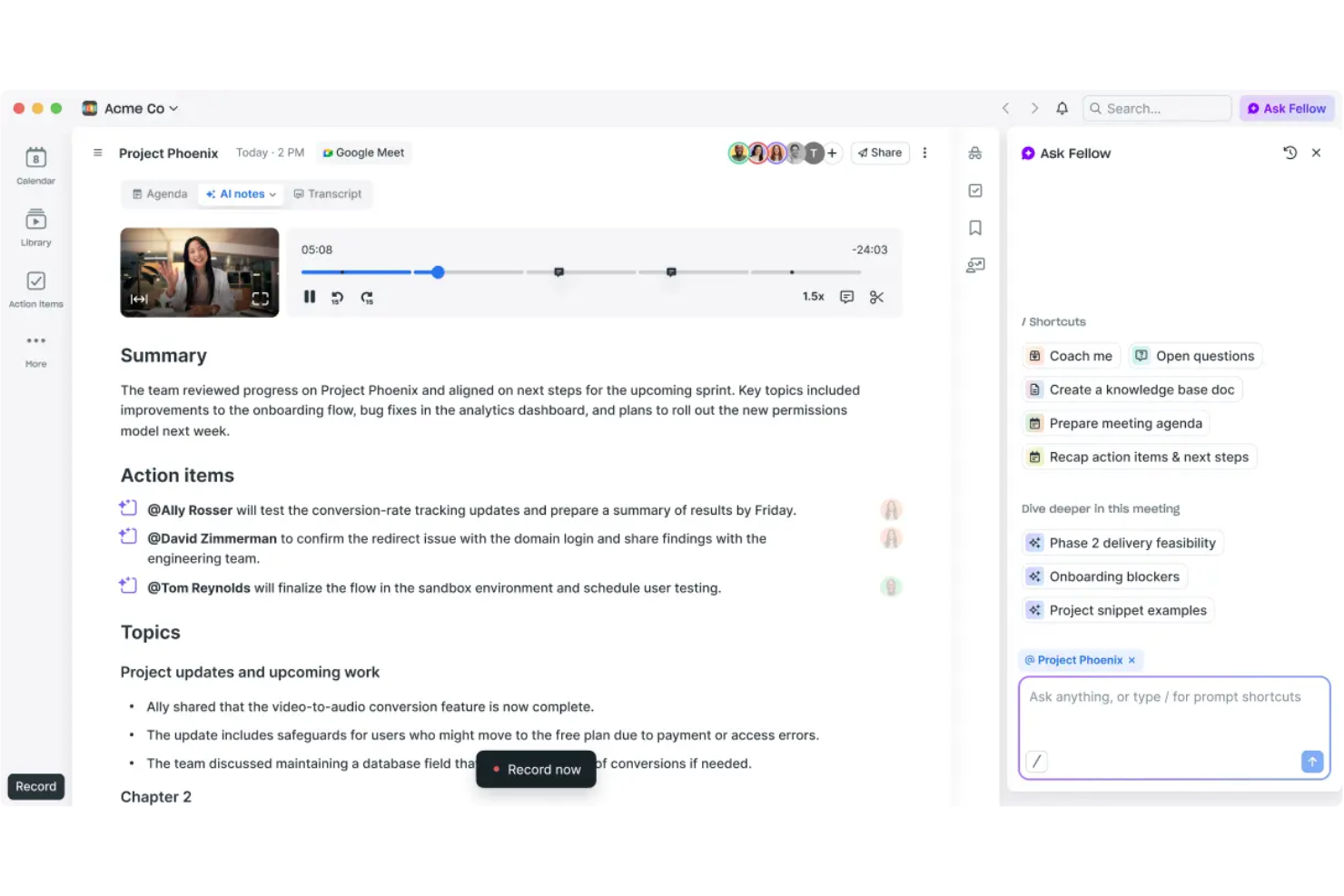
Fellow is an AI meeting assistant platform for creating collaborative agendas, capturing shared meeting notes, and facilitating structured team feedback and action items.
Who Is Fellow Best For?
Fellow fits managers and team leads at small to mid-sized tech companies who want organized, collaborative meeting workflows.
Why I Picked Fellow
I picked Fellow as one of the best because my team actually uses its collaborative agendas to keep meetings focused and accountable. I love how we can capture notes side-by-side in real time, and assign action items during the call. It’s especially useful for building and sharing meeting feedback directly in the workspace.
Fellow Key Features
- AI meeting transcription: Automatically generates transcripts for recorded meetings.
- Template library: Offers pre-built templates for different meeting types and structures.
- Meeting analytics dashboard: Tracks meeting frequency, engagement, and attendee data.
- Shared streams: Lets users organize meetings and notes by project, team, or topic.
Fellow Integrations
Fellow offers native integrations with Google Calendar, Outlook, Slack, Microsoft Teams, Zoom, Asana, Jira, Salesforce, HubSpot, and Linear. An API is available for custom integrations.
Pros and Cons
Pros:
- Dedicated agenda templates for different meeting types
- Built-in AI meeting summaries and transcripts
- Structured feedback and action item management
Cons:
- Occasional sync issues with some calendar platforms
- Fewer workflow automations
Fathom
Best for AI call summaries with CRM sync
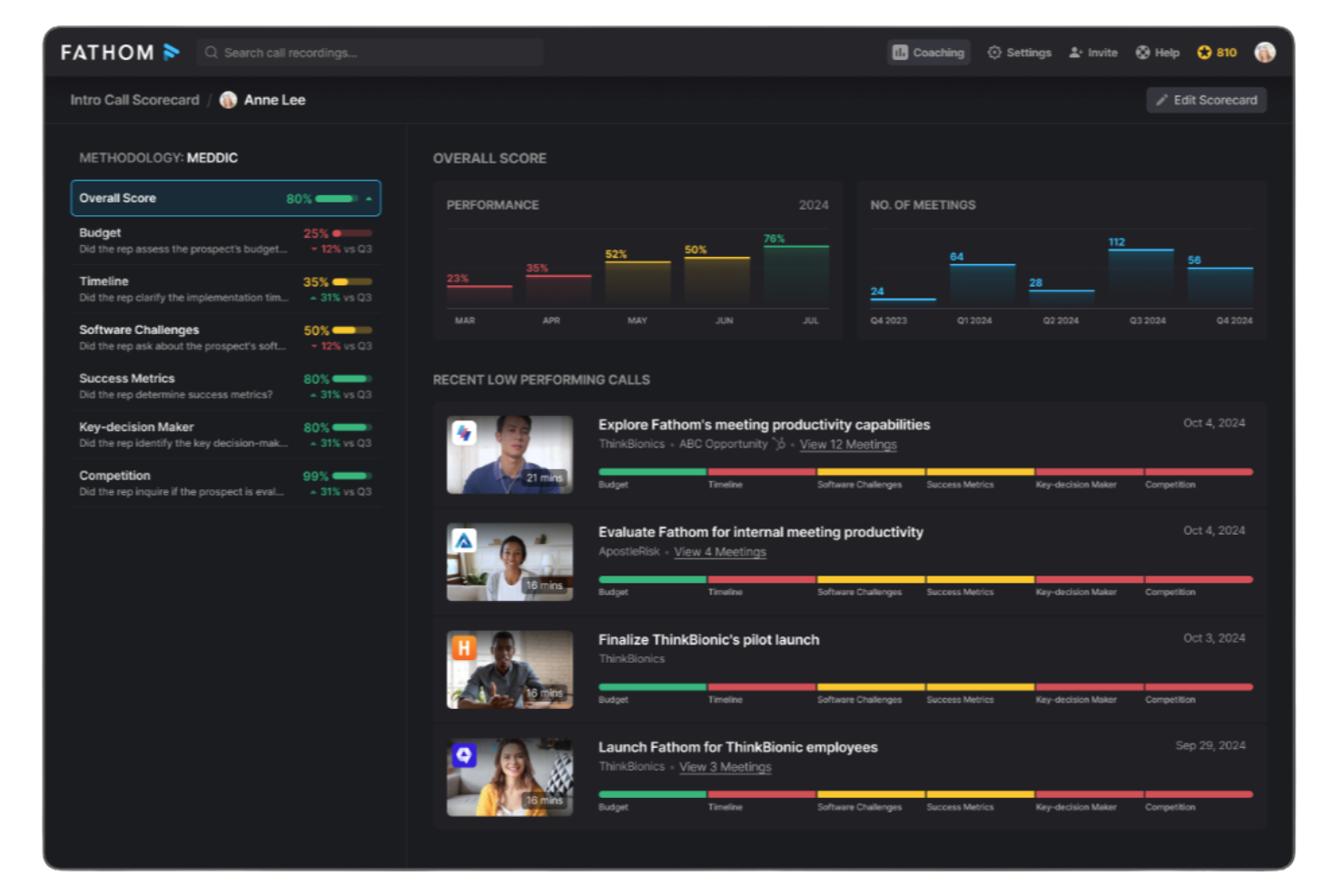
Fathom is an AI meeting assistant platform for recording, transcribing, highlighting, and summarizing video calls, offering instant access to meeting insights and action items.
Who Is Fathom Best For?
Fathom suits distributed sales, customer success, and research teams recording and analyzing virtual meetings across Zoom, Google Meet, and Microsoft Teams.
Why I Picked Fathom
I picked Fathom as one of the best because my team gets truly unlimited meeting recordings and transcriptions without hidden limits or upcharges, staying completely free for individual users. I like using Fathom to automatically generate sharable meeting summaries, highlight key points during calls, and sync action items to our connected apps.
Fathom Key Features
- Real-time transcription: Captures spoken words live on Zoom, Google Meet, and Microsoft Teams.
- Multi-language support: Transcribes meetings in multiple languages without manual switching.
- Speaker identification: Clearly marks which participant is speaking throughout the transcript.
- Automated call tagging: Tags important topics and segments for quick reference after meetings.
Fathom Integrations
Fathom offers native integrations with Salesforce, HubSpot, Slack, Notion, Google Docs, and supports exporting meeting content to Google Drive. An API is available for custom integrations.
Pros and Cons
Pros:
- Highlights and tags key moments during calls
- Real-time transcription in multiple languages
- Unlimited meeting recordings for individuals
Cons:
- Speaker labeling can be inconsistent on large calls
- No offline recording or mobile meeting capture

Avoma
Best for meeting insights and coaching
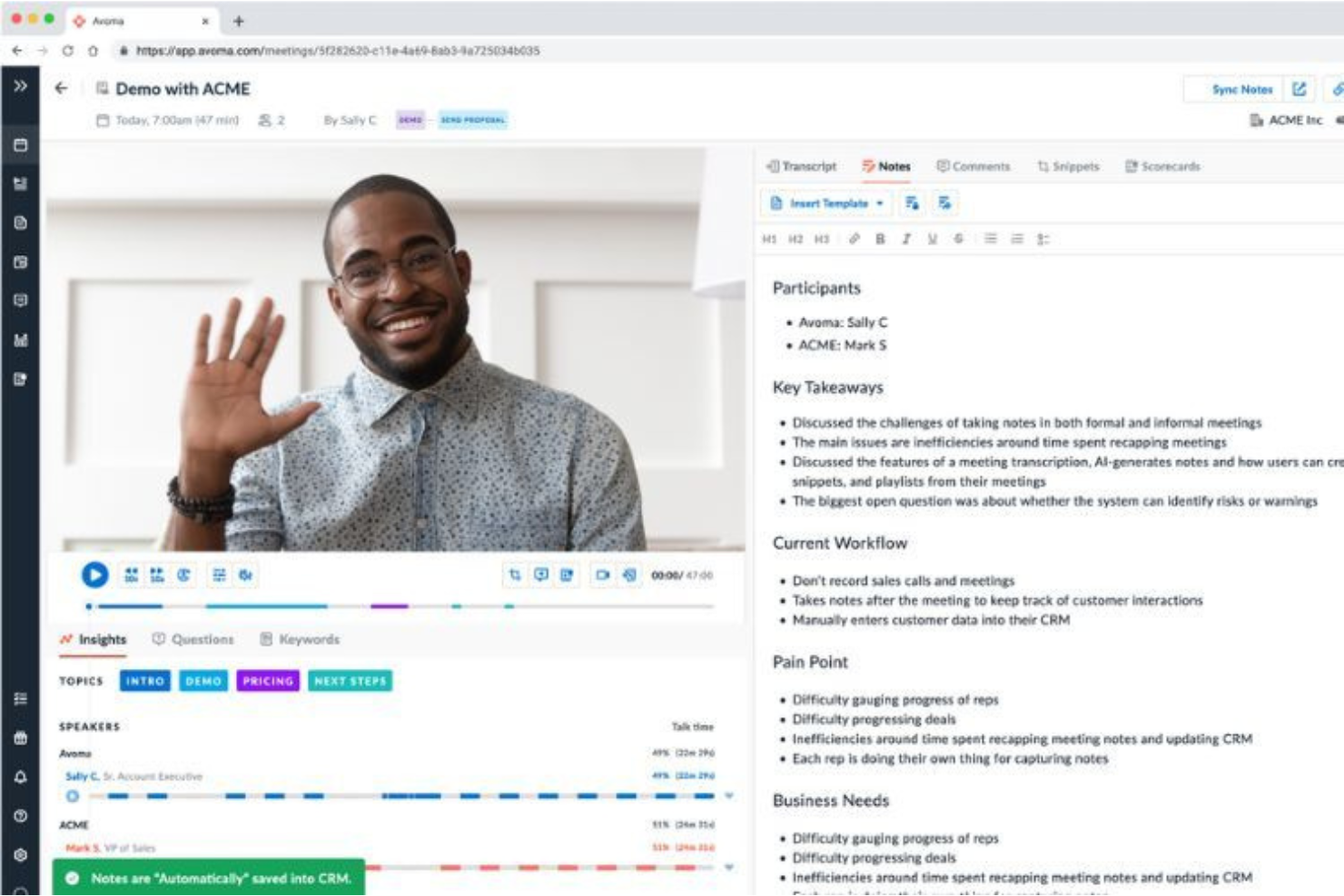
Avoma is an AI meeting assistant platform that records, transcribes, and analyzes conversations while supporting collaboration and coaching features for team meetings.
Who Is Avoma Best For?
Avoma fits revenue and customer-facing teams who need AI-powered meeting recording, insights, and coaching across recurring conversations.
Why I Picked Avoma
I picked Avoma because it goes beyond basic AI notes to deliver in-depth meeting transcriptions, collaborative real-time note-taking, and post-call coaching insights. My team uses Avoma to annotate decisions together during calls and organize conversation highlights for quick reference. The built-in coaching tools let managers review calls and share feedback tied directly to specific conversations.
Avoma Key Features
- Automated agenda templates: Lets you create and reuse structured agendas for recurring meetings.
- Searchable meeting transcript repository: Stores and indexes transcripts for keyword and topic search across all conversations.
- CRM integration: Syncs meeting insights and notes directly with Salesforce, HubSpot, and other CRMs.
- Speaker identification: Distinguishes individual speakers to attribute statements and action items accurately.
Avoma Integrations
Avoma offers native integrations with Zoom, Microsoft Teams, Google Meet, Salesforce, HubSpot, Slack, Google Calendar, and Outlook Calendar. An API is available for custom integrations.
Pros and Cons
Pros:
- Conversation intelligence provides coaching and analytics
- Automated agenda templates for recurring meetings
- Collaborative notes editing during and after meetings
Cons:
- No mobile app for recording meetings on the go
- Occasional transcription errors with strong accents

Granola
Best for concise meeting summaries
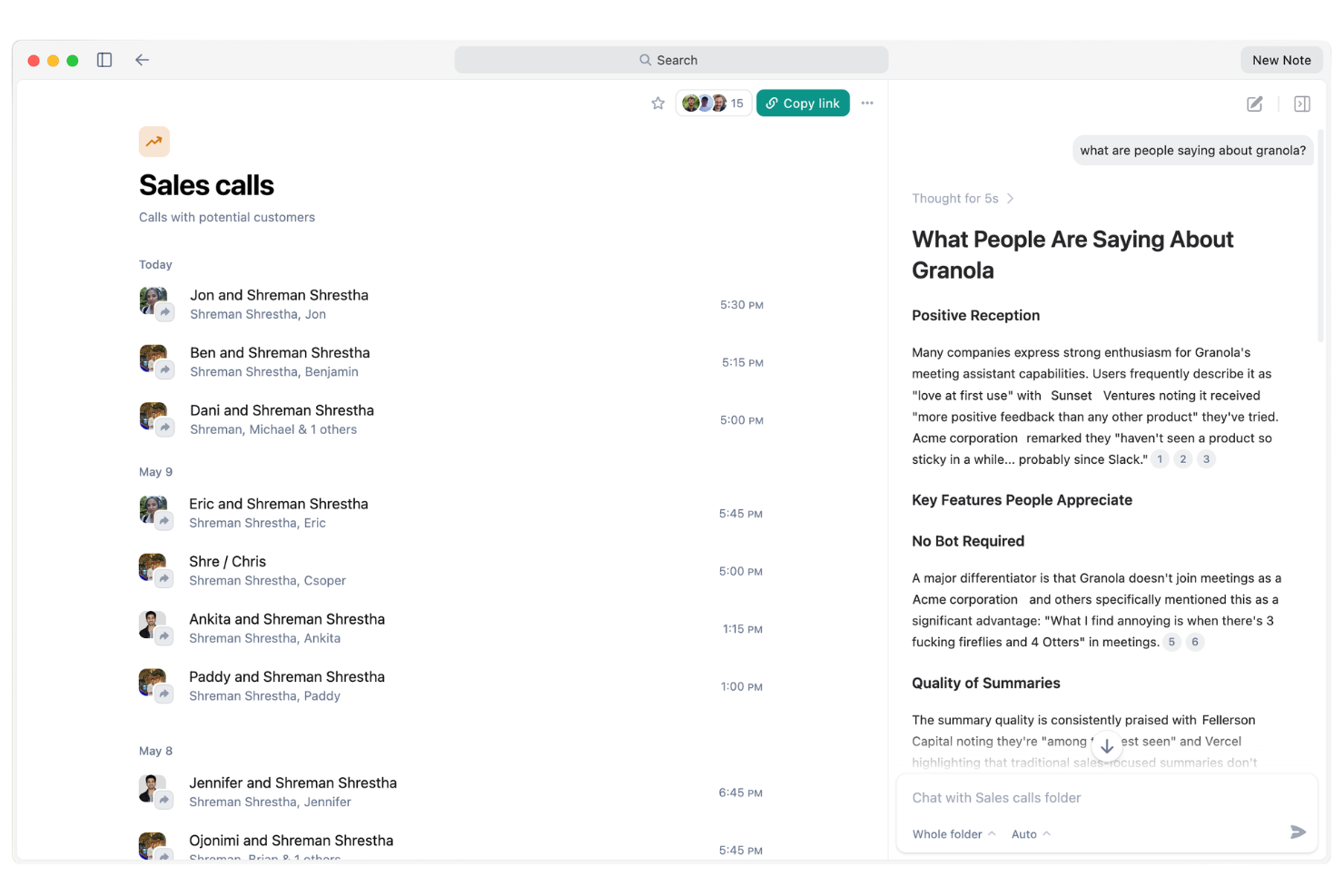
Granola is an AI meeting assistant platform that records meetings, generates transcripts, tracks action items, and triggers automated follow-ups and reminders for your team.
Who Is Granola Best For?
Granola suits busy sales and client-facing teams who need automated follow-ups and reliable action tracking from every meeting.
Why I Picked Granola
I've included Granola in my shortlist because I value how its AI agent automatically handles meeting follow-ups, reminders, and key action items with no manual effort from my side. I like how it actively tracks commitments and nudges participants after meetings so nothing slips. In practice, that means my team is able to focus on discussions while Granola ensures tasks and follow-ups are always managed.
Granola Key Features
- Live meeting transcription: Granola captures and transcribes meeting audio in real time.
- Speaker detection: Identifies and labels different speakers during meeting recordings.
- Searchable meeting archive: Lets users search and retrieve past meeting notes or transcripts easily.
- AI-powered meeting summaries: Generates concise written summaries of each meeting automatically.
Granola Integrations
Granola offers native integrations with Google Calendar, Zoom, Google Meet, Slack, Notion, and Salesforce. An API is available for custom integrations.
Pros and Cons
Pros:
- Summarizes meetings with AI-generated notes
- Tracks and reminds participants on follow-ups
- Automated action items assigned after each meeting
Cons:
- No mobile app for on-the-go use
- Lower plans restrict monthly transcription minutes

Otter.ai
Best for real-time transcription and notes
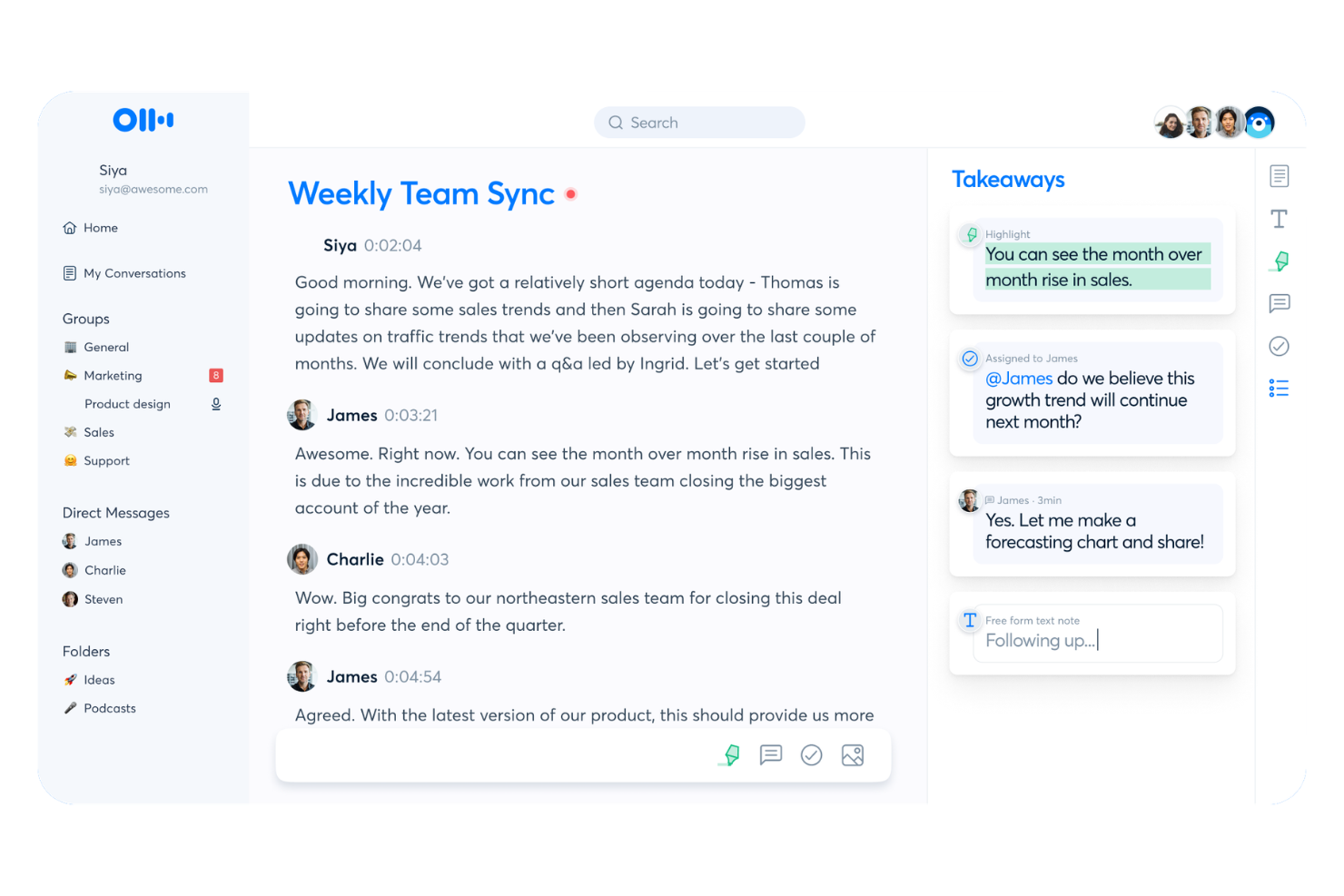
Otter.ai is an AI meeting assistant platform for live voice meeting notes, automated transcription, real-time collaboration, and turning conversations into searchable records for teams and organizations.
Who Is Otter.ai Best For?
Remote and hybrid teams that need live, collaborative voice transcripts and meeting documentation across distributed meetings.
Why I Picked Otter.ai
I picked Otter.ai as one of the best because I rely on its live voice meeting notes and instant transcript sharing during cross-team meetings. I like collaborating on shared notes in real time, with teammates adding comments or edits mid-conversation. My team uses interactive live summary cards to capture decisions and assigned action items as they happen.
Otter.ai Key Features
- Automated speaker identification: Distinguishes and labels speakers in meeting transcripts.
- Syncs with video conferencing platforms: Connects directly to Zoom, Google Meet, and Microsoft Teams.
- Audio import for transcription: Lets you upload audio files to generate searchable transcripts.
- Custom vocabulary: Allows you to add industry terms or names for more accurate transcription.
Otter.ai Integrations
Otter.ai offers native integrations with Zoom, Google Meet, Microsoft Teams, Dropbox, Google Drive, and more. An API is available for custom integrations.
Pros and Cons
Pros:
- Live note collaboration during conversations
- Automated speaker identification is accurate
- Real-time transcription in meetings and calls
Cons:
- Edit options for summaries are limited
- Meeting bot can disrupt privacy-conscious guests

Best for automatic meeting transcription
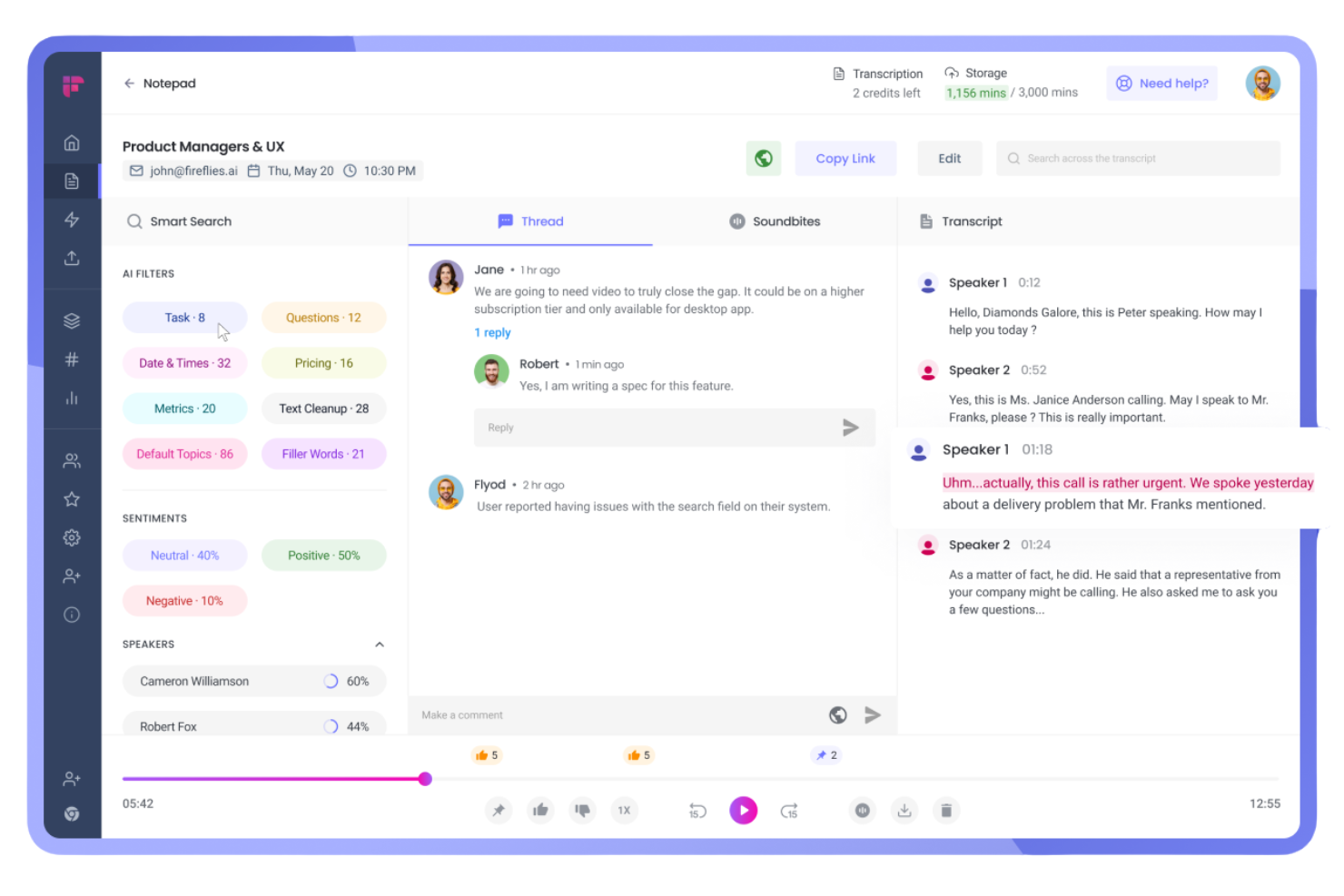
Fireflies.ai is an AI meeting assistant platform that records calls, generates searchable transcripts, auto-summarizes conversations, and integrates with a wide range of video conferencing and collaboration tools.
Who Is Fireflies.ai Best For?
Sales teams and project managers who need automated call transcription and documentation across distributed meetings.
Why I Picked Fireflies.ai
I picked Fireflies.ai as one of the best because it transcribes and summarizes meetings across platforms automatically, taking care of multi-platform recordings in real time. I use its AI-generated summaries to share tailored recaps with different stakeholders, and rely on its keyword search to track key action items from hours of calls without manual effort.
Fireflies.ai Key Features
- Smart search: Search transcripts by keyword, speaker, or topic across all your meetings.
- Speaker identification: Detects and labels different speakers automatically during recordings.
- Collaboration tools: Highlight, comment, and assign tasks directly within transcribed meeting notes.
- CRM integration: Sync meeting data and notes with popular CRM platforms like Salesforce and HubSpot.
Fireflies.ai Integrations
Fireflies.ai offers native integrations with Google Meet, Zoom, Microsoft Teams, Slack, Salesforce, HubSpot, Asana, ClickUp, Monday.com, and more. It connects with Zapier and provides an API for custom integrations.
Pros and Cons
Pros:
- Searchable archive of all recorded meetings
- Real-time AI summaries delivered after calls
- Accurate multi-speaker transcription on meetings
Cons:
- Occasional transcription errors with heavy accents
- No live video recording, audio only

Tactiq
Best for real-time meeting summaries
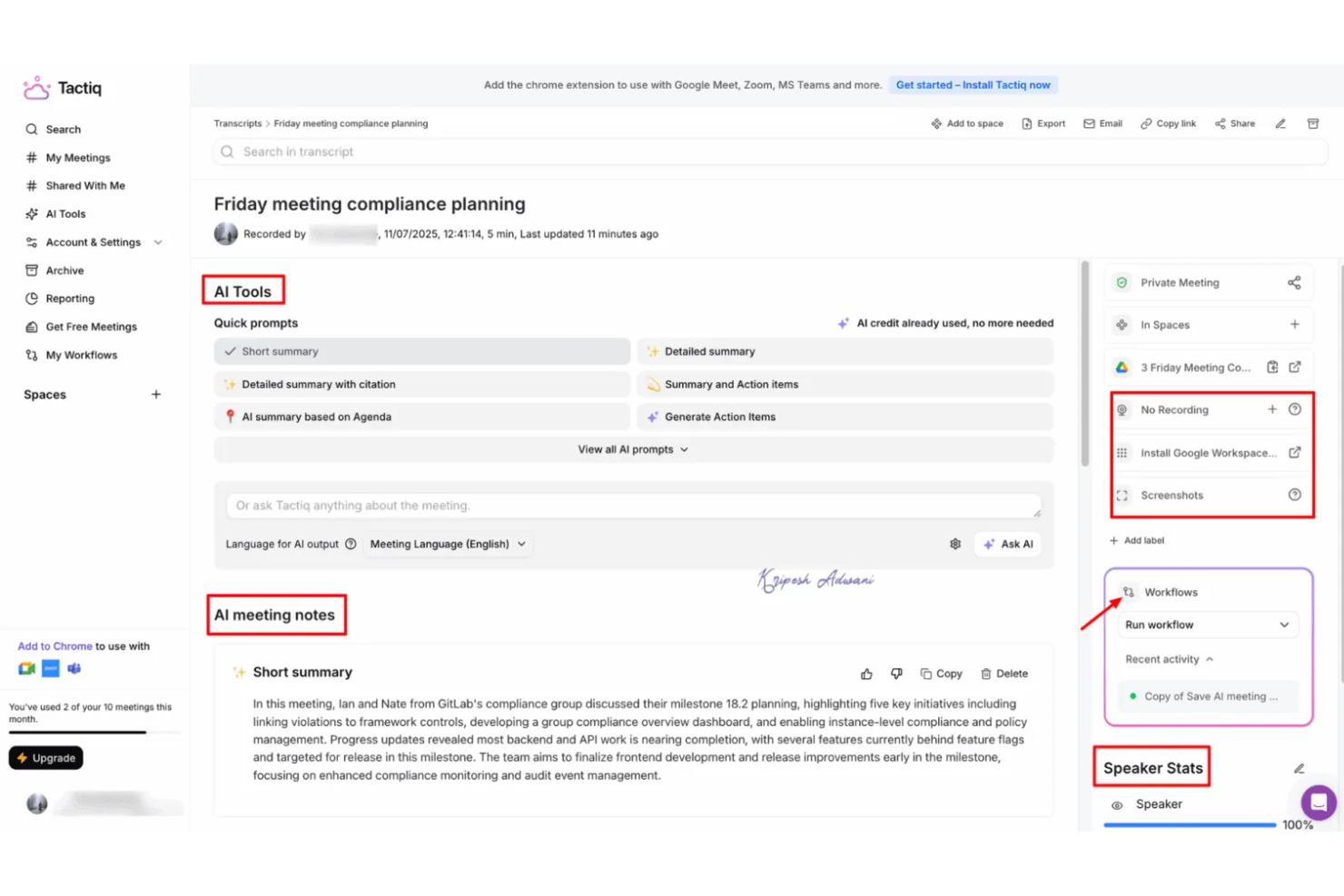
Tactiq is an AI-driven meeting assistant platform that captures live transcripts, generates summaries and action items, and integrates directly with platforms like Google Meet, Zoom, and Microsoft Teams.
Who Is Tactiq Best For?
Tactiq suits cross-functional teams in hybrid or remote workplaces that need instant, AI-powered transcripts and meeting documentation on major video platforms.
Why I Picked Tactiq
I picked Tactiq as one of the best because it grabs transcripts, summaries, and action items live as my team uses Google Meet, Zoom, and Microsoft Teams. I like being able to highlight key moments during a meeting, tag teammates for follow-up, and instantly reference specific details in the transcript. I’ve used it to streamline note-taking by exporting meeting records to tools like Google Docs and Notion.
Tactiq Key Features
- AI topic detection: Identifies and organizes topics discussed in meetings automatically.
- Speaker labeling: Differentiates speakers throughout the transcript for reference.
- Custom vocabulary: Lets you add keywords for better recognition and accuracy.
- Export in multiple formats: Allows exports to PDF, Word, and subtitle files for sharing or archiving.
Tactiq Integrations
Tactiq offers native integrations with Google Meet, Zoom, and Microsoft Teams, and provides export options to Google Docs, Notion, and Slack. An API is available for custom integrations.
Pros and Cons
Pros:
- AI summarizes meetings with key action items
- Detects and labels different speakers
- Captures transcripts in multiple languages
Cons:
- Speakers sometimes mislabeled in fast exchanges
- Few project management or CRM integrations

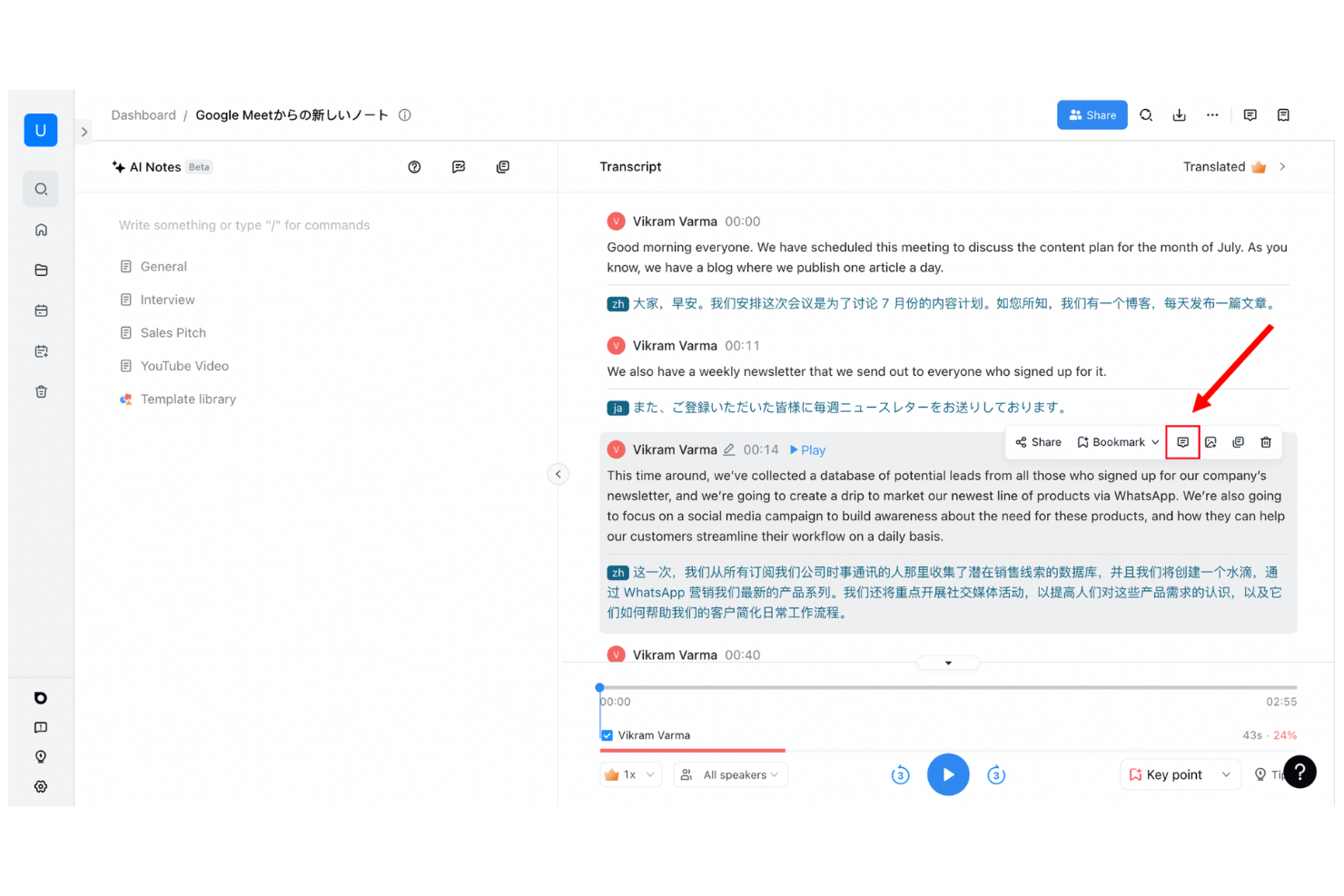
Notta is an AI-powered meeting assistant platform for recording, transcribing, and organizing conversations from online meetings, phone calls, and uploaded audio or video files.
Who Is Notta Best For?
Notta suits remote professionals and global businesses that need fast, accurate transcription for meetings, webinars, calls, and live events across multiple languages.
Why I Picked Notta
I picked Notta as one of the best AI meeting assistants because it instantly transcribes conversations in real time—whether I’m in a video call, attending a live event, or uploading an audio file. I like being able to record and capture every word as it happens, then search, edit, and organize transcripts from any device. I also appreciate that Notta supports multiple languages and recognizes different speakers automatically.
Notta Key Features
- Meeting summary generator: Automatically creates concise AI-powered summaries after each meeting.
- Export options: Lets you export transcripts to PDF, Word, TXT, or subtitle formats.
- Calendar integration: Syncs with Google and Outlook calendars to auto-record meetings.
- Team workspace: Allows teams to organize and share recorded meetings and transcriptions in one place.
Notta Integrations
Notta offers native integrations with Google Meet, Zoom, Microsoft Teams, Google Calendar, and Outlook Calendar, and provides an API for custom integrations.
Pros and Cons
Pros:
- Action items are pulled out from conversation
- Can auto-join and record scheduled meetings
- Distinguishes speakers in transcripts
Cons:
- Free tier limits monthly transcription duration
- Transcription struggles with background noise
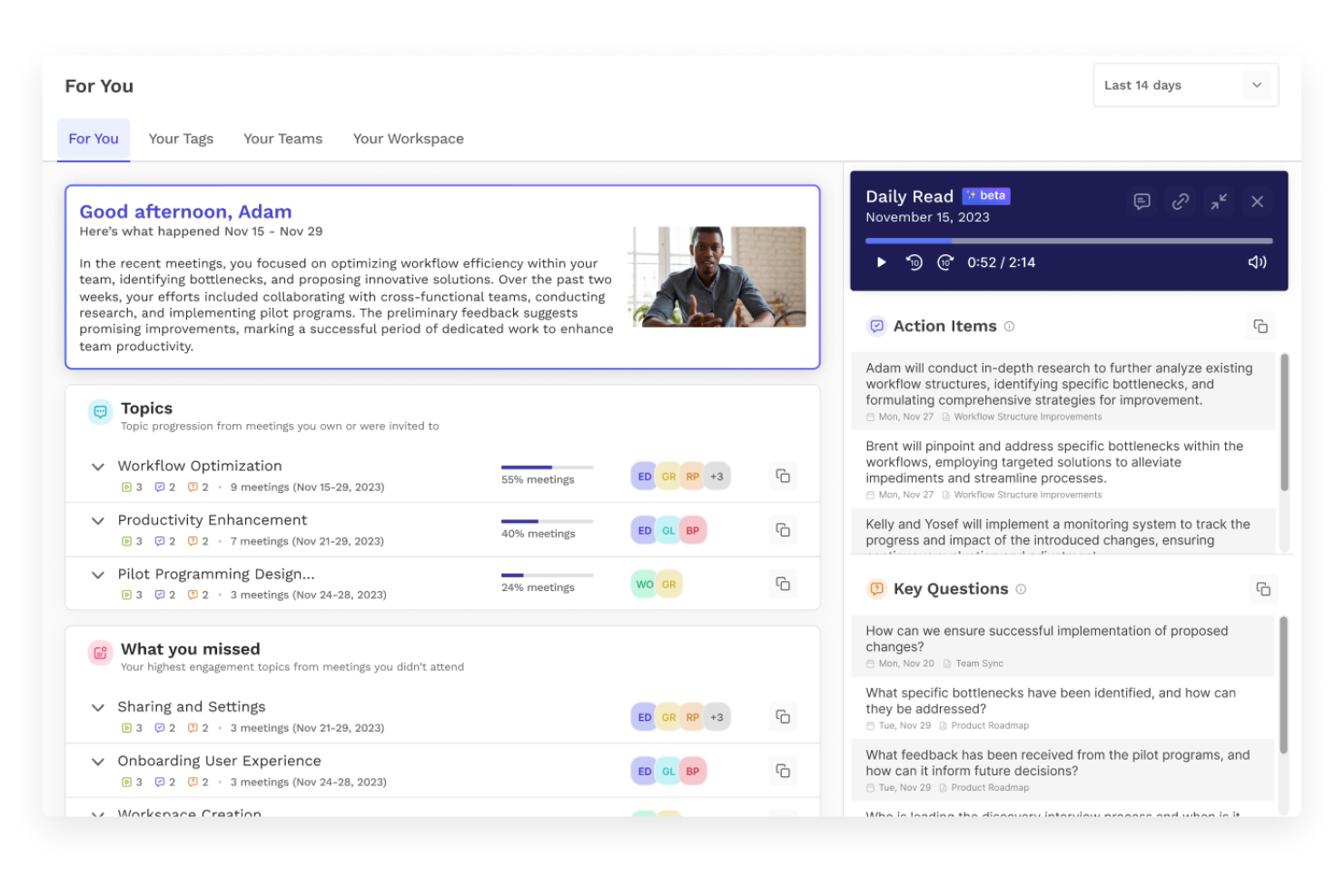
Read AI is an AI meeting assistant platform that automates meeting notes, generates summaries, and tracks action items, while supporting integrations for collaboration across popular video conferencing tools.
Who Is Read AI Best For?
Read AI suits remote and hybrid teams who need automated meeting summaries, tracking, and action items across multiple video conferencing platforms.
Why I Picked Read AI
I picked Read AI because it automates not just meeting notes, but summaries and action items as well, using its AI host feature. I’ve used it to get instant, structured recaps after calls, and I like that it reliably captures every decision point on the fly. My team often references Read AI’s real-time action item tracking to stay on top of follow-ups across multiple meetings.
Read AI Key Features
- Automatic meeting attendance reports: Generates participant lists and attendance summaries after each meeting.
- Live engagement analytics: Measures attentiveness and engagement scores in real time during meetings.
- Custom vocabulary support: Lets you add specific terms and jargon for accurate transcription.
- Calendar integration: Syncs with your calendars to schedule, join, and track meetings automatically.
Read AI Integrations
Read AI offers native integrations with Zoom, Microsoft Teams, Google Meet, Slack, andmore. An API is available for custom integrations.
Pros and Cons
Pros:
- Exports meeting notes to Notion and Drive
- Unlimited meeting recordings for individuals
- Highlights and tags important meeting moments
Cons:
- No offline or mobile meeting capture support
- Speaker labeling inconsistent on large calls
Outros assistentes de reuniões com IA
Eis algumas opções adicionais de assistentes de reuniões com IA que não entraram na minha lista de seleção, mas que ainda vale a pena consultar:
- Jamie
For multilingual meeting capture
- tl;dv
For meeting highlights and timestamps
- MeetGeek
For automated meeting summaries
- Gong
For revenue-focused conversation insights
- Grain
For video meeting highlights
- Sybill
For conversational meeting insights
- Reclaim
For smart meeting scheduling
- Microsoft CoPilot
For AI within Microsoft 365
- Google Gemini
For AI in Google Workspace
- Cirrus Insight
For Salesforce meeting automation
- Chorus
For sales conversation analytics
- Clari Copilot
For revenue conversation insights
- Supernormal
For instant meeting notes
- Zoom AI Companion
For AI in Zoom meetings
- Hedy AI
For multilingual meeting assistance
- Sembly AI
For meeting transcription and analysis
- Colibri.ai
For real-time meeting transcription
- AudioCodes Meeting Insights
For voice analytics and summaries


How I Evaluate AI Meeting Assistants
To make this list, a tool's AI has to deliver real time savings after standups, sprint reviews, and stakeholder check-ins—not just hand you a transcript. I split my evaluation into core functionality every tool must meet to qualify and differentiating factors that separate one pick from another.
Core Functionality (Table Stakes For This List)
When I'm selecting tools for my list, I rank each one on a scale from 0 (does not offer the functionality) to 5 (excels in this area) for each core functionality listed below. Then, I calculate the tool's total score into a percentage. Each tool needs to achieve a minimum total score of 65% to be considered for inclusion.
- Automated Meeting Transcription: I check whether the tool auto-joins and transcribes calls across Zoom, Google Meet, Microsoft Teams, and Webex without manual setup.
- AI-Generated Meeting Summaries: A good summary should break a 45-minute sprint review into topics, decisions, and outcomes I can share with stakeholders right away.
- Action Item Extraction: I look for AI that pulls out tasks, assigns owners, and flags due dates from natural conversation rather than requiring manual tagging.
- Project Tool Integrations: Tools like Otter.ai, Fireflies.ai, and Fellow differ in how deeply they connect with Jira, Asana, or Monday—I evaluate native sync depth.
- Searchable Meeting Repository: I evaluate whether I can search across months of transcripts by keyword, speaker, or topic to find a past decision quickly.
- Speaker Identification: Accurate speaker labels matter, especially when attributing action items across a cross-functional team of engineers, designers, and product managers.
Once I have a list of tools that meet the criteria, I consider what sets each platform apart.
Differentiating Factors (What Sets Vendors Apart)
Here's how I compare and contrast different vendors:
Standout Features
Custom AI summary templates are a big deal for PMs who run different meeting types daily—I want sprint retro outputs structured differently than a stakeholder update. I also look for conversational AI chat that lets me ask questions like "What risks came up in last month's planning sessions?" across stored transcripts. Multi-meeting project intelligence takes this further by surfacing recurring blockers and decision patterns over time, which helps me spot trends before they become problems.
Beyond Features
Security matters because meeting transcripts often contain sensitive project details, client names, and internal decisions. I check for SOC 2 Type II compliance and configurable data retention policies. Pricing structure is another factor I weigh—some tools cap monthly meeting minutes or lock PM integrations behind higher tiers, which changes the real cost for active teams. I also evaluate transcription accuracy with technical jargon, since a tool that mishandles acronyms like "CI/CD" or "OKR" creates more cleanup work than it saves.
Como escolher um assistente de reuniões com IA
É fácil ficar preso em longas listas de funcionalidades e estruturas de preços complexas. Para o ajudar a manter-se concentrado enquanto analisa o seu processo único de seleção de software, eis uma lista de fatores a ter em conta:
| Fator | O que considerar |
|---|---|
| Escalabilidade | A solução conseguirá acompanhar o volume de reuniões da sua equipa à medida que esta cresce? Verifique os limites de utilizadores, lugares ou reuniões. |
| Integrações | O assistente liga-se nativamente ao seu calendário, plataforma de vídeo e ferramentas de colaboração? |
| Personalização | Pode ajustar modelos, formatos de exportação ou acionar fluxos de trabalho específicos para os adaptar ao processo da sua equipa? |
| Facilidade de utilização | As ações principais, como agendar, participar e partilhar resultados, são claras para todos os utilizadores, incluindo funcionários sem conhecimentos técnicos? |
| Implementação e integração inicial | Com que rapidez pode a sua equipa começar a utilizar a solução? Existem guias, recursos de formação e apoio à migração disponíveis? |
| Custo | As funcionalidades e os limites de utilização correspondem ao seu orçamento? Tenha atenção aos custos ocultos de funcionalidades avançadas, limites de utilização ou suporte. |
| Medidas de segurança | A plataforma satisfaz as suas necessidades de privacidade dos dados e as normas relevantes? Procure funcionalidades de encriptação e controlos de dados. |
| Disponibilidade do suporte | O suporte em direto está acessível quando precisa de ajuda? Tenha em consideração o seu fuso horário, horário de funcionamento e urgência dos pedidos de suporte. |
O que é um assistente de reuniões com IA?
Um assistente de reuniões com IA é uma ferramenta digital que utiliza inteligência artificial para gravar, transcrever e analisar reuniões em tempo real. Estas ferramentas de IA automatizam a tomada de notas com IA, gerando notas de reuniões com IA, resumos e tarefas durante reuniões virtuais ou presenciais.
Muitas plataformas também incluem funcionalidades como conversação com IA, mensagens de acompanhamento automáticas e resumos pesquisáveis que podem ser armazenados numa base de conhecimento partilhada. Isto ajuda os membros da equipa a melhorar a colaboração, aumentar a produtividade e aceder a informações de elevada qualidade sobre as reuniões sem esforço manual.
As equipas utilizam cada vez mais assistentes de reuniões com IA para simplificar os fluxos de trabalho após as reuniões, reduzir tarefas repetitivas e facilitar a partilha e a aplicação dos resultados das reuniões.
Funcionalidades
Ao selecionar um assistente de reuniões com IA, procure as seguintes funcionalidades principais:
- Transcrição em tempo real: Capta o conteúdo falado sob a forma de texto durante as reuniões, facilitando o acompanhamento das conversas, a revisão dos detalhes e a partilha dos registos da reunião logo após as chamadas.
- Identificação dos oradores: Distingue e identifica a voz de cada participante, para que saiba sempre quem disse o quê, mesmo em discussões de grupo ou painéis.
- Resumos automáticos: Utiliza IA para produzir sínteses que destacam os temas principais, as ações a realizar e as decisões, fornecendo notas instantâneas da reunião que pode utilizar ou enviar aos colegas.
- Extração de ações a realizar: Identifica, apresenta e acompanha automaticamente as tarefas de seguimento ou responsabilidades que surgem durante a conversa, ajudando as equipas a manterem-se responsáveis.
- Histórico de reuniões pesquisável: Permite pesquisar reuniões anteriores por palavra-chave, tema ou participante, facilitando a recuperação de informações ou a revisão de conversas.
- Integrações nativas com videoconferência: Liga-se diretamente a plataformas como o Zoom, o Google Meet ou o Microsoft Teams, para que possa utilizar o assistente durante as reuniões sem mudar de separador ou de ferramenta.
- Opções de exportação e partilha: Disponibiliza formas de exportar transcrições e resumos para formatos comuns ou aplicações de trabalho, garantindo que as notas estão disponíveis nos locais onde a sua equipa trabalha.
- Suporte para vários idiomas: Permite efetuar transcrições e resumos em idiomas além do inglês, o que é útil para equipas multinacionais ou parceiros internacionais.
- Controlos de segurança e privacidade: Disponibiliza encriptação, permissões de acesso e opções de conformidade, para que os dados confidenciais das reuniões estejam protegidos e cumpram as normas da sua organização.
Vantagens
A implementação de um assistente de reuniões com IA proporciona várias vantagens à sua equipa e à sua empresa. Eis algumas das vantagens que pode esperar:
- Registos precisos das reuniões: A transcrição automática e a identificação dos oradores garantem que capta todos os detalhes e sabe exatamente quem disse o quê.
- Menos registo manual de notas: Os resumos de IA em tempo real e a extração de ações a realizar permitem que os participantes se concentrem nas conversas em vez de estarem a tomar notas.
- Seguimento mais rápido: As ações a realizar e as funcionalidades de exportação ajudam a sua equipa a atribuir rapidamente tarefas ou a distribuir os resultados das reuniões sem atrasos.
- Maior responsabilização: As transcrições pesquisáveis e os registos acessíveis facilitam a consulta de compromissos e decisões tomadas em reuniões anteriores.
- Acessibilidade melhorada: O suporte para vários idiomas e as integrações com plataformas de vídeo facilitam a participação e a revisão das reuniões por equipas remotas ou globais.
- Maior segurança dos dados: Os controlos de privacidade e as funcionalidades de encriptação protegem as informações sensíveis das reuniões contra o acesso não autorizado.
- Maior produtividade: Os processos automatizados aceleram a conclusão das reuniões e libertam tempo para trabalho de maior valor.
Custos e preços
A seleção de um assistente de reuniões com IA requer uma compreensão dos vários modelos de preços e planos disponíveis. Os custos variam consoante as funcionalidades, a dimensão da equipa, os complementos e outros fatores. A tabela abaixo resume os planos comuns, os respetivos preços médios e as funcionalidades normalmente incluídas nas soluções de assistentes de reuniões com IA:
Tabela de comparação de planos para assistentes de reuniões com IA
| Tipo de plano | Preço médio | Funcionalidades comuns |
|---|---|---|
| Plano gratuito | $0 | Inclui transcrição básica de reuniões, minutos limitados por mês, um único utilizador, integrações essenciais e resumos básicos. |
| Plano pessoal | $5-$15/utilizador/mês | Disponibiliza transcrição ilimitada ou ampliada, identificação individual dos oradores, opções de exportação, suporte prioritário e captura de ações a realizar. |
| Plano empresarial | $15-$40/utilizador/mês | Suporta contas de equipa, integrações avançadas, histórico partilhado de reuniões, resumos melhorados, análises e controlos de administração. |
| Plano empresarial de grande escala | $40-$80/utilizador/mês | Disponibiliza integrações personalizadas, gestão de conta dedicada, SSO, funcionalidades de conformidade, integração em massa e opções avançadas de segurança. |
Perguntas frequentes sobre assistentes de reuniões com IA
Eis algumas respostas a perguntas comuns sobre assistentes de reuniões com IA:
Os assistentes de reuniões com IA podem integrar-se com o meu calendário e as ferramentas de videoconferência existentes?
Sim, a maioria dos assistentes de reuniões com IA integra-se com as principais aplicações de calendário e plataformas de videoconferência. Isto facilita a participação e a gravação automáticas de reuniões, a sincronização de agendas e a garantia de que as suas notas e transcrições ficam associadas ao evento correto.
Qual é a precisão da transcrição dos assistentes de reuniões com IA?
A precisão da transcrição é geralmente elevada, especialmente em ambientes silenciosos com áudio nítido. Poderá detetar erros quando os intervenientes falam ao mesmo tempo, falam rapidamente ou existe muito ruído de fundo. É aconselhável rever e editar as transcrições no caso de reuniões muito importantes.
Os meus dados de reunião estão seguros quando utilizo um assistente de reuniões com IA?
Sim, a maioria das plataformas reputadas de assistentes de reuniões com IA utiliza encriptação e disponibiliza controlos de privacidade para proteger os seus dados. Consulte sempre as definições de segurança e as políticas de privacidade de cada fornecedor, especialmente se trabalhar num setor regulamentado ou tratar informações sensíveis.
Os assistentes de reuniões com IA conseguem lidar com vários idiomas?
Sim, muitos assistentes de reuniões com IA oferecem suporte multilingue, tanto na transcrição como nos resumos das reuniões. Isto é especialmente útil para equipas internacionais ou reuniões que alternam entre diferentes idiomas.
O que acontece se um participante entrar atrasado — a sua participação será captada?
Sim, a maioria das ferramentas capta tudo o que é dito a partir do momento em que o participante entra. No entanto, qualquer assunto discutido antes de o assistente de reuniões ser ativado ou de o utilizador entrar não aparecerá na transcrição. Iniciar o assistente a tempo garante uma cobertura completa.
Como partilho as notas da reunião com a minha equipa após uma chamada?
A maioria dos assistentes de reuniões com IA permite exportar notas e transcrições para unidades na nuvem, ferramentas de colaboração ou como ligações partilhadas. Algumas ferramentas automatizam inclusivamente a partilha de notas no Slack ou atualizam os sistemas de acompanhamento de projetos com tarefas identificadas durante uma reunião.