

10 Melhores Aplicações de Registo de Tempo de 2026: Analisadas & Comparadas

10 Lista das melhores aplicações de controlo de tempo


As melhores aplicações de controlo de tempo ajudam-no a compreender exatamente onde é gasto o tempo em tarefas, projetos e membros da equipa, para que possa melhorar a precisão da faturação, a produtividade e o planeamento da carga de trabalho. Estas ferramentas substituem as folhas de cálculo manuais por informações em tempo real e uma responsabilização clara.
Ao longo da minha carreira, utilizei pessoalmente ferramentas de controlo de tempo em contextos de engenharia e de agências, e testemunhei como dados de tempo deficientes criam problemas de faturação, aumento descontrolado do âmbito e esgotamento.
Para este guia, analisei as principais aplicações de controlo de tempo com base em testes realizados em primeira mão. Cada uma oferece diferentes vantagens para registar horas, analisar dados de tempo e ajudar as equipas a manterem-se concentradas, faturarem com precisão e planearem de forma mais inteligente. Por isso, encontrará informações sobre o que as distingue, as suas vantagens e desvantagens, bem como outros detalhes que o ajudarão a tomar uma decisão informada sobre a sua próxima ferramenta.
Why Trust Our Software Recommendations
Our team has been testing and reviewing software since 2012. As project managers ourselves, we know how difficult—and important—it is to choose the right software.
For this guide, we evaluated tools using hands-on testing and independent research, scoring tools using our selection criteria. We also draw on insights from industry thought leaders and practicing project management experts.
Our reviews reflect our human editorial judgment, not a sales pitch.
Expert reviewers:
Tabela comparativa das aplicações de controlo de tempo
Esta tabela comparativa resume os principais detalhes de cada uma das minhas melhores escolhas de software de controlo de tempo:
| Tool | Best For | Trial Info | Price | ||
|---|---|---|---|---|---|
| 1 | Best for GPS-enabled field team tracking | Free plan available | From $29/month (billed annually) | Website | |
| 2 | Best as AI for business | Free trial + Free demo available | From $8/user/month | Website | |
| 3 | Best for remote employee monitoring | Free trial available | From $5.99/user/month | Website | |
| 4 | Best for customizability and flexibility | Free plan + Free trial + Free demo available | From $6/user/month | Website | |
| 5 | Best for user-friendly calendar integrations | Free plan available; 30-day free trial; Free demo available | From $9/user/month | Website | |
| 6 | Best for tracking project costs in real time | Free trial available | From $6.42/user/month (billed annually) | Website | |
| 7 | Best for agencies managing budgets and time together | 14-day free trial | From $10/user/month (billed annually) | Website | |
| 8 | Best for managing hourly workforces | Free plan + 30-day free trial + free demo available | From $99/month (billed annually) | Website | |
| 9 | Best for automatic time tracking | 14-day free trial + free demo available | From $3.99/user/month (billed annually) | Website | |
| 10 | Best with employee monitoring capabilities | Free trial available | From $10/user/month | Website |


Análise geral das melhores aplicações de controlo de tempo
Eis uma breve descrição de cada aplicação de controlo de tempo, destacando o caso de utilização mais adequado e as funcionalidades mais relevantes de cada ferramenta. Incluí também capturas de ecrã para lhe dar uma ideia da respetiva interface de utilizador.

Best for GPS-enabled field team tracking

Connecteam is an employee management platform built for deskless and mobile teams. It combines time tracking, scheduling, task management, and communication tools in one place and makes it easier for businesses to manage field employees and stay connected.
Why I Picked Connecteam
I picked Connecteam because it offers one of the most reliable GPS-enabled time-tracking systems for mobile and field teams. Its built-in time clock lets employees clock in and out from anywhere, and location tracking helps maintain accurate records for payroll and accountability. I also like its scheduling tools, which make it simple to manage shifts, track availability, and reduce conflicts, especially for distributed or on-the-go workforces.
Connecteam Key Features
Connecteam offers several other features that make it a comprehensive time tracking solution for your business.
- Automated Time Logging: This lets you automatically record employee work hours to reduce manual entry errors and maintain accurate reporting.
- Geofencing: You can set up virtual boundaries to make sure employees clock in and out only when they are within designated work areas, which adds a layer of accountability.
- Timesheet Export: You can easily export digital timesheets to payroll software, which streamlines the payroll process and saves time on administrative tasks.
- Break and Overtime Management: The app tracks breaks and overtime hours in real-time to help you manage compliance and follow fair labor practices.
Connecteam Integrations
Integrations include Gusto, QuickBooks, Xero, Paychex, Zapier, NetSuite, Salesforce, HubSpot, Slack, Microsoft Teams, Google Calendar, and Microsoft Outlook.
Pros and Cons
Pros:
- Timesheet export ready for payroll
- View live job-site map routes for mobile staff
- Accurate geofence clock-in monitoring
Cons:
- Requires mobile devices for full benefit
- Complex workflows require setup and configuration effort
New Product Updates from Connecteam

Connecteam Adds Automatic Paid Break Actions and Manual Break Windows
Connecteam adds automatic paid break actions and configurable start windows for manual breaks. These updates help teams manage break schedules and maintain accurate timesheets. For more information, visit Connecteam’s official site.
 .

Best as AI for business
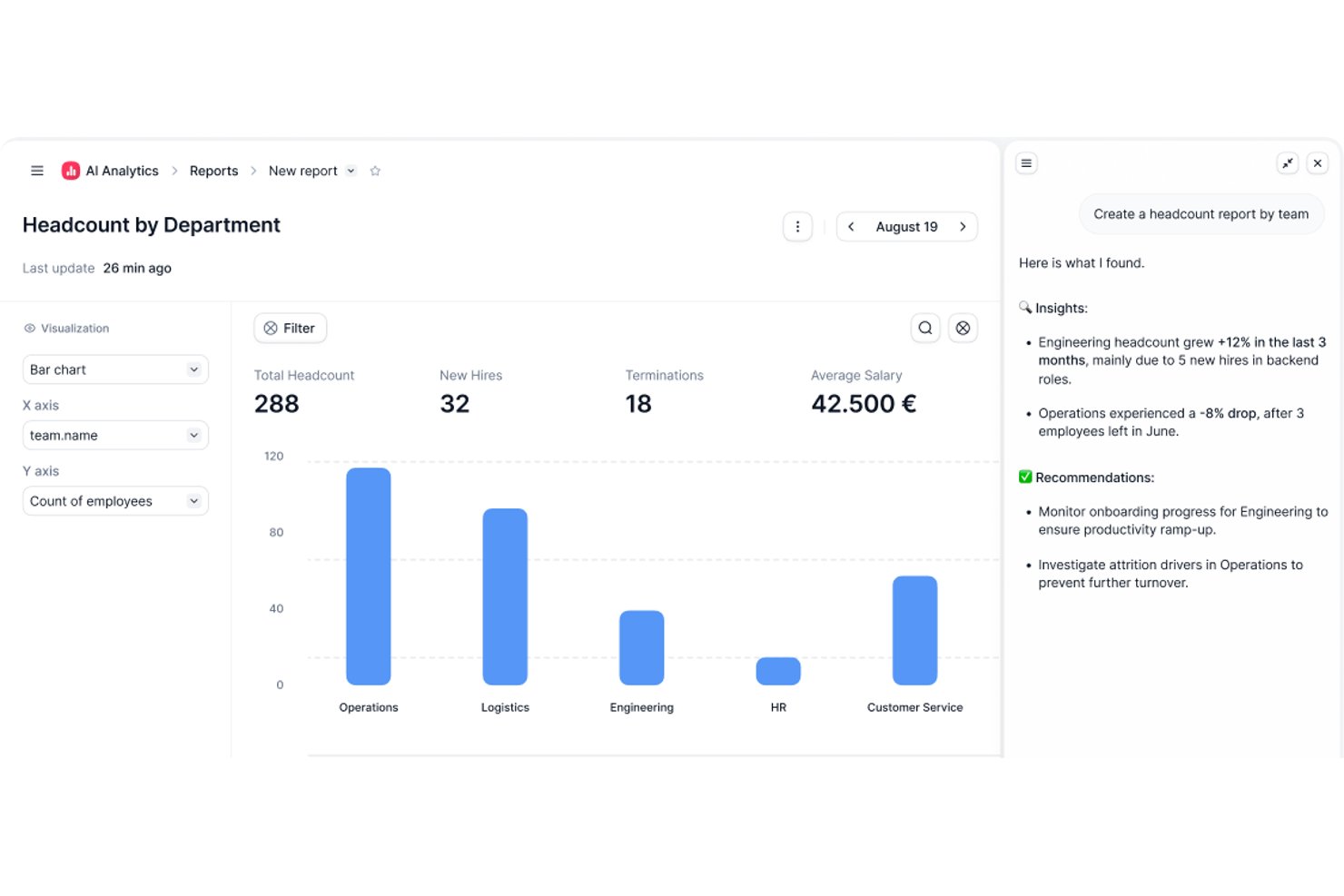
Factorial is an AI-powered HR and business operations platform that covers time tracking, shift scheduling, timesheet approval, project hour logging, and workforce reporting.
Who Is Factorial Best For?
Factorial is a strong fit for HR and operations teams that want time tracking, scheduling, and workforce reporting managed within a single AI-powered platform.
Why I Picked Factorial
I've included Factorial in my top picks because its AI-for-business positioning goes beyond basic time tracking: the built-in AI agent, One, can generate live reports from your actual workforce data, answer team questions about time-off policies, and automate expense processing without you touching a spreadsheet. I also like how project time tracking ties directly into Time and Materials billing, so tracked hours and rates roll up into billable amounts and profitability views in real time.
Factorial Key Features
- QR-code clock-in: Employees can clock in and out by scanning a QR code, including codes tied to specific work locations.
- Team Status widget: Gives managers a real-time view of which employees are clocked in, clocked out, or missing their scheduled start.
- Timesheet approval workflow: Managers can review timesheets by day, week, or month, filter by pending status, and approve or unapprove entries.
- Project budget tracking: Project phases display tracked hours versus estimated hours, used budget versus budget cap, and cost-to-date versus estimated cost.
Factorial Integrations
Marketplace integrations include Microsoft Power BI, Slack, Okta, Sage 200, DATEV LODAS, and Zapier. Factorial also offers a public REST API, webhooks, and sandboxes for custom integrations.
Pros and Cons
Pros:
- Attendance sits alongside leave and employee records
- Mobile clock-ins suit distributed, moving teams
- Quick timesheet submission for managers
Cons:
- Project invoicing caps may constrain client billing
- Custom time reports require manual workarounds

Best for remote employee monitoring

Buddy Punch is an employee time clock software designed to help you manage time tracking, scheduling, and payroll. It lets you monitor employee hours and handle payroll processes from anywhere.
Why I Picked Buddy Punch
I picked Buddy Punch for its robust time tracking and attendance features, which make it easy to monitor remote employee hours, overtime, and missed shifts for accurate payroll. It also automates PTO tracking for simpler time-off management. Additionally, Buddy Punch offers advanced tools like GPS tracking, geofencing, and facial recognition to manage remote teams effectively, ensure accountability, and prevent buddy punching.
Buddy Punch Key Features
In addition, Buddy Punch offers a variety of other features that can meet your scheduling and time tracking needs.
- Employee Scheduling: You can create and manage schedules using a user-friendly drag-and-drop interface, which makes it easy to organize shifts and accommodate changes.
- Payroll Management: This lets you integrate your time tracking data with payroll processing to maintain accurate and timely payments.
- Customizable Reporting: You can generate detailed reports tailored to your specific needs and get insights into employee hours, overtime, and more.
- Job Costing: This lets you track the time spent on specific projects or tasks to better understand labor costs and optimize resource allocation.
Buddy Punch Integrations
Integrations include QuickBooks, ADP Workforce Now, Gusto, Paychex, Paylocity, Paycor, iSolved, Justworks, SurePayroll, Rippling, Zapier, and TriNet Payroll.
Pros and Cons
Pros:
- Customizable reports
- GPS tracking
- Real-time monitoring
Cons:
- No offline mode
- Basic mobile app

actiTIME
Best for customizability and flexibility
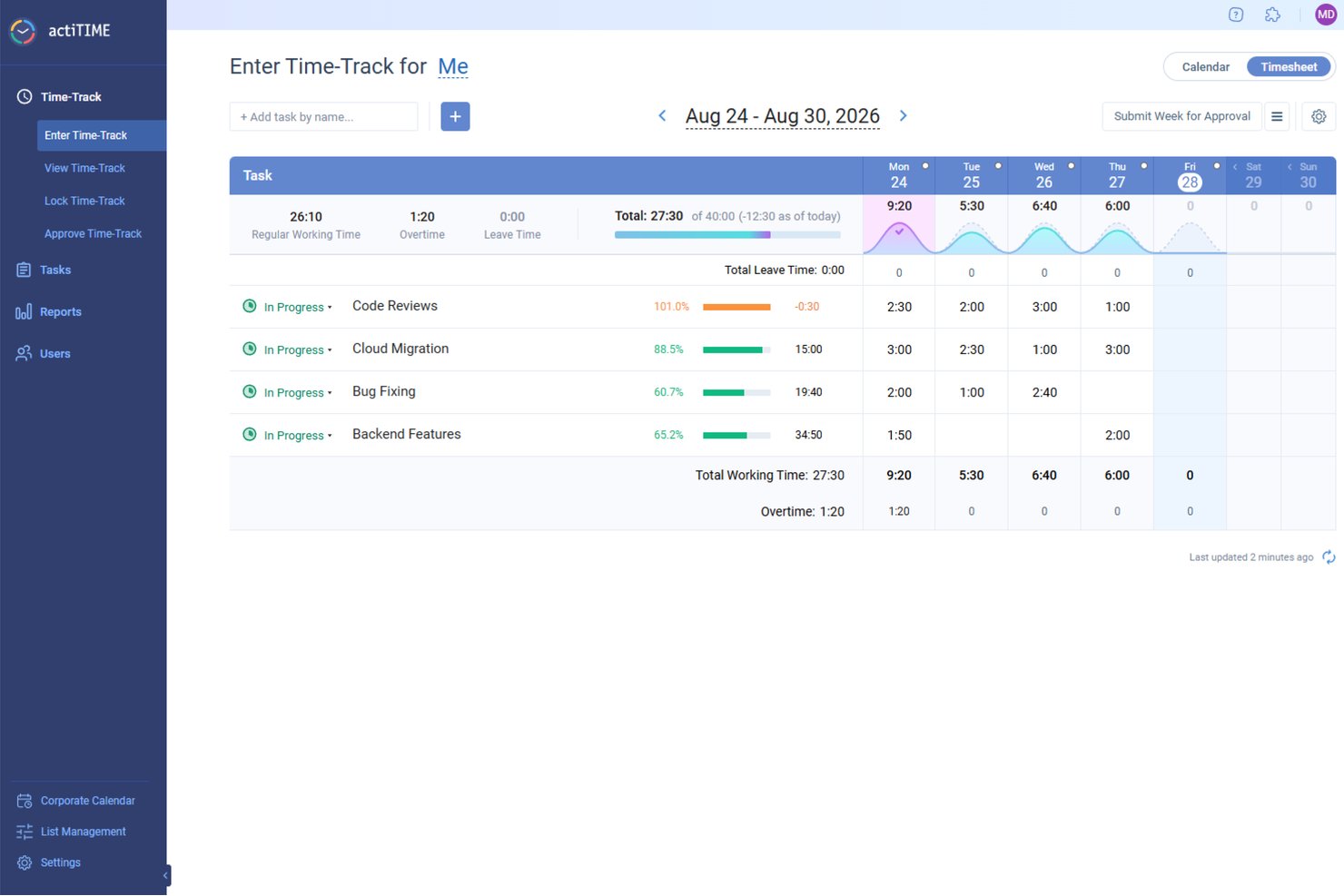
actiTIME is a digital project management tool that focuses on time tracking and work management for businesses of various sizes. Its user-friendly interface and comprehensive time management features position it as a top choice for intuitive time tracking management.
Why I Picked actiTIME
actiTIME allows users to tailor the software to their specific needs. This means that businesses can choose which features they want to use and turn off the rest, simplifying the user experience and ensuring that the software aligns perfectly with their workflow and requirements.
actiTIME provides various deployment options, including cloud, on-premise, and hybrid models. This flexibility ensures that businesses of all types and sizes can choose a deployment method that best fits their IT infrastructure and data management policies. Having these options in a largely "always online" world makes actiTIME stand out for customizability and flexibility.
actiTIME Key Features
actiTIME also offers a wide range of other features that cater to diverse business needs.
- Time Tracking: The weekly timesheets, calendar views, and mobile app let you track working hours and leave with precision.
- Task Management: You can use task estimates, deadlines, and Kanban views to efficiently manage your team's workload.
- Reports & Data Analysis: This lets you generate comprehensive performance reports and profit/loss analyses to gain insights into your business operations.
- Team Management: You can define user roles, set permissions, and manage work schedules to maintain a well-organized team environment.
actiTIME Integrations
Integrations include QuickBooks, Outlook, GitHub, Jira, and Trello.
Pros and Cons
Pros:
- Offline time tracking with sync-back
- Good manual timesheet locking and approval options
- Set hourly budgets and track cost by project
Cons:
- Setup and configuration of advanced workflows can be complex
- Reporting granularity and customization are limited
New Product Updates from actiTIME

actiTIME Visual Hour Indicator and Time-Track Report Redesign
actiTIME adds a wave-style hour indicator to the Timesheet and Calendar views and refreshes the Time-Track report for smoother navigation and clearer visuals. For more information, visit actiTIME's official site.
Toggl
Best for user-friendly calendar integrations
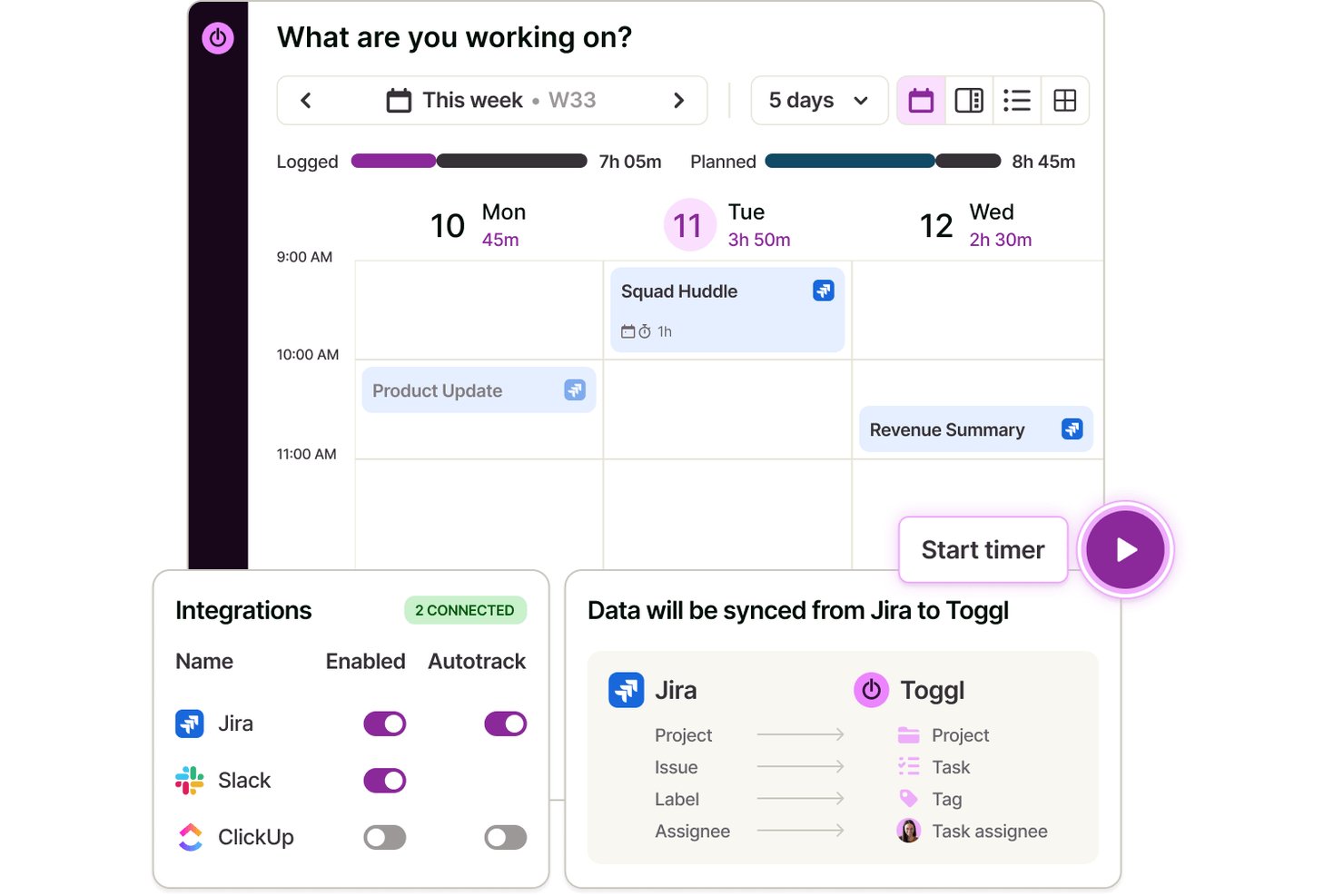
Toggl is a time-tracking app that lets you record hours, manage projects, organize client work, and connect seamlessly with popular calendar platforms through web, desktop, and mobile apps.
Who Is Toggl Best For?
Freelancers, agencies, and small to mid-sized teams looking for simple, calendar-friendly time tracking across multiple devices, capacity planning, and detailed reporting.
Why I Picked Toggl
I picked Toggl as one of the best because I can drag calendar events right into my timesheet, pull in Google or Outlook meeting data instantly, and see scheduled tasks alongside my tracked hours—all without leaving the platform. Toggl AI also allows me to start a timer, create tasks, and compile client reports, all using natural language.
Toggl Key Features
- Task management: Plan tasks on a board, schedule them against real capacity, and track how long they take with a timer.
- Capacity planning: Plan according to team availability and current workload, based on accurate time data.
- Multi-platform time entries: Track time on web, desktop, mobile, and browser extensions that sync across all devices.
- Billable rates: Assign custom hourly rates to projects, clients, or team members for accurate billing.
Toggl Integrations
Toggl offers native integrations with Google Calendar, Outlook Calendar, Asana, Jira, GitHub, Todoist, and more. It connects with Zapier, provides an API for custom integrations, and an MCP for connecting to Claude, Codex, and other AI assitants.
Pros and Cons
Pros:
- Customizable reporting dashboards for projects
- Transparent anti-surveillance approach
- Supports team-based timesheet approvals
Cons:
- No GPS location or screenshot tracking
- Bulk editing tools are limited

DeskTime
Best for tracking project costs in real time
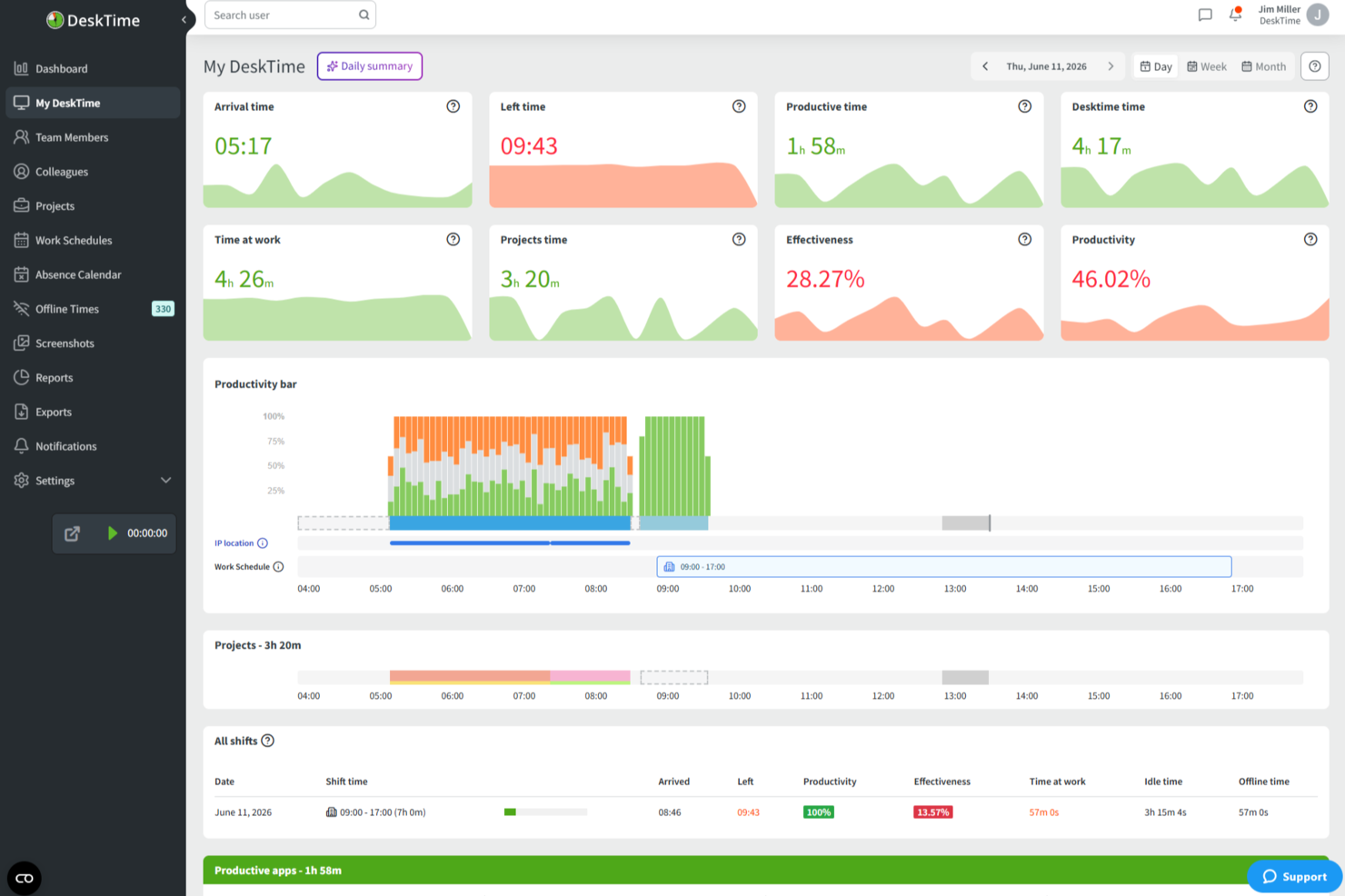
DeskTime is an automatic time tracking app that runs in the background to log app and URL usage, track hours across projects, calculate productivity scores, and manage employee schedules—all within a single platform.
Who Is DeskTime Best For?
DeskTime is a good fit for small to mid-sized teams that need automatic, always-on time tracking without relying on manual input from employees.
Why I Picked DeskTime
I've included DeskTime in my top picks because its project tracking lets you attach hourly rates directly to individual projects and tasks. That means as your team logs hours, DeskTime calculates labor costs in real time, so you're never guessing where your budget stands mid-project. I also like that multiple team members can log time against the same project simultaneously, giving you a live cost rollup across the entire team, not just individual contributors.
DeskTime Key Features
- Automatic time tracking: DeskTime runs in the background on your desktop and logs time automatically, without requiring manual start and stop inputs.
- App and URL categorization: Every app and website your team visits gets tagged as productive, unproductive, or neutral, giving you a breakdown of how work time is actually spent.
- Screenshot feature: DeskTime captures optional screenshots at set intervals, giving you visual confirmation of what was on screen during logged work hours.
- Absence calendar: Track team vacations, sick days, and time off directly within DeskTime alongside regular work schedules.
DeskTime Integrations
DeskTime offers a small set of native integrations, including Google Calendar, Outlook Calendar, Trello, GitLab, Asana, and Jira, and it connects with Zapier. An API is also available for custom integrations.
Pros and Cons
Pros:
- Built-in shift scheduling and absence management
- Categorizes apps as productive or unproductive
- Automatic tracking eliminates manual timer entry
Cons:
- Idle time detection can miscount work hours
- Mobile app lacks full desktop feature parity

Best for agencies managing budgets and time together

Productive is a complete work management system for agencies. It combines employee time tracking, project management, resource allocation, and budgeting under one roof.
Why I Picked Productive
This software is a good choice for teams that want an all-in-one solution for work management. Designed specifically with the needs of agencies in mind, your team members can track their billable and non-billable hours, and you can sync that up directly with invoicing and billing. You can also leverage your time tracking data for project planning, capacity planning, and resource allocation.
The platform is relatively flexible and customizable. Several views are available for project management, including Gantt charts, boards, timelines, calendars, and more. You can assign work and tasks based not just on employee capacities, but also skill sets. It's a comprehensive tool that covers nearly all aspects of your agency's work management operations.
Productive Key Features
Productive also offers several other features that cater to your agency's diverse needs.
- Invoicing: This feature lets you generate invoices directly from tracked time and project data to help you accurately bill your clients.
- Reporting: You can get insights into team performance, project progress, and financial metrics, all tailored to your specific needs.
- Resource Scheduling: This lets you easily allocate tasks and manage workloads across your team.
- Automations: You can automate routine tasks and processes to save time and reduce manual errors, which helps improve overall productivity.
Productive Integrations
Integrations include Dropbox, Exact, Google Calendar, HubSpot, Jira, Harvest Economic, Outlook, Microsoft Calendar, Slack, QuickBooks, and Xero.
Pros and Cons
Pros:
- Budget vs actuals visibility for each project
- Resource planning helps avoid over-booking your team
- Time entries linked directly to budgets and clients
Cons:
- Requires discipline from your team to track time accurately
- Customization options limited for complex setups
New Product Updates from Productive
Productive Adds Voice Dictation, Slack Connector, Proposals, and Overtime
Productive adds voice dictation, a Slack Connector, proposal controls, and overtime tracking. These updates support faster AI interactions, client proposals, and time management. For more information, visit Productive’s official site.

Homebase
Best for managing hourly workforces

Homebase is a time tracking solution tailored for small and midsize businesses, as well as remote and hybrid teams. It has an intuitive user interface (UI) with drag-and-drop functionality, which makes it a strong option if you’re looking for a feature-rich employee scheduling and time-tracking platform that has a relatively short learning curve.
For example, Greg Feinerman, Owner & Medical Director of Feinerman Vision, shared how impactful the tool has been in a healthcare setting: “Homebase made scheduling and payroll easier for our team because it tracked the hours of our staff with accuracy and generated clear reports. Homebase was also helpful for our company in terms of scheduling and tracking. It reduced our administrative work by roughly 20 percent a month, which afforded us more time to focus on patient care.”
Why I Picked Homebase
With Homebase’s scheduling and time tracking app, you can easily drag and drop shifts, make duplicates of employee schedules, and copy current shift schedules to other days with just a click. You can also easily group your employees into teams or departments and view their schedules at a glance, based on their roles. This is useful for businesses like restaurants or organizations with hourly employees, especially those that manage remote or hybrid teams.
Homebase Key Features
Homebase also offers several other features that make it useful as a time tracking app.
- GPS-Enabled Clock-Ins: This lets your team clock in and out from their mobile devices using GPS, which helps make sure they are where they need to be during work hours.
- Shift Alerts: Homebase automatically sends alerts to employees to remind them of upcoming shifts and reduce the likelihood of tardiness or missed shifts.
- Automatic Payroll Calculations: This lets you automatically convert tracked hours, breaks, and overtime into timesheets and calculate wages for payroll, which helps eliminate manual data entry.
- Team Communication Tools: This lets your team view their schedules, request time off, and swap shifts directly through the app.
Homebase Integrations
Integrations include Clover, Lightspeed, Shopify, Square, Toast, Upserve, ADP, Gusto, Heartland, Paychex, Rippling, SurePayroll, and Square Payroll.
Pros and Cons
Pros:
- Built-in photo capture at clock-in for audit trails
- Multi-location support with separate tracking per site
- Ability to set geofence radius for clock-in accuracy
Cons:
- Reporting customization and deep analytics limited
- Offline mode can be unreliable

Best for automatic time tracking
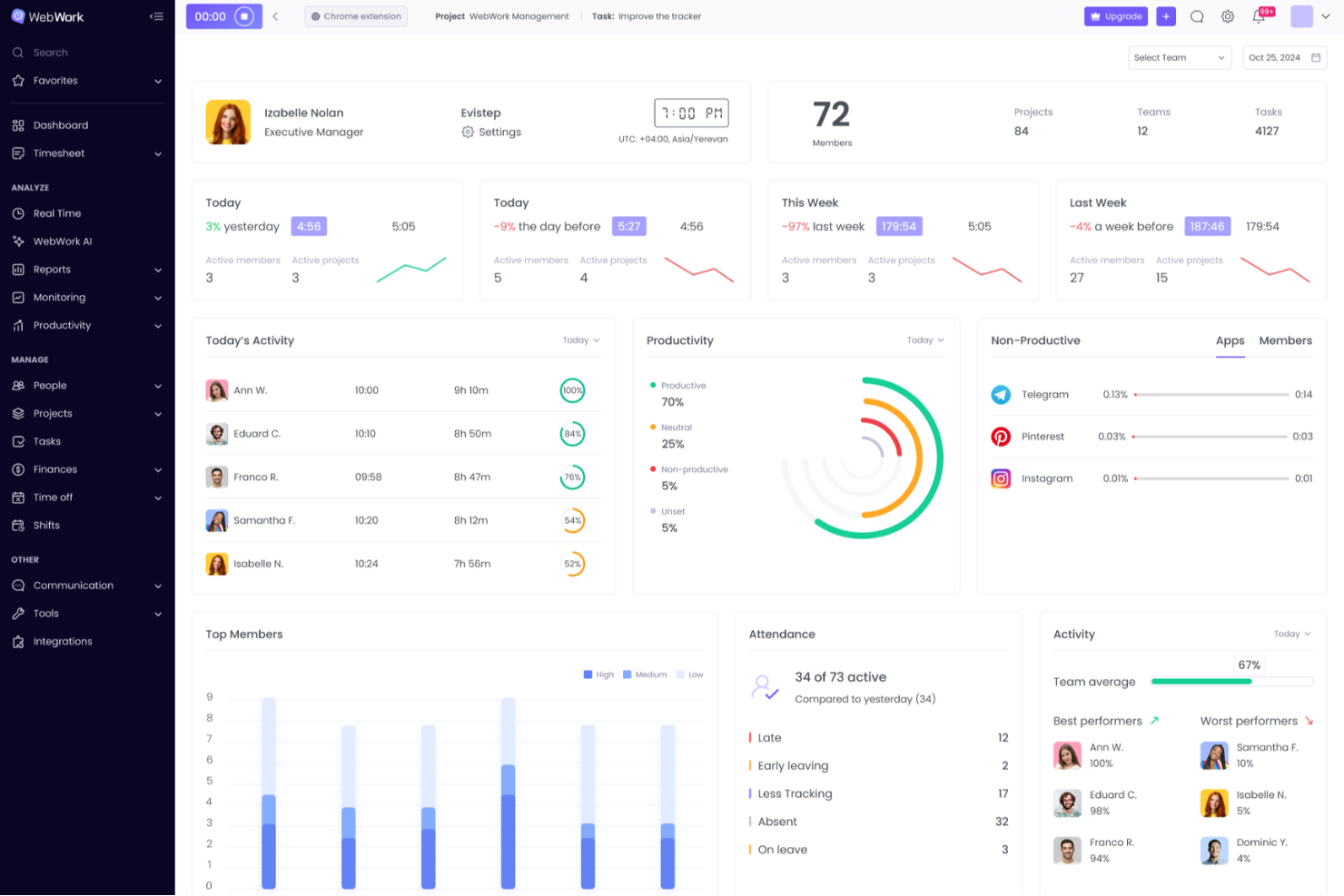
WebWork Time Tracker is a versatile tool designed to help you and your team monitor work hours and boost productivity. It offers automated time tracking and detailed activity monitoring and makes it easier to manage tasks and projects.
Why I Picked WebWork Time Tracker
I like that it offers time tracking with screenshots, which automatically records the hours your team works and captures periodic screenshots to verify their activity. This feature ensures you have a clear view of your team's productivity and helps maintain transparency. It's particularly beneficial when managing remote teams, as it provides an extra layer of accountability.
WebWork Time Tracker Key Features
WebWork Time Tracker also offers a range of other features that can help you improve productivity and accountability on your team.
- Task Management: You can organize and assign tasks directly within the app, which lets your team stay focused and on track with project goals.
- Billable Hours Tracking: You can easily distinguish between billable and non-billable hours, which helps maintain accurate invoicing and budgeting for your projects.
- Activity Levels: This lets you monitor keyboard and mouse activity levels to gain insights into your team’s engagement and productivity throughout the day.
- Invoice Generation: This lets you create and send professional invoices directly from the app, streamline your billing process, and improve cash flow management.
WebWork Time Tracker Integrations
Integrations include Asana, Slack, Deel, GitHub, ClickUp, Trello, Jira, Xero, Bitbucket, Zapier, Todoist, and Bitwage.
Pros and Cons
Pros:
- Manual time edits allow for missed clock-ins
- Idle-time detection flagging team time accuracy
- Segment tracked time by project and sub-task
Cons:
- Difficulty in deducting excess hours when tracker continues running
- Time-consuming setup and custom workflow configuration
New Product Updates from WebWork Time Tracker
WebWork Time Tracker Adds WFH Requests and Flexible Shifts
WebWork Time Tracker adds work-from-home balances, requests, and flexible shifts. These updates simplify remote work scheduling and attendance tracking. For more information, visit WebWork Time Tracker’s official site.
 .

Insightful
Best with employee monitoring capabilities

Insightful is a workforce analytics suite with separate modules for employee time-tracking, automatic time-mapping, and employee monitoring. It's user-friendly and has a broad set of features that can help organizations manage and monitor growing remote teams.
Why I Picked Insightful
It's a great time tracking solution for organizations with remote employees since it includes additional features to monitor employee activity, including time spent on specific projects and tasks, or on third-party websites or apps. It strikes a great balance between being easy to use and offering advanced features that make it great for scaling a remote business.
Insightful Key Features
Insightful also offers a range of other features that can help your team better track time on projects.
- Automated Screenshots: This lets you capture periodic screenshots of your team's screens to get visual insights into their work progress.
- App and Website Usage: You can track which applications and websites are being used and get a detailed view of digital habits and potential distractions.
- Project and Task Tracking: You can assign tasks and track time spent on specific projects, which makes it easier to manage workloads and deadlines.
- Customizable Reports: This lets you generate detailed reports tailored to your specific needs and helps you analyze productivity trends and make data-driven decisions.
Insightful Integrations
Integrations include Asana, Google Docs, Google Hangouts, Jira, Slack, and Trello.
Pros and Cons
Pros:
- On-premise deployment option
- Automatic idle time detection aids better time accuracy
- Segment data between office and remote teams
Cons:
- No mobile app
- Complex interface may slow team adoption
New Product Updates from Insightful
Insightful Expands MCP and HRIS Integrations
Insightful adds OAuth connections for ChatGPT and Microsoft Copilot Studio through its MCP Server, while HRIS integrations gain manager scope syncing in Beta. These updates expand AI access and automate permission management. For more information, visit Insightful’s official site.
 .
Outras opções de controlo de tempo
Eis mais algumas opções que não entraram na lista dos melhores softwares de controlo de tempo, mas que ainda assim vale a pena conhecer:
- Agendrix
For payroll integration
- Beebole
For charging billable hours
- TimeTrex
For biometric employee attendance
- Clockify
For real-time tracking
- Jibble
For small teams
- 7shifts
For restaurant time tracking
- Projectworks
For real-time tracking of billable hours
- Timesheets.com
For project-specific time tracking
- Deltek Replicon Time
For mobile time tracking
- Miter
For construction labor compliance
- Sage HR
For employee engagement features
- Deel HR
For global teams
- ClickTime
For structured, finance-ready data
- Hubstaff
For tracking across devices
- Hub Planner by Milient
For capacity-based time planning
- MinuteShark
For manual and live timers
- VOGSY
For service firms using Google Workspace
- Monitask
For tracking remote team productivity
- TimeJam
For motivating teams with daily time goals


How I Evaluate Time Tracking Apps
I split my evaluation into two layers: baseline criteria a tool must hit—like project-level billing rates and native PM integrations—and differentiators that set tools apart for multi-client PMs.
Core Functionality (Table Stakes For This List)
When I'm selecting tools for my list, I rank each one on a scale from 0 (does not offer the functionality) to 5 (excels in this area) for each core functionality listed below. Then, I calculate the tool's total score into a percentage. Each tool needs to achieve a minimum total score of 65% to be considered for inclusion.
- Time Entry Methods: I check whether a tool supports real-time timers, manual entry, and weekly timesheets—because teams that split time between meetings and deep work need flexible logging options.
- Project & Task Association: Every logged hour should map to a specific project, task, or client so PMs can trace where time actually goes across active engagements.
- Billable Hours Tracking: I look for the ability to flag billable vs. non-billable time and set rates at the user, project, or task level—especially important for agencies juggling multiple client contracts.
- Reporting & Analytics: Good reports break down time by person, project, and client with export options, so I evaluate how easily you can pull a weekly utilization snapshot or a project profitability summary.
- Team & Resource Management: I evaluate multi-user support, role-based permissions, and workload visibility—tools like Toggl Track and Harvest handle this differently, so I compare how each surfaces team utilization.
- PM Tool Integrations: Native connections with platforms like Jira, Asana, and Monday are key, so I check whether tasks sync bidirectionally or require manual mapping between systems.
Once I have a list of tools that meet the criteria, I consider what sets each platform apart.
Differentiating Factors (What Sets Vendors Apart)
Here's how I compare and contrast different vendors:
Standout Features
Budget and burn alerts make a real difference when you're running multiple projects—I look for tools that notify you before a project crosses its hour or cost threshold, not after. Timesheet approval workflows also matter for PMO leads who need to validate logged hours before they flow into invoicing or payroll. I evaluate resource forecasting views that compare planned hours against actuals too, which helps PMs make staffing decisions before a sprint starts rather than reacting to overallocation mid-cycle.
Beyond Features
Pricing model matters a lot here—I check whether per-user costs make sense at scale or if flat-rate plans better fit larger PMOs. Platform coverage is another factor I weigh, since distributed teams need mobile apps and browser extensions to log time wherever they work. I also evaluate how easily a tool rolls out to a full team, looking at SSO provisioning and onboarding resources that help drive adoption. Getting 50 people to actually track their hours consistently is a challenge on its own, and the right vendor makes that easier.
Como escolher uma aplicação de controlo de tempo
É fácil ficar atolado em listas intermináveis de funcionalidades e estruturas de preços complexas. Para o ajudar a manter-se concentrado enquanto conduz o seu processo específico de seleção de software, eis uma lista de verificação dos fatores a ter em conta:
| Fator | O que considerar |
|---|---|
| Escalabilidade | A ferramenta consegue acompanhar o crescimento da sua equipa? Analise os limites de utilizadores, os limites de projetos e se os escalões de preços continuam a fazer sentido à medida que as suas necessidades aumentam. Evite ferramentas que se tornam demasiado dispendiosas ou difíceis de utilizar à medida que crescem. |
| Integrações | Integra-se com as suas ferramentas de gestão de projetos, sistemas de faturação ou processamento salarial? Certifique-se de que as integrações são diretas e estão bem documentadas — e não dependem de soluções alternativas complicadas. O suporte do Zapier é útil, mas pode não ser suficiente. |
| Personalização | Pode adaptar definições como campos de registo de tempo, fluxos de aprovação ou etiquetas de projeto? Pense no grau de rigidez dos seus fluxos de trabalho e se a aplicação consegue adaptar-se às suas necessidades. |
| Facilidade de utilização | A sua equipa vai utilizá-la efetivamente? Procure temporizadores simples, acesso móvel e uma configuração mínima. Se for uma tarefa penosa, obterá dados incorretos ou nenhuns dados. |
| Implementação e integração inicial | Quanto tempo demorará a configuração e quem terá de estar envolvido? Considere se precisará da ajuda de um administrador, quanto tempo demorará a importar projetos e que tipo de formação é disponibilizada. |
| Custo | Consegue justificar o preço por utilizador e por mês? Esteja atento a limites ocultos, contratos de longa duração e extras obrigatórios. Um período experimental gratuito ou um escalão freemium ajuda a reduzir o risco. |
| Medidas de segurança | O fornecedor segue boas práticas como SOC 2, SSO ou 2FA? Se estiver a registar horas de clientes ou dados de processamento salarial, certifique-se de que estão devidamente protegidos. |
| Disponibilidade do suporte | Quando algo corre mal, consegue contactar alguém? Verifique se o suporte por chat em direto, e-mail ou telefone está incluído — ou se está limitado ao horário comercial ou aos escalões premium. |
O que é uma aplicação de registo de tempo?
Uma aplicação de registo de tempo é uma ferramenta concebida para registar e analisar o tempo despendido em tarefas, ajudando indivíduos e equipas a registar horas e os gestores de projetos a acompanhar a capacidade disponível. É utilizada por trabalhadores independentes, agências e equipas baseadas em projetos para acompanhar tempo faturável, medir a produtividade e gerir cargas de trabalho.
Estas aplicações incluem frequentemente temporizadores, introdução manual, relatórios e integrações com ferramentas de faturação ou gestão de projetos.
Funcionalidades das aplicações de registo de tempo
Ao selecionar uma aplicação de registo de tempo, esteja atento às seguintes funcionalidades essenciais:
- Interface fácil de utilizar: A aplicação deve ser fácil de navegar e permitir iniciar e parar rapidamente os temporizadores ou registar horas. Isto permite-lhe concentrar-se no trabalho e não na ferramenta.
- Suporte para vários dispositivos: Procure uma aplicação que funcione sem problemas em computadores, dispositivos móveis e navegadores Web; isto é útil quando alterna entre dispositivos.
- Organização de projetos e tarefas: Pode organizar as horas por cliente, projeto ou tarefa. Isto ajuda-o a analisar onde emprega o seu tempo e a faturar facilmente aos clientes.
- Relatórios personalizáveis: Isto permite-lhe gerar relatórios detalhados com base no tempo registado, identificar tendências, acompanhar a produtividade e partilhar facilmente as horas com um superior ou cliente.
- Introdução manual de tempo: Deve poder adicionar ou editar manualmente as suas horas, para que os seus registos se mantenham corretos mesmo que se esqueça de iniciar o temporizador.
- Lembretes e notificações: Esta funcionalidade envia lembretes, como avisos para registar a entrada ou saída, para manter os seus registos organizados e ajudar a evitar lacunas e entradas em falta.
- Integração com outras ferramentas: Deve poder ligar-se a ferramentas de gestão de projetos ou calendários para poupar tempo e simplificar os seus fluxos de trabalho.
- Funcionalidade offline: Isto permite-lhe registar o tempo mesmo quando está sem ligação. As suas horas de trabalho serão sincronizadas assim que tiver acesso à Internet, para manter tudo atualizado.
- Gestão de tarifas faturáveis: Isto permite-lhe definir e ajustar facilmente as tarifas faturáveis, o que é útil se cobrar aos clientes tarifas diferentes.
Funcionalidades comuns de IA das aplicações de registo de tempo
Para além das funcionalidades padrão das aplicações de registo de tempo apresentadas acima, muitas soluções disponibilizam funcionalidades de IA, como:
- Captura automática de tempo: A IA pode acompanhar a sua atividade e atribuir automaticamente o tempo aos projetos ou tarefas corretos, poupando-lhe tempo e evitando erros manuais.
- Sugestões inteligentes: A IA pode sugerir em que cliente ou tarefa está a trabalhar com base na sua atividade, facilitando a organização quando muda de contexto.
- Análise preditiva: A IA pode analisar padrões anteriores para prever os tempos de conclusão dos projetos ou ajudar a planear o seu horário de trabalho de forma mais eficiente.
- Deteção de anomalias: A IA pode assinalar registos de tempo invulgares (por exemplo, horas excessivamente longas ou entradas em falta), para que possa corrigir rapidamente os erros e evitar confusões mais tarde.
- Informações sobre produtividade: A IA pode analisar os seus hábitos de trabalho, destacar tendências e oferecer sugestões práticas, para que possa trabalhar de forma mais inteligente e não mais intensamente.
Benefícios das aplicações de registo de tempo
A implementação de aplicações de registo de tempo proporciona vários benefícios à sua equipa e à sua empresa. Eis alguns dos benefícios que pode esperar:
- Maior perceção do tempo: Ajuda os membros da equipa a ver onde gastam as suas horas, para que possam trabalhar de forma mais eficiente.
- Faturação mais fácil: Regista com precisão as horas faturáveis, para que possa faturar aos clientes sem ter de fazer suposições.
- Custos dos projetos mais claros: Mostra quanto tempo cada tarefa ou projeto demora, ajudando-o a manter-se dentro do orçamento.
- Maior responsabilização: Facilita a identificação de quem está a trabalhar em cada tarefa e quando, especialmente no caso de equipas remotas.
- Processamento salarial simplificado: Regista as horas de trabalho, para que possa calcular os salários sem ter de andar atrás das folhas de horas.
- Relatórios mais rápidos: Permite aceder rapidamente aos dados de tempo sem ter de criar folhas de cálculo manualmente.
- Planeamento de recursos mais eficiente: Permite identificar desequilíbrios na carga de trabalho, para que possa distribuir as tarefas de forma mais equilibrada.
Custos e preços das aplicações de controlo de tempo
A seleção de aplicações de controlo de tempo exige uma compreensão dos vários modelos de preços e planos disponíveis. Os custos variam consoante as funcionalidades, o tamanho da equipa, os complementos e outros fatores. A tabela abaixo resume os planos mais comuns, os respetivos preços médios e as funcionalidades normalmente incluídas nas aplicações de controlo de tempo:
Tabela de comparação de planos para aplicações de controlo de tempo
| Tipo de plano | Preço médio | Funcionalidades comuns |
|---|---|---|
| Plano gratuito | $0 | Controlo de tempo básico, introdução manual, projetos limitados e relatórios básicos |
| Plano pessoal | $5–$10/utilizador/mês | Controlo de tempo, acesso móvel, relatórios simples e integrações limitadas |
| Plano empresarial | $10–$25/utilizador/mês | Gestão de equipas, acompanhamento de projetos, faturação, fluxos de aprovação e relatórios avançados |
| Plano empresarial personalizado | $25–$50/utilizador/mês | Funções personalizadas, registos de auditoria, suporte dedicado, opções de SSO e segurança avançada |
Perguntas frequentes sobre aplicações de controlo do tempo
Eis algumas respostas a perguntas frequentes que poderá ter sobre aplicações de controlo do tempo e sobre como podem acrescentar valor aos seus processos:
Porque devo registar o tempo da minha equipa?
Registar o tempo da sua equipa permite-lhe perceber onde são investidas as horas de trabalho e ajuda-o a identificar estrangulamentos ou ineficiências. Estes dados permitem-lhe alocar melhor os recursos, gerir orçamentos e manter os projetos no caminho certo. Enquanto gestor de projeto, é especialmente útil para fazer previsões mais precisas e elaborar relatórios para os clientes.
Um registo preciso do tempo também facilita a faturação dos clientes e o processamento salarial, sem ter de fazer estimativas. No geral, promove a responsabilização e ajuda a sua equipa a trabalhar de forma mais inteligente.
Como é que as aplicações de controlo do tempo ajudam a aumentar a produtividade?
As aplicações de controlo do tempo ajudam a aumentar a produtividade ao mostrar onde é passado o tempo todos os dias. Pode identificar distrações, gerir cargas de trabalho e incentivar a sua equipa a concentrar-se nas tarefas prioritárias. Muitas aplicações disponibilizam lembretes e relatórios automáticos para ajudar a manter todos responsáveis e dentro do prazo.
Existem muitos artigos que destacam a quantidade de tempo passada em tarefas improdutivas, e os resultados são bastante assustadores. Desde o tempo passado nos telemóveis até às atividades de convívio, estas atividades podem consumir centenas de horas por ano.
Ao implementar o controlo do tempo em toda a sua força de trabalho, os seus colaboradores ficarão muito mais conscientes das horas improdutivas que estão a acumular, uma vez que não terão forma de registar essas horas na aplicação de controlo. Em vez disso, tornar-se-ão mais responsáveis e produtivos, reduzindo ou eliminando atividades que desperdiçam tempo durante o horário de trabalho.
Existem aplicações gratuitas de controlo do tempo?
Sim, várias aplicações de controlo do tempo disponibilizam planos gratuitos que são excelentes para equipas mais pequenas ou para testar funcionalidades. Ferramentas como a Toggl Track, a Clockify e a Harvest têm versões gratuitas. No entanto, os planos freemium também são uma ótima opção para pequenas empresas com necessidades básicas de controlo do tempo. Tenha em atenção que estes planos não incluem todas as funcionalidades avançadas disponíveis nos planos pagos e, muitas vezes, oferecem apoio ao cliente limitado.
Como posso utilizar os dados de controlo do tempo para melhorar as estimativas dos projetos?
Pode utilizar dados reais dos projetos provenientes de aplicações de controlo do tempo para criar estimativas mais precisas para trabalhos futuros. Analise quanto tempo demoraram tarefas semelhantes, onde ocorreram atrasos e quais os recursos que estiveram sobrecarregados. Com dados históricos, os seus novos planos e orçamentos de projeto podem refletir o desempenho real da equipa, tornando as suas estimativas mais fiáveis.
Como posso gerir a aprovação e as correções das folhas de horas nas aplicações de controlo do tempo?
A maioria das aplicações de controlo do tempo permite configurar fluxos de trabalho de aprovação para que os gestores possam rever e aprovar as folhas de horas submetidas antes de estas serem finalizadas. Se existirem erros ou registos em falta, pode solicitar correções diretamente através da aplicação. Procure ferramentas que notifiquem automaticamente os membros da equipa e mantenham um registo das alterações para efeitos de auditoria.