

De 10 beste verktøyene for tankekart på Mac i 2026

Kortliste over den beste programvaren for tankekart for Mac


Programvare for tankekart for Mac gir deg digitale verktøy for å organisere nye ideer visuelt, håndtere komplekse prosjekter og idémyldre med større klarhet på Apple-enheten din. Hvis du trenger å strukturere tankene dine, samarbeide med teamet ditt eller gjøre spredte notater om til handling, er det viktig å finne den rette appen.
I denne veiledningen finner du en utvalgt liste over de beste verktøyene for tankekart som er utviklet for Mac, med detaljer om hvordan hvert av dem passer til ulike arbeidsflyter, slik at du kan velge løsningen som holder den kreative prosessen din i gang og teamet ditt på samme side.
Why Trust Our Software Recommendations
Our team has been testing and reviewing software since 2012. As project managers ourselves, we know how difficult—and important—it is to choose the right software.
For this guide, we evaluated tools using hands-on testing and independent research, scoring tools using our selection criteria. We also draw on insights from industry thought leaders and practicing project management experts.
Our reviews reflect our human editorial judgment, not a sales pitch.
Expert reviewers:
Sammenligningstabell for programvare for tankekart for Mac
Denne sammenligningstabellen oppsummerer prisopplysningene for mine utvalgte programmer for tankekart for Mac:
| Tool | Best For | Trial Info | Price | ||
|---|---|---|---|---|---|
| 1 | Best for live team brainstorming | Free plan + free demo available | From $6.50/user/month | Website | |
| 2 | Best for fast visual co-editing | Free plan available | From $10/user/month (billed annually) | Website | |
| 3 | Best for an infinite creative canvas | Free plan available | From $5/month (billed annually) | Website | |
| 4 | Best for integrated note-taking layouts | Free plan available | From $69/month (billed annually) | Website | |
| 5 | Best for multipurpose diagramming | Free demo available | From $9.95/user/month (billed annually) | Website | |
| 6 | Best for AI-powered mind map generation | Free plan available | From $4.92/month | Website | |
| 7 | Best for Apple ecosystem integration | Free plan available | From $2.99/month | Website | |
| 8 | Best for detailed project planning | Free trial available | From $99/year | Website | |
| 9 | Best for local data privacy | Free plan + free trial available | From $29.99/user (one-time purchase) | Website | |
| 10 | Best for tracking project tasks | Free plan available | From $199/license | Website |
Anmeldelser av den beste programvaren for tankekart for Mac
Nedenfor finner du mine detaljerte sammendrag av den beste programvaren for tankekart for Mac som kom med på kortlisten min. Anmeldelsene mine gir en detaljert gjennomgang av funksjonene, de beste bruksområdene og integrasjonene til hvert verktøy, slik at du kan finne det beste alternativet for deg.

Best for live team brainstorming
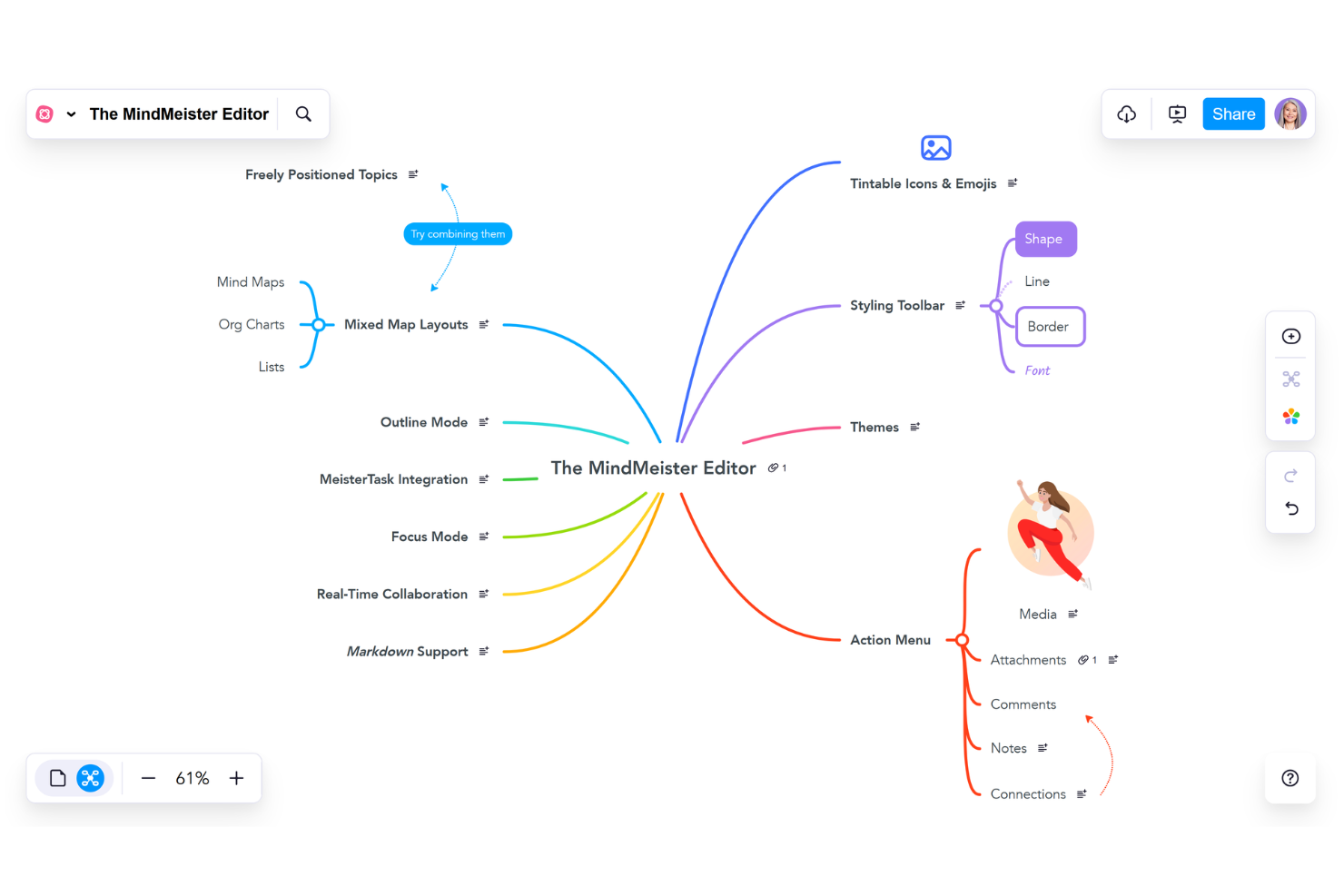
MindMeister is a browser-based mind mapping software that offers real-time collaboration, built-in chat, customizable templates, and easy export options for visual idea organization on Mac.
Who Is MindMeister Best For?
MindMeister is a good fit for distributed teams, agencies, and organizations that need to brainstorm, plan, and collaborate visually in real time.
Why I Picked MindMeister
I picked MindMeister as one of the best because I run live mapping sessions with distributed teams that need real-time collaboration, easy sharing, and group editing, all within a browser on Mac.
MindMeister Key Features
- Customizable templates: Quickly start new mind maps using a variety of built-in templates.
- Attachment support: Add images, links, and notes to any node.
- Task widget integration: Assign and track tasks associated with map topics.
MindMeister Integrations
MindMeister offers native integrations with MeisterTask, Google Drive, and Microsoft Teams. An API is available for custom integrations.
Pros and Cons
Pros:
- Easy linking of maps to MeisterTask tasks
- Presentation mode for sharing mind mapsks
- Real-time collaboration for group brainstorming
Cons:
- Lacks offline editing in browser version
- Free version allows only three maps

Best for fast visual co-editing
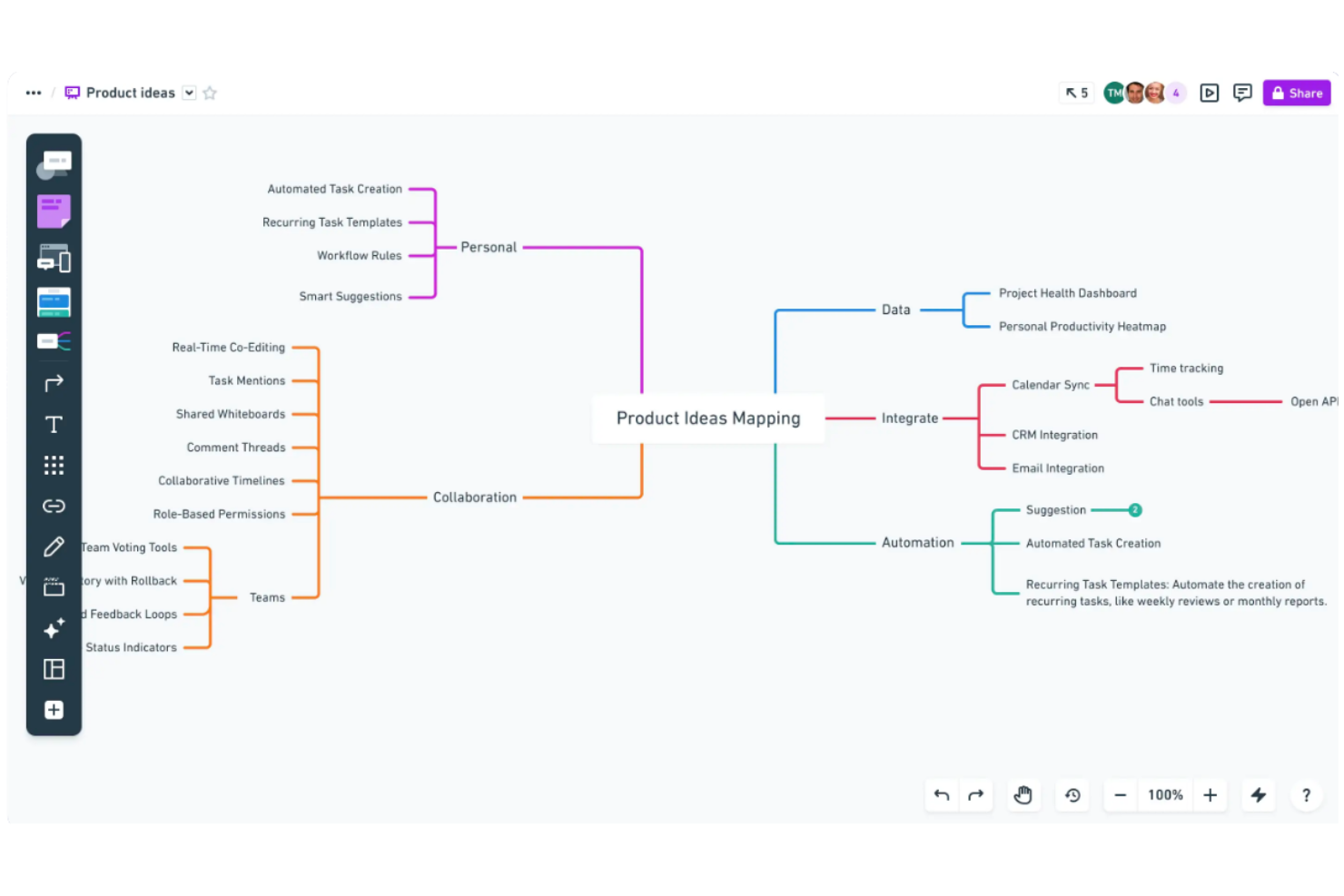
Whimsical is a web-based visual collaboration tool for Mac users that combines mind mapping, flowcharts, wireframes, and sticky notes in an intuitive online workspace.
Who Is Whimsical Best For?
Whimsical suits fast-moving product, design, and remote teams that need real-time, cross-functional collaboration on visual brainstorming projects.
Why I Picked Whimsical
I picked Whimsical because it gives my team instant multi-cursor mind map editing, sticky notes, and color-coded branches right in the browser. We can brainstorm and co-edit visual structures without waiting or switching tools.
Whimsical Key Features
- Unlimited boards per workspace: Create as many mind maps, flowcharts, and wireframes as your projects demand.
- Comments and mentions: Annotate diagrams and directly tag collaborators for feedback or clarifications.
- Version history: Track changes to any board and restore previous iterations as needed.
Whimsical Integrations
Whimsical offers native integrations with Slack, Jira, Notion, Linear, Cursor, GitHub, Figma, and Google Drive. An API is available for custom integrations.
Pros and Cons
Pros:
- Real-time commenting on shared boards
- Drag-and-drop wireframes and sticky notes
- Super fast multi-user mind map editing
Cons:
- Massive canvases experience severe performance lag
- Free tier caps total workspace items

Creately
Best for an infinite creative canvas

Creately is a visual collaboration and mind mapping software for Mac that combines diagramming, concept mapping, intelligent shapes, and workspace management in one online tool.
Who Is Creately Best For?
Creately fits teams in design, product, or education roles who need a visual platform to map ideas, workflows, and processes collaboratively.
Why I Picked Creately
I picked Creately because my team uses its infinite canvas to build giant mind maps that connect to visual docs, tasks, and data shapes. I like being able to link objects, drop in templates, and zoom out to see everything at once.
Creately Key Features
- Drag-and-drop diagramming: Move items and branches instantly anywhere on your canvas.
- Multi-user collaboration: Invite others to edit diagrams with you in real time.
- Data-enabled shapes: Add structured fields and visual tags directly to map items.
Creately Integrations
Creately offers native integrations with Google Workspace, Slack, GitHub, Slack, Confluence, and Microsoft Teams. It also provides an API for custom integrations.
Pros and Cons
Pros:
- Real-time multi-user editing and comments
- Visual database for linking mind map data
- Infinite canvas for organizing complex structures
Cons:
- Free version severely limits workspace items
- Large diagrams cause significant canvas lag

Best for integrated note-taking layouts
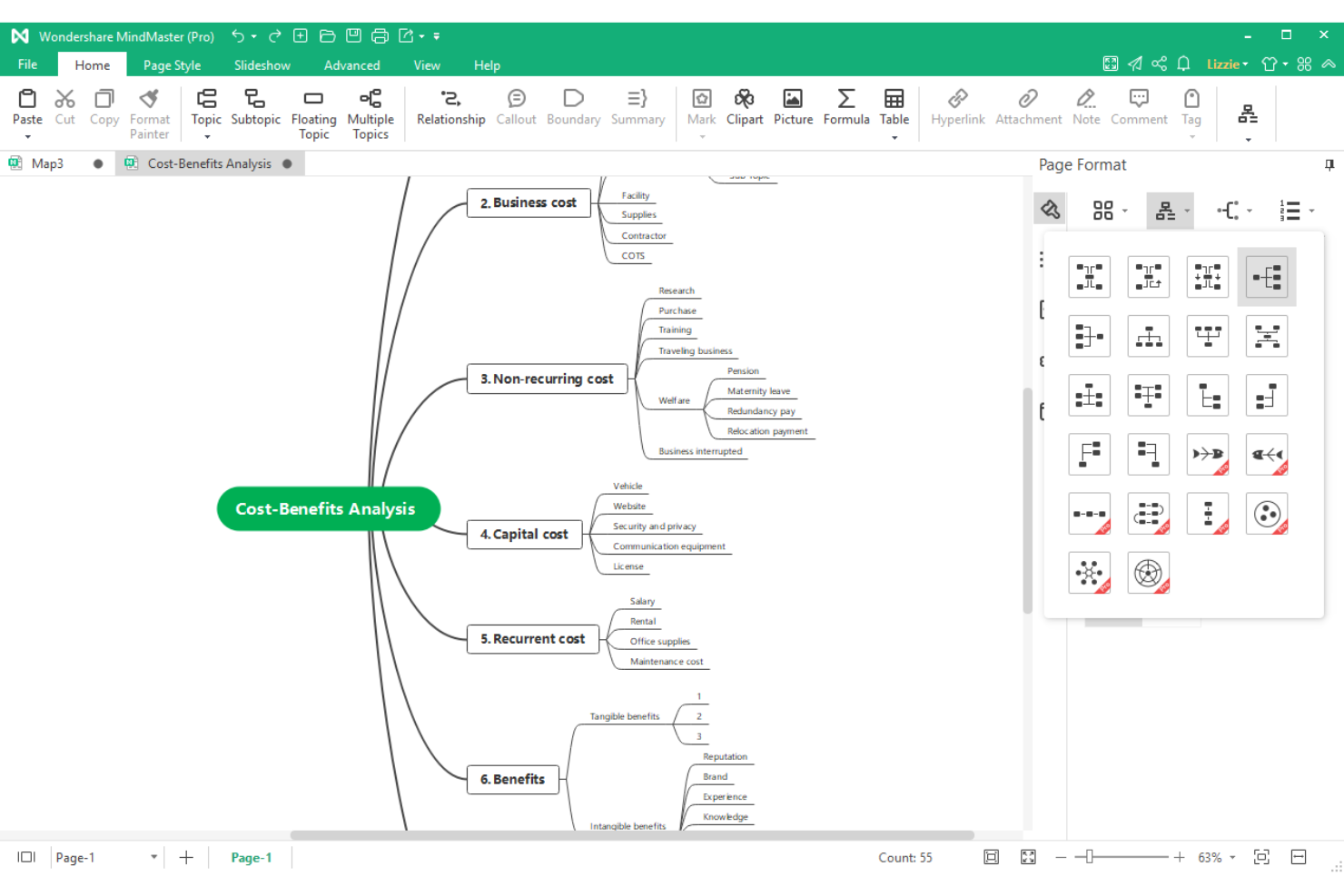
EdrawMind is a desktop and browser-based mind mapping software for Mac that combines idea mapping, outline and presentation modes, and built-in note structuring tools for visual thinkers and project teams.
Who Is EdrawMind Best For?
EdrawMind is a strong choice for educators, students, and professionals who need rich visual note-taking and structured brainstorming in academic or content-driven environments.
Why I Picked EdrawMind
I picked EdrawMind because I rely on its built-in outline and notes modes to structure meeting minutes and research side-by-side with my mind maps. I like having one workspace where I can switch between brainstorming, linear notes, and diagram layouts without losing context.
EdrawMind Key Features
- Brainstorming mode: Lets you visually organize ideas into dynamic, free-form mind maps.
- Multiple map structures: Switch between radial, tree, fishbone, timeline, and org chart layouts.
- Cloud sync: Access and edit your mind maps across Mac and other devices.
EdrawMind Integrations
EdrawMind integrations are not publicly listed.
Pros and Cons
Pros:
- Supports mixed diagram and note layouts
- Presentation mode for sharing visual plans
- Built-in outline and mind map view modes
Cons:
- Free version enforces restrictive paywalls
- Cloud autosave fails during weak connectivity

Best for multipurpose diagramming

SmartDraw is a multipurpose diagramming and mind mapping platform for Mac that covers concept mapping, organizational charts, process flows, technical diagrams, and floor plans.
Who Is SmartDraw Best For?
SmartDraw suits Mac-based operations, IT, and engineering teams who need fast diagramming across flowcharts, mind maps, or technical layouts.
Why I Picked SmartDraw
I picked SmartDraw because I draw everything from mind maps to network diagrams for cross-team projects on Mac. I use the extensive template library and automatic formatting to switch diagram types with just a few clicks.
SmartDraw Key Features
- Collaboration tools: Share diagrams and invite others to comment or edit in real time.
- Intelligent formatting engine: Automatically adjusts spacing and alignment as you build diagrams.
- Cloud storage integration: Save and access diagrams from Google Drive, OneDrive, and Dropbox.
SmartDraw Integrations
SmartDraw offers native integrations with Microsoft 365, Google Workspace, Atlassian Confluence, Jira, Trello, Dropbox, Box, and OneDrive. An API is available for custom integrations.
Pros and Cons
Pros:
- Automatic diagram formatting saves setup time
- Mac app mirrors web functionality closely
- Exports mind maps to multiple diagram types
Cons:
- Complex diagrams cause interface lag
- Fewer built-in mind map templates than peers


Xmind is a Mac-compatible mind mapping software that provides visual diagramming, customizable map styles, and advanced structure options with integrated AI-powered new features.
Who Is Xmind Best For?
Xmind suits Mac users in education, research, or creative roles who need advanced visual mapping and AI-driven brainstorming tools.
Why I Picked Xmind
I picked Xmind as one of the best because its AI features quickly turn bullet points into full mind maps and diagram structures. I also like its built-in logic charts and tree diagrams that make structuring complex ideas straightforward.
Xmind Key Features
- Zen mode: Focuses your workspace with a distraction-free, full-screen environment.
- Templates library: Offers a range of professionally designed templates you can customize for different mapping needs.
- Topic link support: Lets you add links between topics to show relationships across the map.
Xmind Integrations
Xmind offers native integrations with Slack, Zoom, Notion, Dropbox, Google Drive, OneDrive, and more. Xmind offers an API for custom integrations.
Pros and Cons
Pros:
- Syncs projects across Mac, Windows, and mobile
- Offers a wide variety of map templates
- AI instantly transforms notes into mind maps
Cons:
- Large mind maps cause significant lag
- Free version exports include large watermarks


MindNode is a macOS and iOS mind mapping software that features visual idea organization, outline and focus modes, Quick Entry capture, and deep integration with native Apple frameworks.
Who Is MindNode Best For?
MindNode is ideal for Apple users, including students, designers, and creative professionals, who want a mind mapping solution tightly integrated with macOS and iOS.
Why I Picked MindNode
I picked MindNode as one of the best because sync works flawlessly across Mac, iPhone, iPad, and Apple Watch. I use iCloud Drive for real-time updates, and I appreciate deep integration with Apple Shortcuts and Siri for quick capture.
MindNode Key Features
- Focus mode: Hides everything but a single branch to reduce distraction while brainstorming.
- Outline view: Displays your mind map as a collapsible, editable outline.
- Quick Entry: Captures ideas instantly from any screen without opening the full app.
MindNode Integrations
MindNode offers native integration with the Apple ecosystem, Ulysses, Bear, Things, and OmniFocus. It does not offer an open API.
Pros and Cons
Pros:
- Offers visual tags, markdown, and outline view
- Supports system-wide capture with Quick Entry
- Syncs instantly between Mac, iPhone, and iPad
Cons:
- Advanced features are locked behind pro version
- Hidden file storage restricts folder organization


MindManager is a versatile mind mapping and project management platform for Mac that features advanced diagramming, Gantt charting, data linking, and task assignment tools for structured visual planning.
Who Is MindManager Best For?
Project managers and operations leads in mid-sized or larger organizations who need detailed, multi-layered project mapping and visual workflows.
Why I Picked MindManager
I picked MindManager because I can build intricate, multi-level mind maps with task ownership, dependencies, and integrated Gantt charts, features I rely on when managing cross-team project plans on Mac. I often use drag-and-drop resource assignments for precise oversight.
MindManager Key Features
- SmartRules automation: Lets you set rules to trigger visual changes or actions based on map data.
- Topic calculation tools: Calculate values and totals automatically within map branches.
- Map export options: Export maps to PDF, Word, image, or Microsoft Project formats.
MindManager Integrations
MindManager offers native integrations with Microsoft 365, Microsoft Teams, SharePoint, Outlook, OneDrive, Google Drive, Box, Slack, and Zapier. An API is available for custom integrations.
Pros and Cons
Pros:
- Mix diagrams, tasks, and notes in one workspace
- Presentation mode for real-time plan sharing
- Outline and mind map views are linked
Cons:
- Advanced project tools are desktop-only
- Dense interface creates steep learning curve


SimpleMind is a cross-platform mind mapping software for Mac that offers flexible map layouts, custom themes, multimedia attachments, and offline editing with files stored locally.
Who Is SimpleMind Best For?
SimpleMind is ideal for solo professionals and privacy-conscious teams in regulated industries who need offline Mac mind mapping with no cloud storage requirements.
Why I Picked SimpleMind
I picked SimpleMind because I need my Mac mind maps to stay local and secure, there’s no forced cloud sync or external storage. I use password protection and offline access to fully control my brainstorming data.
SimpleMind Key Features
- Multiple map layouts: Create maps in free-form, horizontal, vertical, and top-down structures.
- Multimedia attachments: Add images, videos, notes, and links directly to mind maps.
- Topic relation lines: Visually connect topics with customizable lines to show dependencies.
SimpleMind Integrations
Native integrations are not publicly listed. An API is available for building custom integrations.
Pros and Cons
Pros:
- Free-form and auto-layout map options
- Advanced multimedia support in map nodes
- Keeps all mind map files local
Cons:
- Limited third-party integrations
- No built-in real-time collaboration

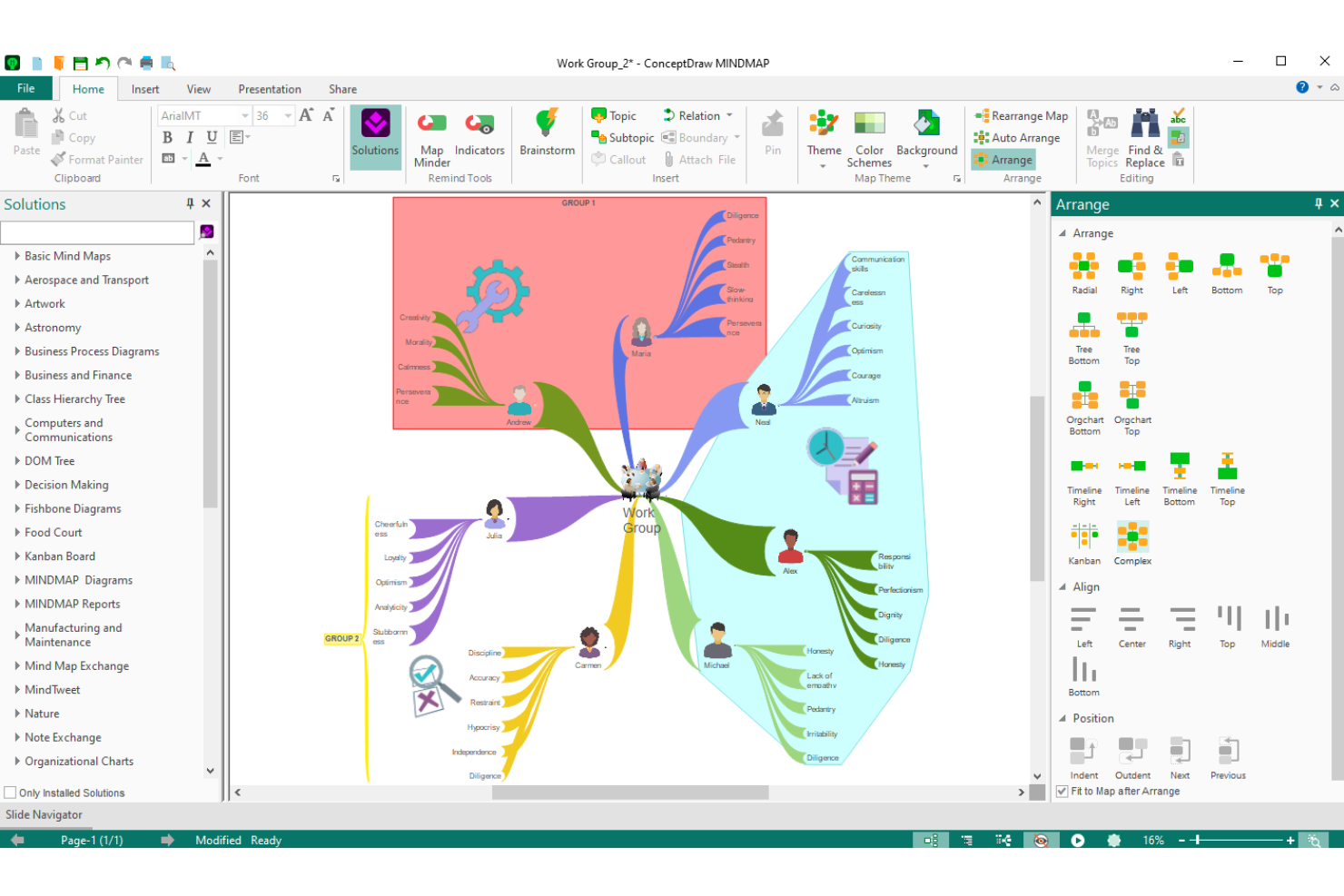
ConceptDraw MINDMAP is desktop mind mapping software for Mac focused on visual brainstorming, map-based outlining, project dashboards, and integration with ConceptDraw’s suite of business productivity tools.
Who Is ConceptDraw MINDMAP Best For?
ConceptDraw MINDMAP fits project managers and professionals who need mind mapping alongside project tracking and business visualization tools on Mac.
Why I Picked ConceptDraw MINDMAP
I picked ConceptDraw MINDMAP because I use its task-oriented mind maps to break down project deliverables, set priorities, and assign responsibilities with status icons and deadline tracking directly in the map workspace.
ConceptDraw MINDMAP Key Features
- Mind map presentation mode: Turn any mind map into an interactive slideshow within the app.
- MS Office file export: Export mind maps directly to Word, PowerPoint, and Project file formats.
- Custom topic formatting: Apply styles, images, and icons to differentiate map branches and topics.
ConceptDraw MINDMAP Integrations
ConceptDraw MINDMAP offers native integrations with Microsoft Office applications, ConceptDraw PROJECT, and Mindjet MindManager. An API is available for custom integrations.
Pros and Cons
Pros:
- Works offline with Mac desktop installation
- Built-in brainstorming and presentation modes
- Exports mind maps to Word and PowerPoint
Cons:
- Limited real-time cloud collaboration options
- Interface feels dated compared to competitors
Annen programvare for tankekart for Mac
Her er noen flere alternativer for programvare for tankekart for Mac som ikke kom med på kortlisten min, men som likevel er verdt å se nærmere på:
- Lucidchart
For multi-platform diagram imports
- Ayoa
For neuro-inclusive design
- ClickUp
For converting nodes into tasks
- Miro
For remote team collaboration
- MindView
For interactive Gantt chart views
- MarginNote
For academic document research


How I Evaluate Mind Mapping Software for Mac
I split my evaluation into baseline criteria—like native Mac compatibility and mind map canvas quality—and differentiators like AI ideation, Gantt conversion, and PM integrations.
Core Functionality (Table Stakes For This List)
When I'm selecting tools for my list, I rank each one on a scale from 0 (does not offer the functionality) to 5 (excels in this area) for each core functionality listed below. Then, I calculate the tool's total score into a percentage. Each tool needs to achieve a minimum total score of 65% to be considered for inclusion.
- Native Mac Compatibility: I check for a dedicated macOS app with Apple Silicon support, trackpad gestures, and Retina rendering rather than a wrapped web view.
- Mind Map Creation: The core mapping canvas matters most—I look at node linking, branch styling, and how naturally you can build radial or hierarchical maps.
- PM Tool Integration: Project managers need maps that connect to where work gets done, so I evaluate integrations with platforms like Jira, Asana, and Trello.
- Real-Time Collaboration: For distributed teams running remote brainstorms or sprint planning, I look for live co-editing with visible cursors and inline comments.
- Export & File Compatibility: I check whether you can export to formats like PDF, PNG, OPML, and DOCX and import maps from competing tools when switching platforms.
- Templates & Structural Views: Good PM templates for WBS or sprint planning save setup time, and alternate views like outlines, timelines, or Gantt charts add flexibility.
Once I have a list of tools that meet the criteria, I consider what sets each platform apart.
Differentiating Factors (What Sets Vendors Apart)
Here's how I compare and contrast different vendors:
Standout Features
Gantt chart conversion is a big differentiator—I look for tools that transform a mind map directly into a Gantt view with dependencies, saving hours of re-entry during sprint planning. Presentation mode also matters when you need to walk stakeholders through project scope without exporting to a separate slide deck. AI-powered ideation is worth evaluating too, especially for brainstorming sessions where auto-generated branches can surface angles your team might otherwise miss.
Beyond Features
Cross-device sync is a key consideration for Mac users—I evaluate whether a tool offers companion iOS and iPadOS apps with Apple Pencil support, since many PMs sketch initial ideas on an iPad before refining on a MacBook. Pricing models vary widely in this space, from one-time license purchases to per-seat subscriptions, so I check whether the structure fits a growing team without unexpected cost jumps. For enterprise PMOs handling sensitive project data, I also look at SSO support, encryption standards, and compliance certifications like SOC 2 and GDPR.
Slik velger du programvare for tankekart for Mac
Det er lett å gå seg vill i lange funksjonslister og komplekse prisstrukturer. For å hjelpe deg med å holde fokus mens du går gjennom den unike prosessen din for valg av programvare, får du her en sjekkliste over faktorer du bør ha i bakhodet:
| Faktor | Hva bør du vurdere? |
|---|---|
| Skalerbarhet | Vil programvaren håndtere større og mer komplekse kart etter hvert som prosjektene dine vokser? Vurder begrensninger på kartstørrelse, antall noder eller brukerplasser. |
| Integrasjoner | Har verktøyet innebygd tilkobling til oppgavebehandlere, fildelingsplattformer eller prosjektsystemer? Mangler kan føre til manuelle omveier. |
| Tilpasningsmuligheter | Kan du tilpasse kartmaler, farger og oppsett slik at de støtter de foretrukne arbeidsflytene og kravene til merkevareprofilen din? |
| Brukervennlighet | Hvor raskt kan du og teamet ditt ta i bruk verktøyet? Se etter friksjon ved å legge til noder, navigere eller bytte mellom enheter. |
| Implementering og introduksjon | Hvilke ressurser er tilgjengelige for å komme i gang? Vurder om det finnes importalternativer, opplæringsmateriell eller produktvisninger for nye brukere. |
| Kostnad | Er prisnivåene tydelige og forutsigbare? Ta med ekstra kostnader som lisenser per bruker, årlig støtte eller nødvendige tillegg. |
| Sikkerhetstiltak | Beskytter programvaren organisasjonens data med kryptering, brukertillatelser og sikker lagring tilpasset macOS-miljøer? |
| Tilgjengelig kundestøtte | Er direkte kundestøtte lett tilgjengelig? Sjekk svartider, regional dekning og om hjelp tilbys via chat, telefon eller e-post. |
Hva er programvare for tankekart for Mac?
Programvare for tankekart for Mac er et digitalt verktøy utviklet for idémyldring, organisering av ideer og visualisering av prosjekter, spesielt optimalisert for macOS-enheter. Med disse plattformene kan du opprette, redigere og dele tankekart ved hjelp av noder som kan dras og slippes, tilpassbare oppsett og eksportalternativer. Dette hjelper deg med å tydeliggjøre konsepter, strukturere informasjon og forbedre prosjektplanleggingen på Mac-en din.
Funksjoner
Når du velger programvare for tankekart til Mac, bør du se etter følgende nøkkelfunksjoner:
- Redigering med dra og slipp: Omorganiser noder, grener og ideer enkelt ved å dra elementer rundt i tankekartet for rask organisering og omstrukturering.
- Tilpassbare maler: Velg blant forhåndsbygde tankekartoppsett for å fremskynde opprettingen av kart og tilpasse dem til den foretrukne idédugnadsstilen eller prosjektformatet ditt.
- Eksport i flere formater: Lagre og del kartene dine i formater som PDF, PNG eller tekstdisposisjoner, slik at samarbeid og presentasjon blir mulig utenfor den opprinnelige appen.
- Skysynkronisering: Få tilgang til tankekartene dine fra flere Mac-enheter gjennom integrert skylagring, slik at det nyeste arbeidet ditt er tilgjengelig overalt.
- Tilgang uten nett: Arbeid med kartene dine uten internettilkobling, noe som er spesielt nyttig når du er på reise eller arbeider i omgivelser med begrenset tilkobling.
- Tastatursnarveier: Utfør vanlige handlinger og navigering ved hjelp av snarveier for raskere oppretting, redigering og administrasjon av kart på Mac-en.
- Integrasjon med oppgavehåndtering: Knytt kartnoder til handlingspunkter, tidsfrister eller prosjektstatuser for å gjøre idédugnaden om til gjennomførbare planer.
- Vedlegg av bilder og filer: Bygg inn bilder, dokumenter eller lenker direkte i tankekartnoder for å samle all relevant informasjon i ett visuelt arbeidsområde.
- Presentasjonsmodus: Gjør tankekartet om til en lysbildefremvisning i appen, slik at du kan lede team eller publikum gjennom ideene dine trinn for trinn uten å forlate plattformen.
Fordeler
Implementering av programvare for tankekart til Mac gir flere fordeler for teamet og virksomheten din. Her er noen av fordelene du kan se frem til:
- Bedre organisering av ideer: Strukturer og knytt tanker visuelt sammen ved hjelp av fleksible tankekart, slik at det blir enklere å tydeliggjøre prioriteringer og relasjoner mellom konsepter.
- Raskere prosjektplanlegging: Bruk redigering med dra og slipp og maler for raskt å omgjøre idédugnader til handlingsrettede diagrammer og arbeidsflyter.
- Opprinnelig macOS-opplevelse: Få jevn ytelse, optimaliserte grensesnitt og sømløs integrasjon med andre Mac-verktøy og systemfunksjoner.
- Enkelt teamsamarbeid: Del kart og oppdateringer på tvers av Mac-enheter og skyen, slik at alle interessenter holder seg oppdatert på ideer og prosjektendringer i utvikling.
- Bedre fokus og kreativitet: Presenter og videreutvikle ideer i et arbeidsområde uten forstyrrelser, noe som legger til rette for dypere engasjement og mer originale innspill.
- Forenklet kunnskapsdeling: Eksporter kart i flere formater og presenter dem direkte, slik at det blir enkelt å distribuere komplekse ideer til teammedlemmer eller interessenter.
- Sentralisert ressursadministrasjon: Legg ved filer, notater, lenker og bilder i noder, slik at all relevant informasjon for et prosjekt finnes på ett organisert, visuelt sted.
Kostnader og priser
Når du velger programvare for tankekart til Mac, må du ha en forståelse av de ulike prismodellene og tilgjengelige abonnementene. Kostnadene varierer basert på funksjoner, teamstørrelse, tillegg og mer. Tabellen nedenfor oppsummerer vanlige abonnementer, gjennomsnittsprisene deres og typiske funksjoner som er inkludert i løsninger for programvare for tankekart til Mac:
Sammenligningstabell for programvare for tankekart til Mac
| Abonnementstype | Gjennomsnittspris | Vanlige funksjoner |
|---|---|---|
| Gratisabonnement | $0 | Grunnleggende kartoppretting, begrensede maler, grunnleggende eksportformater og individuell tilgang uten nett. |
| Personlig abonnement | $5–$10/bruker/måned | Ubegrenset antall kart, avanserte maler, bildevedlegg, standard eksportalternativer og skysynkronisering på tvers av enheter. |
| Bedriftsabonnement | $10–$20/bruker/måned | Teamsamarbeid, redigering i sanntid, avansert oppgavekobling, presentasjonsmoduser og sentralisert administrasjon. |
| Virksomhetsabonnement | $20–$40/bruker/måned | SSO/sikkerhetskontroller, prioritert kundestøtte, tilpasset introduksjon, API-tilgang, samsvarsverktøy og dedikert opplæring. |
Vanlige spørsmål om tankekartprogramvare for Mac
Her er noen svar på vanlige spørsmål om tankekartprogramvare for Mac:
Kan jeg eksportere tankekart til andre filformater på Mac?
Ja, de fleste tankekartprogrammer for Mac lar deg eksportere kart som PDF-filer, bildefiler, tekstdisposisjoner eller til og med Microsoft Office-dokumenter. Dette gjør det enklere å dele ideene dine med kolleger som bruker andre plattformer, eller inkludere kart i prosjektdokumentasjon.
Støtter tankekartprogramvare for Mac samarbeid i sanntid?
Ja, mange alternativer støtter redigering i sanntid og teamsamarbeid. Du og teammedlemmene dine kan jobbe på det samme kartet samtidig, legge til kommentarer og følge endringer, noe som er spesielt nyttig for eksterne eller geografisk spredte team.
Finnes det tankekartverktøy som er utviklet spesielt for Mac-brukere?
Ja, flere tankekartverktøy er spesielt optimalisert for macOS. Disse tilbyr vanligvis integrerte Mac-grensesnitt, støtte for systemets snarveier og bevegelser, samt integrasjon med andre Mac-apper eller -tjenester for en bedre brukeropplevelse.
Er frakoblet tilgang tilgjengelig i tankekartprogramvare for Mac?
Ja, de fleste Mac-baserte tankekartapper tilbyr frakoblet tilgang. Du kan jobbe med kartene dine uten Wi-Fi og deretter synkronisere endringene når du er på nett igjen, noe som er praktisk under pendling eller reiser.
Hvilke sikkerhetsfunksjoner bør jeg se etter i tankekartprogramvare for Mac?
Se etter programvare som krypterer dataene dine, tilbyr tilgangskontroller for brukere og gir sikker skylagring. Bedriftsrettede løsninger kan også inneholde alternativer som SSO (enkel pålogging) og samsvarssertifiseringer for å oppfylle virksomhetens retningslinjer.