

De 10 beste kalkulasjonsprogrammene for varme-, ventilasjons- og klimaanlegg, vurdert i 2026

Beste programvare for HVAC-beregning – kortliste


Det kan være vanskelig å administrere HVAC-prosjekter. Du må håndtere stramme tidsfrister, komplekse beregninger og uforutsette kostnader. Jeg forstår det. Derfor har jeg gått gjennom den beste programvaren for HVAC-beregning for å hjelpe deg med å takle disse utfordringene.
Disse verktøyene kan forenkle prosjektberegningene dine, gjøre arbeidet enklere og frigjøre tid. I denne artikkelen deler jeg mine beste anbefalinger, med fokus på hva som skiller hver av dem ut.
Enten du arbeider med små prosjekter eller store kontrakter, har jeg noe for deg. La oss se nærmere på løsningene som kan gjøre en forskjell for deg og teamet ditt.
Why Trust Our Software Recommendations
Our team has been testing and reviewing software since 2012. As project managers ourselves, we know how difficult—and important—it is to choose the right software.
For this guide, we evaluated tools using hands-on testing and independent research, scoring tools using our selection criteria. We also draw on insights from industry thought leaders and practicing project management experts.
Our reviews reflect our human editorial judgment, not a sales pitch.
Expert reviewers:
Sammenligningstabell for programvare for HVAC-beregning
Denne sammenligningstabellen oppsummerer prisopplysningene for mine beste anbefalinger av programvare for HVAC-beregning.
| Tool | Best For | Trial Info | Price | ||
|---|---|---|---|---|---|
| 1 | Best for cloud-based takeoffs with team access | Free demo + free trial available | From $2,599/user/year | Website | |
| 2 | Best for all-in-one HVAC management | Free demo available | Pricing upon request | Website | |
| 3 | Best for dispatch and invoicing estimates | Free demo available | Pricing upon request | Website | |
| 4 | Best for digital takeoffs with custom assemblies | 14-day free trial available | From $2,000/year | Website | |
| 5 | Best for sheet metal labor and fitting details | Free demo available | Pricing upon request | Website | |
| 6 | Best for detailed ductwork estimating workflows | Free demo available | From $250/month | Website | |
| 7 | Best for fabrication-driven estimating and costing | Not available | Pricing upon request | Website | |
| 8 | Best for quick estimates for small contractors | Free plan + free demo available | From $54/month (billed annually) | Website | |
| 9 | Best for flat rate pricing during service calls | Free demo available | From $99/technician/month | Website | |
| 10 | Best for linking estimates to project accounting | Free demo available | Pricing upon request | Website |
Anmeldelse av den beste programvaren for HVAC-beregning
Nedenfor finner du mine detaljerte sammendrag av den beste programvaren for HVAC-beregning som kom med på kortlisten min. Anmeldelsene mine gir en detaljert gjennomgang av de viktigste funksjonene, fordelene og ulempene, integrasjonene og de ideelle bruksområdene for hvert verktøy, slik at du kan finne det beste alternativet for deg.

STACK
Best for cloud-based takeoffs with team access
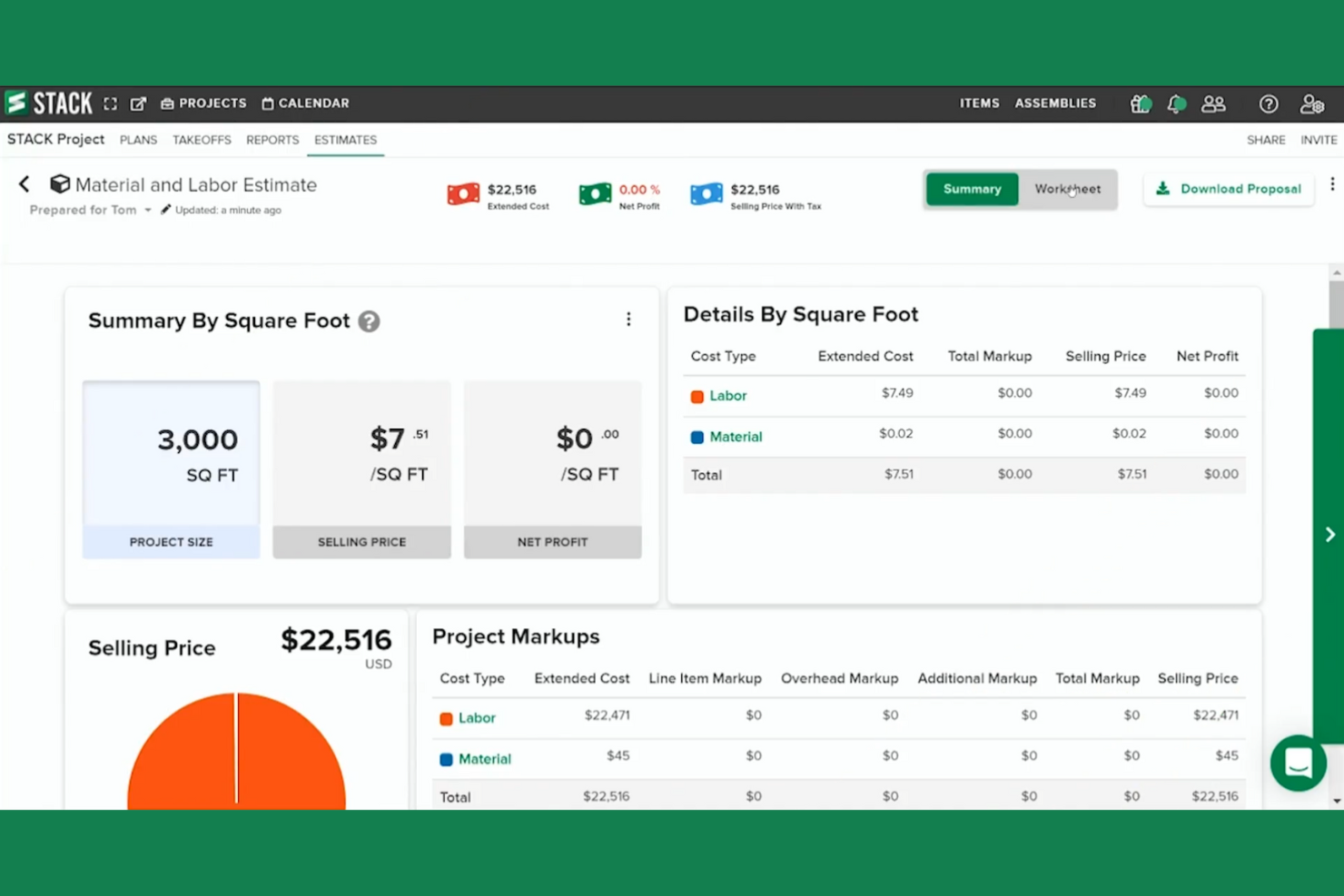
STACK is a cloud-based HVAC estimating and takeoff software designed for contractors looking to speed up their bidding process. It helps contractors perform quick takeoffs and create detailed estimates to increase project profitability.
Why I picked STACK: Its cloud-based nature ensures that your team stays aligned. The platform's open architecture can integrate with other systems, making it highly adaptable.
Standout Features and Integrations:
Features include cloud-based quantity and material takeoff, allowing you to manage takeoffs and keep everyone on the same page. It also offers detailed cost estimates and proposals, letting you adjust costs and create customized branded proposals. Real-time collaboration features ensure your team stays connected with markup, callout, and sharing options.
Integrations include Procore, QuickBooks, Velixo, Sage Intacct, and more.
Pros and Cons
Pros:
- Open architecture for integrations
- Cloud-based collaboration features
- Detailed cost adjustments
Cons:
- Large blueprint uploads take time
- Complex initial setup

Best for all-in-one HVAC management
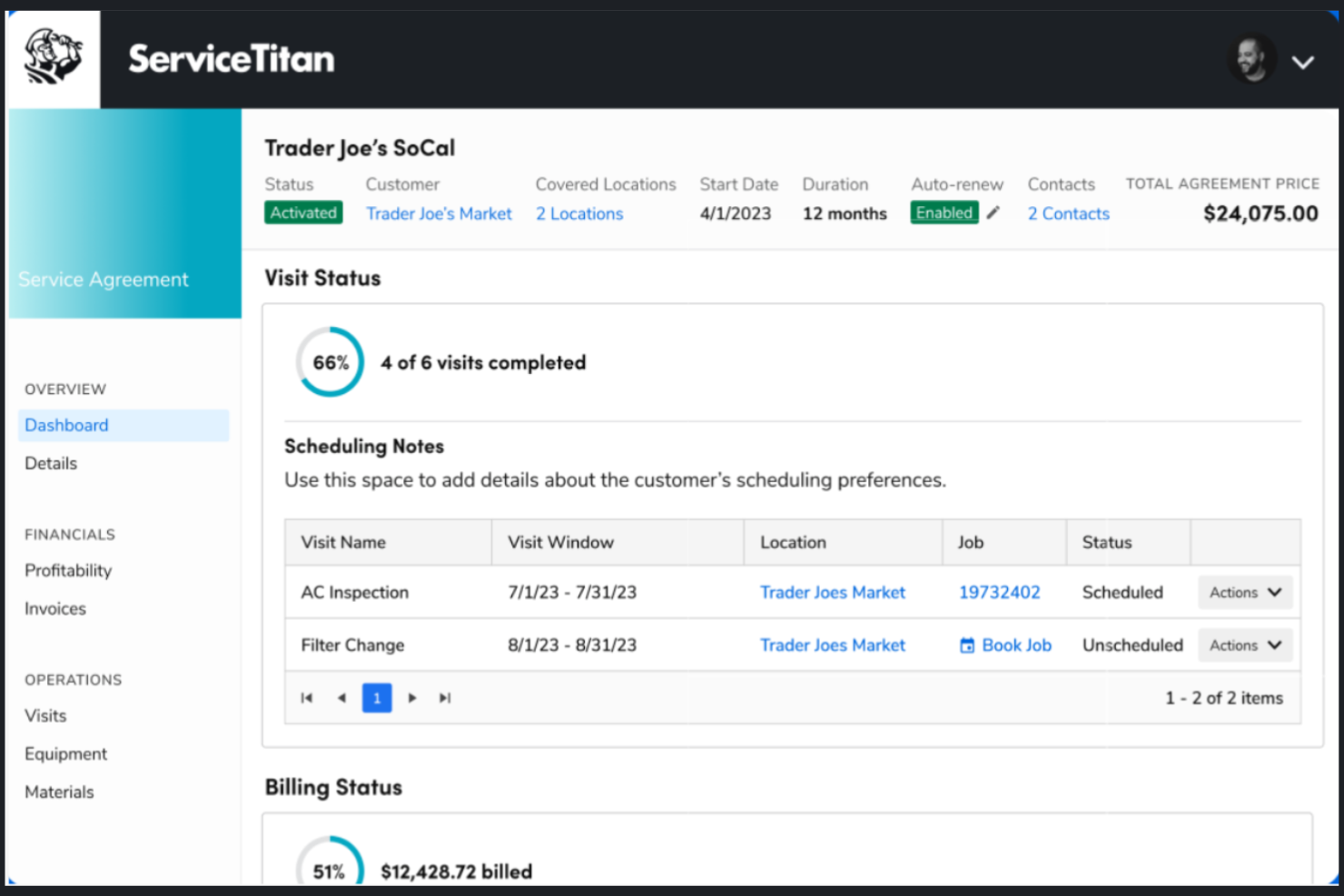
ServiceTitan is a cloud-based residential and commercial HVAC estimating software tailored for contractors, particularly in the HVAC, plumbing, and electrical sectors. It focuses on project management, customer relationship management, and accurate job pricing.
Why I picked ServiceTitan: It's ideal for contractors who want a complete HVAC business management solution. You can create polished digital proposals, automate pricing updates, and produce accurate bids for your HVAC jobs. It also integrates scheduling, dispatching, and invoicing, making it a unified tool for contractors. This versatile software can manage residential and commercial projects.
Standout Features and Integrations:
Features include accurate labor and material cost calculations, digital proposal creation, and mobile app access for technicians. A digital pricebook lets you manage material costs efficiently. It also tracks technician performance with scorecards to monitor service quality.
Integrations include Sage Intacct, BlueVine, MindCloud, and more.
Pros and Cons
Pros:
- Automates pricing updates
- Offers mobile app templates
- Provides project management tools
Cons:
- Limited offline access
- Custom pricing may vary

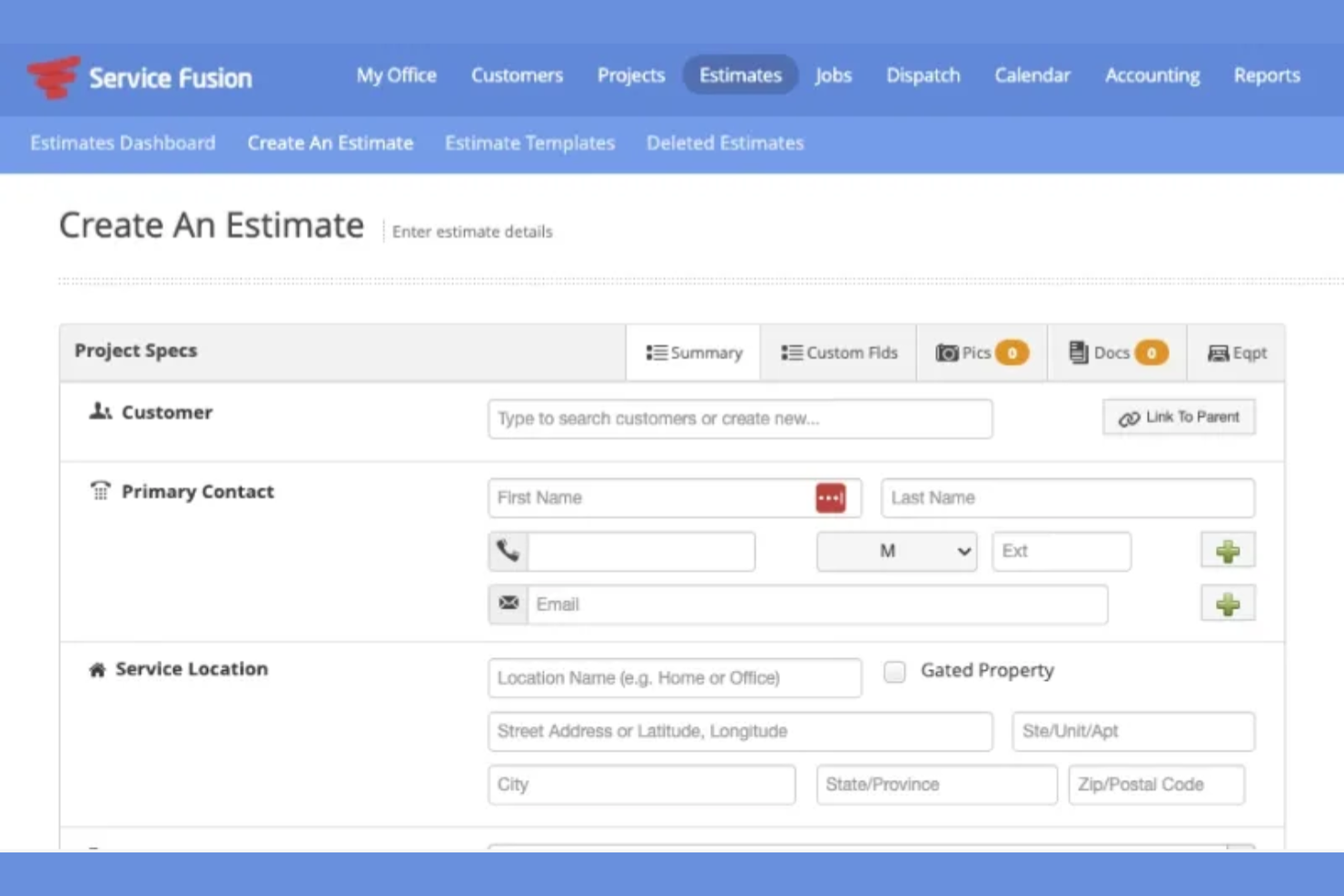
Service Fusion is a field service management platform that helps teams manage jobs from initial quote through payment. It brings estimating, scheduling, and billing into one system so work stays connected as it moves forward. The software is built to support day-to-day operations for service-based teams.
Why I picked Service Fusion: Service Fusion lets you create estimates that tie directly into job scheduling and invoicing, so nothing gets disconnected as work progresses. Once an estimate is approved, you can turn it into a job and dispatch your team without reentering details. Your technicians can see all the required job information in the field. When the job’s done, invoices are created from the same data used in the estimate. This flow helps your team stay organized from the first quote to the final payment.
Standout Features and Integrations:
Features include estimate creation that converts into jobs, built-in dispatch tools for assigning work, and invoicing tied to completed services. You can track job status as it moves from quote to scheduled work. Your team can also manage customer records and service history in one place.
Integrations include QuickBooks, PaySimple, and more.
Pros and Cons
Pros:
- Supports end-to-end job tracking
- Supports communication between office and field teams
- Clear workflow from estimate to invoice
Cons:
- Custom workflows are limited
- Limited options for complex estimates

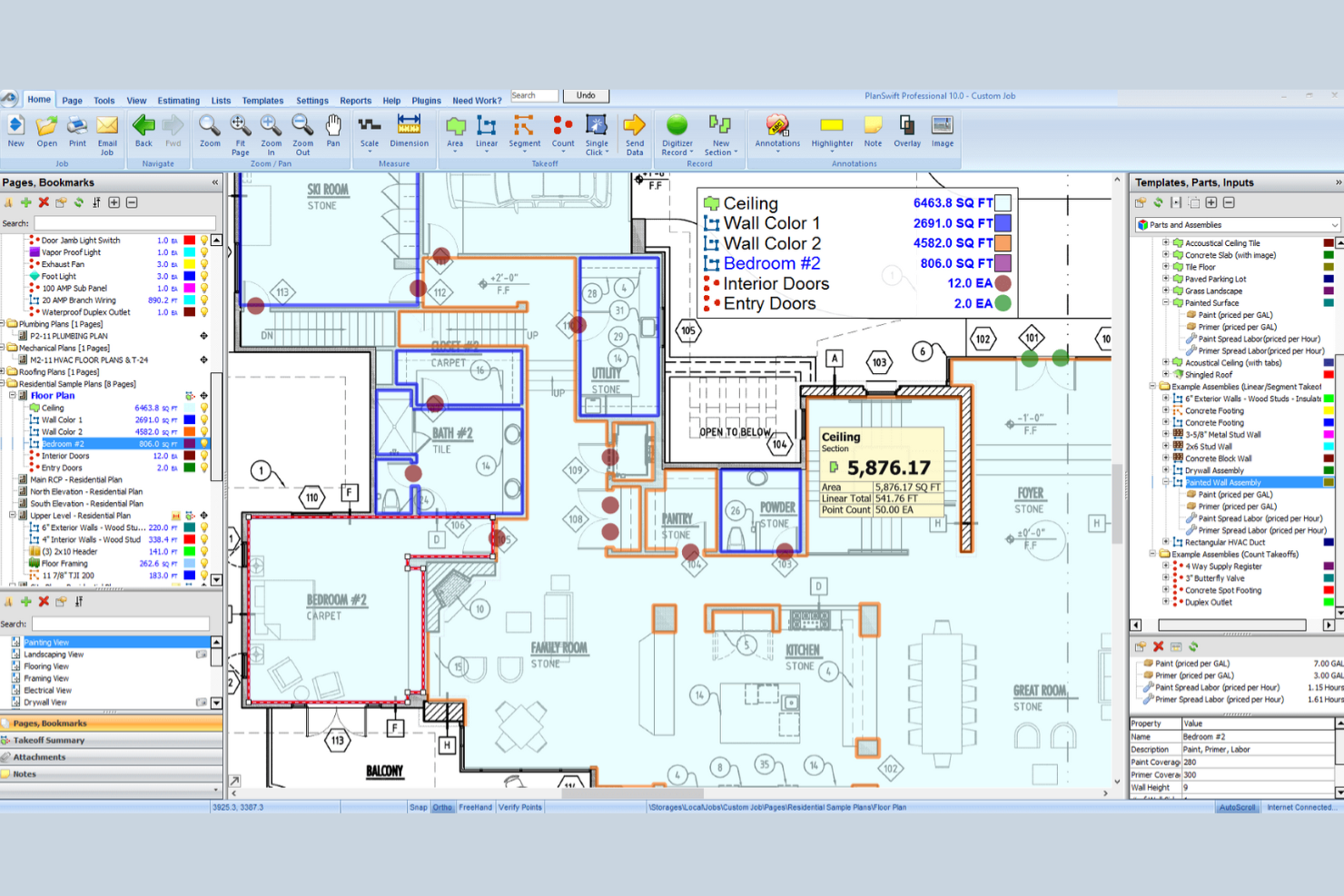
PlanSwift is HVAC estimating software designed for contractors to improve their estimating process. It provides takeoffs and detailed material lists that help calculate costs and volumes for HVAC systems efficiently.
Why I picked PlanSwift: It excels in providing precise HVAC takeoffs, offering features such as digital plan tracing and customizable bills of materials. This software also supports accurate heating and cooling estimates, perfect for complex layouts.
Standout Features and Integrations:
Features include takeoffs, material lists, and the ability to trace room layouts. You can quickly estimate ductwork and integrate additional components such as dampers and insulation. It also has a point-and-click tool that counts items such as pumps and controls, directly adding them to your material list for precise calculations.
Integrations include Microsoft Excel, Sage, and more.
Pros and Cons
Pros:
- Point-and-click counting tool
- Customizable material lists
- Takeoff process
Cons:
- No built-in CRM features
- Requires digital plan uploads

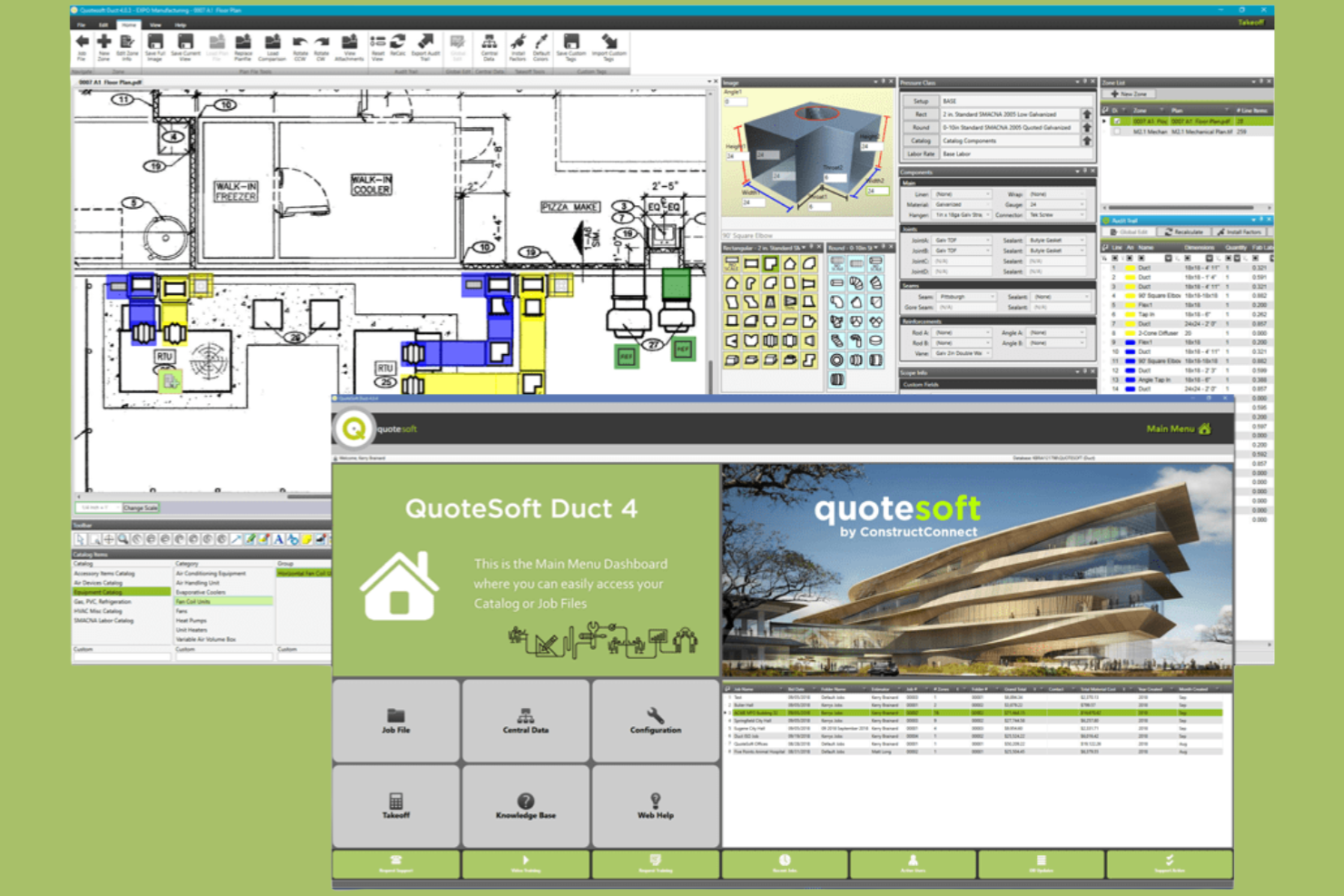
QuoteSoft is an estimating and takeoff product built for mechanical and sheet metal work. It supports bid preparation workflows from takeoff through finalized estimates.
Why I picked QuoteSoft: You get very detailed control over labor and fitting logic, which matters when your work involves complex sheet metal assemblies. You apply labor rates, fitting allowances, and fabrication rules directly to your takeoff items. You can break work down by fittings, joints, and connections instead of relying on broad assemblies, reducing guesswork when bids depend on precise fabrication assumptions.
Standout Features and Integrations:
Features include built-in labor calculation tables that apply hours automatically as you measure, customizable databases for materials and fittings, and on-screen takeoff tools tied directly to estimating logic. You can adjust labor assumptions without redoing the takeoff. Your team can also reuse saved assemblies to keep estimates consistent across jobs.
Integrations are not publicly listed.
Pros and Cons
Pros:
- Handles complex duct layouts
- Strong control over fitting assumptions
- Detailed labor logic for fabrication work
Cons:
- Less flexible for quick ballpark bids
- Time-consuming setup before first bid

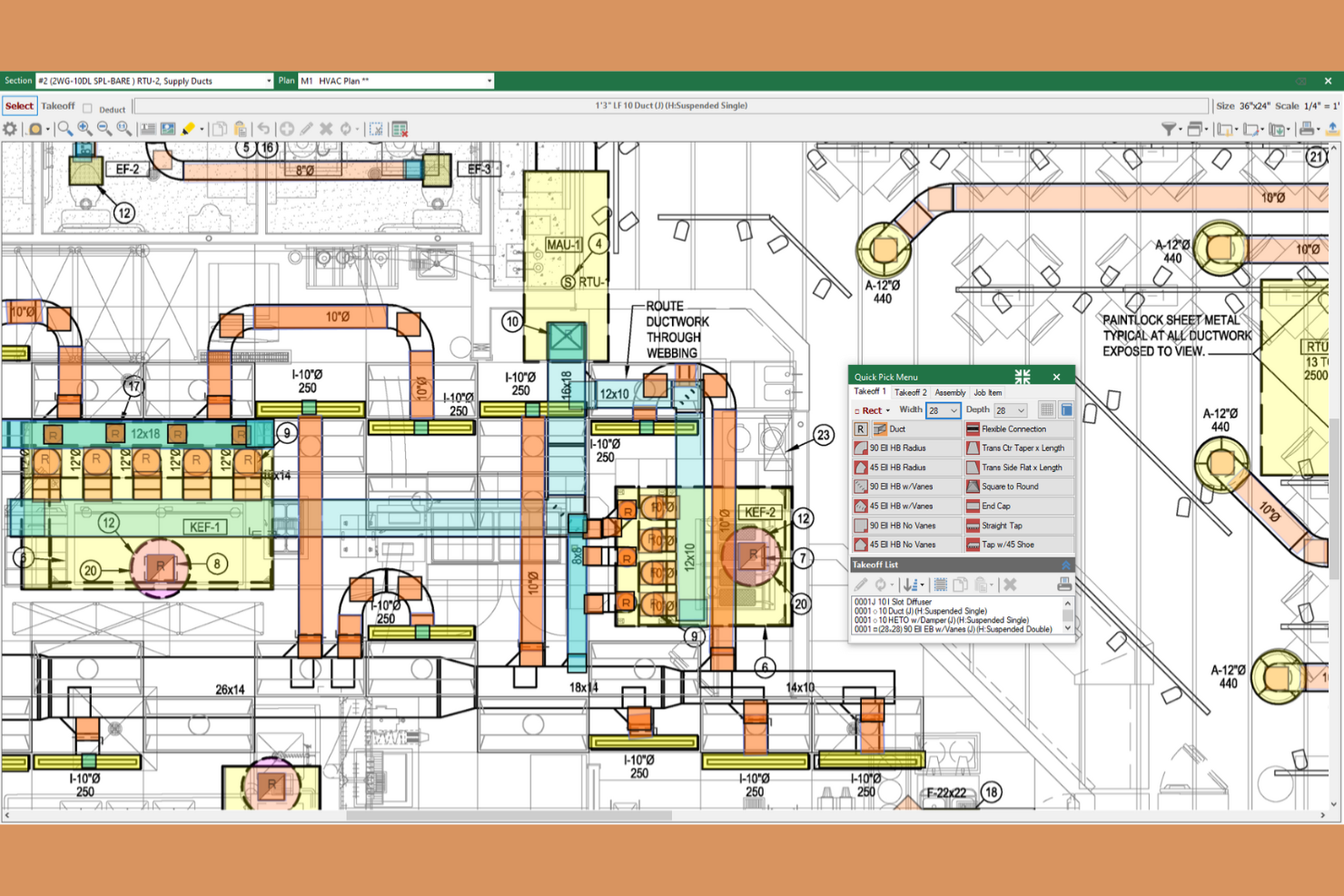
FastDUCT is an HVAC estimating software designed for commercial and industrial sheet metal contractors. It specializes in providing fast and accurate cost estimations for ductwork and HVAC systems.
Why I picked FastDUCT: It’s ideal for creating precise ductwork estimates for your HVAC business. You can customize specifications to match each job’s specific needs. Features such as job templates and easy conversion between duct pricing can increase productivity.
Standout Features and Integrations:
Features include an HVAC pricing catalog with over 250,000 items and an on-screen digitizer for digital plans. It supports various CAD formats and offers high-resolution graphics for detailed analysis. The software also allows for scalable assemblies and customizable cost codes for precise estimates.
Integrations include Microsoft Excel, FastPIPE, and more.
Pros and Cons
Pros:
- Supports multiple CAD formats
- On-screen digitizer
- Extensive pricing catalog
Cons:
- Limited non-Autodesk compatibility
- Limited to HVAC and ductwork

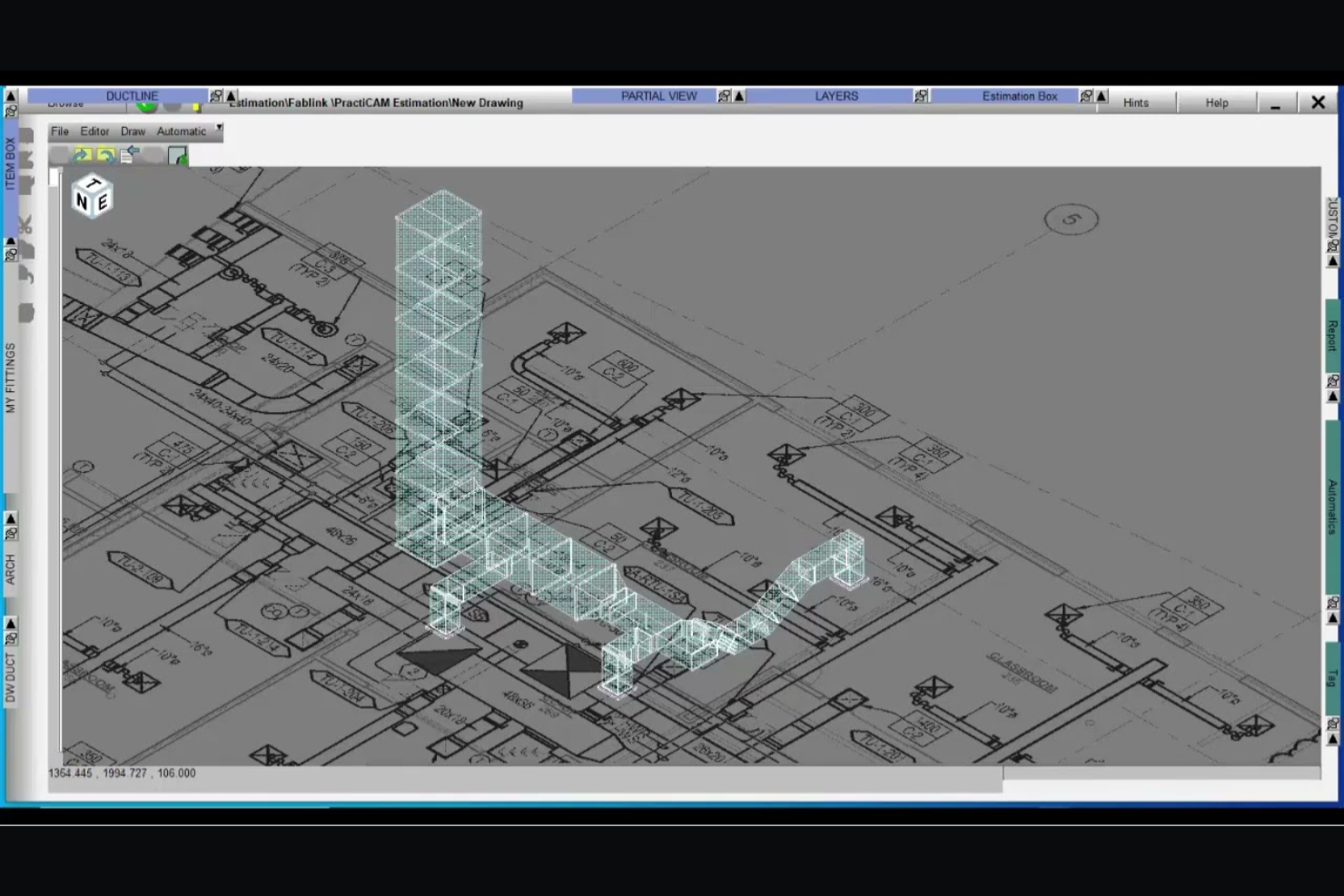
Fablink is an HVAC estimating software tailored for sheet metal and HVAC trades. It helps contractors simplify the estimating process with both standalone and integrated options on Windows and AutoCAD platforms.
Why I picked Fablink: It excels in integrated HVAC and sheet metal estimating. You can quickly convert estimates into 2D or 3D models before finalizing your plans. The software's centralized pricing database ensures quick updates, making it easier to keep your estimates current.
Standout Features and Integrations:
Features include data sharing across systems, which keeps your team aligned. You can track materials and accessories efficiently to avoid discrepancies. The software also offers automatic markups and real-time estimates for accurate projections.
Integrations include AutoCAD, MetaLab, and more.
Pros and Cons
Pros:
- Real-time estimating capabilities
- Centralized pricing database
- Converts estimates to 3D models
Cons:
- Dependent on FabLink ecosystem
- Limited to Windows and AutoCAD

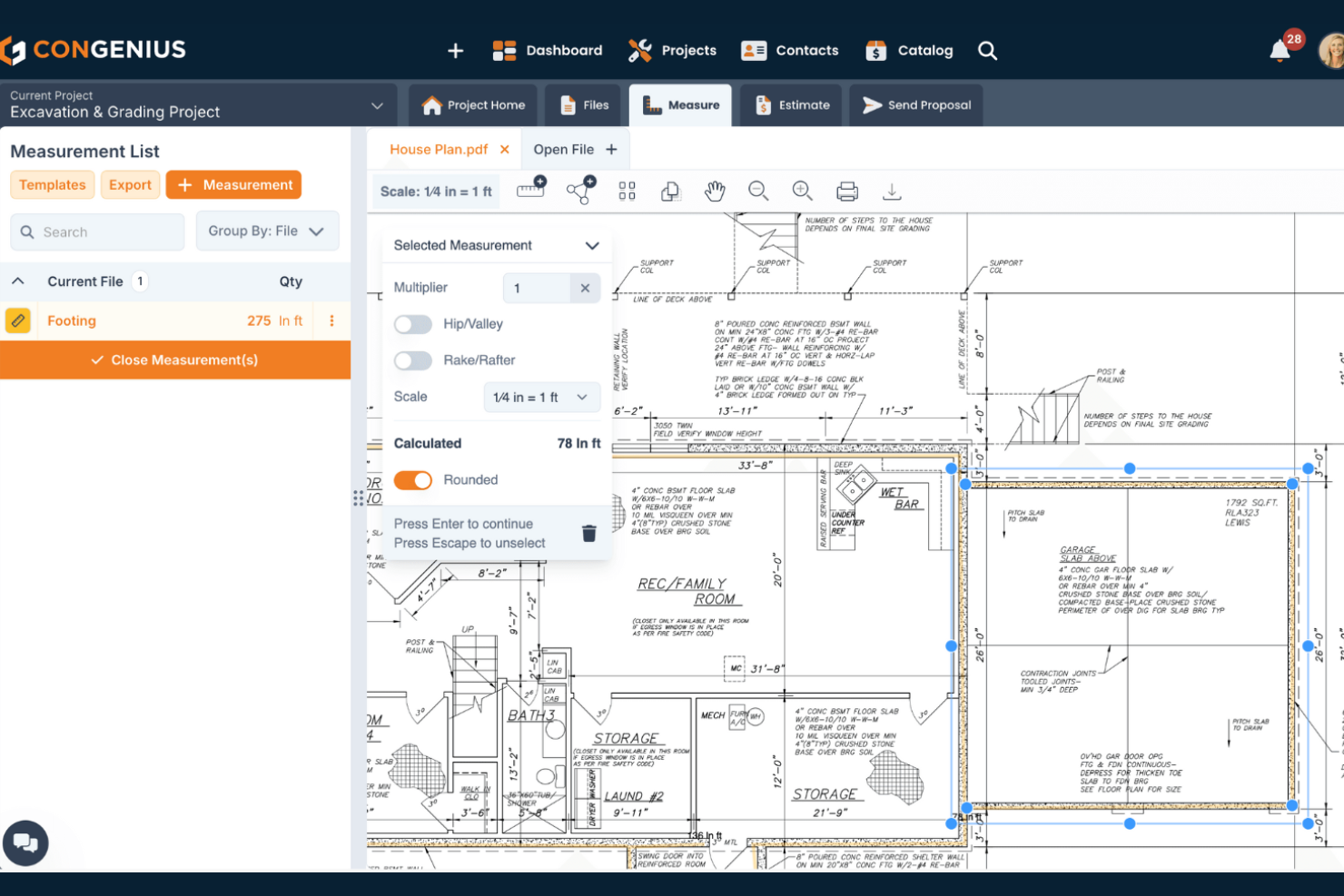
ConGenius is a cloud-based platform that helps contractors build job estimates and project proposals with fewer manual steps. The tool supports sales and estimating functions together, so your team can keep job pricing and proposals in one place.
Why I picked ConGenius: It lets you organize cost items, assemble commonly used work units, and measure from digital plans, so you don’t have to juggle multiple spreadsheets or documents. You can build and reuse catalogs of items and assemblies to spend less time creating estimates for jobs. You can also create and customize proposals that include electronic signature options, helping you boost your win rates.
Standout Features and Integrations:
Features include digital measurement tools that let you count quantities from plans, access to preloaded cost data and item catalogs, and customizable estimate and proposal generation that links your takeoffs to pricing. You also get file management and CRM-like contact organization that keeps your jobs and customer info in one place.
Integrations are not publicly listed.
Pros and Cons
Pros:
- Organizes contacts and job details
- Electronic signature capabilities
- Can measure takeoffs from digital plans
Cons:
- Missing advanced project management features
- Lacks a built-in pdf text search tool

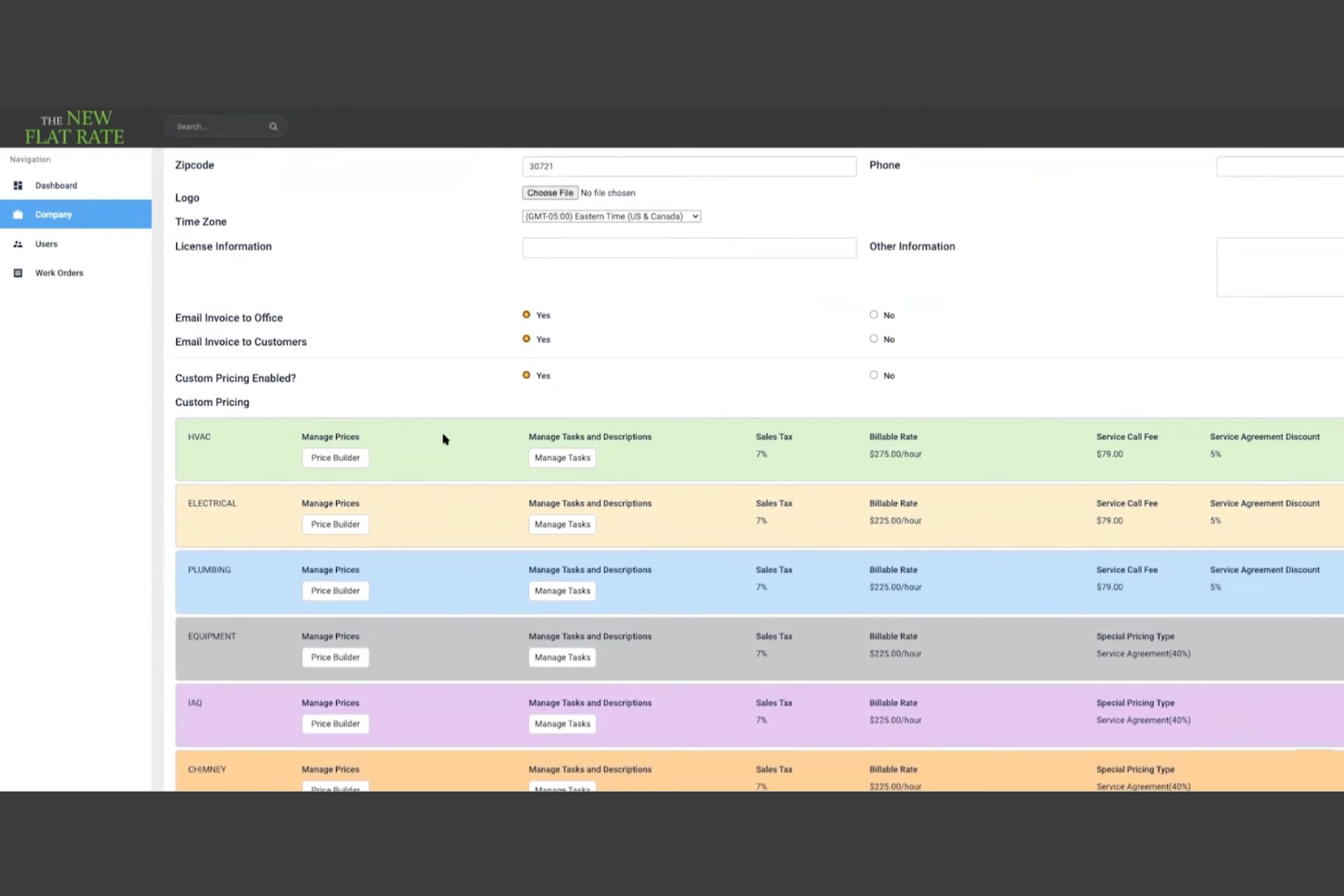
The New Flat Rate is a flat rate pricing platform built to help service teams present consistent prices while they’re in the field. It centers on digital pricebooks that technicians can access during jobs to build and present options quickly.
Why I picked The New Flat Rate: The New Flat Rate gives you a ready-to-use flat rate pricebook that technicians can rely on during service calls. You can present clear pricing options to customers instead of calculating costs after the visit. This keeps prices consistent across jobs and reduces pricing disputes. Real-time pricing updates ensure your technicians aren’t working from outdated numbers. This setup helps you focus on closing work while you’re still on site.
Standout Features and Integrations:
Features include digital flat rate pricebooks your team can access on mobile devices, built-in price presentation tools for service calls, and editable tasks and descriptions to match how you work. You can organize services so technicians find the right option quickly during a visit.
Integrations include ServiceTitan, Housecall Pro, iWallet, and more.
Pros and Cons
Pros:
- Supports standardized service menus
- Creates quotes during service visits
- Mobile app available
Cons:
- Requires regular pricebook upkeep
- Less flexible for custom jobs
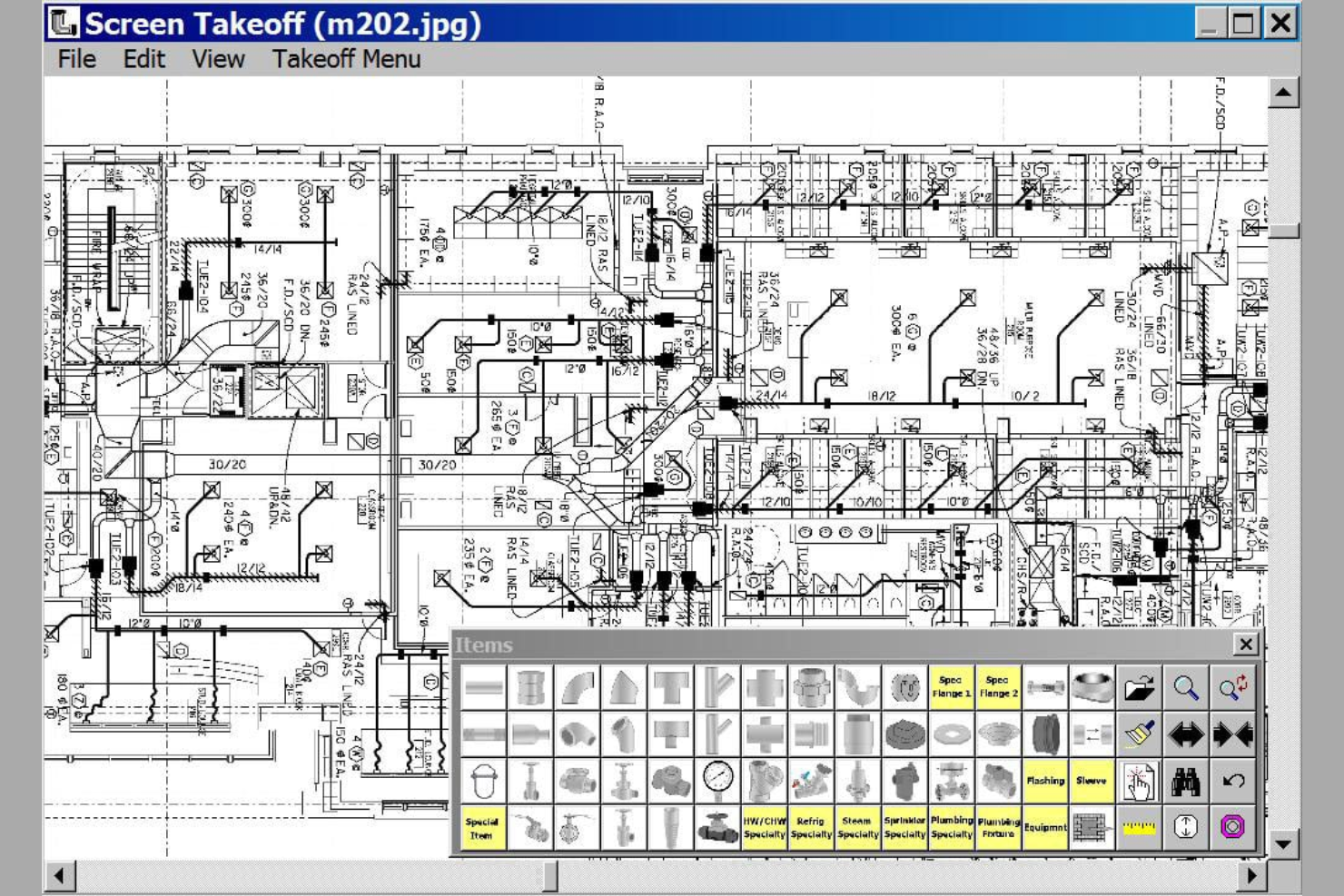
Wendes is a construction management and accounting platform designed to connect estimating with financial and project data. The system supports end-to-end project tracking from bid through completion.
Why I picked Wendes: Wendes combines job costing, accounting, and project controls, so estimates stay tied to actual costs as work progresses. You can build estimates that flow into budgets and cost tracking without reentering data. As jobs move forward, your team can compare estimated costs to actuals in the same system to help you spot gaps early instead of waiting until closeout. You can keep labor, materials, and overhead aligned from bid through billing, fitting teams that want stronger cost control across projects.
Standout Features and Integrations:
Features include job estimate data that ties directly into job cost structures, real-time cost tracking against original estimates, and financial reporting that reflects project performance. Your team can also review cost history to improve future estimates.
Integrations not publicly listed.
Pros and Cons
Pros:
- Multi-job accounting
- Supports long-term project tracking
- Links estimates and costs
Cons:
- Not ideal for quick quotes
- Requires accounting knowledge
Annen programvare for HVAC-beregning
Her er noen flere alternativer for programvare for HVAC-beregning som ikke kom med på kortlisten min, men som likevel er verdt å se nærmere på:
- SAMPro Enterprise
For enterprise-level job costing
- Beam AI
For AI-assisted takeoffs
- Housecall Pro
For estimates converted into invoices
- FieldEdge
For flat rate and pricebook-based estimates
- Procore
For estimating on large construction projects
- Zoho FSM
For estimating within a service workflow
- Jobber
For simple estimates tied to job management


How I Evaluate HVAC Estimating Software
I split my evaluation into two layers: the baseline a tool must have—like duct takeoff and labor costing—and the differentiators that separate the best from the rest for mechanical contractors.
Core Functionality (Table Stakes For This List)
When I'm selecting tools for my list, I rank each one on a scale from 0 (does not offer the functionality) to 5 (excels in this area) for each core functionality listed below. Then, I calculate the tool's total score into a percentage. Each tool needs to achieve a minimum total score of 55% to be considered for inclusion.
- HVAC Takeoff Tools: I check whether the tool handles digital measurement of ductwork, piping, and fittings from plan sets rather than relying on generic shape-based takeoff alone.
- HVAC Cost Databases: Pre-loaded material and equipment pricing matters, so I look for libraries with HVAC-specific items like AHUs, VAV boxes, and diffusers that teams can update.
- Assembly-Based Estimating: Reusable assemblies save hours on repeat bids. I evaluate whether you can build grouped components like a rooftop unit with curb, duct tie-in, and controls.
- Labor Hour Calculations: Each tool should apply HVAC-specific productivity rates for tasks like spiral duct installation or copper brazing rather than flat hourly multipliers.
- Bid & Proposal Generation: I look at how each tool formats final deliverables, from itemized breakdowns by system or floor to professional proposals ready for a GC's bid day.
- Project Management Handoff: Estimating data shouldn't dead-end at contract award. I evaluate how each tool moves bid data into PM, accounting, or fabrication workflows.
Once I have a list of tools that meet the criteria, I consider what sets each platform apart.
Differentiating Factors (What Sets Vendors Apart)
Here's how I compare and contrast different vendors:
Standout Features
Fabrication integration is a major differentiator. I look for tools that push takeoff data directly into shop production systems so your estimating work carries straight to the fab floor. Cloud collaboration also matters, especially when multiple estimators need to split up a large commercial bid simultaneously. I evaluate bid analytics too, where tools track win/loss history and margin trends to help you sharpen pricing on future projects.
Beyond Features
I evaluate how well each tool fits different business sizes. A two-person residential shop has very different needs than a 50-estimator commercial mechanical firm. The integrations ecosystem also weighs heavily—I check whether the tool connects to construction accounting platforms like Sage 300 CRE or Viewpoint and PM tools like Procore. Industry specialization matters too. Vendors with deep HVAC focus tend to offer better manufacturer catalogs, trade-specific support staff, and faster onboarding for mechanical estimators.
Slik velger du programvare for HVAC-beregning
Det er lett å gå seg vill i lange funksjonslister og komplekse prismodeller. For å hjelpe deg med å holde fokus mens du går gjennom den unike prosessen din for valg av programvare, får du her en sjekkliste over faktorer du bør ha i tankene:
| Faktor | Hva du bør vurdere |
|---|---|
| Skalerbarhet | Kan programvaren vokse sammen med virksomheten din? Vurder om den kan håndtere flere prosjekter eller brukere uten problemer. Se etter løsninger som tilbyr trinnvis prising. |
| Integrasjoner | Kan den kobles til de eksisterende verktøyene dine? Sjekk om den er kompatibel med regnskapsprogramvaren eller prosjektstyringssystemene du allerede bruker. |
| Tilpasningsmuligheter | Kan du tilpasse den til arbeidsprosessene dine? Se etter muligheter for å justere maler, rapporter og arbeidsflyter slik at de passer behovene dine. |
| Brukervennlighet | Er det enkelt for teamet ditt å lære å bruke den? Evaluer brukergrensesnittet og se etter opplæringsressurser som kan fremskynde innføringen. |
| Implementering og oppstart | Hvor raskt kan du komme i gang? Vurder tiden og ressursene som kreves for å integrere programvaren i det nåværende oppsettet ditt. |
| Kostnad | Passer den inn i budsjettet ditt? Sammenlign prisen med funksjonene og vurder om du får god verdi for pengene. Se etter skjulte gebyrer eller langsiktige avtaler. |
| Sikkerhetstiltak | Beskytter den dataene dine? Sørg for at den følger bransjestandarder for databeskyttelse og tilbyr sikre tilgangskontroller for brukere. |
| Tilgjengelig brukerstøtte | Kan du få hjelp når du trenger det? Sjekk om leverandøren tilbyr brukerstøtte døgnet rundt, direktechat eller en omfattende kunnskapsbase for feilsøking. |
Hva er programvare for kostnadsberegning av HVAC-prosjekter?
Programvare for kostnadsberegning av HVAC-prosjekter er et verktøy som hjelper entreprenører og teknikere med å beregne kostnader for prosjekter innen oppvarming, ventilasjon og klimaanlegg. Disse verktøyene brukes vanligvis av HVAC-fagfolk, blant annet prosjektledere og kalkulatører, for å forbedre nøyaktigheten og effektiviteten ved utarbeidelse av tilbud og anbud. Funksjoner for kostnadsberegning, prosjektstyring og integrasjon bidrar til å organisere data, administrere ressurser og forenkle arbeidsflyten. Alt i alt sparer disse verktøyene tid og reduserer feil, noe som gjør planlegging og gjennomføring av prosjekter enklere.
Funksjoner
Når du velger programvare for kostnadsberegning av HVAC-prosjekter, bør du se etter følgende viktige funksjoner:
- Kostnadsberegning: Bidrar til å beregne prosjektkostnader nøyaktig, noe som sparer tid og reduserer feil.
- Prosjektstyring: Organiserer oppgaver og tidsplaner for å sikre at prosjektene gjennomføres smidig og til rett tid.
- Integrasjonsmuligheter: Kobler til andre verktøy, for eksempel regnskapsprogramvare, for en smidig arbeidsflyt.
- Mobil tilgang: Lar feltteam registrere data og få tilgang til informasjon på farten.
- Tilpassbare maler: Lar brukerne tilpasse rapporter og kostnadsberegninger etter virksomhetens behov.
- Samarbeid i sanntid: Gjør det mulig for teammedlemmer å samarbeide og dele oppdateringer umiddelbart.
- Dataanalyse: Gir innsikt i prosjektresultater og bidrar til bedre beslutninger.
- Sikkerhetstiltak: Beskytter sensitive data med sterke tilgangskontroller og tiltak for etterlevelse.
Fordeler
Implementering av programvare for kostnadsberegning av HVAC-prosjekter gir flere fordeler for teamet og virksomheten din. Her er noen av fordelene du kan se frem til:
- Tidsbesparelser: Automatiserte beregninger og prosesser frigjør tid til andre oppgaver.
- Nøyaktighet: Færre feil i kostnadsberegningene fører til mer pålitelige prosjektanbud.
- Bedre samarbeid: Kommunikasjon i sanntid mellom teammedlemmene sørger for at alle er oppdatert.
- Bedre beslutningstaking: Detaljert dataanalyse hjelper deg med å ta veloverveide beslutninger om prosjekter og ressurser.
- Kostnadskontroll: Sporing av utgifter og budsjetter bidrar til å forhindre overforbruk.
- Skalerbarhet: Programvaren tilpasser seg virksomhetens vekst, slik at du kan utvide virksomheten og håndtere flere prosjekter.
Kostnader og priser
Valg av programvare for kostnadsberegning av HVAC-prosjekter krever en forståelse av de ulike prismodellene og abonnementene som er tilgjengelige. Kostnadene varierer basert på funksjoner, teamstørrelse, tillegg og mer. Tabellen nedenfor oppsummerer vanlige abonnementer, gjennomsnittsprisene deres og typiske funksjoner som er inkludert i programvareløsninger for kostnadsberegning av HVAC-prosjekter:
Sammenligningstabell for programvare for kostnadsberegning av HVAC-prosjekter
| Abonnementstype | Gjennomsnittspris | Vanlige funksjoner |
|---|---|---|
| Gratisabonnement | $0 | Grunnleggende verktøy for kostnadsberegning, begrenset brukerstøtte og tilgang til fellesskapet. |
| Personlig abonnement | $20-$55/bruker/måned | Avanserte funksjoner for kostnadsberegning, mobil tilgang og brukerstøtte via e-post. |
| Bedriftsabonnement | $65-$100/bruker/måned | Verktøy for teamsamarbeid, integrasjonsmuligheter og prioritert brukerstøtte. |
| Virksomhetsabonnement | $150-$3000+/bruker/måned | Tilpassbare løsninger, dedikert kontooppfølging og avansert analyse. |
Vanlige spørsmål om HVAC-kalkuleringsprogramvare
Her er noen svar på vanlige spørsmål om HVAC-kalkuleringsprogramvare:
Hva er forskjellen mellom HVAC-kalkuleringsprogramvare og generell kalkuleringsprogramvare?
HVAC-kalkuleringsprogramvare er spesialutviklet for HVAC-bransjen, med fokus på prosjekter innen oppvarming, ventilasjon og klimaanlegg. Den tilbyr funksjoner som beregning av kanalnett og belastningsberegninger, som generell kalkuleringsprogramvare kanskje ikke har. Denne spesialiseringen hjelper HVAC-fagfolk med å forenkle kalkuleringsprosessene og forbedre nøyaktigheten. Hvis du jobber innen HVAC, kan bruk av bransjespesifikk programvare spare deg for tid og redusere feil sammenlignet med bruk av et generisk verktøy.
Hvordan forenkler HVAC-kalkuleringsprogramvare arbeidsflyten i prosjekter?
HVAC-kalkuleringsprogramvare automatiserer manuelle beregninger, organiserer tilbud og hjelper deg med å holde oversikt over revisjoner på ett sted. Dette sparer tid, reduserer feil og gjør det enklere å oppdatere kalkyler når prosjektspesifikasjonene endres. Ved å digitalisere arbeidsflyten kan du svare raskere til kunder, holde oversikt over HVAC-utstyr og øke effektiviteten i teamet ditt.
Kan HVAC-kalkuleringsprogramvare integreres med andre forretningsverktøy?
Ja, det meste av HVAC-kalkuleringsprogramvaren kan integreres med andre forretningsverktøy, som regnskapsprogramvare, CRM-systemer og plattformer for prosjektstyring. Før du kjøper, bør du kontrollere om programvaren støtter de spesifikke integrasjonene du trenger, slik at du sikrer at den fungerer godt sammen med de eksisterende verktøyene dine.
Hvor nøyaktige er kalkyler som genereres av HVAC-kalkuleringsprogramvare?
Kalkyler fra HVAC-programvare er svært nøyaktige hvis du bruker oppdaterte prisdatabaser og legger inn presise prosjektspesifikasjoner. Mange verktøy er koblet til oppdaterte materialkostnader, noe som reduserer overraskelser under innkjøp. Oppdater kostnadsdataene regelmessig for å oppnå best mulig resultat.
Hvor sikker er HVAC-kalkuleringsprogramvare?
De fleste løsninger for HVAC-kalkuleringsprogramvare prioriterer sikkerhet og tilbyr funksjoner som datakryptering, sikker brukertilgang og regelmessige sikkerhetskopier. Det er viktig å kontrollere at programvaren overholder bransjestandarder for databeskyttelse. Du bør også se etter funksjoner som tofaktorautentisering for å legge til et ekstra sikkerhetslag for teamets data.
Finnes det opplæring for nye brukere av HVAC-kalkuleringsprogramvare?
Ja, mange leverandører tilbyr opplæringsressurser som videoveiledninger, webinarer og brukerhåndbøker for å hjelpe nye brukere med å komme i gang. Noen tilbyr også personlig tilpassede introduksjonsøkter. Ved å benytte deg av disse ressursene kan teamet ditt lære programvaren raskere, noe som sikrer en smidigere overgang og bedre bruk i hele organisasjonen.