

10 beste teamchat-apper i 2026

10 Kortliste over de beste chatteappene for team


Chatteapper for team er digitale plattformer som lar teamet ditt kommunisere i sanntid, organisere samtaler og dele filer på ett sted. Hvis du leter etter de beste chatteappene for team, ønsker du sannsynligvis å redusere mengden spredte e-poster, holde alle oppdatert og gjøre samarbeidet enklere – særlig når teamet ditt jobber eksternt eller er geografisk spredt. I denne veiledningen finner du en kuratert liste over de beste chatteappene for team, hva som gjør hver av dem unik, og hvordan de kan hjelpe teamet ditt med å holde kontakten og være produktivt i 2026.
Why Trust Our Software Recommendations
Our team has been testing and reviewing software since 2012. As project managers ourselves, we know how difficult—and important—it is to choose the right software.
For this guide, we evaluated tools using hands-on testing and independent research, scoring tools using our selection criteria. We also draw on insights from industry thought leaders and practicing project management experts.
Our reviews reflect our human editorial judgment, not a sales pitch.
Expert reviewers:
Sammenligningstabell for chatteapper for team
Denne sammenligningstabellen oppsummerer prisopplysningene for mine utvalgte chatteapper for team:
| Tool | Best For | Trial Info | Price | ||
|---|---|---|---|---|---|
| 1 | Best for topic-based team discussions | Free plan + free demo available | From $6.67/user/month (billed annually) | Website | |
| 2 | Best for simple chat with tasks | Free plan + free demo available | From $3/user/month (billed annually) | Website | |
| 3 | Best for chat with productivity tools | 30-day free trial + free plan available | From $4.50/user/month (billed annually) | Website | |
| 4 | Best for Microsoft 365 collaboration | Not available | Pricing upon request | Website | |
| 5 | Best for secure decentralized messaging | Free plan available | Pricing upon request | Website | |
| 6 | Best for secure customizable chat | Free plan + free demo available | Pricing upon request | Website | |
| 7 | Best for focused threaded conversations | Free plan available | From $6/user/month (billed annually) | Website | |
| 8 | Best for unified messaging and calls | 14-day free trial | From £18/user/month | Website | |
| 9 | Best for open-source team messaging | 30-day free trial | Pricing upon request | Website | |
| 10 | Best for chat with workflow automation | 14-day free trial available | From $2/user/month | Website |
Anmeldelser av de beste chatteappene for team
Nedenfor finner du mine detaljerte oppsummeringer av de beste chatteappene for team som kom med på kortlisten. Anmeldelsene mine gir et detaljert innblikk i funksjonene, integrasjonene og de beste bruksområdene for hver plattform, slik at du kan finne den som passer best for deg.

Zulip
Best for topic-based team discussions
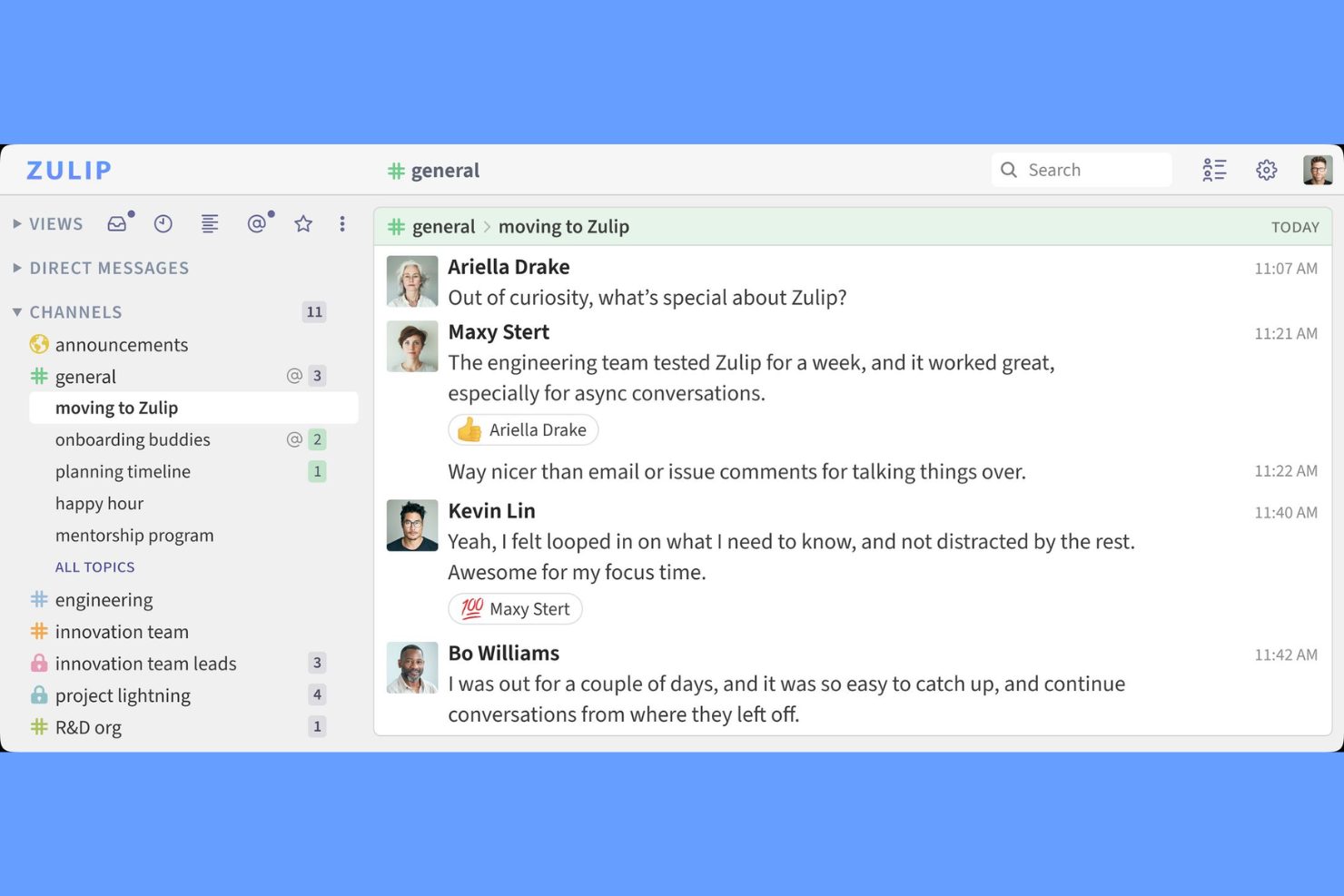
Zulip is a team chat app that organizes conversations into topic-based threads, combining real-time and asynchronous messaging with features like channels, file sharing, and integrations.
Who Is Zulip Best For?
Zulip is a strong fit for distributed engineering teams and open-source communities that need structured, topic-based chat.
Why I Picked Zulip
I picked Zulip as one of the best because I like how it lets my team split conversations into topic-based threads inside channels, so we never lose track of discussions. The async chat model means I can jump into any topic—even hours later—and still see the full context. I use Zulip’s keyboard shortcuts and message filters to quickly catch up on what matters most, which is a huge help when managing multiple projects at once.
Zulip Key Features
- Message editing and deletion: Edit or delete sent messages within a configurable time window.
- Customizable notifications: Set notification preferences by stream, topic, or keyword.
- Markdown support: Format messages with Markdown for code, lists, and links.
- Role-based permissions: Assign roles like admin, moderator, or guest to control access.
Zulip Integrations
Zulip offers native integrations with GitHub, Jira, Travis CI, Sentry, Zendesk, Nagios, Jenkins, GitLab, and Trello, and connects with Zapier. An API is available for custom integrations.
Pros and Cons
Pros:
- Guest access supports external collaboration
- Inbox feature highlights important unread messages
- Topic-based threads keep conversations organized
Cons:
- Notifications and connectivity can be inconsistent
- Mobile app UX is less intuitive and feature-limited

Chanty
Best for simple chat with tasks
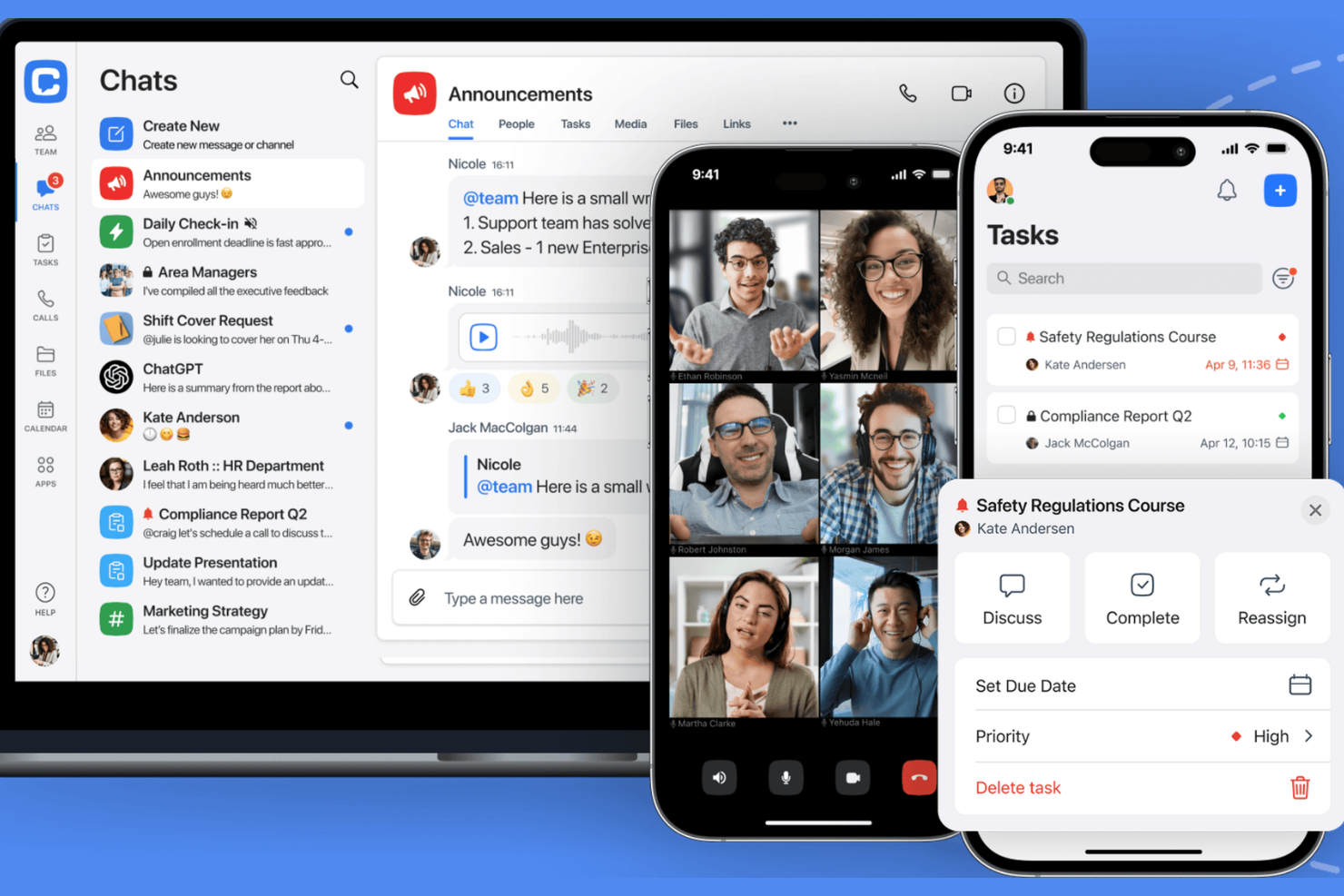
Chanty is a team chat app that combines real-time messaging, audio and video calls, file sharing, and a built-in task management system for collaborative workspaces.
Who Is Chanty Best For?
Chanty is a good fit for small businesses and startups that want simple team chats with built-in task management.
Why I Picked Chanty
I picked Chanty as one of the best because I like how it combines team chat with a built-in task management system—my team can turn any message into a task and track progress right inside the chat. I also use its Teambook feature to organize conversations, tasks, and shared files in one place. Voice and video calls are available without needing extra plugins, which keeps our workflow simple.
Chanty Key Features
- Public and private conversations: Create open or restricted channels for different teams or topics.
- Pinned messages: Pin important messages to keep key information visible in any conversation.
- Built-in file sharing: Upload and share documents, images, and other files directly in chat.
- Third-party integrations: Connect with tools like Google Drive, Trello, and GitHub for added functionality.
Chanty Integrations
Chanty offers native integrations with Trello, Asana, GitHub, Google Drive, Dropbox, OneDrive, Mailchimp, and Zapier, and provides an API for custom integrations.
Pros and Cons
Pros:
- Teambook organizes conversations and files
- Unlimited message history on all plans
- Built-in task management for actionable chats
Cons:
- No built-in screen sharing during calls
- Lacks advanced admin controls for larger orgs

Flock
Best for chat with productivity tools
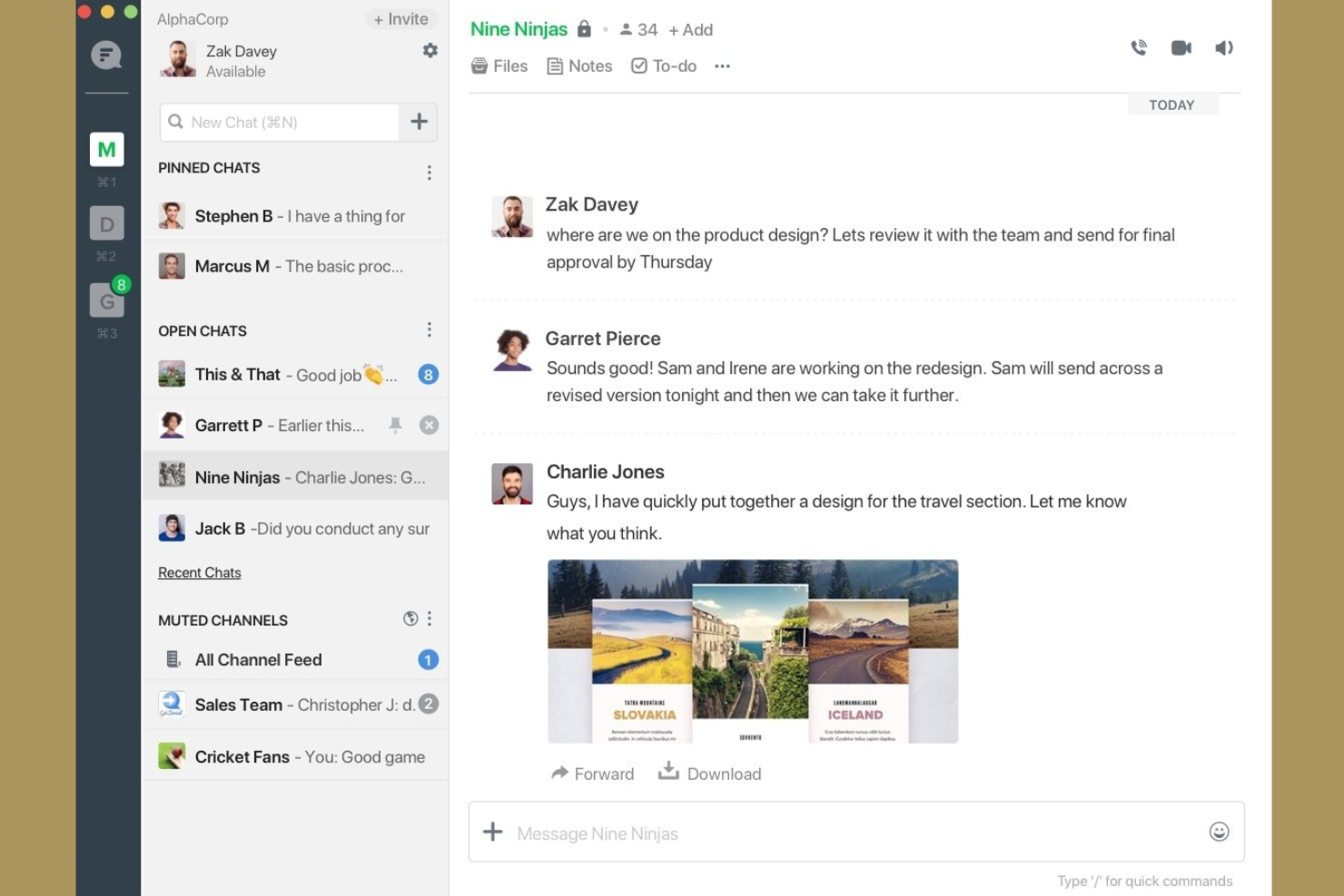
Flock is a team chat app that brings together messaging, video conferencing, shared to-dos, polls, reminders, and file sharing in one workspace.
Who Is Flock Best For?
Flock is a good fit for small to midsize businesses that want built-in productivity tools alongside team chat.
Why I Picked Flock
I picked Flock as one of the best because I like how it combines chat, video meetings, and built-in productivity tools like shared to-dos and polls in one place. My team uses the reminders and note-taking features to keep track of action items during conversations. I also rely on Flock’s file sharing and searchable message history to keep our project resources organized and accessible.
Flock Key Features
- Channel-based messaging: Organize conversations by topic, project, or team in dedicated channels.
- Guest user access: Invite external collaborators to specific channels without giving full workspace access.
- Integrated calendar: Schedule meetings and view upcoming events directly within the app.
- Custom app integrations: Connect Flock with tools like Google Drive, Trello, and GitHub for added functionality.
Flock Integrations
Flock offers native integrations with Google Drive, Trello, GitHub, Asana, Dropbox, Mailchimp, Twitter, and connects with Zapier. An API is available for custom integrations.
Pros and Cons
Pros:
- Easy setup and onboarding for small to mid-sized teams
- Strong messaging with channels, voice, and video in one app
- Built-in to-dos and reminders for lightweight task management
Cons:
- Message history limits on free plan restrict long-term tracking
- Occasional bugs and performance glitches reported

Best for Microsoft 365 collaboration
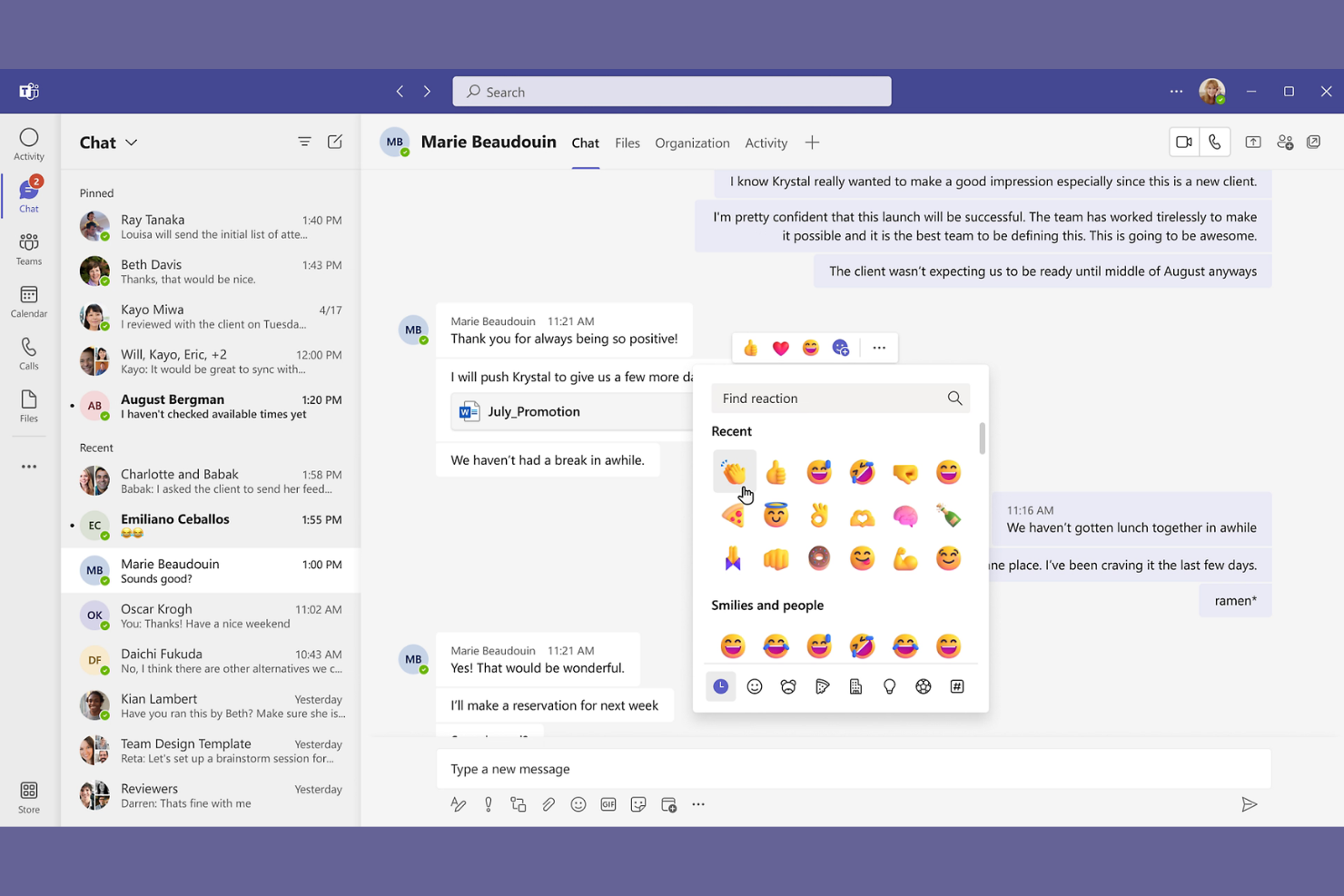
Microsoft Teams is a team chat and collaboration platform that combines instant messaging, video meetings, file sharing, and workspace organization within a unified interface.
Who Is Microsoft Teams Best For?
Microsoft Teams fits organizations that rely on Microsoft 365 for daily communication, document collaboration, and meetings.
Why I Picked Microsoft Teams
I picked Microsoft Teams as one of the best because my team can jump from chat to video meetings and co-edit files without leaving the app. I rely on its deep Microsoft 365 integration to access Word, Excel, and PowerPoint documents right inside our channels. I also use Teams’ calendar and meeting scheduling to keep everyone in sync.
Microsoft Teams Key Features
- Channel-based chat: Organize conversations by topic, project, or team in dedicated channels.
- @mentions and notifications: Tag individuals or groups to draw attention to important messages.
- Persistent chat history: Access and search past conversations and shared files at any time.
- Third-party app integrations: Add tools like Trello, Polly, and GitHub directly into your workspace.
Microsoft Teams Integrations
Microsoft Teams has native integrations across the Microsoft ecosystem, including Microsoft 365 and Azure, and also connects with popular tools like Trello, GitHub, Salesforce, ServiceNow, and Zoom. An API is available for custom integrations.
Pros and Cons
Pros:
- Allows external guest access for collaboration
- Built-in meeting scheduling and calendar sync
- Integrates chat, meetings, and file sharing
Cons:
- Search function sometimes misses older messages
- Notification settings are complex to manage

Element
Best for secure decentralized messaging
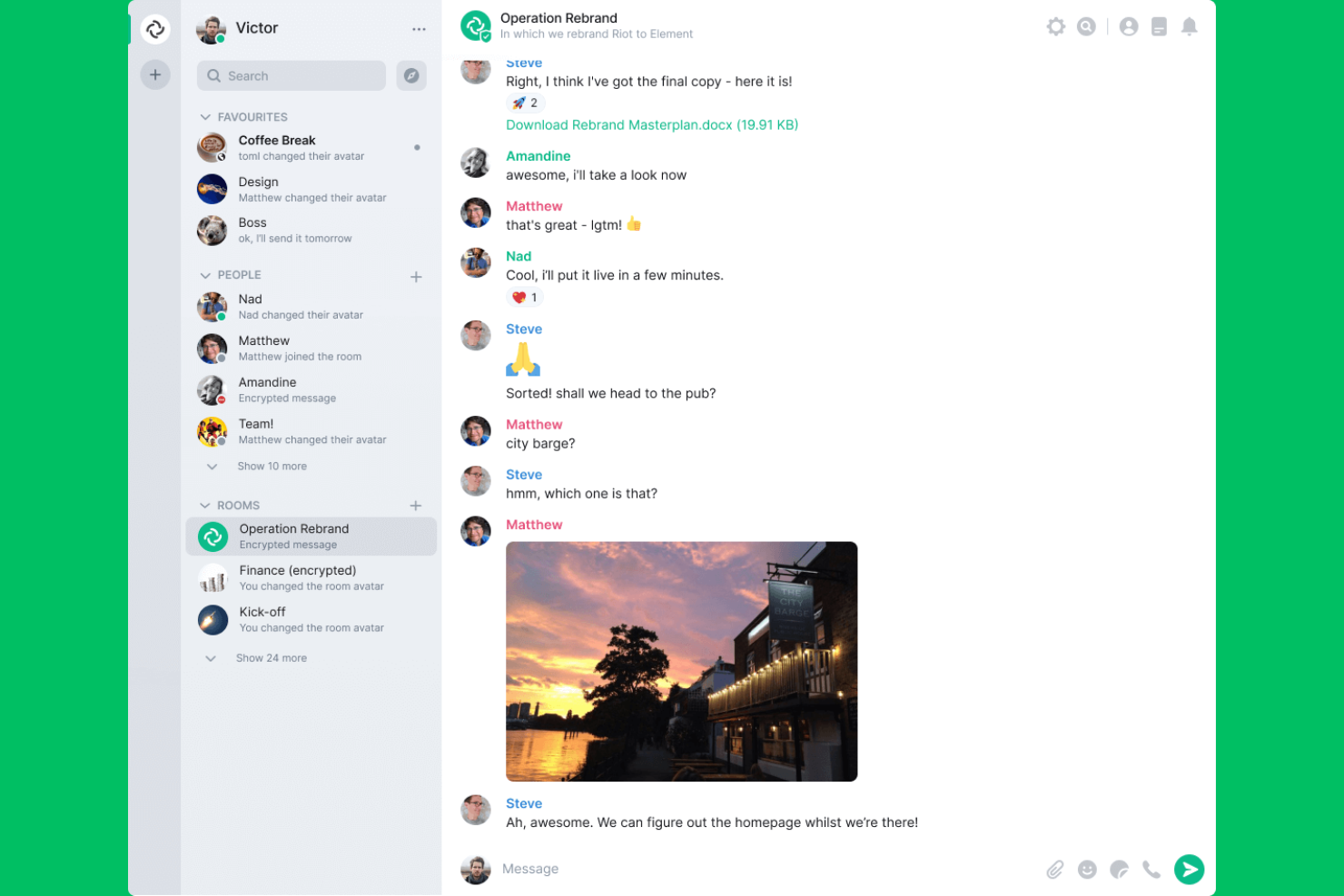
Element is a team chat app built on the Matrix protocol that offers secure messaging, voice and video calls, file sharing, and decentralized communication for organizations.
Who Is Element Best For?
Element is a strong fit for privacy-focused organizations and teams that need secure, decentralized communication across multiple locations.
Why I Picked Element
I picked Element as one of the best because I need a secure, decentralized team chat that puts privacy first. I like that my team can host our own servers and use end-to-end encryption for every message. In practice, that means we control our data and can federate with other Matrix-based platforms.
Element Key Features
- Bridging to other platforms: Connects with Slack, Microsoft Teams, and IRC for cross-platform messaging.
- Rich media sharing: Supports sending images, videos, and files directly in chat rooms.
- Custom notification settings: Lets users fine-tune alerts for each room or conversation.
- Message search: Allows searching across all rooms and direct messages for quick information retrieval.
Element Integrations
Element offers native integrations with Slack, Microsoft Teams, IRC, GitHub, Jitsi, and more. An API is available for custom integrations.
Pros and Cons
Pros:
- Open-source with active community support
- Self-hosting option for full data control
- End-to-end encryption for all messages
Cons:
- Notification settings can be confusing
- Mobile app performance is inconsistent

Best for secure customizable chat
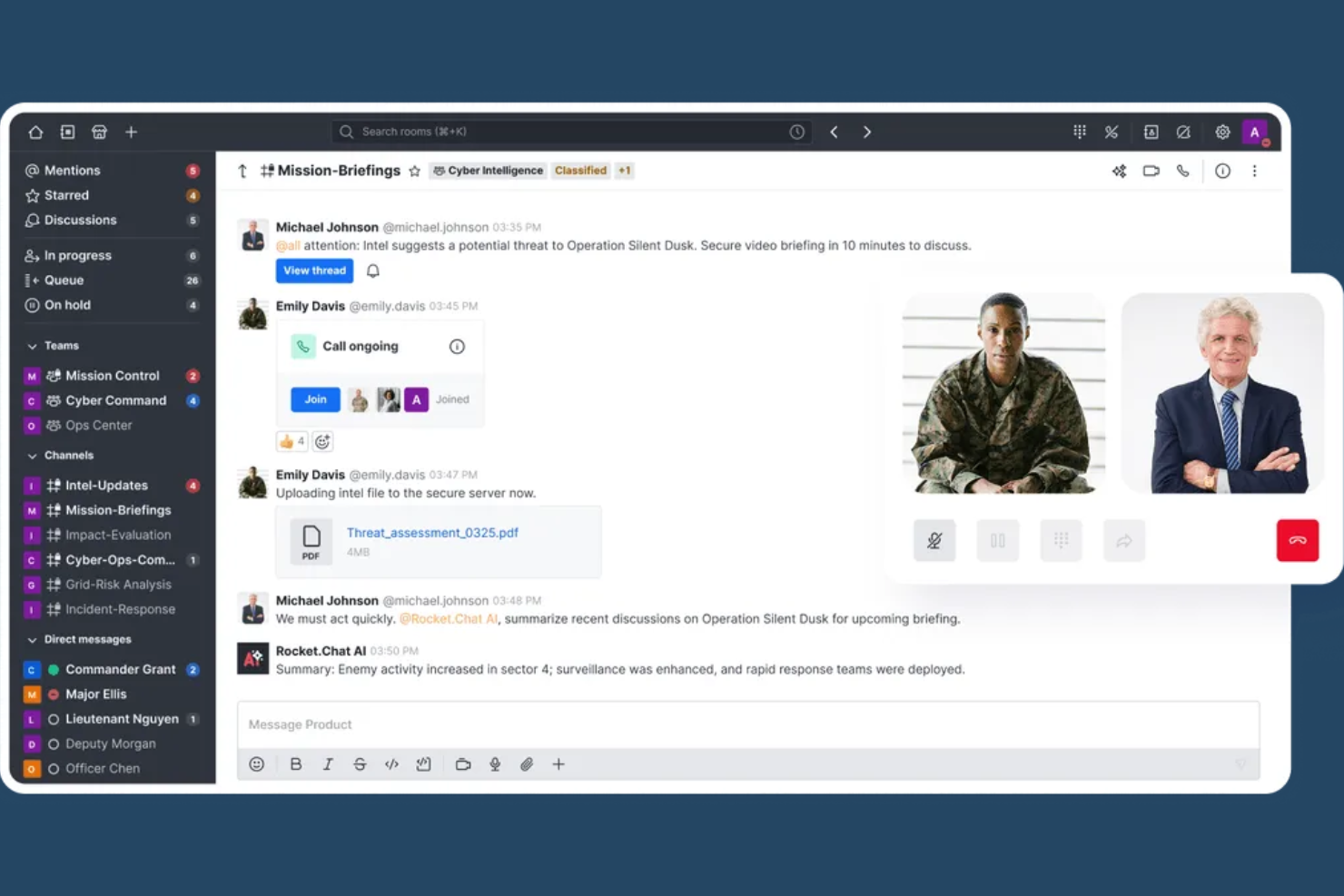
Rocket.Chat is an open-source team chat platform that offers real-time messaging, file sharing, video conferencing, and extensive customization for secure internal and external communications.
Who Is Rocket.Chat Best For?
Rocket.Chat is a strong fit for IT teams and organizations in regulated industries that need secure, customizable team chat.
Why I Picked Rocket.Chat
I picked Rocket.Chat as one of the best because I need a team chat app that’s open-source and built for advanced security and compliance. I use its on-premise deployment and end-to-end encryption to meet strict data protection requirements. My team also customizes the platform’s permissions and audit logs to fit our organization’s compliance workflows.
Rocket.Chat Key Features
- Omnichannel messaging: Manage conversations from email, SMS, WhatsApp, and social channels in one inbox.
- Threaded messaging: Keep discussions organized with threaded replies in any channel.
- Custom emoji and reactions: Personalize chats with custom emoji sets and message reactions.
- Role-based access controls: Assign granular permissions to users and groups for secure collaboration.
Rocket.Chat Integrations
Rocket.Chat offers 50+ native integrations, including Jira, GitHub, GitLab, Trello, Dropbox, Google Drive, Zapier, and has native integrations across the Microsoft ecosystem, including Microsoft 365 and Azure. An API is available for custom integrations.
Pros and Cons
Pros:
- Omnichannel messaging combines chat, voice, and video
- Strong security with encryption, SSO, and access controls
- Open-source and self-hosted for full data control
Cons:
- Insufficient community-based support for enterprise needs
- UI can feel less polished than modern chat tools

Twist
Best for focused threaded conversations
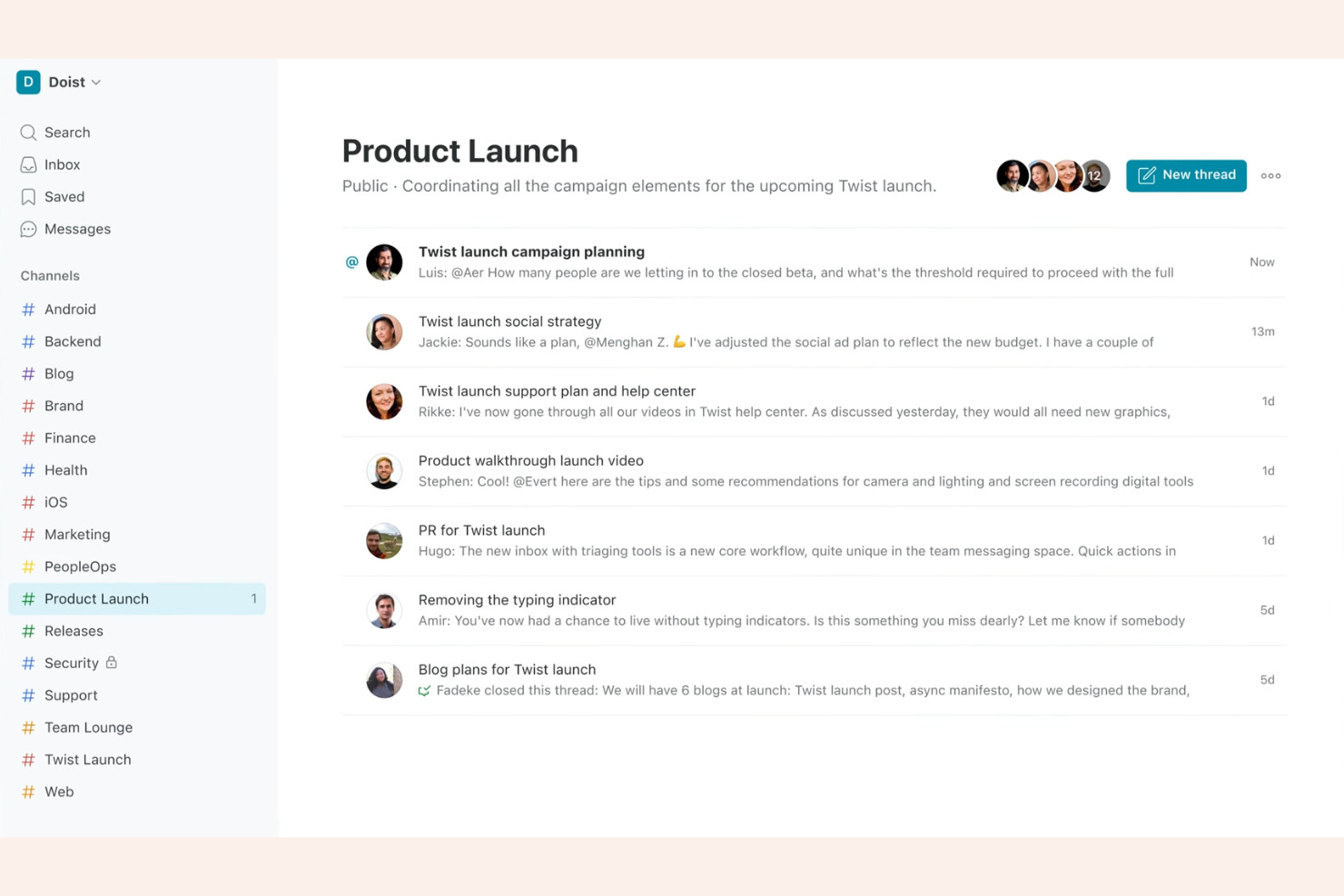
Twist is a team chat app designed around organized threads, channels, and asynchronous messaging for teams who want structured communication.
Who Is Twist Best For?
Twist suits remote or distributed teams who prioritize asynchronous, organized communication over real-time chat.
Why I Picked Twist
I picked Twist as one of the best because I like how it organizes conversations into threads within channels, making it easy for my team to keep discussions focused and searchable. The async-first approach means we don’t feel pressured to respond instantly, which helps when working across time zones. I also use the inbox feature to track updates and jump back into important threads without missing context.
Twist Key Features
- Guest access: Invite external collaborators to specific channels without giving them full workspace access.
- Advanced search: Find messages, files, and threads quickly using filters and keywords.
- Integrations with tools: Connect with GitHub, Todoist, Google Drive, and Zapier for workflow automation.
- Do not disturb mode: Mute notifications during focused work or outside working hours.
Twist Integrations
Twist offers native integrations with GitHub, Todoist, Google Drive, Zapier, and provides an API for custom integrations.
Pros and Cons
Pros:
- Guest access for external collaborators
- Inbox feature helps track important updates
- Async-first design reduces notification overload
Cons:
- Mobile app notifications can be delayed
- No built-in voice or video calling

Best for unified messaging and calls
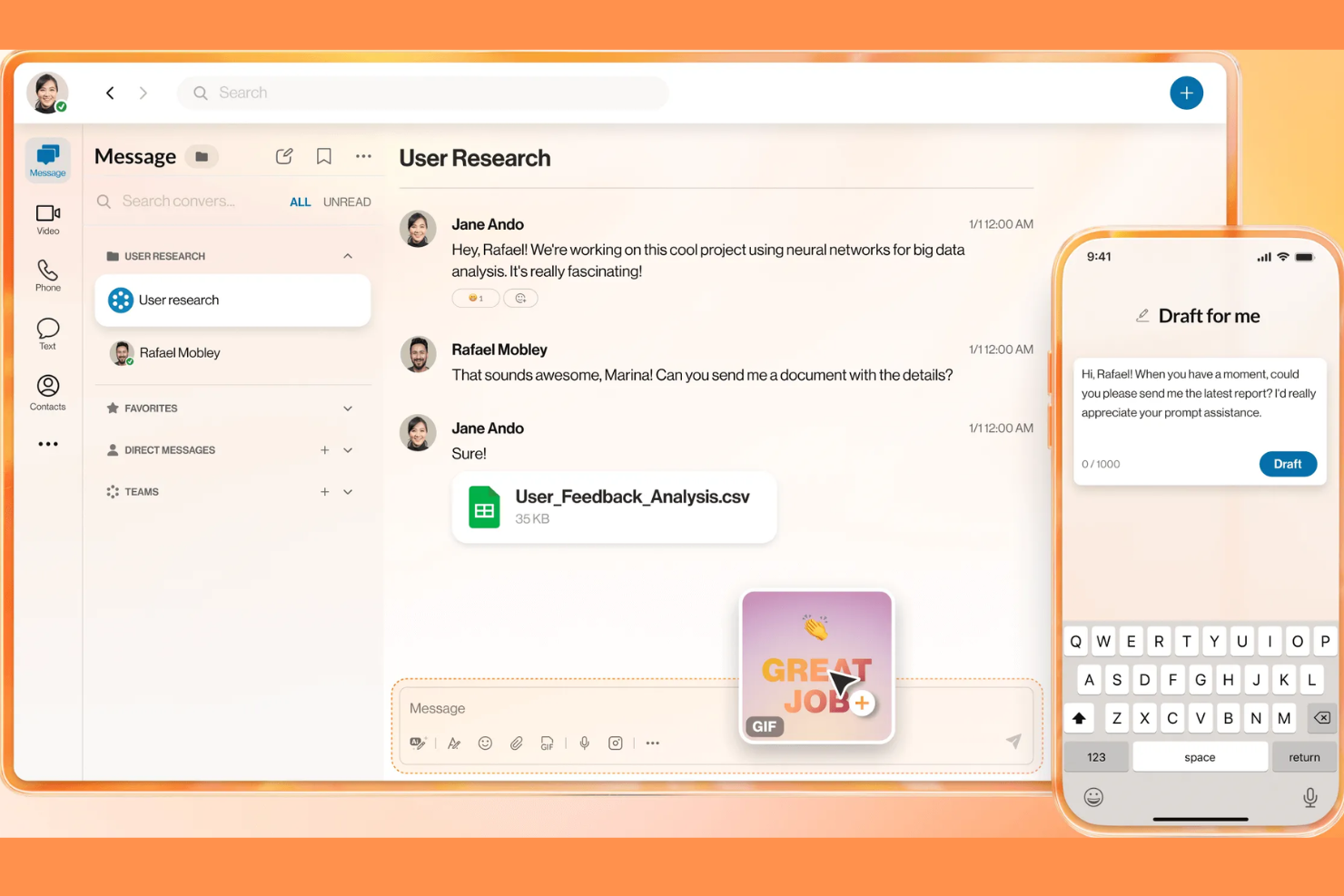
RingCentral is a unified communications platform for teams that brings together chat, video meetings, phone calls, and file sharing in one solution.
Who Is RingCentral Best For?
RingCentral is a strong choice for large enterprises and distributed teams that need unified communications across multiple channels.
Why I Picked RingCentral
I picked RingCentral as one of the best because I rely on its enterprise-grade unified communications to keep my team connected across chat, video, and phone. I like that I can launch video meetings or calls directly from a chat thread without switching apps. My team also uses persistent chat rooms and message search to keep project conversations organized and accessible.
RingCentral Key Features
- Team chat channels: Create dedicated spaces for group conversations and projects.
- File sharing: Upload and share documents, images, and files directly in chat.
- Message pinning: Pin important messages to keep key information visible in any chat.
- Task assignment: Assign and track tasks within chat threads for better accountability.
RingCentral Integrations
RingCentral offers 300+ native integrations, including Google Workspace, Microsoft 365, Salesforce, Zendesk, ServiceNow, Slack, Trello, Asana, Box, and Okta, and it connects with Zapier. An API is available for custom integrations.
Pros and Cons
Pros:
- Unlimited message history for all users
- Built-in task assignment within chat threads
- Persistent chat rooms for ongoing projects
Cons:
- Screen sharing not available in chat conversations
- Admin controls lack advanced customization

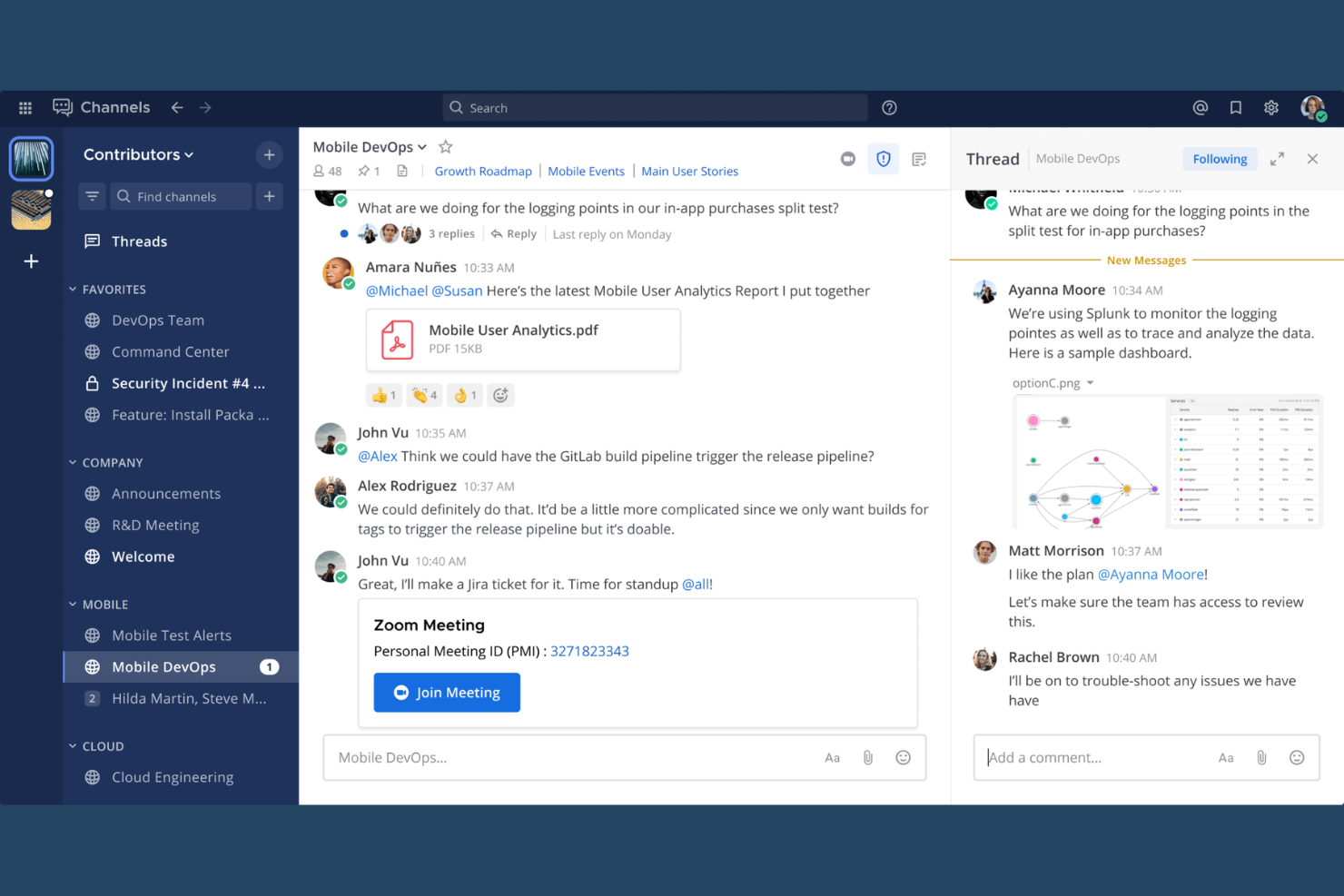
Mattermost is an open-source team chat platform designed for secure messaging, file sharing, workflow automation, and integrations with developer tools.
Who Is Mattermost Best For?
Mattermost is a strong choice for technical teams in regulated industries that require secure, self-hosted team chat.
Why I Picked Mattermost
I picked Mattermost as one of the best because I like how it gives my team full control over our data with self-hosted deployment options. I use its granular access controls and encrypted messaging to meet strict security requirements. My team also relies on its open-source flexibility to customize workflows and integrate with our internal tools.
Mattermost Key Features
- Threaded conversations: Keep discussions organized with threaded replies in channels.
- Channel-based messaging: Create public or private channels for focused team communication.
- File sharing: Upload and share documents, images, and other files directly in chat.
- Custom slash commands: Trigger actions or automate tasks within chat using custom commands.
Mattermost Integrations
Mattermost offers 100+ native integrations, including Jira, GitHub, GitLab, Jenkins, PagerDuty, ServiceNow, Zoom, Microsoft 365, Google Workspace, Slack, and Zapier. An API is available for custom integrations.
Pros and Cons
Pros:
- Supports granular user and channel permissions
- Open-source codebase allows deep customization
- Self-hosting supports strict data privacy needs
Cons:
- No offline access, needs constant internet connection
- Requires external tools for full video conferencing

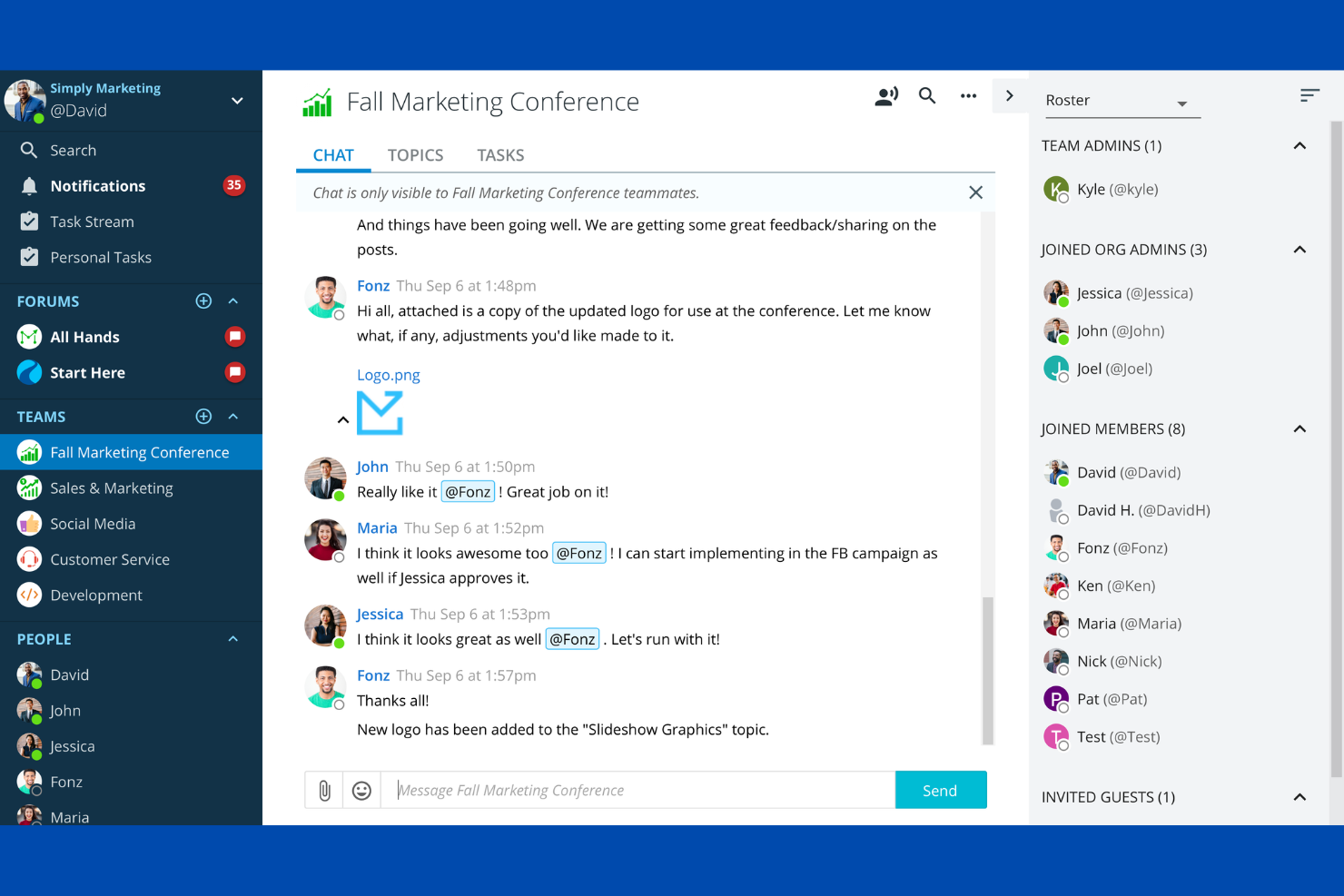
Ryver is a team chat app that combines group messaging, topic-based forums, direct messaging, and integrated task boards for managing conversations and workflows in one platform.
Who Is Ryver Best For?
Ryver is a good fit for small to midsize teams that want chat and task management in a single platform.
Why I Picked Ryver
I picked Ryver as one of the best because I like how it combines chat, topic-based forums, and task boards in a single workspace. My team uses the built-in task management to turn conversations into actionable tasks without switching tools. I also rely on Ryver’s threaded discussions to keep project topics organized and easy to follow.
Ryver Key Features
- Universal search: Find messages, files, and tasks across all teams and forums.
- Custom invite links: Share unique links to quickly onboard new users to specific teams or forums.
- Role-based permissions: Assign user roles to control access to conversations and tasks.
- Unlimited chat history: Access all past messages without restrictions or archiving limits.
Ryver Integrations
Ryver offers native integrations with Google Drive, Dropbox, Box, and connects with Zapier. An API is available for custom integrations.
Pros and Cons
Pros:
- Built-in task boards link conversations to actions
- Replaces internal email with real-time messaging
- Unlimited teams and conversations improve collaboration
Cons:
- Audio/video quality can be inconsistent
- Interface is not intuitive for new users
Andre chatteapper for team
Her er noen flere chatteapper for team som ikke kom med på kortlisten min, men som likevel er verdt å se nærmere på:
- Google Chat
For Google Workspace messaging
- Slack
For channel-based team collaboration
- TeamSnap
For team chat in sports groups
- Blink
For frontline team communication
- Homebase
For messaging hourly teams
- Staffbase
For enterprise employee communications
- Nextiva
For unified business communication
- Pumble
For free team chat with history
- Connecteam
For mobile workforce communication
- Coast
For chat with task management
- Breakroom
For virtual office communication
- Teamwork Chat
For chat within project workflows


How I Evaluate Team Chat Apps
I split my evaluation into two layers: baseline must-haves like threaded channels and PM integrations, and differentiators like AI summaries, guest access, and workflow automation.
Core Functionality (Table Stakes For This List)
When I'm selecting tools for my list, I rank each one on a scale from 0 (does not offer the functionality) to 5 (excels in this area) for each core functionality listed below. Then, I calculate the tool's total score into a percentage. Each tool needs to achieve a minimum total score of 75% to be considered for inclusion.
- Real-Time Messaging: I check for reliable instant messaging across 1:1 and group conversations, including presence indicators and message reactions that keep sprint standups and ad-hoc decisions moving.
- Channels & Threads: Organized channels and threaded replies are how project teams separate conversations by workstream. I look for public/private options, pinning, and topic-level structure.
- File Sharing & Search: Teams share specs, mockups, and status docs constantly. I evaluate how each tool handles file previews, searchable message history, and cross-channel search with date or user filters.
- Voice & Video Calls: Quick huddles replace unnecessary meetings. I look for built-in group calling with screen sharing so a PM can walk through a Gantt chart or wireframe without switching apps.
- Third-Party Integrations: I evaluate each tool's connection to PM platforms like Jira, Asana, and Trello, plus file storage tools like Google Drive and OneDrive, including how updates surface directly in chat.
- Notifications & Mentions: Customizable alerts matter when you're managing multiple project channels. I look for @mention support, per-channel controls, DND scheduling, and keyword-based notifications.
Once I have a list of tools that meet the criteria, I consider what sets each platform apart.
Differentiating Factors (What Sets Vendors Apart)
Here's how I compare and contrast different vendors:
Standout Features
AI-powered thread summaries are a big deal for PMs who return from back-to-back meetings to dozens of unread channels. I look for tools that surface action items and key decisions automatically. In-chat task creation is another differentiator—converting a message into an assigned task with a due date saves the copy-paste dance between apps. I also evaluate guest access options, since most projects involve external contractors or clients who need visibility into specific channels without a full license.
Beyond Features
Security and compliance matter when project channels contain client data or contract details. I check for SOC 2 Type II certification, SSO/SAML support, and configurable retention policies. Pricing transparency is another area I evaluate closely—message history caps and per-guest fees can catch teams off guard as projects scale. I also consider cross-platform coverage, since distributed teams need native desktop, mobile, and web apps with offline access to stay connected during travel or connectivity gaps.
Slik velger du chatteapper for team
Det er lett å gå seg vill i lange funksjonslister og kompliserte prismodeller. For å hjelpe deg med å holde fokus mens du går gjennom den unike prosessen med å velge programvare, får du her en sjekkliste over faktorer du bør ha i bakhodet:
| Faktor | Hva du bør vurdere |
|---|---|
| Skalerbarhet | Vil verktøyet støtte teamstørrelsen din nå og når teamet vokser? Sjekk brukerbegrensninger, prisnivåer og ytelse med store grupper. |
| Integrasjoner | Kan det kobles direkte til de viktigste verktøyene dine (f.eks. prosjektstyring, fillagring og HR-systemer)? Lag en liste over nødvendige integrasjoner før du setter opp kortlisten. |
| Tilpasningsmuligheter | Kan du tilpasse varsler, tillatelser og chatstrukturer slik at de passer arbeidsflytene dine? Vurder administratorkontroller og innstillinger på brukernivå. |
| Brukervennlighet | Vil teamet ditt ta det i bruk raskt? Se etter intuitiv navigasjon, tydelig merking og minimale opplæringskrav. Test med en liten gruppe hvis det er mulig. |
| Implementering og innføring | Hvor lang tid vil oppsettet ta, og hvilke ressurser trengs? Spør om støtte til migrering, opplæringsmateriell og hjelp med innføringen for geografisk spredte team. |
| Kostnad | Er prisplanene transparente og forutsigbare? Ta høyde for alle brukere, tilleggstjenester og eventuelle overskridelser. Sammenlign de totale eierkostnadene, ikke bare de månedlige avgiftene. |
| Sikkerhetstiltak | Tilbyr appen ende-til-ende-kryptering, alternativer for datalagring og samsvar med bransjestandardene dine? Gå gjennom revisjonslogger og administratorkontroller. |
| Tilgjengelig kundestøtte | Hvilke kundestøttekanaler tilbys, og i hvilke tidsrom? Vurder om du trenger hjelp døgnet rundt, en egen kundeansvarlig eller bare et søkbart hjelpesenter. |
Hva er chatteapper for team?
Teamchat-apper er teamkommunikasjonsapper og kommunikasjonsverktøy som lar hele teamet koble seg til hverandre i sanntid gjennom meldinger, kanaler og delte områder. Disse meldingsappene støtter tekstmeldinger, talemeldinger og avanserte chatfunksjoner, noe som gjør dem til viktige samarbeidsverktøy for fjernarbeid. Mange leveres som SaaS-plattformer og fungerer som kommunikasjonsapper med alt-i-ett-funksjonalitet, med meldingsfunksjoner, fildeling og integrasjoner med verktøy som CRM-systemer. De hjelper team med å effektivisere samtaler, forbedre koordineringen og holde seg samkjørte på tvers av prosjekter. Disse verktøyene er populære blant små team og voksende bedrifter, og tilbyr ofte en gratisversjon, skalerbare betalingsplaner og støtte for et ubegrenset antall brukere.
Funksjoner i teamchat-apper
Når du velger teamchat-apper, bør du se etter følgende viktige funksjoner:
- Direktemeldinger: Lar brukere sende private meldinger mellom to personer for raske, fokuserte samtaler uten å involvere hele teamet.
- Gruppekanaler: Tilbyr delte områder der team kan organisere diskusjoner etter prosjekt, tema eller avdeling, slik at samtalene holdes organiserte og tilgjengelige.
- Fildeling: Gjør det mulig for brukere å laste opp, dele og forhåndsvise dokumenter, bilder og andre filer direkte i chattråder for enkelt samarbeid.
- Søkbar meldingshistorikk: Gjør det mulig for brukere å søke i tidligere samtaler, filer og lenker, slik at det er enkelt å finne viktig informasjon ved behov.
- Omtaler og varsler: Lar brukere merke teammedlemmer og tilpasse varsler, slik at viktige meldinger ikke blir oversett, selv i travle kanaler.
- Trådede samtaler: Støtter svar i en spesifikk meldingstråd, noe som bidrar til å holde diskusjonene oversiktlige og redusere rot i travle chatter.
- Indikatorer for brukertilstedeværelse: Viser hvem som er pålogget, borte eller frakoblet, slik at det blir enklere å vite når teammedlemmer er tilgjengelige for raske svar.
- Administratorkontroller: Gir administratorer mulighet til å administrere brukere, tillatelser og kanalinnstillinger for å opprettholde sikkerhet og orden.
- Tilgang på tvers av plattformer: Tilbyr apper for datamaskiner, nettlesere og mobile enheter, slik at team kan holde kontakten uansett hvor de arbeider.
- Støtte for integrasjoner: Kobler seg til andre arbeidsverktøy som kalendere, prosjektstyrings- og fillagringssystemer for å samle arbeidsflyter på ett sted.
Vanlige AI-funksjoner i teamchat-apper
I tillegg til standardfunksjonene i teamchat-apper som er nevnt ovenfor, tar mange av disse løsningene i bruk AI med funksjoner som:
- Smart oppsummering av meldinger: Bruker AI til automatisk å generere korte sammendrag av lange samtaler eller tråder, slik at brukerne raskt kan få oversikt over det de har gått glipp av.
- Automatisk møteplanlegging: Bruker AI til å foreslå møtetidspunkter, samordne kalendere og til og med bestille møter direkte i chatten basert på deltakernes tilgjengelighet.
- Intelligent prioritering av meldinger: Bruker AI til å fremheve eller løfte frem presserende eller relevante meldinger, slik at støyen reduseres og brukerne kan fokusere på det som er viktigst.
- AI-drevne chatboter: Integrerer virtuelle assistenter som kan svare på spørsmål, automatisere rutineoppgaver og gi umiddelbar støtte i chatkanaler.
- Sanntidsoversettelse: Bruker AI til å oversette meldinger mellom språk umiddelbart, slik at globale eller flerspråklige team kan kommunisere sømløst.
- Kontekstuell uttrekking av oppgaver: Bruker AI til å identifisere handlingselementer eller oppgaver som nevnes i chatten, og legger dem automatisk til i prosjektstyringsverktøy eller gjøremålslister.
Fordeler med teamchat-apper
Implementering av teamchat-apper gir flere fordeler for teamet og bedriften din. Her er noen av fordelene du kan se frem til:
- Raskere beslutningstaking: Meldinger i sanntid og umiddelbare varsler hjelper team med å avklare spørsmål og ta beslutninger raskt.
- Sentralisert kommunikasjon: Gruppekanaler og søkbar meldingshistorikk holder alle samtaler og filer samlet på ett tilgjengelig sted.
- Bedre samarbeid: Fildeling, trådede diskusjoner og integrasjoner med andre verktøy gjør det enklere å samarbeide om prosjekter.
- Større åpenhet: Åpne kanaler og administratorkontroller gjør at alle kan holde seg informert om teamets aktiviteter og oppdateringer.
- Bedre fleksibilitet: Tilgang på tvers av plattformer og mobilapper gjør at teammedlemmer kan kommunisere og samarbeide hvor som helst.
- Økt ansvarlighet: Omtaler, meldingshistorikk og administrativ oversikt gjør det enklere å følge opp ansvarsområder og handlingselementer.
- Bedre sikkerhet: Funksjoner som ende-til-ende-kryptering og tilpassbare tillatelser beskytter sensitiv informasjon og bidrar til å opprettholde samsvar med krav.
Kostnader og priser for chatapper for team
Ved valg av chatapper for team er det nødvendig å forstå de ulike prismodellene og abonnementene som er tilgjengelige. Kostnadene varierer basert på funksjoner, teamstørrelse, tillegg og mer. Tabellen nedenfor oppsummerer vanlige abonnementer, gjennomsnittsprisene deres og typiske funksjoner som er inkludert i løsninger for chatapper for team:
Sammenligningstabell for abonnementer for chatapper for team
| Abonnementstype | Gjennomsnittspris | Vanlige funksjoner |
|---|---|---|
| Gratisabonnement | $0 | Grunnleggende meldinger, begrenset fildeling, søkbar meldingshistorikk og grunnleggende integrasjoner. |
| Personlig abonnement | $5–$8/bruker/måned | Ubegrenset meldingshistorikk, forbedret fildeling, gruppekanaler og prioritert brukerstøtte. |
| Bedriftsabonnement | $10–$15/bruker/måned | Avanserte administratorkontroller, integrasjoner med bedriftsverktøy, gjestetilgang og økt lagringsplass. |
| Abonnement for store virksomheter | $20–$25/bruker/måned | Tilpassede sikkerhetsinnstillinger, samsvarsfunksjoner, dedikert kontoadministrasjon og avansert analyse. |
Vanlige spørsmål om chatapper for team
Her er noen svar på vanlige spørsmål om chatapper for team:
Kan chatapper for team erstatte e-post for intern kommunikasjon?
Ja, chatapper for team kan erstatte de fleste interne e-postene ved å tilby direktemeldinger, gruppekanaler og fildeling. Mange team opplever at chatapper reduserer rot i innboksen og gjør beslutningstaking raskere, men noe formell eller ekstern kommunikasjon kan fortsatt kreve e-post.
Hvor sikre er chatapper for team når det gjelder sensitiv bedriftsinformasjon?
De fleste chatapper for team tilbyr sterke sikkerhetsfunksjoner som kryptering, administratorkontroller og samsvarsalternativer. Du bør imidlertid gjennomgå sikkerhetssertifiseringene, alternativene for datalagring og tilgangsinnstillingene for hvert verktøy for å sikre at de oppfyller organisasjonens krav.
Fungerer chatapper for team for eksterne og distribuerte team?
Ja, chatapper for team er utformet for å støtte eksterne og distribuerte team ved å muliggjøre kommunikasjon i sanntid, fildeling og samarbeid fra hvor som helst og på alle enheter. Funksjoner som mobilapper og tilstedeværelsesindikatorer bidrar til å holde alle tilkoblet.
Hva bør jeg ta hensyn til når jeg går over til en ny chatapp for team?
Planlegg datamigrering, brukeropplæring og integrasjon med de eksisterende verktøyene dine. Se etter løsninger som tilbyr importverktøy, opplæringsressurser og brukerstøtte for å minimere forstyrrelser og hjelpe teamet med å tilpasse seg raskt.
Kan chatapper for team integreres med andre arbeidsverktøy?
Ja, de fleste chatapper for team tilbyr integrasjoner med prosjektstyring, fillagring, kalender- og HR-systemer. Sjekk om de viktigste verktøyene dine støttes, og om integrasjonene er inkludert i det valgte abonnementet.