

10 beste Scribe-alternativer for å lage standardiserte arbeidsprosedyrer i 2026

Kortliste over de beste Scribe-alternativene


Hvis du leder prosjekter, vet du hvor vanskelig det kan være å holde dokumentasjonen organisert. Scribe er et nyttig verktøy, men det passer kanskje ikke alltid med arbeidsflyten til teamet ditt eller hjelper alle med å holde seg oppdatert.
Ved å utforske alternativer kan du finne løsninger som passer bedre til forretningsutfordringene dine. Denne artikkelen viser deg de beste alternativene til Scribe, basert på grundig testing og gjennomgang.
Du vil oppdage verktøy som kan tilby akkurat funksjonene du savner, eller forenkle prosesser som tidligere virket altfor kompliserte. La oss finne det perfekte alternativet for teamet ditt sammen.
Hva er Scribe?
Scribe er et verktøy for prosessdokumentasjon som hjelper deg med å registrere og dele arbeidsflyter på en smidig måte. Det brukes ofte av prosjektledere, teamledere og opplæringsansvarlige som trenger å holde dokumentasjonen organisert og tilgjengelig. Med funksjoner som oppretting av trinnvise veiledninger, skjermbildeopptak og automatiske oppdateringer bidrar Scribe til å opprettholde tydelig og konsis dokumentasjon. Alt i alt tilbyr Scribe en enkel måte å dokumentere prosesser på, noe som gjør det lettere for teamet ditt å holde seg samkjørt.
Sammenligningstabell over Scribe-alternativer
Denne sammenligningstabellen oppsummerer prisopplysningene for mine beste alternativer til Scribe.
| Tool | Best For | Trial Info | Price | ||
|---|---|---|---|---|---|
| 1 | Best for AI-powered narrated workflow guides | Free plan + free demo available | From $39/creator/month (billed annually) | Website | |
| 2 | Best for video and text guides from one recording | 7-day free trial + free demo available | From $29/month | Website | |
| 3 | Best for interactive product demos | Free plan available | From $50/user/month | Website | |
| 4 | Best for centralized training docs | Free demo available | Pricing upon request | Website | |
| 5 | Best for AI-powered video creation | Free 7-day trial + free plan + free demo available | From $18/creator/month (billed annually) | Website | |
| 6 | Best for team video messaging | Free demo available | $18/month | Website | |
| 7 | Best for regulated environments | Free 7-day trial available | From $44/user/device/month (billed annually) | Website | |
| 8 | Best for embeddable process guides | Free plan available | From $10/seat/month (billed annually) | Website | |
| 9 | Best for one-click guide sharing | Free 14-day trial + free plan available | From $18/month (billed annually) | Website | |
| 10 | Best for multi-format tutorials | Free trial available | From $200/month | Website |
Why Trust Our Software Recommendations
Our team has been testing and reviewing software since 2012. As project managers ourselves, we know how difficult—and important—it is to choose the right software.
For this guide, we evaluated tools using hands-on testing and independent research, scoring tools using our selection criteria. We also draw on insights from industry thought leaders and practicing project management experts.
Our reviews reflect our human editorial judgment, not a sales pitch.
Expert reviewers:
Anmeldelser av de beste Scribe-alternativene
Nedenfor finner du detaljerte sammendrag av de beste alternativene til Scribe på kortlisten vår. Anmeldelsene våre gir et detaljert innblikk i de viktigste funksjonene, fordelene og ulempene, integrasjonene og ideelle bruksområdene for hvert verktøy, slik at du kan finne det beste alternativet for deg.

Best for AI-powered narrated workflow guides
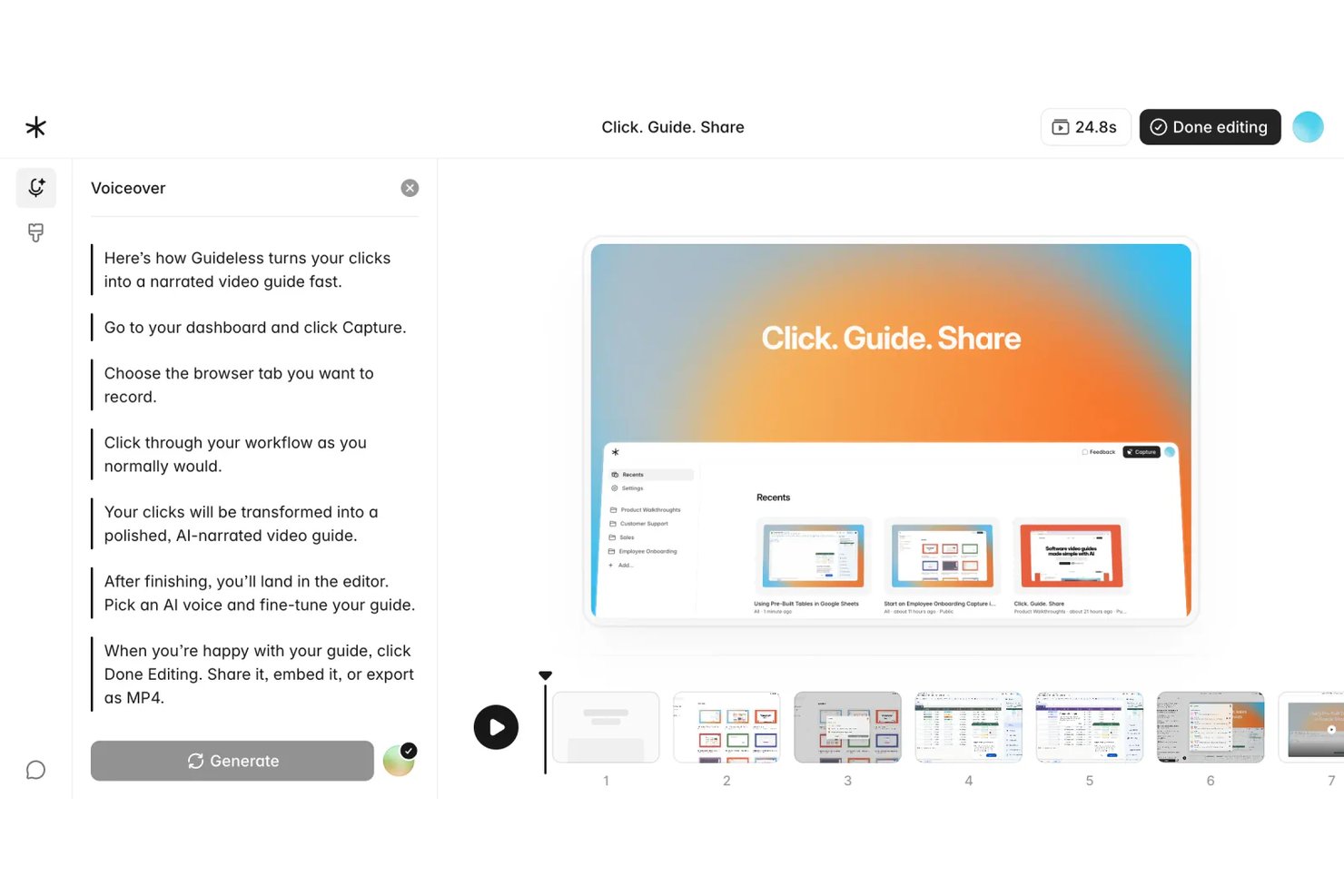
Guideless is a browser-based guide creation tool that turns live workflow recordings into AI-narrated video guides, making it a strong fit for ops and project teams who need engaging, easy-to-update process documentation without manual screen recording.
Who Is Guideless Best For?
Guideless suits small to mid-sized SaaS and tech teams whose entire workflow lives in the browser and who need polished training content without a dedicated video production process.
Why Guideless Is a Good Best Scribe Alternatives Reviewed
I picked Guideless as one of the best because it goes where Scribe doesn't: generating AI-narrated video guides directly from browser workflow captures. Where Scribe produces static screenshot steps, Guideless pairs each captured action with AI-written instructions, a natural-sounding voiceover, and smart zoom effects. I especially like the regenerative editor, which lets me update only the steps that changed and rebuild the narration without re-recording the entire guide.
Guideless Key Features
- Browser workflow capture: Record every step in any web app automatically with a Chrome extension.
- Sensitive data blurring: Blur confidential or sensitive information in screenshots during the guide creation process.
- Export to MP4, PDF, and Markdown: Download guides in video and document formats for sharing and archiving.
- Brand kit customization: Apply your organization’s themes, logos, and colors across all guides for consistent branding.
Guideless Integrations
Guideless offers native integrations with Notion, Confluence, and Slack. An API is available for custom integrations.
Pros and Cons
Pros:
- Regenerative editor updates only changed steps
- Guides export directly as MP4 video
- AI voiceover eliminates manual narration recording
Cons:
- Newer platform with a smaller template library
- Browser-only capture limits desktop app workflows

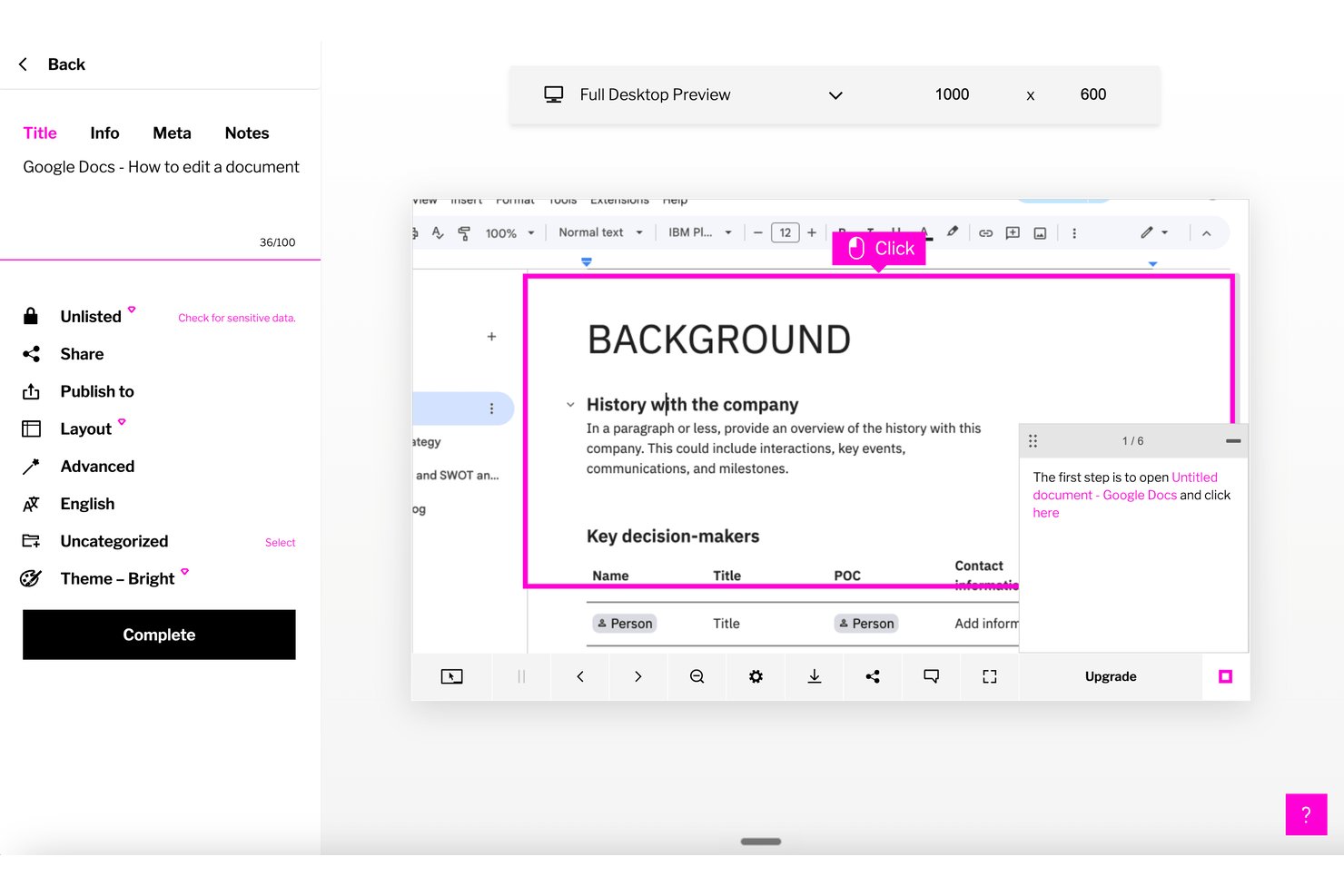
Trails is a process documentation platform for product, engineering, and operations teams that turns repeatable workflows into clear guides, helping colleagues follow procedures and onboard without relying on scattered instructions.
Who Is Trails Best For?
Trails is a good fit for product and engineering leads who need clear workflow guides for onboarding and repeatable team handoffs.
Why I Picked Trails
I like Trails because it’s best for video and text guides from one recording: a screen capture becomes a step-by-step guide with screenshots and an AI-narrated video. I’d use both formats to document a release checklist, giving engineers written steps and a narrated walkthrough of the same workflow.
Trails Key Features
- Capture options: Record with the Chrome extension or desktop app, or upload an existing video.
- AI cleanup: Trails automatically cleans up mistakes in rough recordings.
- Guide sharing: Share guides by link, embed them in a knowledge base, or export them to PDF.
- Access and data controls: Use SAML SSO, role-based permissions, on-device redaction, and encryption.
Trails Integrations
Trails’ native integrations aren’t clearly documented. You can share guides by link or embed them in knowledge bases and help desks, including Zendesk.
Pros and Cons
Pros:
- Exports editable guides as PDF or Markdown
- Redacts sensitive information on your device
- Converts recordings into guides and narrated videos
Cons:
- Doesn’t run approval-based workflows or task checklists
- No frame-by-frame control over video timing

Supademo
Best for interactive product demos

Supademo is a platform for creating interactive product demos, primarily catering to sales and customer success teams. It helps businesses showcase their products effectively to potential customers.
Why it's a good Scribe alternative: Supademo offers interactive demos that engage your audience with clickable elements and guided walkthroughs. You can efficiently customize demos to highlight specific features, making them relevant to different user needs. The platform also tracks user interactions, providing insights into what captures attention. These features make Supademo ideal for teams focused on delivering engaging and informative product demonstrations.
Standout features and integrations:
Features include customizable demo templates, user engagement analytics, and the ability to embed demos on websites. You can also create branching scenarios to personalize the demo experience for different audiences. This flexibility supports your team in delivering targeted and effective presentations.
Integrations include Calendly, Slack, SurveyMonkey, HubSpot, Salesforce, Google Forms, and more.
Pros and Cons
Pros:
- Analytics reveal viewer clicks and drop-offs
- Embeds demos across websites and apps
- AI converts recordings into interactive demos
Cons:
- Feature set still evolving for enterprises
- Lacks deep video-editing controls

Trainual
Best for centralized training docs

Trainual is a training management software that helps small businesses organize and share their standard operating procedures and policies. It serves teams looking to refine their onboarding and training processes.
Why it's a good Scribe alternative: Trainual centralizes your training documents, making it easy to access and update them as needed. With customizable templates and role-based assignments, you can tailor content to specific team members. The platform also lets you track progress, so everyone in your workspace stays up to date.
Standout features and integrations:
Features include drag-and-drop document creation, quizzes to test knowledge, and automatic notifications for updates. You can also use the search function to find specific documents. This makes it easy for your team to stay informed and compliant with company policies.
Integrations include ADP Run, Paycom, Zapier, Dayforce, Figma, and more.
Pros and Cons
Pros:
- Built-in quizzes confirm understanding of the training material
- Role-based assignments automate employee onboarding
- Central hub for playbooks, policies, and procedures
Cons:
- Manual content organization can slow setup
- No real-time walkthroughs or in-app guidance

Guidde
Best for AI-powered video creation

Guidde is an AI-powered platform that simplifies the creation of video documentation, serving businesses and teams that need efficient tutorial and guide production. It primarily helps enterprises strengthen employee onboarding and customer education.
Why it's a good Scribe alternative: Guidde excels with its AI-driven tools that transform workflow captures into edited video tutorials. The Magic Mic feature adds AI-generated narration to your guides for a better learning experience. You can also broadcast your content to both employees and customers, making it suitable for various needs. These capabilities make it a strong choice if you're looking for something beyond traditional documentation.
Standout features and integrations:
Features include the Magic Capture tool for recording workflows, AI-generated storylines, and customizable voiceovers with over 200 options. You can create professional tutorials quickly, which suits teams that need to publish updates often. The platform also offers smart sharing options for distributing content.
Integrations include GitLab, ClickUp, Zendesk, Notion, Slack, Zoom, and more.
Pros and Cons
Pros:
- Supports both video and step instructions
- Branded templates keep video documentation consistent
- AI turns recordings into polished tutorials
Cons:
- Limits on the number of steps per guide
- Limited analytics compared with enterprise platforms

Loom
Best for team video messaging

Loom is a video messaging tool for teams and businesses that need to communicate through video. Users can record, share, and view video messages to support better remote collaboration and communication.
Why it's a good Scribe alternative: Loom offers a unique approach to communication with its video messaging capabilities. You can record your screen, voice, and face simultaneously, making it easy to convey complex information quickly. The instant sharing feature lets your team view messages without delay, keeping everyone in sync. These features make it ideal for teams that prioritize real-time communication and visual storytelling.
Standout features and integrations:
Features include recording HD videos, adding call-to-action buttons, and using viewer insights to track engagement. You can also trim and edit videos directly within the platform, making it easy to polish content. The tool's intuitive interface lets you start creating videos with minimal setup.
Integrations include Slack, Salesforce, Jira, Confluence, Calendly, Zoom, and more.
Pros and Cons
Pros:
- Viewer analytics show engagement and completion
- Records your screen, camera, and microphone together
- Instant shareable links replace many meetings
Cons:
- Occasional low video quality
- Free tier restricts recording length and features

Best for regulated environments

FlowShare is documentation software designed for regulated environments that automates the creation of step-by-step guides. It primarily serves businesses that need efficient documentation for training and compliance.
Why it's a good Scribe alternative: FlowShare captures user actions in the background, creating guides while you work. This feature is suitable for regulated environments where documentation accuracy is essential. With options for corporate branding and bulk editing, you can tailor guides to your organization's needs. Exporting in multiple formats provides flexibility for different documentation needs.
Standout features and integrations:
Features include automatic action capture, corporate identity settings for branding, and bulk-blurring of sensitive data. You can also export guides in PDF, PPTX, and HTML formats. This versatility helps your team maintain consistent and professional documentation.
Integrations include Confluence, SharePoint, WordPress, Guru, and more.
Pros and Cons
Pros:
- Offline access suits strictly regulated environments
- Exports guides to PDF, PPTX, and HTML
- Desktop app auto-records every on-screen action
Cons:
- Formatting limitations
- Only available on Microsoft Windows desktop


MagicHow is a user-friendly tool for creating step-by-step guides, instructions, and manuals, catering to teams that need to document processes efficiently. It serves businesses looking to simplify their documentation practices without needing specialized skills.
Why it's a good Scribe alternative: MagicHow offers quick guide creation, saving your team time on documentation. Automated process recording and easy content editing allow you to quickly produce and customize unlimited guides, while sharing options for links, PDFs, and HTML make distribution straightforward.
Standout features and integrations:
Features include desktop and browser compatibility, customizable guides, and the ability to embed content in platforms. You can also share guides in various formats, providing flexibility in how information is distributed. This versatility helps your team maintain clear, accessible documentation.
Integrations include Confluence, Notion, WordPress, and more.
Pros and Cons
Pros:
- Exports guides to shareable links and PDFs
- Chrome extension records browser workflows automatically
- Free core plan for small teams
Cons:
- Smaller ecosystem with fewer deep integrations
- Limited analytics versus more mature competitors


Dubble is a tool for creating step-by-step guides, tutorials, and onboarding resources by capturing user actions. It's ideal for teams that need quick and efficient process documentation without manual input.
Why it's a good Scribe alternative: Dubble offers instant documentation by recording your actions and converting them into guides. Features such as automatic screenshot capture and editing tools let you create detailed documentation with minimal manual editing. You can also share guides with a single click, making collaboration easy. These functionalities make Dubble suitable for teams that prioritize speed and simplicity in documentation.
Standout features and integrations:
Features include quick editing, with options to update descriptions and screenshots, and the ability to redact sensitive information. You can also share guides with ease, as Dubble supports various formats, including rich content and markdown. This flexibility helps your team keep documentation up to date and accessible.
Integrations include Notion, Confluence, Google Docs, and more.
Pros and Cons
Pros:
- Supports screenshots, videos, and step text
- Exports guides as Markdown for developers
- Chrome watcher turns actions into documentation
Cons:
- Best suited for web apps; desktop or non-browser workflows are limited
- Collaboration features are basic


iorad is a digital tool for educators and trainers to capture and explain workflows through interactive tutorials and how-to guides, simplifying complex processes.
Why it's a good Scribe alternative: iorad offers an interactive approach to tutorial creation, with features like step-by-step walkthroughs and click-to-highlight functionality. You can embed tutorials directly into websites or share them with a link, making them accessible to your audience. The platform also offers real-time editing, so you can update content as processes change. These features make iorad ideal for teams seeking dynamic, engaging instructional content.
Standout features and integrations:
Features include automated step capture, voiceover capabilities, and customizable themes. You can also export tutorials in various formats, such as PDF and HTML, providing flexibility in how you distribute information. This helps your team access and use tutorials effectively.
Integrations include Slack, ServiceNow, Confluence, YouTube, HubSpot, and more.
Pros and Cons
Pros:
- Exports tutorials to PDF for offline
- Chrome extension auto-captures browser tutorials
- Interactive simulations let users practice workflows
Cons:
- Advanced customization requires training
- Interface may feel complex for nontechnical creators
Andre alternativer til Scribe
Her er noen flere alternativer til Scribe som ikke kom med på kortlisten min, men som likevel er verdt å undersøke:
- Tango
For real-time process capture
- UserGuiding
For user onboarding tools
- Trupeer
For video and doc output from one recording
- Tettra
For AI knowledge management
- Process Street
For recurring workflows
- Folge
For creating user manuals
- Stonly
For interactive step-by-step guides
- Zight
For screen recording and sharing
- Fluency
For multilingual documentation
- Fleeq
For video-based training content


How I Evaluate Scribe Alternatives
I look at every tool through two lenses: baseline requirements like automated step capture and guide editing, and differentiators like AI-generated text, analytics, and PM ecosystem integrations.
Core Functionality (Table Stakes For This List)
When I'm selecting tools for my list, I rank each one on a scale from 0 (does not offer the functionality) to 5 (excels in this area) for each core functionality listed below. Then, I calculate the tool's total score into a percentage. Each tool needs to achieve a minimum total score of 65% to be considered for inclusion.
- Automated Step Capture: I evaluate how well each tool records clicks, scrolls, and keystrokes into structured steps—like documenting a Jira ticket creation workflow without manually screenshotting each field.
- Screenshot Annotation: Each tool's annotation toolkit matters, so I check for arrows, callouts, highlights, and boxes that help clarify steps like navigating a sprint board or configuring a dashboard.
- Guide Editing & Customization: I look at how much control you get over generated content—reordering steps, rewriting descriptions, adding branding—so your SOPs look consistent across project documentation.
- Multi-Format Sharing & Export: Whether you need a PDF for stakeholder handoffs or an embedded guide inside Confluence, I evaluate the range of output formats and sharing options each tool supports.
- Sensitive Data Redaction: Tools should let you blur or mask credentials, client names, or financial data in screenshots before sharing process docs with external contractors or cross-functional teams.
- Work Tool Integrations: I check for native connections to platforms like Jira, Slack, Notion, and Confluence so guides land where your project team already works instead of sitting in a silo.
Once I have a list of tools that meet this criteria, I consider what sets each platform apart.
Differentiating Factors (What Sets Vendors Apart)
Here's how I compare and contrast different vendors:
Standout Features
AI-generated step descriptions save real time—when you're documenting a 20-step sprint retro setup, editing auto-written text beats writing from scratch. I also look for a centralized guide library where teams can organize SOPs by project or department, which matters once documentation scales past a handful of guides. Analytics that track view counts and completion rates help PMO leads confirm whether onboarding docs are actually being used or just collecting dust.
Beyond Features
Security and compliance matter when your guides contain client data or internal credentials—I check for SOC 2 compliance and SSO support, especially for enterprise PMOs sharing documentation across vendors. Pricing structure is another key factor; a free tier lets individual PMs validate the tool before pitching a team rollout. I also evaluate time-to-value, meaning how fast a new user can install the extension, capture a process, and share a polished guide on day one.
Hvorfor se etter et alternativ til Scribe?
Selv om Scribe er et godt valg for prosessdokumentasjon, er det flere grunner til at noen brukere ser etter alternative løsninger. Det kan være lurt å se etter et alternativ til Scribe fordi …
- Du trenger flere tilpasningsmuligheter
- Teamet ditt trenger tilgang uten nett
- Du ønsker bedre integrasjon med eksisterende verktøy
- Organisasjonen din trenger støtte for flere språk
- Du trenger avanserte funksjoner for analyse
- Teamet ditt vokser raskt med nye medarbeidere og trenger skalerbarhet
Hvis noe av dette høres kjent ut, har du kommet til rett sted. Listen vår inneholder flere alt-i-ett-verktøy for prosessdokumentasjon som passer bedre for team som står overfor disse utfordringene med Scribe og ser etter alternative løsninger.
De viktigste funksjonene i Scribe
Her er noen av de viktigste funksjonene i Scribe, slik at du kan sammenligne hva alternative løsninger tilbyr:
- Automatisk registrering: Registrerer automatisk prosesser fra nett-, skrivebords- og mobilapper, slik at teamet ditt sparer tid på manuell dokumentasjon.
- Tilpasning: Tilpass veiledninger med KI-generert innhold, firmaprofilering og formateringsalternativer som passer teamets behov.
- Redigering av skjermbilder: Rediger skjermbilder for å fremheve viktig informasjon og gjøre innholdet tydeligere for målgruppen.
- Delingsalternativer: Del veiledninger via e-post eller lenker, bygg dem inn på nettsider, eller eksporter dem som PDF- og HTML-filer for å holde innholdet tilgjengelig.
- Innsikt i engasjement: Følg med på visninger, fullføringer og andre måltall for å holde innholdet relevant og oppdatert.
- Sider: Kombiner flere veiledninger i ett enkelt dokument med tekst, videoer og skjermbilder for omfattende prosessdokumentasjon.
- Scribe Sidekick: Gir tilgang til informasjon ved behov, noe som reduserer gjentatte spørsmål og avbrytelser.
- Automatisk sensurering: Sensurer sensitiv informasjon automatisk eller manuelt på en sikker måte for å beskytte personvernet.