

10 beste programvarer for prosjektstyring innen VVS gjennomgått i 2026

Beste programvare for prosjektstyring innen HVAC – kortliste


Å administrere HVAC-prosjekter kan være en hodepine. Du må holde styr på oppgaver, tidsplaner og team, samtidig som du sikrer kvalitet og effektivitet. Det er mye å håndtere, og det er her programvare for prosjektstyring innen HVAC kommer inn i bildet. Disse verktøyene kan hjelpe deg med å holde alt på rett spor.
Jeg har testet og vurdert disse programvareløsningene uavhengig. Målet mitt er å gi deg objektiv innsikt i hvilke verktøy som best kan dekke behovene dine.
I denne artikkelen deler jeg mine beste anbefalinger for programvare for prosjektstyring innen HVAC. Du får et inntrykk av styrkene til hvert verktøy, slik at du kan avgjøre hvilket som passer best for teamet ditt. La oss gjøre prosjektstyringen litt enklere.
Why Trust Our Software Recommendations
Our team has been testing and reviewing software since 2012. As project managers ourselves, we know how difficult—and important—it is to choose the right software.
For this guide, we evaluated tools using hands-on testing and independent research, scoring tools using our selection criteria. We also draw on insights from industry thought leaders and practicing project management experts.
Our reviews reflect our human editorial judgment, not a sales pitch.
Expert reviewers:
Sammenligningstabell for programvare for prosjektstyring innen HVAC
\u003cspan style=\u0022font-weight: 400;\u0022\u003eDenne sammenligningstabellen oppsummerer prisopplysningene for mine beste utvalgte programvareløsninger for prosjektstyring innen HVAC:\u003c/span\u003e
| Tool | Best For | Trial Info | Price | ||
|---|---|---|---|---|---|
| 1 | Best for HVAC crew dispatch and GPS tracking | Free demo available | Pricing upon request | Website | |
| 2 | Best for all-in-one contractor job costing | 30-day free trial | From $49/month (billed annually) | Website | |
| 3 | Best for small HVAC shops managing field ops | Free demo available | From $245/month | Website | |
| 4 | Best for mixed service and project scheduling | Free demo available | Pricing upon request | Website | |
| 5 | Best for HVAC maintenance agreement management | Free demo available | Pricing upon request | Website | |
| 6 | Best for scheduling HVAC crews end to end | 14-day free trial | From $49/month | Website | |
| 7 | Best for trades businesses managing field ops | Free demo available | Pricing upon request | Website | |
| 8 | Best for small HVAC service businesses | 14-day free trial + free demo available | From $59/month (billed annually) | Website | |
| 9 | Best for HVAC service dispatch and scheduling | Free demo available | Pricing upon request | Website | |
| 10 | Best for HVAC compliance and contract management | 7-day free trial; Free demo available | From £49/user/month (billed annually) | Website |
Anmeldelser av den beste programvaren for prosjektstyring innen HVAC
\u003cspan style=\u0022font-weight: 400;\u0022\u003eNedenfor finner du mine detaljerte sammendrag av den beste programvaren for prosjektstyring innen HVAC som kom med på kortlisten min. Anmeldelsene mine gir en grundig gjennomgang av de viktigste funksjonene, fordelene og ulempene, integrasjonene og ideelle bruksområdene for hvert verktøy, slik at du kan finne det beste alternativet for deg.\u003c/span\u003e

Zuper
Best for HVAC crew dispatch and GPS tracking
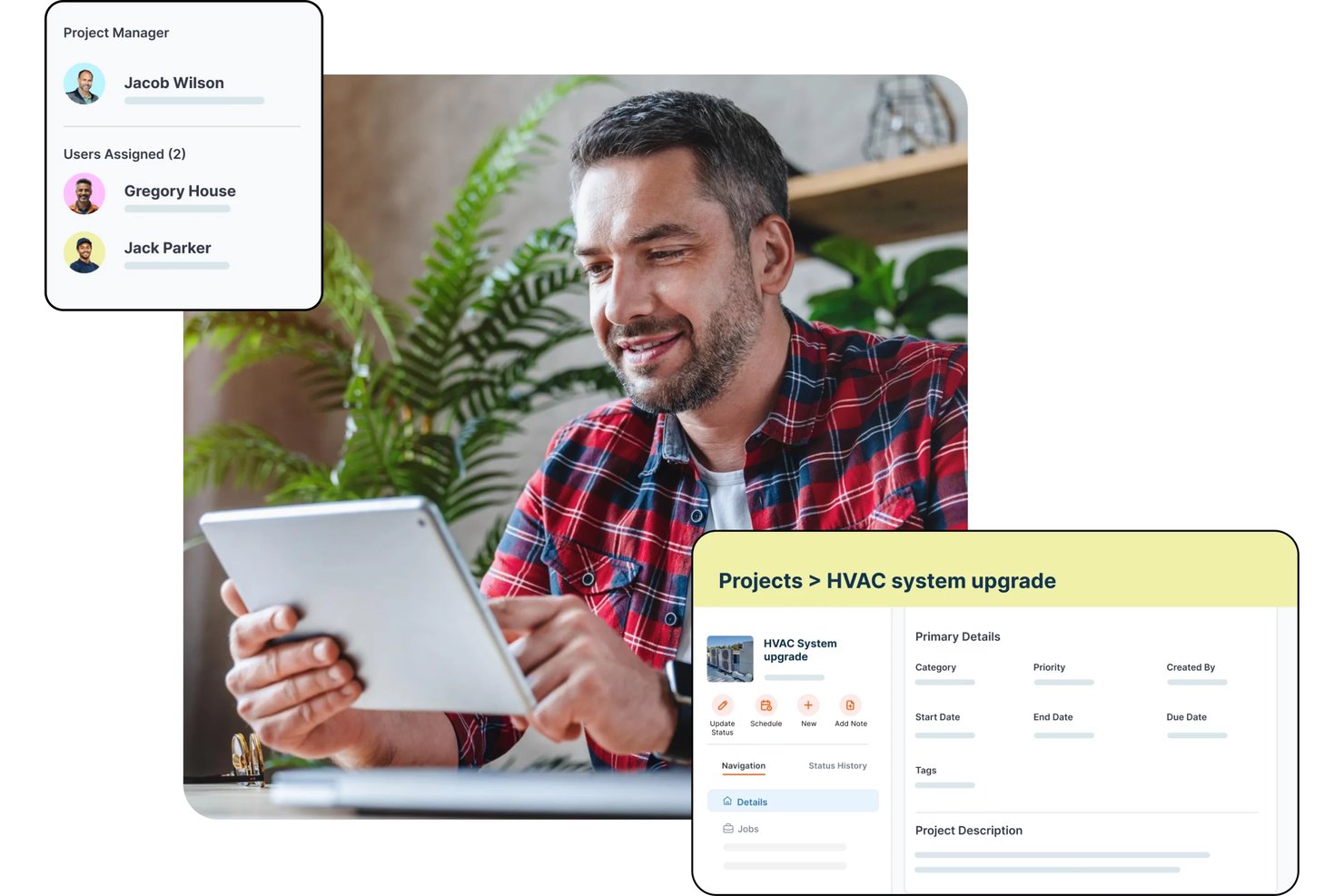
Zuper is a field service management platform for HVAC businesses that covers AI-powered dispatching, crew scheduling, GPS tracking, work order management, job costing, estimating, and preventive maintenance.
Who Is Zuper Best For?
Zuper is a strong fit for HVAC field service managers and dispatchers who need real-time crew visibility and skill-based job assignment across multiple technicians or territories.
Why I Picked Zuper
I picked Zuper as one of the best because its dispatch board and real-time GPS crew tracking are genuinely built for HVAC operations, not bolted on. I like that you can see live technician locations alongside job availability and drag-and-drop rescheduling in one view, so assigning the nearest qualified tech to an emergency call takes seconds. Skill-based and proximity-based assignment means the right person goes to the right job, and customers get automated ETA updates without anyone making a manual call.
Zuper Key Features
- Job costing: Track labor, parts, and expenses against estimated budgets with a live profitability breakdown that updates as time logs and line items change.
- Progressive invoicing: Generate milestone-based or scheduled draft invoices tied to a fixed project amount or time-and-materials totals.
- Asset inspection forms: Configure custom forms with media, barcode-scan, signature, and data-table fields that technicians complete before marking a job done.
- Preventive maintenance scheduling: Set recurring maintenance records to auto-generate jobs daily, weekly, monthly, or on a custom interval ahead of each service date.
Zuper Integrations
Zuper lists 60+ integrations, including ABC Supply, QuickBooks, Salesforce, HubSpot, Xero, Zoho Books, Stripe, and Microsoft Teams. REST API, webhooks, and an MCP server support custom integrations.
Pros and Cons
Pros:
- Drag-and-drop scheduling organizes technician assignments
- Mobile work orders keep office teams informed
- GPS dispatch helps coordinate field crews
Cons:
- Mobile updates can sync slowly
- Estimating tools may feel limited

Best for all-in-one contractor job costing
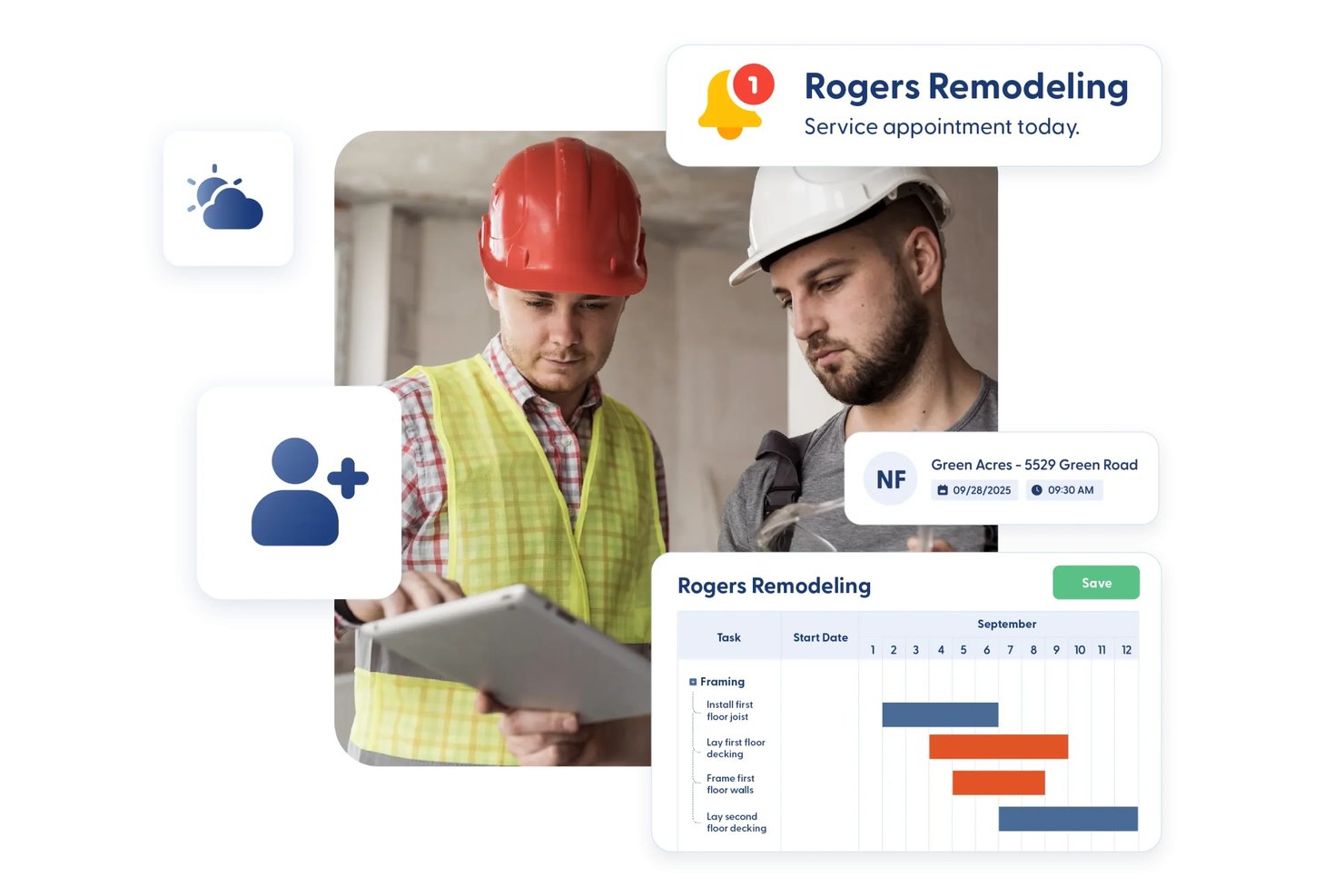
Contractor Foreman is an all-in-one construction management platform for contractors that covers estimating, job costing, scheduling, work orders, service tickets, subcontracts, and field documentation.
Who Is Contractor Foreman Best For?
Contractor Foreman is a strong fit for small to mid-sized trade contractors who need project management, estimating, and job costing in one affordable platform.
Why I Picked Contractor Foreman
I've included Contractor Foreman in my top picks because it pulls job costing, estimating, and project financials into a single platform at a price point that actually makes sense for smaller HVAC operations. I like how job-costing reports track estimated, committed, and actual costs side by side, so you can see exactly where labor or materials are drifting on an active installation job. The crew scheduling and service ticket dispatch map also let you assign techs and sequence nearby calls visually, which I find genuinely useful for day-to-day field coordination.
Contractor Foreman Key Features
- Service ticket dispatch map: A visual map plots open service tickets geographically so you can sequence nearby calls and assign techs without switching tools.
- Change order mobile signing: Clients and owners can sign change orders directly in the iOS or Android app, with the signature included on the generated PDF.
- Permit and inspection tracking: Permits log dates, fees, status, and paperwork, with linked inspection records showing who completed each inspection and when.
- Subcontracts module: Dedicated subcontract records capture scope, terms, retainage, billing, and payments separately from work orders.
Contractor Foreman Integrations
Contractor Foreman lists 50+ integrations, including native connections with QuickBooks Online, QuickBooks Desktop, Google Calendar, Outlook Calendar, Gusto, CompanyCam, and Stripe. Xero is listed for mid-2026, and Zapier is also supported.
Pros and Cons
Pros:
- Dispatch map groups nearby service calls
- Field photos and logs reduce paperwork
- Estimated, committed, and actual cost visibility
Cons:
- Cost reports need more detail
- Mobile app lags on large projects

Best for small HVAC shops managing field ops
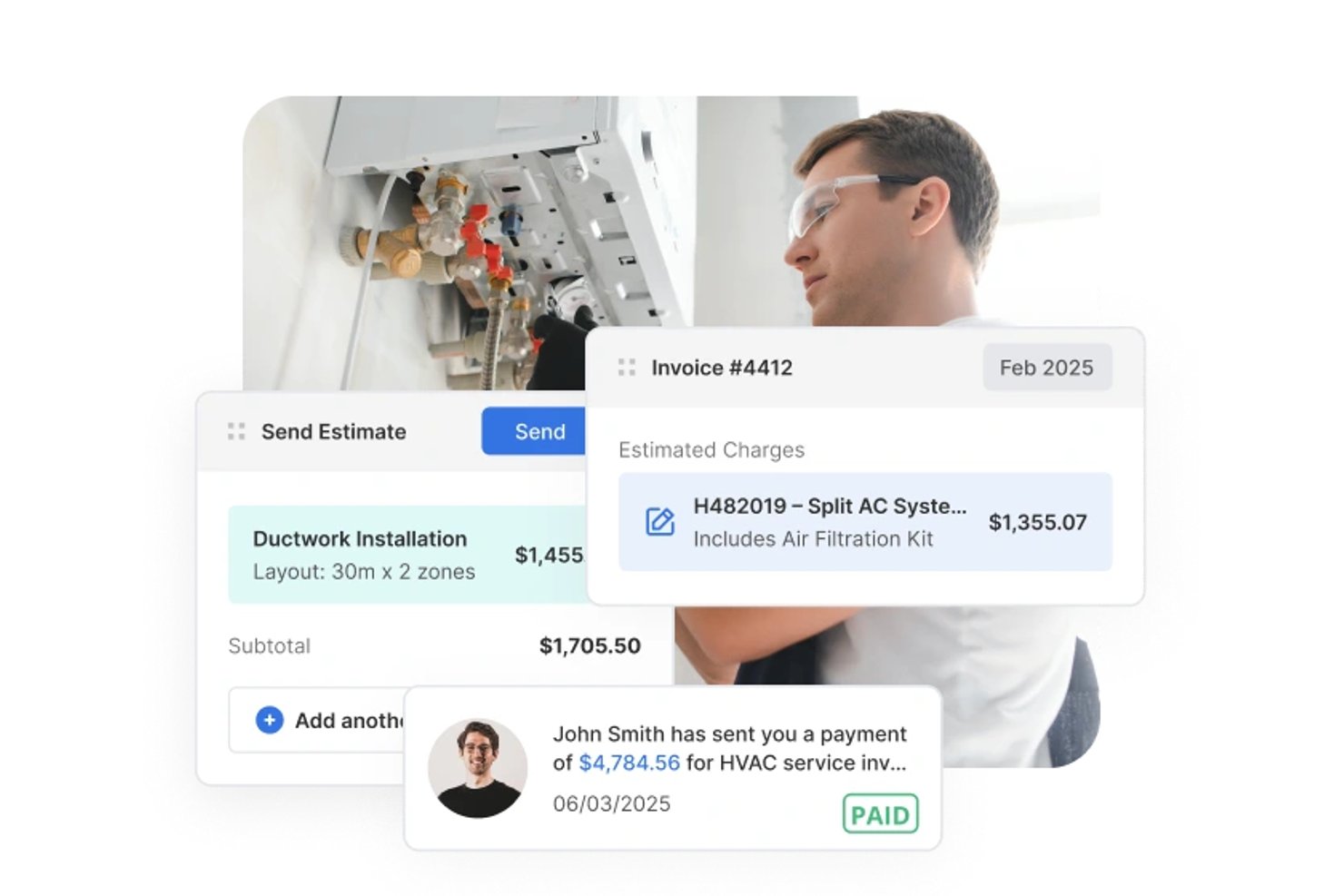
Service Fusion is a field service management platform built for HVAC and other trade contractors, covering scheduling, dispatch, estimating, work order management, invoicing, and mobile field access.
Who Is Service Fusion Best For?
Service Fusion fits small HVAC contractors who need to manage scheduling, dispatch, and field operations without paying per user.
Why I Picked Service Fusion
I picked Service Fusion as one of the best because it handles the full dispatch cycle that small HVAC shops actually live inside every day: the Dispatch Grid lets you assign jobs to technicians, drag and drop as calls come in, and push job details straight to the mobile app. I also like that technicians can capture notes, photos, and signatures in the field and process payment on the spot, keeping the office loop closed without extra back-and-forth. Status rules can require a photo or signature before a job is marked complete, which adds real accountability without a manual checklist.
Service Fusion Key Features
- Estimate options: Build and send a single estimate with up to five named alternatives that customers can review, accept, and sign online.
- Purchase order tracking: Create POs directly from a job, email them to vendors, and track receipt and closure status within the same job record.
- Customer service agreements: Set up agreement records with effective dates and member pricing that automatically applies to products and services on jobs and invoices.
- Offline mobile access: The mobile app switches to offline mode automatically, letting technicians view job details, add notes, photos, and checklists without a connection.
Service Fusion Integrations
Service Fusion offers native integrations with QuickBooks Online and QuickBooks Desktop, plus partner connections including Gusto, Coast, and PaySimple. It also provides an API for custom integrations, although its total integration count isn't documented.
Pros and Cons
Pros:
- Work orders and billing stay together
- Estimate alternatives help customers compare HVAC scopes
- Dispatch board keeps technicians and jobs aligned
Cons:
- Manual cost entry weakens budget tracking
- Mobile app can lag in the field


Fieldpoint is a field service management platform built for commercial contractors, with tools covering work order management, job costing, scheduling and dispatch, preventive maintenance contracts, mobile field access, and quoting.
Who Is Fieldpoint Best For?
Fieldpoint is a strong fit for commercial HVAC contractors who need to manage both project installations and ongoing service work within a single platform.
Why I Picked Fieldpoint
I picked Fieldpoint as one of the best because field service automation is where it genuinely excels—dispatchers can manage a mixed workload of HVAC installs, preventive maintenance calls, and break/fix jobs from a single drag-and-drop scheduling board, with real-time technician GPS locations visible alongside skills and certifications. I also like that preventive maintenance contracts automatically trigger work orders, inspections, and renewal reminders without manual follow-up. That kind of hands-off automation keeps recurring service commitments from slipping through the cracks on busy commercial accounts.
Fieldpoint Key Features
- Quote-to-job conversion: Approved quotes and spend plans convert directly into work orders, contracts, or projects, carrying over tasks, parts, and contract lines.
- Subcontractor management: Assign and dispatch subcontractors based on proximity and satisfaction rating, with vendor quotes, pricing agreements, and invoicing managed in one place.
- Equipment and serial tracking: Equipment records store make, model, serial number, warranty data, and manufacturer, with full history accessible to technicians in the field.
- Job costing with profit forecasting: Track labor, parts, and costs against estimates in real time, and add expected parts and hours to future work orders to forecast profit.
Fieldpoint Integrations
Fieldpoint offers native integrations with Microsoft Dynamics, Microsoft Dynamics 365, Microsoft Dynamics GP, Microsoft Business Central, CMiC, NetSuite, QuickBooks, WorkMarket, and ServiceChannel. Its Open API and Fieldpoint Data Transfer Service support custom integrations.
Pros and Cons
Pros:
- Automates preventive maintenance work orders
- Tracks labor and materials against estimates
- Schedules project crews alongside service calls
Cons:
- Mobile data transfers falter with weak connectivity
- Rollouts can require substantial staff effort

Best for HVAC maintenance agreement management
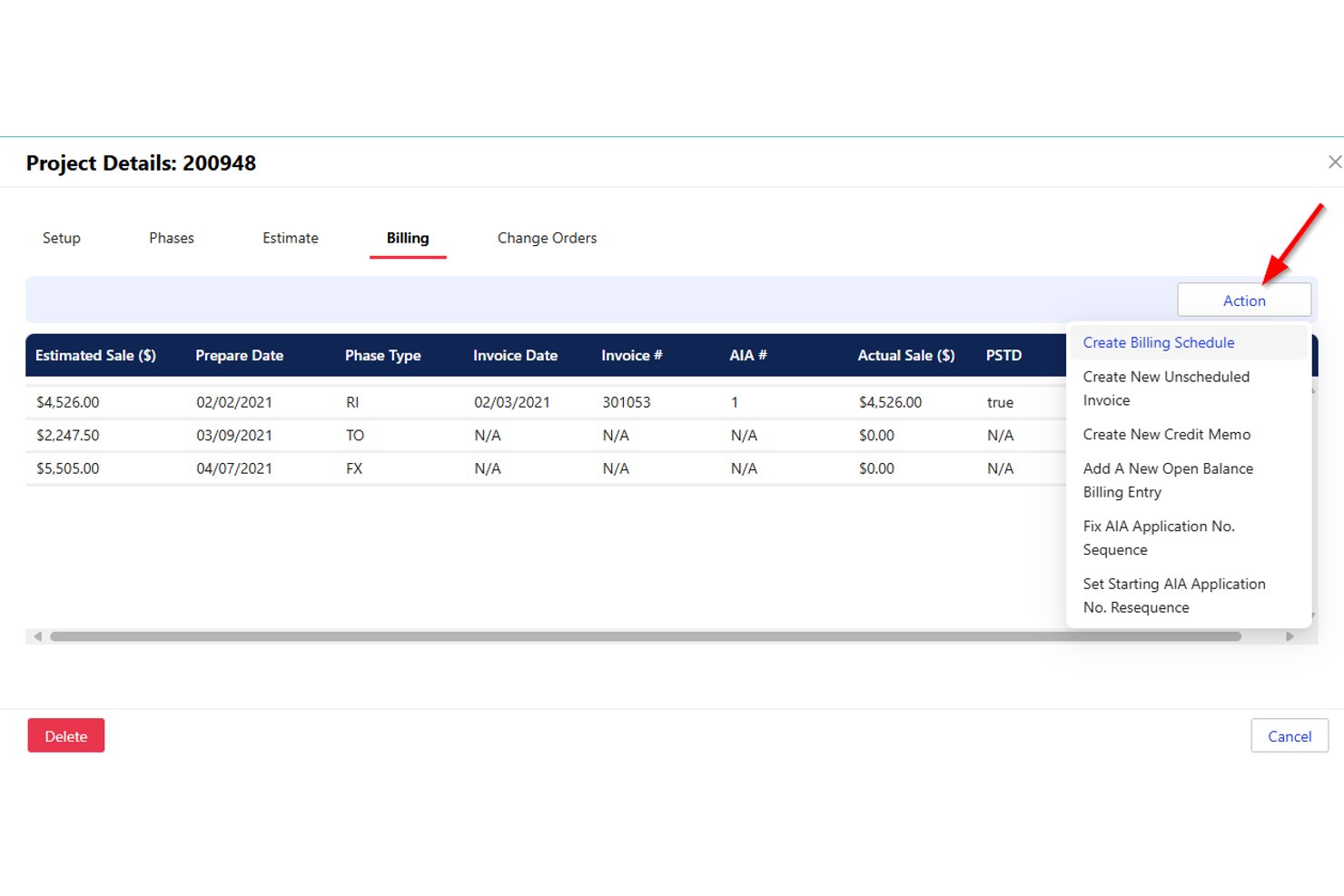
Successware is a cloud-based field service management platform built for home-service contractors, offering scheduling, dispatch, job costing, maintenance agreement management, and integrated accounting tools.
Who Is Successware Best For?
Successware is a strong fit for home-service contractors—particularly HVAC businesses—that need maintenance agreement management, dispatch, and built-in accounting in one platform.
Why I Picked Successware
Successware earns its spot on my shortlist because of how well its Agreement Manager handles the full maintenance agreement lifecycle, from scheduling recurring visits and processing periodic billings to managing renewals automatically. I like that open agreement visits convert directly into dispatchable jobs, so nothing slips through the cracks between your agreement records and your actual schedule. The platform also tracks equipment by serial number, model, and warranty at each service location, which gives technicians the context they need before they arrive on site.
Successware Key Features
- Drag-and-drop dispatch board: Assign and reschedule technicians across daily and weekly views using skill-based filtering and department grouping.
- Integrated accounting: Built-in accounts receivable, accounts payable, income statements, and balance sheets eliminate the need for a separate accounting system.
- Successware Mobile offline access: Technicians can access job data and complete field tasks without a live connection, syncing when connectivity returns.
- Equipment and warranty tracking: Service locations store equipment records by serial number, model, and warranty details for both in-house and manufacturer coverage.
Successware Integrations
Successware offers native integrations with CompanyCam, The New Flat Rate, Profit Rhino, NSPG Price Guide, ADP, QuickBooks Payroll, Ally Lending, GreenSky, PulseM, and Customer Lobby. A public API is not documented.
Pros and Cons
Pros:
- Agreement visits convert into dispatchable jobs
- Field mobile shows customer and job history
- Visual dispatch makes technician assignments clear
Cons:
- Project costing lacks overrun alerts and forecasts
- Unfinished calls require one-at-a-time rescheduling

Jobber
Best for scheduling HVAC crews end to end
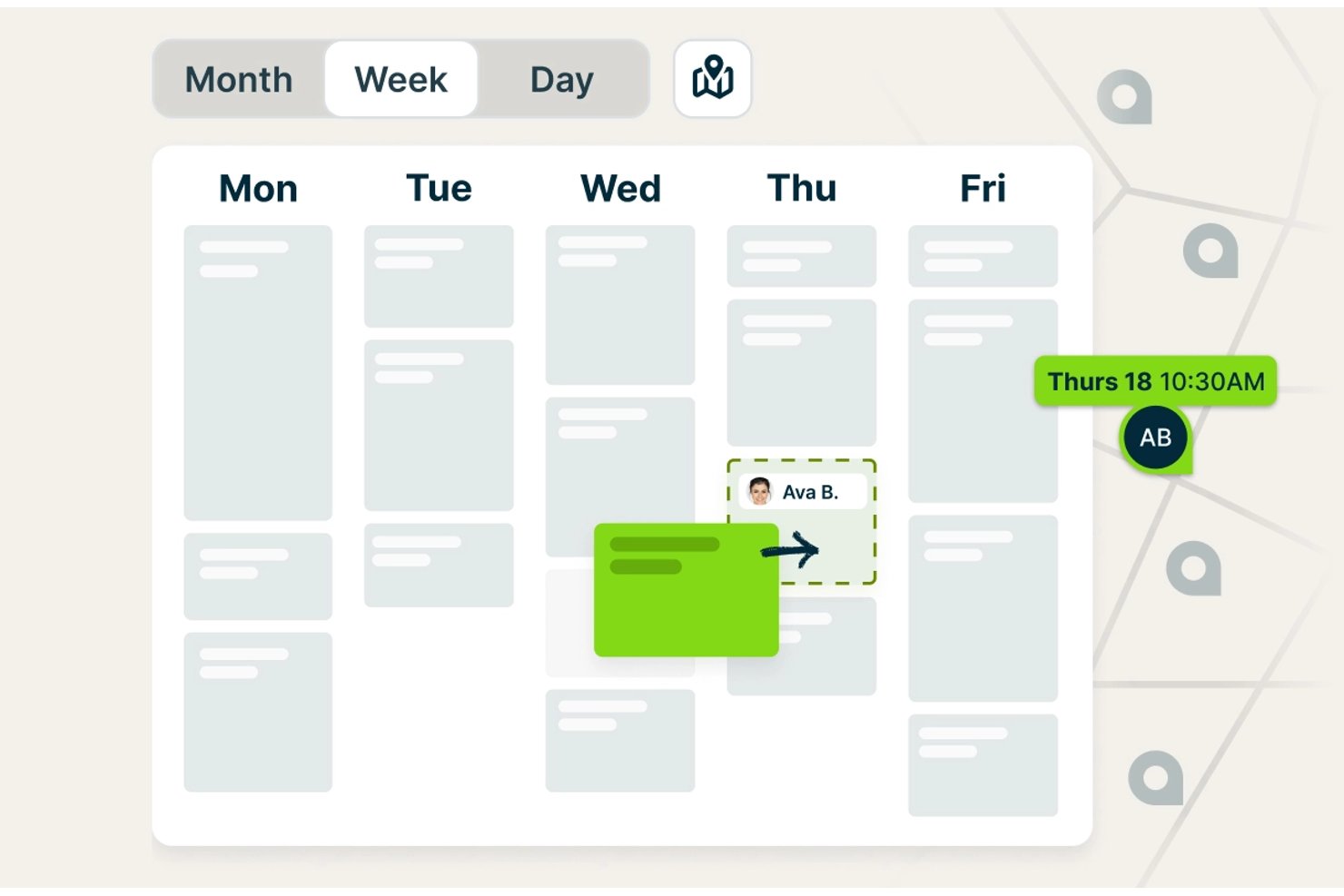
Jobber is a field service management platform built for trades businesses, combining scheduling, dispatching, estimating, job costing, invoicing, and customer communication in a single system.
Who Is Jobber Best For?
Jobber works well for small HVAC contractors and field service managers who need to handle scheduling, dispatching, quoting, and invoicing in one place without a steep learning curve.
Why I Picked Jobber
Jobber earns its spot on my shortlist because of how well it handles the full scheduling loop for HVAC crews, from assigning technicians to flagging travel-time conflicts before the day starts. I particularly like the "Find a Time" tool, which checks each tech's existing workload, working hours, and drive time simultaneously, so you're not manually cross-referencing calendars to avoid double-booking. On the Plus plan, crew scheduling lets you group techs and assign an entire crew to a job in one move.
Jobber Key Features
- Job costing: Tracks labor, materials, and expenses against each job and displays revenue, cost, profit, and margin in one view.
- QuickBooks Online sync: Syncs customer, invoice, and payment data between Jobber and QuickBooks to keep accounting records aligned.
- Online booking: Lets customers request and book appointments based on your configured services and team availability.
- Progress invoicing: Bills clients against project milestones rather than requiring a single invoice at job completion.
Jobber Integrations
Jobber’s marketplace connects 100+ tools, including QuickBooks Online, Xero, The Home Depot, Gusto, and Zapier. Its GraphQL API supports custom integrations with queries, mutations, and webhooks.
Pros and Cons
Pros:
- Mobile app gives technicians access to job details
- Approved quotes convert into jobs without re-entry
- Scheduling keeps HVAC crews and office staff coordinated
Cons:
- Job costing can double-count expenses and line items
- Field notes and photos can fail to sync

Best for trades businesses managing field ops

ServiceTitan is a field service management platform built for trade businesses that covers HVAC scheduling, dispatching, estimating, job costing, work order management, and project tracking across residential and commercial operations.
Who Is ServiceTitan Best For?
ServiceTitan suits HVAC contractors and field service businesses that need scheduling, dispatch, job costing, and project tracking in one platform for residential and commercial work.
Why I Picked ServiceTitan
ServiceTitan earns its spot on my list because it's built specifically for trade businesses, covering the full operational loop from booking through invoicing in one platform. I'm particularly drawn to its Adaptive Capacity scheduling, which automatically assigns technicians to jobs based on configured skills, zones, and shift availability, reducing the manual back-and-forth that slows down dispatch. I also like how its Budget vs. Actual reporting breaks down labor, materials, and subcontractor costs against sold estimates in real time, giving project managers clear visibility into margin before a job closes.
ServiceTitan Key Features
- Pricebook-linked estimates: Create itemized job estimates tied directly to your pricebook, with line items for services, materials, and equipment that feed into project budgets and invoicing.
- Progress billing and AIA pay applications: Bill across project phases and generate payment applications following AIA standards, supporting multi-phase commercial HVAC projects.
- Supplier catalog integration: Connect to supplier catalogs for real-time pricing and availability checks, and send electronic purchase orders directly from a project record.
- Equipment and serial number tracking: Record manufacturer, model, serial number, install date, and warranty details for installed equipment, with warranty status visible to both office staff and technicians.
ServiceTitan Integrations
ServiceTitan offers 70+ pre-built integrations and 149 Marketplace listings, including QuickBooks Online, QuickBooks Desktop, Sage Intacct, Xero, Avalara, and ABC Supply. Its V2 APIs and webhooks support custom integrations.
Pros and Cons
Pros:
- Project records unite jobs, costs, and documents
- Adaptive Capacity assigns technicians by skills
- Budget-versus-actual reporting tracks project margins
Cons:
- Offline project access has notable gaps
- Project setup and workflows take effort
Best for small HVAC service businesses
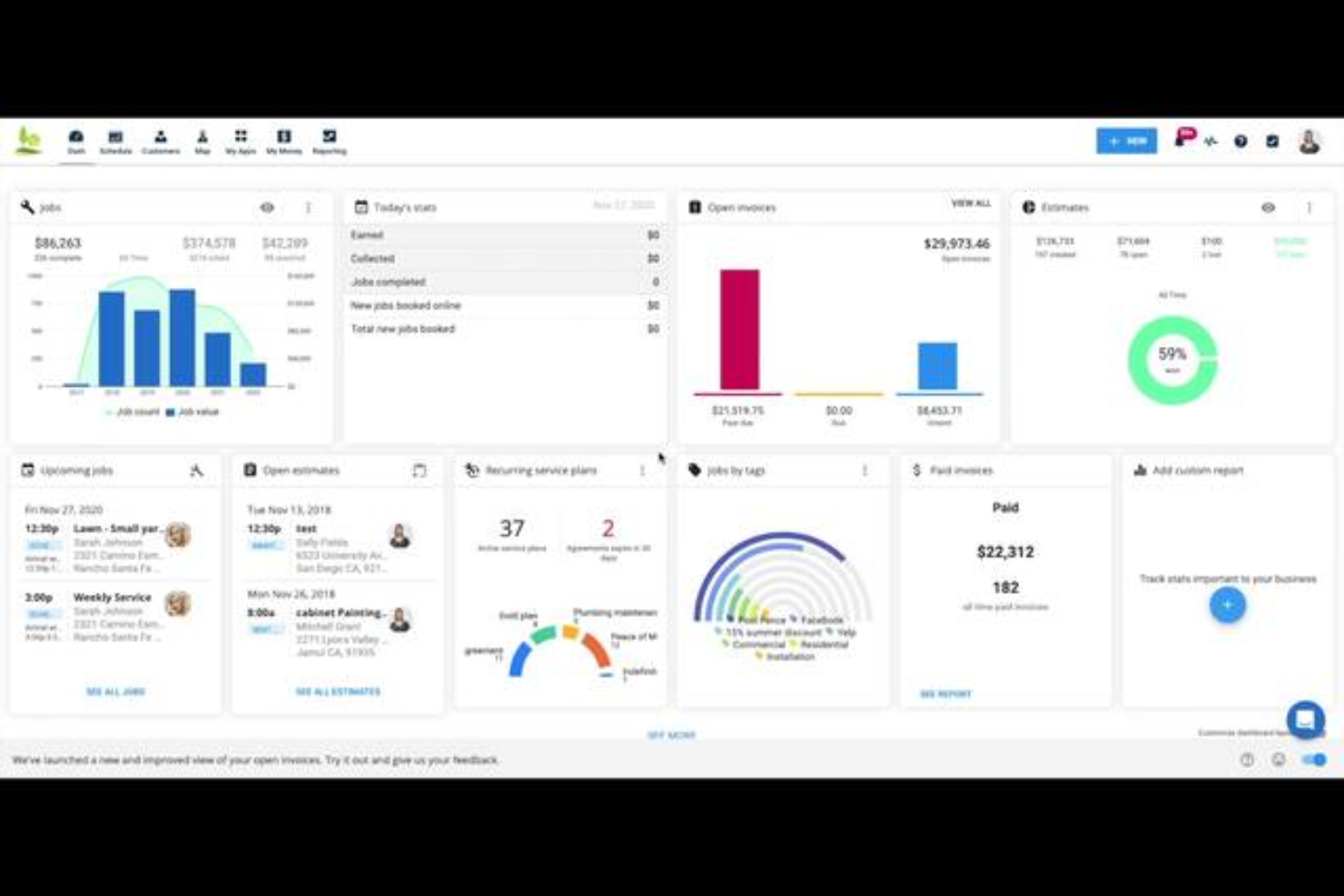
Housecall Pro is a field service management platform for home service businesses, including HVAC contractors, that covers scheduling, dispatching, work order management, job costing, estimating, and recurring maintenance agreements.
Who Is Housecall Pro Best For?
Housecall Pro is a strong fit for small HVAC businesses that need scheduling, dispatching, and invoicing in one place without a steep learning curve.
Why I Picked Housecall Pro
I've included Housecall Pro in my top picks because it gives small HVAC businesses a single place to run the day-to-day without a complicated setup. I particularly like how scheduling works: you drag unscheduled jobs onto the calendar, see your whole team's availability at a glance, and dispatch from the same screen. Job Costing then tracks labor using fully loaded employee rates against actual time logged, so you always know where a job stands on margin.
Housecall Pro Key Features
- Property profile: Records customer equipment details—including make, model, serial number, and install date—and links them directly to jobs.
- Purchase orders: Creates and tracks material orders through statuses like Draft, Issued, Confirmed, and Received, with vendor association and notes.
- Recurring service plans: Schedules maintenance visits and automates recurring billing, with automatic card-on-file charges per plan frequency.
- Employee GPS tracking: Monitors technician locations during business hours and displays routes and estimated travel times on a map view.
Housecall Pro Integrations
Housecall Pro offers documented integrations with QuickBooks Online and Reece, plus marketplace integrations with CompanyCam, MeasureQuick, Profit Rhino, and Zapier. Its public API is available on the Max plan for custom integrations.
Pros and Cons
Pros:
- Reviewers praise estimates-to-payment workflows
- Job costing tracks labor and material margins
- Drag-and-drop dispatch shows crew availability
Cons:
- Change orders lack linked cost tracking
- Long retrofit projects outgrow service-job workflows

Best for HVAC service dispatch and scheduling

FieldEdge is a field service management platform built for HVAC contractors that covers dispatching, scheduling, work order management, quoting, invoicing, and customer records.
Who Is FieldEdge Best For?
FieldEdge suits HVAC service contractors with multiple trucks and technicians who need dispatch, scheduling, and field work order management in one place.
Why I Picked FieldEdge
FieldEdge earns its spot on my list because its dispatch board is genuinely built for service-call operations: I can drag an unassigned work order onto a technician's time slot in seconds, with skill, location, and availability filtering doing the heavy lifting. I also like that technicians can update work orders, attach job photos, and collect payment on-site through the mobile app, keeping the office and field in sync without a separate tool. The real-time status tracking (pending, traveling, working, completed) gives dispatchers a live view of every truck on any given day.
FieldEdge Key Features
- Pricebook and flat-rate pricing: Lets you build quotes using a managed pricing database with standardized rates for consistent job pricing across technicians.
- Service agreements: Supports basic and advanced recurring service agreements with automated alerts and reminders to help manage maintenance contracts.
- QuickBooks synchronization: Syncs customer records, invoices, payments, parts requests, expenses, and time entries between FieldEdge and QuickBooks Online or Desktop.
- Multi-option quoting: Lets technicians or office staff present customers with multiple quote options from the field or office before a job is scheduled.
FieldEdge Integrations
FieldEdge offers native integrations with QuickBooks Online, QuickBooks Desktop, Xplor Pay, and FieldEdge Flat Rate, plus marketplace integrations including FleetSharp. It also provides an API for custom integrations.
Pros and Cons
Pros:
- Field quotes and invoicing support job completion
- Work orders link customer and service histories
- Dispatch board organizes daily service calls
Cons:
- Mobile sync can lag in poor reception
- Reporting offers limited project cost visibility

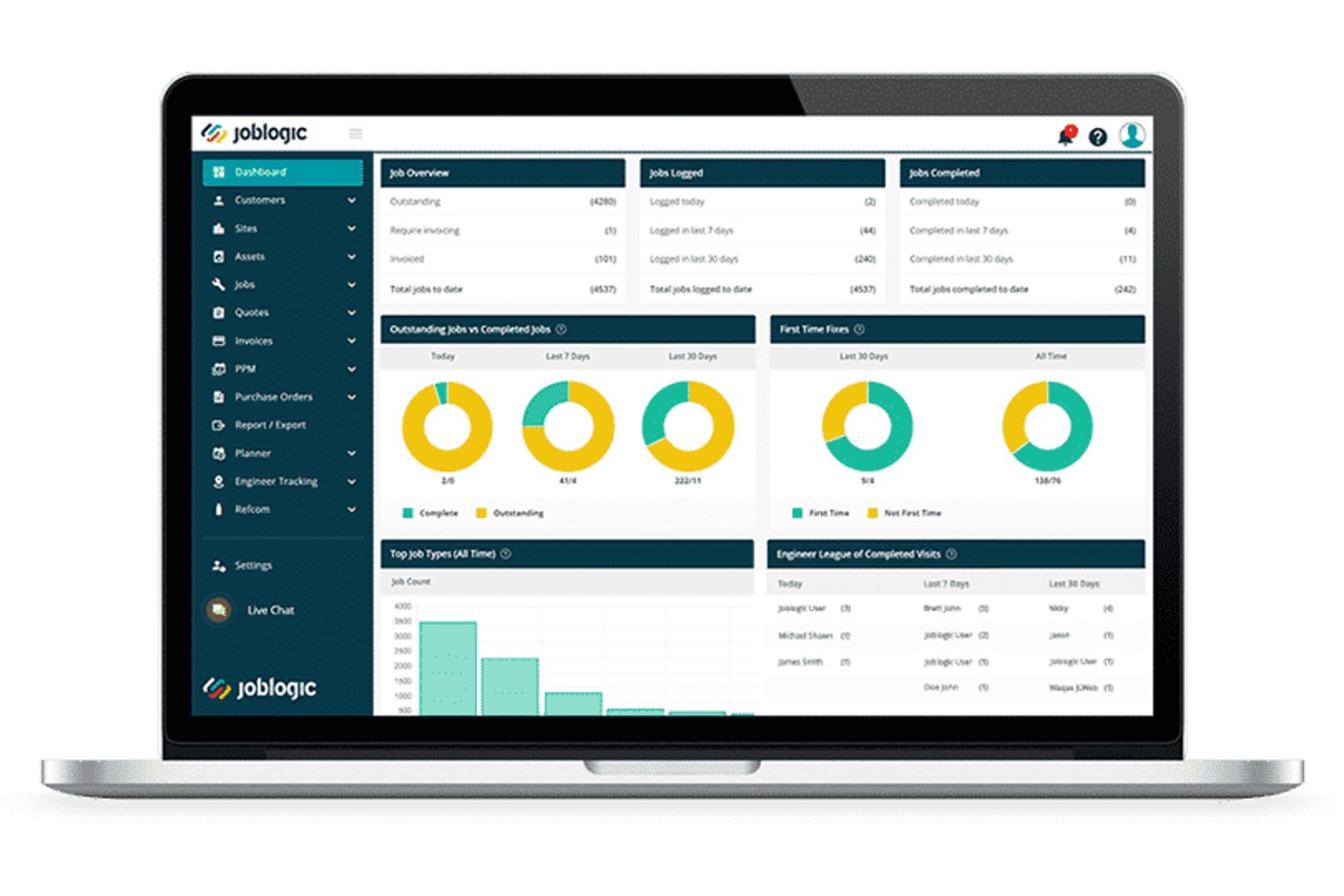
Joblogic is a cloud-based field service management platform built for HVAC and mechanical contractors, covering job scheduling, estimating, PPM contracts, F-Gas compliance, job costing, and field mobile workflows.
Who Is Joblogic Best For?
Joblogic suits growing HVAC and mechanical service contractors who need to manage F-Gas compliance, PPM contracts, and multi-engineer scheduling from a single platform.
Why I Picked Joblogic
Joblogic earns its spot on my shortlist because of how tightly it connects F-Gas compliance, PPM contracts, and project costing in one place. I love that the HVAC Industry Pack gives engineers access to 26 trade-specific forms, including refrigeration maintenance and gas safety records, directly from the mobile app on site. On the project side, I can track estimated versus committed costs, assign subcontractors as named resources, and manage scope changes through formal quote variations without losing the original project quote.
Joblogic Key Features
- Dynamic Scheduler: Automatically recommends engineer routes and assignments based on location, skills, availability, and job priority.
- Asset PPM scheduling: Sets service triggers by frequency or meter readings, with per-asset or per-contract billing options.
- Mobile engineer tracking: Shows live GPS locations and historical journeys for all engineers directly in the back-office Planner.
- Sub-Contractor Portal: Assigns jobs to subcontractors and tracks their progress from a central system.
Joblogic Integrations
Joblogic offers 70+ marketplace apps, modules, and integrations, including native connections to Xero, QuickBooks, Sage, AccountsIQ, FreeAgent, KashFlow, Stripe, and PartsArena. It also supports Microsoft 365, Zapier, and API access for custom integrations.
Pros and Cons
Pros:
- Dispatch views help assign engineers quickly
- PPM tools handle high-volume maintenance contracts
- HVAC compliance forms cover refrigeration and F-Gas
Cons:
- Custom reports can require exports and workarounds
- Mobile photo uploads can lag or fail
Annen programvare for prosjektstyring innen HVAC
\u003cspan style=\u0022font-weight: 400;\u0022\u003eHer er noen flere alternativer for programvare for prosjektstyring innen HVAC som ikke kom med på kortlisten min, men som likevel er verdt å se nærmere på:\u003c/span\u003e
- AnyDB
For configurable HVAC field records
- Foundation
For mechanical contractors with job costing
- Kickserv
For estimate-to-job workflow on service calls
- ServiceTrade
For commercial HVAC change order tracking
- Simpro
For end-to-end HVAC job costing
- Knowify
For project and service work in one
- FieldPulse
For growing HVAC teams managing field ops
- BuildOps
For end-to-end commercial mechanical jobs
- Buildertrend
For construction project cost tracking
- Commusoft
For HVAC service contract management


How I Evaluate HVAC Project Management Software
I split my evaluation into baseline requirements—like job scheduling and field-to-office mobile access—and differentiators that separate the best tools from the rest.
Core Functionality (Table Stakes For This List)
When I'm selecting tools for my list, I rank each one on a scale from 0 (does not offer the functionality) to 5 (excels in this area) for each core functionality listed below. Then, I calculate the tool's total score into a percentage. Each tool needs to achieve a minimum total score of 65% to be considered for inclusion.
- HVAC Job Scheduling & Dispatch: I look for drag-and-drop scheduling that lets you assign crews to multiple job sites and see technician availability at a glance.
- Estimating & Bidding Tools: Each tool should support building HVAC-specific estimates with line items for equipment, ductwork, and labor units—not just generic quote templates.
- Job Costing & Budget Tracking: Real-time cost tracking against the original bid matters here, especially the ability to compare labor and material actuals to estimates mid-project.
- Field-to-Office Mobile Access: I evaluate whether field techs can pull up job details, log time, capture photos, and submit updates from the job site through a dedicated mobile app.
- Work Order & Service Management: The platform should handle the full work order lifecycle—creation, assignment, status tracking—for installs, maintenance calls, and warranty service.
- Project Document Management: I check for centralized storage of permits, equipment specs, warranties, and customer records tied directly to specific HVAC jobs or service addresses.
Once I have a list of tools that meet this criteria, I consider what sets each platform apart.
Differentiating Factors (What Sets Vendors Apart)
Here's how I compare and contrast different vendors:
Standout Features
Preventive maintenance contracts are a major differentiator—I look for tools that automate recurring PM schedules and billing, since these agreements drive steady revenue for HVAC businesses. Equipment and asset tracking matters too, especially when techs need to pull up a unit's serial number, install date, and full service history on-site. I also evaluate how each platform handles subcontractor workflows, from assigning sheet metal or controls subs to tracking their costs against the project budget.
Beyond Features
Accounting integrations are one of the first things I check. HVAC contractors live in QuickBooks or Sage, so two-way sync for invoices and job costs saves hours of double entry each week. Scalability matters just as much—a three-truck residential shop and a 50-crew commercial mechanical contractor need very different setups. I evaluate whether pricing tiers and multi-location support grow with the business. Compliance tools also stand out, particularly EPA refrigerant tracking, technician certification management, and built-in OSHA safety checklists that keep field crews audit-ready.
Slik velger du programvare for prosjektstyring innen HVAC
Det er lett å gå seg vill i lange funksjonslister og kompliserte prismodeller. For å hjelpe deg med å holde fokus mens du går gjennom den unike prosessen med å velge programvare, får du her en sjekkliste over faktorer du bør ha i mente:
| Faktor | Hva du bør vurdere |
| Skalerbarhet | Vil programvaren vokse med virksomheten din? Vurder om den støtter et økende antall brukere og prosjekter uten å bli tregere eller kreve kostbare oppgraderinger. |
| Integrasjoner | Kan den kobles til de eksisterende verktøyene dine? Se etter programvare som integreres med CRM-systemet, regnskapssystemene og IoT-enhetene dine for å effektivisere arbeidsflyter og datadeling. |
| Tilpasningsmuligheter | Kan du tilpasse programvaren til prosessene dine? Sørg for at du kan tilpasse instrumentpaneler, rapporter og arbeidsflyter slik at de samsvarer med teamets spesifikke behov. |
| Brukervennlighet | Er grensesnittet intuitivt for alle brukere? Et komplekst system kan bremse innføringen. Test demoversjonen for å sikre at den er brukervennlig for både teknisk kyndige og mindre teknisk kyndige medarbeidere. |
| Implementering og innføring | Hvor smidig er overgangen til den nye programvaren? Vurder opplæringsmateriellet, støtten under oppsettet og tiden som kreves for å implementere systemet fullt ut. |
| Kostnad | Finnes det skjulte gebyrer eller trinnvis prising? Gå gjennom prisstrukturen for eventuelle tilleggskostnader for funksjoner, støtte eller oppgraderinger, slik at du unngår uventede utgifter. |
| Sikkerhetstiltak | Beskytter den dataene dine? Se etter solide sikkerhetstiltak som kryptering, regelmessige oppdateringer og samsvar med regler for databeskyttelse for å sikre sensitiv informasjon. |
| Tilgjengelig kundestøtte | Er det enkelt å få hjelp når du trenger det? Sørg for at leverandøren tilbyr pålitelige støttekanaler, inkludert chat, telefon og e-post, og sjekk svartidene deres. |
Hva er programvare for prosjektstyring innen HVAC?
Programvare for prosjektstyring av HVAC-prosjekter er et verktøy som er utviklet for å hjelpe med å administrere og koordinere HVAC-prosjekter, inkludert planlegging, ressursfordeling og kommunikasjon. Disse verktøyene brukes vanligvis av HVAC-entreprenører, prosjektledere og teknikere for å øke effektiviteten og produktiviteten. Funksjoner for planlegging, budsjettering og rapportering hjelper med å organisere oppgaver, følge med på kostnader og analysere prosjektets fremdrift. Alt i alt gir disse verktøyene en sentralisert plattform for å administrere HVAC-prosjekter mer effektivt.
Funksjoner i programvare for prosjektstyring av HVAC-prosjekter
Når du velger programvare for prosjektstyring av HVAC-prosjekter, bør du se etter følgende viktige funksjoner:
- Planlegging: Lar deg planlegge og organisere oppgaver og avtaler, slik at prosjektet gjennomføres i tide.
- Ressursfordeling: Hjelper med å tildele og administrere ressurser effektivt, slik at overbooking unngås og effektiviteten ivaretas.
- Budsjettoppfølging: Følger med på prosjektutgifter og holder økonomien under kontroll for å unngå overskridelser.
- Rapportering: Gir innsikt gjennom detaljerte rapporter som hjelper med å analysere prosjektets resultater og ta velinformerte beslutninger.
- Mobil tilgang: Gjør det mulig for teknikere å få tilgang til prosjektdetaljer og oppdatere status underveis, noe som forbedrer kommunikasjonen ute i felten.
- Kundeadministrasjon: Holder oversikt over kundeinteraksjoner og historikk, noe som bidrar til sterke relasjoner og gjentatte oppdrag.
- Lagervarer: Følger med på deler og utstyr, slik at du har det du trenger til hvert prosjekt.
- Integrasjonsmuligheter: Kobler sammen eksisterende verktøy som CRM- og regnskapssystemer for å effektivisere arbeidsflyten.
- Oppgaveadministrasjon: Organiserer oppgaver og ansvarsområder, slik at det blir enklere å følge fremdriften og overholde tidsfrister.
- Sikkerhetstiltak: Beskytter sensitive data med kryptering og overholdelse av personvernregelverk.
Fordeler med programvare for prosjektstyring av HVAC-prosjekter
Implementering av programvare for prosjektstyring av HVAC-prosjekter gir flere fordeler for teamet og virksomheten din. Her er noen av fordelene du kan se frem til:
- Forbedret effektivitet: Automatiserer planlegging og oppgaveadministrasjon, slik at teamet kan fullføre prosjekter raskere og med mindre innsats.
- Kostnadskontroll: Følger med på budsjetter og utgifter, slik at du får en tydelig oversikt over økonomien og kan unngå overskridelser.
- Forbedret kommunikasjon: Tilrettelegger for oppdateringer i sanntid og mobil tilgang, slik at alle har den samme informasjonen, enten de er på kontoret eller ute i felten.
- Bedre ressursstyring: Administrerer ressursfordelingen for å sikre optimal bruk av personell og materialer, og reduserer dermed svinn og forsinkelser.
- Økt kundetilfredshet: Holder kundeopplysninger organisert og tilgjengelige, noe som legger til rette for bedre service og sterkere relasjoner.
- Datadrevne beslutninger: Gir detaljert rapportering og analyse, slik at du kan ta velinformerte beslutninger basert på prosjektets faktiske resultater.
- Sikkerhet: Beskytter sensitiv informasjon med robuste sikkerhetstiltak og sikrer overholdelse av standarder for databeskyttelse.
Kostnader og priser for programvare for prosjektstyring av HVAC-prosjekter
Når du velger programvare for prosjektstyring av HVAC-prosjekter, må du forstå de ulike prismodellene og abonnementene som er tilgjengelige. Kostnadene varierer basert på funksjoner, teamstørrelse, tillegg og mer. Tabellen nedenfor oppsummerer vanlige abonnementer, gjennomsnittsprisene deres og typiske funksjoner som er inkludert i programvareløsninger for prosjektstyring av HVAC-prosjekter:
Sammenligningstabell for abonnementer for programvare for prosjektstyring av HVAC-prosjekter
| Abonnementstype | Gjennomsnittspris | Vanlige funksjoner |
| Gratisabonnement | $0 | Grunnleggende planlegging, oppgaveadministrasjon og begrenset rapportering. |
| Personlig abonnement | $5-$25/bruker/måned | Planlegging, oppgaveadministrasjon, rapportering og mobil tilgang. |
| Bedriftsabonnement | $30-$60/ bruker/måned | Avansert planlegging, budsjettering, teamsamarbeid og kundeadministrasjon. |
| Storbedriftsabonnement | $75-$150/ bruker/måned | Tilpassede integrasjoner, avansert sikkerhet, dedikert brukerstøtte og omfattende analyse. |
Vanlige spørsmål om prosjektstyringsprogramvare for HVAC-prosjekter
Her er noen svar på vanlige spørsmål om prosjektstyringsprogramvare for HVAC-prosjekter:
Hvordan kan prosjektstyringsprogramvare for HVAC-prosjekter forbedre kommunikasjonen i teamet?
Prosjektstyringsprogramvare for HVAC-prosjekter forbedrer kommunikasjonen i teamet ved å tilby en sentralisert plattform for deling av prosjektoppdateringer, dokumenter og tidsplaner. Teamet ditt får tilgang til sanntidsinformasjon, noe som reduserer misforståelser og sikrer at alle er samkjørte. Den gjør det også enkelt å sende meldinger og samarbeide, uavhengig av hvor man befinner seg.
Hva bør du se etter i prosjektstyringsprogramvare for HVAC-prosjekter?
Når du velger prosjektstyringsprogramvare for HVAC-prosjekter, bør du vurdere funksjoner som planlegging, budsjettoppfølging, mobiltilgang og verktøy for kostnadsberegning og tilbud. Sørg for at den integreres med verktøyene du allerede bruker, og at den tilbyr god kundestøtte. Vurder hvor enkel den er å bruke for teamet ditt, og undersøk om den har nødvendige sikkerhetstiltak for å beskytte dataene dine.
Kan prosjektstyringsprogramvare for HVAC-prosjekter bidra til etterlevelse av krav?
Ja, prosjektstyringsprogramvare for HVAC-prosjekter kan bidra til etterlevelse av krav ved å følge opp regulatoriske krav og frister. Den kan lagre viktige dokumenter og sertifiseringer, slik at de er lett tilgjengelige ved revisjoner. Dette hjelper deg med å unngå potensielle bøter og opprettholde bransjestandarder.
Hvordan bidrar prosjektstyringsprogramvare for HVAC-prosjekter til ressursallokering?
Programvaren bidrar til ressursallokering ved å tilby verktøy for effektiv tildeling av oppgaver og styring av arbeidsbelastning. Du kan følge med på tilgjengelige ressurser og prosjektbehov, slik at personell og materialer utnyttes optimalt. Dette minimerer nedetid og forhindrer overbooking, slik at prosjektene dine holder tidsplanen.
Hvilken rolle spiller mobiltilgang i prosjektstyringsprogramvare for HVAC-prosjekter?
Mobiltilgang gjør det mulig for teamet ditt å oppdatere jobbstatus, få tilgang til prosjektdetaljer og kommunisere med kontoret mens de er ute på oppdrag. Denne fleksibiliteten forbedrer arbeidet ute i felt, siden teknikere raskt kan håndtere problemer og motta oppdateringer uten å måtte returnere til kontoret. Dette øker den generelle effektiviteten.
Hvordan støtter prosjektstyringsprogramvare for HVAC-prosjekter datadrevne beslutninger?
Programvaren støtter datadrevne beslutninger ved å tilby detaljerte rapporterings- og analyseverktøy. Du kan overvåke prosjektresultater, følge opp økonomien og identifisere trender, slik at du kan ta velinformerte beslutninger. Denne innsikten bidrar til å optimalisere prosesser og forbedre de samlede prosjektresultatene.