

10 beste plattformer for virksomhetsintegrasjon i 2026

Kortliste over de beste plattformene for virksomhetsintegrasjon


Plattformer for virksomhetsintegrasjon lar deg koble sammen alle forretningsappene, dataene og prosessene dine på tvers av ulike systemer – uten endeløs spesialkoding eller midlertidige lappeløsninger. Hvis du leter etter de beste plattformene for virksomhetsintegrasjon, trenger du sannsynligvis en løsning som bygger bro mellom de kritiske verktøyene til teamene dine, reduserer manuelt arbeid og oppfyller moderne krav til sikkerhet og skalerbarhet. Her går jeg gjennom mine beste anbefalinger for 2026, slik at du raskt kan vurdere hvilke alternativer som faktisk passer miljøet ditt, og hva som gjør hver av dem verdt oppmerksomheten din.
Hvorfor du kan stole på våre programvareanbefalinger
Teamet vårt har testet og anmeldt programvare siden 2012. Vi er selv prosjektledere, så vi vet hvor vanskelig og hvor viktig det er å velge riktig programvare.
I denne guiden har vi vurdert verktøyene gjennom praktisk testing og uavhengig research og gitt dem poeng ut fra våre utvelgelseskriterier. Vi bygger også på innsikt fra ledende eksperter i bransjen og erfarne prosjektledere.
Anmeldelsene våre bygger på vår egen redaksjonelle vurdering. De er ikke et salgsargument.
Ekspertanmeldere:
Sammenligningstabell for plattformer for virksomhetsintegrasjon
Tabellen nedenfor sammenligner prisopplysningene for mine beste utvalgte plattformer for virksomhetsintegrasjon.
| Tool | Best For | Trial Info | Price | ||
|---|---|---|---|---|---|
| 1 | Best for NetSuite users | 30-day free trial available | Pricing upon request | Website | |
| 2 | Best for distributed architecture | 30-day free trial | From $99/month | Website | |
| 3 | Best for legacy system modernization | 30-day free trial + free demo available | From $200/month (billed annually) | Website | |
| 4 | Best for Microsoft 365 environments | 30-day free trial + free plan | From $15/user/month (billed annually) | Website | |
| 5 | Best for API-led connectivity | Free trial + free demo available | Pricing upon request | Website | |
| 6 | Best for low-code automation | Free demo available | Pricing upon request | Website | |
| 7 | Best for generative AI integration | Free demo available | From $9,995/year (billed annually) | Website | |
| 8 | Best for rapid API creation | Free demo available | Pricing upon request | Website | |
| 9 | Best for SAP ecosystem connectivity | Free demo available | From $1,771/month | Website | |
| 10 | Best for data integrity and governance | Free trial available | Pricing upon request | Website |
Anmeldelser av plattformer for virksomhetsintegrasjon
Nedenfor finner du mine detaljerte sammendrag av plattformene for virksomhetsintegrasjon som kom med på kortlisten min. Anmeldelsene mine gir en detaljert gjennomgang av funksjonene, integrasjonene og de beste bruksområdene for hver plattform, slik at du kan finne den som passer best for deg.

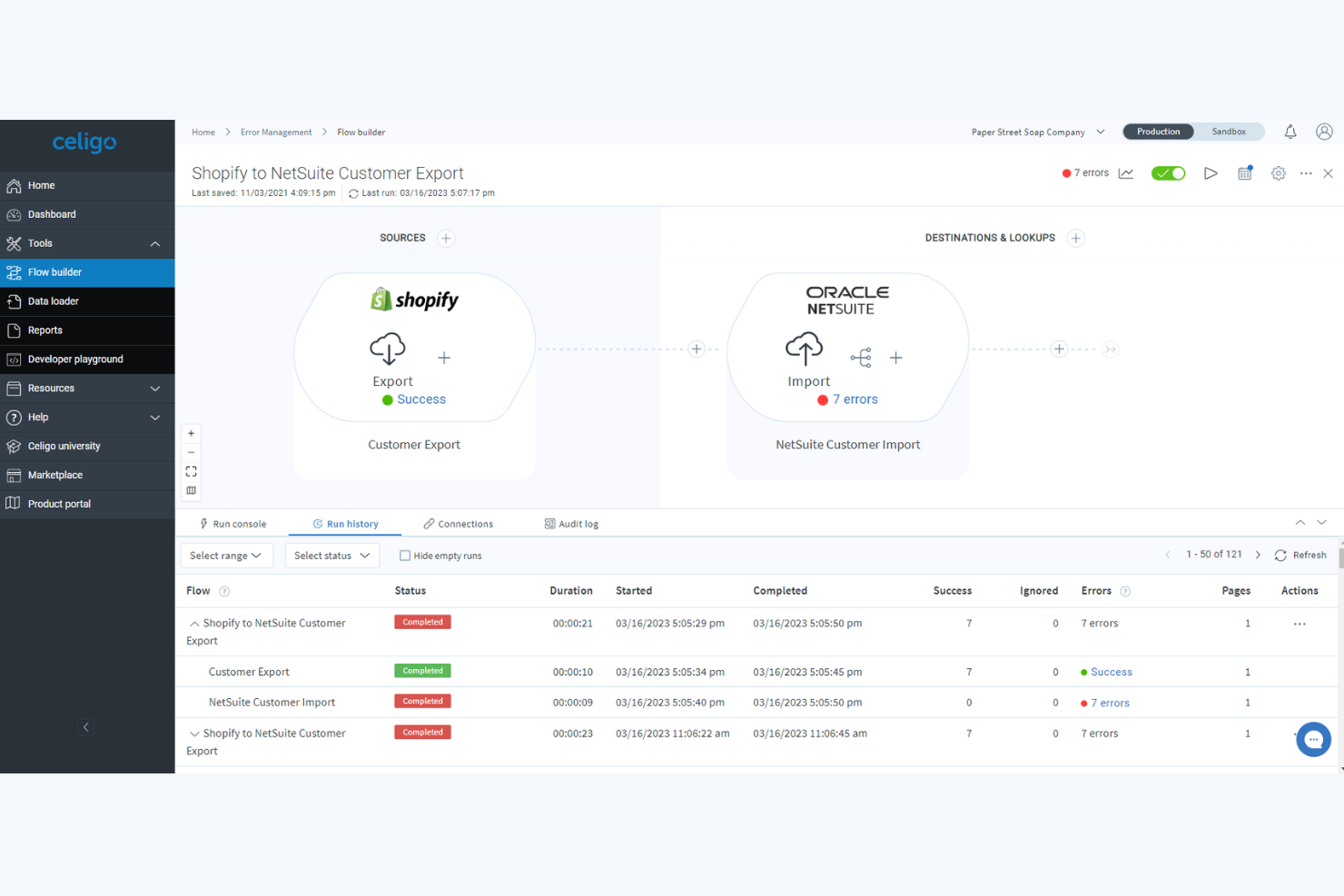
Celigo is an integration platform as a service (iPaaS) designed for automating workflows, syncing data, and managing APIs across business applications and cloud services.
Who Is Celigo Best For?
Finance and IT teams at mid-sized and large organizations that rely on NetSuite to manage core business processes.
Why I Picked Celigo
I picked Celigo as one of the best because it’s the only iPaaS I’ve used that delivers prebuilt integration apps specifically for NetSuite, such as Finance, Ecommerce, and HR connectors tailored to Suite users. My team configures real-time order, invoice, and inventory syncs through Celigo’s Integration Marketplace, and I like being able to use the Flow Builder to automate cross-system business processes without custom coding. Celigo’s focus on NetSuite-native integration lets us orchestrate complex workflows without leaving the NetSuite environment.
Celigo Key Features
- Advanced error management: Monitor, identify, and resolve integration issues with step-by-step error tracing and notifications.
- Role-based access controls: Assign user permissions to manage workflows and integrations securely across teams.
- Prebuilt EDI integrations: Use built-in connectors for electronic data interchange with trading partners.
- Integration template library: Access a selection of ready-made templates to speed up automation across frequently used business processes.
Celigo Integrations
Celigo offers native integrations with NetSuite, Salesforce, Shopify, Amazon, Zendesk, ADP, ServiceNow, Slack, Google Workspace, and Microsoft 365.
Pros and Cons
Pros:
- Supports both cloud and on-premise applications
- Built-in field mapping and transformation tools
- Deep integration with NetSuite ecosystem
Cons:
- UI performance slows with complex flows
- Limited support for less common ERP systems
New Product Updates from Celigo
Celigo Adds Shopify–Microsoft Business Central Integration Template
Celigo adds a pre-built Shopify–Microsoft Business Central integration template for D2C and B2B commerce. This helps merchants launch connected commerce workflows faster. For more information, visit Celigo’s official site.
 .

Boomi
Best for distributed architecture

Boomi is an enterprise integration platform that enables you to connect applications, automate workflows, and manage data across hybrid and multi-cloud environments with scalable, low-code tools.
Who Is Boomi Best For?
IT teams at midsize to large enterprises who need to orchestrate integrations across distributed cloud and on-premise systems.
Why I Picked Boomi
I picked Boomi as one of the best because I need an integration platform that’s designed for distributed, hybrid architectures—my team can deploy Boomi Atoms anywhere, from edge devices to public cloud. I use its runtime flexibility to orchestrate integrations in environments where applications span multiple networks and geographies. I also appreciate the platform’s low-code interface for building, managing, and monitoring distributed data flows.
Boomi Key Features
- Prebuilt connector library: Lets you connect to SaaS, on-premise, and cloud apps.
- Process library: Provides reusable, templatized integration processes for common use cases.
- API management tools: Enables you to publish, monitor, and govern APIs from a single console.
- Data mapping interface: Uses a visual tool to transform and route data between different systems.
Boomi Integrations
Boomi offers native integrations with Salesforce, NetSuite, SAP, Workday, ServiceNow, Shopify, Microsoft Dynamics 365, and QuickBooks. An API is available for custom integrations.
Pros and Cons
Pros:
- Scalable for enterprise-level data integration
- Strong visual interface for data mapping
- Supports hybrid, cloud, and on-premise deployments
Cons:
- Complex error handling for large integrations
- Limited advanced monitoring and analytics tools


IBM App Connect is an enterprise integration platform that centralizes API management, data mapping, workflow automation, and real-time connectivity with a focus on bridging cloud and on-premises systems.
Who Is IBM App Connect Best For?
IBM App Connect suits IT leaders in large enterprises who need to modernize legacy infrastructures and orchestrate data across hybrid environments.
Why I Picked IBM App Connect
I picked IBM App Connect as one of the best because it handles modernizing legacy systems with connectors to mainframes, IBM i, and cloud apps in a single flow. My team uses its drag-and-drop interface to quickly map data transformations and automate event-driven workflows without heavy custom development. I can orchestrate end-to-end integration from on-premises systems to cloud SaaS with built-in, templated solutions.
IBM App Connect Key Features
- Integrated API management: Create, expose, and manage APIs directly within the platform.
- Enterprise message flow monitoring: Get visibility into message queues and integration health.
- Prebuilt template catalog: Use and customize prebuilt integration templates for common enterprise connections.
- Lifecycle governance tools: Control versioning, deployment, and rollback of integration assets.
IBM App Connect Integrations
IBM App Connect offers native integrations with Salesforce, SAP, Microsoft Dynamics 365, Oracle, Workday, ServiceNow, Box, Amazon S3, Google Cloud Platform, and has an API for custom integrations.
Pros and Cons
Pros:
- Enforces enterprise-grade security standards
- Supports complex data transformations
- Handles high-volume integrations
Cons:
- Documentation can be inconsistent or outdated
- UI response may lag with large projects


Microsoft Power Automate is an enterprise integration platform that connects cloud and on-premises systems, automates workflows, orchestrates data movement, and supports process automation across the Microsoft ecosystem.
Who Is Microsoft Power Automate Best For?
IT teams and business users in organizations running Microsoft 365 looking to automate workflows between Microsoft and third-party apps.
Why I Picked Microsoft Power Automate
I included Microsoft Power Automate because my team relies on its deep, built-in connectivity across SharePoint, Teams, and OneDrive to automate approvals, notifications, and document workflows in Microsoft 365 environments. I use AI Builder to add document processing or sentiment analysis to flows without extra tools. I like how we can trigger automations directly from email or Teams chat and monitor flow runs all in one place.
Microsoft Power Automate Key Features
- Prebuilt connectors: Access over 1,000 ready-to-use connectors for third-party and Microsoft services.
- Process mining: Analyze and visualize business processes with built-in process mining tools.
- On-premises data gateway: Connect cloud flows to on-premises data sources securely.
- Custom API integration: Build custom connectors to integrate proprietary apps or legacy systems.
Microsoft Power Automate Integrations
Microsoft Power Automate has native integrations across the Microsoft ecosystem, including Microsoft 365 and Azure.
Pros and Cons
Pros:
- Provides AI features for document and data flows
- Automates workflows with built-in process mining
- Integrates natively with the full Microsoft ecosystem
Cons:
- Flow limits can impact high-volume automations
- Premium connectors require separate licensing

MuleSoft is an enterprise integration solution that provides API management, integration tooling, and prebuilt connectors to connect systems, apps, data, and devices across cloud and on-premise environments.
Who Is MuleSoft Best For?
Large enterprises and IT teams managing complex integrations and API gateways across multi-cloud and hybrid environments.
Why I Picked MuleSoft
I picked MuleSoft as one of the best because I’m looking for purpose-built support for API-led integration strategies. My team uses its Anypoint Platform to design, secure, and manage APIs as the foundation of every integration. With reusable assets and flexible deployment options, we can accelerate project delivery while enforcing consistency across integrations.
MuleSoft Key Features
- Prebuilt connectors library: Access hundreds of out-of-the-box connectors for leading enterprise applications, databases, and SaaS applications.
- Data transformation mapping: Use a visual, drag-and-drop interface to map and transform data between sources.
- Centralized monitoring: Track integration performance and issues with an integrated management dashboard.
- Role-based access controls: Set granular permissions for users and teams within the platform.
MuleSoft Integrations
MuleSoft offers native integrations across the Salesforce ecosystem, SAP, ServiceNow, Workday, and NetSuite. MuleSoft Anypoint Platform provides an API for custom integrations.
Pros and Cons
Pros:
- Mashup and orchestration tools for complex flows
- Strong version control for APIs
- Full lifecycle API management included
Cons:
- Requires specialized MuleSoft developer expertise
- Limited real-time monitoring customization
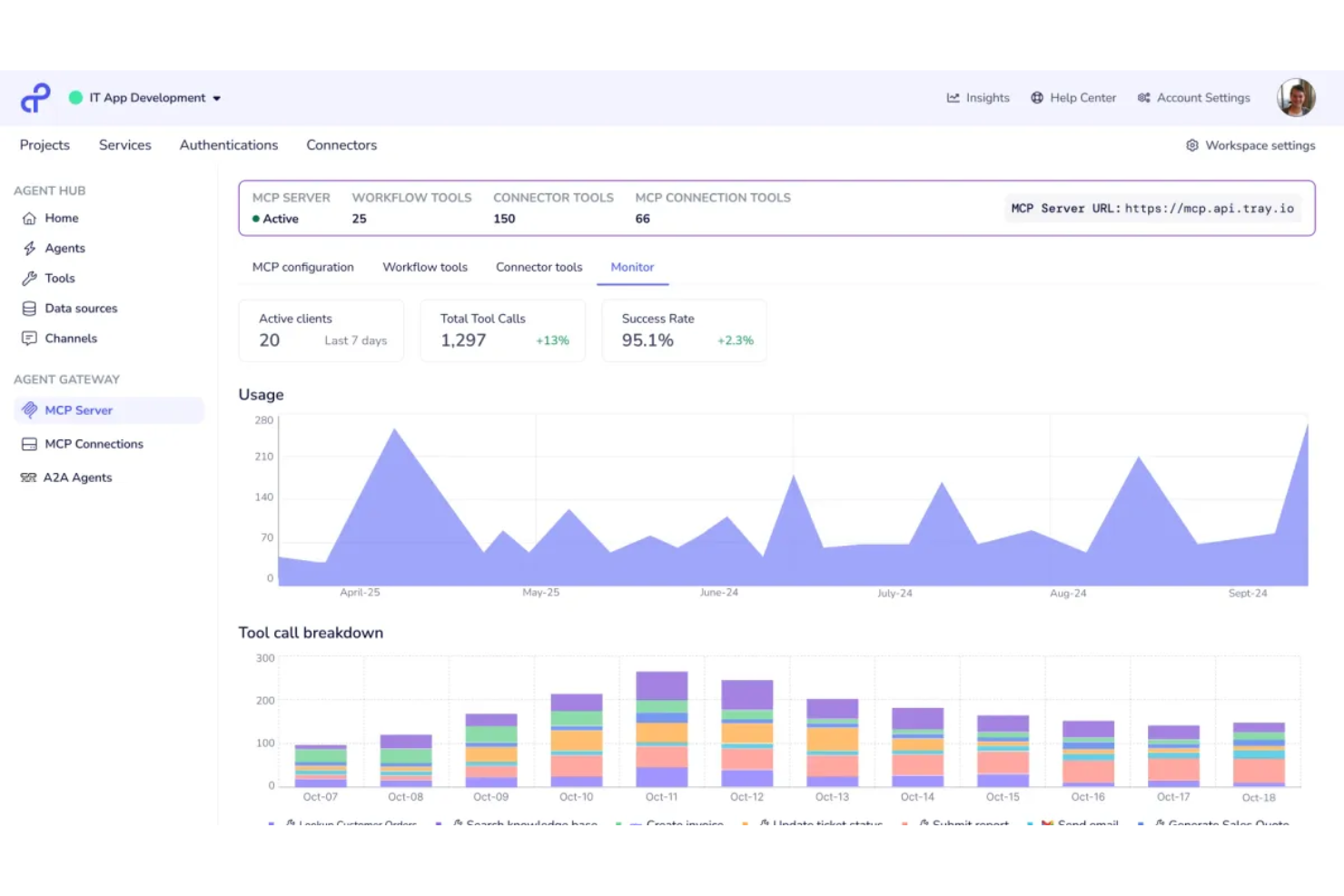
Tray.ai is a low-code integration and automation platform that lets you build multi-step workflows, orchestrate complex processes, and connect business applications through APIs and prebuilt connectors.
Who Is Tray.ai Best For?
Tray.ai is a strong fit for operations and IT teams at mid-sized to large enterprises building and managing custom integrations.
Why I Picked Tray.ai
I picked Tray.ai because I value how it lets me drag and drop logic to build custom integrations without deep coding skills—perfect for cross-app automation at scale. I like using its visual workflow builder for orchestrating complex multi-step processes. My team relies on reusable workflow templates and automated error handling to ensure reliability across integration scenarios.
Tray.ai Key Features
- Prebuilt connectors: Choose from hundreds of ready-made connectors for direct integration with popular business systems.
- Flexible API integration: Connect to any service with an open API for custom automation requirements.
- Digital transformation tools: Manipulate, format, and enrich data as it moves between apps.
- Version control and rollback: Track workflow changes and revert to previous versions as needed.
Tray.ai Integrations
Tray.ai offers native integrations, including Salesforce, HubSpot, Slack, NetSuite, Google Sheets, Zendesk, Snowflake, and Microsoft 365. An API is available for custom integrations.
Pros and Cons
Pros:
- Flexible API integration for custom systems
- Supports real-time data synchronization
- Visual workflow builder for complex logic
Cons:
- Lacks granular user permission settings
- Debugging workflows can be slow


SnapLogic is an enterprise integration platform that lets you connect cloud services, legacy systems, data sources, and applications using visual pipelines and AI-powered integration tools.
Who Is SnapLogic Best For?
IT and data teams in large enterprises who need AI-powered integration across diverse applications and data environments.
Why I Picked SnapLogic
I picked SnapLogic as one of the best because its AI-powered integration assistant accelerates building pipelines and discovering connections across applications and data sources. I’ve used its no-code GenAI builder to automate data flow design, and my team relies on SnapGPT for context-aware, natural language integration tasks. SnapLogic’s focus on generative AI integration helps us simplify complex automation projects without extensive manual scripting.
SnapLogic Key Features
- Prebuilt Snap connector library: Offers hundreds of ready integrations for enterprise apps, databases, and cloud platforms.
- Pipeline versioning: Lets you manage, compare, and roll back integration pipelines with version control.
- Real-time data processing: Supports streaming data for immediate synchronization between systems.
- API management portal: Provides tools to design, publish, and monitor enterprise APIs.
SnapLogic Integrations
SnapLogic offers native integrations with Salesforce, Workday, NetSuite, Snowflake, ServiceNow, SAP, Google BigQuery, Databricks, and Slack. An API is available for custom integrations.
Pros and Cons
Pros:
- Automated error recovery and monitoring features
- Visual pipeline builder accelerates integration setup
- Native connectors for AI and analytics tools
Cons:
- Some connectors require frequent manual updates
- API versioning can be cumbersome

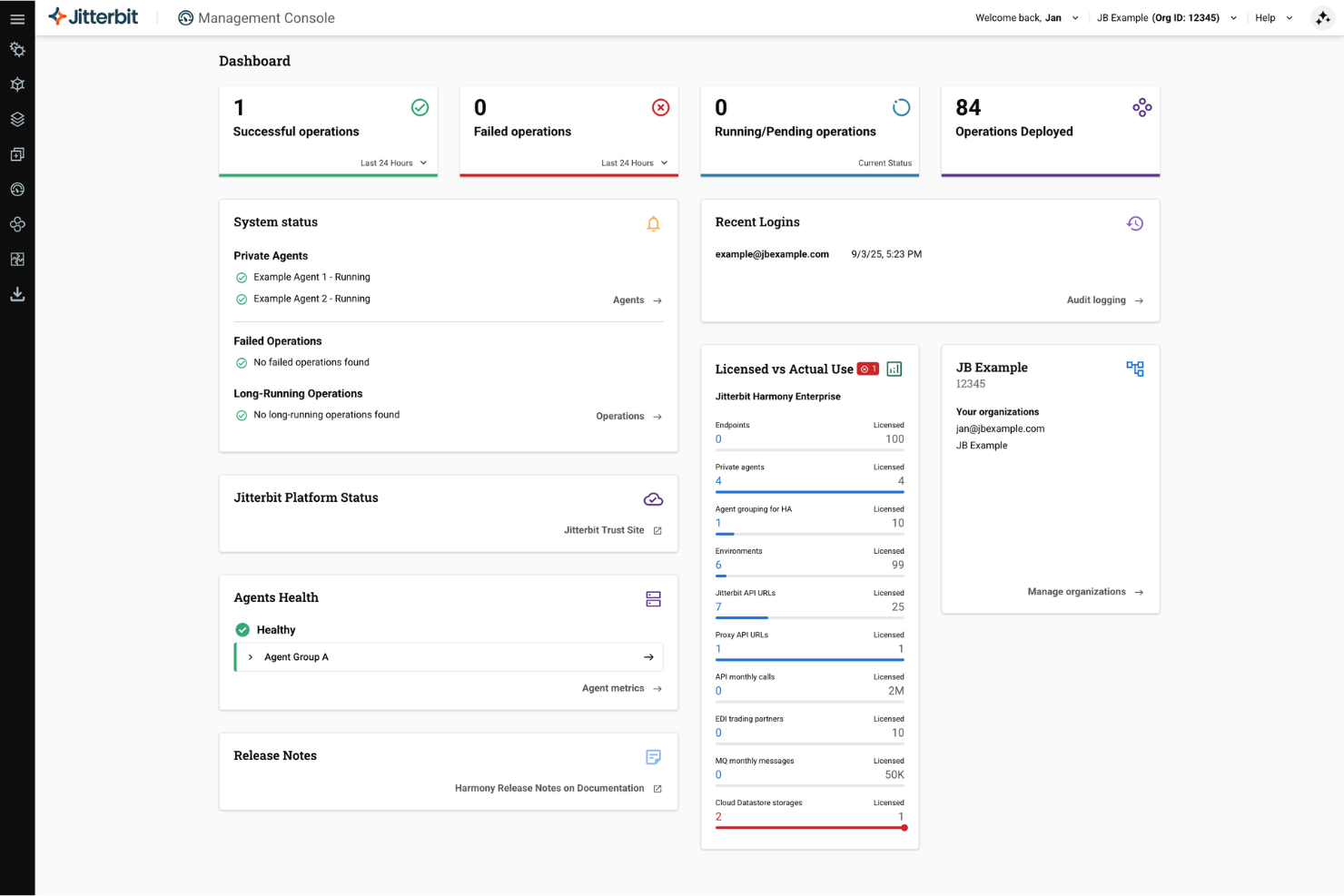
Jitterbit is an integration platform that enables teams to design, connect, and manage APIs, automate workflows, and integrate cloud and on-premises systems through a unified development environment.
Who Is Jitterbit Best For?
Jitterbit is a strong fit for IT teams at mid-size to large enterprises who need to quickly build, deploy, and manage APIs across multiple systems.
Why I Picked Jitterbit
I picked Jitterbit as one of the best because its API integration tools let me roll out new REST APIs rapidly and securely. I like using the graphical designer, which helps my team model API logic and data transformations without manual coding. In practice, we can turn legacy systems into modern endpoints and orchestrate workflows across on-premises and cloud.
Jitterbit Key Features
- Prebuilt connectors: Integrate quickly with popular systems like Salesforce, SAP, and Oracle.
- Automated event triggers: Launch integrations in response to specific data or system events.
- Role-based access control: Manage user permissions at a granular level for projects and environments.
- Logging and monitoring dashboard: Track integration performance and diagnose errors from a central interface.
Jitterbit Integrations
Jitterbit offers native integrations with Salesforce, Slack, Square, Microsoft Dynamics 365, Shopify, ServiceNow, Jira, Snowflake, and HubSpot.
Pros and Cons
Pros:
- API lifecycle management and monitoring tools
- Real-time and batch data synchronization options
- Visual workflow builder for complex integrations
Cons:
- Limited built-in dashboard customization options
- Lengthy onboarding process for large teams


SAP Integration Suite is an enterprise integration platform designed for connecting applications, data, APIs, and on-premise systems across hybrid and cloud environments within the SAP landscape.
Who Is SAP Integration Suite Best For?
Enterprises with complex SAP landscapes that need to unify cloud and on-premise systems across global operations.
Why I Picked SAP Integration Suite
I picked SAP Integration Suite because it handles SAP-to-SAP and third-party app integration with prebuilt connectors and event-driven architecture. My team can automate data flows across SAP S/4HANA, SuccessFactors, and non-SAP cloud services. The API management and process integration tools also let us standardize governance across different business units.
SAP Integration Suite Key Features
- Graphical integration flow designer: Drag and drop to visually design integration workflows without code.
- B2B integration support: Handles EDI formats and trading partner management for external business exchanges.
- Cloud connector: Securely links on-premise systems to cloud applications.
- Monitoring and analytics dashboard: Tracks message flows and system status in real time.
SAP Integration Suite Integrations
SAP Integration Suite offers native integrations across the SAP ecosystem, including SAP S/4HANA, SAP SuccessFactors, SAP Ariba, SAP Concur, and more.
Pros and Cons
Pros:
- Advanced monitoring and error management tools
- Built-in support for B2B and EDI integrations
- Deep connectivity to SAP cloud and on-premise apps
Cons:
- Complex setup for non-SAP system integrations
- High starting price for enterprise usage


Qlik Talend Cloud is a cloud-based enterprise integration platform that unifies data integration, quality, transformation, and pipeline orchestration for managing complex and distributed data environments.
Who Is Qlik Talend Cloud Best For?
Data teams in large organizations who need trusted, governed data across multiple cloud or on-premises sources.
Why I Picked Qlik Talend Cloud
I picked Qlik Talend Cloud as one of the best because data integrity and governance come built in for every integration flow my team runs. I rely on its unified environment for real-time data quality, end-to-end data lineage, and automated data health checks. I like being able to enforce data stewardship with granular controls, regardless of whether our sources live in the cloud or on-premises.
Qlik Talend Cloud Key Features
- Graphical transformation designer: Build and manage complex data pipelines visually.
- Multi-cloud connectivity: Integrate data from AWS, Azure, GCP, and private clouds.
- Reusable integration templates: Leverage prebuilt templates for common data scenarios.
- Automated pipeline scheduling: Set up, run, and monitor data flows on flexible schedules.
Qlik Talend Cloud Integrations
Qlik Talend Cloud offers native integrations with AWS, Snowflake, Databricks, Microsoft Fabric, and Apache Iceberg, along with agentless CDC from databases, SAP, mainframe, and SaaS sources. An API is available for custom integrations.
Pros and Cons
Pros:
- Visual job design with reusable templates
- Strong data governance and stewardship features
- Built-in data profiling and quality tools
Cons:
- Transformation performance can lag with big data
- Limited on-premises deployment options
Andre plattformer for virksomhetsintegrasjon
Her er noen flere alternativer for plattformer for virksomhetsintegrasjon som ikke kom med på kortlisten min, men som likevel er verdt å undersøke:
- Informatica IDMC
For data-heavy environments
- Oracle Integration Cloud
For Oracle application suites
- Workato
For business-led automation
- n8n
For open-source deployments
- TIBCO
For real-time event processing
- Zapier
For governing AI agents
- Frends
For lean, hybrid deployments
- Alumio
For mid-market digital commerce
- APPSeCONNECT
For B2B e-commerce syncing
- Azure Integration Services
For cloud-native developers


How I Evaluate Enterprise Integration Platforms
When Jira data needs to flow into SAP or Asana handoffs need to trigger Workday updates, I split my evaluation into core acceptance criteria first, then the differentiators that separate one platform from another.
Core Functionality (Table Stakes For This List)
When I'm selecting tools for my list, I rank each one on a scale from 0 (does not offer the functionality) to 5 (excels in this area) for each core functionality listed below. Then, I calculate the tool's total score into a percentage. Each tool needs to achieve a minimum total score of 65% to be considered for inclusion.
- Pre-Built Connector Library: I check how many native connectors ship out of the box, and whether they cover the PM tools and enterprise apps your team actually uses—like syncing Jira issues into ServiceNow or pushing Smartsheet data to SAP.
- Workflow Automation Engine: I evaluate whether the platform offers a visual, low-code builder for orchestrating multi-step integrations with branching logic, error handling, and retries rather than requiring custom scripts for every flow.
- Data Mapping & Transformation: Mapping a "priority" field in Asana to a numbered severity scale in an ERP system is a common scenario, so I look for visual mappers that handle nested objects, custom formulas, and schema mismatches across tools.
- API Management: Beyond consuming APIs, I check whether the platform lets you publish, version, and secure your own APIs—especially useful when your PMO needs to expose portfolio data to finance or executive dashboards.
- Real-Time & Batch Sync: Some project data needs instant updates (status changes, blockers), while resource and financial data syncs better on a schedule. I evaluate whether both event-driven and batch modes are supported with flexible triggers.
- Enterprise Security & Governance: I look for SSO, role-based access, encryption at rest and in transit, audit logging, and relevant compliance certifications like SOC 2 or ISO 27001 that enterprise procurement teams typically require.
Once I have a list of tools that meet the criteria, I consider what sets each platform apart.
Differentiating Factors (What Sets Vendors Apart)
Here's how I compare and contrast different vendors:
Standout Features
Pre-built process templates can save weeks of setup. I look for platforms that ship ready-made recipes for common PM scenarios like syncing Jira tickets to ServiceNow or pushing timesheets into payroll systems. A unified observability dashboard is another differentiator I evaluate, especially when your PMO needs to monitor integration health across dozens of connected tools. AI-powered mapping suggestions also matter; platforms that auto-detect field relationships between, say, monday.com and Salesforce cut configuration time significantly.
Beyond Features
Total cost of ownership is a big one. I evaluate whether pricing scales by connector, transaction volume, or flat licensing, because a platform that looks affordable at five integrations can get expensive fast when you're connecting an entire PMO stack. Implementation support matters just as much—I check for certified partners, reference architectures, and structured onboarding programs that shorten time-to-value. Deployment flexibility rounds out my evaluation, since some enterprises require on-premises or hybrid hosting to meet internal data residency policies.
Slik velger du plattformer for virksomhetsintegrasjon
Det er lett å gå seg vill i lange funksjonslister og komplekse prismodeller. For å hjelpe deg med å holde fokus mens du går gjennom den unike prosessen din for valg av programvare, får du her en sjekkliste over faktorer du bør ha i tankene:
| Skalerbarhet | Hva du bør vurdere |
|---|---|
| Skalerbarhet | Kan plattformen håndtere de nåværende og forventede datamengdene dine samt antallet integrasjoner? |
| Integrasjoner | Finnes det innebygde koblinger for de viktigste systemene og skyleverandørene dine, eller trenger du spesialutvikling? |
| Tilpasningsmuligheter | Kan du tilpasse arbeidsflyter, regler og datatilordninger slik at de passer dine unike forretningskrav? |
| Brukervennlighet | Vil teamet ditt – både tekniske og ikke-tekniske brukere – kunne utforme og vedlikeholde integrasjoner uten omfattende opplæring? |
| Implementering og innføring | Hvor lang tid vil oppsettet ta, og tilbyr leverandøren migreringsverktøy, ressurser for innføring og støtte under utrullingen? |
| Kostnad | Kommer det ekstra kostnader for høyere datagjennomstrømming, flere koblinger eller prioritert kundestøtte? |
| Sikkerhetstiltak | Tilbyr plattformen nødvendig kryptering, autentisering og revisjon for å oppfylle samsvarsstandardene dine? |
| Tilgjengelig kundestøtte | Hvilke kanaler og servicenivåavtaler tilbyr leverandøren for problemløsning, og er kundestøtten tilgjengelig i arbeidstiden din? |
Hva er plattformer for virksomhetsintegrasjon?
Plattformer for virksomhetsintegrasjon er programvaresystemer som kobler sammen applikasjoner, data og prosesser på tvers av en organisasjons teknologistakk. De lar deg automatisere arbeidsflyter, synkronisere informasjon mellom systemer og opprettholde datakonsistens etter hvert som miljøet ditt vokser eller endres. Disse plattformene støtter integrasjon på tvers av skybasert, lokalt installert og hybrid infrastruktur, noe som gjør dem til et grunnleggende verktøy for datadrevne team.
Funksjoner
Når du velger plattformer for virksomhetsintegrasjon, bør du se etter følgende viktige funksjoner:
- Ferdigbygde koblinger: Ferdige koblinger til populære forretningsapplikasjoner og databaser, slik at du raskt kan koble sammen og synkronisere systemer uten tilpasset kode.
- Visuell arbeidsflytdesigner: Dra-og-slipp-grensesnitt for å bygge, endre og administrere integrasjonsflyter, slik at kompleks logikk blir tilgjengelig for både tekniske og ikke-tekniske brukere.
- Verktøy for datatransformasjon: Funksjoner for å tilordne, rense og omstrukturere data når de flyttes mellom systemer, slik at du kan sikre konsistens og kompatibilitet.
- Sanntids- og batchbehandling: Støtte for umiddelbare hendelsesstyrte integrasjoner samt planlagte dataoverføringer i stor skala, avhengig av virksomhetens behov.
- Sentralisert overvåkingsdashbord: Ett samlet sted for å se integrasjonsstatus, logger, ytelsesmålinger og varsler, slik at du raskt kan oppdage og løse problemer.
- Rollebasert tilgangskontroll: Detaljerte tillatelser som begrenser eller gir tilgang til integrasjonskomponenter, og som støtter sikkert samarbeid og overholdelse av regelverk.
- Feilhåndtering og nytt forsøk: Automatisk oppdagelse av integrasjonsfeil med innebygd logikk for å prøve på nytt eller eskalere feil, noe som reduserer behovet for manuell inngripen.
- API-administrasjon: Verktøy for å bygge, publisere og administrere API-er, slik at eksterne og interne utviklere kan koble seg sikkert til de integrerte systemene dine.
- Sporing av dataopprinnelse: Mulighet til å spore dataenes opprinnelse, flyt og transformasjonshistorikk på tvers av det integrerte miljøet ditt, noe som støtter revisjoner og feilsøking.
- SDK eller rammeverk for utvidelser: Muligheter for egendefinert skripting eller utvidelser, slik at team med spesialiserte behov kan utvide funksjonaliteten utover standardmulighetene.
Fordeler
Implementering av integrasjonsplattformer for virksomheter gir flere fordeler for teamet og virksomheten din. Her er noen av fordelene du kan se frem til:
- Forbedret datakonsistens: Automatiserte integrasjoner og transformasjonsverktøy hjelper deg med å eliminere feil ved manuell dataregistrering og opprettholde pålitelig, synkronisert informasjon på tvers av systemene dine.
- Raskere arbeidsflytautomatisering: Visuelle designere og ferdigbygde koblinger lar deg raskt automatisere gjentakende prosesser og orkestrere kompleks forretningslogikk uten omfattende koding.
- Bedre oversikt og overvåking: Sentraliserte dashbord og sanntidsovervåking gjør det enkelt for teamet ditt å følge dataflyter, feilsøke problemer og optimalisere systemytelsen.
- Styrket datasikkerhet: Rollebaserte tilgangskontroller, revisjonslogger og API-administrasjon beskytter dataene dine når de flyttes mellom applikasjoner, og bidrar til å oppfylle krav til regelverksetterlevelse.
- Fleksibel hybridtilkobling: Støtte for skybaserte, lokale og eldre systemer lar deg tilpasse integrasjonene etter hvert som miljøet eller virksomhetens behov utvikler seg.
- Enklere innføring og migrering: Ferdigbygde maler, migreringsverktøy og veiledede ressurser for innføring fremskynder implementeringen og hjelper teamet ditt med å realisere verdien tidligere.
- Redusert vedlikeholdsbyrde for IT: Automatisert feilhåndtering og selvbetjeningsverktøy gir forretningsbrukere større handlingsrom og frigjør det tekniske teamet, slik at de kan fokusere på prosjekter med høyere prioritet.
Kostnader og priser
Valg av integrasjonsplattformer for virksomheter krever en forståelse av de ulike prismodellene og abonnementene som er tilgjengelige. Kostnadene varierer basert på funksjoner, teamstørrelse, tillegg og mer. Tabellen nedenfor oppsummerer vanlige abonnementer, gjennomsnittsprisene deres og typiske funksjoner som inngår i løsninger for integrasjonsplattformer for virksomheter:
Sammenligningstabell for integrasjonsplattformer for virksomheter
| Abonnementstype | Gjennomsnittspris | Vanlige funksjoner |
|---|---|---|
| Gratisabonnement | $0 | Tilgang til grunnleggende koblinger, begrensede arbeidsflyter, begrensede datamengder, brukerstøtte fra fellesskapet og tilgang for én bruker. |
| Personlig abonnement | $20–$50/bruker/måned | Flere koblingsalternativer, høyere oppgavegrenser, grunnleggende verktøy for datatransformasjon og brukerstøtte på e-post. |
| Forretningsabonnement | $50–$150/bruker/måned | Avansert automatisering, teamsamarbeid, sentralisert overvåking, rollebasert tilgang og API-administrasjon. |
| Virksomhetsabonnement | $150–$500+/bruker/måned | Ubegrensede integrasjoner, avansert sikkerhet, funksjoner for regelverksetterlevelse, dedikert brukerstøtte og tilpassbar innføring. |
Vanlige spørsmål om integrasjonsplattformer for virksomheter
Her er svar på vanlige spørsmål om integrasjonsplattformer for virksomheter:
Hvordan støtter integrasjonsplattformer for virksomheter både skybaserte og lokalt installerte systemer?
De tilbyr vanligvis koblinger eller agenter som lar deg koble sammen skybasert og lokalt installert programvare. Denne fleksibiliteten betyr at du kan flytte data og automatisere arbeidsflyter på tvers av ulike miljøer uten tilpasset koding eller manuell inngripen.
Kan ikke-tekniske brukere bygge integrasjoner på disse plattformene?
Ja, de fleste moderne integrasjonsplattformer for virksomheter har byggefunksjoner med dra-og-slipp og veiledede arbeidsflyter som gjør det mulig for ikke-tekniske brukere å opprette og administrere integrasjoner. Dette reduserer avhengigheten av IT-team og fremskynder prosjektplanene.
Hvilke sikkerhetsfunksjoner bør jeg se etter i en integrasjonsplattform?
Du bør se etter ende-til-ende-kryptering, rollebasert tilgangskontroll, revisjonslogger og samsvarssertifiseringer. Disse funksjonene bidrar til å beskytte sensitive data når de flyttes mellom systemer, og til å dokumentere kontrolltiltak overfor revisorer eller tilsynsmyndigheter.
Hvor lang tid tar det å implementere en integrasjonsplattform for virksomheter?
Implementeringstiden kan variere fra noen dager til flere måneder. Faktorer inkluderer kompleksiteten i integrasjonene, antallet involverte systemer og nivået på intern ekspertise. Ferdigbygde koblinger og ressurser for innføring kan forkorte utrullingstiden.
Hva er forskjellen mellom API-administrasjon og integrasjon?
API-administrasjon handler om å bygge, publisere og sikre API-er for bruk av interne eller eksterne utviklere, mens integrasjonsplattformer fokuserer på å koble sammen flere systemer og automatisere utvekslingen av data mellom dem. Mange integrasjonsplattformer for virksomheter tilbyr begge funksjonene.