

10 beste AI-verktøy for tilbudsgenerering i 2026

Beste utvalg av AI-forslagsgeneratorer


En AI-forslagsgenerator er programvare som bruker kunstig intelligens til å utarbeide, tilpasse og organisere forretningsforslag på kortere tid. Hvis du ser etter den beste AI-forslagsgeneratoren, er du sannsynligvis under press for å produsere profesjonelle forslag raskt, uten å gå glipp av viktige detaljer eller måtte følge opp tilbakemeldinger på tvers av team.
Når kunder og interne interessenter krever raskere levering, kan automatisering av repetitive oppgaver knyttet til forslag være en stor lettelse. Denne oversikten hjelper deg med å sammenligne de best vurderte AI-forslagsgeneratorene og fremhever hvilke som passer best for ulike bransjer, arbeidsflyter og samarbeidsmåter, slik at du kan velge riktig løsning for teamet ditt.
Hvorfor du kan stole på våre programvareanbefalinger
Teamet vårt har testet og anmeldt programvare siden 2012. Vi er selv prosjektledere, så vi vet hvor vanskelig og hvor viktig det er å velge riktig programvare.
I denne guiden har vi vurdert verktøyene gjennom praktisk testing og uavhengig research og gitt dem poeng ut fra våre utvelgelseskriterier. Vi bygger også på innsikt fra ledende eksperter i bransjen og erfarne prosjektledere.
Anmeldelsene våre bygger på vår egen redaksjonelle vurdering. De er ikke et salgsargument.
Ekspertanmeldere:
Sammenligningstabell for AI-forslagsgeneratorer
Denne sammenligningstabellen oppsummerer prisopplysningene for utvalget mitt av AI-forslagsgeneratorer.
| Tool | Best For | Trial Info | Price | ||
|---|---|---|---|---|---|
| 1 | Best for custom-branded proposal formatting | Free demo available | Pricing upon request | Website | |
| 2 | Best for end-to-end client sign and pay flows | 14-day free trial | From $19/user/month | Website | |
| 3 | Best for CRM-synced quoting and e-signatures | 14-day free trial + free demo available | From $19/user/month (billed annually) | Website | |
| 4 | Best for structured RFP and questionnaire responses | Free demo available | Pricing upon request | Website | |
| 5 | Best for buyer-tracked proposals with CRM prefill | 14-day free trial | From $35/user/month (billed annually) | Website | |
| 6 | Best for CRM-connected proposal workflows | Free plan + 14-day free trial + free demo available | From $19/user/month | Website | |
| 7 | Best for CRM-connected quote-to-proposal execution | Free demo available | Pricing upon request | Website | |
| 8 | Best for interactive proposals with built-in analytics | 14-day free trial + free demo available | From $237.60/year (billed annually) | Website | |
| 9 | Best for proposal tracking with built-in e-sign | 14-day free trial + free demo available | From $25/user/month (billed annually) | Website | |
| 10 | Best for CRM-connected proposal-to-contract workflows | Free plan + 14-day free trial + free demo available | From $272/month (billed annually) | Website |
Anmeldelser av de beste AI-forslagsgeneratorene
Nedenfor finner du mine detaljerte oppsummeringer av de beste AI-forslagsgeneratorene som kom med på utvalgslisten min. Anmeldelsene gir et detaljert innblikk i funksjonene, integrasjonene og de beste bruksområdene for hver plattform, slik at du kan finne den som passer best for deg.

Best for custom-branded proposal formatting
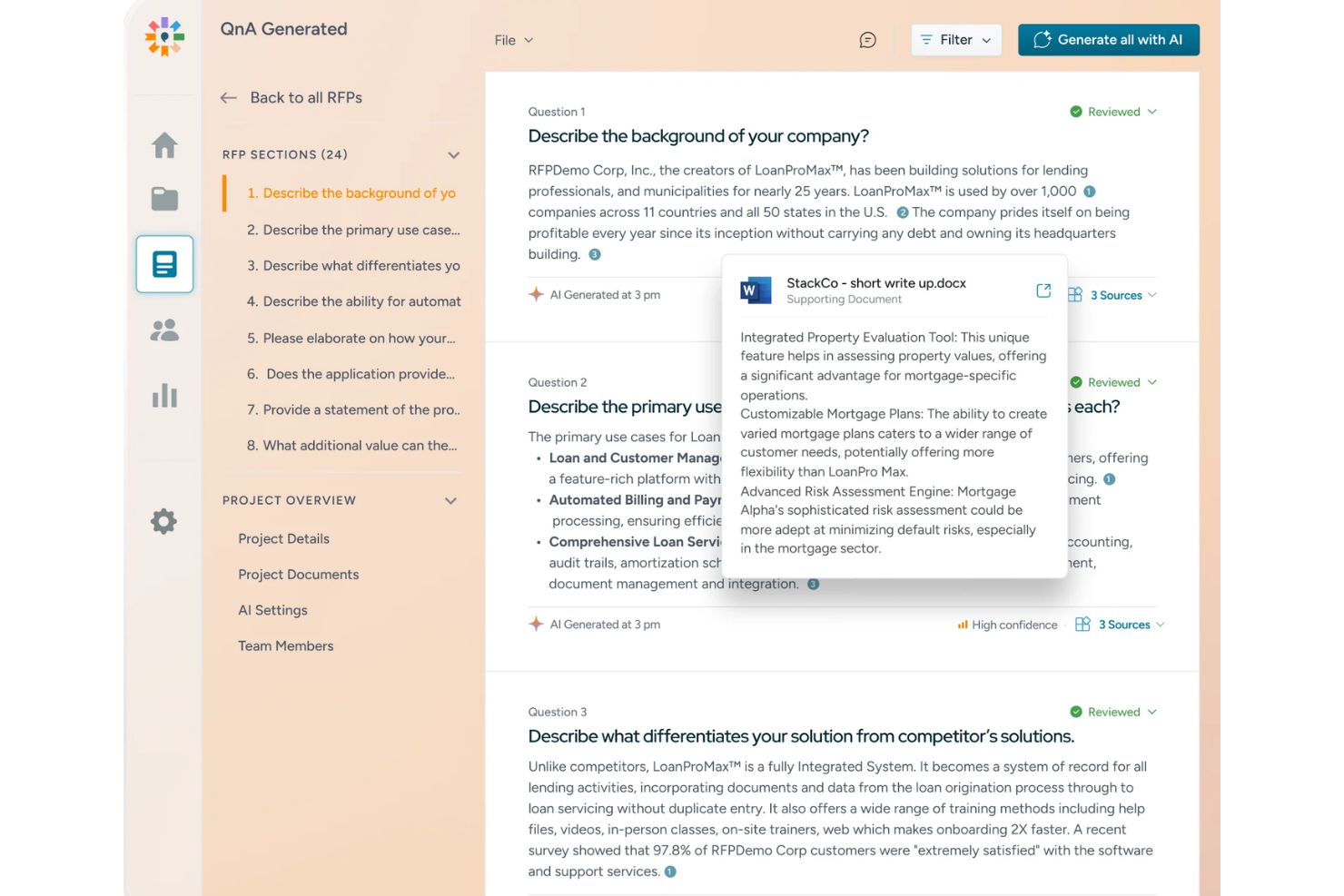
Inventive AI is an AI proposal and RFP response platform that drafts, reviews, and submits responses using RAG-grounded generation, a connected Knowledge Hub, strategic AI agents, and built-in collaboration and approval workflows.
Who Is Inventive AI Best For?
Inventive AI is a strong fit for proposal managers and bid teams that respond to high volumes of incoming RFPs and need AI-grounded drafts tied directly to their company's knowledge sources.
Why I Picked Inventive AI
I picked Inventive AI as one of the best because its narrative-style proposal support lets me start from an existing branded document and have AI suggest an outline, draft section content from approved company sources, and export the finished result in the same format I started with. Every draft cites the Knowledge Hub content it pulled from, with confidence scores attached, so I can see exactly which approved source each section is grounded in. That combination of on-brand formatting and source-traced drafting is where Inventive AI genuinely separates itself.
Inventive AI Key Features
- RAG-grounded response drafts: Generates proposal content pulled directly from your connected Knowledge Hub, with each answer linked to its source and a 0–100% confidence score attached.
- Strategic AI agents: Includes Go/No-Go, Competitive Intelligence, Win Theme, and Compliance agents that run analysis before and during the drafting process.
- Salesforce opportunity sync: Launches RFP responses directly from a Salesforce Opportunity record and keeps response status synced back to that record automatically.
- Internal approval workflow: Lets teams assign sections to SMEs or compliance reviewers, track sign-offs, and log who approved each answer and when.
Inventive AI Integrations
Inventive AI offers native integrations with Salesforce, Google Drive, SharePoint, Confluence, Notion, Slack, HubSpot, Jira, OneDrive, and Okta. It also connects to enterprise knowledge sources and lists Zapier among its service providers.
Pros and Cons
Pros:
- Reviewers report faster response cycles
- Source-cited answers flag unsupported requirements
- Branded narrative drafts preserve document formatting
Cons:
- No recipient-level proposal engagement tracking
- No built-in pricing calculations or quote tables

Best for end-to-end client sign and pay flows

Better Proposals is a proposal platform that combines interactive web-based proposals, e-signatures, built-in pricing tables, and post-signature client onboarding flows with payment collection.
Who Is Better Proposals Best For?
Better Proposals is a strong fit for sales reps and business development leads who need to move clients from proposal to signature and payment in one flow.
Why I Picked Better Proposals
I picked Better Proposals as one of the best because it's the only tool on this list that keeps the entire client journey, from reviewing a proposal to signing and paying, inside a single flow. After a client signs, an automated onboarding sequence kicks off that can collect intake forms, take a deposit through Stripe or PayPal, and book a kickoff call via Calendly, all without leaving the platform. I also like the interactive pricing tables, where clients select their own package and the total recalculates instantly, so the payment amount is always tied directly to what they chose.
Better Proposals Key Features
- AI proposal creation via MCP server: Connect a compatible external AI tool through Better Proposals' CLI and MCP server to generate a new proposal from an existing template, using your account's branding.
- Document Checker: Before sending, this tool flags potential issues in your proposal and offers suggestions, with more targeted feedback if you've specified your industry.
- Proposal tracking and analytics: Track opens, pages viewed, time spent per page, forwarding, and downloads, with a full activity timeline and real-time notifications.
- Multi-signer workflows with signing order: Request signatures from multiple recipients, set the order in which they sign, and let clients sign by typing or drawing.
Better Proposals Integrations
Better Proposals offers six documented native integrations with HubSpot, Salesforce, Calendly, Stripe, GoCardless, and PayPal. It also supports Zapier, an API, and MCP connectivity for compatible AI tools.
Pros and Cons
Pros:
- Interactive pricing connects choices with payment
- Client engagement tracking informs follow-up timing
- Reusable templates speed proposal drafting
Cons:
- Some reviewers find layout editing clunky
- AI requires external tools and setup

Best for CRM-synced quoting and e-signatures

Proposify is a proposal platform that combines AI-assisted writing, customizable templates, interactive quoting, e-signatures, and CRM-synced document workflows.
Who Is Proposify Best For?
Proposify is a strong fit for sales teams that send high volumes of proposals and need CRM-synced pricing, built-in e-signatures, and per-section engagement tracking in one place.
Why I Picked Proposify
I picked Proposify as one of the best because it genuinely closes the gap between your CRM and your proposals. When a deal updates in Salesforce or HubSpot, line items and pricing tables in the linked document update on the next sync automatically. I also rely on its per-section view timeline, which shows exactly how long a prospect spent on each section, so I know whether to follow up on scope or pricing before the call.
Proposify Key Features
- AI writing assistant: Drafts and refines proposal sections—including executive summaries, scopes of work, and cover letters—from call notes, transcripts, or rough ideas you supply.
- Interactive pricing tables: Buyers can adjust quantities and options directly in the proposal, with totals updating in real time based on your product catalog.
- Approval workflows: Assigned approvers must review and sign off on a document before it can be sent, with email notifications and commenting built into the process.
- Content Library: Stores reusable sections, case studies, images, and approved copy that any team member can pull into a new document without rebuilding from scratch.
Proposify Integrations
Proposify offers native integrations with Salesforce and HubSpot for syncing deal data, line items, document activity, and status. It also integrates with Stripe and Zapier and provides an API for custom integrations.
Pros and Cons
Pros:
- Interactive quotes pair pricing choices with signatures
- Section-level reading data guides timely follow-ups
- Reusable library keeps approved proposal content handy
Cons:
- Template layout edits can feel clunky
- AI needs supplied material and human review

Best for structured RFP and questionnaire responses
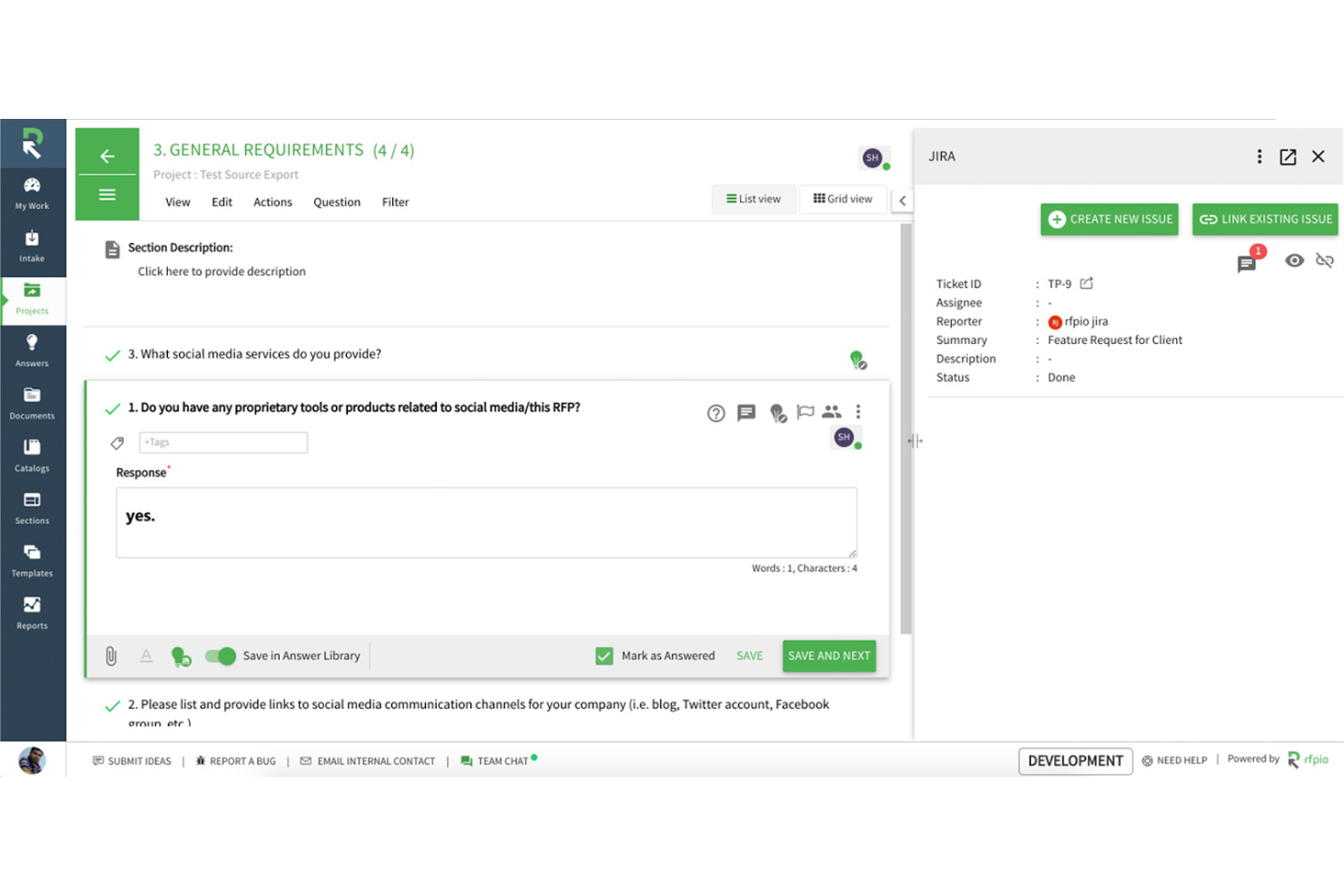
Responsive is an AI-driven response management platform built to handle structured RFPs, RFIs, DDQs, and security questionnaires, with tools for content reuse, collaborative review, AI-assisted drafting, and proposal building.
Who Is Responsive Best For?
Responsive is a strong fit for proposal managers and response teams who handle high volumes of structured RFPs, RFIs, DDQs, and security questionnaires.
Why I Picked Responsive
Responsive earns its spot on my shortlist because it's the strongest purpose-built platform I've found for structured RFP and questionnaire response workflows. I love how the AI-powered opportunity analysis shreds incoming RFXs and DDQs to extract and summarize requirements, helping my team make faster go/no-go calls before a single word is drafted. The centralized Content Library then grounds every response in approved, cited answers from past wins, so I'm not starting from scratch on familiar questions.
Responsive Key Features
- TRACE Score™: Evaluates AI-generated responses for accuracy, relevance, and traceability against trusted sources before you submit.
- Agent Studio: A no-code workspace where teams build and refine custom AI agents using natural-language instructions.
- eSignature dashboard: Tracks document status across awaiting signature, waiting for others, completed, and draft stages in one view.
- Proposal Engagement analytics: Shows recipient-level activity and a chronological view of actions taken on a shared proposal.
Responsive Integrations
Responsive lists 20+ native integrations, including Zoho CRM, Confluence, Highspot, Seismic, Google Sheets, and Microsoft tools such as Word, Excel, PowerPoint, and Outlook. It also offers a REST API, MCP Server, and 75+ APIs for custom integrations.
Pros and Cons
Pros:
- Reviewer assignments clarify cross-team response ownership
- Requirement summaries support faster go/no-go decisions
- Cited answers reuse approved response content
Cons:
- Imported documents may need export formatting cleanup
- AI suggestions can miss question intent

Qwilr
Best for buyer-tracked proposals with CRM prefill

Qwilr is a proposal creation platform that combines an interactive page editor, AI-assisted content generation, CRM-prefilled templates, quoting, e-signatures, payments, and buyer engagement analytics into a single shareable link.
Who Is Qwilr Best For?
Qwilr is a strong fit for sales reps who need to send polished, CRM-prefilled proposals quickly and track how buyers engage with them before following up.
Why I Picked Qwilr
I've included Qwilr in my top picks because it's the tool I reach for when speed-to-send matters and buyer behavior needs to be tracked after the proposal goes out. Its CRM prefill pulls deal data directly into a branded template, so a rep can send a polished proposal the same day as a discovery call. I also rely on the Engagement Algorithm, which lets me define custom thresholds to flag when a buyer has spent meaningful time reviewing the pricing section, giving my team a concrete signal for when to follow up.
Qwilr Key Features
- Interactive quote builder: Create line-item tables or pricing cards with selectable packages, add-ons, and discounts that recalculate totals as buyers make choices.
- Saved block library: Save, organize, and reuse branded content blocks across proposals, with admin-controlled locking to prevent unauthorized edits.
- Multi-signer e-signature: Collect legally binding signatures from multiple buyers within the same Qwilr page, with a certified audit trail automatically generated on completion.
- AI Prefill from call transcripts: Pull deal context from meeting notes and call transcripts directly into proposal variables using AI-assisted prefill on the Scale plan.
Qwilr Integrations
Qwilr offers native integrations with HubSpot, Salesforce, Microsoft Dynamics 365, Zoho CRM, Pipedrive, Claude, and ChatGPT through MCP. It also supports REST API and webhooks, plus Zapier marketplace integrations.
Pros and Cons
Pros:
- Saved blocks keep repeat proposals consistent
- Interactive quotes recalculate buyer selections
- Buyer engagement reveals pricing-section attention
Cons:
- PDF exports can lose page formatting
- AI generation scans one supplied website
PandaDoc
Best for CRM-connected proposal workflows
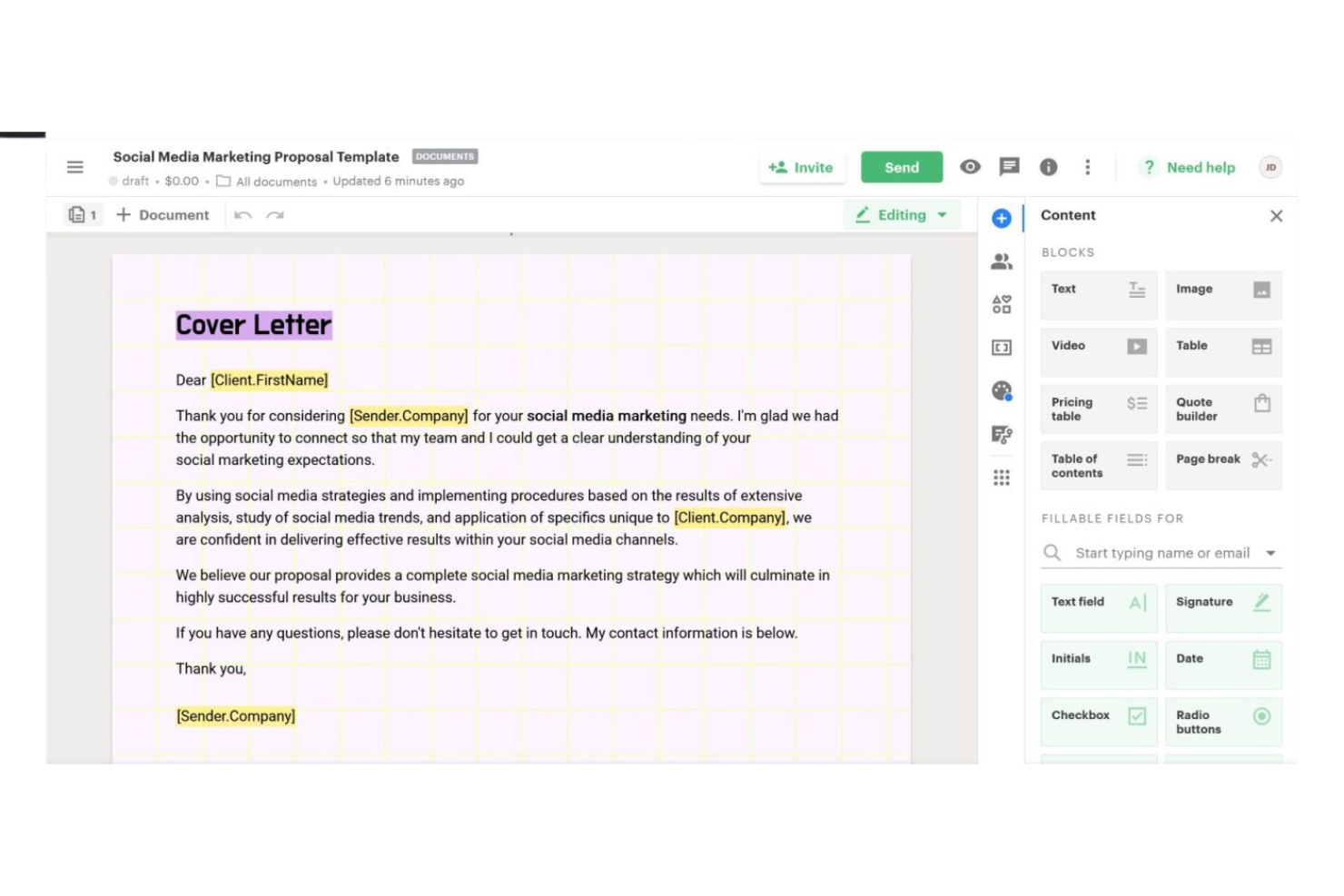
PandaDoc is a document workflow and e-signature platform that lets you build proposals, contracts, and quotes using a drag-and-drop editor, reusable content library, dynamic pricing tables, and native CRM integrations.
Who Is PandaDoc Best For?
Sales teams that rely heavily on CRM data—especially in Salesforce or HubSpot—to drive proposal creation and need e-signature built into the same workflow.
Why I Picked PandaDoc
I picked PandaDoc as one of the best because it's where CRM data and proposal creation genuinely meet in one workflow. When I'm working from a Salesforce opportunity or a HubSpot deal, PandaDoc pulls that data directly into a proposal, including line items, product details, and contact fields, without manual copying. The two-way sync also pushes document status and pricing updates back into the CRM, so the deal record stays current without extra steps.
PandaDoc Key Features
- Approval workflows: Route proposals through ordered internal reviewers before they reach recipients, with approval events logged in the audit trail.
- Document analytics: Track recipient-level engagement including view count, time spent per page, PDF downloads, and link clicks.
- Bulk send: Use templates, variables, and CSV files to send customized documents to multiple recipients at once.
- Conditional smart content: Insert Content Library items into a proposal automatically based on variable values or pricing-table data using if/then rules.
PandaDoc Integrations
PandaDoc lists 30+ integrations, including native Salesforce, HubSpot CRM, Pipedrive, Microsoft Dynamics CRM, and Zoho connections. It also offers a REST API, webhooks, SDKs, a JavaScript SDK, and Zapier connectors.
Pros and Cons
Pros:
- Engagement analytics inform recipient follow-up
- Pricing tables keep quotes in proposals
- Reusable templates reduce proposal rework
Cons:
- AI proposal generation remains in limited beta
- No autonomous prospect research or web crawling

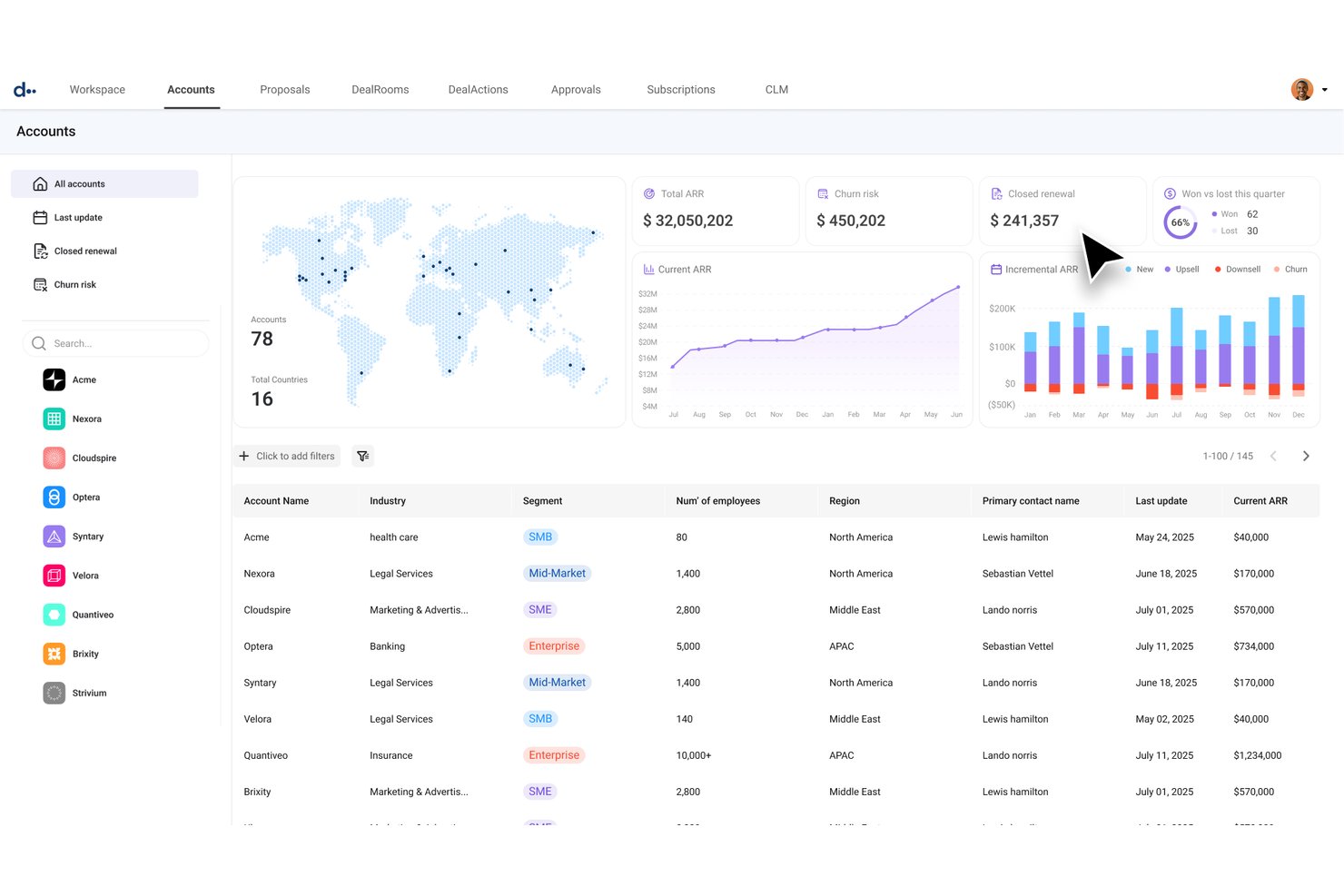
DealHub is a quote-to-revenue platform that combines CPQ, AI-assisted quoting, digital sales rooms, e-signatures, and contract generation in a single connected workflow.
Who Is DealHub Best For?
DealHub fits sales teams running complex, high-volume quote-to-close cycles where CRM data needs to drive every proposal, quote, and contract automatically.
Why I Picked DealHub
I picked DealHub as one of the best because it's the only tool on this list where CRM data doesn't just inform a proposal—it actively builds one. When a rep opens a Salesforce or HubSpot opportunity, DealHub pulls product configuration, pricing rules, and discount guardrails directly into a guided quote, then packages everything into a branded DealRoom with e-signature ready to go. I especially like the governed approval layer, which routes pricing exceptions automatically so deals don't stall waiting on a manager.
DealHub Key Features
- AI conversational quoting: Turns natural-language deal requests into fully configured quotes, pulling pricing rules and product data automatically.
- Buyer engagement tracking: Monitors how buyers interact with shared DealRoom content, including views, downloads, and document activity.
- Automated approval workflows: Routes pricing exceptions and discount approvals to the right stakeholders using parallel, one-click approval flows.
- Contract generation: Builds NDAs, MSAs, and other contracts dynamically from a pre-approved clause library and CRM-integrated data.
DealHub Integrations
DealHub offers native integrations with Salesforce, Microsoft Dynamics 365, HubSpot, and DocuSign eSignature. It also supports API and MCP connectivity for custom integrations and external AI agents.
Pros and Cons
Pros:
- Buyer activity alerts reveal document engagement
- Approval workflows route pricing exceptions
- Templates keep proposals and quote terms consistent
Cons:
- Complex pricing formulas need careful configuration
- AI doesn't research prospects or crawl web

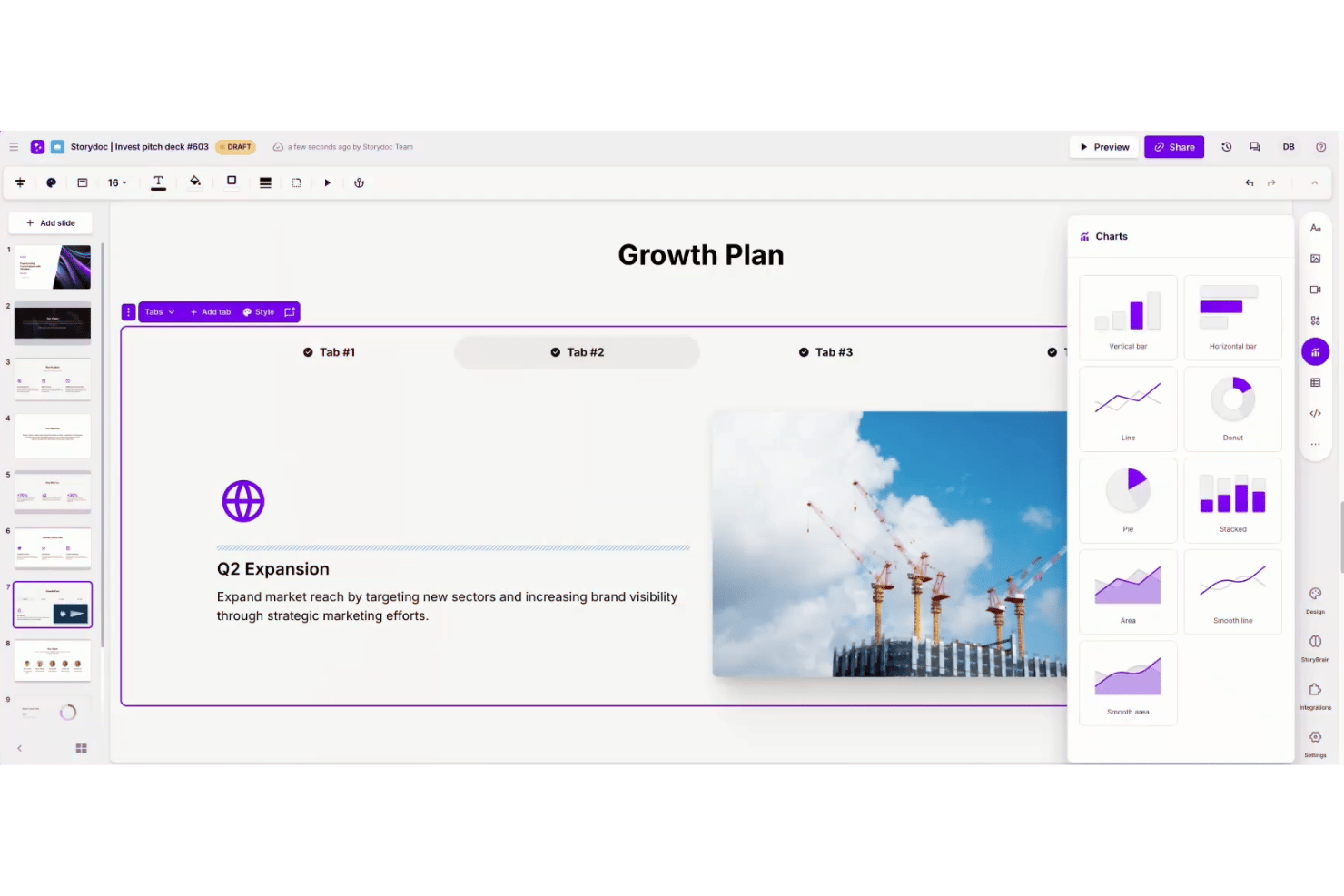
Storydoc is an AI proposal generator that creates interactive, scroll-based proposals with embedded media, pricing calculators, e-signatures, and built-in engagement analytics.
Who Is Storydoc Best For?
Storydoc is a strong fit for sales representatives and business development leads who need to send proposals that look polished and tell them exactly how prospects engage with the content.
Why I Picked Storydoc
I picked Storydoc as one of the best because its built-in engagement analytics tell you exactly how a prospect moved through your proposal: which slides they lingered on, where they dropped off, and whether they shared it internally. That visibility feeds directly into smarter follow-up. Pair that with embedded pricing calculators and one-click e-signatures, and a single Storydoc link can take a prospect from reading to signed without ever leaving the document.
Storydoc Key Features
- StoryBrain AI training: Train the AI on your brand voice, past proposals, and internal materials so generated documents reflect your existing content and style.
- Live-link updates: Edit a proposal after sending it so recipients always see the most current version without needing a new link.
- Team Slides library: Save and share reusable slides across your organization, including case studies, pricing tables, and cover slides.
- Calendar booking embed: Let prospects schedule a meeting directly from within the proposal using integrated calendar tools.
Storydoc Integrations
Storydoc offers native integrations with HubSpot and Salesforce, plus an API for custom integrations and Zapier support.
Pros and Cons
Pros:
- Reusable team slides support consistent proposals
- Tracks slide engagement to guide follow-up
- Polished templates help proposals look professional
Cons:
- PDF exports lose interactive elements and analytics
- AI doesn’t research prospects autonomously

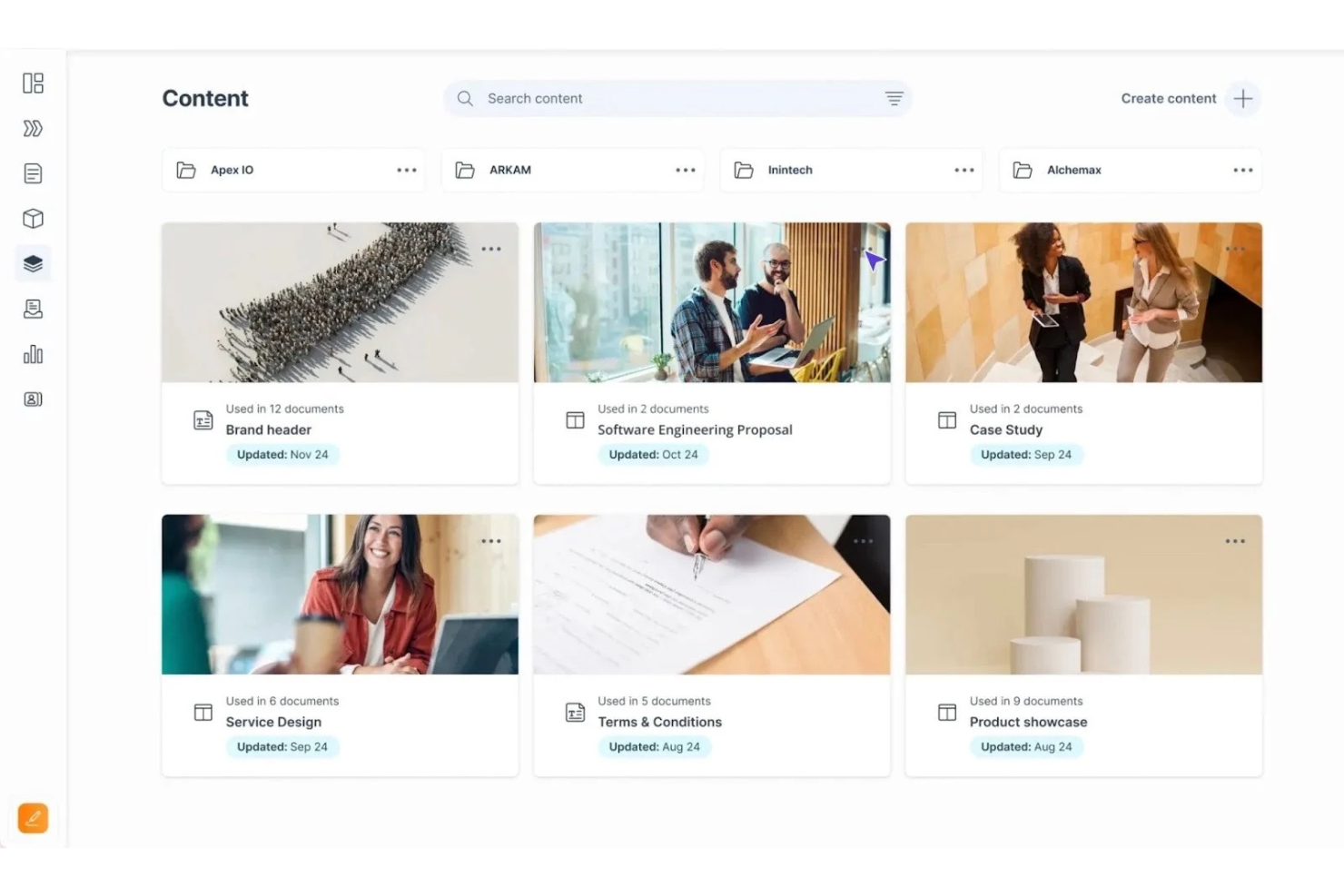
GetAccept is an AI-powered proposal and digital sales room platform that combines proposal creation, interactive pricing tables, buyer engagement tracking, e-signatures, and CRM integrations in one deal-execution workflow.
Who Is GetAccept Best For?
GetAccept fits sales reps and revenue teams who need to send, track, and close proposals fast—without juggling separate tools for quoting, e-signatures, and follow-up.
Why I Picked GetAccept
I picked GetAccept as one of the best because it treats proposal tracking and e-signatures as a single, connected workflow rather than two separate steps. I love that you can see exactly which pages a buyer spent time on, then trigger a targeted follow-up video or reminder without ever leaving the platform. Native, legally binding e-signatures are built directly into that same flow, so there's no handoff to a separate signing tool once a prospect is ready to commit.
GetAccept Key Features
- AI knowledge base: Lets admins train the AI on company content—websites, uploaded PDFs, or manually entered items—so it generates contextually relevant proposal copy.
- Deal room templates: Reusable rooms with lockable sections, placeholders, and variables that keep brand-approved content protected while allowing rep-level personalization.
- Mutual action plans: Shared buyer-seller task lists with owners and due dates that map out every step needed to close a deal.
- Deal score: A machine-learning model that scores each send-out by its likelihood of getting signed, helping reps prioritize follow-up.
GetAccept Integrations
GetAccept offers native integrations with HubSpot, Salesforce, Pipedrive, Lime CRM, Microsoft Teams, Zoom, and Gong. It also supports REST API, webhooks, and Zapier for custom integrations.
Pros and Cons
Pros:
- Native signing and reminders simplify approvals
- Reusable templates reduce repetitive proposal drafting
- Page-level tracking guides timely proposal follow-up
Cons:
- No autonomous prospect research for tailored proposals
- AI drafts can need manual rewriting

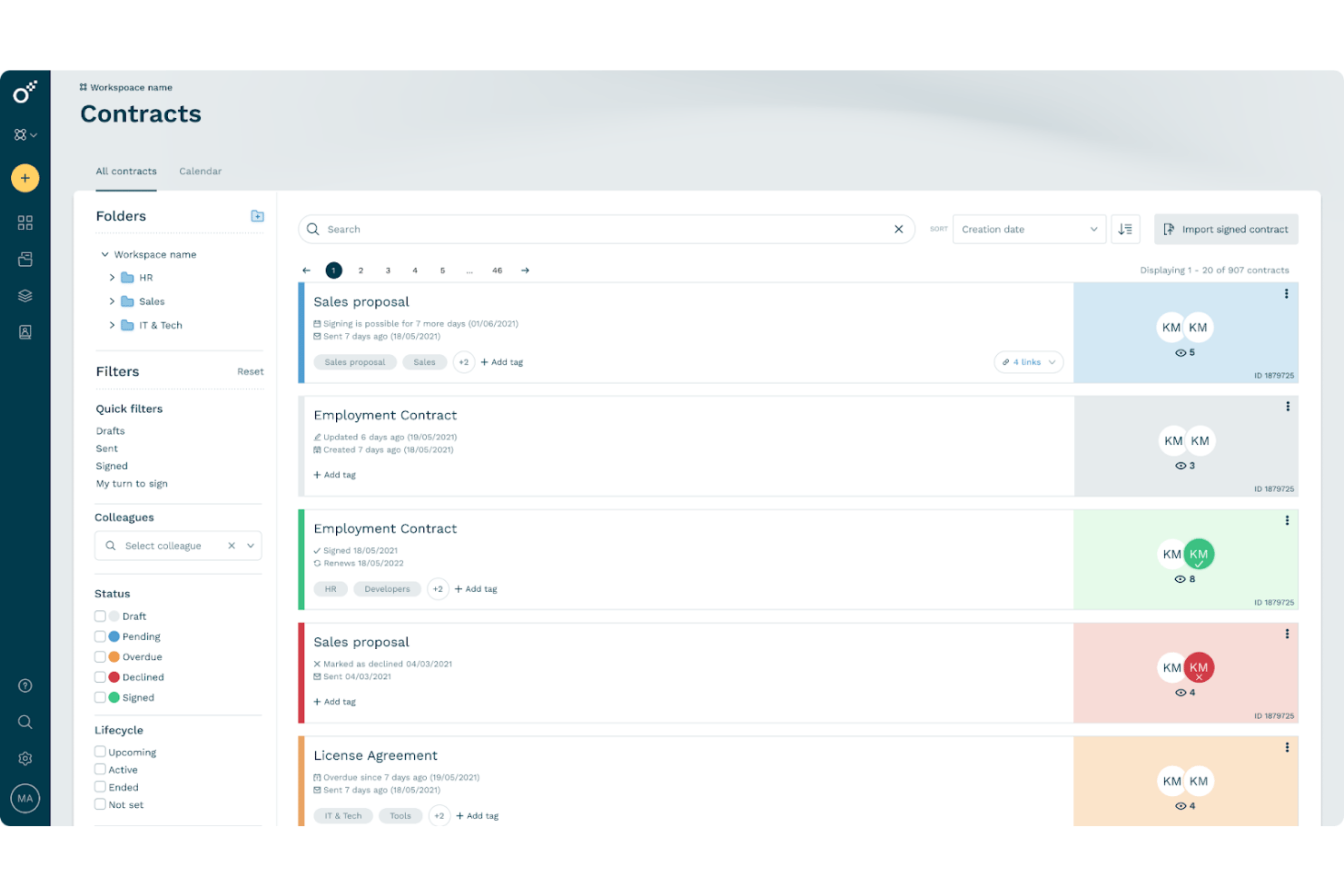
Oneflow is a contract lifecycle management platform that combines AI writing assistance, interactive proposal creation, e-signature, and CRM-connected workflows to take deals from proposal to signed contract.
Who Is Oneflow Best For?
Oneflow is a strong fit for sales teams that need proposals and contracts to live in the same workflow, connected directly to their CRM.
Why I Picked Oneflow
I've included Oneflow in my top picks because it's the only tool on this list that keeps proposals and contracts inside a single, CRM-connected workflow. I love how deal data from Salesforce, HubSpot, or Dynamics 365 populates directly into live, interactive proposals, so there's no manual re-entry when a deal moves forward. The built-in e-signature and internal approval routing mean a proposal can become a signed contract without ever leaving the platform.
Oneflow Key Features
- AI writing assistance: Write with AI helps you draft, refine, and review contract and proposal content directly inside the document editor.
- Content Library: Store and reuse approved text sections across multiple templates, with published updates syncing to connected templates.
- Interactive pricing tables: Product-table sections let recipients view prices, apply discounts, and select quantities, with totals calculated automatically.
- Contract insights dashboard: Track proposal and contract engagement, including visit counts and open activity, from a centralized dashboard.
Oneflow Integrations
Oneflow offers native integrations with Salesforce, HubSpot, and Microsoft Dynamics 365. It also provides API and webhook access for custom integrations and supports Zapier.
Pros and Cons
Pros:
- Live proposals reduce email version churn
- Interactive pricing tables support tailored packages
- Reusable templates speed proposal preparation
Cons:
- Template formatting can require extra fixes
- AI doesn't research prospects autonomously
Andre AI-forslagsgeneratorer
Her er noen flere alternativer for AI-forslagsgeneratorer som ikke kom med på utvalgslisten min, men som likevel er verdt å se nærmere på:
- Prospero
For proposal creation on a tight budget
- Nusii
For freelancers sending tracked proposals
- Piktochart
For visually polished prompt-to-proposal drafts
- Bonsai
For freelance proposals with built-in billing
- Bookipi
For solo businesses drafting proposals fast
- Taskip
For agency proposals with built-in quoting
- Upland Qvidian
For RFP reuse backed by a content library
- Getcone
For proposal-to-payment in one flow
- GovDash
For government RFP proposals end-to-end
- Manus
For AI-agent-led prospect research


How I Evaluate AI Proposal Generators
To make this list, I look for AI that handles real proposal work, like drafting sections from deal data or tailoring copy to a client. From there, I evaluate three things. Core functionality carries most weight, including building pricing tables and routing approvals. Then I consider reusable content libraries and how the tool handles client data.
Core Functionality (Table Stakes For This List)
When I'm selecting tools for my list, I score each one on a scale from 0 (does not offer the functionality) to 5 (excels in this area) for each core functionality listed below. I then convert the total into a percentage to help assess each tool's overall fit, with extra weight on any functionalities I’ve deemed essential.
- AI Proposal Drafting (Essential): I look for full proposal sections drafted from client or deal details, such as tailoring a project approach to a prospect’s goals.
- Reusable Templates (Essential): I assess whether teams can adapt branded layouts and content blocks for different clients, services, or project types.
- Pricing And Quotes: I check whether teams can present clear line items and calculated totals, including options such as phased project packages.
- Signatures And Approvals: I look for an in-proposal signature flow and internal review steps that help teams secure sign-off before sending.
- Proposal Analytics: I consider whether view and engagement data show which sections prospects read and help teams time follow-ups.
- CRM Integration: I assess how client and deal details move between the CRM and proposal, and whether proposal status syncs back.
Once I have a list of tools that meet the criteria, I consider what sets each platform apart.
Differentiating Factors (What Sets Vendors Apart)
Here's how I compare and contrast different vendors:
Standout Features
I look for content library reuse—whether teams can pull pre-approved copy blocks and case studies into new proposals without rewriting. This matters most when your agency runs dozens of bids a month. I also evaluate brand compliance controls, like locked sections and admin permissions that keep reps on-brand without blocking customization. Deal win analytics round things out; tools like Proposify surface patterns from past wins and losses to guide content choices on the next bid.
Beyond Features
I check how each vendor handles client data—whether deal details or pricing uploaded to train AI models stay private or get reused. This matters most for agencies sharing sensitive scope and rate information. I also evaluate pricing model transparency, since per-seat and per-proposal billing hit budgets differently as teams scale. A five-person team sending 40 proposals a month needs a very different plan than a solo consultant sending four.
Slik velger du en AI-forslagsgenerator
Det er lett å gå seg vill i lange funksjonslister og komplekse prismodeller. For å hjelpe deg med å holde fokus mens du går gjennom den unike prosessen med å velge programvare, får du her en sjekkliste over faktorer du bør ha i bakhodet:
| Faktor | Hva du bør vurdere |
|---|---|
| Skalerbarhet | Kan verktøyet støtte teamets forventede mengde forslag og fremtidige vekst? Blir det enkelt å legge til nye brukere eller håndtere flere samtidige prosjekter? |
| Integrasjoner | Kan det kobles direkte til innholdsarkivene, CRM-systemet eller kontorpakker som Microsoft 365 eller Google Workspace? Mangler kan føre til manuelt arbeid eller forsinkelser i arbeidsflyten. |
| Tilpasningsmuligheter | Kan du tilpasse maler, arbeidsflyter for godkjenning og innholdsbiblioteker til de nøyaktige prosessene dine for forslag uten hjelp fra en utvikler? |
| Brukervennlighet | Er grensesnittet intuitivt for både sporadiske og hyppige brukere? Kan teamet ditt realistisk sett utarbeide et forslag med minimal opplæring eller dokumentasjon? |
| Implementering og introduksjon | Hvilke trinn kreves for oppsett og datamigrering? Vurder læringskurven og hvilken leverandørstyrt introduksjon, produktgjennomgang eller dokumentasjon som er tilgjengelig. |
| Kostnad | Passer abonnementsnivåene med budsjettet ditt og gir de verdi for teamstørrelsen og funksjonskravene dine? Vær oppmerksom på ekstra kostnader for lagring, brukere eller tillegg. |
| Sikkerhetstiltak | Finnes det kontroller for datatilgang, revisjonsspor og samsvar med organisasjonens personvern- eller bransjestandarder, særlig for sensitive RFP-forslag? |
| Tilgjengelig brukerstøtte | Hvilke kanaler og servicenivåer tilbyr leverandøren? Kan du raskt få kontakt med brukerstøtten hvis noe blokkerer innsendingen av et aktivt forslag? |
Hva er en AI-forslagsgenerator?
AI-forslagsgeneratorer er programvareverktøy som bruker kunstig intelligens til å automatisere oppretting, redigering og håndtering av forretningsforslag og svar på RFP-er.
Disse verktøyene hjelper team med å produsere skreddersydde, feilfrie dokumenter ved å utnytte innholdsbiblioteker, naturlig språkbehandling og arbeidsflytautomatisering, noe som reduserer manuelt arbeid og fremskynder behandlingstiden for tilbud med høy betydning.
Funksjoner
Når du velger en AI-tilbudsgenerator, bør du se etter følgende nøkkelfunksjoner:
- KI-baserte innholdsforslag: Bruk av kunstig intelligens til å anbefale relevant tekst, svar eller deler basert på tidligere dokumenter og kravene i forespørselen om tilbud.
- Maladministrasjon: Lar deg opprette, lagre og gjenbruke merkevaretilpassede maler for å opprettholde konsistens og fremskynde opprettelsen av tilbud.
- Samarbeidsverktøy: Gjør det mulig for flere brukere å redigere, kommentere eller godkjenne tilbud i sanntid, noe som sikrer versjonskontroll og innspill fra flere team.
- Innholdsbibliotek: Lagrer godkjente svar, grafikk og standarddeler om prosjektleveranser for rask tilgang og konsekvent gjenbruk i alle tilbud.
- Arbeidsflytautomatisering: Automatiserer oppgaver som godkjenningsruting, varslingsmeldinger og påminnelser om frister for å bidra til at tilbud leveres i tide.
- Dokumentformatering og eksportalternativer: Gjør det mulig å tilpasse formateringen ved hjelp av verktøy som Canva og eksportere enkelt til ulike filtyper som PDF, Word eller PowerPoint.
- Tilbudsanalyse: Sporer når og hvordan tilbud åpnes, og gir engasjementsdata som kan brukes til å utforme salgsstrategier og oppfølging.
- Brukertillatelser og roller: Gir detaljert kontroll over hvem som kan opprette, redigere, gjennomgå eller sende tilbud, og beskytter sensitiv informasjon og arbeidsflyter.
- Samsvar og revisjonsspor: Overvåker endringer og opprettholder oppføringer for regelverksetterlevelse og ansvarlighet gjennom tilbudsprosessen.
Fordeler
Implementering av en AI-tilbudsgenerator gir flere fordeler for teamet og virksomheten din. Her er noen av fordelene du kan se frem til:
- Raskere behandling av tilbud: Automatiserte innholdsforslag og gjenbrukbare maler hjelper team med å utarbeide, gjennomgå og sende tilbud mye raskere.
- Større konsistens i tilbudene: Sentraliserte innholdsbiblioteker og maladministrasjon gjør det enklere å opprettholde konsekvent merkevarebygging og kommunikasjon.
- Forbedret samarbeid: Verktøy for redigering, kommentering og arbeidsflyt i sanntid gjør det mulig for team å samarbeide effektivt, selv når de er geografisk spredt.
- Økt nøyaktighet i tilbudene: KI-drevet automatisk utfylling og samsvarsverktøy bidrar til å oppdage feil og sikre fullstendige, relevante svar.
- Bedre oversikt og sporing: Innebygd analyse og sporing av engasjement gir innsikt i hvordan mottakere samhandler med tilbudene.
- Mindre manuelt arbeid: Arbeidsflytautomatisering og KI-drevne svaranbefalinger reduserer det repetitive arbeidet som kreves for hvert tilbud, betydelig.
- Forbedret datasikkerhet: Omfattende tillatelses- og revisjonsfunksjoner beskytter sensitiv virksomhetsinformasjon gjennom hele tilbudsprosessen.
Kostnader og priser
Å velge en AI-tilbudsgenerator krever en forståelse av de ulike prismodellene og abonnementene som er tilgjengelige. Kostnadene varierer basert på funksjoner, teamstørrelse, tillegg og mer. Tabellen nedenfor oppsummerer vanlige abonnementer, gjennomsnittsprisene deres og typiske funksjoner som er inkludert i løsninger for AI-tilbudsgeneratorer:
Sammenligningstabell for abonnementer for AI-tilbudsgeneratorer
| Abonnementstype | Gjennomsnittspris | Vanlige funksjoner |
|---|---|---|
| Gratisabonnement | $0 | Grunnleggende oppretting av tilbud, begrensede maler, tilgang for én bruker og begrensede eksportalternativer. |
| Personlig abonnement | $10-$25/bruker/måned | Forbedret maladministrasjon, enkle samarbeidsverktøy, tilgang til innholdsbibliotek og grunnleggende analyse. |
| Bedriftsabonnement | $30-$65/bruker/måned | Teamsamarbeid, arbeidsflytautomatisering, avansert analyse, tilbudssporing og tilpassede merkevarealternativer. |
| Storbedriftsabonnement | $75-$150/bruker/måned | Avanserte tillatelser, API-tilgang, samsvarsfunksjoner, prioritert brukerstøtte, introduksjonstjenester og revisjonsspor. |
Vanlige spørsmål om AI-forslagsgeneratoren
Her er noen svar på vanlige spørsmål om AI-forslagsgeneratoren:
Hvordan fremskynder en AI-forslagsgenerator tilbudsprosessen?
AI-forslagsgeneratorer foreslår raskt relevant innhold, henter gjenbrukbare deler fra et bibliotek og automatiserer godkjenningsarbeidsflyter. Dette betyr at team bruker mindre tid på å lete etter tidligere svar eller formatere på nytt, slik at dere kan overholde stramme tidsfrister uten å ofre kvalitet.
Kan AI-forslagsgeneratorer integreres med andre forretningsverktøy?
Ja, de fleste AI-forslagsgeneratorer kobles til verktøy som CRM-systemer, plattformer for dokumentlagring og produktivitetspakker. Integrasjoner hjelper deg med å hente kundedata, synkronisere dokumenter og holde arbeidsflytene i gang uten problemer på tvers av den eksisterende teknologistakken.
Hvor sikre er dataene som lagres i en AI-forslagsgenerator?
De fleste leverandører bruker standard sikkerhetspraksis som kryptering, brukertillatelser og revisjonslogger. Se etter løsninger som tilbyr samsvarssertifikater og alternativer for å kontrollere hvem som får tilgang til sensitive filer, særlig når du håndterer konfidensielle kunde- eller firmadata.
Er det vanskelig å lære opp teamet mitt i en ny AI-forslagsgenerator?
Nei, de fleste plattformer tilbyr maler, produktomvisninger og opplæringsvideoer som hjelper team med å komme raskt i gang. En god innføring bør omfatte direkte støtte og tydelig dokumentasjon for å hjelpe nye brukere med å få utbytte allerede den første uken.
Hvilken type analyse kan jeg forvente fra en AI-forslagsgenerator?
Du kan forvente innsikt som mottakerengasjement, åpningsfrekvens for dokumenter og sporing av godkjenningsstatus. Denne analysen hjelper deg med å se hvilke tilbud som går fremover, og identifisere måter å forbedre prosessen og svarfrekvensen på.