

I 10 migliori strumenti di business intelligence per decisioni migliori nel 2026

10 Elenco dei migliori strumenti di BI


Gli strumenti di business intelligence aiutano i team a trasformare i dati grezzi in informazioni utili, consolidando le informazioni, visualizzando le tendenze e supportando decisioni più intelligenti. Che tu stia monitorando i KPI, analizzando il comportamento dei clienti o prevedendo i ricavi, lo strumento di BI giusto può individuare schemi che favoriscono la crescita e migliorano le prestazioni in tutta la tua organizzazione.
Per aiutarti a scegliere la piattaforma giusta, ho testato e recensito i principali strumenti di business intelligence in base alle loro capacità di integrazione dei dati, alle funzionalità dei pannelli di controllo, alla facilità d'uso e alla scalabilità. Questa guida mette in evidenza i migliori strumenti di BI disponibili nel 2026, così potrai trovarne uno che soddisfi le esigenze di dati del tuo team e supporti il processo decisionale strategico.
Cosa sono gli strumenti di business intelligence?
Gli strumenti di business intelligence sono applicazioni software che raccolgono, analizzano e visualizzano i dati per aiutare le organizzazioni a prendere decisioni più intelligenti e basate sui dati.
Consolidano le informazioni provenienti da fonti come database, fogli di calcolo e servizi cloud in pannelli di controllo e report interattivi. Grazie a funzionalità come l'analisi in tempo reale, la visualizzazione dei dati e la reportistica, gli strumenti di BI trasformano i dati grezzi in informazioni utili per i team di tutti i reparti.
Perché fidarsi dei nostri consigli sui software
Il nostro team testa e recensisce software dal 2012. In quanto project manager noi stessi, sappiamo quanto sia difficile — e importante — scegliere il software giusto.
Per questa guida, abbiamo valutato gli strumenti attraverso test pratici e ricerche indipendenti, assegnando un punteggio agli strumenti in base ai nostri criteri di selezione. Ci basiamo inoltre sulle competenze di leader di pensiero del settore e di professionisti attivi nella gestione dei progetti.
Le nostre recensioni riflettono il nostro giudizio editoriale umano, non un discorso di vendita.
Revisori esperti:
Tabella comparativa degli strumenti di business intelligence
Puoi utilizzare il seguente grafico per trovare lo strumento di BI più adatto alle tue esigenze:
| Tool | Best For | Trial Info | Price | ||
|---|---|---|---|---|---|
| 1 | Il miglior strumento di business intelligence per piccole aziende | Prova gratuita di 15 giorni | A partire da $22/mese per 2 utenti | Website | |
| 2 | Ideale per integrazioni con strumenti di BI | Piano gratuito + demo gratuita disponibile | A partire da $5/utente/mese | Website | |
| 3 | Miglior strumento di business intelligence per le aziende | Prova gratuita di 14 giorni | A partire da $70/utente/mese | Website | |
| 4 | Miglior strumento di reportistica BI su database | Demo gratuita | Prezzo personalizzato | Website | |
| 5 | Ideale per condividere analisi tramite portali vendor esterni | Prova gratuita di 30 giorni + demo gratuita disponibile | Prezzi disponibili su richiesta | Website | |
| 6 | La migliore API di business intelligence per integrare l’analisi nei tuoi prodotti e strumenti | Prova gratuita | Prezzi personalizzati | Website | |
| 7 | Ideale per integrare oltre 150 fonti dati | Prova gratuita di 14 giorni + demo gratuita disponibile | Da $44/mese (fatturazione annuale) | Website | |
| 8 | Ideale per la mappatura in tempo reale dei percorsi cross-canale | Prova gratuita + demo gratuita disponibili | Prezzo su richiesta | Website | |
| 9 | Ideale per creare e incorporare dashboard nelle tue applicazioni | Prova gratuita di 5 giorni | Da $79/utente/mese | Website | |
| 10 | Ideale per l'integrazione con Jira e viste personalizzate | Piano gratuito disponibile | Da $18/utente/mese | Website |

Panoramiche dei migliori strumenti di business intelligence
Queste sono le panoramiche dei migliori strumenti di BI attualmente sul mercato:

Il miglior strumento di business intelligence per piccole aziende

Zoho Analytics è uno strumento di business intelligence eccellente per le piccole imprese, grazie all’ampia gamma di funzionalità, all’interfaccia semplice e ai prezzi accessibili per un numero ridotto di utenti. Per un tour operator che gestisce 17 viaggi di più giorni, Zoho Analytics si è rivelato preziosissimo: “Ho utilizzato Zoho Analytics per monitorare le performance delle guide, le valutazioni degli ospiti e la logistica dei viaggi in tutti i nostri 17 tour di più giorni. Zoho Analytics mi ha aiutato a rivelare le tendenze del comportamento degli ospiti e il flusso del viaggio nelle aree rurali. Ci ha permesso di ridurre gli straordinari monitorando inefficienze che non riuscivamo a vedere sui fogli di calcolo.”
Questo strumento consente di raccogliere dati da una vasta gamma di fonti e creare report intuitivi e funzionali per analizzare i dati visualizzati. L’assistente AI “Zia” risponde alle domande digitate in una casella di ricerca utilizzando i dati raccolti, insieme a tecnologie di apprendimento automatico ed elaborazione del linguaggio naturale.
Zoho Analytics si aggiudica il premio come mio preferito per funzionalità e opzioni offerte. Sebbene la maggior parte dei software recensiti qui sia dotata di sistemi BI robusti, Zoho va oltre mettendo a disposizione caratteristiche come l’assistente AI, la facilità di collaborazione, numerose opzioni di integrazione con terze parti e app mobili per Android e iOS.
Tra gli svantaggi minori di Zoho, i tutorial SQL potrebbero essere sviluppati un po’ meglio. Inoltre, le visualizzazioni e i riepiloghi pivot nei report trarrebbero vantaggio dall’aggiunta di un comando “OR” o “CONTAINS” per filtrare meglio i dati necessari.
Dispongono di integrazioni con Zoho Analytics, Salesforce CRM, Microsoft Dynamics CRM, Hubspot CRM, Mailchimp, Google Analytics, Bing Ads, Zoho Surveys, Survey Monkey, Facebook, Twitter, YouTube, QuickBooks, Xero, Shopify, Zendesk e altri ancora.
Zoho Analytics parte da $24/mese per 2 utenti e offre una prova gratuita di 15 giorni.
New Product Updates from Zoho Analytics

Zoho Analytics Adds Exogenous Variables to Multivariate Forecasting
Zoho Analytics introduces exogenous variables for multivariate forecasting using the VARX model. This helps forecasts account for external drivers such as marketing spend, discounts, and seasonality. For more information, visit Zoho Analytics’ official site.
 .
.
ClickUp
Ideale per integrazioni con strumenti di BI
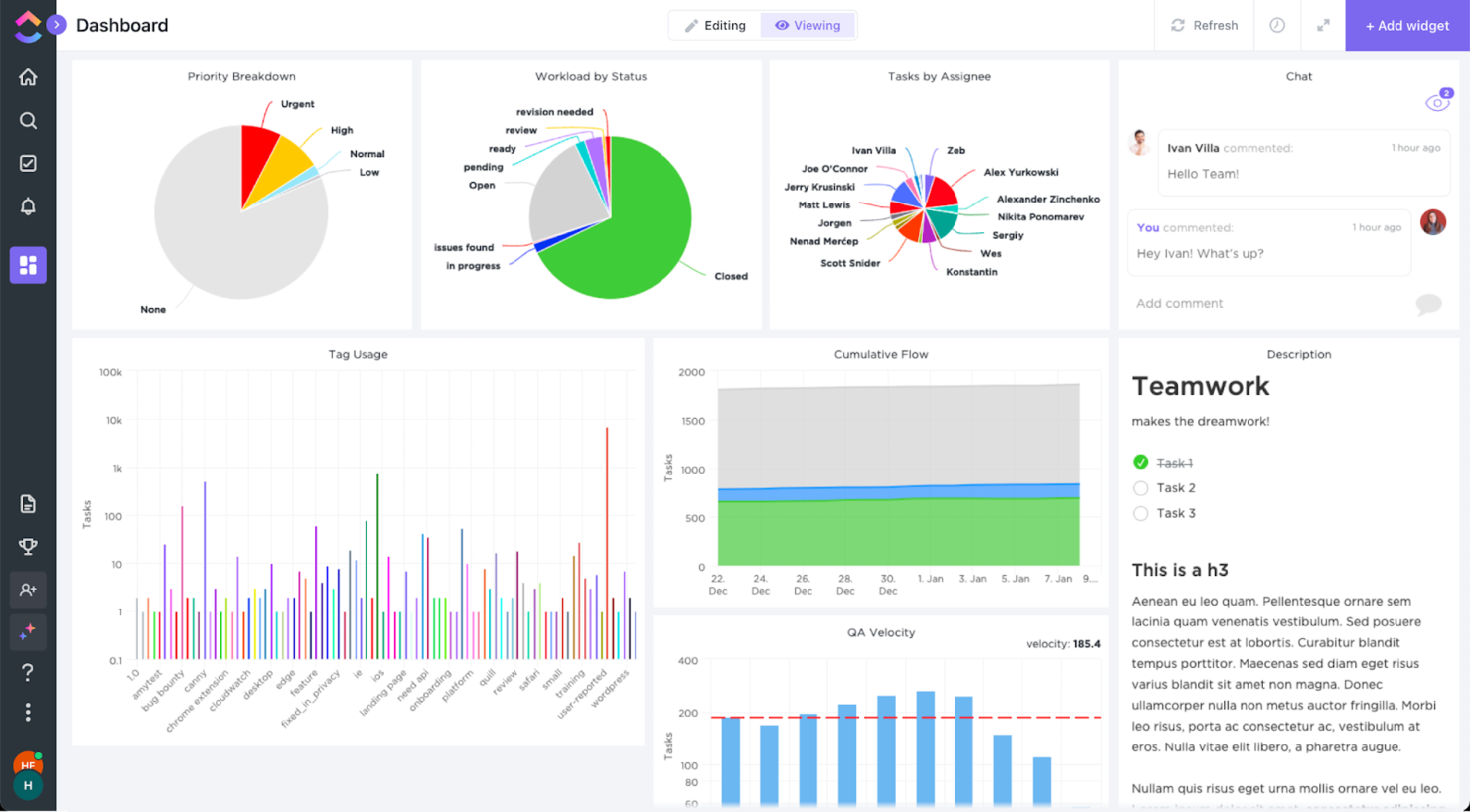
ClickUp è un potente software di gestione dei progetti che offre la possibilità di raccogliere una grande quantità di dati dall'interno della piattaforma e di presentarli nei bellissimi grafici che vedi nello screenshot qui sopra. Sebbene non sia un vero e proprio strumento di Business Intelligence, può sicuramente supportare le tue decisioni.
Detto ciò, ClickUp ha riconosciuto di non poter competere con gli strumenti di BI così com'è. Per questo motivo offre un'integrazione con Tableau. Questa integrazione permette a Tableau di catturare uno screenshot di uno dei tuoi spazi ClickUp e di aggregarlo insieme a tutti gli altri dati aziendali.
ClickUp propone integrazioni native con Tableau, Slack, Google Suite, Dropbox e molti altri strumenti, oltre a più di 1.000 integrazioni tramite Zapier.
ClickUp è gratuito con spazio di archiviazione limitato per un numero illimitato di utenti. I piani a pagamento partono da $5/utente/mese e includono una prova gratuita.
New Product Updates from ClickUp
ClickUp Adds Meetings Hub, Super Agent Templates, and ZoomInfo Integration
ClickUp adds a searchable Meetings Hub, new ways to clone and template Super Agents, and a ZoomInfo integration through the App Center. These updates improve meeting retrieval, agent reuse, and access to sales intelligence. For more information, visit ClickUp’s official site.

Tableau
Miglior strumento di business intelligence per le aziende

Tableau è una piattaforma di analisi robusta e scalabile, disponibile nelle opzioni desktop, cloud o on-site. Vanta uno stile di analisi visiva e interattiva e consente di visualizzare i dati in modo sicuro tramite browser, desktop, dispositivi mobili o integrati in qualsiasi applicazione. Offre oltre 900 risorse di apprendimento, inclusi più di 100 video formativi. Per Gianluca Ferruggia, General Manager di DesignRush, l'impatto di Tableau è stato immediato: “Tableau ha trasformato i nostri dati grezzi in storie grafiche, i suoi dashboard drag-and-drop hanno cambiato le regole del gioco permettendoci di vedere tendenze che i nostri fogli di calcolo nascondevano.”
Si distinguono in un’area specifica dei criteri di valutazione delle funzionalità: la flessibilità. Tableau è facilmente scalabile; disponibile su server, desktop e/o cloud; accessibile su tutti i dispositivi, sia PC che smartphone; e offre risorse di analytics gratuite per studenti, educatori e piccole organizzazioni non profit. Qualunque sia la tua nicchia, sicuramente troverai qualcosa che fa per te.
Tableau può connettersi a sistemi di raccolta dati come ServiceNow, Splunk e Google Analytics. Altre integrazioni, o “Technology Partners” come vengono chiamati, includono 0xdata, AIMMS, Aircloak, AllSight, Amazon Web Services, Astera, Axiomatics, Birst, Datawatch,
Element Analytics, Google Cloud Platform, IBM, Microsoft e molti altri ancora.
Il prezzo iniziale è piuttosto elevato e i costi aumentano al termine del contratto annuale. I contratti pluriennali non sono disponibili, per cui nella nostra sezione valore per costo hanno ricevuto una valutazione negativa per lo schema tariffario elevato e variabile, che può sembrare predatorio.
Tableau parte da $70/utente/mese e offre una prova gratuita di 14 giorni.

Looker
Miglior strumento di reportistica BI su database

Crea report facili da leggere e dashboard interattive orientate alla visualizzazione che mostrano approfondimenti ricchi di dati e azionabili per definire metriche aziendali, individuare valore e scoprire l'interconnessione tra le tabelle. Le risorse e le funzionalità includono applicazioni personalizzate, visualizzazioni incorporate, flussi di lavoro di data science, la possibilità di ospitare su Public Cloud (come AWS e GCP) e altro ancora. Per Amit Chandak, Chief Analytics Officer di Kanerika Inc, Looker si è rivelata una soluzione potente per le sfide legate ai dati dei clienti: “Abbiamo utilizzato Looker per fornire approfondimenti in tempo reale e affidabili a un cliente che aveva difficoltà con dati frammentati—dopo l'implementazione, la velocità dei report è migliorata del 50% e il processo decisionale si è accelerato notevolmente grazie a dashboard chiare e azionabili.”
Offrono un corso di formazione interattivo gratuito e molte altre risorse in stile tutorial, motivo per cui sono riuscito a dare loro un punteggio così alto nella sezione usabilità dei criteri di valutazione. Sotto la scheda “Guida introduttiva”, noterai che dispongono di numerose risorse di autoaiuto per visualizzare dati grezzi, creare strumenti e sviluppare modelli.
Il punto debole di questo software è che la scrittura delle query non è particolarmente intuitiva per l'utente. Inoltre, le attività di analisi dei dati richiedono un tempo significativo per essere elaborate e per eseguire le query. Quando si tratta di big data, potrebbe risultare lento.
Si collegano a database come Redshift, Snowflake, BigQuery e oltre 50 dialetti SQL supportati come Amazon Redshift, Google BigQuery, Snowflake, MySQL, Oracle, Amazon Athena, Amazon Aurora e altri ancora.
Looker parte da $3,000/mese per 10 utenti ($50/utente aggiuntivo) e offre una demo gratuita.
Domo
Ideale per condividere analisi tramite portali vendor esterni

La Domo Business Cloud è una piattaforma che permette di aggregare dati da più fonti e costruire app di workflow personalizzate. Le sue funzionalità includono dashboard e reportistica, machine learning, analisi predittiva e reportistica self-service esterna. Per molte organizzazioni, la capacità di Domo di intervenire quando altri strumenti non sono sufficienti rappresenta un grande vantaggio. Nicola Leiper, Direttrice e Responsabile della Gestione Progetti di Espresso Translations, ha condiviso la sua esperienza: “Excel si è bloccato e Domo ha salvato la nostra relazione con il cliente più importante. Domo non solo ha organizzato i nostri dati ma ha anche salvato la nostra reputazione ed evidenziato alcune delle aree poco performanti delle nostre operazioni che ci sono costate migliaia.”
Mi piace l’attenzione che Domo dedica alle vostre relazioni esterne con fornitori e altri stakeholder. La funzionalità si chiama Domo Everywhere ed è una funzione che permette di costruire portali per i vostri partner esterni. In questo modo, possono analizzare autonomamente i dati che scegliete di condividere con loro e trarne le proprie conclusioni.
Inoltre, le board di visualizzazione dei dati sono widget indipendenti che possono essere modificati, filtrati e ridimensionati con pochi clic. Infine, la piattaforma consente di impostare i permessi sia per utenti interni che esterni, indipendentemente dall’account (Domo o non Domo).
Domo si integra con fonti dati esterne tramite oltre 1000 connettori predefiniti, tra cui Shopify, Salesforce, Amazon S3, Adobe Analytics, Sharepoint e Survey Monkey.
Domo offre una prova gratuita e i prezzi sono disponibili su richiesta.

Sisense
La migliore API di business intelligence per integrare l’analisi nei tuoi prodotti e strumenti

Una piattaforma ibrida cloud progettata per sfruttare tutti i tuoi dati insieme e renderli disponibili tramite dashboard interattive, analisi self-service e/o applicazioni BI con marchio personalizzato. Offre supporto, analisi e reportistica per aree aziendali quali misurazione del servizio clienti, marketing digitale, finanza, risorse umane, vendita al dettaglio ed eCommerce, analisi IT e molto altro.
Per quanto riguarda i nostri criteri di valutazione su usabilità e interfaccia utente, ho trovato che Sisense è facile da usare, facile da installare e configurare, e dispone di un'interfaccia intuitiva e una esperienza utente semplice. Il team di assistenza clienti è reattivo e adattabile, quindi sarebbe una buona scelta per aziende con livelli di esperienza tecnologica inferiori che potrebbero aver bisogno di maggiore assistenza.
Alcuni svantaggi includono il fatto che il connettore per il marketing potrebbe essere più robusto. Inoltre, alcune funzioni sono talmente semplificate da risultare limitanti; ad esempio, non dover scrivere una query sembra un meccanismo per risparmiare tempo finché le tue esigenze non corrispondono ai dati preesistenti e devi ingegnarti per trovare una soluzione creativa e ottenere ciò di cui hai bisogno.
Usa ODBC per connetterti direttamente al potente back-end di Sisense da qualsiasi applicazione di terze parti che preferisci, da Excel ai più diffusi strumenti di visualizzazione e reportistica dei dati. Offrono anche un marketplace per estensioni e plug-in forniti da loro o dai loro partner. Alcuni sono gratuiti, altri disponibili solo con un account premium.
Sisense propone prezzi personalizzati e offre una demo gratuita così come una prova gratuita.

Ideale per integrare oltre 150 fonti dati

Supermetrics è un potente strumento di integrazione dati che semplifica la raccolta e l'analisi dei dati di marketing, rendendolo una risorsa fondamentale per la business intelligence (BI). Permettendo agli utenti di aggregare dati da oltre 150 fonti diverse, incluse le principali piattaforme come Google Ads, Facebook Ads e LinkedIn Ads, Supermetrics garantisce che le aziende possano compilare set di dati completi per prendere decisioni più informate. Ad esempio, Baris Zeren, CEO di Bookyourdata, ha spiegato quanto sia stato d'impatto il servizio per il suo team: “Supermetrics ha reso più semplice la creazione di report perché raccoglie automaticamente i dati di marketing e vendite in un'unica dashboard. È unico perché ha fatto risparmiare al team ore ogni settimana e ci ha fornito una prospettiva coesa e coerente sull'efficacia delle campagne.”
Una delle caratteristiche che distinguono Supermetrics come strumento BI sono le sue capacità di automazione. Gli utenti possono impostare trasferimenti di dati automatizzati, assicurando che i loro report siano sempre aggiornati con gli ultimi dati senza intervento manuale. Questa automazione si estende anche alla pianificazione di importazioni regolari di dati,
Supermetrics offre inoltre opzioni di trasformazione dati robuste. Gli utenti possono filtrare, combinare e modificare i dati prima che raggiungano la destinazione finale, consentendo report personalizzati che soddisfano specifiche esigenze aziendali. Queste capacità di trasformazione sono fondamentali per la BI, poiché permettono alle aziende di adattare i propri dati per scoprire approfondimenti e trend precisi. La compatibilità dello strumento con piattaforme BI leader come Google Data Studio e Power BI ne esalta ulteriormente l’utilità, consentendo visualizzazioni e analisi dati sofisticate.
Inoltre, Supermetrics supporta un'ampia gamma di integrazioni con varie piattaforme di marketing e vendita, come Google Analytics, HubSpot, Shopify e Salesforce, garantendo che tutti i dati rilevanti possano essere consolidati in una singola fonte di verità.

Ideale per la mappatura in tempo reale dei percorsi cross-canale

Adobe Customer Journey Analytics è uno strumento di business intelligence che consente di analizzare e visualizzare i percorsi dei clienti su più canali utilizzando dati in tempo reale, dashboard personalizzabili e funzionalità di analisi avanzate.
Per Chi è Ideale Adobe Customer Journey Analytics?
Per i team di marketing e analisi di grandi aziende che necessitano di esaminare percorsi clienti complessi e multicanale.
Perché ho scelto Adobe Customer Journey Analytics
Ho scelto Adobe Customer Journey Analytics tra i migliori perché posso mappare in tempo reale i percorsi dei clienti tra web, mobile e canali offline. Uso la sua analisi visiva dei flussi per vedere come gli utenti si muovono tra i touchpoint e individuare immediatamente i punti di abbandono. Il mio team si affida al modello di dati unificato per integrare dati da più fonti, così abbiamo sempre una visione completa dell’esperienza del cliente.
Funzionalità Chiave di Adobe Customer Journey Analytics
- Dashboard personalizzabili: Crea dashboard interattive per visualizzare e condividere i principali indicatori con il tuo team.
- Segmentazione avanzata: Crea segmenti di pubblico dettagliati in base al comportamento, dati demografici o criteri personalizzati.
- Report programmati: Automatizza la consegna dei report agli stakeholder secondo una pianificazione definita.
- Connettori di dati: Importa e unifica dati da CRM, ecommerce e altri sistemi esterni.
Integrazioni di Adobe Customer Journey Analytics
Adobe Customer Journey Analytics offre integrazioni native con Adobe Experience Platform, Adobe Analytics, Adobe Target, Adobe Audience Manager e Adobe Campaign. Dispone inoltre di un'API per integrazioni personalizzate e supporta connessioni a fonti dati esterne tramite i connettori di Adobe Experience Platform.
Pros and Cons
Pros:
- Rilevamento anomalie tramite IA e analisi delle cause radice
- Integrazione profonda con Adobe Experience Platform
- Metriche calcolate flessibili e viste dati personalizzate
Cons:
- Integrazioni native limitate al di fuori dei prodotti Adobe
- Le funzionalità avanzate possono richiedere competenze tecniche

ClicData
Ideale per creare e incorporare dashboard nelle tue applicazioni

ClicData è una piattaforma di aggregazione dati con oltre 250 connettori. Questo ti permette di portare dati da qualsiasi area dell'azienda. Successivamente, un data warehouse memorizza tali informazioni e le rende disponibili per progettare dashboard in tempo reale.
L'ultimo passaggio consiste nel progettare la tua dashboard. Il designer di dashboard di ClicData dispone di una funzionalità drag-and-drop che rende semplice costruire le tue visualizzazioni di dati. Aggiungi elementi come annotazioni, indicatori, mappe, audio, tabelle e qualsiasi tipo di grafico tu possa immaginare. Dopodiché, puoi incorporare i tuoi grafici in un sito web, portale o ERP utilizzando la sua API.
Sebbene la piattaforma non offra integrazioni preconfezionate già pronte, la sua API è disponibile per il tuo team IT. L'API permette al software integrato di inviare informazioni a ClicData non appena vengono ricevute, così potrai sempre vedere informazioni aggiornate in tempo reale.
I piani a pagamento di ClicData partono da $75/mese e offrono una prova gratuita di 15 giorni.

Visor
Ideale per l'integrazione con Jira e viste personalizzate

Visor è uno strumento di workspace che si collega a diverse applicazioni SaaS, con l'obiettivo di unire le persone ai dati per un ambiente di lavoro più collaborativo. Consente agli utenti di creare viste personalizzate e visualizzazioni dei propri dati nidificati di Jira, offrendo un'integrazione bidirezionale con Jira per una condivisione accurata e personalizzabile.
Visor funziona come uno strumento di workspace che migliora la funzionalità delle applicazioni SaaS fornendo agli utenti una vista unificata dei loro dati. Visor pone inoltre l'accento sulla condivisione sicura, dotandosi di un'interfaccia semplice e intuitiva drag-and-drop per la massima facilità d'uso. Include anche un avanzato importatore JQL e supporta oltre 75 tipi di campi Jira, soddisfacendo una vasta gamma di esigenze di gestione dei dati.
Inoltre, Visor facilita la collaborazione e la comunicazione tra i membri del team, con funzionalità come diagrammi di Gantt, roadmap e la possibilità di personalizzare le visualizzazioni con colori e formattazione condizionale. Questo può far risparmiare tempo e migliorare l'efficienza nella pianificazione e nella rendicontazione dei progetti.
Visor si integra con Salesforce, Jira e HubSpot.
I prezzi di Visor partono da $9/utente/mese.
Altre opzioni
Durante la mia ricerca, ho trovato alcuni strumenti che non sono entrati nella lista, ma che meritano comunque una menzione.
- Power BI
La migliore soluzione di business intelligence per utenti Microsoft
- Logi Analytics
Miglior strumento di business analytics embedded pronto all'uso per team di sviluppo software
- Coefficient
Ideale per integrare dati nei fogli di calcolo
- InetSoft
Miglior strumento di data intelligence per architettura scalabile e modellizzazione avanzata
- Metric Insights
Miglior portale BI aziendale personalizzabile
- Exago BI
Miglior strumento di reportistica di business intelligence per principianti e persone non tecniche
- Izenda
Il miglior software di business intelligence per l'integrazione in applicazioni web-based


Wie ich Enterprise Content Management Systeme bewerte
Ich teile meine Bewertung in zwei Ebenen auf: die grundlegenden Muss-Kriterien – wie Prüfpfade und granulare Berechtigungen – und die Unterscheidungsmerkmale, die die besten Lösungen für PMOs und Portfolioteams hervorheben.
Grundlegende Funktionalität (Mindestanforderungen für diese Liste)
Wenn ich Werkzeuge für meine Liste auswähle, bewerte ich jedes einzelne auf einer Skala von 0 (Funktionalität nicht vorhanden) bis 5 (hervorragend in diesem Bereich) in Bezug auf jede unten aufgeführte Kernfunktionalität. Anschließend berechne ich die Gesamtpunktzahl des Tools als Prozentsatz. Jedes Tool muss mindestens eine Gesamtpunktzahl von 65 % erreichen, um in Betracht gezogen zu werden.
- Zentralisiertes Inhalts-Repository: Ich bewerte, ob die Plattform Projektliefergegenstände, Verträge und Spezifikationen in einer strukturierten Bibliothek organisieren und speichern kann, die sich über mehrere Portfolios skalieren lässt.
- Versionskontrolle & Prüfpfade: Jede Projektdokumentation wird überarbeitet; deshalb achte ich auf automatische Versionierung und Aktivitätsprotokolle, die zeigen, wer was und wann geändert hat.
- Zugriffssteuerung & Berechtigungen: Rollenbasierte Berechtigungen sind wichtig, wenn PMOs sensible Inhalte verwalten. Daher prüfe ich Steuerungen auf Ordner- und Dokumentenebene sowie SSO-Unterstützung.
- Automatisierung von Dokumentenworkflows: Die Genehmigungsabläufe für Änderungsaufträge, Scope-Dokumente und Abnahmen sollten konfigurierbar sein – mit bedingungsabhängigen Schritten und fristbasierten Benachrichtigungen.
- Metadaten & Enterprise Search: Ich untersuche, wie gut die Plattform Inhalte verschlagwortet und indexiert, damit ein Programmmanager spezifische Liefergegenstände unter tausenden Projektdokumenten auffinden kann.
- Integrationen & APIs: Das Tool sollte sich mit Plattformen verbinden lassen, die Teams bereits nutzen – wie Jira, Microsoft 365 oder Smartsheet – über native Schnittstellen oder eine gut dokumentierte API.
Sobald ich eine Liste von Tools habe, die die Kriterien erfüllen, schaue ich mir an, was jede Plattform im Besonderen auszeichnet.
Unterscheidungsmerkmale (Was Anbieter hervorhebt)
So vergleiche und unterscheide ich verschiedene Anbieter:
Herausragende Funktionen
KI-gestützte Inhaltsintelligenz ist ein großer Unterschiedsfaktor. Ich suche nach Plattformen, die Dokumente automatisch klassifizieren und verschlagworten, sodass ein PMO nicht hunderte Liefergegenstände pro Programm manuell kategorisieren muss. Auch Funktionen fürs Co-Authoring sind wichtig – wenn verteilte Teams gleichzeitig an Scope-Dokumenten oder Projektaufträgen arbeiten müssen, beseitigt Echtzeit-Kollaboration Übergabeverzögerungen. Außerdem bewerte ich das Records- und Aufbewahrungsmanagement, insbesondere für Teams in regulierten Branchen, wo Projektakten strikten Aufbewahrungsfristen und Legal-Hold-Richtlinien unterliegen müssen.
Mehr als nur Funktionen
Flexibilität bei der Bereitstellung ist eines der ersten Kriterien. Manche Projektorganisationen benötigen On-Premise-Hosting aus Gründen der Datenresidenz, andere bevorzugen Cloud-native Lösungen – daher prüfe ich, ob eine Plattform beides unterstützt. Compliance-Zertifizierungen wie SOC 2 und ISO 27001 sind ebenfalls relevant, insbesondere für Teams in regulierten Branchen wie Life Sciences oder öffentlichen Aufträgen. Schließlich beziehe ich die Komplexität der Implementierung mit ein, da die Migration von Terabytes an Legacy-Projektdokumenten aus einem Altsystem die Einführung gefährden kann, wenn der Anbieter keine guten Migrationswerkzeuge und Support für das Onboarding bietet.
Come ho scelto i migliori strumenti di BI
Per prima cosa, ho selezionato un ampio elenco di strumenti popolari sulla base di recensioni e valutazioni degli utenti. Poi ho ristretto l'elenco esaminando le funzionalità chiave che la mia esperienza mi ha mostrato essere necessarie per uno strumento di BI. Infine, ho scelto i criteri riportati di seguito come base per la mia valutazione.
Interfaccia utente (UI)
La tua piattaforma di BI è il luogo in cui analizzi i dati aziendali e, attraverso la modellazione dei dati, li utilizzi sotto forma di grafici e altre rappresentazioni visive che migliorano il processo decisionale. Pertanto, l'interfaccia deve essere pulita, intuitiva e fare buon uso degli spazi vuoti.
Usabilità
Lo strumento deve essere facile da imparare e padroneggiare. Strumenti come Microsoft Power BI, ad esempio, dispongono di un'interfaccia con funzionalità di trascinamento che puoi utilizzare sugli elementi grafici per modificare le informazioni analizzate. Lo strumento di BI dovrebbe includere funzionalità di questo tipo e una documentazione di supporto adeguata, formazione e video tutorial per aiutarti a utilizzare lo strumento più rapidamente.
Funzionalità e caratteristiche
Quante delle caratteristiche e funzioni chiave degli strumenti di reportistica per la gestione offre e quanto sono efficaci? In particolare, ho cercato:
- Dashboard personalizzabili: le migliori soluzioni BI offrono una visualizzazione a schermata singola con più rappresentazioni visive, insieme alla possibilità di interconnettere le visualizzazioni (in modo che eventuali filtri o selezioni influiscano su tutte le visualizzazioni) oppure di mantenere ciascuna di esse indipendente. Dovrebbe riflettere le modifiche in tempo reale e consentire di creare visualizzazioni personalizzate dei dati chiave.
- Analisi dettagliata e filtri dei dati: esaminare informazioni approfondite è fondamentale. Ciò include funzionalità come menu a discesa, filtri di ricerca e filtri segmentatori, oltre alla possibilità di analizzare in dettaglio i dati e tornare ai riepiloghi.
- Interfaccia web per i clienti: è più semplice se le soluzioni di reportistica rivolte ai clienti offrono interfacce web per i clienti, poiché sono più efficienti e facili da amministrare rispetto alle interfacce per clienti basate su desktop.
- Report programmati e automatizzati: lo strumento dovrebbe aiutarti a monitorare facilmente i progressi. Ciò include la possibilità di programmare l'invio di aggiornamenti automatici ai team, inviare report automatici ai clienti e impostare notifiche automatiche per essere informato sulle date o sulle soglie importanti.
- Diagrammi di alta qualità: gli strumenti di base includono grafici a barre, a linee, a torta, ad area e radar, mentre i diagrammi più avanzati includono mappe di calore, grafici a dispersione, grafici a bolle, istogrammi e mappe geospaziali. I migliori strumenti di reportistica consentono di combinare liberamente questi elementi per creare diagrammi che utilizzano una combinazione di queste visualizzazioni.
Integrazioni
I connettori di dati ti aiuteranno a sfruttare al meglio una piattaforma BI. Un modo per farlo consiste nell'integrare i dati con altri software basati sul cloud, come SAP o SAS. Pertanto, cerco integrazioni predefinite, aggregatori di software di terze parti come Zapier e integrazioni personalizzate tramite API.
Prezzi
Uno dei fattori più influenti sulle decisioni aziendali relative agli strumenti è il prezzo. Pertanto, cerco informazioni sui casi d'uso, sui piani tariffari mensili e su qualsiasi altra informazione utile. Ad esempio, verifico se è disponibile una versione gratuita da provare, una prova gratuita oppure se è disponibile come soluzione on-premise.
Domande frequenti sugli strumenti di BI
Trova le risposte alle domande comuni che altre persone pongono su questo argomento.
In che modo gli strumenti di business intelligence possono aiutare i responsabili dell'analisi a prendere decisioni strategiche?
Gli strumenti di business intelligence aiutano i responsabili dell’analisi automatizzando la raccolta dei dati e fornendo informazioni in tempo reale tramite dashboard e visualizzazioni. È possibile confrontare rapidamente le vendite tra le diverse regioni, monitorare i budget e individuare i problemi operativi senza ricorrere alla reportistica manuale. Molte piattaforme offrono modelli predittivi e pianificazione degli scenari per prevedere i risultati e orientare la strategia. Attraverso la narrazione dei dati, che combina elementi visivi e testo, è possibile influenzare le decisioni dei dirigenti e allineare i team attorno a obiettivi basati sulle informazioni.
Quali sono le difficoltà di integrazione più comuni quando si implementano strumenti di BI in ambienti aziendali consolidati?
Le difficoltà di integrazione derivano spesso da sistemi IT obsoleti, dati isolati e formati incoerenti. I sistemi ERP legacy o i database sviluppati internamente possono avere difficoltà a connettersi agli strumenti di BI cloud, causando errori di sincronizzazione o perdita di dati. Dati di scarsa qualità possono falsare i report, mentre protocolli di sicurezza rigidi possono ritardare l’accesso. Per affrontare il problema, verifica i tuoi dati, coinvolgi tempestivamente il reparto IT, standardizza i formati e scegli piattaforme di BI con una solida interoperabilità, come connettori nativi, supporto per le API e funzionalità di trasformazione dei dati.
In che modo gli strumenti di BI supportano la collaborazione tra reparti per i responsabili aziendali?
Gli strumenti di BI semplificano la collaborazione tra i team offrendo un’unica fonte attendibile accessibile a tutti. Invece di gestire diverse versioni dei fogli di calcolo, i responsabili possono creare dashboard interattive che si aggiornano automaticamente con i dati più recenti. I reparti finanziario e vendite possono esaminare previsioni condivise sui ricavi, mentre le attività operative e le risorse umane possono monitorare le esigenze di personale. Funzionalità come le annotazioni sui grafici, l’assegnazione delle attività e gli avvisi sui KPI riducono le incomprensioni, rendono le riunioni più efficienti e aiutano i reparti a mantenere l’allineamento sugli obiettivi comuni.
Quali metriche delle prestazioni dovrebbero monitorare i responsabili aziendali utilizzando il software di BI?
La scelta delle metriche dipende dagli obiettivi aziendali, ma tra quelle più comuni figurano la crescita dei ricavi, il margine di profitto netto, il costo di acquisizione dei clienti, il valore del cliente nel tempo, il tasso di abbandono e le spese operative. Per i team che lavorano per progetti, è possibile monitorare anche i tassi di consegna puntuale o l’utilizzo delle risorse. Gli strumenti di BI semplificano la creazione di dashboard automatizzate per monitorare queste metriche in tempo reale. Imposta soglie personalizzate per attivare notifiche se una metrica esce dall’intervallo preferito. Nel tempo, il monitoraggio di questi KPI aiuta a individuare rapidamente le aree che richiedono attenzione e a misurare l’efficacia delle nuove iniziative.
Come si misura il ROI di una piattaforma di business intelligence in un'organizzazione di medie o grandi dimensioni?
Inizia misurando i risparmi concreti, come la riduzione del lavoro richiesto per la reportistica manuale. Ad esempio, se il reparto finanziario risparmia 20 ore al mese, si tratta di una chiara riduzione dei costi generali. Stima poi i ricavi aggiuntivi derivanti da decisioni più rapide e accurate, come l’acquisizione di nuove vendite o la riduzione dei costi grazie a previsioni migliori. Monitora metriche come la diminuzione degli errori nei report, la maggiore rapidità nell’ottenere informazioni e l’adozione più ampia dei dati. Confronta questi vantaggi con i costi totali, inclusi abbonamenti, integrazione, formazione e assistenza, per calcolare il ROI e giustificare gli investimenti continuativi.