

Gli 8 migliori strumenti di previsione basati sull’IA recensiti nel 2026

Elenco dei migliori strumenti di previsione basati sull'IA


Gestire i progetti può sembrare un'impresa ardua, soprattutto quando devi destreggiarti tra tempistiche, risorse e aspettative. Potresti ritrovarti sommerso dai dati e avere difficoltà a prendere rapidamente decisioni informate. È qui che entrano in gioco gli strumenti di previsione basati sull'IA. Ti aiutano a prevedere i risultati, ad allocare le risorse in modo efficace e a mantenere i progetti sulla buona strada.
Ho dedicato del tempo a testare e recensire questi strumenti e sono qui per condividere i risultati delle mie analisi. In questo articolo ti guiderò attraverso i migliori strumenti di previsione basati sull'IA disponibili. Scoprirai quali sono più adatti alle tue esigenze, sia che tu gestisca un piccolo team o una grande azienda.
Perché fidarsi dei nostri consigli sui software
Il nostro team testa e recensisce software dal 2012. In quanto project manager noi stessi, sappiamo quanto sia difficile — e importante — scegliere il software giusto.
Per questa guida, abbiamo valutato gli strumenti attraverso test pratici e ricerche indipendenti, assegnando un punteggio agli strumenti in base ai nostri criteri di selezione. Ci basiamo inoltre sulle competenze di leader di pensiero del settore e di professionisti attivi nella gestione dei progetti.
Le nostre recensioni riflettono il nostro giudizio editoriale umano, non un discorso di vendita.
Revisori esperti:
Tabella comparativa degli strumenti di previsione basati sull'IA
Questa tabella comparativa riassume i dettagli sui prezzi degli strumenti di previsione basati sull’IA che ho selezionato:
| Tool | Best For | Trial Info | Price | ||
|---|---|---|---|---|---|
| 1 | Ideale per l'allocazione delle risorse basata sull'intelligenza artificiale tra più progetti | Prova gratuita di 30 giorni + demo gratuita disponibile | A partire da €22.5/mese (con fatturazione annuale) | Website | |
| 2 | Ideale per la pianificazione di scenari | Demo gratuita disponibile | Prezzo su richiesta | Website | |
| 3 | Ideale per la pianificazione finanziaria | Demo gratuita disponibile | Prezzi su richiesta | Website | |
| 4 | Ottimo per le capacità di integrazione | Prova gratuita di 30 giorni | Prezzi su richiesta | Website | |
| 5 | Ideale per il budgeting | Demo gratuita disponibile | Prezzo su richiesta | Website | |
| 6 | Ideale per la collaborazione in team | Prova gratuita di 14 giorni | Prezzo su richiesta | Website | |
| 7 | Ideale per analisi dei dati | Piano gratuito e prova gratuita di 30 giorni disponibili | Da $10/utente/mese | Website | |
| 8 | Ideale per il monitoraggio dei progetti | Prova gratuita di 14 giorni + piano gratuito disponibile | Da $10/utente/mese (fatturazione annuale) | Website |

Recensioni dei migliori strumenti di previsione basati sull'IA
Di seguito trovi i miei riepiloghi dettagliati dei migliori strumenti di previsione basati sull’IA inclusi nel mio elenco. Le mie recensioni offrono un’analisi approfondita delle funzionalità principali, dei pro e dei contro, delle integrazioni e dei casi d’uso ideali di ciascuno strumento, per aiutarti a trovare quello più adatto a te.

Epicflow
Ideale per l'allocazione delle risorse basata sull'intelligenza artificiale tra più progetti
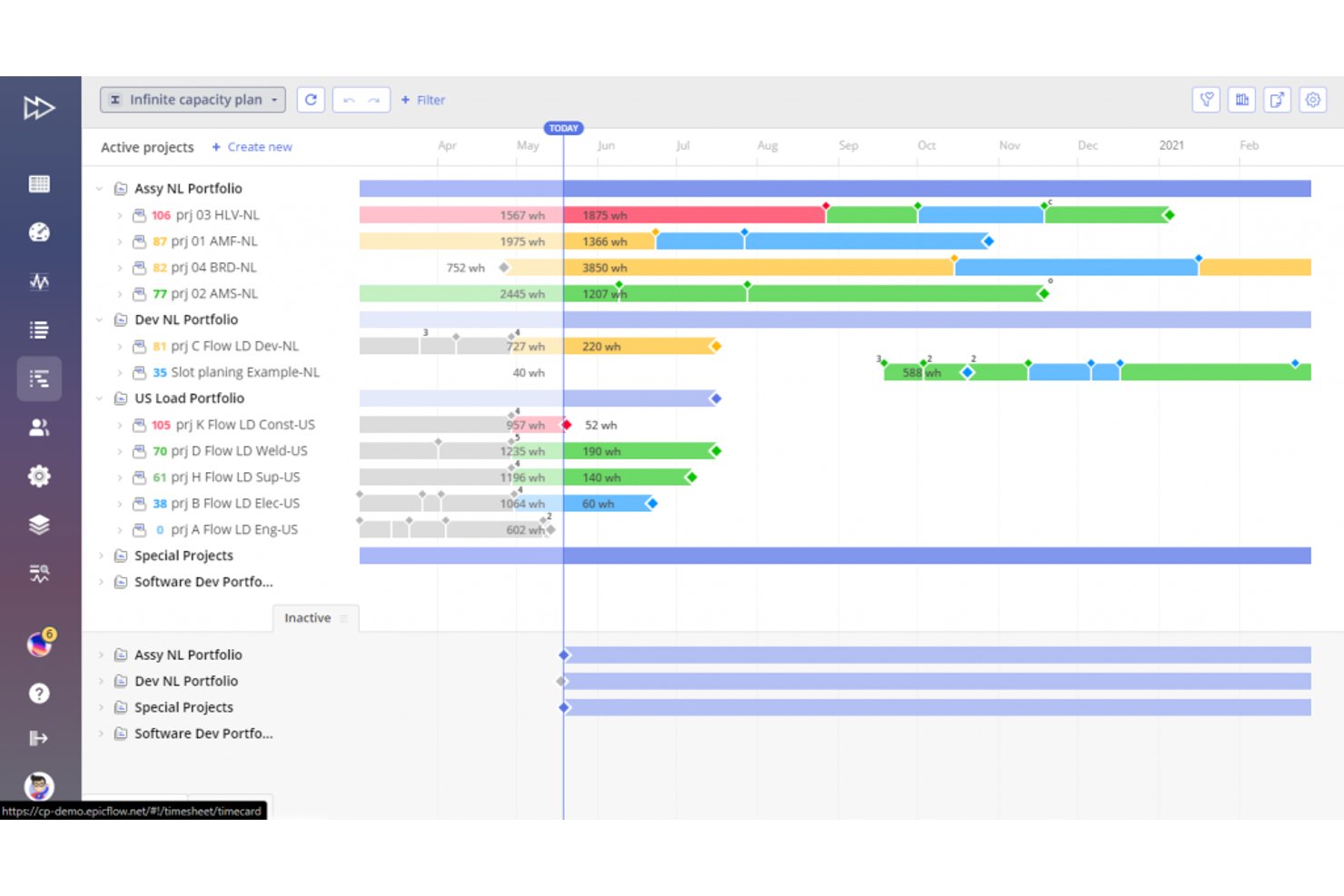
Epicflow è una piattaforma di gestione delle risorse e previsione del portafoglio basata sull'intelligenza artificiale, che combina la pianificazione predittiva della capacità, la programmazione di più progetti, il rilevamento dei colli di bottiglia e la simulazione di scenari ipotetici.
Per chi è più adatto Epicflow?
Epicflow è adatto alle organizzazioni di medie e grandi dimensioni nei settori dell'ingegneria, dell'IT e dello sviluppo dei prodotti, dove più progetti competono per lo stesso gruppo di risorse specializzate.
Perché ho scelto Epicflow
Epicflow si è guadagnato un posto tra i migliori della mia selezione perché affronta il problema della previsione che la maggior parte degli strumenti di gestione dei progetti ignora: l'impatto sulla pianificazione quando gli stessi ingegneri sono condivisi tra otto progetti. Il grafico del carico futuro prevede la domanda di risorse per ogni progetto attivo simultaneamente, mentre la previsione della data di consegna ricalcola le tempistiche di consegna in tempo reale al variare dei vincoli. Epica, l'assistente basato sull'intelligenza artificiale, modella quindi cosa accadrebbe se spostassi una risorsa da un progetto per supportarne un altro, mostrando immediatamente gli impatti a valle.
Funzionalità principali di Epicflow
- Grafico del carico storico: Visualizza la produzione effettiva delle risorse e i colli di bottiglia dei progetti completati per l'analisi delle tendenze.
- Generatore di report basato sull'intelligenza artificiale Epica: Crea report dirigenziali e riepiloghi sullo stato a partire da query in linguaggio naturale relative alla salute del progetto.
- Gestione delle competenze e degli attributi: Abbina i profili delle risorse alle attività di progetto in base a criteri di competenza e attributi.
- Visualizzazione con grafico a bolle/termico: Mostra l'avanzamento, il consumo del budget e il margine residuo utilizzando la logica della Teoria dei vincoli.
Integrazioni di Epicflow
Epicflow offre integrazioni native con Jira, Microsoft Project, Oracle Primavera, SAP, Workfront e Trimergo. È disponibile un'API per le integrazioni personalizzate.
Pros and Cons
Pros:
- Previsione della domanda di risorse tra più progetti basata sull'intelligenza artificiale
- Ricalcolo in tempo reale delle date di consegna nell'intero portafoglio
- Modellazione di scenari ipotetici con impatto immediato a valle
Cons:
- Profondità limitata nelle previsioni dei costi e del budget
- La personalizzazione dei report è relativamente limitata

Anaplan
Ideale per la pianificazione di scenari
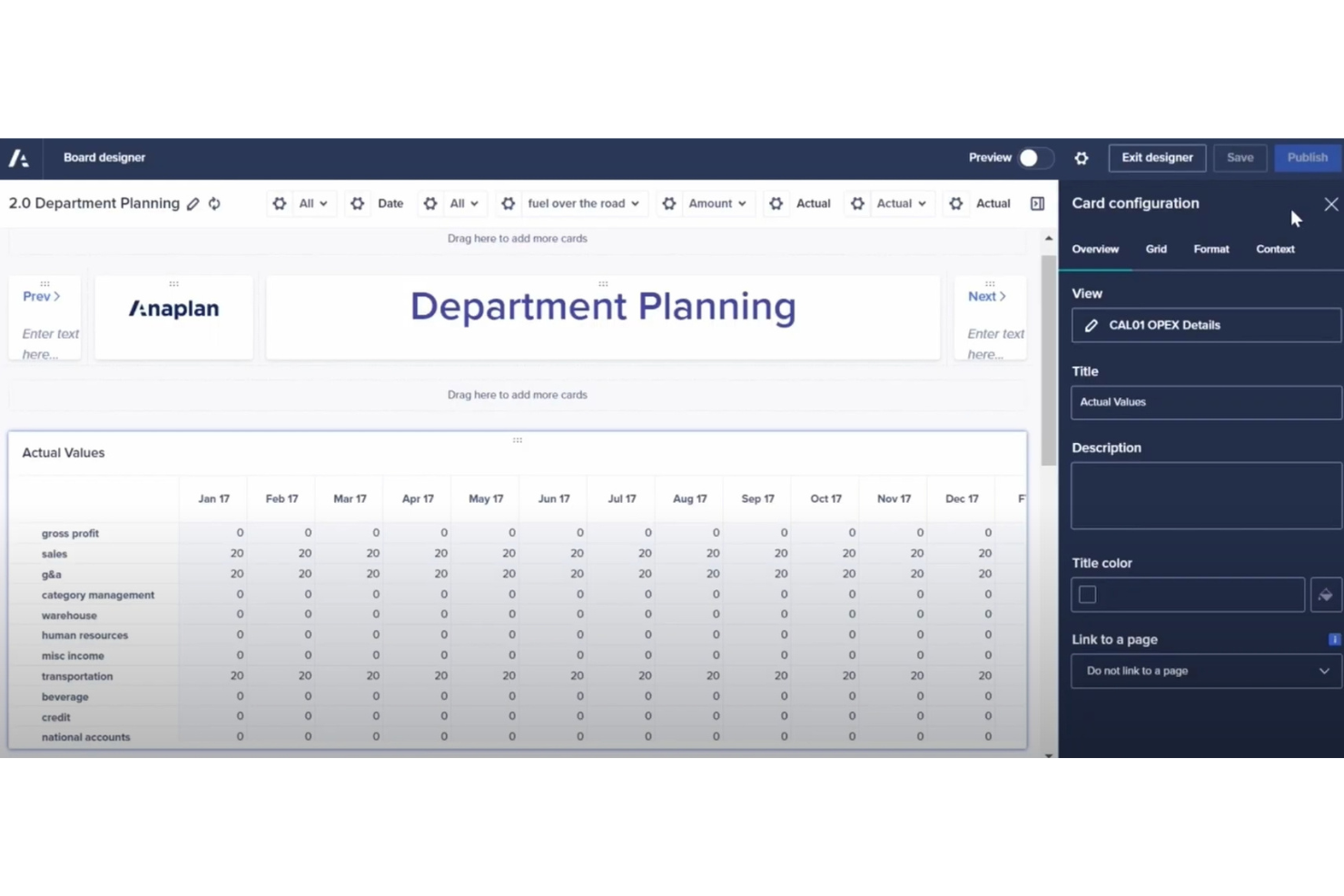
Anaplan è ideale per i team che hanno bisogno di confrontare e stressare molteplici scenari aziendali in un unico ambiente di lavoro. Vedo spesso affidarsi ad Anaplan quei team le cui esigenze previsionali vanno ben oltre modelli lineari o i fogli di calcolo statici.
Quello che mi piace di più è che puoi costruire modelli what-if complessi e personalizzati e alternarli rapidamente per vedere subito l’impatto a valle. Quando la pianificazione degli scenari è una parte centrale della previsione, Anaplan rende pratico eseguire queste simulazioni in modo rapido, anche quando piani e variabili cambiano durante il ciclo.
Anaplan è ideale per
- Team finanziari o operativi che modellano scenari what-if complessi
- Grandi organizzazioni che necessitano di modelli previsionali dinamici e personalizzabili
Anaplan non è adatto per
- Piccoli team con esigenze previsionali di base e a esito singolo
- Chi cerca una soluzione AI pronta all’uso e con un solo clic
Cosa distingue Anaplan
Anaplan è pensato per organizzazioni che vogliono modellare scenari complessi senza essere limitate dalle restrizioni dei fogli di calcolo tradizionali. Invece di gestire input statici e previsioni una alla volta, come potresti fare in Excel, lavori in un ambiente di modellazione dinamico che ti permette di stressare diversi piani aziendali in un unico posto. Trovo che questo approccio sia ideale per gruppi finanziari o operativi che devono adattarsi in tempo reale, valutare l’impatto e gestire più livelli di analisi what-if mentre i piani cambiano.
Compromessi con Anaplan
Anaplan ottimizza per flessibilità e complessità di modellazione, ma la configurazione iniziale e le modifiche richiedono più tempo e competenze rispetto agli strumenti che puntano su previsioni preconfezionate; per questo chi cerca tempi rapidi o utenti occasionali spesso incontrano difficoltà.
Pros and Cons
Pros:
- Agenti AI basati sui ruoli e guida predittiva
- La funzione CoPlanner permette di chiedere informazioni in modo conversazionale
- L’intelligenza interconnessa abilita una pianificazione olistica
Cons:
- Curva di apprendimento ripida
- Richiede competenze tecniche
- Costo elevato per le piccole imprese

Cube
Ideale per la pianificazione finanziaria

Cube è un software FP&A (pianificazione e analisi finanziaria) no-code pensato per i team di finanza strategica. Supporta la pianificazione in tempo reale e aiuta ad automatizzare i processi finanziari, rendendolo ideale per settori come sanità e SaaS.
Perché ho scelto Cube: Si specializza nella pianificazione finanziaria con funzionalità come previsioni flessibili e collaborazione alimentata dall'IA. La previsione sempre attiva di Cube consente al tuo team di adattare le strategie in tempo reale. La gestione unificata dei dati del software garantisce accuratezza e sicurezza nei report finanziari. Le capacità di modellazione degli scenari ti forniscono gli strumenti per prendere decisioni agili.
Funzionalità principali e integrazioni
Le funzionalità includono la previsione sempre attiva, che mantiene le strategie adattabili ai cambiamenti in tempo reale. La modellazione degli scenari è semplificata, permettendo al tuo team di esplorare facilmente diversi risultati finanziari. I flussi di lavoro integrati promuovono una collaborazione senza interruzioni tra i membri del team.
Le integrazioni includono NetSuite, Salesforce, QuickBooks, Xero, Microsoft Dynamics 365, Workday, Intacct, Google Sheets, Excel e Slack.
Pros and Cons
Pros:
- Flessibilità nella modellazione degli scenari
- Previsioni intelligenti con AI (avvio rapido / confronto con benchmark)
- AI agentica per supporto FP&A / supporto decisionale
Cons:
- Curva di apprendimento ripida
- Opzioni di personalizzazione limitate
- Configurazione iniziale complessa


IBM Planning Analytics è la mia scelta quando serve una previsione AI avanzata, specialmente in ambienti di dati complessi che richiedono un'integrazione massiccia. Puoi collegarlo direttamente a fonti come ERP, CRM e data warehouse esterni, rendendolo ideale quando devi consolidare input provenienti da ogni dove.
Quello che apprezzo è la rapidità con cui la modellazione di scenari e l'analisi predittiva si sincronizzano tra le business unit, anche con dati eterogenei. Funziona al meglio se gestisci previsioni complesse o stratificate e hai bisogno di un'integrazione veloce con i sistemi esistenti.
A chi è più adatto IBM Planning Analytics
- Imprese che necessitano di unificare le previsioni da più sistemi
- Team finanziari che gestiscono input di dati complessi e provenienti da fonti multiple
Per chi non è ideale IBM Planning Analytics
- Piccole organizzazioni con esigenze limitate di integrazione dei dati
- Team alla ricerca di strumenti per le previsioni semplici o a bassa manutenzione
Cosa distingue IBM Planning Analytics
IBM Planning Analytics tende a dare priorità alla previsione connessa in organizzazioni che ricevono dati da numerose fonti. Diversamente da soluzioni più semplici, prevede l'integrazione di dati in tempo reale dai sistemi di finanza, vendite e operations. In pratica, è la scelta migliore se vuoi costruire previsioni che riflettano i cambiamenti nei dati sottostanti man mano che avvengono.
Compromessi con IBM Planning Analytics
IBM Planning Analytics è ottimizzato per un'integrazione profonda dei dati, ma questo aggiunge complessità e tempi di configurazione per chi cerca previsioni rapide o una manutenzione meno tecnica.
Pros and Cons
Pros:
- Previsioni AI multivariate e modellazione dei trend
- Opzioni di modellazione flessibili
- Integra insight predittivi in tutti i flussi di pianificazione
Cons:
- Processo di configurazione complesso
- Richiede competenze tecniche
- Flessibilità di personalizzazione limitata


Jedox si distingue per la gestione di budget, previsioni e pianificazione in un unico spazio unificato. Vedo i team finanziari ottenere vero valore da funzionalità come la modellazione finanziaria integrata, le previsioni basate su driver e i flussi di lavoro strutturati per le approvazioni.
Ciò che rende Jedox unico è il modo in cui gestisce le iterazioni di budget e la pianificazione di scenari, soprattutto per le organizzazioni che gestiscono più filiali o linee di prodotto. Mi piace come puoi costruire e modificare modelli dettagliati senza dover passare da uno strumento all'altro.
Jedox è il migliore per
- Team finanziari che gestiscono budget e previsioni complessi
- Imprese che necessitano di pianificazione integrata su scenari e driver
Jedox non è ideale per
- Team che cercano previsioni automatizzate e basate su AI senza modellazione manuale
- Piccole organizzazioni che desiderano strumenti di budgeting leggeri
Cosa distingue Jedox
Jedox è costruito attorno a budgeting e pianificazione aziendale, quindi ti spinge a integrare previsioni, pianificazione e analisi in un modello condiviso che si adatta ai flussi di lavoro finanziari e operativi. A differenza di altri strumenti, che lasciano il flusso di lavoro all'utente, Jedox si aspetta che tu definisca come dovrebbero funzionare budget, previsioni e approvazioni. In pratica, questo funziona bene se desideri processi di pianificazione strutturati, tracciabili e ripetibili tra i team.
Compromessi con Jedox
Jedox è ottimizzato per struttura e controllo dei processi, ma perdi la velocità delle previsioni AI automatizzate e la flessibilità degli strumenti leggeri. Questo può rallentarti se hai bisogno di approcci previsionali ad hoc o sperimentali.
Pros and Cons
Pros:
- Capacità di pianificazione multidimensionale
- Supporto per interrogazioni in linguaggio naturale
- Architettura attenta alla privacy e integrazione AI sicura
Cons:
- Configurazione iniziale complessa
- Curva di apprendimento elevata
- Non adatto a piccoli team


Forecast App si guadagna un posto in questa lista perché è raro trovare una soluzione di previsione AI pensata con la collaborazione di squadra come caratteristica principale. Vedo che le squadre ottengono il massimo quando project manager, finance e operations devono intervenire insieme sull'allocazione delle risorse e sulla modellazione degli scenari.
Il vero vantaggio per la collaborazione è che Forecast permette a più persone di creare, modificare e commentare le previsioni insieme in tempo reale. Apprezzo quanto sia facile visualizzare la capacità e vedere i cambiamenti in programma e budget, direttamente dalle dashboard di pianificazione degli scenari.
Migliore utilizzo di Forecast App
- Team che necessitano di previsioni collaborative tra diversi ruoli
- Organizzazioni basate su progetti che gestiscono risorse e capacità
Forecast App non è ideale per
- Utenti singoli che cercano uno strumento di previsione personale
- Modellizzazione finanziaria altamente specializzata o analisi statistica profonda
Cosa rende unica Forecast App
Forecast App è progettata per team trasversali che hanno bisogno di creare, revisionare e perfezionare le previsioni insieme, nello stesso workspace. A differenza di altri strumenti, che trattano le previsioni come un compito solitario o isolato, Forecast App si aspetta che più persone contribuiscano e condividano la responsabilità della pianificazione degli scenari. In pratica, questo funziona al meglio quando si vuole che tutti—dal project manager alla finanza—capiscano e regolino i carichi di lavoro futuri senza scambiarsi continuamente fogli di calcolo.
Compromessi con Forecast App
Forecast App ottimizza la pianificazione condivisa e la visibilità, ma ciò significa rinunciare a opzioni statistiche avanzate e alla personalizzazione tramite script che si trovano negli strumenti pensati per previsioni specialistiche o lavori di analisi.
Pros and Cons
Pros:
- Metriche predittive personalizzate di progetto (date di fine, budget, avvisi di rischio)
- Nova Insights per monitoraggio delle performance e supporto alle decisioni
- Suggerimenti a livello di task e ottimizzazione delle risorse
Cons:
- Opzioni di personalizzazione limitate
- Curva di apprendimento ripida per principianti
- Costo elevato per team ridotti


Dart merita un posto nella mia lista per la sua analisi dei dati in tempo reale e la modellizzazione predittiva progettata per la previsione quantitativa. Quando confronto strumenti per un lavoro approfondito sui dati, noto che gli algoritmi avanzati di Dart e la gestione flessibile dei dati lo distinguono, soprattutto nel lavoro con dataset di grandi dimensioni e serie temporali complesse.
Apprezzo la rapidità con cui fa emergere approfondimenti significativi, un aspetto fondamentale quando è necessario adattare rapidamente le previsioni al variare delle tendenze.
Dart è ideale per
- Analisti quantitativi che costruiscono modelli previsionali basati sui dati
- Team che necessitano di analisi in tempo reale su grandi volumi di dati
Dart non è consigliato per
- Utenti non tecnici che necessitano di flussi di lavoro di previsione guidati
- Piccoli team con esigenze di reporting o previsione basilari
Cosa rende Dart diverso
Dart è pensato per gli analisti che desiderano lavorare direttamente con i dati grezzi e condurre esperimenti di previsione pratici. A differenza di altri strumenti, Dart si aspetta che tu conosca il tuo dataset e l'approccio di modellizzazione. Invece di guidarti attraverso flussi di lavoro predefiniti, ti lascia il controllo completo su configurazione ed esplorazione dei dati. Questo è ottimo se desideri sperimentare e perfezionare le previsioni nel dettaglio.
Compromessi con Dart
Dart è ottimizzato per la modellizzazione personalizzata, quindi le guide e i modelli preimpostati sono ridotti al minimo e gli utenti non tecnici possono incontrare una curva di apprendimento ripida.
Pros and Cons
Pros:
- Automatizza la generazione di amministrazione di routine e sotto-attività
- Design dell'interfaccia intuitivo
- Funzionalità avanzate di calendario
Cons:
- Richiede accesso internet costante
- Potrebbe richiedere un periodo di apprendimento
- Gli utenti segnalano occasionali rallentamenti del sistema

Wrike
Ideale per il monitoraggio dei progetti
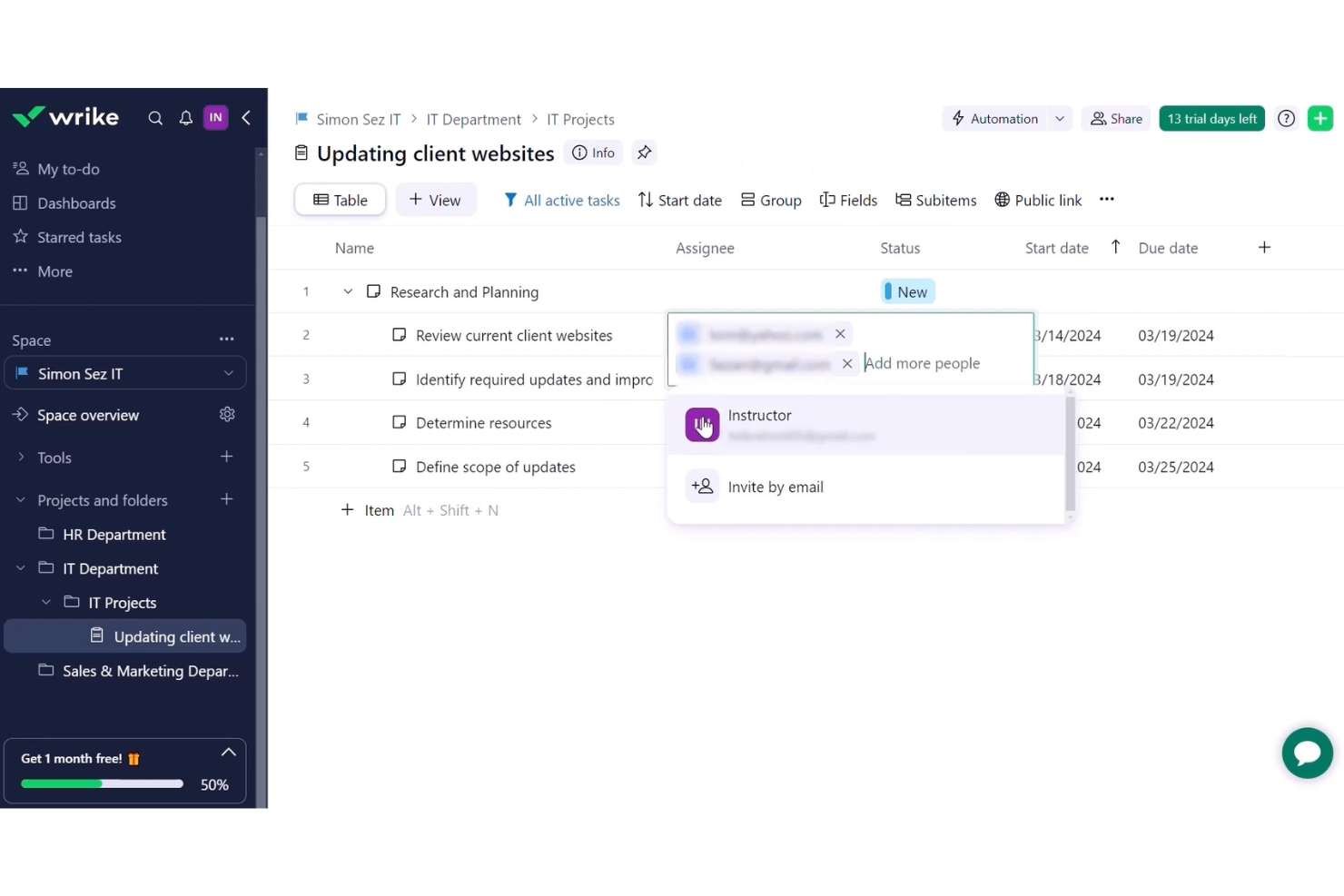
Wrike si guadagna il suo posto per il monitoraggio dei progetti perché è progettato per gestire lavori complessi in cui previsione e visibilità sono imprescindibili. Quando lavoro con team che gestiscono più scadenze e priorità in continuo cambiamento, le dashboard interattive e i grafici del carico di lavoro di Wrike offrono una panoramica in tempo reale dello stato del progetto.
Mi piace che la previsione e l'allocazione delle risorse siano elementi centrali, così puoi individuare i rischi prima che diventino ostacoli.
Ideale per
- Team che gestiscono più progetti con risorse limitate
- Organizzazioni che necessitano di visibilità su previsione e carico di lavoro
Non adatto a
- Piccoli gruppi con piani di progetto semplici e statici
- Team che evitano configurazioni e report dettagliati
Cosa rende Wrike diverso
Wrike sembra progettato per team di progetto che gestiscono numerose componenti su diversi flussi di lavoro. A differenza di altri strumenti, che puntano su tipi di attività flessibili, Wrike ancora il lavoro in timeline di progetto formali e allocazione delle risorse. In pratica, questo approccio ti offre un modo concreto di gestire dipendenze e assegnazioni, soprattutto per la pianificazione e la previsione delle risorse su iniziative sovrapposte.
Compromessi con Wrike
Wrike è ottimizzato per la modellazione dettagliata dei progetti, quindi i team informali o i progetti con obiettivi fluidi e in cambiamento potrebbero trovare il processo di configurazione troppo rigido per le loro esigenze.
Pros and Cons
Pros:
- Funzionalità AI in tutti i piani
- Sintesi automatica & assistenza ai contenuti
- Automazione delle attività e suggerimenti intelligenti
Cons:
- Può diventare costoso rapidamente
- Le integrazioni hanno un costo aggiuntivo
- 2FA solo nel piano enterprise
New Product Updates from Wrike
Wrike Adds Klaxoon MCP Integration
Wrike’s Klaxoon MCP integration is now generally available, enabling AI agents to navigate between Wrike tasks and attached whiteboards, read task context, and manage whiteboard attachments via API. For more information, visit Wrike's official site.
Altri strumenti di previsione basati sull'IA
Ecco alcune altre opzioni di strumenti di previsione basati sull’IA che non sono entrate nel mio elenco, ma che vale comunque la pena prendere in considerazione:
- Zoho Analytics
Ideale per la visualizzazione dei dati
- Asana
Ideale per la comunicazione nel team
- monday.com
Ideale per la gestione visiva delle attività
- ClickUp
Ideale per flussi di lavoro personalizzabili


Come valuto gli strumenti di previsione dei progetti AI
Cerco strumenti in cui l'AI cambia realmente il modo in cui i team prevedono tempi, costi e rischi—non solo dashboard con un'etichetta "AI" appiccicata sopra. La mia valutazione si suddivide in due livelli: la funzionalità di base che uno strumento deve avere per entrare nella lista e i fattori differenzianti che separano una buona scelta da una eccellente.
Funzionalità di base (Requisiti minimi per questa lista)
Quando seleziono gli strumenti per la mia lista, assegno a ciascuno un punteggio da 0 (non offre la funzionalità) a 5 (eccelle in questa area) per ogni funzionalità di base elencata di seguito. Successivamente, calcolo il punteggio totale dello strumento in percentuale. Ogni strumento deve raggiungere un punteggio totale minimo del 65% per essere preso in considerazione.
- Previsione predittiva delle tempistiche: Valuto se lo strumento utilizza modelli ML per prevedere date di completamento e slittamenti delle milestone, e non solo mostra un diagramma di Gantt statico con calcoli delle date eseguiti manualmente.
- Rilevamento del rischio guidato dall'AI: Lo strumento dovrebbe individuare in automatico i progetti a rischio e segnalare modelli di ritardo, andando oltre semplici avvisi basati su regole preimpostate manualmente.
- Previsione di costi e budget: Cerco previsioni EAC e di superamento basate su modelli AI fondati su dati di spesa reale, non semplici proiezioni a ritmo costante che presumono un andamento perfettamente lineare.
- Previsione della domanda di risorse: Gli strumenti dovrebbero prevedere in anticipo carenze di capacità e squilibri nei carichi di lavoro tra i vari progetti, aiutando i responsabili di portafoglio a riassegnare le risorse prima del formarsi dei colli di bottiglia.
- Simulazione di scenari e analisi what-if: Verifico se i team possono modellare compromessi, come l'aggiustamento dell'ambito o la modifica delle tempistiche, e ottenere proiezioni basate su AI sull'impatto di ciascun cambiamento sul piano generale.
- Integrazione dei dati di progetto: Lo strumento deve essere in grado di prelevare dati live dai sistemi di project management e finanziari già utilizzati dai team, che siano Jira, MS Project, Primavera P6 o una piattaforma ERP.
Una volta che ho una lista di strumenti che soddisfano questi criteri, considero cosa distingue ciascuna piattaforma dalle altre.
Fattori differenzianti (Cosa distingue i fornitori)
Ecco come confronto e metto a paragone i diversi fornitori:
Caratteristiche distintive
Le spiegazioni delle uscite AI sono fondamentali—quando uno strumento segnala un progetto come a rischio, voglio vedere quali variabili hanno condotto a quella valutazione così da poterla giustificare alla direzione. L'aggregazione a livello di portafoglio è un forte elemento distintivo per i program manager che supervisionano decine di progetti e necessitano di una panoramica aggregata sulla salute delle consegne e sulla concentrazione dei rischi. Controllo anche la presenza di query in linguaggio naturale, dove gli utenti possono chiedere cose come "Quali progetti del Q3 stanno andando fuori budget?" invece di dover costruire report personalizzati da zero.
Oltre le funzionalità
La preparazione dei dati è una delle prime cose che valuto—alcuni strumenti necessitano di mesi di dati storici di progetto prima che le loro previsioni diventino utili, mentre altri includono benchmark di settore pre-configurati per colmare questa lacuna. Implementazione e time-to-value vanno di pari passo qui, dal momento che uno strumento che richiede sei mesi per l'avvio può rallentare l'adozione. Guardo anche alle politiche di governance AI, in particolare come i fornitori gestiscono i dati dei clienti durante l'addestramento dei modelli e se offrono trasparenza sulle pratiche di mitigazione dei bias.
Come scegliere gli strumenti di previsione basati sull'IA
È facile perdersi in lunghi elenchi di funzionalità e strutture tariffarie complesse. Per aiutarti a rimanere concentrato mentre affronti il tuo esclusivo processo di selezione del software, ecco una lista di fattori da tenere presenti:
| Fattore | Cosa considerare |
|---|---|
| Scalabilità | Lo strumento crescerà insieme alla tua azienda? Considera l'espansione futura e verifica se lo strumento è in grado di gestire senza problemi un aumento del volume dei dati e del numero di utenti. |
| Integrazioni | Si collega ai sistemi che già utilizzi? Verifica se si integra con il tuo CRM, ERP e altri programmi essenziali per evitare silos di dati. |
| Personalizzazione | Puoi adattarlo alle tue esigenze? Cerca opzioni che consentano di modificare i pannelli di controllo e i rapporti in base ai flussi di lavoro e alle preferenze del tuo team. |
| Facilità d'uso | L'interfaccia è intuitiva? Assicurati che i membri del team possano utilizzarla senza una formazione approfondita, riducendo la curva di apprendimento e migliorando l'efficienza. |
| Implementazione e inserimento | Quanto tempo occorrerà per iniziare? Valuta i tempi di configurazione e le risorse necessarie per l'inserimento degli utenti, nonché la disponibilità di supporto durante questa fase. |
| Costo | Rientra nel tuo budget? Confronta i modelli di abbonamento e i costi nascosti. Cerca il miglior rapporto qualità-prezzo in base alle funzionalità offerte a ciascun livello di prezzo. |
| Misure di sicurezza | Come protegge i tuoi dati? Esamina gli standard di crittografia, la conformità a normative come il GDPR e i controlli di accesso per mantenere al sicuro i dati sensibili. |
| Disponibilità dell'assistenza | Quando puoi ricevere aiuto? Verifica se l'assistenza è disponibile 24 ore su 24, 7 giorni su 7, quali canali sono offerti (chat, e-mail, telefono) e la qualità delle risorse come FAQ e forum della comunità. |
Cosa sono gli strumenti di previsione basati sull'IA?
Gli strumenti di previsione basati sull'IA sono soluzioni software che utilizzano l'intelligenza artificiale per prevedere tendenze e risultati futuri sulla base di dati storici. Analisti, responsabili di progetto e professionisti della finanza utilizzano generalmente questi strumenti per migliorare il processo decisionale e la pianificazione strategica.
Le funzionalità di analisi dei dati, modellazione predittiva e creazione di rapporti aiutano a prendere decisioni informate, ottimizzare le risorse e anticipare i cambiamenti del mercato. Nel complesso, questi strumenti forniscono informazioni preziose che favoriscono migliori risultati aziendali.
Funzionalità degli strumenti di previsione basati sull'IA
Quando selezioni gli strumenti di previsione basati sull'IA, presta attenzione alle seguenti funzionalità chiave:
- Modellazione predittiva: utilizza i dati storici per prevedere le tendenze future, supportando la pianificazione strategica.
- Visualizzazione dei dati: presenta i dati in grafici e diagrammi di facile comprensione, migliorando le analisi.
- Pianificazione degli scenari: consente agli utenti di simulare diversi scenari aziendali per prepararsi a vari risultati.
- Analisi dei dati in tempo reale: fornisce informazioni aggiornate, consentendo di prendere decisioni rapidamente.
- Cruscotti personalizzabili: consentono agli utenti di adattare l'interfaccia alle esigenze e ai flussi di lavoro specifici.
- Funzionalità di integrazione: si connette ai sistemi esistenti per garantire la coerenza e l'accessibilità dei dati.
- Reportistica automatizzata: genera automaticamente i report, risparmiando tempo e riducendo il lavoro manuale.
- Apprendimento automatico: migliora continuamente la precisione delle previsioni apprendendo dai nuovi dati immessi.
- Elaborazione in memoria: accelera l'analisi dei dati, fornendo informazioni rapide.
- Misure di sicurezza: protegge le informazioni sensibili con misure di crittografia e conformità.
Vantaggi degli strumenti di previsione basati sull'IA
L'implementazione di strumenti di previsione basati sull'IA offre diversi vantaggi al tuo team e alla tua azienda. Eccone alcuni:
- Migliore capacità decisionale: la modellazione predittiva e l'analisi in tempo reale aiutano il tuo team a prendere rapidamente decisioni informate.
- Ottimizzazione delle risorse: la pianificazione degli scenari consente di allocare le risorse in modo efficace anticipando le esigenze future.
- Maggiore efficienza: la reportistica automatizzata e la visualizzazione dei dati fanno risparmiare tempo e riducono il lavoro manuale, consentendo al tuo team di concentrarsi sulle attività principali.
- Maggiore precisione: l'apprendimento automatico perfeziona continuamente le previsioni, portando a predizioni più affidabili nel tempo.
- Collaborazione migliore: i cruscotti personalizzabili e le funzionalità di integrazione garantiscono che tutti abbiano accesso alle stesse informazioni aggiornate.
- Gestione dei rischi: l'elaborazione in memoria e le misure di sicurezza aiutano a identificare e mitigare i potenziali rischi grazie a una gestione dei dati rapida e sicura.
Costi e prezzi degli strumenti di previsione basati sull'IA
La selezione degli strumenti di previsione basati sull'IA richiede la comprensione dei vari modelli e piani tariffari disponibili. I costi variano in base alle funzionalità, alle dimensioni del team, agli extra e ad altri fattori. La tabella seguente riassume i piani più comuni, i relativi prezzi medi e le funzionalità tipicamente incluse nelle soluzioni di strumenti di previsione basati sull'IA:
Tabella comparativa dei piani per gli strumenti di previsione basati sull'IA
| Tipo di piano | Prezzo medio | Funzionalità comuni |
|---|---|---|
| Piano gratuito | $0 | Visualizzazione di base dei dati, funzionalità di reportistica limitate e accesso al supporto della comunità. |
| Piano personale | $5-$25/utente/mese | Visualizzazione avanzata dei dati, modellazione predittiva di base e cruscotti personalizzabili. |
| Piano aziendale | $30-$75/utente/mese | Modellazione predittiva avanzata, analisi dei dati in tempo reale e integrazione con sistemi di terze parti. |
| Piano per grandi aziende | $100+/utente/mese | Insieme completo di funzionalità, inclusi pianificazione degli scenari, funzionalità di apprendimento automatico e supporto prioritario. |
Domande frequenti sugli strumenti di previsione dell'IA
Ecco alcune risposte alle domande più comuni sugli strumenti di previsione dell’IA:
Come può essere utilizzata l'IA nelle previsioni?
La previsione basata sull’IA consente di prevedere le vendite o il ROI del marketing per i prossimi mesi sulla base delle prestazioni passate. Permette di eseguire analisi di scenario attraverso un modello di causa-effetto, consentendo di simulare facilmente diverse variabili. Questo permette una pianificazione più precisa e un processo decisionale più strategico.
Le previsioni basate sull'IA sono accurate?
Le previsioni basate sull’IA migliorano la precisione analizzando grandi volumi di dati storici e in tempo reale, comprese le tendenze del mercato e i modelli meteorologici. Rilevano schemi complessi che spesso sfuggono agli esseri umani o ai metodi tradizionali. Ciò porta a previsioni della domanda più precise e a risultati operativi migliori.
Quali sono i 7 passaggi della previsione?
I sette passaggi della previsione comprendono la definizione dello scopo, la raccolta dei bilanci passati e dei dati storici, la scelta di un intervallo temporale, la selezione di un metodo di previsione, la documentazione e il monitoraggio dei risultati, l’analisi dei dati finanziari e la ripetizione del processo in base all’intervallo temporale definito. Questi passaggi aiutano a creare previsioni affidabili.
Come funziona la previsione della domanda basata sull'IA?
L’IA migliora la previsione della domanda analizzando grandi quantità di dati, compresi i fattori esterni, per identificare schemi complessi. Il risultato sono previsioni più accurate e complete, una gestione delle scorte più efficiente e una riduzione degli sprechi. Aiuta le aziende a reagire in modo proattivo ai cambiamenti del mercato.
Quali settori traggono maggiori vantaggi dalle previsioni basate sull'IA?
Settori come il commercio al dettaglio, la finanza, la produzione e la gestione della catena di approvvigionamento traggono notevoli vantaggi dalle previsioni basate sull’IA. Questi ambiti si affidano a previsioni accurate per ottimizzare le scorte, gestire le risorse e migliorare la soddisfazione dei clienti. Le previsioni basate sull’IA li aiutano ad anticipare la domanda del mercato e ad adeguare di conseguenza le strategie.
Gli strumenti di previsione basati sull'IA possono integrarsi con i sistemi esistenti?
Sì, la maggior parte degli strumenti di previsione basati sull’IA offre funzionalità di integrazione con sistemi esistenti come CRM, ERP e altre piattaforme di gestione dei dati. Ciò garantisce coerenza e accessibilità dei dati all’interno dell’organizzazione, consentendo un processo di previsione più unificato ed efficiente.