

I 10 migliori strumenti per il monitoraggio delle spese di progetto per il 2026

Migliore selezione di strumenti per monitorare le spese di progetto


Uno strumento per monitorare le spese di progetto aiuta il tuo team a registrare, categorizzare e monitorare in tempo reale le spese relative ai progetti. Se stai cercando il migliore strumento per monitorare le spese di progetto, probabilmente vuoi tenere sotto controllo i budget, evitare sforamenti imprevisti e offrire agli stakeholder una visione chiara di come viene utilizzato il denaro.
Con requisiti in continua evoluzione e team distribuiti, monitorare accuratamente le spese è essenziale per consegnare i progetti nei tempi previsti e rispettando l'ambito definito. Questo elenco ti aiuterà a confrontare le principali opzioni per 2026, così potrai scegliere la soluzione più adatta per gestire i costi, favorire la conformità e mantenere i tuoi progetti finanziariamente sotto controllo.
Perché fidarsi dei nostri consigli sui software
Il nostro team testa e recensisce software dal 2012. In quanto project manager noi stessi, sappiamo quanto sia difficile — e importante — scegliere il software giusto.
Per questa guida, abbiamo valutato gli strumenti attraverso test pratici e ricerche indipendenti, assegnando un punteggio agli strumenti in base ai nostri criteri di selezione. Ci basiamo inoltre sulle competenze di leader di pensiero del settore e di professionisti attivi nella gestione dei progetti.
Le nostre recensioni riflettono il nostro giudizio editoriale umano, non un discorso di vendita.
Revisori esperti:
Tabella comparativa degli strumenti per monitorare le spese di progetto
Questa tabella comparativa riassume i dettagli dei prezzi delle mie migliori selezioni di strumenti per monitorare le spese di progetto
| Tool | Best For | Trial Info | Price | ||
|---|---|---|---|---|---|
| 1 | Ideale per controlli avanzati della programmazione | Versione di prova gratuita disponibile | Da $10/utente/mese (fatturato annualmente) | Website | |
| 2 | Ideale per la fatturazione insieme alle spese | Prova gratuita di 30 giorni | Da $23/mese | Website | |
| 3 | Ideale con chat e documenti integrati | Piano gratuito disponibile | Da $12/utente/mese (fatturato annualmente) | Website | |
| 4 | Ideale per la scansione automatica delle ricevute | Prova gratuita di 14 giorni | Da $3/utente/mese (fatturato annualmente) | Website | |
| 5 | Ideale per la conformità globale delle spese | Demo gratuita disponibile | Da $8/utente/mese (fatturazione annuale) | Website | |
| 6 | Ideale per la cattura delle spese da mobile | Non disponibile | Da $5/utente/mese | Website | |
| 7 | Ideale per flussi di lavoro di agenzie creative | Demo gratuita disponibile | Da $47/utente/mese | Website | |
| 8 | Ideale per allocazione di tempo e costi | Demo gratuita disponibile | Prezzo su richiesta | Website | |
| 9 | Ideale per la prioritizzazione visiva delle attività | Prova gratuita disponibile | Prezzo su richiesta | Website | |
| 10 | Ideale per il monitoraggio in stile foglio di calcolo | Prova gratuita + demo gratuita disponibili | Da $9/membro/mese (fatturato annualmente) | Website |

Recensioni dei migliori strumenti per monitorare le spese di progetto
Di seguito trovi le mie sintesi dettagliate degli strumenti per monitorare le spese di progetto inclusi nella mia selezione. Le mie recensioni offrono una panoramica dettagliata delle funzionalità, dei casi d’uso migliori e delle integrazioni di ciascuno strumento, per aiutarti a trovare quello più adatto al tuo team.

Ideale per controlli avanzati della programmazione
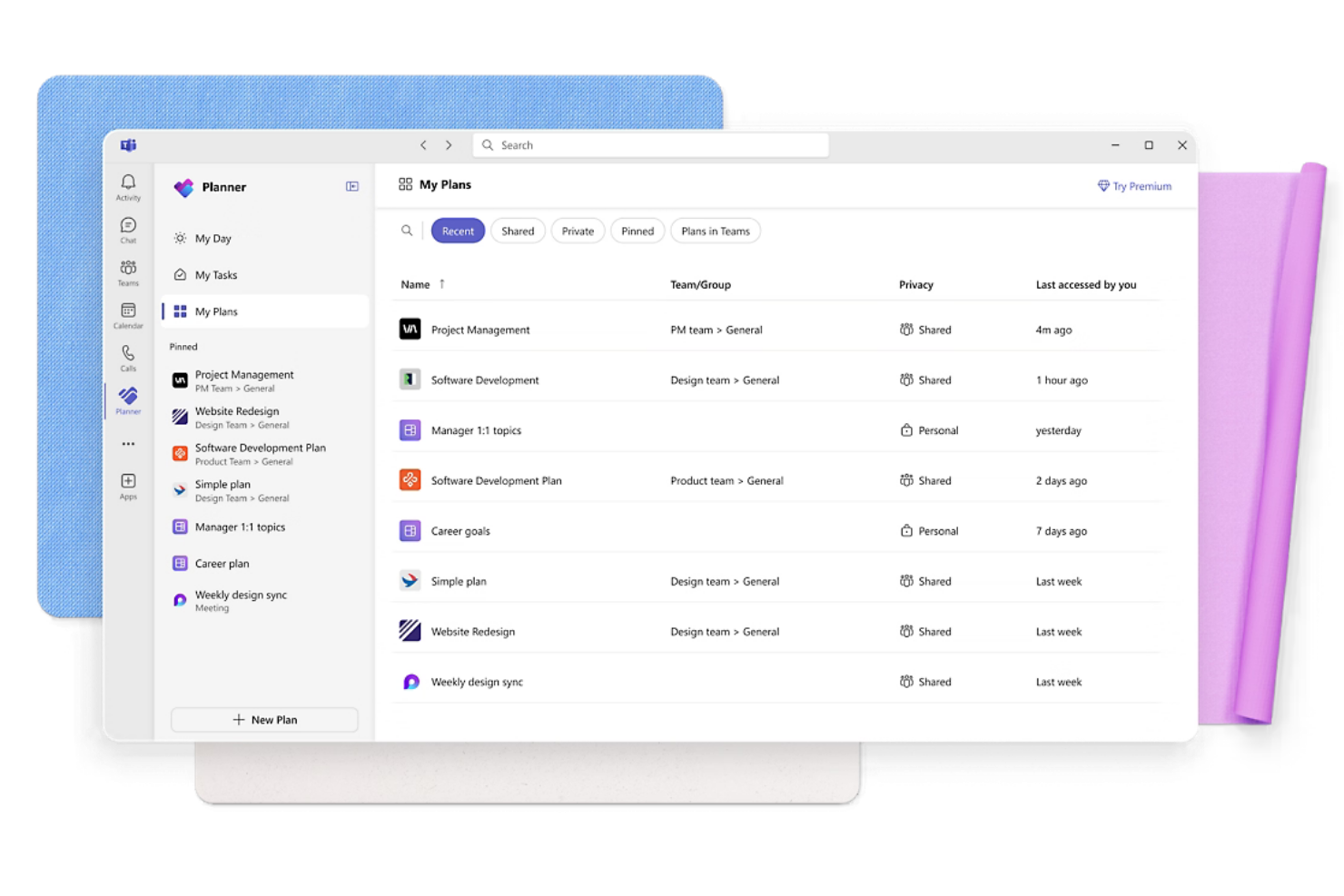
Microsoft Planner si distingue per gli esperti di pianificazione dei progetti che necessitano di un controllo preciso su budget e tempistiche. È particolarmente utile per team nei settori delle costruzioni, ingegneria o informatica che richiedono una gestione rigorosa del budget per progetti complessi con costi articolati. Grazie ai suoi strumenti avanzati di programmazione e allocazione delle risorse, Microsoft Planner ti aiuta a monitorare le spese a un livello dettagliato man mano che il progetto evolve.
Perché ho scelto Microsoft Planner
Per i team che necessitano di controlli avanzati sulla schedulazione, Microsoft Planner offre un livello di dettaglio difficile da eguagliare nel monitoraggio delle spese di progetto. La sua visualizzazione a diagramma di Gantt consente di pianificare ogni attività, traguardo e costo associato, in modo da vedere esattamente come le spese si allineano con la timeline del progetto. Apprezzo il modo in cui gli strumenti di allocazione delle risorse permettono di assegnare costi a specifici membri del team, attrezzature o materiali, facilitando il monitoraggio delle spese mentre il lavoro procede. Queste funzionalità rendono Microsoft Planner una scelta solida per gestire budget complessi e dipendenze nei progetti su larga scala.
Caratteristiche principali di Microsoft Planner
Altre funzionalità di Microsoft Planner aiutano i team a gestire le spese con maggiore controllo:
- Monitoraggio dello stato di riferimento: Confronta le spese pianificate con i costi reali per l'intero ciclo di vita del progetto.
- Report personalizzati: Crea report su misura per analizzare le prestazioni del budget e le tendenze dei costi.
- Tabelle delle tariffe dei costi: Imposta diverse tariffe di pagamento per le risorse per riflettere i vari costi della manodopera.
- Dipendenze tra attività: Collega le attività per visualizzare come le modifiche in un'area possano influire sui costi complessivi del progetto.
Integrazioni di Microsoft Planner
Le integrazioni native includono Microsoft Teams, SharePoint, OneDrive, Outlook, Power BI, Microsoft Planner, Excel, Word, Dynamics 365, e altro ancora.
Pros and Cons
Pros:
- Supporta campi personalizzati per i costi delle spese
- Collega direttamente i costi delle risorse alle attività
- Gestisce budget di progetto in valute multiple
Cons:
- Nessun workflow approvazione spese integrato
- Integrazione limitata con strumenti finanziari di terze parti

Ideale per la fatturazione insieme alle spese
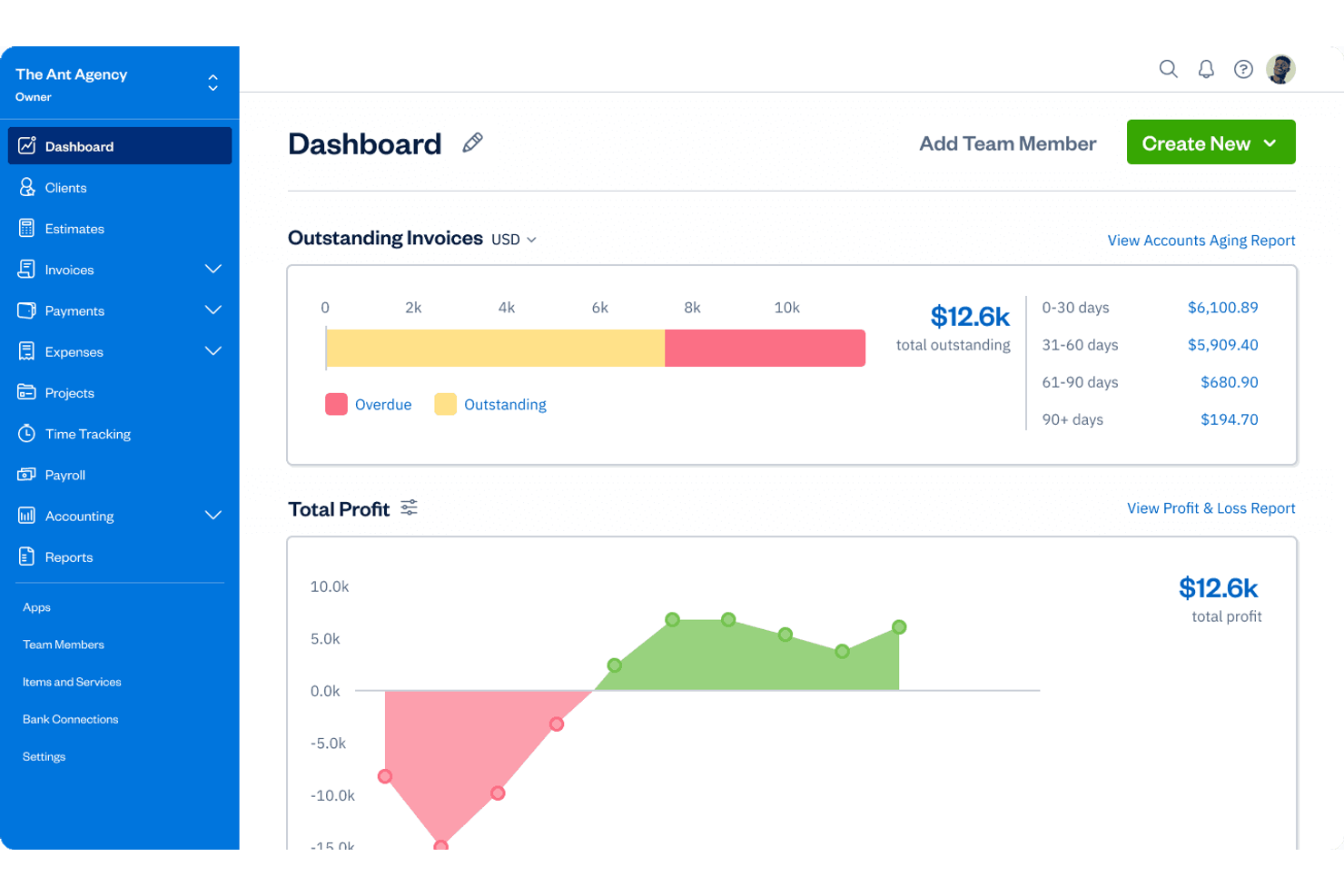
FreshBooks si distingue per i project manager e i proprietari di piccole imprese che hanno bisogno di monitorare le spese e inviare fatture dalla stessa piattaforma. È particolarmente utile per i team orientati ai servizi che fatturano ai clienti il lavoro sui progetti e desiderano mantenere spese e fatturazione strettamente connesse. FreshBooks ti aiuta a gestire i costi di progetto e la fatturazione dei clienti senza dover passare tra diversi strumenti.
Perché ho scelto FreshBooks
Per i team di progetto che devono gestire sia le spese che la fatturazione ai clienti, FreshBooks offre un approccio unificato difficile da trovare altrove. La piattaforma permette di monitorare le spese di progetto e convertirle direttamente in fatture, il che è particolarmente utile per le imprese di servizi che fatturano ai clienti i costi rimborsabili. Mi piace che si possano assegnare le spese a progetti e clienti specifici, rendendo facile mantenere la fatturazione accurata e trasparente. Questa stretta connessione tra monitoraggio delle spese e fatturazione è ciò che rende FreshBooks una soluzione ideale per la gestione delle spese di progetto.
Funzionalità chiave di FreshBooks
Altre funzionalità di FreshBooks aiutano i team di progetto a gestire in modo più approfondito finanze e reportistica:
- Rilevazione del tempo: Registra le ore fatturabili direttamente sui progetti per una fatturazione precisa.
- Riconciliazione bancaria: Collega conti bancari e carte di credito per importare e abbinare automaticamente le transazioni.
- Collaborazione del team: Invita i membri del team a monitorare il tempo e le spese su progetti condivisi.
- Report finanziari: Genera report dettagliati su redditività, spese e ricavi dei progetti.
Integrazioni di FreshBooks
Le integrazioni includono Gusto, Stripe, Shopify, Bench, HubSpot, Zapier, Trello, Mailchimp e altro.
Pros and Cons
Pros:
- Fornisce report su redditività e spese di progetto
- Permette ai membri del team di registrare le spese
- Traccia costi di progetto fatturabili e non fatturabili
Cons:
- Categorie di spesa generiche e semplici
- Il monitoraggio delle spese sull'app mobile è basilare

Lark
Ideale con chat e documenti integrati
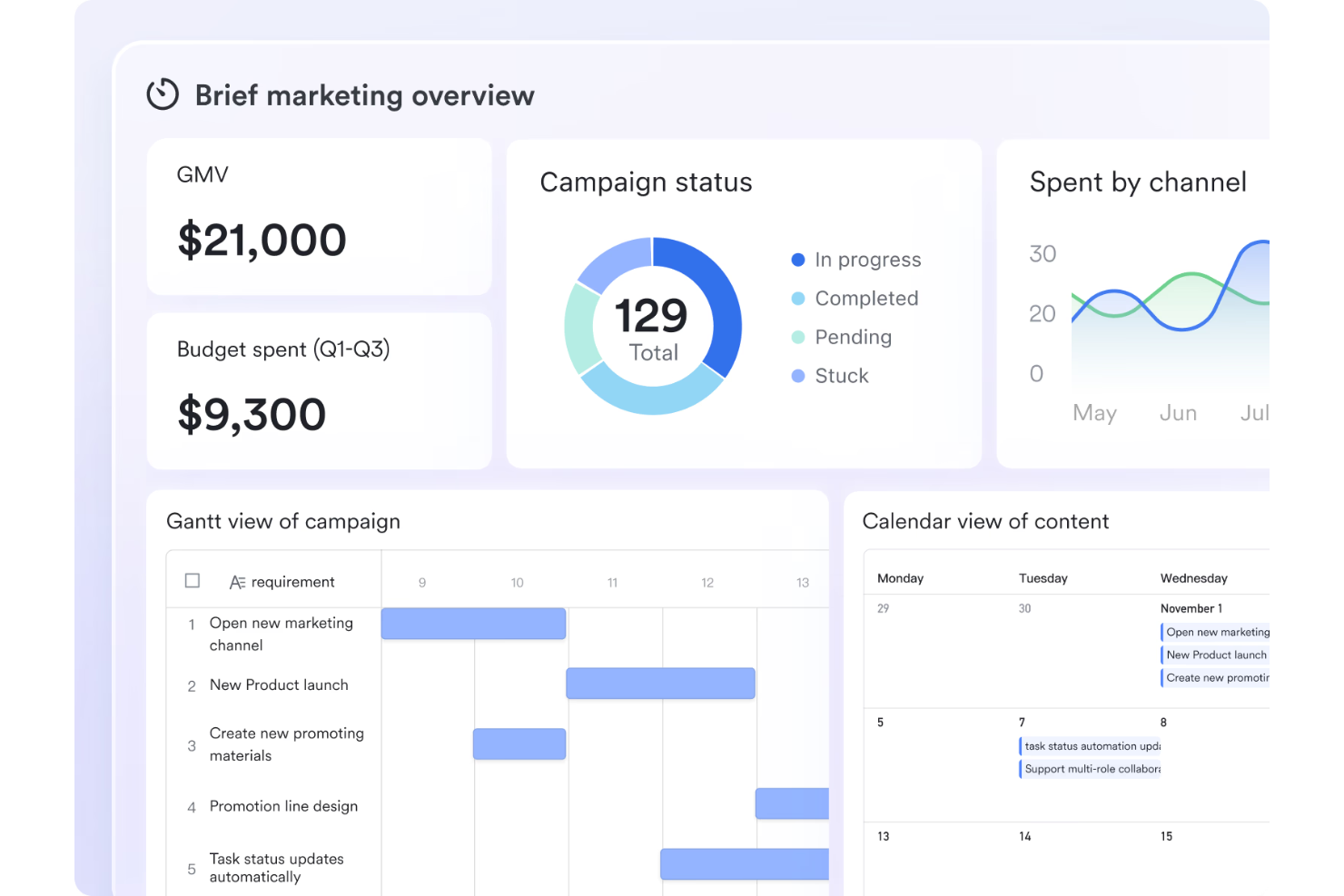
Se il tuo team ha bisogno di monitorare le spese di progetto collaborando in tempo reale, Lark riunisce chat, documenti e gestione delle spese in un unico spazio di lavoro. È ideale per team distribuiti e project manager che desiderano mantenere discussioni sulle spese, approvazioni e documentazione strettamente collegate alla comunicazione di progetto. L'approccio integrato di Lark ti aiuta a gestire i budget e condividere aggiornamenti senza dover passare da uno strumento all'altro.
Perché ho scelto Lark
Lark si distingue nel monitoraggio delle spese di progetto perché combina chat, documenti e flussi di lavoro di approvazione in un'unica piattaforma. Puoi discutere le spese direttamente nei thread delle chat, allegare ricevute o file di budget ai documenti condivisi e gestire le approvazioni delle spese senza lasciare lo spazio di lavoro. Mi piace come questa impostazione mantenga tutta la comunicazione e la documentazione relativa alle spese nel giusto contesto, riducendo il rischio di perdita di informazioni. Per i team che necessitano di strumenti di monitoraggio integrati per connettere conversazioni e gestione delle spese, Lark è un'opzione valida.
Funzionalità principali di Lark
Altre funzionalità di Lark aiutano i team a gestire più efficacemente le spese di progetto e la collaborazione:
- Moduli personalizzabili: Crea e condividi moduli su misura per le esigenze di rendicontazione finanziaria del tuo progetto.
- Promemoria automatici: Imposta promemoria per le scadenze delle spese o revisioni di budget all'interno dello spazio di lavoro.
- Controlli di autorizzazione: Gestisci chi può visualizzare, modificare o approvare documenti e moduli relativi alle spese.
- Accesso tramite app mobile: Monitora e invia le spese da qualsiasi luogo usando l'app mobile di Lark.
Integrazioni di Lark
Le integrazioni includono Google Drive, Microsoft Teams, Zoom, Slack, Trello, Asana, Jira, GitHub, Salesforce e altri.
Pros and Cons
Pros:
- Approvazioni di spesa direttamente in chat
- Condivisione documenti per ricevute e fatture
- Controlli di autorizzazione per l'accesso ai dati finanziari
Cons:
- Opzioni limitate per l'esportazione dei dati di spesa
- Dashboard base per l'analisi delle spese

Ideale per la scansione automatica delle ricevute

Se il tuo team ha bisogno di acquisire e monitorare le spese di progetto con un intervento manuale minimo, Zoho Expense è progettato per la scansione automatica delle ricevute e la gestione delle spese. È particolarmente utile per i project manager e i team finanziari che gestiscono viaggi frequenti o ricevute di fornitori. Zoho Expense ti consente di trasformare rapidamente le ricevute in spese categorizzate, riducendo gli errori e risparmiando tempo nel monitoraggio dei costi di progetto.
Perché ho scelto Zoho Expense
Per i project manager che vogliono eliminare l'inserimento manuale dei dati, Zoho Expense si distingue per le sue capacità di scansione automatica delle ricevute. Lo strumento utilizza la tecnologia OCR per estrarre i dettagli dalle ricevute caricate e creare immediatamente voci di spesa, contribuendo a ridurre gli errori e velocizzando la rendicontazione delle spese. Mi piace che Zoho Expense consenta anche il caricamento cumulativo delle ricevute, rendendo più semplice la gestione di molte spese di progetto contemporaneamente. Se i tuoi progetti comportano acquisti o viaggi frequenti, questo livello di automazione può rendere il monitoraggio delle spese molto più efficiente.
Funzionalità principali di Zoho Expense
Altre funzionalità di Zoho Expense aiutano i team di progetto a gestire spese e conformità:
- Flussi di approvazione personalizzati: Configura processi di approvazione a più livelli per le spese di progetto.
- Monitoraggio chilometraggio: Registra e calcola le spese chilometriche tramite GPS o inserimento manuale.
- Riconciliazione carte aziendali: Abbina le transazioni della carta con le spese inviate per una rendicontazione accurata.
- Automazione delle diarie: Configura e applica tariffe di diaria per i costi di viaggio correlati ai progetti.
Integrazioni di Zoho Expense
Le integrazioni includono Zoho Books, QuickBooks Online, Xero, Sage Accounting, Zoho Projects, Zoho People, Uber for Business, Lyft, Slack e altro ancora.
Pros and Cons
Pros:
- La scansione OCR automatica converte le ricevute in spese
- Supporta il caricamento cumulativo delle ricevute
- Supporta approvazioni a più livelli
Cons:
- Il tagging dei progetti richiede inserimento manuale
- Analisi di base sulle tendenze delle spese

Rydoo
Ideale per la conformità globale delle spese
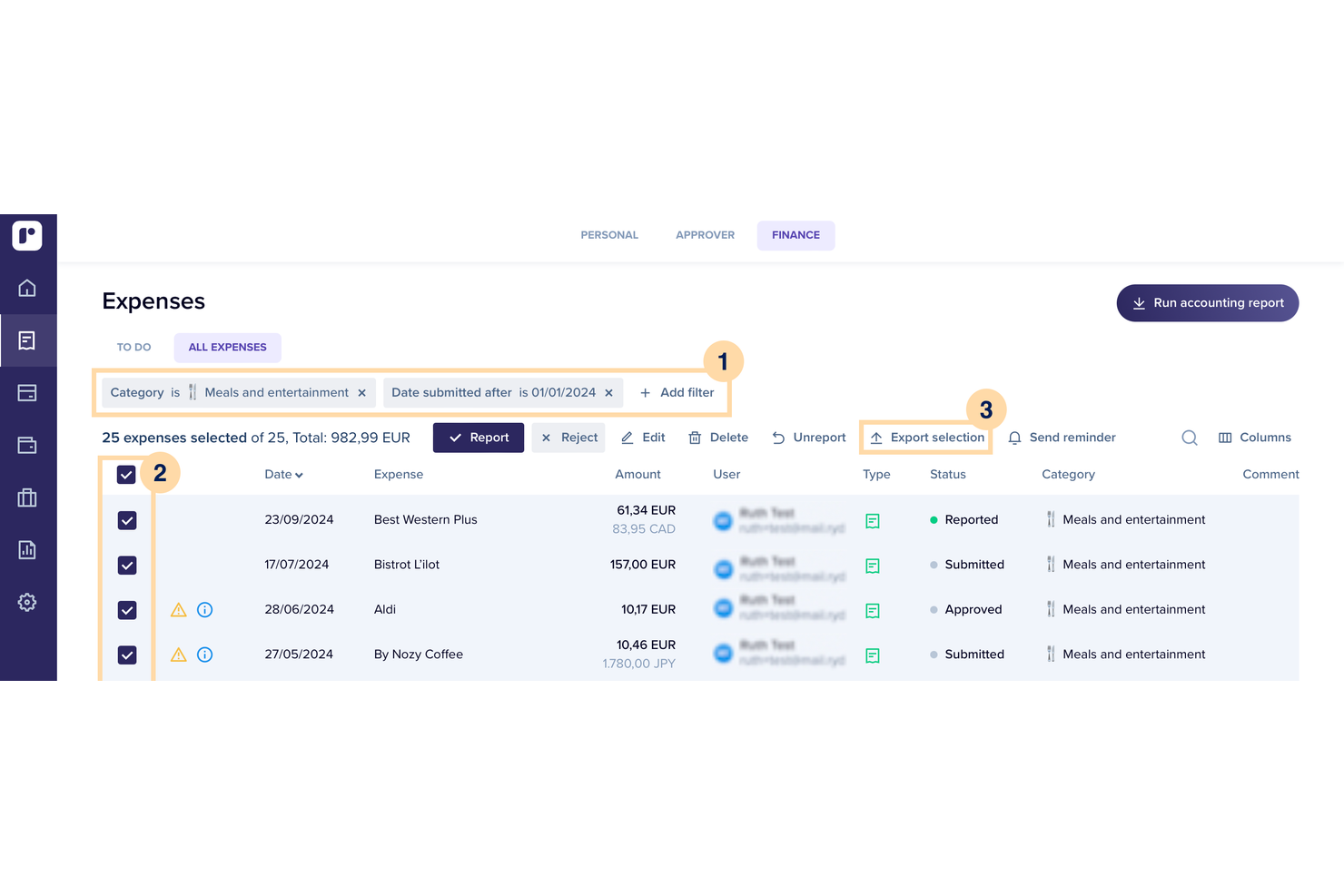
Rydoo è progettato per project manager e team finanziari che devono monitorare le spese in diversi paesi e rispettare le normative locali. È particolarmente utile per le organizzazioni con team distribuiti o progetti internazionali frequenti, dove le regole fiscali e le politiche di spesa possono diventare complesse. Rydoo ti aiuta ad automatizzare i controlli di conformità e a standardizzare il monitoraggio delle spese, indipendentemente da dove lavori il tuo team.
Perché ho scelto Rydoo
Quando hai bisogno di gestire le spese di progetto in diversi paesi, Rydoo si distingue per il suo focus sulla conformità globale. La piattaforma applica automaticamente le normative fiscali locali e le tariffe di diaria, aiutando i project manager a evitare costosi errori e a essere pronti per le verifiche. Apprezzo il fatto che Rydoo aggiorni le regole di conformità in tempo reale, così i report spese del tuo team riflettono sempre le normative più recenti. Questo lo rende una scelta valida per organizzazioni con progetti internazionali o team distribuiti.
Caratteristiche principali di Rydoo
Altre funzionalità di Rydoo che potrebbero essere utili per gestire le spese di progetto includono:
- Scansione delle ricevute in tempo reale: Acquisisci e carica le ricevute istantaneamente tramite l'app mobile, che estrae automaticamente i dati necessari per i report spese.
- Flussi di approvazione personalizzati: Configura catene di approvazione a più livelli, adattabili alla struttura della tua organizzazione e alle esigenze dei progetti.
- Gestione della diaria: Imposta e monitora spese aziendali come le diarie per trasferte, con calcoli automatici in base alla posizione.
- Integrazione con software di contabilità: Collega Rydoo a piattaforme come QuickBooks, Xero e SAP per sincronizzare i dati delle spese direttamente con il tuo sistema contabile.
Integrazioni di Rydoo
Le integrazioni includono SAP, Oracle NetSuite, Microsoft Dynamics 365, QuickBooks, Xero, Sage, Workday, BambooHR, Slack e Uber.
Pros and Cons
Pros:
- Segnala automaticamente le spese non conformi
- Supporta le regole fiscali e le diarie in più paesi
- Offre notifiche di approvazione delle spese in tempo reale
Cons:
- Funzionalità offline limitata per l'inserimento delle spese
- Ruoli utente e permessi poco flessibili

Ideale per la cattura delle spese da mobile

Expensify è pensato per i team che devono registrare le spese di progetto ovunque si trovino, in particolare quelli con personale distribuito o in viaggio. Il suo approccio mobile-first consente agli utenti di scattare foto alle ricevute e inviare le spese direttamente dal proprio telefono, rendendolo particolarmente adatto a squadre operative sul campo e consulenti. Expensify aiuta i project manager a monitorare le spese in tempo reale senza dover aspettare che la documentazione cartacea venga aggiornata.
Perché ho scelto Expensify
Quando i team di progetto devono registrare le spese da qualsiasi luogo, il design mobile-first di Expensify lo rende una scelta pratica. L'app consente agli utenti di fotografare le ricevute, estrarre automaticamente i dettagli e inviare le spese direttamente dallo smartphone, caratteristica particolarmente utile per chi lavora sul campo o si sposta tra le sedi dei clienti. Apprezzo il fatto che Expensify supporti anche la rendicontazione delle spese in tempo reale, così i project manager possono monitorare le uscite man mano che avvengono. Questa attenzione alla cattura delle spese in mobilità contribuisce a ridurre i ritardi e a mantenere aggiornati i budget di progetto.
Funzionalità principali di Expensify
Altre funzionalità di Expensify aiutano i team di progetto a gestire e controllare le spese in modo più efficiente:
- Integrazione con carte aziendali: Sincronizza le transazioni delle carte aziendali direttamente con i report spese per un tracciamento accurato.
- Flussi di approvazione personalizzabili: Crea catene di approvazione multilivello in base alle esigenze del progetto.
- Applicazione delle policy: Applica regole personalizzate per segnalare le spese fuori policy prima dell'invio.
- Conversione automatica della valuta: Converti le spese nella valuta base utilizzando tassi di cambio in tempo reale.
Integrazioni di Expensify
Le integrazioni includono QuickBooks, Xero, Oracle NetSuite, Sage Intacct, Workday, Gusto, ADP, Uber, Lyft e altri.
Pros and Cons
Pros:
- Sincronizza le transazioni delle carte aziendali
- Avvisi in tempo reale sulle violazioni delle policy
- Sincronizzazione automatica delle spese con i codici progetto
Cons:
- Report a livello di progetto limitati
- Richiede internet per la scansione da mobile

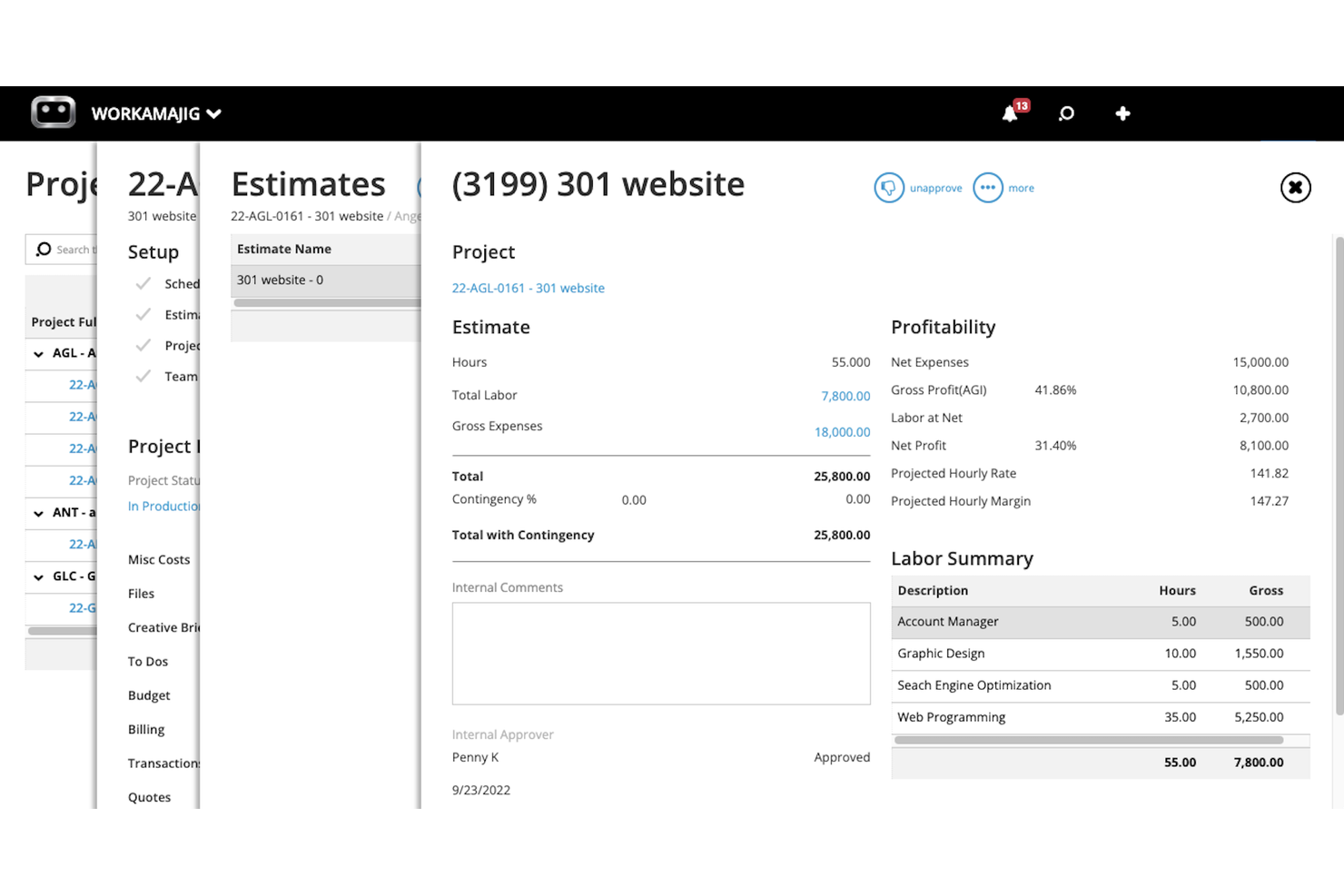
Workamajig è progettato specificamente per le agenzie creative che hanno bisogno di gestire progetti, spese e fatturazione clienti in un unico posto. È particolarmente utile per i team di marketing, design e pubblicità che gestiscono più campagne e desiderano collegare i budget dei progetti direttamente ai flussi di lavoro creativi. Con Workamajig, puoi monitorare tempo, spese e allocazioni delle risorse insieme all'avanzamento dei progetti, aiutandoti a mantenere il lavoro per i clienti redditizio e sotto controllo.
Perché ho scelto Workamajig
Per le agenzie creative, Workamajig integra il monitoraggio delle spese di progetto direttamente nel flusso di lavoro di campagne e attività per i clienti. Puoi collegare i budget ai singoli lavori, tracciare le spese per cliente o campagna e gestire preventivi e consuntivi man mano che i progetti avanzano. Mi piace che Workamajig offra un modo intuitivo per allocare risorse e costi a specifici deliverable creativi, così saprai sempre dove vanno a finire i fondi del progetto. Questo focus sui flussi di lavoro creativi lo rende una soluzione perfetta per le agenzie che devono tenere sotto controllo sia i costi dei progetti che la redditività dei clienti.
Funzionalità chiave di Workamajig
Altre funzionalità di Workamajig aiutano le agenzie a gestire le spese di progetto con maggiore precisione e controllo:
- Gestione delle fatture dei fornitori: Traccia, approva e paga le fatture dei fornitori direttamente all'interno della piattaforma.
- Monitoraggio degli ordini di acquisto: Crea e gestisci ordini di acquisto collegati a progetti o clienti specifici.
- Costruttore di report personalizzati: Progetta e genera report dettagliati finanziari e di progetto su misura per le esigenze dell'agenzia.
- Rilevazione delle ore integrata: Registra ore fatturabili e non fatturabili insieme alle spese per una contabilità di progetto completa.
Integrazioni di Workamajig
Le integrazioni includono Avalara, Bionic, Edenred Pay e AvidXchange.
Pros and Cons
Pros:
- Collega le spese di progetto direttamente ai clienti
- Traccia i costi dei fornitori all'interno di ciascun budget di progetto
- Supporta autorizzazioni dettagliate per le spese
Cons:
- Funzionalità limitate dell'app mobile
- Le esportazioni richiedono una formattazione manuale

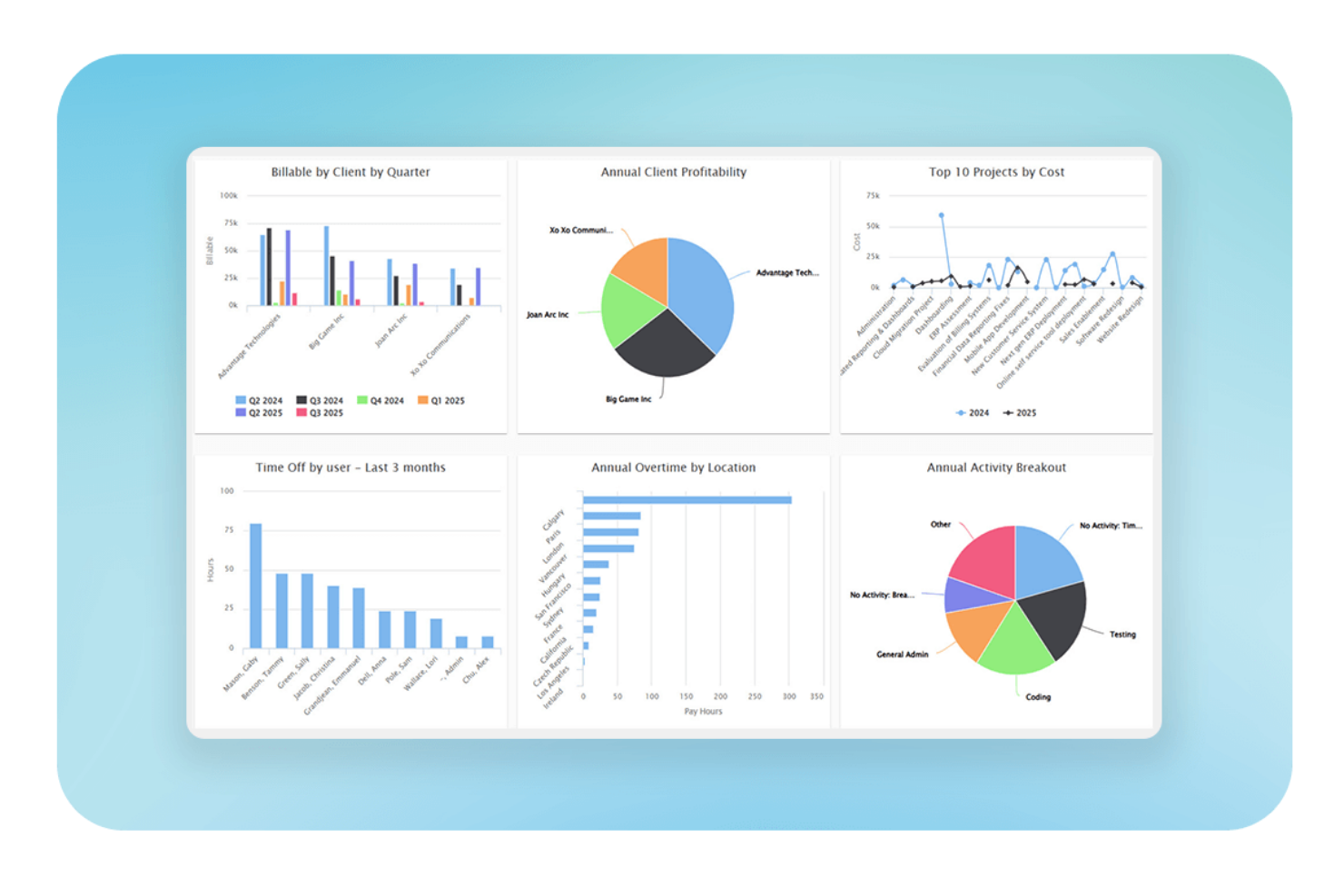
Replicon è progettato per i team che necessitano di monitorare in dettaglio sia il tempo che i costi di progetto, risultando particolarmente adatto per servizi professionali, società di consulenza e aziende IT. È particolarmente utile se hai bisogno di allocare lavoro e spese tra diversi progetti o clienti e desideri registrare ore fatturabili rispetto a quelle non fatturabili. Il monitoraggio dettagliato di Replicon ti consente di collegare direttamente le registrazioni di tempo ai budget di progetto, in modo da poter monitorare costi e utilizzo delle risorse man mano che il lavoro procede.
Perché ho scelto Replicon
Replicon si distingue per la sua capacità di collegare il monitoraggio del tempo direttamente all’allocazione dei costi di progetto, caratteristica essenziale per i team che gestiscono progetti complessi in termini di fatturazione o con un forte impiego di risorse. Puoi assegnare i costi del lavoro a progetti specifici, tracciare ore fatturabili e non fatturabili e monitorare il consumo del budget in tempo reale durante l’avanzamento dei lavori. Apprezzo come Replicon permetta di impostare tariffe personalizzate per diversi ruoli o risorse, facilitando l’ottenimento di dati accurati sulle spese di progetto. Queste funzionalità rendono Replicon una scelta solida se hai bisogno di collegare tempo, costi e monitoraggio del progetto in un’unica soluzione.
Funzionalità principali di Replicon
Altre funzionalità di Replicon aiutano i team a gestire le spese di progetto con maggiore controllo e trasparenza:
- Applica politiche di rimborso spese: Imposta regole per le spese ammissibili e automatizza i controlli di conformità.
- Supporto multi-valuta: Traccia e converti le spese in diverse valute per i progetti internazionali.
- Acquisizione ricevute tramite mobile: Carica e allega ricevute alle registrazioni di spesa direttamente da un dispositivo mobile.
- Workflow di approvazione personalizzati: Progetta processi di approvazione a più livelli per l’invio delle spese.
Integrazioni di Replicon
Le integrazioni comprendono SAP, Oracle, ADP, QuickBooks, Xero, Sage, Microsoft Dynamics 365, Salesforce, Tableau e molte altre.
Pros and Cons
Pros:
- Tariffe basate sul ruolo per calcolare i costi del lavoro
- Offre audit trail per tutte le registrazioni di spesa
- Si integra con sistemi payroll ed ERP
Cons:
- Nessun OCR integrato per la scansione delle ricevute
- Personalizzazione limitata delle categorie di spesa


Priofy offre un approccio visivo alla gestione di attività e spese, rendendolo ideale per i team che hanno bisogno di visualizzare le priorità a colpo d'occhio. È pensato per project manager e gruppi di lavoro che vogliono organizzare, dare priorità e monitorare sia le attività sia le relative spese in un'unica interfaccia interattiva. Con Priofy, puoi individuare rapidamente le attività che impattano sul budget e modificare le priorità man mano che cambiano le esigenze del progetto.
Perché ho scelto Priofy
Ciò che distingue Priofy è la sua attenzione alla prioritizzazione visiva delle attività, che supporta direttamente il monitoraggio delle spese di progetto per i team che devono vedere sia il carico di lavoro che l'impatto sul budget in un solo posto. Puoi assegnare spese alle attività e organizzarle visivamente per priorità, facilitando l'individuazione degli elementi che determinano i costi. Apprezzo il modo in cui le bacheche drag-and-drop di Priofy migliorano la gestione finanziaria permettendo di regolare rapidamente le priorità quando cambiano i budget. Questo approccio aiuta i project manager a mantenere una supervisione finanziaria strettamente collegata alla gestione quotidiana delle attività.
Funzionalità principali di Priofy
Altre funzionalità di Priofy aiutano i team a gestire in modo più efficiente le spese di progetto e le attività:
- Etichette attività personalizzabili: Aggiungi etichette colorate alle attività per identificare rapidamente categorie di spesa o fasi del progetto.
- Supporto allegati: Carica ricevute, fatture o documenti di supporto direttamente sulle attività per una consultazione immediata.
- Widget per il monitoraggio dei progressi: Utilizza widget integrati per monitorare tassi di completamento delle attività e consumo del budget affiancati.
- Discussioni nei commenti: Collabora su attività e voci di spesa tramite discussioni con commenti per una comunicazione chiara.
Integrazioni Priofy
Le integrazioni non sono elencate pubblicamente.
Pros and Cons
Pros:
- Bacheche visive per attività ad alto impatto economico
- Supporta allegati di ricevute per ogni attività
- Esegue analisi KPI su più progetti
Cons:
- Nessuna integrazione diretta con piattaforme contabili
- Non può generare report dettagliati delle spese

Smartsheet
Ideale per il monitoraggio in stile foglio di calcolo
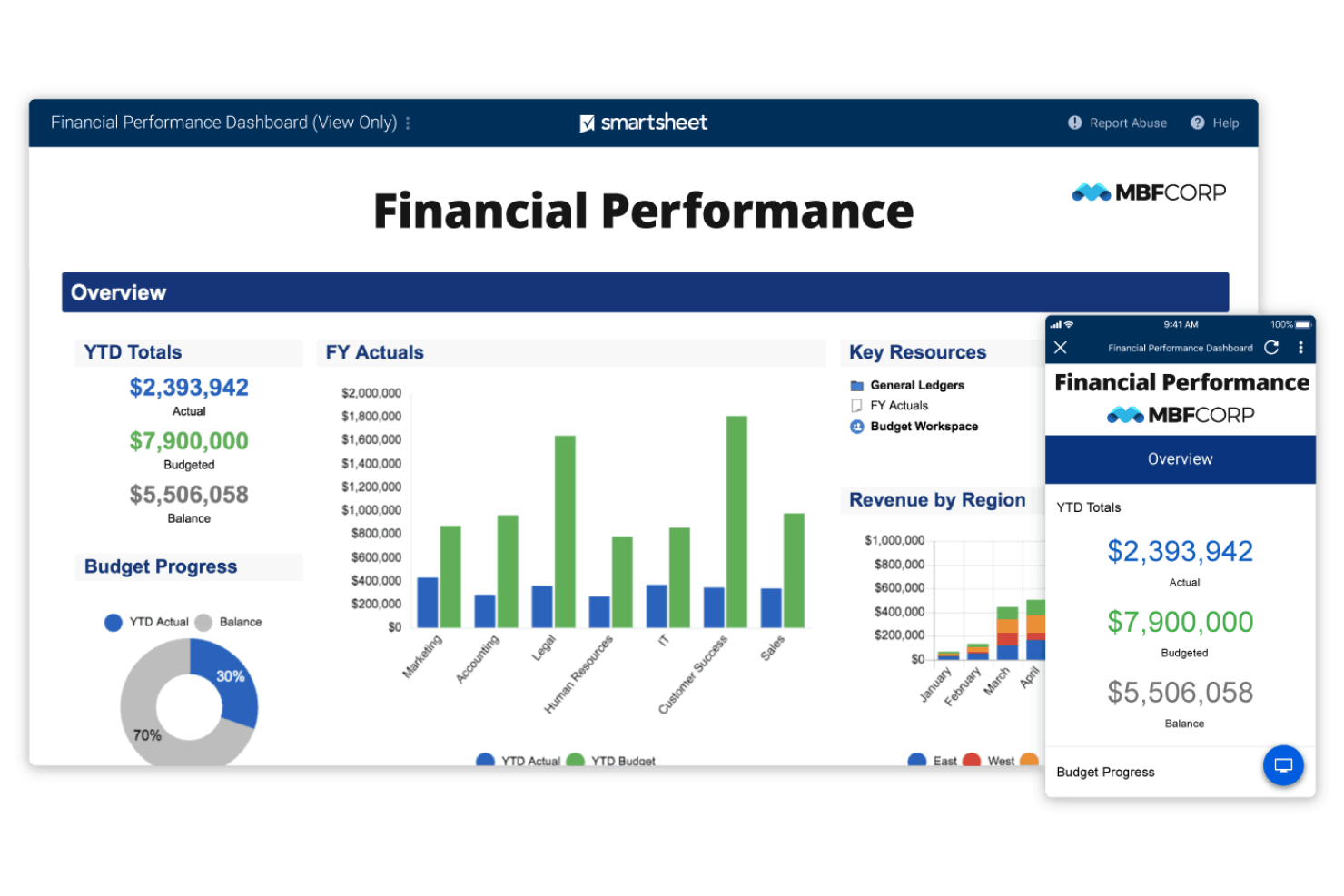
Se cerchi un tracker delle spese di progetto che risulti familiare a chiunque abbia già usato fogli di calcolo, Smartsheet merita sicuramente attenzione. È pensato per team di marketing, operazioni o project management che vogliono organizzare costi, approvazioni e budget in un formato flessibile basato su griglia. Smartsheet si distingue permettendo di creare fogli spese personalizzati con formule, allegati e flussi di lavoro automatizzati tutto in un unico posto.
Perché ho scelto Smartsheet
Ciò che rende Smartsheet speciale è la sua interfaccia in stile foglio di calcolo, che rende il monitoraggio del flusso di cassa e delle spese di progetto intuitivo. Puoi creare colonne personalizzate per le categorie di costo, usare formule per calcolare i totali e allegare ricevute o fatture direttamente a ogni riga. Mi piace la possibilità di impostare flussi di approvazione automatizzati per l’invio delle spese, il che aiuta a mantenere le spese organizzate e facilmente verificabili. Queste caratteristiche fanno di Smartsheet una soluzione solida per i team che desiderano la flessibilità di un foglio di calcolo ma con la struttura di un vero tracker delle spese di progetto.
Funzionalità principali di Smartsheet
Altre funzionalità di Smartsheet aiutano i team a gestire le spese di progetto con maggiore visibilità e controllo:
- Pannello di gestione delle risorse: Monitora in tempo reale l’allocazione del team e i costi di lavoro associati.
- Vista Gantt: Visualizza le tempistiche di progetto insieme a budget e spese effettive.
- Collegamento celle: Collega dati tra diversi fogli per consolidare le informazioni sulle spese.
- Controlli di autorizzazione: Imposta livelli di accesso dettagliati per chi può visualizzare le stime dei costi o modificare i dati finanziari.
Integrazioni Smartsheet
Le integrazioni includono Jira Software, Power BI, Salesforce, SAP ERP, ServiceNow, Tableau, Workday, Microsoft Teams, Slack, Docusign e molte altre.
Pros and Cons
Pros:
- Ampia galleria di modelli
- Integrazione con Docusign per l’approvazione delle spese
- Formattazione condizionale per segnalare elementi fuori budget
Cons:
- Nessun monitoraggio nativo chilometrico né diaria
- Supporto limitato per spese in più valute
New Product Updates from Smartsheet
Smartsheet Adds Column Duplication Without Data
Smartsheet now lets you duplicate columns in table view without copying cell data, while retaining column properties like type, formatting, validation, and dropdown/contact options. For more information, visit Smartsheet's official site.
Altri strumenti per monitorare le spese di progetto
Ecco alcune opzioni aggiuntive per monitorare le spese di progetto che non sono state incluse nella mia selezione, ma che vale comunque la pena prendere in considerazione:
- Wrike
Ideale per la collaborazione in tempo reale del team
- QuickBooks Online
Ideale per l'integrazione con la contabilità
- SAP Concur
Ideale per il controllo delle spese di viaggio aziendali


Come valuto gli strumenti per la gestione delle spese di progetto
Cerco due cose: capacità di base—come l’assegnazione delle spese a un codice progetto e il monitoraggio del consumo del budget—e i fattori di differenziazione che distinguono uno strumento da un altro.
Funzionalità principali (Requisiti minimi per questa lista)
Quando seleziono gli strumenti per la mia lista, valuto ciascuno su una scala da 0 (non offre la funzionalità) a 5 (eccelle in quest’area) per ogni funzionalità principale elencata di seguito. Quindi, calcolo il punteggio totale dello strumento in una percentuale. Ogni strumento deve raggiungere un punteggio totale minimo del 65% per poter essere incluso.
- Assegnazione dei costi basata sul progetto: Controllo se le spese possono essere assegnate a progetti specifici, fasi, attività e codici di costo—ad esempio suddividendo una licenza software su tre commesse attive per clienti.
- Monitoraggio budget vs. costi reali: Qui è importante la visibilità in tempo reale delle variazioni. Valuto come ogni strumento mostra il consumo del budget e se segnala quando un progetto rischia il superamento dei costi.
- Registrazione delle spese e ricevute: Cerco la possibilità di acquisire ricevute tramite dispositivi mobili, scansione OCR e la capacità di collegare la documentazione acquisita direttamente a una scheda progetto dal campo.
- Report finanziari multi-progetto: I cruscotti trasversali tra progetti sono fondamentali. Lo strumento dovrebbe permettere di filtrare i report spese per cliente, periodo o progetto per confrontare le prestazioni di costo affiancate.
- Gestione delle spese fatturabili: Valuto come ogni piattaforma distingue tra costi fatturabili e non fatturabili e se supporta regole di ricarico o l’invio automatico delle spese nelle fatture ai clienti.
- Integrazione dei costi di tempo e lavoro: La maggior parte della spesa di progetto è relativa alla manodopera. Cerco la presenza di timesheet nativi con tariffe basate sul ruolo o una chiara integrazione con strumenti come Harvest o Toggl Track.
Dopo aver stilato una lista di strumenti che soddisfano questi criteri, considero ciò che rende unica ciascuna piattaforma.
Fattori di differenziazione (Cosa distingue i fornitori)
Ecco come confronto i diversi fornitori:
Funzionalità distintive
Gli strumenti di previsione che calcolano la stima a completamento offrono ai project manager un avvertimento anticipato quando la spesa devia dal piano—prima che il budget sia già superato. Esamino anche i flussi di approvazione, in particolare se si possono impostare catene di approvazione multi-livello basate sull’importo della spesa o sulla tipologia di progetto. Per i team che gestiscono incarichi internazionali, la gestione multi-valuta con conversione automatica dei tassi di cambio fa risparmiare ore di riconciliazione manuale a ogni ciclo di fatturazione.
Oltre alle funzionalità
Le integrazioni contabili sono molto importanti. Verifico se lo strumento si sincronizza con piattaforme come QuickBooks, Xero o NetSuite in modo che le spese di progetto confluiscano nel libro mastro senza doverle reinserire manualmente. Anche la struttura dei prezzi è un fattore: i modelli per utente sono adatti a PMO di piccole dimensioni, ma le agenzie con dozzine di collaboratori ottengono più valore dai prezzi per progetto. Valuto anche la preparazione alle verifiche fiscali, controllando la presenza di registri immutabili di modifiche e approvazioni delle spese che resistano ad audit finanziari o dei clienti.
Come scegliere uno strumento per monitorare le spese di progetto
È facile perdersi in lunghi elenchi di funzionalità e strutture tariffarie complesse. Per aiutarti a rimanere concentrato mentre affronti il tuo specifico processo di scelta del software, ecco un elenco dei fattori da tenere a mente:
| Fattore | Cosa considerare |
|---|---|
| Scalabilità | Lo strumento sarà in grado di gestire il volume attuale e futuro dei progetti, le dimensioni del team e l'espansione geografica? |
| Integrazioni | Si connette nativamente ai tuoi sistemi di contabilità, risorse umane e gestione dei progetti senza dover ricorrere a soluzioni alternative? |
| Personalizzazione | Puoi adattare le categorie di spesa, i flussi di approvazione e i report alle esigenze della tua organizzazione? |
| Facilità d'uso | Il tuo team adotterà rapidamente lo strumento oppure saranno necessari formazione e supporto approfonditi? |
| Implementazione e avviamento | Quanto tempo servirà per rendere operativo lo strumento e quali risorse o forme di supporto fornisce il fornitore? |
| Costo | I livelli di prezzo sono chiari e sono in linea con il tuo budget e con i modelli di utilizzo previsti? |
| Misure di sicurezza | Lo strumento offre la crittografia dei dati, controlli degli accessi e conformità agli standard pertinenti (come il GDPR)? |
| Requisiti di conformità | Lo strumento è in grado di supportare le esigenze specifiche del tuo settore o della tua area geografica in materia di imposte, audit e documentazione? |
Che cos'è uno strumento per monitorare le spese di progetto?
Un software per il monitoraggio delle spese di progetto è uno strumento che aiuta i team a registrare, categorizzare e monitorare le spese legate a progetti specifici. Consente ai responsabili di progetto di monitorare la spesa in tempo reale, allegare ricevute e verificare che le spese siano conformi ai budget e alle politiche. Questi strumenti supportano una reportistica accurata, semplificano le approvazioni e aiutano le organizzazioni a mantenere il controllo finanziario su più progetti o clienti.
Funzionalità
Quando scegli uno strumento per il monitoraggio delle spese di progetto, presta attenzione alle seguenti funzionalità chiave:
- Monitoraggio delle spese basato sul progetto: Assegna le spese a progetti o clienti specifici, rendendo semplice monitorare budget e spese a livello dettagliato.
- Acquisizione e archiviazione delle ricevute: Carica, archivia e organizza copie digitali delle ricevute per ogni spesa, supportando le verifiche e la conformità.
- Flussi di approvazione: Inoltra le spese inviate attraverso catene di approvazione personalizzabili, garantendo supervisione e rispetto delle politiche prima del rimborso.
- Supporto per più valute: Registra e converti le spese in valute diverse, una funzionalità essenziale per i team che operano oltre confine.
- Categorie di spesa personalizzate: Crea e gestisci categorie che riflettano i tipi di spesa e le esigenze di reportistica specifici della tua organizzazione.
- Integrazione con i sistemi contabili: Sincronizza direttamente i dati delle spese con il software di contabilità o ERP per ridurre l'inserimento manuale e gli errori.
- Report e pannelli di controllo in tempo reale: Accedi a visualizzazioni e riepiloghi aggiornati della spesa di progetto per supportare il processo decisionale.
- Ruoli e autorizzazioni degli utenti: Controlla chi può inviare, approvare o visualizzare le spese, proteggendo le informazioni finanziarie sensibili.
- Accesso da dispositivi mobili: Inserisci le spese, carica le ricevute e approva le richieste da smartphone o tablet, supportando i team in mobilità.
Vantaggi
L'utilizzo di uno strumento di monitoraggio può ottimizzare le operazioni e offrire diversi vantaggi al tuo team e alla tua azienda. Ecco alcuni dei vantaggi che puoi aspettarti:
- Maggiore controllo del budget: Monitora in tempo reale le spese specifiche dei progetti, aiutandoti a rispettare il budget ed evitare spese eccessive.
- Approvazioni delle spese più rapide: Gestisci il processo di revisione con flussi di lavoro automatizzati, riducendo ritardi e solleciti manuali.
- Maggiore conformità: Applica le politiche aziendali e le normative fiscali segnalando le spese non conformi e mantenendo verifiche dettagliate.
- Reportistica accurata: Genera report e pannelli di controllo aggiornati che offrono una visibilità chiara sui costi dei progetti e sui modelli di spesa.
- Gestione semplificata delle ricevute: Archivia e organizza le ricevute digitali, rendendo le verifiche e i rimborsi più semplici e affidabili.
- Maggiore responsabilità del team: Assegna le spese a singole persone e progetti, chiarendo le responsabilità e riducendo le controversie sulla spesa.
- Integrazione semplice: Sincronizza i dati delle spese con i sistemi contabili ed ERP, riducendo al minimo l'inserimento manuale e il rischio di errori.
Costi e prezzi
La scelta di uno strumento per il monitoraggio delle spese di progetto richiede la comprensione dei vari modelli di prezzo e dei piani disponibili. I costi variano in base alle funzionalità, alle dimensioni del team, ai componenti aggiuntivi e ad altri fattori. La tabella seguente riassume i piani più comuni, i relativi prezzi medi e le funzionalità generalmente incluse nelle soluzioni per il monitoraggio delle spese di progetto:
Tabella comparativa dei piani per il monitoraggio delle spese di progetto
| Tipo di piano | Prezzo medio | Funzionalità comuni |
|---|---|---|
| Piano gratuito | $0 | Monitoraggio di base delle spese, caricamenti delle ricevute limitati, accesso per un singolo utente e reportistica di base. |
| Piano personale | $3–$11/user/month | Monitoraggio basato sul progetto, accesso da dispositivi mobili, acquisizione delle ricevute e semplici flussi di approvazione. |
| Piano aziendale | $10–$43/user/month | Supporto per più utenti, catene di approvazione avanzate, integrazione con i sistemi contabili e categorie personalizzate. |
| Piano aziendale avanzato | $38–$275+/user/month | Sicurezza avanzata, strumenti per la conformità globale, integrazioni personalizzate, supporto dedicato e verifiche. |
Domande frequenti sul monitoraggio delle spese di progetto
Ecco alcune risposte alle domande comuni sul monitoraggio delle spese di progetto:
I sistemi di monitoraggio delle spese di progetto possono gestire spese in più valute?
Sì, la maggior parte dei sistemi di monitoraggio delle spese di progetto supporta l’inserimento e la conversione delle spese in più valute. Questo è importante per i team che lavorano in Paesi diversi, poiché aiuta a garantire report accurati e un monitoraggio corretto del budget indipendentemente dal luogo in cui vengono sostenute le spese.
In che modo i sistemi di monitoraggio delle spese di progetto supportano la conformità alle politiche aziendali?
I sistemi di monitoraggio delle spese di progetto consentono di impostare flussi di approvazione personalizzati, segnalare le spese non conformi e richiedere documentazione come le ricevute. Queste funzionalità aiutano a far rispettare le politiche interne e semplificano la preparazione per gli audit o il rispetto dei requisiti normativi.
Quali tipi di integrazioni dovrei cercare in un sistema di monitoraggio delle spese di progetto?
Cerca integrazioni con il tuo software di contabilità, i sistemi delle risorse umane e gli strumenti di gestione dei progetti. Queste connessioni riducono l’inserimento manuale dei dati, aiutano a mantenere accurati i registri finanziari e semplificano il collegamento diretto delle spese ai progetti o ai clienti.
È possibile limitare chi può visualizzare o approvare le spese?
Sì, la maggior parte dei sistemi di monitoraggio delle spese di progetto offre ruoli e autorizzazioni utente. Puoi controllare chi può inviare, approvare o visualizzare le spese, contribuendo a proteggere i dati finanziari sensibili e garantendo che solo gli utenti autorizzati gestiscano le approvazioni.
Quanto tempo occorre per implementare un sistema di monitoraggio delle spese di progetto?
I tempi di implementazione variano, ma molte soluzioni basate sul cloud possono essere configurate in pochi giorni. Fattori come la migrazione dei dati, la configurazione delle integrazioni e la formazione degli utenti possono prolungare i tempi, quindi è importante pianificare le esigenze di onboarding e assistenza.