

I 10 migliori software per l’inserimento dei clienti recensiti nel 2026

Elenco dei migliori software per l'onboarding dei clienti


I migliori software per l'onboarding dei clienti ti permettono di automatizzare le attività di onboarding, monitorare le scadenze e assicurarti che ogni cliente inizi il rapporto nel modo migliore. Senza lo strumento giusto, farai fatica a rimanere organizzato, gestire l'onboarding in modo efficiente e mantenere soddisfatti i tuoi clienti. Questo rende più difficile costruire un buon rapporto di lavoro con i clienti e soddisfare le loro aspettative per tutta la durata della collaborazione.
Ho utilizzato la mia esperienza nella gestione di un'agenzia e oltre 3 anni di test dei software per esaminare decine di strumenti e selezionare la mia lista dei migliori software per l'onboarding dei clienti. Ognuna delle mie raccomandazioni qui sotto ridurrà il numero di attività di onboarding a tuo carico, così potrai concentrarti sul lavoro prioritario per i clienti. Illustro le funzionalità principali di ogni strumento e il modo in cui possono aiutarti, oltre ai pro e contro e ai casi d'uso tipici.
Perché fidarsi dei nostri consigli sui software
Il nostro team testa e recensisce software dal 2012. In quanto project manager noi stessi, sappiamo quanto sia difficile — e importante — scegliere il software giusto.
Per questa guida, abbiamo valutato gli strumenti attraverso test pratici e ricerche indipendenti, assegnando un punteggio agli strumenti in base ai nostri criteri di selezione. Ci basiamo inoltre sulle competenze di leader di pensiero del settore e di professionisti attivi nella gestione dei progetti.
Le nostre recensioni riflettono il nostro giudizio editoriale umano, non un discorso di vendita.
Revisori esperti:
Tabella comparativa dei software per l'onboarding dei clienti
La tabella seguente confronta i dettagli dei prezzi dei migliori software per l’onboarding dei clienti che ho selezionato.
| Tool | Best For | Trial Info | Price | ||
|---|---|---|---|---|---|
| 1 | Ideale per l'automazione dell'onboarding attivata dal CRM | Prova gratuita di 14 giorni | A partire da €59/utente/mese | Website | |
| 2 | Ideale per formazione interattiva e automazione | Demo gratuita disponibile | Prezzo su richiesta | Website | |
| 3 | Ideale per la gestione della comunicazione con i clienti | Piano gratuito + prova gratuita + demo gratuita disponibili | Da $99/mese | Website | |
| 4 | Ideale per la formazione dei clienti ottimizzata per dispositivi mobili | Prova gratuita di 30 giorni + demo gratuita disponibile | A partire da $3.97/utente/mese | Website | |
| 5 | Migliore con oltre 1.000 connettori app preinstallati | Demo gratuita disponibile | Prezzo su richiesta | Website | |
| 6 | Ideale per le capacità di AI agentic | Prova gratuita + demo gratuita disponibili | Da $19/utente/mese (fatturato annualmente) | Website | |
| 7 | Ideale per portali di inserimento personalizzati | Piano gratuito + dimostrazione gratuita disponibile | A partire da $350/mese (con fatturazione annuale) | Website | |
| 8 | Ideale per gestire progetti di onboarding | Piano gratuito + demo gratuita disponibili | Da $7/utente/mese (fatturato annualmente) | Website | |
| 9 | Ideale per la fidelizzazione dei clienti | Demo gratuita disponibile | Prezzo su richiesta | Website | |
| 10 | Ideale per esperienze in-app personalizzate | Prova gratuita di 14 giorni + demo gratuita disponibile | Da $299/mese (fatturati annualmente) | Website |


Recensione dei migliori software per l'onboarding dei clienti
Di seguito trovi i miei riepiloghi dettagliati dei migliori software per l’onboarding dei clienti inclusi nella mia selezione. Le mie recensioni offrono una panoramica dettagliata delle funzionalità principali, dei pro & contro, delle integrazioni e dei casi d’uso ideali di ogni strumento, per aiutarti a trovare quello più adatto a te.

Ideale per l'automazione dell'onboarding attivata dal CRM
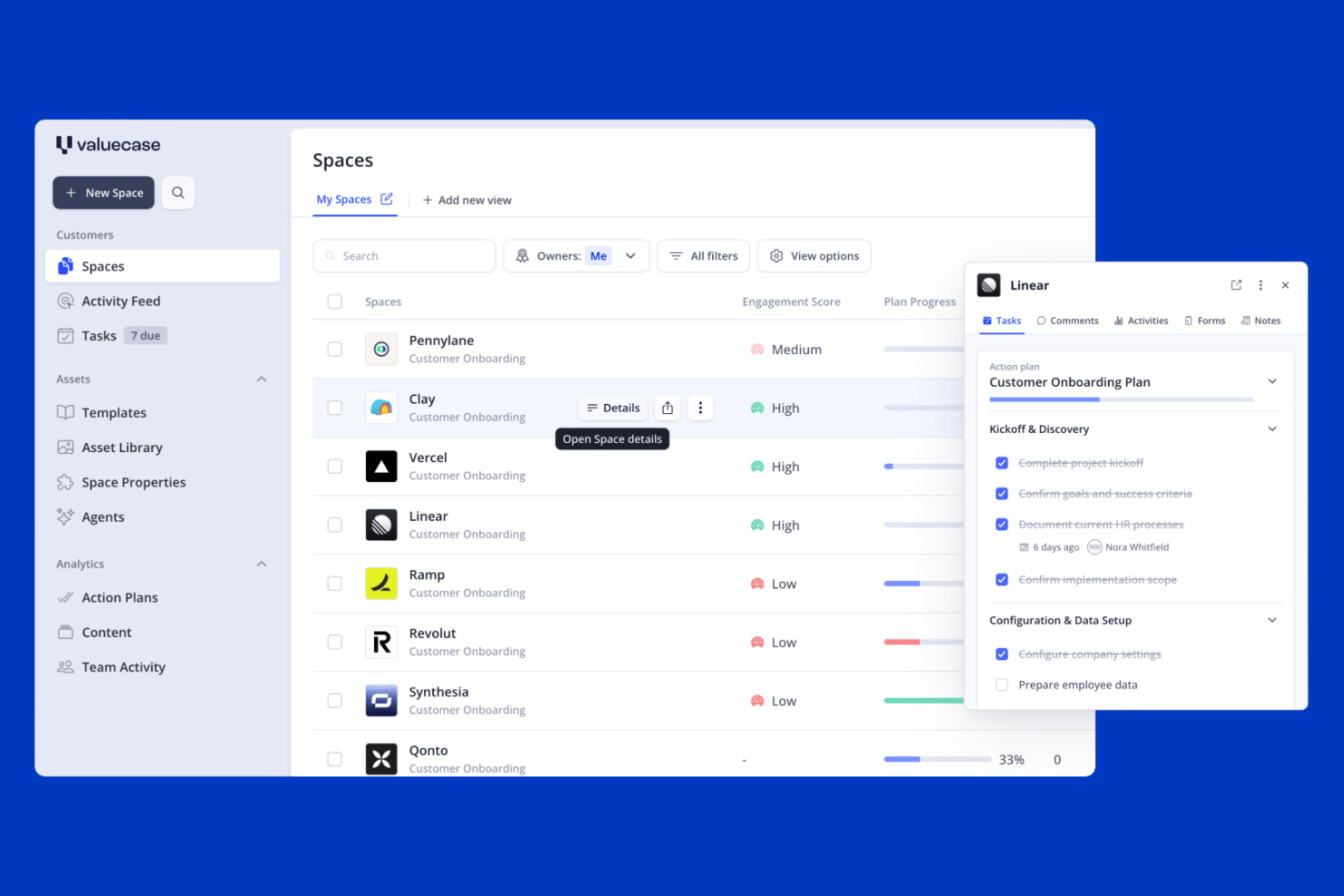
Valuecase è una piattaforma per l'onboarding dei clienti che combina Spazi cliente personalizzati con il brand, automazione dei flussi di lavoro attivata dal CRM, moduli di raccolta dati e chat dal vivo integrata in un'unica area di lavoro.
Per chi è più adatto Valuecase?
Valuecase è una soluzione particolarmente adatta ai team SaaS B2B che desiderano automatizzare il passaggio dalle vendite all'onboarding utilizzando i dati CRM di HubSpot o Salesforce.
Perché ho scelto Valuecase
Valuecase si è guadagnato un posto nella mia rosa di soluzioni preferite per il modo in cui gestisce il passaggio dalle vendite all'onboarding utilizzando dati CRM in tempo reale. Quando un'opportunità si chiude in HubSpot o Salesforce, Valuecase può creare automaticamente uno Spazio cliente personalizzato, già compilato con le attività, i moduli e le milestone corretti, senza che nessuno debba intervenire manualmente. Mi piace anche la chat dal vivo integrata in ogni Spazio, che mantiene le domande dei clienti collegate al record di onboarding invece di disperderle nelle caselle di posta.
Funzionalità principali di Valuecase
- Accesso dei clienti senza login: I clienti aprono il loro Spazio di onboarding tramite un link condiviso senza creare un account, con la possibilità di attivare la protezione tramite password.
- Supporto multilingue: Gli Spazi rilevano automaticamente e mostrano i contenuti nella lingua del cliente in oltre 7 lingue supportate, utilizzando la traduzione basata sull'intelligenza artificiale.
- Modelli di Spazio riutilizzabili: Crea e salva un numero illimitato di modelli di onboarding con attività, milestone, moduli e contenuti incorporati da distribuire immediatamente ai nuovi account.
- Analisi del coinvolgimento: Monitora l'attività dei clienti, l'utilizzo dei contenuti e il tempo necessario al completamento in tutti gli Spazi attivi da una dashboard centrale, per individuare tempestivamente gli account a rischio.
Integrazioni di Valuecase
Valuecase offre integrazioni native con HubSpot, Salesforce e Calendly, oltre a collegamenti con Google Drive, Google Docs, Google Slides, Slack e Microsoft Teams. Supporta inoltre Make, Albato, Zapier e un'API REST per le integrazioni personalizzate.
Pros and Cons
Pros:
- Portali cliente personalizzati con accesso senza login
- L'onboarding attivato dal CRM automatizza il passaggio dalle vendite
- Funzionalità multilingue e basate sull'intelligenza artificiale integrate
Cons:
- Nessuna integrazione nativa con strumenti di gestione dei progetti
- Le funzionalità di firma elettronica non offrono una conformità sufficientemente approfondita
SkyPrep
Ideale per formazione interattiva e automazione

Per i team che desiderano supportare l’onboarding dei clienti tramite una formazione strutturata, SkyPrep offre una piattaforma di apprendimento flessibile utilizzata in settori come la formazione aziendale, la conformità e l’educazione dei clienti. Il tuo team può sfruttare le sue capacità dinamiche di creazione dei corsi e gestione degli utenti per affrontare la sfida comune di coinvolgere efficacemente i nuovi clienti. Concentrandosi sul miglioramento dell’esperienza di onboarding, SkyPrep consente alle aziende di costruire rapporti più solidi con i clienti fin dall’inizio.
Perché ho scelto SkyPrep
Ho scelto SkyPrep per la sua straordinaria capacità di semplificare l’onboarding dei clienti attraverso formazione interattiva e notifiche automatizzate. La formazione interattiva della piattaforma ti permette di personalizzare e rendere ludici i contenuti, mantenendo i clienti coinvolti e motivati durante tutto il processo di onboarding. Inoltre, le notifiche automatiche assicurano che i clienti ricevano promemoria puntuali sui loro requisiti di formazione, aiutandoli a restare al passo e riducendo lo sforzo manuale per il tuo team.
Funzionalità principali di SkyPrep
Oltre alla formazione interattiva e alle notifiche automatiche, SkyPrep offre:
- Iscrizione automatica ai corsi: assegna automaticamente ai nuovi utenti la formazione pertinente in base ai loro profili, assicurando un onboarding adeguato senza interventi manuali.
- Percorsi di apprendimento: organizza i corsi in sequenze strutturate, permettendo agli utenti di seguire la formazione propedeutica in modo sistematico.
- Centro risorse: centralizza materiali formativi come video e PDF, fornendo facile accesso ai nuovi clienti per supportare il loro apprendimento.
- Personalizzazione con il marchio: consente di personalizzare la piattaforma LMS con opzioni di branding, migliorando l’esperienza di onboarding e incentivando il coinvolgimento.
Integrazioni di SkyPrep
Le integrazioni includono PayPal, Stripe, Cisco Webex Meetings, ClickMeeting, GoToMeeting, Microsoft Teams, Zoom, Active Directory Connector, ADP e BambooHR.
Pros and Cons
Pros:
- La formazione interattiva personalizza i contenuti per un onboarding coinvolgente dei clienti
- Le notifiche automatiche informano i clienti sui progressi nella formazione
- Offre una solida protezione dei dati per la gestione sicura delle informazioni dei clienti
Cons:
- Gli utenti segnalano occasionali problemi nel caricamento dei video
- Alcuni utenti trovano le funzionalità di reportistica poco approfondite

Moxo
Ideale per la gestione della comunicazione con i clienti

Moxo è una piattaforma per la collaborazione con i clienti e l'automazione dei flussi di lavoro, rivolta alle aziende che desiderano migliorare la comunicazione con i clienti e ottimizzare i processi. Serve settori come l'immobiliare e la bancassicurazione, concentrandosi su onboarding dei clienti, gestione dei documenti e coordinamento delle attività.
Perché ho scelto Moxo
Moxo ti aiuta a gestire la comunicazione con i clienti attraverso portali basati sui ruoli, così tutti sanno dove andare e cosa fare. La sua IA si occupa delle attività ripetitive, permettendo al tuo team di concentrarsi sulle decisioni importanti. Si integra anche con i tuoi sistemi per mantenere tutto fluido e organizzato.
Funzionalità principali di Moxo
Oltre alla gestione della comunicazione, Moxo offre diverse altre funzionalità per l'onboarding dei clienti.
- Automazione del flusso di lavoro: puoi automatizzare processi complessi ed eliminare le attività manuali creando flussi di lavoro personalizzabili che integrano moduli, approvazioni e firme elettroniche.
- Gestione documentale: include caricamento di documenti, funzioni di firma elettronica, controllo delle versioni, tracciabilità degli audit e monitoraggio della conformità per aiutarti a gestire i documenti in modo efficiente e sicuro.
- Analisi e reportistica: puoi monitorare metriche chiave per individuare colli di bottiglia e migliorare i processi. Questa funzione ti aiuta a ottimizzare il flusso di onboarding e aumentare l'efficienza generale.
- Accesso senza login: offre ai clienti un accesso rapido ai portali e consente loro di interagire senza creare account, aumentando così il tasso di completamento.
Integrazioni di Moxo
Le integrazioni includono Salesforce, Slack, Gmail, Box, Stripe, HubSpot, Jira, QuickBooks, Jotform e Docusign.
Pros and Cons
Pros:
- Migliora la comunicazione con i clienti
- Integra l'IA in modo efficace
- Supporta diversi settori
Cons:
- Sfide con le integrazioni
- Richiede configurazioni tecniche

Ideale per la formazione dei clienti ottimizzata per dispositivi mobili

iSpring LMS è un sistema di gestione dell'apprendimento (LMS) basato su cloud progettato per rendere l'onboarding dei clienti efficiente e coinvolgente. Fornisce alle aziende strumenti per offrire percorsi di apprendimento personalizzati, monitorare i progressi e mantenere i clienti coinvolti attraverso contenuti interattivi.
Perché ho scelto iSpring LMS
Ho scelto iSpring LMS per le sue forti capacità di apprendimento mobile e offline, che rendono facile per i clienti completare la formazione in qualsiasi momento e ovunque si trovino. Supporta inoltre i piani di sviluppo e la formazione sulla conformità, permettendo alle aziende di personalizzare le esperienze di onboarding in base alle diverse esigenze dei clienti. Inoltre, iSpring LMS si distingue per le sue robuste funzionalità di reportistica che offrono approfondimenti sui progressi dei clienti e sull'efficacia della formazione.
Caratteristiche principali di iSpring LMS
Oltre ad essere mobile-friendly, iSpring LMS offre una serie di altre funzionalità utili per l'onboarding dei clienti.
- Lancio e Coinvolgimento: È possibile creare e assegnare programmi di onboarding digitali con percorsi formativi interattivi che coinvolgono i clienti fin dall'inizio.
- Automazione: Consente di iscrivere automaticamente i clienti, assegnare la formazione pertinente e inviare notifiche per ridurre il carico di lavoro manuale e garantire progressi tempestivi.
- Monitoraggio: Permette di monitorare in tempo reale i progressi dei clienti e adattare l'approccio formativo per rispondere meglio alle loro esigenze.
- Newsfeed: Permette di tenere i clienti informati e connessi durante tutto il percorso di onboarding condividendo aggiornamenti e informazioni importanti.
Integrazioni di iSpring LMS
Le integrazioni includono BambooHR, Tilda, Shopify, Zoom, Microsoft Teams, Google Meet e Salesforce.
Pros and Cons
Pros:
- Strumenti per la creazione di corsi assistiti dall'IA
- Eccellente supporto per apprendimento mobile e offline
- Report e analisi avanzati
Cons:
- Personalizzazione limitata per i layout dei corsi
- Meno funzionalità di gamification rispetto ai concorrenti
New Product Updates from iSpring LMS

iSpring LMS Adds Multiple Observations to OJT Sessions
iSpring LMS now lets managers log multiple observations within one OJT session, grouping visits and auto-generating summary stats like averages, criterion results, and comparisons. For more information, visit iSpring LMS's official site.


Celigo è una piattaforma di integrazione e automazione pensata per le aziende che hanno bisogno di connettere più applicazioni e automatizzare i flussi di onboarding, aiutando i team IT, operativi e di assistenza clienti a eliminare l'inserimento manuale dei dati e a ottimizzare l'onboarding dei clienti su più sistemi.
Per chi è più adatto Celigo?
Celigo è ideale per i team IT e operativi di aziende di medie e grandi dimensioni che vogliono automatizzare l'onboarding su numerose applicazioni e piattaforme.
Perché ho scelto Celigo
Ho selezionato Celigo tra i migliori perché permette di collegare oltre 1.000 app già pronte all'uso, un enorme vantaggio quando si fa onboarding di clienti che utilizzano sistemi diversi. Il mio team utilizza i connettori preconfigurati per automatizzare il flusso di dati tra CRM, strumenti di fatturazione e di supporto senza necessità di sviluppo personalizzato. In pratica, possiamo impostare rapidamente flussi di onboarding che sincronizzano i dati dei clienti su piattaforme come Salesforce, NetSuite e Zendesk.
Funzionalità chiave di Celigo
- Creatore di flussi visuale: Progetta i workflow di onboarding con un'interfaccia drag-and-drop.
- Dashboard di gestione degli errori: Monitora e risolvi gli errori d'integrazione da un'unica dashboard.
- Controlli di accesso basati sui ruoli: Imposta permessi per i membri del team che gestiscono i processi di onboarding.
- Strumenti di gestione API: Configura e gestisci integrazioni API personalizzate per esigenze di onboarding particolari.
Integrazioni di Celigo
Le integrazioni includono Salesforce, Microsoft Dynamics 365 Business Central, Oracle NetSuite, Walmart, SAP, Snowflake, Acumatica, Adobe, ADP e 3PL Central.
Pros and Cons
Pros:
- Offre compatibilità con i protocolli dei sistemi legacy
- Fornisce monitoraggio e avvisi degli errori in tempo reale
- Permette la mappatura dettagliata dei dati a livello di campo
Cons:
- Richiede configurazione tecnica per workflow avanzati
- Template di onboarding limitati per settori di nicchia
New Product Updates from Celigo
Celigo Adds SuiteTax and Variant Publishing for Shopify–NetSuite
Celigo adds NetSuite SuiteTax support and variant-level sales channel publishing to its Shopify–NetSuite integration. These updates improve tax handling and give merchants more control over how product variants are published. For more information, visit Celigo’s official site.
 .
.
Ideale per le capacità di AI agentic

Rocketlane è uno strumento di automazione dei servizi professionali (PSA) e onboarding clienti progettato per project manager e team di erogazione servizi. Combina la gestione dei progetti, il monitoraggio finanziario e la pianificazione delle risorse per migliorare la collaborazione del team e offrire un servizio migliore.
Adam Bushell, proprietario e direttore di AB Electrical and Communications, ha trovato particolarmente efficaci le dashboard condivise: “I clienti potevano accedere in qualsiasi momento per vedere esattamente a che punto si trovava il loro progetto. Questa trasparenza ha ridotto le incomprensioni, minimizzato le controversie e reso i passaggi di consegne senza intoppi.”
Perché ho scelto Rocketlane
Rocketlane permette a te e al tuo team di collaborare strettamente con i clienti attraverso spazi di lavoro condivisi. Puoi utilizzare template di progetto e automazioni per restare efficienti e rispettare le scadenze. I suoi aggiornamenti tramite agentic AI ti aiutano a tenere informati i clienti senza ulteriore sforzo. È costruito per rendere il lavoro da remoto e la comunicazione più semplici.
Caratteristiche principali di Rocketlane
Oltre alla collaborazione a distanza, Rocketlane offre diverse altre funzionalità pensate per un onboarding efficace dei clienti.
- SmartFill: semplifica la compilazione delle informazioni di progetto e la creazione di aggiornamenti, riducendo al minimo l'inserimento manuale dei dati.
- Portali Cliente: facilita la comunicazione e la responsabilità grazie a portali condivisi e promemoria automatici per un'esperienza cliente senza intoppi.
- Gestione Unificata dei Progetti: riunisce varie attività di project management in un'unica piattaforma, diminuisce la necessità di più strumenti e aumenta l'efficienza.
- Performance Insights: fornisce analisi sulle prestazioni dei progetti, sull'utilizzo del team e sulla soddisfazione del cliente per consentire decisioni informate.
Integrazioni di Rocketlane
Le integrazioni includono Salesforce, HubSpot, Slack, Google Calendar, Zapier e Jira.
Pros and Cons
Pros:
- Aggiornamenti guidati dall'AI
- Interazione in tempo reale con il cliente
- Gestione automatica delle attività
Cons:
- Accesso offline limitato
- Configurazione iniziale complessa
New Product Updates from Rocketlane

Rocketlane Introduces Governance and Workforce Agents
Rocketlane introduces Governance Agents and Workforce Agents to automate delivery processes and recurring tasks. These updates help teams enforce rules and streamline project execution. For more information, visit Rocketlane’s official site.
 .
.
Dock
Ideale per portali di inserimento personalizzati

Dock è una piattaforma per l'inserimento e la collaborazione con i clienti, progettata per le aziende che necessitano di interazioni personalizzate con i clienti. È destinata ai team di vendita, successo dei clienti e gestione dei progetti, aiutandoli a creare portali di inserimento personalizzati e a gestire la comunicazione con i clienti.
Perché ho scelto Dock
Consente di creare portali di inserimento personalizzati in base alle esigenze dei clienti. Questi portali possono includere contenuti personalizzati, rendendo più significative le interazioni con i clienti. La piattaforma supporta la condivisione e il monitoraggio dei documenti, assicurando che i clienti abbiano tutto ciò di cui necessitano in un unico posto. La sua attenzione alla personalizzazione la rende ideale per le aziende che attribuiscono valore alle esperienze personalizzate dei clienti.
Funzionalità principali di Dock
Dock offre inoltre diverse altre funzionalità che lo rendono una scelta interessante per la soluzione di inserimento dei clienti.
- Aree di lavoro basate su modelli: consentono di configurare rapidamente gli spazi di lavoro per l'inserimento, risparmiando tempo e contribuendo a mantenere la coerenza tra i diversi clienti.
- Moduli di sondaggio: è possibile creare e distribuire moduli di sondaggio per raccogliere preziosi riscontri dai clienti durante il processo di inserimento, favorendo il miglioramento continuo e la soddisfazione dei clienti.
- Pulsanti per il caricamento dei file: consentono ai clienti di caricare facilmente i documenti necessari senza dover uscire dal portale di inserimento, semplificando il processo di raccolta dei dati.
- Analisi e reportistica: è possibile monitorare il coinvolgimento dei clienti e i progressi dell'inserimento, ottenendo informazioni utili per perfezionare e migliorare l'esperienza di inserimento.
Integrazioni di Dock
Le integrazioni includono Salesforce, HubSpot, Slack, Google Drive, Microsoft Teams, Asana, Jira, ClickUp e Zoom.
Pros and Cons
Pros:
- Portali per i clienti personalizzabili
- Supporta la modifica collaborativa
- Monitora il coinvolgimento nei documenti
Cons:
- Curva di apprendimento per i nuovi utenti
- Funzionalità fuori linea limitate

ClickUp
Ideale per gestire progetti di onboarding
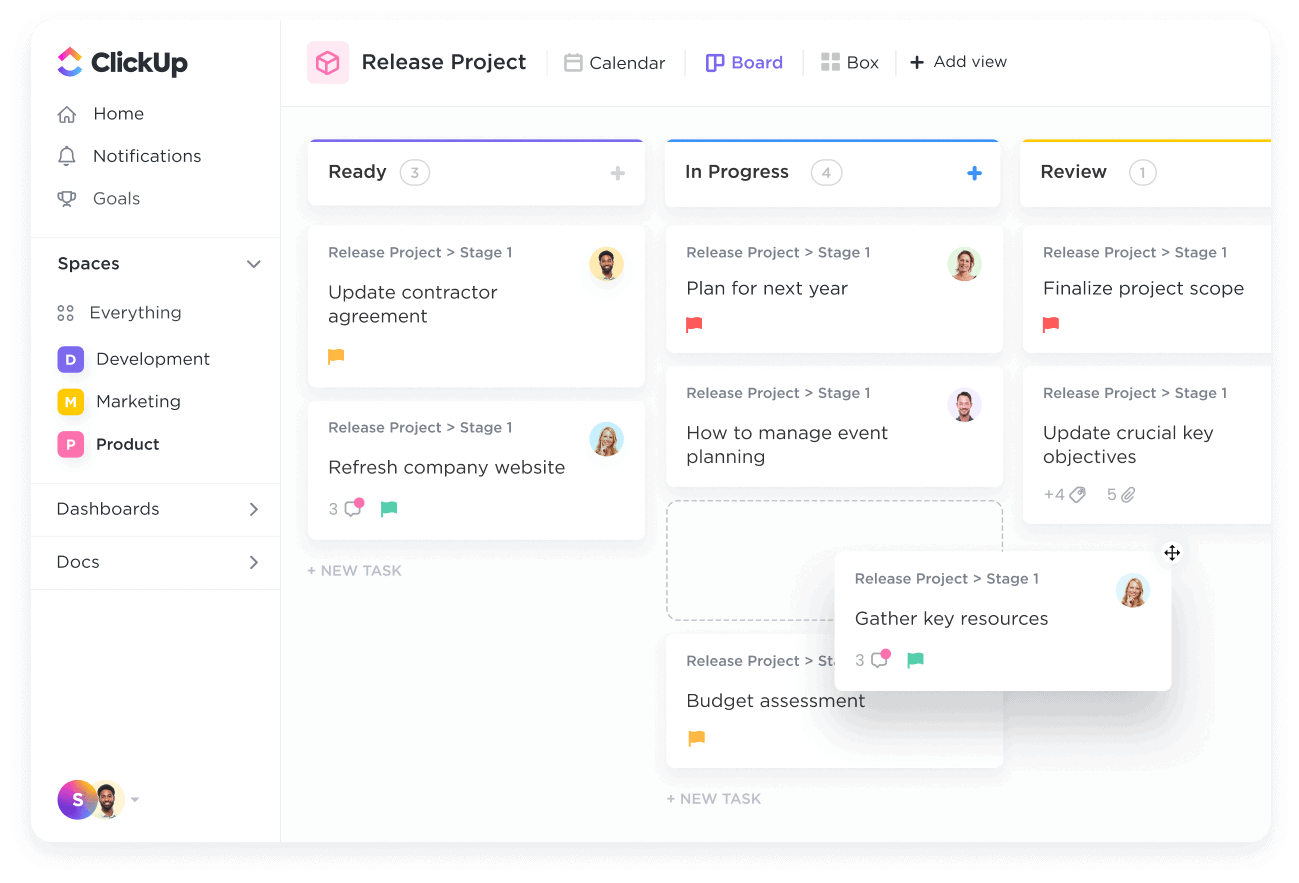
ClickUp è una piattaforma di produttività che riunisce diversi strumenti per la gestione dei clienti, la gestione dei progetti, la comunicazione e la collaborazione. Consolidando attività, calendari e altre funzioni essenziali in un'unica soluzione, ClickUp può aiutare te e il tuo team a integrare i clienti e a gestire ed eseguire i progetti.
Perché ho scelto ClickUp
Ho scelto ClickUp per la sua capacità di automatizzare l'assegnazione delle attività, il che permette al tuo team di concentrarsi su aspetti più importanti della gestione clienti senza essere appesantiti dai processi manuali. ClickUp ti consente di monitorare i progressi durante l'onboarding, raccogliere feedback e fornisce preziose informazioni su come ottimizzare l'esperienza per i nuovi clienti.
Gli strumenti di monitoraggio dei progetti di ClickUp sono un altro motivo che lo distingue come software per l'onboarding dei clienti. Questi strumenti aiutano a tenere sotto controllo i diversi aspetti dei tuoi progetti di onboarding, così che nulla venga trascurato. La piattaforma offre anche funzionalità per la raccolta del feedback dei dipendenti e l'analisi delle prestazioni della formazione, così da poter migliorare costantemente le procedure di onboarding.
Caratteristiche principali di ClickUp
ClickUp offre inoltre diverse funzioni pensate per l'onboarding dei clienti.
- Assistenza basata sull'IA: Questa funzione ti aiuta a generare checklist e riepiloghi e ti rende più semplice organizzare e monitorare le attività di onboarding dei clienti.
- Documentazione centralizzata: ClickUp offre un unico luogo dove archiviare i documenti relativi ai clienti, così il tuo team avrà sempre facile accesso alle informazioni necessarie.
- Spazi collaborativi: Questa funzione consente al tuo team e ai clienti di comunicare apertamente e condividere feedback, favorendo un onboarding più interattivo.
- Follow-up automatici: Puoi mantenere coinvolti i clienti pianificando e inviando automaticamente messaggi di follow-up.
Integrazioni di ClickUp
Le integrazioni includono Microsoft OneDrive, Outlook, Google Calendar, Slack, Trello, Asana, Jira, GitHub, Zoom, Twilio, Zendesk e Salesforce.
Pros and Cons
Pros:
- Efficace per gestire più progetti e scadenze
- Funzionalità complete di gestione delle attività
- Interfaccia altamente personalizzabile
Cons:
- Il tempo di configurazione può essere eccessivo per progetti a breve termine
- Funzionalità offline limitate
New Product Updates from ClickUp
ClickUp Adds Meetings Hub, Super Agent Templates, and ZoomInfo Integration
ClickUp adds a searchable Meetings Hub, new ways to clone and template Super Agents, and a ZoomInfo integration through the App Center. These updates improve meeting retrieval, agent reuse, and access to sales intelligence. For more information, visit ClickUp’s official site.

Ideale per la fidelizzazione dei clienti
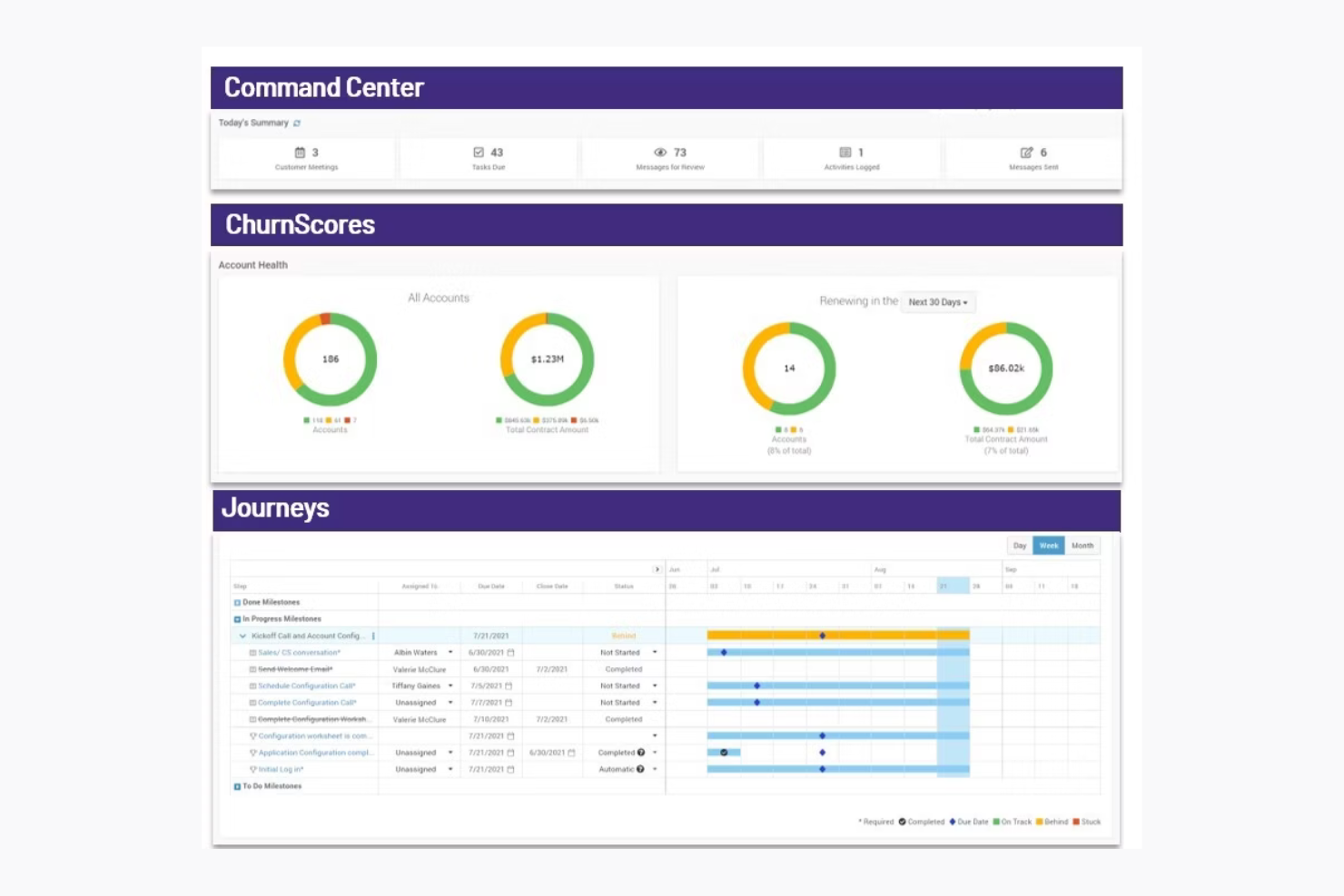
ChurnZero è una piattaforma di customer success progettata per aziende SaaS e team di customer success. Si concentra sul miglioramento della fidelizzazione e dell’engagement dei clienti, offrendo approfondimenti, analisi e strumenti di comunicazione.
Perché ho scelto ChurnZero
ChurnZero ti aiuta a mantenere i clienti mostrando punteggi di salute in tempo reale, così il tuo team può individuare tempestivamente gli account a rischio. Puoi utilizzare playbook automatizzati per contattare i clienti prima che i problemi peggiorino. La messaggistica in-app ti permette di parlare con gli utenti direttamente dove si trovano. È pensato per i team SaaS focalizzati sulla fidelizzazione.
Funzionalità principali di ChurnZero
ChurnZero offre anche una varietà di altre funzionalità utili per l’onboarding dei clienti.
- Vista completa sul cliente: Ottieni informazioni in tempo reale sulla salute e il sentiment dei clienti integrando dati da utilizzo del prodotto, CRM e sistemi di supporto.
- Strumenti potenziati dall’AI: Puoi automatizzare attività amministrative per liberare il team e consentirgli di dedicarsi a interazioni più strategiche con i clienti.
- Collaborazione e automazione: Questo ti permette di utilizzare chatbot, playbook per i clienti e avvisi in tempo reale per aumentare l’efficienza del team.
- Analisi avanzate: Puoi monitorare le relazioni con i clienti e prevedere il rischio di abbandono con strumenti come i punteggi di salute e report dettagliati.
Integrazioni di ChurnZero
Le integrazioni comprendono Salesforce, HubSpot, Zendesk, Slack, Intercom, Mailchimp, Microsoft Dynamics e Pipedrive.
Pros and Cons
Pros:
- Playbook di engagement automatizzati
- Dashboard di successo personalizzabili
- Ideale per aziende SaaS
Cons:
- Processo di configurazione complesso
- Costoso per team più piccoli

Userpilot
Ideale per esperienze in-app personalizzate
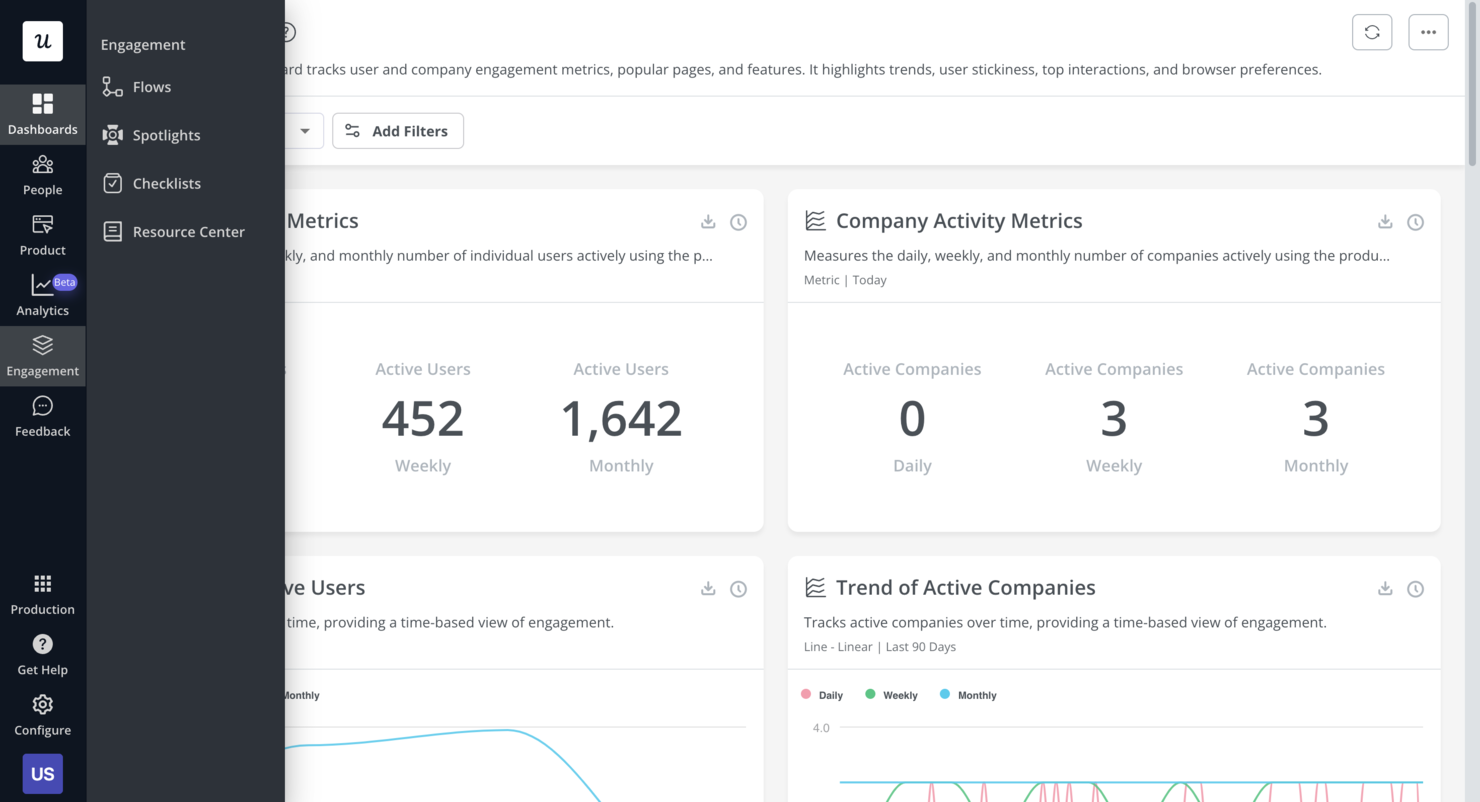
Userpilot è una piattaforma di crescita del prodotto che può migliorare l'onboarding dei clienti. Offre esperienze in-app personalizzate che guidano i nuovi utenti e garantiscono che ottengano il massimo dal tuo prodotto o dai tuoi servizi.
Perché ho scelto Userpilot
Uno dei motivi per cui ho scelto Userpilot è la sua capacità di creare esperienze in-app su misura senza la necessità di programmare. Questo ti permette di guidare gli utenti all'interno del tuo prodotto in modo naturale e intuitivo. Un'altra caratteristica è la raccolta di feedback in-app, che consente di raccogliere le opinioni degli utenti direttamente dall'app per comprendere meglio le loro esigenze e migliorare di conseguenza il prodotto.
Userpilot offre anche la possibilità di riprodurre le sessioni degli utenti, consentendo di visualizzare i percorsi effettuati e individuare aree di miglioramento. Questa funzione è preziosa per ottimizzare il processo di onboarding e assicurarsi che gli utenti possano navigare facilmente nel prodotto. Inoltre, Userpilot offre supporto mobile per creare esperienze di onboarding mobile-first destinate a utenti in movimento.
Funzionalità principali di Userpilot
Userpilot offre anche una vasta gamma di altre funzionalità che possono aiutare a migliorare l'onboarding dei clienti e il coinvolgimento degli utenti.
- Checklist di onboarding: Aiutano gli utenti a conoscere il prodotto e a ridurre il time-to-value. Puoi crearle con un builder no-code che attiva azioni specifiche e traccia i progressi tramite gli analytics.
- Centri risorse: Offrono supporto self-service e permettono agli utenti di trovare risposte senza uscire dal prodotto. Sono anch'essi costruiti con un editor no-code per moduli mirati.
- Segmentazione degli utenti: Puoi creare onboarding personalizzati segmentando gli utenti in base a dati demografici e utilizzo del prodotto, consentendo flussi mirati e analytics dettagliati.
- Sondaggi NPS: Puoi creare e analizzare sondaggi sul Net Promoter Score usando un builder no-code, con opzioni di targeting del pubblico e localizzazione delle traduzioni supportata dall'IA.
Integrazioni Userpilot
Le integrazioni includono HubSpot, Salesforce, Segment, Google Tag Manager, Zendesk, Google Analytics, Intercom, Amplitude, Mixpanel e Heap.
Pros and Cons
Pros:
- Opzioni personalizzabili offerte
- Implementazione e rilascio delle funzionalità rapidi
- Monitora gli obiettivi di crescita del prodotto e analizza i feedback
Cons:
- Il plugin di creazione contenuti può risultare macchinoso da usare
- Le integrazioni con altri strumenti possono essere difficoltose
Altri software per l'onboarding dei clienti
Ecco alcune ulteriori opzioni di software per l’onboarding dei clienti che non sono state incluse nella mia selezione, ma che vale comunque la pena prendere in considerazione:
- Whatfix
Ideale per la guida in-app
- Appcues
Ideale per flussi di onboarding degli utenti
- GUIDEcx
Ideale per la trasparenza nei progetti
- Process Street
Ideale per la gestione centralizzata delle politiche
- Intercom
Ideale per messaggistica in-app
- Userlane
Ideale per contenuti di onboarding personalizzati
- Clustdoc
Ideale per la raccolta dei documenti
- ShareFile
Ideale per la condivisione sicura di file
- Content Snare
Ideale per promemoria automatici ai clienti
- Fenergo
Ideale per la conformità normativa
- Leadsie
Ideale per gestire l'accesso multi-piattaforma
- Motion.io
Ideale per l'automazione delle attività
- Chameleon
Ideale per i tour di prodotto
- Trupeer
Ideale per la creazione personalizzata di video


Come Valuto i Software di Onboarding Clienti
Valuto ogni strumento su due livelli: le capacità di base—moduli di raccolta dati, portali per i clienti, automazione dei flussi di lavoro—e i fattori differenzianti che distinguono le soluzioni più valide per agenzie e uffici di gestione progetti (PMO).
Funzionalità Core (Requisiti Minimi per Questa Lista)
Quando seleziono gli strumenti per la mia lista, valuto ciascuno su una scala da 0 (non offre la funzionalità) a 5 (eccelle in quest’area) per ogni funzionalità core elencata di seguito. Poi calcolo il punteggio totale dello strumento come percentuale. Ogni strumento deve raggiungere un punteggio totale minimo del 65% per essere preso in considerazione.
- Moduli di Acquisizione Clienti: Verifico se uno strumento consente di creare questionari personalizzati con logica condizionale—come mostrare campi diversi a un cliente in abbonamento rispetto a un progetto una tantum.
- Raccolta Documenti e File: La capacità di inviare richieste strutturate di file, monitorare ciò che manca e sollecitare i clienti con promemoria è più importante di un semplice pulsante di caricamento.
- Automazione del Flusso di Lavoro di Onboarding: Cerco sequenze di attività basate su trigger che facciano avanzare il cliente tra le fasi automaticamente, ad esempio assegnando un PM dopo l’invio del modulo di acquisizione.
- Portale Clienti: Valuto se i clienti ricevono uno spazio personalizzato dove possono vedere i propri progressi, completare attività e comunicare—senza bisogno di registrarsi o occupare una licenza prodotto.
- Firma Elettronica e Approvazioni: Strumenti come HoneyBook e Dubsado gestiscono le firme nativamente, mentre altri si affidano a integrazioni con DocuSign o PandaDoc—verifico entrambe le soluzioni.
- Integrazione con la Gestione Progetti: Valuto come i dati di onboarding confluiscono nel tuo sistema PM, che si tratti di sincronizzare le attività con Asana, creare progetti in ClickUp o mappare i campi su Monday.
Dopo aver raccolto la lista degli strumenti che rispettano questi criteri, considero ciò che rende unica ciascuna piattaforma.
Fattori Differenzianti (Cosa Distingue i Fornitori)
Ecco come confronto i diversi fornitori:
Funzionalità Distintive
Le analisi di onboarding ti danno visibilità su dove i clienti si bloccano—che sia un upload in ritardo o un SOW non firmato che resta inutilizzato per giorni nella casella di posta. Cerco dashboard che tracciano i tempi di onboarding e le percentuali di completamento su tutti gli account. Contano anche i modelli di playbook riutilizzabili. Essere in grado di clonare una sequenza di onboarding già testata per una particolare linea di servizio fa risparmiare ai PM la fatica di ricostruire i flussi di lavoro per ogni nuovo incarico. Controllo anche se uno strumento gestisce i pagamenti all’interno del processo di onboarding, permettendo di riscuotere acconti o anticipi prima dell’avvio.
Oltre le Funzionalità
L’ecosistema di integrazione è importante qui. Se i dati di onboarding non finiscono nel tuo CRM o sistema di PM—ad esempio, da HubSpot ad Asana—dovrai reinserire manualmente i dati dei clienti. Valuto anche le strutture tariffarie, in particolare come viene gestita la parte riservata ai clienti. Alcuni strumenti fanno pagare per ogni collaboratore esterno, cosa che può diventare subito costosa se devi gestire l’onboarding di decine di clienti ogni trimestre. Il tempo per ottenere valore è un altro fattore che considero—verifico se una piattaforma offre modelli preconfigurati per evitare che il team debba creare tutto da zero durante la configurazione.
Come scegliere il software per l'onboarding dei clienti
È facile perdersi in lunghi elenchi di funzionalità e strutture di prezzo complesse. Per aiutarti a rimanere concentrato mentre affronti il tuo particolare processo di selezione del software, ecco una lista di controllo dei fattori da tenere a mente:
| Fattore | Considerazioni |
|---|---|
| Scalabilità | Il software può crescere insieme alla tua attività? Valuta se è in grado di supportare una base clienti in crescita o un team in espansione. Cerca piani o funzionalità flessibili che possano soddisfare le esigenze future. |
| Integrazioni | Funziona con gli strumenti che utilizzi attualmente? Assicurati che si colleghi al tuo CRM, alla posta elettronica e ad altre piattaforme essenziali. Verifica la presenza di integrazioni native o del supporto API per evitare costi e complessità aggiuntivi. |
| Personalizzazione | Puoi adattare il software ai tuoi processi? Cerca opzioni per modificare flussi di lavoro, marchio e ruoli degli utenti. Evita gli strumenti che ti vincolano a modelli rigidi e non soddisfano le tue esigenze. |
| Facilità d'uso | È facile da usare? Valuta l'interfaccia e la navigazione. Il software dovrebbe essere intuitivo per tutti i membri del team, così da ridurre i tempi di formazione e gli errori. |
| Implementazione e avvio | Quanto rapidamente puoi iniziare a utilizzarlo? Valuta i tempi di configurazione e le risorse necessarie. Cerca strumenti con procedure guidate di avvio, materiali di formazione e supporto per facilitare la transizione. |
| Costo | Quali sono le spese totali? Esamina non solo il costo dell'abbonamento, ma anche eventuali costi nascosti come componenti aggiuntivi o costi di integrazione. Confronta i livelli di prezzo per trovare il miglior rapporto qualità-prezzo per il tuo budget. |
| Misure di sicurezza | Come protegge i tuoi dati? Valuta i metodi di crittografia, i controlli degli accessi e la conformità agli standard di protezione dei dati. Assicurati che sia in linea con le politiche di sicurezza della tua organizzazione. |
| Disponibilità dell'assistenza | Quali opzioni di assistenza sono disponibili? Verifica se offrono assistenza 24 ore su 24, 7 giorni su 7, chat dal vivo o gestori degli account dedicati. Un'assistenza affidabile può essere fondamentale nei momenti critici o in caso di problemi tecnici. |
Che cos'è il software per l'avvio dei clienti?
Il software per l'avvio dei clienti è uno strumento che ti consente di organizzare e automatizzare tutto ciò che serve per acquisire un nuovo cliente, inclusi moduli, attività, messaggi e condivisione di documenti.
Viene utilizzato da agenzie, consulenti e team di servizi che lavorano con clienti di diversi settori (ad es. marketing, finanza, attività operative) per ridurre i tempi di avvio, mantenere la coerenza e creare un'esperienza strutturata che consenta di instaurare fiducia e un buon rapporto con i clienti. Questi strumenti ti aiutano a evitare passaggi di consegne disordinati, facendo sentire i clienti sicuri nel lavorare con te.
Funzionalità del software per l'avvio dei clienti
Quando selezioni un software per l'avvio dei clienti, presta attenzione alle seguenti funzionalità chiave:
- Flussi di lavoro personalizzabili: puoi creare fasi di avvio che corrispondono al tuo processo specifico, adattandoti alle diverse esigenze dei clienti e ai requisiti del settore.
- Gestione automatizzata delle attività: puoi assegnare, monitorare e ricordare automaticamente agli utenti ogni attività, evitando il mancato rispetto delle scadenze e impedendo che il lavoro venga trascurato.
- Integrazione della firma elettronica: puoi raccogliere in modo sicuro le firme digitali all'interno della piattaforma, evitando che documenti, contratti e accordi diventino colli di bottiglia.
- Portali per i clienti: puoi offrire ai clienti un pannello di controllo personalizzato in cui caricare documenti, monitorare i progressi e comunicare, mantenendo tutti sincronizzati con meno scambi di e-mail.
- Gestione dei documenti: puoi organizzare e archiviare in modo sicuro i file importanti e trovare facilmente ciò che ti serve senza effettuare ricerche interminabili.
- Monitoraggio della conformità: ti aiuta a tenere sotto controllo i requisiti normativi automatizzando la raccolta dei dati, le approvazioni e la documentazione.
- Strumenti di comunicazione automatizzata: puoi configurare e-mail di benvenuto, promemoria o messaggi di ricontatto che vengono inviati automaticamente.
- Report e analisi: puoi monitorare i progressi, identificare i colli di bottiglia, ottenere informazioni sul tuo processo e apportare miglioramenti significativi.
Funzionalità di AI da cercare nel software per l'avvio dei clienti
I team che utilizzano un software per l'avvio dei clienti basato sull'AI possono portare efficienza e personalizzazione a un livello superiore grazie a funzionalità come:
- Elaborazione dei documenti basata sull'AI: L'AI può estrarre, convalidare e organizzare automaticamente le informazioni dai documenti caricati, riducendo l'inserimento manuale dei dati e gli errori.
- Automazione intelligente delle attività: Puoi consentire all'AI di assegnare attività e scadenze in base alla complessità del progetto e ai profili dei clienti, mantenendo così un'esperienza di onboarding fluida.
- Analisi predittiva: L'AI può prevedere potenziali ritardi, identificare i clienti a rischio e suggerire azioni proattive per mantenere il processo di onboarding in linea con i tempi previsti.
- Chatbot e assistenti virtuali: Puoi configurare chatbot basati sull'AI che offrono assistenza immediata ai clienti, rispondono alle domande frequenti, guidano gli utenti nella compilazione dei moduli e inoltrano i problemi quando necessario.
- Percorsi di onboarding personalizzati: L'AI può analizzare i dati dei clienti e consigliare fasi, risorse e comunicazioni di onboarding personalizzate, facendo sentire ogni cliente apprezzato e compreso.
- Elaborazione del linguaggio naturale (NLP): L'AI può analizzare automaticamente le comunicazioni con i clienti per rilevare il sentimento, l'urgenza o i problemi di conformità, aiutando il tuo team a rispondere in modo più efficace.
Vantaggi del software di onboarding dei clienti
L'implementazione di un software di onboarding dei clienti offre diversi vantaggi al tuo team e alla tua azienda. Ecco alcuni dei vantaggi che puoi aspettarti:
- Maggiore organizzazione: Mantiene tutte le informazioni e i documenti dei clienti in un unico luogo, facilitando l'accesso e la gestione da parte del tuo team.
- Comunicazione con i clienti migliorata: Offre strumenti come la messaggistica integrata nell'app e i portali per i clienti per mantenere una comunicazione chiara ed efficiente con i clienti.
- Risparmio di tempo: Automatizza le attività e i flussi di lavoro ripetitivi, consentendo al tuo team di concentrarsi sulle attività più importanti.
- Maggiore soddisfazione dei clienti: Offre ai clienti un'esperienza di onboarding fluida attraverso tour interattivi del prodotto e portali personalizzati.
- Sicurezza dei dati: Archivia i dati dei clienti in modo sicuro e protegge le informazioni sensibili dagli accessi non autorizzati.
- Migliore processo decisionale: Offre funzionalità di analisi e reportistica che forniscono informazioni sul processo di onboarding e sul coinvolgimento dei clienti.
- Coerenza del marchio: Consente di personalizzare il marchio e mantiene l'identità della tua azienda durante tutto il percorso del cliente.
Costi e prezzi del software di onboarding dei clienti
La scelta di un software di onboarding dei clienti richiede la conoscenza dei vari modelli di prezzo e dei piani disponibili. I costi variano in base alle funzionalità, alle dimensioni del team, ai componenti aggiuntivi e ad altri fattori. La tabella seguente riassume i piani più comuni, i prezzi medi e le funzionalità tipicamente incluse nelle soluzioni software di onboarding dei clienti:
Tabella comparativa dei piani per il software di onboarding dei clienti
| Tipo di piano | Prezzo medio | Funzionalità comuni |
|---|---|---|
| Piano gratuito | $0 | Gestione di base dei documenti, accesso limitato degli utenti e assistenza di base |
| Piano personale | $5 - $25 /utente/mese | Gestione dei documenti, automazione delle attività, analisi di base e assistenza via e-mail |
| Piano aziendale | $30 - $60 /utente/mese | Gestione avanzata dei documenti, flussi di lavoro personalizzabili, messaggistica integrata nell'app, portali per i clienti e assistenza prioritaria |
| Piano aziendale avanzato | $70 - $100 /utente/mese | Analisi complete, opzioni di personalizzazione totale, responsabile dell'account dedicato, funzionalità di sicurezza avanzate e assistenza premium 24 ore su 24, 7 giorni su 7 |
Domande frequenti sul software di onboarding dei clienti
Ecco alcune risposte alle domande più comuni sul software di onboarding dei clienti:
In che modo il software di onboarding dei clienti può migliorare la comunicazione?
Il software di onboarding dei clienti ottimizza la comunicazione centralizzando tutte le informazioni sui clienti, le attività e gli aggiornamenti in un’unica piattaforma. In qualità di project manager, puoi impostare promemoria automatici, monitorare i messaggi e fornire ai clienti un unico punto di contatto. Questo riduce lo scambio continuo di e-mail e aiuta tutti a rimanere aggiornati durante l’onboarding.
In che modo il software di onboarding dei clienti migliora la soddisfazione dei clienti?
Il giusto software di onboarding offre ai clienti visibilità sui progressi, sulle tempistiche e sui passaggi successivi. Quando utilizzi un software per tenere informati i clienti e gestire le aspettative, riduci confusione e ritardi. Inoltre, le checklist automatiche e gli aggiornamenti tempestivi aiutano i clienti a sentirsi supportati durante tutto il processo di onboarding.
Funzionalità come l’assegnazione automatica delle attività, i portali personalizzati per i clienti e i tour interattivi del prodotto aiutano i clienti a sentirsi supportati e informati.
In che modo i project manager automatizzano le attività di onboarding dei clienti con il software?
Puoi automatizzare le fasi ripetitive dell’onboarding configurando modelli, trigger e flussi di lavoro nel tuo software di onboarding. Ad esempio, puoi inviare automaticamente e-mail di benvenuto, assegnare le attività iniziali e programmare i follow-up non appena un nuovo cliente si iscrive.
Queste automazioni riducono il lavoro manuale e garantiscono a ogni cliente un’esperienza di onboarding coerente. Il software di onboarding dei clienti è uno strumento che ti permette di organizzare e automatizzare tutto ciò che serve quando acquisisci un nuovo cliente, inclusi moduli, attività, messaggi e condivisione di documenti.
Come posso misurare il successo dell'onboarding utilizzando dashboard o report del software?
Utilizza le dashboard e i report integrati nella tua piattaforma di onboarding per monitorare metriche chiave come i tassi di completamento delle attività, il feedback dei clienti e la durata dell’onboarding.
- I tassi di completamento delle attività mostrano quanti passaggi dell’onboarding i tuoi clienti completano in tempo. Se rilevi un tasso di completamento elevato, sai che il tuo processo è chiaro e gestibile; un tasso basso significa che i clienti potrebbero essere bloccati o confusi.
- Raccogliere il feedback dei clienti, ad esempio tramite sondaggi o valutazioni, ti aiuta a comprendere l’esperienza dei clienti durante l’onboarding. Un feedback positivo indica che il tuo onboarding procede senza intoppi, mentre un feedback negativo evidenzia gli aspetti da migliorare.
- Monitorare la durata dell’onboarding, ovvero il tempo necessario a un nuovo cliente per completare il processo, ti aiuta a individuare i colli di bottiglia. Tempi di onboarding più brevi spesso indicano che il processo è efficiente, mentre ritardi prolungati possono segnalare passaggi non necessari.