

I 10 migliori software di gestione delle risorse digitali per Mac nel 2026

Migliori software di gestione delle risorse digitali per Mac: selezione


Il software di gestione delle risorse digitali (DAM) offre il vantaggio di mantenere le risorse organizzate e facilmente ricercabili, facendoti risparmiare tempo e riducendo la frustrazione. Esistono diverse opzioni software per PC, ma cosa succede se la tua azienda utilizza Mac?
Può essere difficile trovare un software di gestione delle risorse digitali equivalente per Mac. Tuttavia, grazie alla mia vasta esperienza nella gestione di progetti digitali e nell'utilizzo di diversi strumenti di produttività, credo di poterti aiutare a trovare la soluzione giusta per te e il tuo team.
Perché fidarsi dei nostri consigli sui software
Il nostro team testa e recensisce software dal 2012. In quanto project manager noi stessi, sappiamo quanto sia difficile — e importante — scegliere il software giusto.
Per questa guida, abbiamo valutato gli strumenti attraverso test pratici e ricerche indipendenti, assegnando un punteggio agli strumenti in base ai nostri criteri di selezione. Ci basiamo inoltre sulle competenze di leader di pensiero del settore e di professionisti attivi nella gestione dei progetti.
Le nostre recensioni riflettono il nostro giudizio editoriale umano, non un discorso di vendita.
Revisori esperti:
Tabella comparativa: software di gestione delle risorse digitali per Mac
Questa tabella comparativa riassume i dettagli sui prezzi della mia selezione dei migliori software di gestione delle risorse digitali per Mac.
| Tool | Best For | Trial Info | Price | ||
|---|---|---|---|---|---|
| 1 | Ideale per l'organizzazione delle risorse digitali | Prova gratuita di 7 giorni | A partire da $100/mese/utente | Website | |
| 2 | Ideale per i controlli flessibili sui permessi | Demo gratuita disponibile | Prezzi su richiesta | Website | |
| 3 | Ideale per feedback e approvazioni centralizzate | Piano gratuito disponibile | Da $10/mese (fatturazione annuale) | Website | |
| 4 | Ideale per etichettatura e classificazione automatica dei file | Prova gratuita di 30 giorni disponibile | Da $250/mese (fatturato annualmente) | Website | |
| 5 | Ideale per gestire e condividere risorse del marchio | Prova gratuita di 30 giorni | Da $29/utente/mese | Website | |
| 6 | Ideale per prezzi basati sullo spazio di archiviazione con utenti illimitati | Piano gratuito disponibile | A partire da $99/mese | Website | |
| 7 | Ideale per la sincronizzazione dei media su MacOS | Prova gratuita di 14 giorni | Prezzo su richiesta | Website | |
| 8 | Ideale per l'ottimizzazione delle risorse con AI | Prova gratuita di 14 giorni | Da $213/mese | Website | |
| 9 | Ideale per la condivisione di asset di marca | Prova gratuita + demo disponibile | Da $300/utente/mese | Website | |
| 10 | Ideale per la collaborazione sui contenuti | Demo gratuita disponibile | Prezzo su richiesta | Website |

Recensioni dei migliori software di gestione delle risorse digitali per Mac
Di seguito trovi le mie recensioni dettagliate dei migliori software DAM per Mac. Ognuna delle recensioni seguenti analizza i vantaggi e gli svantaggi, le funzionalità principali e gli scenari ideali per l’utilizzo di queste soluzioni software.

Pics.io
Ideale per l'organizzazione delle risorse digitali
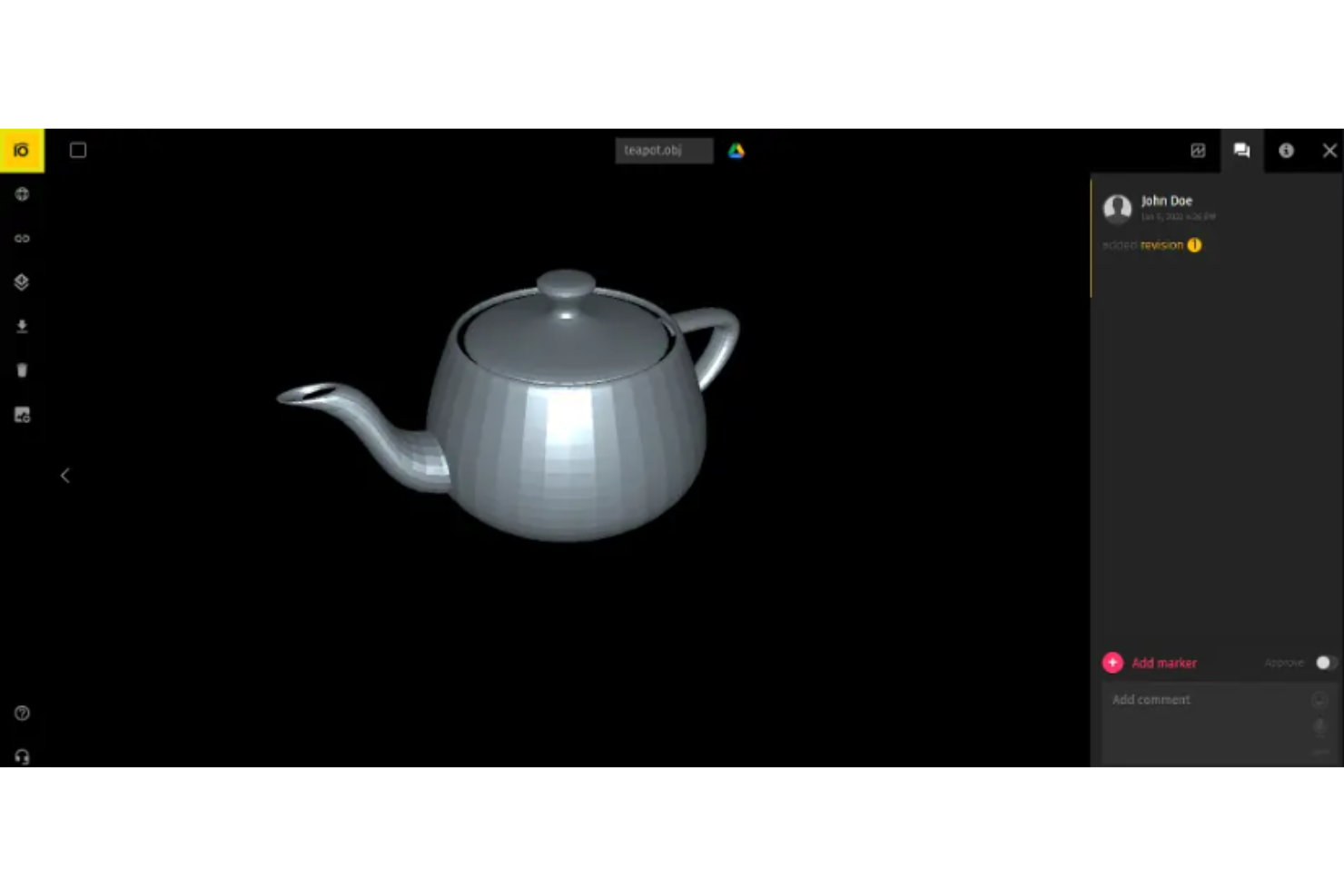
Pics.io è una piattaforma avanzata di gestione delle risorse digitali che semplifica l'organizzazione e la collaborazione sulle risorse digitali. Fornisce un sistema centralizzato per archiviare, accedere e condividere file, migliorando l'efficienza e la collaborazione tra i vari reparti.
Perché ho scelto Pics.io:
Pics.io offre capacità avanzate di organizzazione delle risorse digitali, essenziali per i team che desiderano gestire in modo efficiente le proprie librerie in crescita di contenuti digitali. La sua interfaccia intuitiva e le potenti funzionalità di ricerca lo rendono una scelta versatile per professionisti creativi e team. È ideale per l'organizzazione delle risorse digitali perché offre una piattaforma centralizzata dove i team possono accedere, gestire e distribuire facilmente le proprie risorse digitali, assicurando di poter trovare e riutilizzare rapidamente i contenuti esistenti.
Funzionalità e integrazioni di spicco:
Funzionalità includono controllo delle versioni, organizzazione della libreria multimediale, gestione dei metadati, strumenti di ricerca avanzati, strumenti di modifica integrati, automazione del flusso di lavoro, permessi di accesso personalizzabili, funzionalità di collaborazione, possibilità di condividere le risorse e analisi per il tracciamento dell'utilizzo delle risorse.
Integrazioni includono Google Drive, Amazon S3, Shopify, Slack, Adobe Creative Cloud (After Effects, Illustrator, Photoshop, Premiere Pro), ClickUp, Easy Projects, Google Workspace (Docs, Forms, Sheets, Slides), Hootsuite, HubSpot, la sua app mobile, Monday.com, Salesforce, Trello, WordPress, Wrike, Zapier, YouTube, Figma e Zoho CRM.
Pros and Cons
Pros:
- Funzionalità complete di gestione delle risorse digitali
- Potenti strumenti di ricerca e organizzazione
- Ampia gamma di integrazioni con piattaforme popolari
Cons:
- Non disponibile offline
- Funzionalità complesse
New Product Updates from Pics.io
Pics.io Adds AVIF File Support
Pics.io now supports AVIF files, expanding the image formats you can upload and manage in the platform. This gives teams more flexibility when working with modern image assets. For more information, visit Pics.io’s official site.
 .
.
Papirfly
Ideale per i controlli flessibili sui permessi
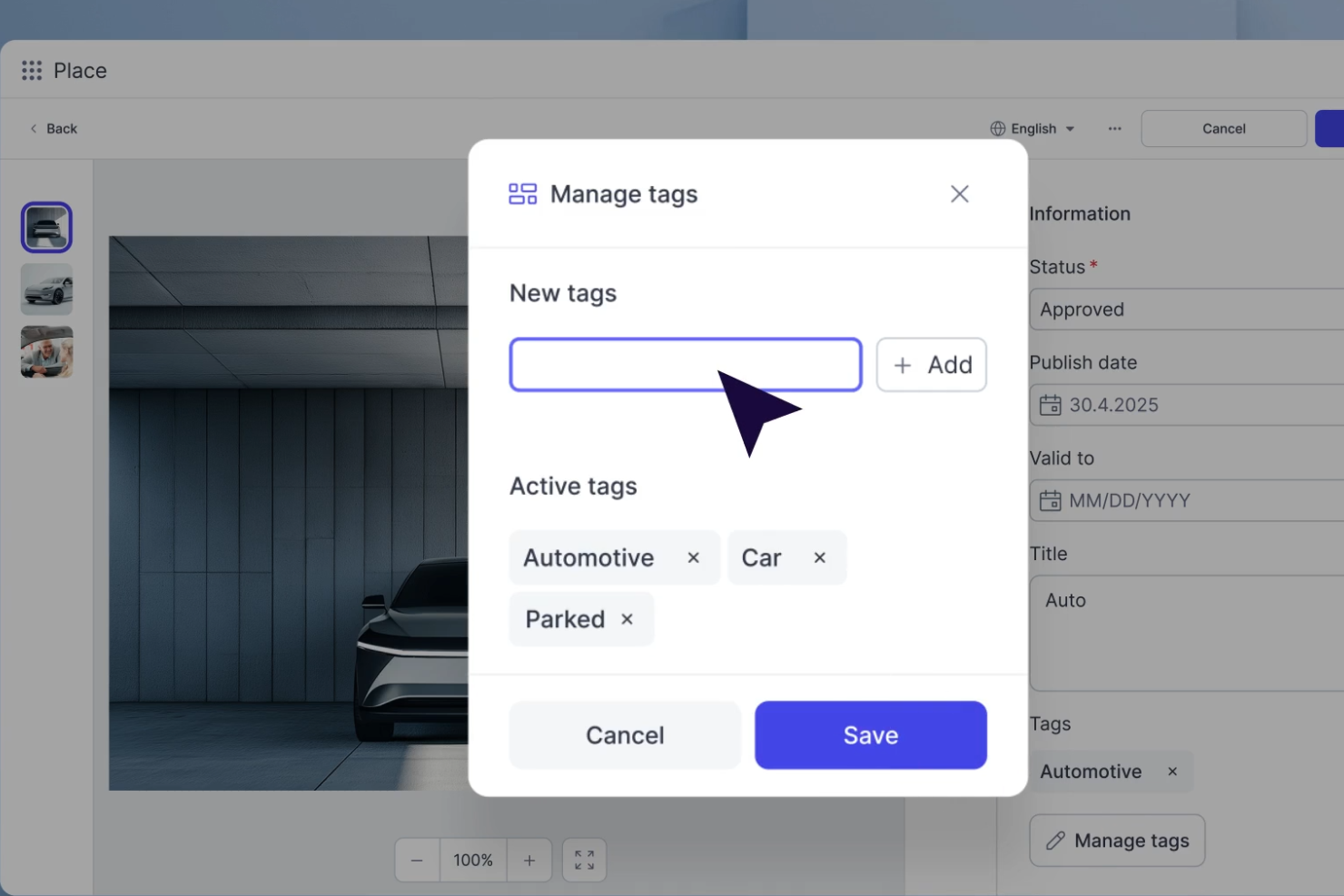
Papirfly è una piattaforma DAM basata su cloud che combina archiviazione centralizzata degli asset, creazione di contenuti tramite modelli, portali di brand e gestione dei diritti per i team di brand e marketing.
Per chi è ideale Papirfly?
Papirfly è particolarmente adatto a team marketing e brand di medie e grandi aziende che gestiscono grandi volumi di asset in più mercati, canali o regioni.
Perché ho scelto Papirfly
Ho inserito Papirfly tra le mie migliori scelte perché i controlli granulari dei permessi vanno ben oltre l'assegnazione di ruoli di base. Puoi limitare l'accesso agli asset per ufficio, regione o ruolo, il che significa che un team marketing regionale in Germania vede solo gli asset approvati per il proprio mercato. Mi piace anche che i controlli sui permessi siano integrati nei workflow di approvazione, così solo gli utenti autorizzati possono approvare asset prima che questi raggiungano un portale o un canale di distribuzione.
Caratteristiche principali di Papirfly
- Ricerca in linguaggio naturale: Descrivi ciò di cui hai bisogno in testo semplice e la ricerca potenziata dall'AI trova gli asset corrispondenti senza necessità di nomi file esatti o tassonomie rigide.
- Rilevamento duplicati: L'analisi visiva e dei metadati tramite AI segnala i file duplicati al momento del caricamento, mantenendo la libreria pulita e sotto controllo di versione.
- Riconoscimento facciale: Identifica automaticamente le persone all'interno degli asset per segnalare lo stato del consenso e supportare la distribuzione di immagini e video conforme al GDPR.
- Analisi del portale: Monitora l'uso degli asset, i download e l'engagement per regione per misurare l'adozione del brand nei vari mercati.
Integrazioni di Papirfly
Le integrazioni includono Adobe Creative Cloud, Adobe Commerce, Akamai, Akeneo, Asana, BigCommerce, Canva, Contentful, DeepL e Dynamics 365.
Pros and Cons
Pros:
- I modelli bloccati evitano asset fuori brand
- Portali di brand integrati per la distribuzione regionale
- Anche chi non è designer può creare asset in autonomia
Cons:
- Poca flessibilità per i modelli di progetto
- Nessuno strumento nativo per l'editing video
New Product Updates from Papirfly

Papirfly Introduces Fund Management in Plan Campaigns
Papirfly introduces Fund Management in Plan Campaigns with budget distribution, fund requests, utilization tracking, approvals, and dashboards. These tools give teams better control and visibility over campaign budgets. For more information, visit Papirfly’s official site.
 .
.
Air
Ideale per feedback e approvazioni centralizzate
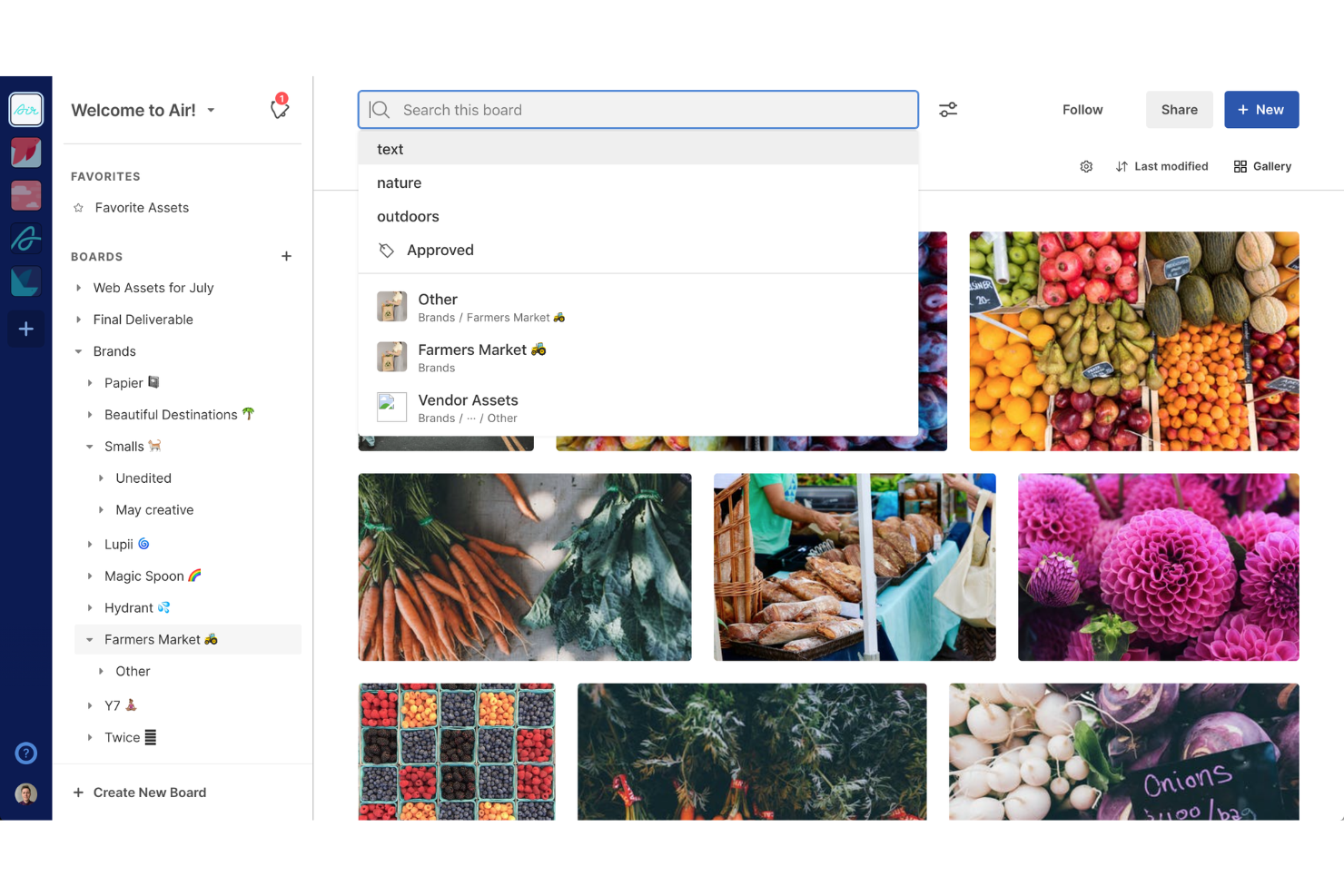
Air è una piattaforma per le operazioni creative progettata per centralizzare la gestione degli asset creativi e dei flussi di lavoro per i team. Offre uno spazio di lavoro che aiuta i team a raccogliere, approvare e condividere i contenuti.
Perché ho scelto Air:
Apprezzo il suo workspace visivo, che consolida tutti gli asset e gli strumenti creativi in un unico luogo. Questo approccio visuale permette agli utenti di gestire, organizzare e accedere ai propri asset digitali in modo più intuitivo, migliorando significativamente la produttività. I processi centralizzati di feedback e approvazione semplificano ulteriormente la collaborazione, consentendo ai team di fornire e ricevere riscontri in tempo reale.
Funzionalità di spicco & integrazioni:
Funzionalità includono ricerca intelligente tramite AI, avanzate capacità di condivisione, supporto a diversi tipi di file, tracciamento delle versioni, gestione automatica della scadenza degli asset e gestione dei diritti digitali.
Integrazioni includono Airtable, Zapier, HubSpot, Slack, Tally, Alfred, ClickUp, Google Sheets, Microsoft Excel, Canva, Adobe Premiere Pro, Salesforce, Trello, Figma, Wrike, Shopify, Amazon S3 e Google Drive.
Pros and Cons
Pros:
- Adatto per funzionalità di approvazione e feedback
- Supporta vari formati di file
- Facilita la condivisione semplice degli asset visivi
Cons:
- Non ideale per asset digitali non visivi
- Manca un'app mobile dedicata
New Product Updates from Air

Air Showcases Introduces Custom Branding, Content Blocks, and Sub-Pages
Air Showcases now support custom branding, content blocks, sub-pages, and saved default layout settings, plus more control over removing items and branding options for Enterprise. For more information, visit Air's official site.

Ideale per etichettatura e classificazione automatica dei file

Tagbox.io è una piattaforma di gestione delle risorse digitali basata su cloud, progettata per i team Mac che hanno bisogno di un metodo più rapido per organizzare, cercare e condividere librerie in espansione di file creativi. Il suo sistema di tagging intelligente, il riconoscimento facciale, la ricerca nei video e gli strumenti di organizzazione visiva delle risorse la rendono una scelta ideale per team di marketing, creativi ed eventi che gestiscono ampie collezioni di foto e video.
Per chi è Tagbox.io?
Tagbox.io è particolarmente adatta a team creativi e di marketing che gestiscono grandi volumi di risorse visive e hanno bisogno di soluzioni più veloci per organizzare, trovare e condividere file.
Perché ho scelto Tagbox.io
Ho scelto Tagbox.io perché aiuta i team Mac a organizzare vaste librerie multimediali tramite etichettatura e classificazione automatica dei file. La sua intelligenza artificiale può etichettare le risorse in base a persone, oggetti, scene e tag personalizzati, permettendo così al team di individuare foto e video specifici senza doverli selezionare manualmente uno ad uno. Apprezzo inoltre la funzione di riconoscimento facciale, che consente di raggruppare e trovare immagini di persone specifiche all'interno di grandi raccolte per eventi o marketing. I suoi strumenti di ricerca avanzata aggiungono un ulteriore livello di controllo perché permettono di filtrare le risorse in base a tag, date, raccolte, tipologia di file, risoluzione, colore e orientamento.
Funzionalità principali di Tagbox.io
Altre funzionalità di Tagbox.io supportano una collaborazione più facile e una gestione delle risorse più strutturata:
- Collezioni condivisibili: Crea raccolte di risorse per membri specifici del team, clienti o collaboratori esterni con permessi di accesso controllati.
- Gestione delle risorse video: Consente di cercare contenuti video per persone, prodotti, discorsi e momenti legati al brand, trovando rapidamente le riprese più utili.
- Campi di metadati personalizzati: Aggiungi dettagli come nomi di clienti, location, tag di campagna o stato di approvazione per mantenere le risorse ben organizzate.
- Ricerca multilingue: Effettua ricerche nella tua libreria in oltre 100 lingue per supportare team e contenuti multilingue.
- App desktop nativa: Offre le stesse funzionalità di ricerca dell’app web, insieme a opzioni di sincronizzazione avanzate e un’interfaccia drag and drop semplice verso qualsiasi app.
Integrazioni di Tagbox.io
Collega Tagbox.io tramite Tagbox Desktop (drag and drop in qualsiasi app), Zapier, Make e un'API REST. Flussi di lavoro personalizzati disponibili per le aziende Enterprise.
Pros and Cons
Pros:
- L'etichettatura AI riduce la classificazione manuale in ampie librerie multimediali su Mac
- Il riconoscimento facciale aiuta i team a individuare rapidamente raccolte di foto ricche di persone
- La ricerca nei video rende più facile trovare discorsi, prodotti e scene
Cons:
- La gestione delle approvazioni dei workflow non è una funzionalità DAM chiaramente centrale
- Il supporto dell'app desktop nativa per Mac non è chiaramente evidenziato

Filecamp
Ideale per gestire e condividere risorse del marchio
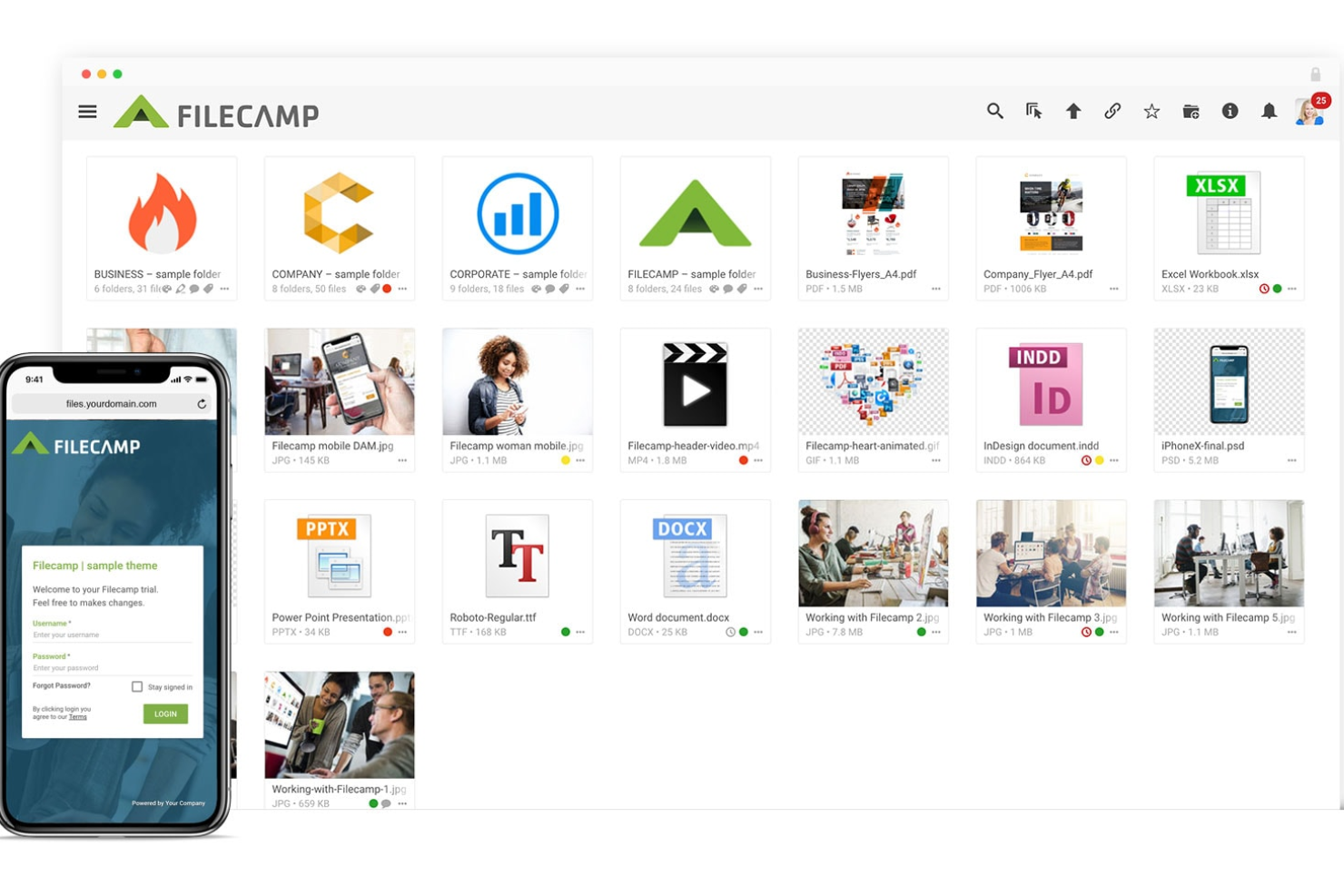
Filecamp è una piattaforma di gestione delle risorse digitali (DAM) basata su cloud che aiuta i team a organizzare, archiviare e condividere file digitali come immagini, video e documenti. Accessibile da qualsiasi browser, incluso su Mac, offre uno spazio centralizzato per gestire le risorse creative.
Perché ho scelto Filecamp:
Ho scelto Filecamp per i suoi strumenti di revisione online e le opzioni avanzate di download. Gli strumenti di revisione permettono al tuo team di esaminare e annotare file di design come PDF e PSD direttamente dal browser, rendendo semplice e centralizzato il feedback creativo. Per gli utenti Mac che lavorano spesso con formati di file diversi, la possibilità di convertire e scaricare i file in versioni differenti—come trasformare un file AI in JPEG—è particolarmente utile. Queste funzionalità riducono la dipendenza da app aggiuntive e mantengono il flusso di lavoro fluido nel browser.
Funzionalità principali & integrazioni:
Funzionalità includono controllo delle versioni, audit trail, raccolte, etichette, preferiti, link condivisi, pagine di login personalizzate, richieste di accesso e auto-etichettatura alimentata da intelligenza artificiale.
Integrazioni attualmente non elencate.
Pros and Cons
Pros:
- Ricerca avanzata ed etichettatura
- Controlli di accesso granulari aumentano sicurezza e collaborazione
- Opzioni di branding personalizzabili migliorano l'aspetto professionale
Cons:
- Potresti dover pagare per ulteriore spazio di archiviazione
- Commenti disponibili solo nei piani di livello superiore
New Product Updates from Filecamp
Filecamp Adds More Flexible Link Files
Filecamp adds editable Link file targets, new opening options, and support for internal Filecamp destinations. These updates make Link files more flexible for navigation and shortcuts. For more information, visit Filecamp’s official site.
 .
.
Ideale per prezzi basati sullo spazio di archiviazione con utenti illimitati
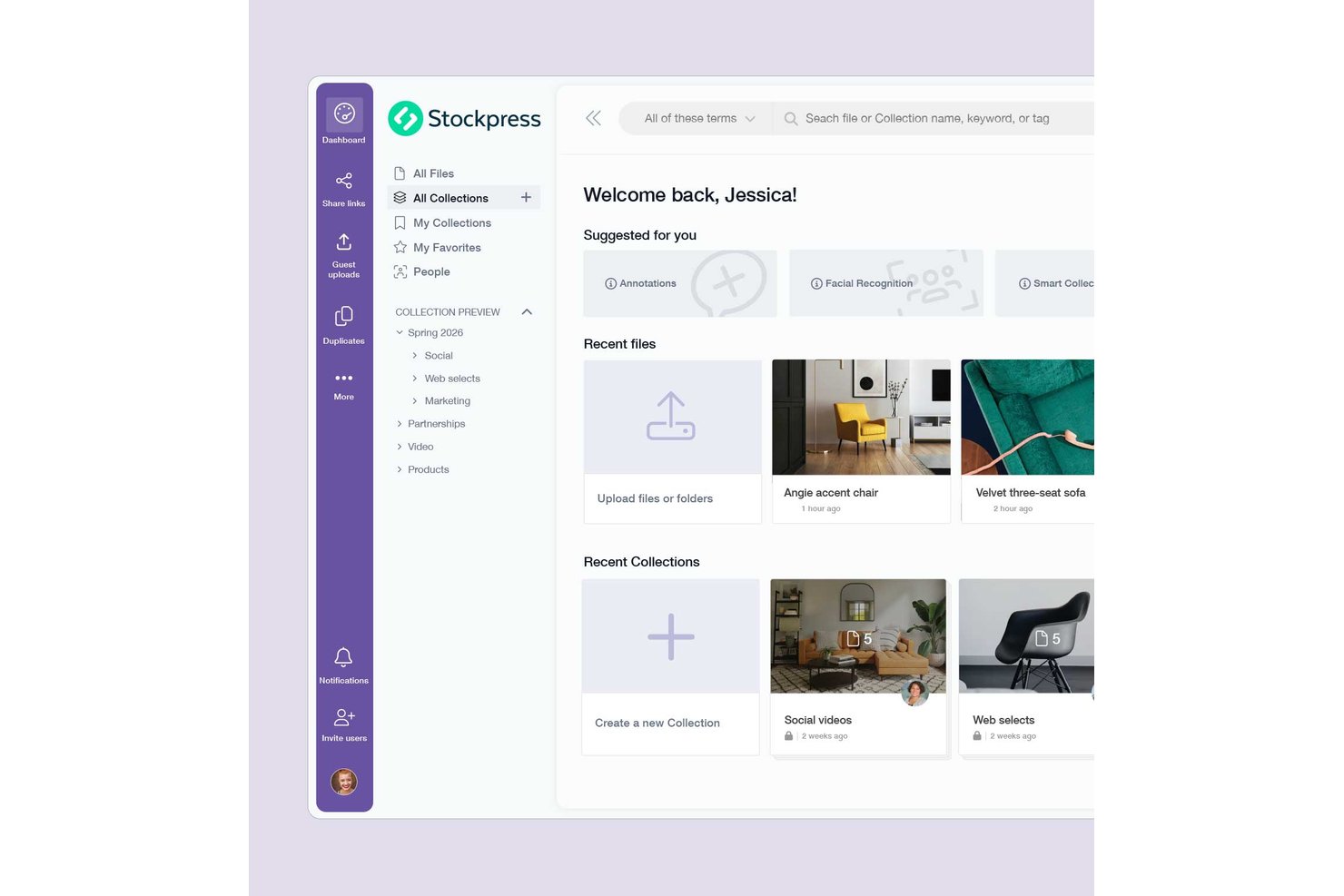
Stockpress è una piattaforma di gestione delle risorse digitali basata sul cloud che centralizza file di qualsiasi tipo o dimensione grazie a tagging basato sull'intelligenza artificiale, Raccolte intelligenti, controllo delle versioni e autorizzazioni granulari per i link di condivisione.
Per chi è più adatto Stockpress?
Stockpress è ideale per i team di marketing e delle agenzie che devono consentire a molte persone di accedere a una libreria condivisa di risorse senza pagare per ogni utente.
Perché ho scelto Stockpress
Ho scelto Stockpress come una delle soluzioni migliori perché il suo modello di prezzo basato sullo spazio di archiviazione, con utenti illimitati, risolve un problema concreto: i team in crescita non dovrebbero dover giustificare ogni nuovo utente. Apprezzo in particolare le Raccolte intelligenti, che si aggiornano automaticamente in base alle ricerche salvate, così la libreria rimane organizzata senza dover ordinare manualmente i contenuti. Il tagging basato sull'intelligenza artificiale per oggetti, scene e colori consente di trovare effettivamente le risorse non appena vengono caricate nell'area di lavoro.
Funzionalità principali di Stockpress
- Cronologia delle versioni e ripristino: Visualizza una cronologia completa dei caricamenti per ogni file, confronta le versioni affiancate e ripristina qualsiasi versione precedente con un solo clic.
- Controlli granulari per i link di condivisione: Imposta password, date di scadenza, limiti di download e accesso in sola visualizzazione sui singoli link di condivisione senza modificare le autorizzazioni generali dell'area di lavoro.
- App di sincronizzazione desktop: Un'app per la barra dei menu del Mac che consente di sincronizzare le Raccolte selezionate con Finder e trasferisce automaticamente nell'area di lavoro le modifiche locali apportate da Photoshop, Illustrator o Lightroom.
- Pagine per il caricamento da parte degli ospiti: Crea pagine di caricamento pubbliche affinché i collaboratori esterni possano inviare file direttamente nell'area di lavoro senza dover disporre di un account Stockpress.
Integrazioni di Stockpress
Stockpress offre integrazioni documentate con Adobe Photoshop, Adobe InDesign, Figma, Canva, Dropbox, Box, Google Drive, Slack e Okta. Fornisce anche un'API per integrazioni personalizzate, ma non sono documentate integrazioni native con Asana, monday.com, Trello, Wrike o Zapier.
Pros and Cons
Pros:
- Il tagging basato sull'intelligenza artificiale velocizza il recupero delle risorse
- La cronologia delle versioni ripristina i file creativi precedenti
- I controlli di condivisione proteggono i materiali consegnati ai clienti
Cons:
- La sincronizzazione desktop per Mac è ancora in versione beta e riservata agli amministratori
- Nessun flusso di approvazione in più fasi

Ideale per la sincronizzazione dei media su MacOS
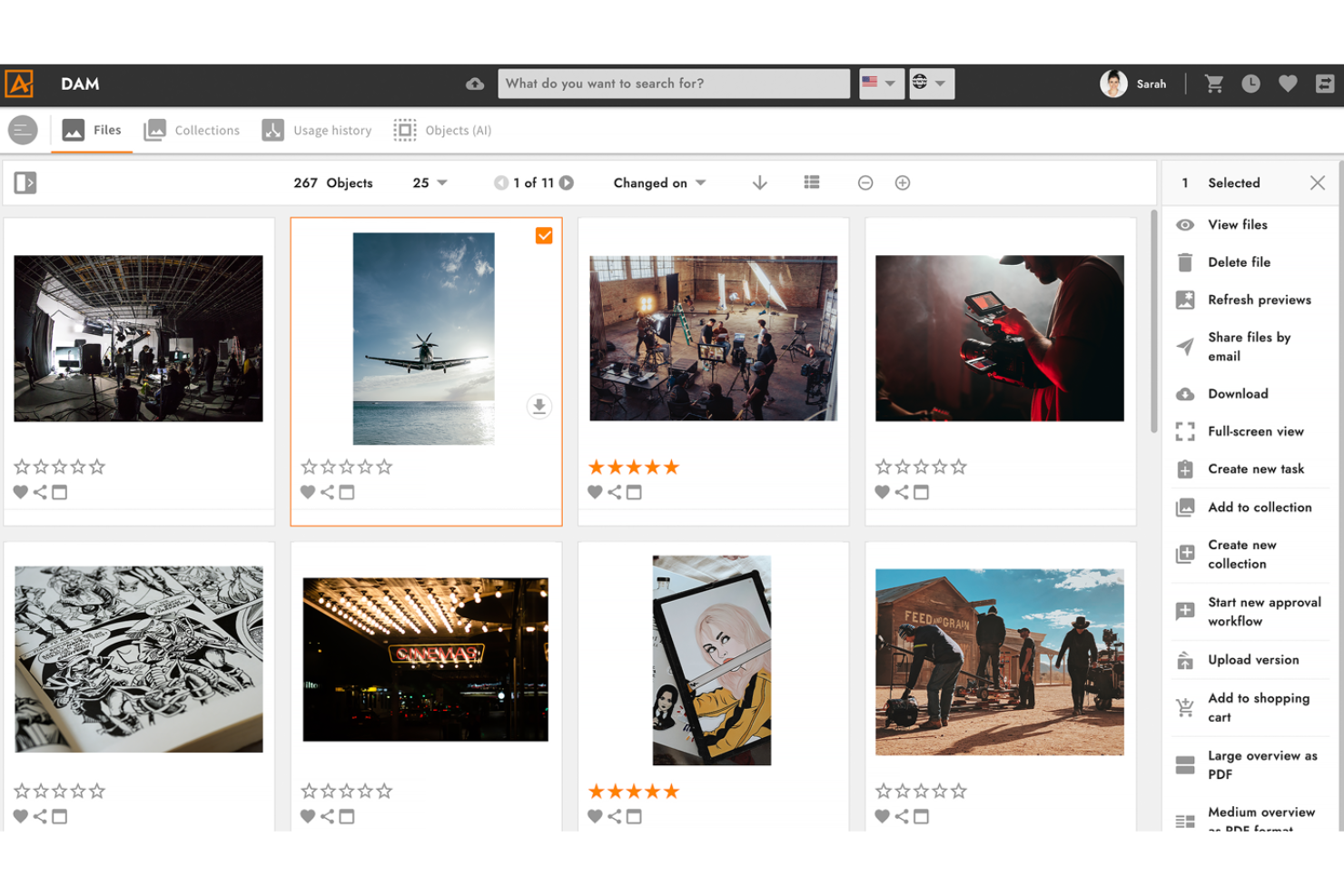
4ALLPORTAL offre una soluzione dinamica per utenti Mac che cercano un software di gestione delle risorse digitali che faciliti la gestione dei contenuti digitali su larga scala. Progettato per settori come ecommerce, media e sanità, centralizza le risorse digitali garantendo integrazione con i sistemi di gestione dei contenuti esistenti e migliorando il flusso di lavoro complessivo. Grazie a funzionalità basate sull'intelligenza artificiale, 4ALLPORTAL non solo organizza la gestione delle risorse, ma consente anche al tuo team di concentrarsi su attività creative e iniziative strategiche.
Perché ho scelto 4ALLPORTAL
Ho scelto 4ALLPORTAL per il suo connettore MacOS, che facilita la sincronizzazione dei dati multimediali tra dispositivi Mac e il sistema DAM, migliorando le capacità di modifica offline. Gli strumenti basati sull'intelligenza artificiale della piattaforma, come la ricerca in linguaggio naturale e il tagging automatico, semplificano il recupero e la categorizzazione delle risorse, risolvendo comuni sfide organizzative. Inoltre, le funzionalità di conformità di 4ALLPORTAL, tra cui i diritti di accesso definiti dall'utente e la gestione dei diritti digitali, garantiscono un utilizzo legale e sicuro delle tue risorse.
Caratteristiche principali di 4ALLPORTAL
Oltre al connettore MacOS, 4ALLPORTAL offre:
- Download rapido: Questa funzione permette di scaricare file rapidamente nel formato desiderato direttamente dalla visualizzazione a riquadri, risparmiando tempo nel recupero delle risorse.
- Controllo delle versioni: Tieni traccia delle modifiche e accedi alle versioni precedenti delle tue risorse, assicurandoti la possibilità di tornare alle versioni precedenti se necessario.
- Gestione automatizzata dei flussi di lavoro: Migliora la collaborazione del team automatizzando le attività di routine e le approvazioni, organizzando i processi di flusso di lavoro.
Integrazioni di 4ALLPORTAL
Le integrazioni includono Salesforce, SAP, Adobe Creative Cloud, Microsoft Office 365, WordPress, Shopify, Magento, HubSpot, Google Analytics e Dropbox. 4ALLPORTAL offre anche un'API per integrazioni personalizzate, garantendo ulteriore flessibilità.
Pros and Cons
Pros:
- Soluzione scalabile adatta a medie e grandi imprese
- Fornisce permessi utente personalizzabili per un accesso sicuro alle risorse
- Offre strumenti basati su AI per una migliore categorizzazione delle risorse
Cons:
- Alcuni utenti segnalano prestazioni lente con il caricamento di file di grandi dimensioni
- Opzioni di integrazione native limitate rispetto ad altre piattaforme

Ideale per l'ottimizzazione delle risorse con AI

Scaleflex è una soluzione di gestione delle risorse digitali progettata per aiutarti a organizzare, ottimizzare e condividere in modo efficiente i tuoi file multimediali, come immagini e video.
Perché ho scelto Scaleflex:
Apprezzo le sue capacità di ottimizzazione basate sull'intelligenza artificiale. Questo significa che puoi comprimere e convertire automaticamente immagini e video in formati come WebP o AVIF, riducendo le dimensioni dei file senza sacrificare la qualità. Questo non solo accelera i tempi di caricamento del tuo sito web, ma migliora anche l'esperienza utente offrendo i media in modo più rapido. Inoltre, Scaleflex offre trasformazioni al volo, permettendoti di ritagliare, ridimensionare e regolare le tue risorse multimediali direttamente all'interno della piattaforma.
Funzionalità principali & integrazioni:
Funzionalità includono automazione con intelligenza artificiale, strumenti di editing integrati, robuste misure di sicurezza, analisi delle prestazioni, visualizzazioni interattive a 360°, API scalabili, integrazione personalizzabile dei flussi di lavoro, strumenti di collaborazione avanzati, tassonomie di metadati multilingue, streaming adattivo per la distribuzione dei video e autorizzazioni avanzate per la condivisione dei file.
Integrazioni includono WordPress, Filerobot, Cloudimage, Shopify, Magento, Prestashop, Drupal, Prismic, Amazon S3, Azure, Angular e React.js.
Pros and Cons
Pros:
- Automazione basata su intelligenza artificiale
- La piattaforma si integra bene con diversi strumenti
- Ottimizzazione efficiente dei media
Cons:
- I piani di fascia bassa sono limitati a un solo progetto
- Alcuni utenti trovano inizialmente complessa l'interfaccia

Ideale per la condivisione di asset di marca
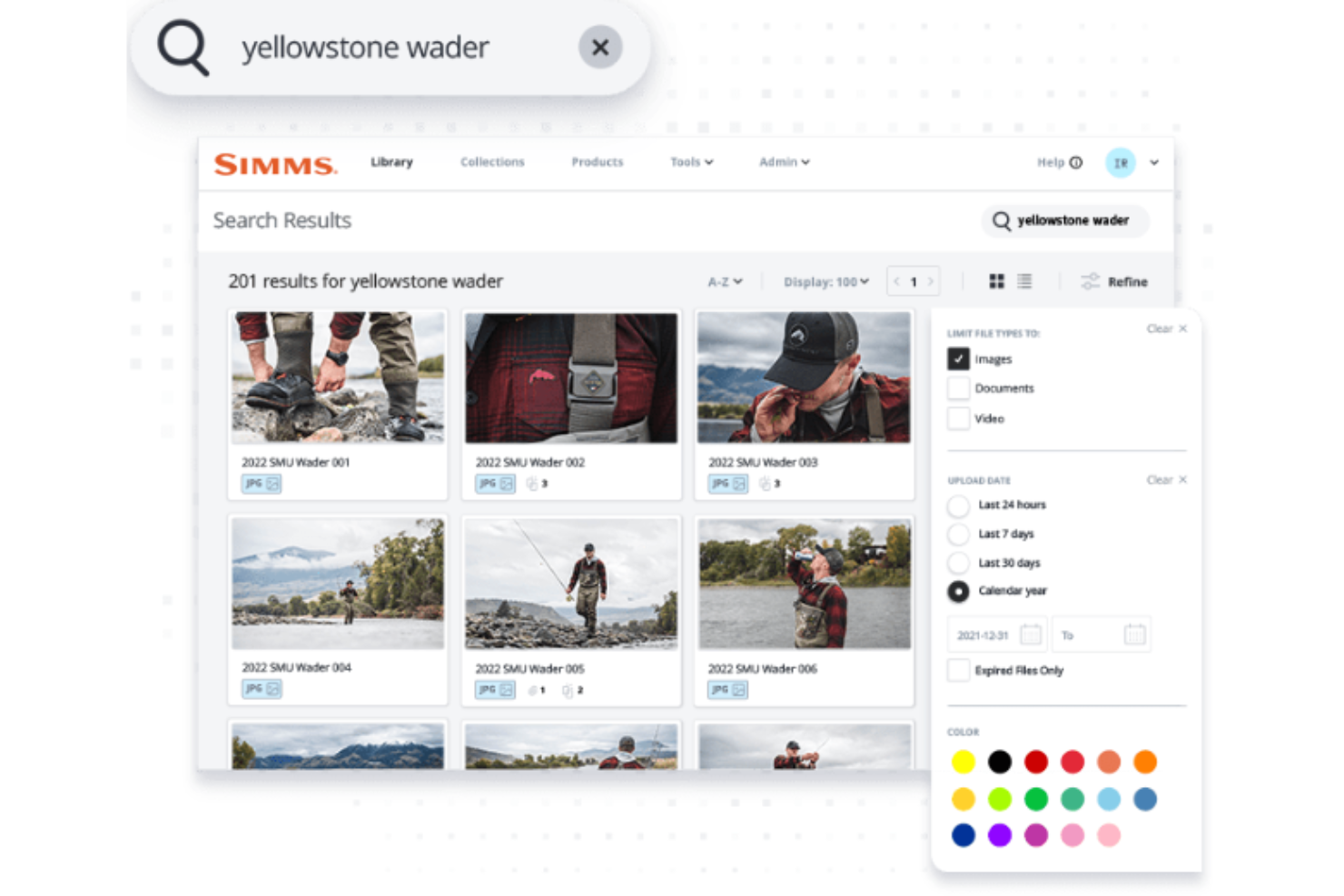
Image Relay è una piattaforma progettata per una gestione efficiente e la condivisione degli asset di marca. Fornisce un accesso sicuro e controllato agli asset digitali, garantendo che l'integrità del marchio venga mantenuta su tutti i canali.
Perché ho scelto Image Relay:
La dedizione di Image Relay alla condivisione degli asset di marca, la sua interfaccia intuitiva e le potenti capacità di ricerca lo distinguono dagli altri software DAM per Mac. È considerato il migliore per la condivisione degli asset di marca grazie alle sue funzionalità specializzate che supportano la distribuzione sicura e controllata dei contenuti digitali.
Funzionalità e integrazioni principali:
Le funzionalità includono opzioni di ricerca avanzate, campi di metadati personalizzabili e impostazioni dei permessi che consentono un accesso controllato agli asset.
Le integrazioni includono Adobe InDesign, Adobe Photoshop, Airtable, Asana, Basecamp, Box, Canva, Conceptboard, Dropbox ed Egnyte.
Pros and Cons
Pros:
- Ricerca avanzata e metadati personalizzabili per una gestione efficiente degli asset
- Accesso controllato con impostazioni dei permessi personalizzabili
- Interfaccia intuitiva per una navigazione e un utilizzo semplici
Cons:
- Opzioni di personalizzazione limitate per i flussi di lavoro
- Esperienza mobile inferiore

Canto
Ideale per la collaborazione sui contenuti

Canto semplifica la gestione delle risorse digitali e migliora la collaborazione tra i team. Aiuta i team e le organizzazioni a conservare, gestire e condividere in modo efficiente le proprie risorse digitali, come foto, video e altri file multimediali.
Perché ho scelto Canto:
Canto offre un approccio dettagliato alla gestione delle risorse digitali, che lo rende unico rispetto ad altri software della sua categoria. È ideale per la collaborazione sui contenuti perché offre una soluzione centralizzata che supporta i team nell'organizzazione, nell'accesso e nella condivisione efficiente delle risorse digitali, aspetti essenziali per progetti collaborativi.
Funzionalità principali e integrazioni:
Le funzionalità includono archiviazione cloud, funzionalità avanzate di ricerca, riconoscimento facciale, tagging dei metadati, controllo delle versioni, modelli per risorse di marca, automazione dei flussi di lavoro, controlli di accesso basati sui ruoli, strumenti per condivisione e collaborazione, e analisi e reportistica in tempo reale.
Le integrazioni includono Salesforce, Dropbox, Adobe Creative Cloud, WordPress, Hootsuite, Canva, Google Drive, Microsoft Office e Zapier.
Pros and Cons
Pros:
- Gestione centralizzata delle risorse digitali
- Funzionalità avanzate di ricerca e smart album
- Opzioni di branding personalizzabili
Cons:
- Possibili problemi di prestazioni con librerie di risorse di grandi dimensioni
- Potrebbero esserci limitazioni nella connessione con applicazioni di terze parti
Altri software di gestione delle risorse digitali per Mac
Di seguito trovi un elenco di altri software di gestione delle risorse digitali per Mac che ho selezionato. Sebbene non siano entrati nella top 10, sono comunque validi e meritano ulteriori approfondimenti.
- Mailchimp
Migliore gestione delle risorse in una piattaforma di marketing
- Adobe Experience Manager
Ideale per esperienze personalizzate
- Nuxeo
Ideale per la personalizzazione dei contenuti
- ResourceSpace
Ideale per la condivisione di risorse
- Extensis Portfolio
Ideale per i workflow creativi
- Digizuite
Ideale per la gestione omnicanale
- Razuna
Ideale per la gestione degli asset di team
- MediaGraph
Ideale per il patrimonio culturale
- Cloudinary
Ideale per esperienze visive
- Brandfolder
Ideale per l'usabilità aziendale


Come valuto i software di gestione delle risorse digitali per Mac
Quando un brand manager deve recuperare asset di campagna approvati sul suo Mac senza inseguire thread su Slack, suddivido la valutazione in capacità di base di DAM e i fattori differenzianti che distinguono i vari strumenti.
Funzionalità di base (Requisiti minimi per questa lista)
Quando seleziono gli strumenti per la mia lista, valuto ciascuno su una scala da 0 (non offre la funzionalità) a 5 (eccelle in quest'area) per ogni funzionalità di base elencata di seguito. Poi, calcolo il punteggio totale dello strumento come percentuale. Ogni tool deve raggiungere un punteggio totale minimo del 65% per essere considerato per l'inclusione.
- Libreria di asset centralizzata: Verifico se puoi archiviare, consultare e recuperare immagini, video, PDF e file di design da un unico hub ricercabile invece che in cartelle sparse.
- Metadata e Tagging: In questo campo sono importanti campi personalizzati, tassonomie e tag di massa—come etichettare asset in base a campagna, cliente o tipo di risorsa per un filtraggio veloce.
- Compatibilità con macOS: Ogni strumento dovrebbe funzionare bene su Mac, sia tramite una app desktop nativa, un'esperienza browser ottimizzata per Safari, o una sincronizzazione a livello di Finder.
- Controllo versioni e approvazioni: Cerco storici delle versioni chiari e cicli di revisione integrati, così un PM creativo può sottoporre una revisione del logo per approvazione senza catene di email.
- Gestione permessi e diritti: L'accesso basato sui ruoli è fondamentale—come concedere a un freelance la sola visualizzazione di una cartella di progetto mentre i referenti interni mantengono pieni diritti di modifica.
- Integrazioni creative e PM: Valuto le connessioni con strumenti già utilizzati dai team, come Adobe Creative Cloud, Figma, Asana, monday.com o Wrike.
Una volta che ho una lista di strumenti che soddisfano questi criteri, considero cosa distingue ogni piattaforma.
Fattori differenzianti (Cosa distingue i fornitori)
Ecco come confronto i diversi fornitori:
Funzionalità distintive
La ricerca basata su AI è un punto di grande differenziazione—gli strumenti che usano il riconoscimento visivo o query in linguaggio naturale permettono di trovare asset senza ricordare nomi di file esatti o convenzioni di tag. Valuto anche i portali brand, che offrono a clienti esterni o freelance una libreria curata self-service invece di dover gestire continue richieste di asset su Slack. L'automazione dei flussi di lavoro creativi è importante, soprattutto moduli di richiesta e regole di assegnazione che fanno avanzare gli asset dal brief all'approvazione senza passaggi manuali.
Oltre le funzionalità
Presto particolare attenzione alle prestazioni specifiche per Mac—che un programma supporti nativamente Apple Silicon, gestisca file ProRes e HEIC, o si integri con Finder per flussi di lavoro drag-and-drop fa davvero la differenza per i team creativi. Anche i modelli di prezzo variano molto, quindi valuto se un fornitore addebita per utente, per spazio di archiviazione, o entrambi, e se i posti per revisori esterni comportano costi aggiuntivi. È inoltre fondamentale la sicurezza, in particolare la conformità SOC 2 e registi di audit dettagliati per i team che gestiscono asset di brand non ancora pubblicati.
Come scegliere un software di gestione delle risorse digitali per Mac
È facile perdersi in lunghi elenchi di funzionalità e strutture di prezzo complesse. Per aiutarti a rimanere concentrato mentre affronti il tuo particolare processo di selezione del software, ecco una lista di fattori da tenere a mente:
| Fattore | Cosa considerare |
|---|---|
| Scalabilità | Il software crescerà insieme al tuo team? Considera la crescita futura e verifica se lo strumento è in grado di gestire senza problemi quantità crescenti di dati e utenti. |
| Integrazioni | Si connette agli strumenti che utilizzi attualmente? Verifica se si integra con il software già in uso, come Adobe Creative Cloud, Google Workspace o Salesforce. |
| Personalizzazione | Puoi adattarlo al tuo flusso di lavoro? Valuta quanto puoi modificare impostazioni, layout e opzioni per soddisfare le tue esigenze e i tuoi processi specifici. |
| Facilità d'uso | È facile da usare per tutti? Valuta se l'interfaccia è intuitiva e se i membri del team possono diventare rapidamente operativi senza dover affrontare una curva di apprendimento ripida. |
| Implementazione e avviamento | Quanto è facile iniziare a utilizzarlo? Analizza il processo di configurazione, le risorse formative disponibili e la rapidità con cui il tuo team può acquisire competenza nell'uso del software. |
| Costo | Rientra nel tuo budget? Confronta i prezzi con le funzionalità offerte e fai attenzione ai costi nascosti o agli eventuali componenti aggiuntivi necessari che potrebbero far aumentare il prezzo. |
| Misure di sicurezza | Le tue risorse sono protette? Assicurati che il software disponga di solide misure di sicurezza, come crittografia, autorizzazioni degli utenti e aggiornamenti regolari, per proteggere i tuoi dati. |
| Disponibilità dell'assistenza | Potrai ricevere aiuto quando ne avrai bisogno? Considera la disponibilità dell'assistenza clienti, verificando se è attiva 24 ore su 24, 7 giorni su 7, e la varietà dei canali di supporto, come chat, e-mail o telefono. |
Tendenze nei software di gestione delle risorse digitali per Mac
I software DAM si stanno evolvendo rapidamente, influenzati dagli ultimi progressi tecnologici e dalle aspettative in continua evoluzione degli utenti. Ecco alcuni degli sviluppi che ho notato nel mercato dei DAM e che promettono di offrire agli utenti Mac strumenti più potenti, intuitivi ed efficienti per la gestione delle loro risorse digitali.
- Metadati ed etichettatura basati sull'AI: l'intelligenza artificiale è ormai un elemento fondamentale nei software DAM, poiché automatizza i processi relativi ai metadati e all'etichettatura. Ciò riduce l'inserimento manuale, accelera la ricerca e migliora la precisione del recupero delle risorse, rappresentando un progresso decisivo per l'efficienza.
- Integrazione multipiattaforma: i sistemi DAM offrono sempre più spesso l'integrazione multipiattaforma, collegandosi a vari strumenti aziendali. Questa connettività è importante perché semplifica i flussi di lavoro e riduce al minimo la necessità di passare da un'applicazione all'altra, consentendo di risparmiare tempo e risorse.
- Misure di sicurezza avanzate: la sicurezza all'interno delle piattaforme DAM è sempre più rigorosa, grazie all'implementazione di sofisticati controlli delle autorizzazioni. Ciò è essenziale per proteggere le risorse digitali dalle crescenti minacce informatiche, garantendo che l'accesso sia limitato al personale autorizzato.
- Distribuzione dei contenuti semplificata: i software DAM facilitano la distribuzione diretta dei contenuti ai rivenditori online attraverso l'elaborazione dinamica delle immagini e la distribuzione coordinata. Si tratta di una tendenza lungimirante, fondamentale per mantenere la coerenza del marchio e accelerare il processo di distribuzione dei contenuti.
- Modifica collaborativa in tempo reale: la possibilità per i gruppi di modificare e applicare etichette alle risorse in tempo reale sta diventando una caratteristica comune nelle soluzioni DAM. Questo aspetto è degno di nota per il suo impatto positivo sulla collaborazione, poiché consente di ricevere riscontri e aggiornamenti immediati, accelerando così il completamento dei progetti.
Che cos'è un software di gestione delle risorse digitali per Mac?
Un software di gestione delle risorse digitali per Mac offre agli utenti Mac una piattaforma centralizzata per gestire efficacemente le proprie risorse digitali. È progettato per aiutare gli utenti a organizzare, archiviare e recuperare in modo efficiente vari file digitali, come immagini, video, file audio e documenti, sui sistemi macOS.
Caratteristiche
Quando selezioni un software di gestione delle risorse digitali per Mac, presta attenzione alle seguenti caratteristiche principali:
- Etichettatura dei metadati: aiuta a categorizzare e trovare rapidamente le risorse assegnando etichette descrittive.
- Controllo delle versioni: monitora le modifiche ai file, garantendo di avere sempre accesso alla versione più recente.
- Condivisione sicura: consente di condividere file con membri del gruppo o clienti mantenendo il controllo sulle autorizzazioni di accesso.
- Flussi di lavoro personalizzabili: permette di adattare i processi alle esigenze specifiche del gruppo e di migliorare l'efficienza.
- Etichettatura dei contenuti basata sull'AI: categorizza automaticamente le risorse, consentendo di risparmiare tempo e riducendo il lavoro manuale.
- Funzionalità di ricerca avanzate: consentono di recuperare rapidamente i file utilizzando parole chiave, etichette o altri criteri.
- Analisi e reportistica: fornisce informazioni sull'utilizzo e sulle prestazioni delle risorse, aiutandoti a prendere decisioni basate sui dati.
- Supporto all'integrazione: si collega a strumenti esistenti come Adobe Creative Cloud o Google Workspace per un flusso di lavoro più fluido.
- Scalabilità: garantisce che il software possa crescere insieme al gruppo, gestendo volumi crescenti di dati e utenti.
- Interfaccia intuitiva: rende semplice per i membri del gruppo navigare e utilizzare il software senza una formazione approfondita.
Vantaggi
L'implementazione di un software di gestione delle risorse digitali per Mac offre diversi vantaggi al gruppo e all'azienda. Ecco alcuni dei vantaggi che puoi aspettarti:
- Risparmio di tempo: trova e recupera rapidamente i file utilizzando l'etichettatura dei metadati e le funzionalità di ricerca avanzate.
- Collaborazione migliorata: condividi le risorse in modo sicuro con il gruppo e i clienti, garantendo che tutti abbiano accesso ai file corretti.
- Coerenza del marchio: mantieni la coerenza del marchio grazie al controllo delle versioni e ai flussi di lavoro personalizzabili che mantengono le risorse aggiornate e coerenti con il marchio.
- Produttività migliorata: automatizza attività ripetitive come l'etichettatura dei contenuti con funzionalità basate sull'AI, liberando tempo per attività più importanti.
- Decisioni basate sui dati: utilizza analisi e reportistica per ottenere informazioni sull'utilizzo e sulle prestazioni delle risorse, aiutandoti a prendere decisioni consapevoli.
- Crescita scalabile: gestisci facilmente una quantità maggiore di dati e utenti con l'espansione del gruppo, grazie alle funzionalità scalabili del software.
- Esperienza intuitiva: usufruisci di un'interfaccia intuitiva che riduce la curva di apprendimento e aiuta il gruppo a diventare operativo rapidamente.
Costi e prezzi
La scelta di un software di gestione delle risorse digitali per Mac richiede la comprensione dei vari modelli di prezzo e dei piani disponibili. I costi variano in base alle funzionalità, alle dimensioni del team, ai componenti aggiuntivi e ad altro ancora. La tabella seguente riassume i piani più comuni, i relativi prezzi medi e le funzionalità tipicamente incluse nelle soluzioni software di gestione delle risorse digitali per Mac:
Tabella comparativa dei piani per software di gestione delle risorse digitali per Mac
| Tipo di piano | Prezzo medio | Funzionalità comuni |
|---|---|---|
| Piano gratuito | $0 | Archiviazione di base, opzioni di condivisione limitate e funzionalità di ricerca semplici. |
| Piano personale | $5-$15/utente/mese | Archiviazione avanzata, assegnazione di tag ai metadati e strumenti di collaborazione di base. |
| Piano aziendale | $25-$50/utente/mese | Ricerca avanzata, condivisione sicura e analisi e reportistica. |
| Piano aziendale avanzato | $75-$150/utente/mese | Flussi di lavoro personalizzabili, integrazioni complete e assistenza dedicata. |
Domande frequenti sul software di gestione delle risorse digitali per Mac
Ecco alcune domande frequenti che ricevo sul software di gestione delle risorse digitali per Mac:
In che modo il software DAM contribuisce alla coerenza del marchio?
Il software DAM mantiene la coerenza del marchio fornendo un archivio centralizzato per tutte le risorse del marchio, accesso controllato per garantire l’utilizzo esclusivo dei materiali approvati, messaggi coerenti grazie all’accesso alle risorse del marchio e ai documenti di messaggistica approvati, nonché maggiore efficienza e velocità nella produzione di contenuti coerenti e in linea con il marchio.
Qual è la differenza tra il software DAM e i servizi di archiviazione cloud come Google Drive o Dropbox?
Sebbene Google Drive, Dropbox e servizi simili possano archiviare file, il software DAM offre funzionalità aggiuntive come la revisione e l’approvazione dei contenuti, il ridimensionamento delle immagini, la modifica dei formati video, la condivisione dei file tramite integrazioni e l’assegnazione avanzata di tag ai metadati. Queste funzionalità aggiuntive rendono il software DAM più adatto alla gestione di un’ampia gamma di risorse digitali in un contesto professionale.
Quali sono le pratiche consigliate per organizzare le risorse nel software DAM?
Le pratiche consigliate per organizzare le risorse nel software DAM includono l’utilizzo di convenzioni di denominazione coerenti, l’impiego dei metadati per facilitare la ricerca e l’organizzazione, lo sviluppo di una struttura logica delle cartelle, la gestione meticolosa delle versioni e lo svolgimento di controlli regolari per rimuovere le risorse obsolete e riorganizzare i contenuti secondo necessità.
Il software di gestione delle risorse digitali per Mac può integrarsi con altre applicazioni e altri servizi Apple?
Sì, molte soluzioni di gestione delle risorse digitali, come il \u003ca href=\u0022https://thedigitalprojectmanager.com/tools/best-digital-asset-management-software-for-photographers/\u0022\u003esoftware DAM per fotografi\u003c/a\u003e, progettate per Mac offrono integrazioni con applicazioni e servizi Apple popolari, come iCloud, Foto, Final Cut Pro e altri. Queste integrazioni facilitano flussi di lavoro fluidi, consentendo agli utenti di accedere direttamente alle risorse e gestirle all’interno degli strumenti dell’ecosistema Mac che preferiscono.