

I 10 migliori software open source per la gestione dei progetti recensiti nel 2026

Elenco dei migliori software open source per la gestione dei progetti


Gestire i progetti può sembrare come cercare di tenere in aria troppe palle contemporaneamente. Scadenze, coordinamento del team e allocazione delle risorse sono solo alcune delle sfide che affronti ogni giorno. Un software open source per la gestione dei progetti può aiutarti a tenere tutto sotto controllo senza spendere una fortuna.
Ho dedicato del tempo a testare e recensire questi strumenti, concentrandomi su ciò che conta davvero per te e per il tuo team. Conosco bene il settore e il mio obiettivo è offrirti una valutazione onesta delle migliori opzioni disponibili.
In questo articolo troverai recensioni imparziali dei migliori software open source per la gestione dei progetti. Metterò in evidenza i loro punti di forza e il modo in cui possono rispondere alle tue esigenze specifiche. Iniziamo e troviamo la soluzione più adatta al tuo team.
Perché fidarsi dei nostri consigli sui software
Il nostro team testa e recensisce software dal 2012. In quanto project manager noi stessi, sappiamo quanto sia difficile — e importante — scegliere il software giusto.
Per questa guida, abbiamo valutato gli strumenti attraverso test pratici e ricerche indipendenti, assegnando un punteggio agli strumenti in base ai nostri criteri di selezione. Ci basiamo inoltre sulle competenze di leader di pensiero del settore e di professionisti attivi nella gestione dei progetti.
Le nostre recensioni riflettono il nostro giudizio editoriale umano, non un discorso di vendita.
Revisori esperti:
Tabella comparativa dei software open source per la gestione dei progetti
Questa tabella comparativa riassume i dettagli dei prezzi delle mie migliori selezioni di software open source per la gestione dei progetti.
| Tool | Best For | Trial Info | Price | ||
|---|---|---|---|---|---|
| 1 | Ideale per team Agile | Piano gratuito disponibile | Da $7.25/utente/mese (fatturato annualmente) | Website | |
| 2 | Ideale per collaborazione in tempo reale | Piano gratuito + demo gratuita disponibile | Da $39/persona/mese | Website | |
| 3 | Ideale per piccole startup | Piano gratuito disponibile | Da €5/mese | Website | |
| 4 | Ideale per la flessibilità dei plugin | Piano gratuito per sempre disponibile | Gratuito da usare | Website | |
| 5 | Ideale per la gestione aziendale | Prova gratuita + piano gratuito disponibile | Da $24.90/utente/mese (fatturazione annuale) | Website | |
| 6 | Ideale per la gestione autonoma delle attività senza funzionalità a pagamento | Piano gratuito disponibile | A partire da €4/mese | Website | |
| 7 | Ideale per il project management lean | Piano gratuito disponibile | Da $8/utente/mese (fatturato annualmente) | Website | |
| 8 | Ideale per le funzionalità di collaborazione remota | Piano gratuito disponibile | A partire da $19.99/mese | Website | |
| 9 | Ideale per il monitoraggio del tempo nei progetti | Piano gratuito disponibile | A partire da $3.33/mese (fatturato annualmente) | Website | |
| 10 | Ideale per integrazione nel lavoro a distanza | Piano gratuito + prova gratuita di 15 giorni disponibile | Da $49/mese (fatturato annualmente) | Website |
Recensioni dei migliori software open source per la gestione dei progetti
Di seguito trovi le mie analisi dettagliate dei migliori software open source per la gestione dei progetti che sono entrati nel mio elenco. Le mie recensioni offrono una panoramica dettagliata delle funzionalità principali, dei pro e dei contro, delle integrazioni e dei casi d’uso ideali di ogni strumento, per aiutarti a trovare quello più adatto a te.

Ideale per team Agile
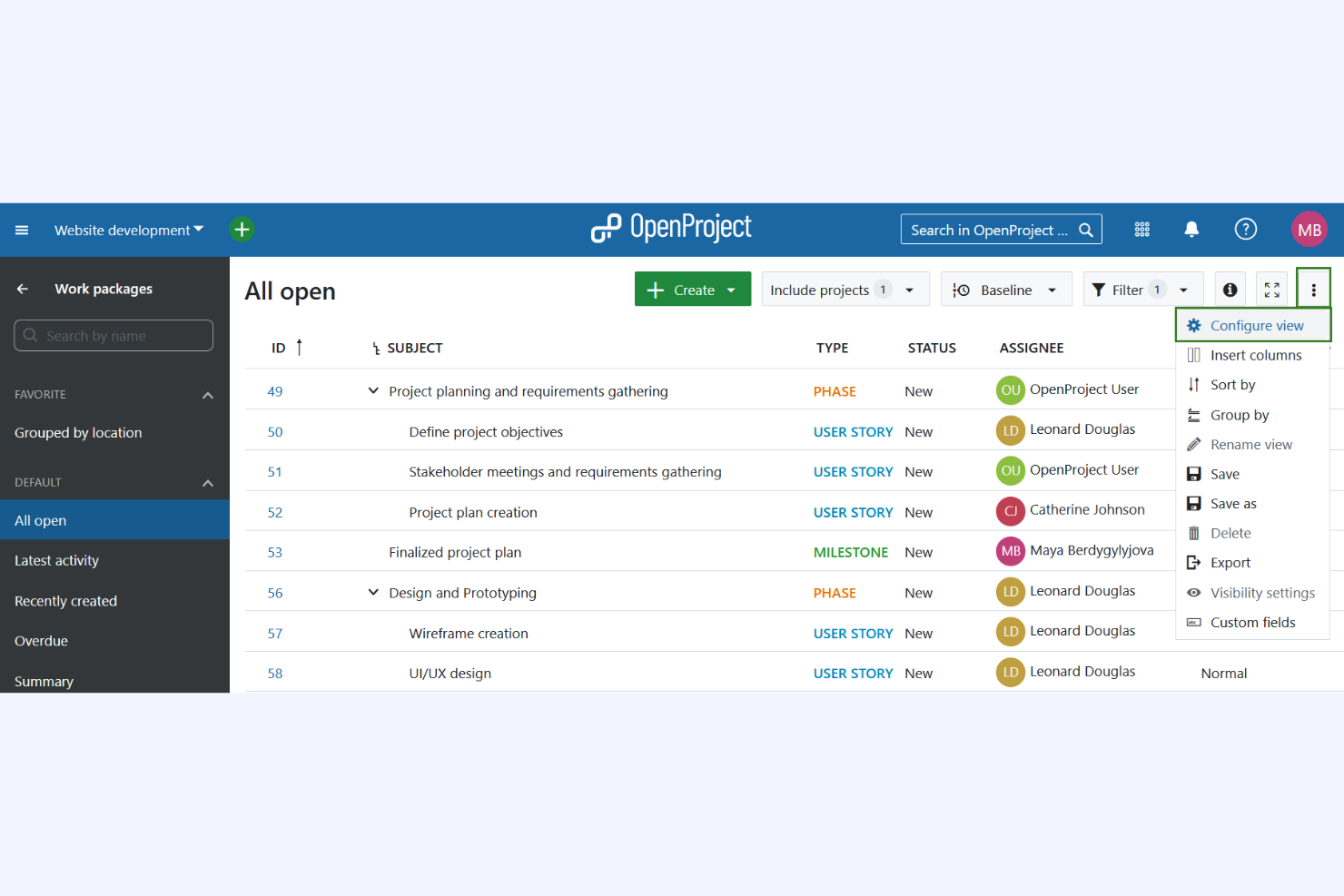
OpenProject entra nella mia lista perché copre i flussi di lavoro Agile in un modo raro tra le piattaforme di project management open source. Quando vedo team che lavorano in sprint e hanno bisogno di backlog di prodotto, story point e burndown chart senza pagare per uno strumento proprietario, è a questo che li indirizzo.
Apprezzo come OpenProject consenta una vera pianificazione di progetto, la visualizzazione della roadmap e una revisione collaborativa del backlog, il tutto permettendo di ospitare la soluzione internamente e controllare i propri dati.
OpenProject è ideale per
- Team di prodotto e di ingegneria Agile che desiderano backlog e pianificazione degli sprint
- Organizzazioni che hanno bisogno di un project management open source ed on-premise
OpenProject non è adatto per
- Team che vogliono solo semplici liste di attività o lavagne kanban
- Project manager che necessitano di funzioni avanzate di gestione tempi o gestione del portafoglio progetti
Cosa distingue OpenProject
OpenProject affronta il project management con un chiaro focus sulla metodologia Agile, invitando i team a suddividere il lavoro in sprint e monitorare i progressi nei backlog di prodotto. Rispetto a Jira, si distingue perché offre il pieno controllo su come ospitare e personalizzare l'ambiente. Vedo questo funzionare al meglio per le organizzazioni che danno priorità alla privacy dei dati e vogliono accesso a ogni livello, fino al codice.
Compromessi con OpenProject
OpenProject punta alla flessibilità nei processi Agile, ma si perdono le funzionalità avanzate di gestione tempi e portafoglio integrate nativamente, il che può essere un limite per team numerosi che cercano questi controlli incorporati.
Pros and Cons
Pros:
- Supporta metodologie Agile
- Opzione di hosting on-premises
- Forte supporto della community
Cons:
- Tutti i piani a pagamento richiedono un numero minimo di utenti
- Funzionalità avanzate limitate nella versione gratuita self-hosted

Plane
Ideale per collaborazione in tempo reale
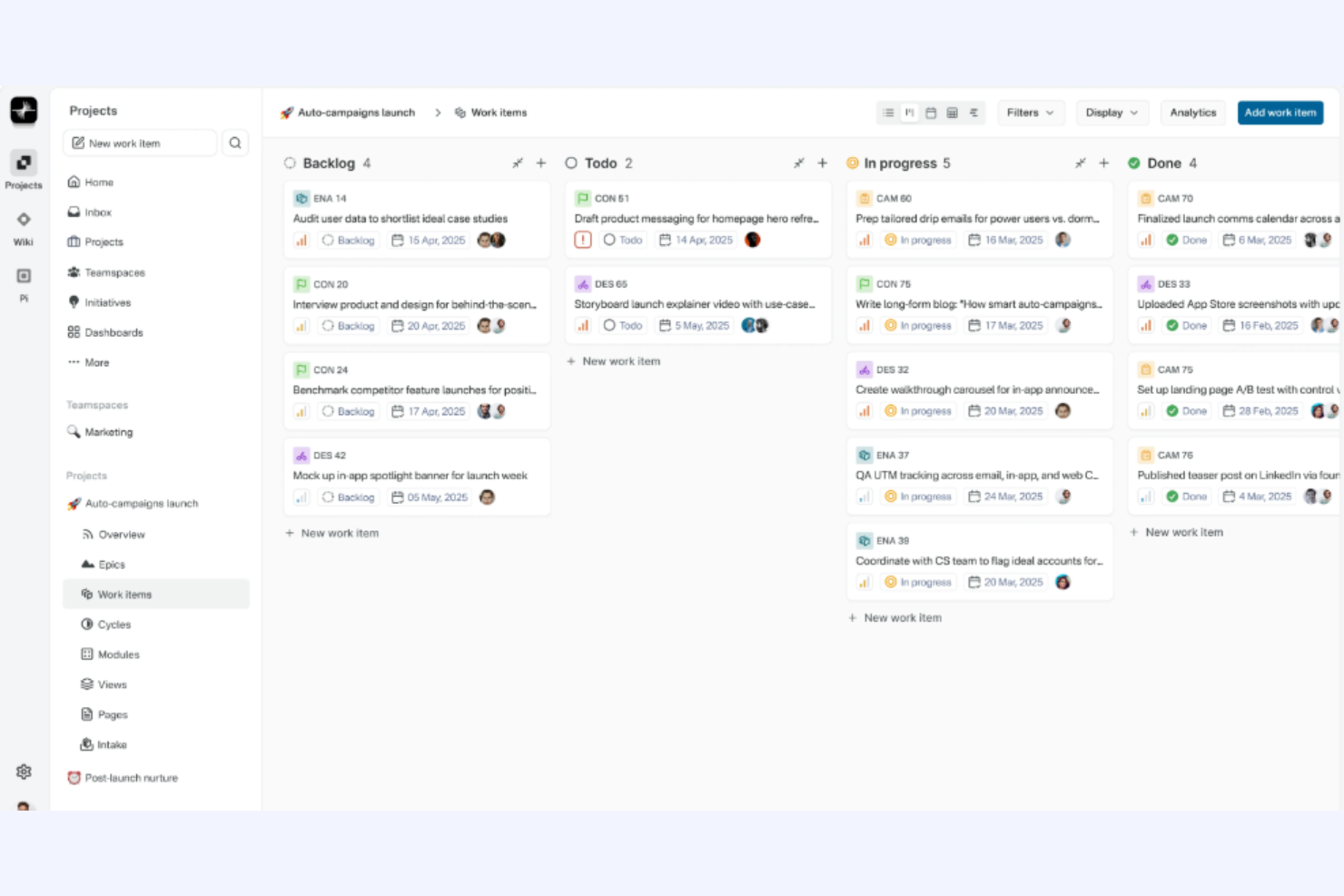
Plane si distingue per la sua combinazione unica di flessibilità open source e collaborazione in tempo reale. Quando il tuo team vuole replicare i cicli di feedback rapidi tipici del lavoro in presenza, le lavagne live e gli aggiornamenti delle attività in modalità multiplayer di Plane brillano davvero. Apprezzo particolarmente il fatto che tutti possano contribuire simultaneamente alle bacheche di progetto, il che aiuta i team distribuiti a mantenere alto il livello di energia e la comunicazione chiara.
Ideale per
- Team distribuiti che necessitano di co-editing e feedback in tempo reale
- Progetti focalizzati sulla pianificazione collaborativa e aggiornamenti live delle attività
Non adatto a
- Team che necessitano di funzionalità avanzate di gestione di portafoglio
- Organizzazioni con requisiti rigidi e formali di governance dei progetti
Cosa distingue Plane
Plane è pensato per catturare il lavoro di squadra dinamico in un unico spazio, come un gioco multiplayer. Invece di sistemi di ticket strutturati come Jira, Plane punta su editing live e lavagne collaborative, invitando tutti a interagire con le attività contemporaneamente. Secondo me, questo cambia davvero la dinamica quando i team cercano spontaneità, sovrapposizione e visibilità condivisa, invece di flussi di lavoro rigidi e passo-passo.
Compromessi con Plane
Plane si concentra sulla collaborazione attiva e continua, ma questo approccio significa rinunciare a controlli formali e rigore nei processi, rendendolo meno adatto a team con esigenze stringenti di conformità o reportistica.
Pros and Cons
Pros:
- Agenti AI per assistenza su attività e automazione
- Dashboard di utilizzo con bilancio basso e in tempo reale
- Certificazioni indipendenti per la sicurezza
Cons:
- Nessuna integrazione nativa con repository di codice
- Manca di campi personalizzabili per esigenze utente specifiche

Taiga
Ideale per piccole startup
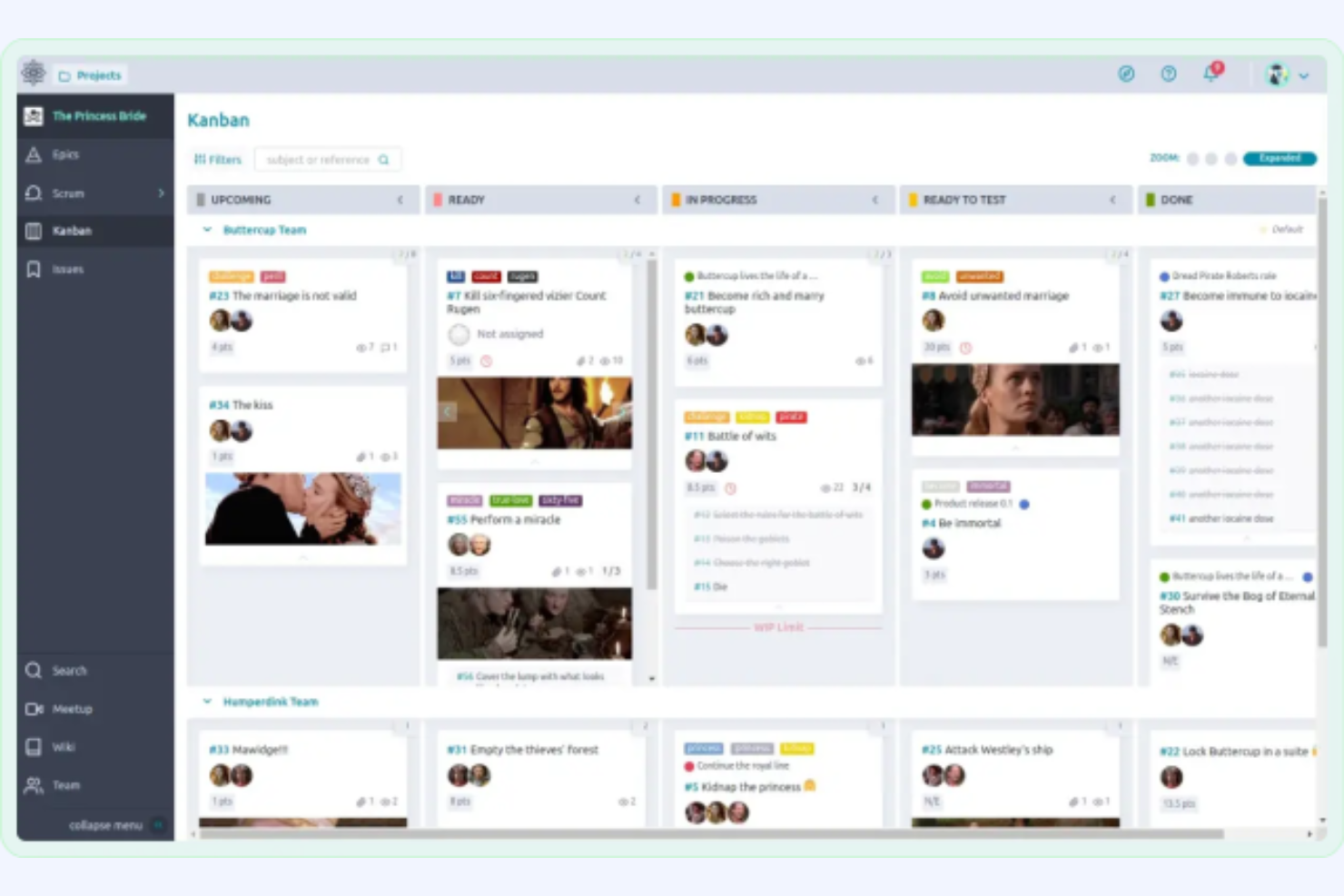
Taiga si guadagna un posto nella mia lista perché è uno degli strumenti open source più accessibili per le startup che necessitano di un vero monitoraggio dei progetti senza un'eccessiva burocrazia nei processi. Mi piace il fatto che siano supportati sia Kanban che Scrum, rendendo facile per i piccoli team adattarsi rapidamente quando le priorità cambiano.
Ciò che distingue Taiga, secondo me, è la sua attenzione all'usabilità per i piccoli team che hanno bisogno delle funzionalità agili fondamentali come la gestione del backlog e le bacheche sprint, senza perdersi in configurazioni o complessità.
Taiga è ideale per
- Piccoli team che utilizzano metodologie agili come Scrum o Kanban
- Startup che necessitano di un sistema di monitoraggio progetti open source e leggero
Taiga non è adatto per
- Imprese con necessità rigorose di conformità o di reportistica
- Team che richiedono funzionalità avanzate di gestione del portafoglio progetti
Cosa distingue Taiga
Taiga è pensato per i team che desiderano una gestione agile dei progetti con il minimo attrito possibile. Adotta un approccio diverso da Jira, riducendo la complessità dei processi e concentrandosi sulla rapida attivazione di semplici bacheche Kanban e Scrum. Vedo che le startup più piccole prosperano con Taiga perché permette di iniziare rapidamente, perfezionare il proprio flusso di lavoro nel tempo e non preoccuparsi di dover rientrare in un sistema rigido o dover gestire configurazioni avanzate.
Compromessi con Taiga
Taiga è ottimizzato per velocità e semplicità, quindi si rinuncia a funzionalità avanzate di reportistica e gestione del portafoglio progetti su cui le organizzazioni più grandi fanno affidamento per supervisione e conformità.
Pros and Cons
Pros:
- Supporta metodologie Agile
- Flussi di lavoro personalizzabili
- Numero illimitato di utenti in tutti i piani
Cons:
- Potrebbe non essere scalabile per team di grandi dimensioni
- Il limite di 3GB rimane anche con il piano più alto
Redmine
Ideale per la flessibilità dei plugin
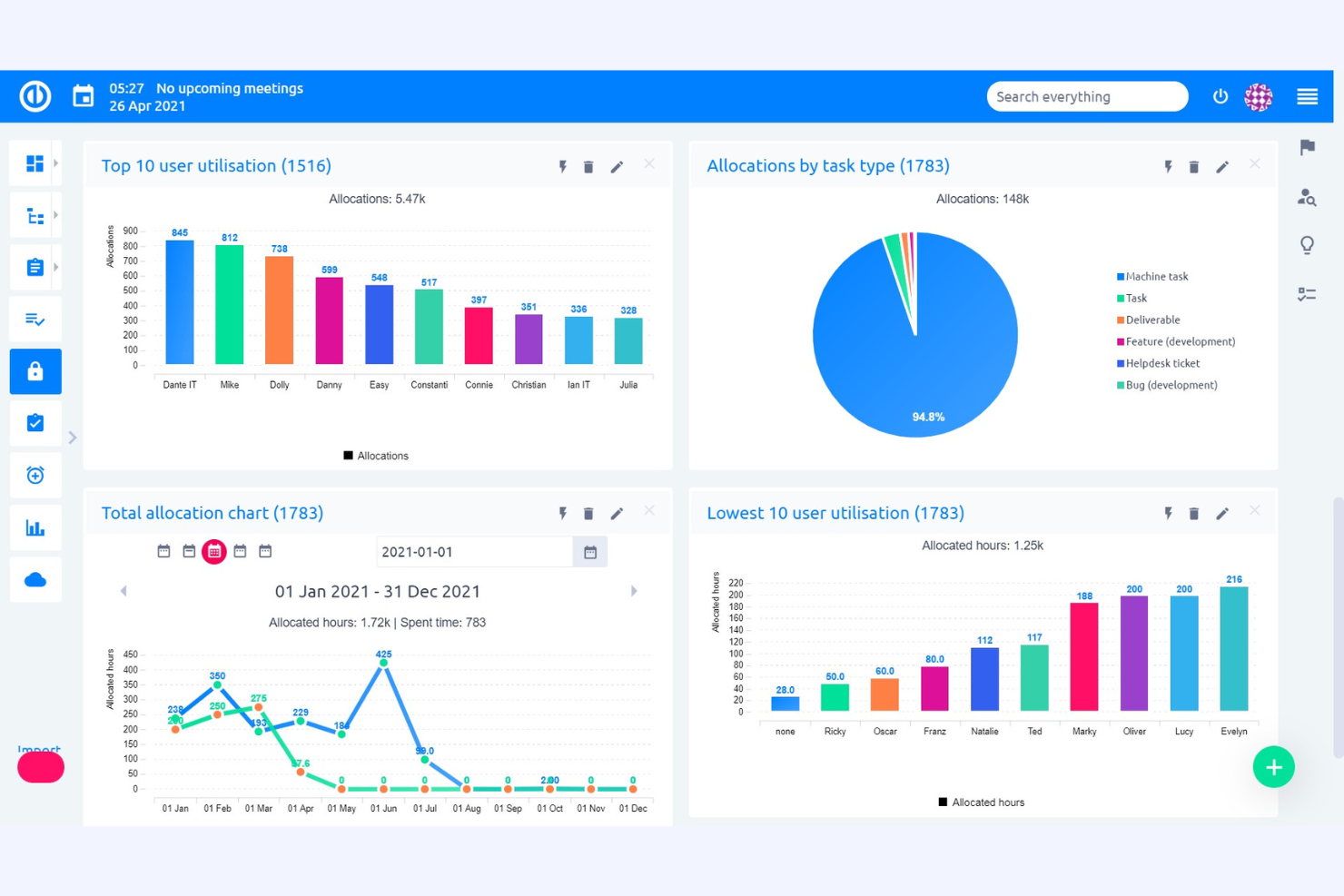
Redmine è presente in questa lista perché è la piattaforma di project management open source più estensibile che abbia mai utilizzato. L'enorme quantità di plugin ti permette di adattarlo a quasi qualsiasi processo di progetto, da bacheche agili a flussi di lavoro per l'assistenza o il monitoraggio dei casi di test. Apprezzo particolarmente la possibilità di creare automazioni o integrazioni personalizzate che vanno ben oltre ciò che offrono la maggior parte dei concorrenti.
Quando i team superano i limiti imposti da altri strumenti, Redmine è quello che vedo usare dai project manager per modellare i processi esattamente come desiderano.
Per cosa è migliore Redmine
- Team che necessitano di flussi di lavoro personalizzati o processi di progetto specializzati
- Organizzazioni che danno valore a un'ampia scelta di plugin e funzionalità personalizzate
Per cosa Redmine non è l'ideale
- Team che desiderano un'interfaccia utente moderna e intuitiva
- Gruppi che preferiscono modelli di progetto pronti all'uso senza configurazione
Cosa distingue Redmine
Redmine si basa sull'idea che sarai tu a modellare lo strumento sul tuo processo, e non il contrario. Diversamente da Jira, che spinge i team verso un flusso di lavoro predefinito, Redmine ti offre una pagina bianca e una ampia libreria di plugin per colmare ogni esigenza. In pratica, è la scelta preferita dai project manager che vogliono risolvere problemi specifici con soluzioni su misura, invece di cambiare il modo in cui lavorano i loro team.
Compromessi con Redmine
Redmine punta tutto sulla personalizzazione, sacrificando però un'esperienza utente moderna, per cui spesso i team devono dedicare più tempo alla configurazione e manutenzione del sistema che alla gestione effettiva dei progetti.
Pros and Cons
Pros:
- Ampia scelta di plugin
- Permessi basati sui ruoli per un accesso utente flessibile
- Diagrammi di Gantt e strumenti di calendario integrati
Cons:
- Necessaria ampia personalizzazione dopo l'installazione
- Le funzionalità avanzate richiedono plugin esterni

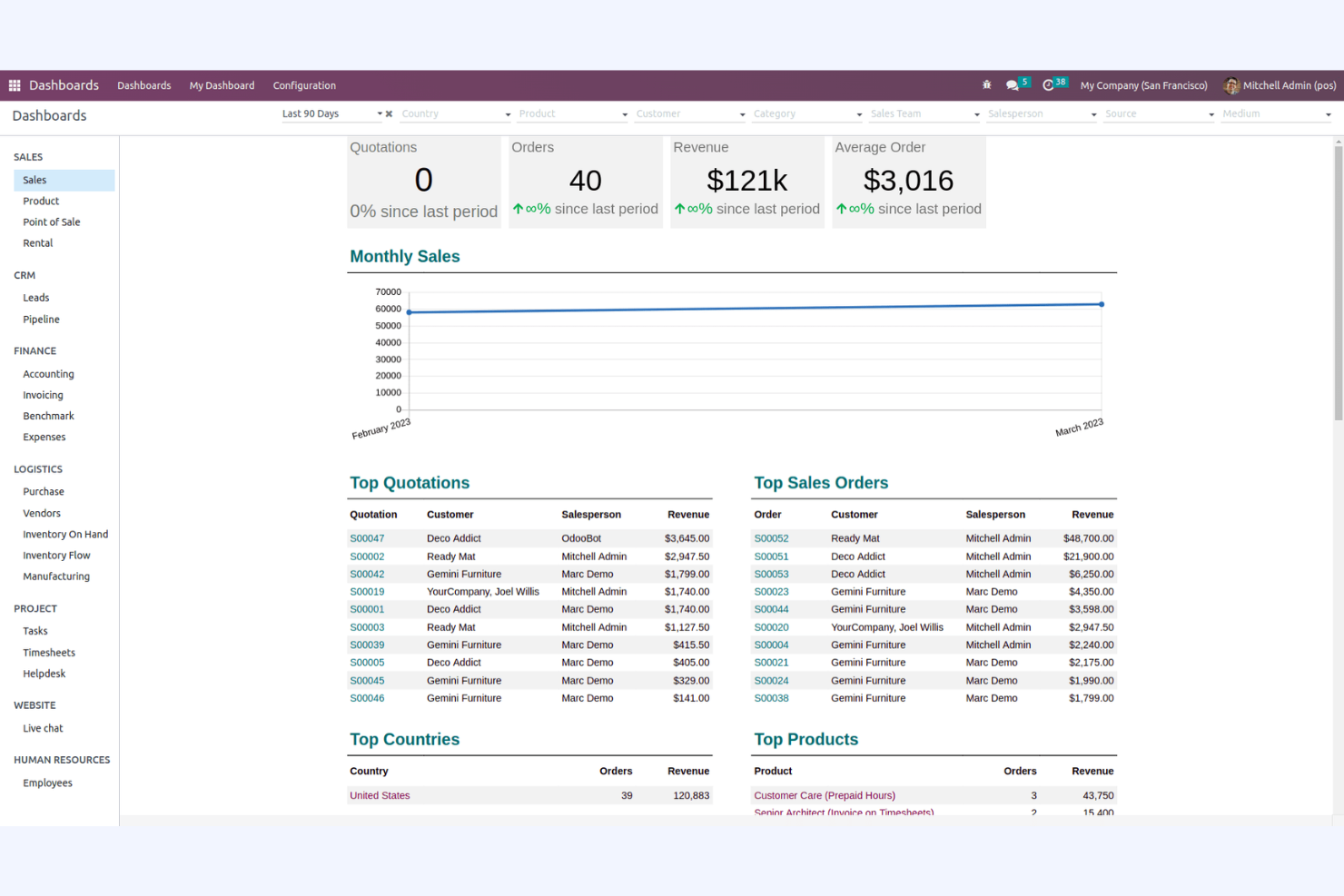
Odoo entra nella mia selezione perché è una delle poche soluzioni open source che copre effettivamente la gestione aziendale a 360 gradi, non solo il lavoro sui progetti. Lo consiglio quando i team hanno bisogno di tracciare i progetti integrati direttamente con contabilità, CRM e magazzino in un unico sistema.
Mi piace il fatto che si possa gestire tutto—dalla pianificazione delle risorse alla fatturazione—senza dover usare più strumenti. È ideale quando vuoi che la gestione dei progetti sia parte integrante dei flussi di lavoro quotidiani della tua azienda.
Odoo è ideale per
- Aziende che necessitano di gestione progetti integrata con funzionalità ERP
- Organizzazioni che vogliono il controllo open source su tutte le operazioni
Odoo non è adatto per
- Piccoli team che cercano uno strumento di progetto rapido e leggero
- Chiunque cerchi funzionalità specifiche per agilità o kanban integrate
Cosa distingue Odoo
Odoo considera la gestione dei progetti come uno dei tanti componenti di una piattaforma aziendale più ampia. Puoi gestire i progetti assieme a CRM, fatturazione e magazzino, con ogni elemento che condivide dati e stato. A differenza di strumenti come Jira, che si concentrano sulla consegna tecnica e sulle bacheche agili, Odoo prevede che il lavoro di progetto sia solo una parte della gestione aziendale. In pratica, questo approccio si adatta bene alle aziende che vogliono gestione, vendite e operazioni in un unico posto.
Compromessi con Odoo
Odoo punta su una copertura ampia delle funzioni aziendali, il che rende la gestione dei progetti meno specializzata e flessibile. Se hai bisogno di metodologie avanzate o funzionalità di nicchia, noterai velocemente questi limiti.
Pros and Cons
Pros:
- Offre scalabilità modulare
- Molteplici strumenti per vendite e gestione delle transazioni
- Oltre 40.000 app della community
Cons:
- I moduli principali non hanno funzionalità avanzate per settori specifici
- Supporto limitato per team più piccoli

Vikunja
Ideale per la gestione autonoma delle attività senza funzionalità a pagamento
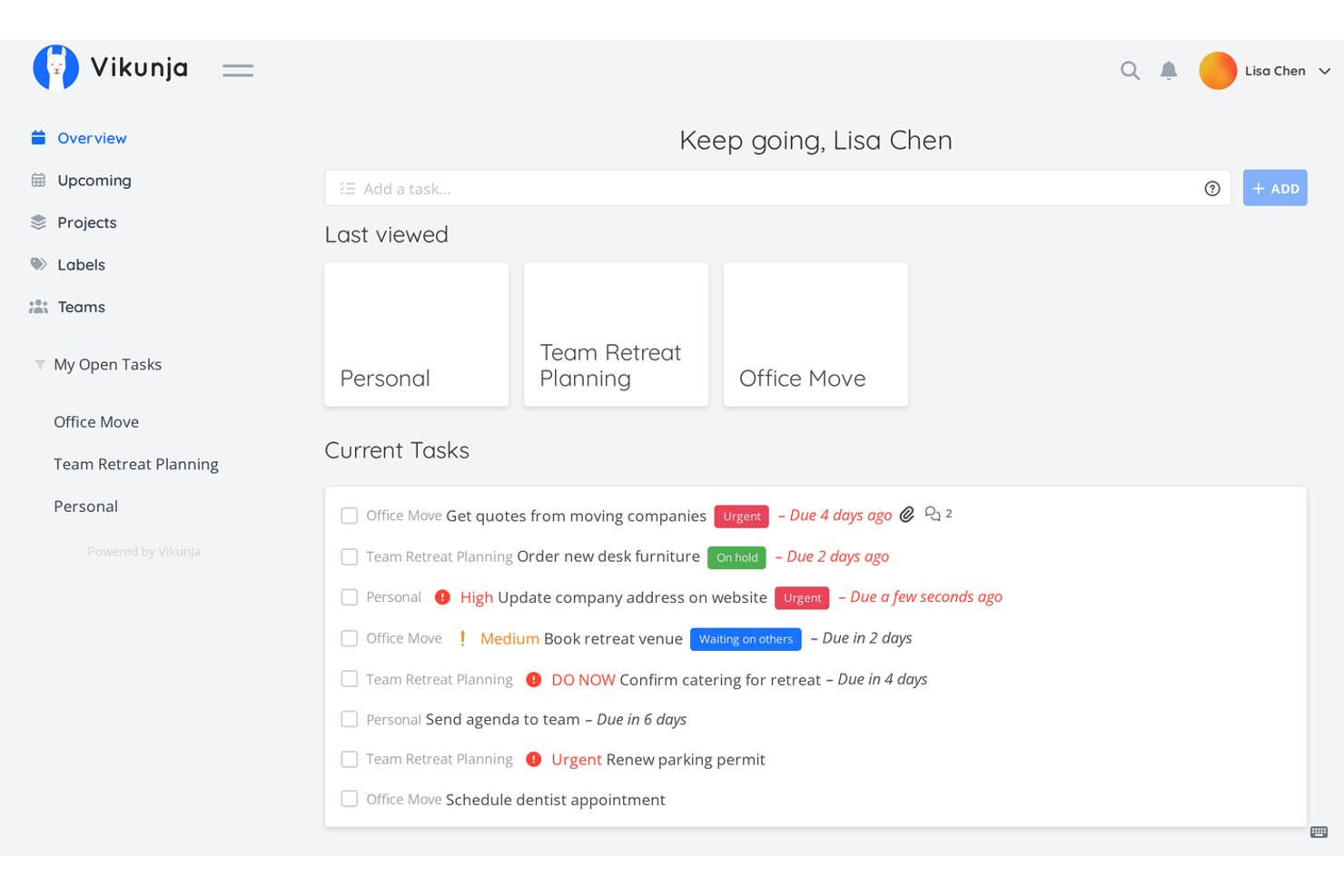
Vikunja è uno strumento a codice aperto per la gestione dei progetti, con licenza AGPLv3 e installabile autonomamente, che offre il monitoraggio delle attività, diverse visualizzazioni dei progetti (Elenco, Kanban, Gantt e Tabella), collaborazione tra squadre e distribuzione flessibile tramite Docker o Kubernetes.
Per chi è più indicato Vikunja?
Vikunja è particolarmente adatto alle squadre tecniche e agli appassionati di installazioni autonome che desiderano il pieno controllo dei propri dati di progetto senza dover pagare.
Perché ho scelto Vikunja
Vikunja si è guadagnato un posto nella mia lista ristretta perché è uno dei pochi strumenti che offre un nucleo completamente con licenza AGPLv3 senza alcuna limitazione delle funzionalità a pagamento: ciò significa che l'intera squadra può usufruire delle visualizzazioni Elenco, Kanban, Gantt e Tabella senza imbattersi mai in una richiesta di passaggio a un piano superiore. Apprezzo la possibilità di eseguirlo in un singolo container Docker o di scalarlo su Kubernetes, mantenendo i dati delle attività sempre all'interno della propria infrastruttura. La funzionalità 'Aggiunta rapida intelligente' consente di digitare direttamente le scadenze, gli assegnatari e le priorità, così acquisire il lavoro è rapido anche in una configurazione completamente autogestita.
Funzionalità principali di Vikunja
- Relazioni tra attività: Collega le attività tra progetti come sottoattività, dipendenze o blocchi per rappresentare le connessioni tra le attività.
- Sincronizzazione CalDAV: Collega le attività di Vikunja al calendario o all'applicazione per le attività che preferisci tramite l'integrazione CalDAV bidirezionale.
- Supporto per OpenID Connect e LDAP: Autentica gli utenti tramite il fornitore di identità esistente utilizzando OpenID, OAuth2 o LDAP.
- Supporto per i webhook: Configura webhook per singolo progetto per inviare eventi relativi ad attività e progetti a strumenti esterni o flussi di automazione.
Integrazioni di Vikunja
Vikunja supporta CalDAV, LDAP, OpenID Connect, OAuth2, n8n, API REST e webhook di progetto. Offre un insieme di integrazioni più ridotto rispetto agli strumenti di gestione dei progetti più diffusi, ma il supporto per API e webhook consente connessioni Git e CI/CD personalizzate.
Pros and Cons
Pros:
- Il nucleo AGPLv3 evita le limitazioni delle funzionalità a pagamento
- Quattro visualizzazioni supportano diversi flussi di lavoro di distribuzione
- Le relazioni tra attività mappano i blocchi tra i progetti
Cons:
- Mancano strumenti dedicati per sprint o arretrati
- L'installazione autonoma richiede una configurazione tecnica

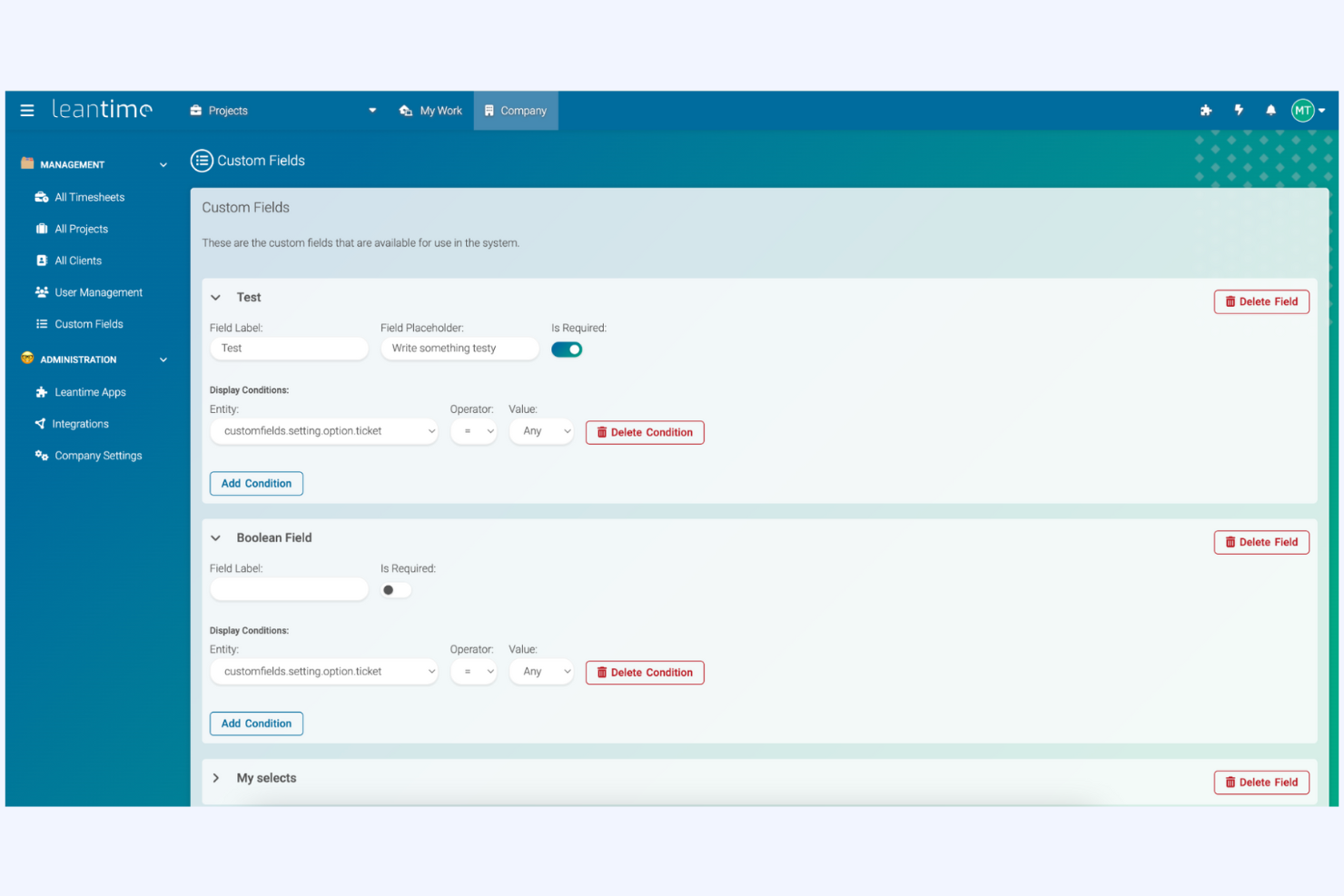
Leantime guadagna un posto nella mia lista per aver posto la metodologia lean al centro di ogni funzionalità. Penso sia una scelta valida quando si desiderano kanban, definizione degli obiettivi e retrospettive in un'unica interfaccia. I team lo utilizzano per passare dalle idee agli esperimenti fino alla consegna, senza perdere di vista il motivo per cui ogni attività è importante.
Ciò che apprezzo di più è come Leantime integri bacheche di ricerca e pianificazione basata su ipotesi, facilitando il continuo apprendimento e adattamento da parte dei team.
Leantime è ideale per
- Team che praticano project management lean o agile
- Organizzazioni che svolgono esperimenti e lavori guidati da ipotesi
Leantime non è adatto per
- Progetti che richiedono una gestione avanzata delle risorse
- Organizzazioni che necessitano di conformità rigorosa o tracce di audit
Cosa distingue Leantime
Leantime struttura ogni parte del lavoro di progetto attorno al pensiero lean. Dove Jira presuppone che tu voglia il controllo granulare su ogni flusso di lavoro, Leantime elimina i processi superflui permettendoti di concentrarti sul passaggio delle idee agli esperimenti. In pratica, questo funziona meglio per gruppi che tracciano insieme ricerca, validazione e consegna senza dover passare da uno strumento all'altro.
Compromessi con Leantime
Leantime è ottimizzato per cicli di progetto lean, ma perdi strumenti avanzati di gestione del portafoglio e delle risorse, il che può essere importante se devi coordinare programmi di ampie dimensioni con più team.
Pros and Cons
Pros:
- Open source con funzionalità principali incluse
- Progettato per utenti neurodivergenti con interfaccia adattata
- Gestione delle attività basata su IA con suggerimenti personalizzati
Cons:
- Non scalabile, esiste solo un piano a pagamento
- Integrazioni limitate con strumenti di terze parti


Huly entra nella mia lista per la sua attenzione alla collaborazione remota, che va chiaramente oltre ciò che la maggior parte delle alternative open source offre. Credo che i team che hanno difficoltà a tenere tutti allineati su più fusi orari apprezzeranno molto funzionalità come la modifica multiutente in tempo reale, riunioni video integrate e lavagne collaborative.
Quello che mi piace di più è come gli spazi di lavoro uniscono attività, chat e documenti collaborativi, così il tuo team smette di passare continuamente da uno strumento all'altro quando lavora allo stesso progetto.
Ideale per
- Team distribuiti che danno priorità alla collaborazione in tempo reale e al lavoro remoto su progetti
- Casi d'uso che richiedono documenti condivisi, videochiamate e modifica in tempo reale
Non ideale per
- Team che necessitano di una strutturazione dettagliata e gerarchica dei progetti
- Organizzazioni che richiedono una gestione avanzata del portafoglio o delle risorse
Cosa distingue Huly
Huly parte dal presupposto che i team remote-first vogliano tutto ciò che riguarda il progetto in un unico spazio di lavoro, invece che suddiviso tra varie app. Invece di dover gestire Slack, Google Docs e Miro, lavori nativamente dentro Huly per chat, pianificazione, documenti e videochiamate. Il design dà l'idea di essere progettato apposta attorno all'interazione di gruppo dal vivo—una cosa che raramente ho visto a questo livello nelle piattaforme open source.
Compromessi di Huly
Ottimizzando per spazi di lavoro collaborativi in tempo reale, Huly rinuncia a funzionalità per portfolio di progetti complessi e reportistica dettagliata. Se hai bisogno di controlli di project management tradizionali o di un monitoraggio a più livelli, probabilmente ti starà stretto.
Pros and Cons
Pros:
- Interfaccia intuitiva
- Uffici virtuali personalizzabili
- Collaborazione in tempo reale
Cons:
- Funzionalità avanzate limitate
- Non ideale per grandi aziende

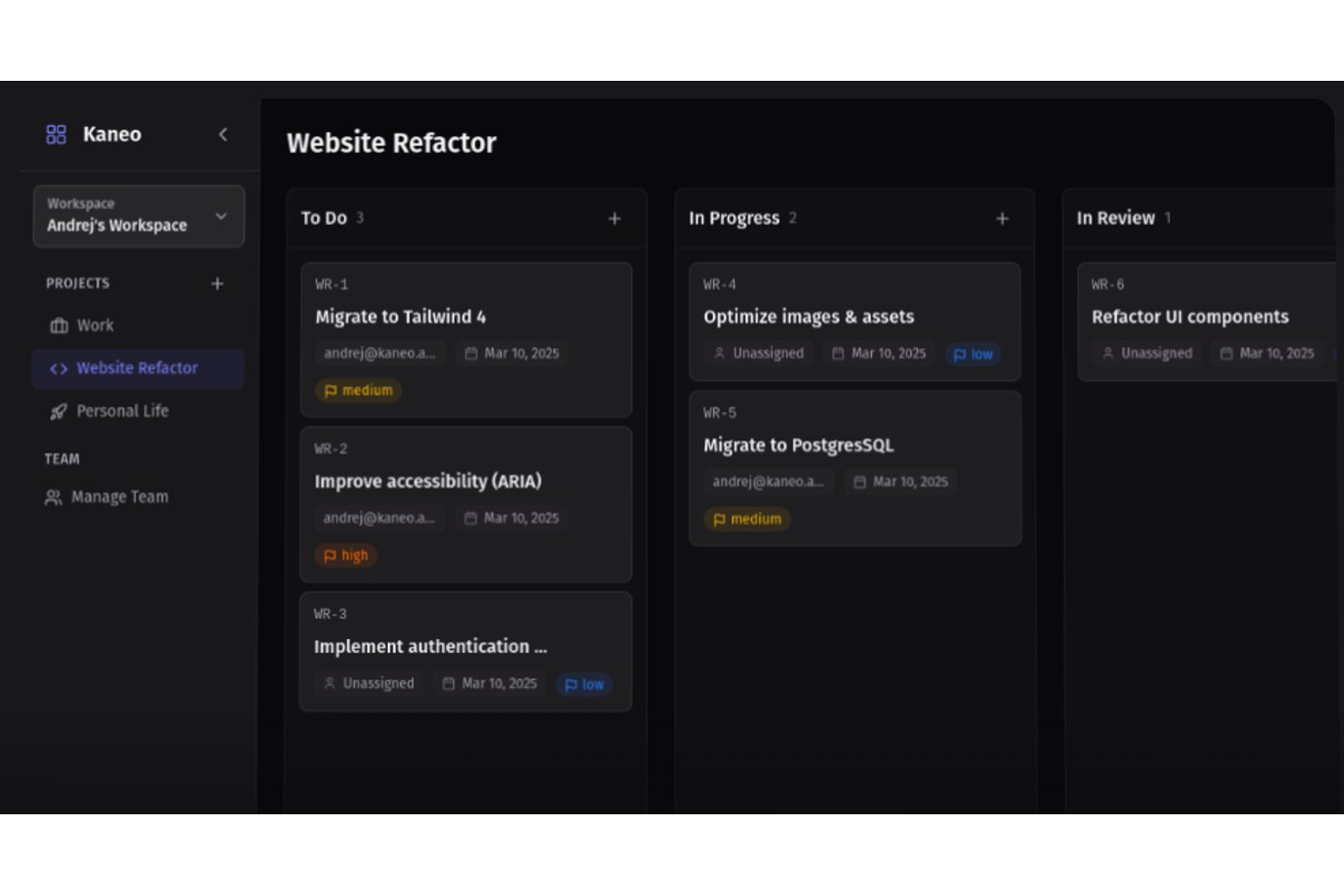
Kaneo è uno strumento a codice aperto di gestione dei progetti con licenza MIT e ospitato autonomamente, dotato di bacheche kanban, viste Gantt, monitoraggio integrato del tempo e integrazione nativa con GitHub/Gitea per i team orientati allo sviluppo.
Per chi è più adatto Kaneo?
Kaneo è particolarmente adatto ai team orientati allo sviluppo e agli amministratori di sistemi ospitati autonomamente che necessitano di uno strumento leggero di gestione dei progetti con licenza MIT, integrazione Git nativa e monitoraggio integrato del tempo.
Perché ho scelto Kaneo
Ho scelto Kaneo come uno dei migliori strumenti perché il suo monitoraggio integrato del tempo registra direttamente sulle attività gli orari di inizio e fine, calcolando le durate senza componenti aggiuntivi di terze parti. Ciò che trovo davvero utile è il modo in cui questa funzione si combina con le transizioni automatiche di stato di GitHub in Kaneo: quando l'invio di un ramo sposta un'attività nello stato 'in corso', il registro del tempo acquisisce l'impegno nel relativo contesto. È una configurazione leggera ma pratica per i team di sviluppo che necessitano di visibilità sull'impegno senza dover gestire uno strumento separato per la registrazione delle ore.
Funzionalità principali di Kaneo
- Sincronizzazione nativa con GitHub e Gitea: L'integrazione bidirezionale con GitHub e Gitea replica automaticamente problemi, etichette, assegnatari e stato delle richieste di integrazione su entrambe le piattaforme.
- Viste multiple dei progetti: Le viste delle attività arretrate, bacheca, elenco e Gantt consentono di visualizzare il lavoro nel formato più adatto al flusso di lavoro del team.
- Supporto per SSO e OIDC: L'accesso tramite Google, GitHub, Discord e OIDC generico è incluso gratuitamente in ogni versione, comprese le distribuzioni ospitate autonomamente.
- Integrazione MCP/AI: Un servizio integrato del Model Context Protocol consente agli assistenti AI come Claude e Cursor di leggere e creare attività direttamente tramite un punto terminale API dedicato.
Integrazioni di Kaneo
Kaneo dispone di integrazioni native con GitHub e Gitea, oltre a integrazioni per le notifiche con Slack, Discord, Telegram e richiami web personalizzati. Fornisce inoltre un'API REST documentata e un punto terminale MCP per flussi di lavoro personalizzati e assistenti AI.
Pros and Cons
Pros:
- La distribuzione ospitata autonomamente rimane completamente senza limitazioni
- I registri del tempo integrati collegano l'impegno alle attività
- Le viste Gantt e Kanban supportano diverse modalità di pianificazione
Cons:
- Le metriche e le cerimonie formali di Scrum sono ancora assenti
- Chi gestisce il proprio hosting deve occuparsi di backup, scalabilità e disponibilità

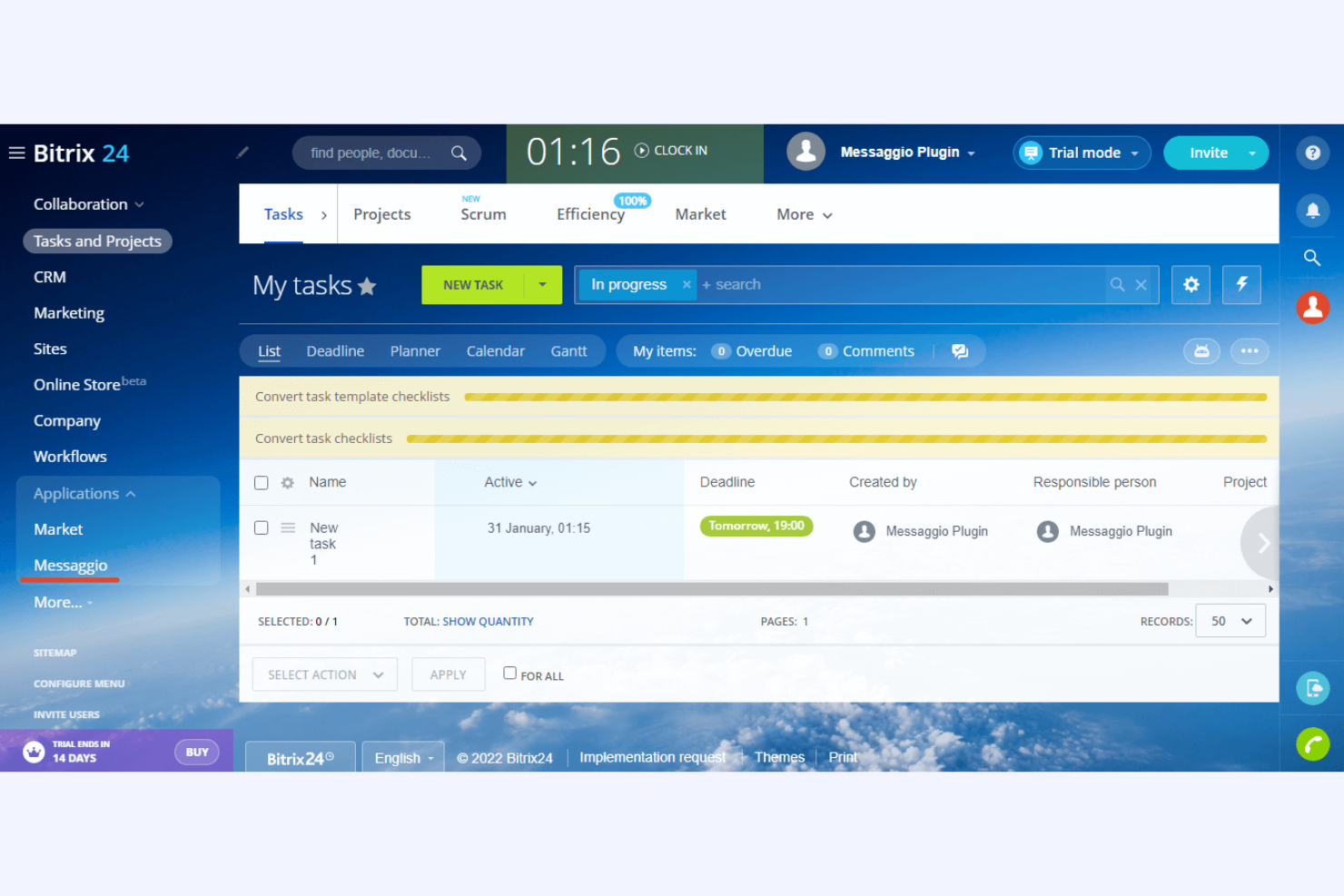
Bitrix24 ha senso in questa lista perché è la piattaforma open source che vedo scegliere dai team quando la collaborazione a distanza e gli strumenti di comunicazione integrati sono irrinunciabili. Con chat integrata, videochiamate, condivisione di documenti e una bacheca attività facile da collegare a queste funzionalità, mantiene i team distribuiti sempre sincronizzati.
Quello che lo distingue, secondo me, è la possibilità di creare in pochi istanti uno spazio di lavoro online condiviso in cui chat, riunioni video e file sono subito accanto alle attività di progetto—niente va perso. Apprezzo molto come elimina gli ostacoli per i team distribuiti su più fusi orari.
A chi è più adatto Bitrix24
- Team distribuiti che necessitano di chat, video e strumenti di progetto insieme
- Organizzazioni che danno priorità alla collaborazione in tempo reale in modalità remota
A chi non è indicato Bitrix24
- Team che necessitano di funzionalità di project management altamente specialistiche
- Gruppi di ingegneri con flussi di lavoro complessi e focalizzati sul codice
Cosa distingue Bitrix24
Bitrix24 nasce per mettere strumenti di comunicazione e di progetto fianco a fianco, così si hanno chat, video, condivisione file e attività tutte nello stesso spazio. Questo funziona particolarmente bene quando serve un hub online centrale invece di dover saltare tra varie app. Rispetto a un tool come Jira, Bitrix24 favorisce un lavoro di squadra più in tempo reale, con conversazioni direttamente integrate nello spazio di progetto.
Compromessi con Bitrix24
Bitrix24 è ottimizzato per una comunicazione unificata di team, ma ciò avviene a scapito di funzionalità di project management approfondite e specialistiche. Se il tuo lavoro si basa su pianificazioni avanzate o flussi di lavoro personalizzati, troverai queste opzioni limitate.
Pros and Cons
Pros:
- Supporta diversi canali di comunicazione
- Strumenti integrati per siti, CRM e chiamate
- Elevata sicurezza con 2FA, AES-256, SSO
Cons:
- Interfaccia poco intuitiva con funzionalità chiave sparse
- Costi nascosti per integrazioni e componenti aggiuntivi
Altri software open source per la gestione dei progetti
Ecco alcune altre opzioni di software open source per la gestione dei progetti che non sono entrate nel mio elenco, ma che vale comunque la pena prendere in considerazione:
- Project Libre AI
Ideale per analisi guidate dall’IA
- Tillywork
Ideale per l'automazione delle attività
- Freeter
Ideale per l'organizzazione di progetti freelance
- Focalboard
Ideale per lavagne kanban


Come Valuto il Software Open Source per la Gestione dei Progetti
Quando un team che si auto-ospita necessita del pieno controllo dei dati senza costi SaaS, valuto gli strumenti su due livelli: criteri di base che ogni strumento deve soddisfare e fattori differenzianti che separano le migliori opzioni.
Funzionalità di Base (Requisiti Fondamentali per Questa Lista)
Quando seleziono gli strumenti per la mia lista, valuto ciascuno su una scala da 0 (la funzionalità non è presente) a 5 (eccelle in quest'area) per ogni funzionalità di base elencata di seguito. Calcolo quindi il punteggio totale dello strumento in percentuale. Ogni strumento deve raggiungere un punteggio totale minimo del 65% per essere considerato per l'inclusione.
- Licenza Open Source: Verifico che il progetto utilizzi una licenza approvata dall'OSI e che il codice sorgente sia pubblicamente accessibile, poiché strumenti come OpenProject (GPL) e Taiga (MPL) adottano approcci diversi che influiscono su come il tuo team può modificare e redistribuire.
- Capacità di Auto-Ospitarsi: La flessibilità di deploy è importante, quindi cerco immagini Docker ufficiali, guide di installazione documentate e supporto per database standard come PostgreSQL—tutto ciò di cui un amministratore di sistema ha bisogno per avviare la piattaforma nell'infrastruttura interna.
- Gestione Task e Progetti: Ogni strumento deve permettere la creazione di task, assegnazioni, date di scadenza, sottotask e dipendenze come minimo. Valuto se sia possibile pianificare una consegna reale con milestone piuttosto che gestire semplicemente una lista piatta di cose da fare.
- Viste Multiple dei Progetti: I team lavorano in modo diverso, quindi cerco almeno bacheche Kanban, viste elenco e diagrammi di Gantt o viste cronologiche. Strumenti come Leantime e Focalboard affrontano questo aspetto in modi distinti che vale la pena confrontare.
- Funzionalità di Collaborazione del Team: Valuto come ogni piattaforma gestisce commenti, @menzioni, allegati e notifiche—le interazioni quotidiane che mantengono allineati i team distribuiti senza dover passare a uno strumento di chat separato.
- Estendibilità e Integrazioni: Una REST API ben documentata, supporto webhook e connessioni native a strumenti per sviluppatori come GitLab o Jenkins mi dimostrano che la piattaforma può integrarsi con uno stack tecnologico esistente e non restare isolata.
Una volta ottenuta la lista degli strumenti che soddisfano questi criteri, considero cosa rende unica ogni piattaforma.
Fattori di Differenziazione (Cosa Distingue i Fornitori)
Ecco come confronto e metto a confronto diversi fornitori:
Funzionalità Distintive
L'integrazione nativa con Git è un grande elemento distintivo per i team a forte prevalenza di sviluppatori. Cerco strumenti che colleghino commit e richieste di pull direttamente ai task, così l'avanzamento degli sprint si aggiorna da solo man mano che il codice passa in revisione. La gestione agile degli sprint è collegata—la gestione del backlog, i grafici burndown e il monitoraggio della velocità aiutano i team lead a pianificare le iterazioni con dati reali invece che a intuito. Valuto anche se una piattaforma include un wiki integrato, poiché conservare specifiche e decisioni insieme al lavoro di progetto riduce la necessità di cambiare contesto tra diversi strumenti di documentazione.
Oltre le Funzionalità
La salute della community dice molto sulla sostenibilità a lungo termine. Verifico la frequenza dei commit, la cadenza dei rilasci e l'attività sul forum—un repository fermo è un rischio, non importa quanto ricca sia la dotazione di funzionalità. La trasparenza della licenza conta tanto quanto il resto. Alcuni strumenti si promuovono come open source ma tengono funzionalità chiave dietro livelli a pagamento, quindi valuto esattamente cosa sia disponibile con la licenza gratuita. Anche gli strumenti di migrazione sono un altro fattore che considero, visto che la maggior parte dei team migra da Jira o Trello e ha bisogno di importare i dati senza perdere la storia dei progetti.
Come scegliere un software open source per la gestione dei progetti
È facile perdersi in lunghi elenchi di funzionalità e strutture tariffarie complesse. Per aiutarti a rimanere concentrato mentre affronti il tuo specifico processo di selezione del software, ecco una lista di fattori da tenere a mente:
| Fattore | Cosa considerare |
|---|---|
| Scalabilità | Considera come lo strumento cresce insieme al tuo team. È in grado di gestire un numero maggiore di progetti e utenti man mano che le tue esigenze aumentano? Verifica se esiste un limite alle dimensioni dei progetti o al numero di utenti che potrebbe diventare un vincolo in futuro. |
| Integrazioni | Valuta le esigenze di integrazione con gli strumenti che già utilizzi. Si collega facilmente a software come Slack, GitHub o Trello? Assicurati che lo strumento supporti un flusso di dati uniforme senza richiedere soluzioni manuali alternative. |
| Personalizzazione | Valuta quanto puoi adattare lo strumento ai tuoi flussi di lavoro. Puoi modificare dashboard, campi o report in modo che corrispondano ai tuoi processi? Una scarsa flessibilità potrebbe comportare un lavoro aggiuntivo per il tuo team. |
| Facilità d'uso | Determina se l'interfaccia è intuitiva per il tuo team. Sarà necessaria una formazione approfondita per iniziare? Una curva di apprendimento ripida può rallentare l'adozione e ridurre la produttività. |
| Implementazione e onboarding | Esamina il processo di configurazione e i materiali di supporto. Sono disponibili tutorial, modelli o guide per gli utenti che aiutino il tuo team a iniziare rapidamente? Un onboarding inadeguato può ritardare i vantaggi che ti aspetti dallo strumento. |
| Costo | Confronta i prezzi con il tuo budget. Sono previste commissioni nascoste o costi aggiuntivi per determinate funzionalità? Considera il costo totale di proprietà, comprese eventuali spese di supporto o manutenzione. |
| Misure di sicurezza | Assicurati che lo strumento soddisfi i tuoi standard di sicurezza. Offre la crittografia dei dati, backup regolari e controlli degli accessi? Le falle nella sicurezza possono causare violazioni dei dati e perdita di informazioni sensibili. |
Che cos'è un software open source per la gestione dei progetti?
Il software open source per la gestione dei progetti è un tipo di strumento che consente agli utenti di gestire attività, progetti e risorse con la flessibilità di modificare e personalizzare il codice. Questi strumenti vengono generalmente utilizzati da responsabili di progetto, responsabili dei team e professionisti IT che necessitano di soluzioni adattabili ai propri flussi di lavoro specifici. Le funzionalità di gestione delle attività, pianificazione e collaborazione aiutano a organizzare i progetti, migliorare la comunicazione e monitorare i progressi. Nel complesso, questi strumenti offrono valore fornendo soluzioni personalizzabili in grado di crescere insieme alle esigenze del team.
Funzionalità
Quando selezioni un software open source per la gestione dei progetti, presta attenzione alle seguenti funzionalità chiave:
- Gestione delle attività: Consente di creare, assegnare e monitorare le attività, facendo chiarezza su chi è responsabile di cosa e sulle relative scadenze.
- Flussi di lavoro personalizzabili: Permettono di adattare i processi alle esigenze specifiche del team, migliorando efficienza e adattabilità.
- Strumenti di collaborazione: Facilitano la comunicazione e la condivisione delle informazioni tra i membri del team, mantenendo tutti aggiornati.
- Monitoraggio del tempo: Consente di controllare il tempo dedicato alle attività e ai progetti, aiutando nella definizione del budget e nell'analisi della produttività.
- Report e analisi: Forniscono informazioni sulle prestazioni dei progetti, supportando il processo decisionale e l'identificazione delle aree di miglioramento.
- Funzionalità di integrazione: Si collegano ad altri strumenti software già utilizzati dal team, garantendo un flusso dei dati fluido e riducendo il lavoro manuale.
- Misure di sicurezza: Proteggono i dati con funzionalità come la crittografia e i controlli degli accessi, garantendo la sicurezza delle informazioni sensibili.
- Scalabilità: Supporta la crescita consentendo di gestire un numero maggiore di progetti e utenti con l'espansione del team.
- Interfaccia intuitiva: Offre un design intuitivo e facile da usare, riducendo la curva di apprendimento per i nuovi utenti.
- Documentazione e supporto: Fornisce risorse come guide e tutorial per facilitare l'inserimento degli utenti e la risoluzione dei problemi.
Vantaggi
L'implementazione di un software open source per la gestione dei progetti offre diversi vantaggi al team e all'azienda. Ecco alcuni dei vantaggi che puoi aspettarti:
- Convenienza economica: Spesso disponibile a un costo inferiore o gratuitamente, riduce le spese pur fornendo le funzionalità essenziali per la gestione dei progetti.
- Flessibilità: I flussi di lavoro personalizzabili consentono di adattare il software ai processi specifici, migliorando l'efficienza del team.
- Controllo dei dati: Grazie alle misure di sicurezza, mantieni il controllo sulle informazioni sensibili, garantendo la protezione e la privacy dei dati.
- Supporto della comunità: L'accesso a una comunità di utenti e sviluppatori può fornire informazioni preziose e assistenza nella risoluzione dei problemi.
- Scalabilità: Può crescere insieme al team, consentendo di gestire un numero maggiore di utenti e progetti con l'espansione dell'azienda.
- Innovazione: La natura open source incoraggia il miglioramento continuo e gli aggiornamenti, mantenendo il software in linea con le esigenze attuali.
- Potenziale di integrazione: Si collega facilmente agli strumenti esistenti nel tuo ecosistema tecnologico, riducendo al minimo le interruzioni e massimizzando la produttività.
Costi e prezzi
La scelta di un software open source per la gestione dei progetti richiede la comprensione dei vari modelli e piani tariffari disponibili. I costi variano in base alle funzionalità, alle dimensioni del team, ai componenti aggiuntivi e ad altri fattori. La tabella seguente riassume i piani più comuni, i relativi prezzi medi e le funzionalità tipicamente incluse nelle soluzioni software open source per la gestione dei progetti:
Tabella comparativa dei piani per il software open source di gestione dei progetti
| Tipo di piano | Prezzo medio | Funzionalità comuni |
|---|---|---|
| Piano gratuito | $0 | Gestione di base delle attività, strumenti di collaborazione e integrazioni limitate. |
| Piano personale | $5-$87 /mese | Gestione delle attività, flussi di lavoro personalizzati e report e analisi di base. |
| Piano aziendale | $13-$175 /mese | Report avanzati, monitoraggio del tempo e funzionalità di sicurezza migliorate. |
| Piano per grandi imprese | $19-$325 /mese | Integrazioni personalizzate, supporto dedicato e opzioni di personalizzazione avanzate. |
Domande frequenti sul software open source per la gestione dei progetti
Ecco alcune risposte alle domande più comuni sul software open source per la gestione dei progetti:
In che modo il software open source per la gestione dei progetti può ridurre i costi?
Il software open source per la gestione dei progetti può ridurre i costi eliminando i canoni di licenza associati al software proprietario. Puoi personalizzarlo in base alle tue esigenze senza pagare extra per funzionalità che non utilizzi. Inoltre, il supporto della community spesso sostituisce i costosi pacchetti di assistenza clienti.
Cosa devo considerare nella scelta di un software open source per la gestione dei progetti?
Considera le esigenze e i flussi di lavoro specifici del tuo team. Valuta la scalabilità del software, le capacità di integrazione e la facilità d’uso. Assicurati che offra le funzionalità necessarie al tuo team, come strumenti per la gestione delle attività e la collaborazione, e valuta il supporto disponibile da parte della community.
Il software open source per la gestione dei progetti è sicuro?
La sicurezza varia in base al software, quindi verifica la presenza di funzionalità come la crittografia dei dati, gli aggiornamenti regolari e la fiducia della community. Puoi esaminare il codice sorgente per individuare eventuali vulnerabilità e alcuni strumenti offrono plugin o impostazioni di sicurezza aggiuntivi per migliorare la protezione.
In che modo il software open source gestisce gli aggiornamenti e la manutenzione?
Gli aggiornamenti e la manutenzione sono spesso gestiti dalla community, con sviluppatori e utenti che contribuiscono a miglioramenti e correzioni di bug. Di solito puoi implementare gli aggiornamenti autonomamente, ma sono necessarie alcune conoscenze tecniche. Gli aggiornamenti regolari garantiscono che il software rimanga sicuro e funzionale.
Il software open source per la gestione dei progetti può integrarsi con altri strumenti?
Molte soluzioni open source offrono funzionalità di integrazione con strumenti diffusi come Slack, GitHub e Google Workspace. Consulta la documentazione del software o i forum della community per verificare le integrazioni disponibili e valuta come si adattano ai tuoi flussi di lavoro esistenti.
Quali sono le difficoltà più comuni nell'utilizzo di un software open source per la gestione dei progetti?
Le difficoltà includono una possibile curva di apprendimento, la mancanza di un supporto dedicato e livelli variabili di documentazione. Potresti aver bisogno di competenze tecniche per la configurazione e la personalizzazione. Quando scegli soluzioni open source, è fondamentale bilanciare vantaggi come la flessibilità con queste difficoltà.