

I 10 migliori software di gestione documentale con IA recensiti nel 2026

Elenco dei migliori software di gestione dei documenti basati sull'AI


Il software di gestione dei documenti basato sull'AI aiuta i responsabili di progetto a organizzare, archiviare e recuperare i file in modo più efficiente, automatizzando il controllo delle versioni, l'assegnazione dei tag, le autorizzazioni e la ricerca. Invece di perdere tempo a cercare documenti o a gestire manualmente gli accessi, questi strumenti utilizzano l'intelligenza artificiale per semplificare il modo in cui i team gestiscono i file durante l'intero ciclo di vita del progetto.
Ho testato e recensito i principali strumenti di gestione dei documenti basati sull'AI per individuare quelli che rendono davvero più semplice il lavoro dei team di progetto impegnati. Dall'assegnazione automatica dei tag e l'OCR alla ricerca intelligente e all'automazione dei flussi di lavoro, ogni strumento offre qualcosa di prezioso per ridurre gli ostacoli e migliorare la produttività.
Perché fidarsi dei nostri consigli sui software
Il nostro team testa e recensisce software dal 2012. In quanto project manager noi stessi, sappiamo quanto sia difficile — e importante — scegliere il software giusto.
Per questa guida, abbiamo valutato gli strumenti attraverso test pratici e ricerche indipendenti, assegnando un punteggio agli strumenti in base ai nostri criteri di selezione. Ci basiamo inoltre sulle competenze di leader di pensiero del settore e di professionisti attivi nella gestione dei progetti.
Le nostre recensioni riflettono il nostro giudizio editoriale umano, non un discorso di vendita.
Revisori esperti:
Tabella comparativa dei software di gestione dei documenti basati sull'AI
Questa tabella comparativa riassume i dettagli sui prezzi delle mie migliori selezioni di software di gestione dei documenti basati sull’AI:
| Tool | Best For | Trial Info | Price | ||
|---|---|---|---|---|---|
| 1 | Ideale per la gestione di documenti multilingue | Demo gratuita disponibile | Prezzi su richiesta | Website | |
| 2 | Migliore per la collaborazione su documenti assistita dall'IA | Piano gratuito disponibile | A partire da $14.99/mese (fatturazione annuale) | Website | |
| 3 | Ideale per la condivisione sicura di file | Prova gratuita di 14 giorni + piano gratuito + demo gratuita disponibile | Da $5/utente/mese (fatturato annualmente) | Website | |
| 4 | Ideale per organizzazione basata su metadati | Prova gratuita di 30 giorni + demo gratuita disponibile | Da $65/utente/mese | Website | |
| 5 | Ideale per soluzioni cloud ibride | 15 giorni di prova gratuita + demo gratuita disponibile | A partire da $22/utente/mese (fatturazione annuale) | Website | |
| 6 | Ideale per l’elaborazione documentale basata su IA | Prova gratuita disponibile | Prezzo su richiesta | Website | |
| 7 | Ideale per l'analisi di documenti su cloud | Demo gratuita disponibile | Da $30 per 1.000 pagine | Website | |
| 8 | Ideale per la gestione dei contenuti aziendali | Consulenza gratuita disponibile | Prezzo su richiesta | Website | |
| 9 | Ideale per tecnologia OCR | Demo gratuita disponibile | Prezzi su richiesta | Website | |
| 10 | Ideale per l’estrazione dati dalle fatture | Demo gratuita disponibile | Prezzo su richiesta | Website |
Recensioni dei migliori software di gestione dei documenti basati sull'AI
Di seguito trovi i miei riepiloghi dettagliati dei migliori software di gestione dei documenti basati sull’AI inclusi nel mio elenco. Le mie recensioni offrono una panoramica dettagliata delle funzionalità principali, dei pro e dei contro, delle integrazioni e dei casi d’uso ideali di ogni strumento, per aiutarti a trovare quello più adatto a te.
Doxis
Ideale per la gestione di documenti multilingue
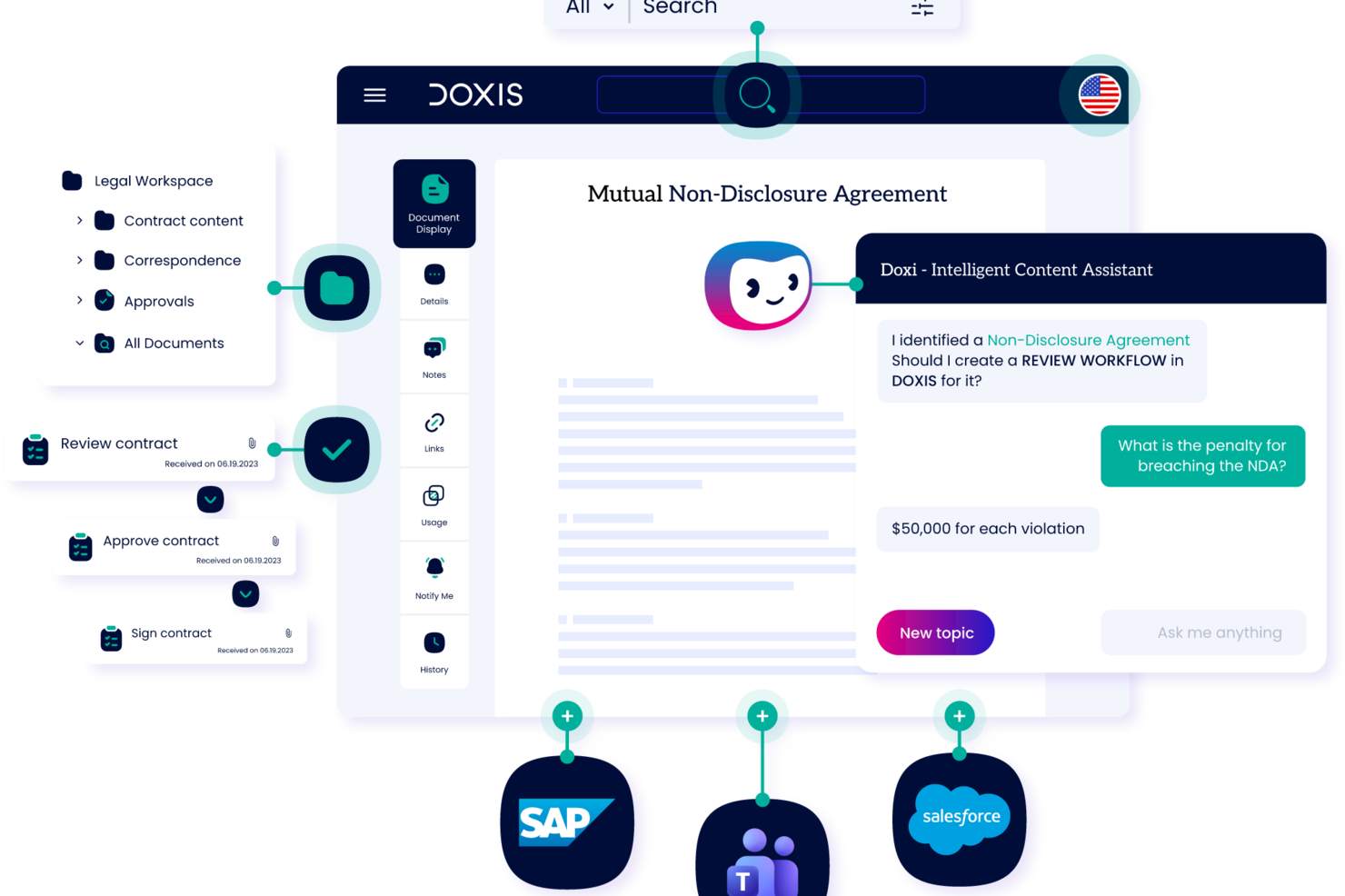
Progettato per le imprese, Doxis è una piattaforma di gestione documentale dotata di intelligenza artificiale che utilizza l'automazione intelligente dei contenuti per acquisire, classificare, elaborare e archiviare documenti con tracciamento delle versioni e controlli sul ciclo di vita.
Per chi è più indicato Doxis?
Doxis è ideale per grandi organizzazioni con team di gestione dei registri o legali che necessitano di prove chiare e difendibili di ogni azione eseguita sui documenti.
Perché ho scelto Doxis
Ho incluso Doxis tra le mie scelte principali perché il suo motore di elaborazione documentale AI gestisce oltre 100 lingue in modo nativo, caratteristica rara a questo livello di accuratezza. Apprezzo che Doxis AI.dp non si limiti a memorizzare documenti multilingue, ma li legga attivamente, li classifichi e ne estragga i metadati strutturati, indipendentemente dalla lingua. In pratica, ciò significa che il mio team può indirizzare una fattura tedesca e un contratto francese attraverso lo stesso workflow automatizzato senza alcuna preselezione manuale. La ricerca per le aziende permette inoltre di filtrare i risultati per lingua, un vero risparmio di tempo in un archivio ampio e multilingue.
Caratteristiche principali di Doxis
- Assistente intelligente per i contenuti: Doxi, l'assistente AI integrato di Doxis, fornisce risposte contestuali e mette in evidenza i documenti più rilevanti all'interno del tuo spazio di lavoro.
- Builder di app senza codice: Doxis Business Studio consente di creare app personalizzate per i contenuti e processi documentali senza scrivere codice.
- Gestione automatica della conservazione: La piattaforma applica e fa rispettare i periodi di conservazione dei documenti in base a regole configurabili.
- Archiviazione a prova di audit: I documenti completati vengono bloccati in uno stato immutabile e di sola lettura al termine di ogni workflow.
Integrazioni di Doxis
Doxis offre integrazioni native certificate con SAP, Salesforce e l'ecosistema Microsoft, tra cui Microsoft 365, Microsoft Teams, Microsoft Outlook, Microsoft SharePoint e Microsoft Dynamics 365. Utilizza connettori indipendenti dal fornitore per sistemi ERP, CRM, HR, CAD ed e-mail/groupware, insieme a un framework event-condition-action (ECA) per l'automazione dei processi tra sistemi. È disponibile un'API per integrazioni personalizzate. Il supporto a Zapier non è documentato.
Pros and Cons
Pros:
- Gestisce gestione documentale, workflow e automazione su un'unica piattaforma
- Prodotto flessibile che si adatta alle necessità organizzative
- Indicizzazione e archiviazione automatizzata gestita dall'IA, con acquisizione di metadati
Cons:
- Personalizzazioni complesse spesso richiedono il coordinamento con il supporto
- Il team commerciale tende a promettere più del dovuto in fase di selezione

Migliore per la collaborazione su documenti assistita dall'IA
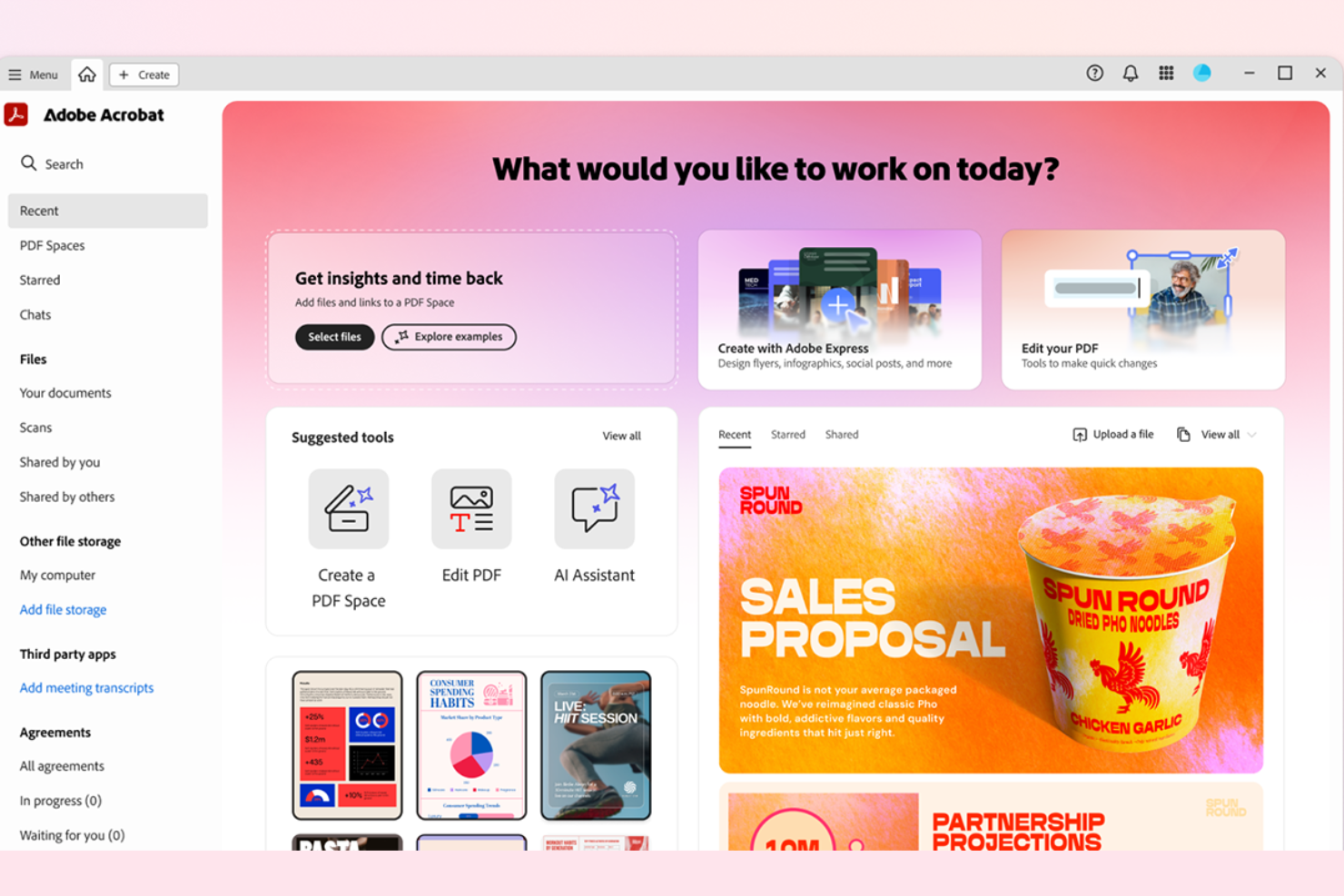
Adobe Acrobat merita il suo posto nella mia lista perché consente ai team di collaborare sui documenti in tempo reale, con l'IA generativa che aiuta a riassumere e organizzare i feedback tra le varie versioni. Nella pratica, vedo i team utilizzare l'Assistente AI per estrarre i punti d'azione e perfezionare le bozze dei documenti durante cicli di revisione complessi.
Quello che mi colpisce è come l'IA colleghi commenti, attività e modifiche ai file, così hai sempre una visione aggiornata e ricca di contesto su chi ha fatto cosa e perché.
Ideale per
- Team che gestiscono collaborazione e revisione di documenti su larga scala
- Organizzazioni che centralizzano feedback, modifiche ai file e approvazioni
Non adatto per
- Team che necessitano di funzionalità di gestione avanzata dei contenuti
- Flussi di lavoro focalizzati sulla conservazione dei record o su archiviazione conforme a normative rigorose
Cosa distingue Adobe Acrobat
Adobe Acrobat pone tutto al centro del controllo documentale e della revisione collaborativa. A differenza di Google Workspace, che presuppone una co-creazione leggera, Adobe Acrobat basa il suo funzionamento su permessi granulari, cronologia delle versioni e cicli di revisione formali. Lo ritengo adatto alle organizzazioni che monitorano attentamente cambiamenti, commenti e passaggi di consegne e che vogliono mantenere centralizzate le tracce di audit su ogni documento.
Compromessi con Adobe Acrobat
Acrobat è ottimizzato per la revisione e l'approvazione gestita, ma si rinuncia a flussi di lavoro più ampi e alla gestione completa del ciclo di vita dei contenuti. Questo significa che i team che necessitano di gestione end-to-end dei record o automazione avanzata potrebbero incontrare dei limiti.
Pros and Cons
Pros:
- Ricerca e sintesi documentale tramite IA
- Strumenti avanzati di redazione e protezione dei dati sensibili
- Gestione centralizzata di modelli e librerie di documenti
Cons:
- Rallentamenti occasionali con PDF grandi o complessi
- Alcuni limiti alle transazioni delle firme elettroniche dipendono dal piano

Box
Ideale per la condivisione sicura di file
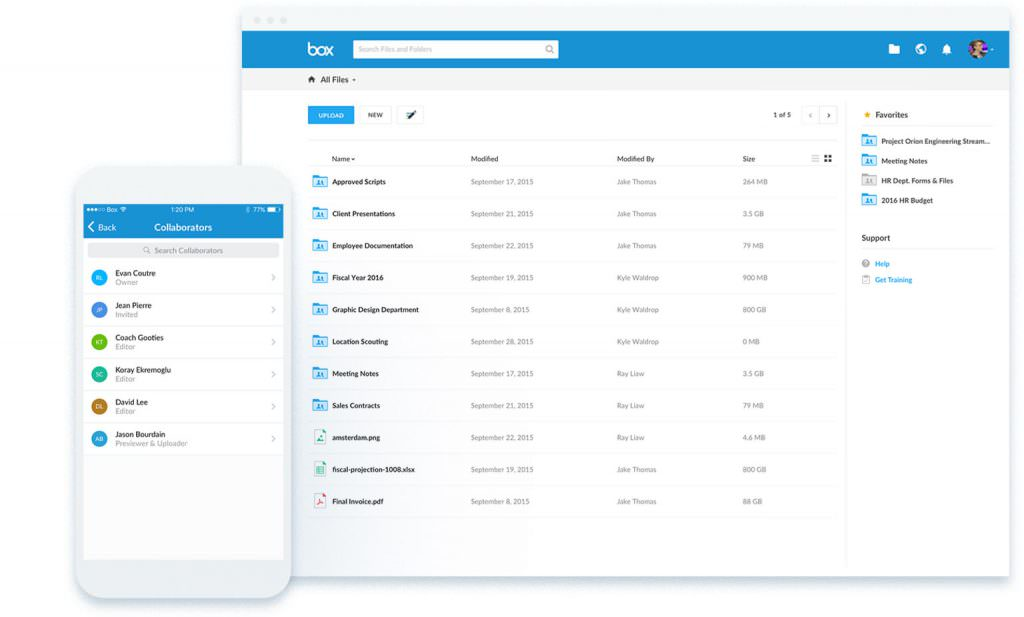
Box si guadagna un posto in questa lista perché è uno dei pochi strumenti di cui mi fido per gestire documenti che richiedono una sicurezza a prova di errore negli ambienti cloud. Quando vedo organizzazioni spostare contratti sensibili, documenti finanziari o ricerche nel cloud, i controlli di accesso dettagliati di Box, la filigranatura dei documenti e le policy di conservazione personalizzate si distinguono nettamente.
Quello che apprezzo qui è la possibilità di impostare permessi e opzioni di conformità a livello di file per team con requisiti di dati rigorosi.
Box è ideale per
- Organizzazioni che gestiscono file riservati o dati regolamentati
- Team che necessitano di controlli d'accesso dettagliati e di policy di conservazione
Box non è adatto per
- Team che necessitano di creare o modificare documenti all'interno dell'app
- Piccoli gruppi che condividono raramente informazioni sensibili
Cosa distingue Box
Box è pensato per organizzazioni che vogliono trattare l'archiviazione e la condivisione dei documenti come un processo incentrato sulla sicurezza, invece che come semplice cloud storage. A differenza di Google Drive, che privilegia la condivisione veloce e la collaborazione, Box prevede che tu pianifichi chi ha accesso e come vengono gestiti i file. In pratica, questo lo rende una soluzione ideale per i settori orientati alla compliance in cui la governance rigorosa è fondamentale.
Compromessi con Box
Box punta su sicurezza e controllo, ma questo significa che gli strumenti di collaborazione e modifica dei documenti in-app sono limitati. Avrai bisogno di app separate per la modifica dei documenti in tempo reale.
Pros and Cons
Pros:
- Solide misure di sicurezza
- Opzioni di workflow personalizzabili
- Ampia gamma di integrazioni
Cons:
- Configurazione iniziale complessa
- Richiede accesso a Internet

M-Files
Ideale per organizzazione basata su metadati
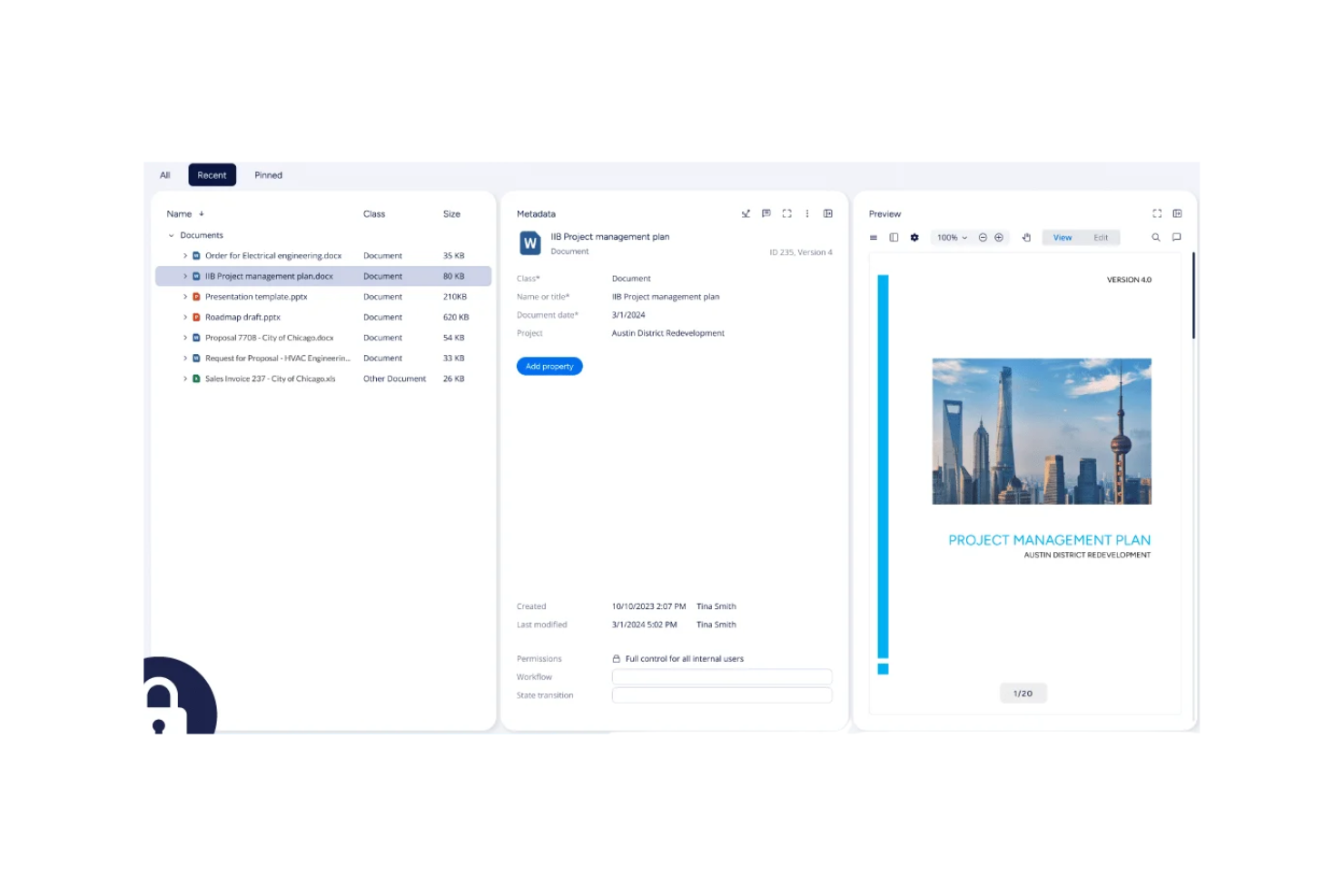
M-Files è incluso in questa lista perché il suo approccio basato sui metadati cambia completamente il modo in cui organizzi e recuperi le informazioni. Invece di affidarti alle cartelle, etichetti i documenti in base a cosa sono, il che ti consente di visualizzare i contenuti in qualsiasi contesto abbia senso.
Mi piace come i suggerimenti di metadati assistiti dall'IA aiutino a mantenere la coerenza e l'accuratezza delle etichette, soprattutto per i team che gestiscono raccolte di documenti disordinate e complesse. Questo è particolarmente efficace quando gestisci file normati o devi soddisfare requisiti di audit rigorosi.
M-Files: Migliore per
- Team che gestiscono documenti normati con requisiti di audit rigorosi
- Organizzazioni che necessitano di ricerca e classificazione contestuale basata su metadati
M-Files: Meno indicato per
- Team che preferiscono una semplice organizzazione a cartelle
- Piccole aziende con esigenze minime di conformità o metadati
Cosa distingue M-Files
M-Files ti fa passare dall'organizzare i file per posizione all'organizzarli in base a cosa sono e cosa significano. A differenza di Google Drive o Dropbox, non navighi tra cartelle annidate. Aggiungi invece metadati che descrivono i documenti, poi li cerchi o filtri per scopo, stato o progetto. Questo sistema funziona bene quando tutto si muove velocemente e i file devono poter comparire in qualsiasi contesto di lavoro, non solo in una posizione.
Compromessi con M-Files
M-Files ottimizza per struttura e coerenza, ma questo significa che la configurazione e la manutenzione richiedono uno sforzo in più, specialmente quando desidereresti semplicemente mettere i documenti in una cartella e basta.
Pros and Cons
Pros:
- Ricerca basata su metadati
- Opzioni di implementazione flessibili
- Funzionalità di conformità avanzate
Cons:
- Complessità iniziale di configurazione
- Richiede formazione per gli utenti

Egnyte
Ideale per soluzioni cloud ibride
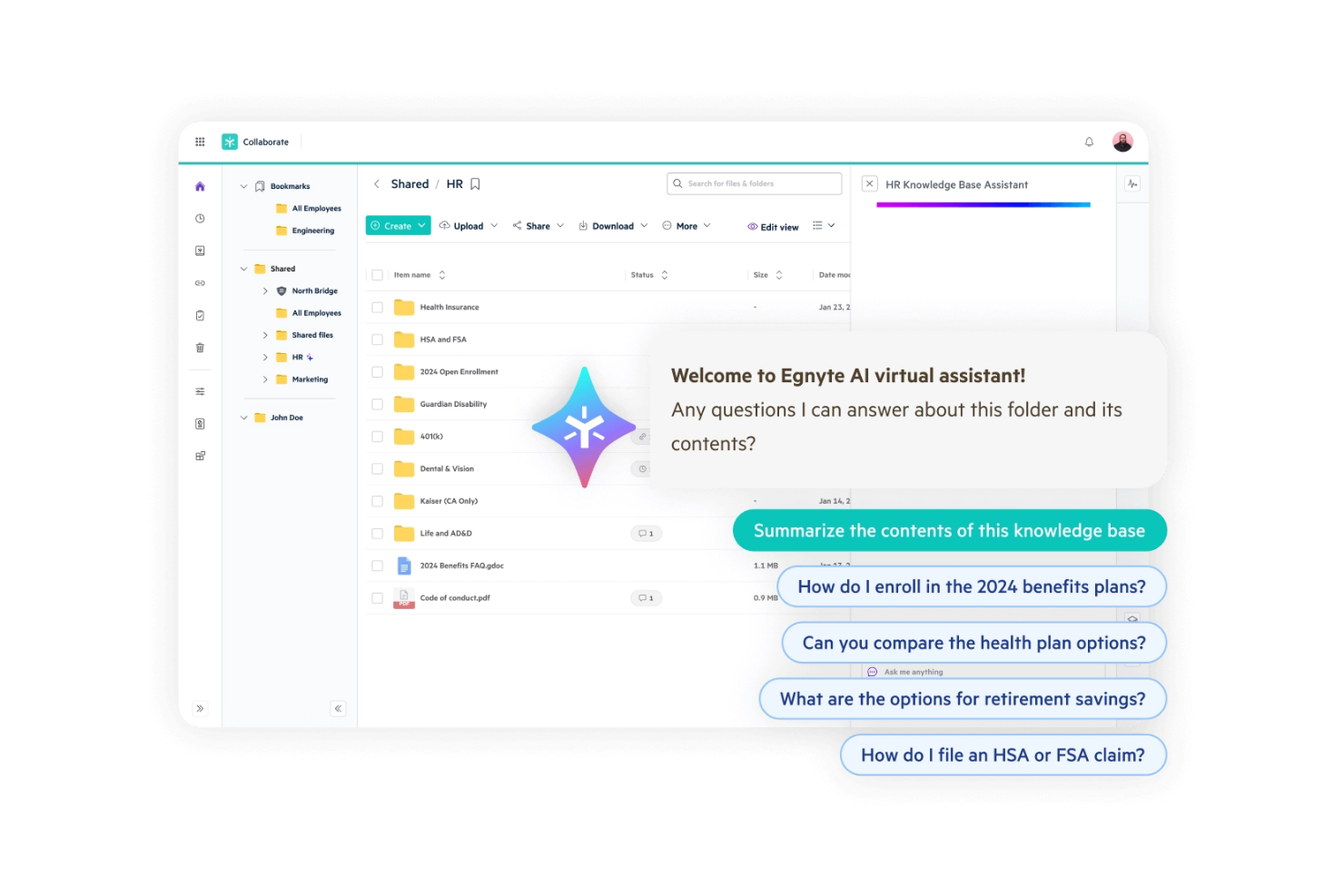
Egnyte è nella mia lista perché è il primo posto dove guardo quando il cloud ibrido è imprescindibile per la gestione dei documenti. Vedo che i team che gestiscono sia contenuti interni sensibili sia la necessità di collaborare esternamente si orientano su Egnyte perché permette di impostare controlli chiari su dove risiedono i file e su chi può accedervi.
Quello che mi piace è il modo in cui l’automazione del ciclo di vita dei file e le autorizzazioni granulari di Egnyte semplificano davvero la conformità, soprattutto per le organizzazioni con esigenze regolamentari o infrastrutture divise.
Ideale per
- Organizzazioni con ambienti IT ibridi o esigenze di conformità rigorose
- Team che gestiscono condivisioni esterne e contenuti interni basati su permessi
Meno indicato per
- Aziende che vogliono solo uno spazio di archiviazione cloud pubblico
- Piccoli team con esigenze documentali semplici e a bassa sicurezza
Cosa distingue Egnyte
Egnyte è pensato per chi si aspetta che i propri file passino tra cloud e on-premise, sempre sotto un controllo di accesso preciso. Rispetto a Google Workspace, Egnyte non presuppone che tutti i tuoi contenuti possano risiedere in sicurezza nel cloud pubblico. Questo strumento punta sull’archiviazione ibrida, permettendoti di mantenere i dati regolamentati in sede pur collaborando da remoto.
Nella pratica, lo vedo funzionare meglio quando la conformità e l’infrastruttura divisa sono richieste, non opzionali.
Compromessi con Egnyte
Egnyte è ottimizzato per implementazioni ibride e conformità dettagliata. Questo maggiore controllo implica una configurazione e una gestione continua più impegnative, specialmente per i team che vorrebbero evitare di occuparsi delle policy di archiviazione.
Pros and Cons
Pros:
- Opzioni di archiviazione flessibili
- Forti capacità di conformità
- Gestisce bene file di grandi dimensioni
Cons:
- Richiede una connessione internet stabile
- Curva di apprendimento iniziale

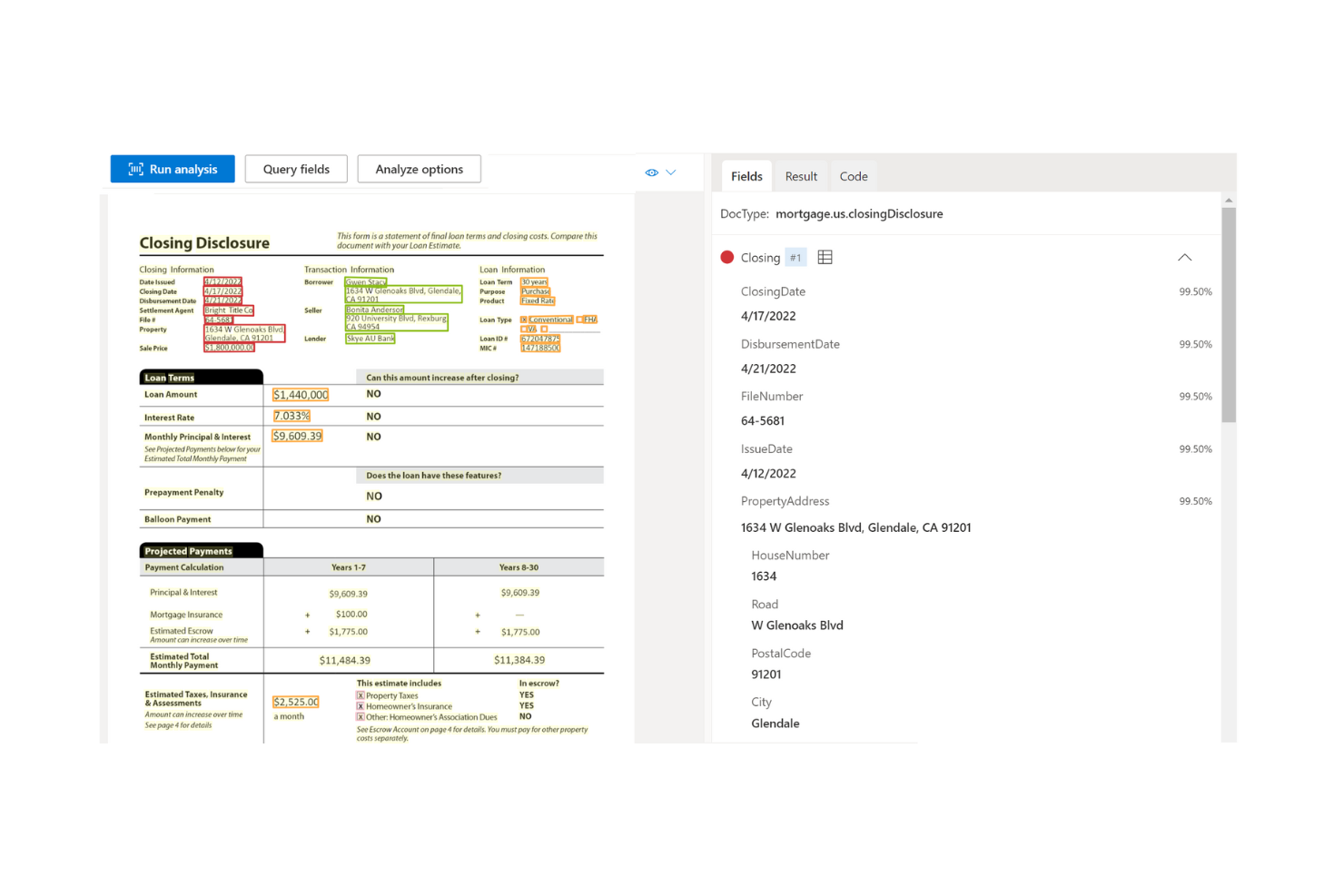
Azure AI Document Intelligence si guadagna un posto in questa lista per la sua capacità di automatizzare la classificazione e l’estrazione dei dati da documenti complessi utilizzando modelli di intelligenza artificiale addestrabili. Quando l’ho provato con contratti voluminosi e fatture multi-formato, sia i modelli predefiniti che quelli personalizzati hanno gestito layout complicati molto meglio rispetto ai comuni strumenti OCR.
Mi piace il fatto che supporti l’estrazione sia da file strutturati che non strutturati, semplificando la vita ai team che lavorano con tipi di documenti eterogenei e permettendo di raccogliere tutto in un sistema ricercabile e gestibile.
Miglior utilizzo di Azure AI Document Intelligence
- Team che automatizzano l’estrazione da contratti, moduli e fatture
- Organizzazioni che gestiscono grandi volumi di documenti diversi
Quando Azure AI Document Intelligence non è ideale
- Piccoli team che necessitano solo di funzionalità OCR di base
- Aziende che richiedono funzionalità integrate di modifica o collaborazione sui documenti
Cosa distingue Azure AI Document Intelligence
Azure AI Document Intelligence adotta un approccio guidato dai modelli per l’analisi e l’interpretazione dei documenti. Invece di concentrarsi su tag manuali o estrazione basata su regole come avviene con gli strumenti tradizionali, prevede l’utilizzo di modelli di IA addestrati per classificare ed estrarre contenuti. Solitamente lo vedo impiegato in organizzazioni che devono gestire grandi lotti di fatture e contratti, dove i modelli e l’OCR semplice non bastano.
A differenza di soluzioni basilari come Adobe Acrobat, Azure si rivolge a scenari in cui la struttura dei documenti varia e la preparazione manuale non è scalabile.
Compromessi nell’utilizzo di Azure AI Document Intelligence
È ottimizzato per l’automazione su larga scala, ma si rinuncia a una certa flessibilità quando occorrono modifiche manuali o revisioni collaborative dei documenti stessi.
Pros and Cons
Pros:
- Personalizzazione flessibile dei modelli
- Infrastruttura cloud scalabile
- Adatto a settori industriali diversificati
Cons:
- Complesso nella configurazione iniziale
- Richiede competenze tecniche

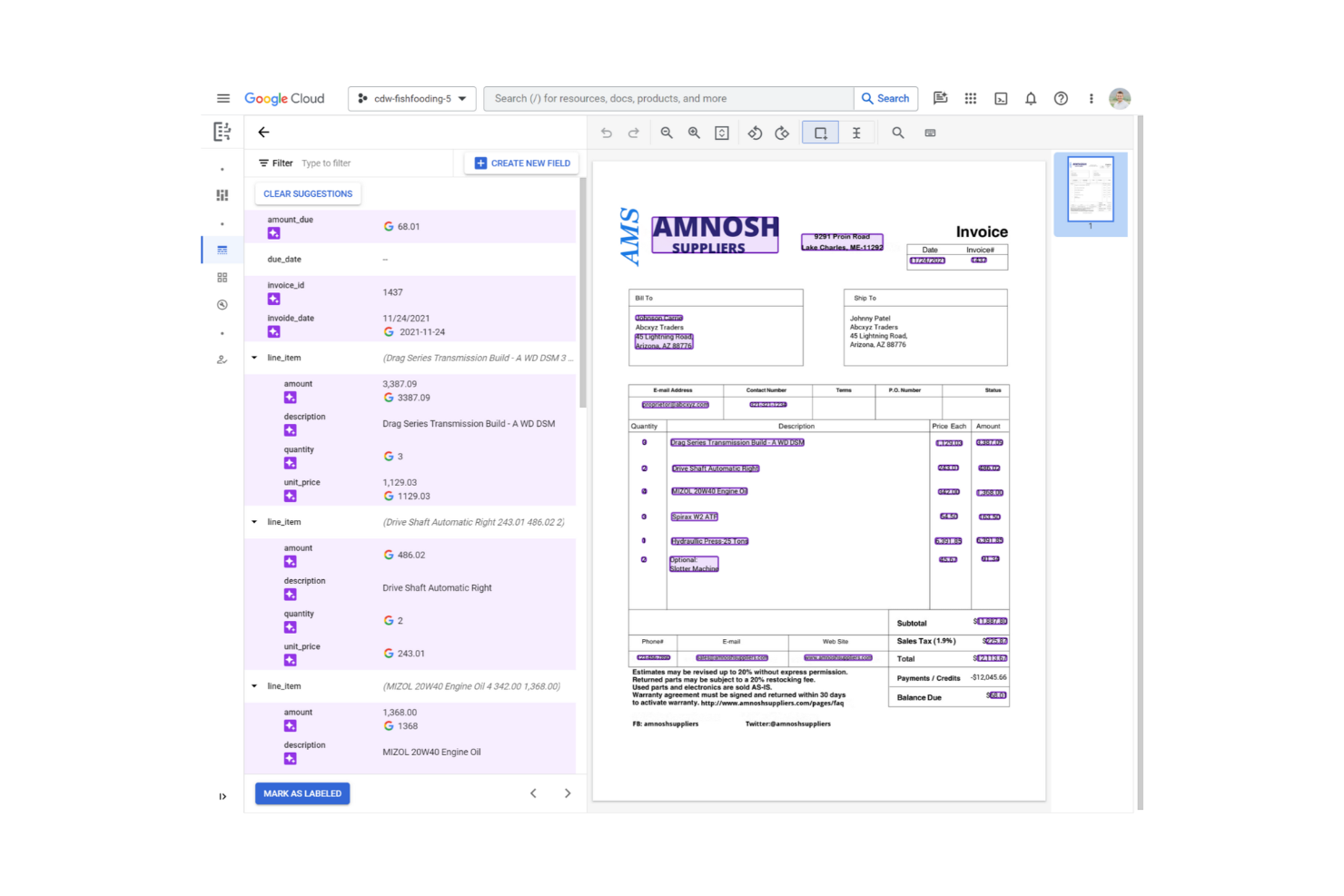
Google Document AI si distingue per l'analisi dei documenti basata su cloud, soprattutto se gestisci grandi volumi di documenti che necessitano di estrazione automatizzata. Mi piace come gestisce in modo affidabile tipi di file complessi (fatture, contratti, PDF non strutturati) ed estrae dati strutturati utilizzando modelli addestrati su misura. I team che necessitano di OCR scalabile, analisi di moduli e flussi di lavoro documentali personalizzati ne traggono grande beneficio quando accuratezza e velocità sono fondamentali.
Ideale per Google Document AI
- Organizzazioni che elaborano grandi volumi di documenti non strutturati o digitalizzati
- Team che necessitano di estrazione automatica dei dati da vari tipi di documenti
Non ideale per Google Document AI
- Team più piccoli con esigenze di archiviazione documentale di base
- Situazioni in cui è richiesta una revisione o modifica manuale approfondita
Cosa distingue Google Document AI
Google Document AI si avvicina alla gestione dei documenti in modo diverso rispetto a soluzioni DMS tradizionali come SharePoint. Presume che tu voglia automatizzare la cattura e la classificazione dei dati piuttosto che semplicemente archiviare e organizzare i file. Nella pratica, funziona al meglio quando si gestiscono grandi volumi di fatture, contratti o moduli e si ha assolutamente bisogno di un'estrazione accurata e scalabile—specialmente se si desidera un flusso di lavoro cloud-native.
Compromessi con Google Document AI
È ottimizzato per l'automazione e l'estrazione avanzata, ma perdi la facilità di modifica manuale dei documenti e il controllo su cartelle tipico dei repository standard. Se hai bisogno di una gestione pratica dei documenti, potresti incontrare delle difficoltà.
Pros and Cons
Pros:
- Efficiente per elaborazioni su larga scala
- Modelli pre-addestrati disponibili
- Accessibilità su cloud
Cons:
- Richiede connessione internet
- Può essere richiesta conoscenza tecnica

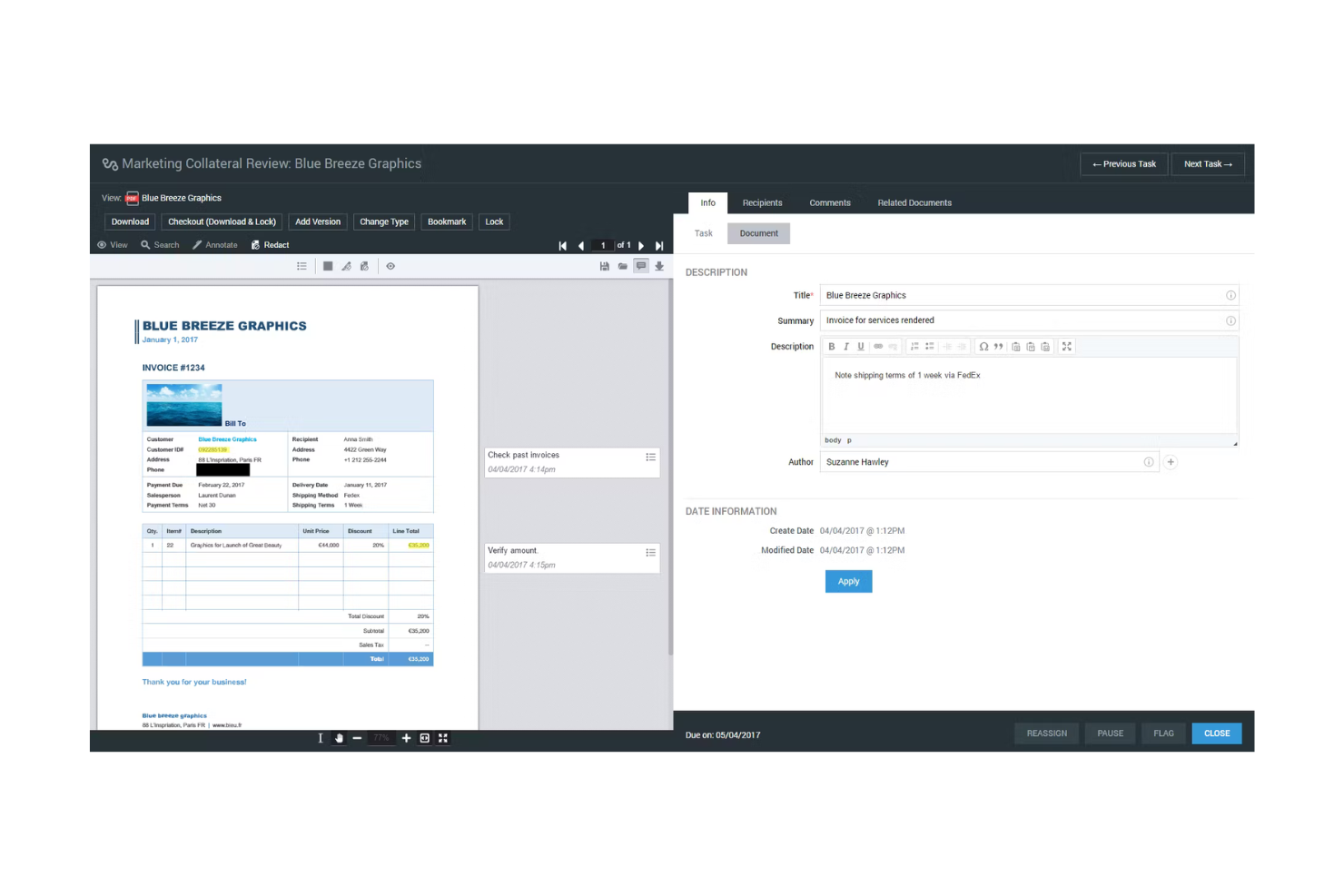
Xerox DocuShare è in questo elenco perché le sue capacità di gestione dei contenuti possono gestire il controllo dei documenti, l'indicizzazione e l'automazione dei flussi di lavoro su larga scala. Ritengo che sia ideale per le organizzazioni con requisiti complessi di governance e sicurezza che devono gestire milioni di file tra diversi team o unità aziendali.
Quello che apprezzo è come le funzionalità di automazione di DocuShare supportano la cattura ad alto volume, la categorizzazione intelligente e le politiche di conservazione. Questo si adatta bene a team che devono bilanciare la conformità e l'accessibilità delle informazioni senza troppa supervisione manuale.
DocuShare è ideale per
- Imprese con necessità complesse di conformità e governance dei documenti
- Organizzazioni che gestiscono contenuti ad alto volume e multidipartimentali
DocuShare non è l'ideale per
- Piccoli team con semplici esigenze di archiviazione documentale
- Chiunque abbia bisogno di una condivisione file semplice e leggera o di collaborazione basilare
Cosa distingue DocuShare
DocuShare è progettato pensando alla governance a livello aziendale, dove la gestione del ciclo di vita dei documenti e il rispetto rigoroso delle normative sono prioritari.
A differenza di Google Workspace, che predilige la collaborazione quotidiana, DocuShare è costruito per ambienti regolamentati che necessitano di processi formali per la cattura, la gestione e la conservazione dei documenti. In pratica, questa piattaforma rende al meglio quando si ha bisogno di un controllo granulare, politiche centralizzate e automazione nella gestione sicura dei documenti.
Compromessi con DocuShare
DocuShare è ottimizzato per la conformità e il controllo su larga scala, ma questo aggiunge complessità e può rallentare la collaborazione semplice o la condivisione rapida tra team più piccoli.
Pros and Cons
Pros:
- Robuste funzionalità di conformità
- Scalabile per grandi aziende
- Permessi utente personalizzabili
Cons:
- Richiede tempo iniziale di configurazione
- Potrebbe richiedere formazione agli utenti


ABBYY si distingue perché la sua tecnologia OCR è di un livello superiore per la gestione dei documenti su larga scala. Se gestisci grandi volumi di documenti cartacei scansionati o file basati su immagini, ABBYY estrae dati strutturati e metadati con una precisione superiore a qualsiasi altra piattaforma che abbia testato. Mi piace il fatto che puoi automatizzare la cattura e il riconoscimento di documenti in più lingue, una caratteristica rara a questo livello.
ABBYY è ideale per
- Organizzazioni che gestiscono grandi volumi di documenti scansionati
- Team che necessitano di OCR avanzato multilingue e acquisizione dati
ABBYY non è adatto per
- Gestione documentale semplice senza esigenze OCR
- Piccoli team che lavorano principalmente con file digitali e basati su testo
Cosa distingue ABBYY
ABBYY è pensato per le organizzazioni che dipendono dall'estrazione di testo e informazioni strutturate da file cartacei o basati su immagini su larga scala. Mentre Google Workspace e Microsoft SharePoint si concentrano sulla gestione dei file digitali, ABBYY presume che tu parta da documenti fisici, ricevute o PDF che non sono nativamente ricercabili. In pratica, funziona meglio quando la cattura e l'estrazione dei dati dai documenti sono elementi centrali del tuo flusso di lavoro, non un ripensamento.
Compromessi con ABBYY
ABBYY punta tutto su precisione elevata e OCR avanzato, ma ciò significa rinunciare a funzionalità di collaborazione snelle e strumenti di modifica integrati che ci si aspetterebbe da piattaforme documentali più generiche.
Pros and Cons
Pros:
- Elevata precisione nell'acquisizione dati
- Supporta più lingue
- Gestisce diversi tipi di documenti
Cons:
- Complessità nell'installazione iniziale
- Richiede formazione per un uso ottimale

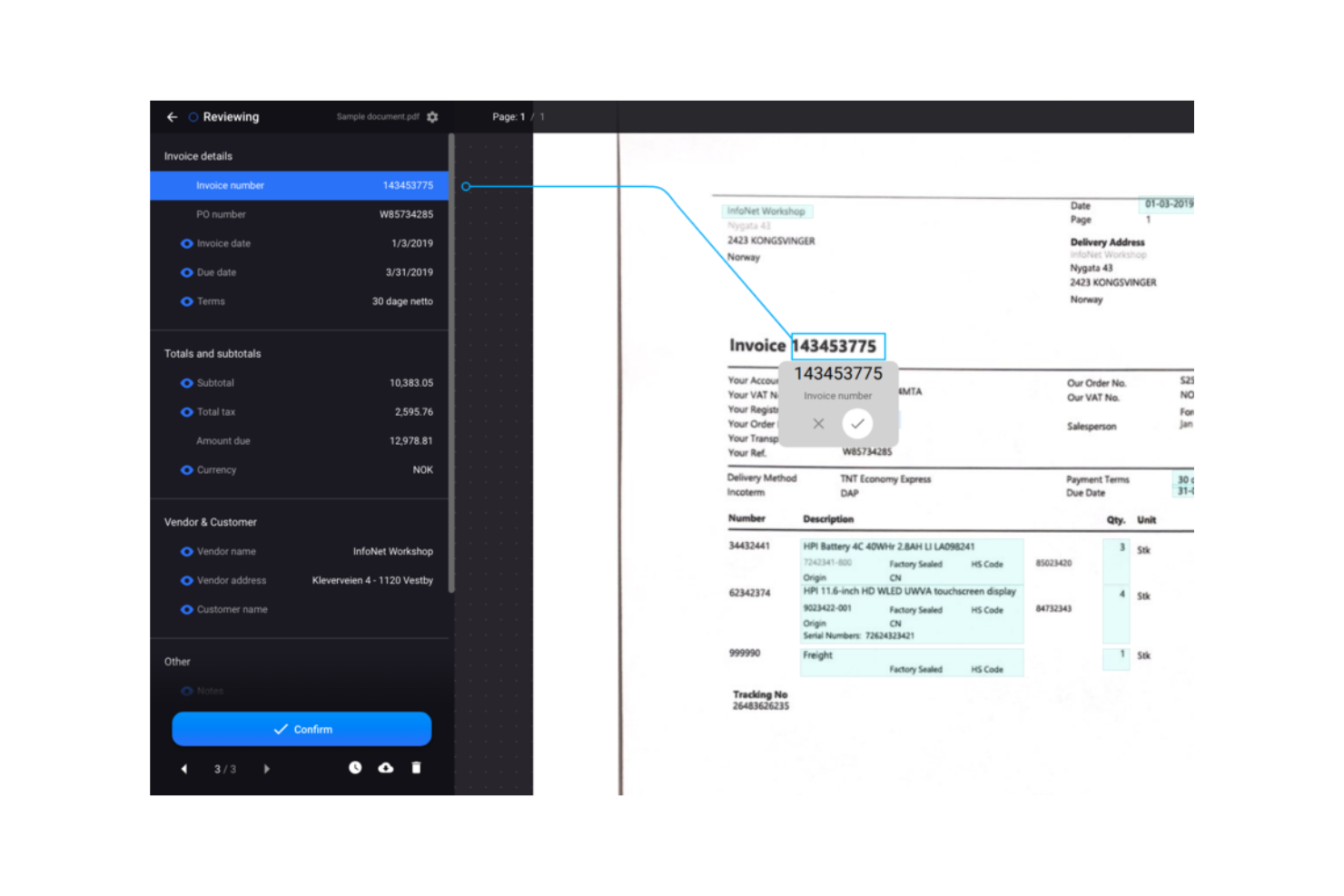
Rossum.ai entra nella mia lista perché la sua estrazione dati dalle fatture tramite intelligenza artificiale gestisce un livello di complessità documentale che la maggior parte degli strumenti non riesce a toccare. Vedo i team finanziari utilizzare Rossum.ai quando si trovano bloccati a inserire manualmente dati da fatture che cambiano aspetto ogni settimana.
Quello che apprezzo è che Rossum.ai apprende dalle correzioni, quindi l’estrazione continua a migliorare nel tempo. Se gestisci grandi volumi di fatture fornitori o formati in continuo cambiamento, questo aiuta ad evitare errori e dettagli mancanti.
Rossum.ai è ideale per
- Team finanziari che gestiscono grandi volumi di fatture fornitori
- Organizzazioni che necessitano estrazione tramite IA da formati fattura non strutturati
Rossum.ai non è l’ideale per
- Piccole imprese con un volume ridotto di fatture
- Team che priorizzano la gestione documentale oltre l’estrazione delle fatture
Cosa distingue Rossum.ai
Rossum.ai affronta l’elaborazione documentale aspettandosi che i team automatizzino i flussi di lavoro ad alto volume sulle fatture con modelli IA che apprendono da ogni correzione. A differenza di strumenti come Google Workspace o gli OCR tradizionali, Rossum.ai gestisce formati di fatture in continuo cambiamento e non standard senza affidarsi a template fissi. Lo vedo funzionare al meglio quando le fatture arrivano in molteplici formati e fonti, rendendo l’inserimento manuale doloroso e soggetto a errori.
Compromessi con Rossum.ai
Rossum.ai è ottimizzato per l’estrazione automatizzata delle fatture, ma questa specializzazione implica rinunciare a funzionalità più ampie di gestione documentale e alla flessibilità per contenuti diversi dalle fatture.
Pros and Cons
Pros:
- Processo di configurazione rapido
- Alta precisione nell’estrazione dei dati
- Opzioni di workflow personalizzabili
Cons:
- Limitato ai dati delle fatture
- Richiede connessione internet
Altri software di gestione dei documenti basati sull'AI
Ecco alcune ulteriori opzioni di software di gestione dei documenti basati sull’AI che non sono state incluse nel mio elenco, ma che vale comunque la pena valutare:
- Document360
Ideale per la creazione di basi di conoscenza
- Trupeer
Ideale per il miglioramento automatizzato degli script
- Affinda
Ideale per l'analisi e l'estrazione dei dati dai CV


Come valuto i software di gestione documentale AI
Ogni strumento in questo elenco deve offrire un reale valore aggiunto grazie all'AI—non basta aggiungere un chatbot ad un semplice archivio file e definirlo intelligente. Suddivido la mia valutazione in due livelli: la funzionalità di base che uno strumento deve possedere per qualificarsi (come classificazione AI, ricerca intelligente ed estrazione) e i fattori differenzianti che distinguono le opzioni buone da quelle eccellenti per i team di progetto.
Funzionalità di base (Requisiti Minimi per Questo Elenco)
Quando seleziono gli strumenti per la mia lista, valuto ciascuno su una scala da 0 (non offre la funzionalità) a 5 (eccelle in quest'area) per ciascuna funzionalità chiave elencata di seguito. Poi calcolo il punteggio totale dello strumento come percentuale. Ogni strumento deve raggiungere un punteggio totale minimo del 65% per essere considerato per l'inclusione.
- Classificazione Documentale AI: Cerco strumenti che etichettano e categorizzano automaticamente i caricamenti—ad esempio, organizzando SOW, ordini di modifica e note di riunione nei giusti folder di progetto senza sforzo manuale.
- Ricerca e Recupero Intelligente: Un project manager in cerca di una clausola specifica in un contratto di 90 pagine dovrebbe poter porre una domanda in linguaggio naturale e ottenere un risultato preciso, non centinaia di corrispondenze di parole chiave.
- AI per Riassunto ed Estrazione: Valuto se lo strumento riesce ad estrarre automaticamente scadenze, deliverable e attività da documenti come brief di progetto o accordi con fornitori.
- Archivio Documentale Centralizzato: La piattaforma deve offrire un sistema strutturato di archiviazione con permessi dove i team di progetto possono organizzare i file per area di lavoro, fase o flusso di lavoro con controlli di accesso chiari.
- Controllo Versioni e Automazione dei Flussi di Lavoro: Verifico la presenza di versionamento automatico e workflow di approvazione configurabili—ad esempio, l'inoltro di un piano di progetto rivisto attraverso approvazioni sequenziali prima della finalizzazione.
- Integrazioni con la Gestione Progetti: Strumenti che si collegano a piattaforme come Jira, Asana o Monday consentono ai team di collegare i documenti direttamente a compiti e milestone, aspetto che considero essenziale per un'adozione reale.
Una volta selezionati gli strumenti che soddisfano questi criteri, considero ciò che differenzia ciascuna piattaforma.
Fattori differenzianti (Cosa distingue i fornitori)
Ecco come confronto e metto a confronto i diversi fornitori:
Funzionalità distintive
Un assistente AI generativo integrato offre un valore reale quando i project manager possono porre domande a tutta la libreria documentale invece di aprire file uno alla volta. Ricerco anche insight trasversali tra documenti—l'AI che mette in evidenza dipendenze tra SOW collegate, ordini di modifica e pianificazioni fa risparmiare ore di controllo manuale incrociato. Il rilevamento automatico dei rischi è un altro elemento distintivo, soprattutto per gli strumenti che segnalano clausole mancanti o conflitti di versione nei contratti prima che diventino problemi in fase di esecuzione.
Oltre le funzionalità
Sicurezza e politiche di gestione dati AI sono aspetti molto importanti: verifico se i fornitori addestrano i modelli sui dati dei clienti e se offrono opzioni di implementazione privata. Per i team di progetto che si espandono su più portafogli, valuto anche la flessibilità del modello di licenza, poiché il prezzo per utente può diventare costoso rapidamente per grandi PMO. Considero inoltre il supporto all'implementazione. Gli strumenti che offrono assistenza alla migrazione e strumenti per l'importazione dei documenti rendono il passaggio molto meno faticoso rispetto alle piattaforme che lasciano l'utente da solo a dover gestire tutto.
Come scegliere un software di gestione dei documenti basato sull'AI
È facile perdersi in lunghi elenchi di funzionalità e strutture tariffarie complesse. Per aiutarti a rimanere concentrato mentre affronti il tuo specifico processo di selezione del software, ecco una lista di controllo dei fattori da tenere a mente:
| Fattore | Cosa considerare |
|---|---|
| Scalabilità | Il software può crescere insieme alla tua azienda? Considera il numero massimo di utenti e il volume di documenti supportati. Sono previsti costi aggiuntivi con l'aumentare delle dimensioni? |
| Integrazioni | Funziona con gli strumenti che utilizzi già? Verifica la compatibilità con i software esistenti, come i sistemi CRM, ERP o di posta elettronica, per evitare problemi in futuro. |
| Personalizzazione | Puoi adattare il software ai tuoi flussi di lavoro? Cerca opzioni per personalizzare i pannelli di controllo, le relazioni e i modelli di documenti in base ai processi del tuo team. |
| Semplicità d'uso | Il software è intuitivo per il tuo team? Una curva di apprendimento ripida può rallentarne l'adozione. Cerca interfacce facili da utilizzare e leggi le recensioni degli utenti per ottenere maggiori informazioni. |
| Implementazione e inserimento | Quanto tempo sarà necessario per iniziare a lavorare? Considera la disponibilità di risorse formative, il supporto durante la configurazione e la complessità della migrazione dei documenti esistenti. |
| Costo | Il prezzo rientra nel tuo budget? Cerca eventuali costi nascosti e considera il costo totale di proprietà nel tempo, inclusi eventuali componenti aggiuntivi o aggiornamenti. |
| Misure di sicurezza | In che modo il software protegge i tuoi dati? Verifica gli standard di crittografia, i controlli di accesso e la conformità alle normative sulla protezione dei dati per garantire la sicurezza. |
Cos'è un software di gestione dei documenti basato sull'AI?
Il software di gestione documentale basato sull'intelligenza artificiale è uno strumento che utilizza l'intelligenza artificiale per automatizzare l'organizzazione, l'archiviazione e il recupero dei documenti digitali. Questi strumenti sono comunemente utilizzati dai professionisti di settori come quello finanziario, sanitario e legale, offrendo valore aumentando l'efficienza e riducendo l'inserimento manuale dei dati.
Funzionalità come l'estrazione dei dati, i flussi di lavoro automatizzati e l'accesso sicuro aiutano a gestire grandi volumi di documenti e a garantire la conformità. Nel complesso, questi strumenti semplificano la gestione dei documenti e migliorano la produttività.
Funzionalità del software di gestione documentale basato sull'intelligenza artificiale
Quando scegli un software di gestione documentale basato sull'intelligenza artificiale, presta attenzione alle seguenti funzionalità principali:
- Estrazione dei dati: estrae automaticamente i dati rilevanti dai documenti, riducendo l'inserimento manuale e gli errori.
- Flussi di lavoro automatizzati: semplifica l'elaborazione dei documenti indirizzando le attività alle persone o ai sistemi appropriati.
- Accesso sicuro: garantisce che solo gli utenti autorizzati possano visualizzare o modificare i documenti, proteggendo le informazioni sensibili.
- Controllo delle versioni: tiene traccia delle modifiche e conserva le versioni precedenti, consentendo di accedere facilmente alla cronologia del documento.
- Modelli personalizzabili: consente di creare formati di documento adatti alle esigenze specifiche della tua azienda.
- Capacità di integrazione: si connette ad altri strumenti e software, migliorando la produttività complessiva.
- Scalabilità: supporta volumi crescenti di documenti e di utenti man mano che la tua azienda si espande.
- Supporto multilingue: gestisce documenti in più lingue, risultando utile per i team internazionali.
- Strumenti di analisi: fornisce informazioni sull'utilizzo e sulle prestazioni dei documenti, aiutando a migliorare i processi.
- Archiviazione basata sul cloud: offre un facile accesso ai documenti da qualsiasi luogo, agevolando il lavoro da remoto.
Vantaggi del software di gestione documentale basato sull'intelligenza artificiale
L'implementazione di un software di gestione documentale basato sull'intelligenza artificiale offre numerosi vantaggi al tuo team e alla tua azienda. Ecco alcuni dei vantaggi che puoi aspettarti:
- Maggiore efficienza: automatizza attività ripetitive come l'estrazione dei dati e l'instradamento dei documenti, facendo risparmiare tempo al tuo team.
- Maggiore accuratezza: riduce gli errori di inserimento manuale dei dati grazie alle funzionalità di elaborazione automatizzata dei dati.
- Maggiore sicurezza: protegge le informazioni sensibili con controlli di accesso sicuri e crittografia.
- Migliore collaborazione: consente a più utenti di accedere e modificare i documenti contemporaneamente, favorendo il lavoro di squadra.
- Scalabilità: cresce insieme alla tua azienda, adattandosi all'aumento dei documenti e degli utenti secondo necessità.
- Risparmio sui costi: riduce la necessità di spazio di archiviazione fisico e di lavoro manuale, abbassando i costi operativi.
- Processo decisionale informato: fornisce analisi e informazioni sull'utilizzo dei documenti, aiutando a definire le strategie aziendali.
Costi e prezzi del software di gestione documentale basato sull'intelligenza artificiale
La scelta di un software di gestione documentale basato sull'intelligenza artificiale richiede la comprensione dei vari modelli e piani tariffari disponibili. I costi variano in base alle funzionalità, alle dimensioni del team, agli extra e ad altri fattori. La tabella seguente riepiloga i piani più comuni, i relativi prezzi medi e le funzionalità tipicamente incluse nelle soluzioni software di gestione documentale basate sull'intelligenza artificiale:
Tabella comparativa dei piani per il software di gestione documentale basato sull'intelligenza artificiale
| Tipo di piano | Prezzo medio | Funzionalità comuni |
|---|---|---|
| Piano gratuito | $0 | Archiviazione documentale di base, estrazione dei dati limitata e semplici strumenti di collaborazione. |
| Piano personale | $5-$25/utente/mese | Elaborazione avanzata dei dati, controlli di accesso sicuri e monitoraggio della cronologia delle versioni. |
| Piano aziendale | $25-$50/utente/mese | Automazione dei flussi di lavoro, funzionalità di sicurezza avanzate e modelli personalizzabili. |
| Piano per grandi aziende | $50-$100+/utente/mese | Soluzioni di archiviazione scalabili, capacità di integrazione e strumenti di analisi completi. |
Domande frequenti sul software di gestione dei documenti con IA
Ecco alcune risposte alle domande comuni sul software di gestione dei documenti con IA:
In che modo la gestione dei documenti con IA migliora l'efficienza dei flussi di lavoro?
Il software di gestione dei documenti con IA automatizza le attività ripetitive, come l’estrazione e la classificazione dei dati, consentendo al tuo team di concentrarsi su attività più strategiche. Integrandosi con i flussi di lavoro esistenti, riduce gli errori manuali, velocizza l’elaborazione dei documenti e migliora la produttività complessiva.
Quali sono le funzionalità di sicurezza dei sistemi di gestione dei documenti con IA?
Questi sistemi offrono funzionalità come la crittografia, i controlli degli accessi e la conformità alle normative per proteggere i tuoi dati. Cerca un software che fornisca registri di controllo e l’autenticazione a due fattori, per garantire che solo gli utenti autorizzati possano accedere ai documenti sensibili.
Il software di gestione dei documenti con IA può integrarsi con i sistemi esistenti?
Sì, la maggior parte delle soluzioni di gestione dei documenti con IA offre integrazioni con strumenti comuni come CRM, ERP e servizi di archiviazione cloud. Verifica la compatibilità con i sistemi attuali per garantire un flusso di lavoro regolare ed evitare interruzioni durante l’implementazione.
Quanto sono personalizzabili le soluzioni di gestione dei documenti con IA?
Queste soluzioni offrono spesso modelli, flussi di lavoro e dashboard personalizzabili per adattarsi alle tue esigenze specifiche. Valuta quanto facilmente puoi configurare il software per allinearlo ai processi aziendali e se offre la flessibilità necessaria per adattarsi al cambiamento delle tue esigenze.
Qual è il processo tipico di inserimento dei nuovi utenti?
L’inserimento solitamente prevede sessioni di formazione, tour del prodotto e accesso a risorse di supporto come webinar e documentazione. Un buon processo di inserimento garantisce che il team possa adattarsi rapidamente al nuovo sistema e iniziare a sfruttarne i vantaggi senza dover affrontare una curva di apprendimento ripida.
In che modo il software di gestione dei documenti con IA gestisce i requisiti di conformità?
Questi strumenti spesso includono funzionalità che aiutano a rispettare standard di conformità come HIPAA o GDPR. Forniscono controlli degli accessi sicuri e registri di controllo per garantire che le pratiche di gestione dei documenti siano conformi ai requisiti normativi, riducendo il rischio di non conformità.