

I 10 migliori software per la gestione dei documenti dei clienti per il 2026

Selezione di software per la gestione dei documenti dei clienti


Il software per la gestione dei documenti dei clienti consente al tuo team di organizzare, archiviare e condividere in modo sicuro i file dei clienti in un unico luogo. Se stai cercando il modo migliore per gestire documenti sensibili, archiviazione dei file, monitorare le modifiche e controllare gli accessi tra team distribuiti, sai quanto rapidamente i processi aziendali manuali possono andare in crisi. La piattaforma giusta ti aiuta a gestire diversi tipi di file, mantenere la conformità e garantire che tutti lavorino sulla versione più recente, senza infiniti scambi di email o allegati persi.
Inoltre, molti strumenti combinano anche funzionalità di gestione delle attività con un'interfaccia intuitiva. Di conseguenza, è più facile coordinare il lavoro mantenendo organizzati i documenti dei clienti. In questa guida troverai un confronto chiaro dei principali strumenti per la gestione dei documenti dei clienti per il 2026, così potrai scegliere quello più adatto al tuo flusso di lavoro, alle tue esigenze di sicurezza e al tuo stile di collaborazione.
Perché fidarsi dei nostri consigli sui software
Il nostro team testa e recensisce software dal 2012. In quanto project manager noi stessi, sappiamo quanto sia difficile — e importante — scegliere il software giusto.
Per questa guida, abbiamo valutato gli strumenti attraverso test pratici e ricerche indipendenti, assegnando un punteggio agli strumenti in base ai nostri criteri di selezione. Ci basiamo inoltre sulle competenze di leader di pensiero del settore e di professionisti attivi nella gestione dei progetti.
Le nostre recensioni riflettono il nostro giudizio editoriale umano, non un discorso di vendita.
Revisori esperti:
Riepilogo dei migliori software per la gestione dei documenti dei clienti
Questa tabella comparativa riassume i dettagli sui prezzi delle mie migliori selezioni di software per la gestione dei documenti dei clienti, per aiutarti a trovare quello più adatto al tuo budget e alle tue esigenze aziendali.
| Tool | Best For | Trial Info | Price | ||
|---|---|---|---|---|---|
| 1 | Ideale per l'elaborazione documentale multilingue | Demo gratuita disponibile | Prezzo su richiesta | Website | |
| 2 | Ideale per la modifica collaborativa di documenti in tempo reale | Prova gratuita di 14 giorni e piano gratuito disponibile | Da $6.30/mese (fatturazione annuale) | Website | |
| 3 | Ideale per l'integrazione con l'ecosistema Microsoft | Piano gratuito disponibile | Da £1,99/utente/mese | Website | |
| 4 | Ideale per strumenti di produttività integrati | Prova gratuita di 30 giorni disponibile | Da $6/utente/mese (fatturazione annuale) | Website | |
| 5 | Ideale per il monitoraggio dei documenti dei casi legali | Prova gratuita + demo gratuita disponibili | Prezzo su richiesta | Website | |
| 6 | Ideale per l'instradamento automatico dei flussi di lavoro | Demo gratuita disponibile | Prezzo su richiesta | Website | |
| 7 | Ideale per controlli avanzati di collaborazione | Prova gratuita di 14 giorni + piano gratuito + demo gratuita disponibile | Da $5/utente/mese (fatturato annualmente) | Website | |
| 8 | Ideale per la ricerca basata sui metadati | Prova gratuita di 30 giorni + demo gratuita disponibile | Da $65/utente/mese | Website | |
| 9 | Ideale per la condivisione sicura di file con i clienti | Demo gratuita + prova gratuita disponibile | Da $50/utente/mese (fatturato annualmente) | Website | |
| 10 | Ideale per esigenze di gestione della conformità | Prova gratuita di 14 giorni + demo gratuita disponibile | Da $25/utente/mese | Website |
Recensioni dei software per la gestione dei documenti dei clienti
Di seguito trovi i miei riepiloghi dettagliati dei software per la gestione dei documenti dei clienti inclusi nella mia selezione. Le mie recensioni offrono un’analisi approfondita delle funzionalità, dei casi d’uso migliori e delle integrazioni di ciascuna piattaforma, per aiutarti a trovare quella più adatta a te.
Doxis
Ideale per l'elaborazione documentale multilingue
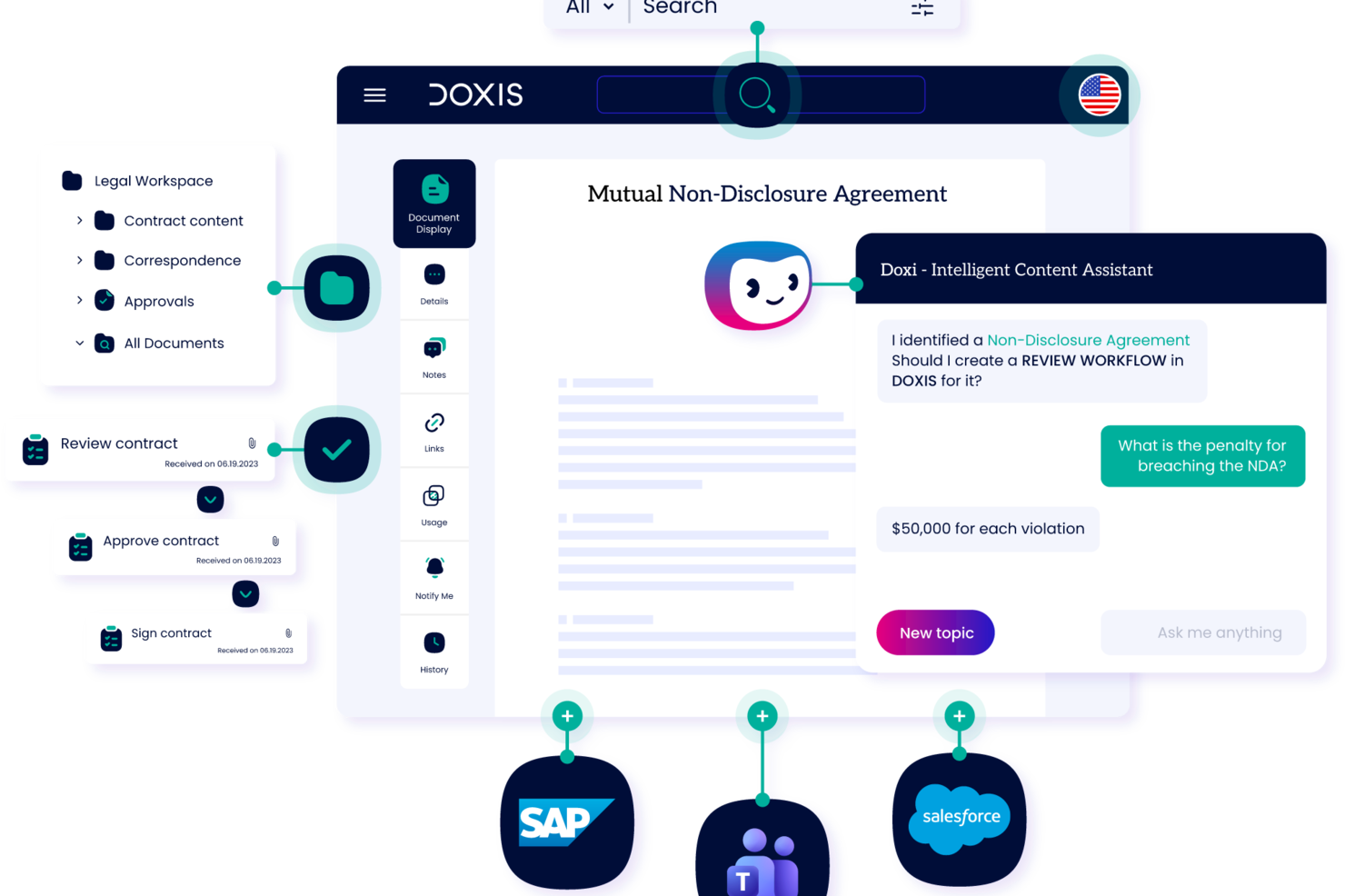
Doxis è una piattaforma di gestione dei contenuti aziendali che unisce acquisizione documentale tramite intelligenza artificiale, fascicoli elettronici dei clienti, flussi di lavoro automatizzati e archiviazione conforme alle normative in un unico sistema configurabile.
Per chi è pensato Doxis?
Doxis è adatto alle medie e grandi imprese in settori regolamentati che necessitano di un sistema configurabile e conforme per gestire grandi volumi di documenti dei clienti tra diversi dipartimenti.
Perché ho scelto Doxis
Ho incluso Doxis tra le mie scelte principali perché il suo modulo AI.dp rileva ed elabora documenti in oltre 100 lingue, inclusi documenti multilingue, il che rappresenta un vero elemento distintivo per i team aziendali che gestiscono fascicoli clienti nei mercati internazionali. In pratica, questo significa che il mio team può eseguire gli stessi flussi di lavoro per classificazione automatica ed estrazione dati sia su un contratto scritto in arabo o cinese, sia su uno redatto in inglese, senza dover creare pipeline separate. Inoltre, apprezzo che l'interfaccia della piattaforma sia disponibile in 12 lingue ufficiali, coprendo 135 Paesi, affinché i team che gestiscono i documenti non debbano usare un sistema pensato per un'altra area geografica.
Caratteristiche principali di Doxis
- Fascicoli elettronici dei clienti: Consolida contratti, email, fatture e documenti correlati in un unico dossier cliente completo.
- Archiviazione a prova di audit: Conserva i documenti in archivi non alterabili con piani di conservazione conformi al GDPR e regole di eliminazione automatica.
- Automazione dei workflow documentali: Instrada i documenti attraverso approvazioni multi-stadio con regole di delega e sostituzione.
- Controllo degli accessi basato sui ruoli: Limita la visualizzazione e modifica dei documenti in base al ruolo utente, al team o all'unità organizzativa.
Integrazioni Doxis
Doxis offre integrazioni native con SAP, Salesforce e l'ecosistema Microsoft, inclusi Microsoft 365, Microsoft Teams, Microsoft Outlook, Microsoft SharePoint e Microsoft Dynamics 365. Fornisce inoltre una REST API per integrazioni personalizzate, oltre a connettori indipendenti dal fornitore per sistemi ERP, CRM, HR e CAD. Il supporto a Zapier non è ancora chiaro.
Pros and Cons
Pros:
- Supporta la classificazione documentale multilingue
- Archiviazione a prova di audit con controlli non alterabili
- Integrazione profonda con SAP e Salesforce
Cons:
- Progettato principalmente per implementazioni su scala aziendale
- La qualità del supporto dipende dal singolo agente

Ideale per la modifica collaborativa di documenti in tempo reale

Se il tuo team ha bisogno di collaborare in tempo reale su documenti dei clienti, Google Drive è una scelta eccellente. È particolarmente utile per agenzie, società di consulenza e team distribuiti che fanno affidamento su una modifica e una commentazione condivise e rapide. Google Drive si distingue per la co-autorizzazione in tempo reale, i controlli di condivisione intuitivi e l'integrazione perfetta con le app di Google Workspace.
Perché ho scelto Google Drive
Per i team che devono modificare e revisionare insieme i documenti dei clienti, le funzionalità di collaborazione in tempo reale di Google Drive sono difficili da superare. Ho scelto Google Drive perché consente a più utenti di lavorare simultaneamente sullo stesso documento, con modifiche e commenti visualizzati all'istante. La cronologia delle versioni integrata facilita il monitoraggio delle modifiche e il ripristino di bozze precedenti, se necessario. Queste caratteristiche rendono Google Drive particolarmente adatto alla gestione dei documenti dei clienti, dove il feedback immediato e la rapidità di esecuzione sono fondamentali.
Funzionalità chiave di Google Drive
Altre funzionalità che rendono Google Drive utile per la gestione dei documenti dei clienti includono:
- Drive condivisi: Crea spazi dedicati per team o clienti per organizzare e accedere collettivamente ai documenti.
- Filtri di ricerca avanzati: Trova rapidamente i file utilizzando filtri per proprietario, tipo, data di modifica e altro.
- Controlli di scadenza dei file: Imposta una data di scadenza per l’accesso ai file condivisi per mantenere la riservatezza del cliente.
- Accesso offline: Visualizza e modifica i documenti anche senza connessione Internet, sincronizzando le modifiche quando torni online.
Integrazioni Google Drive
Le integrazioni includono Google Docs, Google Sheets, Google Slides, Gmail, Google Calendar, Google Meet, Tableau, Atlassian e altre ancora.
Pros and Cons
Pros:
- La modifica in tempo reale supporta una collaborazione clienti veloce
- La cronologia delle versioni tiene traccia di tutte le modifiche ai documenti
- I Drive condivisi organizzano i file per cliente o team
Cons:
- Non è presente una funzionalità di firma elettronica integrata
- I risultati di ricerca possono includere file non pertinenti

OneDrive
Ideale per l'integrazione con l'ecosistema Microsoft
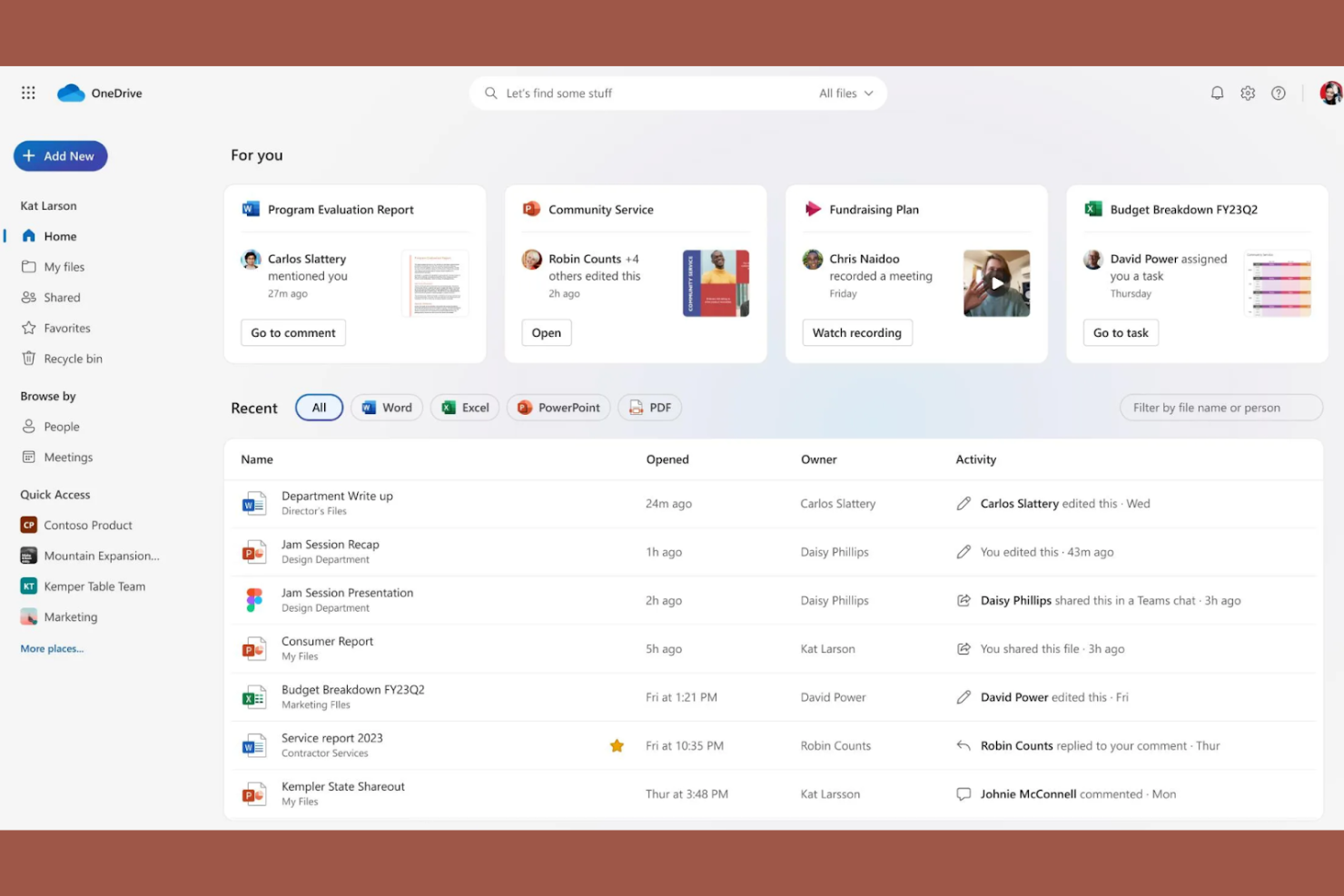
Per le aziende che già utilizzano Microsoft 365, OneDrive offre un modo familiare per gestire e condividere i documenti dei clienti. È particolarmente utile per i team IT, le società di consulenza e i servizi professionali che si affidano alle app Microsoft per il lavoro quotidiano. OneDrive si distingue per la sua profonda integrazione con Outlook, Teams e SharePoint, rendendo semplice mantenere i file dei clienti collegati ai flussi di lavoro esistenti.
Perché ho scelto OneDrive
Quando il tuo team si affida agli strumenti di Microsoft 365, OneDrive si inserisce naturalmente nel processo di gestione dei documenti dei clienti. Ho scelto OneDrive perché consente di salvare, condividere e modificare i file direttamente dalle app familiari come Outlook e Teams. La sincronizzazione automatica con SharePoint garantisce che i documenti dei clienti restino organizzati e accessibili in tutta l'organizzazione. Queste funzionalità rendono OneDrive una scelta solida per le aziende che desiderano una gestione documentale strettamente integrata nell'ecosistema Microsoft.
Funzionalità principali di OneDrive
Altre funzionalità che rendono OneDrive utile per la gestione dei documenti dei clienti includono:
- Richiesta di file: Raccogli documenti dai clienti in modo sicuro senza dare loro accesso alle tue cartelle.
- Cassaforte personale: Conserva i file sensibili dei clienti in un'area protetta con un ulteriore livello di sicurezza.
- Permessi di condivisione granulari: Imposta i diritti di visualizzazione, modifica o download per ogni file o cartella.
- Rilevamento automatico di ransomware: Ricevi avvisi e opzioni di recupero dei file se viene rilevata un'attività sospetta.
Integrazioni OneDrive
Le integrazioni includono Microsoft 365, Outlook, Teams, SharePoint, Power Automate, Power BI, Dynamics 365 e altro ancora.
Pros and Cons
Pros:
- Integrazione diretta nella chat di Microsoft Teams
- La funzione Richiesta di file semplifica il caricamento dei documenti da parte dei clienti
- Accesso offline ai file per il lavoro con i clienti da remoto
Cons:
- I conflitti di sincronizzazione possono causare file duplicati dei clienti
- Nessun strumento integrato di annotazione dei documenti

Ideale per strumenti di produttività integrati

Se il tuo team ha bisogno di una gestione dei documenti dei clienti strettamente connessa agli strumenti di produttività, Microsoft 365 riunisce tutto sotto un unico tetto. È una scelta ideale per società di consulenza, agenzie e servizi professionali che desiderano archiviazione, modifica e collaborazione sui documenti nello stesso ambiente di email, calendari e riunioni. Con app integrate come Word, Excel e SharePoint, puoi gestire i file e le comunicazioni dei clienti senza cambiare piattaforma.
Perché ho scelto Microsoft 365
Ciò che distingue Microsoft 365 per la gestione dei documenti dei clienti è il modo in cui unisce l’archiviazione dei documenti agli strumenti di produttività integrati. Ho scelto Microsoft 365 perché puoi creare, modificare e condividere i file dei clienti utilizzando Word, Excel e PowerPoint senza uscire dalla piattaforma. SharePoint aggiunge librerie di documenti strutturate e controlli sui permessi, che aiutano i team a organizzare e proteggere i materiali dei clienti. Questo approccio all-in-one ti permette di gestire e collaborare in tempo reale sui documenti dei clienti, tutto all’interno dello stesso spazio di lavoro.
Funzionalità chiave di Microsoft 365
Altre funzionalità che rendono Microsoft 365 utile per la gestione dei documenti dei clienti includono:
- Prevenzione della perdita dei dati (DLP): Configura policy per aiutare a prevenire la condivisione accidentale di informazioni sensibili dei clienti.
- Co-Authoring: Più membri del team possono lavorare sullo stesso documento contemporaneamente.
- eDiscovery: Cerca ed esporta i documenti dei clienti per esigenze di natura legale o di conformità.
- Sincronizzazione OneDrive: Accedi e sincronizza i file dei clienti su più dispositivi per lavorare offline.
Integrazioni Microsoft 365
Le integrazioni includono Microsoft Teams, OneDrive, SharePoint, Outlook, Power BI, Dynamics 365 e altro ancora.
Pros and Cons
Pros:
- Le policy DLP integrate proteggono i dati dei clienti
- eDiscovery supporta le esigenze legali e di conformità
- Microsoft Purview aggiunge strumenti di audit e conformità
Cons:
- I permessi di SharePoint possono essere complessi da gestire
- La condivisione dei file all’esterno dell’organizzazione è spesso limitata

Filevine
Ideale per il monitoraggio dei documenti dei casi legali

Filevine è progettato per i team legali che necessitano di tracciare, organizzare e collaborare su documenti di casi durante l'intero ciclo di vita di una pratica. È particolarmente utile per studi legali e dipartimenti legali che gestiscono un alto volume di fascicoli, scadenze e comunicazioni con i clienti. Grazie al suo approccio centrato sul caso, Filevine aiuta a mantenere ogni documento, nota e attività collegata al cliente e alla pratica giusta.
Perché ho scelto Filevine
Il monitoraggio dei documenti dei casi legali è uno dei punti di forza principali di Filevine, il che lo rende una scelta solida per studi legali e team legali. La piattaforma organizza tutti i documenti, le note e le comunicazioni per caso, così sai sempre dove trovare il file giusto. Mi piace che Filevine offra anche il monitoraggio di scadenze e attività direttamente collegate a ogni pratica, aiutando il team a rispettare le date critiche e le consegne. Per i professionisti del settore legale che devono gestire fascicoli complessi e mantenere una tracciabilità chiara, queste funzionalità rendono Filevine una soluzione mirata.
Funzionalità principali di Filevine
Altre funzionalità di Filevine che supportano la gestione dei documenti dei clienti includono:
- Strumenti di generazione documentale: Crea e compila i documenti legali utilizzando modelli personalizzabili.
- Integrazione tra messaggi e fascicolo: Invia messaggi di testo direttamente a un fascicolo per la documentazione automatica.
- Raccolta di firme elettroniche: Richiedi e traccia le firme elettroniche all'interno della piattaforma.
- Controlli di accesso basati sui ruoli: Imposta i permessi per gli utenti in base al ruolo o al coinvolgimento nella pratica.
Integrazioni di Filevine
Le integrazioni includono Outlook, Gmail, QuickBooks, LawPay, Dropbox, Box, Google Drive, Microsoft Teams e altri.
Pros and Cons
Pros:
- Documentazione dei messaggi integrata nei fascicoli
- Generazione automatica di documenti da modelli
- Raccolta di firme elettroniche direttamente sulla piattaforma
Cons:
- La ricerca documentale può essere lenta con grandi volumi
- La configurazione dei report personalizzati richiede l'assistenza del fornitore

DocuWare
Ideale per l'instradamento automatico dei flussi di lavoro

DocuWare si distingue per i team che hanno bisogno di automatizzare flussi di lavoro documentali complessi e processi di approvazione. È particolarmente utile per le organizzazioni che gestiscono grandi volumi di documenti, come le aree finanza, risorse umane e operations. La piattaforma aiuta a ridurre i passaggi manuali e gli errori permettendo di progettare e avviare flussi di lavoro su più fasi direttamente dal repository documentale, supportando al contempo la firma elettronica per semplificare approvazioni e completamento dei documenti.
Perché ho scelto DocuWare
L'instradamento automatico dei flussi di lavoro è il punto di forza di DocuWare per la gestione dei documenti dei clienti. La piattaforma consente di creare flussi di lavoro personalizzati che instradano automaticamente i documenti per revisione, approvazione o archiviazione in base alle regole definite. Apprezzo il fatto che sia possibile attivare notifiche e assegnare compiti man mano che i documenti avanzano nelle varie fasi: questo aiuta i team a evitare colli di bottiglia e solleciti manuali. Per le organizzazioni che devono gestire grandi quantità di documentazione dei clienti con controlli rigorosi sui processi, le funzionalità di automazione dei flussi di lavoro di DocuWare rappresentano una soluzione ideale.
Funzionalità principali di DocuWare
Altre funzionalità di DocuWare che supportano la gestione documentale includono:
- Controllo delle versioni dei documenti: Traccia le modifiche e conserva la cronologia completa di modifiche e aggiornamenti dei documenti.
- Permessi di accesso basati sui ruoli: Imposta livelli di accesso dettagliati per utenti e gruppi per proteggere le informazioni sensibili.
- Ricerca full-text: Trova rapidamente i documenti utilizzando parole chiave e metadati su tutto il repository.
- Gestione documenti da mobile: Accedi, revisiona e approva i documenti da dispositivi mobili usando l'app DocuWare.
Integrazioni di DocuWare
Le integrazioni includono Microsoft Dynamics 365, SAP, Outlook, Sage, QuickBooks, SharePoint, Oracle e altri.
Pros and Cons
Pros:
- Ricerca full-text su tutti i documenti archiviati
- Accesso basato su ruoli per controllo granulare dei permessi
- Controllo delle versioni con cronologia dettagliata dei documenti
Cons:
- Segnalati occasionali ritardi nell'indicizzazione dei documenti
- Gli aggiornamenti dell'interfaccia possono interrompere i flussi di lavoro consolidati

Box
Ideale per controlli avanzati di collaborazione
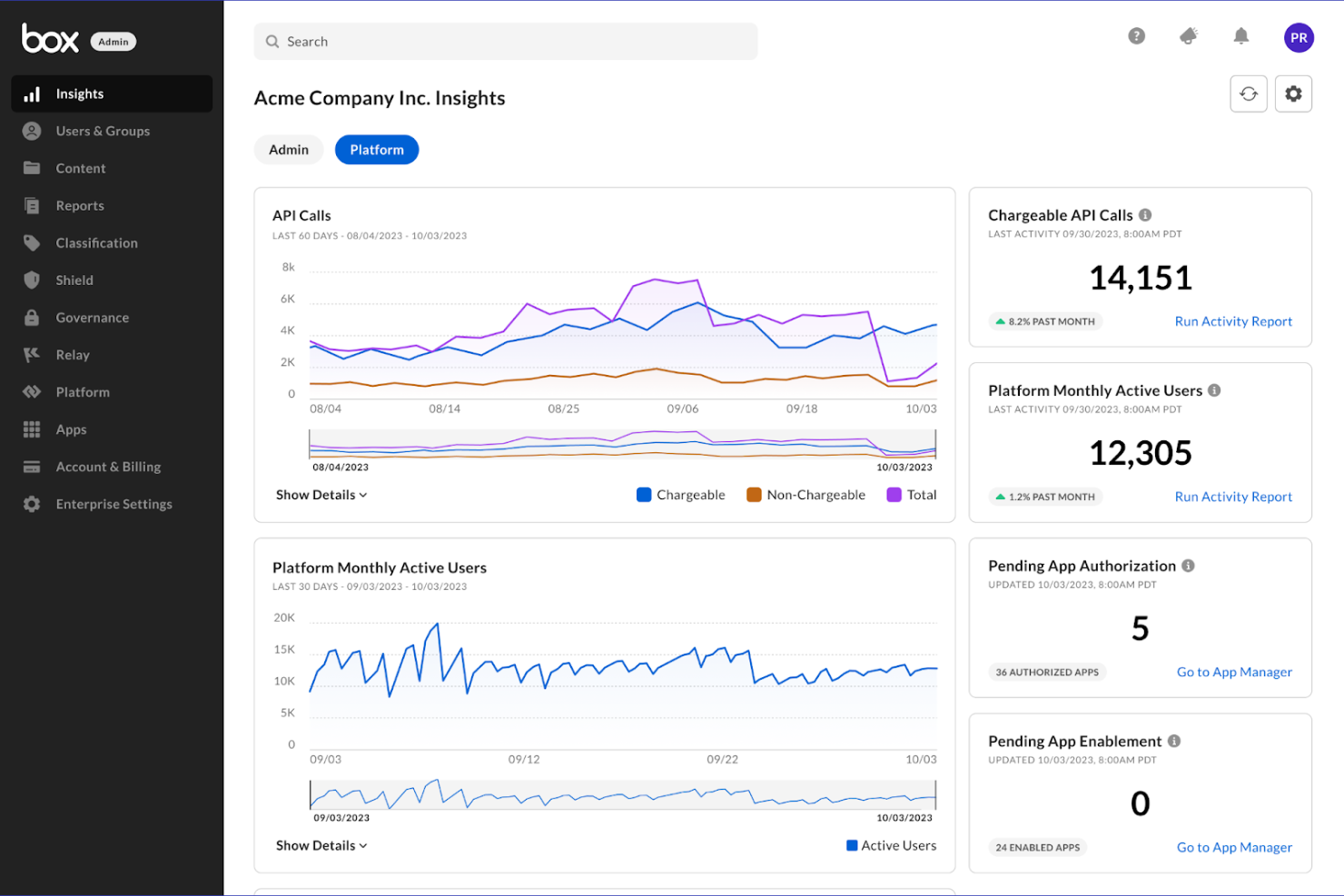
Box è progettato per i team che necessitano di un controllo granulare sulla condivisione e la collaborazione dei documenti. È particolarmente adatto per le organizzazioni in settori regolamentati o per chi gestisce file sensibili di clienti tra team distribuiti. Grazie alle impostazioni avanzate dei permessi e al monitoraggio dettagliato delle attività, Box ti aiuta a gestire chi può accedere, modificare o condividere i documenti dei clienti in ogni fase.
Perché ho scelto Box
Le avanzate opzioni di controllo della collaborazione rendono Box eccellente per la gestione dei documenti dei clienti. La piattaforma ti permette di impostare permessi dettagliati a livello di file, cartella o utente, così puoi controllare esattamente chi può visualizzare, modificare o condividere documenti sensibili dei clienti. Mi piace anche che Box offra audit trail e registri delle attività, che aiutano a tracciare gli accessi e le modifiche ai documenti per la conformità o la trasparenza verso il cliente. Per i team che devono gestire file riservati e coordinarsi tra dipartimenti o con partner esterni, queste funzioni di collaborazione rendono Box una scelta solida.
Caratteristiche principali di Box
Altre funzionalità di Box che supportano la gestione dei documenti dei clienti includono:
- Filigranatura dei documenti: Aggiungi filigrane visibili ai file per scoraggiare la condivisione o la copia non autorizzata.
- Politiche di conservazione automatizzata: Imposta regole per la conservazione dei documenti e la cancellazione automatica per supportare i requisiti di conformità.
- Integrazione con eSignature: Raccogli firme elettroniche legalmente vincolanti direttamente su Box tramite Box Sign.
- Link di richiesta file: Crea link sicuri che permettono a clienti o partner di caricare documenti direttamente nelle cartelle designate.
Integrazioni Box
Le integrazioni includono Microsoft Office 365, Google Workspace, Salesforce, Slack, Adobe, Servicenow e altro ancora.
Pros and Cons
Pros:
- Raccolta delle firme elettroniche integrata nella piattaforma
- Politiche di conservazione automatizzate per supporto alla conformità
- I link di richiesta file semplificano la ricezione dei documenti dai clienti
Cons:
- Le velocità di caricamento possono rallentare con file di grandi dimensioni
- La struttura delle cartelle può diventare rapidamente complessa

M-Files
Ideale per la ricerca basata sui metadati
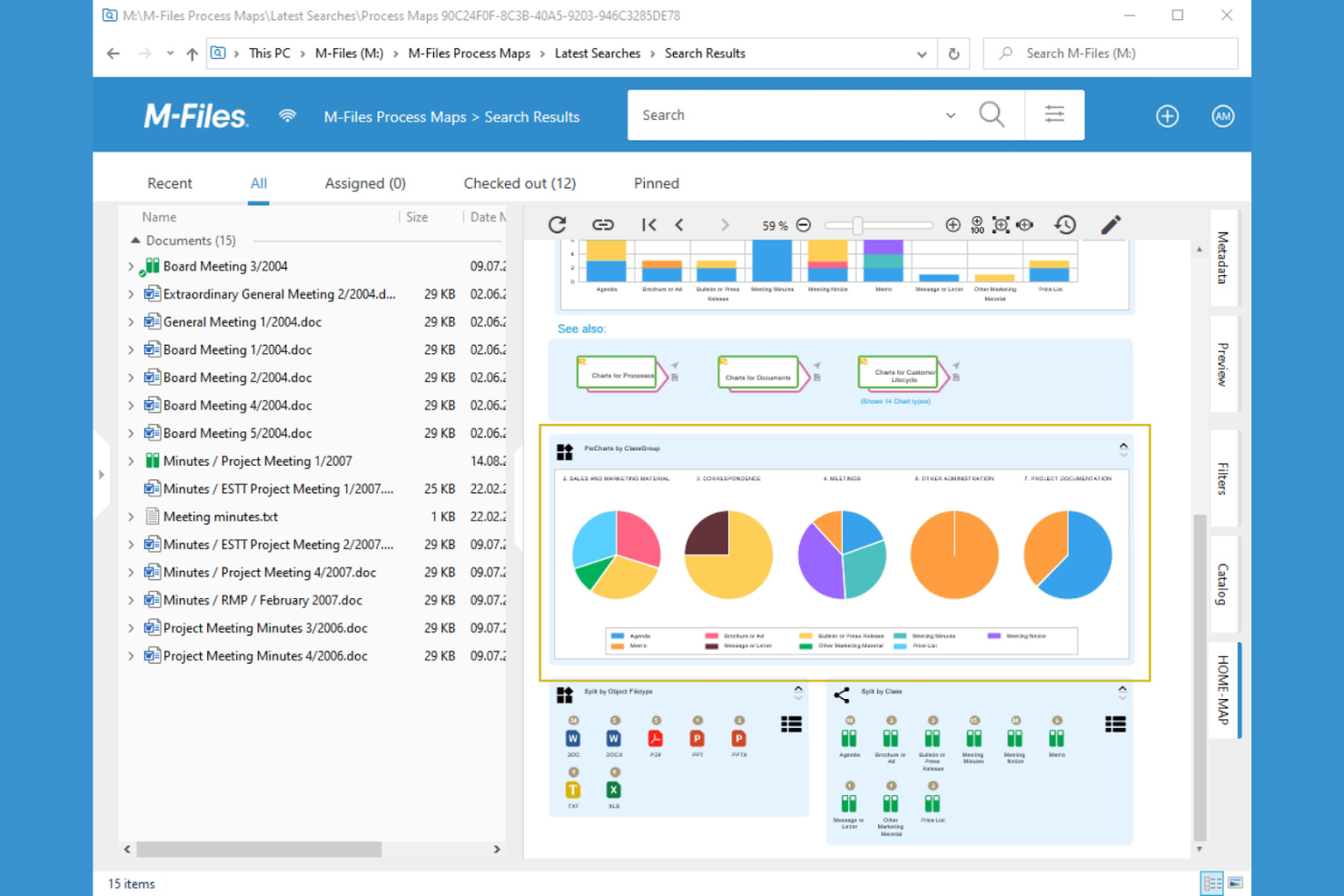
M-Files adotta un approccio alla gestione dei documenti basato sui metadati, facilitando la ricerca e l’organizzazione dei file dei clienti in base a cosa sono e non solo dove sono archiviati. Questa piattaforma è particolarmente utile per studi professionali, team legali e società di consulenza che gestiscono grandi volumi di documenti con complesse esigenze di ricerca e conformità. M-Files si distingue per la capacità di automatizzare la classificazione dei documenti e rendere rapidamente disponibili i contenuti rilevanti, anche su più repository.
Perché ho scelto M-Files
Ciò che distingue M-Files è la ricerca basata sui metadati, che aiuta i team a trovare i documenti dei clienti in base al contesto e al contenuto anziché alla posizione delle cartelle. Ho scelto M-Files perché consente di etichettare i file con metadati personalizzati, rendendo molto più semplice organizzare e recuperare informazioni tra progetti e clienti. La classificazione automatica dei documenti e i filtri di ricerca avanzati della piattaforma permettono di individuare rapidamente i file corretti, anche in repository estesi e distribuiti. Per i team che devono gestire archivi complessi di clienti e garantire che nulla venga perso, queste funzionalità rendono M-Files una soluzione solida.
Funzionalità principali di M-Files
Altre funzionalità di M-Files che supportano la gestione dei documenti dei clienti includono:
- Instradamento automatizzato dei workflow: Assegna i documenti a utenti o team specifici in base a regole predefinite.
- Permessi di accesso dettagliati: Controlla chi può visualizzare, modificare o condividere ciascun documento in modo dettagliato.
- Versionamento dei documenti: Mantieni una cronologia completa delle modifiche e torna facilmente alle versioni precedenti.
- Integrazione con firme elettroniche: Raccogli firme elettroniche legalmente vincolanti direttamente dalla piattaforma.
Integrazioni di M-Files
Le integrazioni includono Microsoft 365, Salesforce, SAP, Google Workspace e altro ancora.
Pros and Cons
Pros:
- La cronologia delle versioni traccia tutte le modifiche ai documenti
- I permessi dettagliati limitano l'accesso ai file dei clienti
- Le tracce di audit aiutano a soddisfare i requisiti di conformità
Cons:
- L'installazione del client desktop è necessaria per tutte le funzionalità
- La configurazione della ricerca avanzata richiede l'intervento dell'amministratore

Ideale per la condivisione sicura di file con i clienti

SmartVault è progettato per i team che necessitano di condivisione centralizzata e sicura di file e archiviazione documenti dei clienti. È una soluzione ideale per studi contabili, consulenti finanziari e altri professionisti che gestiscono dati sensibili dei clienti. La piattaforma risponde alle sfide relative ad accessi sicuri, tracciabilità delle attività e requisiti di conformità nelle comunicazioni con i clienti. Con caratteristiche come archiviazione cloud, strumenti per la firma dei documenti e flussi di lavoro che supportano operazioni senza carta, SmartVault aiuta i team a dedicare meno tempo alla gestione dei file mantenendo la sicurezza. Molte organizzazioni fanno anche riferimento a casi di studio per valutare come la piattaforma supporti la gestione sicura dei documenti dei clienti.
Perché ho scelto SmartVault
Ho scelto SmartVault perché la condivisione sicura dei file dei clienti è una priorità assoluta per molte aziende che trattano informazioni riservate. La piattaforma offre crittografia a livello bancario e permessi di accesso personalizzabili, aiutando i team a controllare esattamente chi può visualizzare o modificare i documenti sensibili. Apprezzo inoltre che SmartVault fornisca registri dettagliati delle attività, così da poter tracciare ogni interazione con i documenti ai fini della conformità e della responsabilizzazione. Queste funzioni la rendono una scelta solida per i professionisti che devono proteggere i dati dei clienti mantenendo flussi di lavoro efficienti.
Funzionalità principali di SmartVault
Altre funzionalità di SmartVault che supportano la gestione dei documenti dei clienti includono:
- Portale clienti: I clienti possono caricare, scaricare e visualizzare i documenti in modo sicuro tramite un portale online personalizzato.
- Elenco richieste documenti: Crea ed invia ai clienti le liste dei documenti necessari, monitorando le consegne in tempo reale.
- Integrazione con eSignature: Raccogli firme elettroniche legalmente vincolanti direttamente dalla piattaforma.
- Modelli di cartelle: Standardizza la struttura delle cartelle per diversi tipi di clienti o progetti per mantenere i file organizzati.
Integrazioni di SmartVault
Le integrazioni includono QuickBooks Online, Xero, Sage Intacct, Bill.com, Hubdoc, Salesforce, Microsoft Office 365, DocuSign, Adobe Sign, Intuit ProConnect e altri.
Pros and Cons
Pros:
- Portale clienti sicuro per la condivisione dei documenti
- Tracciabilità dettagliata per monitorare la conformità
- Elenco richieste documenti per le consegne dei clienti
Cons:
- Segnalata occasionalmente lentezza nel caricamento dei file dagli utenti
- L’interfaccia può sembrare datata rispetto ai concorrenti
Revver
Ideale per esigenze di gestione della conformità
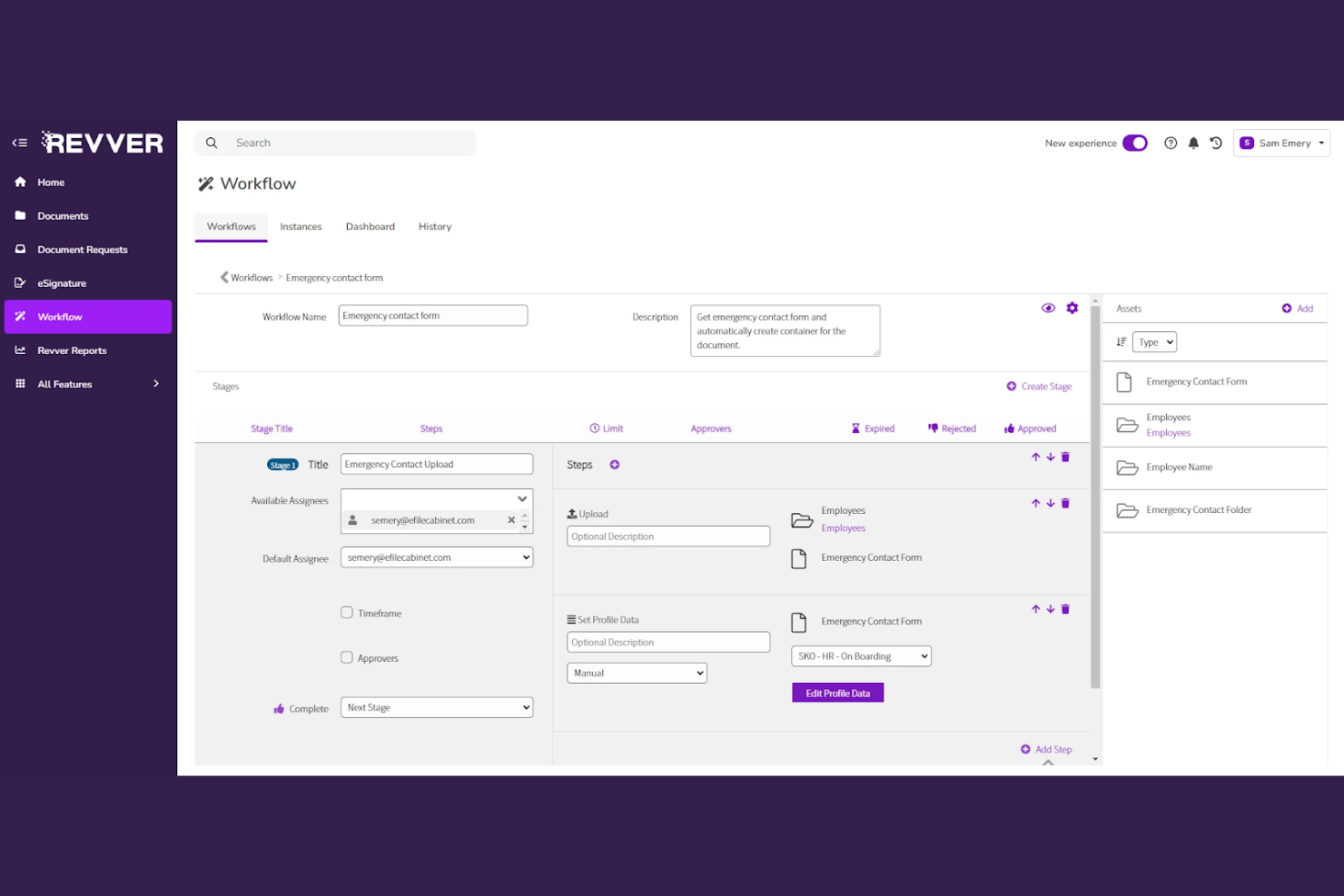
Revver è progettato per le organizzazioni che devono gestire i documenti dei clienti rispettando severi requisiti di conformità e audit. È un’opzione ideale per i servizi finanziari, il settore sanitario e i team legali che affrontano standard normativi complessi e devono dimostrare di avere il controllo dei documenti. Revver si distingue per i suoi flussi di lavoro integrati di conformità e per i dettagliati registri di audit che aiutano i team a restare pronti per ispezioni e controlli.
Perché ho scelto Revver
Revver ha attirato la mia attenzione perché è stato creato con la gestione della conformità come elemento centrale, fondamentale per i team che trattano documenti sensibili dei clienti. La piattaforma offre politiche di conservazione automatizzate e registri di audit, così puoi dimostrare la conformità alle normative di settore in qualsiasi momento. Ho scelto Revver per la sua capacità di bloccare l’accesso ai documenti e tracciare ogni azione, particolarmente importante nei settori regolamentati. Queste caratteristiche lo rendono una scelta solida per le organizzazioni che devono dimostrare l’integrità e il controllo dei documenti durante audit o ispezioni.
Funzionalità principali di Revver
Oltre ai suoi controlli focalizzati sulla conformità, Revver offre diverse altre funzionalità per gestire i documenti dei clienti:
- Modelli di documento: Crea e riutilizza modelli standardizzati per i documenti più comuni dei clienti.
- Caricamenti multipli: Aggiungi più file alla volta per velocizzare l’onboarding o la migrazione.
- Campi personalizzati di metadati: Tagga i documenti con metadati specifici per cliente o progetto per una migliore organizzazione.
- Filtri di ricerca avanzati: Restringi le ricerche dei documenti utilizzando criteri multipli come data, proprietario o tipologia di documento.
Integrazioni di Revver
Le integrazioni includono OneDrive, Google Drive, Google Sheets, Google Docs, Microsoft 365 e altro.
Pros and Cons
Pros:
- Il caricamento multiplo accelera la migrazione dei documenti
- I modelli di documento standardizzano i file rivolti ai clienti
- I registri di audit tracciano ogni azione sui documenti
Cons:
- Documentazione pubblica limitata per le funzionalità avanzate
- I filtri di ricerca possono essere lenti con grandi volumi
Altri software per la gestione dei documenti dei clienti
Ecco alcune ulteriori opzioni di software per la gestione dei documenti dei clienti che non sono state incluse nella mia selezione, ma che vale comunque la pena valutare:


Come valuto il software di gestione documentale per clienti
Divido la mia valutazione in due livelli: i requisiti fondamentali come portali clienti sicuri e cronologia delle versioni, e i fattori differenzianti come l'automazione e la personalizzazione white-label che distinguono i migliori strumenti.
Funzionalità di base (Requisiti imprescindibili per questa lista)
Quando seleziono gli strumenti per la mia lista, valuto ciascuno su una scala da 0 (non offre la funzionalità) a 5 (eccelle in quest'area) per ogni funzionalità di base elencata di seguito. Poi calcolo il punteggio totale dello strumento in percentuale. Ogni strumento deve raggiungere un punteggio minimo totale del 65% per essere considerato per l'inclusione.
- Archivio clienti centralizzato: Verifico se lo strumento organizza i documenti per cliente, progetto o incarico—e non solo in cartelle generiche—così i team possono trovare un deliverable specifico senza dover cercare in un'unità condivisa.
- Portale di condivisione rivolto al cliente: Ogni strumento dovrebbe offrire un portale sicuro o uno spazio di lavoro personalizzato dove i clienti possono accedere per visualizzare, scaricare o caricare file invece di affidarsi a allegati email dispersi.
- Permessi di accesso granulari: Valuto quanto sia preciso il controllo su chi vede cosa—ad esempio, concedere a un cliente l'accesso in sola lettura ai deliverable finali mantenendo le bozze interne riservate al team di progetto.
- Controllo delle versioni e tracciabilità delle attività: La piattaforma dovrebbe tracciare ogni modifica, caricamento e accesso, così puoi risalire a chi ha cambiato un documento di scopo e quando, cosa che conta in caso di dispute o audit.
- Collaborazione e approvazione dei documenti: Valuto se team e clienti possono commentare, annotare e approvare file all'interno della piattaforma—ad esempio, rivedere un documento di lavoro senza dover cambiare strumento.
- Integrazione con progetti e workflow: Lo strumento dovrebbe collegare i documenti alle attività e alle tappe di progetto, sia nativamente che tramite integrazioni con piattaforme come Asana, Monday o Jira.
Una volta individuati gli strumenti che soddisfano questi criteri, considero cosa li distingue l'uno dall'altro.
Fattori di differenziazione (Cosa distingue i fornitori)
Ecco come confronto e metto a confronto i diversi fornitori:
Funzionalità eccezionali
La personalizzazione white-label è importante per agenzie e società di consulenza che vogliono che il proprio portale appaia come parte integrante del proprio brand, e non come uno strumento di terzi. Valuto anche i flussi di lavoro documentali automatizzati—come, ad esempio, l'invio di un promemoria se un cliente non ha ancora approvato un deliverable entro una certa data. I moduli di raccolta file che guidano i clienti nel caricamento corretto dei documenti fanno risparmiare ai team la fatica di doverli inseguire per email. Le analisi di coinvolgimento aiutano a capire quando un cliente non ha aperto una proposta, permettendo così un sollecito prima che scada un termine.
Oltre alle funzionalità
Le certificazioni in materia di sicurezza e conformità come SOC 2 Type II e l'adeguatezza al GDPR sono aspetti da verificare, soprattutto quando si gestiscono contratti sensibili o dati regolamentati dei clienti. Valuto anche attentamente i modelli di pricing: alcune piattaforme prevedono un costo per ogni utente esterno cliente, il che diventa rapidamente oneroso se gestisci decine di account. Anche la profondità di integrazione con lo stack PM esistente è importante. Uno strumento che sincronizza i documenti con i workflow Asana o Monday evita al team di doverli collegare manualmente ai task su due sistemi diversi.
Come scegliere un software per la gestione dei documenti dei clienti
È facile perdersi in lunghi elenchi di funzionalità e strutture tariffarie complesse. Per aiutarti a rimanere concentrato mentre affronti il tuo processo di selezione del software, unico per le tue esigenze, ecco una lista di controllo dei fattori da tenere a mente:
| Fattore | Cosa considerare |
|---|---|
| Scalabilità | Il software sarà in grado di gestire il volume dei documenti e la crescita degli utenti nel tempo? Verifica i limiti di archiviazione e il numero massimo di utenti. |
| Integrazioni | Si collega nativamente agli strumenti che già utilizzi (e-mail, CRM, gestione dei progetti)? Elenca le integrazioni indispensabili prima di restringere la scelta. |
| Personalizzazione | Puoi adattare le strutture delle cartelle, le autorizzazioni e i flussi di lavoro ai processi con i clienti? Evita i sistemi rigidi che ti costringono ad adattarti. |
| Semplicità d'uso | Il tuo team e i tuoi clienti lo adotteranno rapidamente? Cerca una navigazione chiara, esigenze formative minime e un'interfaccia familiare. |
| Implementazione e onboarding | Quanto tempo occorrerà per migrare i documenti e formare gli utenti? Informati sugli strumenti di importazione dei dati, sul supporto durante l'onboarding e sulle risorse disponibili. |
| Costo | I livelli tariffari sono trasparenti e prevedibili con la crescita delle tue esigenze? Fai attenzione ai costi aggiuntivi per lo spazio di archiviazione, gli utenti o le funzionalità avanzate. |
| Misure di sicurezza | Offre crittografia, autorizzazioni dettagliate e registri di controllo? Verifica la conformità agli standard di protezione dei dati del tuo settore. |
| Requisiti di conformità | Il software supporta i tuoi requisiti normativi (GDPR, HIPAA, SOC 2)? Richiedi la documentazione e verifica la presenza di strumenti di conformità integrati. |
Che cos'è il software per la gestione dei documenti dei clienti?
Il software per la gestione dei documenti dei clienti è un sistema digitale per archiviare, organizzare, condividere e proteggere i documenti relativi al lavoro con i clienti. Queste piattaforme aiutano i team a gestire i file, controllare gli accessi, monitorare le modifiche e mantenere la conformità agli standard di protezione dei dati. I responsabili di progetto le utilizzano per centralizzare le comunicazioni con i clienti, semplificare la collaborazione e garantire che le informazioni sensibili siano gestite in modo sicuro durante tutto il ciclo di vita del progetto.
Funzionalità del software per la gestione dei documenti dei clienti
Quando scegli un software per la gestione dei documenti dei clienti, presta attenzione alle seguenti funzionalità chiave:
- Archiviazione dei documenti: Centralizza tutti i file dei clienti in un archivio digitale sicuro e organizzato, semplificando il caricamento, l'accesso e la gestione dei documenti da qualsiasi luogo.
- Controlli delle autorizzazioni: Consente di impostare livelli di accesso dettagliati per utenti e gruppi, garantendo che solo le persone autorizzate possano visualizzare, modificare o condividere le informazioni sensibili dei clienti.
- Cronologia delle versioni: Tiene traccia delle modifiche apportate ai documenti nel tempo, permettendo agli utenti di visualizzare, confrontare o ripristinare versioni precedenti per evitare la perdita o la confusione dei dati.
- Registri di controllo: Registra tutte le attività sui documenti, come visualizzazioni, modifiche e condivisioni, garantendo trasparenza e responsabilità per le esigenze di conformità e sicurezza.
- Condivisione dei file: Permette di condividere in modo sicuro i documenti con clienti o membri del team, spesso con opzioni per la protezione tramite password, le date di scadenza o le limitazioni al download.
- Ricerca e recupero: Offre strumenti di ricerca avanzati per individuare rapidamente i documenti tramite parole chiave, metadati o filtri, risparmiando tempo e riducendo il lavoro manuale.
- Strumenti di collaborazione: Supporta la modifica in tempo reale, i commenti e le notifiche, permettendo a team e clienti di lavorare insieme sui documenti senza conflitti tra versioni.
- Modelli di documenti: Fornisce modelli riutilizzabili per i documenti più comuni dei clienti, aiutando a standardizzare i processi e a ridurre il lavoro ripetitivo.
- Accesso da dispositivi mobili: Consente agli utenti di visualizzare, modificare e condividere documenti da smartphone o tablet, supportando il lavoro da remoto e la collaborazione in mobilità.
Vantaggi del software per la gestione dei documenti dei clienti
L'implementazione di un software per la gestione dei documenti dei clienti offre diversi vantaggi al tuo team e alla tua attività. Ecco alcuni dei benefici che puoi aspettarti:
- Accesso centralizzato ai documenti: Tutti i file dei clienti sono archiviati in un'unica posizione sicura, rendendo facile per il tuo team trovare e gestire i documenti.
- Maggiore sicurezza dei dati: I controlli delle autorizzazioni e i registri di controllo aiutano a proteggere le informazioni sensibili dei clienti e supportano la conformità alle normative del settore.
- Collaborazione più rapida: Le funzionalità di modifica, commento e condivisione in tempo reale consentono a team e clienti di lavorare insieme senza ritardi o confusione tra le versioni.
- Riduzione degli errori manuali: La cronologia delle versioni e i modelli di documenti riducono al minimo gli errori e garantiscono la coerenza dei materiali forniti ai clienti.
- Onboarding semplificato: Gli strumenti di ricerca e le strutture organizzate delle cartelle aiutano i nuovi membri del team a familiarizzare rapidamente con i progetti dei clienti.
- Maggiore responsabilità: I registri delle attività e i registri di controllo garantiscono trasparenza su chi ha effettuato l'accesso o modificato i documenti, supportando le revisioni interne e gli audit.
- Supporto al lavoro da remoto: L'accesso da dispositivi mobili e l'archiviazione basata sul cloud permettono al tuo team di gestire i documenti dei clienti da qualsiasi luogo, mantenendo i progetti in movimento.
Costi e prezzi del software di gestione dei documenti dei clienti
La scelta del software di gestione dei documenti dei clienti richiede una conoscenza dei vari modelli di prezzo e dei piani disponibili. I costi variano in base alle funzionalità, alle dimensioni del team, ai componenti aggiuntivi e ad altri fattori. La tabella seguente riassume i piani più comuni, i relativi prezzi medi e le funzionalità tipicamente incluse nelle soluzioni software di gestione dei documenti dei clienti:
Tabella comparativa dei piani del software di gestione dei documenti dei clienti
| Tipo di piano | Prezzo medio | Funzionalità comuni |
|---|---|---|
| Piano gratuito | $0 | Archiviazione di base dei documenti, opzioni di condivisione limitate, ricerca semplice e controlli di base delle autorizzazioni. |
| Piano personale | $5-$15/user/month | Maggiore spazio di archiviazione, accesso per singoli utenti, cronologia delle versioni e strumenti di collaborazione di base. |
| Piano aziendale | $15-$30/user/month | Autorizzazioni basate sui team, condivisione avanzata, registri di controllo, opzioni di integrazione e sicurezza avanzata. |
| Piano per grandi aziende | $30-$60/user/month | Flussi di lavoro personalizzati, strumenti per la conformità, analisi avanzate, assistenza dedicata e spazio di archiviazione illimitato. |
Domande frequenti sul software di gestione dei documenti dei clienti
Ecco alcune risposte alle domande comuni sul software di gestione dei documenti dei clienti:
Come posso migrare i documenti dei clienti esistenti in un nuovo sistema di gestione dei documenti?
La maggior parte dei software di gestione dei documenti dei clienti offre strumenti di importazione o servizi di migrazione. Inizia organizzando i file, quindi utilizza le funzionalità di importazione integrate oppure collabora con il team di assistenza del fornitore per trasferire i documenti. Verifica la compatibilità con i formati di file attuali ed esegui prima la migrazione di un piccolo gruppo di file di prova.
Posso controllare chi può visualizzare o modificare specifici documenti dei clienti?
Sì, i controlli delle autorizzazioni consentono di impostare chi può visualizzare, modificare o condividere ogni documento o cartella. Assegna ruoli agli utenti o ai gruppi e controlla regolarmente le autorizzazioni per assicurarti che solo le persone autorizzate abbiano accesso alle informazioni sensibili dei clienti.
Quali misure di sicurezza dovrei cercare in un software di gestione dei documenti dei clienti?
Cerca la crittografia (durante il transito e a riposo), i registri di controllo, l’autenticazione a più fattori e certificazioni di conformità come SOC 2 o ISO 27001. Queste funzionalità aiutano a proteggere i dati dei clienti e a supportare i requisiti di sicurezza della tua organizzazione.
Come funzionano il controllo delle versioni dei documenti e i registri di controllo?
Il controllo delle versioni dei documenti salva automaticamente le versioni precedenti quando vengono apportate modifiche, così puoi esaminare o ripristinare le bozze precedenti. I registri di controllo registrano tutte le attività sui documenti, come visualizzazioni, modifiche e condivisioni, fornendo una traccia ai fini della conformità e della responsabilità.
È possibile integrare il software di gestione dei documenti dei clienti con altri strumenti aziendali?
Sì, molte piattaforme offrono integrazioni con strumenti di posta elettronica, CRM, gestione dei progetti e firma elettronica. Consulta il marketplace delle integrazioni del fornitore o la documentazione dell’API per verificare la compatibilità con i sistemi esistenti.