

I 10 migliori software di gestione delle attività con IA recensiti nel 2026

Selezione dei migliori software di gestione delle attività con IA


Gestire le attività può essere opprimente, soprattutto quando si devono coordinare più progetti e scadenze. Potresti ritrovarti sommerso da fogli di calcolo e note adesive, cercando di tenere sotto controllo la tua lista di cose da fare. È qui che entra in gioco il software di gestione delle attività con IA. Questi strumenti ti aiutano a organizzare, assegnare priorità e automatizzare le attività, liberando tempo per ciò che conta davvero.
In base alla mia esperienza, gli strumenti di IA possono trasformare il modo in cui lavora il tuo team, riducendo il lavoro manuale e aumentando l'efficienza. Ho testato e recensito diversi software per offrirti una panoramica imparziale delle migliori opzioni disponibili. In questo articolo elenco troverai informazioni sulle funzionalità, sui vantaggi e sui punti di forza unici di ogni strumento. Che tu sia un project manager o faccia parte di un piccolo team, qui troverai qualcosa che può aiutarti ad avere successo.
Perché fidarsi dei nostri consigli sui software
Il nostro team testa e recensisce software dal 2012. In quanto project manager noi stessi, sappiamo quanto sia difficile — e importante — scegliere il software giusto.
Per questa guida, abbiamo valutato gli strumenti attraverso test pratici e ricerche indipendenti, assegnando un punteggio agli strumenti in base ai nostri criteri di selezione. Ci basiamo inoltre sulle competenze di leader di pensiero del settore e di professionisti attivi nella gestione dei progetti.
Le nostre recensioni riflettono il nostro giudizio editoriale umano, non un discorso di vendita.
Revisori esperti:
Tabella comparativa dei software di gestione delle attività con IA
Questa tabella comparativa riassume i dettagli dei prezzi delle mie migliori selezioni di software di gestione delle attività con IA.
| Tool | Best For | Trial Info | Price | ||
|---|---|---|---|---|---|
| 1 | Ideale per insight sui task guidati dall'intelligenza artificiale | Prova gratuita di 14 giorni + piano gratuito disponibile | Da $9/utente/mese (fatturazione annuale) | Website | |
| 2 | Ideale per la gestione agile dei progetti | Prova gratuita + piano gratuito + demo gratuita disponibile | Da $13/utente/mese (fatturato annualmente) | Website | |
| 3 | Ideale per la creazione collaborativa di mappe mentali | Piano gratuito disponibile | A partire da $4/utente/mese (fatturazione annuale) | Website | |
| 4 | Ideale per la collaborazione di squadra | Piano gratuito + demo gratuita disponibile | A partire da $10,99/utente/mese (fatturato annualmente) | Website | |
| 5 | Ideale per la pianificazione automatizzata delle attività | Prova gratuita di 7 giorni | Da $4,60/utente/mese (fatturato annualmente) | Website | |
| 6 | Ideale per l'automazione intuitiva delle attività | Versione di prova gratuita disponibile | A partire da $19/postazione/mese (fatturato annualmente) | Website | |
| 7 | Ideale per l'integrazione intelligente con il calendario | Piano gratuito disponibile | Da $10/postazione/mese | Website | |
| 8 | Ideale per il time blocking | Piano gratuito disponibile e prova gratuita di 7 giorni | A partire da $5/mese (fatturati annualmente) | Website | |
| 9 | Ideale per la gestione delle attività tramite comandi vocali | Demo gratuita disponibile | A partire da $79,99/anno (fatturato annualmente) | Website | |
| 10 | Ideale per i professionisti IT | Prova gratuita di 30 giorni disponibile | Prezzo su richiesta | Website |

Recensioni dei migliori software di gestione delle attività con IA
Di seguito sono riportati i miei riepiloghi dettagliati dei migliori software di gestione delle attività con IA inclusi nella mia selezione. Le mie recensioni offrono uno sguardo approfondito alle funzionalità principali, ai pro e contro, alle integrazioni e ai casi d’uso ideali di ogni strumento, per aiutarti a trovare quello più adatto a te.

Ideale per insight sui task guidati dall'intelligenza artificiale
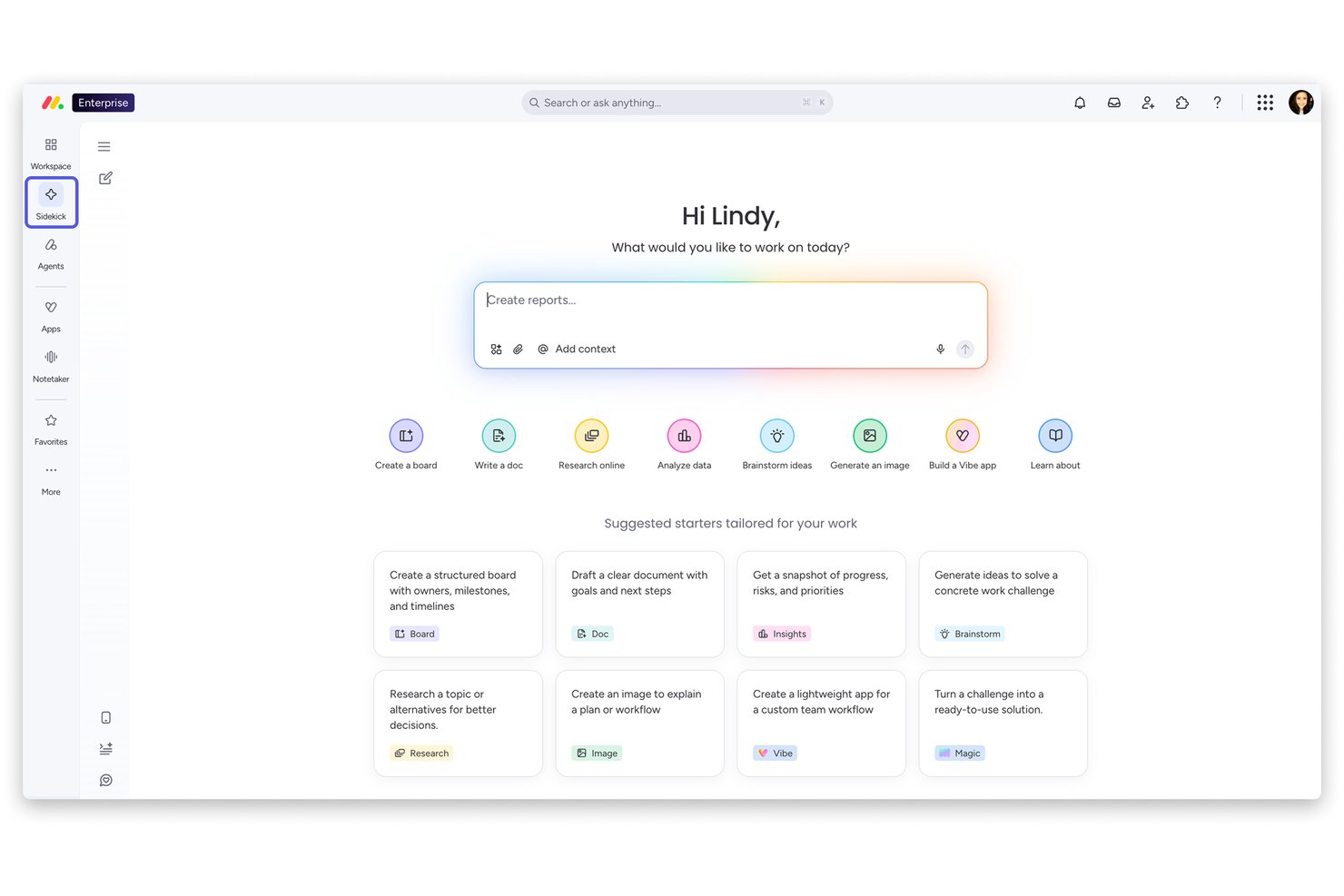
monday AI Workspace è una piattaforma di gestione del lavoro potenziata dall'intelligenza artificiale che combina agenti AI autonomi, monitoraggio predittivo dei rischi, automazione intelligente delle attività e reportistica generativa su progetti, portafogli e team trasversali.
Per chi è ideale monday AI Workspace?
È particolarmente adatto a team di medie e grandi dimensioni che necessitano di una supervisione guidata dall'AI su più progetti simultanei, soprattutto in ambiti tecnologici, di prodotto e in contesti interfunzionali.
Perché ho scelto monday AI Workspace
monday AI Workspace si è guadagnato il suo posto nella mia selezione grazie alla capacità di individuare proattivamente i rischi prima che diventino un problema. Mi piace il fatto che il suo motore predittivo di rischio analizzi continuamente gli stati delle attività, le dipendenze e le conversazioni del team per segnalare tempestivamente le criticità, invece di attendere una scadenza mancata per avviare una discussione. L'assistente AI Sidekick poi collega le informazioni, offrendo raccomandazioni contestualizzate su cosa affrontare come prossimo passo.
Funzionalità chiave di monday AI Workspace
- Costruttore personalizzato di agenti AI: Consente di creare e configurare agenti AI per i flussi di lavoro ricorrenti dei progetti.
- Automazione AI da riunione ad attività: Trascrive le riunioni e converte le decisioni direttamente in attività assegnate sulle tue board.
- Mappatura delle dipendenze tra progetti: Visualizza e tiene traccia delle dipendenze tra attività e progetti utilizzando l'AI.
- Controlli di accesso basati sui ruoli: Supporta permessi granulari per dati generati dall'AI, automazioni e board di progetto.
Integrazioni di monday AI Workspace
monday AI Workspace offre centinaia di integrazioni native tra cui Slack, Google Workspace, Microsoft 365, Salesforce, Jira, GitHub, Zoom, Dropbox, HubSpot e Zendesk. Supporta anche Zapier e mette a disposizione un'API per integrazioni personalizzate.
Pros and Cons
Pros:
- Gli agenti AI automatizzano i flussi di lavoro delle attività end-to-end
- Avvisi predittivi dei rischi evidenziano i blocchi in anticipo
- Sidekick AI genera riepiloghi di progetto su richiesta
Cons:
- Le raccomandazioni AI mancano di spiegazioni dettagliate
- La struttura delle board rallenta l'impostazione iniziale del progetto
New Product Updates from monday AI Workspace
monday AI Workspace Adds Human Approval Routing
monday AI Workspace adds a human-in-the-loop approval block to AI Workflows, sending approval requests and routing workflow paths based on responses. For more information, visit monday AI Workspace's official site.

Ideale per la gestione agile dei progetti

MeisterTask è uno strumento collaborativo di gestione delle attività progettato per i team che seguono metodologie agili. Aiuta gli utenti a organizzare le attività, gestire i progetti e migliorare la collaborazione tra i membri del team attraverso bacheche di progetto visive.
Perché ho scelto MeisterTask: MeisterTask è ideale per la gestione agile dei progetti grazie a funzionalità come bacheche in stile Kanban, flussi di lavoro personalizzabili e monitoraggio del tempo. Il tuo team può facilmente monitorare i progressi con le timeline di progetto e gli aggiornamenti automatici delle attività. Offre inoltre un'interfaccia semplice per gestire attività e progetti. Secondo la mia esperienza, queste caratteristiche rendono MeisterTask una scelta solida per i team orientati alle pratiche agili.
Funzionalità e integrazioni principali:
Le funzionalità includono bacheche di progetto personalizzabili che si adattano al tuo flusso di lavoro. Puoi impostare attività ricorrenti che si aggiungono automaticamente alle tue bacheche. MeisterTask offre anche un tracciamento dettagliato delle attività tramite tag e date di scadenza per mantenere il team organizzato.
Le integrazioni includono Slack, Microsoft Teams, Google Drive, Dropbox, GitHub, Zendesk, Outlook e Zapier.
Pros and Cons
Pros:
- Bacheche Kanban personalizzabili
- Limiti WIP disponibili per identificare tempestivamente i colli di bottiglia
- Aggiornamenti automatici delle attività
Cons:
- Reportistica avanzata limitata
- Potrebbe non adattarsi a tutti i tipi di progetti

Taskade
Ideale per la creazione collaborativa di mappe mentali

Taskade è uno strumento di produttività collaborativa pensato per i team che necessitano di uno spazio di lavoro versatile per la gestione dei progetti e la comunicazione. Serve agli utenti offrendo strumenti per la gestione delle attività, la creazione di mappe mentali e la collaborazione in tempo reale.
Perché ho scelto Taskade: Taskade è noto per le sue capacità collaborative di creazione di mappe mentali, che lo rendono ideale per sessioni di brainstorming e la pianificazione visiva dei progetti. Consente al tuo team di creare mappe mentali dinamiche che si evolvono insieme ai progetti. Funzionalità come la modifica in tempo reale, le videoconferenze e il tracciamento delle attività garantiscono che tutti rimangano aggiornati. Nella mia esperienza, questi strumenti favoriscono un flusso di lavoro più interattivo e coinvolgente.
Caratteristiche principali & integrazioni:
Le funzionalità includono collaborazione in tempo reale, videoconferenze e gestione delle attività. Puoi creare mappe mentali che si collegano direttamente alle attività, permettendo transizioni più fluide dalla pianificazione all'esecuzione. Il design della piattaforma stimola la creatività e l'adattabilità nei flussi di lavoro dei tuoi progetti.
Le integrazioni includono Google Drive, Slack, Zapier, Trello, GitHub, Microsoft Teams ed Evernote.
Pros and Cons
Pros:
- La collaborazione in tempo reale consente sessioni di brainstorming dinamiche
- Gli utenti possono taggare i nodi con hashtag per un filtraggio rapido
- L’assistente AI può generare modelli e ristrutturare appunti
Cons:
- Rischio di aggiunta eccessiva di funzionalità man mano che la piattaforma si evolve
- La gestione delle diverse visualizzazioni può richiedere tempo per essere padroneggiata dagli utenti

Asana
Ideale per la collaborazione di squadra

Asana è uno strumento di gestione dei progetti progettato per i team che hanno bisogno di coordinare il lavoro e monitorare i progetti in uno spazio condiviso. Serve le aziende offrendo funzionalità di gestione delle attività, automazione dei flussi di lavoro e monitoraggio dei progetti.
Perché ho scelto Asana: Asana è pensato per la collaborazione di squadra, offrendo funzionalità come l'assegnazione dei compiti, il monitoraggio dei progressi e le linee temporali dei progetti. Il tuo team può beneficiare della possibilità di creare workspace e organizzare le attività per progetto. La funzione timeline aiuta a visualizzare le scadenze dei progetti, assicurando che tutti rimangano informati. Dalla mia esperienza, l'attenzione di Asana alla collaborazione lo rende ideale per le squadre che vogliono aumentare la propria produttività.
Funzionalità di spicco & integrazioni:
Le funzionalità includono modelli di progetto personalizzabili, gestione del carico di lavoro e monitoraggio dei portafogli. Questi strumenti aiutano il tuo team a gestire più progetti e assicurare una distribuzione efficace delle risorse. Inoltre, Asana offre un'interfaccia intuitiva che facilita la navigazione efficiente tra i progetti.
Le integrazioni includono Slack, Microsoft Teams, Google Workspace, Dropbox, Salesforce, Zoom, GitHub, Zapier, Trello e Mailchimp.
Pros and Cons
Pros:
- Funzionalità di comunicazione contestuale
- Spazio di lavoro condiviso per la visibilità dei progetti
- Modelli di progetto personalizzabili
Cons:
- Interfaccia e funzionalità può risultare opprimente per i nuovi utenti
- Rischio di silos informativi senza utilizzo dedicato

TimeHero
Ideale per la pianificazione automatizzata delle attività

Timehero è uno strumento di gestione delle attività rivolto a team e singoli che hanno bisogno di automatizzare i processi di pianificazione. Aiuta gli utenti pianificando automaticamente le attività in base agli impegni e alle scadenze già presenti, ottimizzando così la gestione del tempo.
Perché ho scelto Timehero: Timehero eccelle nella pianificazione automatica delle attività, offrendo funzionalità che adattano i compiti in base alle priorità e alle scadenze che cambiano. Il tuo team può trarre vantaggio dalla possibilità di ripianificare dinamicamente le attività quando ne vengono aggiunte di nuove. Con opzioni come la pianificazione predittiva e la sincronizzazione con il calendario, è sicuro che non perderai mai una scadenza. Nella mia esperienza, le capacità di automazione di Timehero lo rendono uno strumento prezioso per chiunque desideri migliorare la gestione del proprio tempo.
Funzionalità principali e integrazioni:
Funzionalità come la pianificazione predittiva anticipano i tempi di completamento delle attività in base al tuo carico di lavoro. Puoi impostare attività ricorrenti che si inseriscono automaticamente nel tuo programma. Lo strumento offre anche aggiornamenti in tempo reale, così sei sempre aggiornato sui progressi del team.
Le integrazioni includono Google Calendar, Zoom, Slack, Trello, Office 365, Gmail, Evernote, Jira, Hubspot CRM e Asana.
Pros and Cons
Pros:
- Ripianificazione automatica delle attività
- Stime predittive della durata per la pianificazione delle attività
- Allocazione del tempo di concentrazione
Cons:
- La precisione dipende dai dati inseriti dall'utente
- Potrebbe non adattarsi a tutti i flussi di lavoro

Motion
Ideale per l'automazione intuitiva delle attività

Motion è una piattaforma di produttività che offre una 'Agentic Work Suite', progettata per migliorare l'efficienza del team attraverso l'intelligenza artificiale. I suoi utenti principali sono i team che desiderano ottimizzare le operazioni. Le principali funzioni aziendali includono la gestione dei progetti, l'automazione delle attività e il supporto alle vendite.
Perché ho scelto Motion: Motion si distingue per l'automazione intuitiva delle attività, rendendolo una scelta eccellente per i team che vogliono ridurre il carico di lavoro manuale. Le sue funzionalità basate su IA, come la programmazione automatica e la priorizzazione delle attività, sono ideali per chi cerca efficienza. Gli utenti possono usufruire della capacità di gestire attività ripetitive, consentendo di concentrarsi su attività più strategiche. Il design della piattaforma è intuitivo, rendendolo accessibile a team di qualsiasi dimensione.
Funzionalità e integrazioni principali:
Le funzionalità includono la priorizzazione automatica delle attività, la programmazione intelligente e la gestione dei progetti tramite IA. Queste funzionalità aiutano il team a concentrarsi sui compiti importanti, ridurre la fatica decisionale e migliorare la produttività complessiva. Nella mia esperienza, queste capacità sono fondamentali per gestire flussi di lavoro complessi.
Le integrazioni includono Google Calendar, Outlook, Slack, Zoom, Microsoft Teams, Salesforce e HubSpot.
Pros and Cons
Pros:
- Prioritizzazione e pianificazione automatica
- Builder di flussi di lavoro con IA per trasformare informazioni non strutturate in progetti
- Funzione di automazione delle email in attività
Cons:
- Preoccupazioni sulla privacy per alcuni dipendenti
- Possibile eccesso di automazione per alcune attività

Reclaim
Ideale per l'integrazione intelligente con il calendario

Reclaim è uno strumento di gestione delle attività e del calendario progettato per professionisti e team che desiderano ottimizzare i propri programmi. Aiuta gli utenti programmando automaticamente le attività intorno agli eventi già presenti nel calendario, garantendo un uso efficiente del tempo.
Perché ho scelto Reclaim: Reclaim si distingue per la sua integrazione intelligente con il calendario, che allinea automaticamente le attività agli impegni programmati. Permette di impostare priorità e modificare la durata delle attività in base alla disponibilità. Il sistema integrato di notifiche ti tiene aggiornato sui cambiamenti di programma e sulle scadenze imminenti. Nella mia esperienza, queste funzionalità rendono Reclaim la scelta ideale per chi ha bisogno di un controllo preciso sul proprio calendario.
Funzionalità e integrazioni principali:
Funzionalità includono il time blocking intelligente, dove le attività si adattano automaticamente al tuo programma. Puoi anche impostare tempi di concentrazione per ridurre le distrazioni e aumentare la produttività. Inoltre, Reclaim offre una priorizzazione flessibile delle attività per aiutarti a gestire il carico di lavoro.
Integrazioni includono Google Tasks, Outlook, Slack, Zoom, Microsoft Teams, Asana, Trello, Jira, Todoist e Zapier.
Pros and Cons
Pros:
- Time blocking supportato da intelligenza artificiale
- Ripianificazione dinamica e risoluzione dei conflitti
- Aggiunta automatica di pause flessibili tra le riunioni
Cons:
- La mancanza di dati aggiornati porta a una pianificazione errata
- Richiede l'accesso al calendario


Trevor AI è uno strumento di produttività pensato per individui e team che hanno bisogno di ottimizzare i propri programmi attraverso una gestione efficace del tempo. Aiuta gli utenti offrendo funzionalità di time blocking e prioritizzazione delle attività per garantire un uso efficiente del tempo.
Perché ho scelto Trevor AI: Trevor AI è rinomato per le sue efficaci capacità di time blocking, permettendo di destinare intervalli temporali specifici alle attività. Regola automaticamente il tuo programma in base alle priorità delle attività e alle scadenze. Puoi facilmente trascinare e rilasciare le attività nel calendario, rendendo semplice la gestione della giornata. Passando al piano Pro si sbloccano opzioni di pianificazione avanzate e integrazioni più approfondite. Secondo la mia esperienza, queste funzionalità rendono Trevor AI una scelta eccellente per chi desidera migliorare le proprie capacità di gestione del tempo.
Funzionalità e integrazioni principali:
Le funzionalità includono la pianificazione delle attività tramite drag-and-drop, che semplifica il processo di organizzazione della giornata. È possibile impostare promemoria per le attività in modo da rimanere al passo durante la giornata. Trevor AI offre inoltre un'interfaccia pulita e intuitiva che consente rapide modifiche alle attività.
Le integrazioni includono Google Calendar, Outlook, Todoist, Microsoft 365, Google Tasks e Microsoft To Do.
Pros and Cons
Pros:
- Funzione AI 'plan my day' per pianificare più attività contemporaneamente
- Le funzionalità della piattaforma facilitano il lavoro profondo
- Suggerimenti AI per ripianificare le attività in ritardo
Cons:
- Reportistica e analisi minimaliste
- Si concentra su Google e Outlook Calendar


EchoPal è uno strumento di gestione delle attività alimentato dalla voce, progettato per i professionisti che preferiscono gestire le attività tramite il linguaggio naturale. Aiuta gli utenti a rendere più efficiente il proprio flusso di lavoro offrendo controlli vocali e chat per la gestione delle attività.
Perché ho scelto EchoPal: EchoPal eccelle nella gestione delle attività attivata dalla voce, permettendoti di gestire la tua lista di attività tramite comandi vocali e input da chat. Dispone di un’intelligenza multi-step che automatizza i flussi di lavoro complessi comprendendo le dipendenze e prendendo decisioni contestuali. Lo strumento include inoltre l’intelligenza emotiva, monitorando i livelli di stress dell’utente per adattare di conseguenza i flussi di lavoro. Nella mia esperienza, queste funzionalità rendono EchoPal un’opzione unica per chi dà valore all’integrazione vocale.
Funzionalità principali & integrazioni:
Le funzionalità includono l’intelligenza emotiva, che aiuta a gestire lo stress adattando le attività. Lo strumento supporta anche flussi di lavoro multi-step, consentendo l’automazione complessa delle attività. Inoltre, EchoPal offre funzionalità di accessibilità per soddisfare le esigenze di diversi utenti.
Le integrazioni includono Trello, Jira, Google Calendar, Linear, Slack, Gmail, Asana, Google Workspace, Windows e Outlook.
Pros and Cons
Pros:
- Comprensione del linguaggio naturale per la funzionalità dei comandi vocali
- Avvia flussi di lavoro multi-step e cross-tool con un solo comando vocale
- L’IA ha consapevolezza del contesto
Cons:
- Può richiedere un apprendimento dei comandi vocali
- Limitato a input vocali e chat

Atera
Ideale per i professionisti IT

Atera è un software di monitoraggio e gestione remota (RMM) progettato per professionisti IT e fornitori di servizi gestiti (MSP). Offre strumenti per monitorare, gestire e supportare le reti IT, aiutando gli utenti a gestire in modo efficiente le attività informatiche e il supporto ai clienti. Puoi anche categorizzare risorse, avvisi e ticket per semplificare i flussi di lavoro e mantenere una migliore organizzazione.
Perché ho scelto Atera: Atera è pensato per i professionisti IT, con funzionalità come monitoraggio remoto, pianificazione automatica, gestione automatizzata delle patch e rilevamento della rete. Il tuo team può gestire efficacemente le risorse IT e offrire assistenza remota con facilità. Dispone anche di sistemi di ticketing integrati che facilitano la comunicazione con i clienti. Nella mia esperienza, l’attenzione di Atera alle esigenze della gestione IT lo rende uno strumento prezioso per i fornitori di servizi.
Funzionalità e integrazioni principali:
Le funzionalità includono avvisi in tempo reale, che ti notificano qualsiasi problema nella tua rete. Puoi automatizzare attività di routine come la gestione delle patch per risparmiare tempo. Atera offre anche strumenti di reportistica che ti aiutano ad analizzare le prestazioni e prendere decisioni informate.
Le integrazioni includono Google Identity Providers, Azure AD, Okta, Zapier, Microsoft Teams, Slack, HubSpot, Salesforce, Dropbox, SAP Business One, OneDrive e Google Drive.
Pros and Cons
Pros:
- Ampia gamma di strumenti di gestione IT
- Rilevamento, approvazione e distribuzione automatizzata delle patch
- Profili di automazione IT ed esecuzione di script
Cons:
- Richiede conoscenze tecniche
- Variabilità nei tempi di risposta dell’assistenza
Altri software di gestione delle attività con IA
Ecco alcune altre opzioni di software di gestione delle attività con IA che non sono entrate nella mia selezione, ma che vale comunque la pena prendere in considerazione:


Come valuto il software di gestione delle attività con IA
Ogni strumento in questa lista deve fare più che appiccicare un’etichetta IA su semplici automatismi: cerco piattaforme dove l’IA guida davvero le decisioni come la priorità delle attività, la previsione dei ritardi o l’assegnazione automatica dei lavori in base alla capacità. Suddivido la mia valutazione in due livelli: le funzionalità di base che uno strumento deve possedere per essere considerato e i fattori che differenziano le opzioni buone da quelle eccellenti.
Funzionalità di base (Requisiti minimi per questa lista)
Quando seleziono gli strumenti per la mia lista, valuto ciascuno su una scala da 0 (non offre la funzionalità) a 5 (eccelle in quest’area) per ogni funzionalità di base elencata di seguito. Poi, calcolo il punteggio totale dello strumento in percentuale. Ogni strumento deve raggiungere un punteggio totale minimo del 65% per essere preso in considerazione.
- Automazione delle attività guidata dall’IA: Verifico se lo strumento può creare e assegnare automaticamente attività da input come note di riunione, messaggi in chat o briefing di progetto, anziché richiedere l’inserimento manuale di ogni voce.
- Prioritizzazione intelligente delle attività: Ogni strumento dovrebbe ordinare o riordinare le attività tramite IA in base a fattori come scadenze, dipendenze e impatto—not solo consentire agli utenti di trascinarle manualmente.
- Insights predittivi sui progetti: Cerco IA che preveda le date di completamento, segnali milestone a rischio, o evidenzi squilibri di carico di lavoro prima che causino scadenze mancate in sprint o cicli di consegna.
- Sommari e aggiornamenti generati: La piattaforma dovrebbe produrre contenuti utili generati dall’IA come riassunti degli standup, descrizioni delle attività o report settimanali di stato che permettono ai PM di risparmiare tempo nella scrittura.
- Assegnazione intelligente delle risorse: Valuto se l’IA raccomanda l’assegnazione delle attività in base alle capacità, competenze o performance passate dei membri del team, invece di lasciare che siano i responsabili a indovinare chi sia disponibile.
- Integrazione di workflow e strumenti: Lo strumento deve collegarsi alle piattaforme già usate dai team—come Slack, Jira, GitHub o Google Workspace—e innescare azioni IA su questi sistemi collegati.
Una volta individuati gli strumenti che soddisfano questi criteri, considero cosa rende ciascuna piattaforma unica.
Fattori differenzianti (Cosa distingue i fornitori)
Ecco come confronto i diversi fornitori:
Funzionalità distintive
La conversione automatica tra riunioni e attività tramite IA è una forte caratteristica distintiva: gli strumenti che estraggono le azioni da uno standup registrato o da una chiamata di pianificazione e le trasformano in attività assegnate fanno risparmiare ai PM ore di lavoro dopo la riunione. Cerco anche la mappatura delle dipendenze tra progetti, dove l’IA rileva collegamenti nascosti tra flussi di lavoro che il monitoraggio manuale farebbe sfuggire. Gli agenti IA personalizzati spiccano per i team che ripetono spesso workflow come la triage degli sprint o le approvazioni di rilascio, consentendo ai PM di automatizzare decisioni che altrimenti gestirebbero una per una.
Oltre le funzionalità
La trasparenza dell’IA per me conta molto: verifico se uno strumento spiega perché ha fatto una raccomandazione o ha riorganizzato una priorità, poiché i PM devono giustificare queste scelte agli stakeholder. La sicurezza dei dati è altrettanto importante, specialmente in relazione all’utilizzo dei dati di progetto dei clienti per addestrare modelli di terze parti. Valuto anche l’onboarding e il supporto all’adozione, perché implementare processi alimentati dall’IA in un team di ingegneri o designer scettici richiede più di un semplice articolo nella help center. Configurazione guidata, librerie di prompt e gallerie di template fanno davvero la differenza nel ridurre i tempi di adozione.
Come scegliere un software di gestione delle attività con IA
È facile perdersi in lunghi elenchi di funzionalità e strutture tariffarie complesse. Per aiutarti a rimanere concentrato mentre affronti il tuo processo di selezione del software, ecco una lista di controllo dei fattori da tenere presenti:
| Fattore | Cosa considerare |
|---|---|
| Scalabilità | Il software può crescere insieme al tuo team? Valuta se supporta un numero crescente di utenti e progetti più grandi senza perdere prestazioni. Cerca piani tariffari a livelli in linea con la crescita. |
| Integrazioni | Il software si collega agli strumenti che già utilizzi? Assicurati che offra integrazioni native con le tue piattaforme principali, come Slack, Google Workspace o Trello. Evita gli strumenti che richiedono soluzioni alternative. |
| Personalizzazione | Puoi adattare il software ai tuoi flussi di lavoro? Verifica se consente di creare campi, visualizzazioni e modelli personalizzati. Fai attenzione ai sistemi rigidi che limitano la flessibilità. |
| Semplicità d'uso | L'interfaccia è intuitiva per il tuo team? Dai priorità agli strumenti dal design semplice e con una curva di apprendimento minima. Evita configurazioni complesse che richiedono una formazione approfondita. |
| Implementazione e avvio | Quanto velocemente puoi iniziare? Cerca un software con procedure guidate di avvio, tutorial e assistenza. Valuta la disponibilità di risorse come modelli e tour del prodotto. |
| Costo | Il prezzo rientra nel tuo budget? Confronta i costi con le funzionalità offerte. Fai attenzione ai costi nascosti e assicurati che il ritorno sull'investimento giustifichi la spesa. |
| Misure di sicurezza | I tuoi dati sono protetti? Verifica la presenza di funzionalità come la crittografia, l'autenticazione a due fattori e controlli di sicurezza regolari. Non compromettere la sicurezza dei dati per risparmiare. |
Cos'è un software di gestione delle attività con IA?
Il software per la gestione delle attività basato sull'intelligenza artificiale è uno strumento digitale che aiuta ad automatizzare e organizzare le attività utilizzando l'intelligenza artificiale. Professionisti come project manager, responsabili di team e freelance utilizzano generalmente questi strumenti per aumentare la produttività e migliorare l'efficienza del flusso di lavoro. La pianificazione automatizzata, la definizione delle priorità delle attività e le funzionalità di integrazione aiutano gli utenti a gestire i carichi di lavoro, stabilire le priorità e tenere traccia dei progressi. Nel complesso, questi strumenti fanno risparmiare tempo e riducono il lavoro manuale, consentendo agli utenti di concentrarsi su attività più strategiche.
Funzionalità
Quando selezioni un software per la gestione delle attività basato sull'intelligenza artificiale, presta attenzione alle seguenti funzionalità chiave:
- Pianificazione automatizzata: pianifica automaticamente le attività in base al tuo programma esistente, facendo risparmiare tempo e riducendo l'inserimento manuale.
- Definizione delle priorità delle attività: utilizza l'intelligenza artificiale per determinare quali attività sono più importanti, aiutandoti a concentrarti su ciò che conta di più.
- Funzionalità di integrazione: si connette ad altri strumenti come calendari e app di comunicazione per creare un flusso di lavoro unificato.
- Funzionalità di comando vocale: consente di gestire le attività tramite input vocale, offrendo praticità senza l'uso delle mani.
- Pannelli personalizzabili: consentono di adattare l'interfaccia alle esigenze specifiche del proprio flusso di lavoro, migliorandone l'usabilità.
- Analisi in tempo reale: forniscono informazioni sulla produttività e sull'avanzamento delle attività, aiutandoti a prendere decisioni consapevoli.
- Blocco del tempo: assegna fasce orarie specifiche alle attività, migliorando la concentrazione e la gestione del tempo.
- Strumenti di collaborazione: facilitano la comunicazione del team e la condivisione delle attività, migliorando il lavoro di squadra e il coordinamento dei progetti.
Vantaggi
L'implementazione di un software per la gestione delle attività basato sull'intelligenza artificiale offre diversi vantaggi al tuo team e alla tua azienda. Ecco alcuni dei vantaggi che puoi aspettarti:
- Maggiore produttività: la pianificazione automatizzata e la definizione delle priorità delle attività aiutano a concentrarsi sulle attività importanti, riducendo il tempo dedicato alla pianificazione manuale.
- Collaborazione migliorata: l'integrazione con gli strumenti di comunicazione e i pannelli condivisi facilita il lavoro di squadra e il coordinamento dei progetti.
- Migliore gestione del tempo: funzionalità come il blocco del tempo e i promemoria garantiscono il completamento delle attività secondo programma, migliorando l'efficienza complessiva.
- Processo decisionale migliorato: le analisi in tempo reale offrono informazioni sull'avanzamento delle attività e sulla produttività, aiutandoti a prendere decisioni consapevoli.
- Riduzione dello stress: automatizzare le attività di routine e utilizzare i comandi vocali riduce la pressione del carico di lavoro, consentendo di concentrarsi sulle attività strategiche.
Costi e prezzi del software per la gestione delle attività basato sull'intelligenza artificiale
La selezione di un software per la gestione delle attività basato sull'intelligenza artificiale richiede la comprensione dei diversi modelli e piani tariffari disponibili. I costi variano in base alle funzionalità, alle dimensioni del team, ai componenti aggiuntivi e ad altri fattori. La tabella seguente riassume i piani più comuni, i relativi prezzi medi e le funzionalità tipicamente incluse nelle soluzioni software per la gestione delle attività basate sull'intelligenza artificiale:
Tabella comparativa dei piani per il software di gestione delle attività basato sull'intelligenza artificiale
| Tipo di piano | Prezzo medio | Funzionalità comuni |
|---|---|---|
| Piano gratuito | $0 | Gestione di base delle attività, integrazioni limitate e supporto della comunità. |
| Piano base | $4-$20/user/month | Definizione delle priorità delle attività, sincronizzazione del calendario e strumenti di collaborazione di base. |
| Piano aziendale | $10-$25/user/month | Analisi avanzate, collaborazione del team e flussi di lavoro personalizzati. |
| Piano per grandi aziende | +$25/user/month - Prezzo personalizzato | Supporto dedicato, sicurezza avanzata e funzionalità di integrazione complete. |
Domande frequenti sul software di gestione delle attività basato sull'AI
Ecco alcune risposte alle domande comuni sul software di gestione delle attività basato sull’AI:
Come funziona il software di gestione delle attività basato sull'AI?
Il software di gestione delle attività basato sull’AI utilizza l’intelligenza artificiale per automatizzare e ottimizzare la pianificazione e la definizione delle priorità delle attività. Analizza il tuo calendario, le scadenze e le dipendenze tra le attività per suggerire il modo migliore di organizzare il tuo tempo. Questo ti aiuta a concentrarti su ciò che è importante senza dover pianificare manualmente ogni dettaglio. Imparando dal tuo comportamento passato, può migliorare nel tempo, rendendo il tuo flusso di lavoro più efficiente.
Il software di gestione delle attività basato sull'AI può integrarsi con gli strumenti che già utilizzo?
Sì, la maggior parte dei software di gestione delle attività basati sull’AI può integrarsi con strumenti diffusi come Google Calendar, Slack e Trello. Queste integrazioni aiutano a creare un flusso di lavoro unificato sincronizzando attività e comunicazioni tra le varie piattaforme. Prima di effettuare l’acquisto, controlla le opzioni di integrazione per assicurarti che siano compatibili con gli strumenti che utilizzi attualmente.
Il software di gestione delle attività basato sull'AI è sicuro?
Sì, i software di gestione delle attività basati sull’AI affidabili includono funzionalità di sicurezza come la crittografia dei dati e l’autenticazione a due fattori. Quando scegli uno strumento, cerca soluzioni conformi agli standard del settore e che offrano aggiornamenti di sicurezza regolari. È inoltre consigliabile consultare la loro informativa sulla privacy per capire come vengono gestiti i tuoi dati.
In che modo il software di gestione delle attività basato sull'AI può migliorare la collaborazione del team?
Il software di gestione delle attività basato sull’AI migliora la collaborazione offrendo dashboard condivise, aggiornamenti in tempo reale e strumenti di comunicazione. Consente ai membri del team di assegnare attività, monitorare i progressi e condividere file in un unico luogo. Questo approccio centralizzato riduce le incomprensioni e mantiene tutti allineati sugli obiettivi del progetto.