

10 migliori alternative a Visme per le presentazioni nel 2026

Selezione di alternative a Visme


Una valida alternativa a Visme offre al tuo team modelli di design flessibili, strumenti per presentazioni interattive e funzionalità per una collaborazione semplice, senza vincolarti a un'unica piattaforma. Se stai cercando alternative a Visme, probabilmente cerchi strumenti in grado di gestire infografiche, report e presentazioni, adattandosi al tuo flusso di lavoro e al tuo budget.
Con così tante opzioni disponibili, è difficile capire quale piattaforma riuscirà davvero a supportare le esigenze creative e di gestione dei progetti del tuo team. Questo elenco analizza le migliori alternative a Visme per il 2026, così potrai confrontare funzionalità, opzioni di collaborazione e integrazioni e scegliere con sicurezza quella più adatta al tuo prossimo progetto.
Che cos'è Visme?
Visme è una piattaforma di design basata sul cloud per la creazione di contenuti, tra cui presentazioni, infografiche, report e altri contenuti visivi. Offre un'ampia gamma di modelli, funzionalità di modifica tramite trascinamento e rilascio ed elementi interattivi per aiutare team e singoli utenti a realizzare contenuti visivi professionali. Visme viene utilizzato da project manager, esperti di marketing, educatori e team aziendali che hanno bisogno di comunicare idee visivamente e collaborare a progetti creativi senza affidarsi ai tradizionali software di design.
Tabella di confronto delle alternative a Visme
Questa tabella di confronto riassume i dettagli sui prezzi delle migliori alternative a Visme che ho selezionato:
| Tool | Best For | Trial Info | Price | ||
|---|---|---|---|---|---|
| 1 | Ideale per flussi di lavoro di design di team collaborativi | Disponibile piano gratuito | Da $12/mese (fatturazione annuale) | Website | |
| 2 | Ideale per modelli grafici per i social media | Piano gratuito disponibile | Da $13/mese | Website | |
| 3 | Ideale per la creazione di grafici interattivi | Piano gratuito disponibile | Da $25/mese | Website | |
| 4 | Ideale per creare infografiche guidate dai dati | Disponibile piano gratuito | Da $14/membro/mese (fatturato annualmente) | Website | |
| 5 | Ideale per modelli di report personalizzabili | Piano gratuito disponibile | Da $10/mese (fatturato annualmente) | Website | |
| 6 | Ideale per video di presentazioni animate | Piano gratuito disponibile | Da $49/mese | Website | |
| 7 | Ideale con integrazione ad Adobe Creative Cloud | Prova gratuita di 30 giorni + piano gratuito disponibile | Da $9.99/mese | Website | |
| 8 | Ideale per la progettazione di slide con intelligenza artificiale | Prova gratuita di 14 giorni + demo gratuita disponibile | Da $12/mese (fatturazione annuale) | Website | |
| 9 | Ideale per funzionalità di presentazione aziendale | Prova gratuita di 30 giorni disponibile | Da $9.99/persona/mese | Website | |
| 10 | Ideale per l’editing drag-and-drop veloce | Piano gratuito + demo gratuita disponibili | Da $15/utente/mese | Website |
Perché fidarsi dei nostri consigli sui software
Il nostro team testa e recensisce software dal 2012. In quanto project manager noi stessi, sappiamo quanto sia difficile — e importante — scegliere il software giusto.
Per questa guida, abbiamo valutato gli strumenti attraverso test pratici e ricerche indipendenti, assegnando un punteggio agli strumenti in base ai nostri criteri di selezione. Ci basiamo inoltre sulle competenze di leader di pensiero del settore e di professionisti attivi nella gestione dei progetti.
Le nostre recensioni riflettono il nostro giudizio editoriale umano, non un discorso di vendita.
Revisori esperti:
Recensioni delle alternative a Visme
Di seguito trovi le mie analisi dettagliate delle migliori alternative a Visme incluse nella mia selezione. Le mie recensioni offrono una panoramica dettagliata delle funzionalità, dei casi d’uso migliori e delle integrazioni di ciascuna piattaforma, per aiutarti a trovare quella più adatta a te.
Canva
Ideale per flussi di lavoro di design di team collaborativi
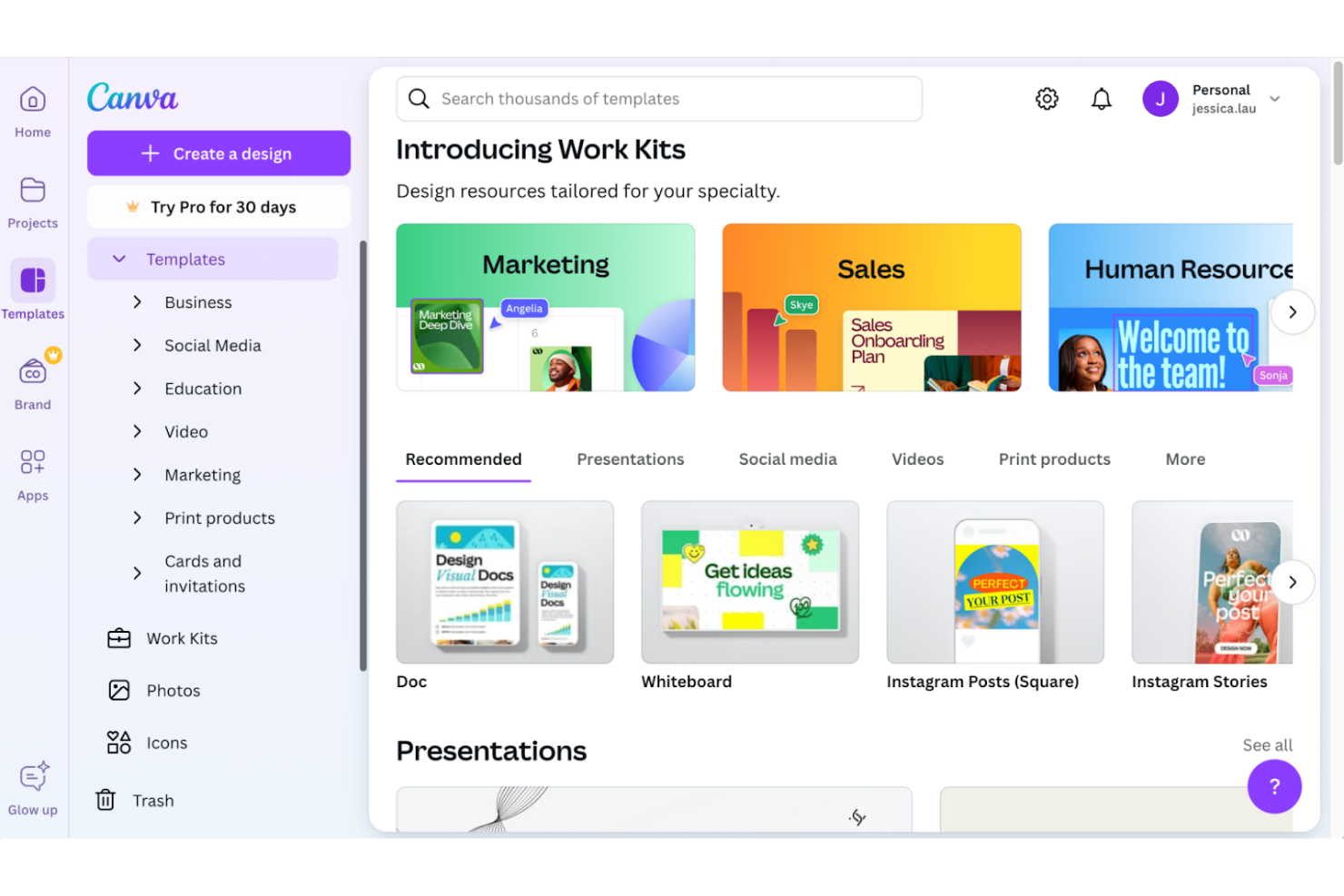
Se il tuo team ha bisogno di una piattaforma di design pensata per la collaborazione in tempo reale, Canva merita attenzione. È particolarmente utile per team di marketing, agenzie e gruppi distribuiti che desiderano co-creare grafiche, presentazioni e documenti senza complicazioni di controllo delle versioni. Canva si distingue tra le alternative a Visme perché rende facile commentare, condividere e modificare i progetti insieme in un unico posto.
Perché Canva è una buona alternativa a Visme
Quando cerco un'alternativa a Visme che supporti progetti di design di team, Canva si distingue per le sue funzionalità collaborative. Puoi invitare i colleghi a modificare, commentare e revisionare i progetti in tempo reale, aiutando tutti a rimanere allineati sui progetti. Le cartelle condivise di Canva e gli strumenti per il brand kit facilitano la gestione delle risorse e il mantenimento della coerenza nel lavoro di squadra. Queste funzionalità sono particolarmente utili per i gruppi che devono collaborare su presentazioni, infografiche e materiali di marketing senza confusione sulle versioni.
Funzionalità principali di Canva
Altre funzionalità di Canva che potrebbero interessare ai team in cerca di alternative a Visme includono:
- Magic Resize: Adatta istantaneamente il tuo design a diversi formati per social o stampa con un solo clic.
- Content Planner: Pianifica e pubblica i tuoi progetti direttamente su diverse piattaforme social dall'interno di Canva.
- Libreria Media Integrata: Accedi a una vasta collezione di foto, video e tracce audio gratuite e premium da usare nei tuoi progetti.
- Registrazione Presentazioni: Registra te stesso mentre presenti le slide con audio e video, poi condividi la registrazione con il team o con il pubblico.
Integrazioni Canva
Le integrazioni includono Google Drive, Dropbox, OneDrive, Slack, Mailchimp, HubSpot e molte altre.
Pros and Cons
Pros:
- Lavagna collaborativa in tempo reale
- Ampia libreria di template per diversi tipi di contenuti
- Magic Resize per adattamento rapido ai formati
Cons:
- Nessuna modifica offline per utenti desktop
- Alcuni contenuti premium richiedono un pagamento aggiuntivo

Ideale per modelli grafici per i social media

Per i team focalizzati sui contenuti per i social media, PosterMyWall offre una vasta libreria di modelli grafici pronti all'uso. È una scelta ideale per marketer, agenzie e piccole imprese che devono realizzare rapidamente post, annunci e storie accattivanti. A differenza di molte alternative a Visme, PosterMyWall è specializzato nei formati per i social media e rende semplice personalizzare le grafiche per tutte le principali piattaforme.
Perché PosterMyWall è una buona alternativa a Visme
Se il tuo obiettivo principale è creare grafiche per i social media in modo rapido, PosterMyWall è pensato proprio per questo. La piattaforma offre migliaia di modelli già dimensionati per piattaforme come Instagram, Facebook e LinkedIn, così non devi preoccuparti di adattare i formati. Apprezzo il fatto che sia possibile aggiungere animazioni, video e musica direttamente alle tue creazioni, rendendo i post ancora più coinvolgenti. Per chi deve produrre molti contenuti specifici per piattaforma, la libreria di modelli di PosterMyWall e gli strumenti di editing dei media lo rendono una valida alternativa a Visme.
Funzionalità principali di PosterMyWall
Altre caratteristiche di PosterMyWall degne di nota includono:
- Strumento di ridimensionamento con un clic: adatta istantaneamente il tuo design a diversi formati di stampa e digitali.
- Collaborazione e commenti: invita i membri del team a rivedere e commentare i progetti in tempo reale.
- Pubblicazione diretta sui social media: pubblica le grafiche completate direttamente su Facebook, Twitter e altre piattaforme dall'interno dello strumento.
- Modelli video personalizzati: accedi e modifica modelli video per post e annunci animati.
Integrazioni di PosterMyWall
Le integrazioni sono disponibili tramite API.
Pros and Cons
Pros:
- Ampia libreria di modelli per i social media
- Ridimensionamento con un clic per più piattaforme
- Risorse integrate di foto e video stock
Cons:
- Gestione del brand e controllo delle risorse limitati
- Nessuna integrazione nativa con app di terze parti

Infogram
Ideale per la creazione di grafici interattivi

Per i team che hanno bisogno di creare grafici interattivi e visualizzazioni di dati, Infogram offre un livello di interattività che la maggior parte delle alternative a Visme non eguaglia. È particolarmente adatto a marketer, analisti ed educatori che desiderano incorporare grafici, mappe e dashboard dinamici in presentazioni o pagine web. Infogram si distingue per il suo editor drag-and-drop e l'integrazione dei dati in tempo reale, rendendo più semplice trasformare dati complessi in visualizzazioni coinvolgenti.
Perché Infogram è una buona alternativa a Visme
Se la creazione di grafici interattivi è la tua priorità, Infogram rappresenta una valida alternativa a Visme. La piattaforma consente di creare grafici, mappe e dashboard che si aggiornano in tempo reale con fonti di dati attive. Apprezzo come sia possibile incorporare queste visualizzazioni interattive direttamente su siti web o presentazioni, offrendo agli spettatori un'esperienza più coinvolgente. L'animazione dei grafici di Infogram e gli effetti al passaggio del mouse aiutano anche a evidenziare dati chiave in modi che le visualizzazioni statiche non possono eguagliare.
Funzionalità principali di Infogram
Altre funzionalità di Infogram degne di nota includono:
- Libreria di template: Accesso a un'ampia gamma di template per infografiche, report e presentazioni.
- Collaborazione di team: Invita colleghi a modificare e commentare i progetti in tempo reale.
- Branding personalizzato: Applica i colori, i font e i loghi della tua organizzazione a tutte le risorse visive.
- Vari formati di esportazione: Scarica i progetti come file PNG, PDF, GIF o HTML interattivi.
Integrazioni di Infogram
Le integrazioni includono Google Drive, YouTube, Vimeo, Giphy, SlideShare, Flickr, Dropbox, MySQL, Amazon Redshift e altre ancora.
Pros and Cons
Pros:
- Capacità di integrazione con fonti di dati in tempo reale
- Legende cliccabili per l'attivazione e disattivazione dei dati
- Supporta l'incorporamento delle visualizzazioni nelle pagine web
Cons:
- Opzioni di esportazione dedicate alla stampa limitate
- Nessuno strumento integrato per l'editing video
Ideale per creare infografiche guidate dai dati
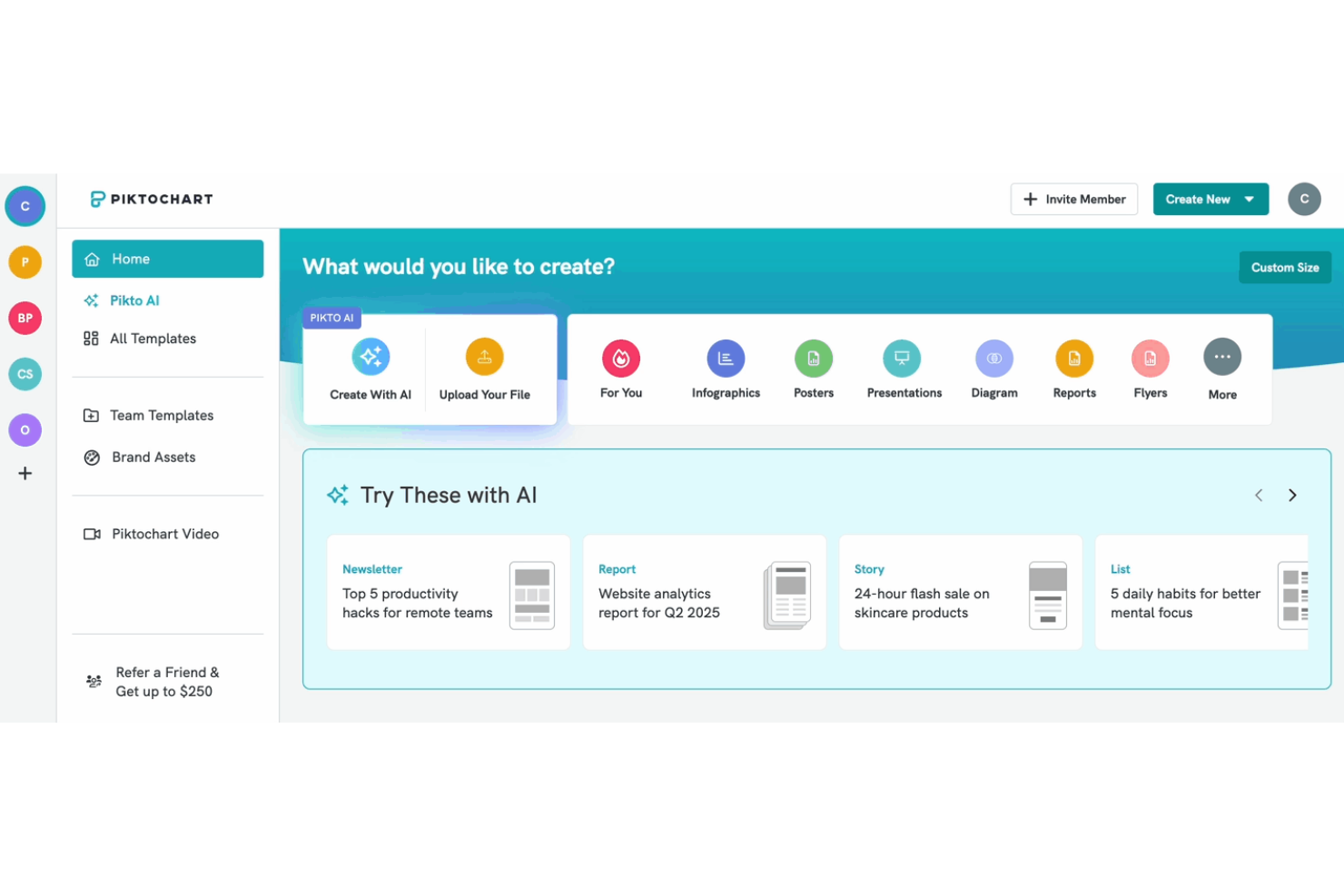
Se hai bisogno di trasformare dati complessi in visualizzazioni chiare, Piktochart è pensato proprio per questo scopo. È particolarmente adatto a team di marketing, educatori e analisti che vogliono creare infografiche, report e presentazioni che evidenziano insight sui dati. Piktochart si distingue dalle altre alternative a Visme offrendo strumenti specializzati per importare dati e costruire grafici che rendono le informazioni facili da comprendere.
Perché Piktochart è una Buona Alternativa a Visme
Per i team focalizzati sulla visualizzazione dei dati, Piktochart offre strumenti specializzati che lo rendono una valida alternativa a Visme. Puoi importare direttamente fogli di calcolo e trasformarli in grafici, diagrammi e infografiche con pochi clic. Apprezzo molto come l'editor di grafici di Piktochart permetta di personalizzare colori, etichette e punti dati per adattarli al tuo brand o messaggio. Queste funzionalità sono particolarmente utili se i tuoi progetti richiedono visualizzazioni chiare e basate sui dati che vadano oltre la semplice grafica di base.
Funzionalità Principali di Piktochart
Altre funzionalità di Piktochart che potrebbero interessarti includono:
- Editor Drag-and-Drop: Organizza e personalizza gli elementi sulla tua area di lavoro senza alcuna esperienza di design.
- Libreria di Template: Scegli tra un'ampia selezione di modelli professionali per infografiche, report e presentazioni.
- Collaborazione di Team: Invita i membri del team a modificare, commentare e revisionare i progetti in tempo reale.
- Gestione dei Contenuti del Brand: Archivia e applica loghi, colori e font della tua organizzazione a tutti i tuoi design.
Integrazioni Piktochart
Le integrazioni includono Zoom e Google Drive.
Pros and Cons
Pros:
- Importazione diretta di fogli di calcolo per la creazione di grafici
- Strumenti IA per generare immagini dai documenti
- Ampia libreria di mappe geografiche interattive
Cons:
- Strumenti di fotoritocco limitati
- Nessuna pianificazione nativa dei social media

Venngage
Ideale per modelli di report personalizzabili

Quando hai bisogno di creare report altamente personalizzati, Venngage ti offre un controllo maggiore sul layout e sull'identità del brand rispetto alla maggior parte delle alternative a Visme. È particolarmente utile per consulenti, agenzie e team aziendali che desiderano curare ogni dettaglio dei propri report e delle proprie proposte. Venngage si distingue per il suo editor di template flessibile e per gli avanzati strumenti di branding che ti aiutano ad allineare lo stile ai colori e al brand della tua organizzazione.
Perché Venngage è una valida alternativa a Visme
Se cerchi maggiore flessibilità nella progettazione dei report, Venngage è un’ottima alternativa a Visme grazie ai suoi modelli di report completamente personalizzabili. Puoi modificare i layout, sostituire elementi visivi e perfezionare ogni sezione per adattarla alle esigenze del tuo brand o dei tuoi clienti. Apprezzo il fatto che la funzione Brand Kit di Venngage consenta di salvare e applicare colori, font e loghi dell’organizzazione su tutti i documenti. Queste opzioni di personalizzazione semplificano la creazione di report professionali e coerenti con il tuo marchio per ogni tipo di esigenza aziendale.
Caratteristiche principali di Venngage
Altre funzionalità utili di Venngage possono includere:
- Creatore di infografiche: Realizza infografiche da zero o utilizza modelli preimpostati per raccontare storie visive.
- Strumenti di visualizzazione dei dati: Inserisci grafici, tabelle e mappe direttamente nei tuoi progetti utilizzando editor integrati.
- Modalità collaborazione: Invita colleghi a modificare e commentare i progetti in tempo reale.
- Opzioni di esportazione: Scarica i tuoi progetti nei formati PNG, PDF o file HTML interattivi per la condivisione o la pubblicazione.
Integrazioni di Venngage
Le integrazioni native non sono attualmente elencate.
Pros and Cons
Pros:
- Verifica dell’accessibilità conforme WCAG integrata
- Modelli professionali specializzati per aziende
- Strumenti integrati per la creazione di grafici e mappe
Cons:
- Grafici nascosti sotto la scheda elementi
- Processo di onboarding iniziale più lungo

PowToon
Ideale per video di presentazioni animate
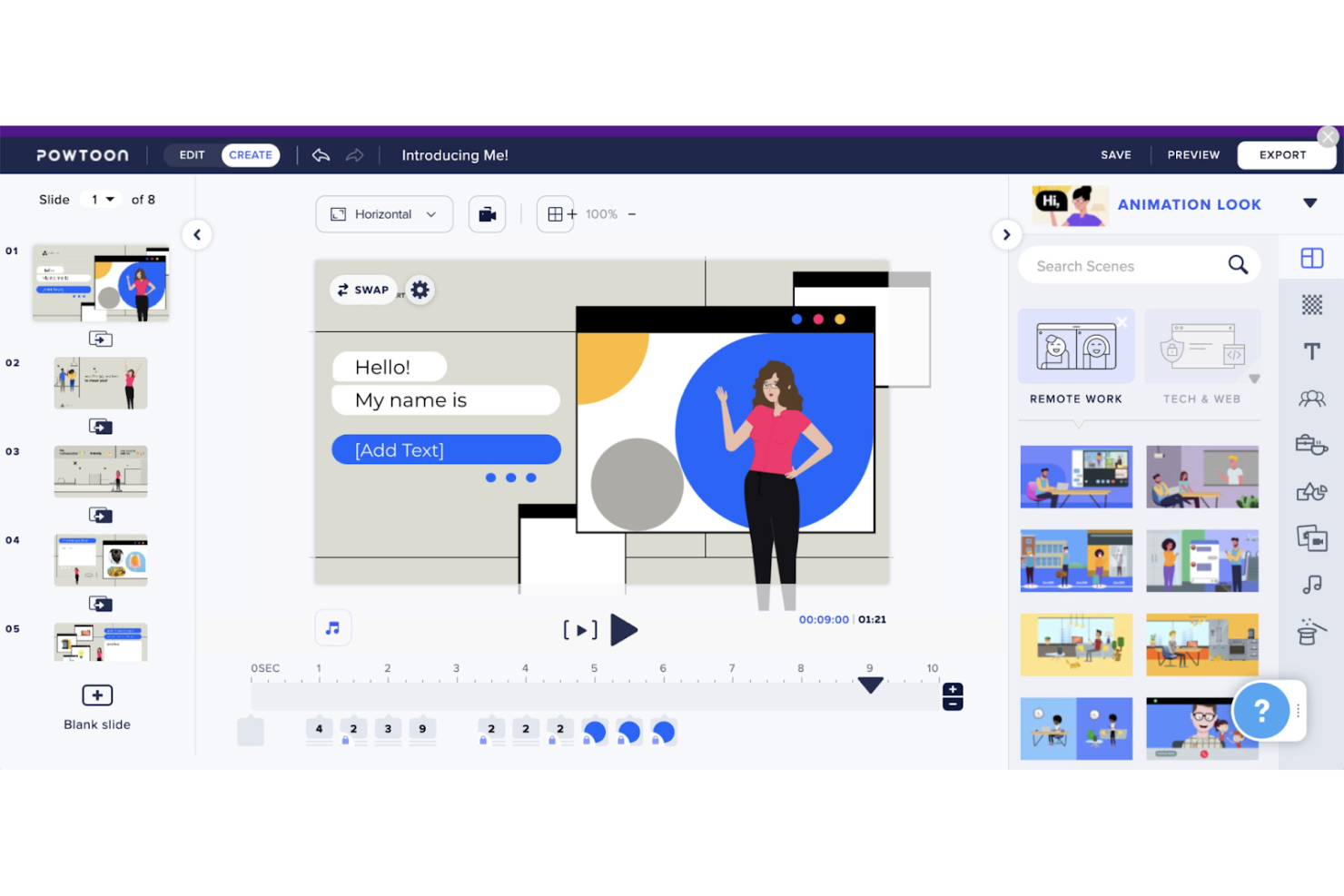
Se hai bisogno di creare video di presentazioni animate, Powtoon offre una piattaforma dedicata per trasformare le idee in storie visive coinvolgenti. È una scelta ideale per team di marketing, educatori e formatori che desiderano andare oltre le slide statiche e aggiungere animazioni, personaggi e movimento ai loro contenuti. Powtoon si distingue tra le alternative a Visme grazie alla sua specializzazione in strumenti di animazione e modelli creati appositamente per presentazioni basate su video.
Perché Powtoon è una buona alternativa a Visme
A differenza di molti strumenti di presentazione, Powtoon è progettato specificamente per creare video animati invece di slide statiche. Questa specializzazione ti permette di accedere a un'ampia gamma di effetti di animazione, librerie di personaggi e transizioni di scena che danno vita alle tue presentazioni. Apprezzo il fatto che Powtoon ti consenta di combinare doppiaggi, musica e elementi visivi dinamici per creare contenuti più coinvolgenti rispetto alle tradizionali presentazioni a slide. Per chi vuole superare la staticità delle immagini, Powtoon offre funzionalità di animazione che Visme non riesce a eguagliare.
Caratteristiche principali di Powtoon
Altre funzionalità di Powtoon degne di nota includono:
- Libreria di modelli: Accedi a una vasta gamma di modelli preimpostati per diversi stili di presentazione e video.
- Strumenti di collaborazione: Invita i membri del team a revisionare, commentare e modificare i progetti in tempo reale.
- Branding personalizzato: Carica i tuoi loghi, font e palette di colori per mantenere la coerenza del marchio.
- Opzioni di esportazione diretta: Pubblica i video direttamente su YouTube, Facebook o scaricali in diversi formati.
Integrazioni Powtoon
Le integrazioni includono HubSpot, Wistia, Kaltura, Vimeo, Microsoft Teams e Canvas.
Pros and Cons
Pros:
- Ampia libreria di personaggi animati
- Registrazione e modifica del doppiaggio integrate
- Pubblicazione diretta su YouTube e social media
Cons:
- Elementi interattivi limitati per le presentazioni
- Filigrane nei video con la versione gratuita
Ideale con integrazione ad Adobe Creative Cloud

Se il tuo team utilizza già Adobe Creative Cloud, Adobe Express offre un modo diretto per creare grafiche, video e documenti con accesso alle risorse Adobe esistenti. È particolarmente utile per i team marketing, i designer e i content creator che vogliono passare rapidamente dal concetto al visual finale senza uscire dall’ecosistema Adobe. Adobe Express si distingue dalle altre alternative a Visme perché consente di importare file di Photoshop e Illustrator, font e librerie direttamente nei progetti.
Perché Adobe Express è una valida alternativa a Visme
Per team che hanno già investito in Adobe Creative Cloud, Adobe Express rappresenta una naturale alternativa a Visme grazie alla profonda integrazione con la suite di strumenti creativi Adobe. È possibile importare risorse direttamente da Photoshop, Illustrator e Adobe Fonts, semplificando il mantenimento della coerenza del brand su tutti i progetti. Mi piace la possibilità di accedere a librerie e modelli condivisi, un aspetto che aiuta i team a collaborare e riutilizzare elementi grafici in modo efficiente. Questo livello di integrazione non è offerto da Visme, soprattutto per le organizzazioni che si affidano al flusso di lavoro creativo Adobe.
Funzionalità principali di Adobe Express
Altre funzionalità di Adobe Express da evidenziare includono:
- Azioni rapide: Esegui operazioni come la rimozione dello sfondo, il ridimensionamento delle immagini e la conversione PDF con un solo clic.
- Strumenti per la creazione di video: Crea brevi video e animazioni tramite editing drag-and-drop.
- Kit del brand: Conserva e applica colori, loghi e font del tuo marchio in tutti i progetti.
- Pianificatore di contenuti: Pianifica e pubblica post sui social media direttamente dalla piattaforma.
Integrazioni di Adobe Express
Le integrazioni includono Adobe Photoshop, Adobe Illustrator, Adobe InDesign, Adobe Lightroom, Adobe Acrobat, Adobe Firefly, Vimeo, Google Drive, Microsoft OneDrive e altro ancora.
Pros and Cons
Pros:
- Importazione diretta di file Photoshop e Illustrator
- Azioni rapide automatizzano le attività di design ripetitive
- Strumenti per video e animazioni per contenuti social
Cons:
- Opzioni limitate di visualizzazione avanzata dei dati
- Alcune funzionalità richiedono abbonamenti Adobe separati


Se desideri velocizzare la creazione di slide con l’IA, Beautiful.ai è pensato proprio per questa esigenza. È particolarmente utile per team, consulenti e professionisti che devono costruire presentazioni impeccabili senza perdere ore nel formattare. A differenza della maggior parte delle alternative a Visme, Beautiful.ai utilizza regole di design guidate dall’intelligenza artificiale per regolare automaticamente i layout, così le tue slide risultano sempre pulite e coerenti.
Perché Beautiful.ai è una buona alternativa a Visme
Per chi cerca di automatizzare il design delle slide, Beautiful.ai si distingue per il suo approccio supportato dall’IA. La piattaforma applica automaticamente le migliori pratiche di design mentre aggiungi contenuti, quindi non c’è bisogno di regolare manualmente layout o spaziatura. Mi piace che tu possa scegliere tra un’ampia gamma di template intelligenti, che si adattano in tempo reale mentre modifichi testi, immagini o grafici. Se desideri presentazioni dall’aspetto rifinito con il minimo sforzo manuale, Beautiful.ai offre un’alternativa unica agli strumenti di design più manuali di Visme.
Funzionalità principali di Beautiful.ai
Altre funzioni di Beautiful.ai che vale la pena evidenziare includono:
- Strumenti di collaborazione per il team: Più utenti possono modificare, commentare e revisionare presentazioni insieme in tempo reale.
- Impostazioni di controllo del brand: Blocca colori, font e loghi aziendali per garantire che ogni slide segua le linee guida del brand.
- Dashboard di analisi: Monitora visualizzazioni, interazioni e condivisioni delle presentazioni da un’unica dashboard centrale.
- Esportazione PowerPoint: Esporta le presentazioni direttamente in formato PowerPoint per ulteriori modifiche o condivisioni.
Integrazioni Beautiful.ai
Le integrazioni includono Slack, ChatGPT, Salesforce, monday.com, PowerPoint e Webex.
Pros and Cons
Pros:
- L’IA regola automaticamente i layout durante la modifica
- Il controllo del brand blocca colori e font
- L’esportazione in PowerPoint mantiene la formattazione delle slide
Cons:
- Opzioni limitate per infografiche e grafici
- Nessuna possibilità di incorporare contenuti web interattivi
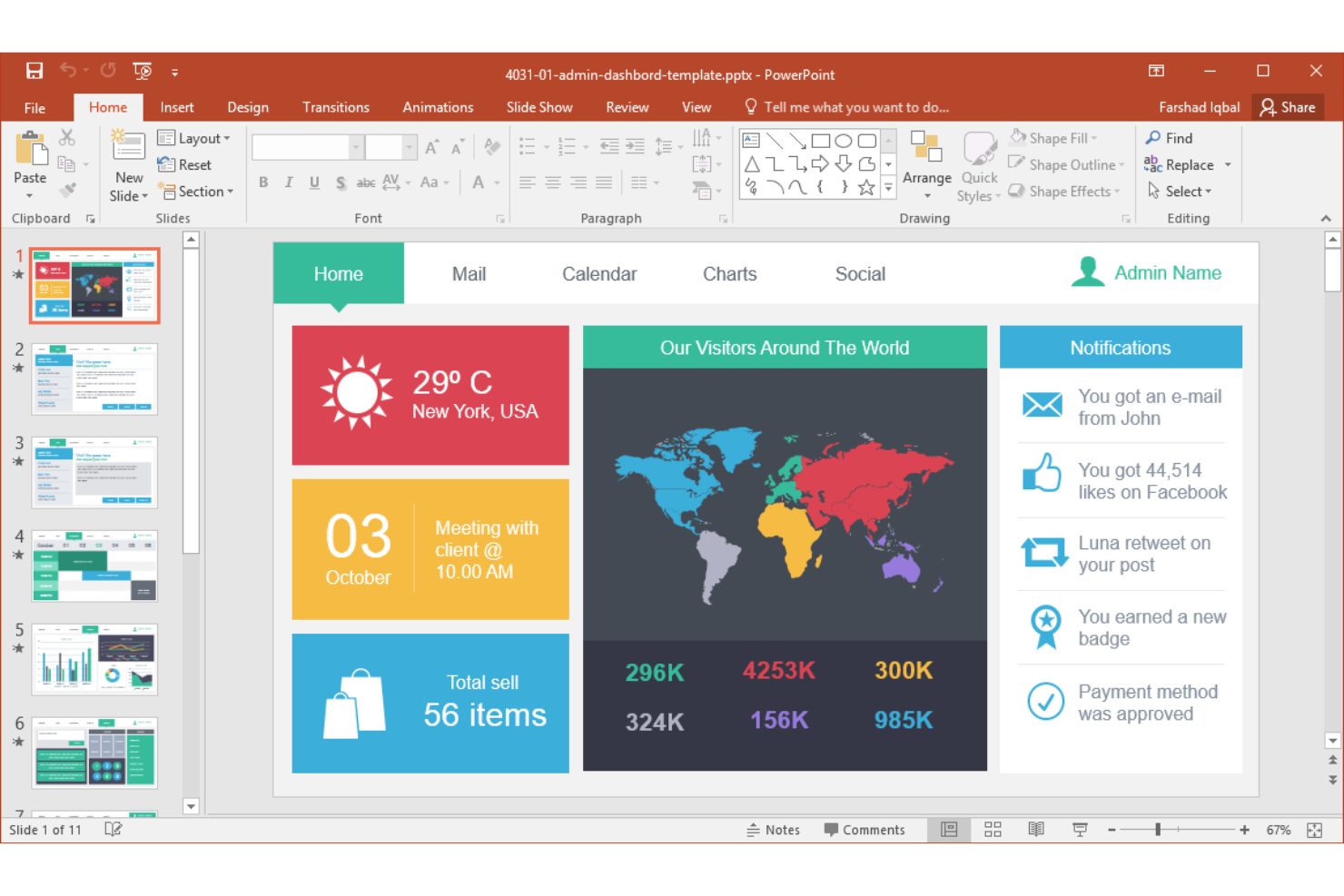
Per i team che necessitano di funzionalità avanzate e un'integrazione stretta con gli strumenti aziendali, Microsoft PowerPoint è una scelta familiare. È particolarmente indicato per le organizzazioni che utilizzano Microsoft 365, hanno bisogno di un controllo dettagliato sui contenuti delle diapositive o richiedono opzioni avanzate di collaborazione e sicurezza. A differenza della maggior parte delle alternative a Visme, PowerPoint offre una personalizzazione profonda, un'ampia libreria di modelli ed è compatibile con gli ambienti IT aziendali.
Perché Microsoft PowerPoint è una valida alternativa a Visme
Quando hai bisogno di funzionalità di presentazione di livello aziendale, Microsoft PowerPoint offre un livello di controllo e flessibilità difficile da eguagliare. Ho scelto PowerPoint per i suoi strumenti avanzati di schema diapositiva, che ti permettono di far rispettare gli standard di brand e gestire modelli complessi per team numerosi. La piattaforma supporta inoltre autorizzazioni dettagliate, cronologia delle versioni e co-redazione, rendendola particolarmente adatta alle organizzazioni con elevati requisiti di collaborazione e conformità. Se il tuo team opera in un ambiente Microsoft 365 e deve gestire presentazioni su larga scala, PowerPoint è un'alternativa pratica a Visme.
Funzionalità principali di Microsoft PowerPoint
Altre funzionalità di Microsoft PowerPoint da menzionare includono:
- Strumento Designer: suggerisce istantaneamente miglioramenti al layout e al design mentre crei le diapositive.
- Transizione Morph: crea transizioni animate fluide tra le diapositive per racconti dinamici.
- Supporto media incorporati: consente di aggiungere video, audio ed elementi interattivi direttamente nelle diapositive.
- Presenter Coach: utilizza l'IA per fornire feedback in tempo reale su ritmo, parole di riempimento e modo di esporre durante le sessioni di prova.
Integrazioni di Microsoft PowerPoint
Le integrazioni includono Microsoft Teams, OneDrive, SharePoint, Excel, Word, Outlook e altro ancora.
Pros and Cons
Pros:
- La transizione Morph consente animazioni avanzate delle diapositive
- Profonda integrazione con l'ecosistema Microsoft 365
- Supporta la modifica offline e l'accesso ai file
Cons:
- Le funzionalità di collaborazione richiedono un abbonamento a Microsoft 365
- Nessuna libreria integrata di foto stock o icone


Se cerchi uno strumento che renda l’editing drag-and-drop veloce e semplice, DocHipo merita sicuramente un’occhiata. È particolarmente utile per chi non è designer, piccole imprese, marketer e creatori di contenuti che devono progettare grafiche e documenti senza una ripida curva di apprendimento. DocHipo si distingue dalle alternative a Visme puntando su un montaggio rapido tramite template e su un’interfaccia che permette di creare immagini professionali in pochi minuti.
Perché DocHipo è una buona alternativa a Visme
DocHipo adotta un approccio diverso rispetto a molte alternative a Visme dando priorità all’editing visuale drag-and-drop veloce. La piattaforma offre un’ampia raccolta di template pronti all’uso e un editor semplice che permette di spostare, ridimensionare e personalizzare gli elementi con pochi clic. Mi piace che si possano sostituire immagini, icone e testo immediatamente senza dover navigare tra menu o impostazioni complesse. Per chi ha bisogno di creare grafiche dall’aspetto professionale in tempi stretti, gli strumenti di editing di DocHipo rappresentano una valida alternativa a Visme.
Caratteristiche principali di DocHipo
Altre funzionalità di DocHipo che mi hanno colpito includono:
- Supporto a documenti multipagina: Crea e gestisci documenti multipagina per report, brochure ed eBook.
- Libreria integrata di risorse stock: Accedi a una libreria integrata di foto, illustrazioni e icone stock per i tuoi progetti.
- Kit brand personalizzabili: Imposta e applica colori, font e loghi del tuo brand su tutti i progetti.
- Download in diversi formati: Esporta i tuoi progetti finali come file PNG, JPG, PDF o GIF.
Integrazioni DocHipo
Le integrazioni includono YouTube, Mailchimp, Jotform, Pexels e Unsplash.
Pros and Cons
Pros:
- Accesso diretto alle risorse di Unsplash e Pexels
- Elementi testuali e sticker animati inclusi
- Scarica i progetti come PNG, JPG, PDF o GIF
Cons:
- Nessuna applicazione mobile disponibile
- Manca l’inserimento numerico per il posizionamento
Altre alternative a Visme
Ecco alcune ulteriori alternative a Visme che non sono entrate nella mia selezione, ma che vale comunque la pena prendere in considerazione:


Come Valuto le Alternative a Visme
Valuto gli strumenti secondo due livelli: criteri di base come modelli di roadmap e co-editing in tempo reale, e fattori distintivi come il design supportato dall'IA e le integrazioni con strumenti di project management.
Funzionalità Principali (Requisiti Fondamentali per Questa Lista)
Quando seleziono gli strumenti per la mia lista, valuto ciascuno su una scala da 0 (non offre la funzionalità) a 5 (eccelle in quest'area) per ciascuna delle seguenti funzionalità principali. Quindi, calcolo il punteggio totale convertendolo in percentuale. Ogni strumento deve raggiungere un punteggio minimo totale del 65% per essere preso in considerazione.
- Creazione di Contenuti Visivi: Cerco strumenti che permettano di creare presentazioni, infografiche e report con un editor drag-and-drop, invece di obbligarti a utilizzare presentazioni a diapositive rigide.
- Modelli Focalizzati sui Progetti: Una buona libreria include roadmaps preimpostate, diagrammi di Gantt, report di stato e cronologie delle milestone che puoi personalizzare per sprint review o aggiornamenti per la dirigenza.
- Collaborazione in Tempo Reale: Valuto se diversi membri del team possono co-modificare, commentare e risolvere feedback nello stesso file senza conflitti di versione.
- Gestione del Brand e delle Risorse: I team che riutilizzano loghi, font e palette di colori in più materiali hanno bisogno di kit brand centralizzati e librerie di asset condivise per mantenere la coerenza.
- Visualizzazione dei Dati: Verifico la presenza di tipi di grafici, opzioni di importazione dati e la possibilità di collegare fonti live come Google Sheets per mantenere aggiornate le dashboard di progetto.
- Esportazione e Condivisione in Più Formati: I diversi stakeholder si aspettano formati vari, perciò cerco opzioni per PDF, PNG, PPT e link condivisibili, oltre a possibilità di integrazione o pubblicazione interattiva.
Una volta che ho una lista di strumenti che rispettano questi criteri, considero ciò che distingue ciascuna piattaforma.
Fattori Distintivi (Cosa Distingue i Fornitori)
Ecco come confronto e metto a confronto i diversi fornitori:
Funzionalità Distintive
Il design potenziato dall'IA è un grande elemento distintivo. Cerco strumenti che generino layout o testo da un prompt, il che fa risparmiare ore quando bisogna costruire una presentazione la sera prima del comitato direttivo. Contano anche le integrazioni con gli strumenti di project management. Estrarre dati in tempo reale da Jira o Asana in un report visivo è molto meglio che fare screenshot manuali ogni volta. Controllo anche il monitoraggio del coinvolgimento sui link condivisi, per vedere se i dirigenti hanno effettivamente aperto il tuo aggiornamento di stato o sono andati direttamente alla slide sul budget.
Oltre le Funzionalità
Il modello di prezzo è importante quando si implementa uno strumento in tutto un PMO. Valuto se i costi per utente rimangono ragionevoli su larga scala o se i piani basati sul team offrono un valore migliore per gruppi più grandi. Anche la curva di apprendimento è un fattore chiave. La maggior parte dei project manager non sono designer esperti, quindi cerco piattaforme in cui si possa produrre una roadmap dall’aspetto professionale già alla prima sessione. Anche la scalabilità è fondamentale. Strumenti che supportano più workspace, dashboard amministrative e permessi basati sui ruoli rendono molto più facile gestire l’uso man mano che l’adozione cresce oltre un singolo team.
Perché cercare un'alternativa a Visme?
Sebbene Visme sia una valida piattaforma, ci sono diversi motivi per cui alcuni utenti cercano soluzioni alternative. Potresti cercare un'alternativa a Visme perché…
- Hai bisogno di una gestione più avanzata degli elementi del brand
- Il tuo team richiede controlli più approfonditi sulle autorizzazioni dei modelli
- Desideri funzionalità integrate per l'automazione dei dati o il collegamento a dati in tempo reale
- Hai bisogno di funzionalità migliori per animazioni o interattività
- La tua organizzazione necessita di un controllo centralizzato sui team distribuiti
Se ti riconosci in una di queste situazioni, sei nel posto giusto. Il mio elenco include diverse alternative a Visme più adatte ai team che affrontano queste difficoltà con Visme e cercano soluzioni alternative.
Funzionalità principali di Visme
Ecco alcune delle funzionalità principali di Visme, per aiutarti a mettere a confronto ciò che offrono le soluzioni alternative:
- Creatore di presentazioni e infografiche con trascinamento
- Ampia libreria di modelli e temi
- Risorse integrate di foto stock, icone e video
- Elementi interattivi come finestre pop-up e animazioni
- Strumenti di collaborazione in team in tempo reale
- Visualizzazione dei dati con grafici e diagrammi
- Kit del brand personalizzabili per garantire un branding coerente
- Opzioni di esportazione in più formati, tra cui PDF, PPTX e HTML5
- Analisi per monitorare il coinvolgimento degli spettatori
- Protezione con password e controlli della privacy per i contenuti condivisi