

Le 10 migliori alternative a MuleSoft per l’integrazione delle API nel 2026

Selezione di alternative a MuleSoft


Una valida alternativa a MuleSoft offre una gestione flessibile delle API, funzionalità iPaaS affidabili e supporto per flussi di lavoro complessi tra sistemi cloud e locali. Se stai cercando alternative a MuleSoft, probabilmente stai valutando opzioni in grado di gestire esigenze di integrazione in continua evoluzione, semplificare la gestione del ciclo di vita delle API e adattarsi all'insieme di tecnologie della tua squadra, senza gli ostacoli legati alle licenze o alla complessità che talvolta accompagnano MuleSoft.
Questo elenco ti aiuterà a confrontare rapidamente le principali piattaforme, a evidenziarne i punti di forza distintivi e a individuare la soluzione più adatta alle tue priorità di integrazione e gestione delle API.
Che cos'è MuleSoft?
MuleSoft è una piattaforma di integrazione che collega applicazioni, dati e dispositivi in ambienti cloud e locali. Offre strumenti per la gestione delle API, la trasformazione dei dati e l'automazione dei flussi di lavoro, consentendo alle squadre di creare e gestire integrazioni su larga scala. MuleSoft è ampiamente utilizzato dalle organizzazioni che hanno bisogno di unificare sistemi complessi, semplificare i flussi di dati e supportare iniziative di trasformazione digitale intuitive con connettività affidabile e una governance centralizzata delle API.
Tabella di confronto delle alternative a MuleSoft
Questa tabella di confronto riassume i dettagli dei prezzi delle migliori alternative a MuleSoft che ho selezionato:
| Tool | Best For | Trial Info | Price | ||
|---|---|---|---|---|---|
| 1 | Ideale per builder di integrazioni guidato dall'intelligenza artificiale | Demo gratuita disponibile | Prezzo su richiesta | Website | |
| 2 | Ideale per integrazioni di automazione dei flussi di lavoro | Demo gratuita disponibile | Prezzo su richiesta | Website | |
| 3 | Ideale per la rapida implementazione di integrazioni cloud | Prova gratuita di 30 giorni disponibile | Da $99/mese + utilizzo | Website | |
| 4 | Ideale per analisi avanzate delle API | Prova gratuita di 60 giorni disponibile | A partire da $20/1M chiamate API | Website | |
| 5 | Ideale per la gestione scalabile del traffico API | Piano gratuito di 6 mesi disponibile | Prezzi su richiesta | Website | |
| 6 | Ideale per il massimo controllo di sicurezza a livello aziendale | Prova gratuita di 30 giorni + demo gratuita disponibile | Prezzo su richiesta | Website | |
| 7 | Ideale per l'integrazione nativa con l'ecosistema Microsoft | Prova gratuita di 30 giorni disponibile | Prezzi su richiesta | Website | |
| 8 | Ideale per microservizi e supporto Kubernetes | Prova gratuita di 30 giorni + demo gratuita disponibile | Prezzo su richiesta | Website | |
| 9 | Le funzionalità di gestione API sono meno mature | Not available | Prezzo su richiesta | Website | |
| 10 | Ideale per il routing API in ambienti ibridi e multi-cloud | Demo gratuita disponibile | Prezzi su richiesta | Website |
Perché fidarsi dei nostri consigli sui software
Il nostro team testa e recensisce software dal 2012. In quanto project manager noi stessi, sappiamo quanto sia difficile — e importante — scegliere il software giusto.
Per questa guida, abbiamo valutato gli strumenti attraverso test pratici e ricerche indipendenti, assegnando un punteggio agli strumenti in base ai nostri criteri di selezione. Ci basiamo inoltre sulle competenze di leader di pensiero del settore e di professionisti attivi nella gestione dei progetti.
Le nostre recensioni riflettono il nostro giudizio editoriale umano, non un discorso di vendita.
Revisori esperti:
Recensioni delle alternative a MuleSoft
Di seguito trovi i miei riepiloghi dettagliati delle migliori alternative a MuleSoft incluse nella mia selezione. Le mie recensioni offrono uno sguardo approfondito sulle funzionalità, le capacità e le integrazioni di ciascuna piattaforma, per aiutarti a trovare quella più adatta alle tue esigenze.


Celigo offre alle squadre una piattaforma di integrazione flessibile pensata per le aziende in rapida crescita che hanno bisogno di collegare app cloud e automatizzare i flussi di lavoro. Se vuoi semplificare integrazioni complesse senza un forte coinvolgimento dell’IT, Celigo è progettato per aiutarti a muoverti velocemente e ad adattarti man mano che le tue esigenze cambiano.
Per chi è ideale Celigo?
Medie imprese e team IT che cercano soluzioni di integrazione basate sull’AI per automatizzare i flussi di lavoro tra applicazioni cloud.
Perché Celigo è una buona alternativa a MuleSoft
Ho scelto Celigo perché il suo builder di integrazione guidato dall’AI aiuta il mio team ad automatizzare flussi complessi senza dover ricorrere a una programmazione estesa. La piattaforma suggerisce passaggi e mappature per l’integrazione, accelerando la consegna dei progetti. Apprezzo come l’intelligenza artificiale individua possibili errori prima del rilascio, riducendo il tempo di troubleshooting. Per i team che puntano a muoversi rapidamente e ridurre la configurazione manuale, l’approccio AI-driven di Celigo spicca tra le alternative a MuleSoft.
Caratteristiche principali di Celigo
- Designer visuale dei flussi: Crea e gestisci integrazioni tramite un’interfaccia drag-and-drop.
- Connettori predefiniti per applicazioni: Accedi a una libreria di connettori per app SaaS e on-premise più diffuse.
- Controlli di accesso basati sui ruoli: Imposta i permessi e gestisci l’accesso degli utenti ai progetti di integrazione.
- Dashboard di monitoraggio in tempo reale: Monitora la salute e le prestazioni delle integrazioni con aggiornamenti di stato in tempo reale.
Integrazioni Celigo
Celigo offre integrazioni native con Salesforce, NetSuite, Shopify, Amazon, Zendesk, ServiceNow, Jira, Microsoft 365, Google Workspace e Slack. È disponibile anche un’API per integrazioni personalizzate.
Pros and Cons
Pros:
- Designer visuale dei flussi supporta workflow complessi
- Strumenti di gestione degli errori con avvisi in tempo reale
- Supporta integrazioni sia cloud che on-premise
Cons:
- Supporto limitato per l’integrazione con sistemi legacy
- I limiti di chiamata API possono limitare l’uso ad alto volume
New Product Updates from Celigo
Celigo Expands Microsoft Entra Authentication for SQL Connectors
Celigo’s Azure Synapse and MS SQL connectors now support Microsoft Entra service principal authentication via client secrets and certificates, so you can connect securely without relying on SQL credentials. For more information, visit Celigo’s official site.
 .
.
Workato
Ideale per integrazioni di automazione dei flussi di lavoro

Workato è pensato per i team che desiderano automatizzare flussi di lavoro complessi tra più applicazioni aziendali senza ricorrere a una programmazione avanzata. I professionisti di marketing, vendite e operazioni scelgono spesso Workato per la sua piattaforma di integrazione low-code e l’ampia libreria di connettori predefiniti. A differenza di MuleSoft, Workato punta sulla rapida implementazione delle automazioni di flusso di lavoro e supporta una vasta gamma di sistemi SaaS e on-premises.
Perché Workato è una valida alternativa a MuleSoft
Per i team focalizzati sulle integrazioni per l’automazione dei flussi di lavoro, Workato offre un approccio diverso rispetto a MuleSoft. Ho scelto Workato perché permette di creare automazioni complesse e multi-step utilizzando un’interfaccia low-code e una vasta libreria di ricette predefinite. Il suo motore di automazione basato su ricette supporta logiche condizionali, trasformazioni di dati e trigger guidati da eventi, sia su applicazioni cloud che on-premises. Questo rende Workato particolarmente utile per le organizzazioni che desiderano automatizzare rapidamente i processi aziendali senza dover dipendere fortemente da risorse di sviluppo.
Caratteristiche principali di Workato
Altre funzionalità che rendono Workato un punto di riferimento per integrazione e automazione includono:
- Piattaforma API: Crea, pubblica e gestisci API direttamente all’interno di Workato.
- Costruttore di integrazione incorporato: Consenti a partner o clienti di realizzare le proprie integrazioni direttamente nel tuo prodotto.
- Controlli di accesso basati sui ruoli: Definisci permessi dettagliati per utenti e team nella gestione delle automazioni.
- Dashboard di monitoraggio in tempo reale: Segui lo stato delle esecuzioni delle automazioni, errori e salute del sistema in tempo reale.
Integrazioni Workato
Le integrazioni includono Salesforce, Asana, Snowflake, NetSuite, ServiceNow, Workday, Slack, Google Sheets e Box.
Pros and Cons
Pros:
- Ampia libreria di ricette di integrazione predefinite
- Strumento di automazione low-code per utenti business
- Costruttore di integrazione incorporato per fornitori SaaS
Cons:
- Presenta una curva di apprendimento ripida
- Le funzionalità di gestione API sono meno mature

Boomi
Ideale per la rapida implementazione di integrazioni cloud
Se il tuo team ha bisogno di un modo economico per connettere rapidamente applicazioni cloud e on-premise, Boomi è progettato per una distribuzione rapida. È una scelta ideale per i team IT e gli specialisti di integrazione che vogliono automatizzare i flussi di lavoro e lo spostamento dei dati su una vasta gamma di piattaforme. A differenza di MuleSoft, l’interfaccia low-code di Boomi e i connettori predefiniti ti permettono di avviare integrazioni in giorni, non settimane.
Perché Boomi è una valida alternativa a MuleSoft
Quando devi implementare integrazioni cloud rapidamente, Boomi si distingue per velocità e flessibilità. Ho scelto Boomi perché il suo generatore di processi drag-and-drop e l’ampia libreria di connettori predefiniti ti consentono di creare e lanciare integrazioni con poco codice. La piattaforma supporta anche la sincronizzazione dei dati in tempo reale e la gestione automatizzata degli errori, aiutando i team a mantenere i sistemi collegati e funzionanti senza problemi. Per le organizzazioni che vogliono accelerare la trasformazione digitale senza uno sviluppo pesante, Boomi offre un’alternativa pratica a MuleSoft.
Principali funzionalità di Boomi
Altre funzionalità che rendono Boomi utile per i progetti di integrazione includono:
- Gestione API Boomi AtomSphere: Gestisci, monitora e protegge le API in tutto il panorama d’integrazione.
- Gestione B2B/EDI: Gestisci lo scambio elettronico di dati e le relazioni con i partner commerciali direttamente all’interno della piattaforma.
- Master Data Hub: Centralizza e sincronizza i dati master su più sistemi.
- Libreria di processi: Accedi a un archivio di template di processi d’integrazione riutilizzabili per casi d’uso comuni.
Integrazioni Boomi
Le integrazioni includono SAP, Salesforce, Oracle NetSuite, ServiceNow, AWS, Slack, Workday, Stripe, Shopify e Google Drive.
Pros and Cons
Pros:
- Connettori predefiniti per le principali piattaforme SaaS
- Progettazione visiva dei processi per l’integrazione
- Strumenti integrati per la gestione B2B/EDI
Cons:
- Opzioni limitate per trasformazioni dati avanzate
- Richiede un modulo separato per la gestione delle API

Apigee
Ideale per analisi avanzate delle API

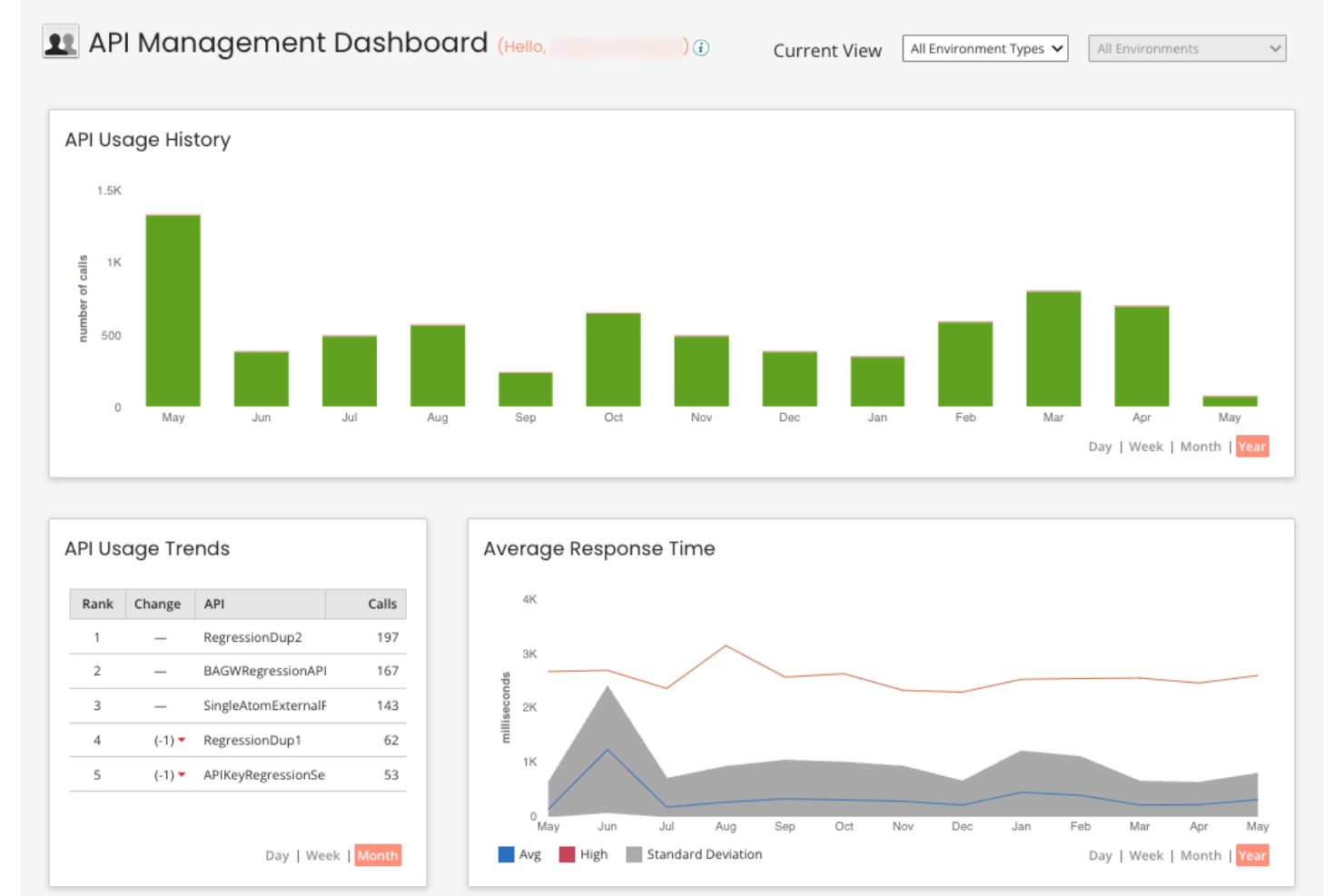
Se il tuo team necessita di una visibilità approfondita sull'utilizzo e le prestazioni delle API, Apigee offre analisi avanzate che vanno oltre il monitoraggio standard. È progettato per aziende e imprese digitali che desiderano ottimizzare le strategie API con dati dettagliati e approfondimenti azionabili. Rispetto a MuleSoft, Apigee si distingue per i suoi dashboard di analisi in tempo reale e il rilevamento automatico delle anomalie nel traffico API integrato.
Perché Apigee è una valida alternativa a MuleSoft
Per i team che necessitano di più del semplice monitoraggio delle API, Apigee offre funzionalità di analisi avanzate che lo distinguono da MuleSoft. Ho scelto Apigee perché offre dashboard in tempo reale, report personalizzabili e rilevamento automatico delle anomalie nel traffico API integrato. Queste funzionalità consentono di identificare rapidamente problemi di prestazioni, tendenze di utilizzo e minacce alla sicurezza all'interno dell'ecosistema API. Se la tua priorità sono approfondimenti attuabili e basati sui dati per la gestione delle API, Apigee è una valida alternativa da considerare.
Funzionalità chiave di Apigee
Altre funzionalità che rendono Apigee interessante per la gestione delle API includono:
- Creazione di proxy API: Crea e gestisci proxy API per astrarre i servizi di backend e applicare le policy.
- Strumenti di gestione del traffico: Imposta quote, limiti di velocità e policy di spike arrest per controllare il consumo delle API.
- Portale per sviluppatori integrato: Fornisce un portale personalizzabile per l'onboarding e il supporto dei consumatori delle API.
- Distribuzione multi-cloud: Distribuisci e gestisci le API su ambienti ibridi e multi-cloud.
Integrazioni di Apigee
Le integrazioni includono Google Cloud Storage, BigQuery, Google Kubernetes Engine, Vertex AI, Cloud Functions e altro.
Pros and Cons
Pros:
- Analisi API avanzate con dashboard in tempo reale
- Rilevamento automatico delle anomalie nel traffico API integrato
- Supporto alla distribuzione multi-cloud per ambienti ibridi
Cons:
- La configurazione delle policy richiede scripting basato su XML
- La distribuzione dei proxy API può essere lenta su larga scala

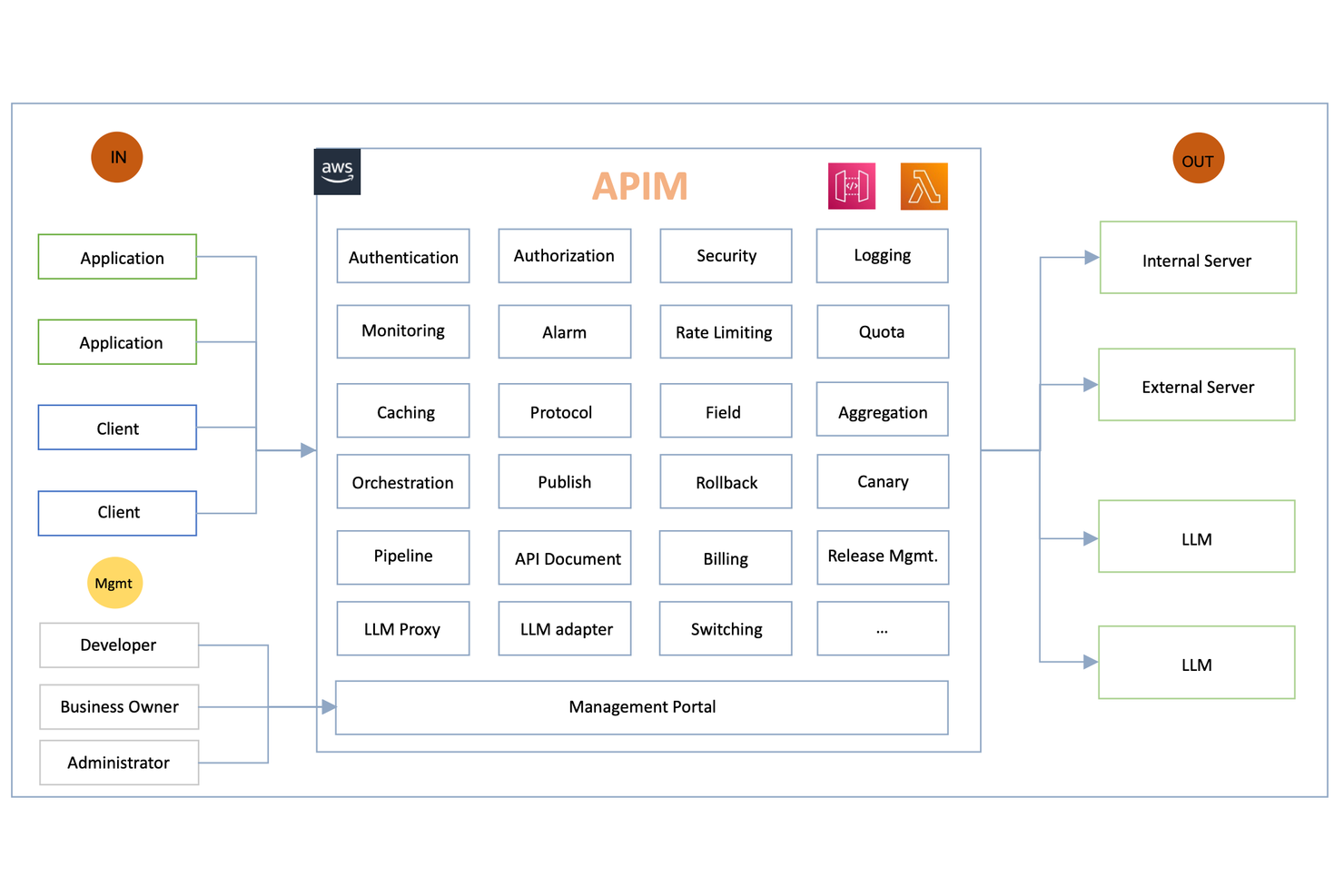
Per le organizzazioni che gestiscono traffico API imprevedibile o ad alto volume, Amazon API Gateway offre una soluzione cloud-native progettata per la scalabilità. Si rivela particolarmente adatto per team di ingegneria e aziende digitali che devono gestire, proteggere e monitorare API con capacità elastica. A differenza di MuleSoft, Amazon API Gateway è strettamente integrato con AWS Lambda e altri servizi AWS, rendendolo ideale per architetture serverless e guidate dagli eventi.
Perché Amazon API Gateway è una valida alternativa a MuleSoft
Quando è necessario gestire traffico API massiccio o imprevedibile, Amazon API Gateway si distingue per la sua scalabilità elastica. Ho selezionato questo strumento perché si adatta automaticamente per gestire milioni di richieste al secondo senza intervento manuale. Le sue funzionalità di throttling integrato e controllo dei burst aiutano a proteggere i sistemi di backend dal sovraccarico, fondamentale in ambienti ad alto traffico. Per i team che danno priorità a una gestione del traffico cloud-native e affidabile, Amazon API Gateway offre un livello di scalabilità difficile da eguagliare.
Funzionalità principali di Amazon API Gateway
Altre funzionalità che rendono Amazon API Gateway utile per la gestione delle API includono:
- Supporto per domini personalizzati: Associa le tue API ai tuoi domini per endpoint con brand personalizzato.
- Versionamento API: Gestisci più versioni delle tue API contemporaneamente per rispondere a diverse esigenze dei client.
- Trasformazione di richieste e risposte: Modifica le richieste in entrata e le risposte in uscita tramite mapping templates.
- Autorizzazione integrata: Integra con AWS IAM, Cognito o Lambda authorizer per un controllo sicuro dell'accesso alle API.
Integrazioni di Amazon API Gateway
Le integrazioni includono AWS Lambda, Amazon EC2, AWS Elastic Beanstalk, Amazon ECS, AWS Step Functions, Amazon CloudWatch e altro.
Pros and Cons
Pros:
- Integrazione nativa con funzioni AWS Lambda
- Prezzi pay-as-you-go per richieste API
- Protezione DDoS automatizzata tramite AWS Shield
Cons:
- Supporto limitato per servizi cloud non AWS
- Nessun mocking API integrato per il testing

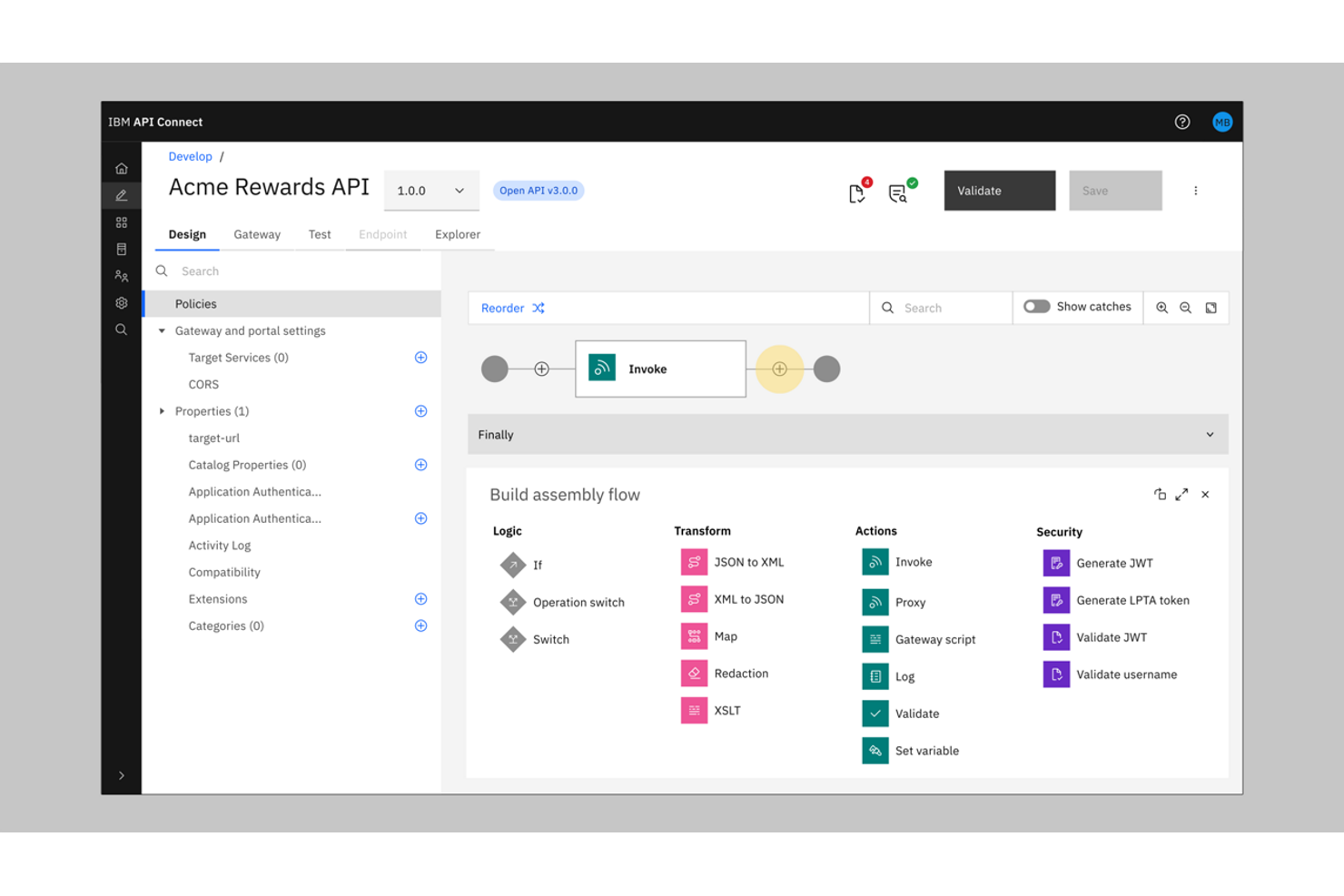
IBM API Connect è una piattaforma di integrazione come servizio (iPaaS) progettata per le organizzazioni che necessitano di una sicurezza avanzata e di una governance rigorosa per il loro ecosistema API. È particolarmente rilevante per le imprese di settori regolamentati, come la finanza o la sanità, dove la conformità e i controlli di accesso sono imprescindibili. A differenza di MuleSoft, IBM API Connect offre politiche di sicurezza granulari e protezione dalle minacce integrata in ogni fase del ciclo di vita delle API.
Perché IBM API Connect è una valida alternativa a MuleSoft
Quando la sicurezza di livello aziendale è una priorità assoluta, IBM API Connect offre una soluzione d'integrazione che va oltre quanto proposto da molte altre piattaforme. L'ho scelto per la sua protezione dalle minacce integrata, che include funzionalità come OAuth, OpenID Connect e gestione delle chiavi API per proteggere ogni endpoint. La piattaforma supporta inoltre controlli di accesso dettagliati e funzioni di auditing, aiutando le organizzazioni a soddisfare requisiti di conformità stringenti. Queste caratteristiche incentrate sulla sicurezza rendono IBM API Connect una scelta solida per i team che non possono scendere a compromessi sulla protezione dei dati o sui requisiti normativi.
Le principali funzionalità di IBM API Connect
Altre funzionalità che rendono IBM API Connect una scelta forte tra gli strumenti di integrazione e gestione API includono:
- Cruscotto di analisi API: Gli utenti possono monitorare l’utilizzo delle API, le prestazioni e le tendenze attraverso un pannello di controllo visuale.
- Portale per sviluppatori: La piattaforma mette a disposizione un portale personalizzabile per l’onboarding e il supporto di sviluppatori esterni e interni.
- Documentazione API automatizzata: API Connect genera e aggiorna documentazione interattiva per tutte le API pubblicate.
- Supporto per implementazione multi-cloud: I team possono implementare e gestire integrazioni e API complesse in ambienti cloud pubblici, privati e ibridi.
Integrazioni di IBM API Connect
Le integrazioni native non sono attualmente elencate.
Pros and Cons
Pros:
- Protezione integrata dalle minacce per gli endpoint API
- Generazione automatica della documentazione API
- Supporto per implementazione e gestione multi-cloud
Cons:
- Configurazione iniziale complessa per ambienti aziendali
- L’interfaccia utente può risultare datata

Ideale per l'integrazione nativa con l'ecosistema Microsoft

Per i team già investiti nell'ecosistema cloud di Microsoft, Microsoft Azure API Management offre un percorso diretto verso una governance e un'integrazione API unificate. È particolarmente utile per i reparti IT e gli architetti aziendali che desiderano gestire, proteggere e monitorare le API su Azure e altri servizi Microsoft. A differenza di MuleSoft, Azure API Management fornisce un'integrazione profonda e nativa con strumenti come Azure Active Directory, Logic Apps e Power Platform.
Perché Microsoft Azure API Management è una valida alternativa a MuleSoft
Se la tua organizzazione si affida all'ecosistema cloud di Microsoft, Azure API Management è progettato specificamente per un'integrazione senza soluzione di continuità con i servizi Microsoft nativi. Ho scelto questo strumento perché si collega direttamente con Azure Active Directory per la gestione delle identità e supporta i flussi di lavoro automatizzati tramite Logic Apps e Power Platform. La piattaforma consente inoltre l'applicazione centralizzata delle policy API e l'analisi direttamente dal portale Azure, semplificando la gestione delle API insieme ad altre risorse Microsoft. Per i team che stanno standardizzando su Microsoft, questo livello di integrazione nativa rappresenta un chiaro vantaggio rispetto a MuleSoft.
Funzionalità principali di Microsoft Azure API Management
Altre funzionalità che rendono Azure API Management prezioso per i progetti di integrazione includono:
- Portale per sviluppatori: Personalizza e pubblica un portale brandizzato per la documentazione e l'onboarding delle API.
- Distribuzione multi-area geografica: Distribuisci gateway API su più regioni Azure per una disponibilità globale.
- Versioning e revisioni: Gestisci più versioni e revisioni delle API senza tempi di inattività.
- Caching integrato: Migliora le prestazioni delle API con il caching configurabile delle risposte a livello di gateway.
Integrazioni di Microsoft Azure API Management
Le integrazioni includono Azure Logic Apps, Azure Functions, Azure Kubernetes Service, Azure Container Apps e altro ancora.
Pros and Cons
Pros:
- Integrazione profonda con i servizi cloud Azure
- Scalabilità automatica per API ad alto traffico
- Supporta distribuzioni API multi-area geografica
Cons:
- Integrazione limitata con ecosistemi non Microsoft
- Nessun supporto integrato per flussi di lavoro B2B/EDI


I team che sviluppano applicazioni distribuite spesso scelgono Kong per il suo solido supporto a microservizi e Kubernetes. È una soluzione adatta alle organizzazioni che danno priorità alle prestazioni e alla scalabilità del gateway API in ambienti containerizzati o cloud-native. A differenza di MuleSoft, Kong offre ingress Kubernetes nativo e funzionalità di service mesh che aiutano a gestire le API in architetture moderne e dinamiche.
Perché Kong è una valida alternativa a MuleSoft
Se il tuo team si concentra su microservizi o architetture Kubernetes-native, Kong offre capacità che MuleSoft non eguaglia. Ho scelto Kong perché fornisce supporto nativo per ingress Kubernetes e un service mesh integrato per gestire il traffico est-ovest tra i servizi. Queste funzionalità ti permettono di distribuire, mettere in sicurezza e scalare le API direttamente negli ambienti containerizzati. Per le organizzazioni che si stanno indirizzando verso sistemi cloud-native o distribuiti, l'approccio 'architecture-first' di Kong è una scelta solida.
Funzionalità principali di Kong
Altre funzionalità che rendono Kong interessante per la gestione delle API includono:
- Architettura a plugin: Estendi la funzionalità di base con un'ampia gamma di plugin open-source ed enterprise.
- Configurazione dichiarativa: Gestisci le impostazioni e le policy del gateway API utilizzando file YAML per il controllo versione e l'automazione.
- Controllo degli accessi basato sui ruoli: Assegna permessi granulari a utenti e team per un'amministrazione sicura.
- Dashboard analitica delle API: Monitora utilizzo, latenza e tassi di errore delle API attraverso dashboard visive integrate.
Integrazioni di Kong
Le integrazioni includono AWS Lambda, Azure Functions, OpenWhisk, Datadog, Prometheus, Zipkin e altro ancora.
Pros and Cons
Pros:
- Supporto nativo all'ingress controller di Kubernetes
- Sistema di plugin per funzionalità gateway personalizzate
- Configurazione dichiarativa con file YAML
Cons:
- Connettori enterprise limitati disponibili di default
- La compatibilità dei plugin varia in base al tipo di deployment

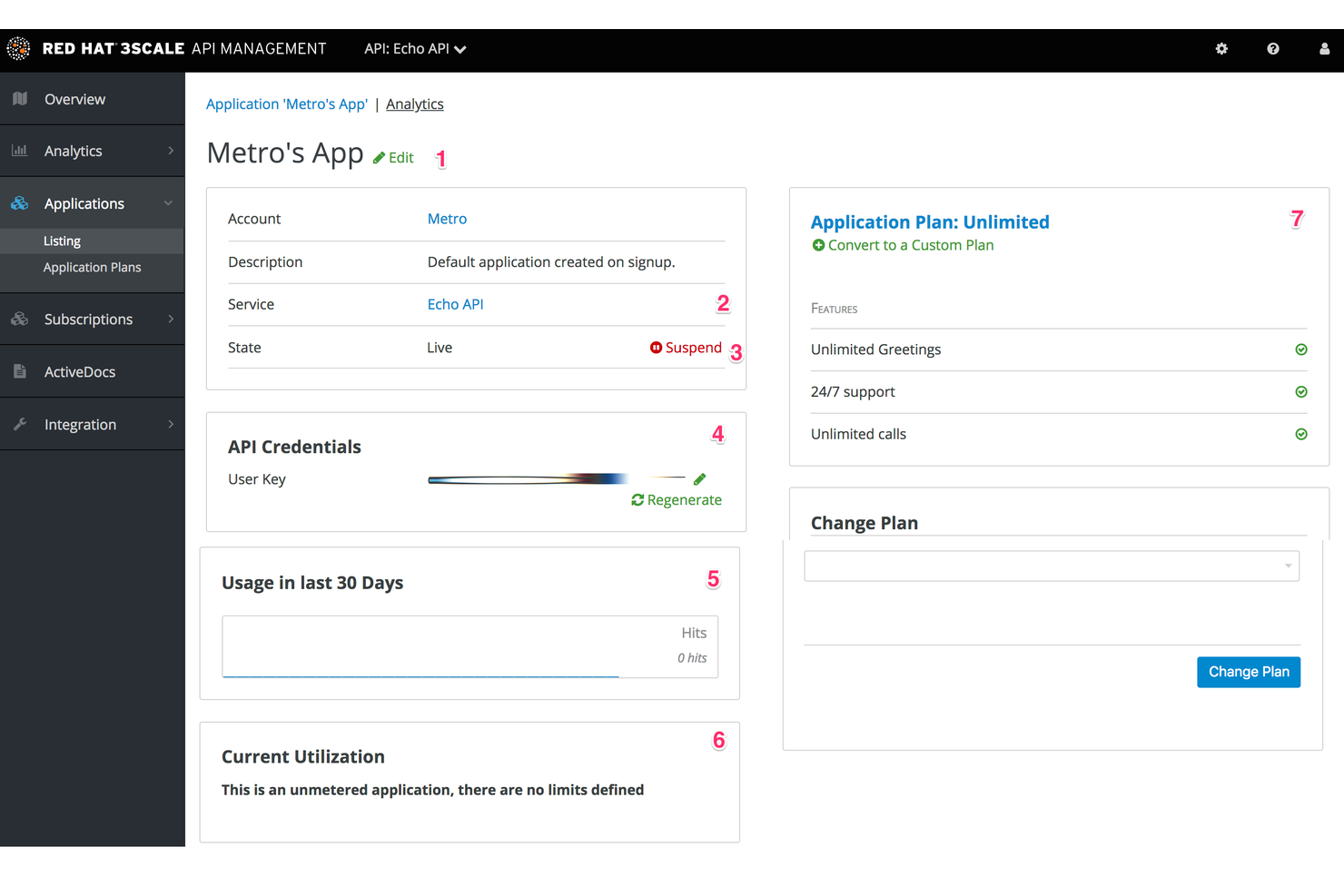
Se hai bisogno di monetizzare le API e gestire i piani di utilizzo, 3Scale di Red Hat offre una piattaforma specializzata per le aziende basate su API e i team di prodotti digitali. È progettato per le organizzazioni che desiderano controllare l'accesso, impostare livelli di prezzo e monitorare in dettaglio il consumo delle API. A differenza di MuleSoft, 3Scale pone la monetizzazione avanzata delle API e la gestione del portale sviluppatori al centro delle sue funzionalità.
Perché ho scelto 3Scale
Ho scelto 3Scale per la sua particolare architettura ibrida che separa il gestore delle API dal gateway del traffico. Questo ti consente di ospitare il livello di gestione nel cloud mantenendo il gateway API on-premise o all'edge, cosa essenziale per prestazioni a bassa latenza in configurazioni cloud ibride. La sua ottimizzazione nativa per OpenShift lo rende una soluzione potente per le aziende che già operano nell'ecosistema Red Hat.
Caratteristiche principali di 3Scale
Altre funzionalità che rendono 3Scale interessante per la gestione delle API includono:
- Opzioni di deployment del gateway API: Scegli tra soluzioni cloud, on-premises o gateway ibrido.
- Dashboard per analisi e reportistica: Accedi a metriche dettagliate su utilizzo delle API, prestazioni e pattern di traffico.
- Supporto OAuth e OpenID Connect: Abilita autenticazione e autorizzazione sicure per i consumatori delle API.
- Motore di gestione delle policy: Applica regole personalizzate per controllo del traffico, sicurezza e trasformazione delle richieste.
Integrazioni di 3Scale
Le integrazioni includono Red Hat OpenShift, Red Hat Ansible Automation Platform, Red Hat Enterprise Linux e altro.
Pros and Cons
Pros:
- Strumenti di monetizzazione per l'utilizzo delle API e la fatturazione
- Portale sviluppatori integrato per i consumatori di API
- Motore per policy di gestione personalizzata del traffico
Cons:
- Integrazioni native limitate al di fuori dei prodotti Red Hat
- Nessun tool ETL o di trasformazione dati integrato


Kgateway di Solo.io è pensato per organizzazioni che gestiscono API in ambienti ibridi e multi-cloud. Questo strumento è particolarmente adatto a imprese e team di piattaforma che necessitano di routing avanzato delle API, controllo del traffico e sicurezza su infrastrutture distribuite. Diversamente da MuleSoft, Gloo Gateway punta sull'integrazione cloud-native e supporta scenari di routing complessi per architetture moderne.
Perché Kgateway è una valida alternativa a MuleSoft
Quando il routing delle API in ambienti ibridi e multi-cloud è una priorità, Kgateway offre funzionalità che lo distinguono da MuleSoft. Ho scelto Kgateway perché è stato progettato per gestire gestioni complesse del traffico su Kubernetes, VM e diversi fornitori cloud. Il suo supporto a routing avanzato, integrazione con service mesh e politiche di sicurezza granulari lo rendono ideale per ambienti distribuiti e cloud-native. Questa attenzione a una gestione delle API flessibile e indipendente dal cloud è particolarmente preziosa per i team che vogliono modernizzare la propria infrastruttura oltre quanto generalmente supportato da MuleSoft.
Funzionalità principali di Kgateway
Altre caratteristiche che rendono Solo.io interessante per la gestione delle API includono:
- Portale per sviluppatori API: Centralizza la documentazione delle API e l’onboarding per sviluppatori interni ed esterni.
- Controlli di sicurezza API integrati: Applica policy di autenticazione, autorizzazione e protezione dalle minacce direttamente a livello di gateway.
- Traffic shadowing: Permette di testare nuove versioni delle API replicando il traffico live senza impattare la produzione.
- Scoperta automatica delle API: Rileva e registra automaticamente i nuovi servizi man mano che vengono distribuiti.
Integrazioni di Kgateway
Le integrazioni includono Envoy Proxy, Istio, Backstage, kagent, Google Cloud e altro.
Pros and Cons
Pros:
- Routing avanzato del traffico per infrastrutture multi-cloud
- Integrazione nativa con service mesh tramite Istio
- Scoperta automatica delle API per ambienti dinamici
Cons:
- Richiede competenze avanzate su Kubernetes e cloud
- I dettagli sui prezzi non sono pubblicamente disponibili
Altre alternative a MuleSoft
Ecco alcune alternative aggiuntive a MuleSoft che non sono state incluse nella mia selezione, ma che vale comunque la pena valutare:
- Tyk
Ideale per la flessibilità open-source nei gateway API
- WSO2 API Manager
Il migliore per la gestione del ciclo di vita delle API open source
- Jitterbit iPaaS
Ideale per integrazione EDI ed ERP rapida


Come valuto le alternative a MuleSoft
Divido la mia valutazione tra requisiti fondamentali—gestione delle API, connettori pre-costruiti, trasformazione dei dati—che qualsiasi piattaforma deve avere, e i fattori che fanno la differenza quando si sceglie di migrare da MuleSoft.
Funzionalità di base (requisiti indispensabili per questa lista)
Quando seleziono gli strumenti per la mia lista, attribuisco a ciascuno un punteggio da 0 (non offre la funzionalità) a 5 (eccelle in quest'area) per ogni funzionalità chiave elencata qui sotto. Poi trasformo il punteggio totale dello strumento in una percentuale. Ogni strumento deve raggiungere un punteggio minimo totale del 65% per poter essere preso in considerazione.
- Gestione del ciclo di vita delle API: Valuto se una piattaforma consente di progettare, versionare, pubblicare e monitorare le API—così il tuo PMO può esporre endpoint di dati di progetto a sistemi a valle come dashboard BI.
- Libreria di connettori pre-costruiti: L'ampiezza dei connettori è fondamentale, soprattutto per sistemi vicini alla gestione progetti come Jira, Salesforce, SAP e Workday, tra i quali i team spesso devono sincronizzare i dati.
- Trasformazione e mappatura dei dati: Controllo come ogni strumento gestisce le incongruenze di schema—ad esempio mappando campi personalizzati dall'output JSON di un project tracker al formato di input XML di un altro sistema.
- Orchestrazione dei flussi di lavoro: Cerco flussi di integrazione multi-step con ramificazioni, gestione degli errori e tentativi di ripetizione, fondamentali per automatizzare la presa in carico dei progetti o aggiornamenti di stato tra sistemi diversi.
- Opzioni di deploy ibrido: Molti team aziendali lavorano con una combinazione di sistemi cloud e on-premise, quindi valuto se la piattaforma supporta architetture ibride con gestione unificata.
- Controlli di sicurezza e governance: Verifico la presenza di controlli di accesso basati sui ruoli, standard di crittografia, registrazione degli audit e certificazioni di conformità, rilevanti per gli ambienti di progetto aziendali che trattano dati sensibili.
Una volta identificati gli strumenti che soddisfano questi criteri, considero ciò che differenzia ciascuna piattaforma.
Fattori differenzianti (cosa distingue i fornitori)
Ecco come confronto e metto a confronto i diversi fornitori:
Funzionalità distintive
Qui è molto importante avere un builder low-code o no-code: determina se il personale PMO può creare integrazioni autonomamente o se ogni volta serve l'intervento degli ingegneri. Cerco anche funzionalità di integrazione assistita dall'IA, come la mappatura automatica dei campi, che riduce i tempi di configurazione quando si collegano sistemi con schemi complessi. I template riutilizzabili di integrazione sono importanti, specialmente le soluzioni pre-costruite per workflow comuni come sincronizzare ticket Jira in un CRM o inserire traguardi di progetto in un ERP.
Oltre le funzionalità
Il costo totale di proprietà è la prima cosa che valuto—il modello di licensing di MuleSoft è spesso il motivo principale per cui i team cercano alternative, quindi confronto le strutture di prezzo su base di consumo, per utente o fee fisse. La velocità di implementazione è altrettanto importante; verifico quanto rapidamente un team può attivare una prima integrazione, poiché alcune piattaforme offrono un onboarding guidato mentre altre presuppongono competenze tecniche avanzate. Prendo anche in considerazione la salute dell'ecosistema, come la presenza di connettori sviluppati dalla community e forum attivi, perché ciò influisce direttamente sulla velocità con cui il team riesce a risolvere eventuali problemi in autonomia.
Perché cercare un'alternativa a MuleSoft?
Sebbene MuleSoft sia una buona scelta tra le alternative a MuleSoft, esistono diversi motivi per cui alcuni utenti cercano soluzioni alternative. Potresti essere alla ricerca di un'alternativa a MuleSoft perché…
- Hai bisogno di prezzi più flessibili o trasparenti
- La tua squadra desidera un inserimento più semplice o rapido
- Hai bisogno di integrazioni native con piattaforme specifiche
- Hai bisogno di funzionalità avanzate di monetizzazione delle API
- La tua organizzazione preferisce opzioni a codice aperto o autogestite
- Desideri una soluzione più leggera per progetti di dimensioni ridotte
- La tua squadra ha bisogno di una curva di apprendimento più semplice
Se ti riconosci in una di queste situazioni, sei nel posto giusto. Il mio elenco contiene diverse alternative a MuleSoft più adatte alle squadre che affrontano queste difficoltà con MuleSoft e sono alla ricerca di soluzioni alternative.
Funzionalità principali di MuleSoft
Ecco alcune delle funzionalità principali di MuleSoft, per aiutarti a mettere a confronto ciò che offrono le soluzioni alternative:
- Strumenti per la gestione del ciclo di vita delle API: La piattaforma Anypoint di MuleSoft fornisce un ambiente per progettare, sviluppare e gestire le API, facilitando l'integrazione aziendale in tutta l'organizzazione.
- Progettista visivo dei flussi di integrazione: Il progettista fornisce un'interfaccia intuitiva che semplifica l'integrazione di applicazioni complesse, consentendo agli utenti di trascinare e rilasciare componenti per creare una logica sofisticata.
- Connettori predefiniti per le applicazioni SaaS e locali più diffuse: Questi connettori semplificano l'integrazione delle applicazioni fornendo una connettività immediata alle applicazioni SaaS e a diversi sistemi CRM senza richiedere codice personalizzato.
- Gateway API centralizzato per la sicurezza e il controllo del traffico: Questa funzionalità garantisce la sicurezza delle implementazioni su larga scala, sebbene la natura della piattaforma si rifletta spesso in costi elevati nel suo modello tariffario.
- Elaborazione dei dati in tempo reale e in batch: MuleSoft gestisce in modo efficiente carichi di lavoro diversi, consentendo alle aziende di creare flussi di elaborazione in grado di gestire sia gli attivatori immediati sia i trasferimenti di dati in massa.
- Controlli degli accessi basati sui ruoli e governance: Le funzionalità avanzate di governance lo rendono una scelta preferita per le strategie di gestione dei dati master (MDM), garantendo l'integrità dei dati in tutti i magazzini di dati connessi.
- Pannelli di monitoraggio e analisi: I pannelli dettagliati forniscono una visibilità approfondita sulle funzionalità di integrazione, consentendo ai team di monitorare le prestazioni e risolvere i problemi in scenari complessi di integrazione aziendale.
- Supporto per implementazioni ibride e su più cloud: La piattaforma supporta modelli di implementazione flessibili che competono con quelli dei concorrenti, rendendola ideale per le moderne architetture distribuite nel cloud.
- Strumenti integrati per la trasformazione e la mappatura dei dati: MuleSoft include suggerimenti basati sull'IA per la mappatura dei dati, semplificando il processo di conversione dei formati complessi durante l'automazione dei processi ad alto volume.
- Portale per sviluppatori con documentazione delle API e inserimento iniziale: Fornendo un centro centralizzato per la documentazione, il portale aiuta gli sviluppatori a comprendere e utilizzare rapidamente le API per accelerare la trasformazione digitale.