

Le 10 migliori alternative a Linear per il monitoraggio dei problemi nel 2026

Elenco delle migliori alternative a Linear


Le migliori alternative a Linear combinano un monitoraggio rapido delle attività, funzionalità di collaborazione chiare e una personalizzazione flessibile dei flussi di lavoro, in grado di soddisfare le esigenze dei team di prodotto e ingegneria dinamici. Se stai cercando alternative a Linear, probabilmente cerchi un software per i flussi di lavoro dei progetti che offra visibilità, mantenga il lavoro in movimento e si adatti alle priorità in continua evoluzione, senza perdere la concentrazione e la velocità a cui ti sei abituato.
Questa guida ti mostra rapidamente quali strumenti sono all’altezza della sfida, per quali situazioni è più adatto ciascuno di essi e come il tuo flusso di lavoro quotidiano potrebbe migliorare concretamente passando a una soluzione diversa.
Che cos’è Linear?
Linear è uno strumento per i flussi di lavoro dei progetti, progettato per monitorare i problemi, gestire gli sprint e collaborare tra i team di prodotto e ingegneria. È noto per la sua interfaccia estremamente veloce, i comandi basati sulla tastiera e l’attenzione ad aiutare i team a portare avanti il lavoro senza ostacoli. Linear offre funzionalità come elenchi di attività, bacheche Kanban e integrazioni con strumenti come GitHub e Slack, supportando una comunicazione chiara e una distribuzione continua per i moderni team tecnologici.
Tabella di confronto delle alternative a Linear
Questa tabella di confronto riassume i dettagli sui prezzi delle mie migliori alternative a Linear:
| Tool | Best For | Trial Info | Price | ||
|---|---|---|---|---|---|
| 1 | Ideale per chi cerca un'opzione self-hosted | Piano gratuito disponibile | Da $7.25/utente/mese (fatturazione annuale) | Website | |
| 2 | Ideale per i team che gestiscono codice e attività insieme | Piano gratuito disponibile | Da $4.99/utente/mese (fatturazione annuale) | Website | |
| 3 | Ideale per sprint agili | Piano gratuito disponibile | Da €5/mese | Website | |
| 4 | Ideale per il monitoraggio delle segnalazioni potenziato dall'IA | Piano gratuito disponibile | Da $4.5/utente/mese (fatturazione annuale) | Website | |
| 5 | Ideale con board agili avanzati | Piano gratuito disponibile | Da $7.91/utente/mese | Website | |
| 6 | Ideale per discussioni sui progetti a thread | Piano gratuito disponibile | Da $3/utente/mese | Website | |
| 7 | Ideale per tracciare bug all'interno dei team di prodotto | Piano gratuito disponibile | Prezzo su richiesta | Website | |
| 8 | Ideale per sviluppatori che già utilizzano GitHub | Piano gratuito disponibile | Da $4/utente/mese | Website | |
| 9 | Ideale per visualizzare i progetti su una timeline | Piano gratuito disponibile | Da $19.99/mese | Website | |
| 10 | Ideale per team che necessitano della flessibilità open source | Piano gratuito disponibile | Da $6/utente/mese (fatturazione annuale) | Website |
Perché fidarsi dei nostri consigli sui software
Il nostro team testa e recensisce software dal 2012. In quanto project manager noi stessi, sappiamo quanto sia difficile — e importante — scegliere il software giusto.
Per questa guida, abbiamo valutato gli strumenti attraverso test pratici e ricerche indipendenti, assegnando un punteggio agli strumenti in base ai nostri criteri di selezione. Ci basiamo inoltre sulle competenze di leader di pensiero del settore e di professionisti attivi nella gestione dei progetti.
Le nostre recensioni riflettono il nostro giudizio editoriale umano, non un discorso di vendita.
Revisori esperti:
Recensioni delle alternative a Linear
Di seguito trovi i miei riepiloghi dettagliati delle alternative a Linear entrate nella mia selezione. Le mie recensioni offrono una panoramica approfondita delle funzionalità, dei casi d’uso migliori e delle integrazioni di ciascun software, per aiutarti a trovare quello più adatto a te.

Ideale per chi cerca un'opzione self-hosted
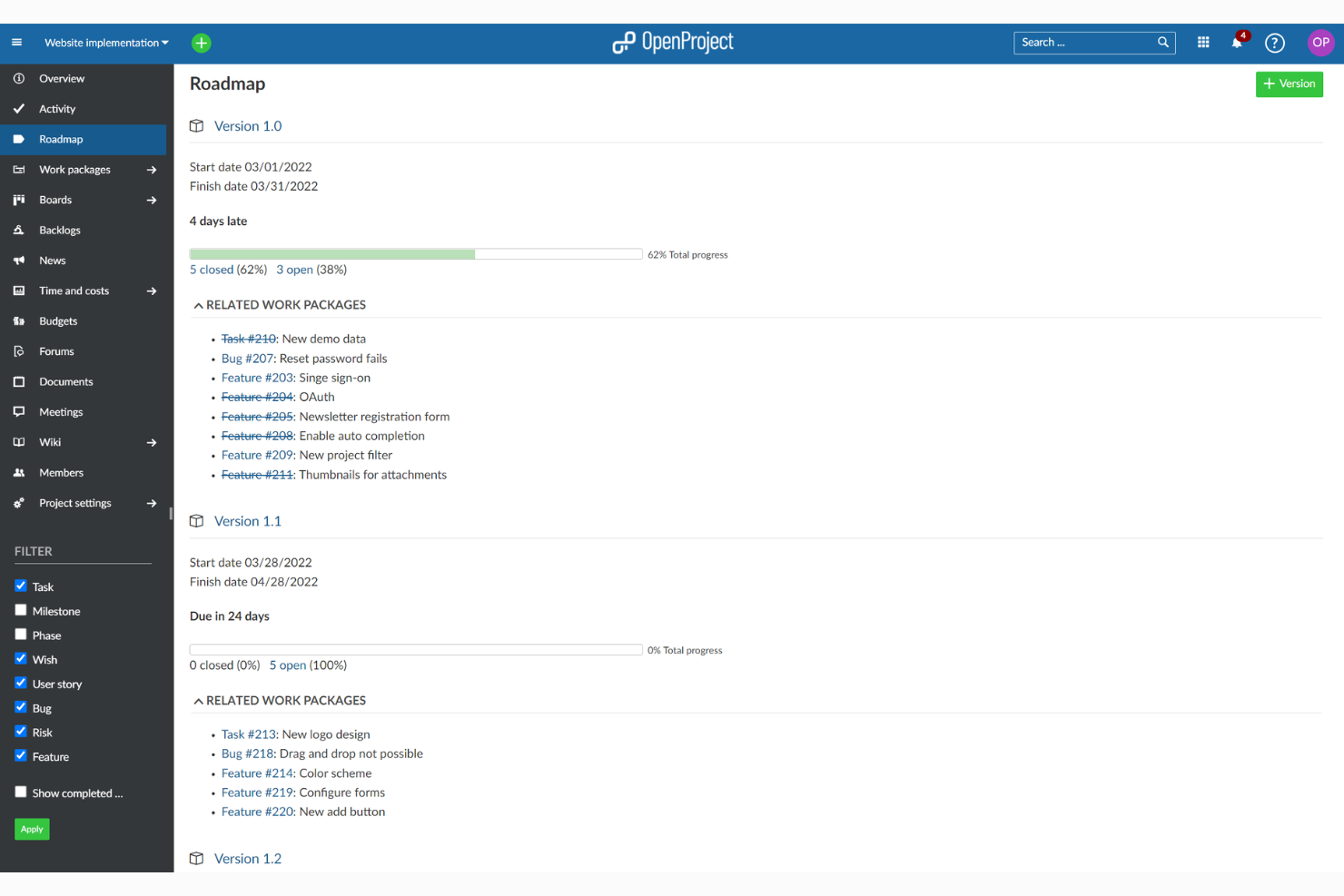
OpenProject è una piattaforma modulare di project management progettata per le organizzazioni che desiderano il controllo dei dati e la personalizzazione dettagliata dei workflow. Si rivolge ai team che hanno bisogno di un'implementazione flessibile e di strumenti collaborativi per gestire attività, scadenze e progetti complessi.
Per chi è ideale OpenProject?
Dipartimenti IT e uffici di project management che necessitano di implementazione on-premises e sovranità dei dati per i propri flussi di lavoro progettuali.
Perché OpenProject è una valida alternativa a Linear
Ho scelto OpenProject perché è uno dei pochi strumenti di project management che offre una vera opzione di installazione self-hosted, fondamentale quando un’organizzazione ha esigenze stringenti di residenza dei dati o di conformità. Con l’installazione on-premises, il mio team controlla dove risiedono i dati dei progetti, cosa che strumenti solo SaaS come Linear non possono offrire. Apprezzo anche il sistema integrato di pacchetti di lavoro di OpenProject, che ci permette di tracciare attività, bug e funzionalità con campi personalizzati e workflow integrati in un unico posto. Per i team che gestiscono cicli di consegna strutturati, il diagramma di Gantt e la funzione di confronto delle baseline facilitano la visualizzazione dei cambiamenti di programma rispetto al piano originale.
Funzionalità principali di OpenProject
- Board agili: Gestisci sprint Scrum o Kanban con backlog, pianificazione sprint e gestione attività tramite drag-and-drop.
- Monitoraggio del tempo: Registra il tempo direttamente sui pacchetti di lavoro per monitorare lo sforzo e supportare i report sui costi di progetto.
- Panoramica del portafoglio progetti: Visualizza e filtra più progetti da una dashboard centrale per monitorare lo stato delle diverse linee di lavoro.
- Budget e report sui costi: Imposta i budget di progetto, monitora i costi pianificati rispetto a quelli reali e genera report sui costi esportabili.
Integrazioni di OpenProject
OpenProject offre integrazioni native con GitHub, GitLab, Excel e Microsoft Project, e mette a disposizione una REST API per integrazioni personalizzate.
Pros and Cons
Pros:
- Supporta hosting on-premises e su cloud privato
- Strumenti avanzati per diagrammi di Gantt e gestione delle tempistiche
- Design modulare per una gestione scalabile dei progetti
Cons:
- Le prestazioni diminuiscono con progetti molto grandi
- Le funzionalità di reportistica sono meno personalizzabili

Zenhub
Ideale per i team che gestiscono codice e attività insieme
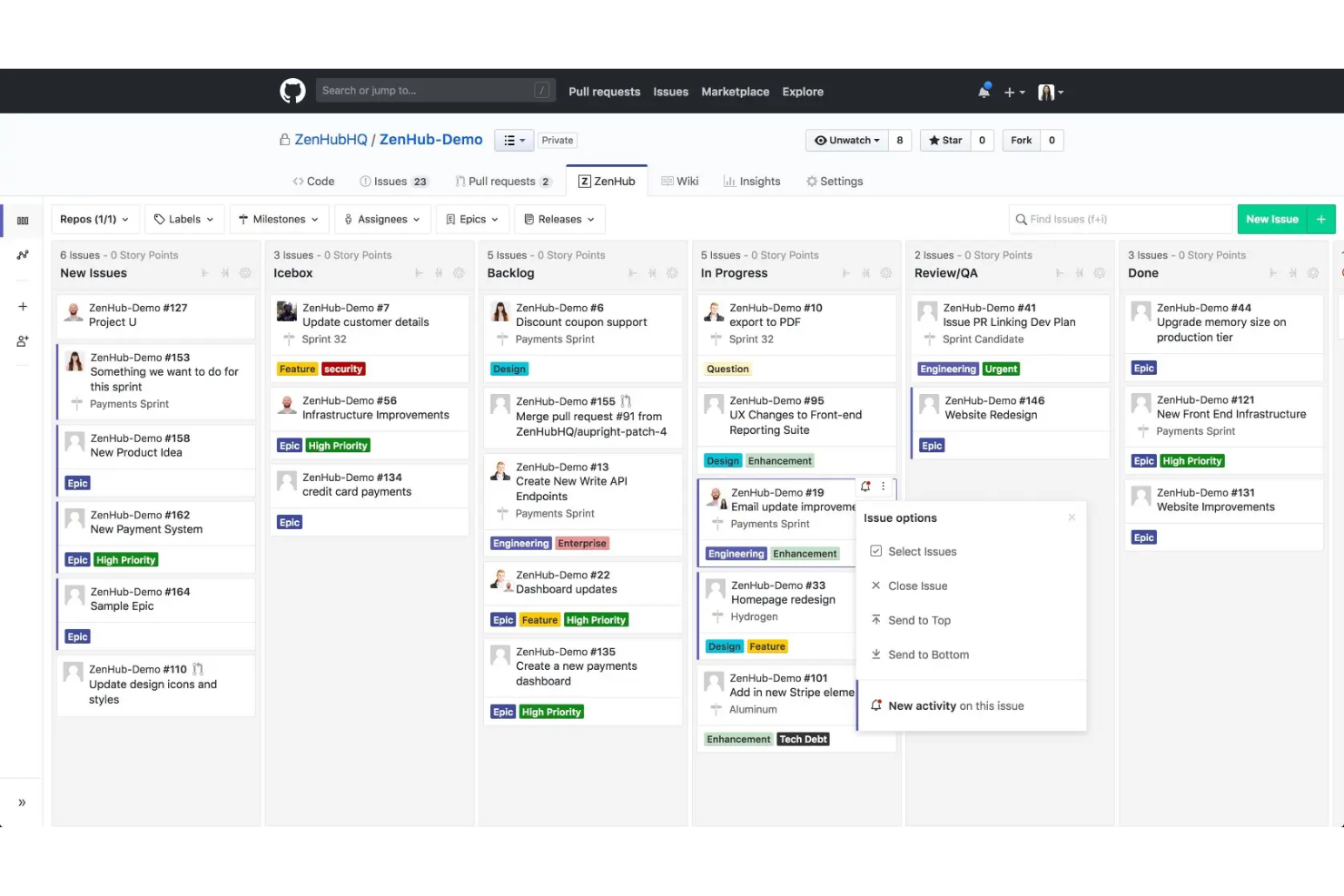
Zenhub offre tutte le funzionalità di gestione progetti direttamente all'interno di GitHub, rendendolo ideale per team di prodotto e ingegneria che lavorano in modo veloce. Se vuoi centralizzare codice, problemi e attività di workflow senza cambiare strumento, penso che l'approccio di Zenhub meriti considerazione.
Per chi è Zenhub?
Team di prodotto e ingegneria che vogliono gestire insieme codice, problemi e pianificazione su GitHub.
Perché Zenhub è una valida alternativa a Linear
Ho scelto Zenhub proprio perché funziona direttamente dentro GitHub invece che affiancarlo. Il mio team collega i repository e gestisce problemi, pull request e pianificazione degli sprint in un unico luogo, senza dover cambiare contesto tra dove vive il codice e dove viene tracciato il lavoro. Apprezzo molto la funzione automatica di selezione dei candidati sprint, che attinge dai problemi del backlog prioritizzati per generare piani sprint senza configurazione manuale. I report di rilascio in tempo reale e i grafici burndown di Zenhub si aggiornano automaticamente man mano che il lavoro si chiude su GitHub, offrendo dati di consegna accurati senza input extra dal team.
Funzionalità principali di Zenhub
- Feed del team: Una vista in tempo reale su cosa sta lavorando ogni membro del team e dove trova blocchi, aggiornata automaticamente.
- Riepiloghi sprint con IA: Genera un riassunto leggibile delle attività completate durante lo sprint senza scritture manuali.
- Report di lead time e ciclo: Misura quanto tempo impiegano i problemi dalla creazione alla chiusura, con filtri per etichetta, sprint e assegnatario.
- Planning poker: Uno strumento di stima integrato che permette al team di concordare collaborativamente i valori dei punti storia.
Integrazioni Zenhub
Zenhub offre integrazioni native con GitHub, Slack, Jira e mette a disposizione un'API per integrazioni personalizzate.
Pros and Cons
Pros:
- Integrazione completa con i workflow GitHub
- Funzioni automatiche per la pianificazione degli sprint
- Stima nativa con planning poker
Cons:
- Funzionalità limitate fuori da GitHub senza estensione browser
- Workflow complessi per chi non è sviluppatore

Taiga
Ideale per sprint agili
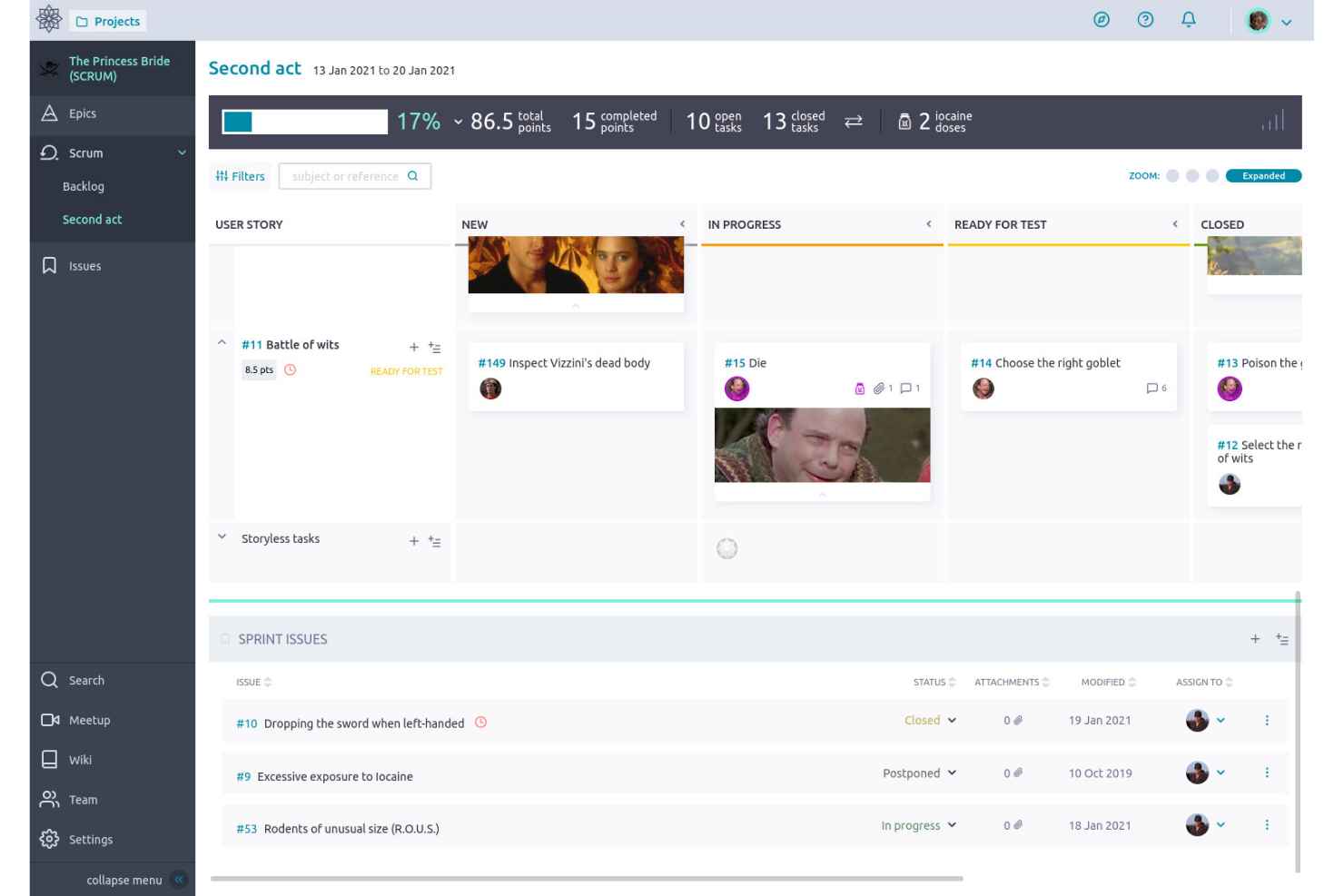
Taiga è una piattaforma open-source di gestione progetti pensata per i team di prodotto e i praticanti Agile che desiderano flessibilità e trasparenza. Con board personalizzabili e funzionalità di backlog integrate, offre uno spazio di lavoro collaborativo per monitorare strumenti di sviluppo complessi e flussi di lavoro.
Per chi è ideale Taiga?
Team Agile e product manager nello sviluppo software che necessitano di strumenti flessibili e open-source per la gestione dei flussi di lavoro.
Perché Taiga è una valida alternativa a Linear
Ho scelto Taiga perché è costruito attorno all’Agile fin dall’inizio, non aggiunto successivamente come ripensamento. Il mio team utilizza i suoi strumenti di pianificazione sprint per definire gli obiettivi, assegnare story point e monitorare la velocità tra le iterazioni senza dover configurare troppo in anticipo. Apprezzo anche le modalità Kanban e Scrum di Taiga, che ci permettono di passare tra diversi stili di consegna a seconda del flusso di lavoro. Per i team che lavorano con sprint strutturati e una vera disciplina sul backlog, quella struttura Agile nativa fa risparmiare molto tempo di configurazione.
Funzionalità principali di Taiga
- Sistema di tracciamento delle issue: Registra, assegna e filtra bug o attività con campi personalizzati e livelli di priorità.
- Gestione degli Epic: Raggruppa user story e issue correlate sotto Epic per monitorare attività di larga scala.
- Wiki: Crea e mantieni la documentazione di progetto direttamente all’interno di ogni workspace.
- Ruoli e permessi team: Assegna accessi basati sui ruoli per controllare cosa ogni membro può vedere o modificare.
Integrazioni di Taiga
Taiga offre integrazioni native con GitHub, GitLab, Mattermost, Webhooks e Slack e mette a disposizione una API per integrazioni personalizzate.
Pros and Cons
Pros:
- Wiki integrato per la documentazione interna
- Grafici burndown e velocità per gli sprint
- Gestione nativa di backlog ed Epic
Cons:
- Interfaccia utente può sembrare datata e disordinata
- Automazioni limitate per i flussi di lavoro ripetitivi
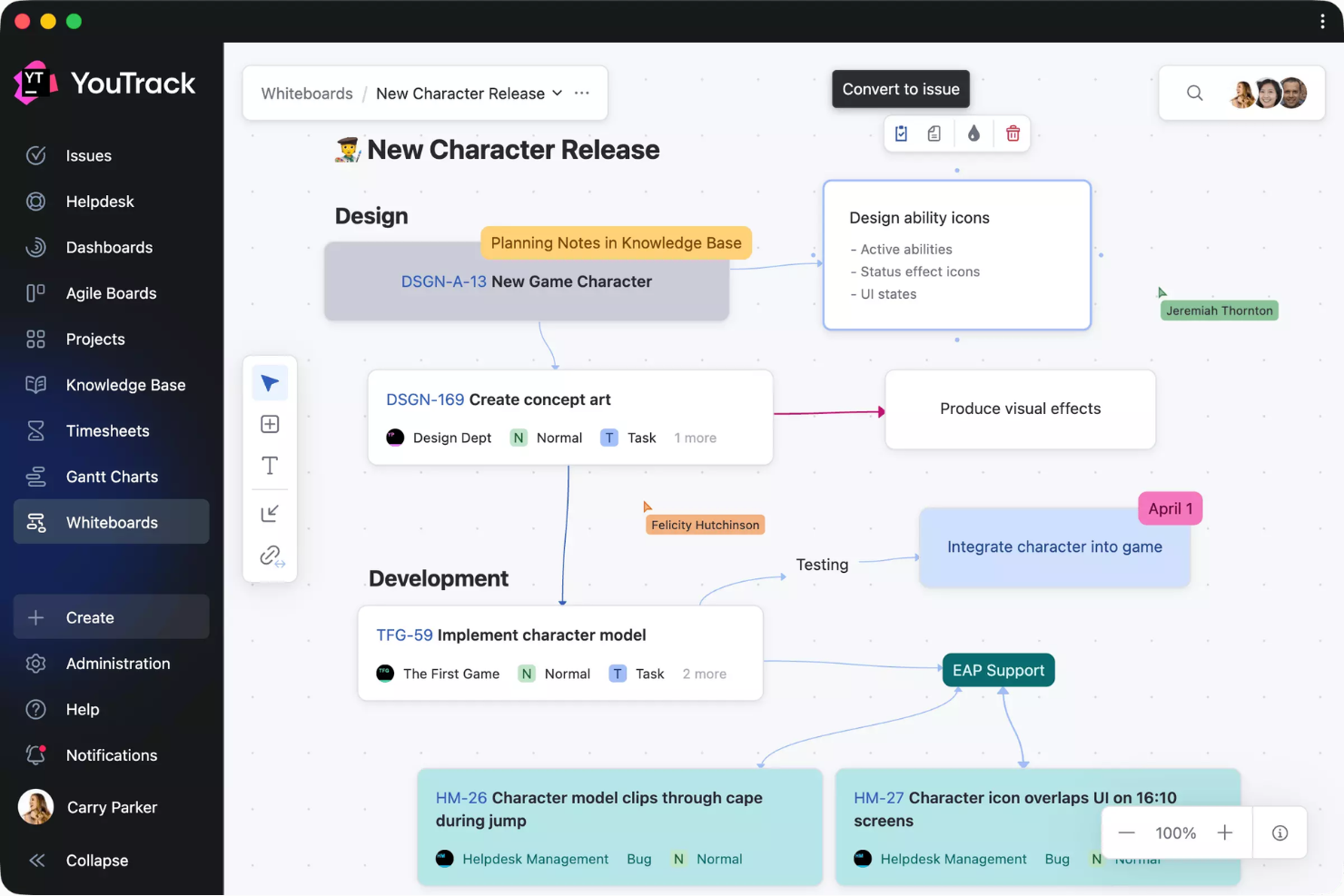
YouTrack è uno strumento di gestione progetti e monitoraggio delle segnalazioni pensato per team tecnici che necessitano di flussi di lavoro personalizzati e un'elevata configurabilità. Se il tuo team attribuisce valore alla ricerca avanzata, alle board agili e all'automazione che va oltre il semplice tracciamento dei bug, YouTrack è una soluzione da prendere in considerazione.
Per chi è YouTrack?
Team di sviluppo di medie e grandi dimensioni che richiedono flussi di lavoro personalizzabili e una gestione avanzata delle segnalazioni su progetti software.
Perché YouTrack è una valida alternativa a Linear
Ho scelto YouTrack perché le sue funzionalità di intelligenza artificiale sono più avanzate rispetto alla maggior parte dei sistemi di tracciamento dei ticket. La funzione di trasformazione da testo a segnalazione scansiona qualsiasi testo selezionato e trasforma automaticamente gli elementi di azione in task—il mio team la utilizza durante gli standup asincroni e nei thread di revisione per registrare le segnalazioni senza inserimenti manuali. Mi piace anche che l'Assistente AI generi riepiloghi di task e ticket di supporto indipendentemente dalla lunghezza o dalla lingua della discussione, cosa molto utile quando devo recuperare una lunga catena di segnalazione. Anche la connessione con il server MCP è un dettaglio interessante, permette al mio team di interagire con YouTrack direttamente da un agente LLM o IDE.
Funzionalità chiave di YouTrack
- Board agili: Gestisci board scrum o kanban con swimlane configurabili, stime e pianificazione degli sprint integrate.
- Flussi di lavoro personalizzati: Crea transizioni di stato automatiche e regole di business tramite l'editor di workflow integrato.
- Ricerca intelligente e query salvate: Filtra le segnalazioni usando sintassi di ricerca basata su attributi e salva le query per usi ripetuti.
- Monitoraggio del tempo: Registra il lavoro direttamente sulle segnalazioni e genera report trasversali sui progetti grazie agli strumenti di gestione del tempo integrati.
Integrazioni YouTrack
YouTrack offre integrazioni native con GitHub, GitLab, Bitbucket, Slack, Zendesk, Microsoft Teams e Upsource, oltre a un'API per integrazioni personalizzate.
Pros and Cons
Pros:
- Automazione per la segnalazione e descrizione dei bug
- Modifica massiva delle segnalazioni con filtri di ricerca avanzata
- Strumenti integrati di monitoraggio del tempo e reporting
Cons:
- L'interfaccia può risultare affollata per i nuovi utenti
- Le app mobili non hanno tutte le funzionalità della versione web

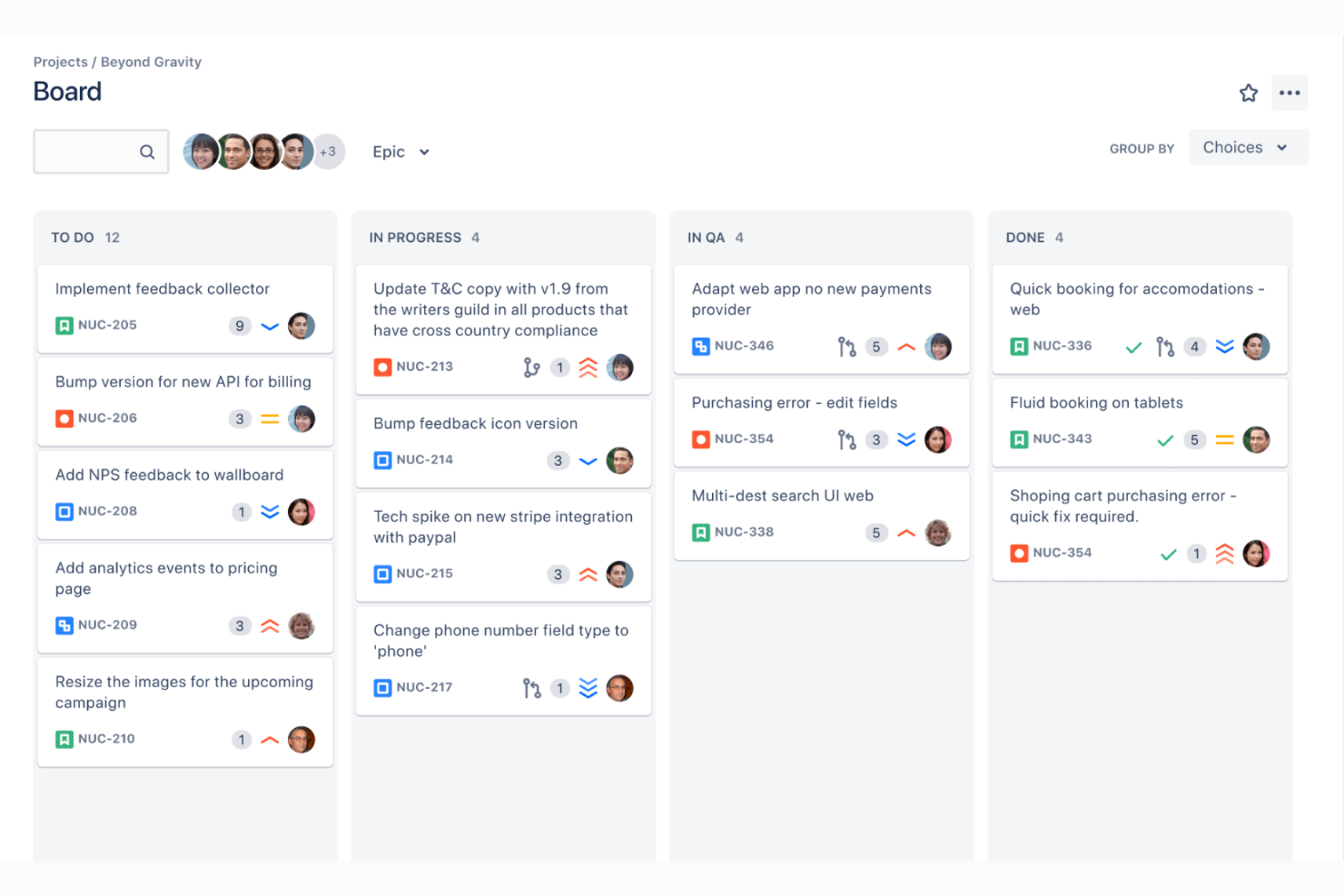
Jira è un software di gestione progetti progettato per team che seguono pratiche agili e necessitano di opzioni di configurazione avanzate. Penso sia una scelta vincente se la tua azienda si affida a flussi di lavoro per sviluppatori personalizzabili e al monitoraggio dettagliato di progetti complessi.
Per chi è più indicato Jira?
Team di prodotto o ingegneria aziendali e di medie dimensioni che gestiscono progetti complessi e collaborativi con esigenze di flussi di lavoro dettagliati.
Perché Jira è una valida alternativa a Linear
I board agili di Jira sono il motivo per cui continuo a consigliarlo a team che gestiscono consegne a livelli multipli e basate su sprint. Apprezzo particolarmente come i board scrum di Jira permettano di configurare colonne, swimlane e metodi di stima a un livello di dettaglio notevole—qualcosa che Linear non offre con la stessa profondità. Il mio team utilizza anche gli strumenti di affinamento backlog di Jira per revisionare le problematiche, assegnare story point e pianificare il lavoro prima di ogni sprint. Per i team che gestiscono flussi di lavoro paralleli, quel livello di controllo sulla pianificazione degli sprint è difficile da eguagliare.
Funzionalità chiave di Jira
- Flussi di lavoro personalizzati: Mappa gli stati delle problematiche sul processo di consegna reale del tuo team utilizzando un editor workflow drag-and-drop.
- Roadmap avanzate: Pianifica e visualizza il lavoro di più team e progetti in una singola vista cronologica.
- Gestione delle dipendenze: Collega le problematiche per segnalare i blocchi e tracciare le relazioni tra attività in diversi progetti.
- Dashboard di reportistica: Accedi a report integrati come velocity chart, burndown chart e diagrammi di flusso cumulativo.
Integrazioni Jira
Jira offre integrazioni native con Confluence, Bitbucket, Trello, Slack, GitHub, Microsoft Teams, Google Drive, Dropbox, Zendesk e Salesforce, oltre a supportare integrazioni dal marketplace e fornire un'API per integrazioni personalizzate.
Pros and Cons
Pros:
- Automazioni avanzate del flusso di lavoro integrate
- Strumenti ricchi di report e dashboard
- Si adatta a grandi team distribuiti
Cons:
- La complessità della configurazione può frustrare i team più piccoli
- Le prestazioni rallentano su progetti di grandi dimensioni

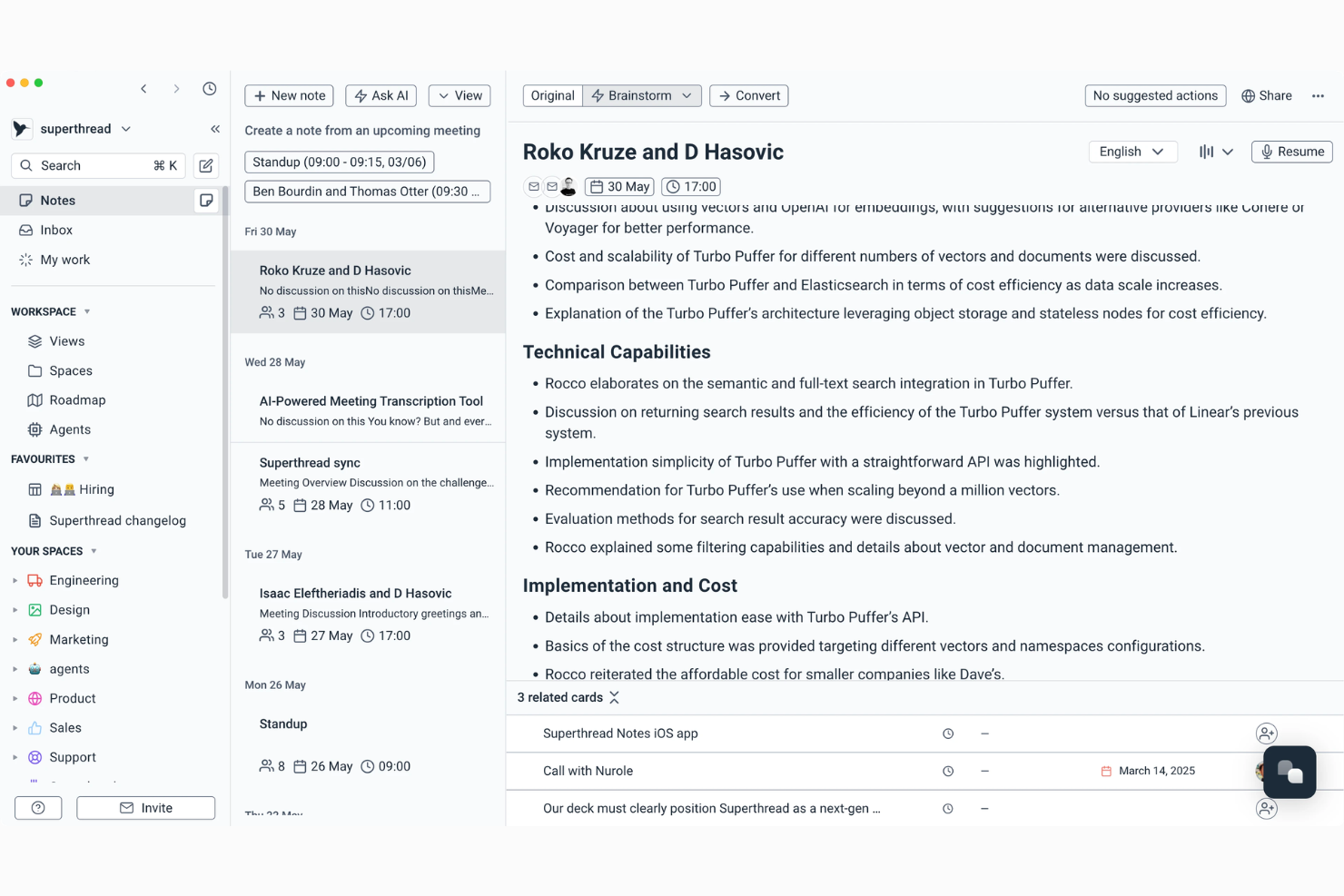
Superthread è una piattaforma di gestione progetti costruita per team che desiderano una comunicazione strutturata senza sacrificare chiarezza o contesto. Penso che la apprezzerai se la tua azienda si basa sulla necessità di mantenere discussioni approfondite sui progetti strettamente collegate a compiti, scadenze e stato in tempo reale.
Per chi è ideale Superthread?
Team in ambienti di prodotto o agenzia dal ritmo veloce che necessitano di discussioni approfondite e organizzate legate direttamente al lavoro sui progetti.
Perché Superthread è una valida alternativa a Linear
Ho scelto Superthread perché tratta le discussioni a thread come una caratteristica principale e non come un ripensamento. Ogni thread è collegato direttamente a un'attività o a un progetto, quindi quando il mio team discute una decisione di design o un cambiamento di ambito, quella conversazione vive esattamente dove si svolge il lavoro. Mi piace in particolare come la funzione Pagine ci consente di scrivere briefing o specifiche dettagliate in linea accanto ai task, riducendo così gli scambi attraverso documenti esterni. Per i team dove la perdita di contesto tra diversi strumenti è un vero problema, Superthread tiene tutto connesso in un unico posto.
Funzionalità principali di Superthread
- Sprint: Pianifica ed esegui sprint a tempo con assegnazione dei task e monitoraggio dei progressi integrato.
- Gantt chart: Visualizza cronologie dei compiti, dipendenze e scadenze dell'intero progetto in una sola vista.
- Filtri salvati: Crea e riutilizza filtri personalizzati per far vedere esattamente la vista di lavoro di cui ha bisogno il tuo team.
- Agente AI per i meeting: Trascrive le riunioni, riassume i risultati e suggerisce automaticamente attività partendo dalle note discusse.
Integrazioni di Superthread
Slack, GitHub, Microsoft Office 365, Google Calendar e Zapier. È disponibile un'API per integrazioni personalizzate.
Pros and Cons
Pros:
- Tariffa pay-what-you-want disponibile
- Documenti collaborativi a fianco dei task
- AI unica per riassunti delle riunioni
Cons:
- Integrazioni native limitate
- Personalizzazione avanzata delle board assente


Bugasura è uno strumento di tracciamento dei bug progettato per i team di prodotto e QA che necessitano di un feedback rapido e concreto all'interno dei flussi di lavoro digitali. Se desideri una piattaforma collaborativa e facile da usare che riduca il rumore attorno alla segnalazione e risoluzione dei problemi, Bugasura merita attenzione.
A chi è rivolto Bugasura?
Team di prodotto e QA in aziende digital-first che hanno bisogno di un modo efficiente e collaborativo per gestire la segnalazione e il tracciamento dei bug.
Perché Bugasura è una valida alternativa a Linear
Ho scelto Bugasura perché è progettato specificatamente per il tracciamento dei bug in modo che Linear—pur essendo focalizzato sull'ingegneria—non è. Lo strumento di segnalazione consente al mio team di catturare i bug direttamente da qualsiasi browser senza dover cambiare contesto, eliminando così molta documentazione manuale. Mi piace anche la gestione dei bug basata sugli sprint, che permette al mio team di assegnare, prioritizzare e risolvere bug all'interno di cicli temporizzati che riflettono il reale lavoro della QA accanto allo sviluppo del prodotto. Per i team in cui il tracciamento dei bug è un'attività quotidiana, e non un dettaglio secondario, Bugasura mantiene il processo molto più snello.
Funzionalità principali di Bugasura
- Generazione automatica della descrizione dei problemi tramite AI: Carica documenti di contesto per generare automaticamente descrizioni dei problemi, gravità, tipologia e impatto aziendale per qualsiasi bug registrato.
- Registrazione di note vocali: Allega commenti vocali direttamente ai problemi per aggiungere contesto che i soli campi di testo non possono catturare.
- Report visuali sugli sprint: Visualizza dashboard a livello di sprint che evidenziano i problemi principali, il numero di bug aperti e la suddivisione per gravità in un unico posto.
- Reporter per Android: Cattura e segnala bug su qualsiasi app Android con un solo tap, grazie ai righelli CSS per un feedback al pixel.
Integrazioni di Bugasura
Bugasura offre integrazioni native con Jira, Slack e GitHub e mette a disposizione un'API per integrazioni personalizzate.
Pros and Cons
Pros:
- Reporter basato su browser per la cattura immediata dei bug
- Automazione della descrizione dei problemi tramite AI
- Supporto per note vocali per aggiungere contesto
Cons:
- Strumenti di automazione del flusso di lavoro limitati
- Non supporta strutture di progetto complesse

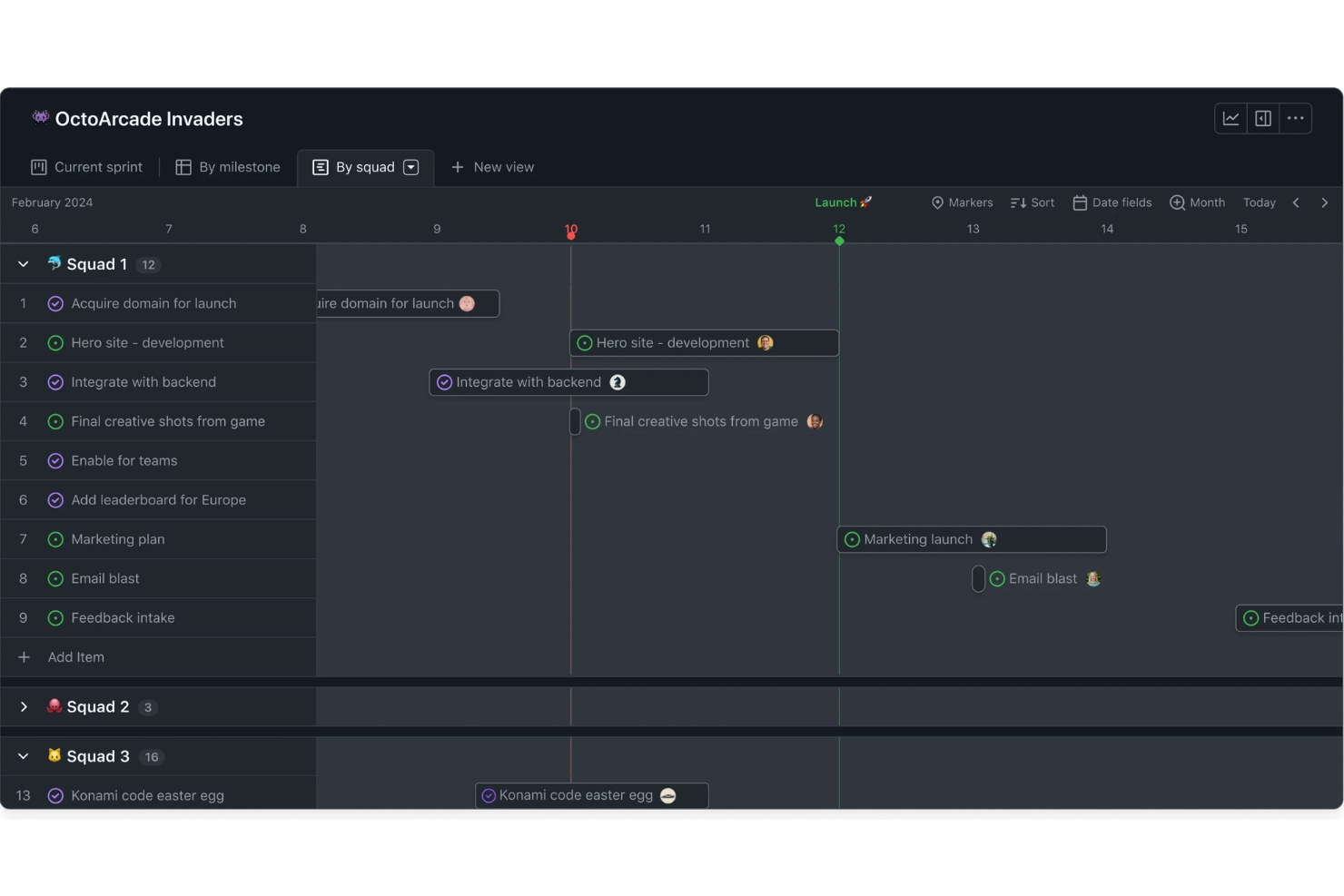
Se il tuo team gestisce già il codice su GitHub, GitHub Issues integra la gestione del flusso di lavoro direttamente nella tua piattaforma di sviluppo. È pensato per team di prodotto e sviluppo che vogliono tracciare problemi, pianificare sprint e discutere il lavoro senza dover continuamente cambiare strumento.
Per chi è più indicato GitHub Issues?
Per i team di sviluppo che già utilizzano GitHub per gestire il codice e desiderano tenere il tracking dei progetti nello stesso ambiente.
Perché GitHub Issues è una valida alternativa a Linear
Ho scelto GitHub Issues perché elimina la distanza tra il luogo in cui risiede il codice e quello in cui viene tracciato il lavoro. Quando il mio team apre un problema, può collegarlo direttamente a una pull request, a un commit o a un branch—così l’avanzamento è visibile senza aggiornamenti manuali. Mi affido anche a GitHub Projects per creare bacheche in stile kanban accanto ai nostri repository. Per i team che vivono su GitHub, questo tipo di integrazione nativa significa che la pianificazione dello sprint e la gestione delle attività restano realmente sincronizzate con lo sviluppo.
Funzionalità principali di GitHub Issues
- Tracciamento di sotto-problemi: Suddividi un problema grande in sotto-problemi più piccoli e monitora il loro stato di completamento tramite indicatori di progresso integrati.
- Campi personalizzati: Aggiungi metadati come priorità, story point, date e cicli di iterazione direttamente ai problemi e ai progetti.
- Approfondimenti di progetto e grafici burn-up: Tieni sotto controllo la salute dello sprint e identifica i colli di bottiglia nell’iterazione o nella milestone corrente.
- Workflow automatizzati: Imposta regole per gestire i problemi, aggiornare i valori dei campi personalizzati o archiviare elementi in base all’attività del progetto.
Integrazioni di GitHub Issues
GitHub Issues offre integrazioni native all’interno dell’ecosistema GitHub, inclusi GitHub Actions e GitHub Projects, e mette a disposizione un’API per integrazioni personalizzate.
Pros and Cons
Pros:
- Integrato dove gli sviluppatori gestiscono il codice
- Collegamento automatico dei problemi ai commit
- Bacheche kanban integrate per i progetti
Cons:
- Reportistica limitata rispetto a Linear
- Nessun tool dedicato alle retrospettive sprint


Huly è una piattaforma visiva per il monitoraggio dei progetti progettata per i team che necessitano di una visione chiara delle tempistiche dei progetti e delle dipendenze tra le attività. È ideale per manager, stakeholder e collaboratori che desiderano uno spazio di lavoro semplice e centralizzato per mappare, modificare e comunicare i flussi di lavoro tra progetti.
Per chi è più indicato Huly?
Per project manager e team interfunzionali che necessitano di un sistema centralizzato per visualizzare scadenze, traguardi e dipendenze tra più progetti.
Perché Huly è una valida alternativa a Linear
Ho scelto Huly perché il suo pianificatore di team fornisce al mio gruppo una vista calendario condivisa di ogni attività pianificata tra tutti i progetti, suddivisa per persona. Quando qualcuno trascina una voce d'azione su una fascia oraria nel proprio pianificatore personale, questa compare automaticamente anche nel pianificatore di team—così posso vedere chi è impegnato su cosa, e quando, senza dover rincorrere aggiornamenti. Il monitoraggio dei traguardi si integra a questa funzione, permettendomi di raggruppare le problematiche per fase di progetto con scadenze prefissate: così è facile capire come le singole attività contribuiscano agli obiettivi di consegna più ampi. Per i team che cercano visibilità sulle tempistiche senza uno strumento roadmap a sé stante, questa combinazione offre copertura totale.
Funzionalità principali di Huly
- Monitoraggio delle problematiche: Crea, assegna e categorizza problematiche con stati, priorità ed etichette personalizzabili tra i vari progetti.
- Bacheche Kanban: Visualizza il lavoro in corso con schede drag-and-drop organizzate per stato o responsabile.
- Strumenti di collaborazione sui documenti: Crea e modifica documenti condivisi insieme alle attività di progetto senza lasciare la piattaforma.
- Strumenti HR e gestione membri: Gestisci profili, ruoli e struttura dei dipartimenti dei membri del team all'interno dell'ambiente di lavoro.
Integrazioni di Huly
Huly offre un'API per integrazioni personalizzate.
Pros and Cons
Pros:
- Offre una visualizzazione in tempo reale delle tempistiche di progetto
- Il pianificatore di team mostra il carico di lavoro tra i vari reparti
- Il monitoraggio dei traguardi collega le attività alle scadenze
Cons:
- La visualizzazione Gantt non è disponibile
- Al momento non ci sono app mobili dedicate

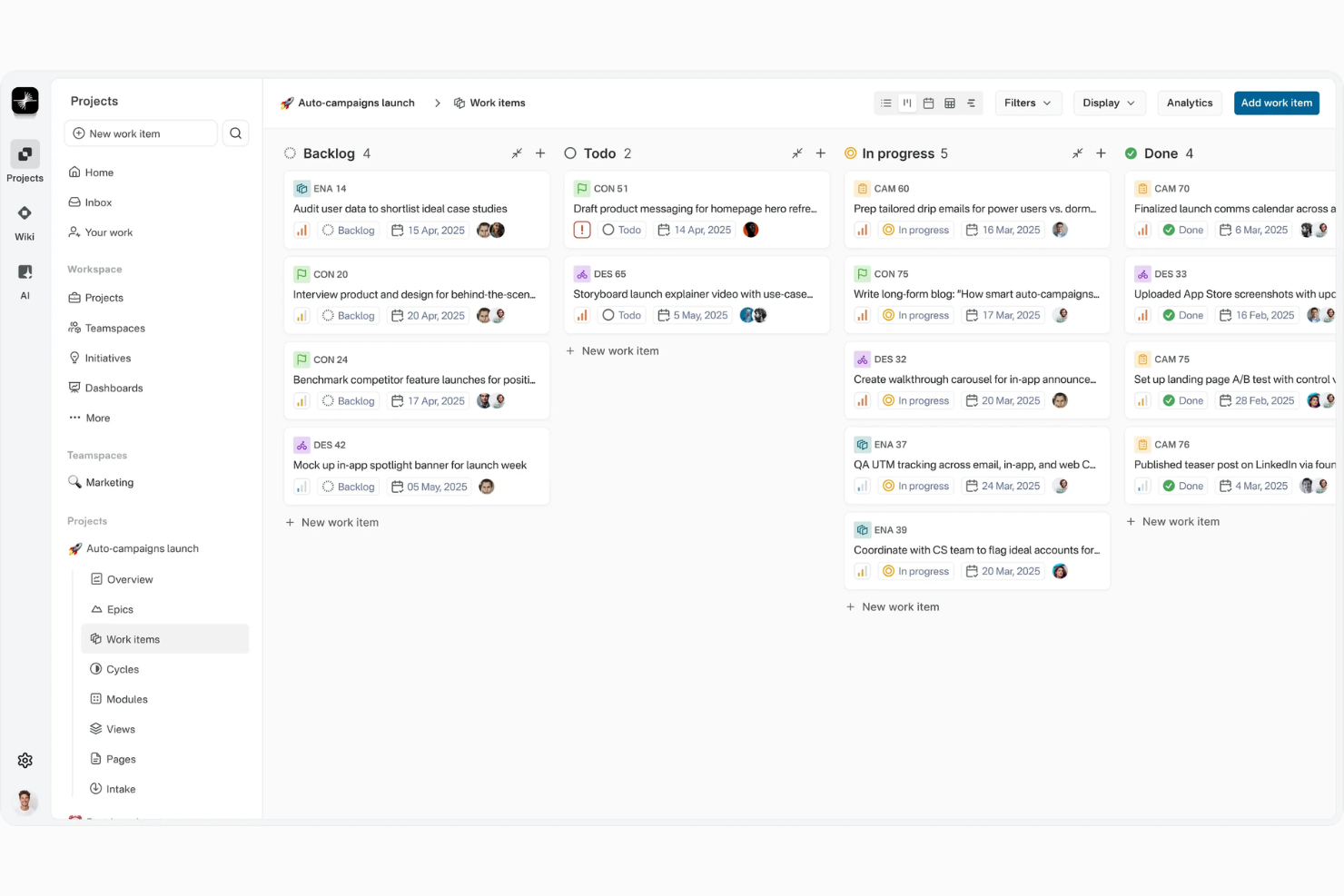
Plane è una piattaforma open-source per la gestione dei flussi di lavoro dei progetti, pensata per i team che desiderano trasparenza, personalizzazione e pieno controllo sul proprio spazio di lavoro. La troverai particolarmente utile se cerchi un'alternativa flessibile con un forte approccio orientato alla comunità su gestione delle issue, cicli di lavoro e pianificazione degli obiettivi.
Per chi è ideale Plane?
Team di ingegneria e prodotto che desiderano una piattaforma self-hosted, open source, con accesso completo alla personalizzazione dei flussi di lavoro.
Perché Plane è una valida alternativa a Linear
Ho scelto Plane perché è uno dei pochi strumenti di gestione progetti che puoi auto-ospitare completamente, offrendo al tuo team pieno controllo su residenza dei dati e infrastruttura. Per i team con stringenti esigenze di sicurezza o conformità, questo aspetto conta più di quanto riconoscano molti strumenti cloud-first. Mi piace particolarmente la funzione Cycles di Plane, che riprende la pianificazione a sprint ma si adatta a qualsiasi tipo di flusso di lavoro, non solo all’ingegneria. Inoltre, l’essere open source permette al mio team di estendere e modificare la piattaforma in modi che nessuno strumento vincolato all’offerta SaaS consentirebbe.
Caratteristiche principali di Plane
- Raccolta richieste: Acquisisci e valuta le richieste in arrivo, trasformandole direttamente in attività senza uscire dal progetto.
- Epic e iniziative: Organizza il lavoro su più livelli, collegando gli epic di team alle iniziative a livello organizzativo, monitorando i progressi in aggregato.
- Viste multiple: Passa da vista a bacheca, tabellare, elenco o Gantt per adattarti alle modalità di lavoro preferite dai diversi ruoli del tuo team.
- Flussi di lavoro e approvazioni: Costruisci fasi di lavoro personalizzate con transizioni e controlli automatici, senza dover ricorrere a plugin di terze parti.
Integrazioni di Plane
Sono disponibili integrazioni con GitHub, GitLab, Slack, Discord e altri.
Pros and Cons
Pros:
- Opzione self-hosting con proprietà dei dati
- Cicli avanzati e generatore di workflow personalizzati
- Comunità attiva e coinvolta per il supporto
Cons:
- Le automazioni dei flussi di lavoro sono ancora basilari
- Funzionalità di analisi e reportistica limitate
Altre alternative a Linear
Ecco alcune ulteriori alternative a Linear che non sono entrate nella mia selezione, ma che vale comunque la pena prendere in considerazione:


Come valuto le alternative a Linear
Considero due livelli per ogni strumento: le funzionalità di base—monitoraggio dei problemi, cicli di sprint, integrazioni per sviluppatori—e i fattori distintivi che determinano la reale compatibilità con il team.
Funzionalità fondamentali (requisiti essenziali per questo elenco)
Quando seleziono gli strumenti per il mio elenco, assegno a ciascuno un punteggio su una scala da 0 (non offre la funzionalità) a 5 (eccelle in questo ambito) per ogni funzionalità fondamentale indicata di seguito. Quindi converto il punteggio totale dello strumento in una percentuale. Ogni strumento deve raggiungere un punteggio totale minimo del 65% per essere preso in considerazione.
- Monitoraggio dei problemi: verifico la presenza di sotto-problemi, campi personalizzati e dipendenze—come il collegamento di un bug a un'epic principale e il monitoraggio dei blocchi tra i team.
- Gestione di sprint e cicli: cerco viste per la pianificazione degli sprint, la gestione del backlog e il monitoraggio della velocità, così che i team possano prevedere le consegne sulla base di dati reali.
- Pianificazione della roadmap e dei progetti: qui sono importanti le roadmap multi-team con traguardi—valuto quanto bene uno strumento consenta ai responsabili di progetto di collegare il lavoro quotidiano alle iniziative trimestrali.
- Molteplici viste del lavoro: i team hanno bisogno almeno di viste Kanban, elenco e sequenza temporale. Verifico se sono disponibili filtri salvati e viste personalizzate per ciascun utente.
- Integrazioni con strumenti per sviluppatori: i collegamenti nativi a GitHub, GitLab o Bitbucket, insieme agli strumenti Slack e CI/CD, permettono agli ingegneri di rimanere all'interno dei flussi di lavoro già in uso.
- Scorciatoie da tastiera e menu dei comandi: la navigazione rapida tramite scorciatoie e una tavolozza dei comandi è un tratto distintivo dell'esperienza utente di Linear, quindi cerco una velocità comparabile anche in questo caso.
Una volta ottenuto un elenco di strumenti che soddisfano questi criteri, considero ciò che distingue ogni piattaforma.
Fattori distintivi (ciò che differenzia i fornitori)
Ecco come confronto i diversi fornitori:
Funzionalità distintive
Lo smistamento basato sull'IA è un importante fattore distintivo—gli strumenti che assegnano automaticamente i problemi o suggeriscono le priorità sulla base di schemi passati fanno risparmiare tempo prezioso ai responsabili tecnici durante la pianificazione degli sprint. Cerco anche documenti o wiki integrati e collegati direttamente ai problemi, perché il contesto distribuito tra strumenti separati rallenta i team. Anche le automazioni personalizzate dei flussi di lavoro sono importanti. Un generatore di regole senza codice che sposta i problemi tra gli stati o avvisa le persone giuste quando cambiano gli stati riduce il carico di lavoro manuale che tende ad aumentare con la crescita dei team.
Oltre le funzionalità
Le prestazioni sono una considerazione importante—Linear ha fissato lo standard in termini di velocità, quindi valuto se le alternative risultano altrettanto rapide durante la navigazione in backlog di grandi dimensioni o la ricerca tra migliaia di problemi. Anche il supporto alla migrazione ha un peso significativo. Un importatore nativo da Linear, Jira o GitHub Issues rende realistico il passaggio per i team che hanno già un progetto in corso. Infine, valuto come i prezzi aumentano in base alle dimensioni del team, poiché uno strumento che funziona per una startup di 10 persone deve rimanere sostenibile con 200 utenti senza aumenti di costo imprevisti.
Perché cercare un’alternativa a Linear?
Sebbene Linear sia una buona scelta come software per i flussi di lavoro dei progetti, ci sono diversi motivi per cui alcuni utenti cercano soluzioni alternative. Potresti cercare un’alternativa a Linear perché…
- Hai bisogno di una distribuzione in sede o con hosting autonomo
- Hai bisogno di autorizzazioni avanzate o di ruoli utente
- Il tuo team gestisce dipendenze e tempistiche complesse
- Operi in un settore altamente regolamentato
- Hai bisogno di funzioni integrate per la definizione del budget o il monitoraggio finanziario
- La tua organizzazione richiede una personalizzazione approfondita
Se ti riconosci in una di queste situazioni, sei nel posto giusto. Il mio elenco contiene diverse opzioni software per i flussi di lavoro dei progetti più adatte ai team che affrontano queste difficoltà con Linear e cercano soluzioni alternative.
Funzionalità principali di Linear
Ecco alcune delle funzionalità principali di Linear, utili per mettere a confronto ciò che offrono le soluzioni alternative:
- Monitoraggio dei problemi: crea, assegna priorità e gestisci attività, bug e richieste di funzionalità in bacheche di progetto organizzate, dove i membri del team possono assegnare responsabilità e monitorare i progressi in tempo reale.
- Flussi di lavoro automatizzati: usa le automazioni per gestire le attività ripetitive, aggiornare gli stati e attivare azioni in base a modifiche o eventi nel flusso di lavoro, mantenendo i progetti in movimento senza interventi manuali.
- Roadmap: visualizza i piani a lungo termine, le iniziative chiave e gli sprint imminenti tra più team per aiutarti a pianificare, comunicare e monitorare la direzione generale del progetto.
- Gestione dei cicli: organizza il lavoro in cicli settimanali o bisettimanali, consentendo ai team di pianificare, eseguire e revisionare il lavoro in incrementi gestibili, con report integrati sull'avanzamento del ciclo.
- Integrazioni: connettiti alle integrazioni con GitLab, Slack, Figma e GitHub per mantenere il codice, le conversazioni e il lavoro di progettazione del prodotto strettamente collegati alle attività di progetto operative.
- Scorciatoie da tastiera: naviga, aggiorna e gestisci rapidamente le attività utilizzando una suite completa di scorciatoie da tastiera personalizzabili, aiutando gli utenti esperti a completare più azioni in meno tempo.
- Visualizzazioni personalizzate: filtra e raggruppa i problemi in base a criteri come assegnatario, priorità o stato per visualizzare solo le informazioni rilevanti per il tuo flusso di lavoro o per la struttura del tuo team.
- Autorizzazioni basate sul team: controlla l'accesso a progetti e dati sensibili impostando diversi livelli di autorizzazione per singoli utenti, gruppi o team all'interno del tuo spazio di lavoro.
- Collaborazione in tempo reale: commenta le attività, tagga i membri del team e ricevi notifiche immediate sugli sviluppi del progetto, assicurandoti che tutti siano informati e allineati.
- Accesso all'API: sfrutta l'API di Linear per creare integrazioni personalizzate, automatizzare i report o collegare gli aggiornamenti dei progetti ad altri strumenti aziendali fondamentali del tuo insieme di applicazioni.