

10 alternative a iManage per la gestione dei documenti nel 2026

Selezione delle alternative a iManage


Le migliori alternative a iManage offrono un controllo sicuro dei documenti, una collaborazione flessibile e una ricerca semplice, senza la complessità o i costi che possono accompagnare iManage. Se stai cercando un software per il controllo dei documenti adatto al flusso di lavoro del tuo team, sai quanto sia importante trovare un equilibrio tra conformità, facilità d'uso e integrazione con gli strumenti che già utilizzi.
In questa guida troverai le mie migliori proposte tra le alternative a iManage, ognuna con un'attenzione specifica alla gestione dei documenti, al controllo delle versioni e alla produttività del team. Utilizza questo elenco per confrontare le opzioni e trovare quella più adatta alla tua azienda.
Che cos'è iManage?
iManage è una piattaforma software per il controllo dei documenti progettata per la gestione sicura dei documenti, la collaborazione e la conformità. Aiuta i team a organizzare, archiviare e monitorare i documenti, mantenendo al contempo rigidi controlli degli accessi e registri di audit. Gli studi legali, le società finanziarie e le aziende di servizi professionali utilizzano spesso iManage per centralizzare i file sensibili e semplificare i flussi di lavoro. Le solide funzioni di ricerca, controllo delle versioni e integrazione lo rendono una scelta popolare per le organizzazioni che devono gestire grandi volumi di documenti riservati.
Tabella di confronto delle alternative a iManage e Optimizely
Questa tabella di confronto riassume i dettagli dei prezzi delle mie migliori alternative a iManage
| Tool | Best For | Trial Info | Price | ||
|---|---|---|---|---|---|
| 1 | Ideale per la semplice condivisione dei file e l'archiviazione del team | Prova gratuita + piano gratuito disponibili | A partire da $9.99/utente/mese (con fatturazione annuale) | Website | |
| 2 | Ideale per prendere appunti e gestire le conoscenze in un unico luogo | Piano gratuito disponibile | A partire da $10/utente/mese (con fatturazione annuale) | Website | |
| 3 | Ideale per la condivisione ricercabile delle conoscenze e le domande e risposte | Demo gratuita disponibile | Prezzi su richiesta | Website | |
| 4 | Ideale per gli strumenti di base di conoscenza per l'assistenza clienti | Prova gratuita di 14 giorni + demo gratuita disponibile | A partire da $29/user/month (fatturati annualmente) | Website | |
| 5 | Ideale per flussi di lavoro documentali automatizzati basati sul cloud | Demo gratuita disponibile | Prezzi su richiesta | Website | |
| 6 | Ideale per hub di conoscenze e documentazione dei team | Prova gratuita + piano gratuito disponibili | A partire da $5.42/utente/mese | Website | |
| 7 | Ideale per l’organizzazione dei documenti basata sui metadati | Demo gratuita disponibile | A partire da $65/utente/mese | Website | |
| 8 | Ideale per la collaborazione sui documenti di Microsoft 365 | Prova gratuita di 30 giorni disponibile | A partire da $5.40/utente/mese (con fatturazione annuale) | Website | |
| 9 | Ideale per l'automazione dei documenti e le firme elettroniche | Prova gratuita di 14 giorni + piano gratuito + demo gratuita disponibile | A partire da $19/utente/mese (con fatturazione annuale) | Website | |
| 10 | Ideale per la ricerca unificata della conoscenza basata sull'intelligenza artificiale | Demo gratuita disponibile | Prezzi su richiesta | Website |
Perché fidarsi dei nostri consigli sui software
Il nostro team testa e recensisce software dal 2012. In quanto project manager noi stessi, sappiamo quanto sia difficile — e importante — scegliere il software giusto.
Per questa guida, abbiamo valutato gli strumenti attraverso test pratici e ricerche indipendenti, assegnando un punteggio agli strumenti in base ai nostri criteri di selezione. Ci basiamo inoltre sulle competenze di leader di pensiero del settore e di professionisti attivi nella gestione dei progetti.
Le nostre recensioni riflettono il nostro giudizio editoriale umano, non un discorso di vendita.
Revisori esperti:
Recensioni delle alternative a iManage
Di seguito sono riportati i miei riepiloghi dettagliati delle migliori alternative a iManage incluse nella mia selezione. Le mie recensioni offrono uno sguardo approfondito sulle funzionalità, le integrazioni e i casi d’uso migliori di ciascun software, per aiutarti a trovare quello più adatto a te.

Dropbox
Ideale per la semplice condivisione dei file e l'archiviazione del team
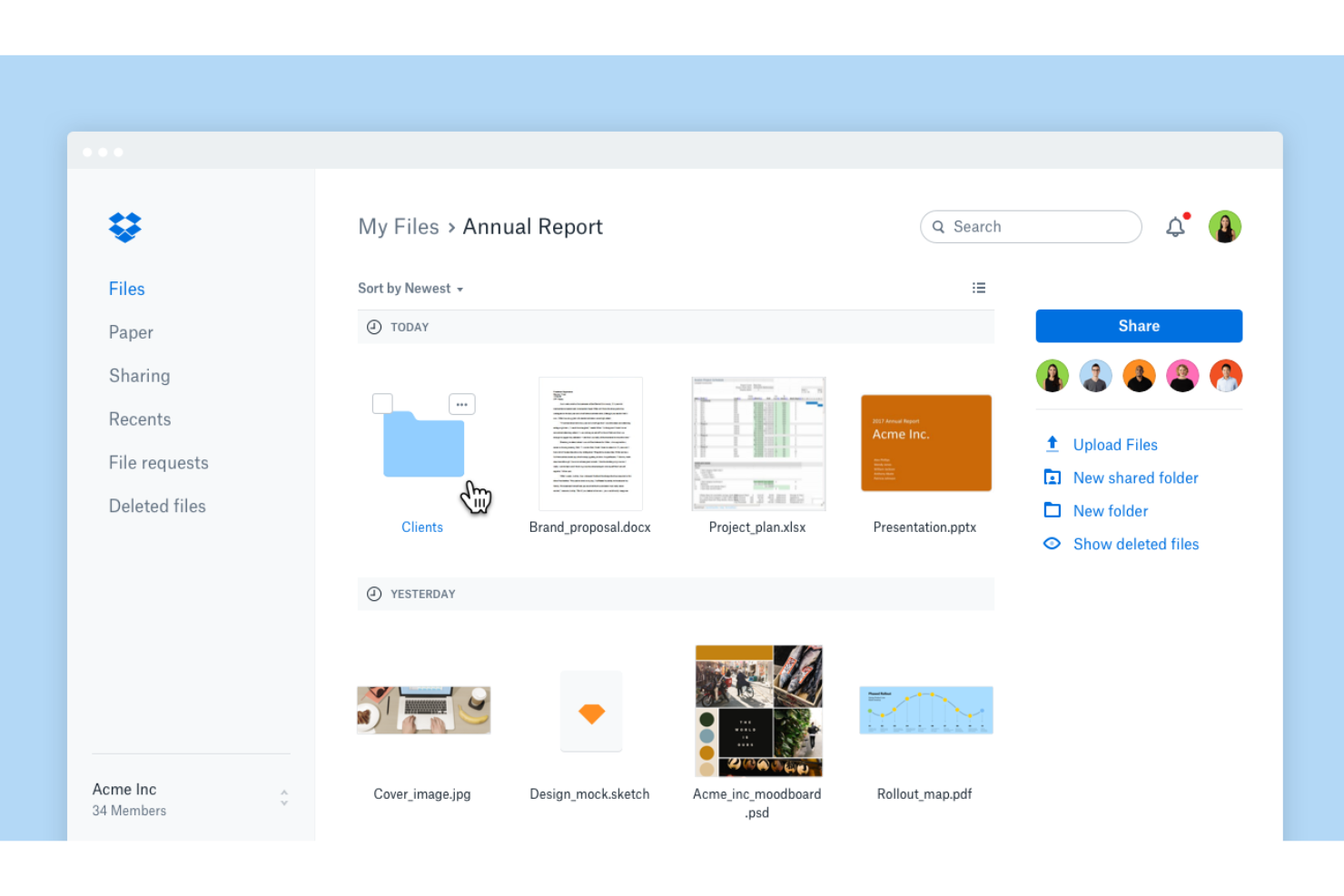
Dropbox è una piattaforma basata sul cloud per l'archiviazione e la condivisione di file, pensata per i team che necessitano di un accesso semplice e sicuro ai documenti da qualsiasi luogo. È adatta alle aziende che cercano collaborazione agevole, recupero dei file e controllo centralizzato senza la complessità dei sistemi tradizionali di gestione dei documenti.
Per chi è più adatto Dropbox?
Dropbox è una soluzione ideale per i team di piccole e medie dimensioni che necessitano di un'archiviazione e condivisione dei documenti semplice e basata sul cloud.
Perché Dropbox è una buona alternativa a iManage
Ho scelto Dropbox perché elimina le difficoltà legate alla gestione dei file tra team distribuiti. Mi affido alla sua struttura di cartelle condivise e alla sincronizzazione in tempo reale per fare in modo che tutti lavorino sulla stessa versione di un documento, con notifiche automatiche delle attività che mi indicano esattamente quando un file è stato modificato o spostato. Apprezzo anche i controlli di condivisione dei file di Dropbox, che mi consentono di impostare autorizzazioni di sola visualizzazione o modifica, aggiungere la protezione tramite password e applicare date di scadenza ai link condivisi. Per i team che non necessitano di un sistema completo di gestione dei documenti legali, Dropbox offre un accesso ai file sicuro e organizzato senza oneri aggiuntivi.
Funzionalità principali di Dropbox
- Recupero dei file e cronologia delle versioni: Ripristina i file eliminati o le versioni precedenti di qualsiasi documento utilizzando una cronologia fino a 30 giorni.
- Dropbox Paper: Crea e modifica documenti collaborativi con sequenze temporali, elenchi di attività e tabelle direttamente all'interno di Dropbox.
- Console di amministrazione: Monitora l'attività del team, gestisci l'accesso dei membri e supporta la conformità da una dashboard di amministrazione centralizzata.
- Backup del computer: Esegui automaticamente il backup di cartelle importanti come il desktop, così le modifiche vengono sincronizzate in tutto il tuo account Dropbox.
Integrazioni di Dropbox
Dropbox offre integrazioni native con Google Workspace, Microsoft 365, Slack, Zoom, Trello, Docusign, Adobe Creative Cloud, Salesforce, Canva e Okta. È disponibile un'API per le integrazioni personalizzate.
Pros and Cons
Pros:
- La sincronizzazione dei file in tempo reale mantiene i team allineati su tutti i dispositivi
- I semplici controlli di condivisione favoriscono una collaborazione esterna sicura
- Il recupero dei file consente di ripristinare le versioni eliminate o precedenti
Cons:
- Manca l'automazione integrata dei flussi di lavoro per i processi documentali
- Funzionalità di metadati limitate per un'organizzazione avanzata
Notion
Ideale per prendere appunti e gestire le conoscenze in un unico luogo
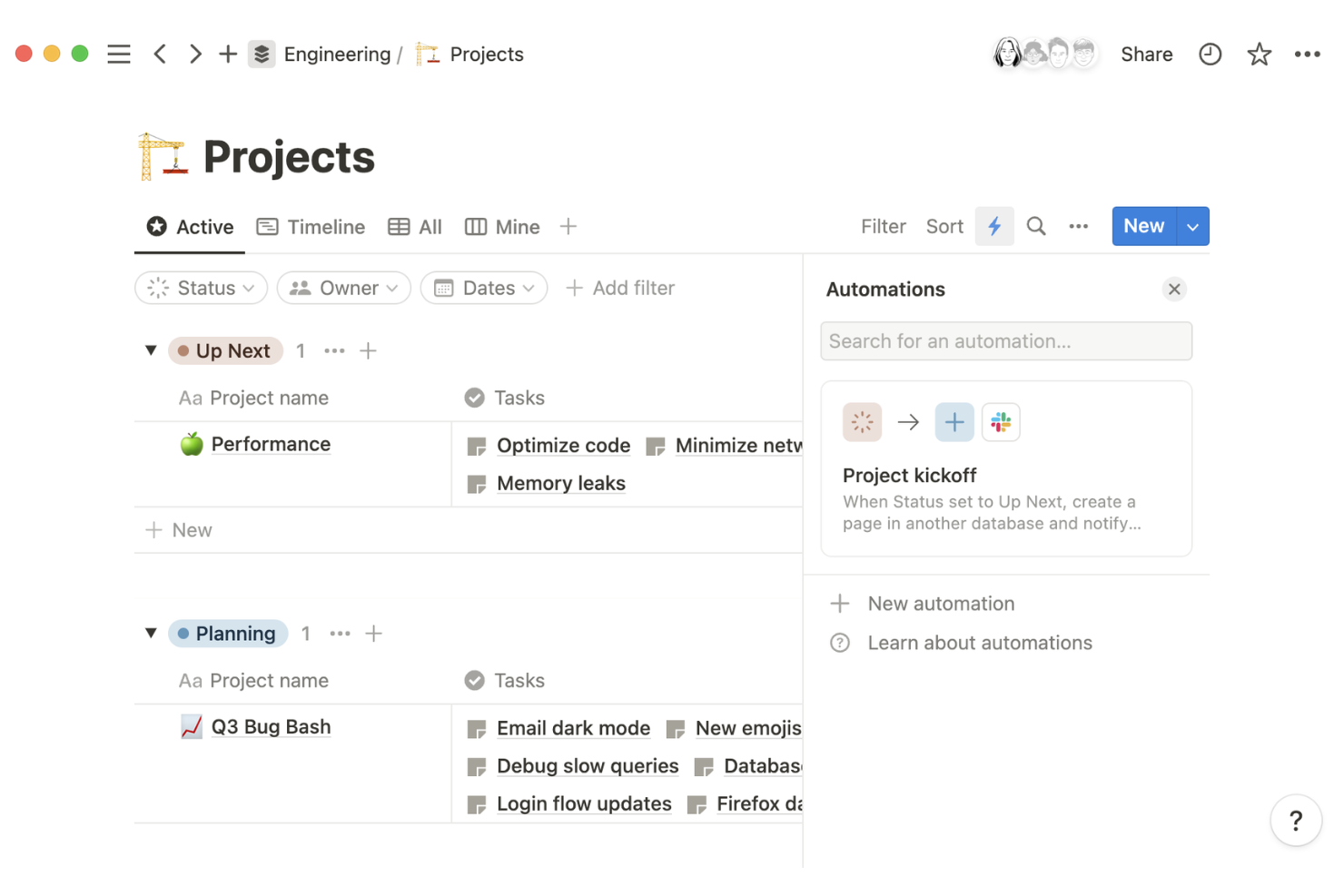
Notion è una piattaforma flessibile per l'area di lavoro che consente ai team di creare, organizzare e gestire documenti, wiki e conoscenze di progetto in un unico luogo. Penso che le startup in rapida crescita e i team interfunzionali apprezzeranno il modo in cui combina database strutturati con la modifica collaborativa per un controllo dinamico dei documenti.
Per chi è più adatto Notion?
Notion è particolarmente adatto a startup e team distribuiti che hanno bisogno di un'area di lavoro personalizzabile per gestire documenti, wiki e progetti.
Ho scelto Notion perché sostituisce le rigide strutture di cartelle di iManage con un'area di lavoro flessibile basata su blocchi, in cui i team possono creare wiki, documenti e database che riflettono realmente il loro modo di lavorare. Apprezzo in particolare la funzionalità Blocchi sincronizzati: è sufficiente modificare un contenuto una sola volta perché venga aggiornato ovunque appaia nell'area di lavoro, un vantaggio concreto per i team che gestiscono policy condivise o documenti sui processi.
La funzionalità Verifica consente inoltre agli amministratori di contrassegnare le pagine come confermate e aggiornate, così i collaboratori sanno sempre se un documento è autorevole o obsoleto. Per i team interfunzionali che gestiscono documentazione in continua evoluzione tra prodotto, ingegneria e design, è difficile trovare una combinazione altrettanto efficace di flessibilità e gestione dei contenuti.
Funzionalità principali di Notion
- Analisi delle pagine: Monitora il modo in cui i dipendenti interagiscono con i contenuti a livello di pagina, così gli amministratori possono identificare quali documenti vengono letti e quali stanno diventando obsoleti.
- Autorizzazioni avanzate: Imposta controlli di accesso granulari che specificano esattamente chi può visualizzare, modificare o creare contenuti in qualsiasi parte dell'area di lavoro.
- Provisioning degli utenti SCIM: Crea, aggiorna o rimuove automaticamente utenti e gruppi per mantenere sincronizzato l'accesso all'area di lavoro con la directory.
- Viste dei database: Visualizza gli stessi contenuti come tabella, bacheca, calendario o galleria, consentendo ai team di strutturare le conoscenze nel formato più adatto al loro flusso di lavoro.
Integrazioni di Notion
Notion offre integrazioni native con Google Drive, Slack, GitHub, Jira, Asana, Figma, Zoom e Trello. Si collega inoltre a Zapier e mette a disposizione un'API per integrazioni personalizzate.
Pros and Cons
Pros:
- L'area di lavoro flessibile si adatta ai diversi flussi di lavoro dei team
- Le viste dei database supportano un'organizzazione strutturata dei documenti
- I blocchi di contenuto sincronizzati mantengono la coerenza tra le pagine
Cons:
- Funzionalità di conformità limitate per i settori regolamentati
- Nessun sistema avanzato di controllo delle versioni dei documenti

Ideale per la condivisione ricercabile delle conoscenze e le domande e risposte
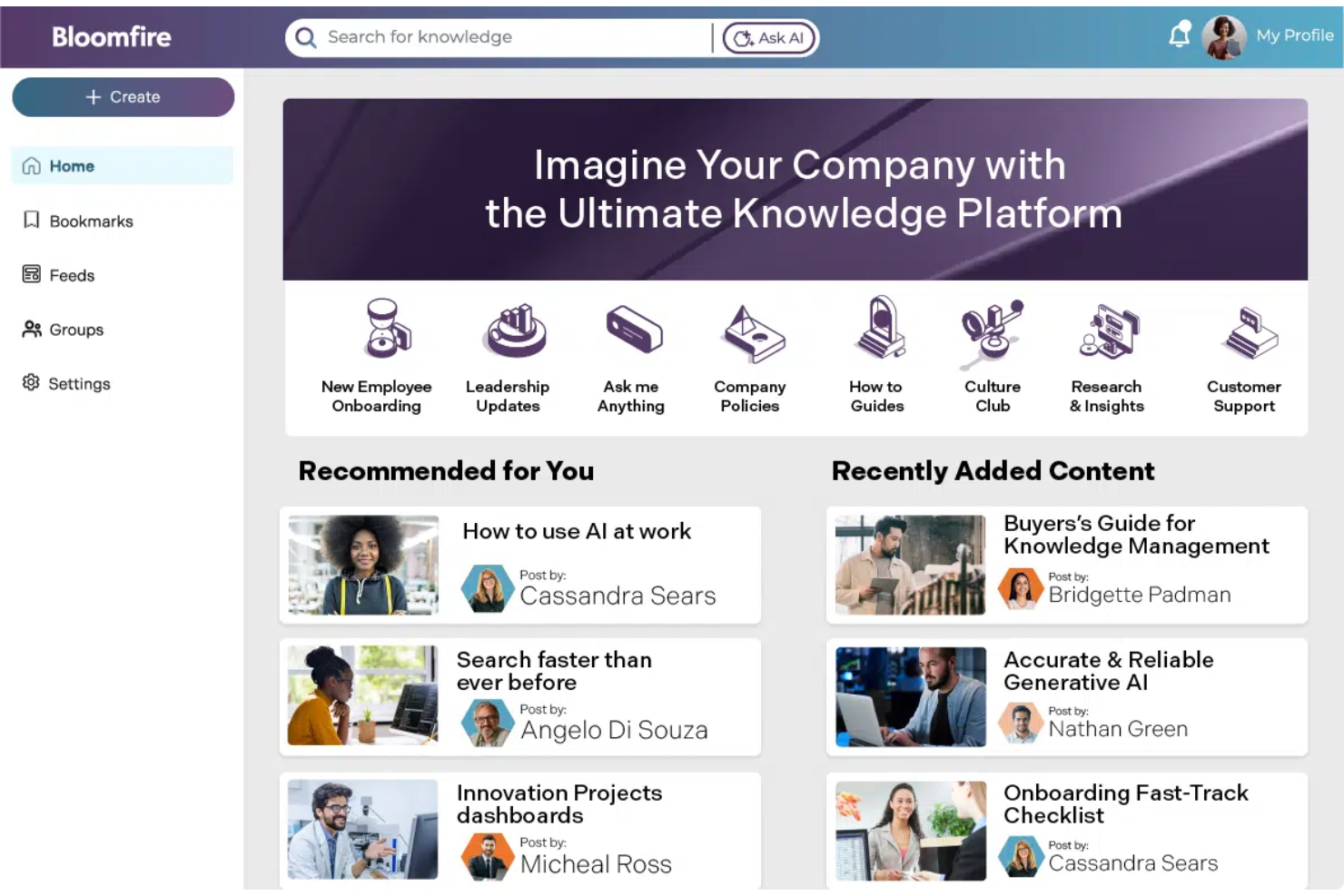
Bloomfire è una piattaforma di gestione della conoscenza progettata per i team che necessitano di un accesso rapido e ricercabile alle informazioni e ai documenti aziendali. Ritengo che i team operativi, di assistenza e di conformità apprezzeranno la sua attenzione alla reperibilità dei contenuti e alla condivisione sicura delle conoscenze.
Per chi è più indicato Bloomfire?
Bloomfire è particolarmente adatto ai team di assistenza clienti e operativi di organizzazioni di medie e grandi dimensioni che necessitano di una condivisione centralizzata e ricercabile delle conoscenze.
Perché Bloomfire è una buona alternativa a iManage
Ho scelto Bloomfire perché la sua ricerca basata sull'IA va ben oltre la corrispondenza delle parole chiave: indicizza in profondità i contenuti in diversi formati, comprese presentazioni, registrazioni audio e video, consentendo ai team di trovare risposte all'interno di documenti che non riuscirebbero mai a individuare nella struttura basata su cartelle di iManage. Apprezzo anche la base di conoscenza autoriparante, che utilizza l'IA per segnalare automaticamente i contenuti obsoleti o ridondanti e invitare gli autori ad aggiornarli o archiviarli.
In pratica, questo significa che il mio team non deve eseguire revisioni manuali dei contenuti per mantenere accurata la base di conoscenza. Per le organizzazioni in cui la documentazione obsoleta rappresenta un vero rischio, è proprio questa combinazione di ricerca intelligente e gestione automatizzata dei contenuti a distinguere concretamente Bloomfire.
Funzionalità principali di Bloomfire
- Strumenti di moderazione: Configura flussi di approvazione, segnala i contenuti da esaminare e ripristina le versioni precedenti di qualsiasi contributo della community.
- Motore di conoscenza collettiva Q&A: Poni domande in linguaggio naturale e raccogli le risposte degli esperti, che vengono archiviate come conoscenze strutturate e ricercabili.
- Apprendimento e conferma: Integra direttamente nella piattaforma strumenti di convalida delle conoscenze per confermare che le informazioni fondamentali siano state esaminate e assimilate.
- Suite di analisi: Monitora il comportamento di ricerca, il coinvolgimento nei contenuti e le lacune informative tramite report in tempo reale scaricabili per i report aziendali più ampi.
Integrazioni di Bloomfire
Bloomfire offre integrazioni native con Salesforce, Slack, Microsoft Teams, Zendesk e Google Drive, oltre a fornire un'API per integrazioni personalizzate.
Pros and Cons
Pros:
- La ricerca basata sull'IA indicizza efficacemente diversi formati di contenuto
- Le domande e risposte integrate raccolgono e ampliano le competenze interne
- Le analisi rivelano le lacune informative e le tendenze di utilizzo
Cons:
- Nessuna funzionalità dedicata al controllo delle versioni dei documenti
- Funzionalità limitate per la modifica dei documenti all'interno della piattaforma

Intercom
Ideale per gli strumenti di base di conoscenza per l'assistenza clienti

Intercom offre una base di conoscenza e una piattaforma di assistenza basate sull'IA, progettate per i team a contatto con i clienti che devono gestire e fornire informazioni aggiornate su larga scala. Ritengo che sia una soluzione particolarmente adatta alle aziende che desiderano centralizzare i contenuti di assistenza, automatizzare le risposte e migliorare l'autonomia dei clienti.
Per chi è più indicato Intercom?
Intercom è una soluzione adatta ai team di assistenza e successo clienti delle aziende SaaS che devono gestire e fornire conoscenze su larga scala.
Ho scelto Intercom perché affronta la gestione della conoscenza dal punto di vista del rapporto con i clienti, un aspetto che iManage non tratta affatto. Ciò che trovo più utile è l'hub della conoscenza, che centralizza i contenuti di assistenza in un unico sistema consultabile. Apprezzo anche la possibilità di indirizzare articoli specifici a determinati segmenti di clienti, in modo che i contenuti appropriati raggiungano il pubblico giusto senza doverli instradare manualmente. Per i team che gestiscono grandi volumi di documentazione di assistenza, gli strumenti per le azioni in blocco consentono di aggiornare contemporaneamente la disponibilità di Fin, la posizione delle cartelle e le impostazioni del pubblico per più articoli.
Funzionalità principali di Intercom
- Rilevamento delle lacune nei contenuti: Analizza le conversazioni passate con l'assistenza per identificare gli argomenti non coperti dalla base di conoscenza e segnalarli per la creazione di nuovi articoli.
- Agente IA Fin: Un agente IA che recupera le risposte direttamente dalla base di conoscenza per risolvere le richieste dei clienti senza l'intervento umano.
- Generatore di automazioni senza codice: Consente di creare regole di instradamento delle conversazioni, attivatori SLA e flussi di lavoro per le escalation senza il supporto del team tecnico.
- Posta in arrivo omnicanale: Riunisce le conversazioni provenienti da email, chat, WhatsApp e app social in un'unica posta in arrivo condivisa.
Integrazioni di Intercom
Intercom offre integrazioni native con Salesforce, HubSpot, Zendesk, Jira, Slack, Google Analytics, Shopify, Stripe, Mailchimp e Facebook, oltre a fornire un'API per le integrazioni personalizzate.
Pros and Cons
Pros:
- La base di conoscenza basata sull'IA migliora l'efficienza dell'assistenza
- La segmentazione dei contenuti fornisce agli utenti informazioni pertinenti
- La posta in arrivo omnicanale centralizza la comunicazione con i clienti
Cons:
- Non adatto alla gestione del ciclo di vita dei documenti interni
- Funzionalità limitate di governance e conformità dei documenti

DocuWare
Ideale per flussi di lavoro documentali automatizzati basati sul cloud

DocuWare è una piattaforma di gestione documentale basata sul cloud, progettata per i team distribuiti che necessitano di un controllo sicuro e centralizzato sui documenti aziendali. È adatta alle organizzazioni che desiderano automatizzare i flussi di lavoro, digitalizzare i processi con un elevato utilizzo di documenti cartacei e mantenere la conformità normativa tra diverse sedi.
Per chi è più adatto DocuWare?
DocuWare è una scelta valida per i team distribuiti in settori come finanza, sanità e produzione che necessitano di una gestione documentale sicura e basata sul cloud, oltre che dell'automazione dei flussi di lavoro.
Ho scelto DocuWare perché il suo strumento per la progettazione dei flussi di lavoro con funzionalità di trascinamento mi consente di creare processi di approvazione in più fasi senza scrivere una sola riga di codice. Per i team distribuiti, questo è molto importante. Apprezzo anche i modelli di flusso di lavoro preconfigurati per processi comuni come l'approvazione delle fatture e l'inserimento dei nuovi dipendenti, che riducono notevolmente i tempi di configurazione. L'elaborazione intelligente dei documenti di DocuWare utilizza l'IA per classificare, estrarre e indicizzare automaticamente i documenti in entrata, così il mio team dedica meno tempo all'inserimento manuale dei dati e più tempo al lavoro effettivo.
Funzionalità principali di DocuWare
- Moduli elettronici: Crea e condividi moduli web personalizzabili per acquisire dati strutturati e indirizzarli direttamente nei flussi di lavoro documentali.
- Gestione delle versioni: Salva automaticamente i documenti modificati come nuove versioni, mantenendo una cronologia completa dei documenti senza dover effettuare un monitoraggio manuale.
- Controllo granulare delle autorizzazioni: Definisci esattamente ciò che ogni utente o gruppo può archiviare, recuperare, modificare, esportare o eliminare negli archivi documentali.
- Pannello di controllo: Monitora in tempo reale l'avanzamento dei flussi di lavoro attivi da una vista centralizzata, ottenendo visibilità sulla posizione dei documenti in qualsiasi processo.
Integrazioni di DocuWare
DocuWare offre integrazioni native con Microsoft 365, Microsoft Teams, Outlook, SAP, QuickBooks e Docusign, oltre a fornire un'API per integrazioni personalizzate.
Pros and Cons
Pros:
- Lo strumento senza codice per la creazione dei flussi di lavoro semplifica l'automazione dei processi
- L'elaborazione dei documenti basata sull'IA riduce l'inserimento manuale dei dati
- Le autorizzazioni granulari migliorano il controllo della sicurezza dei documenti
Cons:
- Le funzionalità dell'app mobile sono meno avanzate
- La configurazione può richiedere tempo per i flussi di lavoro complessi

Ideale per hub di conoscenze e documentazione dei team

Confluence è uno spazio di lavoro collaborativo progettato per i team che devono organizzare, condividere e gestire documenti in un hub centralizzato. È una soluzione particolarmente adatta alle aziende tecnologiche e alle organizzazioni orientate ai progetti che desiderano semplificare la condivisione delle conoscenze e la documentazione.
Per chi è più adatto Confluence?
Confluence è una scelta eccellente per i team interfunzionali che operano in ambito tecnologico, di prodotto e di gestione dei progetti e hanno bisogno di uno spazio di lavoro collaborativo per la gestione delle conoscenze e dei documenti.
Perché Confluence è una buona alternativa a iManage
Ho scelto Confluence perché offre ai team uno spazio strutturato e ricercabile per tutta la documentazione. Mi affido alla sua funzione Spazi per organizzare i contenuti per team, progetto o argomento, rendendo facile trovare il documento giusto senza dover cercare tra le cartelle. Apprezzo anche il controllo delle versioni delle pagine, che mi consente di tenere traccia di ogni modifica apportata a un documento e di ripristinare versioni precedenti quando necessario. Per i team che già utilizzano Jira, il collegamento nativo tra i due strumenti consente di collegare direttamente la documentazione del progetto alle attività e ai problemi, mantenendo tutto il contesto in un unico posto.
Funzionalità principali di Confluence
- Modelli di pagina: Scegli tra una raccolta di modelli predefiniti per piani di progetto, requisiti di prodotto, note delle riunioni e altro ancora, così da standardizzare la documentazione.
- Commenti in linea: Lascia commenti direttamente su sezioni specifiche di una pagina per fornire feedback precisi e contestuali, senza ricorrere a discussioni separate.
- Autorizzazioni dei contenuti: Imposta i controlli di accesso a livello di pagina o di spazio per singoli utenti, gruppi o visitatori anonimi.
- Automazione: Crea flussi di lavoro basati su regole per gestire attività ripetitive come aggiornamenti delle pagine e notifiche, utilizzando regole personalizzate senza codice.
Integrazioni di Confluence
Confluence offre integrazioni native con Jira, Trello, Loom, Slack, Microsoft 365, Google Drive, Dropbox e Zoom. Migliaia di integrazioni aggiuntive sono disponibili tramite Atlassian Marketplace ed è disponibile un'API per le integrazioni personalizzate.
Pros and Cons
Pros:
- Gli spazi strutturati organizzano efficacemente le conoscenze del team
- La modifica in tempo reale supporta la documentazione collaborativa
- Gli ampi modelli standardizzano i flussi di lavoro della documentazione
Cons:
- Nessun flusso di lavoro nativo per l'approvazione dei documenti
- Le prestazioni della ricerca possono diminuire con grandi quantità di dati

M-Files
Ideale per l’organizzazione dei documenti basata sui metadati
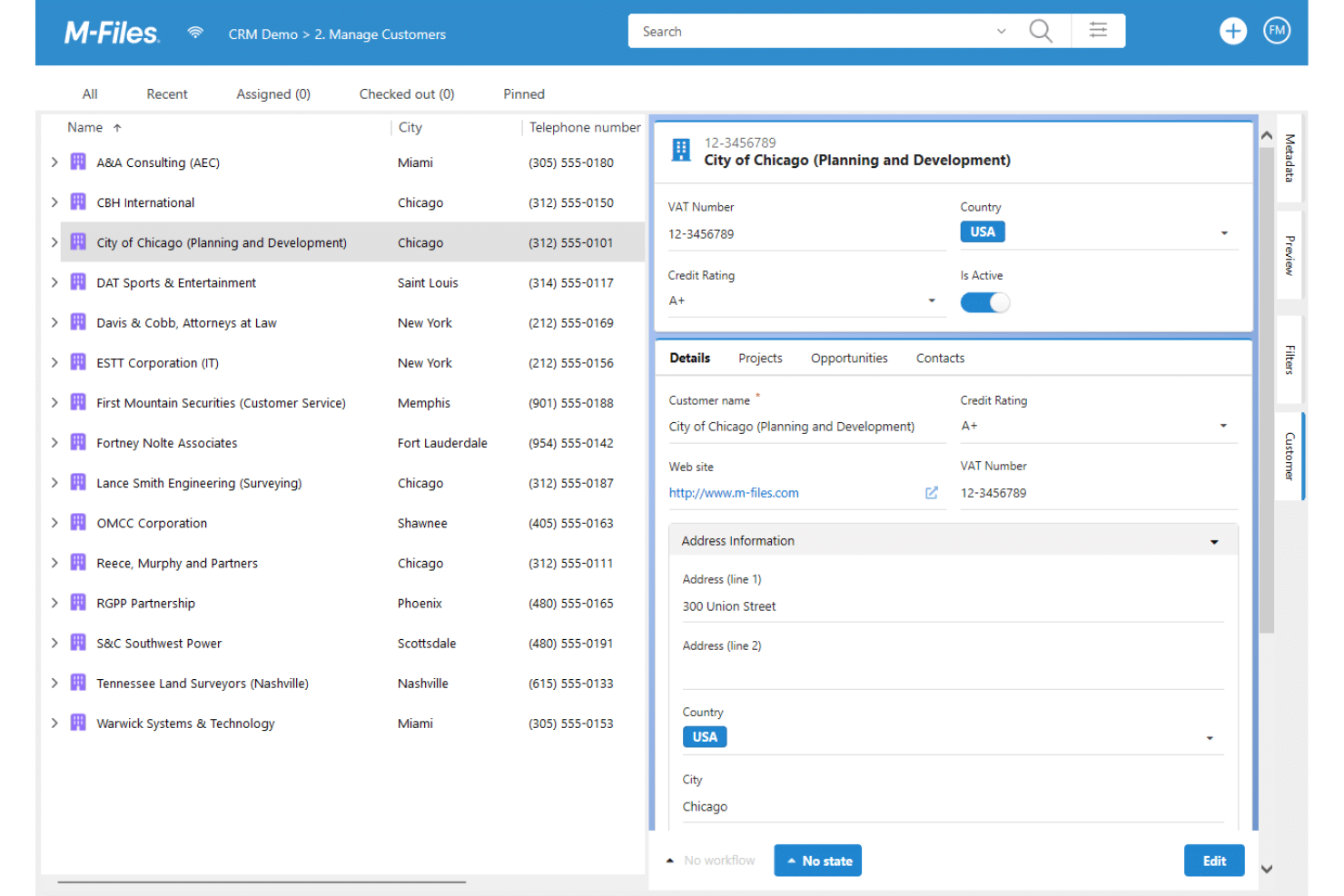
Se hai bisogno di un sistema di controllo documentale che si adatti a flussi di lavoro complessi, vale la pena prendere in considerazione M-Files. È progettato per i team dei settori regolamentati che desiderano organizzare, proteggere e monitorare i documenti utilizzando i metadati anziché le cartelle tradizionali.
Per chi è più adatto M-Files?
M-Files è una soluzione adatta alle organizzazioni di medie e grandi dimensioni nei settori regolamentati che necessitano di un controllo documentale avanzato e della conformità normativa.
Perché M-Files è una buona alternativa a iManage
Ho scelto M-Files perché il suo approccio all’organizzazione dei documenti basato sui metadati rende rapida la ricerca dei file, anche all’interno di grandi archivi. Invece di cercare tra gerarchie di cartelle, posso applicare ai documenti proprietà come progetto, cliente o stato e recuperarli istantaneamente. Apprezzo anche i flussi di lavoro automatizzati di M-Files, che indirizzano i documenti per la revisione e l’approvazione senza passaggi manuali. Per i team che gestiscono documentazione soggetta a rigorosi requisiti di conformità, i registri di controllo integrati e il controllo delle versioni forniscono una registrazione chiara di ogni modifica.
Funzionalità principali di M-Files
- Ricerca basata sull’intelligenza artificiale (Aino): L’assistente basato sull’intelligenza artificiale integrato in M-Files consente di interrogare l’archivio documentale utilizzando il linguaggio naturale, per ottenere risultati accurati e conformi alle autorizzazioni.
- Collaborazione sui contenuti: Crea documenti in collaborazione con i soggetti interessati interni ed esterni direttamente all’interno di M-Files, con tutte le modifiche collegate a una fonte centralizzata e governata di contenuti.
- Automazione delle politiche di conservazione: Applica e fa rispettare automaticamente le regole di conservazione dei dati durante l’intero ciclo di vita dei documenti, riducendo il carico manuale legato alla conformità.
- Visualizzazioni contestuali basate sui ruoli: Fornisce a ogni membro del team uno spazio di lavoro personalizzato che mostra solo i documenti, le attività e i dati pertinenti al suo ruolo.
Integrazioni di M-Files
M-Files offre integrazioni native con Salesforce, Docusign, Microsoft 365, Microsoft Teams, SharePoint, Google Workspace e Adobe Acrobat Sign e supporta integrazioni personalizzate tramite la sua API.
Pros and Cons
Pros:
- L’applicazione di metadati rende rapido il recupero dei documenti
- I flussi di lavoro automatizzati supportano catene di approvazione complesse
- Registri di controllo avanzati per monitorare la conformità
Cons:
- La configurazione iniziale richiede tempi significativi
- Opzioni limitate per l’accesso offline ai documenti

Ideale per la collaborazione sui documenti di Microsoft 365
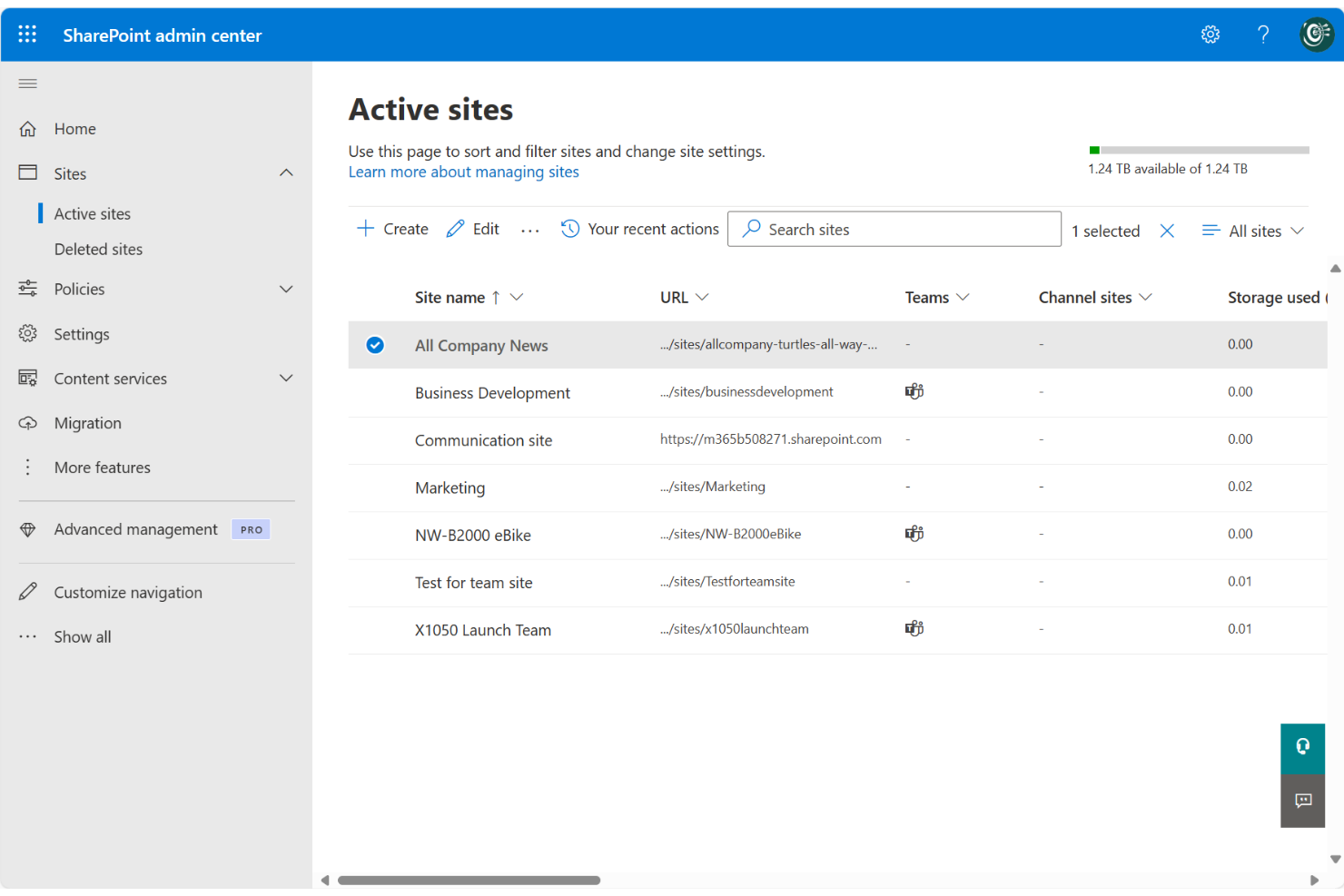
Microsoft SharePoint è una piattaforma di gestione documentale e collaborazione progettata per le organizzazioni che già si affidano a Microsoft 365. È adatta ai team che necessitano di condivisione sicura dei file, controllo delle versioni e accesso centralizzato ai documenti tra reparti o sedi.
Per chi è più adatto Microsoft SharePoint?
Microsoft SharePoint è particolarmente adatto alle organizzazioni di medie e grandi dimensioni che necessitano di una gestione documentale centralizzata all'interno dell'ecosistema Microsoft 365.
Perché Microsoft SharePoint è una buona alternativa a iManage
Ho scelto SharePoint perché si integra naturalmente nei team che lavorano già all'interno di Microsoft 365. Apprezzo il fatto che le raccolte documenti di SharePoint supportino la co-creazione in tempo reale, così il mio team può modificare contemporaneamente file Word, Excel o PowerPoint senza conflitti tra le versioni. Mi affido anche alla sua etichettatura basata sui metadati e ai tipi di contenuto per organizzare i documenti su larga scala, il che rende rapido trovare il file giusto, anche all'interno di archivi di grandi dimensioni. Per i team che gestiscono contenuti sensibili, l'ereditarietà delle autorizzazioni di SharePoint e i controlli di accesso a livello di sito mi offrono un controllo preciso su chi può visualizzare ogni contenuto.
Funzionalità principali di Microsoft SharePoint
- Controllo delle versioni delle raccolte documenti: Tieni traccia di ogni modifica apportata a un file con la cronologia automatica delle versioni, così puoi ripristinare qualsiasi versione precedente senza backup manuali.
- Controlli delle autorizzazioni a livello di sito: Imposta regole di accesso dettagliate a livello di sito, elenco o elemento per gestire esattamente chi può visualizzare o modificare contenuti specifici.
- Generatore di flussi di lavoro Power Automate: Crea flussi di lavoro automatizzati per l'approvazione e l'instradamento dei documenti utilizzando Power Automate direttamente all'interno di SharePoint.
- Generatore di siti intranet: Crea siti interni personalizzati con strumenti di trascinamento, modelli e componenti Web per centralizzare le conoscenze e le risorse del team.
Integrazioni di Microsoft SharePoint
Microsoft SharePoint offre integrazioni native nell'intero ecosistema Microsoft, tra cui Microsoft 365 e Azure, e fornisce un'API per le integrazioni personalizzate.
Pros and Cons
Pros:
- Integrazione profonda con gli strumenti di collaborazione di Microsoft 365
- Il controllo avanzato delle versioni supporta il monitoraggio della cronologia dei documenti
- Le autorizzazioni dettagliate consentono una gestione precisa degli accessi
Cons:
- La configurazione iniziale può essere complessa per i nuovi utenti
- La struttura dei metadati può essere difficile da gestire su larga scala
PandaDoc
Ideale per l'automazione dei documenti e le firme elettroniche
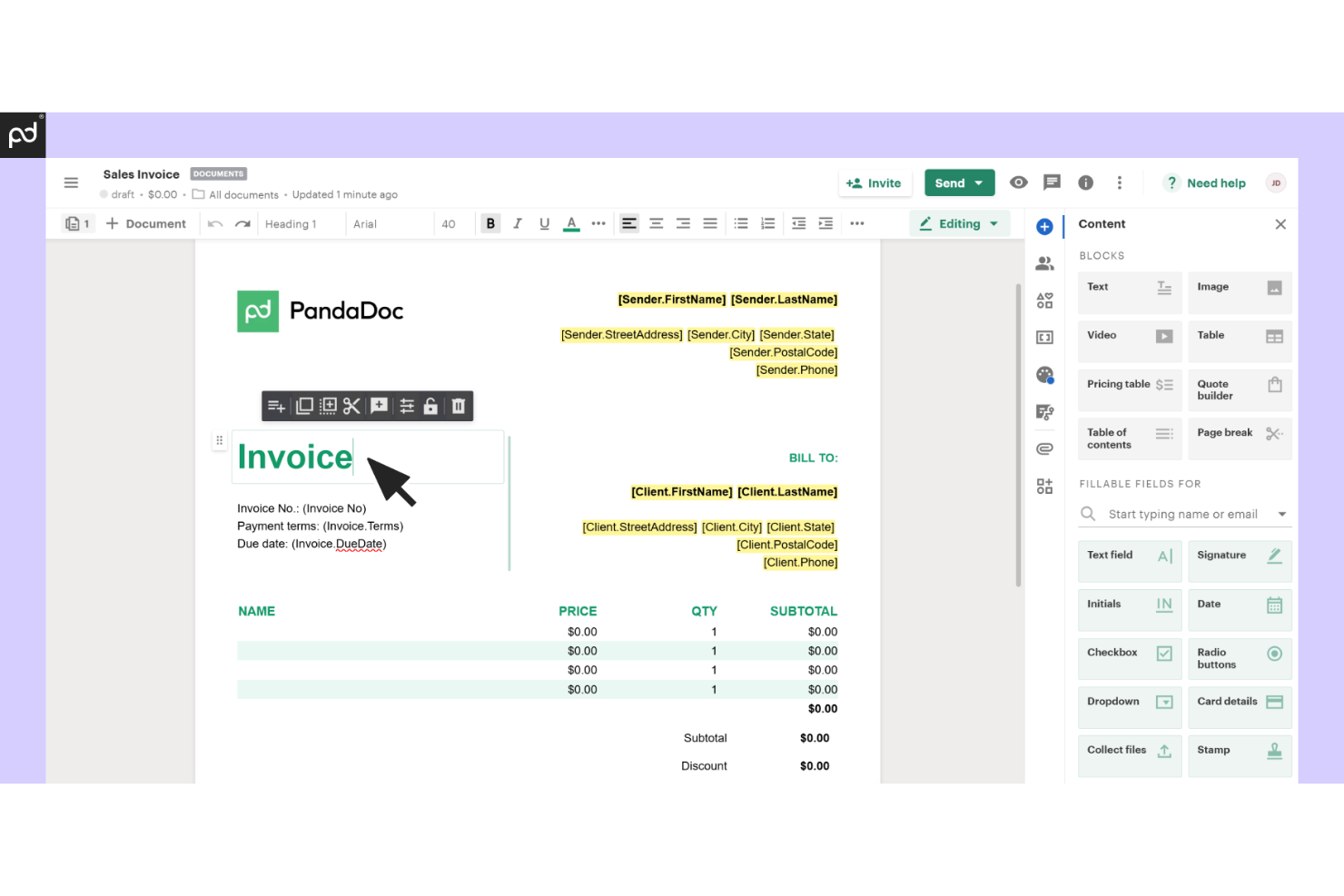
PandaDoc è una piattaforma di automazione dei documenti pensata per i team di vendita, legali e operativi che devono creare, inviare e monitorare documenti digitali. Si distingue per le sue funzionalità di firma elettronica e gli strumenti per i flussi di lavoro che aiutano le aziende a gestire contratti e proposte in un unico luogo.
Per chi è più adatto PandaDoc?
PandaDoc è una soluzione particolarmente adatta ai team di vendita e alle aziende in crescita che necessitano di flussi di lavoro documentali rapidi e automatizzati, oltre che di funzionalità di firma elettronica.
Perché PandaDoc è una buona alternativa a iManage
Ho scelto PandaDoc perché copre l'intero ciclo di vita dei documenti, dalla creazione alla firma, in un unico luogo. Apprezzo particolarmente la funzionalità Smart Content, che adatta il contenuto del documento in base al destinatario, così non devo modificare manualmente le proposte per ogni trattativa. Lo strumento integrato di revisione con modifiche evidenziate consente al mio team di collaborare alle modifiche dei contratti direttamente all'interno del documento, senza dover passare da conversazioni via e-mail e file separati. Per i team di vendita che hanno bisogno di firmare e restituire rapidamente i documenti, i controlli sull'ordine di firma e il monitoraggio dei documenti in tempo reale di PandaDoc rendono il processo molto più trasparente e gestibile.
Funzionalità principali di PandaDoc
- Blocco dei contenuti: limita la modifica di sezioni specifiche di un documento per impedire modifiche non autorizzate a contenuti sensibili o giuridicamente vincolanti.
- Invio in blocco: invia documenti personalizzati a più destinatari contemporaneamente utilizzando modelli, variabili integrate e caricamenti di file CSV.
- Registro di controllo e cronologia: monitora ogni interazione con il documento, incluso chi lo ha aperto, visualizzato e firmato, tramite un registro delle attività con data e ora.
- Libreria dei contenuti: archivia layout riutilizzabili, risorse grafiche del marchio e blocchi di contenuto pre-approvati per creare documenti più rapidamente.
Integrazioni di PandaDoc
PandaDoc offre oltre 30 integrazioni native, tra cui Salesforce, HubSpot, Pipedrive, Greenhouse, Stripe, PayPal, monday.com, Zoho, QuickBooks, Microsoft OneDrive e Slack. Si connette inoltre a Zapier e fornisce un'API per integrazioni personalizzate.
Pros and Cons
Pros:
- Gestione del ciclo di vita dei documenti end-to-end in un'unica piattaforma
- Il monitoraggio in tempo reale migliora la visibilità sullo stato dei documenti
- La libreria dei contenuti accelera i flussi di lavoro per la creazione dei documenti
Cons:
- Supporto limitato per policy avanzate di conservazione dei documenti
- Meno funzionalità incentrate sulla conformità per i settori regolamentati

Glean
Ideale per la ricerca unificata della conoscenza basata sull'intelligenza artificiale
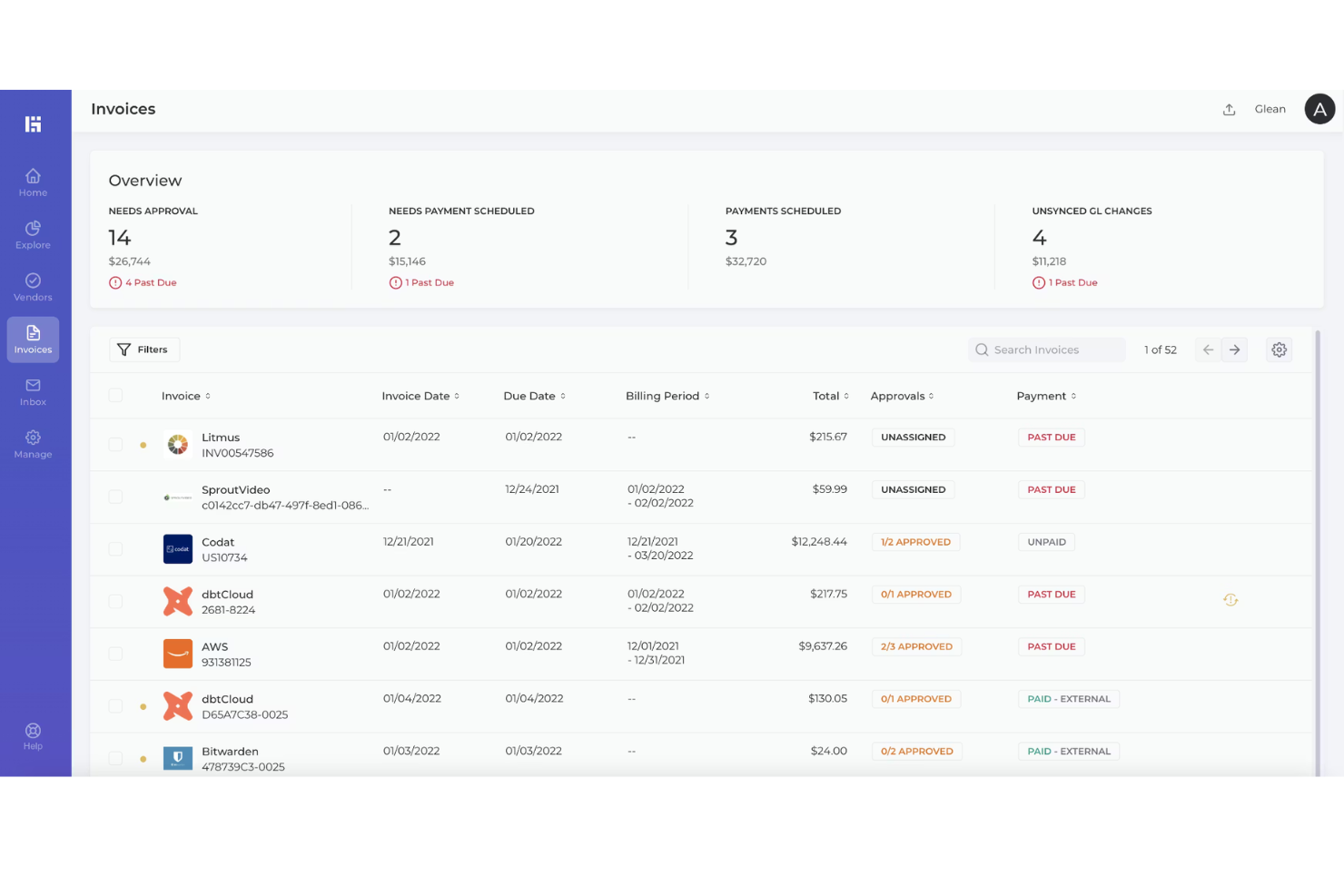
Glean è una piattaforma di gestione della conoscenza basata sull'intelligenza artificiale, progettata per le organizzazioni che necessitano di un accesso rapido e sicuro alle informazioni distribuite tra più sistemi. Penso che i team del settore tecnologico, della consulenza o delle grandi imprese apprezzeranno il modo in cui unifica la ricerca e l'individuazione dei documenti tra tutti gli strumenti di lavoro.
Per chi è più indicato Glean?
Glean è particolarmente adatto alle grandi imprese e ai team distribuiti che necessitano di una ricerca unificata e basata sull'intelligenza artificiale tra più fonti di conoscenza.
Perché Glean è una buona alternativa a iManage
Ho scelto Glean perché risolve un problema che iManage non affronta completamente: trovare informazioni distribuite tra decine di strumenti, non solo in un archivio centrale di documenti. La ricerca aziendale di Glean indicizza in tempo reale oltre 100 app collegate, così il mio team può effettuare ricerche su Slack, Jira, Google Drive e Confluence con un'unica ricerca, senza cambiare contesto. Ciò che trovo particolarmente utile è il grafo della conoscenza alla base del sistema. Mappa le relazioni tra persone, progetti e contenuti, così i risultati di ricerca sono personalizzati in base al ruolo e alle modalità di lavoro di ciascun utente, invece di restituire corrispondenze generiche. Per i team che gestiscono grandi volumi di documentazione distribuita, la funzionalità Risposte consente inoltre agli amministratori di fissare risposte verificate alle domande più comuni, riducendo le richieste ripetute e mantenendo aggiornata la conoscenza.
Funzionalità principali di Glean
- Raccolte: Organizza e condividi serie curate di link e documenti provenienti da più app, con descrizioni personalizzate per ogni elemento.
- Link rapidi: Crea URL brevi e facili da ricordare che reindirizzano alle risorse consultate più frequentemente, con supporto per URL variabili per raggiungere ticket o richieste di modifica specifici.
- Indicizzazione in tempo reale: I risultati di ricerca vengono aggiornati continuamente, così il team trova sempre la versione più recente di qualsiasi documento o messaggio.
- Ricerca consapevole delle autorizzazioni: Glean applica i controlli di accesso esistenti delle fonti di dati collegate, così gli utenti visualizzano solo i contenuti che sono autorizzati a consultare.
Integrazioni di Glean
Glean offre integrazioni native con Google Workspace, Microsoft 365, Slack, Jira, Confluence, Salesforce, GitHub, Zendesk, Box e Dropbox. È disponibile un'API per le integrazioni personalizzate.
Pros and Cons
Pros:
- La ricerca unificata tra più strumenti migliora l'accesso alla conoscenza
- I risultati personalizzati ne migliorano la pertinenza per ogni utente
- L'indicizzazione in tempo reale garantisce il recupero di informazioni aggiornate
Cons:
- Non offre funzionalità native di controllo delle versioni dei documenti
- Non dispone di funzionalità integrate per la modifica dei documenti
Altre alternative a iManage
Ecco alcune ulteriori alternative a iManage che non sono entrate nella mia selezione, ma che vale comunque la pena prendere in considerazione:


Come valuto le alternative a iManage
Divido la mia valutazione in criteri di base, come l'archiviazione delle email e l'organizzazione delle pratiche, e fattori distintivi che differenziano una piattaforma dall'altra per i team legali e della gestione della conoscenza.
Funzionalità fondamentali (requisiti essenziali per questo elenco)
Quando seleziono gli strumenti da includere nel mio elenco, assegno a ciascuno un punteggio su una scala da 0 (non offre la funzionalità) a 5 (eccelle in quest'area) per ogni funzionalità fondamentale indicata di seguito. Poi converto il punteggio totale dello strumento in una percentuale. Ogni strumento deve raggiungere un punteggio totale minimo del 65% per essere preso in considerazione.
- Gestione dei documenti: valuto come una piattaforma gestisce il controllo delle versioni, la registrazione e l'estrazione dei documenti e i controlli del ciclo di vita, soprattutto quando più membri del team modificano contemporaneamente lo stesso contratto o atto.
- Organizzazione incentrata sulla pratica: ogni strumento dovrebbe consentire di raggruppare documenti, email e note in un'unica area di lavoro dedicata a una pratica o a un progetto, invece di distribuire i file in cartelle generiche.
- Gestione delle email: cerco un'integrazione nativa con Outlook che consenta di archiviare email e allegati direttamente nelle aree di lavoro delle pratiche, inclusi la deduplicazione a livello di conversazione e l'assegnazione di tag ai metadati.
- Sicurezza e controlli degli accessi: autorizzazioni granulari, barriere etiche e tracce di audit sono importanti in questo ambito, in particolare per i team che gestiscono documenti riservati o soggetti a privilegio legale tra diversi gruppi di pratica.
- Ricerca e metadati: una buona alternativa dovrebbe offrire una ricerca a testo integrale combinata con il filtraggio dei metadati, in modo da poter individuare in pochi secondi una clausola o un atto specifico tra migliaia di documenti.
- Integrazione con Microsoft 365: verifico se la piattaforma supporta la modifica in linea in Word, la creazione collaborativa in Teams e la sincronizzazione bidirezionale, così che gli utenti possano lavorare nelle applicazioni su cui fanno già affidamento ogni giorno.
Una volta ottenuto un elenco di strumenti che soddisfano questi criteri, considero ciò che distingue ciascuna piattaforma.
Fattori distintivi (ciò che differenzia i fornitori)
Ecco come confronto i diversi fornitori e ne metto in evidenza le differenze:
Funzionalità distintive
Cerco informazioni sui documenti basate sull'IA, come suggerimenti predittivi per l'archiviazione o l'estrazione di clausole, che facciano risparmiare ai team ore di categorizzazione manuale per ogni pratica. Anche le funzionalità di gestione della conoscenza hanno un peso significativo, soprattutto quando uno studio deve rendere disponibili precedenti riutilizzabili tra diversi gruppi di pratica senza ricreare le ricerche da zero. Valuto anche l'automazione dei flussi di lavoro, poiché gli strumenti che gestiscono l'instradamento dei documenti e le catene di approvazione mantengono fluida la gestione delle nuove pratiche senza continui solleciti.
Oltre le funzionalità
Il modello di implementazione è importante: alcuni studi hanno bisogno di piattaforme native del cloud, mentre altri richiedono opzioni in locale o ibride per soddisfare le politiche di residenza dei dati. Valuto anche l'ecosistema delle integrazioni, verificando la presenza di connettori predefiniti per i sistemi di gestione delle pratiche e di fatturazione, come Clio o Elite 3E. Vale la pena esaminare anche la struttura dei prezzi e delle licenze, poiché i piani modulari che consentono di aggiungere separatamente funzionalità di IA o analisi offrono ai team più piccoli lo spazio per crescere senza pagare troppo per funzionalità di cui non hanno ancora bisogno.
Perché cercare un'alternativa a iManage?
Sebbene iManage sia una buona scelta per il controllo dei documenti, esistono diversi motivi per cui alcuni utenti cercano soluzioni alternative. Potresti essere alla ricerca di alternative a iManage Work perché…
- Hai bisogno di opzioni di integrazione più flessibili
- Desideri un'interfaccia utente più semplice per i team non legali
- Hai bisogno di piani più economici per le organizzazioni di dimensioni ridotte
- Hai bisogno di un supporto migliore per i team da remoto o ibridi
- Desideri funzionalità di collaborazione più avanzate
- Hai bisogno di opzioni globali per la residenza dei dati o la conformità
Se ti riconosci in una di queste situazioni, sei nel posto giusto. Il mio elenco contiene diverse opzioni di software per il controllo dei documenti più adatte ai team che affrontano queste difficoltà con iManage e sono alla ricerca di soluzioni alternative.
Funzionalità principali di iManage
- Gestione di documenti ed e-mail: Centralizza la gestione dei documenti Internet e delle e-mail per archiviare, organizzare e recuperare i file in modo sicuro all'interno di un sistema unificato.
- Gestione dei contenuti aziendali: Supporta l'archiviazione strutturata dei documenti con controllo delle versioni, assegnazione di metadati e autorizzazioni di accesso per ambienti ECM sicuri.
- Supporto alla gestione dei casi: Funziona insieme al software per la gestione degli studi professionali per collegare i documenti alle questioni legali, migliorando l'organizzazione e la tracciabilità.
- Firme elettroniche: Consente flussi di lavoro per la firma digitale, favorendo approvazioni più rapide dei documenti e riducendo la gestione manuale.
- Implementazione in sede e nel cloud: Offre flessibilità agli studi che necessitano di un software per la gestione dei documenti installato in sede o di un accesso basato sul cloud, a seconda dei requisiti di conformità.
- Interfaccia intuitiva: Progettata per semplificare l'utilizzo da parte dei professionisti legali che gestiscono grandi volumi di documenti sensibili.